If you encounter any issues or have any questions regarding your new product,
feel free to contact our helpful Customer Support Team. Your satisfaction is our goal!
Wenn Sie auf Probleme oder Fragen zu Ihrem neuen Produkt haben,
können Sie sich gerne an unser hilfsbereites Kundendienstteam wenden. Ihre Zufriedenheit ist unser Ziel!
Si vous rencontrez des problèmes ou avez des questions concernantnos nouveaux produits,
n’hésitez pas à contacter notre équipe d’assistance à la clientèle.
Votre satisfaction est notre objectif!
如果您遇到任何問題或對新產品有任何疑問,請隨時聯繫我們的客戶支援團隊。
您的滿意是我們的目標!
新製品に関して問題が発生したり、質問がある場合は、
お力添えできるカスタマーサポートチームにお気軽にお問い合わせください。あなたの満足が私たちの目標です!
SHENZHEN
TRETTITRE TECHNOLOGY CO., LTD.
ROOM 401, BUILDING 20A, CUIGANG INDUSTRIAL ZONE 4, HUAIDE COMMUNITY, FUYONG STREET, SHENZHEN, CN
深圳三聲有幸科技有限公司
中國廣東省深圳市寶安區福永街道懷德社區翠崗工業區四區20A棟401室
trettitre_officials
Trettitre
trettitre_sound
trettitre_sound
Trettitre
[email protected]www.trettitre.com +86 0755-26601713
Quick Start
Setup
3
4
1
2
5
ENGLISH
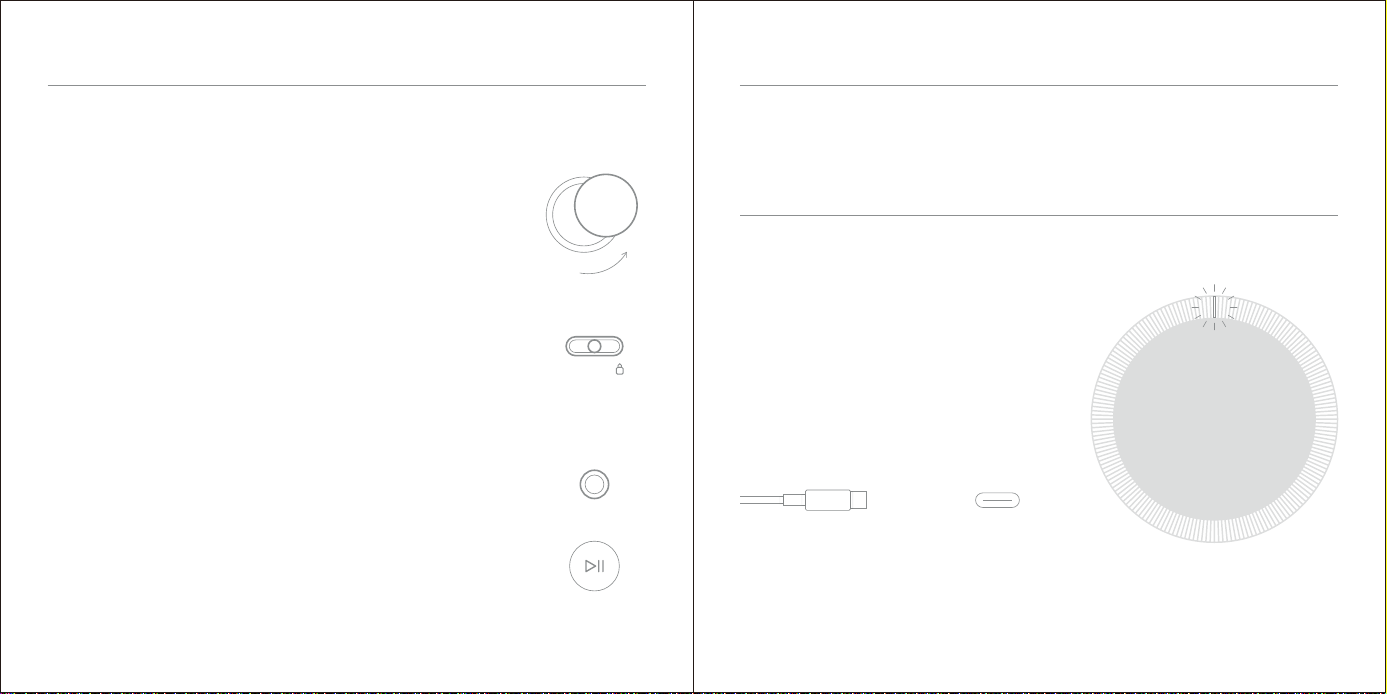
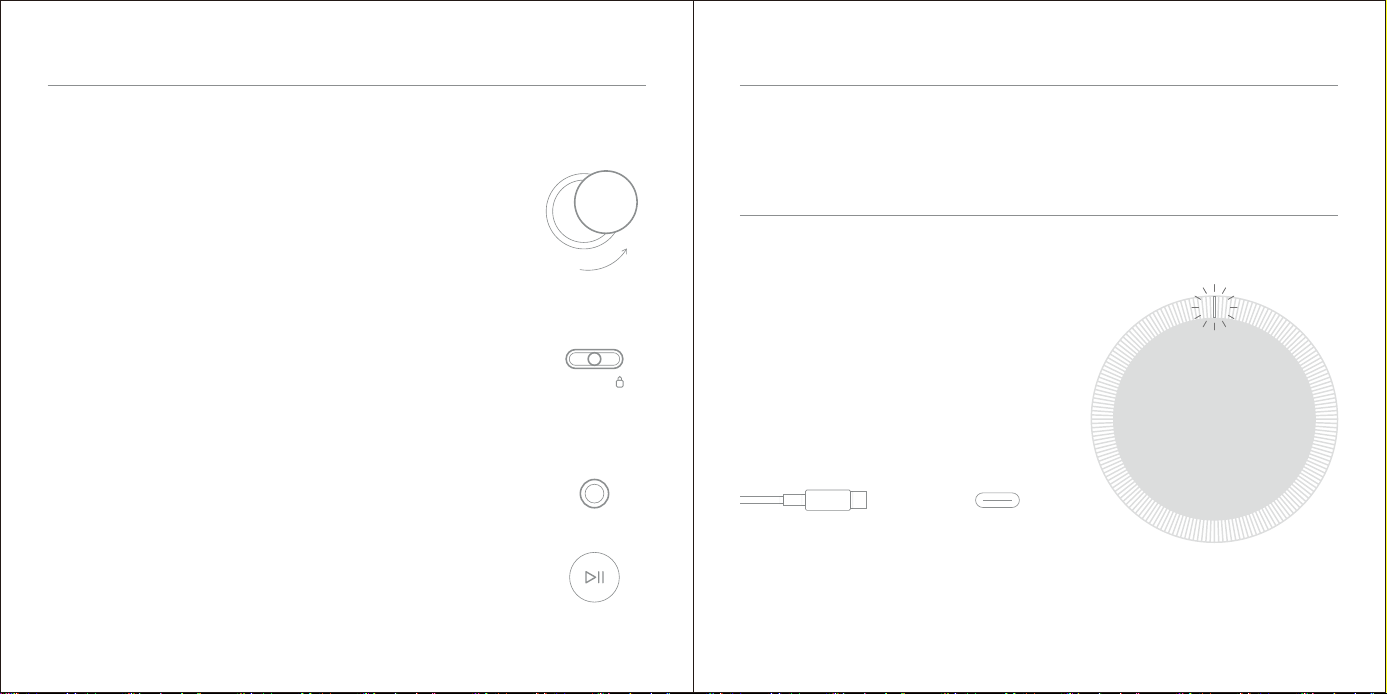
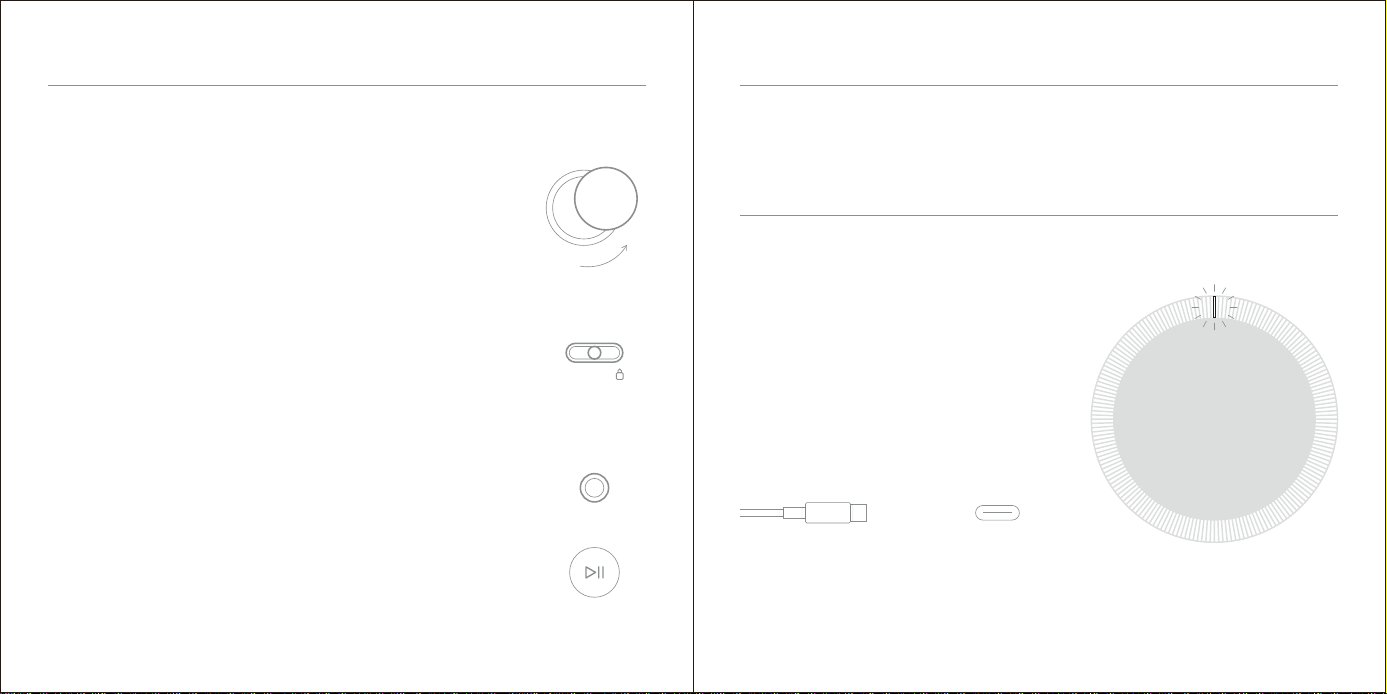
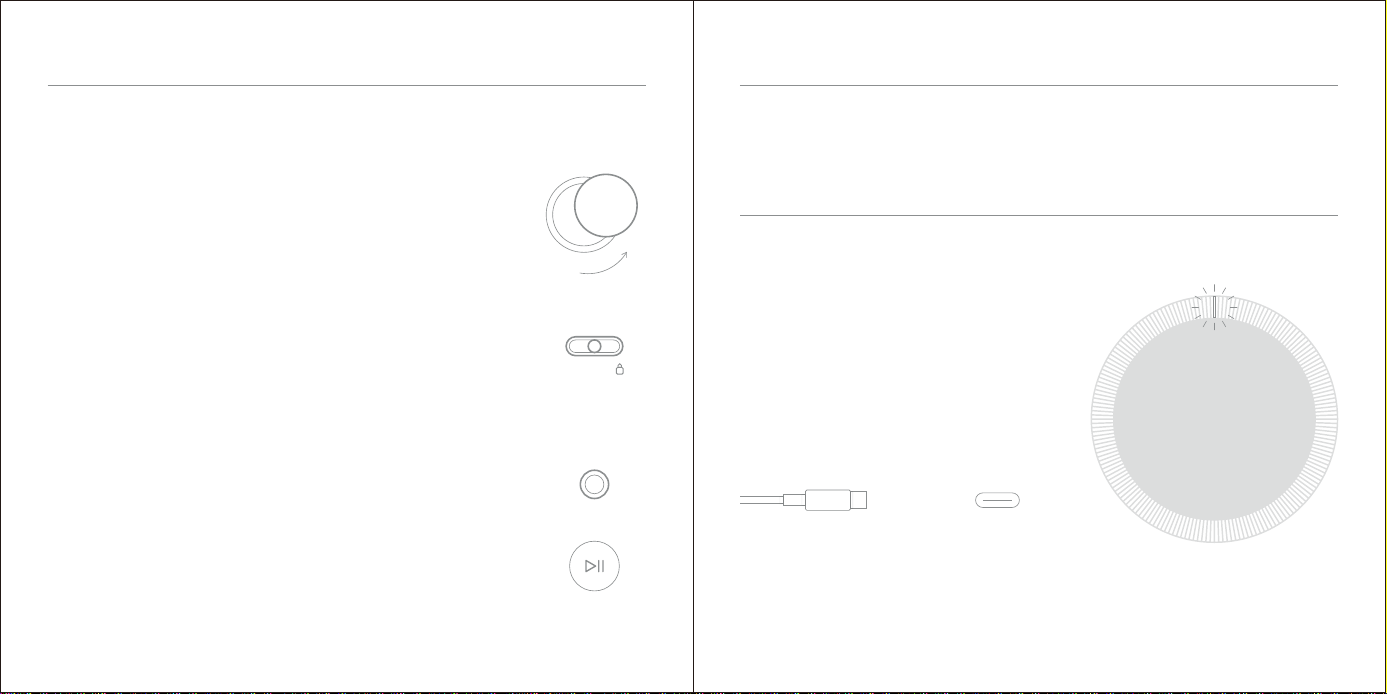
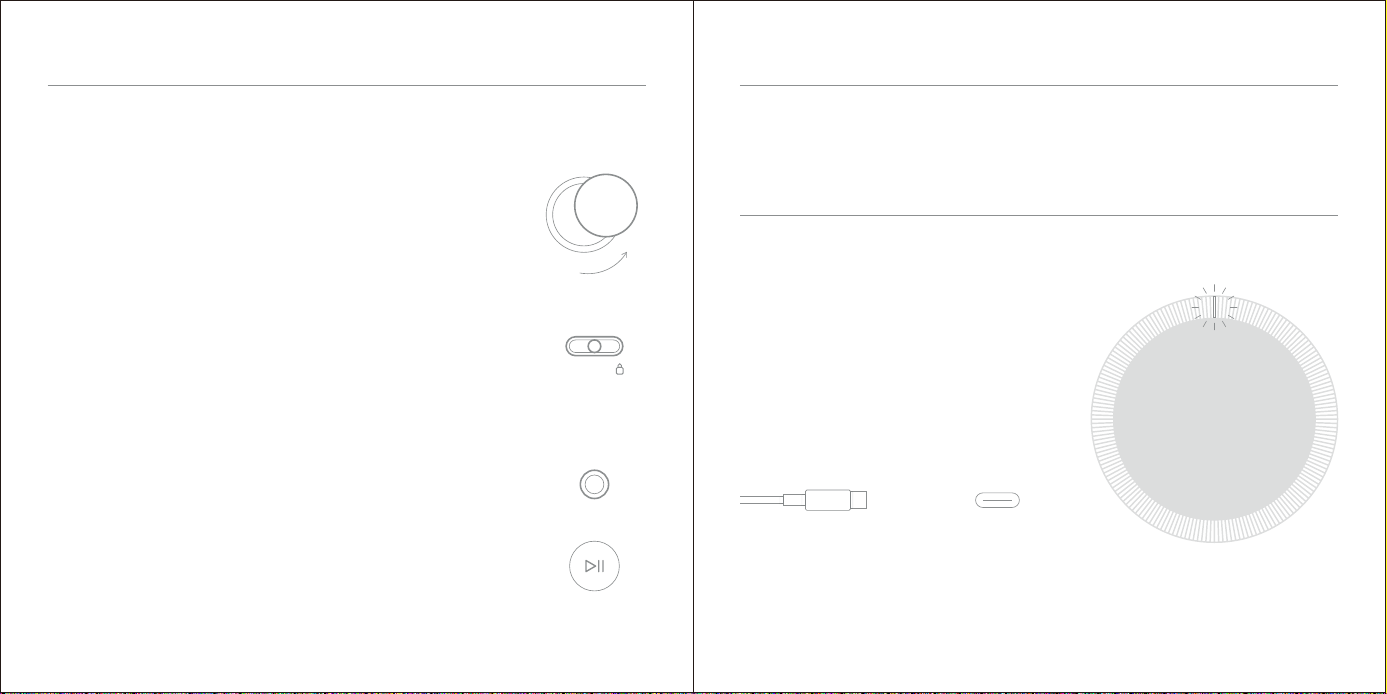
When the orange indicator light is flashing, the device needs to be charged.
Different colors of the indicator light correspond to differences in running state.
White light: work well;
Green light: fully charged;
Orange light: charging;
Orange flashing light: battery<20%;
Orange flashing light (quickly) :battery<5%;
When fully charged,
the device can play for approximately 12 hours with standard CDs,
and approximately 8 hours in Bluetooth Mode.
Type-C
Quick Start
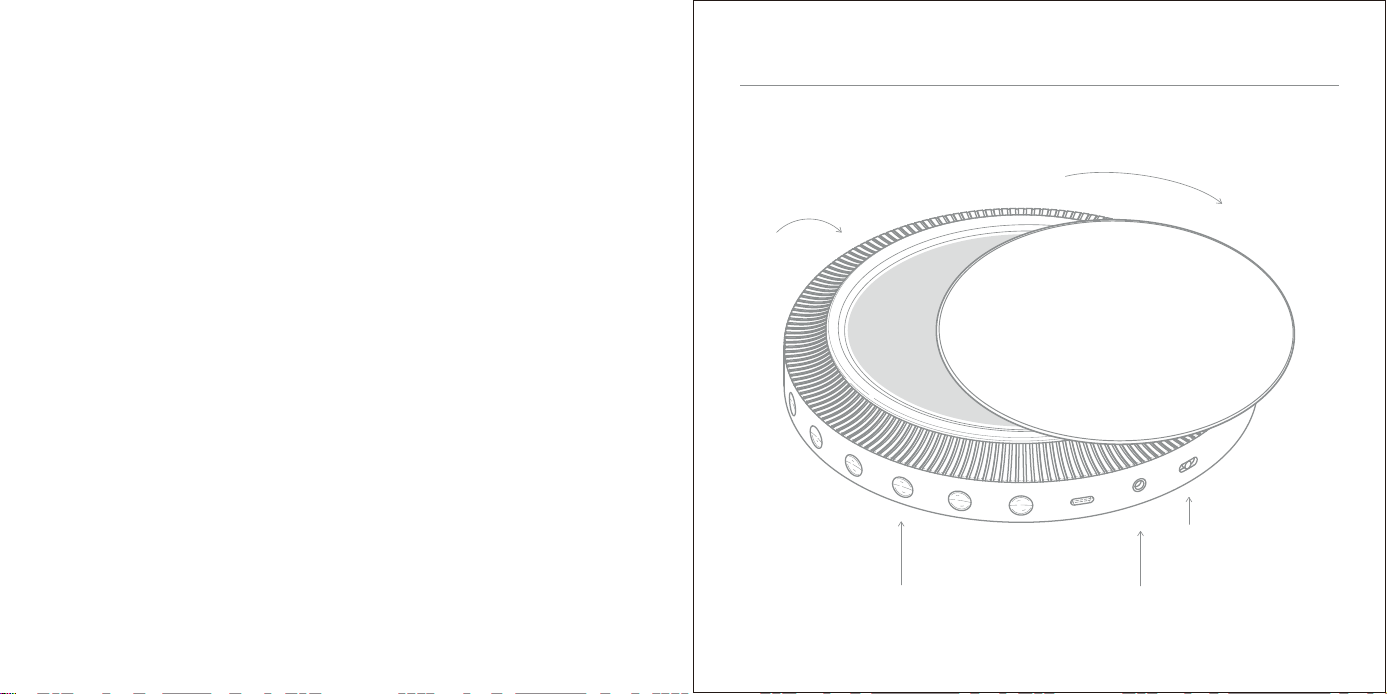
Charging Instructions
4 Plug in your headphones.
1
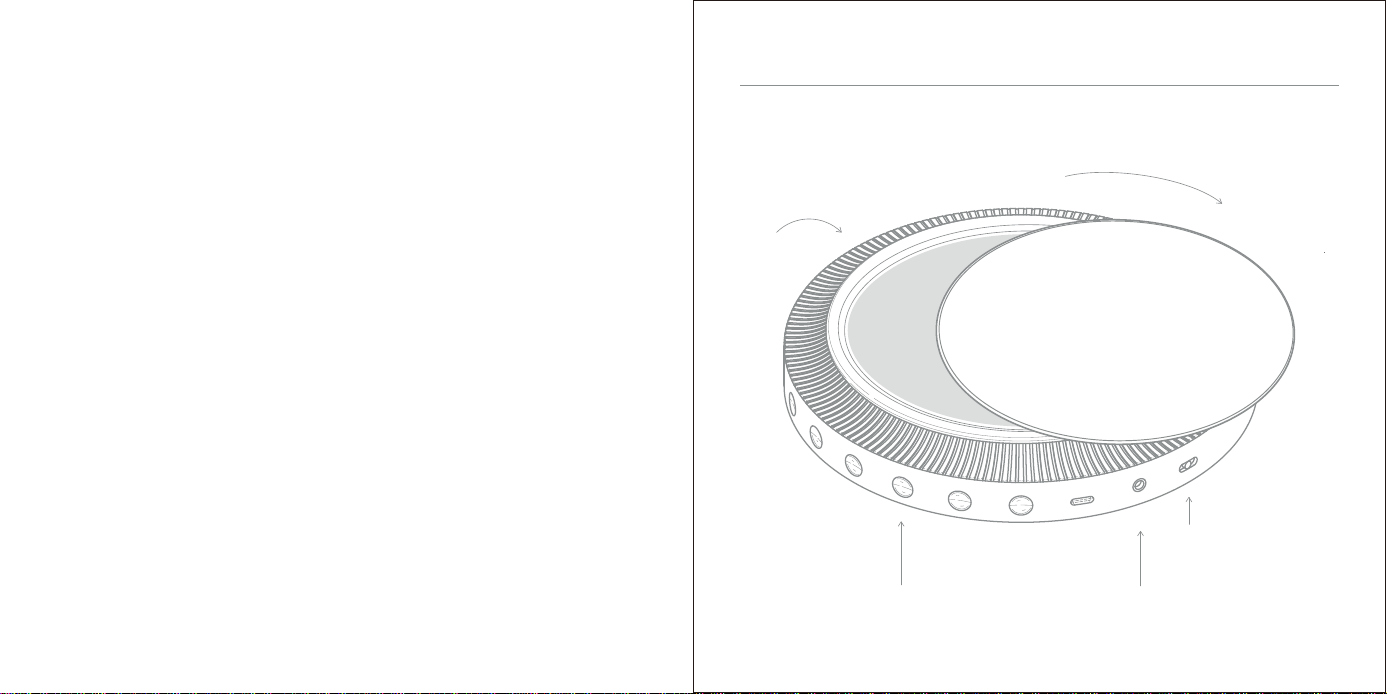
Rotate to open the cover lid.
3
The device will automatically start in CD mode.
Switch the button to "ON"
Note: if the CD is not inserted, it will automatically shut down after 2 minutes.
Press the play button and restart it. Pressing other keys will be invalid.
2 Insert a CD and close the cover lid.
Note: if the device is played normally or not operated,
the screen will automatically stop after one minute,
and press any key to call up the screen.
5
Press "play" to start.
Quick Start
Setup
OFF ON
/
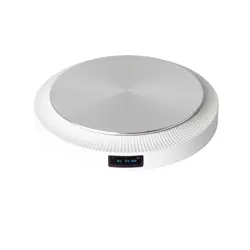
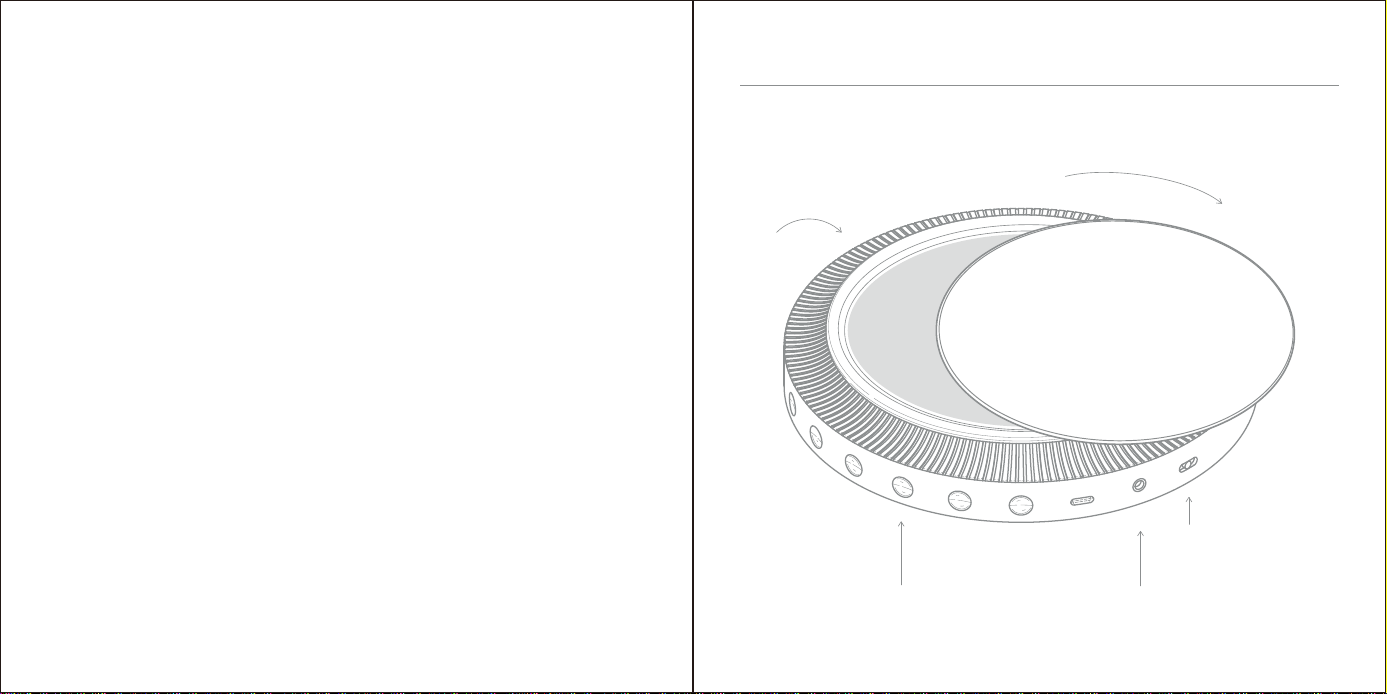
Package included:
The CD player, user manual (.PDF).
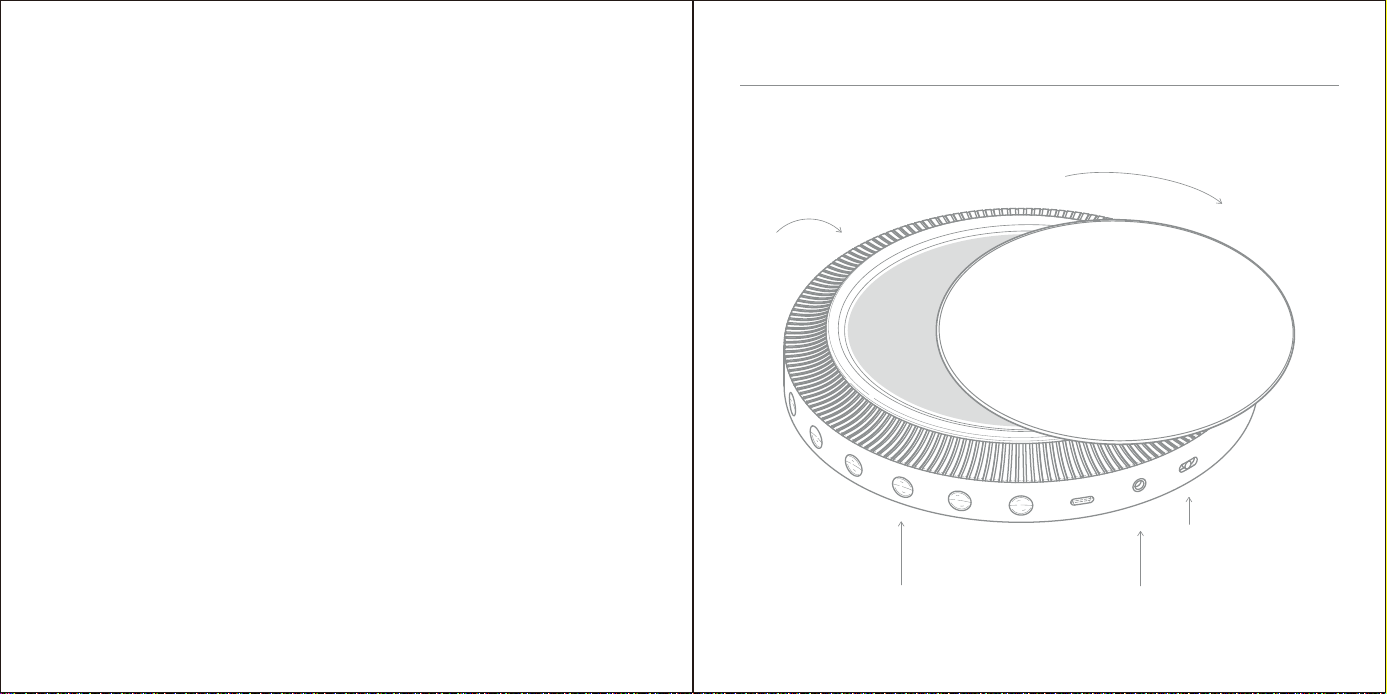
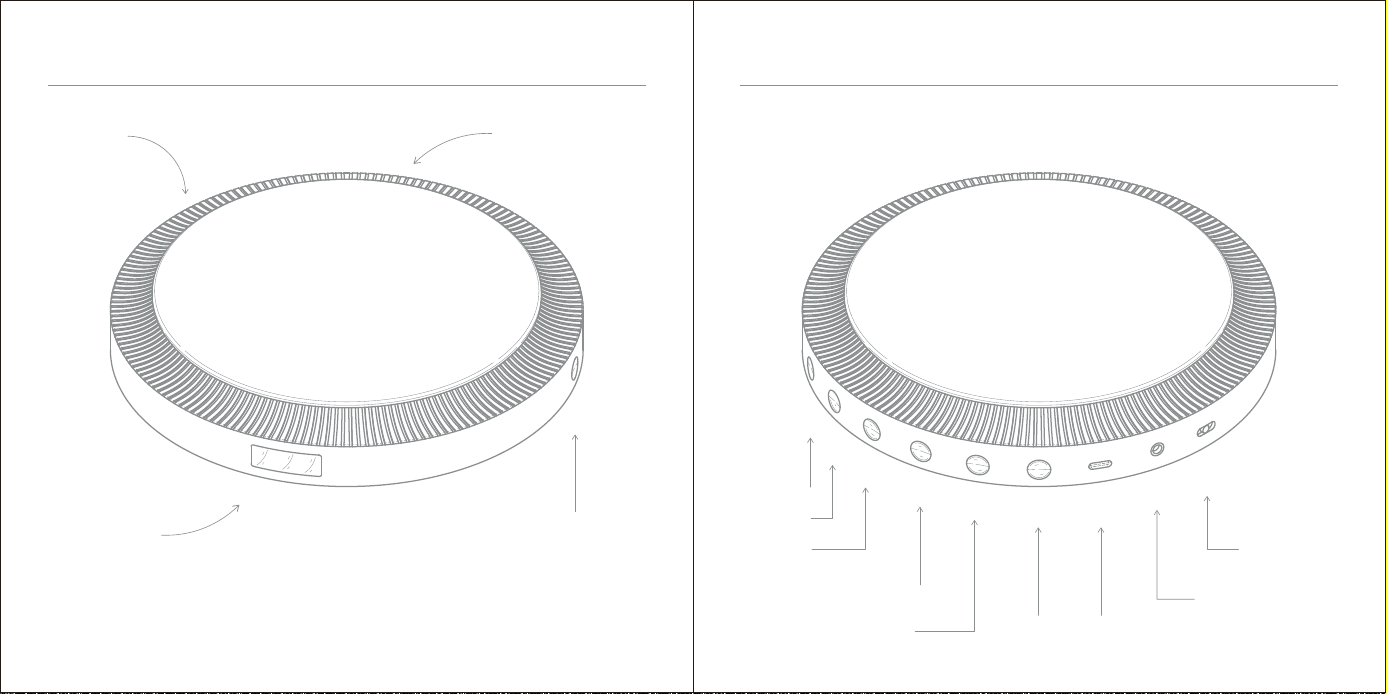
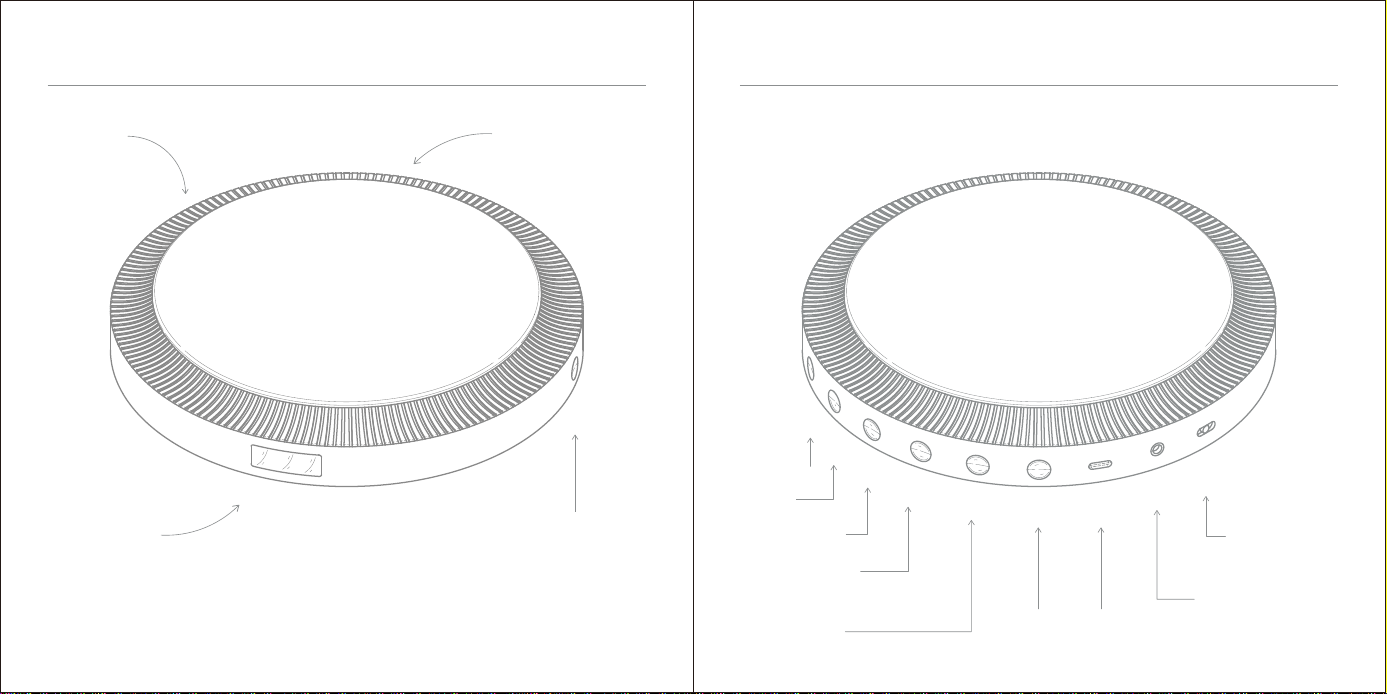
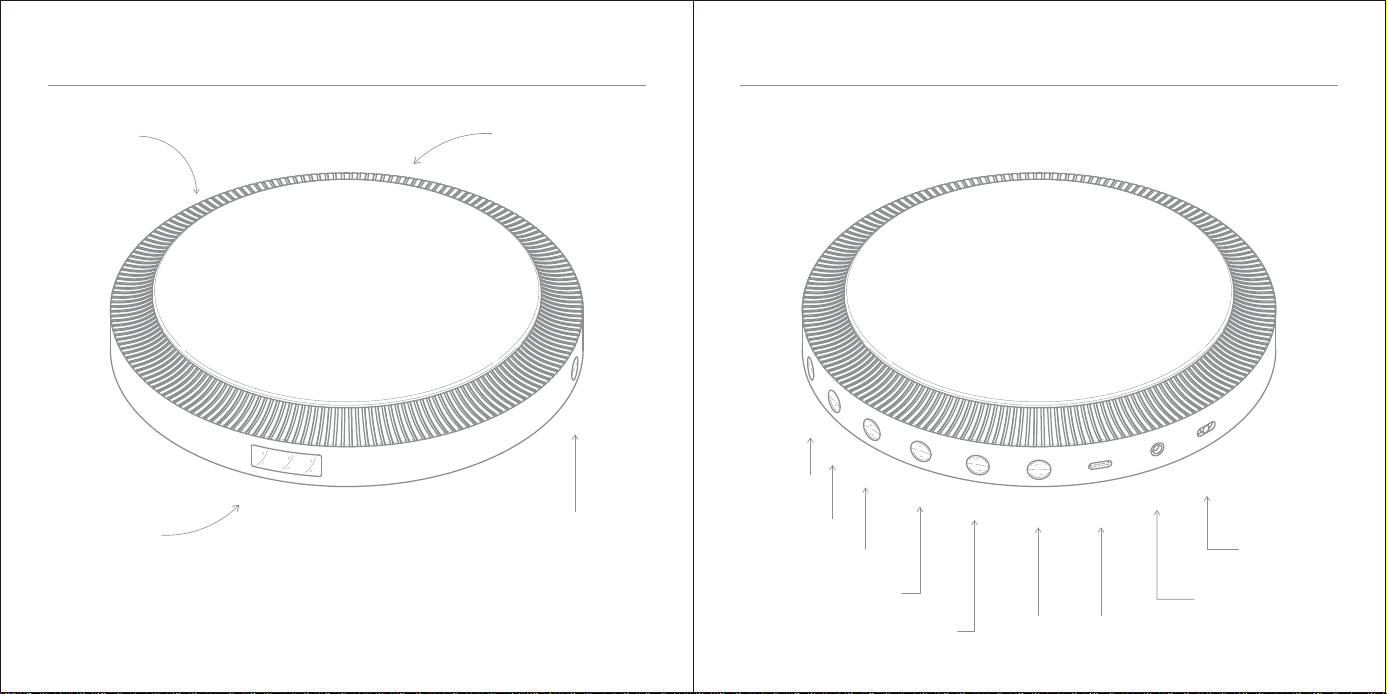
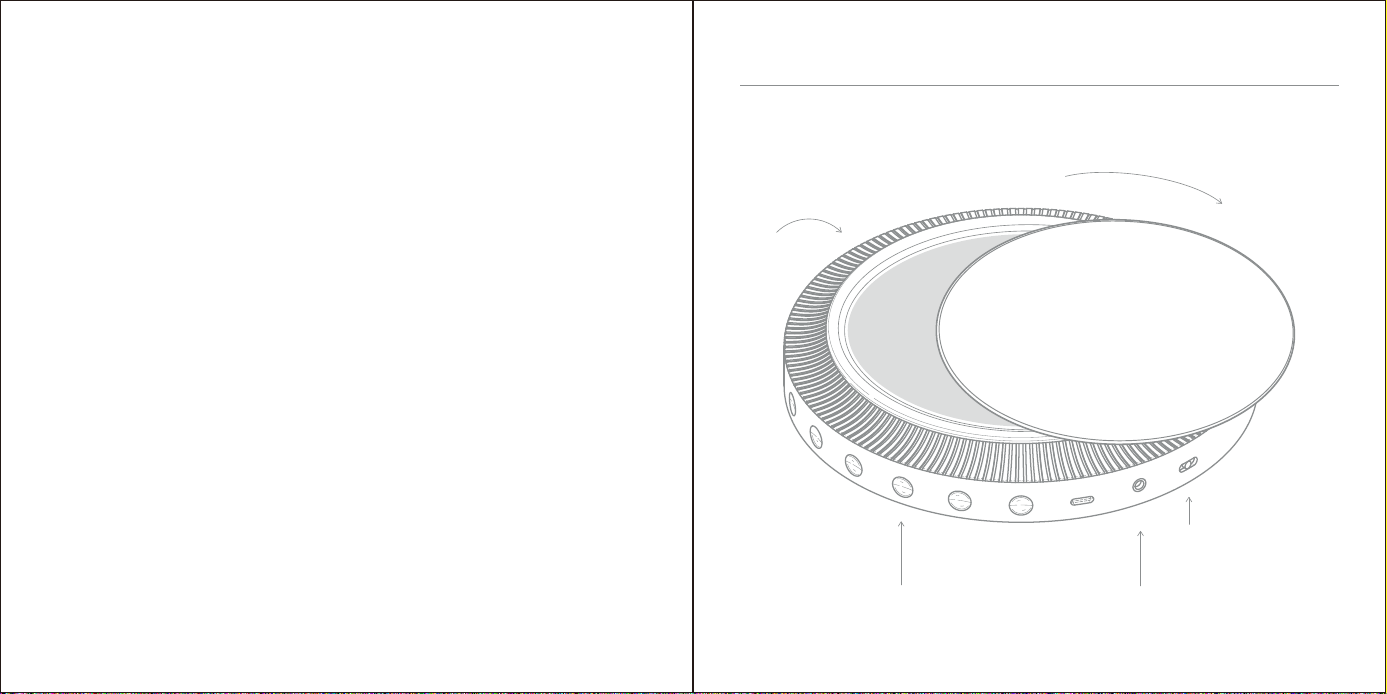
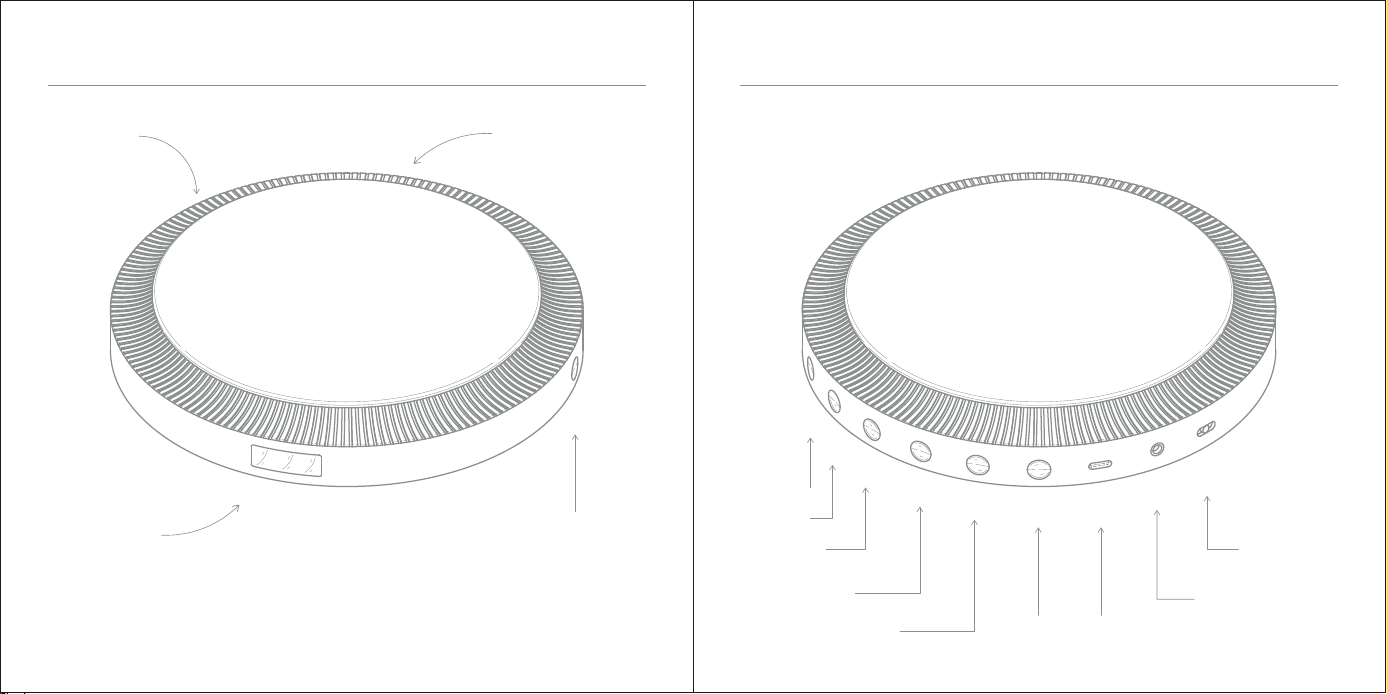
Product Diagram
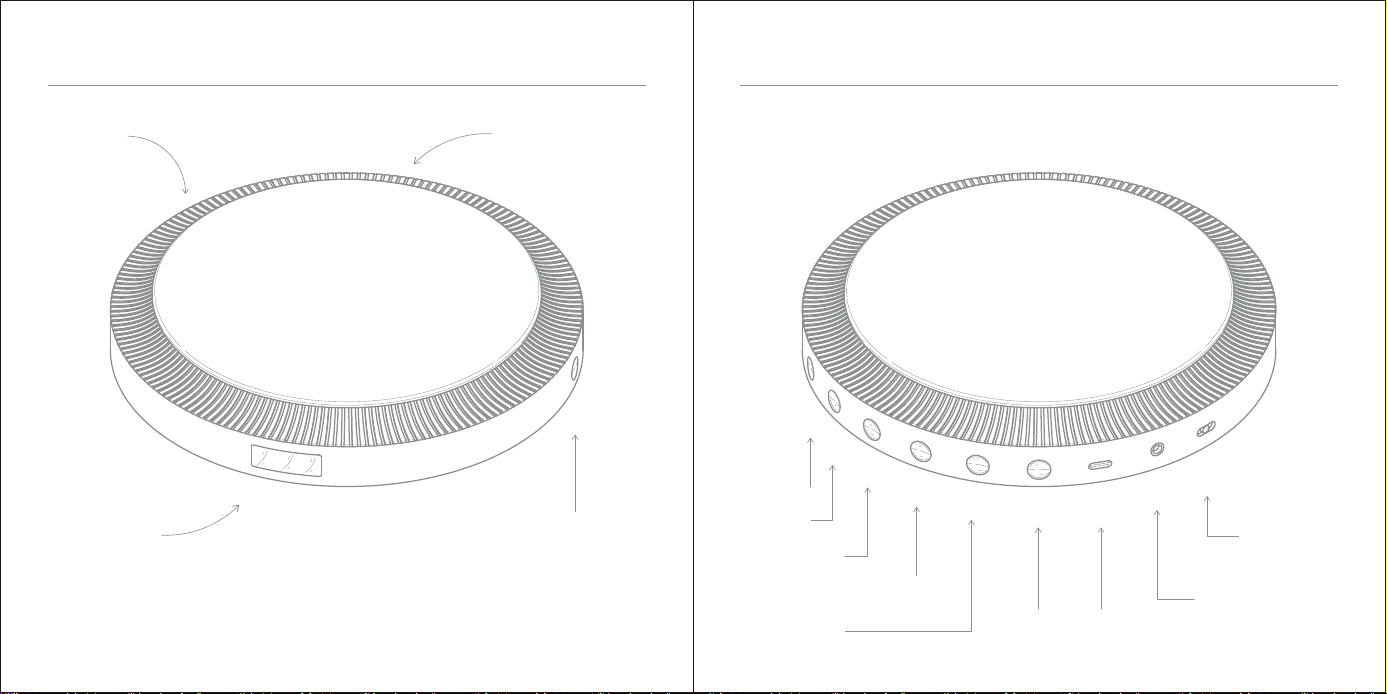
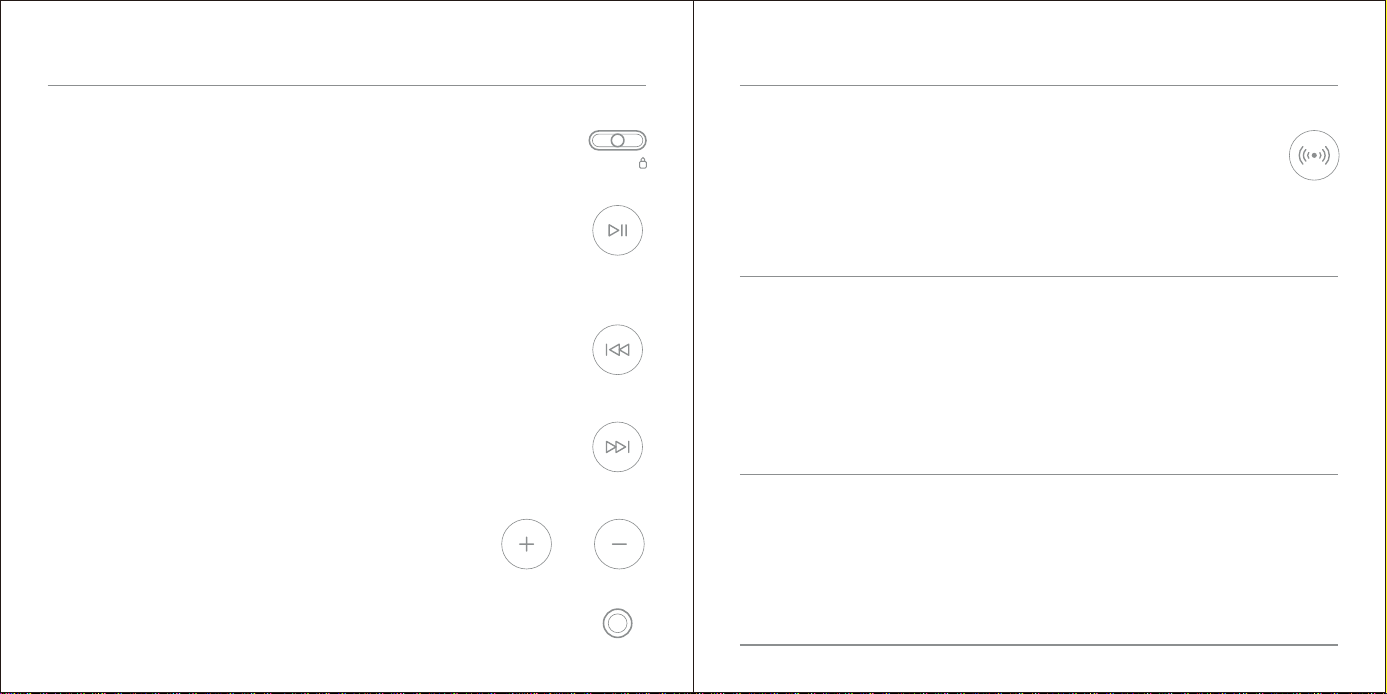
Volume +
Volume +
Volume -
Prev Song
Fast Rewind
Play/Pause/Play Modes/Stop Earphone Jack
Next Song / Fast Forward BT/ASP Type-C
Power OFF / ON
and LOCK
Cover Lid Indicator Light
LED Display
Product Diagram
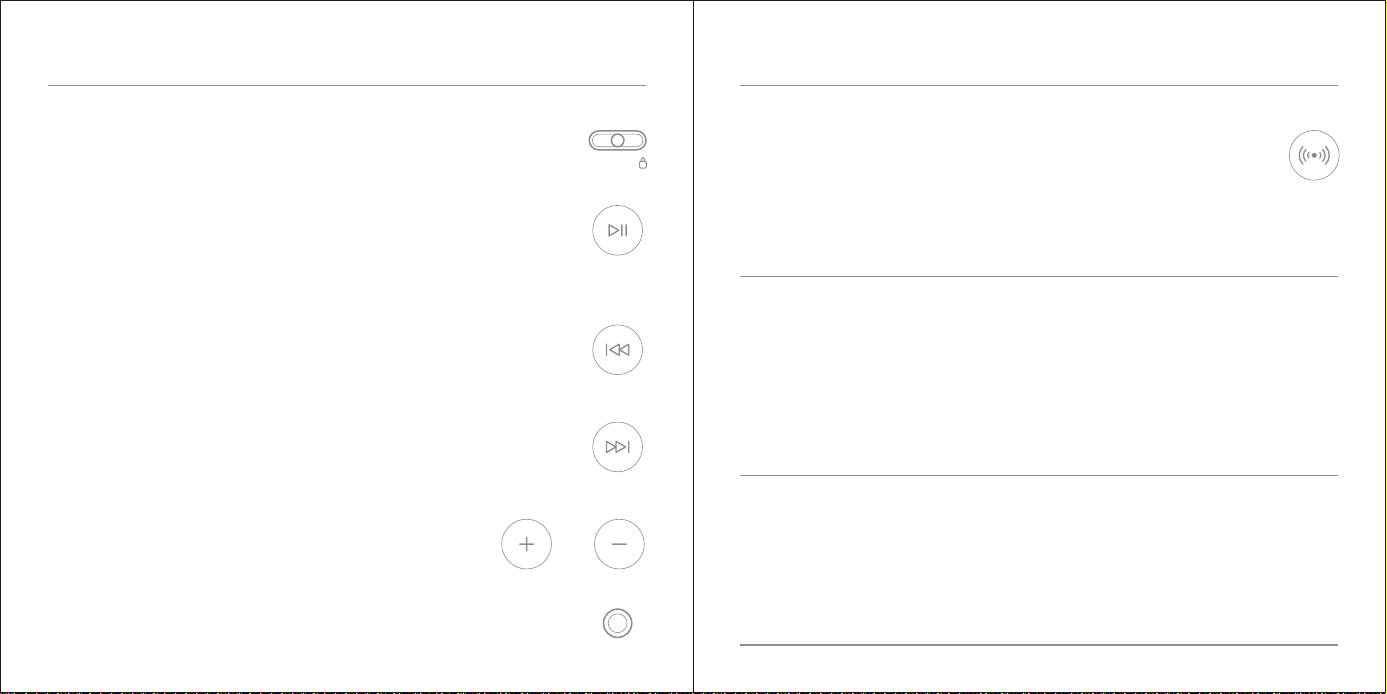
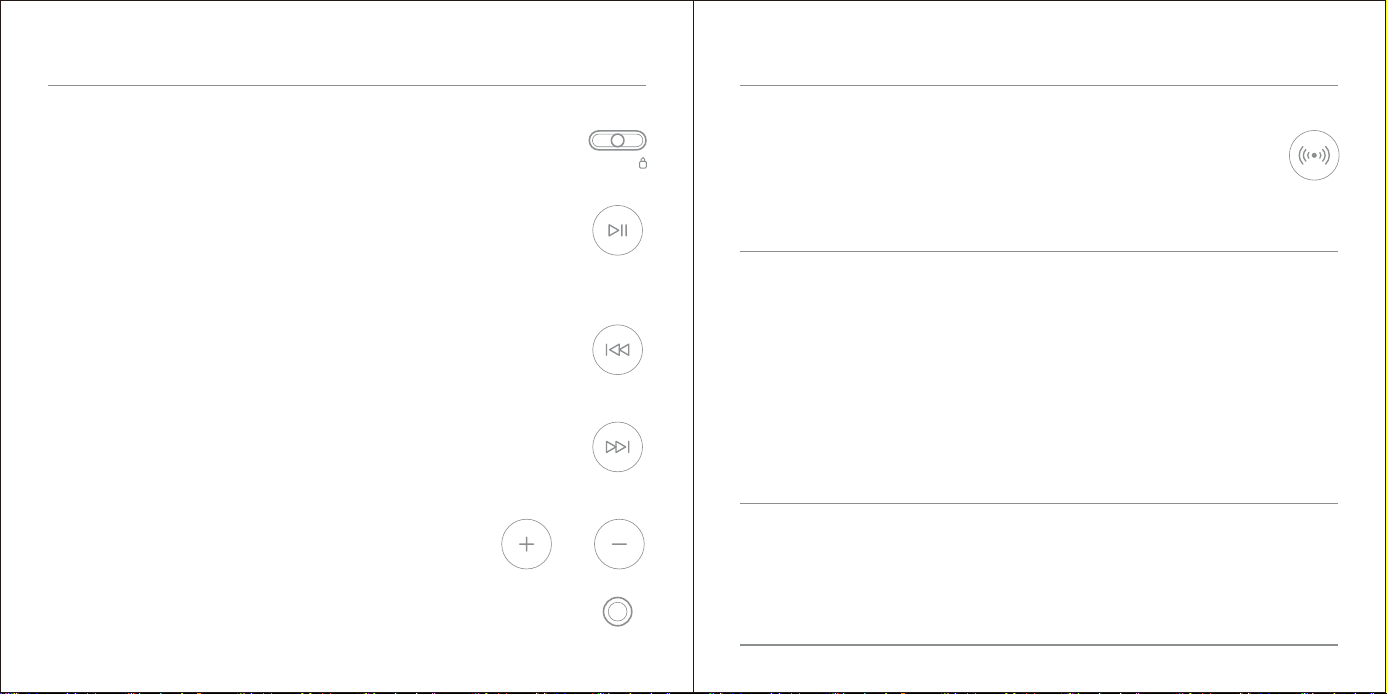
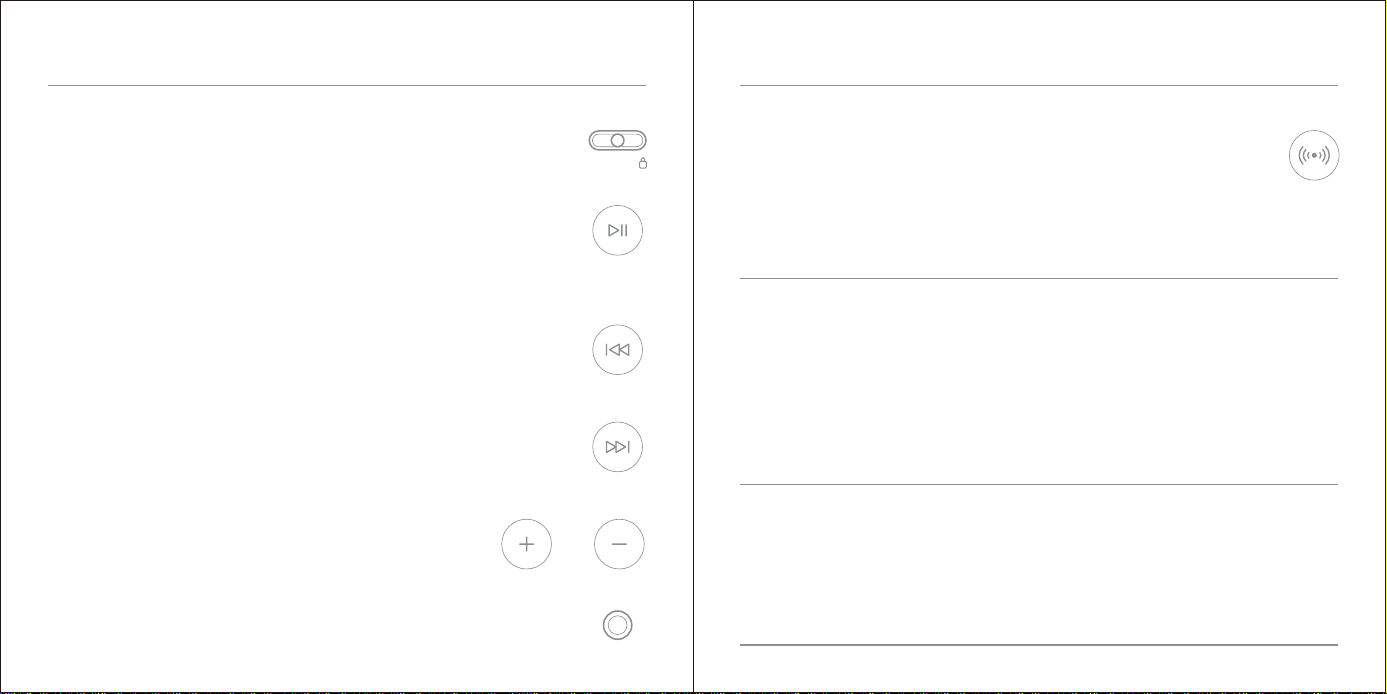
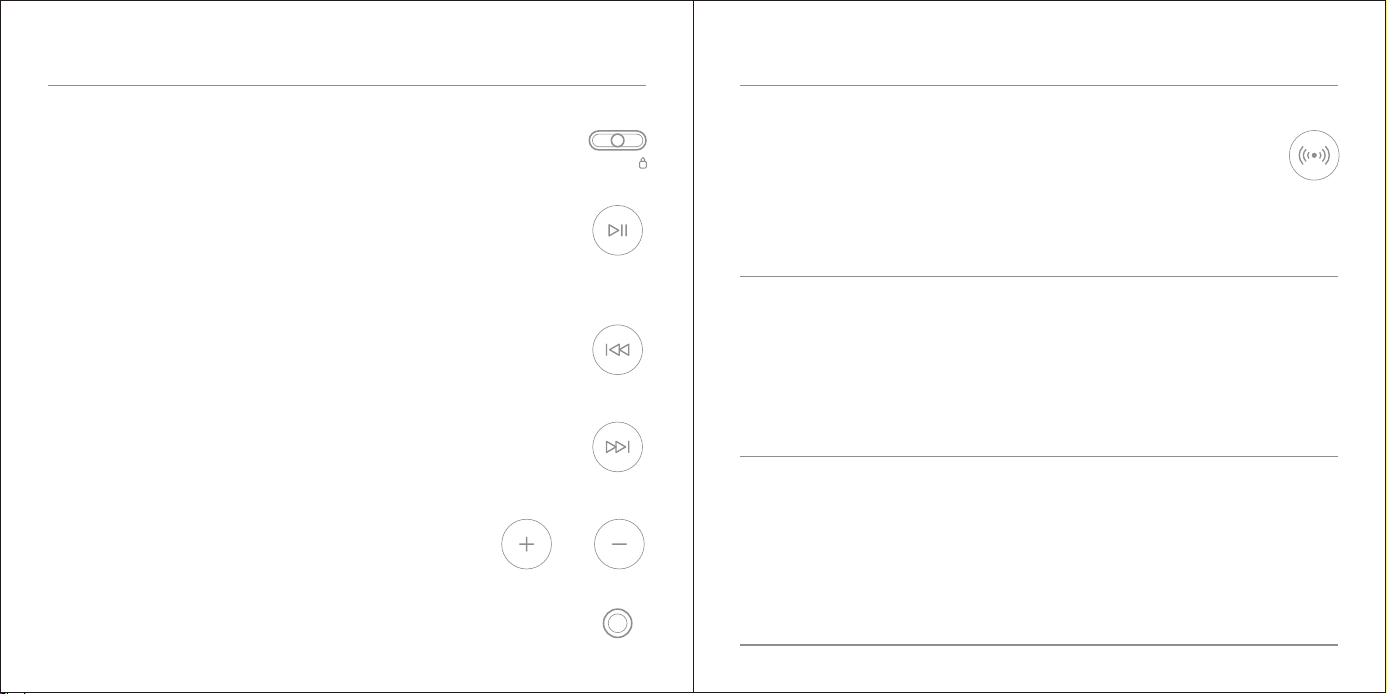
Slide the switch to "Power OFF", "Power ON" and "LOCK" (to lock buttons).
Power OFF / ON and LOCK
Short press the "Play" button to pause and play.
Long press the "Play" button to stop playing, Short press the button again to play from the first song.
Double click the "Play" button to switch between 3 play modes:
repeat current track, repeat all, RND (Play in random order)
Play / Pause / Play Modes / Stop
Short press the "Prev Song" button to replay the previous track;
Long press the "Prev Song" button to quickly scan backwards/rewind.
Prev Song / Fast Rewind
Short press the "Next Song" button to play the next track;
Long press the "Next Song" button to quickly scan forward/fast forward.
Next Song / Fast Forward
Main Functions
Adjust the volume while playing.
Volume + / Volume -
Standard 3.5mm audio output. Connect to headsets, speakers or cars.
Earphone Jack
Short press the "BT" button to turn on/off Bluetooth mode.
Long press the "BT" button to switch the anti-shock protection system (ASP) on/off.
BT / ASP
The CD player will automatically search for Bluetooth devices (speakers, headsets, etc.).
Please turn on the Bluetooth feature on your device.
Your device will be paired with the CD player in a few seconds.
Switch to Bluetooth mode:
NOTICE!
If your device should become unpaired or you find it is unable to connect,
repeat the above steps.
Some speakers have a private digital Bluetooth protocol. If the Bluetooth connection fails,
you need to buy another Bluetooth adapter.
Main Functions
OFF ON
/
Type-C Input: 5V 2A
Support Disc Format: CD, CD-R, CD-DA, CD-RW, HDCD;
Charge Time: 3 hours
Capacity: 2000mAh
Bluetooth Range: 8-10m
SNR: >70dB
THD: <3%
Dimension: Φ170×27mm
Material: ABS + Al Alloy
Weight: 360g
MADE IN CHINA
Specifications
1. Avoid listening at excessive volumes or for excessive periods of time to reduce
the risk of hearing damage.
2. Avoid contact with moisture, rain, sand or various heat sources.
3. When cleaning, use a soft cloth damp with water. Do not use alcohol or
benzene solvent to clean.
4. When riding a bicycle, driving a car or a motorcycle, do not use headphones.
Stay alert to your surroundings.
Excessive volume can damage hearing
To avoid hurting your ears, avoid excessive use.
CAUTION
Caution

What is not covered by the warranty:
Problem Possible Cause or Solution
Our company warrants all products to be of the highest quality in material, craftsmanship and service,
effective from the date of purchase to the end of the warranty period.
This warranty extends only to personal use and does not extend to any product that has been used for
commercial, rental, or any other use in which the product is not intended for. There are no warranties other
than the warranties expressly set forth with each product.
This warranty is non-transferable. Our company is not responsible in any way for any damages, losses or
inconveniences caused by equipment failure caused by user negligence, abuse, or noncompliance with the
user manual or non-compliance with any additional safety recommendations or warnings included in the
product packaging and manual.
1. The warranty immediately becomes void if the product has been tampered with, repaired or modified by
non-authorized personnel.
2. Damage (accidental or otherwise) to the product that does not impact the product's operation, including but
not limited to rust, change in color, texture or finish, wear and tear, and gradual deterioration is not covered.
3. Damage caused by accident, abuse, natural disaster, intentional or accidental misuse, fire, neglect or
improper maintenance, and use under abnormal conditions is not covered.
4. Products that have exceeded the warranty service period stipulated by our company are not covered.
5. The warranty immediately becomes void if the original serial number is removed, obliterated or altered from
the product.
6. Packaging and attached accessories, services and additional configurations other than those promised by
the salesperson are not covered.
7. The warranty immediately becomes void if the instructions in the user manual are not followed.
The CD player will not
turn on.
1. Make sure that the USB cable is connected correctly.
2. Replace the batteries.
The CD player does
not play or stops
playing.
1. Moisture may have condensed on the lens, open the CD cover and
leave it open for about one hour to let it dry out.
2. Make sure that the CD is inserted with the label facing up.
3. Ensure the CD is not scratched or damaged.
No sound or poor
sound.
1. Earphone plug is not firmly inserted into the phone's jack, reinsert.
2. Volume is set to a minimum, increase volume.
3. The battery is low, recharge.
4. CD is defective, replace.
FAQ / Troubleshooting Warranty
3
4
1
2
5
快速設置
設置
中文
快速設置
設置
當橙色指示燈閃爍時,設備需要充電。
不同顏色的指示燈對應了不同的運行狀態。
白色常亮——運行正常;
綠色常亮——充電完成;
橙色常亮——充電中;
橙色慢闪——電量<20%;
橙色快闪——電量<5%。
當充滿電時,該設備在CD模式下播放大約12個小時,
在藍牙模式下播放大約8個小時。
Type-C
快速設置
充電說明
3
設備將在CD模式下自動啟動。
若未放入CD,兩分鐘後自動關機,按播放鍵重新開機,按其他鍵則無效。
將開關切換到“ON”
4
插入您的耳機
1
旋轉開啟上蓋
2 放入光碟並旋轉合上蓋子
正常播放或未操作設備,一分鐘後自動息屏,按任意鍵喚起亮屏。
5 按播放鍵開始
OFF ON
/
包裝內容:
CD機、說明書(.PDF)。
產品概覽
音量鍵+
音量鍵+
音量鍵﹣
上一曲/快回
播放/暫停/播放模式/停止
耳機插孔
下一曲/快進 蓝牙/ASP Type-C
電源關閉/
打開/鎖定
上蓋 指示燈
LED 顯示
產品概覽
滑動開關至“OFF”、“ON”或“鎖定”。
電源關閉 / 打開 / 鎖定
短按“播放”按鈕切換暫停/播放;
長按“播放”按鈕停止播放,再次短按“播放”將從第一首開始播放;
雙撃“播放”按鈕切換單曲迴圈/全部迴圈/隨機播放。
播放 / 暫停 / 播放模式 / 停止
短按“上一曲”按鈕,重放上一首曲目;長按“上一曲”按鈕可快速倒回。
上一曲 / 快回
短按“下一曲”按鈕播放下一首曲目;長按“下一曲”按鈕快進歌曲。
下一曲 / 快進
產品功能
在播放時調節音量。
音量+ / 音量-
標準3.5毫米音訊輸出。可連接至耳機、揚聲器或汽車上。
耳機插孔
短按“BT”按鈕開啟/關閉Bluetooth模式。
長按“BT”按鈕開啟/關閉ASP功能。
藍牙 / ASP
CD機會自動搜尋藍牙設備。
請在您的藍牙設備上,打開Bluetooth功能。
您的藍牙設備將在幾秒鐘內與CD機自動配對。
切換至Bluetooth模式:
注意!
如果您的設備未配對或無法連接,請重複上述步驟。
部分品牌音箱具有私有數位藍牙協定,或導致藍牙連接失敗,
需另購藍牙轉接器。
產品功能
OFF ON
/
Type-C輸入:5V 2A
支援CD格式:CD、CD-R、CD-DA、CD-RW、HDCD;
充電時間:3小時
電池容量:2000mAh
藍牙範圍:8-10米
SNR: >70dB
THD: <3%
尺寸:Φ170×27毫米
材料:ABS + 鋁合金
重量:360克
MADE IN CHINA
產品參數
1.避免過大音量或過長時間聽音樂,以降低聽力受損的風險。
2.避免靠近濕氣、雨水、灰塵或各種熱源。
3.清潔時,請使用微濕的軟布,不要使用酒精或含有苯的溶劑進行清潔。
4.騎自行車、開車或騎摩托車時,不要配戴耳機。請保持對周圍環境的警惕。
音量過大會損害聽力
為了避免傷害您的耳朵,請勿過度使用。
注意事項
注意事項

非保修範圍:
問題 可能的原因及解決方法
從購買之日起至保修期結束,我們公司致力於對所有客戶提供高品質的保修服務。
本保修僅適用於個人使用,不適用於任何用於商業、租賃或任何其他用途的產品。除各
產品明確規定的保修外,無其他額外保修。
本保修不可轉讓。我們公司不對因用戶疏忽、濫用或不遵守用戶手冊而導致的設備故障
以及造成的任何損失負責。
1. 未經授權的維修、碰撞、疏忽或改動;
2. 産品的清潔和正常情況下的損耗(如外殼、接插部件的自然損耗、老化及磨損);
3. 因故意、意外、火災、或維護不當以及因自然災害等不可抗力造成的損壞;
4. 産品超出本公司規定的質保期限;
5. 質保憑證上産品型號、編號被刪除、抹去或改變,與産品實物不相符;
6. 外包裝及內附的贈品,銷售人員承諾的産品之外的服務及附加的配置;
7. 未按操作說明,人爲濫用誤用、擅自改裝。
設備無法開機。 1. 確保充電時電源線連接正確。
2. 更換電池。
設備停止或
無法播放歌曲。
1. 水分可能凝結在鐳射讀取頭上,
打開CD蓋通風一小時,讓其乾燥。
2. 確保插入CD時標籤面朝上。
3. 確保CD沒有刮傷或損壞。
沒有聲音或
音質很差。
1. 耳機未牢固插入耳機孔,請重新插入。
2. 音量處於最小,請增加音量。
3. 電量不足,請及時充電。
4. CD有磨損或缺陷,請嘗試更換新CD。
常見問題/故障排除 保修
3
4
1
2
5
クイックスタ ート
セットアップ
日本語
オレンジ色のLEDが点滅すると、デバイスを充電する必要があります。
異なる色のライトは、異なる動作状態に対応します。
白光正常に動作;
緑光充電終了;
オレンジ充電中;
オレンジ色の光が点滅する
バッテリー<20%;
オレンジ色の光が点滅する(急速)
バッテリー<5%;
完全に充電されると、デバイスは標準CDで約12時間、
Bluetoothモードで約8時間再生できます。
Type-C
クイックスタ ート
充電手順
4
ヘ ッド ホ ン を 接 続 し ま す 。
1
回転させてカバーの蓋を開けます。
3
デバイスは自動的にCDモードで起動します。
ボタンを「ON」に切り替えます
注意:CDを入れていない場合、2分後に自動的に電源を切り、
再生キーを押した後に再起動し、他のキーを押すと無効になります。
2 CDを挿入し、カバーの蓋を閉じます。
注意:正常に再生または操作されていない機器は、
1分後に自動的にスクリーンを閉じ、
任意のキーを押してハイライトを喚起します。
5
「再生」を押して開始します。
クイックスタ ート
セットアップ
OFF ON
/
パッケージは以下を含みます:
CDプレイヤー、取扱説明書(.PDF)。
製品図
音量+
音量+
音量‑
前の曲/早巻き
再生/一時停止/
再生モード/停止
イ ヤ ホ ン ジャック
次の曲/早送り BT/ASP Type-C
電源のオフ/
オンとロック
カバー ライト は
LED
ディスプレイ
製品図
OFF ON
/
スイッチを「電源オフ」、「電源オン」、「ロック」(ボタンをロックするため)
にスライドさせます。
電源のオフ/オンとロック
再生ボタンを短く押して、一時停止して再生します。
長く押すと、再生が停止します、もう一度再生キーを押すと、最初の曲から再生されます。
ボタンをダブルクリック、現在のトラックを繰り返す、すべてを繰り返す、
RND(ランダムな順序で再生)の3つの再生モードを切り替えます。
再生/一時停止/再生モード/停止
前のトラックを再生するには、戻るボタンを短く押します。
戻るボタンを長押しすると、すばやく逆方向にスキャン/巻き戻します。
前の曲/早巻き
次のトラックを再生するには、進むボタンを短く押します。
早送りボタンを長押しすると、すばやく再生方向にスキャン/早送りします。
次の曲/早送り
主な機能
再生中に音量を調整します。
音量+/音量‑
標準の3.5mmオーディオ出力。ヘッドセット、スピーカー、または車に接続します。
イ ヤ ホ ン ジ ャック
短く押すと、Bluetoothモードをオン/オフにします。
長押しして、耐衝撃保護システム(ASP)のオン/オフを切り替えます。
BT/ASP
CDプレーヤーは自動的にBluetoothデバイス(スピーカー、ヘッドセットなど)を検索します。
お使いのデバイスのBluetooth機能をオンにし。
お使いのデバイスは、数秒でCDプレーヤーとペアリングされます。
Bluetoothモードに切り替える:
注 意!
お使いのデバイスがペアリングされていないか、接続できないことが判明した場合,
上記の手順を繰り返します。
一部のスピーカーは、プライベートデジタルBluetoothプロトコルを搭載しています。Bluetooth接続
に失敗した場合は、別のBluetoothアダプターを購入する必要があります。
主な機能
タイプC入力:5V2A
サポートディスクフォーマット:CD、CD-R、CD-DA、CD-RW、HDCD;
充電時間:3時間
容量:2000mAh
Bluetooth範囲:8-10m
SNR:>70dB
THD:<3%
寸法:Φ170×27mm
材質:ABS+アルミニウムごうきん
重量:360g
MADEINCHINA
仕様
1.聴覚障害のリスクを減らすために、過度の音量または長時間の聴取は避けてください。
2.湿気、雨、砂、またはさまざまな熱源との接触を避けてください。
3.お手入れの際は、水で湿らせた柔らかい布を使用してください。
アルコールやベンゼン溶剤を使用して清掃しないでください。
4.自転車に乗るとき、車やバイクを運転するときは、ヘッドホンを使用しないでください。
周囲に注意してください。
音量が大きすぎると、
聴覚に損傷を与える可能性があります
耳を痛めないように、過度の使用は避けてください。
注意事項
注意事項

問題 考えられる原因と解決策
購入日から保証期間終了まで、素材・品質・サービスの全てで最高の状態であることを保証します。
この保証は個人的な使用にのみ適用され、商用、レンタル、または製品が意図されていないその他の使用
に使用された製品には適用されません。各製品に明記された保証以外の保証はありません。
この保証は譲渡できません。うちの会社は、ユーザーの過失、乱用、ユーザーマニュアルへの違反、または
製品のパッケージやマニュアルに含まれる追加の安全上の推奨事項や警告への違反によって引き起こさ
れた機器の故障によって引き起こされた損害、損失、または不便については一切責任を負いません。
保証の対象外となるもの:
1.非認定ユーザーによって製品が改ざん、修理、または変更された場合、保証は直ちに無効になります。
2.錆、色、質感または仕上げの変化、摩耗、及び段階的な劣化を含む、またはこれ以外の動作に影響しない
製品への損傷はカバーされません。
3.事故、乱用、自然災害、故意または偶発的な誤用、火災、怠慢または不適切なメンテナンス、
および異常な条件下での使用による損傷は対象外です。
4.当社規定の保証期間を過ぎた商品は対象外となります。
5.元のシリアル番号が製品から削除、消去、または変更された場合、保証は直ちに無効になります。
6.販売員が約束したもの以外のパッケージングおよび付属のアクセサリ、サービス、
および追加の構成は対象外です。
7.ユーザーマニュアルの指示に従わない場合、保証は直ちに無効になります。
CDプレーヤーの
電源が入りません。
1.USBケーブルが正しく接続されていることを確認します。
2.電池を交換します。
CDプレーヤーが
再生されないか、
再生が止まる。
1.レンズに水分が付着している可能性がありますので、
CDカバー約1時間開いけたままにして乾かしてください。
2.CDがラベルを上に向けて挿入されていることを確認します。
3.CDに傷や損傷がないことを確認します。
音が出ない、
または音が悪い。
1.イヤホンプラグが電話機のジャックにしっかりと挿入
されているかを確認し、されていなければ再度挿入します。
2.音量を最小に設定した後で、音量を上げます。
3.バッテリー残量が少なくなっています。充電してください。
4.CDに欠陥があります。交換してください。
FAQ/トラブルシューティング 保証
Schnellstart
Einrichten
3
4
1
2
5
DEUTSCH
Wenn die orangefarbene Anzeigeleuchte blinkt,
muss das Gerät aufgeladen werden.
Unterschiedliche Farben der Anzeigeleuchte entsprechen
Unterschieden im Betriebszustand.
Weißes Licht: gut funktionieren;
Grünes Licht: vollständig aufgeladen;
Oranges Licht: Aufladen;
Oranges Blinklicht: Akku<20%;
Oranges Blinklicht (schnell): Akku<5%;
Bei voller Aufladung
kann das Gerät etwa 12 Stunden mit Standard-CDs und etwa 8 Stunden im
Bluetooth-Modus abspielen.
Type-C
Schnellstart
Ladeanleitung
4
Schließen Sie Ihre Kopfhörer an.
1
Zum Öffnen der Abdeckung drehen.
3
Das Gerät startet automatisch im CD-Modus.
Schalten Sie den ON/OFF-Schalter auf ON
Wenn keine CD eingelegt ist, schaltet es sich automatisch nach 2 Minuten ab.
Drücken Sie die Play-Taste und starten Sie es neu.
Das Drücken anderer Tasten funktioniert nicht..
2 CD einlegen und Abdeckung schließen.
Das Gerät spielt normal oder das Gerät wird nicht bedient,
und der Bildschirm schaltet sich nach einer Minute automatisch aus.
Drücken Sie eine beliebige Taste, um den Bildschirm aufzurufen.
5
Drücken Sie “Play”, um zu starten.
Schnellstart
Einrichten
OFF ON
/
Lieferumfang:
Der CD-Player, Benutzerhandbuch (.PDF).
Produktdiagramm
Lautstärke +
Lautstärke +
Lautstärke -
Vorheriges Lied
Schneller Rücklauf
Wiedergabe/Pause/
Wiedergabemodi/Stopp
Kopfhörerbuchse
Nächstes Lied/Schneller Vorlauf BT/ASP Type-C
Strom ON/OFF
und SPERREN
Abdeckung
Anzeigeleuchte
LED -Anzeige
Produktdiagramm
Schieben Sie den Schalter auf “OFF”, “ON” und “SPERREN” (um die Tasten zu sperren).
Strom ON/OFF und SPERREN
Drücken Sie kurz die “Wiedergabe”-Taste, um anzuhalten und abzuspielen.
Drücken Sie lange auf die “Wiedergabe”-Taste, um die Wiedergabe zu stoppen,
und drücken Sie die Taste erneut kurz, um ab dem ersten Lied zu spielen.
Doppelklicken Sie auf die “Wiedergabe”-Taste, um zwischen den 3 Wiedergabemodi zu wechseln:
Aktuellen Titel wiederholen, Alle wiederholen, RND (In zufälliger Reihenfolge spielen)
Wiedergabe / Pause / Wiedergabemodi / Stopp
Drücken Sie kurz die Taste “Vorheriges Lied”, um den vorherigen Titel erneut abzuspielen;
Drücken Sie lange die Taste “Vorheriges Lied”, um schnell zurückzuspulen.
Vorheriges Lied / Schneller Rücklauf
Drücken Sie kurz die Taste “Nächstes Lied”, um den nächsten Titel abzuspielen;
Drücken Sie lange auf die Schaltfläche “Nächster Lied”, um schnell vorzuspulen.
Nächstes Lied / Schneller Vorlauf
Hauptfunktionen
Stellen Sie die Lautstärke während des Spielens ein.
Lautstärke + / Lautstärke -
Standard-3,5-mm-Audioausgang. An Headsets, Lautsprecher oder Autos anschließen.
Kopfhörerbuchse
Drücken Sie kurz die “BT”-Taste, um den Bluetooth-Modus ein-/auszuschalten.
Drücken Sie lange auf die Taste “BT”,
um das Anti-Shock-Protection-System (ASP) ein-/auszuschalten.
BT / ASP
Der CD-Player sucht automatisch nach Bluetooth-Geräten (Lautsprecher, Headsets usw.).
Bitte schalten Sie die Bluetooth-Funktion auf Ihrem Gerät ein.
Ihr Gerät wird in wenigen Sekunden mit dem CD-Player gekoppelt.
In den Bluetooth-Modus wechseln:
ACHTUNG!
Wenn Ihr Gerät entkoppelt werden sollte oder Sie feststellen,
dass es keine Verbindung herstellen kann, wiederholen Sie die obigen Schritte.
Ein teil der marke bluetooth verfügt über ein gesondertes bluetooth-protokoll,
Falls die bluetooth-verbindung fehltaut, kann ein weiterer bluetooth-trancer benötigt werden.
Hauptfunktionen
OFF ON
/
Type-C-Eingangt: 5V 2A
Unterstützte Disc-Formate: CD, CD-R, CD-DA, CD-RW, HDCD;
Ladezeit: 3 Stunden
Kapazität: 2000mAh
Bluetooth-Reichweite: 8-10m
SNR: >70dB
Klirrfaktor: <3%
Abmessung: Φ170×27mm
Material: ABS + Al-Legierung
Gewicht: 360g
MADE IN CHINA
Spezifikationen
1. Hören Sie nicht zu laut oder zu lange, um das Risiko von Gehörschäden zu
verringern.
2. Vermeiden Sie den Kontakt mit Feuchtigkeit, Regen, Sand oder verschiedenen
Wärmequellen.
3. Verwenden Sie zur Reinigung bitte ein weiches, mit Wasser angefeuchtetes
Tuch. Verwenden Sie zur Reinigung keinen Alkohol oder benzinhaltige
Lösungsmittel.
4. Verwenden Sie beim Fahrrad-, Auto- oder Motorradfahren keine Kopfhörer.
Achten Sie auf Ihre Umgebung.
Übermäßige Lautstärke kann
das Gehör schädigen
Vermeiden Sie eine übermäßige Nutzung,
um Ihren Ohren nicht zu verletzen.
VORSICHT
Vorsicht

Was nicht durch die Garantie abgedeckt ist:
Problem Mögliche Ursache oder Lösung
Unser Unternehmen garantiert, dass alle Produkte in Bezug auf Material, Verarbeitung und Service von
höchster Qualität sind, gültig vom Kaufdatum bis zum Ende der Garantiezeit..
Diese Garantie gilt nur für den persönlichen Gebrauch und gilt nicht für Produkte, die für gewerbliche,
vermietete oder andere Zwecke verwendet wurden. Es gibt keine anderen Garantien als die Garantien, die
ausdrücklich mit jedem Produkt angegeben sind.
Diese Garantie ist nicht übertragbar. Unser Unternehmen ist in keiner Weise verantwortlich für Schäden,
Verluste oder Unannehmlichkeiten, die durch Geräteversagen verursacht werden, die durch Fahrlässigkeit,
Missbrauch oder Nichteinhaltung des Benutzerhandbuchs durch den Benutzer im Handbuch verursacht
wurden.
1. Die Garantie erlischt sofort, wenn das Produkt von nicht autorisiertem Personal manipuliert, repariert
oder modifiziert wurde.
2. Schäden (versehentlich oder anderweitig) am Produkt, die den Betrieb des Produkts nicht beeinträchti-
gen, einschließlich, aber nicht beschränkt auf Rost, Veränderung der Farbe, Textur oder Oberfläche,
Verschleiß und allmähliche Verschlechterung, sind nicht abgedeckt..
3. Schäden durch Unfall, Missbrauch, Naturkatastrophen, absichtlichen oder versehentlichen Missbrauch,
Feuer, Vernachlässigung oder unsachgemäße Wartung und Verwendung unter anormalen Bedingungen,
werden nicht abgedeckt.
4. Produkte, die die festgelegte Garantiezeit überschritten haben, sind nicht abgedeckt.
5. Die Garantie erlischt sofort, wenn die ursprüngliche Seriennummer vom Produkt entfernt, ausgelöscht
oder geändert wird.
6. Verpackungen und beigefügtes Zubehör, Dienstleistungen und zusätzliche Konfigurationen, die nicht vom
Verkäufer versprochen wurden, sind nicht abgedeckt..
7. Die Garantie erlischt sofort, wenn die Anweisungen im Benutzerhandbuch nicht befolgt werden.
Der CD-Player lässt
sich nicht einschalten.
1. Stellen Sie sicher, dass das USB-Kabel richtig angeschlossen ist.
2. Tauschen Sie die Batterien aus.
Der CD-Player spielt
nicht oder hört auf zu
spielen.
1. Möglicherweise hat sich Feuchtigkeit auf der Linse niederges-
chlagen, öffnen Sie die CD-Hülle und lassen Sie sie etwa 1
Stunde lang trocknen.
2. Stellen Sie sicher, dass die CD mit dem Etikett nach oben
eingelegt ist.
3. Stellen Sie sicher, dass die CD nicht zerkratzt oder beschädigt ist.
Kein Ton oder
schlechter Ton.
1. Der Kopfhörer sitzt nicht fest in der Kopfhörerbuchse, bitte
stecken Sie ihn erneut ein.
2. Die Lautstärke ist auf Minimum, bitte erhöhen Sie die
Lautstärke.
3. Der Akku ist schwach, bitte laden Sie ihn rechtzeitig auf.
4. Die CD ist abgenutzt oder defekt, versuchen Sie, sie durch eine
neue zu ersetzen.
Häufiges Problem / Fehlerbehebung Garantie
Départ rapide
Installation
3
4
1
2
5
FRANÇAIS
Lorsque l’indicateur orange clignote, l’appareil doit être rechargé.
Les indicateurs de couleur différente correspondent aux différentes conditions de
fonctionnement.
Blanc constant - fonctionnement normal.
Vert constant - charge complète.
Orange constant - charge en cours.
Orange clignote lentement - batterie <20%.
Orange clignote rapidement - batterie <5%.
Lorsqu’il est entièrement chargé,
l’appareil peut fonctionner pendant environ 12 heures en mode CD.
En mode Bluetooth, il peut fonctionner pendant environ 8 heures.
Type-C
Départ Rapide
Instructions de charge
4 Branchez vos écouteurs.
1
Tournez pour ouvrir le couvercle.
3
L’appareil démarre automatiquement en mode CD.
Remarque : si le CD n’est pas inséré,
l’appareil s'éteint automatiquement après 2 minutes.
Appuyez sur la touche de lecture pour redémarrer.
L’appui sur d’autres touches ne sera pas valable.
Mettez le bouton sur “ON”.
2 Insérez un CD et fermez le couvercle.
L’écran s’éteint automatiquement après une minute de lecture
normale ou lorsque l’appareil n’est pas utilisé. Il suffit
d’appuyer sur n’importe quelle touche pour rappeler l’écran.
5
Appuyez sur “play” pour commencer.
Départ Rapide
Installation
OFF ON
/
Contenu de la boîte
Lecteur CD, Guide d’Utilisateur (.PDF).
Diagramme de Produit
Volum +
Volume +
Volume -
Précédent/
Retour rapide
Lecture/Pause/
Mode de lecture/Arrêt
Prise écouteur
Suivant/Avance rapide Bluetooth/ASP Type-C
Arrêter/allumer/
verrouiller
Couvercle
ndicateur lumineux
Affichage LED
Diagramme de Produit
Basculez l’interrupteur sur “arrêter”, “allumer” ou “verrouiller”.
Arrêter / Allumer / Verrouiller
Appuyez brièvement sur le bouton “Play” pour mettre en pause / lecture;
Appuyez longuement sur le bouton “Play” pour arrêter la lecture, appuyez à nouveau brièvement
sur le bouton pour reprendre la lecture à partir de la première chanson;
Double-cliquez sur le bouton “Play” pour basculer entre 3 modes de lecture : boucle
unique/toutes les boucles/lecture aléatoire.
Lecture / Pause / Mode de lecture / Arrêt
Appuyez brièvement sur le bouton “Prev Song” pour lire la chanson précédente ;
Appuyez longuement sur le bouton “Prev Song” pour reculer rapidement dans la chanson.
Précédent / Retour rapide
Appuyez brièvement sur le bouton "Next Song" pour lire la chanson suivante;
Appuyez longuement sur le bouton "Next Song" pour avancer rapidement dans la chanson.
Suivant / Avance Rapide
Fonctions Principales
Régler le volume pendant la lecture.
Volume+ / volume-
Sortie audio standard de 3,5 mm.
Peut être connectée à des écouteurs, des enceintes ou une voiture.
Prise écouteur
Appuyez brièvement sur le bouton “BT” pour activer/désactiver le mode Bluetooth.
Appuyez longuement sur le bouton “BT” pour activer/désactiver la fonction ASP.
Bluetooth / ASP
Le lecteur CD recherche automatiquement les appareils Bluetooth.
Veuillez activer la fonction Bluetooth sur votre appareil Bluetooth.
Votre appareil Bluetooth sera automatiquement jumelé avec le lecteur
CD en quelques secondes.
Passer en mode Bluetooth:
ATTENTION!
Si votre appareil n’est pas jumelé ou ne peut pas être connecté,
veuillez répéter les étapes ci-dessus.
Certaines marques d'appareils audio ont un protocole Bluetooth numérique privé.
Si cela entraîne l'échec de la connexion Bluetooth,
il faudra acheter un adaptateur Bluetooth supplémentaire.
Fonctions Principales
OFF ON
/
Entrée Type-C: 5V 2A
Formats de CD pris en charge: CD, CD-R, CD-DA, CD-RW, HDCD;
Temps de charge : 3h
Capacité de la batteriet: 2000mAh
Portée Bluetooth: 8-10m
SNR: >70dB
THD: <3%
Taille: Φ170×27mm
Matériau: ABS + Alliage d’aluminium
Poidst: 360g
MADE IN CHINA
Spécifications
1. Évitez d’écouter de la musique à un volume trop élevé ou pendant trop
longtemps pour réduire le risque de lésions auditives.
2. Évitez la proximité de l’humidité, de la pluie, de la poussière ou de sources de
chaleur de toute sorte.
3. Pour le nettoyage, utilisez un chiffon doux et légèrement humide et n’utilisez
pas d’alcool ou de solvants contenant du benzène.
4. Ne portez pas d’écouteurs lorsque vous faites du vélo, conduisez ou montez
sur une moto. Veuillez rester conscient de votre environnement.
Un volume trop élevé peut
endommager votre audition
Pour éviter d’endommager vos oreilles,
veuillez ne pas en abuser.
PRÉCAUTIONS
Précautions

Ce qui n’est pas couvert par la garantie:
Problèmes Causes possibles et solutions
Nous nous engageons à fournir une garantie de haute qualité à tous les clients de la date d’achat jusqu’à la fin
de la période de garantie.
Cette garantie s’applique uniquement à l’usage personnel et ne s’applique pas à un produit utilisé à des fins
commerciales, de location ou à toute autre fin. Il n’y a pas d’autres garanties que celles qui sont
expressément indiquées pour chaque produit.
Cette garantie n’est pas transférable. Nous ne sommes pas responsables de tout dysfonctionnement de
l’appareil et de tout dommage causé par la négligence de l’utilisateur, une mauvaise utilisation ou le
non-respect du manuel d’utilisation.
1. La garantie est immédiatement annulée si le produit a été altéré, réparé ou modifié par du personnel non
autorisé;
2. Le nettoyage du produit et l’usure dans des conditions normales (par exemple, l’usure naturelle du
boîtier, des pièces enfichables, le vieillissement et l’usure) ne sont pas couverts;
3. Les dommages causés par un accident, un abus, une catastrophe naturelle, une mauvaise utilisation
intentionnelle ou accidentelle, un incendie, une négligence ou un entretien inadéquat, et une utilisation
dans des conditions anormales ne sont pas couverts;
4. Les produits qui ont dépassé la période de service de garantie stipulée par l’entreprise ne sont pas
couverts;
5. Si le numéro de série original est retiré, effacé ou modifié du produit, la garantie est immédiatement
annulée;
6. L’emballage et les accessoires d’accompagnement, les services et les configurations supplémentaires
autres que ceux promis par le vendeur ne sont pas couverts;
7. Le non-respect des instructions du manuel d’utilisation entraîne l’annulation immédiate de la garantie.
L’appareil ne s’allume
pas.
1. Assurez-vous que le câble USB est correctement connecté.
2. Remplacez les batteries.
L’appareil ne lit pas
ou cesse de lire.
1. Il peut y avoir de la condensation d’humidité sur la tête de lecture
laser, ouvrez le couvercle du CD et ventilez pendant une heure
pour qu’elle sèche.
2. Assurez-vous que le CD est inséré avec le côté étiquette vers le
haut.
3. Assurez-vous que le CD n’est pas rayé ou endommagé.
Pas de son ou qualité
de son très médiocre.
1. La fiche de l’écouteur n’est pas fermement insérée dans la
prise, réinsérez-la.
2. 2. Le volume est au minimum, veuillez monter le volume.
3. 3. La batterie est faible, rechargez-la à temps.
4. Le CD est usé ou défectueux, veuillez essayer de le remplacer
par un nouveau.
FAQ / Dépannage Garantie