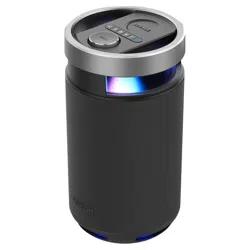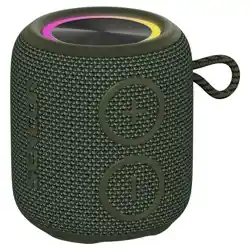
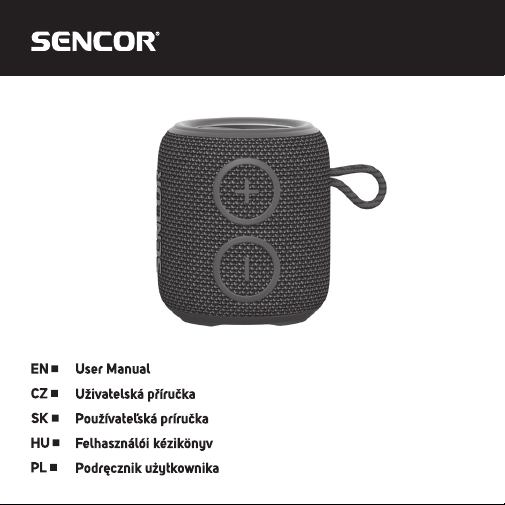
SIRIUS 2 MICRO
BT speaker
BT reproduktor
BT reproduktor
BT hangszóró
Głośnik BT
EN - 2
INCLUDED CONTENTS
1x BT speaker SIRIUS 2 MICRO
1x USB-C charging cable
1x User's manual
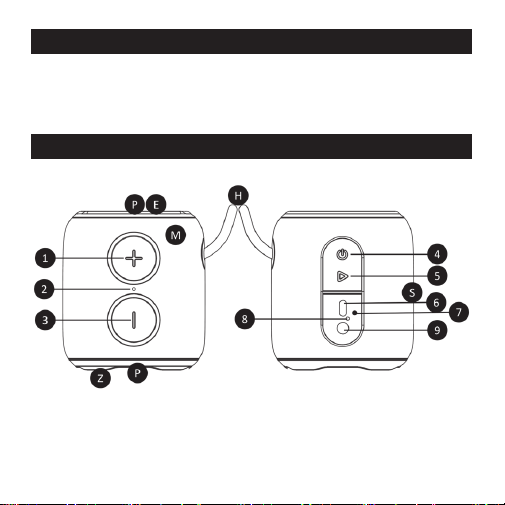
BT SPEAKER DESCRIPTION

EN - 3
1 Next track button (long press), volume up button (short press)
2 BT speaker status LED
3 Previous track button (long press), volume down button (short press)
1+3
switching off / switching on / changing the LED effect (short press of the
“+” and “-” buttons), switching off / switching on / changing the volume of
the alert tone mode (long press of the “+” and “-” buttons)
4 BT speaker on / off button (long press), change source (short press)
5 Press PLAY/PAUSE/TWS button, accept and reject incoming call
6 Charging socket (USB-C)
7 RESET button
8 LED charging indicator
9 Socket for audio AUX IN mini jack (3.5 mm)
S Speaker – common channel (MONO)
P Passive radiator
E LED effect
H BT speaker carrying loop
M Microphone
Z BT speaker feet
EN - 4
PUTTING INTO OPERATION
Before first use, be sure to read the safety instructions contained in this
user's manual carefully.
Before first use, please charge the BT speaker to a maximum level. Hold
down the power on button to turn on the BT speaker. Turning on/off is
indicated by a sound signal. To turn the BT speaker off, hold down the
power on button.
Attention: After a longer period of inactivity, the appliance will turns itself off.
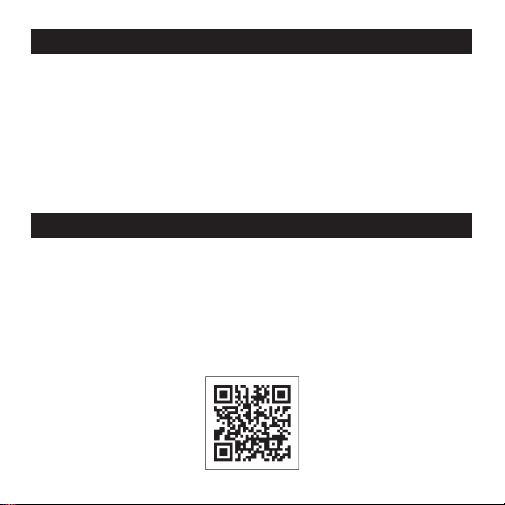
CONNECT THE BT SPEAKER TO THE SENCOR HOME APP
This BT speaker can be connected to the SENCOR HOME app to easily
set equalizers, change the preset LED effect, or just control the speaker
remotely.
Ɣ 'RZQORDGWKHDSSWR\RXUVPDUWSKRQHUHJLVWHUDQGVHWXS\RXU6,5,86
2. If you already have the SENCOR HOME app installed, add your
SIRIUS 2 to it for easy control.

EN - 5
Ɣ ,QVWUXFWLRQVRQKRZWRXVHWKHDSSOLFDWLRQFDQEHGRZQORDGHGIURP
the website https://www.sencor.com/ in the AUDIO/WIRELESS
REPRODUCTORS section.
Notice: The option to add a BT speaker to the SENCOR HOME app
applies to the series marked “SE” (SIRIUS 2 MAXI SE, SIRIUS 2 SE,
SIRIUS 2 MINI SE and SIRIUS 2 MICRO SE). Previous versions of
SIRIUS 2 cannot be upgraded to “SE”.
PAIRING DEVICES VIA BLUETOOTH
Turn on the BT speaker and search for its Bluetooth name “SIRIUS 2
MICRO” in the device to be paired, then start the pairing process. If
you are requested to enter a pairing code while your device and the BT
speaker are pairing, use the code: “0000”. To disconnect a paired device,
end the pairing session on your mobile device or briefly press the “On/Off”
button twice. Disconnection will be indicated by an acoustic signal.
Note: To ensure a stable Bluetooth connection, make sure that the distance
between the BT speaker and your connected device is kept within 10 meters.
Attention: Some connected devices support common volume setting. If
some of the connected devices do not support this feature, the volume
setting will operate separately on each device.

EN - 6
TWS FEATURE
If you purchase another SIRIUS 2 MICRO Series speaker, you can
pair them together for stereo sound. First, make sure your device is not
connected to any BT speaker. Switch on both BT speakers, press and hold
the PLAY/PAUSE/TWS button (this will be accompanied by an acoustic
signal) and wait until the speakers automatically pair together. Successful
pairing will also be accompanied by an acoustic signal. Then connect your
mobile device to the BT speaker.
Changing the volume level using the volume control buttons will take effect
automatically on both paired BT speakers. Pressing and holding the Power
On button on one of the speakers will turn both paired speakers off. To
exit TWS mode, hold down the PLAY/PAUSE/TWS button on one of the
participating BT speakers until an acoustic signal sounds.
RECOMMENDATION: For optimal stereo sound, we recommend always
pairing the same BT speaker types (SIRIUS 2 MICRO with SIRIUS 2
MICRO; SIRIUS 2 MINI with SIRIUS 2 MINI; SIRIUS 2 with SIRIUS 2;
SIRIUS 2 MAXI with SIRIUS 2 MAXI).
Warning: The TWS feature is only available in the Bluetooth mode. It is
not possible to pair the device with another type of BT speaker with TWS
function, even within re-editions of products with a different name than
(SIRIUS 2 MICRO, SIRIUS 2 MINI, SIRIUS 2, SIRIUS 2 MAXI).

EN - 7
AUDIO AUX IN
The BT speaker is equipped with a 3.5mm jack. Your device can be
connected to a BT speaker using an audio cable. First connect the audio
plug to your device and then to the BT speaker’s jack.
Please note: before connecting your device and BT speaker, make sure
that the output signal from your device is at the minimum level (minimum
output volume). This will prevent the BT speaker from damage. When
the audio cable is connected, the BT speaker does not meet the water
ingression protection class.
Note: In this mode, not all functions of the BT speaker are available. The
Bluetooth function is not active if the audio jack is connected to the BT
speaker.
PLAY/PAUSE BUTTON
Ɣ 3UHVVWKH3OD\3DXVHEXWWRQWRVWDUWRUSDXVHPXVLFSOD\EDFNGXULQJ
Bluetooth connection or when the memory card is inserted.
Ɣ 7KHLQFRPLQJFDOOWRD%OXHWRRWKFRQQHFWHGSDLUHGGHYLFHZLOOEH
announced with a tone which will interrupt the music being played
back. To answer/hang up an incoming call, press the Play/Pause button
briefly. Long press the Play/Pause button to reject an incoming call.

EN - 8
Note: Microphone reception in the BT speaker may be attenuated due
to the waterproof nature of the device. To improve reception, turn the BT
speaker microphone (“M” in the main picture) towards you and speak
loudly near the BT speaker.
VOLUME AND TRACK PLAYBACK CONTROL
To control the BT speaker’s volume (+/- buttons), use the buttons on the
BT speaker. During music playback, you can press and hold the “+” button
to jump to the next track playback. To select the previous track, press and
hold the “-” button.
TURNING OFF BT SPEAKER NOTIFICATIONS AND
ALERTS
The BT speaker offers 2 volume levels for notification and alert messages
and the option to switch off completely. By pressing and holding the
volume down and volume up buttons together for 3 seconds, you can
change the volume level, turn off or on the BT speaker's notification and
alert messages. The mode change will be accompanied by an acoustic
tone. When turned off and on, the BT speaker will remember the last
selected mode.
Caution: in the off state, no messages notifying about the BT speaker
state will be shown. Charge the BT speaker as a preventive measure.
Avoid using the sound at a maximum level.

EN - 9
LIGHT EFFECTS
The BT speaker is equipped with a light effect on the top. The light effect is
switched on/off/changed by briefly pressing the volume down and volume
up buttons simultaneously.
RESET BUTTON
Use a blunt and thin object to reset the BT speaker. Insert it into the hole
marked RESET. Press lightly until the button click is heard.
RECOMMENDATION: If there is an unexpected problem with the BT
speaker connection or its functions. Reset the BT speaker.
CHARGING THE BT SPEAKER
A charged battery provides power for several hours of operation at normal
volume levels. A high volume consumes more battery power; therefore, we
recommend listening at normal volume levels. To charge the BT speaker,
plug your charging adapter into the mains and then into the BT speaker.
A low battery level will be indicated by an audible alert. At the first sign of
a low battery, connect your rechargeable adapter. The charging process
will be indicated by a red LED until the battery is de-energized or fully
charged.

EN - 10
Attention: For charging, use only the original accessories supplied
with the appliance. To achieve the maximum battery lifetime, it is best
not to start charging until the low battery audible alert is output. Charge
continuously until fully charged. When the battery operating time becomes
very short, the battery lifetime has been used up; we recommend that you
have the battery replaced at your authorized centre.
Recommendation: If the unit is not to be used for an extended period of
time, we recommend to fully charge the battery once every two to three
months. We recommend to store the unit with a the battery charged to
prevent irreparable damage to the battery (loss of capacity). For optimal
charging, use a 5V 2A charging adapter.
INGRESSION PROTECTION (IPX7)
The unit is resistant against water thus allowing you to listen to your
music in bath, shower, on the beach or by the pool. IPX7 water resistance
guarantees the unit’s function with slight splashing or immersing in water
1 m deep for up to 30 minutes. Full immersion is not recommended
because of possible loss of the audio playback signal.
Warning: Always remember to seal the BT speaker inputs (No. 6–9 in the
picture “BT speaker description”) with the original gasket and make sure
that the gasket is not damaged. Never charge the unit during possible
contact with fluids. The unit is designed for contact with clean water
only without any additives. Avoid exposing the unit to contaminated or
industrially treated fluids (such as lemonade, sea/salt water, oils, etc.).

EN - 11
TECHNICAL SPECIFICATIONS
SIRIUS 2 MICRO
Water-resistant Bluetooth speaker with IPX7 protection class
Features:
Water-resistant speaker with IPX7 protection class
The speaker cover is made of premium fabric
TWS function (True Wireless Stereo)
LED speaker illumination
Sound:
0D[LPXPVSHDNHURXWSXW:,PSHGDQFH
1 speakers + 1 passive radiators
Frequency response: 60 Hz – 20 kHz
7RWDOKDUPRQLFGLVWRUWLRQ
Inputs:
Bluetooth Audio 5.0
AUX audio input (3.5mm stereo connector)
Other:
Handsfree Function
Built-in rechargeable battery: 1200 mAh Li-Ion
3OD\EDFNWLPHRIXSWRKRXUV#YROXPH
USB-C charging
Max. charging time 3 hours
EN - 12
Accessories: USB charging cable, user’s manual
Dimensions: 89×80×80 mm
Weight: 175 g
Bluetooth Version 5.0
Maximum Transmitter
Power
100mW @ 2.4GHz–
2.4835GHz
Codec SBC
Profiles
HFP V1.5; A2DP V1.2; AVRCP
V1.4; HSP V1.2
ŃŝŇź–źŇ
ź
W
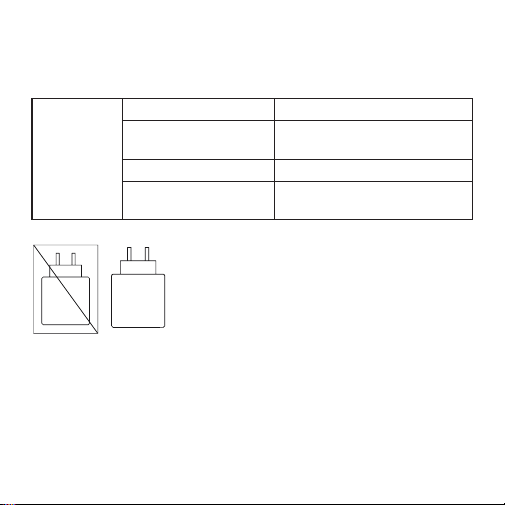
The power delivered by the charger must
be between min 0,4 Watts required by the
radio equipment, and max 4 Watts in order to
achieve the maximum charging speed.
Adaptor is not included in package.
EN - 13
INSTRUCTIONS AND INFORMATION ON THE DISPOSAL OF
DISCARDED PACKAGING MATERIALS
Take the packaging to a collection centre for recycling.
DISPOSAL OF DISCARDED ELECTRICAL AND ELECTRONIC
EQUIPMENT
This symbol on the product, accessory or packaging means that
the product must not be disposed of in normal household waste.
Please dispose of this product in a collection yard designated
for the recycling of electrical and electronic equipment. In some
EU countries or other European countries, you can return the
old product to your local retailer when you buy a new equivalent
product. By disposing of this product correctly, you help protect
valuable natural resources and prevent potential negative
environmental and human health impacts that could result from
improper disposal. For more information, contact your local
authorities or the nearest collection centre. You may be fined by
law for improper disposal of this type of waste.
For companies in the EU
If you need to dispose of electrical or electronic equipment, ask
your dealer or supplier for the necessary information.
Disposal in countries outside the European Union
Ask your local authorities or your dealer for information on
proper disposal.
This product meets the EU requirements.

EN - 14
)$67ý5DVKHUHE\GHFODUHVWKDWWKHW\SHRIUDGLRHTXLSPHQW6,5,86
2 MICRO complies with the Directive 2014/53/EU. The full text of the EU
Declaration of Conformity is available at: www.sencor.eu.
Text, design and technical data are subject to change without notice;
we reserve the right to make such changes.
The original version is Czech.
0DQXIDFWXUHU)$67ý5DV86DQLWDVXětþDQ\
Czech Republic
info@sencor.com

EN - 15
EN
Warranty conditions
Warranty card is not apart of the device packaging.
This product is warranted for the period of 24 months from the date of purchase to the end-user. Warranty
is limited to the following conditions. Warranty is referred only to the customer goods using for common
domestic use. The claim for service can be applied either at dealer’sshop where the product was bought, or
at below mentioned authorized service shops. The end-user is obligated to set up aclaim immediately when
the defects appeared but only till the end of warranty period. The end user is obligated to cooperate to certify
the claiming defects. Only completed and clean (according to hygienic standards) product will be accepted.
In case of eligible warranty claim the warranty period will be prolonged by the period from the date of claim
application till the date of taking over the product by end-user, or the date the end-user is obligated to take it
over. To obtain the service under this warranty, end-user is obligated to certify his claim with duly completed
following documents: receipt, certificate of warranty, certificate of installation.
This warranty is void especially if apply as follows:
Defects which were put on sale.
Wear-out or damage caused by common use.
The product was damaged by unprofessional or wrong installation, used in contrary to the applicable
instruction manual, used in contrary to legal enactment and common process of use or used for another
purpose which has been designed for.
The product was damaged by uncared-for or insufficient maintenance.
The product was damaged by dirt, accident of force majeure (natural disaster, fire, and flood).
Defects on functionality caused by low duality of signal, electromagnetic field interference etc.
The product was mechanically damaged (e.g. broken button, fall).
Damage caused by use of unsuitable media, fillings, expendable supplies (batteries) or by unsuitable
working conditions (e.g. high temperatures, high humidity, quakes).
Repair, modification or other failure action to the product by unauthorized person.
End-user did not prove enough his right to claim (time and place of purchase).
Data on presented documents differs from data on products.
Cases when the claiming product cannot be indentified according to the presented documents (e.g. the
serial number or the warranty seal has been damaged).
Manufacturer:
FAST ČR, a.s., U Sanitasu 1621, Říčany 251 01, Czech Republic
info@sencor.com
Authorized service centers:
Visit www.sencor.com for detailed information about authorized service centers.
The original version of the instructions is in the Czech language, other language versions are made by the
appropriate translation.