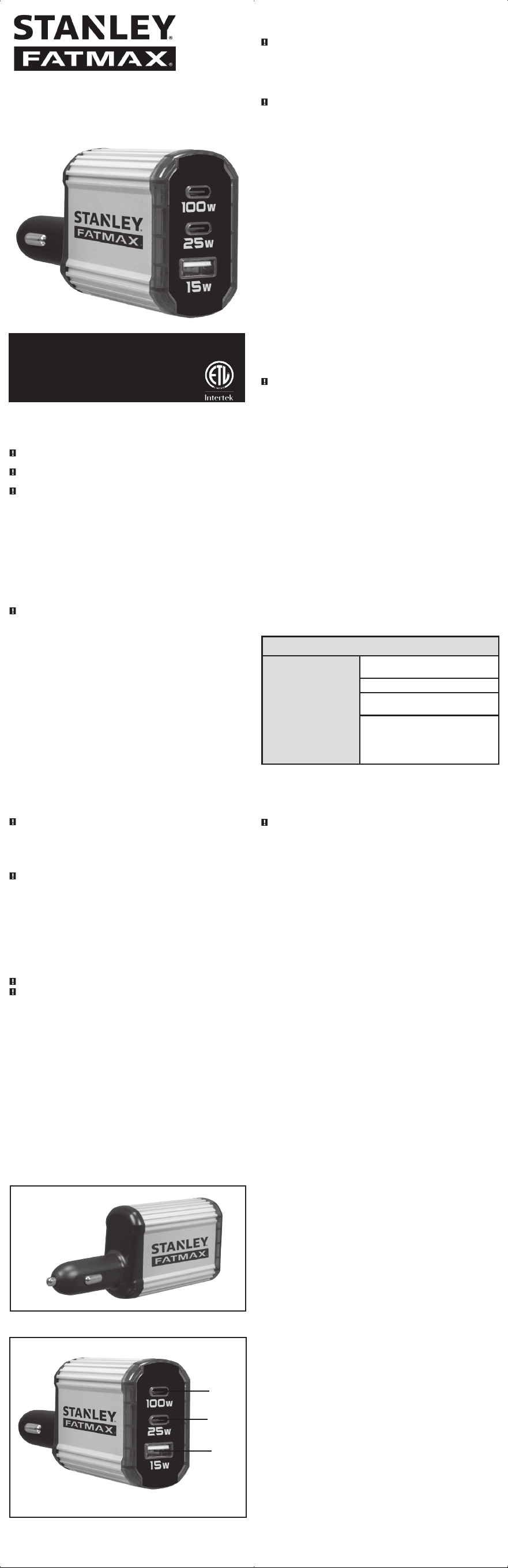
100 WATT
FAST USB CHARGER
DC100F
SAVE THIS INSTRUCTION MANUAL FOR
FUTURE REFERENCE.
© 2025 Baccus Global LLC
Boca Raton, FL 33432
(877) 571-2391
SAFETY GUIDELINES /
DEFINITIONS
DANGER: Indicates an imminently hazardous situation which, if not avoided, will result in death
or serious injury.
WARNING: Indicates a potentially hazardous situation which, if not avoided, could result in
death or serious injury.
CAUTION: Indicates a potentially hazardous situation which, if not avoided, may result in injury.
CAUTION: Used without the safety alert symbol indicates potentially hazardous situation which, if
not avoided, may result in property damage.
RISK OF UNSAFE OPERATION. When using tools or equipment, basic safety precautions should
always be followed to reduce the risk of personal injury. Improper operation, maintenance or
modification of tools or equipment could result in serious injury and property damage. There
are certain applications for which tools and equipment are designed. Manufacturer strongly
recommends that this product NOT be modified and/or used for any application other than for
which it was designed. Read and understand all warnings and operating instructions before using
any tool or equipment.
READ ALL INSTRUCTIONS
WARNING: Read and understand this instruction manual before using this unit. Failure
to follow all instructions listed below may result in fire and/or serious injury.
SAVE THESE INSTRUCTIONS
This manual contains importance safety and operation instructions for the unit.
IMPORTANT SAFETY
INSTRUCTIONS
• Avoid dangerous environments. Do not use appliances in damp or wet locations. Do not use
appliances in the rain.
• Store idle appliances indoors. When not in use, appliances should be stored indoors in dry, and
high or locked-up place – out of reach of children.
• Disconnect appliances. Disconnect the appliance from the power supply when not in use.
• Proper cooling is essential when operating the USB Charger. Do not place the unit near the
vehicle’s heat vent or in direct sunlight.
• Use of accessories and attachments. The use of any accessory or attachment not
recommended for use with this appliance could be hazardous. Note: refer to the accessory section
of this manual for further details.
• Check damaged parts. Do not operate the unit if it has received a sharp blow or is otherwise
damaged in any way.
WARNING – To reduce the risk of electric shock:
• Do not make any electrical connections or disconnections in areas designated as IGNITION
PROTECTED. This includes DC cigarette lighter type plug connection. This unit is NOT approved
for ignition protected areas.
• Never immerse the unit in water or any other liquid, or use when wet or if it has become wet.
• DO NOT insert foreign objects into the USB Ports.
WARNING – To reduce the risk of fire:
• Make sure that the 12 volt outlet is free of debris and the USB Charger fits tightly in the outlet.
• Do not replace any vehicle fuse with one of a rating higher than recommended by the vehicle
manufacturer. Ensure that the electrical system in your vehicle can supply this without causing the
vehicle fuse to open. This can be determined by making sure the fuse in the vehicle that protects
the outlet is rated higher than 10 amperes. Information about the vehicle fuse ratings are typically
found in the vehicle operator’s manual.
• If the vehicle fuse opens repeatedly, do not continue to replace it. Discontinue use of the vehicle
accessory outlet and locate the source of the overload. Never patch the fuse with tin foil, wire, or
the like, as this may cause serious damage elsewhere in the electrical circuit or cause a fire.
• Do not operate near flammable materials, fumes or gases.
• Do not expose to extreme heat or flames.
WARNING – To reduce the risk of fire or electric shock, do not interconnect output terminations.
CAUTION – To reduce the risk of injury or property damage:
• Remove appliance plug from outlet before working on the appliance.
• Do not attempt to connect or set up the unit or its components while operating your vehicle. Not
paying attention to the road may result in a serious accident.
• Always use the USB Charger where there is adequate ventilation.
• Always turn the USB Charger off by disconnecting it from the DC accessory outlet when not in
use.
• Make sure the nominal powering voltage is 12 volts DC, center connection positive (+).
• Do not use with positive ground electrical systems.* Reverse polarity connection may cause
permanent damage to the USB Charger and will void warranty.
*The majority of modern automobiles, RVs and trucks are negative ground.
• Do not open the USB Charger — there are no user-serviceable parts inside.
• Keep away from children. This is not a toy!
• Install and operate unit only as described in this Instruction Manual.
• Check unit periodically for wear and tear. Do not disassemble the unit. Opening the unit may
result in a risk of fire and will void warranty.
FEATURES
SAVE THESE INSTRUCTIONS
WARNING – To reduce the risk of injury or property damage: Follow these instructions
and those published by battery manufacturer and the manufacturer of any equipment you
intend to use with this unit. Review cautionary markings on these products and on engine.
OPERATING INSTRUCTIONS
To turn the unit off, disconnect it from the 12 volt DC power source.
CAUTION – To reduce the risk of property damage:
• The USB Charger must be connected only to batteries with a nominal output voltage of 12 volts.
The unit will not operate from a 6 volt battery and will sustain permanent damage if connected
to a 24 volt battery.
• Always connect the USB Charger to the 12 volt DC power source before plugging any devices
into the unit.
Operation of the USB Ports
IMPORTANT NOTES: The 1st USB-C Port provides up to PD 100W output power. The USB-A Port
provides up to 15W output power. The 2nd USB-C Port provides up to PD 25W output power. The
total output power is up to 15W when the 2nd USB-C Port and USB-A Port are used simultaneously.
The total output power is up to 100W when either the 2nd USB-C port or the USB-A port is used
with the 1st USB-C port simultaneously.
1. Connect the unit’s 12V DC vehicle adapter plug to a vehicle’s accessory outlet or other
12 volt DC power source. Make sure there is adequate space for proper ventilation of
the USB Charger.
2. Rotate the unit slightly to make sure there is good contact.
3. The power LED indicator will light blue, indicating a proper connection.
4. Plug the USB-powered device(s) into one (or all) of the ports, and operate normally.
Notes: If the USB Charger does not work, make sure the ignition/accessory switch is
actually powering the accessory outlet. Some vehicles require the ignition switch
to be turned on.
These USB Ports do not support data communication. The ports only provide a total of
100W DC power to external USB-powered devices.
If an overload or short circuit fault condition occurs in the USB ports, the corresponding
port will shut down automatically.
Some USB-powered household electronics may not operate with these USB charging/
power ports. Check the manual of the corresponding electronic device to confirm that it
can be used with this type of USB charging/power port.
Remember to disconnect the unit from any power source when it is not in use.
WARNING – Unit case may get warm when operated at maximum power.
OPERATING TIPS
The USB Charger should only be operated in locations that are:
DRY — Do not allow water or other liquids to come into contact with the USB Charger.
COOL — Surrounding air temperature should ideally be 10-20°C (50-68°F). Keep the USB Charger
away from direct sunlight, when possible.
WELL-VENTILATED — Keep the area surrounding the USB Charger clear to ensure free air circulation
around the unit. Do not place items on or over the USB Charger during operation.
SAFE — Do not use the USB Charger near flammable materials or in any locations that may
accumulate flammable fumes or gases. This is an electrical appliance that can briefly spark when
electrical connections are made or broken.
CARE AND MAINTENANCE
Storage
• Optimal storage temperature for this unit is between0-40°C (32-104°F).
• Store and use the USB Charger in a cool, dry place with adequate ventilation for all-around air
circulation.
• Avoid locations that are exposed to heating units, radiators, direct sunlight, or excessive humidity
or dampness.
• From time to time wipe the outside of the appliance with a soft cloth. Do not immerse the
appliance in water.
TROUBLESHOOTING
COMMON POWER OUTPUT PROBLEMS
USB Port will not power
appliance
Check the connection to the 12 volt DC power source.
Make sure there is good contact.
Confirm there is functioning DC current.
Make sure USB powered devices connected to USB
ports do not exceed the maximum rating.
Some USB-powered household electronics will not
operate with this USB charging/power port. Check
the manual of the corresponding electronic device
to confirm that it can be used with this type of USB
charging/power port.
ACCESSORIES
Recommended accessories for use with your tool may be available from the manufacturer. If you
need assistance regarding accessories, please contact the manufacturer at 1-877-571-2391.
WARNING - The use of any accessory not recommended for use with this appliance could be
hazardous.
TECHNICAL ASSISTANCE
For Customer Service or Technical Assistance, contact the manufacturer at 1-877-571-2391.
ONE-YEAR LIMITED
MANUFACTURER’S WARRANTY
The manufacturer, Baccus Global LLC, warrants this product against defects in materials and
workmanship for a period of ONE (1) YEAR commencing from the date of retail purchase by
the original end-user purchaser or from the date of delivery of the good, whichever occurs later
(“Warranty Period”).
If there is a defect and a valid claim is received by the manufacturer within the Warranty Period,
the defective product can be replaced in the following ways: (1) Return the product to the
manufacturer for replacement. Proof of purchase may be required by manufacturer. (2) Return the
product to the retailer where product was purchased for an exchange (provided that the store is
a participating retailer). Returns to retailer should be made within the time period of the retailer’s
return policy for exchanges only. Proof of purchase may be required. Please check with the retailer
for their specific return policy regarding returns that are beyond the time set for exchanges.
This manufacturer’s warranty does not apply to accessories, bulbs, fuses and batteries; defects
resulting from normal wear and tear, accidents; damages sustained during shipping; alterations;
unauthorized use; neglect, misuse, abuse; and failure to follow instructions for care and
maintenance for the product.
This manufacturer’s warranty gives you, the original retail purchaser, specific legal rights and you
may have other rights which vary from state to state or province to province. This product is not
intended for commercial use. To register your product with the manufacturer, please visit www.
BaccusGlobal.com.
The photos in this manual may differ from the actual unit.
SPECIFICATIONS
DC INPUT: 13.8V DC
1ST. USB-C OUTPUT: 5VDC 3A / 9VDC 3A / 12VDC 3A / 15VDC
3A / 20VDC 5A (PD 100W)
2ND USB-C OUTPUT: 5VDC 3A / 9VDC 2.77A (PD 25W MAX.)
USB-A OUTPUT: 5VDC, 15W MAX.
2ND USB-C AND USB-A OUTPUT SIMULTANEOUSLY: 5VDC, 15W MAX.
TOTAL OUTPUT ON ALL USB PORTS: 100W MAX.
Imported by Baccus Global LLC,
225 NE Mizner Blvd., Suite 301, Boca Raton, FL 33432
www.Baccusglobal.com 1-877-571-2391
RD030425
STANLEY® AND THE STANLEY® LOGO ARE REGISTERED TRADEMARKS OF STANLEY BLACK +
DECKER INC. OR ONE OF ITS AFFILIATES, AND ARE USED UNDER LICENSE.
1ST
USB-C PORT
2ND
USB-C PORT
USB
A PORT
12 VOLT DC VEHICLE
ADAPTER PLUG
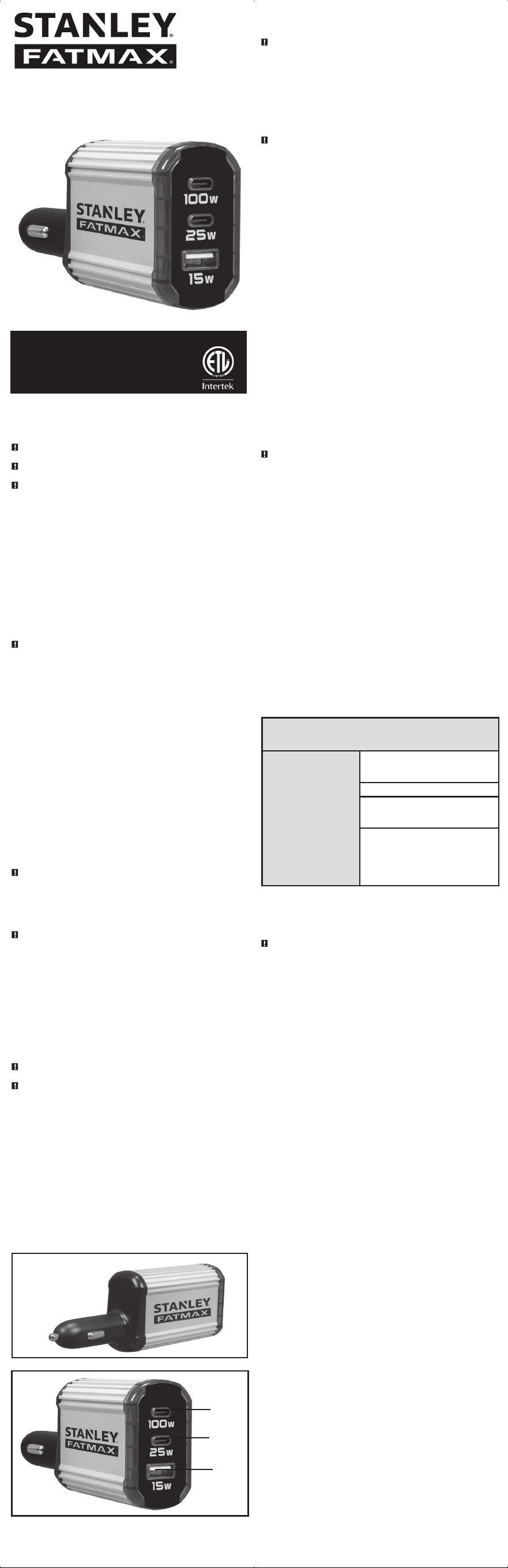
100 WATT
CARGADOR RÁPIDO USB
DC100F
GUARDE ESTE MANUAL DE INSTRUCCIONES
PARA FUTURAS CONSULTAS.
© 2025 Baccus Global LLC
Boca Raton, FL 33432
(877) 571-2391
DIRECTRICES DE SEGURIDAD/
DEFINICIONES
PELIGRO: Indica una situación de peligro inminente que, si no se evita, provocará la muerte o
lesiones grave.
ADVERTENCIA: Indica una situación potencialmente peligrosa que, si no se evita, podría
provocar la muerte o lesiones grave.
PRECAUCIÓN : Indica una situación potencialmente peligrosa que, si no se evita, puede
provocar lesiones.
PRECAUCIÓN : Utilizado sin el símbolo de alerta de seguridad, indica una situación potencialmente
peligrosa que, si no se evita, puede provocar daños materiales.
RIESGO DE FUNCIONAMIENTO INSEGURO. Al utilizar herramientas o equipos, siempre se
deben seguir precauciones de seguridad básicas para reducir el riesgo de lesiones personales. El
funcionamiento, el mantenimiento o la modificación inadecuados de herramientas o equipos
pueden provocar lesiones graves y daños materiales. Existen determinadas aplicaciones para las que
están diseñadas las herramientas y los equipos. El fabricante recomienda encarecidamente que este
producto NO se modifique ni se utilice para ninguna aplicación distinta para la que fue diseñado.
Lea y comprenda todas las advertencias e instrucciones de funcionamiento antes de utilizar
cualquier herramienta o equipo.
LEA TODAS LAS
INSTRUCCIONES
ADVERTENCIA: Lea y comprenda este manual de instrucciones antes de utilizar esta
unidad. Si no sigue todas las instrucciones que se enumeran a continuación, puede
producirse un incendio.
GUARDE ESTAS INSTRUCCIONES
Este manual contiene instrucciones importantes de seguridad y funcionamiento de la unidad.
INSTRUCCIONES DE SEGURIDAD
IMPORTANTES
• Evite entornos peligrosos. No utilice aparatos eléctricos en lugares húmedos o mojados. No
utilizar bajo la lluvia.
• Guarde los aparatos que no utilice en interiores. Cuando no se utilicen, los aparatos deben
almacenarse bajo techo en un lugar seco, alto o cerrado, fuera del alcance de los niños.
• Desconecte los aparatos. Desconecte el aparato de la fuente de alimentación cuando no esté
en uso.
• El refrescamiento adecuado es esencial al utilizar el cargador USB. No coloque la unidad
cerca de la salida de aire caliente del vehículo ni bajo la luz solar directa.
• Uso de accesorios y complementos. El uso de cualquier accesorio o complemento no
recomendado para este aparato puede resultar peligroso. Nota: consulte la sección de accesorios
de este manual para obtener más detalles.
• Compruebe si hay piezas dañadas. No utilice la unidad si ha recibido un golpe fuerte o está
dañada de cualquier otra forma.
ADVERTENCIA – Para reducir el riesgo de descarga eléctrica:
• No realice ninguna conexión ni desconexión eléctrica en áreas designadas como PROTEGIDAS
CONTRA IGNICIÓN. Esto incluye la conexión al enchufe de CC tipo encendedor de cigarrillos. Esta
unidad NO está aprobada para áreas protegidas contra ignición.
• NUNCA sumerja la unidad en agua ni en ningún otro líquido, ni la use si está mojada o se ha
mojado.
• NO inserte objetos extraños en los puertos USB.
ADVERTENCIA – Para reducir el riesgo de incendio:
• Asegúrese de que la toma de 12 voltios esté libre de residuos y de que el cargador USB encaje
bien en la toma.
• No reemplace ningún fusible del vehículo por uno de una capacidad superior a la recomendada
por el fabricante. Asegúrese de que el sistema eléctrico de su vehículo pueda suministrar esta
corriente sin que se funda el fusible del mismo. Esto se puede determinar asegurándose de que
el fusible del vehículo que protege la toma tenga una capacidad superior a 10 amperios. La
información sobre las capacidades nominales de los fusibles se encuentra normalmente en el
manual del operador del vehículo.
• Si el fusible del vehículo se funde repetidamente, no continúe reemplazándolo. Deje de usar la
toma de accesorios del vehículo y localice la fuente de la sobrecarga. Nunca repare el fusible con
papel de aluminio, alambre o algo similar, ya que esto puede causar daños graves en otra parte
del circuito eléctrico o provocar un incendio.
• No utilizar cerca de materiales, humos o gases inflamables.
• No exponer a llamas ni a calor extremo.
ADVERTENCIA – Para reducir el riesgo de incendio o descarga eléctrica, no interconecte las
terminaciones de salida.
PRECAUCIÓN – Para reducir el riesgo de lesiones o daños a la propiedad:
• Retire el enchufe del aparato de la toma de corriente antes de trabajar en él.
• No intente conectar ni configurar la unidad ni sus componentes mientras conduce su vehículo. No
prestar atención a la carretera puede provocar un accidente grave.
• Utilice siempre el cargador USB en un lugar con ventilación adecuada.
• Apague siempre el cargador USB desconectándolo de la toma de CC para accesorios cuando no
lo utilice.
• Asegúrese de que el voltaje de alimentación nominal sea de 12 voltios CC, conexión central
positiva (+).
• No lo utilice con sistemas eléctricos con conexión a tierra positiva*. La conexión con polaridad
inversa puede causar daños permanentes al cargador USB y anulará la garantía.
*La mayoría de los automóviles, RV y camiones modernos tienen conexión a tierra negativa.
• No abra el cargador USB — no contiene piezas que el usuario pueda reparar.
• Mantener alejado de los niños. ¡Esto no es un juguete!
• Instale y opere la unidad únicamente como se describe en este manual de instrucciones.
• Revise la unidad periódicamente para detectar desgaste. No desarme la unidad. Abrir la unidad
puede resultar en riesgo de incendio y anulará la garantí.
CARACTERÍSTICAS
GUARDE ESTAS INSTRUCCIONES
ADVERTENCIA – Para reducir el riesgo de lesiones o daños a la propiedad: Siga estas
instrucciones y las publicadas por el fabricante de la batería y el fabricante de cualquier equipo
que desee utilizar con esta unidad. Revise las indicaciones de precaución en estos productos y en
el motor.
INSTRUCCIONES DE
FUNCIONAMIENTO
Para apagar la unidad, desconéctela de la fuente de alimentación de CC de 12 voltios.
PRECAUCIÓN – Para reducir el riesgo de daños a la propiedad:
• El cargador USB debe conectarse únicamente a baterías con un voltaje de salida nominal de 12
voltios. La unidad no funcionará con una batería de 6 voltios y sufrirá daños permanentes si se
conecta a una batería de 24 voltios.
• Conecte siempre el cargador USB a la fuente de alimentación de CC de 12 voltios antes de
enchufar cualquier dispositivo a la unidad.
Funcionamiento de los puertos USB
NOTAS IMPORTANTES: El 1er puerto USB-C proporciona una potencia de salida de hasta 10W
PD. El puerto USB-A proporciona una potencia de salida de hasta 15W. El 2do puerto USB-C
proporciona una potencia de salida de hasta 2W PD. La potencia de salida total es de hasta 15W
cuando se utilizan simultáneamente el 2do puerto USB-C y el puerto USB-A. La potencia de salida
total es de hasta 100W cuando se utilizan simultáneamente el 2do puerto USB-C o el puerto USB-A
con el 1er puerto USB-C.
1. Conecte el enchufe adaptador para vehículo de 12V CC de la unidad a la toma de
accesorios del vehículo o a otra fuente de alimentación de 12V CC. Asegúrese de que haya
espacio suficiente para una ventilación adecuada del cargador USB.
2. Gire la unidad ligeramente para asegurarse de que haya un buen contacto.
3. El indicador LED de encendido se iluminará en azul, lo que indica una conexión adecuada.
4. Conecte el dispositivo o dispositivos alimentados por USB en uno (o todos) de los puertos
y opere normalmente.
Notas: Si el cargador USB no funciona, asegúrese de que el interruptor de encendido/accesorios
esté realmente alimentando la toma de accesorios. Algunos vehículos requieren que el
switch de arranque esté encendido.
Estos puertos USB no admiten la comunicación de datos. Los puertos solo proporcionan
una potencia total de 100W CC a dispositivos externos alimentados por USB.
Si se produce una sobrecarga o un cortocircuito en los puertos USB, el puerto
correspondiente se apagará automáticamente.
Es posible que algunos dispositivos electrónicos domésticos alimentados por USB no
funcionen con estos puertos USB de carga/alimentación. Consulte el manual del dispositivo
electrónico correspondiente para confirmar que se puede utilizar con este tipo de puerto
USB de carga/alimentación.
Recuerde desconectar la unidad de cualquier fuente de alimentación cuando no esté en
uso.
ADVERTENCIA – La carcasa de la unidad puede calentarse cuando se utiliza a máxima potencia.
CONSEJOS DE FUNCIONAMIENTO
El Cargador USB solo debe utilizarse en lugares que sean:
SECOS – No permita que el agua u otros líquidos entren en contacto con el cargador USB.
FRESCOS– La temperatura del aire circundante debe ser idealmente de 10 a 20°C (50 a 68°F).
Mantenga el cargador USB lejos de la luz solar directa, siempre que sea posible.
BIEN VENTILADOS — Mantenga el área que rodea al cargador USB despejada para garantizar la
libre circulación de aire alrededor de este. No coloque elementos sobre el cargador USB durante
su funcionamiento.
SEGUROS– No utilice el cargador USB cerca de materiales inflamables ni en ningún lugar donde
se puedan acumular humos o gases inflamables. Este es un aparato eléctrico que puede generar
chispas cuando se realizan o se interrumpen las conexiones eléctricas.
CUIDADO Y MANTENIMIENTO
Almacenamiento
• La temperatura óptima de almacenamiento para esta unidad es de entre 0 y 40°C (32 y 104°F).
• Guarde y utilice el cargador USB en un lugar fresco y seco con ventilación adecuada para una
circulación de aire uniforme.
• Evite lugares expuestos a unidades de calefacción, radiadores, luz solar directa o humedad
excesiva.
• De vez en cuando, limpie el exterior del aparato con un paño suave. No sumerja el aparato en
agua.
SOLUCIÓN DE PROBLEMAS
PROBLEMAS COMUNES DE SALIDA DE
ALIMENTACIÓN
El Puerto USB no alimenta el
aparato
Verifique la conexión a la fuente de alimentación de
CC de 12 voltios. Asegúrese de que haya un buen
contacto.
Confirme que haya corriente CC en funcionamiento.
Asegúrese de que los dispositivos alimentados por USB
conectados a los puertos USB no excedan la capacidad
máxima.
Algunos dispositivos electrónicos domésticos
alimentados por USB no funcionarán con este puerto
USB de carga/alimentación. Consulte el manual del
dispositivo electrónico correspondiente para confirmar
que se puede utilizar con este tipo de puerto USB de
carga/alimentación.
ACCESORIOS
El fabricante puede ofrecer accesorios recomendados para su herramienta. Si necesita ayuda con
respecto a los accesorios, comuníquese con el fabricante al 1-877-571-2391.
ADVERTENCIA - Tel uso de cualquier accesorio no recomendado para este aparato podría
ser peligroso.
ASISTENCIA TÉCNICA
Para obtener asistencia técnica o servicio al cliente, comuníquese con el fabricante al
1-877-571-2391.
GARANTÍA LIMITADA DEL
FABRICANTE POR UN AÑO
El fabricante, Baccus Global LLC, garantiza este producto contra defectos de materiales y mano
de obra durante un período de UN (1) AÑO a partir de la fecha de compra minorista por parte
del comprador final original o desde la fecha de entrega del producto, lo que ocurra más tarde
(“Período de Garantía”).
Si hay un defecto y el fabricante recibe un reclamo válido dentro del Período de Garantía, el
producto defectuoso se puede reemplazar de las siguientes maneras: (1) Devuelva el producto al
fabricante para su reemplazo. El fabricante puede exigir un comprobante de compra. (2) Devuelva
el producto al minorista donde lo compró para un cambio (siempre que la tienda sea un minorista
participante). Las devoluciones al minorista deben realizarse dentro del período de tiempo de
la política de devolución del minorista para cambios únicamente. Es posible que se requiera un
comprobante de compra. Consulte con el minorista su política de devolución específica con respecto
a las devoluciones que superen el tiempo establecido para los cambios.
Esta garantía del fabricante no se aplica a accesorios, bombillas, fusibles y baterías; defectos
resultantes del uso y desgaste normal, accidentes; daños sufridos durante el envío; alteraciones;
uso no autorizado; negligencia, mal uso, abuso; y no seguir las instrucciones de cuidado y
mantenimiento del producto.
Esta garantía del fabricante le otorga a usted, el comprador minorista original, derechos legales
específicos y puede tener otros derechos que varían de un estado a otro o de una provincia a otra.
Este producto no está destinado a uso comercial. Para registrar su producto con el fabricante, visite
www. BaccusGlobal.com.
Las fotografías de este manual pueden diferir de la unidad real.
ESPECIFICACIONES
ENTRADA DE CC: 13.8V DC
SALIDA 1er USB-C: 5VDC 3A / 9VDC 3A / 12VDC 3A / 15VDC
3A / 20VDC 5A (PD 100W)
SALIDA 2do USB-C: 5VDC 3A / 9VDC 2.77A (PD 25W MÁX.)
SALIDA USB-A: 5VDC, 15W MÁX.
SALIDA 2do USB-C Y USB-A SIMULTÁNEAMENTE: 5VDC, 15W MÁX.
SALIDA TOTAL EN TODOS LOS PUERTOS USB: 100W MÁX.
Importado por Baccus Global LLC,
225 NE Mizner Blvd., Suite 301, Boca Raton, FL 33432
www.Baccusglobal.com 1-877-571-2391
RD030425
STANLEY® Y EL LOGOTIPO DE STANLEY® SON MARCAS REGISTRADAS DE STANLEY BLACK + DECKER INC. O DE
UNA DE SUS AFILIADAS, Y SE UTILIZAN BAJO LICENCIA.
1ER
PUERTO USB-C
2DO
PUERTO USB-C
PUERTO
USB A
ENCHUFE ADAPTADOR
DE CC PARA VEHÍCULO
DE 12 VOLTIOS