S33-1
说明书
128G双铜+风琴折
500xl40mm
500.00mm
S33-1
I
What's in the box
斗
2in
140
.
00mm
1
Detachable Soundbar
User Manual
Wireless
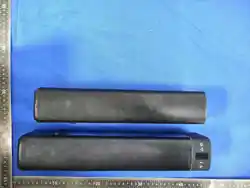
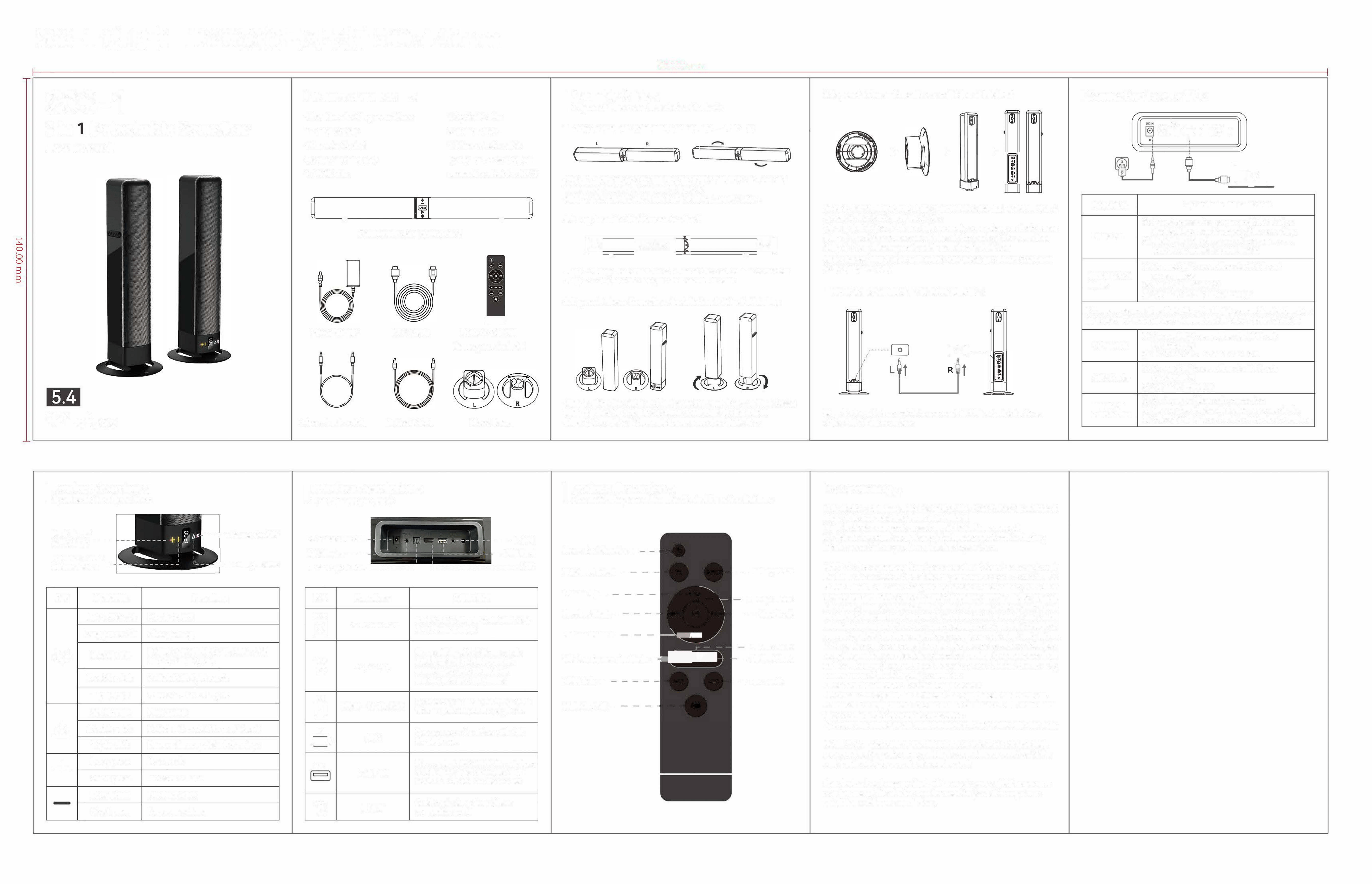
1 Dual interlocking sound bars
1 Power supply
1 Remote Control
(battery not include)
1 ARC Cable
二一`
l
Power supply
。
匡
Dual interlocking sound bars
3.5mm Audio cable
ARC Cable
Optical Cable
1 Optical Cable
2 Stand Bases
1 3.5mm Audio cable
(Only for L/R soundbar
connection,
Not for AUX)
`罩歹
_
Remote Control
(battery not include)
Stand Bases
(_
_-
I
Assembly Guide
斗
4 Types of Placement Installation Methods
1.Long Soundbar combination method-Table Top
{
L
(
Step 1: Align the grooves in the two parts of the sound bar and
then twist to rotate form unlock to lock
Step 2: Complete long soundbar table top combination
2.Long Soundar Wall Mount Method
4.Separate Tower Soundbars wall Mount Method
I Connectin
g
to your TV
斗
但
`歹
匠
i
,
-
叶
Step 1: Hang the screws on 2 holes at the back of the sound bar
Step 2: Complete the long sound bar wall mount
3.Separate Tower Soundbars Installation Method Table Top
`
陟
Step 1: Align the right and left separate sound bars on their bases
Step 2: Twist to lock the separate soundbars on the bases
Step 3: Complete 2 Separate tower soundbar Table Top
I
How to connect L/R soundbar�
问
一
参
工
.
.
.蠡
...•
4
..
.t.
i
一
令
R
t
-
一
令
工
··
·······
···
·
,
.
,
问
问
问
Step 1: Removal the round discs from left base and unscrew the 3
screws in the bottom of each disc
Step
2: Install the right and left separate soundbars on their bases
Step 3: Hand the screws on 2 holes at the back of the soundbar
Step 4: Complete separate wall
-
mounted installation
Note: Install the discs back when
y
ou want to restore the base
to its original state
Step 1: Use a 3.5mm cable to connect LOUT output interfaces
of the left /right soundbar
O
心X,N
C
O L如
©
回]单色
©
@
口
巨
Functions
Operation Introduction
.
First, Connect the power cord (15V=3A) to
Power on
the
DC IN port on the back of the soundbar.
@.
Next, Plug the other end of the power cord
into an AC (mains) power outlet.
.
Connect TV to soundbar via HDMI port
HDMI (ARC)
on soundbar
Mode
.
Set TV to HDMI ARC
®·Set TV
to
PCM or Passthrough
If there no sound after following the HDMI connection instruction.
Go
to you TV settings and enable HDMI-CEC Device Control.
. Connect TV to soundbar via OPT port
OPT Mode on soundbar
@. Set TV to OPT
3. Set TV to PCM
.
Connect TV
to soundbar via AUX port
AUX Mode
on soundbar
@. Set TV to Headset
Bluetooth
. Set input to Bluetooth connection
@. Turn on the Bluetooth feature on your device
Connection
@. Select "S33-1" from the list of Bluetooth devices
I
Product Overview
斗
Speaker Button Operations
I
Interface Description
斗
Port Connection Guide
I
Product Illustration 斗
Schematic Diagram of Remote Control Function Buttons
Next Track/
Volume
Up
•----
Previous Track/
Volume Down
•
-
一一一,-
Power On/O
-
,
-
-
-
•
Play/P
ause
Ke
y
Operation
Functions
Long press 2s
Power on/off
Long press 1 Os
Clear pairing
七
·
, .
). 、
-
Short press
Switch between BT,Opt, ARC, USB
and AUX functions
Double-dick Switch RGB light mode
Triple
-
click
Turn On/Turn O light
Short press
Play/pause
8
Double
-
click Switch EQ mode(Normal/Vocal)
Triple
-
click
Restore factory default Settings
+
Long press
Next track
Short press
Increase volume
Long press Previous track
Short press
Decrease volume
DC Power Port
•
-
AUX Port►
- ---
Fiber -
Optic
Port
-
--
-
- -
-
-1
---
•
L
OUT
-•
USB Port
L
- - - - - -
- - - - - - -
- -
ARC
K
e
y
Functions
Operation
DCIN
Insert
a DC power cord (15V 3A)
笆
DC Power Port
for
power
supply.
Compatible with 3.5mm audio
AUXIN
interfaces of mobile phones,
@
AUX Port
computers, and tablets for
connection and playback.
OPT
Connect to an audio interface with
回]
Fiber - Optic Port
fiber
-
optic output for playback.
ARC
Connect to an interface with ARC
(孛)
ARC
for
playback.
USB
Play music in MP3/WAVformat from
USB Port
a
USB drive. It is compatible with
most USB drivers on the market.
LOUT
Dual Interlocking Sound Bars
©
LOUT
connection port.
Power On/ Standby
EQ Sound Eect
Volume
Up
Previous Track
Volume Down
Wireless Connection Mode
USB Mode
Mute On/ O
-
-
@
-0 8-
一二十
气
今
,
_
,
_
户·亏l
月
一已三
- - -@
1
-
-
Factory
Reset
Play / Pause
-
-
-
.
. Next
Track
AUX
Mode
◄
Optical Mode
-
ARC
Mode
FCC
Warning
This device complies with Part 15 of the FCC Rules. Operation is
subject to the following two conditions:
(1) This device may not cause harmful interference, and (2) this
device must accept any interference received, including interference
that may cause undesired operation.
NOTE 1: This equipment has been tested and found to comply with
the limits for a Class B digital device, pursuant to part 15 of the FCC
Ru
les. These limits are designed to provide reasonable protection
a
gainst harmful interference in a residential installation. This
e
quipment generates, uses and can radiate radio frequency energy
a
nd, if not installed and used in accordance with the instructions,
may cause harmful interference to radio communications. However,
there is no guarantee that interference will not occur in a particular
in
stallation. If this equipment does cause harmful interference to
radio or television reception, which can be determined by turning
the equipment off and on, the user is encouraged to try to correct
th
e interference by one or more of the following measures:
- Reorient or relocate the receiving antenna.
- Increase the separation between the equipment and receiver.
-Connect the equipment into an outlet on a circuit different from
that to which the receiver is connected.
-Consult the dealer or an experienced radio/TV technician for help.
NOTE 2: Any changes or modifications to this unit not expressly
a
pproved by the party responsible for compliance could void the
user's authority to operate the equipment.
RF Exposure Statement
To ma
intain compliance with FCC'S RF Exposure guidelines, This
equipment should be installed and operated with minimum 2
0
cm
between the radiator and your body. This device and its antenna(s)
mu
st not be co-located or operation in conjunction with any other
antenna or transmitter.