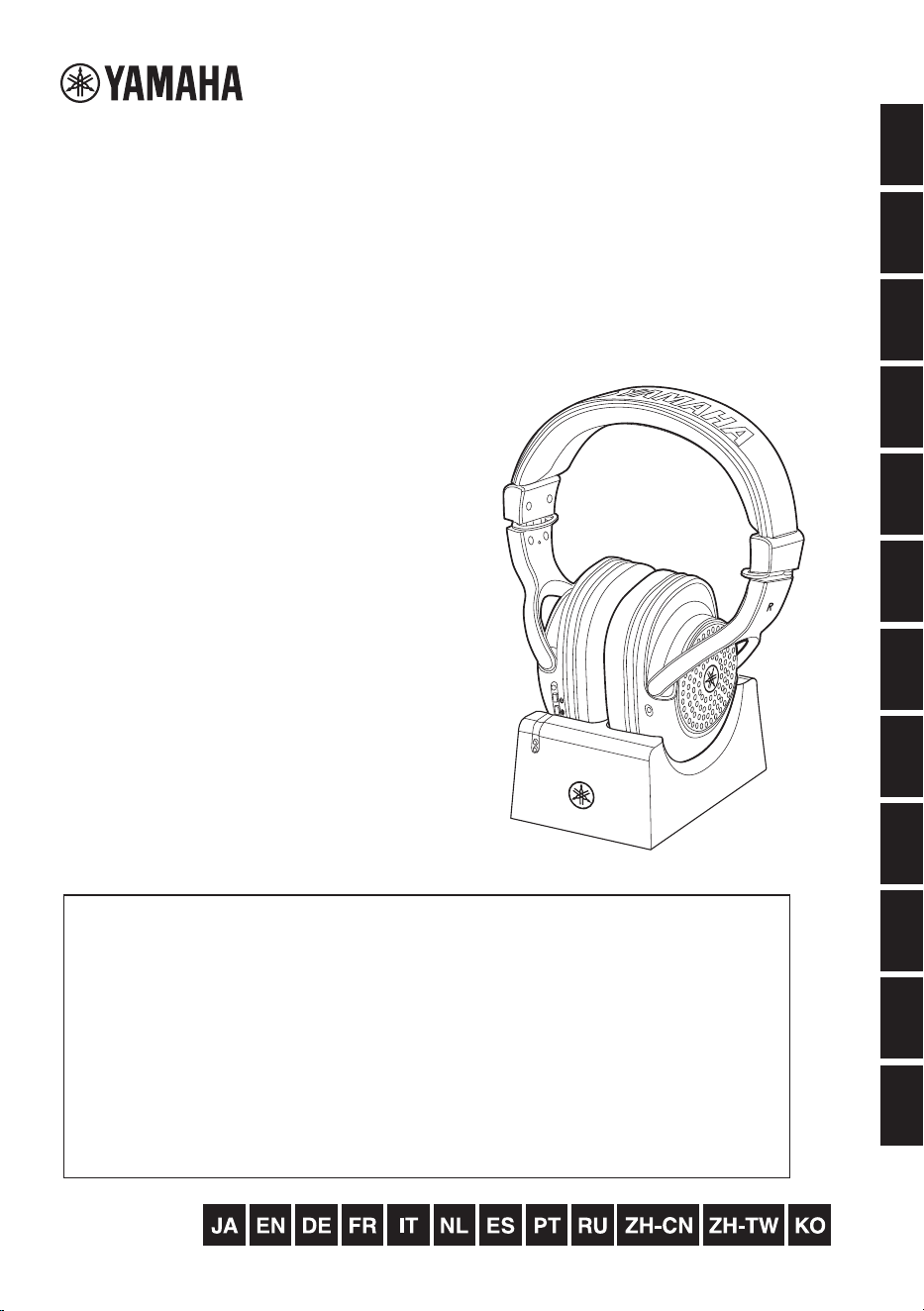
YH-WL500
日本語
EnglishDeutsch
FrançaisItaliano
Nederlands
Español
Português
한국어 Рycский繁體中文 简体中文
YH-WL500
取扱説明書
Owner’s Manual
Benutzerhandbuch
Mode d’emploi
Manuale di istruzioni
Gebruikershandleiding
Manual de instrucciones
Manual do Proprietário
Руководство пользователя
使用说明书
使用說明書
ۉࡅ۳ֵۭ
「安全上のご注意」(3ページ)を必ずお読みください。
Make sure to read the “PRECAUTIONS” on page 4.
Lesen Sie unbedingt die „VORSICHTSMASSNAHMEN“ auf Seite 4.
Assurez-vous de lire "PRÉCAUTIONS D’USAGE" à la page 4.
Asegúrese de leer “PRECAUCIONES” en la página 4.
Certifique-se de ler “PRECAUÇÕES” na página 4.
Обязательно прочтите разделы «ПРАВИЛА ТЕХНИКИ БЕЗОПАСНОСТИ» на стр. 4.
Lees de "VOORZICHTIG" op pagina 4.
Assicurarsi di leggere le "PRECAUZIONI" a pagina 4.
务请阅读第4页“注意事项”。
請務必詳閱第4頁的「注意事項」。
ࢇࢂę߇ࢷ࣯ࢂیତĚࡶ؆Җݤࢋ࣯߭ݫݤࠝ
ワイヤレスヘッドホン
Wireless Headphones
CASQUE D'ÉCOUTE SANS FIL
БЕСПРОВОДНЫЕ НАУШНИКИ
无线耳机
無線耳機
1. IMPORTANT NOTICE: DO NOT MODIFY
THIS UNIT!
This product, when installed as indicated in the
instructions contained in this manual, meets FCC
requirements. Modifications not expressly approved
by Yamaha may void your authority, granted by the
FCC, to use the product.
2. IMPORTANT: When connecting this product to
accessories and/or another product use only high
quality shielded cables. Cable/s supplied with this
product MUST be used. Follow all installation
instructions. Failure to follow instructions could void
your FCC authorization to use this product in the
USA.
3. NOTE: This product has been tested and found to
comply with the requirements listed in FCC Regula-
tions, Part 15 for Class “B” digital devices. Compli-
ance with these requirements provides a
reasonable level of assurance that your use of this
product in a residential environment will not result in
harmful interference with other electronic devices.
This equipment generates/uses radio frequencies
and, if not installed and used according to the
instructions found in the users manual, may cause
interference harmful to the operation of other elec-
tronic devices. Compliance with FCC regulations
does not guarantee that interference will not occur
in all installations. If this product is found to be the
source of interference, which can be determined by
turning the unit “OFF” and “ON”, please try to elimi-
nate the problem by using one of the following mea-
sures:
- Relocate either this product or the device that is
being affected by the interference.
- Utilize power outlets that are on different branch
(
circuit breaker or fuse) circuits or install AC line
filter/s.
- In the case of radio or TV interference, relocate/
reorient the antenna. If the antenna lead-in is 300
ohm ribbon lead, change the lead-in to co-axial
type cable.
If
these corrective measures do not produce satis-
factory results, please contact the local retailer
authorized to distribute this type of product. If you
cannot locate the appropriate retailer, please con-
tact Yamaha Corporation of America, 6600 Oran-
gethorpe Ave., Buena Park, CA90620, USA.
The above statements apply ONLY to those prod-
ucts distributed by Yamaha Corporation of America
or its subsidiaries.
(529-M04 FCC class B YCA 01)
FCC INFORMATION (U.S.A.)
COMPLIANCE INFORMATION STATEMENT
(Supplier’s declaration of conformity procedure)
Responsible Party : Yamaha Corporation of America
Address : 6600 Orangethorpe Ave. Buena
Park Calif. 90620
Telephone : 714-522-9011
Type of Equipment : Wireless Headphones
Model Name : YH-WL500
This device complies with Part 15 of the FCC Rules.
Operation is subject to two following conditions:
1) this device may not cause harmful interference, and
2) this device must accept any interference received
including interference that may cause undesired
operation.
(529-M02 FCC sdoc YCA 01)
IMPORTANT
Plese record the serial number of this unit in the
space below.
Model
Serial No.
This serial number is located on the bottom or rear
of the unit.
Retain this Owner’s Manual in a safe place for
future reference.
(Ser.No)
This applies only to products distributed by
YAMAHA CORPORATION OF AMERICA.
YH-WL500 Owner’s Manual
3
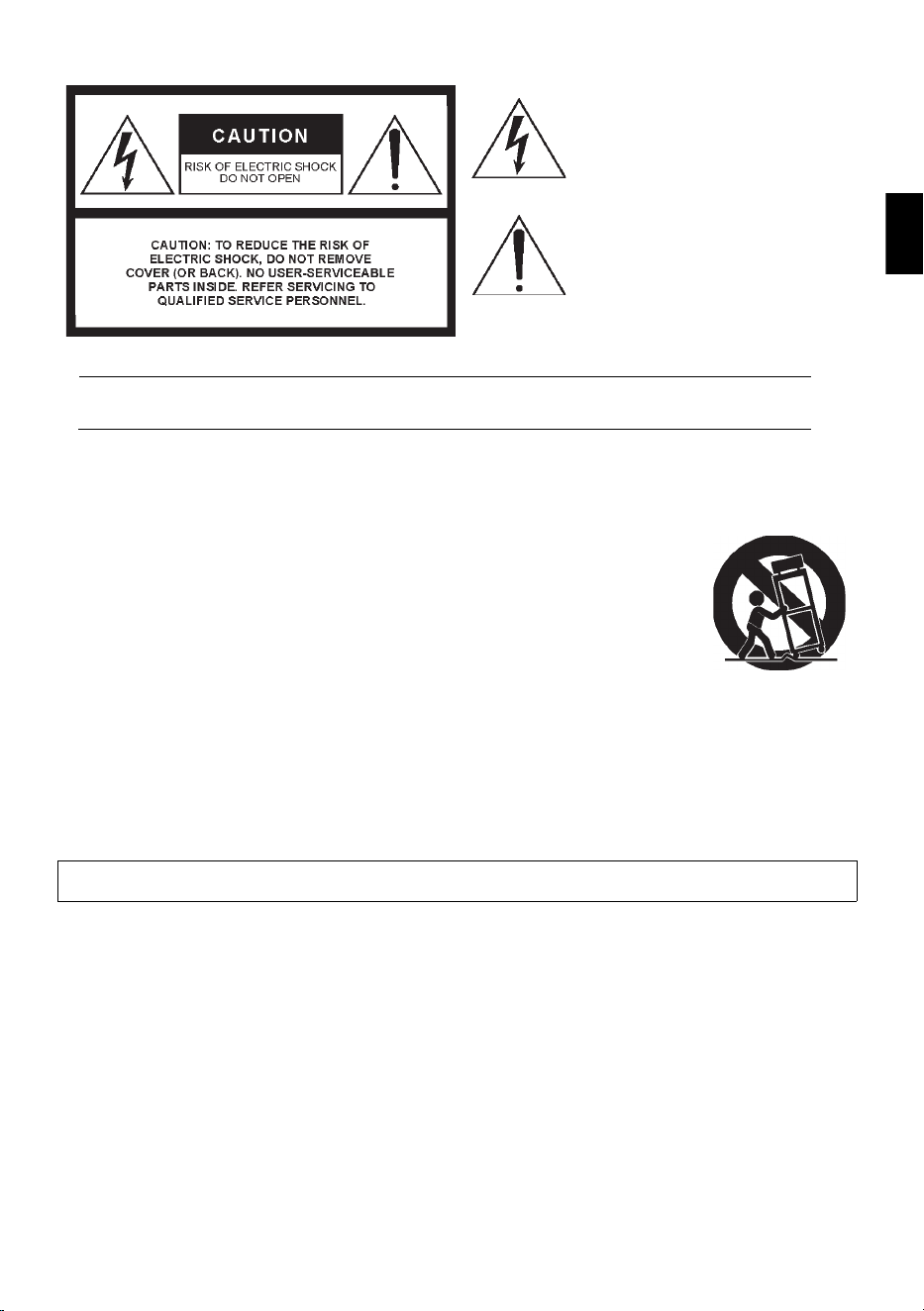
([SODQDWLRQRI*UDSKLFDO6\PEROV
7KHOLJKWQLQJIODVKZLWKDUURZKHDG
V\PEROZLWKLQDQHTXLODWHUDOWULDQJOHLV
LQWHQGHGWRDOHUWWKHXVHUWRWKH
SUHVHQFHRIXQLQVXODWHGGDQJHURXV
YROWDJHZLWKLQWKHSURGXFWVHQFORVXUH
WKDWPD\EHRIVXIILFLHQWPDJQLWXGHWR
FRQVWLWXWHDULVNRIHOHFWULFVKRFNWRSHUVRQV
7KHH[FODPDWLRQSRLQWZLWKLQDQ
HTXLODWHUDOWULDQJOHLVLQWHQGHGWRDOHUW
WKHXVHUWRWKHSUHVHQFHRILPSRUWDQW
RSHUDWLQJDQGPDLQWHQDQFHVHUYLFLQJ
LQVWUXFWLRQVLQWKHOLWHUDWXUH
DFFRPSDQ\LQJWKHSURGXFW
,03257$176$)(7<,16758&7,216
5HDGWKHVHLQVWUXFWLRQV
.HHSWKHVHLQVWUXFWLRQV
+HHGDOOZDUQLQJV
)ROORZDOOLQVWUXFWLRQV
'RQRWXVHWKLVDSSDUDWXVQHDUZDWHU
&OHDQRQO\ZLWKGU\FORWK
'RQRWEORFNDQ\YHQWLODWLRQRSHQLQJV,QVWDOOLQ
DFFRUGDQFHZLWKWKHPDQXIDFWXUHUVLQVWUXFWLRQV
'RQRWLQVWDOOQHDUDQ\KHDWVRXUFHVVXFKDV
UDGLDWRUVKHDWUHJLVWHUVVWRYHVRURWKHU
DSSDUDWXVLQFOXGLQJDPSOLILHUVWKDWSURGXFHKHDW
'RQRWGHIHDWWKHVDIHW\SXUSRVHRIWKHSRODUL]HG
RUJURXQGLQJW\SHSOXJ$SRODUL]HGSOXJKDVWZR
EODGHVZLWKRQHZLGHUWKDQWKHRWKHU$JURXQGLQJ
W\SHSOXJKDVWZREODGHVDQGDWKLUGJURXQGLQJ
SURQJ7KHZLGHEODGHRUWKHWKLUGSURQJDUH
SURYLGHGIRU\RXUVDIHW\,IWKHSURYLGHGSOXJGRHV
QRWILWLQWR\RXURXWOHWFRQVXOWDQHOHFWULFLDQIRU
UHSODFHPHQWRIWKHREVROHWHRXWOHW
3URWHFWWKHSRZHUFRUGIURPEHLQJZDONHGRQRU
SLQFKHGSDUWLFXODUO\DWSOXJVFRQYHQLHQFH
UHFHSWDFOHVDQGWKHSRLQWZKHUHWKH\H[LWIURPWKH
DSSDUDWXV
2QO\XVHDWWDFKPHQWVDFFHVVRULHVVSHFLILHGE\WKH
PDQXIDFWXUHU
8VHRQO\ZLWKWKHFDUW
VWDQGWULSRGEUDFNHWRU
WDEOHVSHFLILHGE\WKH
PDQXIDFWXUHURUVROGZLWK
WKHDSSDUDWXV:KHQDFDUW
LVXVHGXVHFDXWLRQZKHQ
PRYLQJWKHFDUWDSSDUDWXV
FRPELQDWLRQWRDYRLGLQMXU\
IURPWLSRYHU
8QSOXJWKLVDSSDUDWXVGXULQJOLJKWQLQJVWRUPVRU
ZKHQXQXVHGIRUORQJSHULRGVRIWLPH
5HIHUDOOVHUYLFLQJWRTXDOLILHGVHUYLFHSHUVRQQHO
6HUYLFLQJLVUHTXLUHGZKHQWKHDSSDUDWXVKDVEHHQ
GDPDJHGLQDQ\ZD\VXFKDVSRZHUVXSSO\FRUGRU
SOXJLVGDPDJHGOLTXLGKDVEHHQVSLOOHGRUREMHFWV
KDYHIDOOHQLQWRWKHDSSDUDWXVWKHDSSDUDWXVKDV
EHHQH[SRVHGWRUDLQRUPRLVWXUHGRHVQRWRSHUDWH
QRUPDOO\RUKDVEHHQGURSSHG
:$51,1*
725('8&(7+(5,6.2)),5(25(/(&75,&6+2&.'2127(;326(7+,6$33$5$786725$,12502,6785(
08/HQ
YH-WL500 Owner’s Manual
4
PLEASE READ CAREFULLY BEFORE PROCEEDING
Please keep this manual in a safe and handy place for future reference.
WARNING
Always follow the basic precautions listed below to avoid the possibility of serious injury or even death from
electrical shock, short-circuiting, damages, fire or other hazards. These precautions include, but are not
limited to, the following:
• Do not place the USB cable near heat sources such as
heaters or radiators. Also, do not excessively bend or
otherwise damage the cord, or place heavy objects on it.
• Do not touch the product or the power plug during an
electrical storm.
• Use only the correct voltage specified for the product. The
required voltage is printed on the name plate of the
product.
• Use the specified USB AC adaptor (page 20).
• Use only the supplied USB cable/plug. Do not use the
USB cable/plug for other products.
• Check the power plug periodically and remove any dirt or
dust which may have accumulated on it.
• Insert the power plug firmly all the way into the AC outlet.
Using the product when it is not plugged in sufficiently
can cause dust to accumulate on the plug, possibly
resulting in fire or skin burns.
• When setting up the product, make sure that the AC outlet
you are using is easily accessible. If some trouble or
malfunction occurs, immediately turn off the power switch
and disconnect the plug from the outlet. Even when the
power switch is turned off, as long as the USB cable is not
unplugged from the wall AC outlet, the product will not be
disconnected from the power source.
• Do not connect the product to an electrical outlet using a
multi-plug outlet extender. Doing so can result in lower
sound quality, or possibly cause overheating in the outlet.
• When disconnecting the power plug, always hold the plug
itself and not the cord. Pulling by the cord can damage it
and cause electric shocks or a fire.
• If not using the product for long periods of time, be sure to
pull the power plug from the AC outlet.
• This product contains no user-serviceable parts. Do not
attempt to disassemble the internal parts or modify them
in any way.
• Do not expose the product to rain, use it near water or in
damp or wet conditions, or place on it any containers
(such as vases, bottles or glasses) containing liquids
which might spill into any openings or places where water
may drop. A liquid such as water getting into the product
may cause a fire, electric shocks, or malfunctions.
• Use the USB AC adaptor indoors only. Do not use in any
wet environments.
• Never insert or remove a power plug with wet hands.
• Do not place any burning items or open flames near the
product, since they may cause a fire.
• Radio waves from this product may affect electro-medical
devices, such as a heart pacemaker implant or defibrillator
implant.
- Do not use the product near medical devices or inside
medical facilities. Radio waves from this product may
affect electro-medical devices.
- Do not use the product within 15 cm (6 in.) of persons
with a heart pacemaker implant or a defibrillator
implant.
PRECAUTIONS
Power supply
Do not disassemble
Water warning
Fire warning
Wireless unit
DMI-10 1/3

YH-WL500 Owner’s Manual
5
• Do not disassemble this product. Failure to do so might
result in battery fluid leakage. If the contents of the battery
get on your hands or in your eyes, it can cause blindness,
chemical burns, and damage to the product.
• Do not dispose of this product in fire. Doing so may result
in the battery bursting, causing a fire or injury.
• Do not expose this product to high temperatures, such as
direct sunlight or a fire. Doing so may result in the battery
bursting, causing a fire or injury.
• Do not subject this product to mechanical shock.
It may result in damage caused by batteries, electric
shock, or malfunction.
• If the batteries do leak, avoid contact with the leaked fluid.
If the battery fluid should come in contact with your eyes,
mouth, or skin, wash immediately with water and consult a
doctor. Battery fluid is corrosive and may possibly cause
loss of sight or chemical burns.
• Do not place this product in a place where the air pressure
is extremely low.
• For details on charging the battery, be sure to read the
battery manual and follow the instructions. Failure to do
so may result in fire, overheating, explosion or
malfunction.
• If any of the following problems occur, immediately turn
off the power switch and disconnect the power plug from
the outlet. If you are using batteries, remove all batteries
from the product.
Finally have the device inspected by Yamaha service
personnel.
- The USB cable or plug becomes frayed or damaged.
- Unusual smells or smoke are emitted.
- Some object, or water has been dropped into the
product.
- There is a sudden loss of sound during use of the
product.
- Cracks or other visible damage appear on the product.
(Lithium ion) battery If you notice any abnormality
DMI-10 2/3
YH-WL500 Owner’s Manual
6
CAUTION
Always follow the basic precautions listed below to avoid the possibility of physical injury to you or others,
or damage to the product or other property. These precautions include, but are not limited to, the following:
• Do not place the product in an unstable position or a
location with excessive vibration, where it might
accidentally fall over and cause injury.
• Before connecting the product to other electronic
components, turn off the power for all components. Also,
before turning the power on or off for all components, set
all volume levels to minimum.
• Be sure to set the volumes of all components at their
minimum levels and gradually raise the volume controls
while playing the product to set the desired listening level.
• Do not rest your weight on, or place heavy objects on the
product, and do not use excessive force on the buttons,
switches or connectors.
• Keep small parts out of the reach of infants or small
children who may accidentally swallow them.
• Do not use the product or headphones
for a long period of time at a high or
uncomfortable volume level, since this
can cause permanent hearing loss. If
you experience any hearing loss or
ringing in the ears, consult a physician.
• If the headphones irritate your skin, stop use immediately.
• Remove the power plug from the AC outlet before cleaning
the unit. Failure to observe this may cause electric shocks.
• Before moving the product, remove all connected cables,
to prevent damage to the cables or injury to anyone who
might trip over them.
• Charge only with a specified charger. Charging with an
unspecified charger may cause leakage, overheating,
explosion, or malfunction.
• Charge only within the specified charging temperature
range. Charging at a temperature outside the range may
cause leakage, overheating, explosion, or malfunction.
Location
Connections
Handling
(Lithium ion) battery
DMI-10 3/3
YH-WL500 Owner’s Manual
7
Notices
Battery-related notes
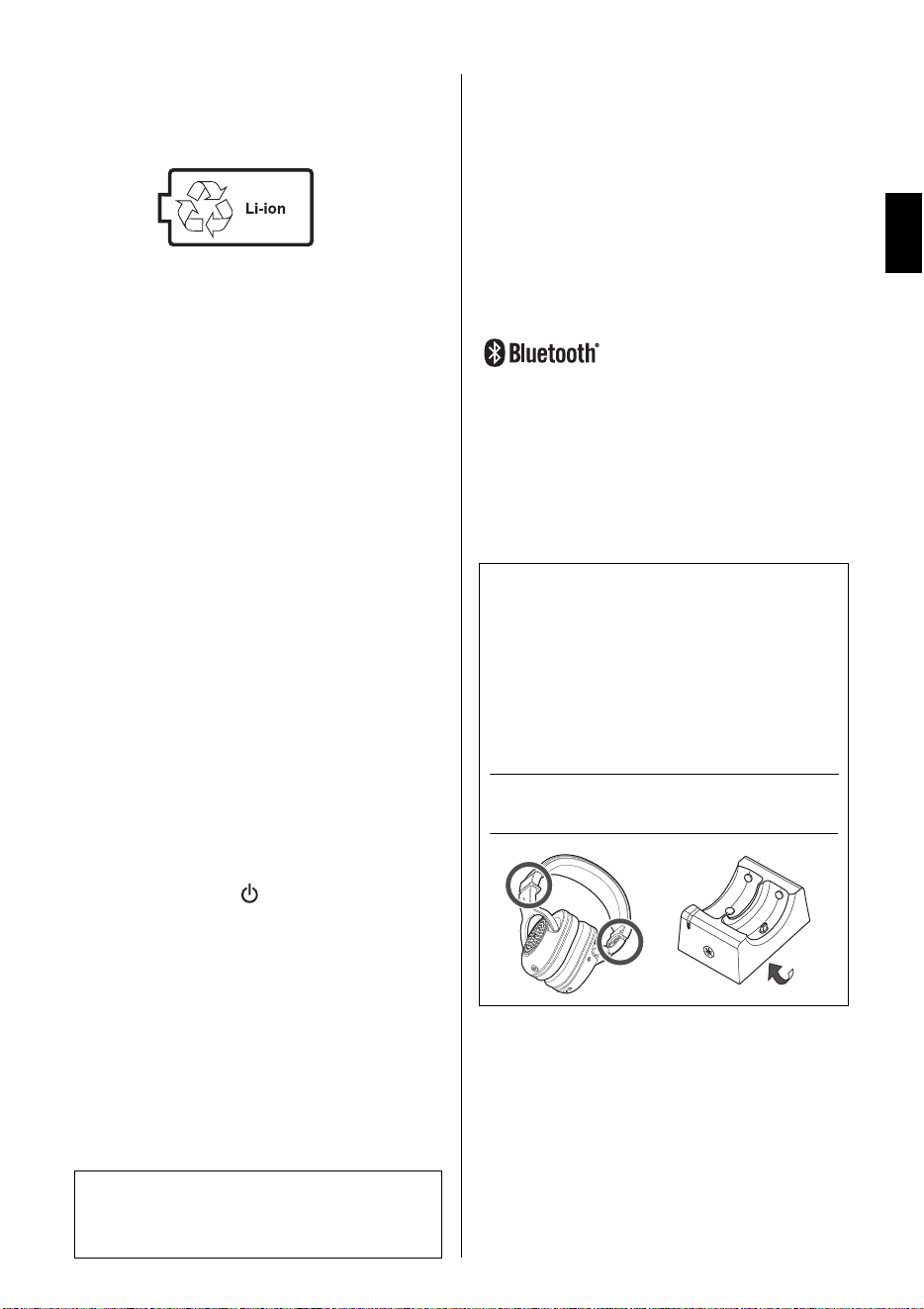
This product contains a lithium-ion battery.
The lithium-ion battery contained in this product is a
consumable item. To extend the life of the battery as
long as possible, use caution regarding the following.
• If the product is not used for a long period of time,
the charging time may get longer.
• When storing the product for a long time, charge the
product around once every six months to avoid
excessive discharge.
• When the battery fails to hold a charge or only has
useful power for a very short time, the life of the bat-
tery is over.
• Lithium-ion batteries can be recycled. After usage,
you may recycle the battery, but never attempt to
remove it by yourself. Have the device inspected by
qualified Yamaha service personnel. If there are no
Yamaha service personnel in your area, dispose of
it properly according to relevant environmental laws
and disposal rules in your area.
• This product contains a battery that contains per-
chlorate material. Perchlorate Material - special
handling may apply,
See www.dtsc.ca.gov/hazardouswaste/perchlorate.
Handling this product
• Depending on the condition of surrounding radio
waves, the product may possibly malfunction.
• Always turn the power off when the product is not in
use. Even when the [ ] (power key) switch is in
standby status (power LED is off/ status is off), elec-
tricity is still flowing to the product at the minimum
level. When you are not using the product for a long
time, make sure you unplug the power cord from
the wall AC outlet.
Maintenance
When cleaning the product, use a soft and dry (or
slightly damp) cloth. Do not use paint thinners, sol-
vents, alcohol, cleaning fluids, or chemical-impreg-
nated wiping cloths.
Information
About the contents of this document
• This document is an owner’s manual intended for
the readers who will use this product.
• The illustrations and screens as shown in this docu-
ment are for instructional purposes only.
• Software may be revised and updated without prior
notice.
Trademarks
•The Bluetooth® word mark and logos are regis-
tered trademarks owned by Bluetooth SIG, Inc. and
any use of such marks by Yamaha Corporation is
under license.
• The company names and product names in this
manual are the trademarks or registered trade-
marks of their respective companies.
Yamaha cannot be held responsible for
damage caused by improper use or modifi-
cations to the product.
The graphic below indicates the location of the
name plate. The model number, serial number,
power requirements, etc., are located on this plate.
You should note this serial number in the space
provided below and retain this manual as a perma-
nent record of your purchase to aid identification in
the event of theft or loss.
Model No.
Serial No.
(bottom_en_02)

YH-WL500 Owner’s Manual
8
Table of Contents
PRECAUTIONS .................................................................................. 4
Notices .............................................................................................................. 7
Information ....................................................................................................... 7
Product Overview ............................................................................. 9
Main Features ................................................................................................... 9
Packing Contents ............................................................................................. 9
Part Names ..................................................................................................... 10
Setting Up ....................................................................................... 11
Connecting the Transmitter to Other Devices by Cables ........................... 11
When connecting to a digital musical instrument or audio interface .................. 11
When connecting to a guitar amp ...................................................................... 11
Connecting the Power Adaptor .................................................................... 12
Charging the Headphones ............................................................................ 12
Basic Operations ............................................................................ 13
Using the Headphones .................................................................................. 13
Adjusting the Volume .................................................................................... 13
Checking the Audio Input Status .................................................................. 13
Checking Remaining Battery Power ............................................................ 14
After Using the Headphones ......................................................................... 14
Connecting by Cable ..................................................................................... 14
Advanced Features ......................................................................... 15
Using Simultaneously with Bluetooth Devices ........................................... 15
Registering a Bluetooth device .......................................................................... 15
Connecting to a Bluetooth device ...................................................................... 16
Disconnecting from a Bluetooth device .............................................................. 17
Using Additional Headphones ...................................................................... 17
Troubleshooting .............................................................................. 18
Appendix ......................................................................................... 20
Specifications ................................................................................................. 20
List of Operations .......................................................................................... 21
List of Audio Messages and LED Indicator ................................................. 21
Audio messages ................................................................................................ 21
LED displays ...................................................................................................... 22
YH-WL500 Owner’s Manual
9
Product Overview
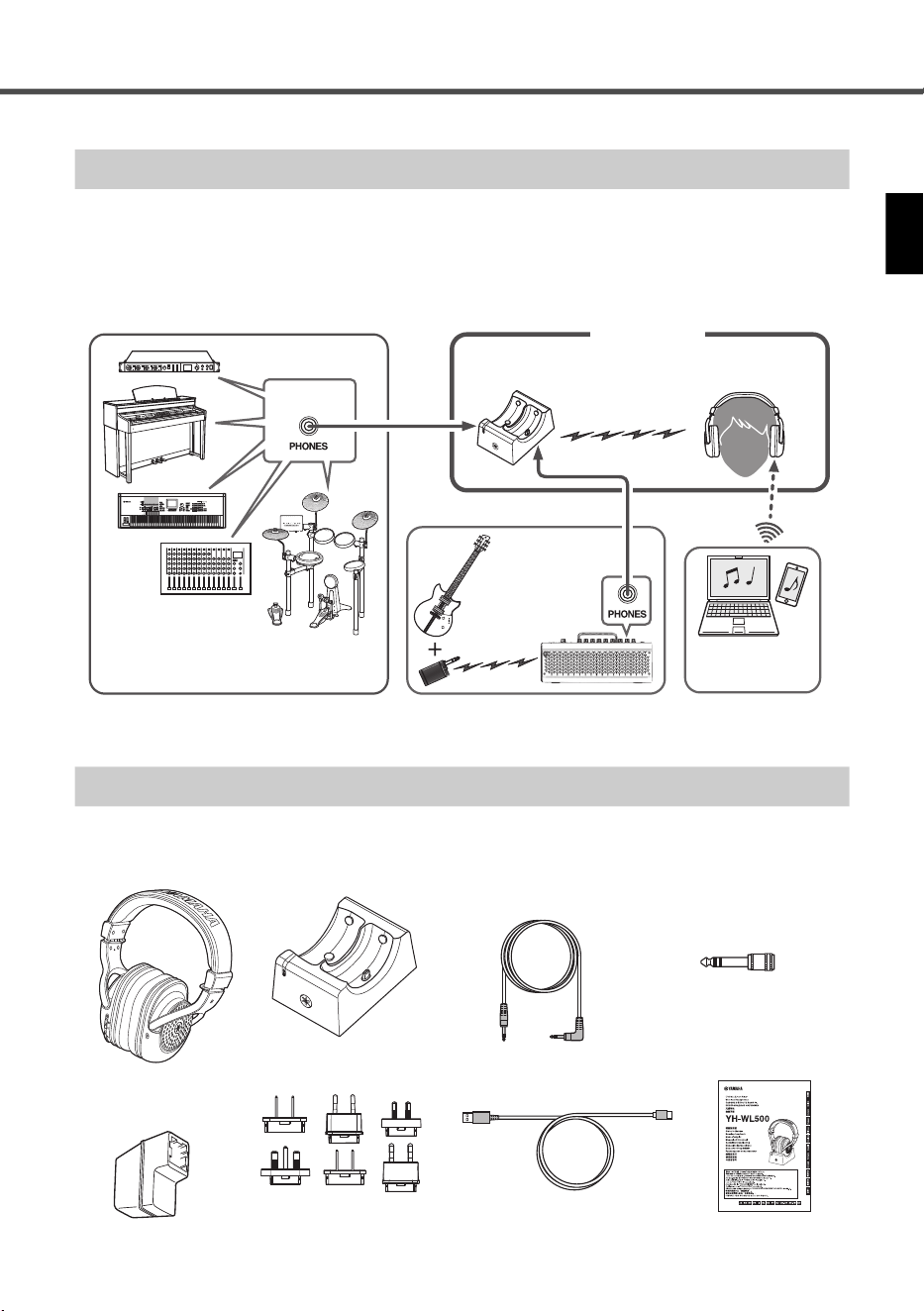
This product is a set of wireless headphones with a companion transmitter. The input jack of the
transmitter can be connected to the headphone jack of a device (such as a digital keyboard, guitar
amplifier, audio interface, etc.), enabling wireless connection of exceptionally low latency. Since
this product can also be connected to a Bluetooth device, you can play your instrument s
imultane-
ously along with music playback from your Bluetooth device, such as a smartphone.
Make sure that all of the following are enclosed with this product.
Main Features
* This is a dedicated connection using Yamaha’s original 2.4 GHz transmitter and achieves exceptionally low delay.
A transmission channel is automatically set up simply by removing the headphones from the transmitter.
Wireless
connection*
Headphone jack
Transmitter
Digital musical instrument, keyboard,
mixer, audio interface, etc.
Headphones
YH-WL500
Cable connection
Bluetooth
Cable
con-
nection
Headphone jack
Guitar amplifier,
multi-effect
device
Smart device/
Computer
Packing Contents
Headphones
Transmitter
USB power adaptor
Attachment plugs × 6
USB cable
(50 cm/type A type C)
3.5 mm stereo mini
plug cable (2 m)
Audio conversion plug
(stereo mini plug stand-
ard stereo phone plug)
Owner’s Manual
(this document)
* Select the plug that corre-
sponds to the shape of the
AC outlet in your area.
Product Overview
YH-WL500 Owner’s Manual
10
Part Names
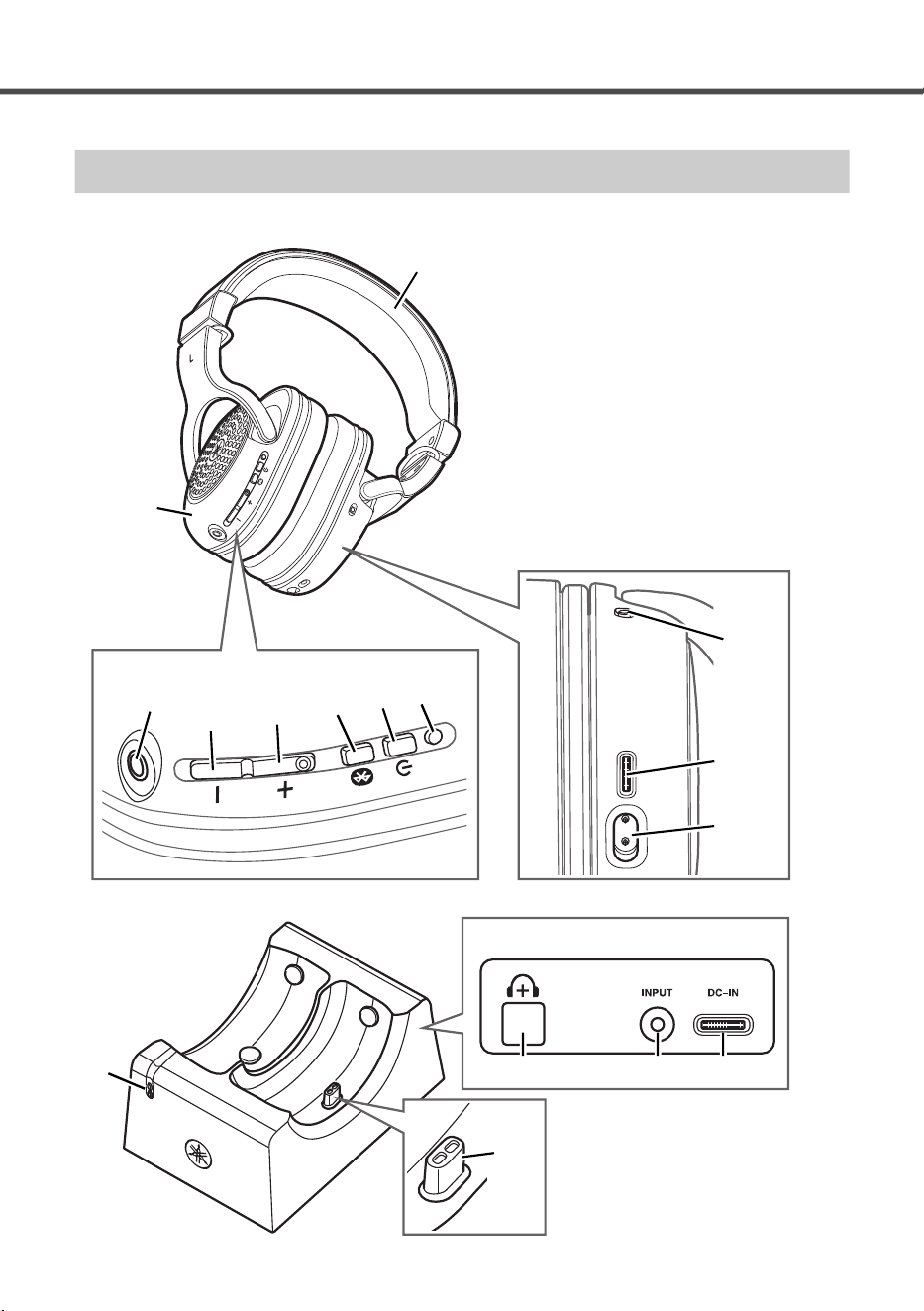
Headphones
Transmitter
!2 Status LED
!3 Connector B
!4 Additional headphones key
!5 Input jack
!6 DC IN
!2
!3
!4 !5 !6
Rear
i
u
y
t
r
e
w
o
!1
q Headband
w Housing
e Power LED
r Power key
t Bluetooth key
y + key
u − key
i Cable input jack
o Charging LED
!0 USB charging connector
!1 Connector A
Connect to Connector B of the transmitter.
!0
q
YH-WL500 Owner’s Manual
11
Setting Up
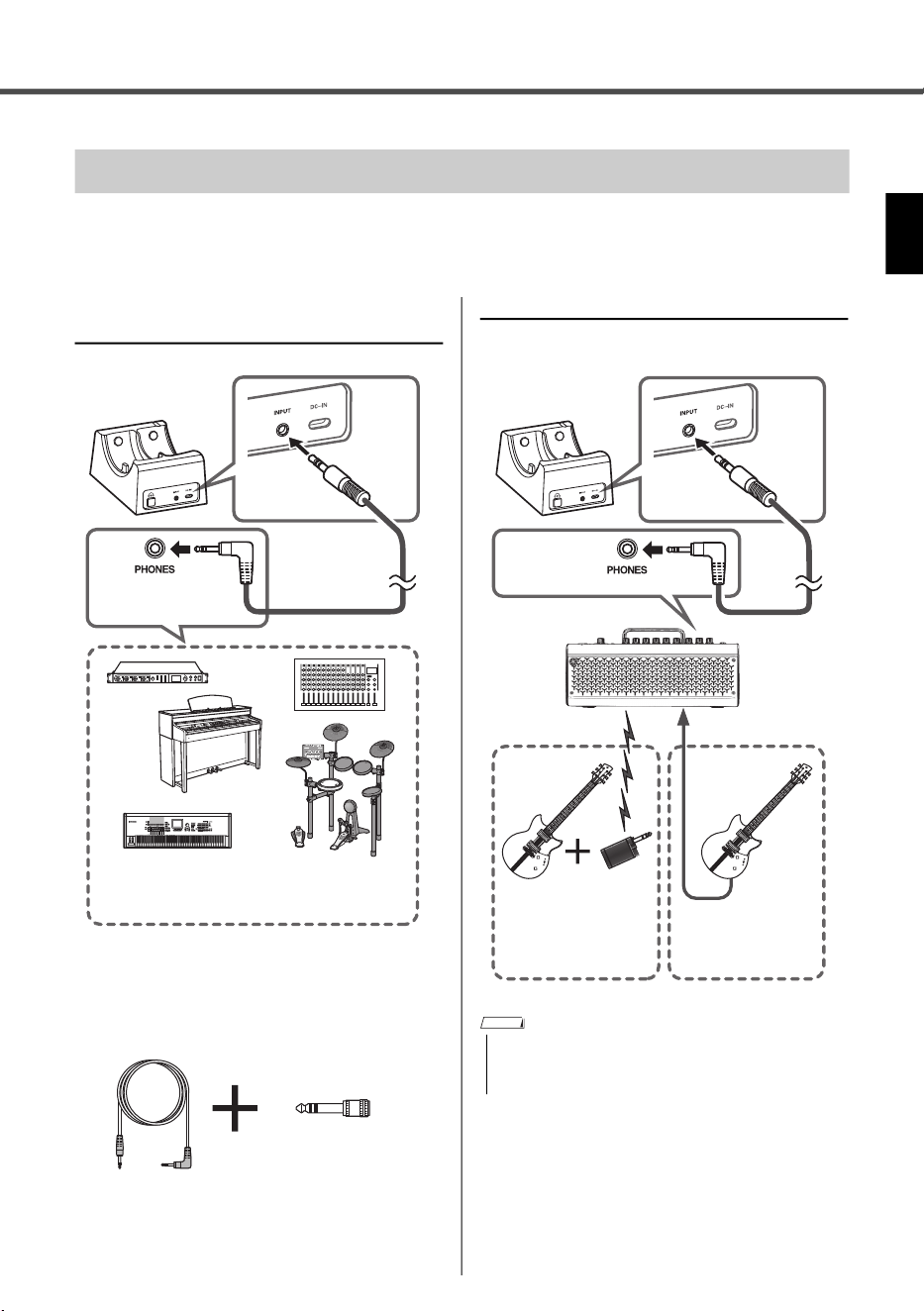
Before using the headphones, connect the headphone jack of your particular device (digital musi-
cal instrument, guitar amp, or audio interface, etc.) to the transmitter’s input jack (stereo mini jack),
by using the stereo mini plug cable included with this product.
When connecting to a digital musical
instrument or audio interface
Use the attached audio conversion plug depending on
the headphone jack of your particular device.
When connecting to a guitar amp
Connecting the Transmitter to Other Devices by Cables
Headphone jack
Stereo mini
plug cable
(included)
Input
jack
Rear
Transmitter
Digital musical instrument, keyboard, mixer,
or audio interface
3.5 mm stereo mini
plug cable
Audio conversion plug
(standard stereo phone
plug stereo mini plug)
• When using a commercial stereo mini plug cable for
connection with the transmitter, make sure to use one
having no (zero) resistance.
Cable
connection
Wireless
connection
Example showing
wireless transmitter
and corresponding
amplifier, such as
the Relay G10TII
Headphone
jack
Transmitter
Stereo mini
plug cable
(included)
Input
jack
Guitar amplifier,
multi-effect device
Rear
NOTE
Setting Up
YH-WL500 Owner’s Manual
12
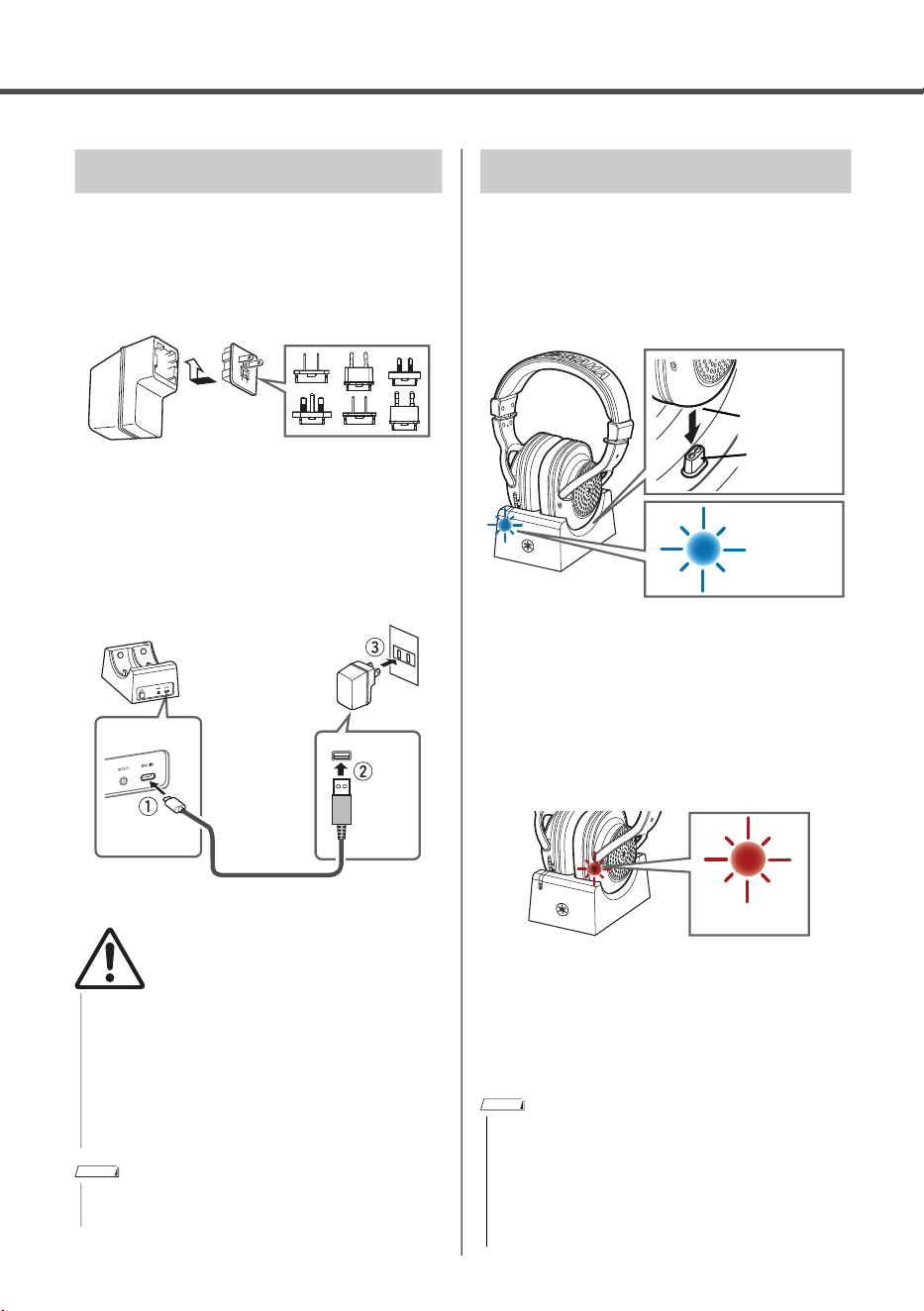
1. Attach the attachment plug that corresponds
to the shape of the AC outlet in your area to
the USB power adaptor.
For details, refer to the separate “Attachment Plug
Converter Table” leaflet.
2. Connect the USB power adaptor in the
order shown in the illustration.
Make sure to charge the headphones before
using.
1. Set the headphones on the transmitter.
Make sure that connecter A of the headphones fits
securely on connecter B of the transmitter.
If the headphones are set correctly, the status LED
of the transmitter flashes in blue, and then lights
continuously in blue.
When the status LED does not light up in blue,
check whether connector B of the transmitter is cor-
rectly inserted in connector A of the headphones.
2. Make sure that the charging LED of the
headphones is lit up in red.
The charging LED lights up in red during charging,
and turns off when charging is completed.
The charging LED will not light up when the head-
phones are already fully charged.
Setup is now completed.
Connecting the Power Adaptor
• Be sure to use the attached USB power adaptor only.
• When using the USB power adaptor with a removable
plug, make sure to keep the plug attached to the USB
power adaptor. Using the plug alone can cause elec-
tric shock or fire.
• Never touch the inner metallic section when attaching
the attachment plug to avoid electric shock, short cir-
cuit, or damage. Also, be careful th
at no dust accu-
mulates between the USB power
adaptor and plug.
• To disconnect the USB power adaptor, follow steps 2
q to e in reverse order.
USB power
adaptor
Attachment plug
Slide the plug
as indicated.
USB power
adaptor
USB cable
AC outlet
Transmitter
Rear
Type A
Type C
WARNING
NOTE
Charging the Headphones
• You may not be able to charge if you use a USB cable
other than the one included with this product.
• You can also charge directly from the AC outlet by con-
necting the USB cable with a USB power adaptor
instead of setting on the transmitter.
• During charging, no buttons can be used, and wireless
connection is canceled.
Connecter B
Connecter A
Blue
Red
NOTE
YH-WL500 Owner’s Manual
13
Basic Operations
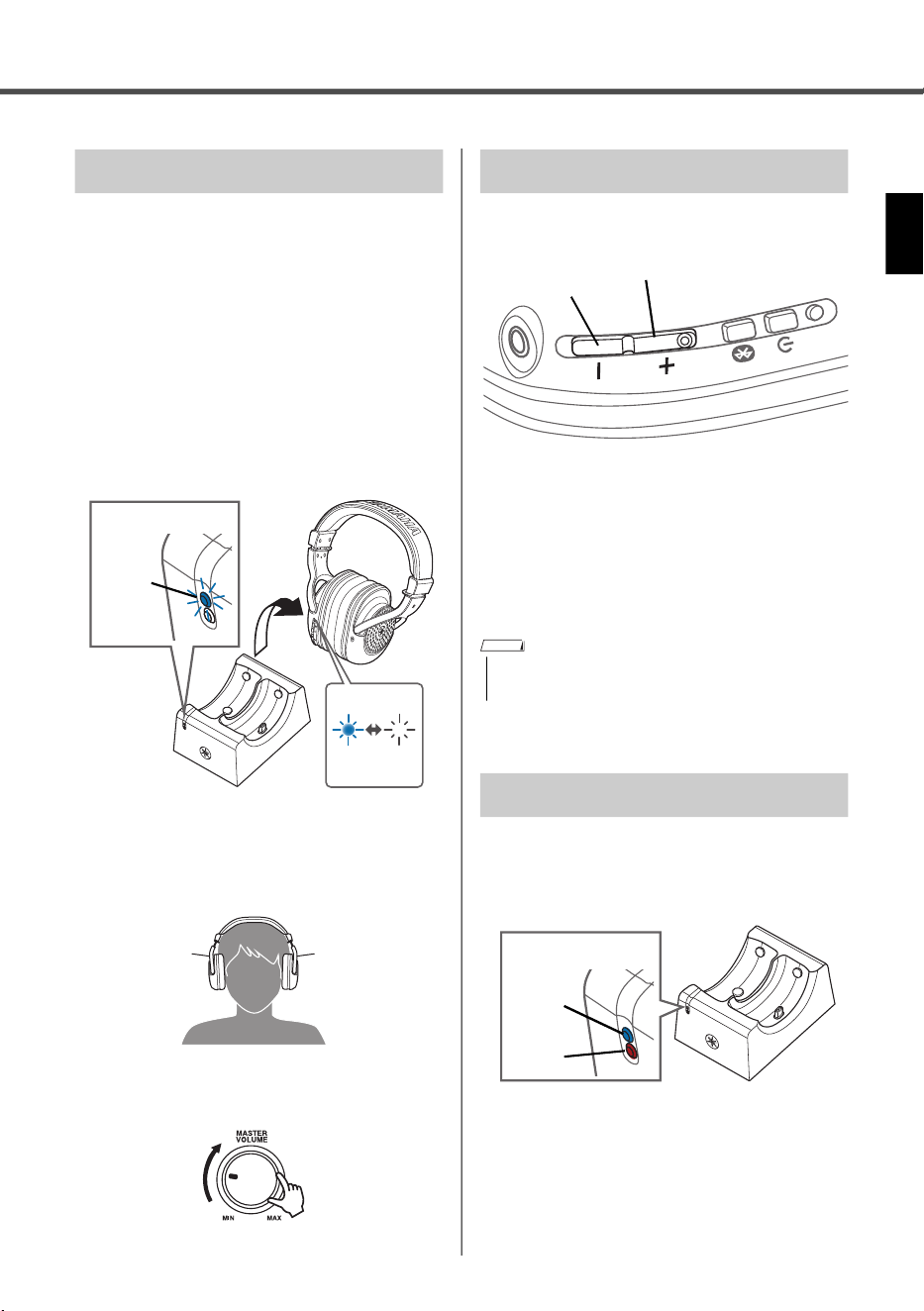
1. Turn on the power of your connected
devices.
Also in this step, lower the volume of those
devices.
2. Remove the fully charged headphones from
the transmitter.
The status LED of the transmitter and the power
LED of the headphones flash in blue and a wire-
less channel is set up automatically.
If successfully connected, you will hear a “Pairing
Successful” audio message, and then the power
LED lights continuously in blue.
3. Put the headphones on.
Check the markings for the left and right sides to
make sure the headphones are positioned cor-
rectly when you put them on.
4. Adjust the volume of your device as
desired.
Follow the steps below to adjust the volume.
• Turning the volume up:
Press the + key.
• Turning the volume down:
Press the − key.
• Turning the volume up continuously:
Hold down the + key.
• Turning the volume down continuously:
Hold down the − key.
While using this product, you can check the
status of the audio input from the status LED of
the transmitter.
When the audio input is too high, the status LED lights
up in red. Lower the volume of the connected device.
Using the Headphones
Transmitter
Flashes
in blue
Status LED
Power LED
Flashes
in blue
R L
Adjusting the Volume
• When volume reaches the maximum, you will hear a
“beep” sound.
Checking the Audio Input Status
− key
+ key
NOTE
Blue
Red
Status LED
Basic Operations
YH-WL500 Owner’s Manual
14
While you are using the headphones, you can
check how much battery power is left from an
audio message.
Audio message
• Battery Low: small amount of charge remaining
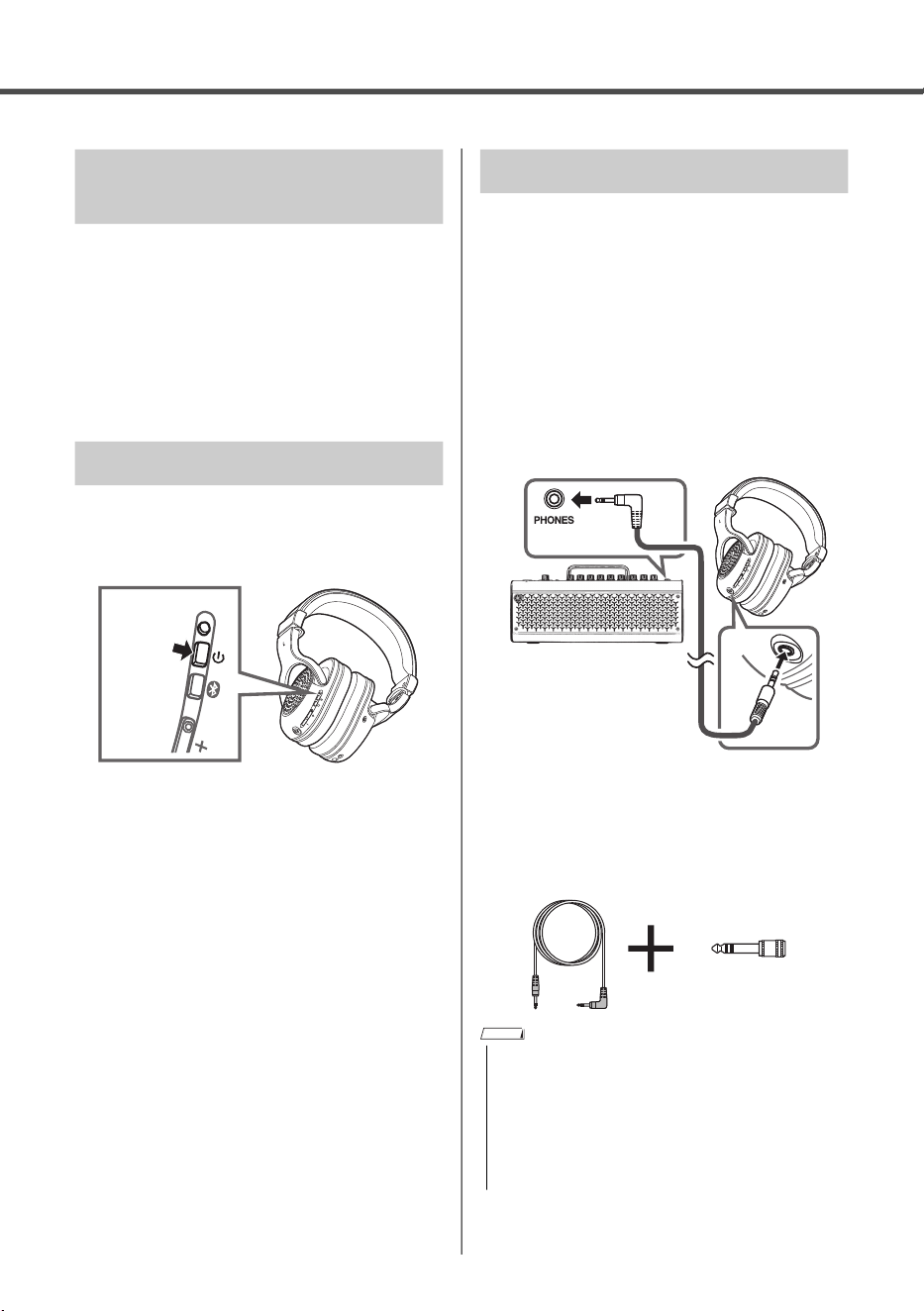
1. When you are finished using the head-
phones, make sure to turn the power off by
holding down the power key.
2. Charge the headphones by setting them on
the transmitter (p.12).
By connecting this product directly
to a device
by cable, you can use it conventionally without
having to use the power supply.
1. Turn the power of this product off by holding
down the power key.
2. Lower the volume of your equipment.
3. Connect the headphone jack of your equip-
ment to the input jack of the headphones by
using the 3.5 mm stereo mini-plug cable
(included).
4. Adjust the volume of the connected device
as desired.
Use the attached audio conversion plug according to
the shape of the headphone jack of your equipment.
Checking Remaining Battery
Power
After Using the Headphones
Hold
down
Connecting by Cable
• The following functions are not available when connecting
via cable.
- Adjusting the volume by pressing the + key (or the − key)
- Wireless connection
• When using this product with the cable connected, you
cannot use it with the power turned on. Use the head-
phones after turning off the power by holding down the
power key.
3.5 mm stereo
mini-plug cable
(included)
NOTE
YH-WL500 Owner’s Manual
15
Advanced Features
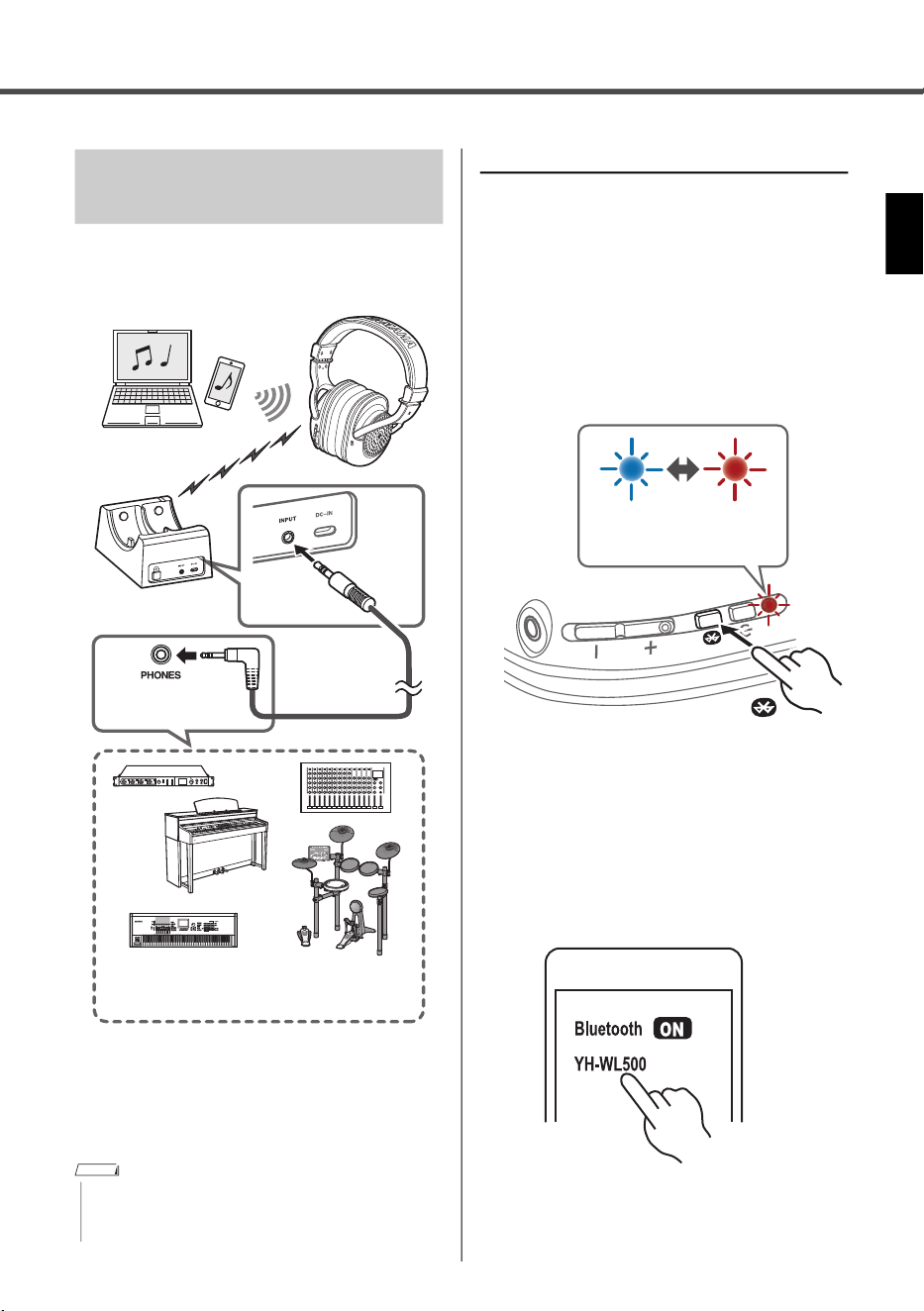
During wireless connection, you can also listen to
music (for example, musical accompaniment) from
a Bluetooth-compatible smart device or computer.
Start playback of the musical accompaniment
from your smart device, after registering and
connecting as a Bluetooth device (described at
right). At that time, adjust the volume of the
music from the smart device.
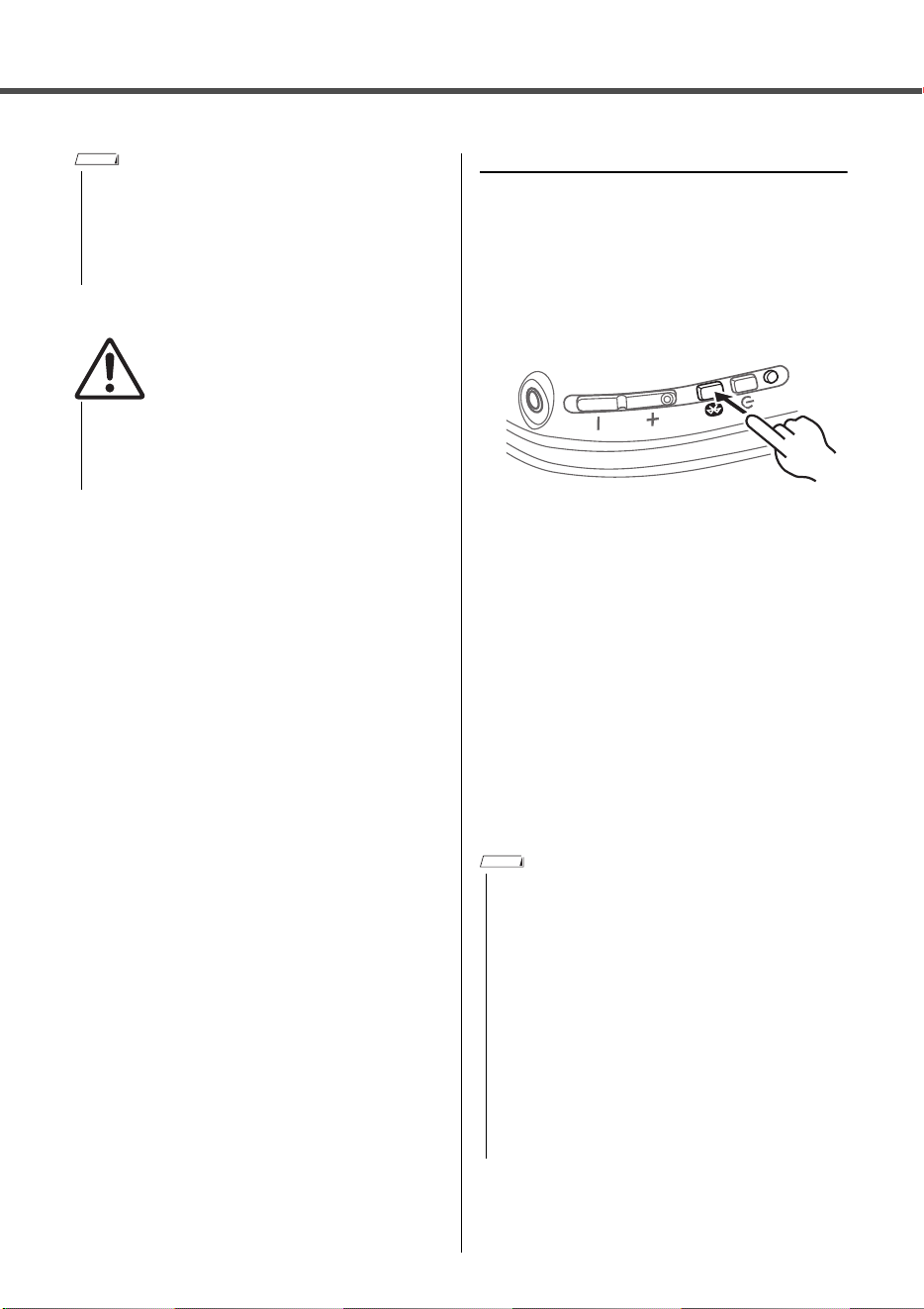
Registering a Bluetooth device
When first connecting this product to a Blue-
tooth device, follow the steps below to register
this product with that device.
1. Set this product to registration standby
mode.
With the power turned on, hold down the Bluetooth
key until the power LED flashes as shown in the
illustration below. The headphones will enter regis-
tration standby mode.
2. Activate the Bluetooth function on the Blue-
tooth device.
A list of Bluetooth devices that can be connected
will be shown.
3. Select this product from this list on your
Bluetooth device.
If successfully connected, you will hear a “Con-
nected” audio message.
Using Simultaneously with
Bluetooth Devices
• The volume of the music from your smart device via Blue-
tooth connecting cannot be adjusted by pressing the +
key (or the − key) of this product.
Headphone jack
Transmitter
Input
jack
Wireless
connection
Bluetooth
connection
Cable
connection
Rear
Digital musical instrument, keyboard, mixer,
or audio interface
NOTE
Blue Red
Flashes alternately
2 sec or more
Advanced Features
YH-WL500 Owner’s Manual
16
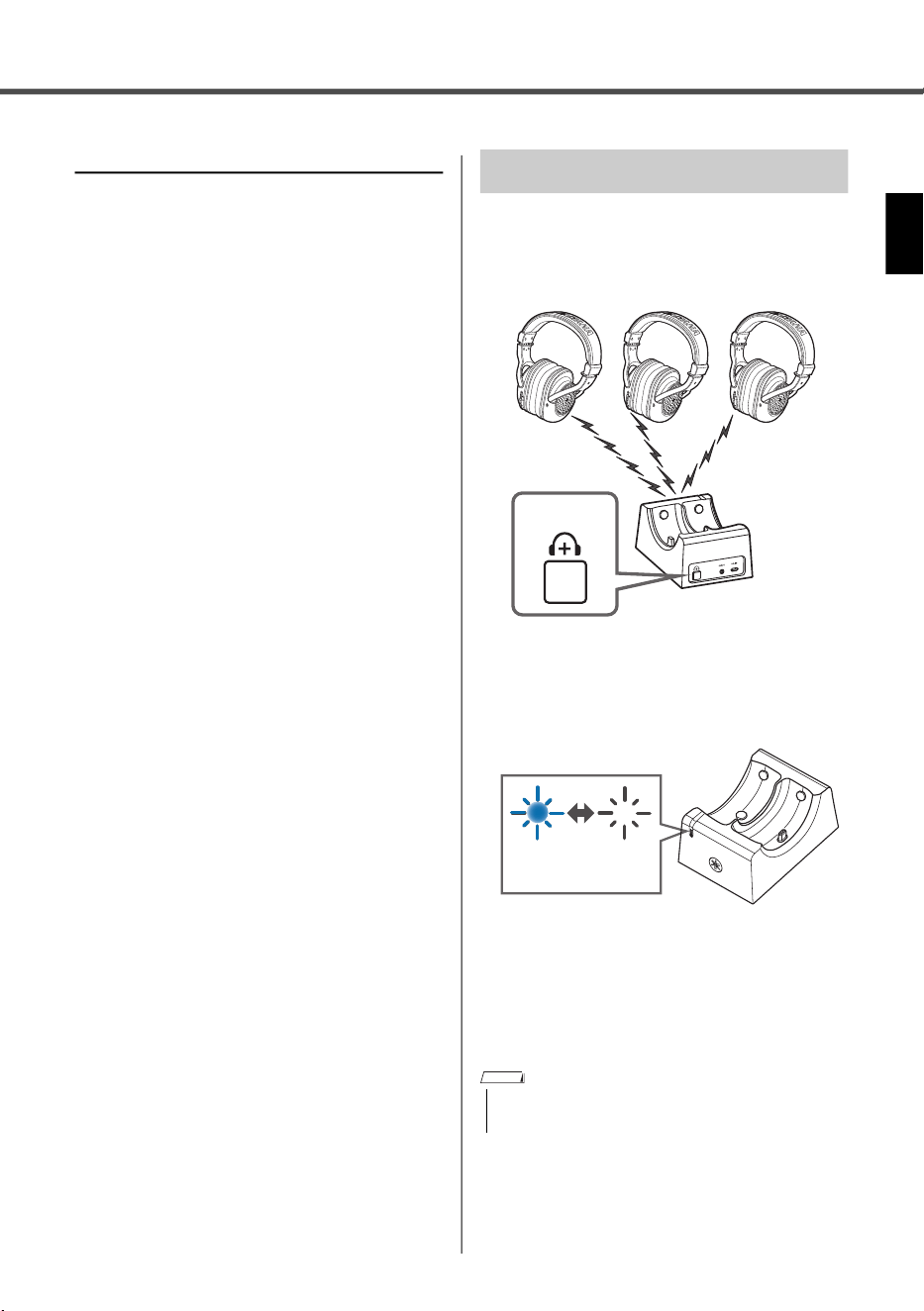
Connecting to a Bluetooth device
Connect this product to the Bluetooth device
with which it has already been registered.
When you press the Bluetooth key briefly, this
product will search for all previously connected
Bluetooth devices, sequentially from the latest con-
nected one, and will connect it automatically.
If this product does not automatically connect to a
Bluetooth device, it is waiting for connection. Make
connection from the Bluetooth device itself to prop-
erly connect with this product.
When this product is not able to connect with the
Bluetooth devices (a maximum of eight) connected
in the past, the waiting for connection status is
once reset. Briefly press the Bluetooth key again
and redo connection from the beginning of these
steps.
If successfully connected, you will hear a “Con-
nected” audio message.
• Registration standby mode will automatically end after
about thirty seconds. To register again, start from step 1.
• Up to 8 devices can be registered with this product.
From the 9th device on, older registrations will be
deleted (the oldest is deleted first).
• If a passkey is required when connecting, input “0000.”
• Be sure to set the volume of the Bluetooth device to
the minimum level and gradually raise the volume
while playing the Bluetooth device to set the desired
listening level.
Failure to do so can damage your hearing.
NOTE
CAUTION
• This product connects to a single Bluetooth device,
and cannot connect to multiple devices at the same
time.
• When Bluetooth is disconnected for one minute in the fol-
lowing states, the power of the headphones is automati-
cally turned off.
- When no wireless communications are made for ten
minutes
- When there is no sound for thirty minutes at the time of
wireless communications
If this occurs, press the power key again to turn on the
power.
• The volume of the music from your smart device via
Bluetooth connecting cannot be adjusted by pressing
the + key (or the − key) of this product. Adjust the vol-
ume of the music directly from the smart device.
NOTE
Advanced Features
YH-WL500 Owner’s Manual
17
Disconnecting from a Bluetooth device
Follow the steps below to disconnect a Blue-
tooth device.
Turn the Bluetooth device’s power off.
This product enters a waiting-for-connection status
(from a Bluetooth device).
Turn the power of this product off.
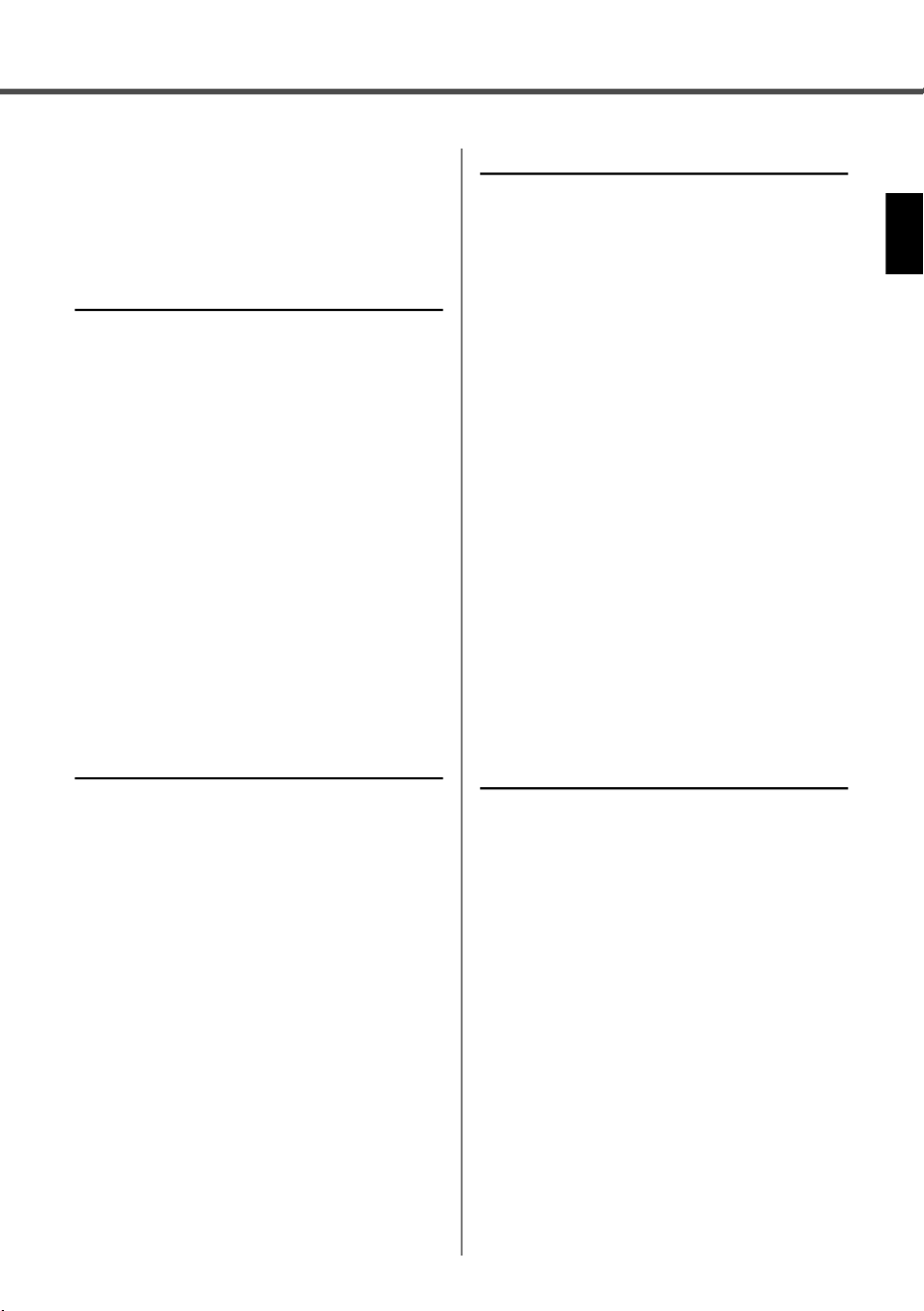
You can add two or more headphones to a sin-
gle transmitter, and they can simultaneously be
used wirelessly.
1. Press the additional headphones key of the
transmitter.
The status LED of the transmitter flashes in blue.
2. Briefly press the power key on the head-
phones twice.
The power LED of the headphones flashes in blue
and this product starts pairing. The status LED will
light up in blue when pairing is completed.
Using Additional Headphones
• Currently (as of December, 2022), headphones-only
sales are not available.
Transmitter
Rear
Flashes in
blue
NOTE

YH-WL500 Owner’s Manual
18
Troubleshooting
Read this first
If this product does not operate normally while
you are using it, first check the following.
Turn the power off and then on again.
Make sure that this product has been suffi-
ciently charged.
• “Charging the Headphones” (p.12)
Also, check the following.
• “Power will not turn on” (p.18)
• “The product cannot be charged” (p.18)
• “No sound can be heard” (p.18)
• “The sound is distorted, noisy or choppy
” (p.18)
• “Cannot connect the headphones and the transmit-
ter”
(p.19)
• “Cannot connect to a Bluetooth device” (p.19)
• “The product does not operate or play back” (p.19)
• “Problem still not resolved” (p.19)
Power will not turn on
There may not be enough battery power left.
Charge this product.
• “Charging the Headphones” (p.12)
The product cannot be charged
Your computer is not turned on (when charging
from your computer).
Turn the power of your computer on, and then charge
this product.
* Charging from a PC is not guaranteed.
You may have been using a USB cable other
than the one included with this product.
Use the included USB cable to make sure the product
correctly charges.
Some foreign substance may have accumu-
lated between connectors A and B.
Check the connectors and make sure that no foreign
substance has accumulated there.
No sound can be heard
The headphones are not connected to the
transmitter.
Pair this product once again. Set the headphones on
the transmitter once, and remove them after the status
LED changes from flashing in blue to continuously lit in
blue (pp. 12–13). Otherwise, press the additional head-
phones key of the transmitter, and then briefly press the
power key of headphones twice (p.17).
This product is not connected to a Bluetooth
device.
Pair this product.
• “Connecting to a Bluetooth device” (p.16)
The volume is too low.
Raise the volume.
• “Adjusting the Volume” (p.13)
The music stopped playing back.
Start playback of the music from the connected Blue-
tooth device.
• “Using Simultaneously with Bluetooth Devices” (p.15)
The cable may not be correctly connected
(when using wireless connection).
Connect the 3.5 mm stereo mini-plug cable jack of this
product correctly to your external device.
• “Connecting the Transmitter to Other Devices by
Cables” (p.11)
The cable containing resistance is being used.
Use the included 3.5 mm stereo mini-plug cable when
connecting this product to a device by cable. If you are
using a commercial stereo mini-plug cable, make sure
to use one that has no (zero) resistance.
The volume of the external device is low when
using wireless connection.
Raise the volume on your external device.
• “Using Simultaneously with Bluetooth Devices” (p.15)
The volume of the external device is low when
connecting to a Bluetooth device.
Raise the volume on your external device.
• “Using Simultaneously with Bluetooth Devices” (p.15)
The volume of the external device is low when
using a 3.5 mm stereo mini-plug cable.
Raise the volume on your external device.
• “Connecting by Cable” (p.14)
The sound is distorted, noisy or choppy
The signal of wireless connection may not be
coming in clearly, making the connection
unstable.
Pair this product once again. Set the headphones on
the transmitter once, and remove them after the status
LED changes from flashing in blue to continuously lit in
blue (pp. 12–13).
The signal of Bluetooth connection may not be
coming in clearly, making the connection
unstable.
Move away from wireless devices such as access
points, or appliances that product electromagnetic
waves such as microwave ovens.
Troubleshooting
YH-WL500 Owner’s Manual
19
Try placing the connected Bluetooth device as close to
this product as you can.
Devices with wireless network connectivity may trans-
mit signals that obstruct Bluetooth communications. In
this case, turn off the wireless network connectivity fea-
ture on your Bluetooth device.
The product does not operate or play back
This product may be charging.
You cannot use this product while it is charging. Use
the headphones after charging is finished.
There is no remaining battery power on this
product.
Charge this product.
• “Charging the Headphones” (p.12)
The product is temporarily not functioning.
Turn the power off and then on again. When it becomes
impossible to turn the power off by normal operation,
hold down the power key for about six seconds or more
in order to perform a hardware reset. When the power
LED turns off, the reset operation is complete.
The 3.5 mm stereo mini-plug cable may be con-
nected.
No button operations are possible while using this prod-
uct with cable connection. Remove the 3.5 mm stereo
mini-plug cable from the headphones.
Cannot connect the headphones and the
transmitter
The headphones and the transmitter may be
too far apart.
Move the headphones closer to the transmitter.
A device that emits electromagnetic waves
(such as a microwave oven, access point and
so on) might be nearby.
Do not use this product near other devices that emit
electromagnetic waves.
The signal of wireless connection may not be
coming in clearly
Pair this product once again. Set the headphones on
the transmitter once, and remove them after the status
LED changes from flashing in blue to continuously lit in
blue (pp. 12–13). Otherwise, press the additional head-
phones key of the transmitter, and then briefly press the
power key of headphones twice (
p.17
).
Cannot connect to a Bluetooth device
This product and your Bluetooth device may be
too far apart.
Move this product closer to the Bluetooth device.
A device that emits electromagnetic waves
(such as a microwave oven, access point and
so on) might be nearby.
Do not use this product near other devices that emit
electromagnetic waves.
The connection information for the registered
Bluetooth device may not be working properly.
Delete the connection information of this product from
the Bluetooth device, and then pair this product with
the device.
• “Registering a Bluetooth device” (p.15)
The registration information for the Bluetooth
device that was registered on this product may
have been deleted.
Pair this product once more.
• “Registering a Bluetooth device” (p.15)
This product may already be connected to
another Bluetooth device.
Disconnect that Bluetooth device, and then connect
this product with the new device.
• “Disconnecting from a Bluetooth device” (p.17)
Problem still not resolved
If the trouble still cannot be solved, please contact
Yamaha for product support as shown below.
For customers within Japan
Please contact the store where you purchased this
product, or the Product Support Center as listed in the
included “warranty sheet.”
For customers outside of Japan
Please contact your nearest authorized Yamaha dealer
or service center.
YH-WL500 Owner’s Manual
20
Appendix
Headphones
Driver type: Dynamic, open air / over-ear
Driver unit: 40 mm
Impedance: 32 Ω
Wired input jack: 3.5 φ stereo mini-jack
USB charging connector: USB Type-C (USB 1.1)
Weight: 315 g
Bluetooth
Radio frequency:
2402 MHz
to
2480 MHz
Maximum output power (EIRP): 10 dBm
Bluetooth version: 4.2
Supported profiles: A2DP, AVRCP
Supported codecs: SBC
Maximum number of pairable devices: 8
SAR observed value: 0.15 w/kg
Transmitter
Input jack: 3.5 φ stereo mini-jack
DC IN: USB Type-C (USB 1.1)
Weight: 400 g
Maximum power Consumption:
2.55W (5.1 VDC × 500mA)
Wireless communication functions
Digital format: Original format (equivalent to 24-bit)
Radio frequency (operational frequency):
2402 MHz
to
2478 MHz
Maximum output power (EIRP): 10 dBm
Maximum communication range: 7 m in optimum
conditions, though this may differ depending
on the condition of surrounding radio waves.
Power supply
Rechargeable battery
Internal rechargeable battery: Lithium-ion battery
Charging time (to full capacity):
Approximately 3 hours
Charging temperature: +5 to +40 °C
Operating Temperature: 0 to +40 °C
Battery run time (continuous playback time):
Approximately 9 hours
USB power adaptor
Model number: UNXBU3012-050020SA
Input: 100 VAC to 240 VAC
Output: 5.1 VDC/2A (USB-A)
* The contents of this manual apply to the latest specifications as of the printing date.
To obtain the latest manual, access the Yamaha website, and then download the manual file.
Specifications
(58-M02 WEEE en 01)
Information for users on collection and disposal of old equipment:
This symbol on the products, packaging, and/or accompanying documents means that used elec-
trical and electronic products should not be mixed with general household waste.
For proper treatment, recovery and recycling of old products, please take them to applicable col-
lection points, in accordance with your national legislation.
By disposing of these products correctly, you will help to save valuable resources and prevent any
potential negative effects on human health and the environment which could otherwise arise from
inappropriate waste handling.
For more information about collection and recycling of old products, please contact your local
municipality, your waste disposal service or the point of sale where you purchased the items.
For business users in the European Union:
If you wish to discard electrical and electronic equipment, please contact your dealer or supplier
for further information.
Information on Disposal in other Countries outside the European Union:
This symbol is only valid in the European Union. If you wish to discard these items, please contact
your local authorities or dealer and ask for the correct method of disposal.
Appendix
YH-WL500 Owner’s Manual
21
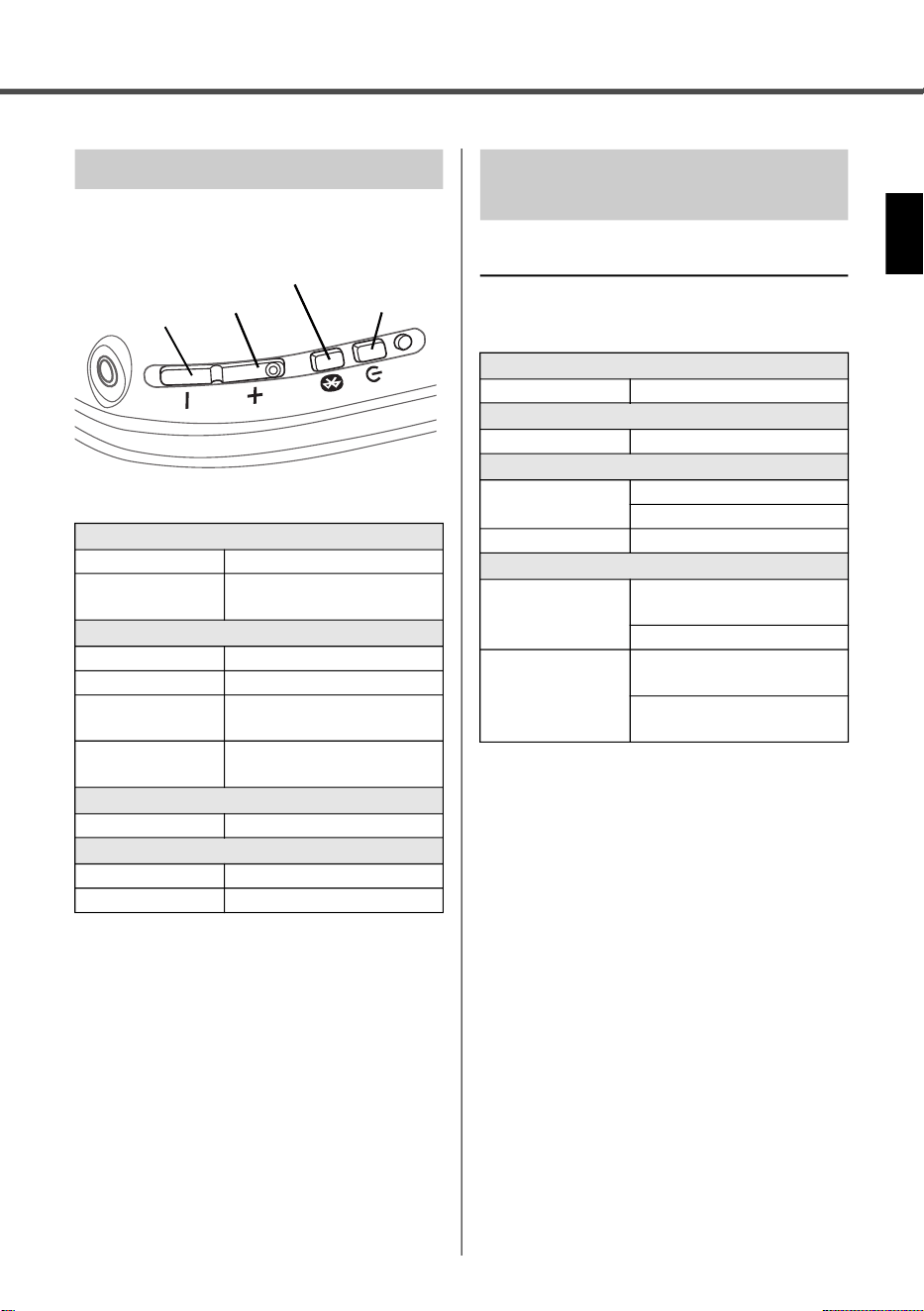
The main operations of this product are as
shown below.
Audio messages
The audio messages on this product are
shown below.
List of Operations
Power
Power on Power key
Power off Power key
(hold down for one second)
Volume
Volume up + key
Volume down − key
Volume up
continuously
+ key (hold down)
Volume down
continuously
− key (hold down)
Wireless communication
Start pairing Power key (twice)
Bluetooth
Start registration Bluetooth key (hold down)
Start connecting Bluetooth key
− key
+ key
Power key
Bluetooth key
List of Audio Messages and
LED Indicator
Power
Power Off Power off
Battery
Battery Low Battery Low
Wireless communication
Pairing Successful Pairing Successful
Finished connecting
Pairing Failed Pairing unsuccessful
Bluetooth
Connected Finished connecting to Blue-
tooth device
Finished connecting again
Disconnected Disconnected from Bluetooth
device
Disconnected by the condition
of surrounding radio waves
Appendix
YH-WL500 Owner’s Manual
22
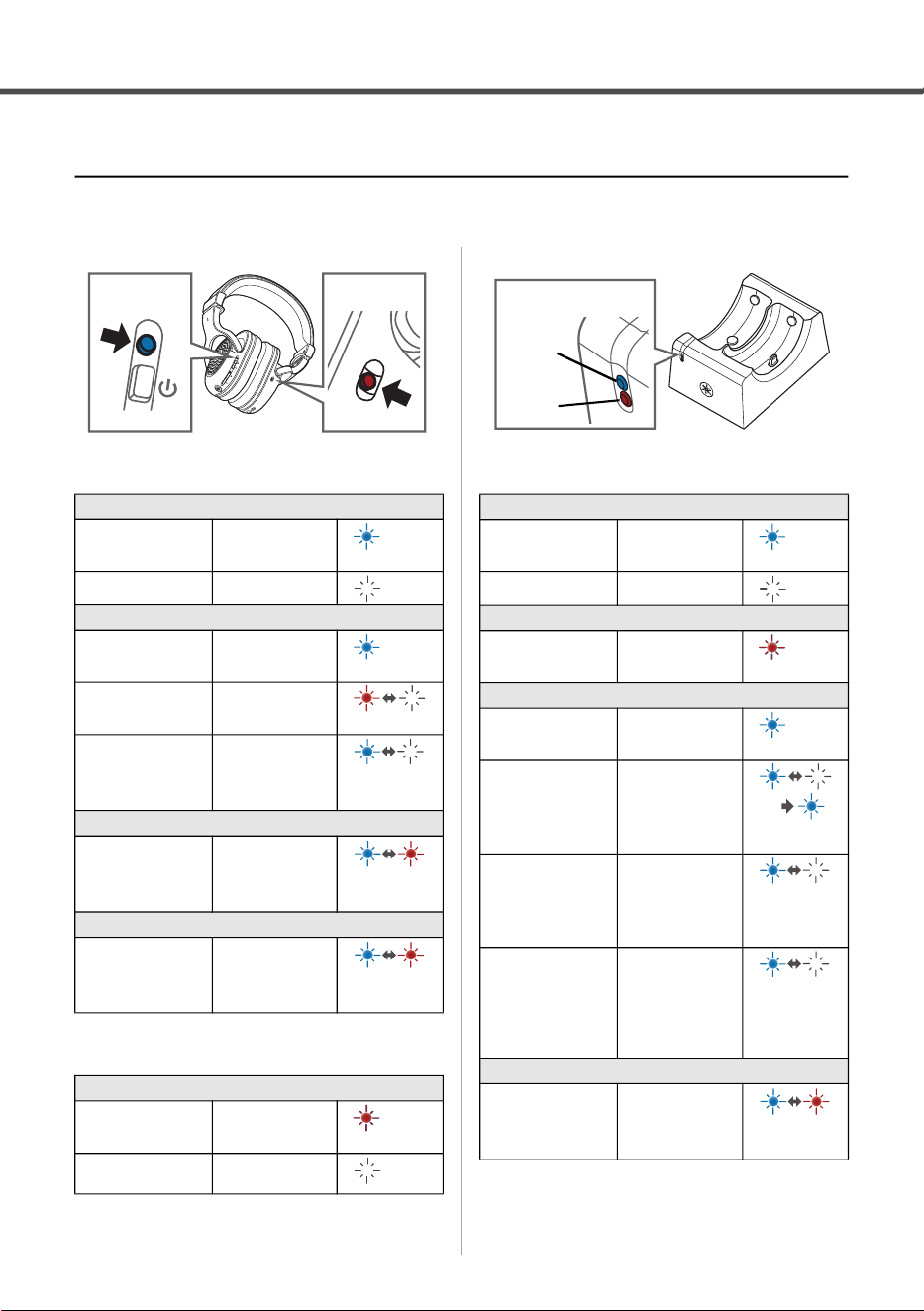
LED displays
The LED displays on this product are shown below.
Power LED
Charging LED
Status LED
Power
Power on Lights up (blue)
Power off Lights off
Wireless communication
With no abnor-
malities
Lights up (blue)
Communication
error
Flashes for one
minute (red)
Searching for
paired Blue-
tooth device
Flashes (blue)
for less than
about 10 sec-
onds
Bluetooth
Standby mode
for pairing with
Bluetooth device
Flashes
(between red
and blue alter-
nately)
Farmware update
Updating Flashes
(between red
and blue alter-
nately)
Battery
Under charge Lights up (red)
Finished charg-
ing
Lights off
Headphones
Power LED
Charging LED
Blue
Blue
Red
Blue
Blue
Red
Blue
Red
Red
Power
Power on Lights up (blue)
Power off Not lit
Audio input
An audio input is
too large
Lights up (red)
Wireless communication
With no abnor-
malities
Lights up (blue)
Searching for
RSSI frequency
(when setting
the headphones
to transmitter)
Flashes (blue)
Lights up
(blue)
Searching for
radio channels
(when removing
the headphones
from transmitter)
Flashes for 20
seconds (blue)
Standby mode for
pairing with the
headphones
(when holding
down the addi-
tional key)
Flashes for two
minutes (blue)
Farmware update
Updating Flashes
(between red
and blue alter-
nately)
Blue
Red
Status LED
Transmitter
Blue
Red
Blue
Blue
Blue
Blue
Blue
Blue
Red

YH-WL500 Owner’s Manual
23
MEMO

Software Licenses and Copyrights
This product incorporates the following third party software.
For information (copyright, etc.) about each software, please read the terms and
conditions stated below. By using this product, you will be deemed to have accepted the
terms and conditions.
Zephyr
© Copyright Zephyr Project members and individual contributors.
Apache License
Version 2.0, January 2004
http://www.apache.org/licenses/
TERMS AND CONDITIONS FOR USE, REPRODUCTION, AND DISTRIBUTION
1. Definitions.
"License" shall mean the terms and conditions for use, reproduction, and distribution as
defined by Sections 1 through 9 of this document.
"Licensor" shall mean the copyright owner or entity authorized by the copyright owner
that is granting the License.
"Legal Entity" shall mean the union of the acting entity and all other entities that control,
are controlled by, or are under common control with that entity. For the purposes of this
definition, "control" means (i) the power, direct or indirect, to cause the direction or
management of such entity, whether by contract or otherwise, or (ii) ownership of fifty
percent (50%) or more of the outstanding shares, or (iii) beneficial ownership of such
entity.
"You" (or "Your") shall mean an individual or Legal Entity exercising permissions
granted by this License.
"Source" form shall mean the preferred form for making modifications, including but not
limited to software source code, documentation source, and configuration files.
"Object" form shall mean any form resulting from mechanical transformation or
translation of a Source form, including but not limited to compiled object code, generated
documentation, and conversions to other media types.
"Work" shall mean the work of authorship, whether in Source or Object form, made
available under the License, as indicated by a copyright notice that is included in or
attached to the work (an example is provided in the Appendix below).

"Derivative Works" shall mean any work, whether in Source or Object form, that is
based on (or derived from) the Work and for which the editorial revisions, annotations,
elaborations, or other modifications represent, as a whole, an original work of authorship.
For the purposes of this License, Derivative Works shall not include works that remain
separable from, or merely link (or bind by name) to the interfaces of, the Work and
Derivative Works thereof.
"Contribution" shall mean any work of authorship, including the original version of the
Work and any modifications or additions to that Work or Derivative Works thereof, that is
intentionally submitted to Licensor for inclusion in the Work by the copyright owner or by
an individual or Legal Entity authorized to submit on behalf of the copyright owner. For
the purposes of this definition, "submitted" means any form of electronic, verbal, or
written communication sent to the Licensor or its representatives, including but not limited
to communication on electronic mailing lists, source code control systems, and issue
tracking systems that are managed by, or on behalf of, the Licensor for the purpose of
discussing and improving the Work, but excluding communication that is conspicuously
marked or otherwise designated in writing by the copyright owner as "Not a
Contribution."
"Contributor" shall mean Licensor and any individual or Legal Entity on behalf of whom
a Contribution has been received by Licensor and subsequently incorporated within the
Work.
2. Grant of Copyright License. Subject to the terms and conditions of this License,
each Contributor hereby grants to You a perpetual, worldwide, non-exclusive, no-charge,
royalty-free, irrevocable copyright license to reproduce, prepare Derivative Works of,
publicly display, publicly perform, sublicense, and distribute the Work and such Derivative
Works in Source or Object form.
3. Grant of Patent License. Subject to the terms and conditions of this License, each
Contributor hereby grants to You a perpetual, worldwide, non-exclusive, no-charge,
royalty-free, irrevocable (except as stated in this section) patent license to make, have
made, use, offer to sell, sell, import, and otherwise transfer the Work, where such license
applies only to those patent claims licensable by such Contributor that are necessarily
infringed by their Contribution(s) alone or by combination of their Contribution(s) with the
Work to which such Contribution(s) was submitted. If You institute patent litigation against
any entity (including a cross-claim or counterclaim in a lawsuit) alleging that the Work or
a Contribution incorporated within the Work constitutes direct or contributory patent
infringement, then any patent licenses granted to You under this License for that Work
shall terminate as of the date such litigation is filed.
4. Redistribution. You may reproduce and distribute copies of the Work or Derivative
Works thereof in any medium, with or without modifications, and in Source or Object
form, provided that You meet the following conditions:

1. You must give any other recipients of the Work or Derivative Works a copy of this
License; and
2. You must cause any modified files to carry prominent notices stating that You
changed the files; and
3. You must retain, in the Source form of any Derivative Works that You distribute,
all copyright, patent, trademark, and attribution notices from the Source form of
the Work, excluding those notices that do not pertain to any part of the Derivative
Works; and
4. If the Work includes a "NOTICE" text file as part of its distribution, then any
Derivative Works that You distribute must include a readable copy of the
attribution notices contained within such NOTICE file, excluding those notices
that do not pertain to any part of the Derivative Works, in at least one of the
following places: within a NOTICE text file distributed as part of the Derivative
Works; within the Source form or documentation, if provided along with the
Derivative Works; or, within a display generated by the Derivative Works, if and
wherever such third-party notices normally appear. The contents of the NOTICE
file are for informational purposes only and do not modify the License. You may
add Your own attribution notices within Derivative Works that You distribute,
alongside or as an addendum to the NOTICE text from the Work, provided that
such additional attribution notices cannot be construed as modifying the License.
You may add Your own copyright statement to Your modifications and may
provide additional or different license terms and conditions for use, reproduction,
or distribution of Your modifications, or for any such Derivative Works as a whole,
provided Your use, reproduction, and distribution of the Work otherwise complies
with the conditions stated in this License.
5. Submission of Contributions. Unless You explicitly state otherwise, any Contribution
intentionally submitted for inclusion in the Work by You to the Licensor shall be under the
terms and conditions of this License, without any additional terms or conditions.
Notwithstanding the above, nothing herein shall supersede or modify the terms of any
separate license agreement you may have executed with Licensor regarding such
Contributions.
6. Trademarks. This License does not grant permission to use the trade names,
trademarks, service marks, or product names of the Licensor, except as required for
reasonable and customary use in describing the origin of the Work and reproducing the
content of the NOTICE file.
7. Disclaimer of Warranty. Unless required by applicable law or agreed to in writing,
Licensor provides the Work (and each Contributor provides its Contributions) on an "AS
IS" BASIS, WITHOUT WARRANTIES OR CONDITIONS OF ANY KIND, either express
or implied, including, without limitation, any warranties or conditions of TITLE, NON-

INFRINGEMENT, MERCHANTABILITY, or FITNESS FOR A PARTICULAR PURPOSE.
You are solely responsible for determining the appropriateness of using or redistributing
the Work and assume any risks associated with Your exercise of permissions under this
License.
8. Limitation of Liability. In no event and under no legal theory, whether in tort
(including negligence), contract, or otherwise, unless required by applicable law (such as
deliberate and grossly negligent acts) or agreed to in writing, shall any Contributor be
liable to You for damages, including any direct, indirect, special, incidental, or
consequential damages of any character arising as a result of this License or out of the
use or inability to use the Work (including but not limited to damages for loss of goodwill,
work stoppage, computer failure or malfunction, or any and all other commercial
damages or losses), even if such Contributor has been advised of the possibility of such
damages.
9. Accepting Warranty or Additional Liability. While redistributing the Work or
Derivative Works thereof, You may choose to offer, and charge a fee for, acceptance of
support, warranty, indemnity, or other liability obligations and/or rights consistent with this
License. However, in accepting such obligations, You may act only on Your own behalf
and on Your sole responsibility, not on behalf of any other Contributor, and only if You
agree to indemnify, defend, and hold each Contributor harmless for any liability incurred
by, or claims asserted against, such Contributor by reason of your accepting any such
warranty or additional liability.
END OF TERMS AND CONDITIONS
For transmitter
(554-M01 FCC Radiation Exposure statement –Base)
(554-M03 ISED Radiation Exposure statement –Base)
For headphones
(554-M05 FCC SAR statement)
(555-M06 IC SAR statement)
For transmitter and headphones
(555-M13 ISED RSS 01)
This equipment complies with FCC radiation exposure limits set forth for an uncontrolled environment. For the Base,
it should be installed and operated with minimum distance 20cm between the radiator and your body. This transmit-
ter must not be co-located or operating in conjunction with any other antenna or transmitter.
This equipment complies with IC RSS-102 radiation exposure limits set forth for an uncontrolled environment. For the
Base, it should be installed and operated with minimum distance 20 cm between the radiator and your body. This
transmitter must not be co-located or operating in conjunction with any other antenna or transmitter.
Cet équipement est conforme aux limites d'exposition aux radiations IC CNR-102 établies pour un environnement
non contrôlé. Cet équipement doit être installé et utilisé avec une distance minimale de 20 cm entre le radiateur et
votre corps. Cet émetteur ne doit pas être colocalisé ou fonctionner en conjonction avec une autre antenne ou un
autre émetteur.
This equipment complies with FCC radiation exposure limits set forth for an uncontrolled environment. End user must
follow the specific operating instructions for satisfying RF exposure compliance. This transmitter must not be co-
located or operating in conjunction with any other antenna or transmitter.
The portable device is designed to meet the requirements for exposure to radio waves established by the Federal Com-
munications Commission (USA). These requirements set a SAR limit of 1.6 W/kg averaged over one gram of tissue. The
highest SAR value reported under this standard during product certification for use when properly worn on the head.
This equipment complies with ISED radiation exposure limits set forth for an uncontrolled environment. End user
must follow the specific operating instructions for satisfying RF exposure compliance. This transmitter must not be
co-located or operating in conjunction with any other antenna or transmitter.
The portable device is designed to meet the requirements for exposure to radio waves established by the ISED.
These requirements set a SAR limit of 1.6 W/kg averaged over one gram of tissue. The highest SAR value reported
under this standard during product certification for use when properly worn on the head.
Cet équipement est conforme aux limites d’exposition aux rayonnements ISED établies pour un environnement non
contrôlé. L’utilisateur final doit suivre les instructions spécifiques pour satisfaire les normes. Cet émetteur ne doit pas
être co-implanté ou fonctionner en conjonction avec toute autre antenne ou transmetteur.
Le dispositif portatif est conçu pour répondre aux exigences d’exposition aux ondes radio établie par le développe-
ment énergétique DURABLE. Ces exigences un SAR limite de 1,6 W/kg en moyenne pour un gramme de tissu. La
valeur SAR la plus élevée signalée en vertu de cette norme lors de la certification de produit à utiliser lorsqu’il est
correctement porté sur le tête.
This device contains licence-exempt transmitter(s)/receiver(s) that comply with Innovation, Science and Economic
Development Canada’s licence-exempt RSS(s). Operation is subject to the following two conditions:
1. This device may not cause interference.
2. This device must accept any interference, including interference that may cause undesired operation of the device.
L’émetteur/récepteur exempt de licence contenu dans le présent appareil est conforme aux CNR d’Innovation,
Sciences et Développement économique Canada applicables aux appareils radio exempts de licence. L’exploitation
est autorisée aux deux conditions suivantes :
1. L’appareil ne doit pas produire de brouillage;
2. L’appareil doit accepter tout brouillage radioélectrique subi, même si le brouillage est susceptible d’en compro-
mettre le fonctionnement.
VGK0100
© 2023 Yamaha Corporation
Published 03/2023 2023年3月 发行
IPOE-A1
Yamaha Global Site
https://www.yamaha.com/
Yamaha Downloads
https://download.yamaha.com/
10-1 Nakazawa-cho, Naka-ku,
Hamamatsu, 430-8650 Japan
〒430-8650 静岡県浜松市中区中沢町 10-1
雅马哈乐器音响(中国)投资有限公司
上海市静安区新闸路1818号云和大厦2楼
客户服务热线:4000517700
公司网址:https://www.yamaha.com.cn
制造商:雅马哈株式会社
制造商地址:日本静冈县滨松市中区中泽町10-1
厂名:深圳市冠旭电子股份有限公司
厂址:深圳市龙岗区坪地街道国际低碳城
台灣山葉音樂股份有限公司
YAMAHA MUSIC & ELECTRONICS TAIWAN CO., LTD.
https://tw.yamaha.com
總公司:(02) 7741-8888
新北市板橋區遠東路1號2樓
客服專線:0809-091388
原產國:中国