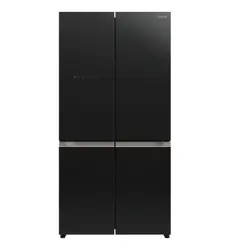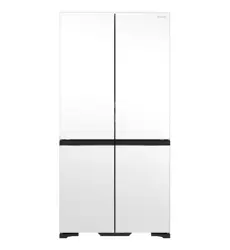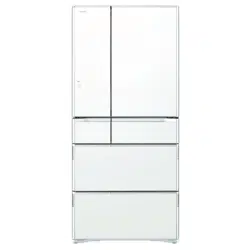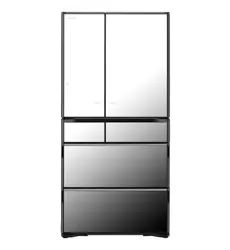
INSTRUCTION MANUAL
家庭用
For household use
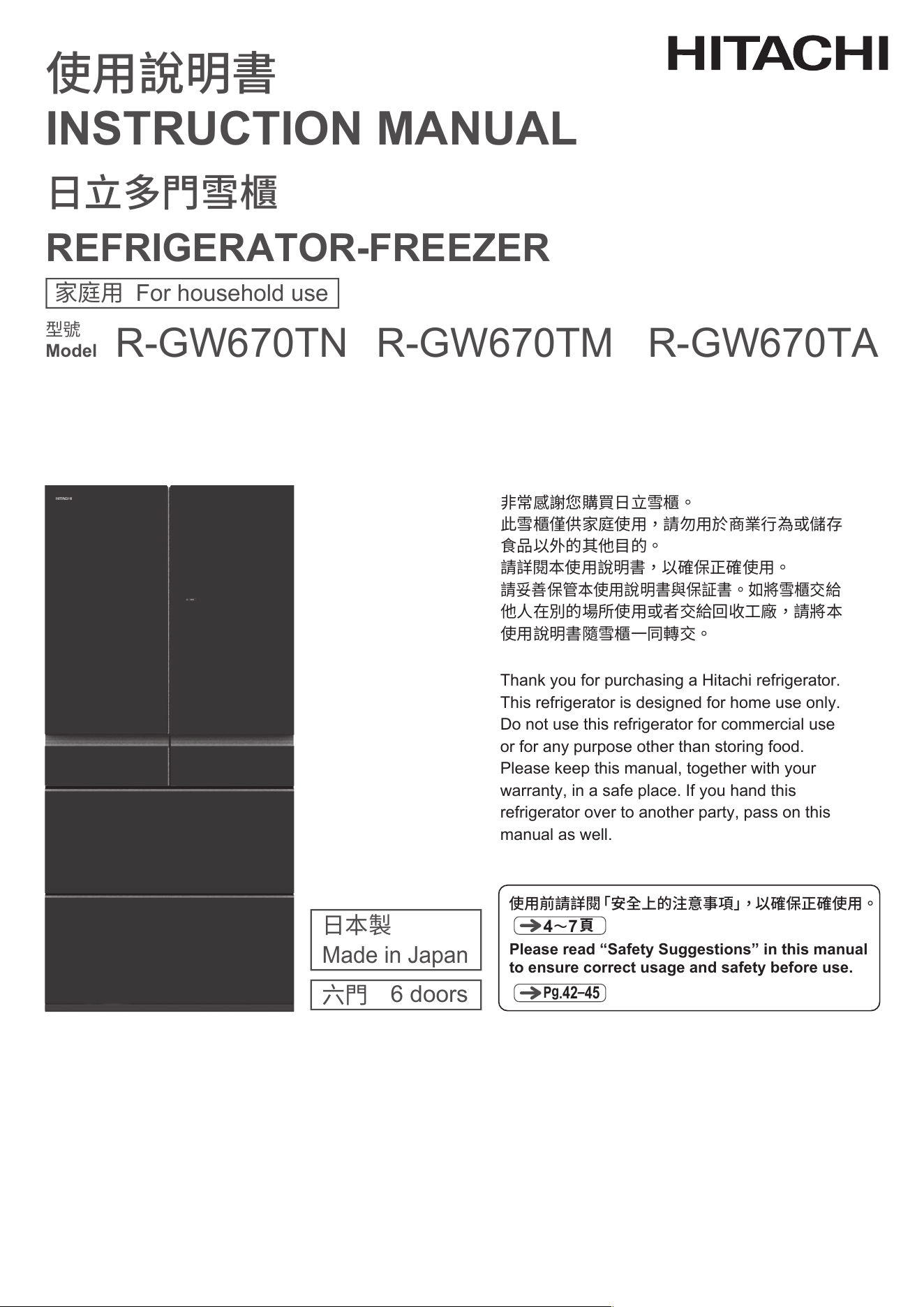
REFRIGERATOR-FREEZER
Model
Thank you for purchasing a Hitachi refrigerator.
This refrigerator is designed for home use only.
Do not use this refrigerator for commercial use
or for any purpose other than storing food.
Please keep this manual, together with your
warranty, in a safe place. If you hand this
refrigerator over to another party, pass on this
manual as well.
P
g
.42
–
45
Please read “Safety Suggestions” in this manual
to ensure correct usage and safety before use.
4〜7
頁
使用前請詳閱「安全上的注意事項」,以確保正確使用。
6 doors
Made in Japan
六門
日本製
型號
使用說明書
日立多門雪櫃
非常感謝您購買日立雪櫃。
此雪櫃僅供家庭使用,請勿用於商業行為或儲存
食品以外的其他目的。
請詳閱本使用說明書,以確保正確使用。
他人在別的場所使用或者交給回收工廠,請將本
使用說明書隨雪櫃一同轉交。
請妥善保管本使用說明書與保証書。如將雪櫃交給
R-GW670TNR-GW670TM R-GW670TA
2
節省電力的使用方法
1. 減少開關雪櫃門的次數,若打開後也請盡快關上
頻繁地開關雪櫃門會讓冷空氣向外流失。
2. 避免過分堆滿食品
食品堆積過滿時,雪櫃內部冷氣循環變差,難以達到充分冷卻,更容易造成耗電及浪費。建議儲存食物
時以看到雪櫃內部最後面為主及保留間隙。
3. 溫熱的東西請常溫放涼後再冷藏
將熱食放進雪櫃會讓溫度上升,造成附近的食品容易變質。
4. 雪櫃周邊應保留適當的間隙
若周圍沒有足夠的空間,會無法散熱造成耗電。
5. 更換老化的雪櫃門密封墊
密封墊老化後會容易讓內部的冷空氣向外流失,造成耗電。 若出現這種狀況,可先拿一張名片夾在門
縫處,若關上雪櫃門後名片掉落,建議盡快更換新的密封墊。
常見問題
無法製冰時
33 頁
雪櫃內部不冷時
32 頁 34 頁
結霜或結露時
Tips for using the refrigerator wisely for energy savings
1.
2.
3.
4.
5.
Reduce the rate of opening and closing of doors.
Frequent opening and closing leads to waste of energy.
Do not overfill the refrigerator.
Overfilling the refrigerator prevents smooth circulation of cool air, even cooling throughout
and consumes
unnecessary power. Place food that you can see the back wall of the refrigerator.
Do not place hot food in the refrigerator.
Placing hot food in the refrigerator raises the temperature, which, in turn, raises the temperature of
surrounding food.
Provide sufficient spacing around the refrigerator.
Installing the refrigerator with insufficient clearance between the refrigerator and surrounding objects
prevents the release of heat and thus leads to waste of energy.
Replace door gaskets if damaged.
Cool air can leak through damaged gaskets, which leads to waste of energy. If a business card inserted
between the gasket and
the refrigerator slides down, the gasket needs replacing.
FREQUENTLY-ASKED QUESTIONS (FAQs)
Pg
.71
Pg
.70
Pg
.72
If you cannot make ice
If the refrigerator is not
cold
If frost or condensation is
formed
41
・・・・
・・・・・・・・・・・・・・・・・・・・・・
・・・・・・・・・・・・・・・・
・・・・・・・・・・・・・・・・・・・
・・・・・・・・・・・・・・
・・・・
・・・・・・・・・・・・・
・・・・・・・・・・・・・・・・・・・・・・・・・・・・
・・・
・・・・
・・・
・・・・・・・・・・・・・・・・・・・・・・・・・・・・・
・・・
・・・・・・・・・・・・・・・・・・・・・・・
・・・・・・・・・・・・・・・・・・・・・・・・
・・・・・・・・・・・・・・・・・・
・・
・・・・・・・・・・・・・・
・・・・・・・・・
・・・・・・・・・・・・・・・・・・・・・・・・・・・・
・・・・・・・・・・・・・・
・・・
・・・・・・
・・・・・・・・・・・・・・・・・・・・・・・・・・・・
・・
・・・・・・・・・・・・・・・・・
・・・・・・・・・・・・・・・
・・
・・・・・・・・・・・・・・・
・・・・・・・・・・・・・・・・・・・・・・・・・・・・・
・・・
・・・
・・・・・・・・・・・・・・・・・・・・・
・・・・・・・・・・・
・・・・・・・・・・・・・・・・・・
HOW TO USE
MAINTENANCE
TROUBLESHOOTING and AFTER-SALES SERVICE
SAVING ENERGY
“Eco” operation indicator lamp
“Energy Saving” mode
52
52
52
53
53
53
54
54
55
55
56
56
57
57
57
57
57
57
58
58
59
59
60
60
61
61
62
62
62
63
63
63
42
46
46
47
48
48
49
50
51
64
64
64
TROUBLESHOOTING
Initial stage
Control Panel
Refrigerator is not cold
Automatic ice making
Frost and/or condensation formed
Indicator is blinking
Concerns on the Vacuum Compartment
Concerns on the Vegetable Compartment
Concerns on uneven height or tilting of the doors
Strange smell
Refrigerator is too cold
Refrigerator becomes hot
Concerns on noises
Auto Drawer
Others
Preparation for moving/transporting (moving house)
AVAILABLE PARTS
NOTES ON NON-CFC REFRIGERATORS/
GUIDE ON TOTAL STORABLE WEIGHT
AFTER-SALES SERVICE
・・・・・・・・・・・・・・・・
・・・・・・・・・・・・・・・・・・・・・・・・・・・・・
・・・・・・・・・・・・・・・・・・・・・・・・・・・
・・・・・・・・・・・・・・・・・・
・・・・・・・・・・・・・・・・・・・
・・・・・・・
・・・・・・・・・・・・・・・・・・・・・
・・・・・
・・・・
・・・・
・・・・・・・・・・・・・・・・・・・・・・・・・・・
・・・・・・・・・・・・・・・・・・
・・・・・・・・・・・・・・・
・・・・・・・・・・・・・・・・・・・・・
・・・・・・・・・・・・・・・・・・・・・・・・・・・・
・・・・・・・・・・・・・・・・・・・・・・・・・・・・・・・・・
・・・
・・・・・・・・・・・・・・・・・・
・・・・・・
・・・・・・・・・・・・・・・
65
65
65
65
66
66
66
67
68
68
68
68
68
68
68
69
69
69
69
70
70
70
70
71
72
72
73
74
74
74
75
75
75
76
77
78
78
79
80
MAINTENANCE
Power plug/Door gasket
Door surfaces/Shelves and Pockets/Liquid receiver
Refrigerator back/sides/bottom/Cases
Vacuum Compartment
Auto Drawer
Water Supply Tank
Ice maker cleaning
HOW TO REMOVE/ATTACH PARTS
Height adjustable upper and middle shelf
Height adjustable lower shelf
Fixed shelf
Shelf partition
Door pockets
Vacuum Case
Ice Case (Ice Compartment) and Upper Freezer case (Upper Freezer)
Slide Case and Lower freezer case (Lower Freezer)
Upper Case and Lower Case (Vegetable Compartment)
How to remove/attach the slide door
・・・・・・・・・・・・・・・・・・・・・・・
・・・・・・・・・・・・・・・・・
・・・
・・・
・・・・・・・・・・・・・・・・・・
・・・・・・・・・・・・・・・・・・・・・・・・・・・・
・・・・・・・・・・・・・・・・・・・・・・
・・・・・・・・・・・・・・・・・・・・・・
・・・・
・・・
・・・・・・・・・・・・
・・・・・・・・・・・・・・・・・・・・・・・・・・・・・
・・・・・・・・・・・・・・・・・・・・・・・・・・・
・・・・・・・・・・・・・・・・・・・・・・・・・・・
・・・・・・・・・・・・・・・・・・・・・・・・・・
・・・
・・・
・・・
・・・・・・・
CONTENTS
BEFORE USE
・・・・・・・・・・・・
・・・・・・・・・・・・・・・・・・・・・・・・・・
・・・・・・・・・・・・・・・・・
・・・・・・・・・・
・・・・・・・・・・・・・・・・・・・・・・・・・・・・・・・・・
・・・・・・・・・・・・・
・・・・・・・・
・・・・・・・・・・
・・・・・・・・・・・・・・・・・・・・・
SAFETY SUGGESTIONS
BEFORE USE
Preparation before use
Opening and closing the doors
CHECK
Name of each compartment
Food Storage Recommendations
Functions of the Control Panel
Using Auto Drawer
TROUBLESHOOTING and AFTER-SALES SERVICE
MAINTENANCE
HOW TO USEBEFORE USE
REFRIGERATOR COMPARTMENT
Name of each part
Using “Moisture Cooling”
Using “Quick Cooling”
Using the small items case
Adjusting the height of pockets and shelves
VACUUM COMPARTMENT
Stored food
Changing the Vacuum Compartment settings
Opening and closing the Vacuum Case
ICE COMPARTMENT (AUTOMATIC ICE MAKER)
Making ice
Ice storage capacity and time required to make ice
Quick Ice Making
Stop Ice Making
Water supply indicator
When “Auto Ice On” or
“
■■■
/
■
” and
“
■
” are blinking
Small items storage space
FREEZER COMPARTMENT
Stored food
Using “Delicious Freezing”
Adjusting the temperature (Freezer Compartment)
VEGETABLE COMPARTMENT
Stored food
Adjusting the Temperature of the Vegetable Compartment (Using “Vege Cool” mode)
Tips for storing vegetables
VARIOUS FUNCTIONS
Further temperature adjustments (Refrigerator/Freezer)
Locking the Control Panel
Door alarm
Volume adjustment of door alarm and operation sound
Triple power deodorizing effect (Refrigerator Compartment)
42
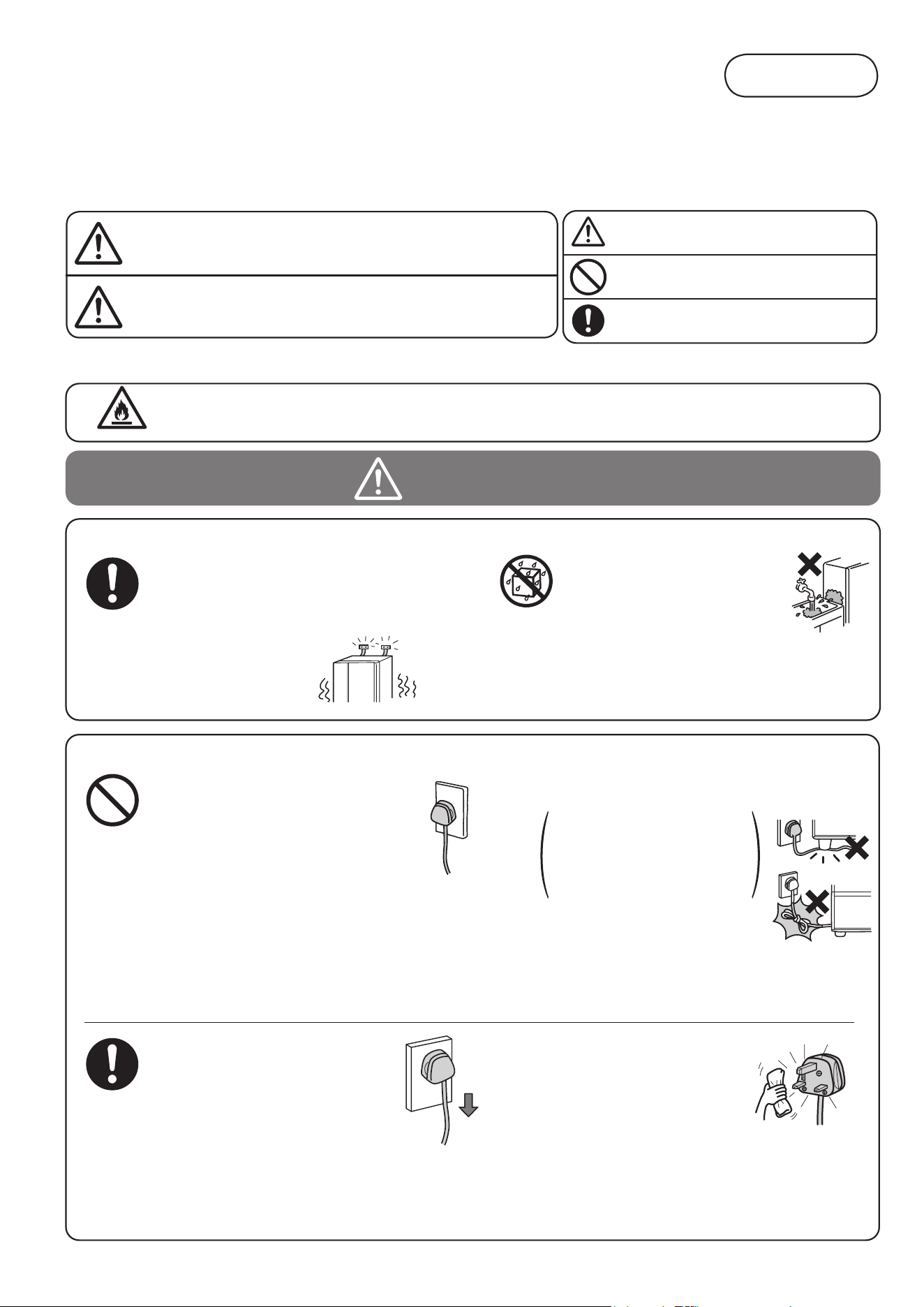
Please ensure to follow
these precautions
When using this appliance, failure to follow safety precautions may result in personal harm, harm to other people,
and also damage to property.
■
The following notes are categorized and explained by the following symbols
according to the hazard level in terms of harm and material damage
that may occur from ignoring suggestions and not using correctly.
■
Suggestions are indicated and categorized
by the following symbols accompanied by
explanations. (The symbols below are examples)
Suggestions headed by this pictograph
indicate "There is high chance of serious
injury or death" if ignored.
Suggestions headed by this pictograph
indicate "There is a high chance of injury or
damage to property" if ignored.
Prohibited
Handling the power and power cable
Installation
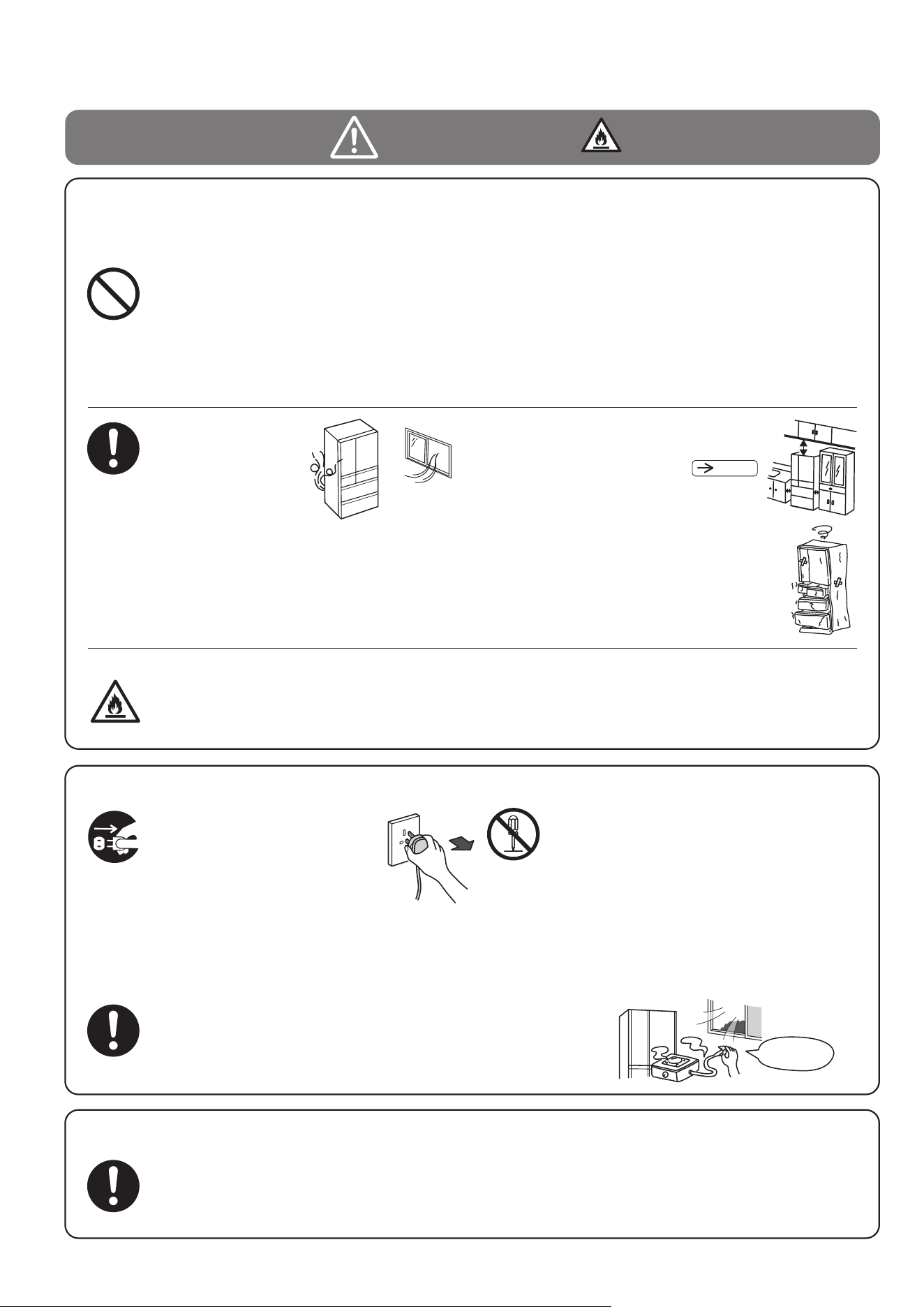
Take measures to prevent overturning
of refrigerator due to earthquake, etc.
・Overturning of the refrigerator could result
in personal injury.
●
Avoid usage that may
cause the wall outlet or
power cord components
to work beyond their specified
electric current.
Also do not use power sources
that are not a rated AC voltage.
If a power source is shared with other
appliances, double or multipoint adapters may
heat up beyond normal levels and cause fire.
・
Use a wall outlet rated above 10 ampere by itself.
Insulation failure from moisture
from the dust collected on the
power
plug may cause fire.
●
When positioning the appliance, ensure the
supply cord is not trapped or damaged.
Using a damaged power cord
may cause electric shock, short
circuits, or fire.
●
Do not install the
refrigerator in damp places
or where water may adhere to.
・This may impair electricity
insulation causing electric
shock or fire.
●
Do not locate multiple portable
socket-outlets or portable power
supplies at the rear of the appliance.
●
Wetting
Prohibited
The power cord or plug should not
be cut, modified, touched with hot
implements, bent by force,twisted,
pulled, have heavy objects placed
on it, pressed by the refrigerator,
or be bound or tied up.
・If the supply cord is damaged, it must be replaced
by the manufacturer or its service agent or a
similarly qualified person in order to avoid a hazard.
This symbol denotes the precautions on flammable refrigerants.
■
This refrigerator uses flammable refrigerants. The symbol column below states the precautions on flammable refrigerants.
trembling
and
unstable
This symbol indicates "Warning and calling
attention".
This symbol indicates something you must not do.
(Prohibited)
This symbol indicates something you must do.
(Compulsory)
●
・Connection of the power plug
with the cord running upwards
could apply stress on the cord and
cause electrical short circuit or overheat,
resulting in electrical shock or fire.
・
Incomplete connection of the power plug could
result in electrical shock or fire due to heat.
Connect the power plug
firmly to a power outlet with
the cord downwards.
●
Clean the dust on the
power plug frequently.
・Unplug the power plug and wipe it with a dry cloth.
WARNING
CAUTION
WARNING
SAFETY SUGGESTIONS
●
Do not use the multi-socket adapters and the extension cords.
●
Do not use the refrigerator when the power plug/cord
are damaged and/or the power plug is not inserted into
the outlet securely.
●
Disconnect the power plug when the refrigerator
will be unused for long periods of time.
R600a
43
Pg
.
65
binder
LP gas
Benzine
WARNING
Handling the power and power cable
This appliance is not intended for use by persons (including children) with reduced physical, sensory
or mental capabilities, or lack of experience and knowledge, unless they have been given supervision
or instruction concerning use of the appliance by a person responsible for their safety. Children
should be supervised to ensure that they do not play with the appliance.
Contact
Prohibited
・There is a danger of injury when the ice trays are rotating.
●
Deactivate the function of the Auto Drawer when children etc. may play with the Auto Drawer.
●
●
Do not put too much force on the door
by opening it too much or leaning on
the opened door.
●
●
●
●
●
Do not store dry ices in the refrigerator.
・
It might explode if sealed.
Do not hang on the doors or step on the various compartments.
・
Injury may be caused by the
refrigerator tipping over or
hands getting caught between doors.
・
Benzine, ether, LP gas, thinner,
adhesives may ignite an explosion.
・Substances that require precise
conditions for storage cannot be stored in a domestic
refrigerator.
●●
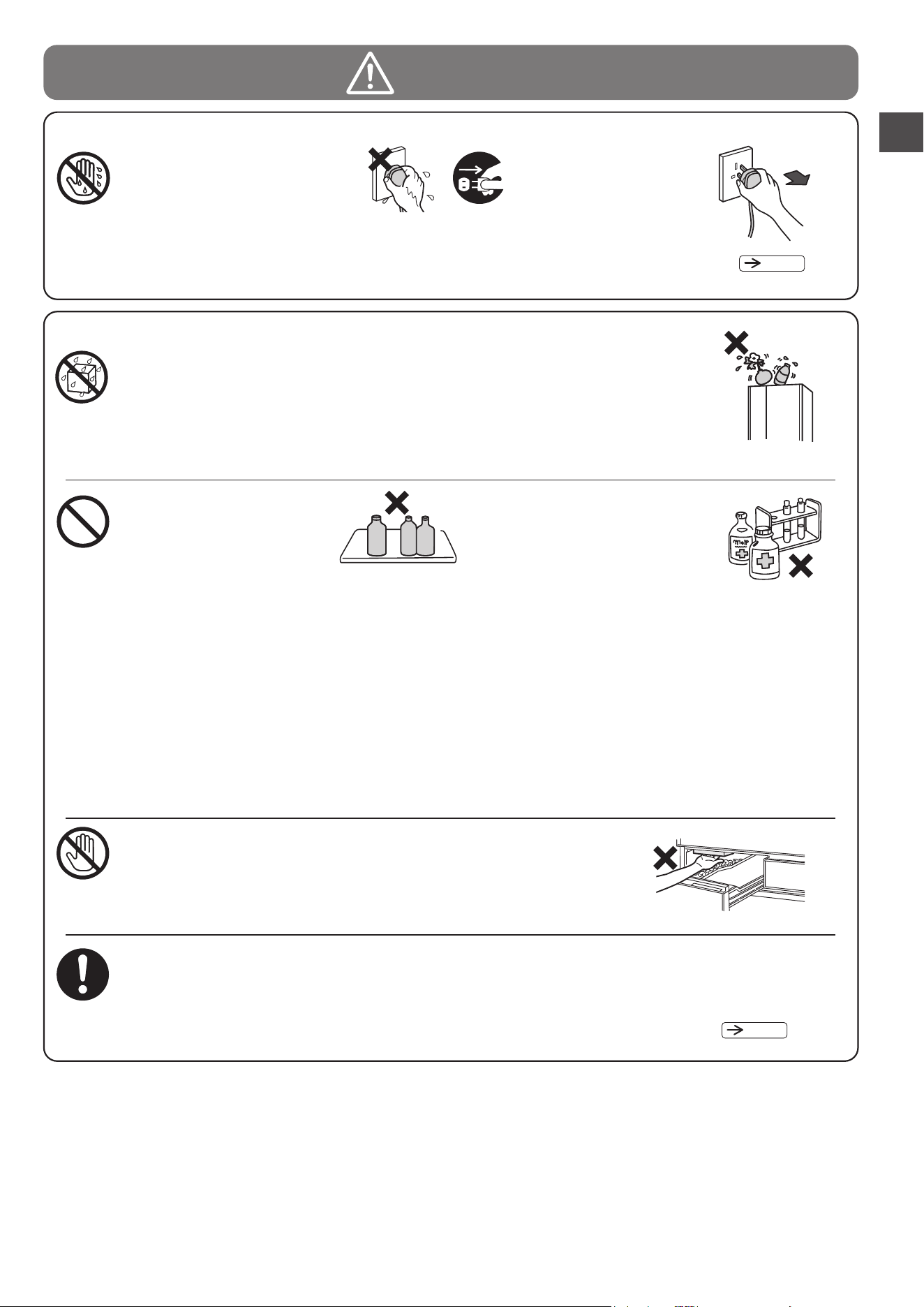
Do not insert or remove the
power plug with wet hands.
During use
Prohibited
・
Spilled water may impair insulation of
electrical components causing faulty
electrical currents. This may result in
electric shock or fire.
● ●
Do not splash human waste on the main body of
the refrigerator and/or inside the refrigerator.
Do not put water containers
on top of the refrigerator.
Wetting
Prohibited
Do not touch the
machinery components
of the automatic ice maker.
Do not put in items that
may catch fire
●
Drugs, chemicals, research
and experimental substances
should not be stored in the
refrigerator.
・Opening and closing doors etc.
may cause things placed on
top of
the refrigerator to fall resulting in injury.
● Do not put things on top of the refrigerator.
・
When the interior lamp is damaged, please contact the service centre
to replace it so as to avoid injury.
● Do not remove the cover of the interior lamp.
● Do not add impact to the glass door.
Wet Hands
Prohibited
Be sure to unplug the
power plug before
doing maintenance to
the refrigerator.
Continued use may
cause electric shock or injury.
SAFETY SUGGESTIONS
・Always hold the plug when unplugging it.
・
This may result in electric shock.
・
Sparks from points of electrical contact such as door switches
may ignite a fire.
Do not use flammable sprays near the refrigerator.
Pg
.
51
Since the refrigerant used is flammable,
any leakage from the
pipe inside the wall
may cause ignition and
explosion.
●
●
Prohibited
About the refrigerant (Be careful of the following related to the use
of flammable gas.)
Do not scratch or damage the main body of
the refrigerator with a sharp object such as
screw.
Do not use mechanical devices and heat generating
devices such as a dryer/fire to accelerate the defrosting
process.
●
Do not use electrical appliances inside the
refrigerator.
・If the refrigerant leaks, sparks on the contact
may cause ignition and explosion.
● ●
The warning label and name plate including
this symbol affixed on compressor and
refrigerator should be kept throughout the
life of the refrigerator.
Handling, service, disposal and installation of
used flammable refrigerant shall be done by
authorized service companies or service
engineer only.
●
When discarding the unit
Before discarding the unit or recycling, remove the door gaskets to avoid the risk of an infant
or child being entrapped inside.
Continuous running may cause
electric shock or injury.
● ●
In case of emergency
Stop the refrigerator by
unplugging it if it is not running
properly or breaks down.
Do not disassemble, repair, or modify
your refrigerator.
Injury may be caused by ignition of fire
or faulty running.
・ Please consult with a retailer if any repairs
or disassembly are required.
・Always hold the plug when unplugging it.
Disassembly
prohibited
●
In the event of gas leak, do not touch the refrigerator and
open windows to allow ventilation.
・ Sparks from points of electrical contact such as door switches may
ignite explosions causing fire or burn injuries.
deactivate
the switch
Leakage of the refrigerant may accumulate
and cause ignition and explosion.
If the refrigerant leaks, it may cause ignition
and explosion.
●
●
●
Do not damage
the refrigerant
circuit. If you
happen to
damage the
refrigerant pipe, stay away from the
refrigerator and avoid using fire and
electrical appliances.
Keep ventilation openings, in the
appliance enclosure or in the built-in
structure, clear of obstruction.
Should you damage the refrigerator,
open the window to ventilate and
contact the authorised service centre.
Pg.
46
WARNING
SAFETY SUGGESTIONS
(
Continued
)
R600a
When discarding the unit, please consult
your local Recycle Center.
44
・ The power cord/plug are too hot to touch.
・ You smell something burning.
・ The power cord is scratched deeply or deformed.
・ You feel electricity like a sharp and quick tremor or vibration.
≪Examples of abnormity and malfunction≫
R600a
45
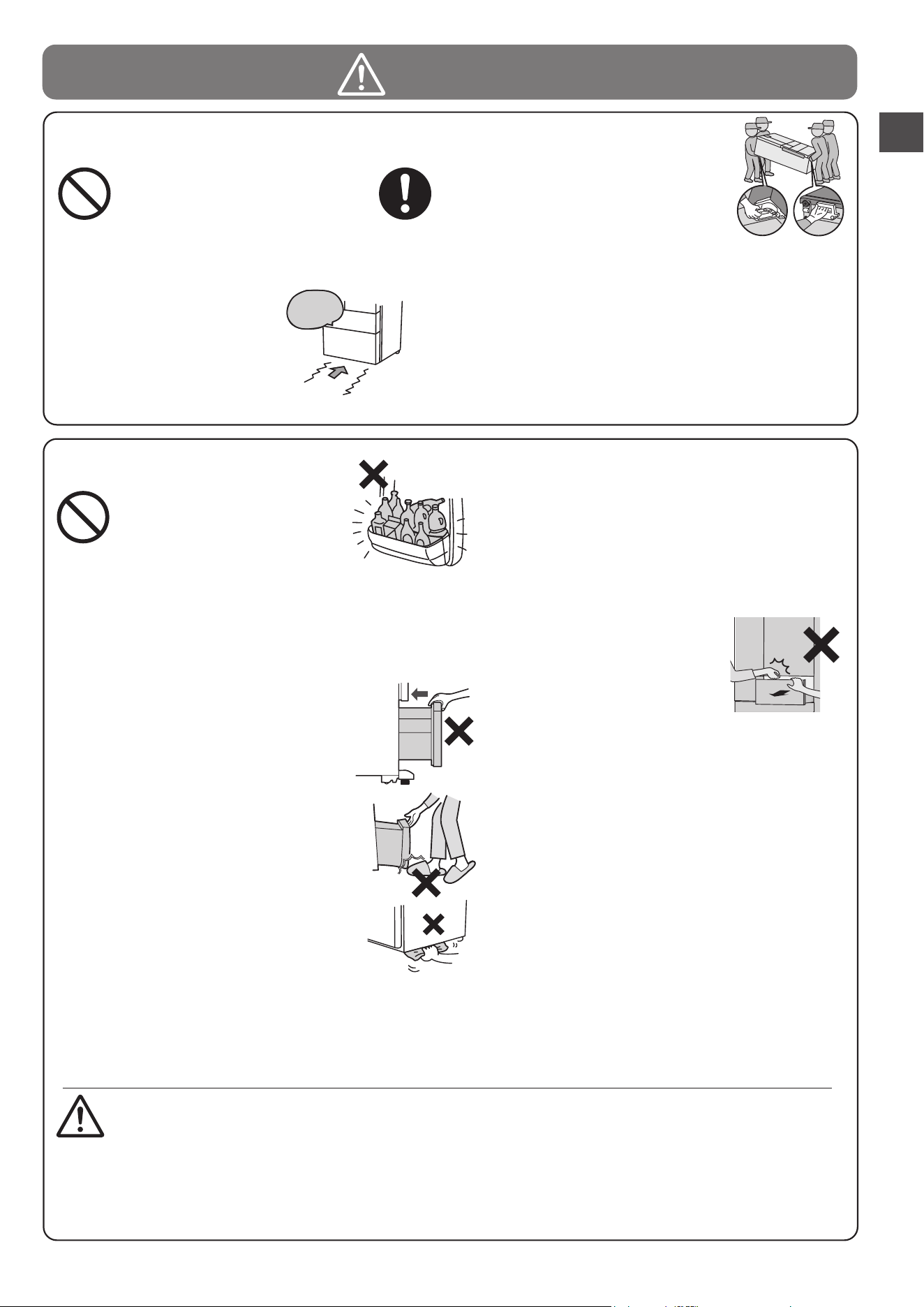
・
Carry it with the door facing upward; as shown in the illustration.
caution
CAUTION
●
●
●
●
●
●
Prohibited
SAFETY SUGGESTIONS
Never hang the handle
with a crane, etc.
Be careful not to knock
the back/sides of the
refrigerator.
When moving and installing the refrigerator
To prevent water from dripping on the floor.
When opening or closing a door while the adjacent
door is left open, exercise caution lest your hand or
a finger should be caught between the opened doors.
Take care when removing the glass shelf
because it is heavy.
When you hear an abnormal sound or
find abrasion powder during the opening
or closing of a door, stop using the
refrigerator and call for inspection.
Water due to dew and/or frost may drip on the floor
if there is a gap clearance around the door for a long
time. Close the door completely, leaving no gap.
●
●
●
●
●
●
●
●
●
●
●
●
Prohibited
During use
Do not put bottles in the Door
Baskets if they do not sit
properly on the bottom of the
front section.
Do not have food items protruding over the
front of the shelves.
Do not open or close the door with force.
(Doing so may cause food to drop)
Do not open or close a door
while other person is using
the refrigerator.
Do not open or close a door of
the Refrigerator Compartment
while holding the handle of the drawer.
Do not touch the food and containers inside
the Freezer Compartment with wet hands.
Do not eat food that smells strange or has
changed color.
Neither heat the glass surface of the glass
shelf nor put a hot item on it.
● Do not hold the door gasket when opening
and closing the refrigerator door.
Do not put the glass bottles in the Freezer
Compartment.
●
Do not close a door with other
than the handle.
Do not put your feet too close
when opening the bottom
door of the refrigerator.
Do not put your hands or feet
under the base surface of the
refrigerator.
Do not give a hard impact to the glass
shelf. (The glass shelf may be broken,
causing personal injury).
・
Forcing in items like large bottles may result in
them getting tipped over, causing injury.
・
Injury may be caused from items like bottles getting
knocked over.
・
This may cause frost injury. (Especially in the case of
metal items)
・Spoiled food may cause serious sickness.
・
Bottles may break from the contents freezing and
cause injury.
・
You may hit the instep or other parts
of your feet resulting in injury.
When cleaning, putting your hands
under the base surface of the refrigerator may result
in injury by cutting them on sheet metal parts.
●
Take the food and ice out from the refrigerator
and dump the water in the water supply tank.
●
Lay a protective mat and cloth etc. to prevent
the floor from damaging and the water left in
the refrigerator from spilling.
●
Fix the refrigerator doors with a tape etc. to prevent those from opening.
In addition, use a tape to fix an electric plug/power cord so that it will not
hang down.
●
Hold the carrying handle and carry the refrigerator with two or
more people.
●
Install the refrigerator securely on the sturdy and flat floor using
the adjustable mounts.
Do not transport the refrigerator with it
loaded laterally.
●
Do not use the handle of the refrigerator
door when moving the refrigerator.
●
Do not drag the refrigerator on the fragile floor.
Doing so may cause damage the floor.
Please lay a protective mat etc. when moving
the refrigerator.
●
46
2
1
Preparation before use
The floor should be sturdy and flat.
Lay a board with 1cm thickness on the floor if the refrigerator is installed
on the carpet, tatami mat, flooring or PVC sheet flooring which may be
hollow or discolor.
Place the refrigerator away from direct sunlight and heat.
This will reduce adverse effects to refrigerating power and keep
electricity cost down.
Do not place it in damp areas, and ensure good air ventilation.
This will prevent rust and condensation.
The refrigerator should be separated from other equipment
such as TVs.
This is to prevent disturbance (noise / scattered image) to TVs
and other devices caused by the refrigerator.
●
●
●
●
●
Packaging specifications may vary depends on
production time, but this does not affect the quality.
●
Depending on the strength and type of the floor
material, and the weight of the food, the door may
lower several days later (about 5 days). In this case,
adjust the doors to be parallel again.
●
If the place where the refrigerator is installed
is not horizontal or the floor material is soft,
there may be a height difference between
the left and right doors of the refrigerator.
There is no problem with the functioning of
the refrigerator, but if you are concerned,
adjust the doors to be paralleled by following
the above described procedure.
●
If you make the refrigerator horizontal left to right
but make the front slightly higher than the back,
it will be easier to close the doors and the doors
will be less likely to remain partially open.
●
When you release your hand from a refrigerator
door with the door open, the door may move.
But this is normal.
Note
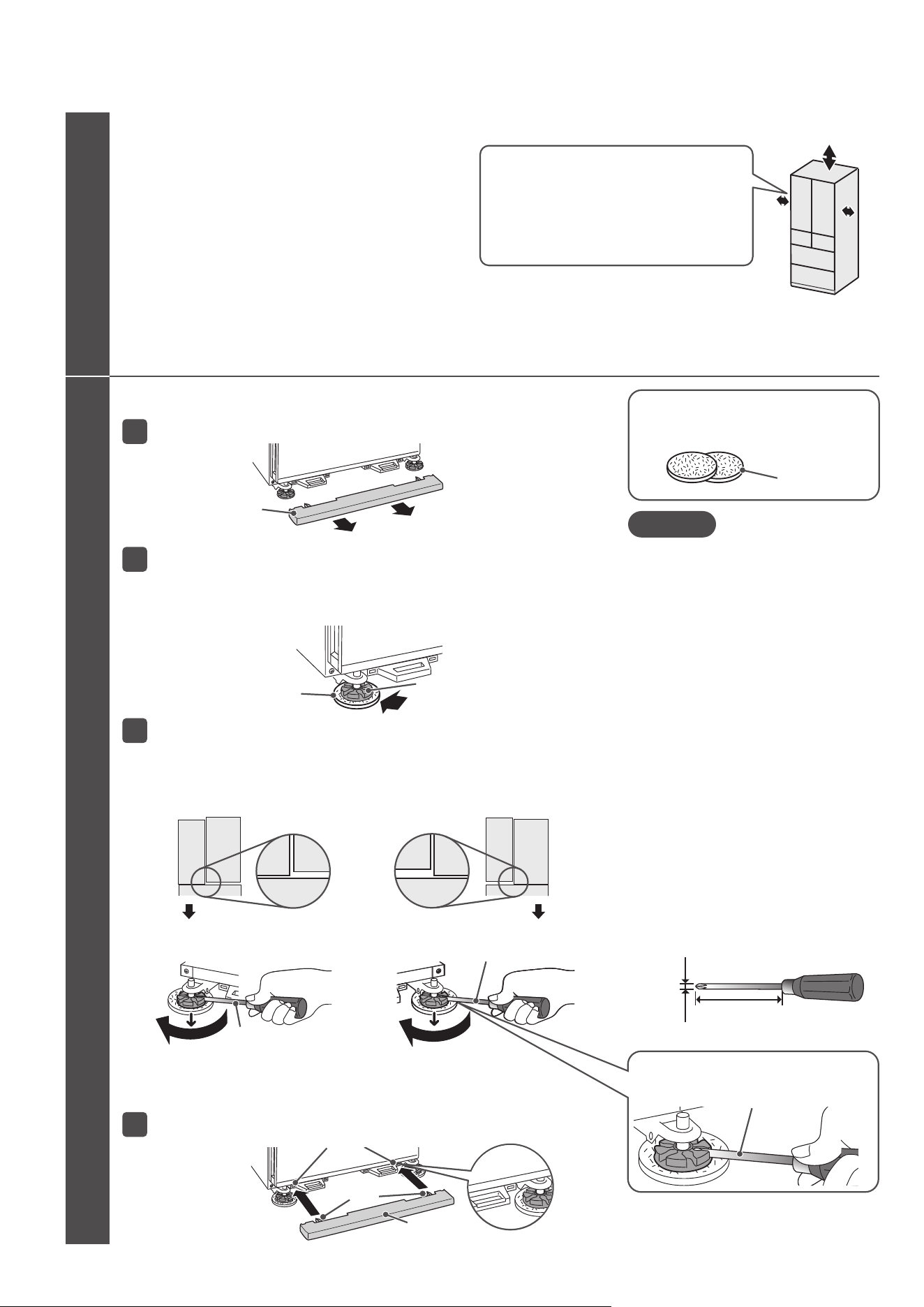
Adjust and fix the refrigerator horizontally.
As a guide, the height of the door can be adjusted 1mm every one turn of the adjustable mount.
If the adjustable leg is difficult to turn, insert a Phillips screwdriver to turn it.
Turn the left and right adjustable mounts until they touch the floor.
Adjust so that the left and right doors of the refrigerator compartment are parallel.
Hold the leg cover and pull it toward you to remove it.
1
3
Insert the fork of the leg cover into the mounting holes to attach the cover.
4
Place cushions under the adjustable mounts.
Place the cushions under the adjustable mounts evenly at the front, back, left and right.
2
Cushion
■
The left side door is lower
Turn the left adjustable mount clockwise to level
the left and right doors.
■
The right side door is lower
Turn the right adjustable mount clockwise to level
the left and right doors.
Recommended size of Phillips screwdriver
Approx.10 cm
Approx.
φ
0.6 cm
Phillips screwdriver
Insert the Phillips screwdriver securely into the
groove of the adjustable mount and then turn it.
Use the supplied cushion [2 pc]
●
Always wipe the adjustable mounts and clean the floor before placing the cushions.
Any dirt under the cushions may scratch the floor.
●
●
Be careful not to scratch the floor with the Phillips screwdriver
when turning the adjustable mount.
Excessively turning an adjustable mount may cause it to detach.
BEFORE USE
Above 5 cm or more
Left and right 0.5 cm or more
When installing the refrigerator near the wall, please allow
a gap of 1.5 cm or more between the refrigerator and the wall.
(Otherwise, the refrigerator doors may not open fully and the
food/cases in the refrigerator may not be taken out.)
When the refrigerator doors are hard to open, please move
the refrigerator further away from the wall.
*
The actual size of the center part of the side of the refrigerator's
main body is slightly larger than the nominal size.
Therefore, please allow sufficient space around the refrigerator when installing it.
*
If you are concerned about noise caused by vibration or condensation
on the rear of the refrigerator or discoloration/marking on the wall due to
high humidity, install the refrigerator with a gap of 2 cm or more.
Please allow sufficient space around the refrigerator to dissipate heat
generated from the refrigerator as shown in the illustration on the right.
●
Leg cover
Cushion (Supplied tool)
Adjustable mount
Phillips screwdriver
Phillips screwdriver
Fork
Leg cover
Mounting holes
BEFORE USE
47
Pg.
65‒67
3
Cleaning the inside of the refrigerator.
You may plug in the power cord immediately after installing the refrigerator.
Do not share the wall outlet with any other appliances. (Alternating current 220–240 V, rated 10 A or more)
Plug the power cord.
4
● Wipe with a soft, damp cloth, then finish with a dry cloth.
● Rinse the water supply tank and water filter.
*
Do not wipe off the lubricant applied to the slide door rails or the contact surface of the rails.
* At the beginning, the refrigerator may smell of plastic.
If you are concerned, ensure that the room is well ventilated.
(Smell will gradually disappear)
●
Check that the power plug or the cord is not wedged between the back of the refrigerator and the wall in order to prevent the cord from getting hot.
Cooling inside the refrigerator begins
●
It may take
more than 24 hours to cool
well the inside of the refrigerator, depending on conditions such as
the ambient temperature or storage state of foods.
Do not put ice cream, uncooled foods or perishable foods in the refrigerator until the inside has cooled well.
●
Perform
"Ice Maker Cleaning"
when using the automatic ice making function for the first time.
●
Ice making will start automatically after the inside of the refrigerator has cooled well.
( When using for the first time,
it may take 24 hours or more to make ice
.)
●
When the temperature inside the refrigerator is low, cooling may not start for about 10 minutes after plugging in the power plug.
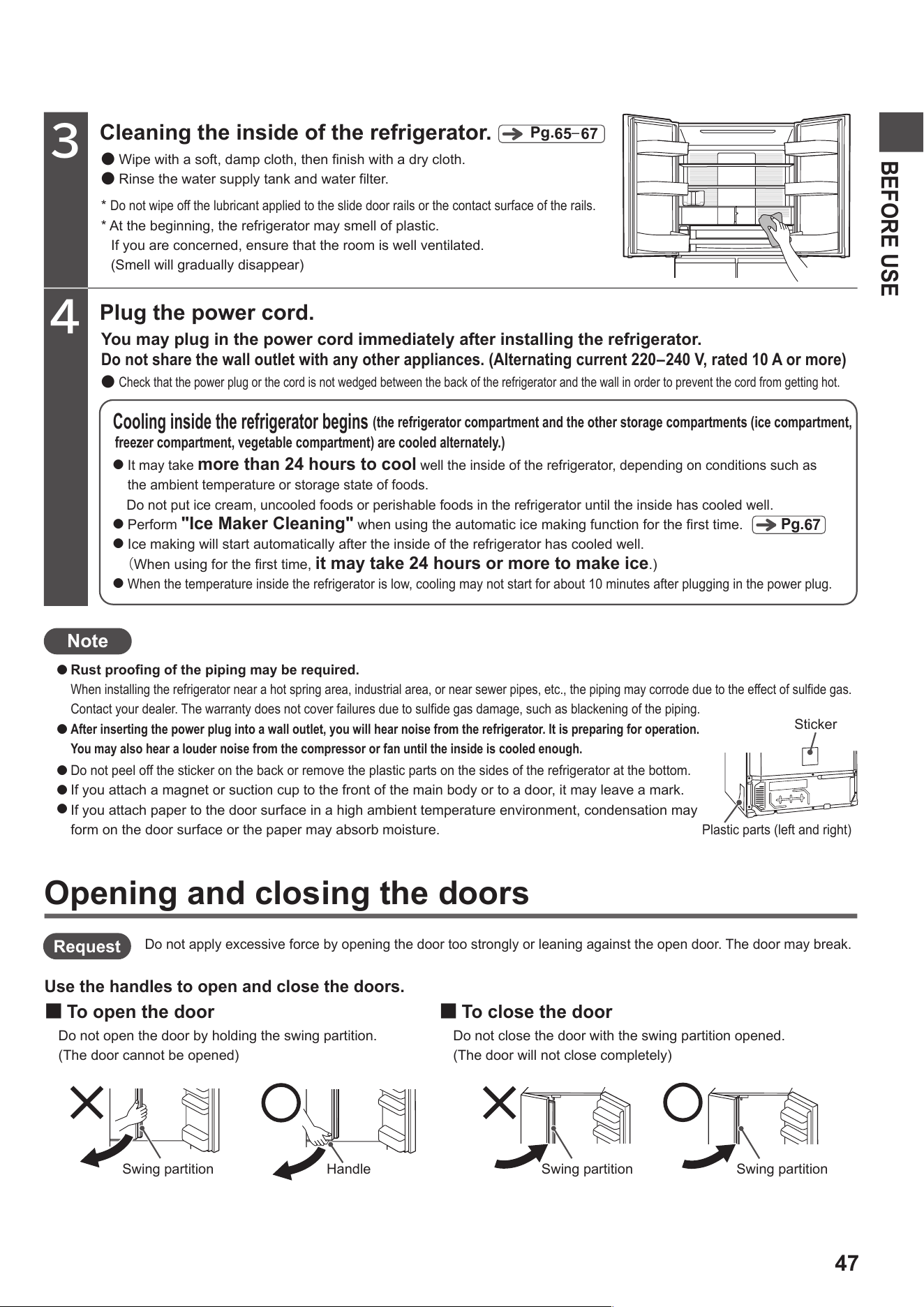
Do not peel off the sticker on the back or remove the plastic parts on the sides of the refrigerator at the bottom.
If you attach a magnet or suction cup to the front of the main body or to a door, it may leave a mark.
If you attach paper to the door surface in a high ambient temperature environment, condensation may
form on the door surface or the paper may absorb moisture.
Rust proofing of the piping may be required.
When installing the refrigerator near a hot spring area, industrial area, or near sewer pipes, etc., the piping may corrode due to the effect of sulfide gas.
Contact your dealer. The warranty does not cover failures due to sulfide gas damage, such as blackening of the piping.
After inserting the power plug into a wall outlet, you will hear noise from the refrigerator. It is preparing for operation.
You may also hear a louder noise from the compressor or fan until the inside is cooled enough.
Note
freezer compartment, vegetable compartment) are cooled alternately.)
(the refrigerator compartment and the other storage compartments (ice compartment,
Pg.
67
Plastic parts (left and right)
Sticker
Opening and closing the doors
Use the handles to open and close the doors.
■
To open the door
Do not open the door by holding the swing partition.
(The door cannot be opened)
■
To close the door
Do not close the door with the swing partition opened.
(The door will not close completely)
Do not apply excessive force by opening the door too strongly or leaning against the open door. The door may break.
Swing partition Handle Swing partition Swing partition
Request
●
●
●
●
●
48
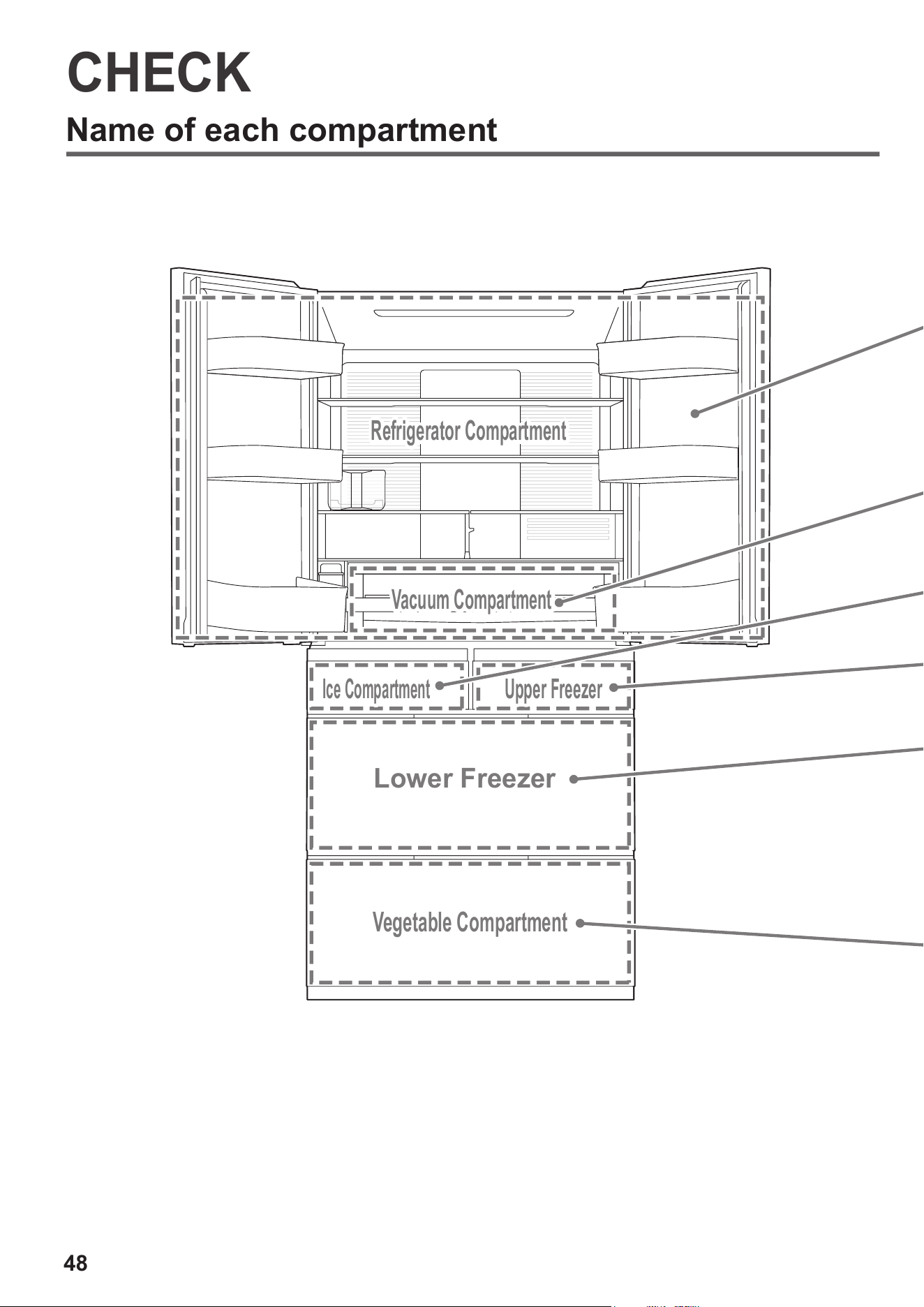
Name of each compartment
CHECK
Refrigerator Compartment
Vacuum Compartment
Ice Compartment
Upper Freezer
Lower Freezer
Vegetable Compartment
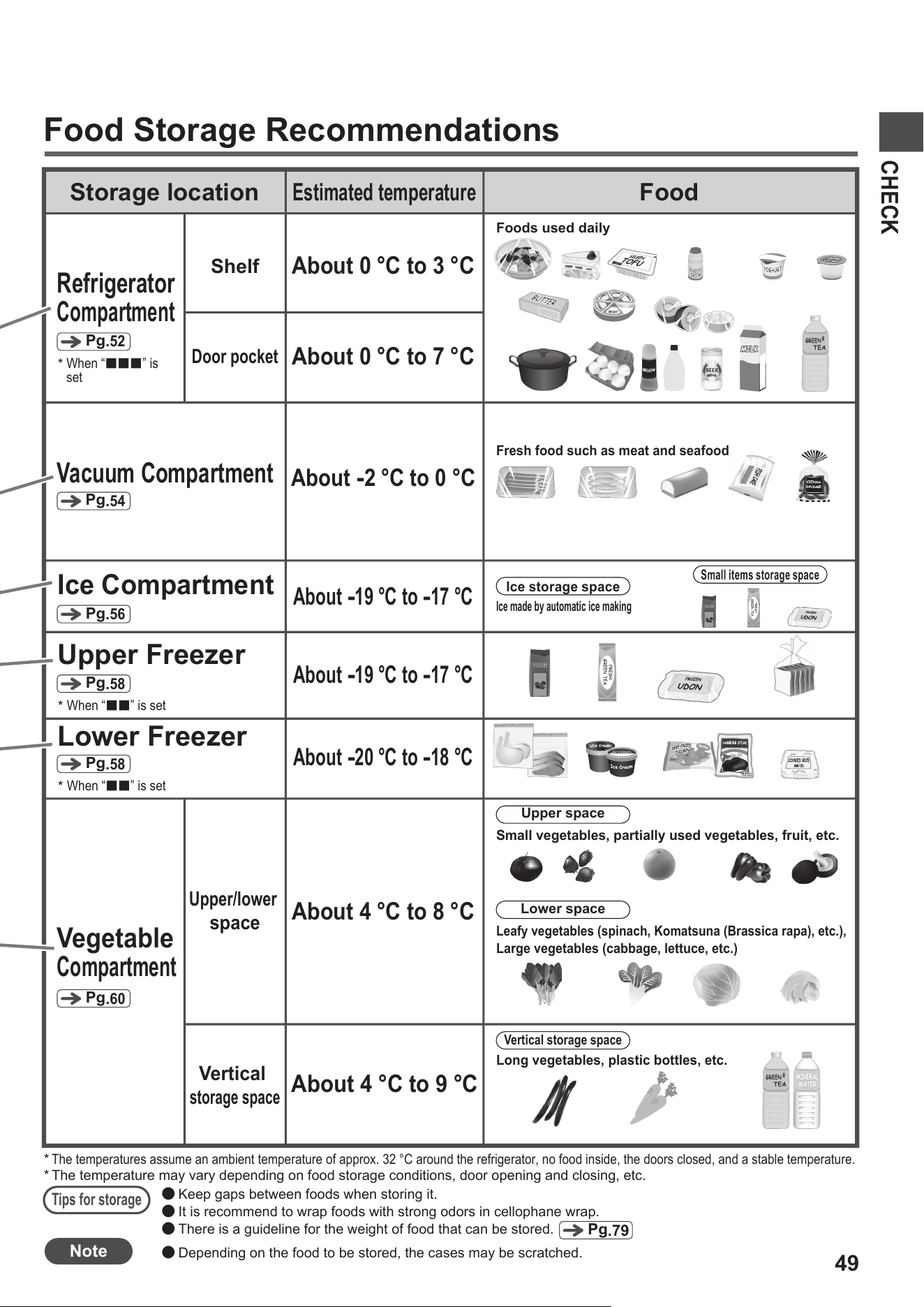
49
CHECK
Storage location
Estimated temperature
Food
Refrigerator
Compartment
Pg
.
52
About 4 °C to 9 °C
Vertical
storage space
Vegetable
Compartment
Pg
.
60
Vacuum Compartment
Pg
.
54
Upper Freezer
Pg
.
58
Lower Freezer
Pg
.
58
Ice Compartment
Pg
.
56
Food Storage Recommendations
MINERAL
WATER
MINERAL
WATER
About 0 °C to 3 °C
About 0 °C to 7 °C
Shelf
Door pocket
Foods used daily
About
-
2 °C to 0 °C
Fresh food such as meat and seafood
About
-
19 °C to
-
17 °C
About
-
19 °C to
-
17 °C
About
-
20 °C to
-
18 °C
Upper/lower
space
About 4 °C to 8 °C
Upper space
Small vegetables, partially used vegetables, fruit, etc.
Lower space
Leafy vegetables (spinach, Komatsuna (Brassica rapa), etc.),
Large vegetables (cabbage, lettuce, etc.)
Vertical storage space
Long vegetables, plastic bottles, etc.
*
Tips for storage
●
Keep gaps between foods when storing it.
●
It is recommend to wrap foods with strong odors in cellophane wrap.
●
There is a guideline for the weight of food that can be stored.
The temperature may vary depending on food storage conditions, door opening and closing, etc.
Pg
.79
When “
■■■
” is
set
*
When “
■■
” is set
*
When “
■■
” is set
*
Ice storage space
Ice made by automatic ice making
Small items storage space
*
The temperatures assume an ambient temperature of approx. 32 °C around the refrigerator, no food inside, the doors closed, and a stable temperature.
Note
●
Depending on the food to be stored, the cases may be scratched.
50
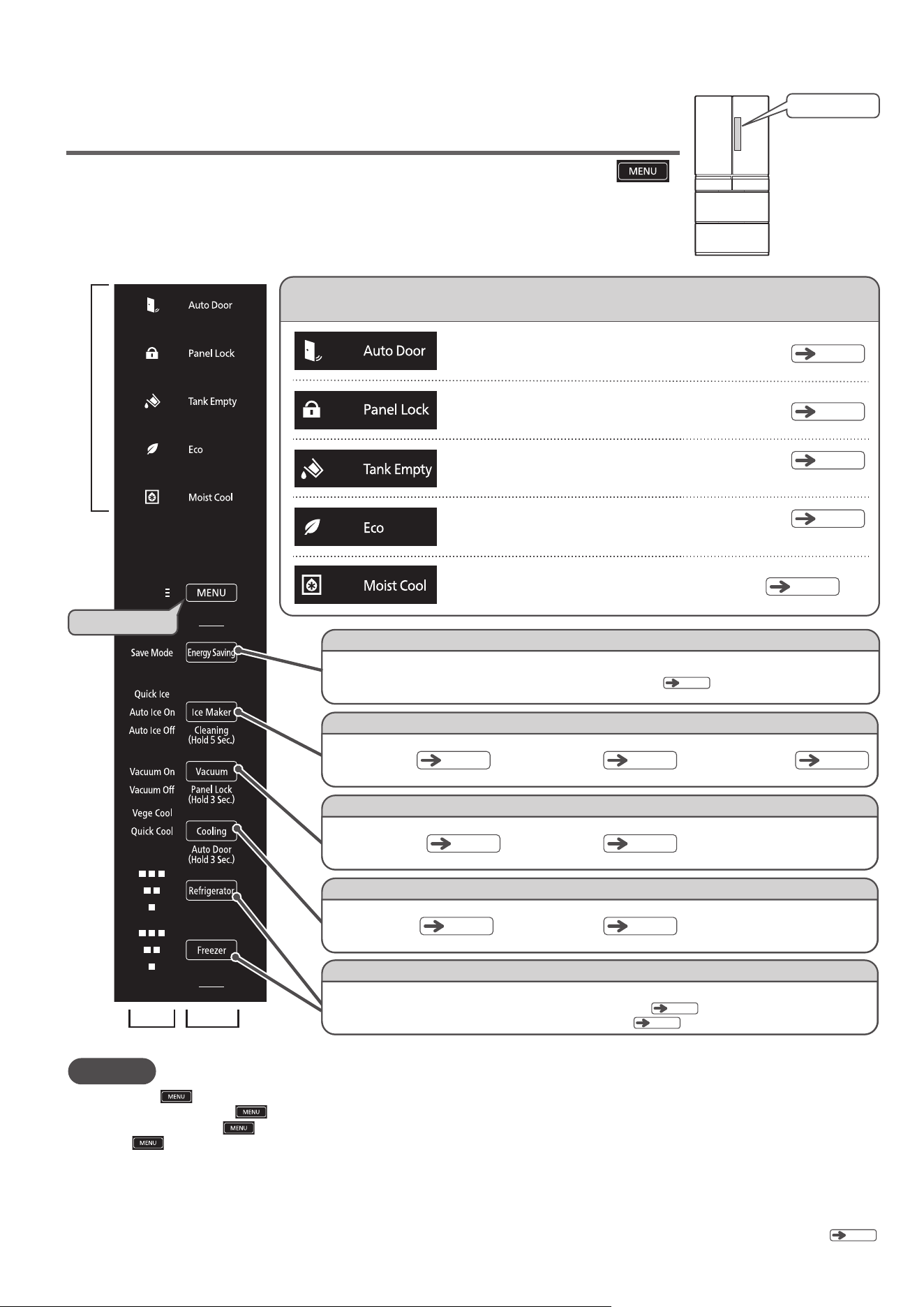
Functions of the Control Panel
CHECK
(
Continued
)
Note
When you touch , all the indicators light up and the current settings are displayed. You can also view the current settings by opening the refrigerator compartment door.
When you are done, touch again to deactivate the Display Section and Operation Section.
Even if you do not touch , the Display Section and Operation Section will be deactivated after about 40 seconds to save power.
However, stays lit. In addition, the setting for “Save”, the display during “Quick”, “Spot Cool” and “Off (Stop Ice Making)”, [Water supply tank indicator lamp], “Off
(Non-vacuum)” display, [Eco operation indicator lamp] and [Door open/close indicator lamp] during eco operation are not deactivated.
When a refrigerator compartment door is opened, the Display Section and Operation Section light up. In this case, they will be deactivated about 15 seconds after the door is closed.
The response of the touch panel may change depending on the ambient temperature, humidity, the physical condition of the user, or the operation of nearby electrical devices.
If the touch panel does not respond, release your finger and then touch it again. If the interval between key touches is too short, the touch panel may not respond. Touching the touch panel strongly will not improve the response.
The Operation Section may not respond if it is wet or dirty. Remove the dirt with a damp cloth and then wipe it with a dry cloth.
The Operation Section will not respond to touches while a refrigerator door is open or while the Display Section is blinking. Check “The lamp on the Control Panel blinks”.
●
●
●
●
●
●
●
The Display and Operation Sections are normally unlit. Touch
to make them light up.
The Operation Section is a touch panel.
Touch it to toggle the settings.
*All the indicator lamps on the control panel shown below are lit to facilitate explanation.
Indicator lamps to provide information
*1
*2
*2
The symbols and letters on the control panel light up only when you operate.
Only the symbol lights up all the time, and the letters light up only when you operate.
*2
*1
*2
*1
Display Section
Touch first
Display Section
Operation Section
Lights when the Auto Drawer function is activated
Lights when the operation section on the control panel
is locked
Lights when the water in the water supply tank is low
[Water supply tank indicator lamp]
Lights when the refrigerator is operated in a manner to reduce power consumption
[Eco operation indicator lamp]
Lights when “Moisture Cooling” is activated
Pg.
51
Pg.
62
Pg.
57
Pg.
64
Pg.
52
Energy Saving
Save Mode
Slightly reduces the cooling in each compartment to save energy
Pg
.72
Ice Maker
Control Panel
Vacuum
Vacuum On
Cooling
Vege Cool
Refrigerator/Freezer
The temperature settings of the Refrigerator Compartment and the Freezer Compartment can be adjusted in three levels.
Adjusting the temperature setting of the Refrigerator Compartment
Pg
.52
Pg
.64
Adjusting the temperature setting of the Freezer Compartment
Pg
.59
Quick Ice
Pg.
57
Pg.
55
Pg.
61
Quick Cool
Pg.
53
Vacuum Off
Pg.
55
Auto Ice On
Pg.
56
Auto Ice Off
Pg.
57
51
The default setting is “On”.
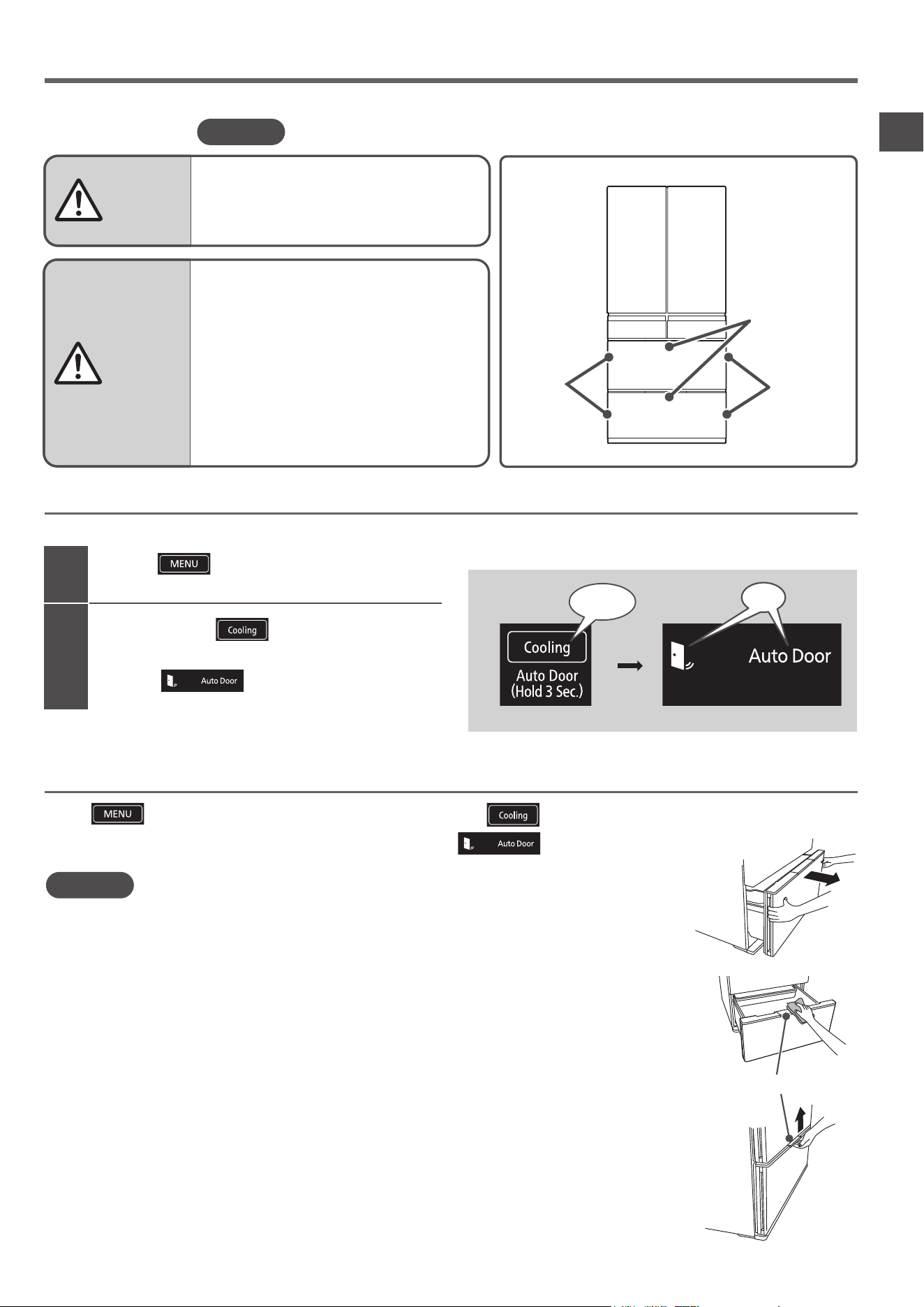
Using Auto Drawer
■Auto Drawer Auto Drawer function helps you to pull out the case easily even if it is heavy with plentiful foods in.
2
1
All indicator lamps are activated, and then the current settings are displayed.
×
CAUTION
WARNING
Touch
to activate the display.
Touch and hold
for 3 seconds or longer
until the setting sound (a long beep) is heard to
activate indicator.
When the Auto Drawer function is deactivated, hold the left and right handles on the side of the door with both hands to
open the door.
It is not possible to close the door using the Auto Drawer function.
When closing the door, hold the left and right handles on the side of the door to close the drawer.
When deactivate the Auto Drawer function, it is not possible to deactivate the Auto Drawer function of “Lower Freezer”
and the “Vegetable Compartment” separately.
This function is to reduce the burden at the start of pulling out the drawer, and the dimension that the drawer comes out
when operating the Auto Drawer function is about 15 cm or more. Depending on the installation conditions of the refrigerator,
the dimensions of the drawer coming out may change, or the door may return slightly after the door opens electrically,
but it does not indicate any fault.
It is not possible to open “Lower Freezer” and the “Vegetable Compartment” at the same time using the Auto Drawer function.
The Auto Drawer function does not work when either “Lower Freezer” or “Vegetable Compartment” is open.
A sound is heard when you press the Auto Drawer switch, but it does not indicate any fault.
If you spill food juice, etc. on the upper part of the Auto Drawer switch, be sure to wipe it off immediately.
The mechanical part of the Auto Drawer switch may not work, and it may cause the door to open unintentionally.
Do not close the door while pressing the Auto Drawer switch.
The Auto Drawer switch protrudes from the door surface. Do not pull up the Auto Drawer switch laying your hand on it.
In addition, be careful not to hit it or press it unintentionally.
●
Deactivate the function of the Auto Drawer
when children etc. may play with the Auto
Drawer.
●
Do not put your feet too close to the main body of
the refrigerator when pressing the Auto Drawer
switch of the Vegetable Compartment.
(The door may hit your leg and cause injury.)
●
Make sure to hold the handle of the door
when closing the door.
(Otherwise, your finger is caught in the door
and it may result in injury.)
●
Do not press the Auto Drawer switch with
your knee, etc.
Auto Drawer
switch
Handle
(Manually
operated)
Handle
(Manually
operated)
How to set
CHECK
■
Control Panel
Touch and hold
for 3 seconds
On
(When purchased/set)
How to deactivate the Auto Drawer function
Touch to activate the display, and then touch and hold
for 3 seconds or longer until
the setting sound (two short beeps) is heard to deactivate indicator.
Note
●
●
●
●
●
●
●
●
●
●
Auto Drawer Switch
Note
Auto Refrigerator Door function is not offered on this model.
52
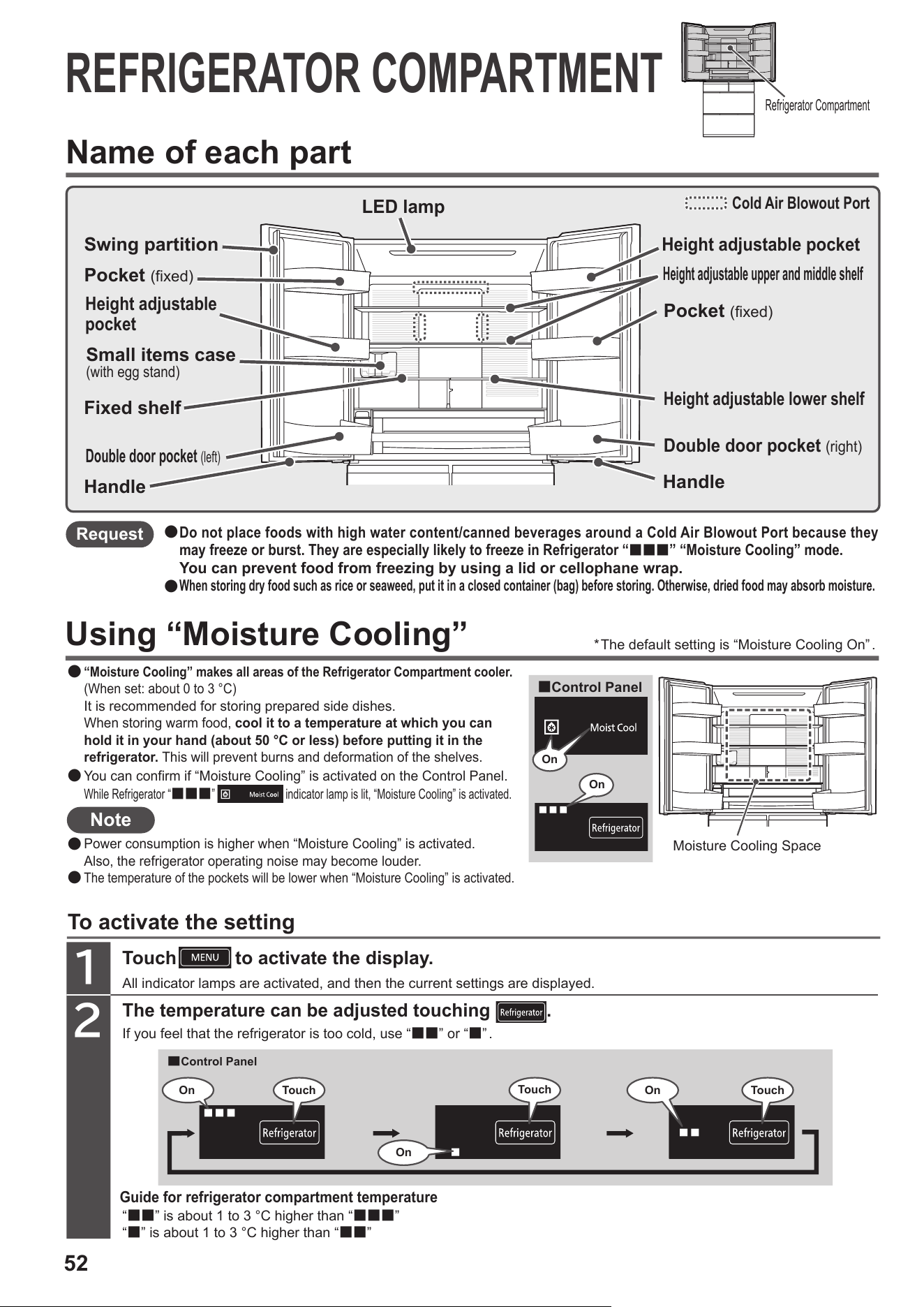
REFRIGERATOR COMPARTMENT
Request
Name of each part
Using “Moisture Cooling”
Note
To activate the setting
Guide for refrigerator compartment temperature
Touch
to activate the display.
1
2
The temperature can be adjusted touching .
All indicator lamps are activated, and then the current settings are displayed.
“■■” is about 1 to 3 °C higher than “■■■”
“■” is about 1 to 3 °C higher than “■■”
If you feel that the refrigerator is too cold, use “■■” or “■”.
“Moisture Cooling” makes all areas of the Refrigerator Compartment cooler.
(When set: about 0 to 3 °C)
It is recommended for storing prepared side dishes.
When storing warm food, cool it to a temperature at which you can
hold it in your hand (about 50 °C or less) before putting it in the
refrigerator. This will prevent burns and deformation of the shelves.
●
●
●
●
Power consumption is higher when “Moisture Cooling” is activated.
Also, the refrigerator operating noise may become louder.
The temperature of the pockets will be lower when “Moisture Cooling” is activated.
Do not place foods with high water content/canned beverages around a Cold Air Blowout Port because they
may freeze or burst. They are especially likely to freeze in Refrigerator “
■■■
” “Moisture Cooling” mode.
You can prevent food from freezing by using a lid or cellophane wrap.
When storing dry food such as rice or seaweed, put it in a closed container (bag) before storing. Otherwise, dried food may absorb moisture.
●
●
Refrigerator Compartment
Cold Air Blowout Port
LED lamp
Swing partition
Fixed shelf
Height adjustable
pocket
Small items case
(with egg stand)
Pocket (fixed)
Double door pocket (left)
Handle
Height adjustable pocket
Height adjustable upper and middle shelf
Pocket (fixed)
Height adjustable lower shelf
Double door pocket (right)
Handle
*The default setting is “Moisture Cooling On” .
You can confirm if “Moisture Cooling” is activated on the Control Panel.
While Refrigerator “
■■■
”
indicator lamp is lit, “Moisture Cooling” is activated.
■Control Panel
Moisture Cooling Space
On
On
■
Control Panel
On Touch
On
Touch
TouchOn
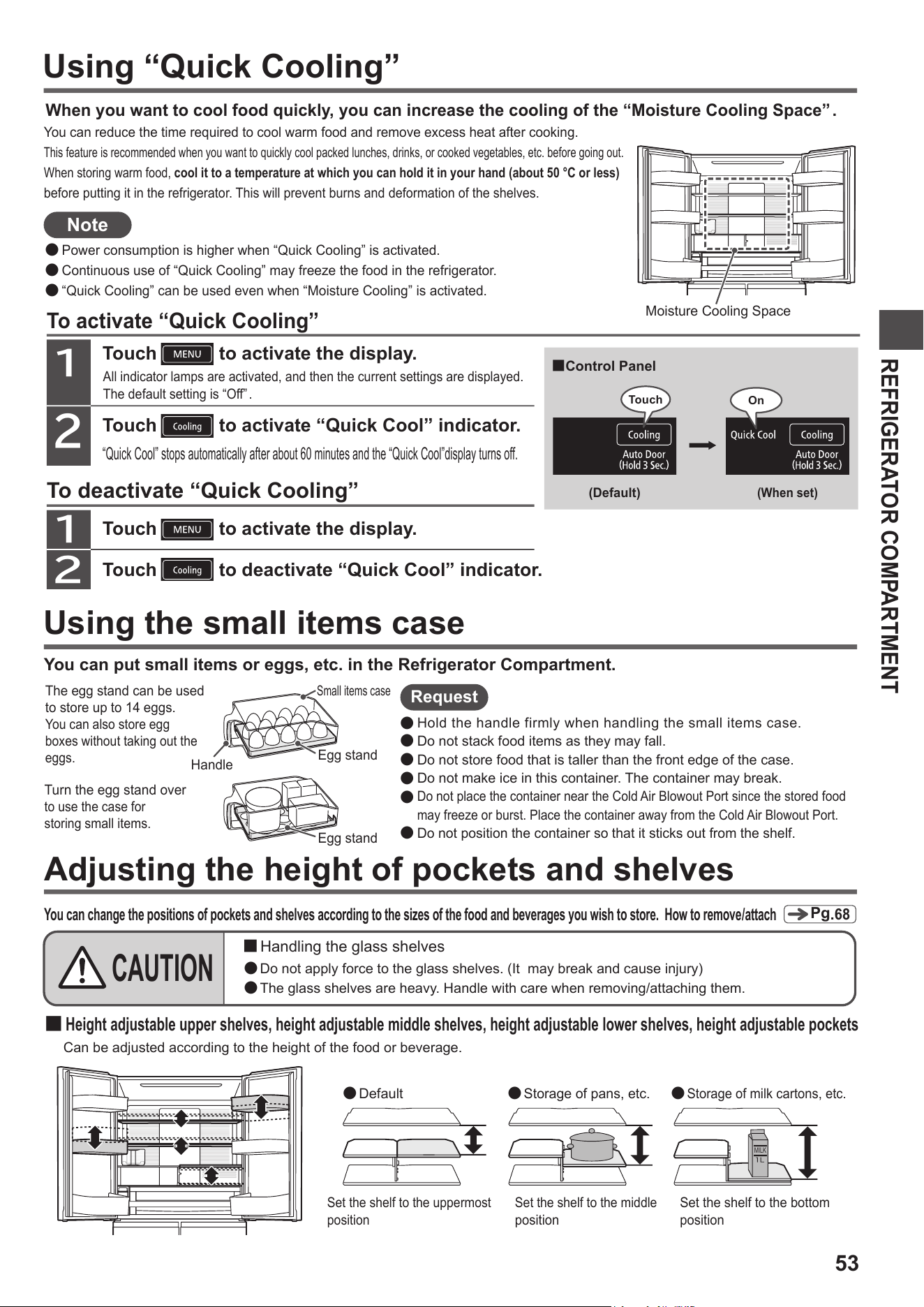
53
REFRIGERATOR COMPARTMENT
Using “Quick Cooling”
Note
Request
You can put small items or eggs, etc. in the Refrigerator Compartment.
Using the small items case
The egg stand can be used
to store up to 14 eggs.
You can also store egg
boxes
without taking out the
eggs.
Turn the egg stand over
to use the case for
storing
small items.
Small items case
Handle
Egg stand
Egg stand
Adjusting the height of pockets and shelves
You can change the positions of pockets and shelves according to the sizes of the food and beverages you wish to store. How to remove/attach
Pg
.
68
● Default ●
Storage of pans, etc.
Set the shelf to the middle
position
Set the shelf to the uppermost
position
Set the shelf to the bottom
position
●
Storage of milk cartons, etc.
Moisture Cooling Space
“Quick Cool” stops automatically after about 60 minutes and the “Quick Cool”display turns off.
Touch to activate “Quick Cool” indicator.
To activate “Quick Cooling”
2
1
Touch to activate the display.
Touch to deactivate “Quick Cool” indicator.
To deactivate “Quick Cooling”
2
1
Touch to activate the display.
All indicator lamps are activated, and then the current settings are displayed.
The default setting is “Off”.
You can reduce the time required to cool warm food and remove excess heat after cooking.
This feature is recommended when you want to quickly cool packed lunches, drinks, or cooked vegetables, etc. before going out.
When storing warm food, cool it to a temperature at which you can hold it in your hand (about 50 °C or less)
before putting it in the refrigerator. This will prevent burns and deformation of the shelves.
When you want to cool food quickly, you can increase the cooling of the “Moisture Cooling Space” .
●
Power consumption is higher when “Quick Cooling” is activated.
●
Continuous use of “Quick Cooling” may freeze the food in the refrigerator.
●
“Quick Cooling” can be used even when “Moisture Cooling” is activated.
Hold the handle firmly when handling the small items case.
Do not stack food items as they may fall.
Do not store food that is taller than the front edge of the case.
Do not make ice in this container. The container may break.
Do not place the container near the Cold Air Blowout Port since the stored food
may freeze or burst. Place the container away from the Cold Air Blowout Port.
Do not position the container so that it sticks out from the shelf.
●
●
●
●
●
●
■
Handling the glass shelves
●
Do not apply force to the glass shelves. (It may break and cause injury)
●
The glass shelves are heavy. Handle with care when removing/attaching them.
CAUTION
■
Height adjustable upper shelves, height adjustable middle shelves, height adjustable lower shelves, height adjustable pockets
Can be adjusted according to the height of the food or beverage.
MILK
■Control Panel
(Default)
(When set)
Touch
On
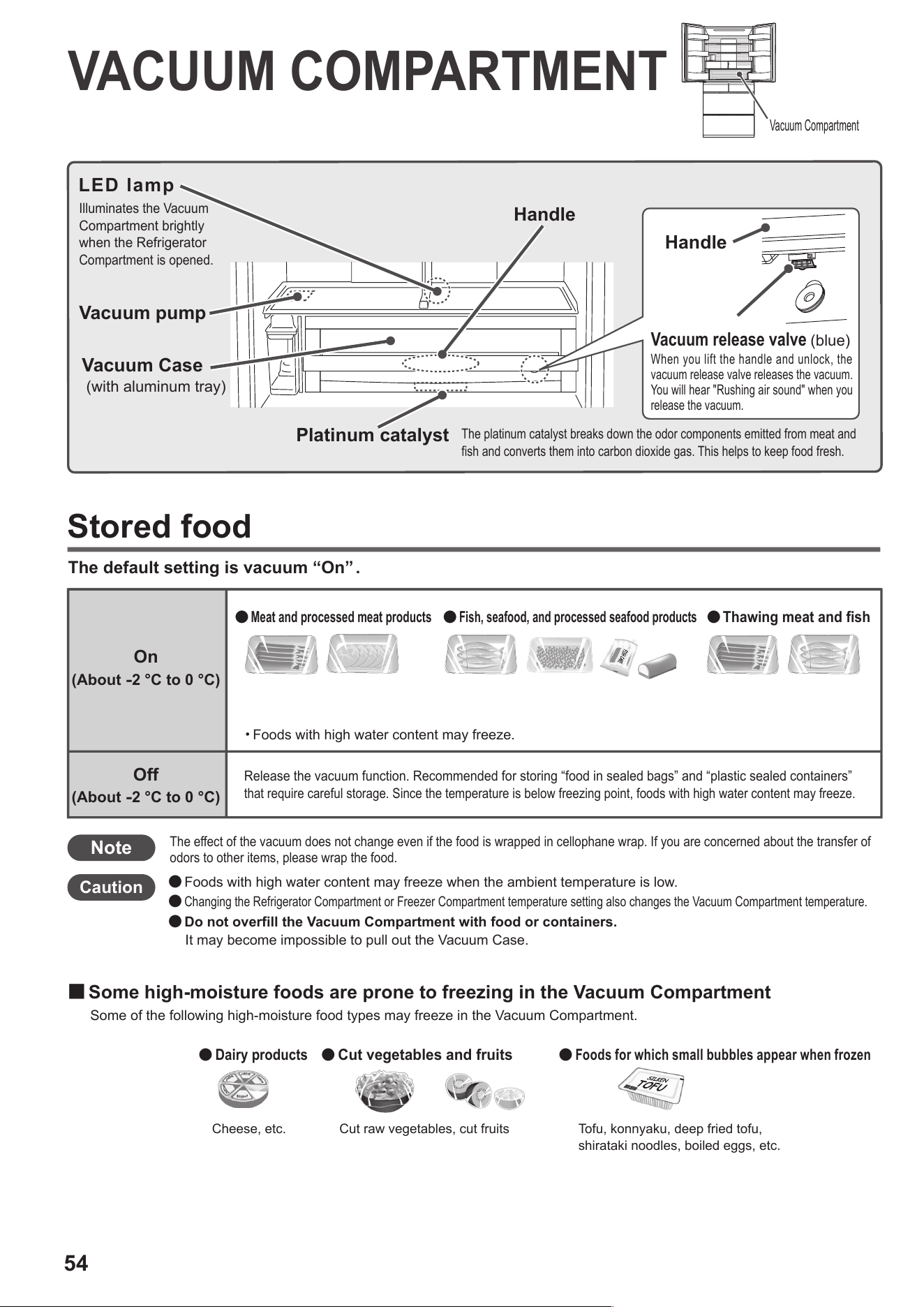
54
The default setting is vacuum “On” .
VACUUM COMPARTMENT
Stored food
Note
Caution
● Foods with high water content may freeze when the ambient temperature is low.
●
Changing the Refrigerator Compartment or Freezer Compartment temperature setting also changes the Vacuum Compartment temperature.
● Do not overfill the Vacuum Compartment with food or containers.
It may become impossible to pull out the Vacuum Case.
Release the vacuum function. Recommended for storing “food in sealed bags” and “plastic sealed containers”
that require careful storage. Since the temperature is below freezing point, foods with high water content may freeze.
Cheese, etc.
●
Dairy products
●
Foods for which small bubbles appear when frozen
Tofu, konnyaku, deep fried tofu,
shirataki noodles, boiled eggs, etc.
●
Cut vegetables and fruits
Cut raw vegetables, cut fruits
Off
(About
-
2 °C to 0 °C)
On
(About
-
2 °C to 0 °C)
●
Meat and processed meat products
●
Fish, seafood, and processed seafood products
●
Thawing meat and fish
・Foods with high water content may freeze.
■
Some high-moisture foods are prone to freezing in the Vacuum Compartment
Some of the following high-moisture food types may freeze in the Vacuum Compartment.
The effect of the vacuum does not change even if the food is wrapped in cellophane wrap. If you are concerned about the transfer of
odors to other items, please wrap the food.
LED lamp
Illuminates the Vacuum
Compartment brightly
when the Refrigerator
Compartment is opened.
Vacuum pump
Vacuum Case
(with aluminum tray)
Platinum catalyst
The platinum catalyst breaks down the odor components emitted from meat and
fish and converts them into carbon dioxide gas. This helps to keep food fresh.
Handle
Handle
When you lift the handle and unlock, the
vacuum release valve releases the vacuum.
You will hear "Rushing air sound" when you
release the vacuum.
Vacuum release valve
(blue)
Vacuum Compartment
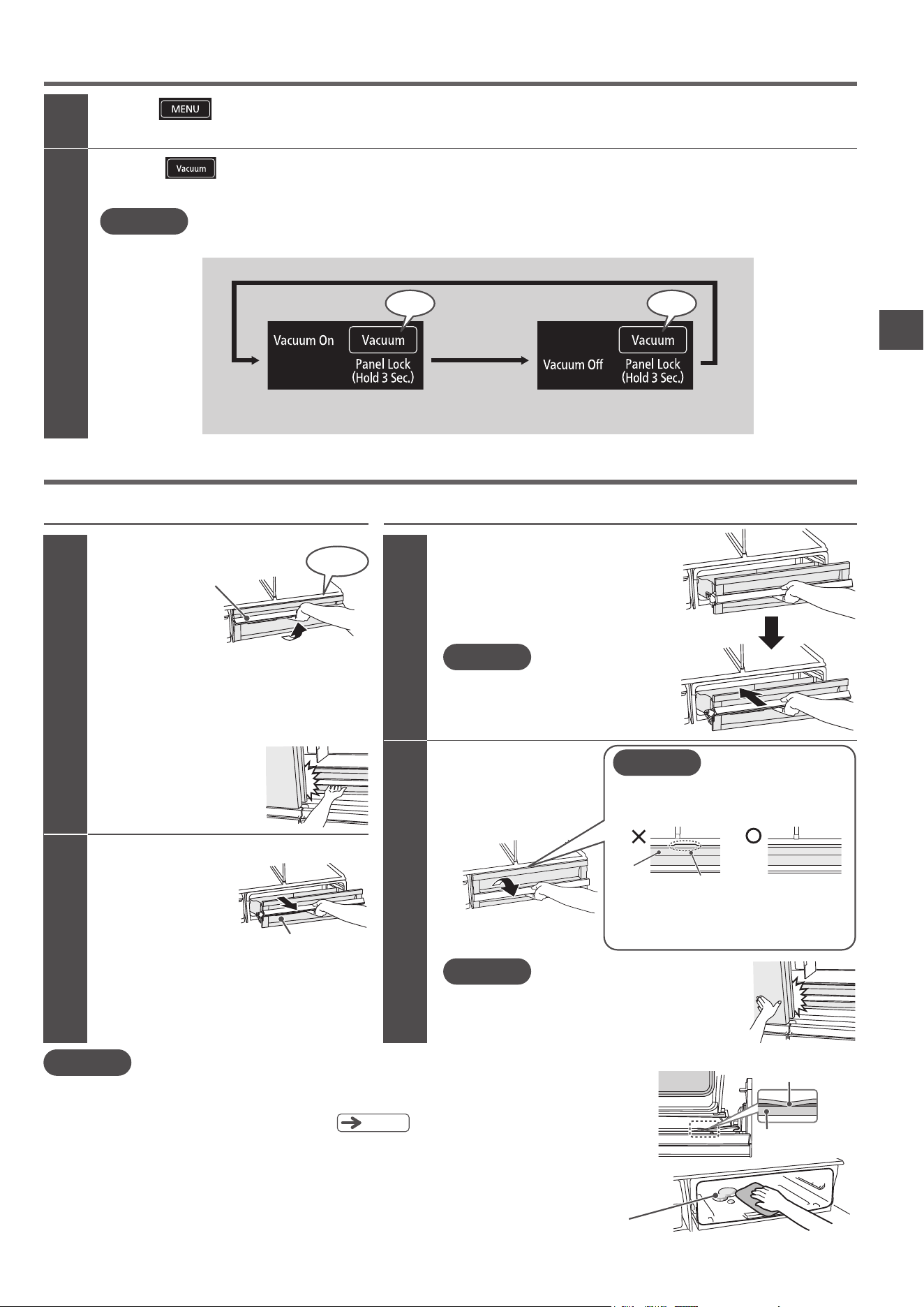
55
VACUUM COMPARTMENT
Changing the Vacuum Compartment settings
1
2
Request
All indicator lamps are activated, and then the current settings are displayed.
Note
While “Vacuum Off” is set, the “Vacuum Off” display continues to light. Other displays are deactivated after about 40 seconds
to save energy, but the functions that have been set continue to operate.
Touch to activate the display.
Touch to change to the desired setting.
Each time you touch the panel, the display changes in the order shown below. The default setting is “Vacuum On”.
It takes about 3 to 4 minutes from the time when the
r
efrigerator door is closed and the vacuum pump is
activated until a vacuum state is reached. If you open
the Vacuum Case within 4 minutes, there may be no
“Rushing air sound”.
*
The vacuum is being released while you hear the “Rushing
air sound”. The Vacuum Case cannot be pulled out at this
time. After the sound has stopped, pull the Vacuum Case
out toward you.
*
When you release the handle, the handle is lowered.
*
If the gasket is caught, the vacuum cannot be maintained. Straighten any parts of
the gasket that are caught. The left and right sides and the underside are hard to see,
so please remove the Vacuum Case to check.
Since the Vacuum Compartment is hermetically sealed, water contained in food or air may cause water drops,
frost, or ice to form inside the compartment. Wipe off with a soft cloth moistened with warm water.
(The
performance will not be affected even if there are water drops, frost, or ice in the Vacuum Compartment.)
If you are concerned about water drops, frost, or ice, it is recommend to wrap stored food in cellophane wrap.
If you spill water or juice from food in the compartment, wipe it off immediately.
The platinum catalyst does not require replacement. Do not remove it.
●
●
●
●
●
Pg
.
68
■
Control Panel
Touch Touch
(Default)
“On” “Off”
1
2
1
2
Push the Vacuum Case
all the way in while the
handle is pulled up.
Pull up the handle
to unlock.
If you do not push the Vacuum Case all the way
in while the handle is pulled up, the lock is not be
applied and a vacuum cannot be created.
Fully lower the
handle to lock.
Opening and closing the Vacuum Case
When opening
Handle
“Rushing air sound”
*
If you try to raise the handle without
opening both the left and right doors
of the Refrigerator Compartment,
parts may break.
Pull the Vacuum Case
forward.
When closing
Caution
Caution
If you close the Refrigerator Compartment door without locking
the handle, it may cause breakage of parts or food, or cause the
door to remain slightly open, resulting in poor cooling.
Caught
Water drops, frost, ice
If you do not fully lower the handle while
the Vacuum Case is pushed all the way in,
a vacuum cannot be created.
A vacuum cannot be created.
If the convex shape on the upper part of
the lid is seen, lower the handle after the
Vacuum Case is pushed all the way in.
Correctly locked.
Lid
Convex shape
Caution
Gasket
Vacuum Case
56
ICE COMPARTMENT
(
AUTOMATIC ICE MAKER
)
Ice Compartment
Pg
.
67
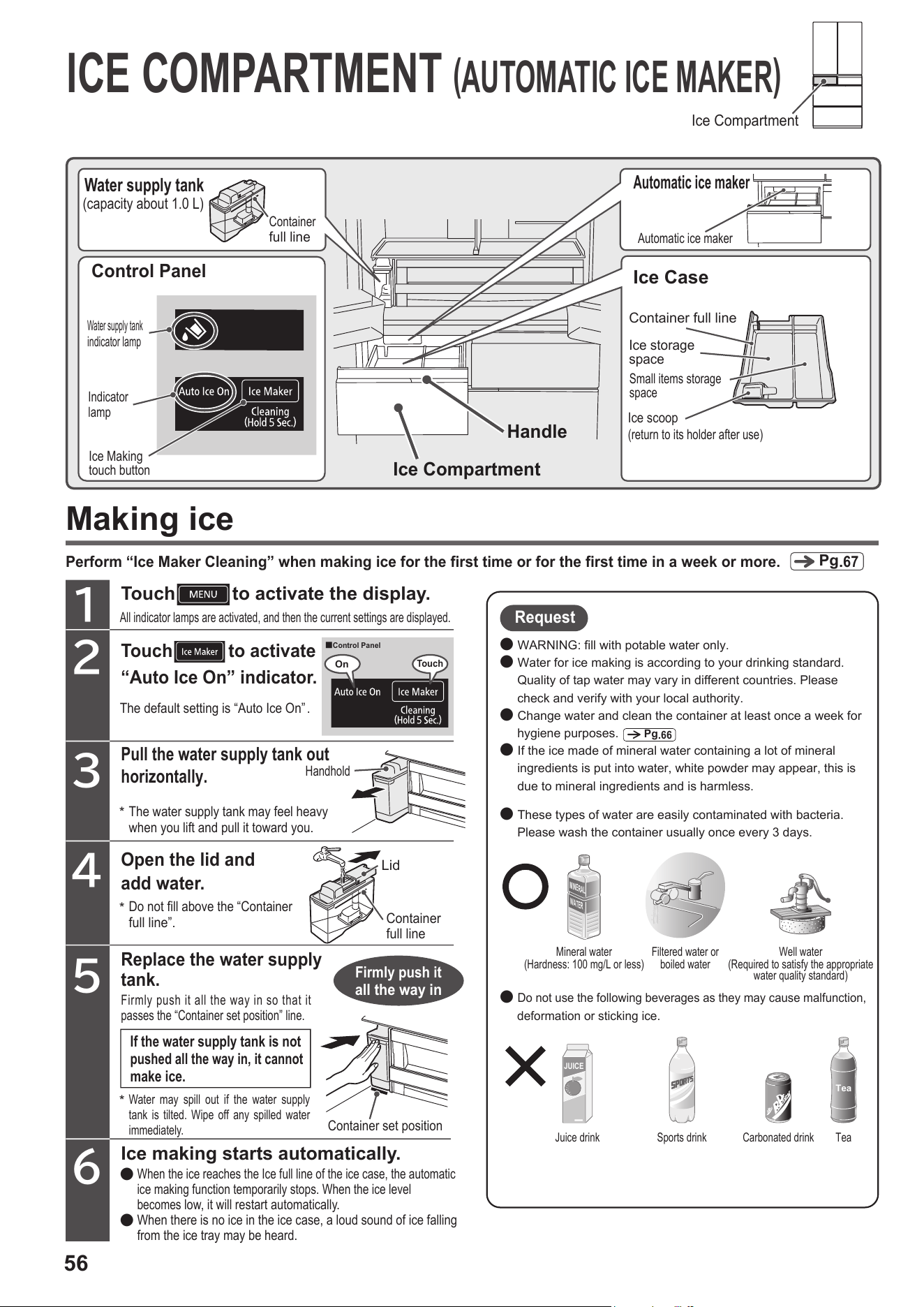
Making ice
Perform “Ice Maker Cleaning” when making ice for the first time or for the first time in a week or more.
3
Touch
to activate
“Auto Ice On” indicator.
2
1
4
The default setting is “Auto Ice On” .
Open the lid and
add water.
5
Ice making starts automatically.
6
Replace the water supply
tank.
If the water supply tank is not
pushed all the way in, it cannot
make ice.
Touch to activate the display.
All indicator lamps are activated, and then the current settings are displayed.
Firmly push it
all the way in
Container set position
Mineral water
(Hardness: 100 mg/L or less)
Juice drink Sports drink Carbonated drink Tea
Well water
(Required to satisfy the appropriate
water quality standard)
Filtered water or
boiled water
MINERAL
WATER
Tea
JUICE
Request
● WARNING: fill with potable water only.
● Water for ice making is according to your drinking standard.
Quality of tap water may vary in different countries. Please
check and verify with your local authority.
● Change water and clean the container at least once a week for
hygiene purposes.
● If the ice made of mineral water containing a lot of mineral
ingredients is put into water, white powder may appear, this is
due to mineral ingredients and is harmless.
● These types of water are easily contaminated with bacteria.
Please wash the container usually once every 3 days.
●
Do not use the following beverages as they may cause malfunction,
deformation or sticking ice.
Pg
.
66
Do not fill above the “Container
full line”.
Firmly push it all the way in so that it
passes the “Container set position” line.
Water may spill out if the water supply
tank is tilted. Wipe off any spilled water
immediately.
When the ice reaches the Ice full line of the ice case, the automatic
ice making function temporarily stops. When the ice level
becomes
low, it will restart automatically.
When there is no ice in the ice case, a loud sound of ice falling
from the ice tray may be heard.
●
●
Small items storage
space
Control Panel
Water supply tank
indicator lamp
Indicator
lamp
Ice Making
touch button
Water supply tank
(capacity about 1.0 L)
Container
full line
Ice Compartment
Handle
Automatic ice maker
Automatic ice maker
Ice Case
Ice scoop
(return to its holder after use)
Container full line
Ice storage
space
■
Control Panel
Handhold
Lid
Container
full line
On
Touch
*
*
*
The water supply tank may feel heavy
when you lift and pull it toward you.
Pull the water supply tank out
horizontally.
57
ICE COMPARTMENT (AUTOMATIC ICE MAKER)
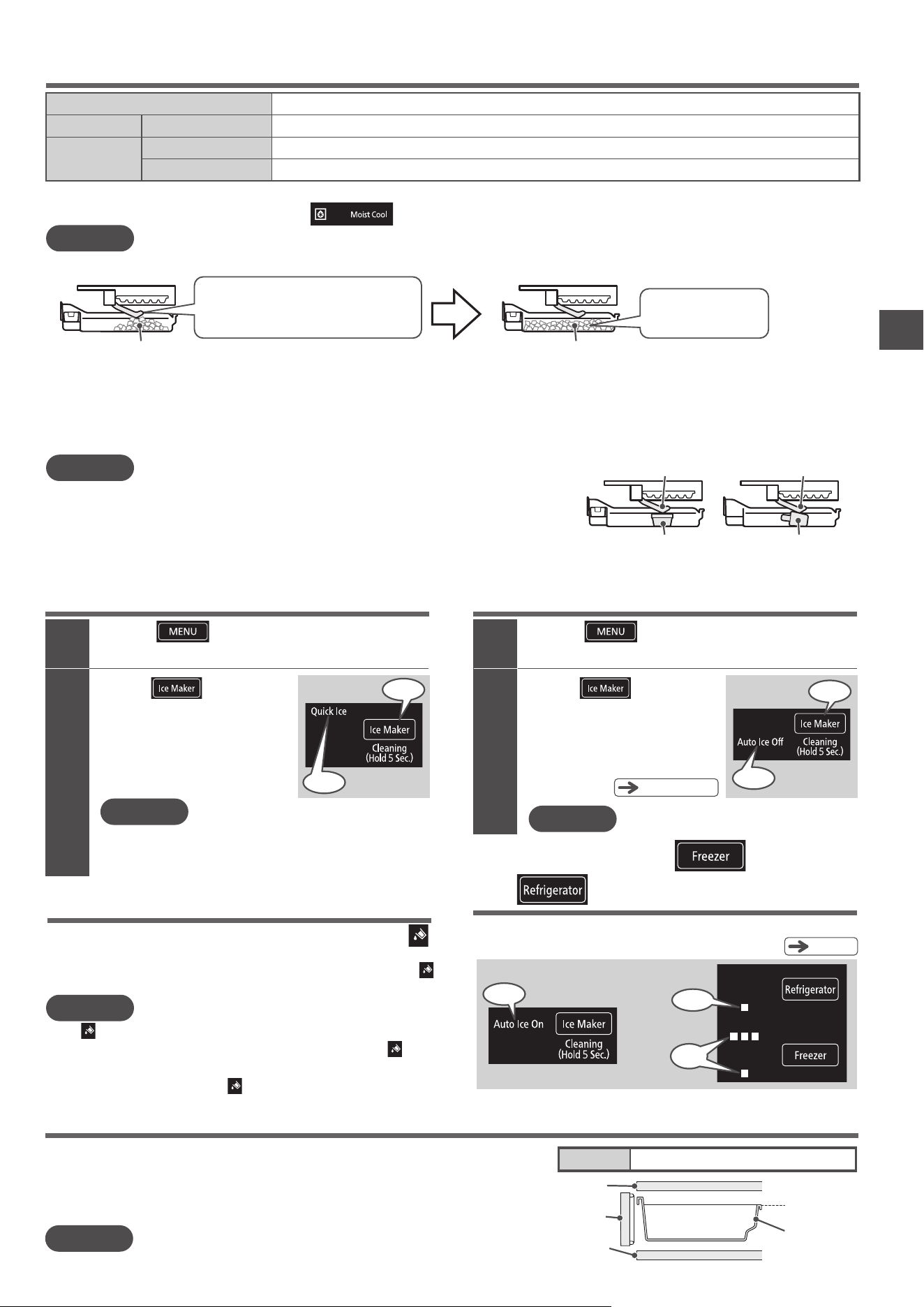
Ice storage capacity and time required to make ice
Note
●
It will take extra time to make ice in the following cases.
・First time use (it may take 24 hours or more)
・When the Freezer Compartment temperature is set to “
■”
・
When a large amount of food is put into the refrigerator at once
・When the refrigerator is set to “Save Mode”
・When the doors are opened and closed frequently
・
When the Freezer Compartment or Ice Compartment doors are left partially open
・When the ambient temperature is low such as in winter
・When there is a power outage
Time for one cycle of ice
making (12 ice cubes)
Model
Ice storage capacity
When the ice is leveled
Normal ice making
“Quick Ice”
Estimated 110 to 140 minutes
Estimated 80 minutes
R-GW670T
Type
Estimated 140 ice cubes
Quick Ice Making Stop Ice Making
Ice build-up in one place can stop ice making even when the ice level is low.
●
To make more ice, move the ice to the front and level it off.
●
Ice (build-up in one place) Ice (leveled)
Note
Is the ice scoop at its correct position?
Is there any frozen food in the ice case?
Frozen food
Detection lever
Ice scoop
Detection lever
When “Auto Ice On” or “Quick Ice” is set, do not put anything other than ice made by the automatic ice
maker in the ice storage space, such as frozen foods or the ice scoop. It will not be possible to make ice.
(It may prevent the ice from forming as parts of the ice maker may be obstructed by the food obstructing.)
Open and close the door of the Ice Compartment slowly.
I
f you open or close it vigorously, ice may spill from the ice case and fall into the Lower Freezer.
●
●
Ice touches the detection lever
↓
Ice making stops even when the ice level is low
More ice can be made
Water supply indicator
When the water level is low in the water supply tank, the
indicator lits. Add water to the water supply tank.
When the left door of the refrigerator compartment is opened or closed, the
indicator turns off once. It lights up again if water is not added. (Up to 3 hours later)
Note
The
indicator does not light when the automatic ice maker is “Auto Ice Off”.
If there is water in the water supply tank but the water supply tank is not pushed in firmly, the indicator
will light up. Push in the water supply tank so that it passes the “Container set position” line.
Even when “Auto Ice On” is activated, the
indicator may not light when the Ice Case is full.
●
●
●
*
Approximate time when the ambient temperature is about 30 °C, the Freezer Compartment temperature is set to
“
■■
” ,
the Refrigerator
Compartment temperature is set to “
■■■
”, and the door is not opened/closed.
Note
Touch to activate the display.
1
Touch
to activate
“Quick Ice” indicator.
2
All indicator lamps are activated, and then the current settings are displayed.
You can make ice in a shorter time than normal ice making.
“Quick Ice” finishes in about 7 hours, and the ice
maker switches back to “Auto Ice On”.
12 ice cubes are made by one ice-making operation.
While “Quick Ice” is operating, the “Quick Ice” display continues
to light. Also, the “Eco operation indicator lamp” does not light up.
●
While “Quick Ice Making” is operating, cooling for the freezer compartment
is given priority, so the temperature of the refrigerator compartment is likely
to increase when the doors are opened and closed frequently.
●
■
Control Panel
Note
Touch to activate the display.
1
Touch
to activate
“Auto Ice Off” indicator.
2
All indicator lamps are activated, and then the current settings are displayed.
The ice maker stops automatic ice making and does not make ice.
*
If you want to stop ice making for one week or longer,
please clean the automatic ice maker.
Pg
.66, 67
While “Auto Ice Off” is set, the “Auto Ice Off” display continues to light.
■
Control Panel
The ice tray may be touching food in the ice case.
Pg
.
67
Empty the ice case and perform “Ice Maker Cleaning”.
When “Auto Ice On” or “
■■■
/
■
”
and “
■
” are blinking
■Control Panel
or
Blinking
Blinking
Touch
On
On
Touch
Blinking
Small items storage space
Items to be stored
Ice pack, coffee beans and tea-leaves, etc.
Otherwise, the door may not close properly, and the refrigerator may not be cooling enough.
Furthermore, the stored food and the case may be damaged.
Store foods according to those types and sizes.
Use the upper edge of the case as a guide for the height of the foods to be stored.
Store foods so that those do not touch the partition.
Ice Compartment Door
Partition
Partition
Ice case
Upper edge of
the case
Note
If you put a warm item such as hot food in the storage space, the ice in the ice storage space may melt and/or it may take a long time to make ice.
If too many ices are stored, ices may drop from the small items storage space and those may fall down to the Lower Freezer.
Ifyoufeeltherefrigeratorisnotcoolingenoughinthehotseasonsuchassummer,settheFreezerCompartmenttemperaturesettingto“
■■■
”.
●
●
●
58
FREEZER COMPARTMENT
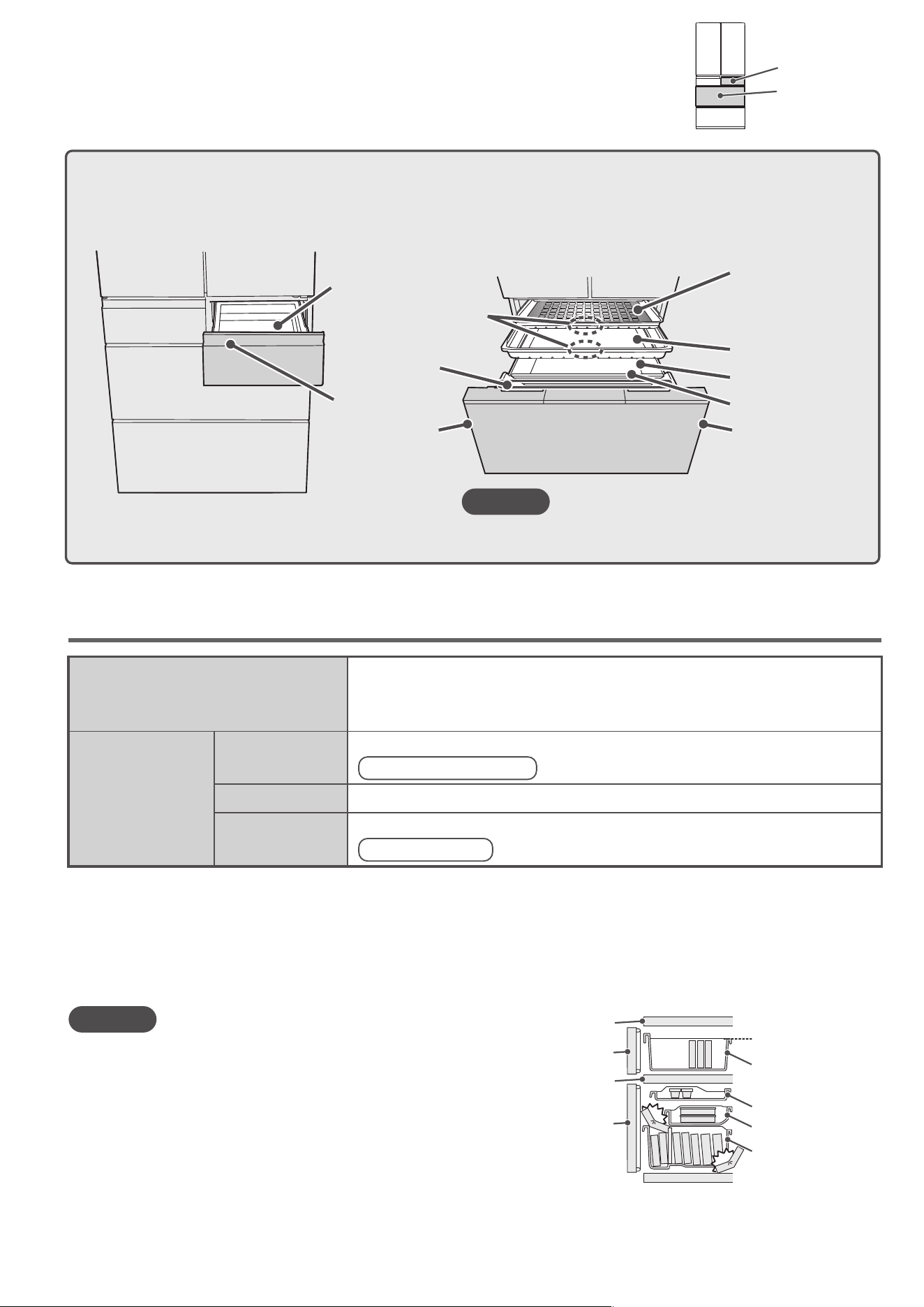
Slimline slide case
Lower freezer case
Small frozen food items, etc.
Slide Case
Upper Freezer
Lower Freezer
Freezer bags, airtight containers, etc.
Freezer bags, airtight containers, bread, etc.
Frozen food, ice cream, etc.
Plastic bottles designed to be used in freezers, etc
Vertical storage space
To quickly freeze meat, fish and steamed rice
Delicious Freezing space
Stored food
Food can be stored according to different type and sizes with the lower and upper freezer cases. Stored food should not
touch the upper cases or partitions.
The doors may not close properly and the refrigerator may not cool properly. The food or the cases may also be damaged.
Freezer Compartment
upper door
Freezer Compartment
lower door
Partition
Partition
Upper Freezer case
Slimline slide case
Slide Case
Lower freezer case
Case top
Caution
Lower Freezer
Upper Freezer
Do not put plastic bottles in the slimline slide case. If the plastic
bottle freezes, it will expand and it will be impossible to take it out.
Do not use the freezer with the Slide Case removed. Food may
fall into the back of the case and the door may not close.
Do not use containers not designed to be used in freezers.
●
●
●
Handle
Handle
HandleHandle
Use to keep daily foods or partially used foods.
Upper Freezer
The 3-layer case provides you with plenty of storage space and
allows you to organize your food easily.
Suitable for storing foods that you store a lot of and ice cream that melts easily.
Lower Freezer
Upper Freezer
case
Slimline slide case
(Delicious Freezing space)
*
With large aluminum tray
Slide Case
Lower freezer case
Vertical storage
space
Partition
Caution
●
The slimline slide case and the partition cannot be removed.
●
When using the Slimline slide case and the Slide Case,
hold the handle. Otherwise, your finger is caught in and
it may result in injury.
59
FREEZER COMPARTMENT
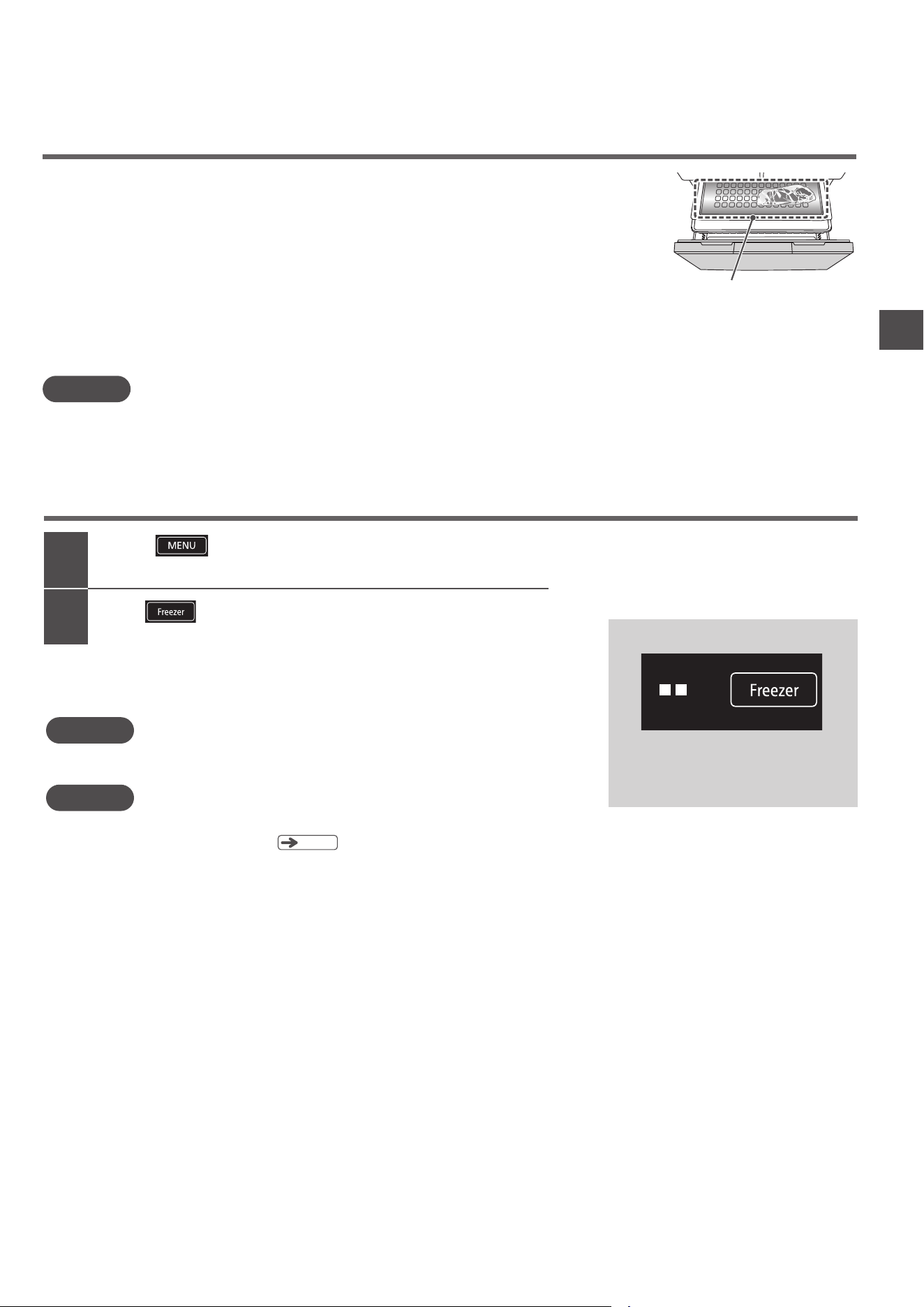
You can freeze food more efficiently if you lay it out on the large aluminum tray rather than stacking it.
Note
Using “Delicious Freezing”
Combined with the effect of the large aluminum tray, “Delicious Freezing” freezes food more quickly.
Simply put the food in the Delicious Freezing space and the sensor will detect the temperature of
the food and automatically switch the cooling operation.
Wrap the food in cellophane wrap or put it in a freezer bag and place it on the large aluminum tray.
It is convenient to cut food into small, thin pieces. This will make it freeze to the center more
quickly and also makes it easier to take out of the freezer.
When storing warm food, cool it to a temperature at which you can hold it in your hand
(about 50 °C or less) before putting it in the refrigerator.
Delicious Freezing space
If you feel that the refrigerator is too cold, use “
■■
”
or
“
■
”
.
The temperature of the refrigerator will vary slightly depending on the operating conditions.
You can also fine-tune the temperature.
Seeing the freezer to “
■■■
” consumes more power than the “
■■
” setting.
Changing the freezer temperature setting also changes the Ice Compartment temperature.
2
1
Touch to activate the display.
Touch
to adjust the Freezer Compartment temperature.
All indicator lamps are activated, and then the current settings are displayed.
The default setting is “■■” . Select “■■” for ordinary usage.
Select “■■■” if you need additional cooling, such as in the summer.
(Freezer Compartment)
Adjusting the temperature
■Control Panel
Request
Note
●
●
●
●
Pg
.62
Guide for Freezer Compartment temperature
“
■■■
” is about 2 to 4 °C lower than “
■■
”
“
■
” is about 2 to 4 °C higher than “
■■
”
60
VEGETABLE COMPARTMENT
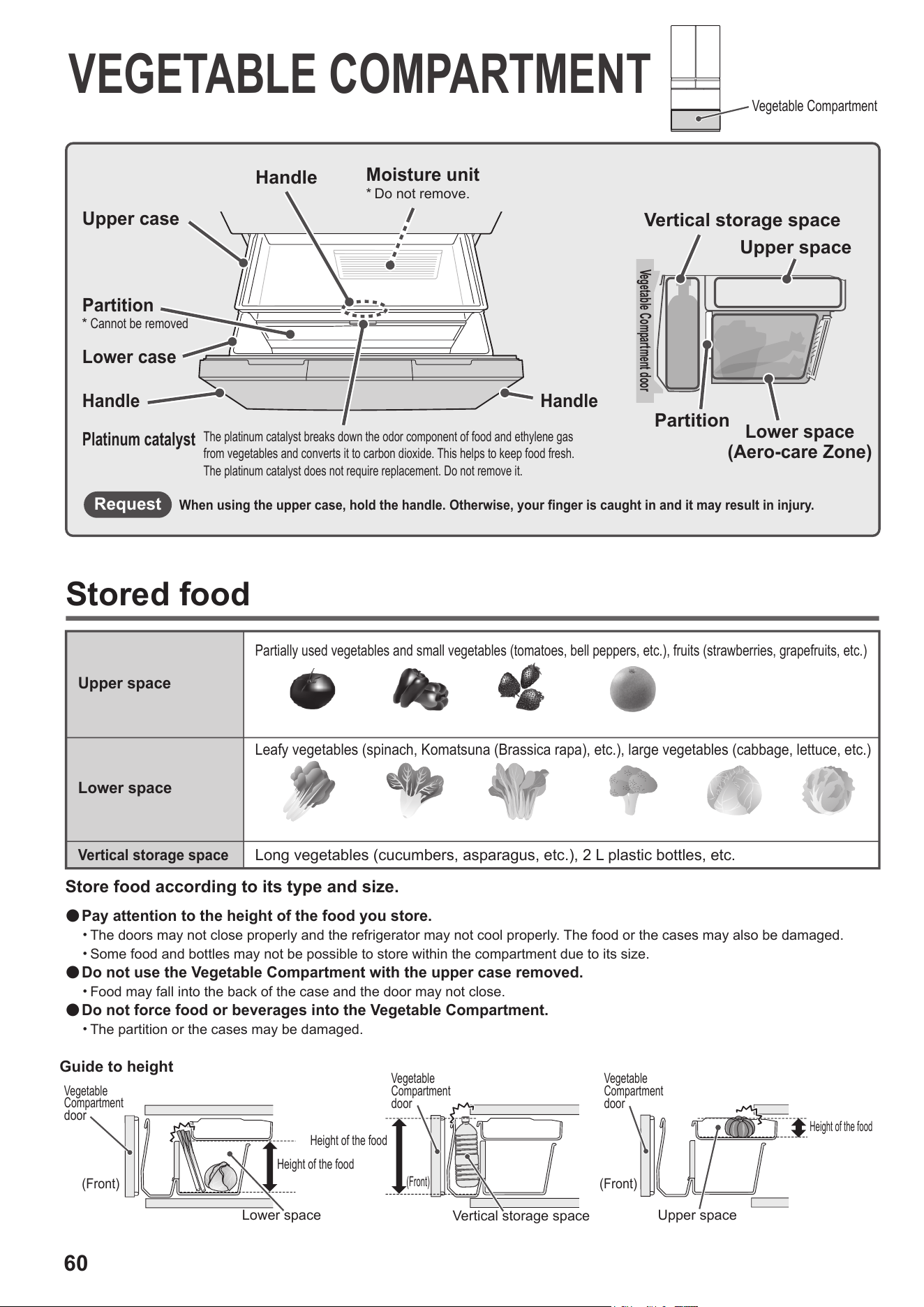
Store food according to its type and size.
Vegetable Compartment
●
Pay attention to the height of the food you store.
・The doors may not close properly and the refrigerator may not cool properly. The food or the cases may also be damaged.
・Some food and bottles may not be possible to store within the compartment due to its size.
●
Do not use the Vegetable Compartment with the upper case removed.
・Food may fall into the back of the case and the door may not close.
●
Do not force food or beverages into the Vegetable Compartment.
・The partition or the cases may be damaged.
Guide to height
Vegetable
Compartment
door
Stored food
Upper space
Partially used vegetables and small vegetables (tomatoes, bell peppers, etc.), fruits (strawberries, grapefruits, etc.)
Lower space
Leafy vegetables (spinach, Komatsuna (Brassica rapa), etc.), large vegetables (cabbage, lettuce, etc.)
Vertical storage space
Long vegetables (cucumbers, asparagus, etc.), 2 L plastic bottles, etc.
Handle
Upper case
Partition
*
Cannot be removed
Lower case
HandleHandle
Moisture unit
*
Do not remove.
Platinum catalyst
The platinum catalyst breaks down the odor component of food and ethylene gas
from vegetables and converts it to carbon dioxide. This helps to keep food fresh.
The platinum catalyst does not require replacement. Do not remove it.
Vegetable Compartment door
Vertical storage space
Upper space
Partition
Lower space
(Aero-care Zone)
When using the upper case, hold the handle. Otherwise, your finger is caught in and it may result in injury.
Request
(Front)
Height of the food
Height of the food
Vertical storage space
Vegetable
Compartment
door
Vegetable
Compartment
door
(Front)
(Front)
Lower space Upper space
Height of the food
61
VEGETABLE COMPARTMENT
Tips for storing vegetables
■
Vegetables recommended for storage at room temperature
■
Foods prone to low temperature damage
If you put food in the Vegetable Compartment for a long time, the color may change or the taste may
deteriorate depending on the food. Also, the food can lose vitamin C, become moldy, and begin to rot.
Note
The vertical storage space has a slightly higher temperature than other spaces.
You can enjoy a delicious taste if you chill these fruits in the refrigerator for a short time before eating.
●
Vegetables…
tomatoes, bell peppers, cucumbers, eggplants, green beans,
sweet potatoes, okra, etc.
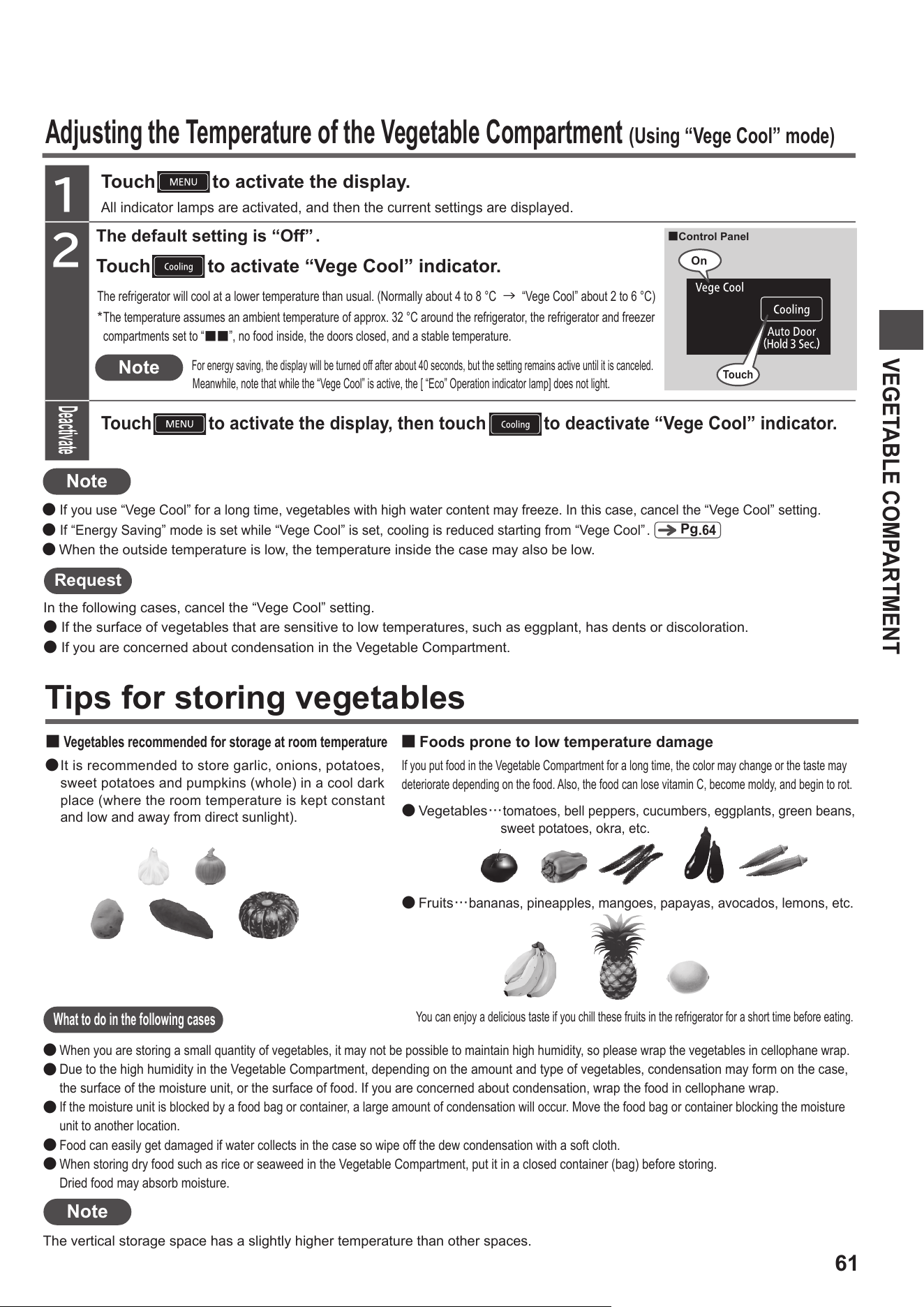
Adjusting the Temperature of the Vegetable Compartment
(Using “Vege Cool” mode)
●
Fruits…
bananas, pineapples, mangoes, papayas, avocados, lemons, etc.
It is recommended to store garlic, onions, potatoes,
sweet potatoes and pumpkins (whole) in a cool dark
place (where the room temperature is kept constant
and low and away from direct sunlight).
●
What to do in the following cases
When you are storing a small quantity of vegetables, it may not be possible to maintain high humidity, so please wrap the vegetables in cellophane wrap.
Due to the high humidity in the Vegetable Compartment, depending on the amount and type of vegetables, condensation may form on the case,
the surface of the moisture unit, or the surface of food. If you are concerned about condensation, wrap the food in cellophane wrap.
If the moisture unit is blocked by a food bag or container, a large amount of condensation will occur. Move the food bag or container blocking the moisture
unit to another location.
F
ood can easily get damaged if water collects in the case so wipe off the dew condensation with a soft cloth.
When storing dry food such as rice or seaweed in the Vegetable Compartment, put it in a closed container (bag) before storing.
Dried food may absorb moisture.
●
●
●
●
●
●
If you use “Vege Cool” for a long time, vegetables with high water content may freeze. In this case, cancel the “Vege Cool” setting.
●
If “Energy Saving” mode is set while “Vege Cool” is set, cooling is reduced starting from “Vege Cool”.
●
When the outside temperature is low, the temperature inside the case may also be low.
Note
Request
In the following cases, cancel the “Vege Cool” setting.
● If the surface of vegetables that are sensitive to low temperatures, such as eggplant, has dents or discoloration.
● If you are concerned about condensation in the Vegetable Compartment.
Touch
Note
2
1
All indicator lamps are activated, and then the current settings are displayed.
Touch to activate the display.
Touch
to activate the display, then touch to deactivate “Vege Cool” indicator.
Touch to activate “Vege Cool” indicator.
For energy saving, the display will be turned off after about 40 seconds, but the setting remains active until it is canceled.
Meanwhile, note that while the “Vege Cool” is active, the [ “Eco” Operation indicator lamp] does not light.
The refrigerator will cool at a lower temperature than usual. (Normally about 4 to 8 °C
→
“Vege Cool” about 2 to 6 °C)
The default setting is “Off” .
Pg
.
64
The temperature assumes an ambient temperature of approx. 32 °C around the refrigerator, the refrigerator and freezer
compartments set to “
■■
”, no food inside, the doors closed, and a stable temperature.
*
Deactivate
On
■Control Panel
Touch
On
62
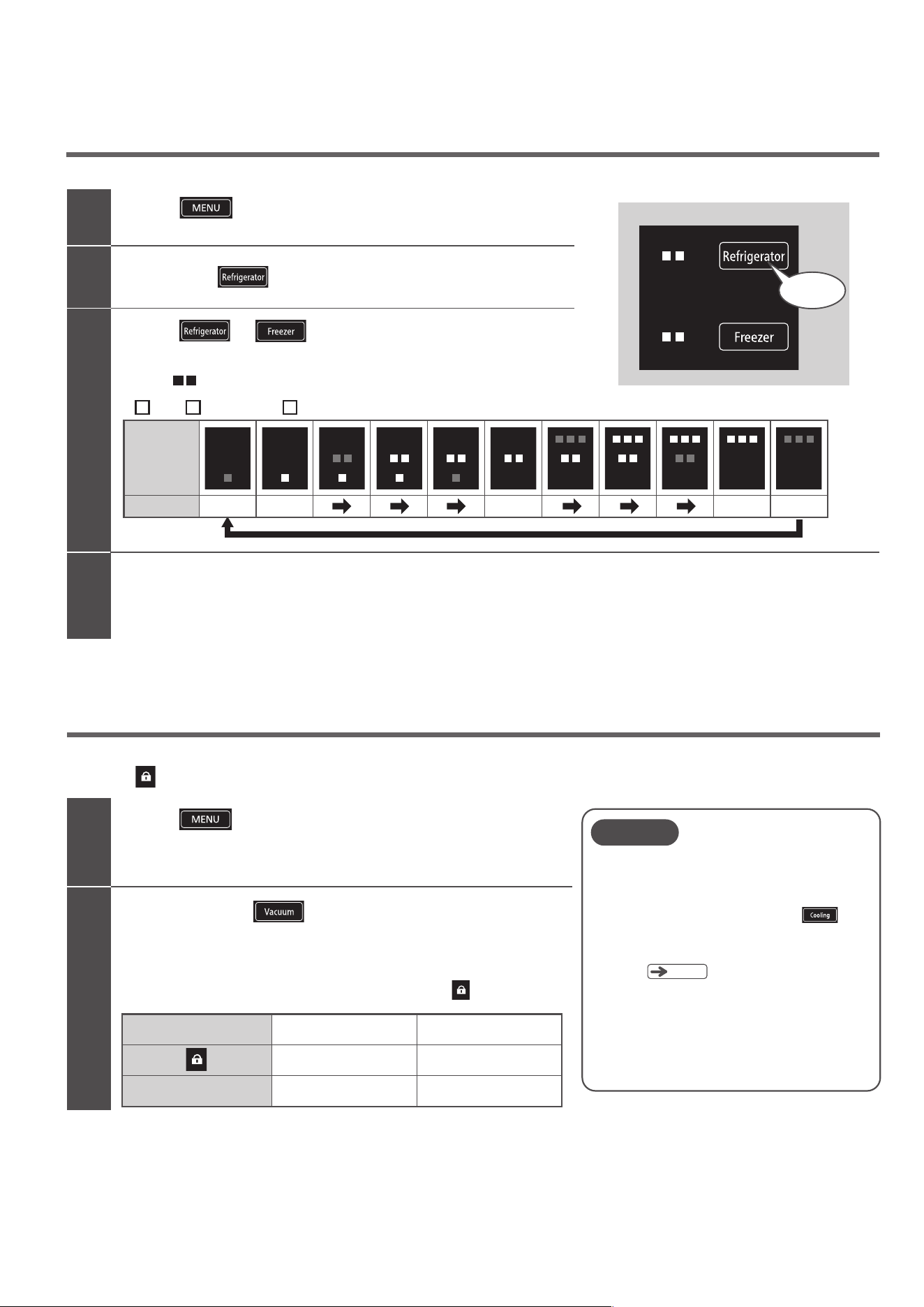
The temperature settings of the Refrigerator Compartment and the Freezer Compartment can be further adjusted in 11 levels.
Further temperature adjustments (Refrigerator/Freezer)
VARIOUS FUNCTIONS
Perform steps 1 and 2.
Two short beeps will be heard, and normal adjustment (3 levels) will be restored.
2
1
3
All indicator lamps are activated, and then the current settings are displayed.
Touch
to activate the display.
Touch and hold
for 3 seconds or longer until you hear a long beep.
Touch or to adjust each compartment.
Each time you touch it, the display changes in order as shown below.
Select “ ” for ordinary usage.
By disabling the Control Panel, you can prevent accidental operation or misuse by children.
When the
display is lit, you cannot change the settings even if you touch the control panel.
Locking the Control Panel
All indicator lamps are activated, and then the current settings are displayed.
2
1
The Control Panel lock switches “On” or “Off”.
The default setting of the Control Panel lock is “Off” ( off).
Control Panel lock settings
Setting sound
“On” (locked)
On
Long beep
“Off” (unlocked)
Off
Two short beeps
Touch
to activate the display.
Touch and hold for 3 seconds or longer until
the setting sound is heard.
Deactivate
■Control Panel
Touch and hold
for 3 seconds
(: lit,: blinking,
: unlit )
Low
Lower
Medium
High
Higher
Display
Settings
■ ■ ■
The Control Panel lock may be released after the
power plug is disconnected and reconnected, or
after operation restarts following a power outage.
The display turns off after about 40 seconds to save
power, but the setting continues until you cancel it.
●
●
Note
Even if locking the Control Panel, it is not possible
to deactivate the function on the Auto Drawer.
When you would like to deactivate the function
on the Auto Drawer, touch and hold for
3
seconds or longer until the setting sound (two
short beeps) is heard after unlocked the Control
Panel.
●
Pg
.51
63
VARIOUS FUNCTIONS
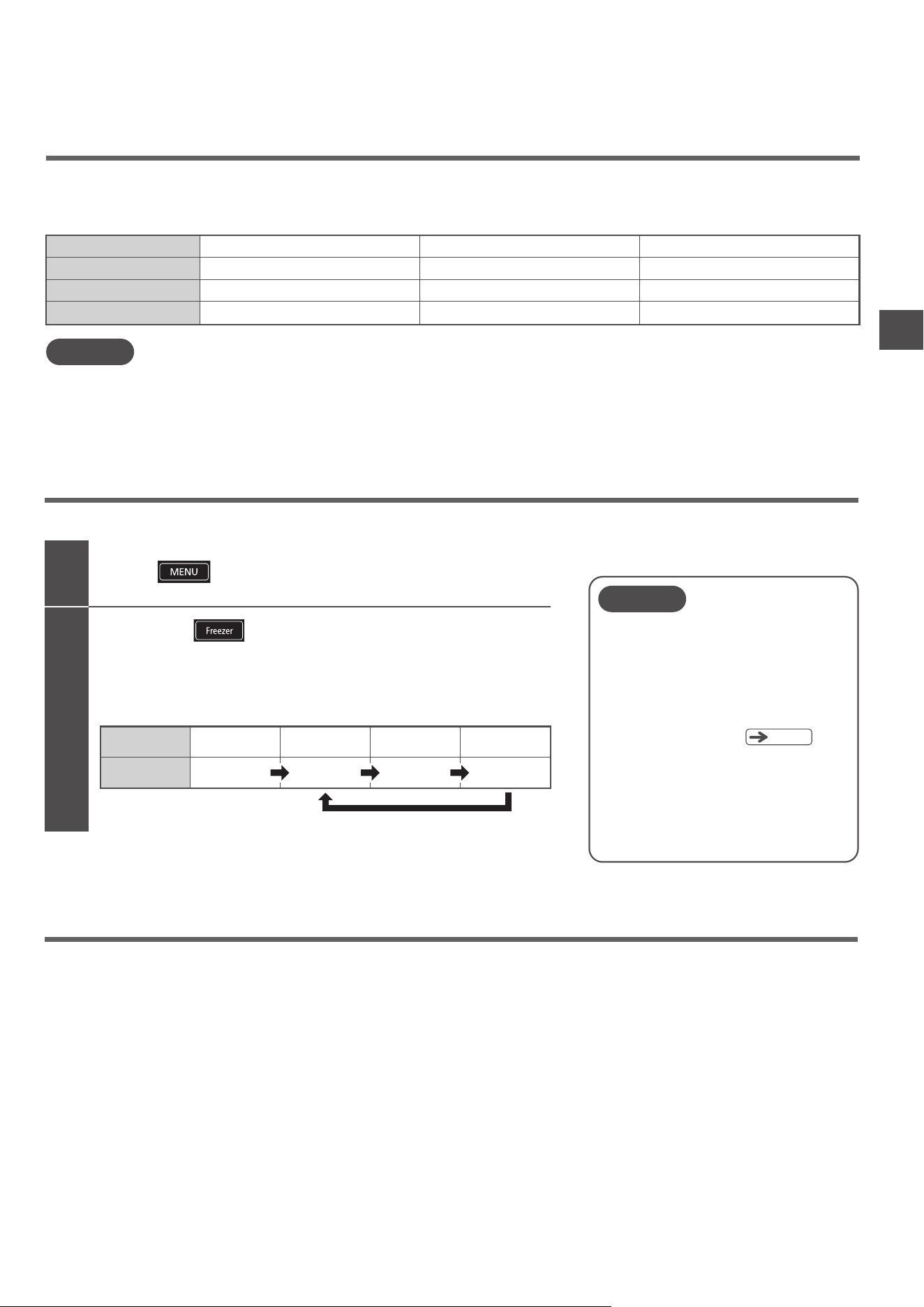
Triple power deodorizing effect (Refrigerator Compartment)
Deodorizes various odors in the refrigerator including the four major odors of sulfur, nitrogen, aldehyde, and acid,
by combining three types of deodorizing materials.
Note
You can make the door alarm and operation sounds louder, or you can set them to not sound.
Volume adjustment of door alarm and operation sound
2
Touch
to activate the display.
1
Touch and hold
for 3 seconds or longer until you hear the set sound.
The operation sound volume can be switched to “Standard”, “Loud”, or
“Off”.
Repeatedly change the setting to choose the volume level you
prefer (see table below). The default setting is “Standard".
Volume
Setting sound
Standard
−
Standard
Two short beeps
Loud
Two long beeps
Off
Long beep
Door alarm
If you open one of the doors for 1 minute or more, a sound and light will inform you that the door is open.
The door alarm function works with the Refrigerator Compartment, Ice Compartment, Lower Freezer Compartment and Vegetable Compartment.
(It does not work with the Upper Freezer Compartment.)
●
The Door Alarm will start in 30 secs if Energy Saving mode is activated. However, the display blinks after 1 minute.
●
When the display is blinking, the Operation Section will not respond to touches. Close the door before operating the Control Panel.
Door opening time
Alarm sound
Display Section
Operation Section
After 1 minute
Loud beep (3 times)
Blinking
On
After 2 minutes
Loud beep (5 times)
Blinking
On
After 3 minutes or more
Long beep (continuous),Louder
Blinking
On
(Default)
Note
It is not possible to adjust the door alarm and
the operation sound to different volume levels.
If you set the volume level to “Off”, the indicator
lamp on the Control Panel to inform the door is
open will also not blink.
Even if the volume is set to “Off”, the “Ice Maker
Cleaning” alarm will sound.
In addition, if you touch and hold the button for
3 seconds or longer, a beep sound is heard after
doing it.
The setting returns to “Standard” after the power
plug is disconnected and reconnected, or after
operation restarts following a power outage.
●
●
●
●
Pg
.
67
All indicator lamps are activated, and then the current settings are displayed.
64
SAVING ENERGY
If
does not light, the following reasons are possible.
・
The refrigerator has just been installed or many foods have been stored at once
・
The doors have been opened and closed frequently
・Food or a bag is stuck in a door so that it cannot close completely
・“Quick Ice” or “Quick Cool” is activated
・The temperature around the refrigerator is approx. 35 °C or higher
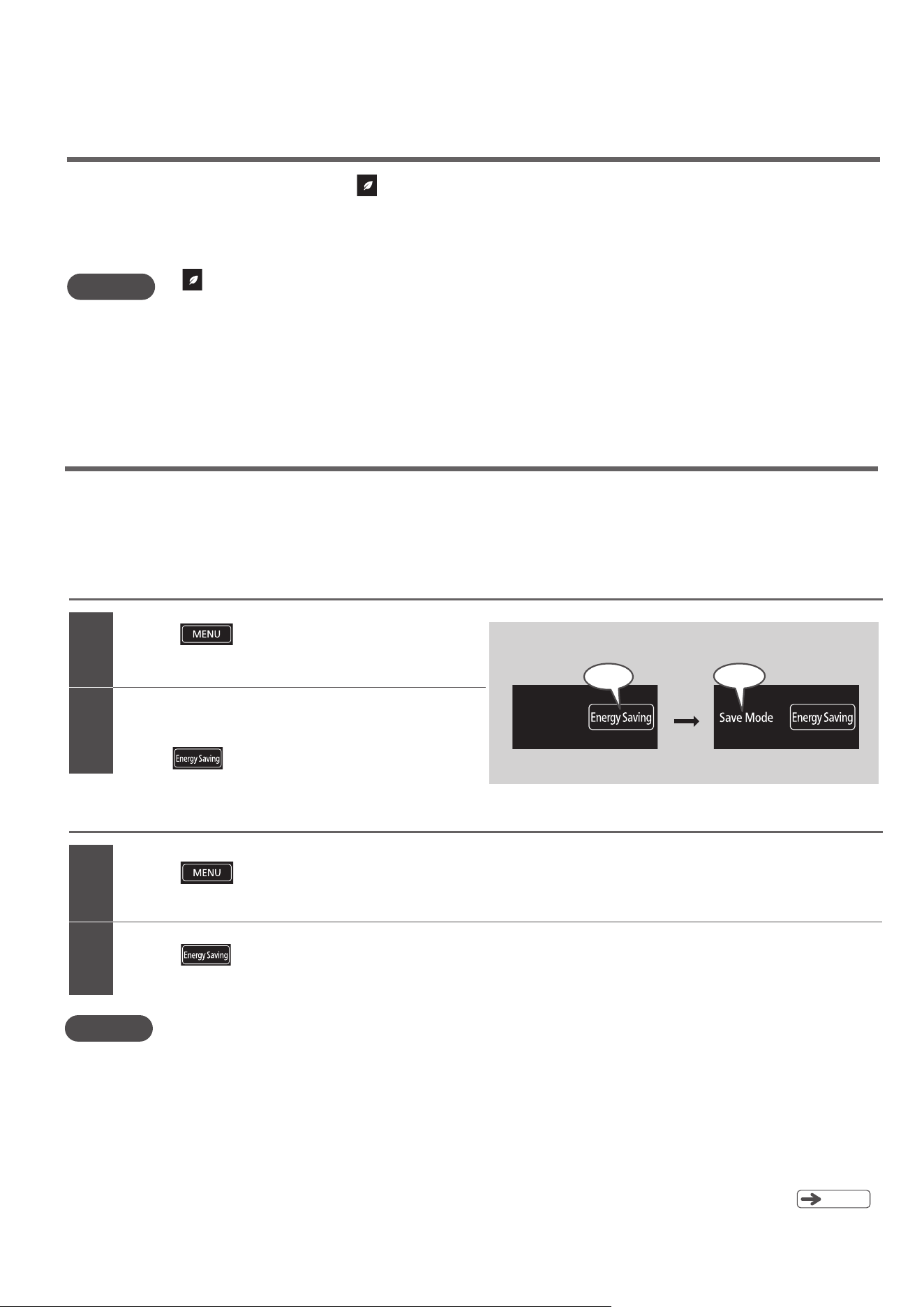
“Eco” operation indicator lamp
Note
When the operation is relatively stable, automatically lights up to inform you of energy saving operation.
Use this indicator lamp as a reference for using the refrigerator wisely, such as by opening and closing the doors
infrequently and putting food in and taking it out quickly.
“Energy Saving” mode
When set to “Energy Saving” mode, the cooling of each compartment is reduced to save energy.
Note
If you open the refrigerator door for 30 seconds or more, the LED lights inside the Refrigerator Compartment and the Vacuum Compartment dim to remind you
to close the door quickly. If the doors are not opened for a long period of time, the interior is cooled more slowly to further reduce energy consumption.
All indicator lamps are activated, and then the current settings
are displayed.
2
Touch to activate the display.
1
2
1
Touch
to activate “Save Mode” indicator.
The default setting for “Energy Saving” mode is “Off”
(“Save Mode” indicator: Off).
All indicator lamps
are activated
, and then the current settings are displayed.
Touch to activate the display.
Touch to deactivate “Save Mode” indicator.
To activate “Energy Saving” mode
To deactivate “Energy Saving” mode
●
Automatic temperature control lowers cooling loads, which may cause ice cream to become soft.
It also requires more time for freezing and ice making.
We only recommend Energy Saving mode when the refrigerator door is only opened very infrequently, and only
for short periods of time; or when the household is empty when on vacation.
The “Save Mode” indicator lamp is turned on during “Energy Saving” mode.
If “Quick Ice” or “Quick Cool” is activated while “Save Mode” is activated, the “Save Mode” setting is temporarily canceled. After the “Quick Ice”
or “Quick Cool” operations are completed, “Save Mode” is restored.
If you have already set one or both of the “Freezer Compartment” and “Refrigerator Compartment” temperature to “■” , cooling
is not reduced further in order to ensure that food is kept fresh.
If “Energy Saving” mode is activated while “Vege Cool” is activated, cooling is reduced starting from “Vege Cool”.
●
●
●
●
Pg
.
61
■
Control Panel
(Default) (When set)
Touch
On
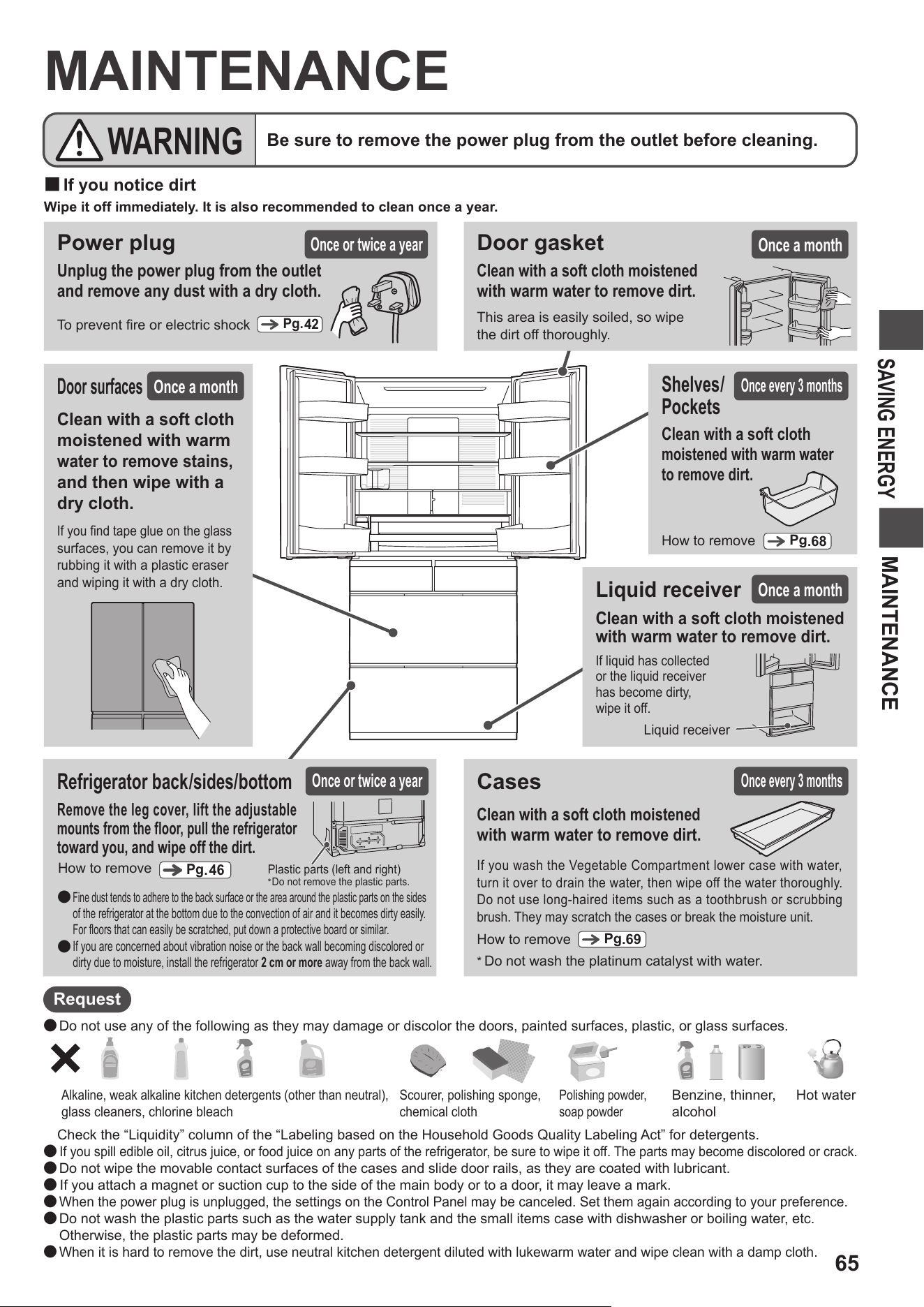
65
MAINTENANCE
SAVING ENERGY
MAINTENANCE
■
If you notice dirt
Wipe it off immediately. It is also recommended to clean once a year.
●
Do not use any of the following as they may damage or discolor the doors, painted surfaces, plastic, or glass surfaces.
Check the “Liquidity” column of the “Labeling based on the Household Goods Quality Labeling Act” for detergents.
●
If you spill edible oil, citrus juice, or food juice on any parts of the refrigerator, be sure to wipe it off. The parts may become discolored or crack.
●
Do not wipe the movable contact surfaces of the cases and slide door rails, as they are coated with lubricant.
●
If you attach a magnet or suction cup to the side of the main body or to a door, it may leave a mark.
●
When the power plug is unplugged, the settings on the Control Panel may be canceled. Set them again according to your preference.
●
Do not wash the plastic parts such as the water supply tank and the small items case with dishwasher or boiling water, etc.
Otherwise, the plastic parts may be deformed.
●
When it is hard to remove the dirt, use neutral kitchen detergent diluted with lukewarm water and wipe clean with a damp cloth.
Request
Door surfaces
Cases
*
Do not wash the platinum catalyst with water.
If you wash the Vegetable Compartment lower case with water,
turn it over to drain the water, then wipe off the water thoroughly.
Do not use long-haired items such as a toothbrush or scrubbing
brush. They may scratch the cases or break the moisture unit.
Clean with a soft cloth moistened
with warm water to remove dirt.
Once a month
How to remove
Pg
.69
Power plug
To prevent fire or electric shock
Unplug the power plug from the outlet
and remove any dust with a dry cloth.
Alkaline, weak alkaline kitchen detergents (other than neutral),
glass cleaners, chlorine bleach
Scourer, polishing sponge,
chemical cloth
Polishing powder,
soap powder
Benzine, thinner,
alcohol
Hot water
Be sure to remove the power plug from the outlet before cleaning.
WARNING
Once or twice a year
Pg.
42
Once every 3 months
Refrigerator back/sides/bottom
Once or twice a year
Remove the leg cover, lift the adjustable
mounts from the floor, pull the refrigerator
toward you, and wipe off the dirt.
Fine dust tends to adhere to the back surface or the area around the plastic parts on the sides
of the refrigerator at the bottom due to the convection of air and it becomes dirty easily.
For floors that can easily be scratched, put down a protective board or similar.
If you are concerned about vibration noise or the back wall becoming discolored or
dirty due to moisture, install the refrigerator 2 cm or more away from the back wall.
●
●
Plastic parts (left and right)
*
Do not remove the plastic parts.
Pg
.46
How to remove
Liquid receiver
Clean with a soft cloth moistened
with warm water to remove dirt.
If liquid has collected
or the liquid receiver
has become dirty,
wipe it off.
Liquid receiver
Once a month
Shelves/
Pockets
How to remove
Pg
.68
Once every 3 months
Clean with a soft cloth
moistened with warm water
to remove dirt.
If you find tape glue on the glass
surfaces, you can remove it by
r
ubbing it with a plastic eraser
and wiping it with a dry cloth.
Clean with a soft cloth
moistened with warm
water to remove stains,
and then wipe with a
dry cloth.
Door gasket
This area is easily soiled, so wipe
the dirt off thoroughly.
Clean with a soft cloth moistened
with warm water to remove dirt.
Once a month
Door surfaces
Once a month
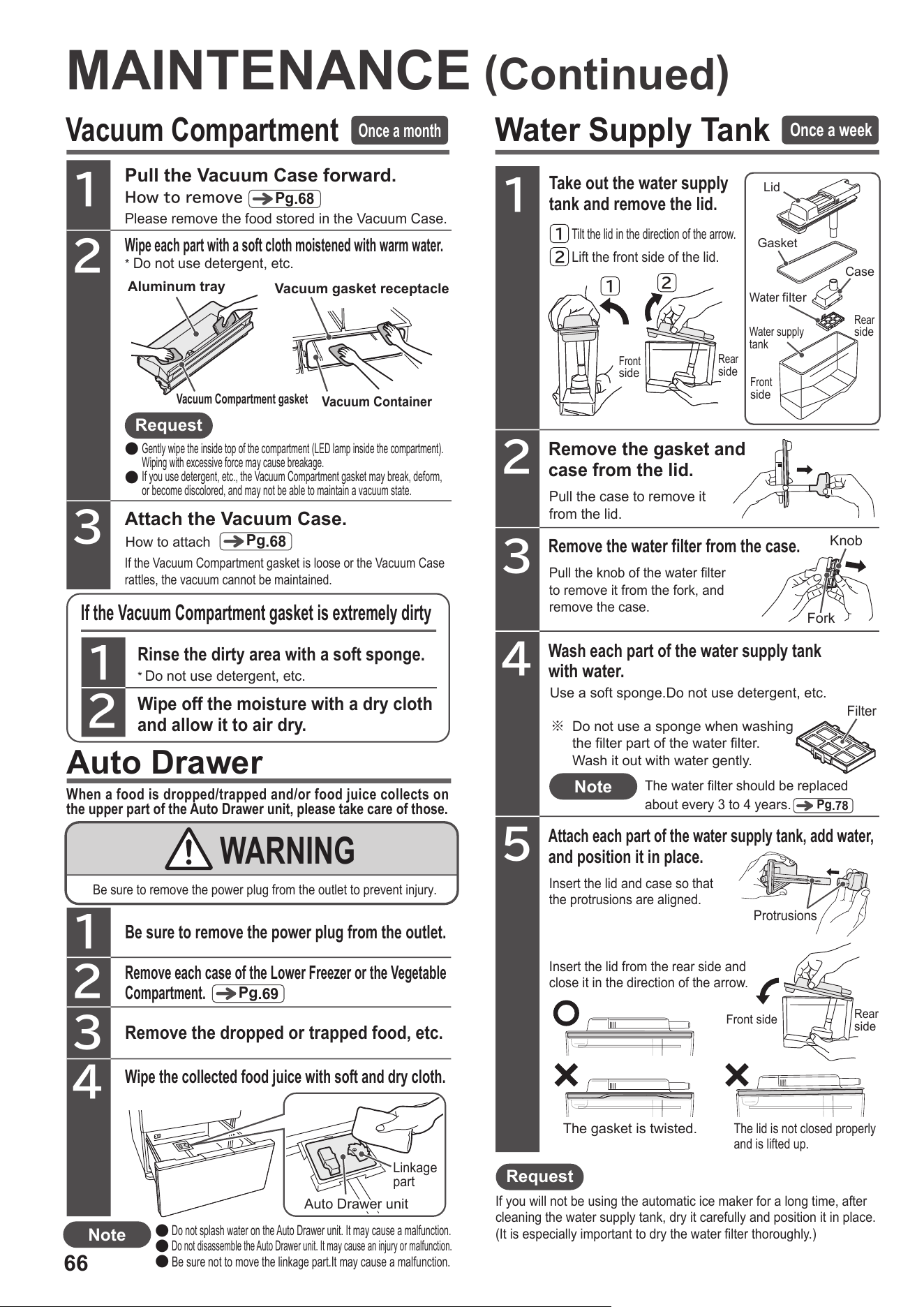
66
Water Supply Tank
Take out the water supply
tank and remove the lid.
1
Remove the gasket and
case from the lid.
2
Pull the case to remove it
from the lid.
Remove the water filter from the case.
3
Pull the knob of the water filter
to remove it from the fork, and
remove the case.
Wash each part of the water supply tank
with water.
4
Use a soft sponge.Do not use detergent, etc.
Attach each part of the water supply tank, add water,
and position it in place.
5
Insert the lid from the rear side and
close it in the direction of the arrow.
Insert the lid and case so that
the protrusions are aligned.
If you will not be using the automatic ice maker for a long time, after
cleaning the water supply tank, dry it carefully and position it in place.
(It is especially important to dry the water filter thoroughly.)
The gasket is twisted.
The lid is not closed properly
and is lifted up.
Protrusions
1
2
Lift the front side of the lid.
Tilt the lid in the direction of the arrow.
1
2
Rinse the dirty area with a soft sponge.
Wipe off the moisture with a dry cloth
and allow it to air dry.
1
2
If the Vacuum Compartment gasket is extremely dirty
*
Do not use detergent, etc.
Pull the Vacuum Case forward.
Wipe each part with a soft cloth moistened with warm water.
2
3
1
Howtoremove
Please remove the food stored in the Vacuum Case.
If the Vacuum Compartment gasket is loose or the Vacuum Case
rattles, the vacuum cannot be maintained.
Auto Drawer
When a food is dropped/trapped and/or food juice collects on
the upper part of the Auto Drawer unit, please take care of those.
Remove the dropped or trapped food, etc.
Wipe the collected food juice with soft and dry cloth.
2
3
4
1
Be sure to remove the power plug from the outlet.
Remove each case of the Lower Freezer or the Vegetable
Compartment.
Linkage
part
Auto Drawer unit
Do not splash water on the Auto Drawer unit. It may cause a malfunction.
Do not disassemble the Auto Drawer unit. It may cause an injury or malfunction.
Be sure not to move the linkage part.It may cause a malfunction.
●
●
●
WARNING
Be sure to remove the power plug from the outlet to prevent injury.
※ Do not use a sponge when washing
the filter part of the water filter.
Wash it out with water gently.
MAINTENANCE
(
Continued
)
Vacuum Compartment
Once a month
Pg
.68
*
Do not use detergent, etc.
Aluminum tray
Vacuum Compartment gasket
Vacuum gasket receptacle
Vacuum Container
Request
●
●
Gently wipe the inside top of the compartment (LED lamp inside the compartment).
Wiping with excessive force may cause breakage.
If you use detergent, etc., the Vacuum Compartment gasket may break, deform,
or become discolored, and may not be able to maintain a vacuum state.
Attach the Vacuum Case.
How to attach
Pg
.68
Pg
.69
Note
Once a week
Front
side
Rear
side
Lid
Gasket
Case
Water
filter
Water supply
tank
Front
side
Rear
side
Fork
Knob
Note
The water filter should be replaced
about every 3 to 4 years.
Pg
.78
Front side
Rear
side
Request
Filter
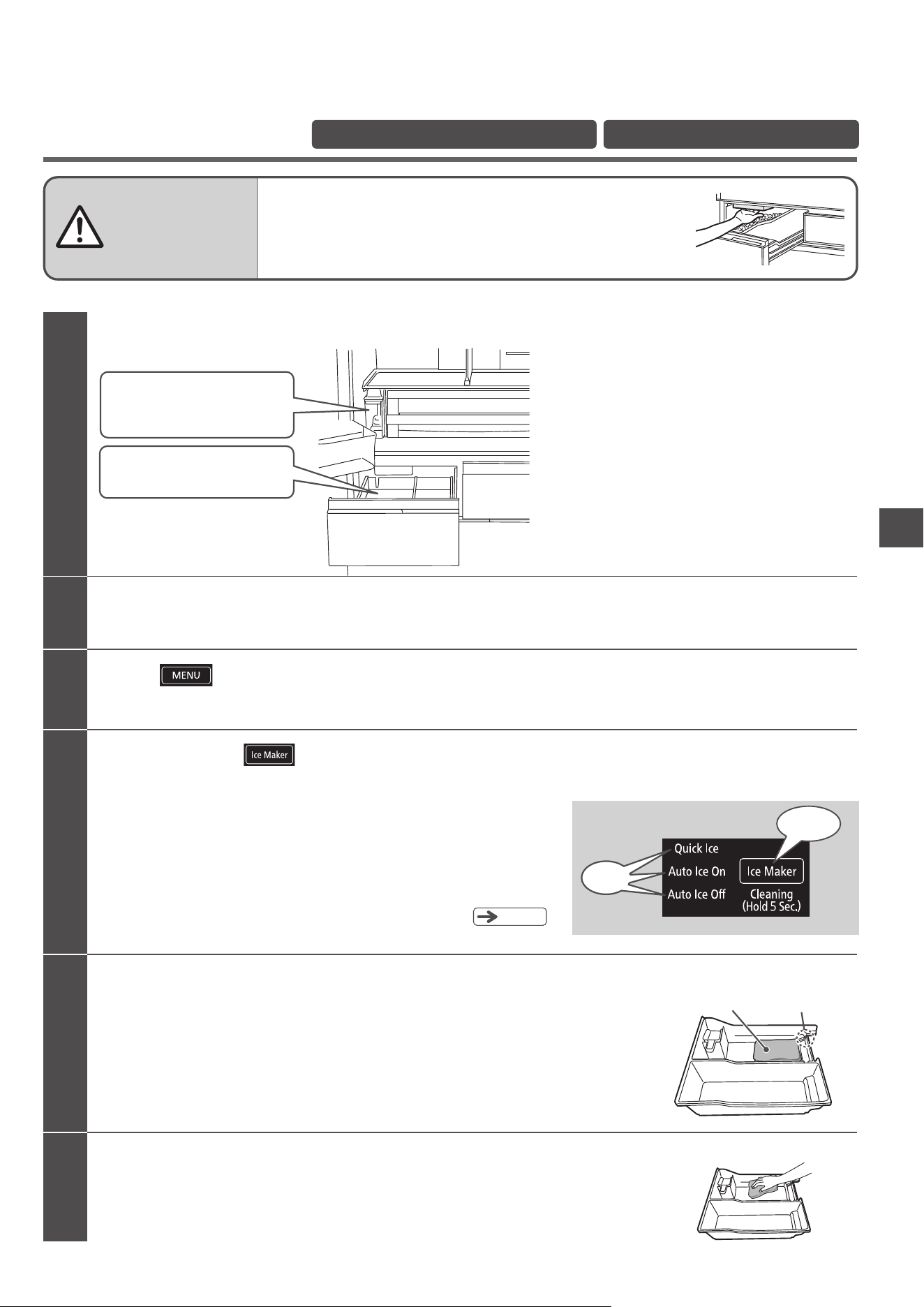
MAINTENANCE
67
Ice maker cleaning
Before operating performing “Ice Maker Cleaning” , confirm the following.
After checking the items on the left,
do the following.
4
5
3
2
Place a water-absorbing towel on the bottom of the Ice Case to prevent water that
has collected during the ice maker cleaning process from spilling out of the cutout.
1
Rinse the ice tray and water channel.
When the alarm stops, lay a clean towel on the bottom of the Ice Case to block the cutout
at the rear.
Remove the Ice Case, wipe off the water inside, and then place it into the Ice Compartment.
Remove the towel you used to wipe off water.
You may continue to use the remaining water in the water supply tank.
After “Ice Maker Cleaning” is complete, the refrigerator resumes back to “Auto Ice On” .
・The lamp blinks for about 4 minutes and the alarm continues to sound.
・
You cannot cancel “Ice maker cleaning” partway through.
・
If you open one of the refrigerator doors during “Ice maker cleaning”,
it may not work properly.
Do not open or close any of the doors until “Ice maker cleaning” is finished.
・
The alarm will be activated even if the door alarm is set to “Off”.
Pg
.
63
The three indicators “Quick Ice”, “Auto Ice On”, and “Auto Ice Off” blink at the same time, and “Ice Maker Cleaning” starts. (About 4 minutes)
Touch and hold for 5 seconds or longer until the alarm sounds.
Do not touch the mechanical part of the automatic
ice maker.
(Doing so may cause injury.)
All indicator lamps are activated, and then the current settings are displayed.
Touch to activate the display.
Close all the doors.
Cutout
Towel
WARNING
Preparation
When using the automatic ice maker for the first time When it has not been used for a week or longer
×
Water supply tank
・
There is water up to the container full line.
・
It is positioned correctly past the
container set position.
・
If there is any ice in the ice case,
remove it.
Ice case
■
Control Panel
Blinking
Touch and hold for
5 seconds
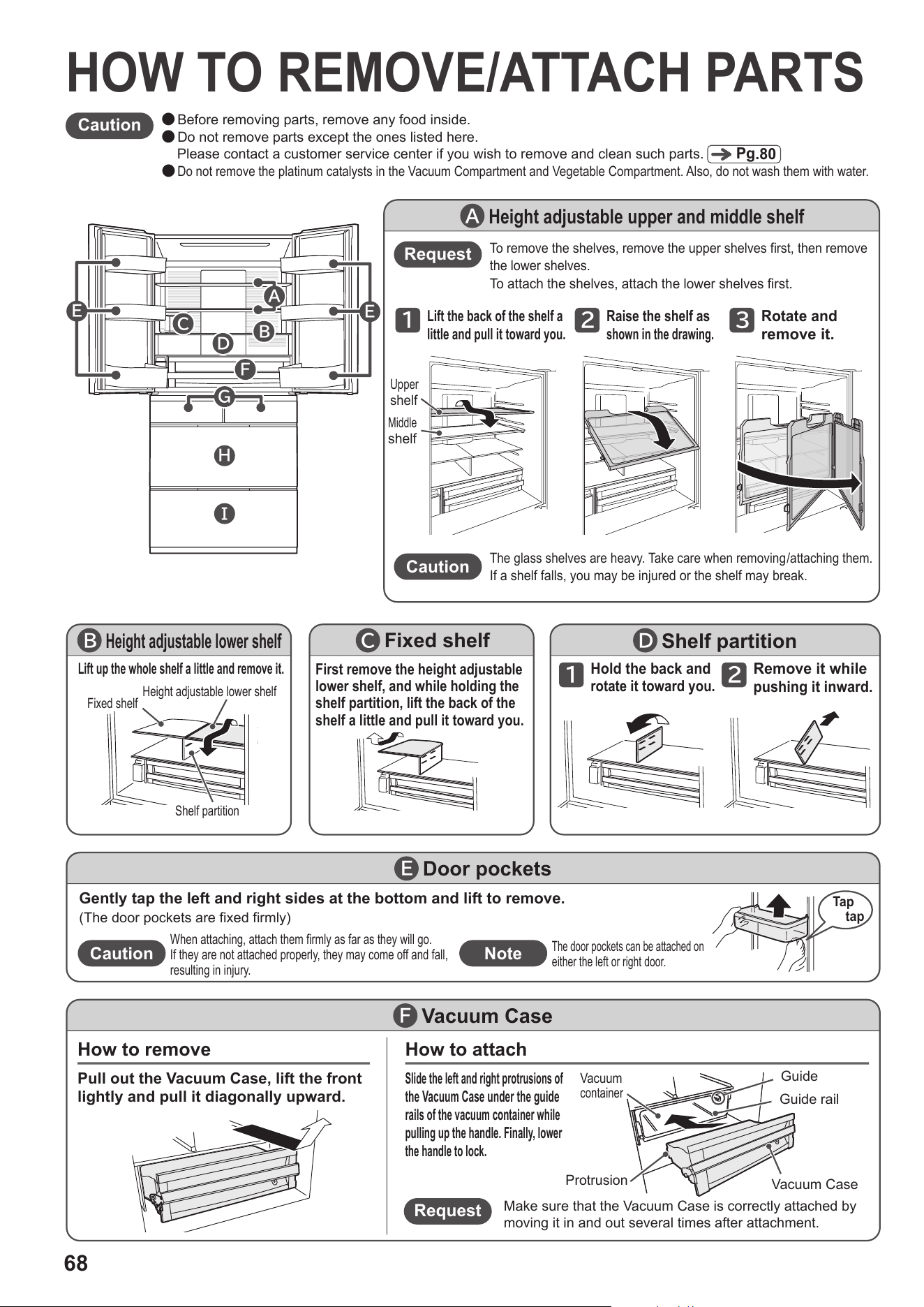
68
Request
Make sure that the Vacuum Case is correctly attached by
moving it in and out several times after attachment.
How to remove How to attach
Vacuum Case
F
Pull out the Vacuum Case, lift the front
lightly and pull it diagonally upward.
Slide the left and right protrusions of
the Vacuum Case under the guide
rails of the vacuum container while
pulling up the handle. Finally, lower
the handle to lock.
Protrusion
Guide rail
Guide
Vacuum Case
Vacuum
container
Caution
Door pockets
E
Gently tap the left and right sides at the bottom and lift to remove.
(The door pockets are fixed firmly)
When attaching, attach them firmly as far as they will go.
If they are not attached properly, they may come off and fall,
resulting in injury.
The door pockets can be attached on
either the left or right door.
Tap
tap
Height adjustable lower shelf
B
Lift up the whole shelf a little and remove it.
Hold the back and
rotate it toward you.
1
Remove it while
pushing it inward.
2
Shelf partition
D
Height adjustable upper and middle shelf
A
Lift the back of the shelf a
little and pull it toward you.
1
Raise the shelf as
shown in the drawing.
2
Rotate and
remove it.
3
The glass shelves are heavy. Take care when removing/attaching them.
If a shelf falls, you may be injured or the shelf may break.
Caution
Request
To remove the shelves, remove the upper shelves first, then remove
the lower shelves.
To attach the shelves, attach the lower shelves first.
Fixed shelf
C
First remove the height adjustable
lower shelf, and while holding the
shelf partition, lift the back of the
shelf a little and pull it toward you.
Upper
shelf
Middle
shelf
Height adjustable lower shelf
Fixed shelf
Shelf partition
●
Before removing parts, remove any food inside.
●
Do not remove parts except the ones listed here.
Please contact a customer service center if you wish to remove and clean such parts.
●
Do not remove the platinum catalysts in the Vacuum Compartment and Vegetable Compartment. Also, do not wash them with water.
Caution
Pg
.80
HOW TO REMOVE/ATTACH PARTS
E
E
F
B
C
D
I
H
G
A
Note
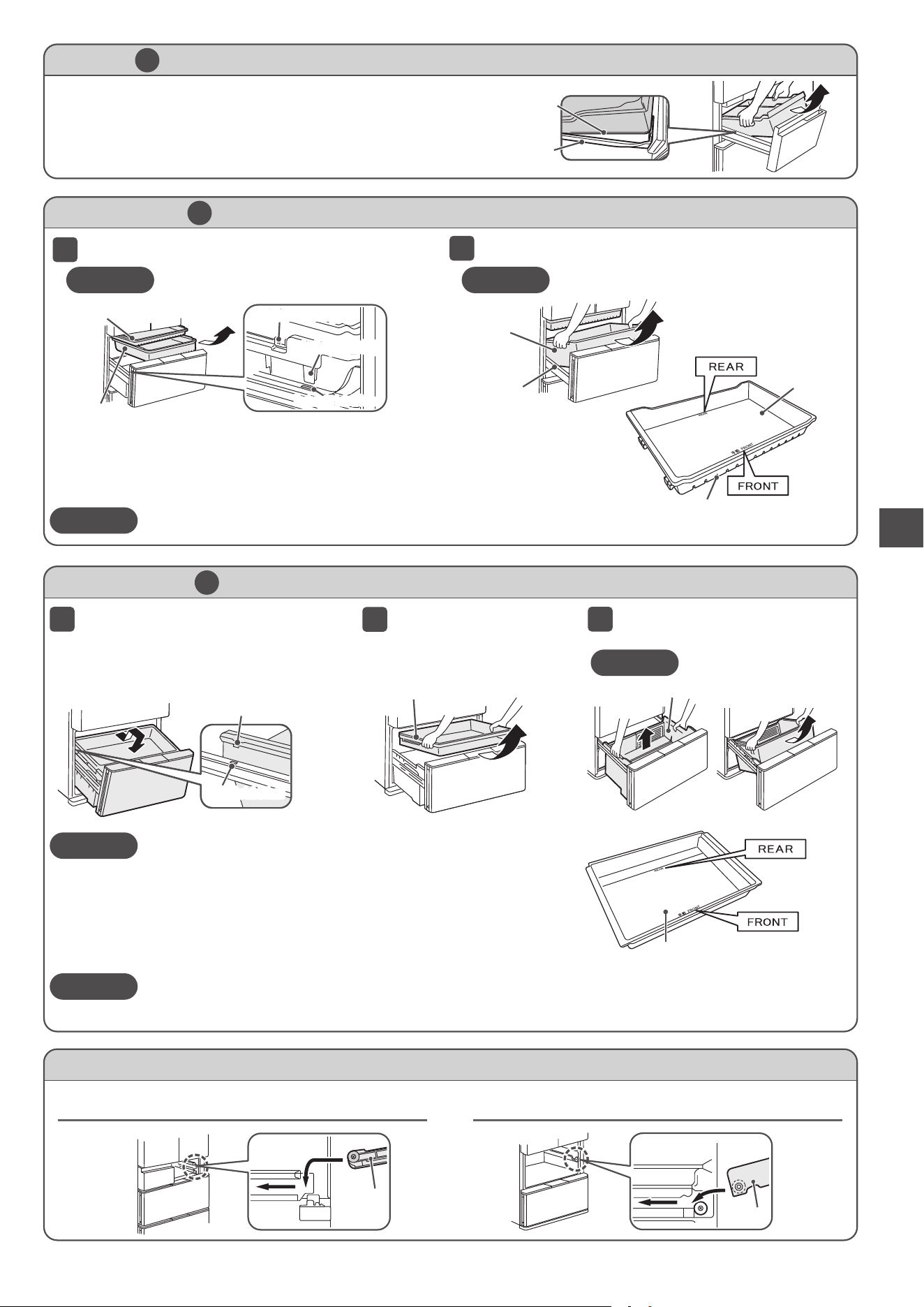
69
HOW TO REMOVE/ATTACH PARTS
When attaching, place the bottom of the case on the frame
to set it in place.
Ice Case (Ice Compartment) and Upper Freezer case (Upper Freezer)
G
Open the door and lift the case toward you.
How to remove/attach the slide door (Ice Compartment/Upper Freezer/Lower Freezer/Vegetable Compartment)
Ice Compartment/Upper Freezer
Lower Freezer/Vegetable Compartment
Caution
Pull up the upper case.
2
1
3
Upper Case and Lower Case (Vegetable Compartment)
I
●
Be sure to keep your feet far enough away when opening the
door. You may pinch your foot with the door.
●
Note that water may drip from the back of the lower case.
●
If it is hard to remove the lower case, remove the case after
removing the Vegetable Compartment door from the main body
of the refrigerator.
Caution
●
If the upper case is not attached correctly, parts such as the case may break.
After attaching the upper case, hold the handle of the upper case to slide the upper case forward and backward,
and check the upper case is attached correctly.
Note
Note
The partition cannot be removed.
Protrusion (left and right)
Upper case
Open the door as far as it will go,
lift both ends toward you, pull it
out more slowly, and lower it to
the floor.
Attach the upper case so that the side of the bottom of the case with the
characters of “FRONT” faces front.
If it is not set properly, there may be a strange noise when opening or
closing the door, or it may cause the door to remain partially open.
Rectangular hole in frame
Lift the lower case straight up and
remove it from the front side.
Lower case
Frame
Frame
Slide Case and Lower freezer case (Lower Freezer)
H
Open the door and pull out the Slide Case.
1
Lift the Lower freezer case toward you.
2
When attaching, insert the left and right protrusions of
the Lower freezer case into the rectangular holes of the
frame and set it in place.
Then, set the left and right forks of the Slide Case in
place on the outside of the Lower freezer case.
Caution
The Slimline slide case cannot be removed.
Caution
The partition cannot be removed.
Slimline slide case
Slide Case
Fork (left and right)
Protrusion (left and right)Protrusion (left and right)
Rectangular hole in frame
Attach the slide case so
that the side of the bottom
of the case with the
characters of “FRONT” and
the slits (holes) faces front.
Slide Case
Slits (Holes)
Rear
Rear
upper case
Front
Front
Frame
Lower freezer case
Bottom of case
Frame
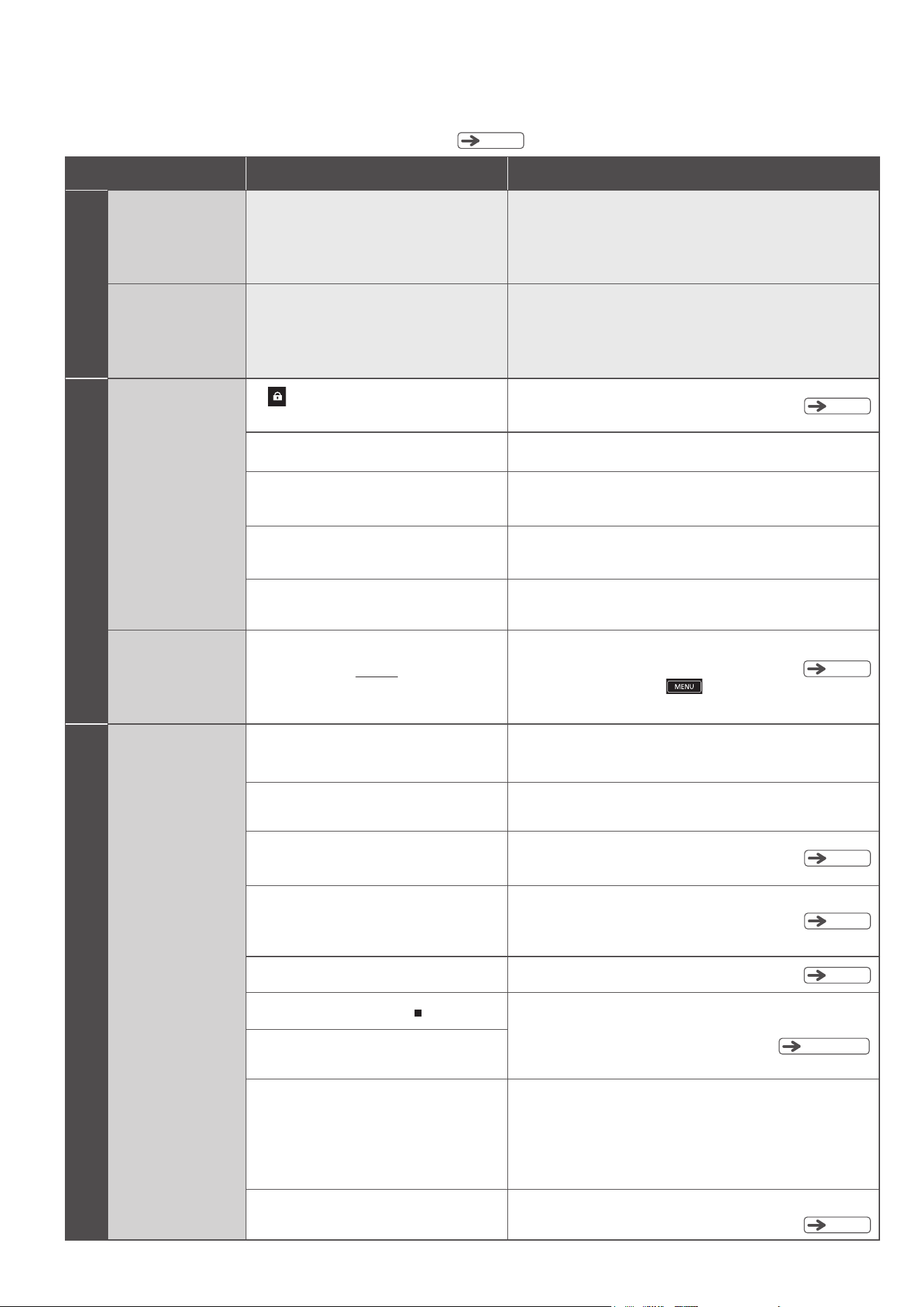
70
TROUBLESHOOTING
Pg
.80
Check the following points before calling for repair. If the refrigerator still does not work correctly, contact a customer service
center for product information and handling of the problem.
Symptoms
Checks Possible Cause
Initial stage
Not cold
Have 24 hours passed since the installation?
Cooling may take 24 hours or more. Place food at
interval time and refrain from opening and closing the
door within 24 hours. Cooling will take a longer time
during summer or when large amount of food is stored.
There is no ice
As the entire refrigerator is not cooled immediately after
installation, it takes more than 24 hours for the first ice to be
made. Place food at appropriate intervals, refrain from
opening and closing the doors as much as possible, and wait.
Have 24 hours passed since the installation?
Control Panel is not
working
Control Panel
Is a Refrigerator Compartment door open?
Please close the door after use.
Are you wearing gloves or do you have a plaster
on your finger?
Touch directly with your finger.
Are you touching another area of the touch panel
at the same time?
Touch only the area you wish to operate.
Are there water drops or dirt on the Control Panel?
Remove the dirt with a damp cloth and then wipe it
with a dry cloth.
Not cold enough
Ice cream is soft.
Refrigerator is not cold
Is food or a bag stuck in a door so
that it cannot close completely?
Remove the food and close the door. Ensure the height of
the food do not exceed the limit.
Have you packed food in forcibly or put a large
amount of food in the refrigerator at once?
Keep gaps between food when storing it.
Pg
.46
It may be difficult to cool depending on the location
where the refrigerator is installed, the gaps, and the
surrounding conditions.
Check if the refrigerator is installed correctly.
Pg
.64
Is “Energy Saving” mode activated?
Deactivate “Energy Saving” mode.
Pg
.69
Are the cases for each compartment
attached properly?
Attach them properly.
Is the ambient temperature around the
refrigerator too high, such as in summer?
Change the temperature setting of the compartment
which does not cool well.
Did you open one of the doors for a long time or
did you open and close it too frequently?
The temperature inside the refrigerator gradually rises while one
of the refrigerator doors is open. Frequently opening and closing
the doors or leaving a door open for a long time makes it difficult
for the temperature in the refrigerator to drop. Open and close
the doors quickly or open and close them as little as possible.
Pg
.72
Does the Control Panel display change
continuously?
The refrigerator is in Store mode. Deactivate this mode.
Pg
.52, 59
Pg
.62
Is lit in the Display Section?
If yes, the Operation mode is locked.
Deactivate “Lock” mode.
The Operation
Section is unlit.
The Operation Section goes out about 40 seconds after
the completion of operation to save energy.
To turn it back on, touch
or open a door of the
Refrigerator Compartment.
Pg
.50
Is the temperature set to “
”?
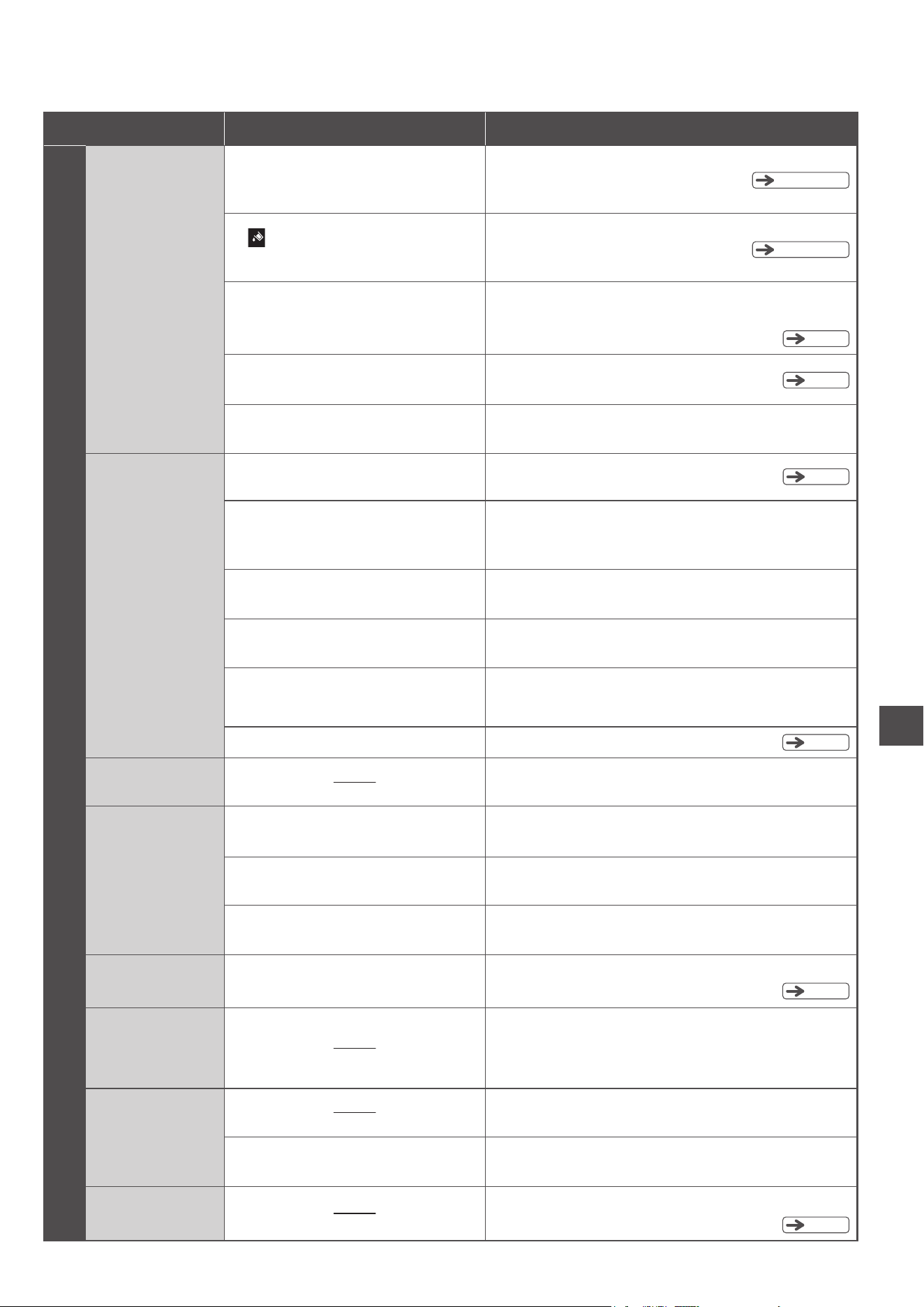
71
TROUBLESHOOTING
Pg
.56,57
Pg
.56,57
Symptoms
Checks Possible Cause
Automatic ice making
Ice-maker is not
working
Is “Auto Ice Off” lit on the control panel?
If yes, the “Ice-making” mode has been
turned off.
Activate “Auto Ice On” or “Quick Ice” mode.
Is anything other than ice stored in the
Ice Case?
Remove it from the Ice Case.
Is lit on the control panel?
The water in the water supply tank is low.
Add water into the water supply tank.
Is the water in the water supply tank low?
If the water in the tank is low, ice may not be made.
Add water until water level reaches the “Container full line” of
the water supply tank.
Is the water supply tank beyond the “Container
set position” line?
Push it beyond the “Container set position” line.
It takes a long time
to make ice.
Are you opening the doors frequently or
storing a large amount of food at once?
The inside is not cooled down enough.
Minimize the opening and closing frequency of the doors until it is entirely cooled.
Allow enough spacing between each item of stored food.
Is the surrounding temperature low?
Ice making takes more than four hours during winter.
Refrain from opening and closing the doors frequently and wait.
Did you just change the Ice Maker setting
from “Auto Ice Off” to “Auto Ice On”?
Ice making may take time immediately after changing the setting.
Refrain from opening and closing the doors frequently and wait.
Pg
.57
Is the Ice Case filled with ice over the
limit line for stored ice?
Remove some ice.
Are there any food or package stuck in between
the door of the Freezer or Ice Compartments
preventing the door from closing completely?
Remove the food and close the door.
Pg
.64
Pg
.56
Pg
.57
Deactivate “Energy Saving” mode.Is “Energy Saving” mode activated ?
There are protrusions
on the ice.
This is caused by frozen water collected in the ice tray grooves.
It is not a fault.
Stored ice becomes
round.
Ice cubes adhere
together.
Is old ice left unused for a long time?
Old ice cubes naturally shrink and stick together. There is no problem
as long as the ice cubes can be separated with the ice scoop.
Are you opening the doors frequently or
storing a large amount of food at once?
Open and close the doors quickly or open and close them
as little as possible.
Was one the Refrigerator Compartment doors
or slide doors temporarily left partially open?
When closing the door, close it fully.
The ice maker makes
small ice cubes.
Is the water in the water supply tank low?
When water is low, small ice cubes may be made. Add water until water level
reaches the “Container full line” of the Water Supply Tank.
There are white
impurities in the
ice cubes.
Did you use mineral water to make ice?
The minerals contained in the water may freeze and turn
white, but this is harmless.
When not making ice
Freshly-made ice cubes
adhere together.
Water accumulated in the ice tray grooves may freeze and the
ice cubes may adhere together. It does not indicate any fault.
Activate “Auto Ice Off” mode.
See “Stop Ice Making” .
This is due to the air bubble formed in the ice.
Pg
.56
Pg
.56
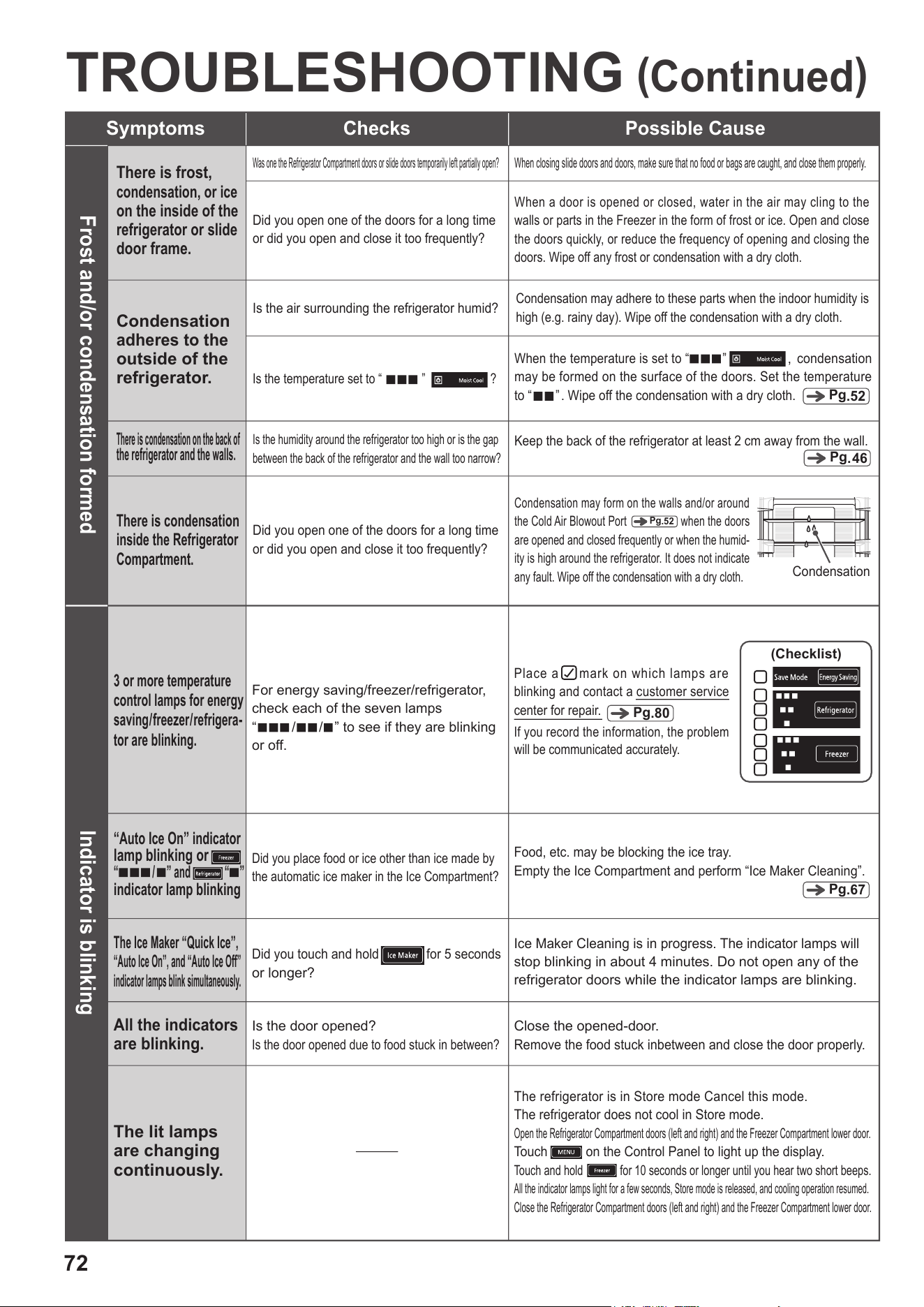
72
TROUBLESHOOTING
(
Continued
)
Symptoms
Checks Possible Cause
Frost and/or condensation formed
There is frost,
condensation, or ice
on the inside of the
refrigerator or slide
door frame.
Condensation
adheres to the
outside of the
refrigerator.
Was one the Refrigerator Compartment doors or slide doors temporarily left partially open?
When closing slide doors and doors, make sure that no food or bags are caught, and close them properly.
Did you open one of the doors for a long time
or did you open and close it too frequently?
When a door is opened or closed, water in the air may cling to the
walls or parts in the Freezer in the form of frost or ice. Open and close
the doors quickly, or reduce the frequency of opening and closing the
doors. Wipe off any frost or condensation with a dry cloth.
Is the air surrounding the refrigerator humid?
Condensation may adhere to these parts when the indoor humidity is
high (e.g. rainy day). Wipe off the condensation with a dry cloth.
Pg
.46
There is condensation on the back of
the refrigerator and the walls.
Is the humidity around the refrigerator too high or is the gap
between the back of the refrigerator and the wall too narrow?
Keep the back of the refrigerator at least 2 cm away from the wall.
Indicator is blinking
All the indicators
are blinking.
Is the door opened?
Is the door opened due to food stuck in between?
Close the opened-door.
Remove the food stuck inbetween and close the door properly.
When the temperature is set to “
”
,
condensation
may be formed on the surface of the doors. Set the temperature
to
“ ” . Wipe off the condensation with a dry cloth.
Is the temperature set to
“ ”
?
Pg
.52
There is condensation
inside the Refrigerator
Compartment.
Did you open one of the doors for a long time
or did you open and close it too frequently?
Condensation may form on the walls and/or around
the Cold Air Blowout Port when the doors
are opened and closed frequently or when the humid-
ity is high around the refrigerator. It does not indicate
any fault. Wipe off the condensation with a dry cloth.
Condensation
Pg
.52
Pg
.67
Did you place food or ice other than ice made by
the automatic ice maker in the Ice Compartment?
Food, etc. may be blocking the ice tray.
Empty the Ice Compartment and perform “Ice Maker Cleaning”.
“Auto Ice On” indicator
lamp blinking or
“ / ” and “ ”
indicator lamp blinking
Ice Maker Cleaning is in progress. The indicator lamps will
stop blinking in about 4 minutes. Do not open any of the
refrigerator doors while the indicator lamps are blinking.
Did you touch and hold
for 5 seconds
or longer?
The Ice Maker “Quick Ice”,
“Auto Ice On”, and “Auto Ice Off”
indicator lamps blink simultaneously.
(Checklist)
For energy saving/freezer/refrigerator,
check
each of the seven lamps
“
/ / ”
to see if they are blinking
or off.
The lit lamps
are changing
continuously.
The refrigerator is in Store mode Cancel this mode.
The refrigerator does not cool in Store mode.
Open the Refrigerator Compartment doors (left and right) and the Freezer Compartment lower door.
Touch on the Control Panel to light up the display.
Touch and hold for 10 seconds or longer until you hear two short beeps.
All the indicator lamps light for a few seconds, Store mode is released, and cooling operation resumed.
Close the Refrigerator Compartment doors (left and right) and the Freezer Compartment lower door.
3 or more temperature
control lamps for energy
saving/freezer/refrigera-
tor are blinking.
Place a mark on which lamps are
blinking and contact a customer service
center for repair.
If you record the information, the problem
will be communicated accurately.
Pg
.80
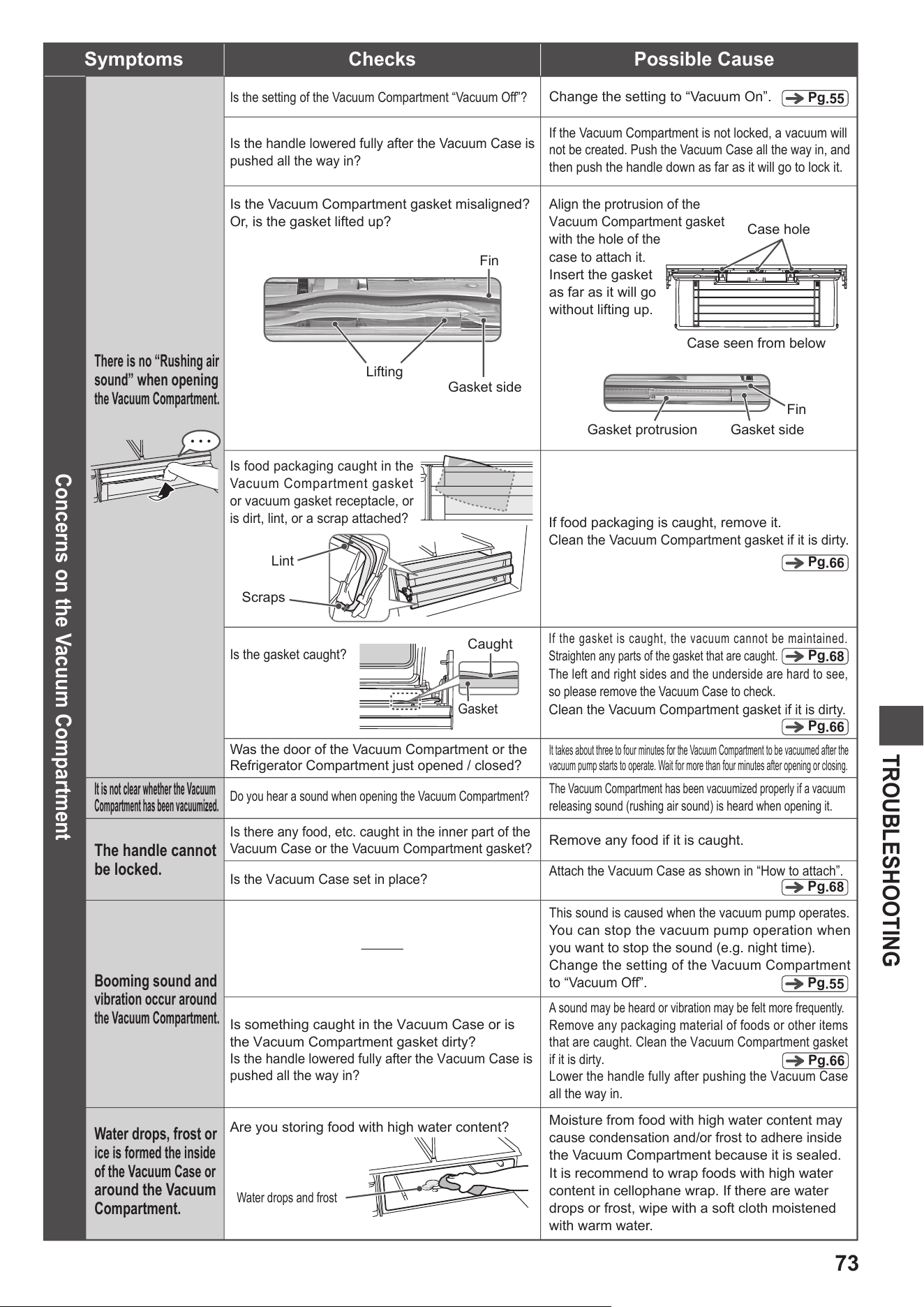
73
TROUBLESHOOTING
A sound may be heard or vibration may be felt more frequently.
Remove any packaging material of foods or other items
that are caught. Clean the Vacuum Compartment gasket
if it is dirty.
Lower the handle fully after pushing the Vacuum Case
all the way in.
This sound is caused when the vacuum pump operates.
You can stop the vacuum pump operation when
you want to stop the sound (e.g. night time).
Change the setting of the Vacuum Compartment
to “Vacuum Off”.
If the gasket is caught, the vacuum cannot be maintained.
Straighten any parts of the gasket that are caught.
The left and right sides and the underside are hard to see,
so please remove the Vacuum Case to check.
Clean the Vacuum Compartment gasket if it is dirty.
Pg
.55
Pg
.66
Pg
.68
Pg
.55
Pg
.66
Pg
.68
Pg
.66
Concerns on the Vacuum Compartment
There is no “Rushing air
sound”
when opening
the Vacuum Compartment.
Is the handle lowered fully after the Vacuum Case is
pushed all the way in?
If the Vacuum Compartment is not locked, a vacuum will
not be created. Push the Vacuum Case all the way in, and
then push the handle down as far as it will go to lock it.
Is the setting of the Vacuum Compartment “Vacuum Off”?
Change the setting to “Vacuum On”.
If food packaging is caught, remove it.
Clean the Vacuum Compartment gasket if it is dirty.
Is food packaging caught in the
Vacuum Compartment gasket
or vacuum gasket receptacle, or
is dirt, lint, or a scrap attached?
Lint
Scraps
Is the gasket caught?
Caught
Gasket
Was the door of the Vacuum Compartment or the
Refrigerator Compartment just opened / closed?
It takes about three to four minutes for the Vacuum Compartment to be vacuumed after the
vacuum pump starts to operate. Wait for more than four minutes after opening or closing.
It is not clear whether the Vacuum
Compartment has been vacuumized.
The handle cannot
be locked.
Booming sound and
vibration occur around
the Vacuum Compartment.
The Vacuum Compartment has been vacuumized properly if a vacuum
releasing sound (rushing air sound) is heard when opening it.
Remove any food if it is caught.
Attach the Vacuum Case as shown in “How to attach”.
Symptoms
Checks Possible Cause
Do you hear a sound when opening the Vacuum Compartment?
Is there any food, etc. caught in the inner part of the
Vacuum Case or the Vacuum Compartment gasket?
Is the Vacuum Case set in place?
Is something caught in the Vacuum Case or is
the Vacuum Compartment gasket dirty?
Is the handle lowered fully after the Vacuum Case is
pushed all the way in?
Water drops, frost or
ice is formed the inside
of the Vacuum Case or
around the Vacuum
Compartment.
Moisture from food with high water content may
cause condensation and/or frost to adhere inside
the Vacuum Compartment because it is sealed.
It is recommend to wrap foods with high water
content in cellophane wrap. If there are water
drops or frost, wipe with a soft cloth moistened
with warm water.
Are you storing food with high water content?
Water drops and frost
Gasket protrusion
Align the protrusion of the
Vacuum Compartment gasket
with the hole of the
case to attach it.
Insert the gasket
as far as it will go
without lifting up.
Fin
Gasket side
Case hole
Case seen from below
Gasket side
Is the Vacuum Compartment gasket misaligned?
Or, is the gasket lifted up?
Fin
Lifting
・・・
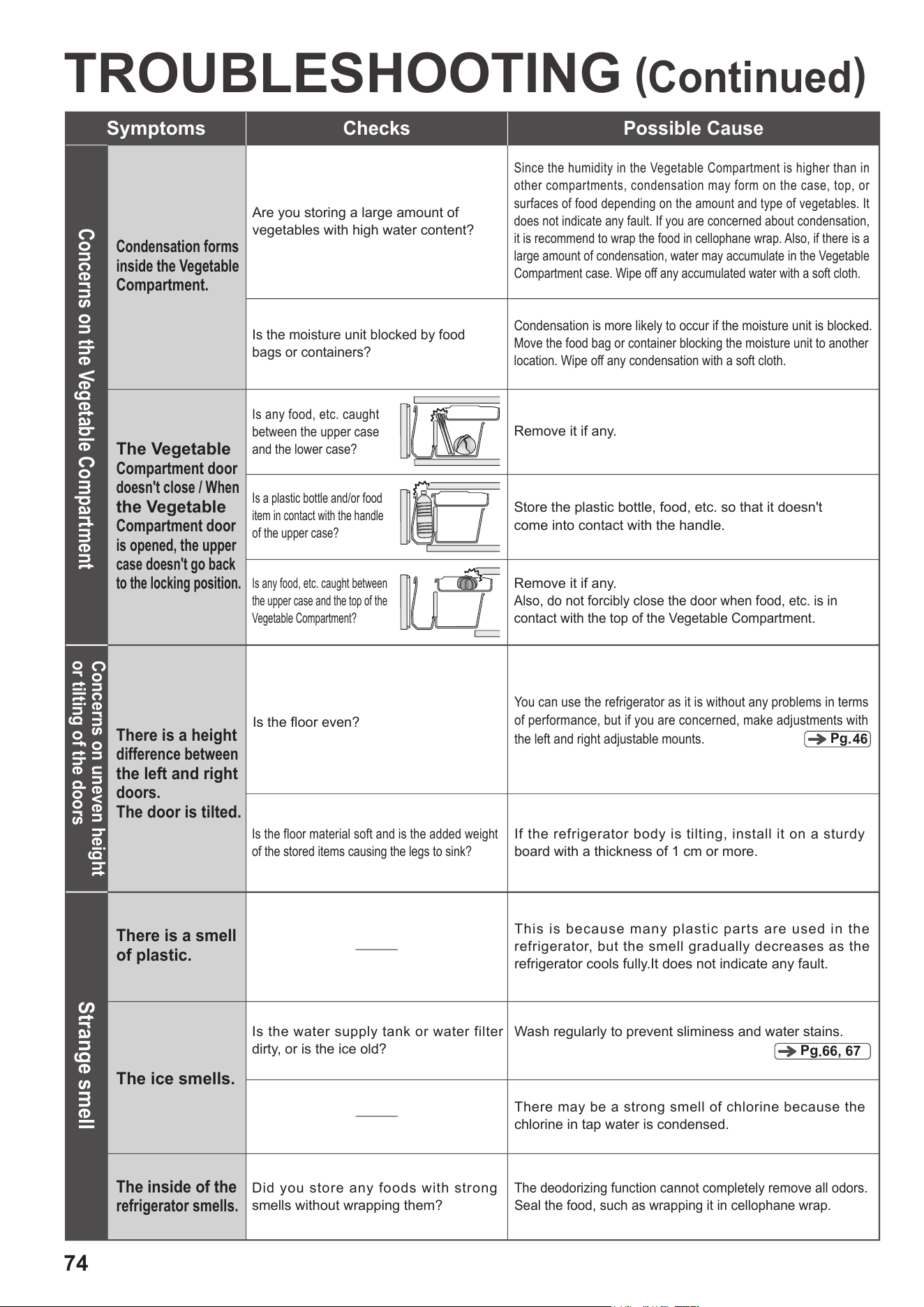
74
Pg
.
66, 67
TROUBLESHOOTING
(
Continued
)
Symptoms
Checks Possible Cause
Concerns on the Vegetable Compartment
Condensation forms
inside the Vegetable
Compartment.
Is the moisture unit blocked by food
bags or containers?
Condensation is more likely to occur if the moisture unit is blocked.
Move the food bag or container blocking the moisture unit to another
location. Wipe off any condensation with a soft cloth.
Are you storing a large amount of
vegetables with high water content?
Since the humidity in the Vegetable Compartment is higher than in
other compartments, condensation may form on the case, top, or
surfaces of food depending on the amount and type of vegetables. It
does not indicate any fault. If you are concerned about condensation,
it is recommend to wrap the food in cellophane wrap. Also, if there is a
large amount of condensation, water may accumulate in the Vegetable
Compartment case. Wipe off any accumulated water with a soft cloth.
The Vegetable
Compartment door
doesn't close / When
the Vegetable
Compartment door
is opened, the upper
case doesn't go back
to the locking position.
Is any food, etc. caught
between the upper case
and the lower case?
Remove it if any.
Is a plastic bottle and/or food
item in contact with the handle
of the upper case?
Store the plastic bottle, food, etc. so that it doesn't
come into contact with the handle.
Is any food, etc. caught between
the upper case and the top of the
Vegetable Compartment?
Remove it if any.
Also, do not forcibly close the door when food, etc. is in
contact with the top of the Vegetable Compartment.
Concerns on uneven height
or tilting of the doors
Is the floor material soft and is the added weight
of the stored items causing the legs to sink?
If the refrigerator body is tilting, install it on a sturdy
board with a thickness of 1 cm or more.
There is a height
difference between
the left and right
doors.
The door is tilted.
You can use the refrigerator as it is without any problems in terms
of performance, but if you are concerned, make adjustments with
the left and right adjustable mounts.
Is the floor even?
Pg
.46
Strange smell
The ice smells.
The inside of the
refrigerator smells.
Did you store any foods with strong
smells without wrapping them?
The deodorizing function cannot completely remove all odors.
Seal the food, such as wrapping it in cellophane wrap.
There may be a strong smell of chlorine because the
chlorine in tap water is condensed.
There is a smell
of plastic.
This is because many plastic parts are used in the
refrigerator, but the smell gradually decreases as the
refrigerator cools fully.It does not indicate any fault.
Is the water supply tank or water filter
dirty, or is the ice old?
Wash regularly to prevent sliminess and water stains.
75
TROUBLESHOOTING
Symptoms
Checks Possible Cause
Refrigerator is too cold
The refrigerator
is too cold.
Food freezes.
Is the ambient temperature 5 °C or below?
When the ambient temperature is low, the inside of the refrigerator
may become too cold. Set the temperature setting to “
■
”.
Is the temperature set to
“
■■■”?
Set the temperature setting to “■■”.
Is the food placed in front of the Cold Air Blowout Port?
Do not place food in front of the Cold Air Blowout Port.
You can prevent food from freezing by using a lid or cellophane wrap.
The side of the
refrigerator and
the edge of the
door become hot.
You feel a warm
air current at
your feet.
The areas around the refrigerator can become hot as the heat
generated by the cooling system is dissipated to the outside.
Immediately after installation or in summer, the temperature
may reach 50 to 60 °C. Although there is no problem in terms of
safety or performance, do not touch these areas.
Refrigerator becomes hot
Corncerns on noises
Abnormal sound
from the refrigerator
Is the floor uneven?
Is the refrigerator against the wall or furniture?
Operation sound may resonate and get louder.
Install the refrigerator with space clearance around it please.
Is the leg cover detached?
Operation sound may resonate and get louder.
Attach the leg cover securely.
Are you in the situation as shown below?
The inside of the refrigerator is not cooled
when using for the first time, etc.
Frequently opening and closing the refrigerator doors
The ambient temperature around the refrigerator is high.
“Quick Ice” or “Quick Cool” is activated.
・
・
・
・
Operation sound may be loud as the compressor is operating
at high-speed to cool the inside of the refrigerator quickly.
The sound is reduced after the inside of the refrigerator is
cooled enough.
The operating noise
goes
on for a long time.
Sometimes the
noise gets louder.
Others
If you hear a noise
like...
(Not indicate any fault)
This is the operation sound of parts to cool the inside of the refrigerator.
The driving force changes according to temperature changes in
the refrigerator. As a result, you may feel that the refrigerator is
noisy sometimes.
Since the compressor is operated slowly to save energy,
the operating noise may go on for a long time.
Sounds normally heard
(Humming/hooting/squealing/rattling/snarling)
Those are the sounds heard when the motor or compressor operates to
cool the inside of the refrigerator.
Collision sound (tapping)
Water boiling sound (burbling/bubbling out)
Carbonic acid bursting sound (fizzy/bubbly)
This is the sound of the refrigerant flowing to cool the inside of the refrigerator.
Water flowing sound (trickling)
Sound like grilling meat (sizzling)
This is the sound of water flowing during defrosting or the sound of evaporation.
Squeaky sound (squeaking/creaking)
This is the squeaking sound caused by parts expanding when the temperature
inside the refrigerator changes or the parts squeaking sound when the air pressure
in the Vacuum Compartment changes.
Collision sound (rattling/rumbling)
This is the sound when ice leaves the automatic ice maker's ice tray.
Water flowing sound (zipping/gurgling)
Sound like something is caught (rattling)
Roaring sound (honking)
Occasional sounds (clicking/snarling/clacking/
humming/squealing/clattering/sizzling)
This is the sound of the electrical components that control the temperature
inside the refrigerator.
Pg
.46
The refrigerator may vibrate, and it may make the operation
sound louder.
Install the refrigerator on a sturdy board with a thickness of
1 cm or more.
Pg
.52, 59
This is the sound when water is poured into the ice tray.
If you do not want to make ice, touch
and set the mode to
“
Auto Ice Off”.
Pg
.46
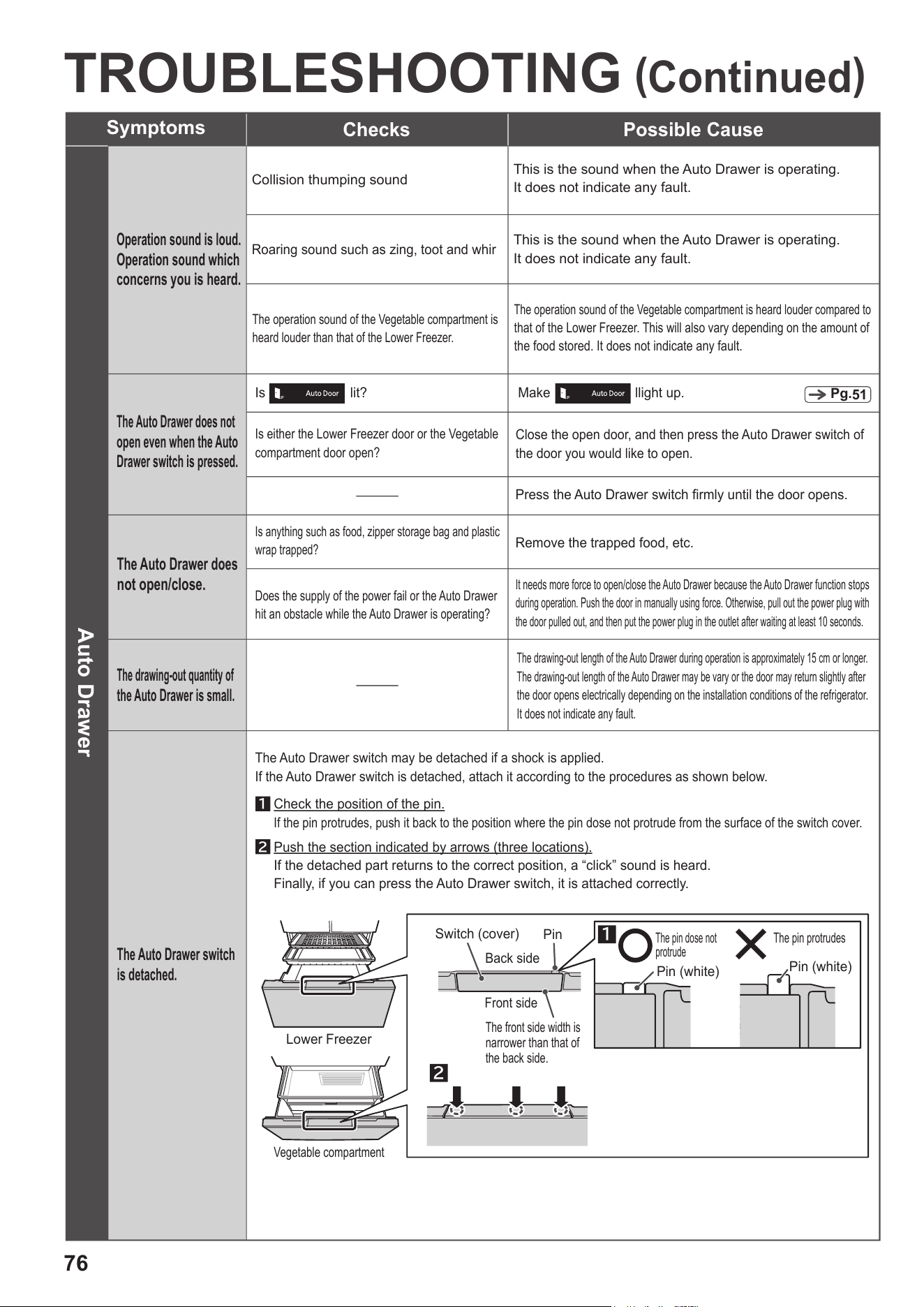
76
TROUBLESHOOTING
(
Continued
)
The Auto Drawer does
not open/close.
The drawing-out quantity of
the Auto Drawer is small.
The Auto Drawer switch
is detached.
Is anything such as food, zipper storage bag and plastic
wrap trapped?
It needs more force to open/close the Auto Drawer because the Auto Drawer function stops
during operation. Push the door in manually using force. Otherwise, pull out the power plug with
the door pulled out, and then put the power plug in the outlet after waiting at least 10 seconds.
Is either the Lower Freezer door or the Vegetable
compartment door open?
Close the open door, and then press the Auto Drawer switch of
the door you would like to open.
The drawing-out length of the Auto Drawer during operation is approximately 15 cm or longer.
The drawing-out length of the Auto Drawer may be vary or the door may return slightly after
the door opens electrically depending on the installation conditions of the refrigerator.
It does not indicate any fault.
Remove the trapped food, etc.
Press the Auto Drawer switch firmly until the door opens.
Does the supply of the power fail or the Auto Drawer
hit an obstacle while the Auto Drawer is operating?
The Auto Drawer switch may be detached if a shock is applied.
If the Auto Drawer switch is detached, attach it according to the procedures as shown below.
Operation sound is loud.
Operation sound which
concerns you is heard.
The Auto Drawer does not
open even when the Auto
Drawer switch is pressed.
Roaring sound such as zing, toot and whir
Collision thumping sound
This is the sound when the Auto Drawer is operating.
It does not indicate any fault.
This is the sound when the Auto Drawer is operating.
It does not indicate any fault.
The operation sound of the Vegetable compartment is
heard louder than that of the Lower Freezer.
The operation sound of the Vegetable compartment is heard louder compared to
that of the Lower Freezer. This will also vary depending on the amount of
the food stored. It does not indicate any fault.
Check the position of the pin.
If the pin protrudes, push it back to the position where the pin dose not protrude from the surface of the switch cover.
Push the section indicated by arrows (three locations).
If the detached part returns to the correct position, a “click” sound is heard.
Finally, if you can press the Auto Drawer switch, it is attached correctly.
1
2
Lower Freezer
Vegetable compartment
2
1
The pin dose not
protrude
The pin protrudes
Pin (white)
Pin (white)
Switch (cover)
Pin
The front side width is
narrower than that of
the back side.
Back side
Front side
Auto Drawer
Symptoms
Checks Possible Cause
Is lit?
Make llight up.
Pg.
51
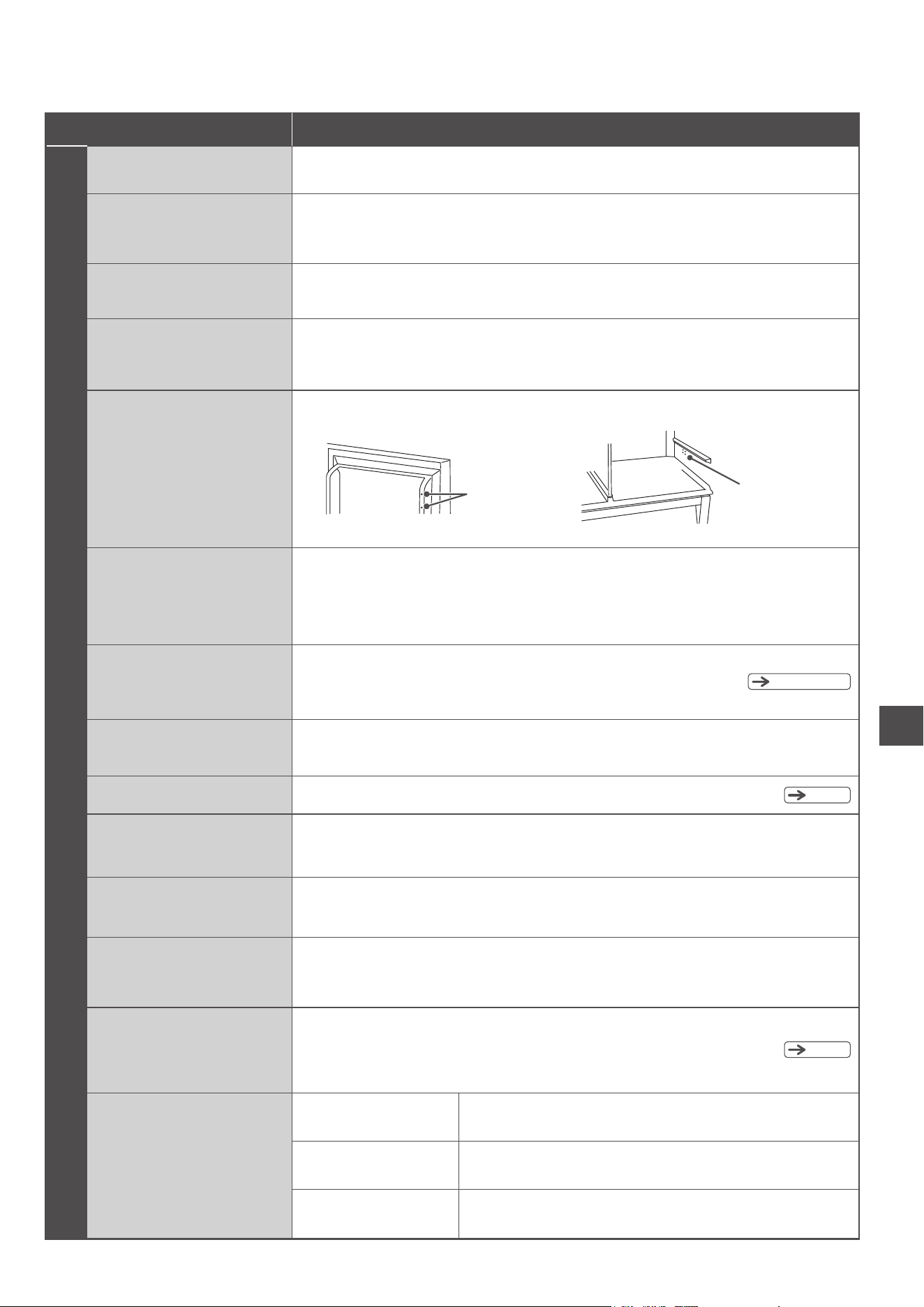
77
TROUBLESHOOTING
Pg
.65
–
67
*
Depending on the product, stickers may be affixed. Do not remove these stickers.
Symptoms
Possible Cause
Others
Electric shock when you touch
the body of the refrigerator
There are thin hair lines
on the plastic parts.
The door surfaces/the sides or
top surface of the refrigerator
are wavy or distorted.
The refrigerator may be charged with static electricity. This is safe.
Slight waving and/or distortions are generated in the manufacturing process of the refrigerator.
They may be conspicuous depending on the position and brightness of the light source,
but they are not a fault. Also, they do not affect the performance of the refrigerator.
These lines are caused by liquid resin flowing when the plastic is molded. Especially visible
on transparent parts. There is no issue with the quality and will not crack.
Static interference on radio
and television
This is due to the very slight electromagnetic waves generated by this refrigerator.
Install the refrigerator away from TVs, radios, entry phones, etc.
Keep the power supply line away from any antenna wires.
There are small holes inside
the door and on the side of the
Refrigerator Compartment.
These holes are used to release the internal air when filling the doors and compartment with insulating material
in the refrigerator manufacturing process. They do not indicate any fault.
Holes (inside door)
Holes (side of Refrigerator
Compartment)
If you are not using the refrigerator
for a long time.
Removing frost.
Moving/transporting
the refrigerator
Broken glass
(door glass/glass shelf)
When I close one door,
another door opens.
There was a power outage.
Reduce the frequency of opening and closing the doors and avoid storing additional
food
until the power supply is restored.
After the power is restored, check the settings on the Control Panel.
Each settings such as the temperature settings and the ice making modes may change
after the power fail recovery. Therefore, reset those as necessary.
Remove all the items in the refrigerator.
Remove the power plug and clean the inside of the refrigerator and automatic ice maker.
Leave all the doors open for 2 or 3 days to dry the refrigerator.
This refrigerator automatically defrosts, so no action is required. The thawed water
collects in the evaporation tray and automatically evaporates.
See “Preparation for moving/transporting (moving house) ”.
Do not touch the broken glass, and immediately contact your dealer for repair.
Did you close the door with too much force?
Since each compartment is connected by a cold air passage, other doors may open momentarily
due to the change in air pressure when the door is closed.
It is hard to open the door
immediately after closing it.
Did you leave the door open for a long time?
This is because the air that has entered the refrigerator is suddenly cooled and the
pressure temporarily drops. Rather than leaving the door open for a long time, open and
close it each time you need to take something out or put something in.
If you are concerned about
vibration noise or the back
wall becoming discolored or
dirty due to moisture
Install the refrigerator 2 cm or more away from the back wall.
Pg.
46
Pg.
78
A fly or other insect enters
the refrigerator.
Are there flies near the
refrigerator?
Keep the environment clean.
Use an insect trapper.
Cover or wrap the food.
Does the refrigerator contain
food with strong odors?
Close the refrigerator doors as quickly as possible after taking
the food from the refrigerator.
Has the door been left opened for
a long time?
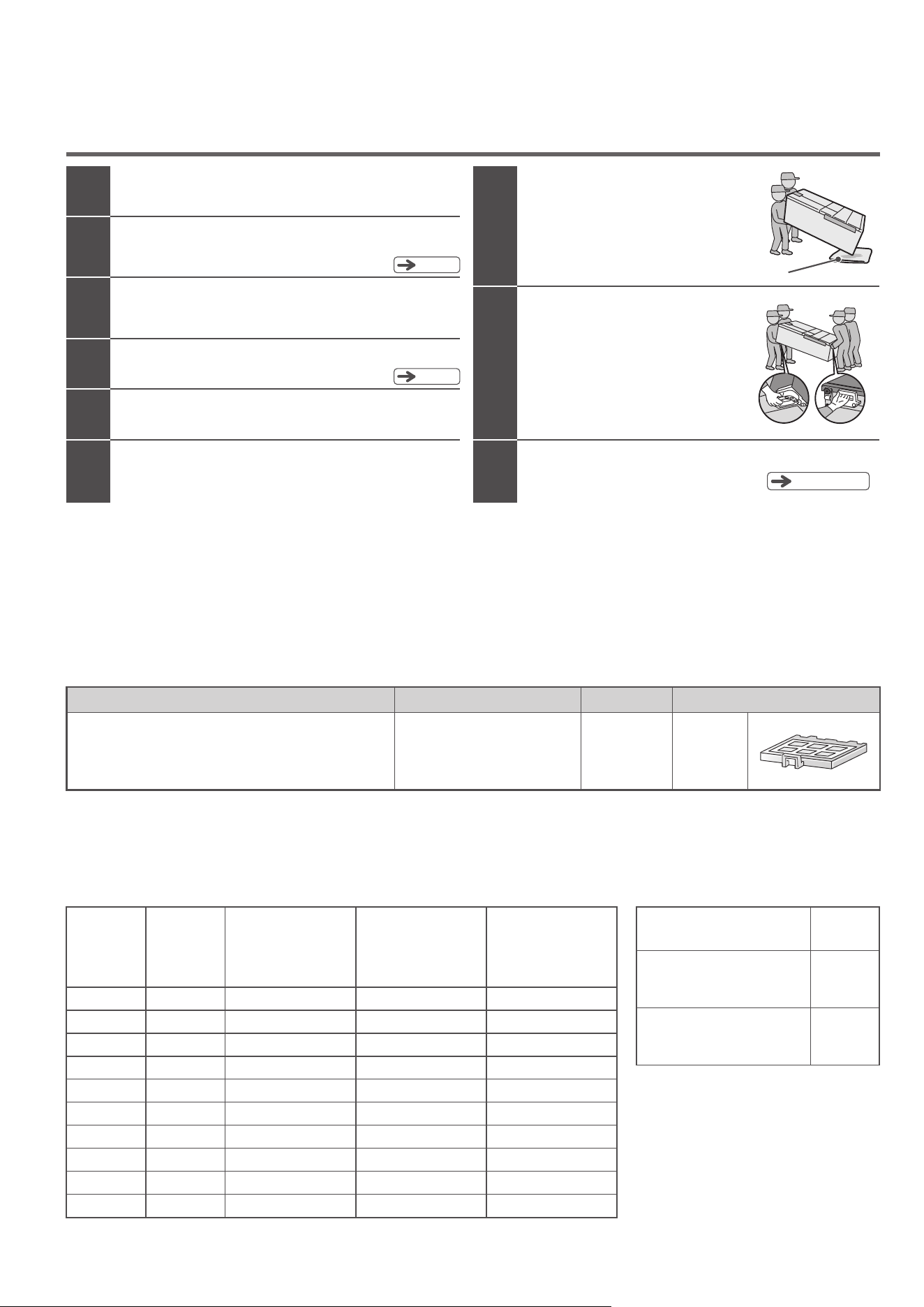
78
AVAILABLE PARTS
■
During the purchase of the following parts, please specify your refrigerator model. Only purchase parts from authorised dealers.
RJK-30
Water filter for the automatic
ice maker
Common to
all models
The ice smells.
The water filter may be old and dirty.
(The usage period is approximately 3 to 4 years)
Preparation for moving/transporting (moving house)
Remove all the food and ice.
1
3
Unplug the power plug.
This can be done just before moving the refrigerator.
7
8
4
5
Secure the door and power cord with tape.
96
2
Pour away the water in the water supply tank and ice tray.
Remove the water supply tank and perform
“Ice Maker Cleaning”.
Pg
.67
Pg
.46
Remove the leg cover and raise the adjustable
mounts.
Lay protective sheets or fabric when moving
or transporting the refrigerator.
This is to prevent damage to the flooring and spillage of water.
Place a cloth under the refrigerator,
tilt the refrigerator backwards,
and drain water from the bottom
at the back.
Cloth, etc.
Hold the carrying handle and
carry the refrigerator with two
or more people.
Do not stack the refrigerator horizontally
when shipping it.
(It may cause the refrigerator to malfunction)
Install according to “Before use”.
Pg
.46, 47
When this happens
Product name
Product modelModel
TROUBLESHOOTING
(
Continued
)
除霜控制裝置的類型
最大除霜間隔[小時]
最小除霜間隔[小時]
變數
48
12
Type of defrost controllers
Maximum possible defrost interval [h]
Minimum possible defrost interval [h]
Variable
周圍溫度控制式防結露加熱器的耗電量
相對濕度
相對濕度
中位數
加熱器耗電量(W)
周圍溫度:16 ℃
加熱器耗電量(W)
周圍溫度:22 ℃
加熱器耗電量(W)
周圍溫度:32 ℃
0 ー 10 %
10 ー 20 %
20 ー 30 %
30 ー 40 %
40 ー 50 %
50 ー 60 %
60 ー 70 %
70 ー 80 %
80 ー 90 %
90 ー100 %
5 %
15 %
25 %
35 %
45 %
55 %
65 %
75 %
85 %
95 %
0.0
0.0
0.0
0.0
0.0
0.6
1.2
1.8
2.7
3.6
0.4
1.2
1.7
2.3
3.5
4.8
0.0
0.0
0.0
0.0
0.9
0.9
0.9
1.0
2.0
2.8
3.3
4.0
5.1
5.3
R-GW670TA
Relative
humidity
RH band
mid-point
Heater W
at 16 °C
Heater W
at 22 °C
Heater W
at 32 °C
Power input of ambient controlled anti-condensation heaters
79
NOTES ON NON-CFC REFRIGERATORS/GUIDE ON TOTAL STORABLE WEIGHT
NOTES ON NON-CFC REFRIGERATORS/GUIDE ON TOTAL STORABLE WEIGHT
Notes on non-CFC refrigerators
本雪櫃所使用雪種及其他斷熱材料皆無使用氟氯化碳,而是使用碳氫化合物。碳氫化合物不會破壞地球臭氧層,對地球溫
室效應的影響非常小,屬於環保物質。
碳氫化合物為可燃型物質。雪種密封於雪種迴路管中,在一般的使用情況下應該不會發生外洩。
但萬一有雪種管線損壞的情況發生,請遠離火源及避免使用電器用品,將門窗打開以利空氣流通。之後,請立即與經銷商
或技術中心聯絡。
Hydrocarbons do not damage the ozone layer, have minimal impact on global warming, and are thus considered
This refrigerator uses hydrocarbons, instead of chlorofluorocarbons (CFCs), in its refrigerant and insulation materials.
comparatively environment-friendly.
appliances. Keep your distance from the refrigerator, and contact a customer service center to request repair.
operation. If the cooling circuit is damaged, open a window to ventilate the room, and avoid using fire and electrical
Note that hydrocarbons are flammable. The refrigerant is sealed in the cooling circuit and should not leak under normal
有關碳氫化合物的雪櫃
可容納於層架或收納盒內的食品重量如下:
Refer to the following table as a guide on the total weight of food that can be stored on each shelf or in each container.
關於廢棄之重要警告
Important notes on disposal
隔熱材料中含有環戊烷 (Cyclopentane)。
當要處理隔熱材料中之氣體時,必須依照特殊的廢棄處理程序。
要廢棄本產品時,為了不會對環境造成不良影響,請詢問當地的相關機關。
The insulation material of this refrigerator uses cyclopentane and other gases that require special procedures for safe
disposal. To dispose of this refrigerator, please contact your local environmental protection agency (or some other
relevant agency), and inquire about safe disposal procedures.
●
●
●
●
可容納的食品重量
Guide on total storable weight
零件名稱
冷藏室
可調式層架上段
可調式層架中段
可調式層架下段 , 固定層架
真空保鮮室上方的層架
真空保鮮箱
雪櫃門置物架 ( 右側 ) 合計
雪櫃門置物架 ( 左側 ) 合計
製冰格
小置物空間
上層冰凍格
上層滑動格
中層滑動格
下層冰凍格
上層滑動格
下層置物格
製冰室
上層冰凍室
下層冰凍室
蔬果保鮮室
Name of parts
Refrigerator
compartment
Height adjustable upper shelf
Height adjustable middle shelf
Height adjustable lower shelf, Fixed shelf
Shelf above the vacuum compartment
Vacuum case
Total for the right door pockets
Total for the left door pockets
Upper Freezer case
Slimline slide case
Slide case
Lower freezer case
Upper Case
Lower Case
Ice Case
Small Items storage space
Ice compartment
Upper freezer
compartment
Lower freezer
compartment
Vegetable
compartment
有關碳氫化合物的雪櫃/可容納的食品重量
R-GW670T Type
R-GW670T 型號
有關碳氫化合物的雪櫃/可容納的食品重量
25.0 kg
25.0 kg
23.5 kg
15.0 kg
5.4 kg
21.0 kg
21.0 kg
5.5 kg
1.5 kg
6.0 kg
6.5 kg
17.5 kg
7.0 kg
20.0 kg
19 頁
Pg.
57

80
R-GW670T
R-GW670T Type
D
型號
AFTER-SALES SERVICE
關於售後服務
電源線受損或需要維修時,請直接洽詢下列服務中心。
使用中出現異常現象時,請立即拔掉電源插頭以及聯絡售後服務中心以進行修理。
•
Malaysia
Arcelik Hitachi Home Appliances Sales Malaysia Sdn. Bhd.
Lot 12, Jalan Kemajuan, Bangi Industrial Estate,
Selangor Darul Ehsan, Malaysia
43650 Bandar Baru Bangi,
Tel: +60-3-8926-4168
Fax: +60-3-8926-3013
•
Australia
Beko A&NZ Pty Ltd
55 Blanck Street, Ormeau QLD 4208
Phone: 1300 470 552
•
New Zealand
Beko A&NZ Pty Ltd
55 Blanck Street, Ormeau QLD 4208
Phone: 09 96 44 429
製造商
/
Manufacturer
Please contact the following service centre if power cord is damaged or service is required.
If some malfunction occurs during operation, unplug the power plug immediately and contact the service
centre to have the refrigerator repaired.