Version: V1.0
Revision Date: 2025.6
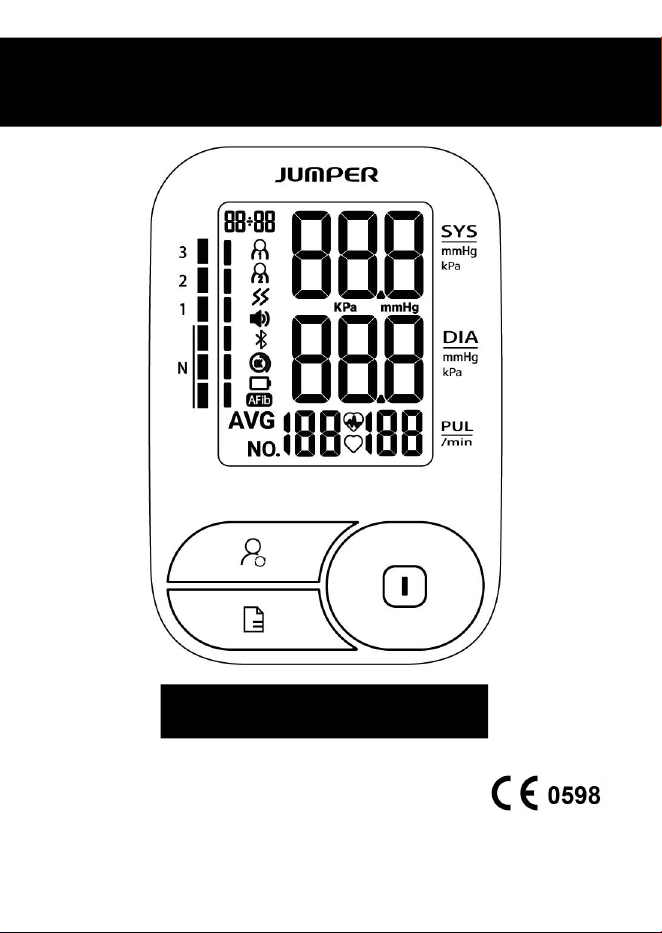
Electronic Blood Pressure Monitor
JPD-HA200C User Manual

- 1 -
Product Composition
The product is comprised of the host machine and the Upper-arm-type cuff of
Electronic Blood Pressure Monitor(measured arm circumference 22-36cm or
22-42cm).
Intended use & Intended User &Intended patient population
The Electronic Blood Pressure Monitor is intended to measure the systolic and
diastolic blood pressure as well as the pulse rate of adult person via non-invasive
oscillometric technique at medical facilities or at home.The intended user is
professional or lay user. The device is intended to be used by adults over 12 years
old.
Working Principle
This product is designed based on the principle of Oscillographic method to
measure the blood pressure of patients. Inflatable cuff is used to block arterial
blood flow during the oscilloscope measurement. Because of the hemodynamic
action of the heartbeat, the pulse wave synchronized with the heart beat is
overlapped on the sleeve pressure. The pulse wave disappeared when the air
sleeve pressure was much higher than the systolic pressure. As the sleeve
pressure drops, the pulse begins to appear. When the cuff pressure is higher than
the contraction pressure down to the systolic pressure, the pulse wave suddenly
increases and reaches the maximum value when the average pressure is reached.
Then the pulse wave attenuates with the decrease of cuff pressure. Then blood
pressure is calculated according to the relationship between pulse wave amplitude
and the corresponding time sleeve pressure.
- 2 -
Safety Precautions
The warnings and illustrations shown in the User Manual enable you to
use the product safely and correctly, thus preventing you and others
from being injured, specifically as follows:
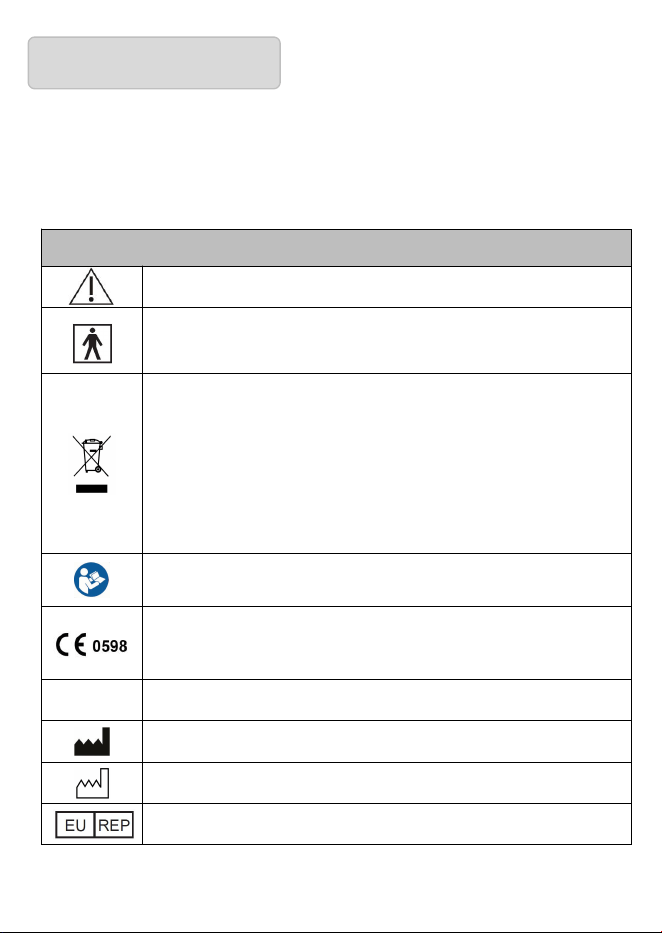
Legend, mark and meaning
Warning message
Anti-electric shock degree is Type BF of the application
part
When the product life expires and the end users discard
the products, send them to the designated collecting and
separating place for disposal according to the
requirements from the local environmental protection
authority.
Consult the instructions for use.
This product complies with the MDR 2017/745
requirements.
IP21
Degree of protection against the ingress of water.
Information of manufacturer
Date of manufacture
Authorized European Representative
- 3 -
Quick Start Guide
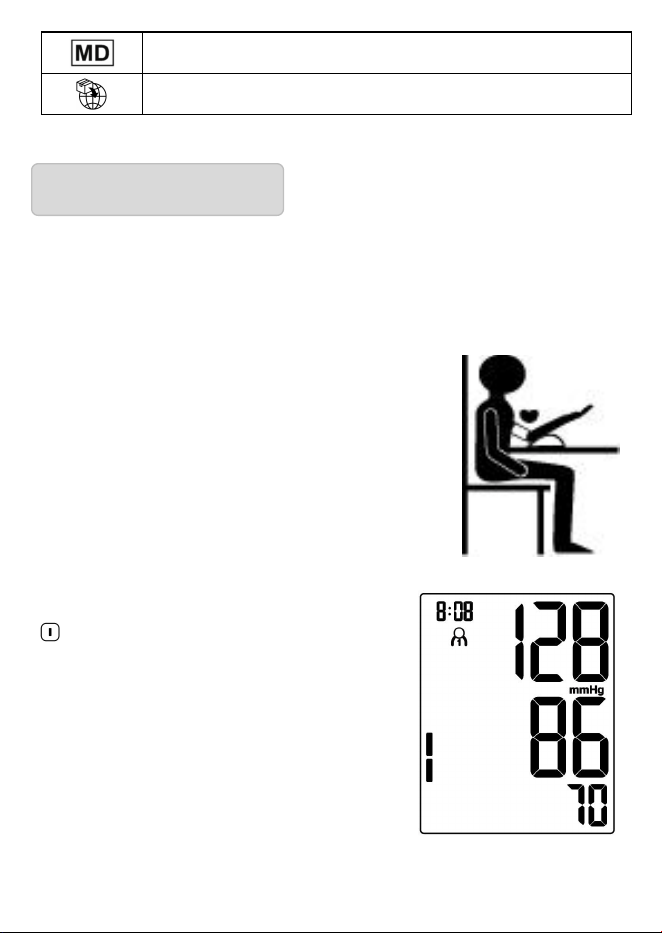
Avoid smoking, eating, drinking caffeinated drinks or exercising for 30
minutes before taking measurement.
1. Sit upright in a chair with both feet on the floor.
2. Remove tight fitting clothing from your upper
arm along with any thick clothing.
3. Pull on the end of the cuff until it wraps
securely around your upper arm. Place your arm
on a table so that the cuff will be at the same level
as your heart.
4. The cuff will automatically inflate and the
measurement will start, upon pressing the
“ ” button.
5. When the measurement is complete, the
cuff will automatically deflate and your
systolic and diastolic pressure values and
pulse rate will be displayed.
Medical Device
Information of Importer
- 4 -
1. Overview
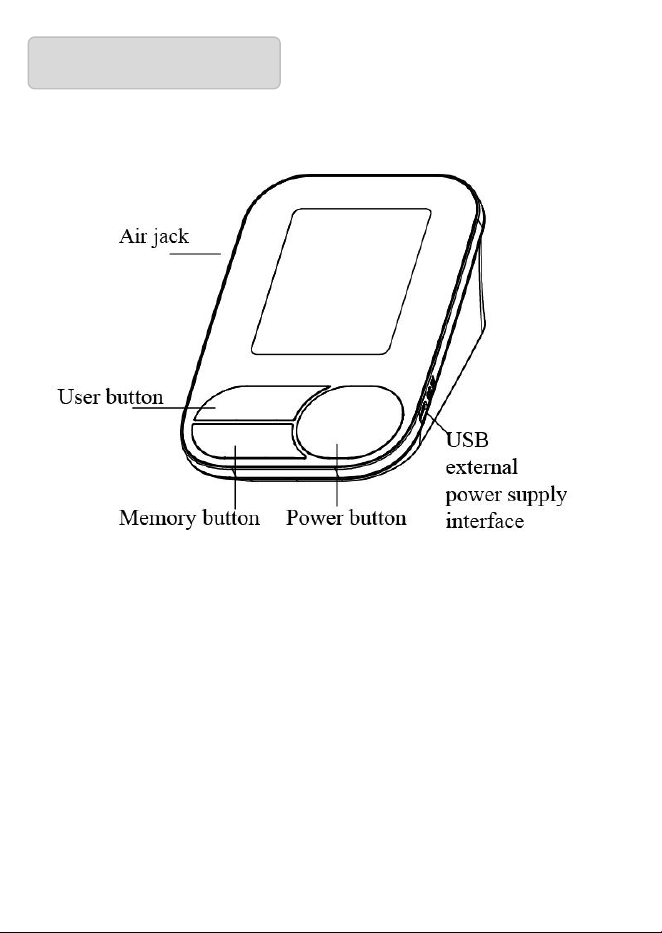
1.1 Monitor
1.2 Features
Universal Cuff
Auto power off
Average of last 3 readings
Irregular Heartbeat Detector
Atrial Fibrillation Detection(AFib)
199 Readings* 2 Users (with guest mode)
Operated by 4 AAA batteries (USB 5V optional)
Backlight (Optional)
- 5 -
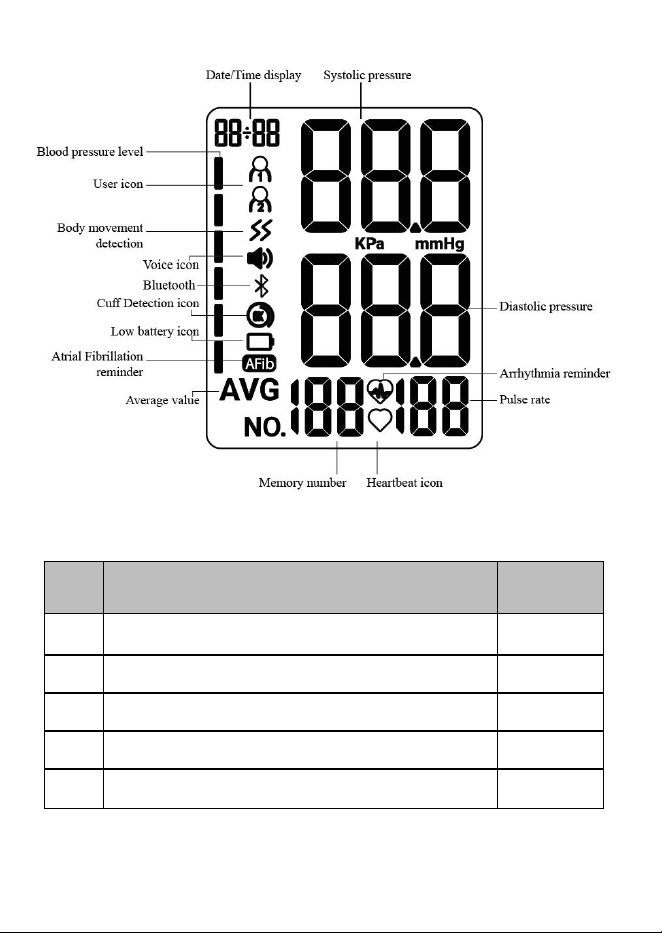
1.3 Display
1.4 Packing List
No.
Name
Quantit6y
1
Electronic Blood Pressure Monitor
1
2
Cuff
1
3
Dry Battery (AAA)
4
4
User Manual
1
5
Easy-to-carry Storage Bag
1
- 6 -
2. Preparation
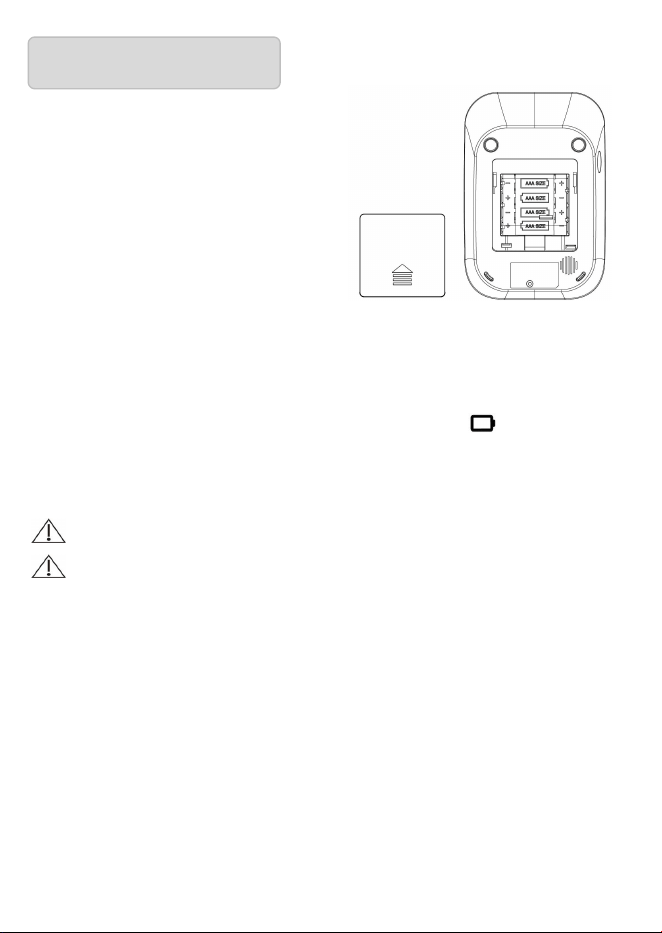
2.1 Battery Installation
a) Open the battery cover as shown
in the picture.
b) Place 4 AAA dry batteries. Pay
attention to the battery electrode indication.
2.2 Battery power indication and replacement
After the product is turned on, if low power symbol appears on the
screen , the measurement cannot be performed, and the battery must be
replaced.
Do not use any expired battery;
If the product is not used for over 3 months, please take out the
batteries.
2.3 USB Power Supply
USB line can be connected for power supply of the product without
battery.
If need connect Separate power supply , please note the following:
1)Output: DC 5 V; 0.5 A.
2)Rated input voltage shall not exceed 500 V.
- 7 -
3)Classification of protection against electric shock: Class II
Note: Please select the USB power supply that is supplied by the
manufacturer or that complies with the relevant safety standards (e.g.
IEC 62368 and IEC 60601-1).
2.4 Cuff
The applicable arm circumference range of the cuff is 22-36cm or
22-42cm.
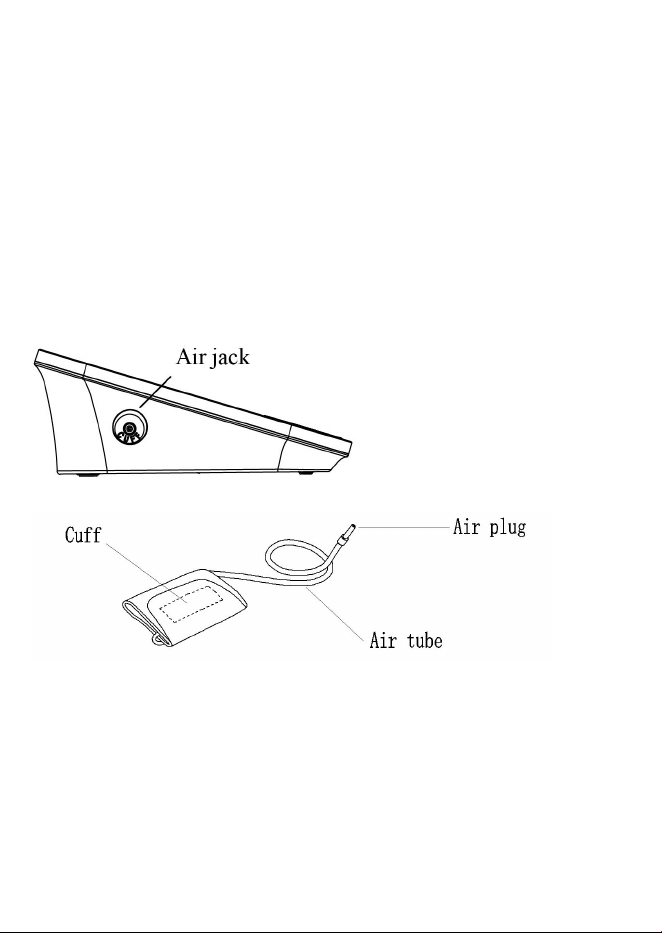
Connection: Insert the air plug of cuff air tube into air jack of the
Electronic Blood Pressure Monitor. Figure shown as above:
8
3. Function Setting Mode
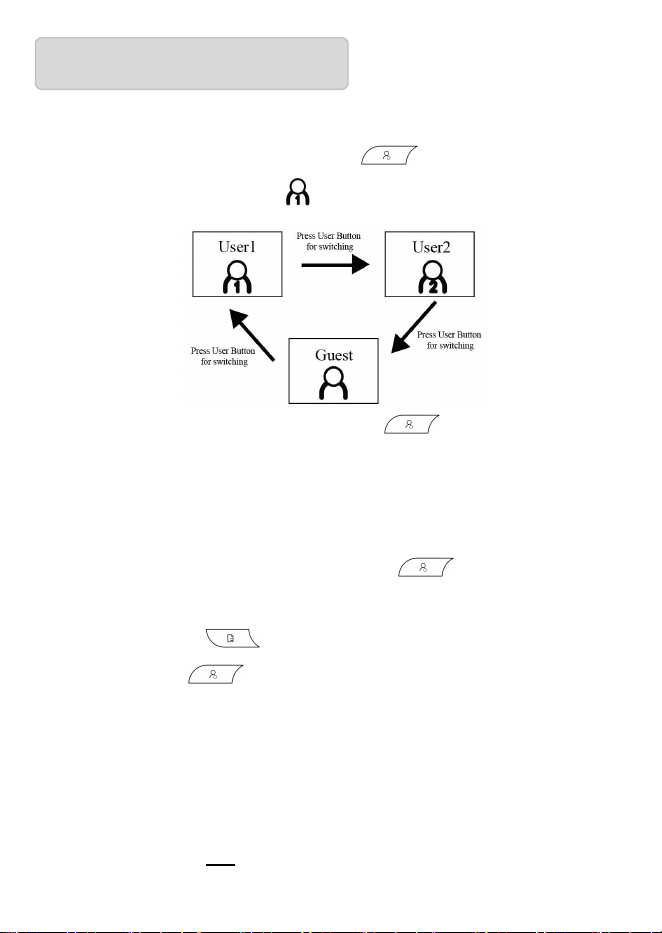
3.1 User Mode
In the shutdown state, press the "User " button to switch to the
other user. (default user: User 1 )
(Note: In the shutdown state, press “User ” button to view the
current time and the current user)
3.2 Year/Month/Date/Time Setting
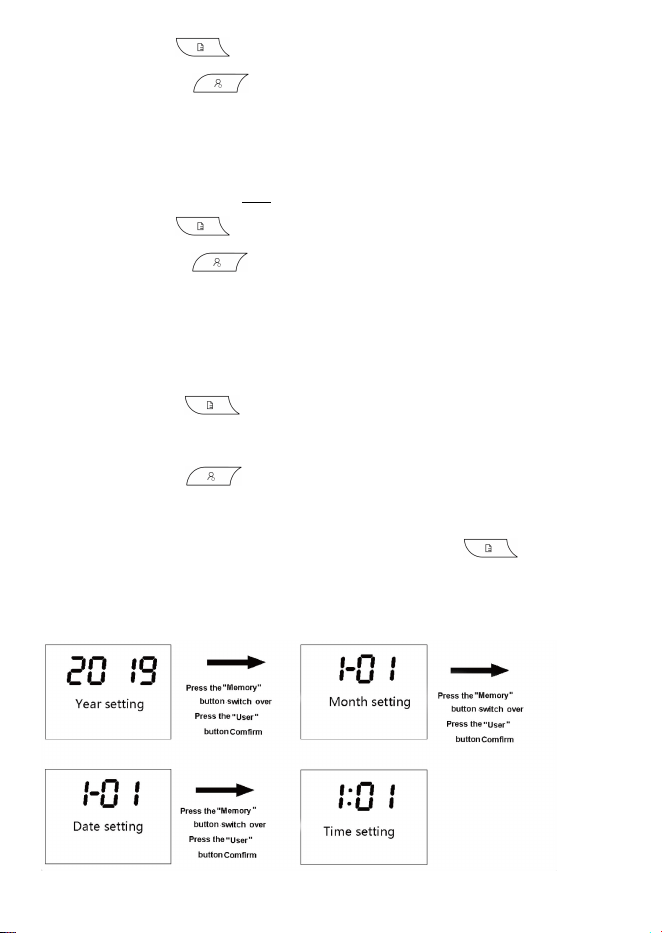
1) Year Setting:
In the shutdown state, long press the "User " button to enter the
year setting mode. The screen show "20XX" and blink.
Press the "Memory " button to adjust years values.
Press the "User " button to confirm and enter to the Month
setting.
Note: The device may automatically enter the year setting mode after
battery replacement and power-on.
2) Month Setting:
The screen shows "XX-XX" and month values blink.
9
Press "Memory " to adjust month values between 1 to 12.
Press the "User " button to confirm and enter to the Date
setting.
3) Date Setting:
The screen shows "XX-XX" and date values blink.
Press "Memory " to adjust date values between 01 and 31.
Press the "User " button to confirm and enter to the Time
setting.
4) Time Setting:
The screen shows "XX:XX" (Time value flashing).
Press "Memory " to adjust hours values between 01 and 23,
then adjust minutes values between 00 and 59.
Press the "User " button to confirm and enter to the Talking
function setting.
Note:When setting time values, hold the "Memory " button to
quickly adjust values.When the maximum value is reached, the setting
will reset to the minimum value.
10
3.3 Talking function setting (voice version only)
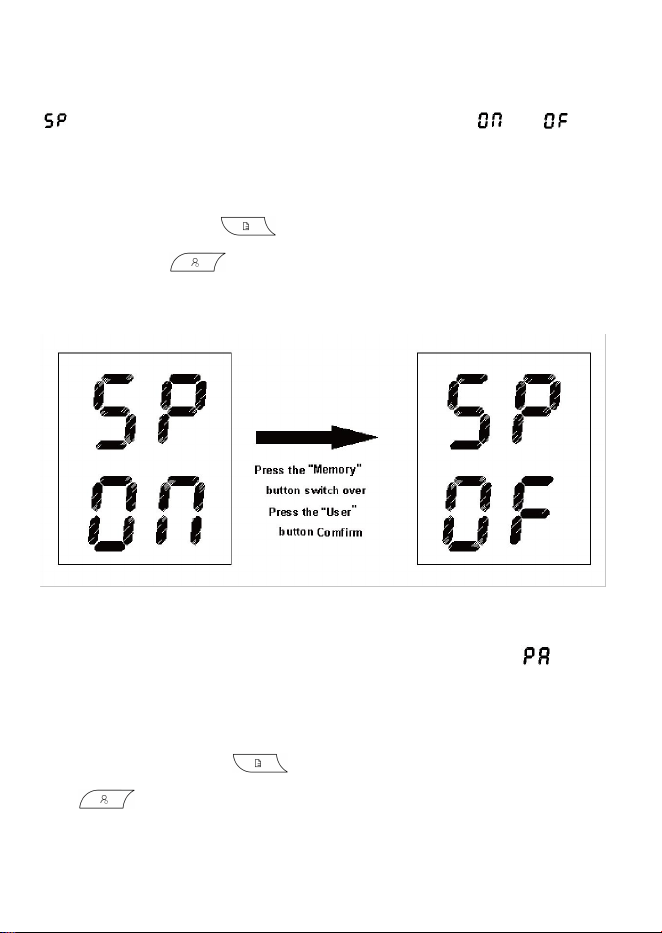
After entering the Talking function setting mode, the screen shows
“ ” at the SYS area, with the current voice status “ ” / “
”
and
voice icon (not displayed, when talking function mode is off) at the DIA
area.
Press the “Memory ” button to switch the voice status, and
press the “User ” button for confirmation and enter the unit
display setting.
3.4 Unit setting
After entering the unit setting mode, the screen shows “ ” at the
SYS area and unit area will display mmHg, it means the unit mmHg is
selected (system default unit: mmHg),
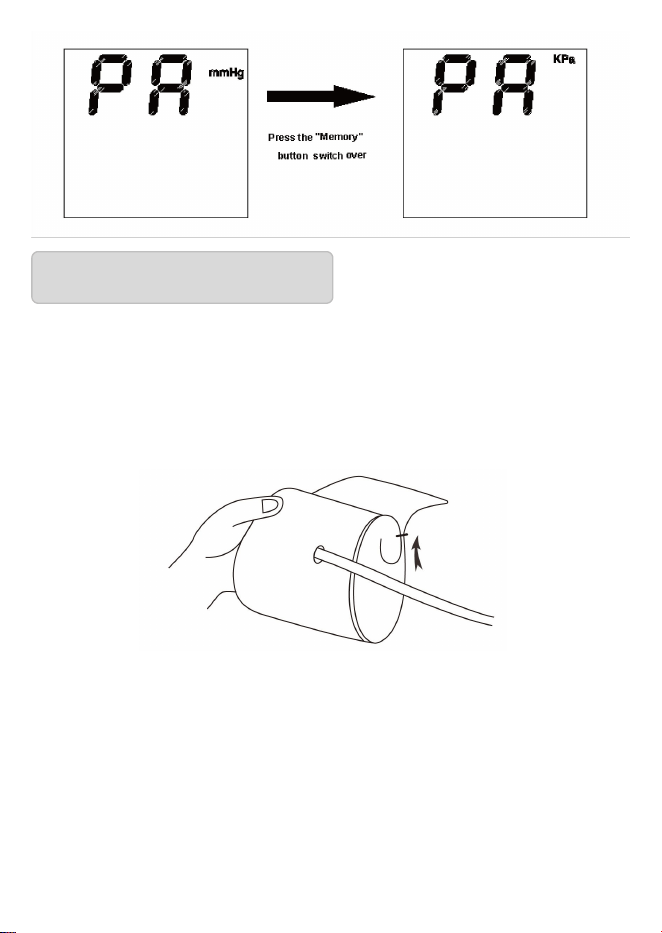
Press of the “Memory ” button to switch the unit and press the
“User ” button to confirmation and save the unit setting.
11
4.1 How to use the cuff
(1) Place the cuff flat on the table, leave the hook & loop downwards,
and pass the end of cuff through the metal ring to form a loop. The hook
& loop shall point outwards.
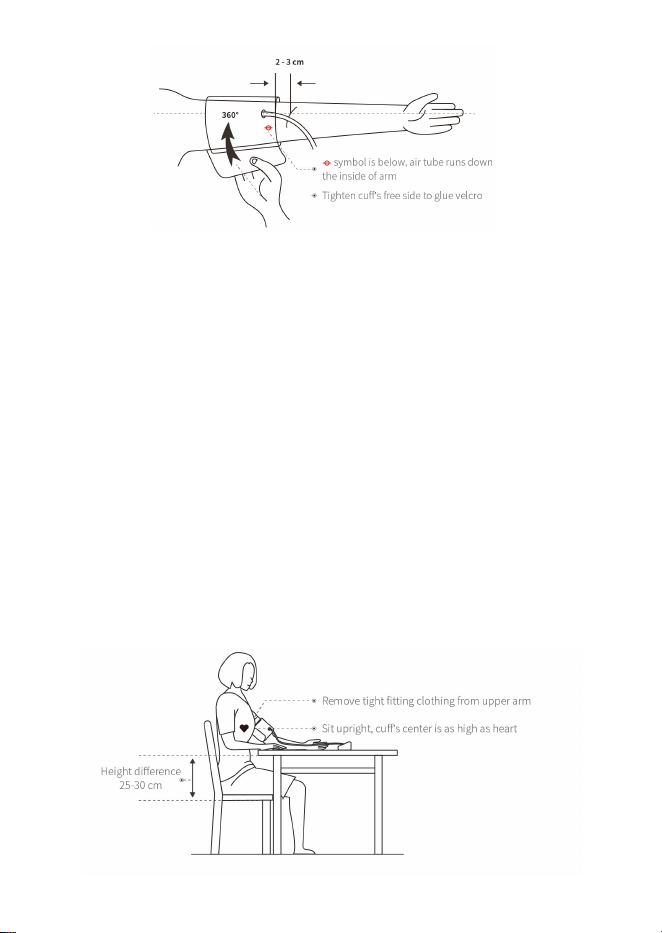
(2) Pull the cuff through the upper arm to be measured, and wear the
cuff correctly based on the downward icon “ Φ ”, the air tube runs
down the inside of your arm. Hook up the cuff on the upper arm
according to the illustration, ensure that the lower edge of cuff is 2~3cm
away from the elbow joint. Tighten the free edge of cuff to stick the
hook & loop.
4. Correct Method of Use
12
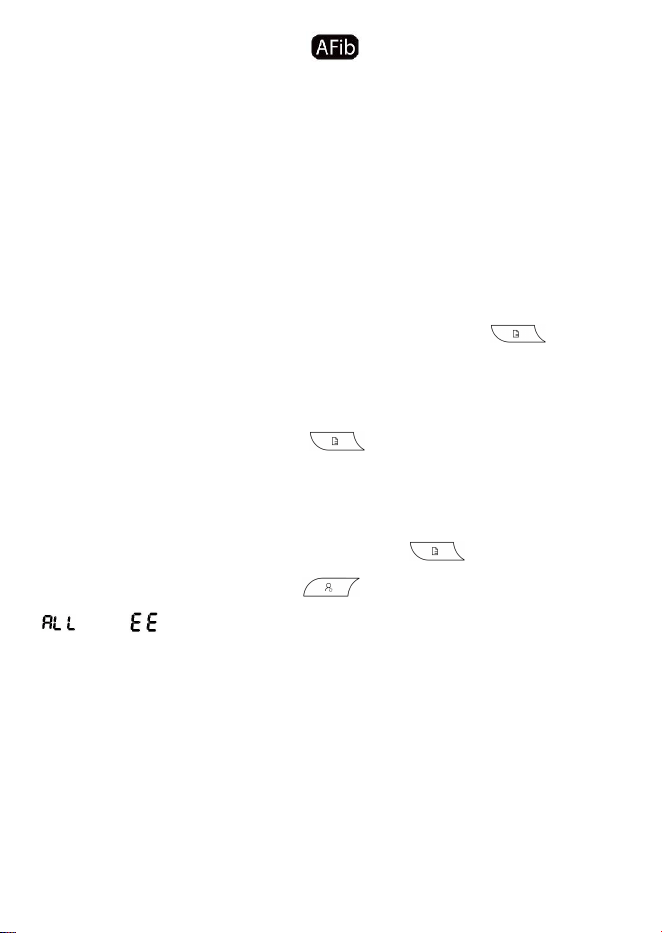
(3) The cuff should be wrapped on the upper arm comfortably, with tight
space for two fingers. Before measurement, remove tight fitting clothing
from your upper arm along with any thick clothing. Place the lower arm
flat on the desktop, leaving the center of palm naturally upwards, sitting
upright, and ensuring the center of cuff and the heart are at the same
level. Note that the tube of cuff cannot be folded or bent.
Note: If you cannot use the left arm for measurement, please use the
right arm for measurement. All the measurements must be performed on
the same arm for comparison.
4.2 Starting measurement
After you wear the cuff correctly, you can start the measurement:

13
(1) Press the “Power ” button, and the device will return to zero
automatically, the air pump will start to inflate the cuff, and the screen
will display the change of the pressure in the cuff.
(2) When reaching the stable pressure upon inflation, the air pump will
stop the inflation, and the pressure in the cuff will be reduced gradually
and displayed on the screen. If the inflated pressure is insufficient, the
device will reinflate the cuff automatically for a higher pressure;
(3) When the pulse is measured, the screen will display the "heart"
symbol and start flashing. The flashing “heart” symbol will be displayed
on the screen.
(4) Upon measurement completion, the measured values of systolic
pressure, diastolic pressure and pulse will be displayed on the screen.
(5) The screen will continue to display the measurement results, unless
press on the “Power ” button to turn off the device. If there is no
operation, the device will be powered off automatically in 30s.
Note:
(1) When the icon shows up, it means body movements during the
measurement, which may result in incorrect measurement.
(2) Irregular heartbeat symbol appears in the result when irregular
rhythm is detected 2 or more times during a measurement. If it continues
to appear, we recommend you to consult with and follow the directions
of your physician.
(3) This is not a diagnosis. It is only a potential finding for AFib. when
14
the Atrial Fibrillation symbol continues to appear during
measurements. You should contact your physician to discuss the
findings.
(4) If you suffer from an irregular heartbeat or atrial fibrillation,
measurements taken with this device should be evaluated with your
physician.
4.3 Using memory function
This blood pressure monitor is available for 2 users with 199 memories
per user. Track the memory data by pressing “Memory ” button
from the latest measurement, recorded as “1”. Then track “2”, “3” or
more via the same operation. When there are over 3 measurement data,
in power off state, press “Memory ” button for the average values
of the latest 3 measurement data, recorded as “AVG 03”.
4.4 Clearing stored measurement data
In the off state, press and hold the “Memory ” button for more
than 3 seconds, then press “User ” button at the same time until
“ ”and “ ” are displayed on screen, thus all of the memory values
are deleted.
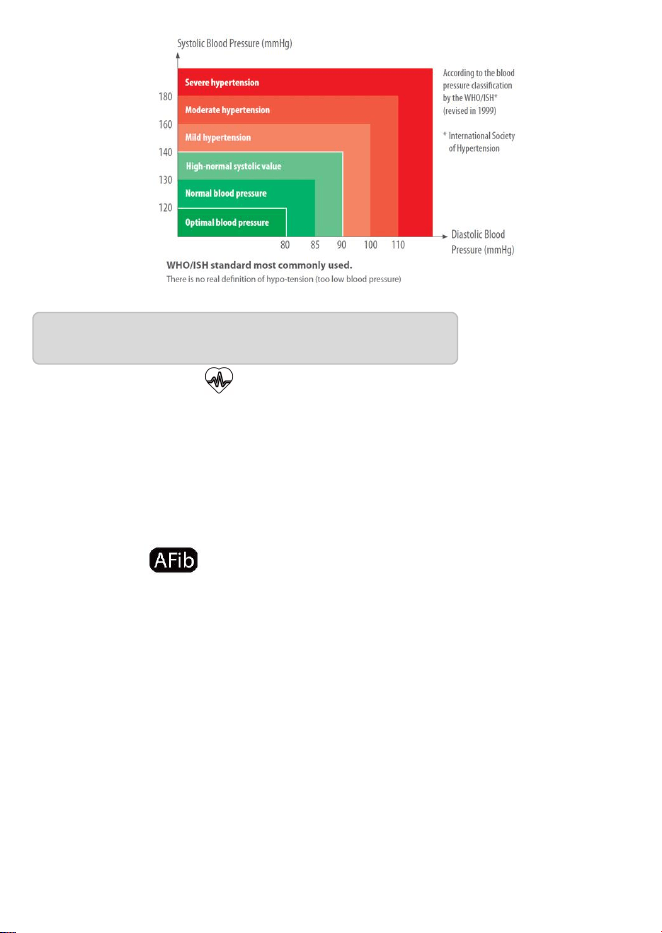
4.5 Classification standard for blood pressure condition
There is no definition of hypotension yet. Generally, if the systolic blood
pressure is less than 90mmHg (12kPa), it is hypotension.
15
What is Arrhythmia ?
Arrhythmia is a condition where the heartbeat rhythm is abnormal due
to flaws in the bio-electrical system that drives the heartbeat. Typical
symptoms are skipped heartbeats, premature contraction, an abnormally
rapid (tachycardia) or slow (bradycardia) pulse.
What is AFib ?
Atrial fibrillation (AFib) is a serious heart condition that causes an
irregular and often rapid heartbeat. It's a type of arrhythmia, or abnormal
heartbeat, that occurs when the upper chambers of the heart, or atria,
beat irregularly and sometimes much faster than normal. This irregular
beating prevents the heart's upper and lower chambers from working
together properly, which can cause blood to pool in the atria and
potentially clot. AFib can lead to serious complications, including:
Blood clots, Stroke, Heart failure.
5. Arrhythmia & AFib instructions
16
When the “ / ” symbol sometimes flashes
(1)It is recommended that you consult with, and follow the directions of
your physician.
(2) Arrhythmia/AFib can influence your blood pressure measurements.
Even the patient have been diagnosed with AFib but the “ / ”
symbol does not flash in measurements. AFib may not occur at the time
of specific blood pressure measurements. It is recommended that you
consult with your physician regularly.
The device has no side-effects if administered correctly and residual risk
is acceptable.
(1) Warning:
Keep the device out of the reach of the children under 12 and people
who can ’ t express their intention. When children of 12~18 use the
device, they should be accompanied by the adults. Pregnant women
shall use under the guidance of doctors.
Do not wrap the cuff over a wound, as this can cause further injury.
Do not use cuff in the arm which has invasive treatment device or
arteriovenous shunt,otherwise will cause hurt.
Do not apply the cuff and its pressurization on the arm on the side
6. Contraindications, Precautions, Warnings and
Prompt Instruction

17
of a mastectomy.
Do not use the cuff for a long time, avoid allergies.
This model of Electronic Blood Pressure Monitor is suitable for the arm
circumference range of 22-36cm or 22-42cm, and if the arm
circumference exceeds this range, you might fail to obtain the correct
measured value of blood pressure;
This model of Electronic Blood Pressure Monitor is not suitable for
newborns or young children;
The blood pressure is constantly changing. You shall not judge the blood
pressure condition with just one measurement result. The repeated
measurement data over a period of time will be more reliable;
For any patient, do not measure more than 3 times continuously, it
should be at least above 5 minutes of interval rest between any two
measurements, otherwise will cause extravasated blood.
Do not make self-diagnosis according to the measurement results.
Please consult your professional doctor with the measurement result
record(s).The treatment based on the self-diagnosis of measurement
results is very dangerous;
Before you start measuring, make sure the connecting tube is free of
kinks that could cause unmeasurement or other damage.
Please use the cuff follow the use manual, pay attention to the use of
the hose, avoid twining due to excessive length.
Please do not use mobile phone, computer,electric kettle and the

18
other can cause interference device around the device.
No servicing/maintenance while the device is in use.
Don’t use accessories and detachable parts not specified or
authorized by manufacturer. Otherwise, it may cause damage to the unit
or danger to the user or patients.
After use, dispose of product and packaging in accordance with
hospital, administrative and/or local government policy.
This monitor is not intended for the diagnosis, treatment, or
management of AFib.
(2) Precautions:
Do not repair, disassemble or modify the Electronic Blood Pressure
Monitor without permission;
Do not collide or drop the host to avoid collision or strong impact
on the device;
Do not mix old and new batteries of different brands for use.
Indoor temperature, environment, noise, user's body position, speech or
exercise might affect the blood pressure measurements. The body
movement, magnetic field and improper wearing of cuff and sensor will
affect the measurement as well.
The equipment is not suitable for use in the public places or in
electrosurgery.
The Electronic Blood Pressure Monitor has clinically investigated
according to the requirements of ISO 81060-2.
19
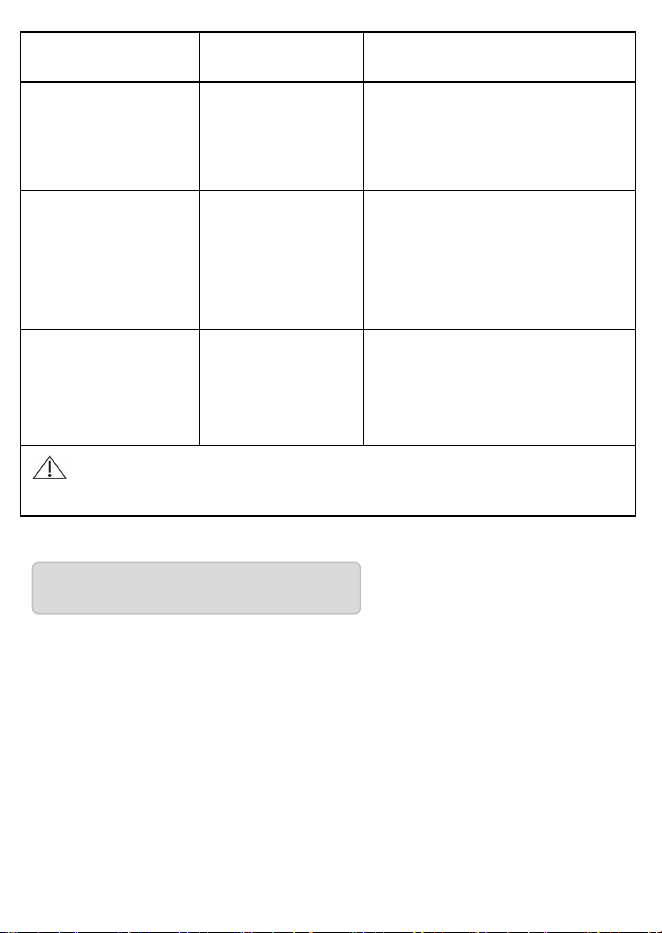
7. Troubleshooting
* If you have trouble using the device, please check the following
instruction.
Problem
Possible cause
How to correct
No display when
press the Power
button
Low battery
Replace new batteries or use
the USB for power supply.
The polarities of
batteries are
installed
wrongly.
Install the batteries in correct
polarities.
No pressurizing
The air plug is
loosely installed.
Make sure the air plug is
securely inserted in the main
unit.
The air tube is
broken or leaked.
Purchase a new cuff.
“Err 1”displayed
The leakage is
too fast or the
pulse signal is
too weak.
Please check the cuff, tie it up
and try again.
“
Err 2
”
displayed
The blood
pressure signal
cannot be
detected due to
too much noises.
Please remove the noise
sources and measure again.
appear
Please measure again and
consult with your physician
“
Err 3
”
displayed
The test result is
abnormal.
Please measure again.
20
8. Storage & Maintenance
Keep the device away from direct sunlight, extreme temperatures,
humidity or moisture
.
Use a dry, soft cloth to clean the device, or if desired, use a cloth
lightly dampened with water.
Do not use corrosive cleaner, benzene, thinner or other volatile
liquids to clean the device.
Do not wash or expose the arm cuff to liquid.
“Err P”
displayed
The inflation
fails.
Please check the cuff, tie it up
and try again.
“HI” displayed
The inflation
pressure is
greater than 295
mmHg (39kPa )
Please measure again.
“ErrH ”
displayed
Systolic
Pressure >250m
mHg; or
Diastolic
Pressure >190m
mHg
Please measure again.
“ErrL”
displayed
Systolic Pressure
<60mmHg; or
Diastolic
Pressure
<30mmHg.
Please measure again.
Note: If your problem cannot be solved by the above, please
contact customer service. Do not disassemble the device!
21
Remove batteries from the device when it will not be used for
more than 3 months.
Disinfection:
Recommended disinfecting agent:
Isopropanol solution with 70% concentration
Medical alcohol with 75% concentration
Do not disinfect by such method as high temperature steam or
ultraviolet irradiation, which might damage the instrument or accelerate
the aging!
It is suggested to disinfect the electronic blood pressure monitor
before and after use each time. Each time of disinfection shall be
completed within 1min. The number of repeated disinfection each time
shall not exceed 2 times.
Cleaning and disinfection shall be carried out in the following
environment: temperature: +5 °C~+40 °C (50℉-104℉), relative
humidity: 15%~85%RH, non-condensing, atmospheric pressure:
70kPa~106 kPa.
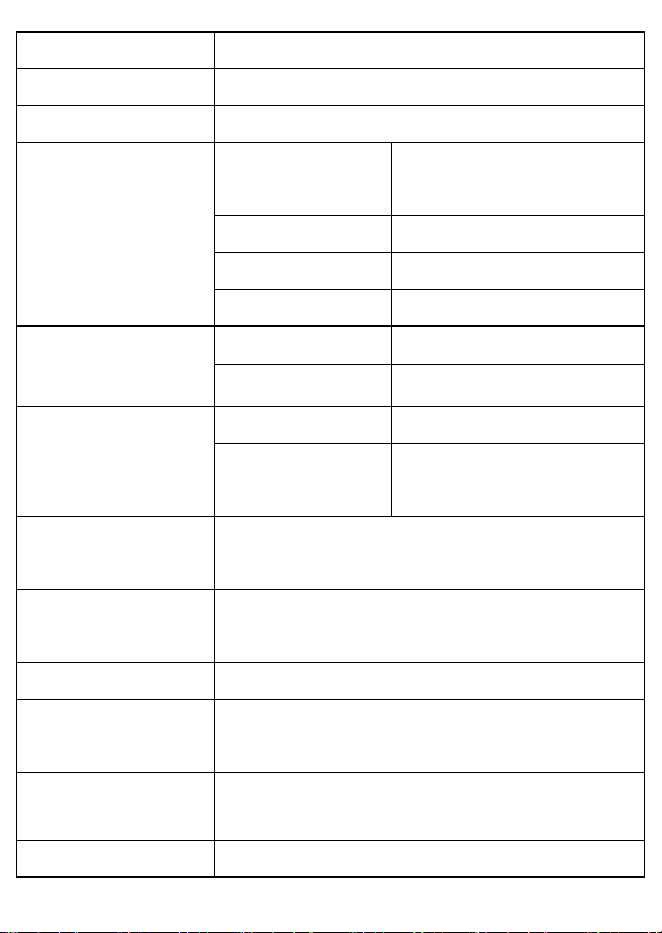
9. Specifications
Product Name
Electronic Blood Pressure Monitor
Model
JPD-HA200C
FCC ID
2ADYL-JPDHA200C
22
Display Mode
Digital display mode
Measuring Mode
Oscillographic method
Measuring Body Part
Upper arm
Measuring Range
Pressure value
0-295mmHg
(0kPa-39.3kPa)
Systolic pressure
60-250mmHg
Diastolic pressure
30-190mmHg
Pulse value
40-199 pulse beats/min
Static measurement
accuracy
Pressure value
±3mmHg
(
±0.4kPa
)
Pulse value
± 5% of read value
LCD display
Pressure
Unit : mmHg/ kPa
Pulse
Pulse rate per minute,
displaying three digits
Storage capacity
It can store 199 groups of measurement data for
each of two users
Power supply
4 AAA dry batteries
/DC 5V USB external power supply
Power Off Mode
Manual power-off/ Auto power-off
Device weight
(without batteries)
About 235g
Monitor Size
145mm (length) *99mm (width) *57mm (height)
Screen Size
72mm (length) *58mm (width)

23
Cuff
Upper-arm-type cuff
(measured arm circumference 22-36cm or
22-42cm)
Annexure
Cuff, User Manual, Dry Battery,
Easy-to-carry Storage Bag
Software version
1.0
Battery Life
High-performance dry battery can be used for
about 300 times at normal temperature
Service Life
5 years
Date of Production
See label
Operating
environment
Temperature
Condition
5 ℃-40 ℃
If the device is
stored and used
in the
environment out
of the
designated
temperature &
humidity ranges,
it cannot operate
normally.
Humidity
Condition
15%-85%RH
Atmospheric
Condition
70kPa-106kPa
Transportation and
Storage Environment
Avoid strong impact, direct impact, exposure or
rain during transportation. The packaged Blood
Pressure Monitor shall be stored indoors at the

24
EMC Information-Guidance and Manufacture’s Declaration
1* WARNING: Use of this equipment adjacent to or stacked with other
equipment should be avoided because it could result in improper
operation. If such use is necessary, this equipment and the other
equipment should be observed to verify that they are operating
normally.”
2* WARNING: Use of accessories, transducers and cables other than
those specified or provided by the manufacturer of this equipment could
result in increased electromagnetic emissions or decreased
electromagnetic immunity of this equipment and result in improper
operation.”
3* WARNING: Portable RF communications equipment (including
peripherals such as antenna cables and external antennas) should be used
no closer than 30 cm (12 inches) to any part of the ME equipment,
including cables specified by the manufacturer. Otherwise, degradation
of the performance of this equipment could result.”
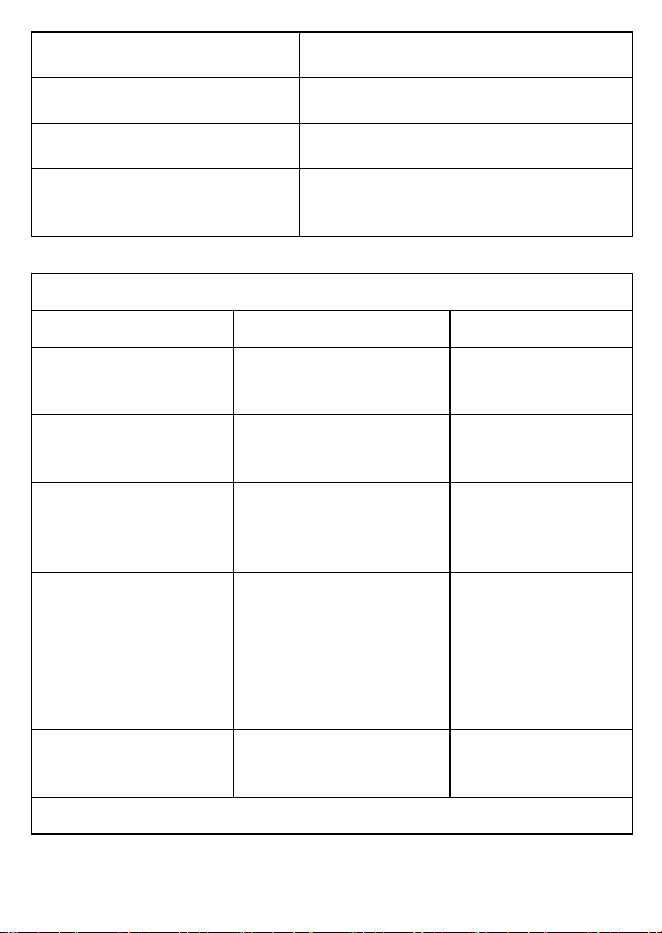
Table 1
declaration - electromagnetic emission
Emissions test
Compliance
temperature of -20
℃
~55
℃
and the relative
humidity of 10%~93%, atmospheric Condition:
70kPa-106kPa, without corrosive gas and with
good ventilation.
Alarm system
The test result is abnormal.
25
RF emissions
CISPR 11
Group 1
RF emissions
CISPR 11
Class B
Harmonic emissions
IEC 61000-3-2
Not applicable
Voltage fluctuations/
flicker emissions
IEC 61000-3-3
Not applicable
Table 2
declaration - electromagnetic immunity
Immunity test
IEC 60601 test level
Compliance level
Electrostatic discharge
(ESD)
IEC 61000-4-2
±8 kV contact
±2 kV, ±4 kV, ±8 kV, ±15
kV air
±8 kV contact
±2 kV, ±4 kV, ±8 kV,
±15 kV air
Electrical fast
transient/burst
IEC 61000-4-4
± 2 kV for power supply
lines
± 1 kV for input/output lines
Not applicable
Surge
IEC 61000-4-5
± 0.5kV, ± 1 kV line(s) to
lines
± 0.5kV, ± 1 kV, ± 2 kV
line(s) to earth
Not applicable
Voltage dips, short
interruptions and voltage
variations on power
supply input lines
IEC 61000-4-11
0 % UT; 0.5 cycle At 0°,
45°, 90°, 135°, 180°, 225°,
270°and 315°
0 % UT; 1 cycle and
70 % UT; 25/30 cycles
Single phase: at 0°
0 % UT; 250/300 cycles
Not applicable
Power frequency
(50/60 Hz) magnetic field
IEC 61000-4-8
30 A/m
30 A/m
NOTE: UT is the a.c. mains voltage prior to application of the test level.
Table 3

26
declaration - electromagnetic immunity
Immunity test
IEC 60601 test level
Compliance level
Conducted RF
IEC 61000-4-6
3 V
0.15 MHz to 80 MHz
6 V in ISM bands between 0.15
MHz and 80 MHz
Not applicable
Radiated RF
IEC 61000-4-3
10V/m
80 MHz to 2.7 GHz
10V/m
Table 4
declaration - IMMUNITY to proximity fields from RF wireless communications
equipment
Immun
ity test
IEC60601 test level
Compliance
level
Test
frequency
Modulation
Maximum
power
Immunit
y level
Radiat
ed RF
IEC
61000-
4-3
385 MHz
**Pulse
Modulation:
18Hz
1.8W
27 V/m
27 V/m
450 MHz
*FM+ 5Hz
deviation:
1kHz sine
2 W
28 V/m
28 V/m
710 MHz
745 MHz
780 MHz
**Pulse
Modulation:
217Hz
0.2 W
9 V/m
9 V/m
810 MHz
870 MHz
930 MHz
**Pulse
Modulation:
18Hz
2 W
28 V/m
28 V/m
1720 MHz
1845 MHz
1970 MHz
**Pulse
Modulation:
217Hz
2 W
28 V/m
28 V/m
2450 MHz
**Pulse
Modulation:
217Hz
2 W
28 V/m
28 V/m

27
5240 MHz
5500 MHz
5785 MHz
**Pulse
Modulation:
217Hz
0.2 W
9 V/m
9 V/m
Note* - As an alternative to FM modulation, 50 % pulse modulation at 18 Hz may be
used because while it does not represent actual modulation, it would be worst case.
Note** - The carrier shall be modulated using a 50 % duty cycle square wave signal
FCC Compliance Statements
This device complies with Part 15 of the FCC Rules. Operation is
subject to the following two conditions: (1) this device may not cause
harmful interference, and (2) this device must accept any interference
received, including interference that may cause undesired operation.
Note: This equipment has been tested and found to comply with the
limits for a Class B digital device, pursuant to Part 15 of the FCC Rules.
These limits are designed to provide reasonable protection against
harmful interference in a residential installation. This equipment
generates, uses and can radiate radio frequency energy and, if not
installed and used in accordance with the instructions, may cause
harmful interference to radio communications. However, there is no
guarantee that interference will not occur in a particular installation.
If this equipment does cause harmful interference to radio or television
reception, which can be determined by turning the equipment off and on,
the user is encouraged to try to correct the interference by one or more
of the following measures:
-- Reorient or relocate the receiving antenna.

28
-- Increase the separation between the equipment and receiver.
-- Connect the equipment into an outlet on a circuit different from that to
which the receiver is connected.
-- Consult the dealer or an experienced radio/TV technician for help.
Caution: Changes or modifications not expressly approved by the party
responsible for compliance could void the user’s authority to operate the
equipment.
US Radiation Exposure Statement
This equipment complies with FCC radiation exposure limits set forth
for an uncontrolled environment. End user must follow the specific
operating instructions for satisfying RF exposure compliance. This
transmitter must not be co-located or operating in conjunction with any
other antenna or transmitter.
After-sale Service
After-sale service unit: Shenzhen Jumper Medical Equipment Co., Ltd.
Address: D Building, No. 71, Xintian Road, Fuyong Street, Baoan,
Shenzhen, Guangdong, China
Tel: +86-755-26696279
E-mail: [email protected]
Website: www.jumpermmed.com
www.jumper-medical.com
Postal Code: 518103
29
Statement:
The lay operator or lay responsible organization should contact the
manufacturer or manufacturer's representative on the following
issues:
Assistance in setting up, using, or maintaining the equipment or
system when needed.
Any serious incident that has occurred in relation to the device
should be reported to the manufacturer and the competent
authorities of your Member State.
Manufacturer will provide circuit diagrams, component part lists,
descriptions, calibration instructions to assist to service personnel
in parts repair.
Authorized European Representative
Shenzhen Jumper Medical Equipment Co., Ltd.
D Building, No. 71, Xintian Road, Fuyong Street,
Baoan, Shenzhen, Guangdong, China,518103
Tel: +86-755-26696279
E-mail: [email protected]
Website: www.jumpermmed.com
www.jumper-medical.com
MedPath GmbH
Mies-van-der-Rohe-Strasse 8, 80807 Munich,
Germany