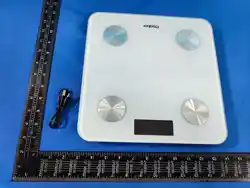
VCH11321充電人體秤規格書
VCH11321 Charging Body Scale
Specification Document
(200g起秤 50g分度)
(Weighing from 200g starting point, with 50g as the
division unit)
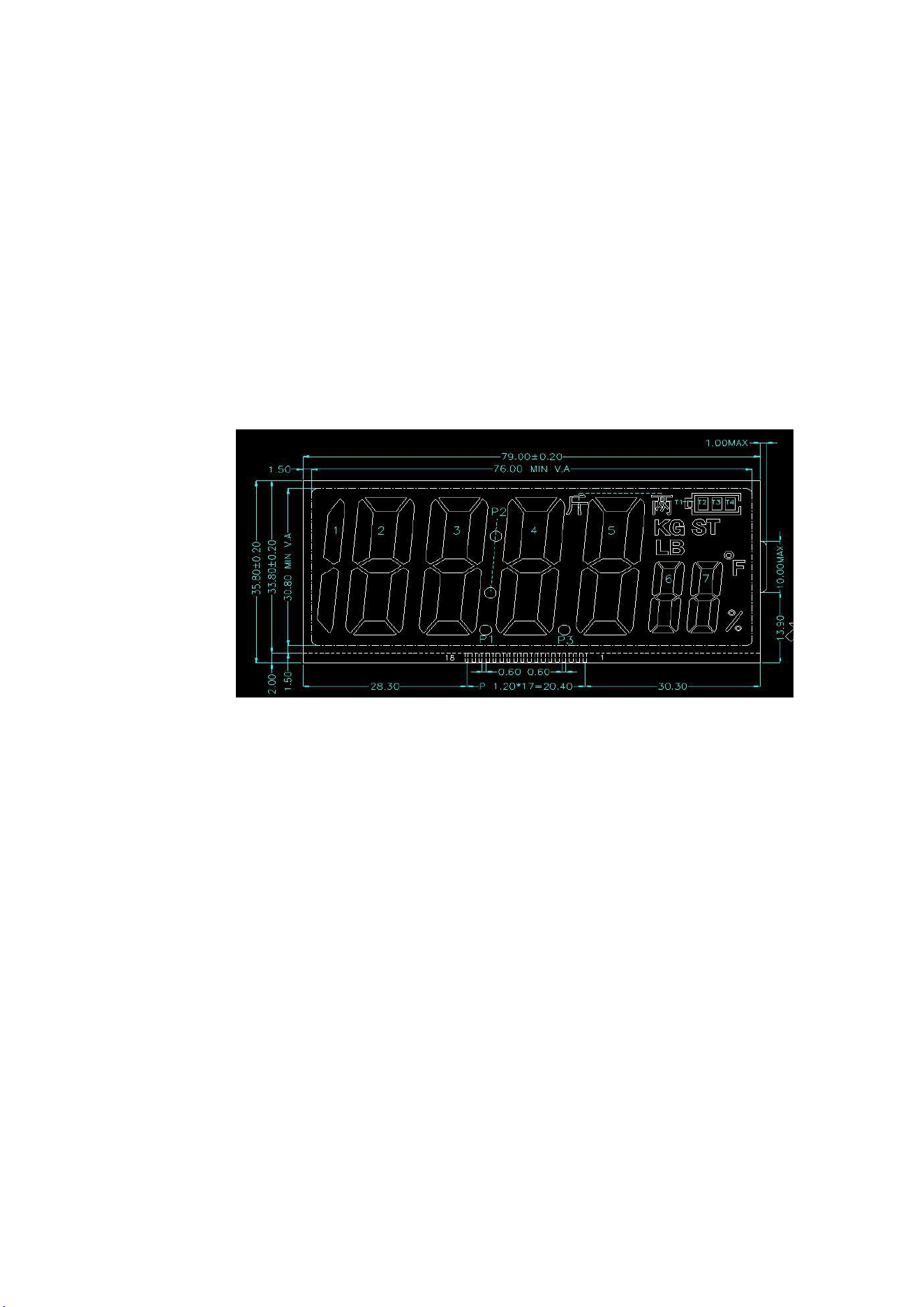
一、液晶圖
一、 Liquid Crystal Display
二、主要技術參數
二、Main Technical Parameters
1.稱重範圍:0.2kg-183kg 1.Weighing range: 0.2kg - 183kg
2.分度值:50g 2. Tolerance value: 50g
3.單位轉換: kg /斤兩 3. Unit Conversion: kg / jin liang
4 . 電 源 電 壓 : 3.7V ( 鋰 電 池 ) 4. Power supply voltage: 3.7V (lithium
battery)
5. 平均工作電流:11mA 5. Average working current: 11mA
6.平均待機電流:10uA-25uA 6. Average standby current: 10uA - 25uA
7. 開機方式:上電開機、自動上秤開機、按鍵開機;自動上秤開機重量≥5kg
7. Power-on methods: Power-on via power supply, power-on by automatic
weighing, power-on through button; Automatic weighing power-on requires a
weight of ≥ 5kg
8.自動關機:稱重後無任何操作 10 秒後自動關機
8. Automatic shutdown: The device will automatically power off 10
seconds after weighing without any further operation.
9.溫度顯示:-9℃—99℃
9. Temperature display: -9℃ - 99℃
10.編碼(標定後不顯示)——全顯——回零
10. Coding (disappears after calibration) - Full Display - Return to
Zero

11.低壓提示:當電源電壓 3.0V±0.1 時顯示“Lo”
11. Low Voltage Warning: When the power supply voltage is 3.0V ± 0.1,
it displays "Lo"
12.超載提示:當稱重超過 183kg 時顯示“oL”
12.twelve Overload warning: When the weight exceeds 183kg, it displays
"oL"
13.校準正確:顯示 PASS,校準錯誤:顯示“----” “toL”
13.Calibration correct: Display "PASS", Calibration error: Display "----
" "toL"
14.工作溫度:0-40℃(與實際溫度誤差±2°)
14.fourteen Operating temperature: 0 - 40 ℃ (with an error of ± 2 °
compared to the actual temperature)
15. 存儲溫度:-10-50℃
15. Storage temperature: -10 to 50 degrees Celsius
16. 濕度要求:≤90﹪RH
16. Humidity requirement: ≤ 90% RH
17. 電量顯示:4.2-3.9V 顯示三格電量
17.Battery level display:
4.2 - 3.9V indicates three battery levels
3.8-3.6V 顯示二格電量
3.8 - 3.6V Displays two levels of battery charge.
3.5V-3.3V 顯示一格電量
3.5V - 3.3V displays one unit of battery charge.
3.2V 顯示空格電量
3.2V Indicates empty battery level
18. 開機回零時間:≤2S
18.Zeroing time upon startup: ≤ 2 seconds
19. 藍牙:廣播模式連接,配合OKOK,適配相關通信協議
19. Bluetooth: Broadcasting mode connection, compatible with OKOK, and
compatible with relevant communication protocols
20. 充電功能:插上 USB 後,電池符號閃動,充滿後不閃動
20. Charging function: When a USB is plugged in, the battery symbol
flashes. Once fully charged, the symbol stops flashing.
三、校準說明
三、Calibration Instructions
(一)
預壓進校準:開機顯示有編碼,表示為首次校準,開機顯示不出現編碼,則需使用
非首次校準。進校準狀態下,單位kg閃動,校準狀態下不會自動關機。
(一)Pre-pressure calibration: If the machine displays a code upon startup,
it indicates the first calibration. If no code is displayed upon startup, a non-
first calibration is required. During the calibration process, the unit "kg"
flashes, and the machine will not automatically shut down in the calibration
state.
(1)
首次校準,稱重狀態下,放置 100kg 砝碼到秤盤上,顯示內碼,穩定後抬起砝
碼進入
校準。

(1) For the first calibration, in the weighing state, place a 100kg
weight on the scale pan, display the internal code, and wait for it to
stabilize before lifting the weight and proceeding to the calibration
process.
(2)非首次校準:(1)斷電後上電,歸零後內沒進行稱重情況下,放置超過 100kg
砝碼 到秤盤上,待其穩定鎖定後(即數字開始閃爍時),再上壓 50kg 砝碼,即可進入
校準;
(2) Non-first calibration: (1) After power-off and power-on, if the zero
position has not been reached and no weighing has been performed yet, place a
weight of over 100kg on the scale pan. Wait until it stabilizes and locks (i.e.,
when the numbers start to flash), then place a 50kg weight on top. This will
allow for calibration.
(二) 按鍵進校準:在零位顯示狀態下,按鍵三短一長進入校準。
(2) Pressing the button for calibration: In the zero position display mode,
pressing the button three times briefly and once for a long duration will enter
the calibration mode.
(三) 校準步驟:
(三)Calibration Steps:
1.
預壓進入校準後,抬起秤盤上的全部砝碼,出現 0.0kg 後顯示“50.0kg”(按鍵進
校準
時直接顯示“50.0kg”),提示放 50kg 砝碼;
1.After the pre-pressure calibration is completed, remove all the weights
from the scale pan. When the display shows "0.0kg", it will then show "50.0kg"
(when pressing the button for calibration, it will directly display "50.0kg").
This indicates that a 50kg weight should be placed.
2.放置 50kg 砝碼到秤盤上,LCD 顯示“100.0kg,提示放 100kg 砝碼;
2. Place a 50kg weight on the scale pan. The LCD displays "100.0kg",
indicating that a 100kg weight should be added.
3.放置 100kg 砝碼到秤盤上,LCD 顯示“150.0kg” ,提示放 150kg 砝碼;
3. Place a 100kg weight on the scale pan. The LCD displays "150.0kg",
indicating that a 150kg weight should be added.
4.放置 150kg 砝碼到秤盤上, LCD 顯示“PASS”,校準完成,人體秤直接進入正常
稱重狀 態。
4.Place a 150kg weight on the scale pan. The LCD displays "PASS",
indicating that the calibration is complete. The body scale then directly
enters the normal weighing state.

(四)校準完成時,如出現“PASS”表示校準完成,顯示“----”表示校準燒錄
錯誤,顯
示“toL”表示燒錄未完成。
(四) When the calibration is completed, if "PASS" appears, it indicates
that the calibration is successful. If "----" appears, it means there was an
error during the calibration burn.
The symbol "toL" indicates that the burning process has not been
completed.
FCC Statement:
This device complies with part 15 of the FCC Rules. Operation is subject to the
following two conditions:
(1) This device may not cause harmful interference, and
(2) this device must accept any interference received, including interference that may
cause undesired operation. This equipment has been tested and found to comply with the
limits for a Class B digital device, pursuant to part 15 of the FCC Rules. These limits
are designed to provide reasonable protection against harmful interference in a
residential installation. This equipment generates, uses and can radiate radio
frequency energy and, if not installed and used in accordance with the instructions,
may cause harmful interference to radio communications. However, there is no guarant ee
that interference will not occur in a particular installation. If this equipment does
cause harmful interference to radio or Television reception, which can be determined by
turning the equipment off and on, the user is encouraged to try to correct the
interference by one or more of the following measures:
—Reorient or relocate the receiving antenna.
—Increase the separation between the equipment and receiver.
—Connect the equipment into an outlet on a circuit different from that to which
The receiver is connected.
—Consult the dealer or an experienced radio/TV technician for help.
Caution: Any changes or modifications not expressly approved by the party
responsible for compliance could void the user's authority to operate the equipment.
This equipment complies with FCC radiation exposure limits set forth for an
uncontrolled environm ent. This transmitter must not be co ‐ located or operating in
conjunction with any otherantenna or transmitter..