SG241059
DIM
R
X2
X6
A
A
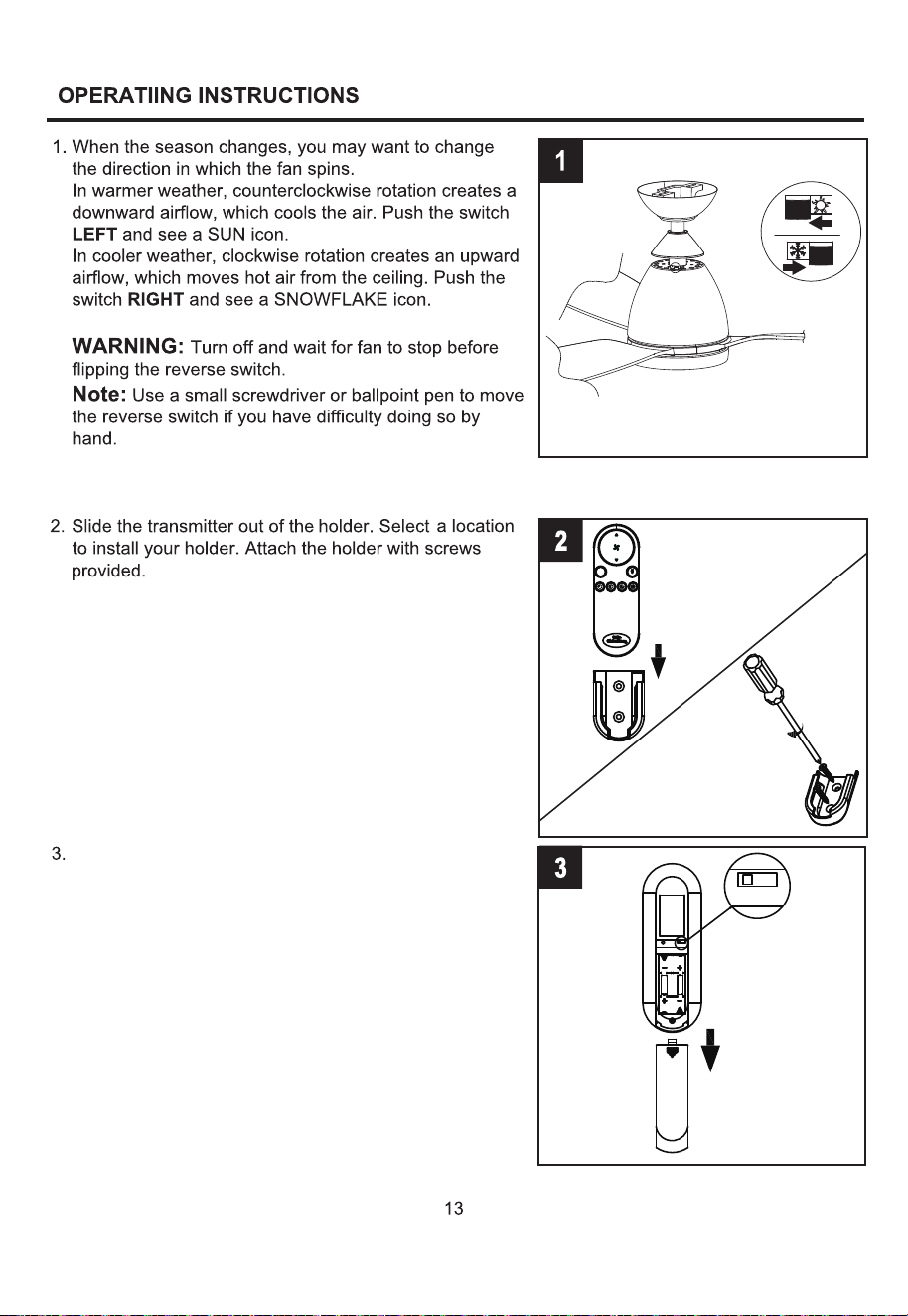
Open the battery cover.
DIM
R
ON
DIM
ON
A
UM-4 1.5VX2
A
A
A
A
A
FCC ID:M8C-EEC118RF433
DIM
This device complies with part 15 of the
FCC Rules. Operation is subject to the
following two conditions: (1)This device
may not cause harmful interference,
and (2)this device must accept any
Interference that may cause undesired
operation
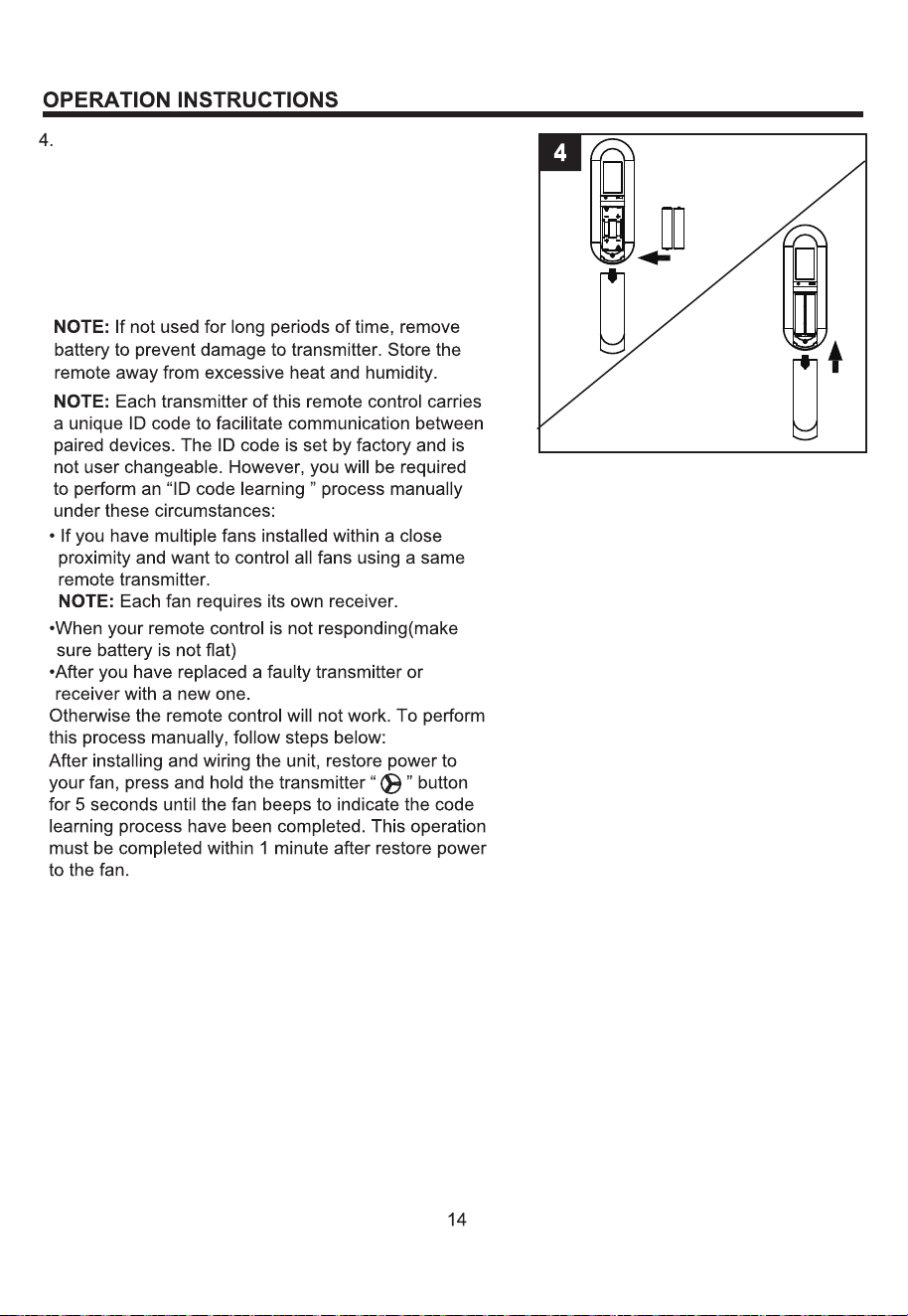
To make fan operational, install two 1.5 V AAA batteries
(included). Replace the battery cover.
NOTE: This remote control uses two 1.5 V AAA batteries.
Replace batteries with the correct size and type of battery.
Clean the battery contacts and area inside the device
prior to installing new batteries. Ensure the batteries are
installed correctly with regard to the polarity ( + and -).
A
UM-4 1.5VX2
A
-
+
AAA
A
A
A
A
-
+
A AA
DIM
ON
FCC ID:M8C-EEC118RF433
This device complies with part 15 of the
FCC Rules. Operation is subject to the
following two conditions: (1)This device
may not cause harmful interference,
and (2)this device must accept any
Interference that may cause undesired
operation
DIM
ON
FCC ID:M8C-EEC118RF433
This device complies with part 15 of the
FCC Rules. Operation is subject to the
following two conditions: (1)This device
may not cause harmful interference,
and (2)this device must accept any
Interference that may cause undesired
operation
ON
DIM
ON
A
UM-4 1.5VX2
A
A
A
A
A
FCC ID:M8C-EEC118RF433
DIM
9
This device complies with part 15 of the
FCC Rules. Operation is subject to the
following two conditions: (1)This device
may not cause harmful interference,
and (2)this device must accept any
Interference that may cause undesired
operation
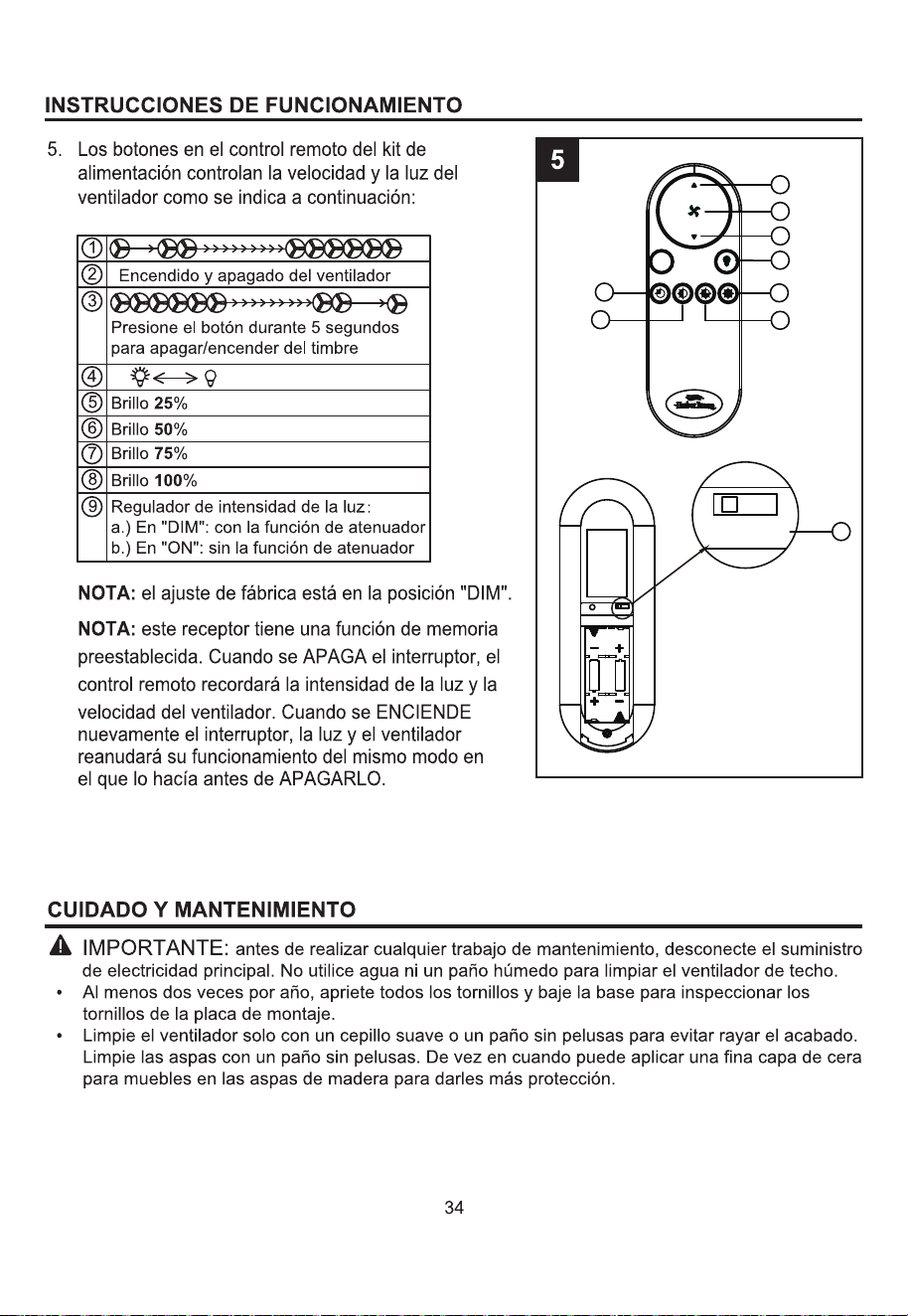
DIM
1
2
3
4
7
8
5
6
R
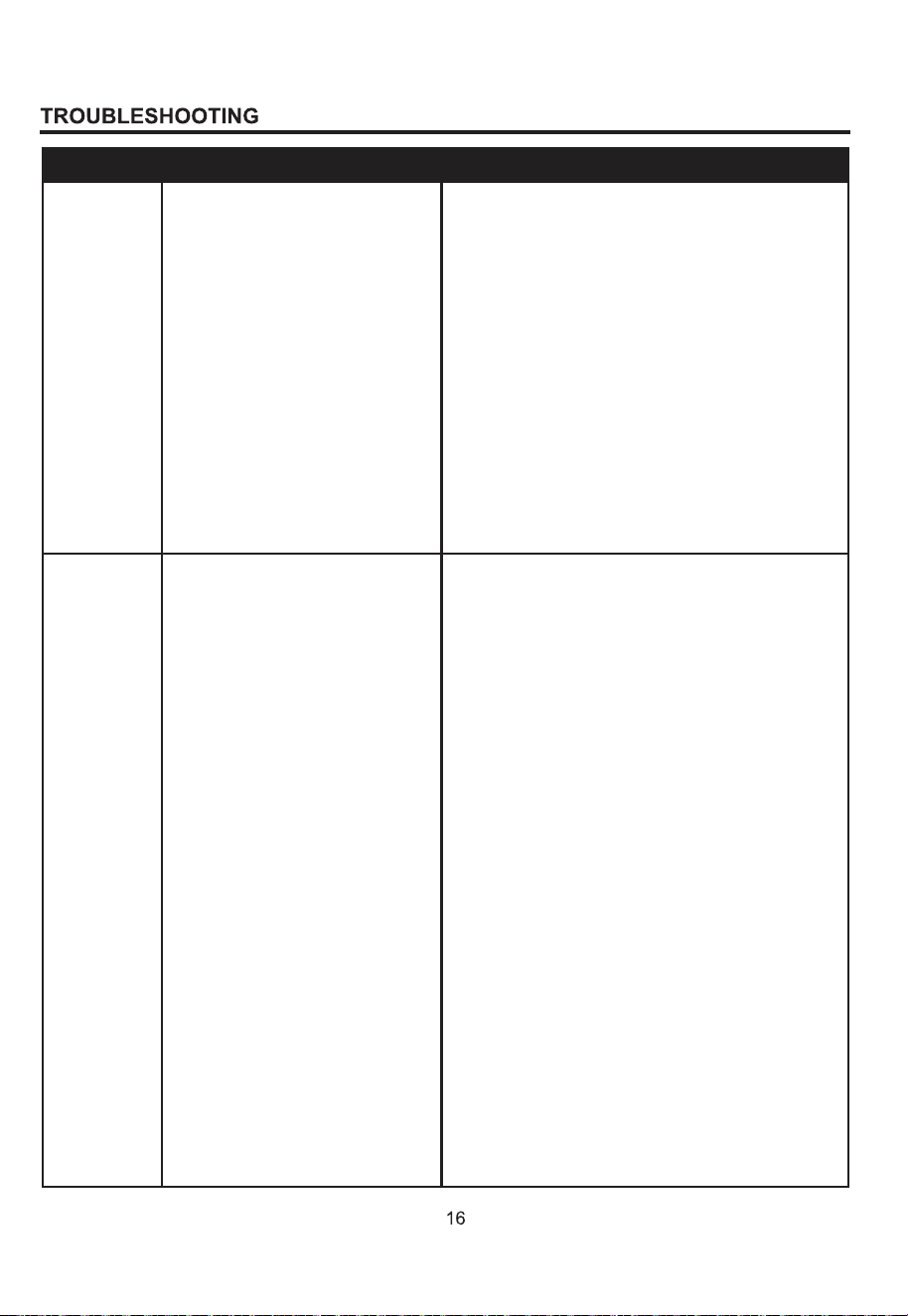
1. Set screws are loose.
2. Using non-approved speed
control.
3. Normal noise.
4. Wire connectors inside switch
housing rattling.
5. Cracked blade.
6. The distance from canopy to
ceiling is too great.
7.Glass is not secure.
1. Tighten all set screws.
2. Some fan motors are sensitive to signals
from solid-state varible speed controls. DO
NOT USE a solid-state variable speed control.
3. Allow "break-in" period of 24 hours. Most
noises associated with a new fan will disappear
after this period.
4. Check to make sure wire connectors in
switch housing are not rattling against each
other or against the interior wall of the switch
housing.
5. Replace blades.
6. Make sure upper canopy is a short distance
from ceiling. It should not touch the ceiling.
7. Secure the glass.
1. Hanger bracket and/or ceiling
outlet box is not securely
fastened.
2. Set screw in downrod
assembly is loose.
3. Fan hanger ball is not properly
seated in canopy tabs.
4. Set screw in motor coupling is
loose.
5. Blade is loose.
6. Blade holders are loose.
7. Blade out of balance.
8. Fan too close to vaulted
ceiling.
9. Transition to different speed.
10. Fan not securely mounted.
1. Tighten the hanger bracket screws to the
outlet box,and/or secure outlet box.
2. Tighten the set screw in the downrod
assembly.
3. Turn power off, support the fan very carefully,
and check that the hanger ball is properly seated.
4. Raise motor coupling up and tighten set
screws securely.
5. Check that all blades are screwed firmly into
blade holders.
6. Check to be sure the fan blade irons seat
firmly and uniformly on the surface of the motor.
If flanges are seated incorrectly, loosen the
flange screws and retighten.
7. Interchange two adjacent blades; this will
redistribute the weight and possibly result in
smoother operation.
8. Lower or move fan. Extension downrods may
be ordered.
9. When switching from medium to low speed,
you may notice some fan wobble in the fan.
When the fan stabilizes at low speed, wobble
should disappear.
10. Make sure canopy and mounting bracket are
tightened securely to ceiling joist.
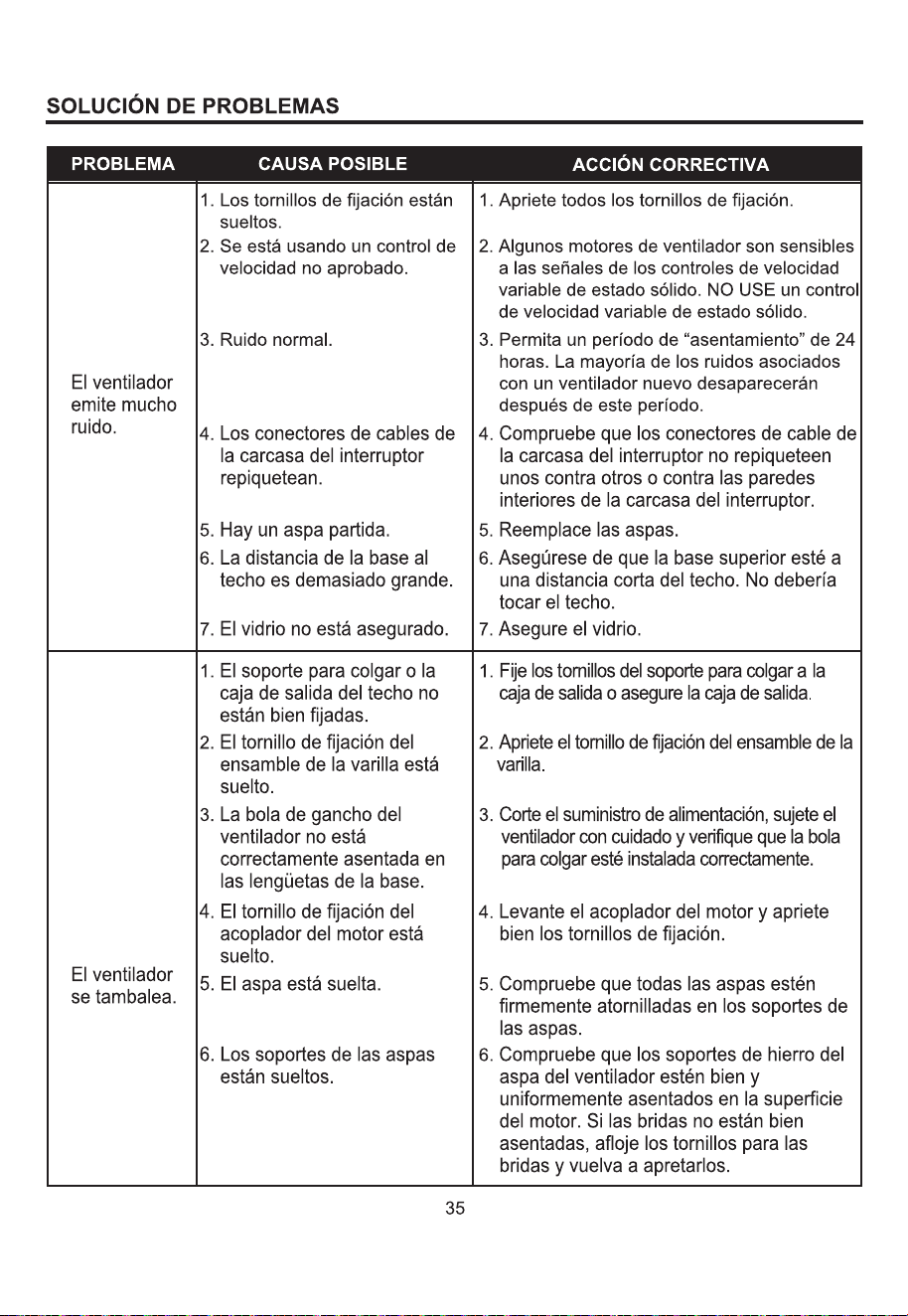
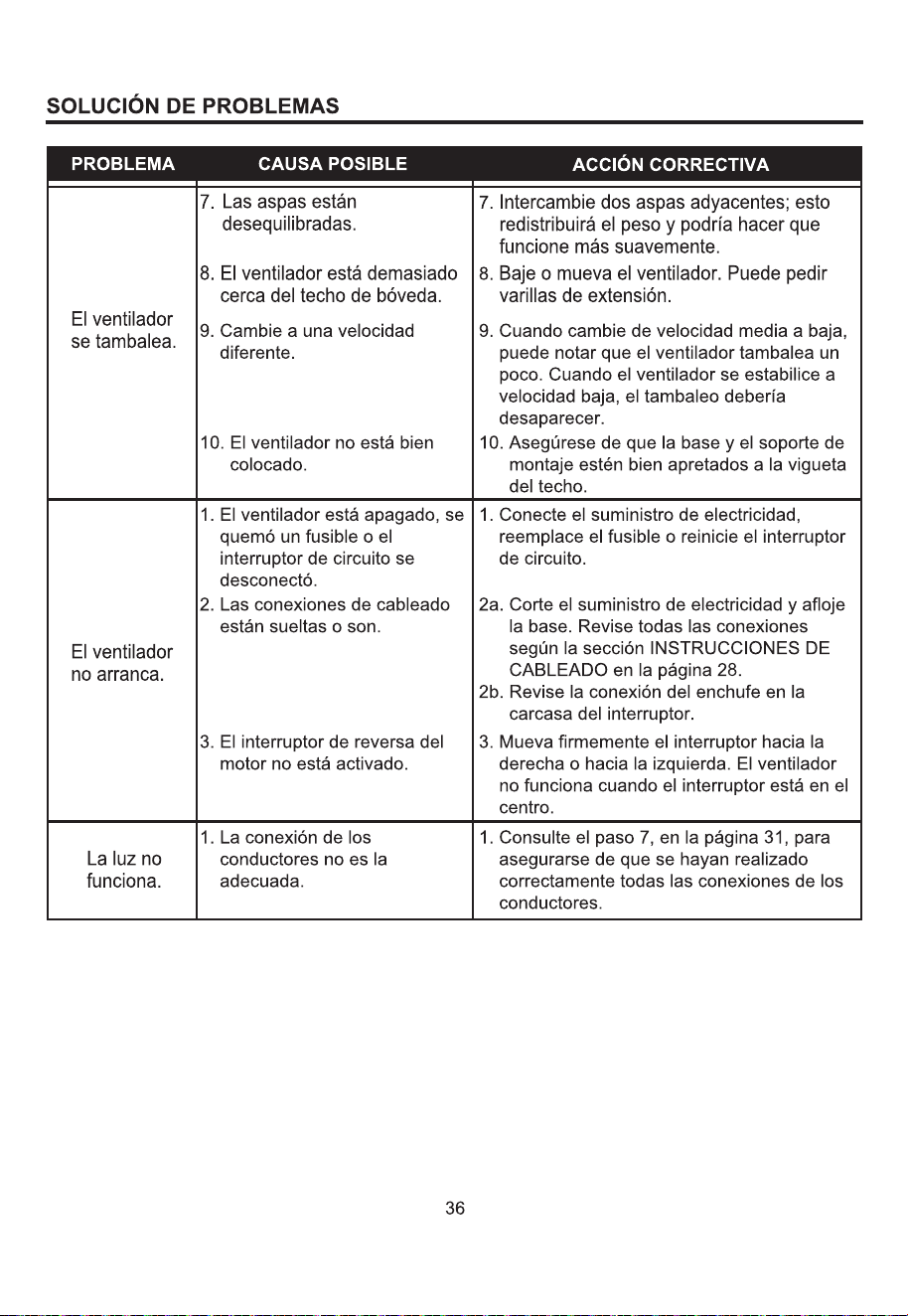
Fan sounds
noisy.
Fan wobbles.
PROBABLE CAUSE CORRECTIVE ACTION
PROBLEM
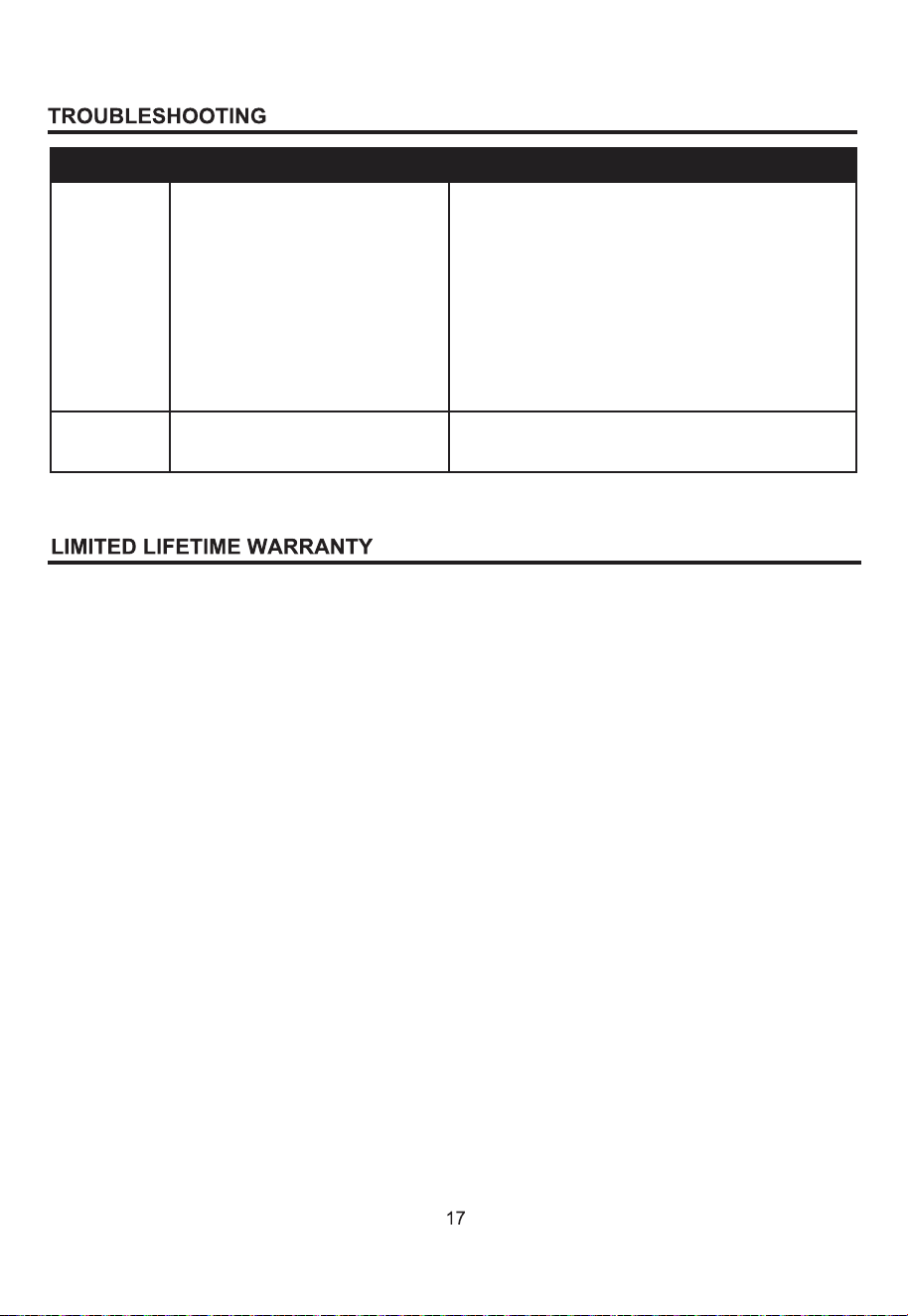
1. Power turned off, fuse blown
or circuit breaker tripped.
2. Loose wire connections or
wrong connections.
3. Motor reversing switch not
engaged.
1.Turn power on, replace fuse or reset breaker.
2a. Turn power off and loosen canopy; check all
connections according to section WIRING
INSTRUCTIONS on page 9.
2b. Check the plug connection in the switch
housing.
3. Push switch firmly right or left. Fan will not
operate when switch is in the middle.
Fan does not
start.
1. Wrong wire connection.
1. Refer to Step 7, page 12 to ensure all wire
connections were done correctly.
Light does
not work.
PROBABLE CAUSE CORRECTIVE ACTION
PROBLEM
NOTE:
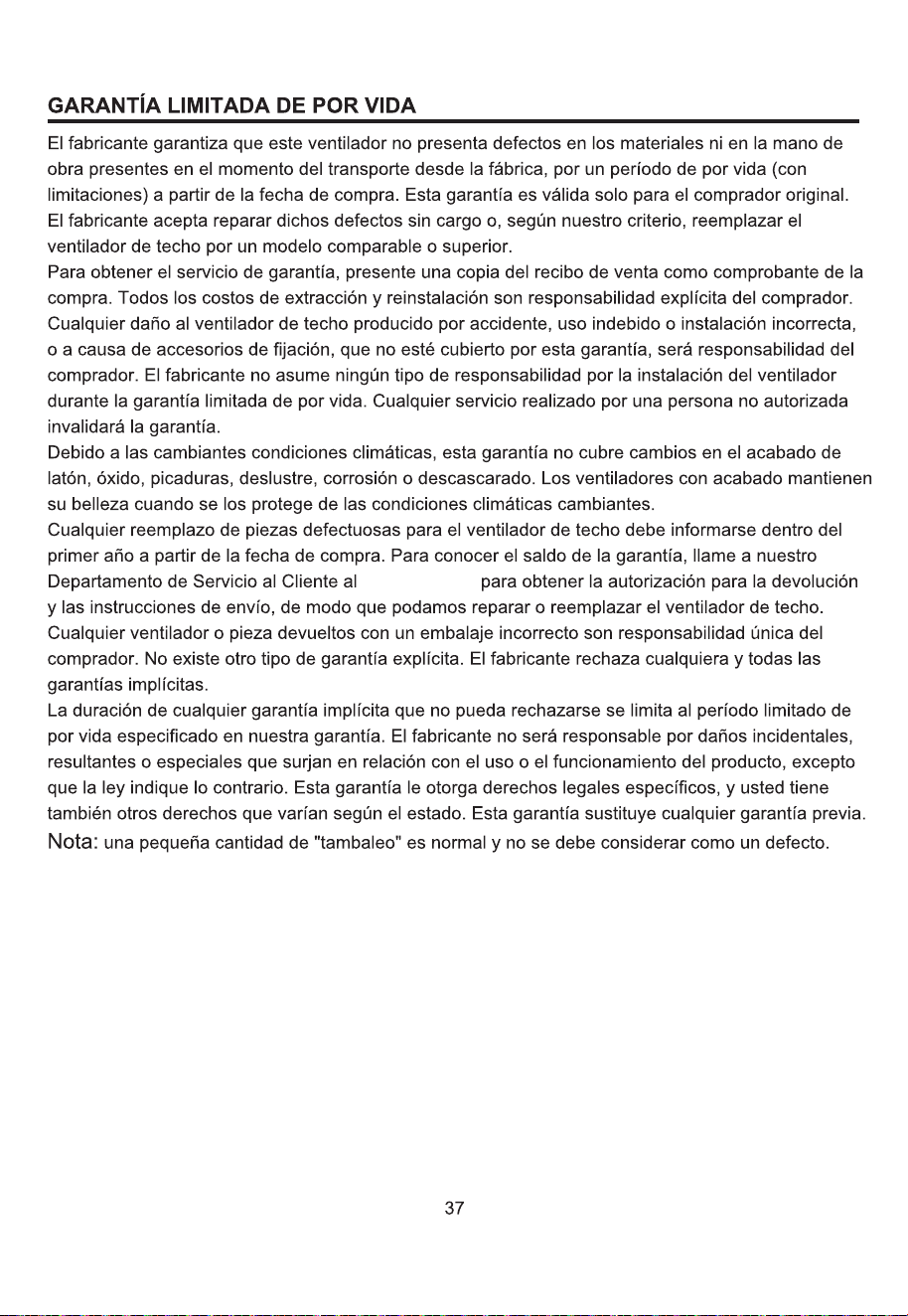
The manufacturer warrants this fan to be free from defects in workmanship and material present at
time of shipment from the factory for life (with limitations) from the date of purchase. This warranty
applies only to the original purchaser. The manufacturer agrees to correct such defect at no charge
or, at our option, replace the ceiling fan with a comparable or superior model.
To obtain warranty service, present a copy of your sales receipt as proof of purchase. All cost of
removal and reinstallation are the expressed responsibility of the purchaser. Any damage to the
ceiling fan by accident, misuse or improper installation, or by affixing accessories not produced by
this warranty, are at the purchaser’s own responsibility. The manufacturer assumes no responsibility
whatsoever for fan installation during the limited lifetime warranty. Any service performed by an
unauthorized person will render the warranty invalid.
Due to varying climatic conditions, this warranty does not cover changes in brass finish, rusting,
pitting, tarnishing, corroding or peeling. Brass finish fans maintain their beauty when protected from
varying weather conditions.
The duration of any implied warranty which can not be disclaimed is limited to the lifetime limited
period as specified in our warranty. The manufacturer shall not be liable for incidental, consequential
or special damages arising at or in connection with product use or performance except as may other
wise be accorded by law. This warranty gives you specific legal rights, and you also have other rights
which vary from state to state. This warranty supersedes all prior warranties.
A small amount of “ wobble ” is normal and should not be considered a defect.
Any replacement of defective parts for the ceiling fan must be reported within the first year from
the date of purchase. For the balance of the warranty, call our customer service department at
888-251-1003
for return authorization and shipping instru
c
tions so that we may repair or replace the
ceiling fan. Any fan or parts returned improperly packaged is the sole responsibility of the purchaser.
There is no further expressed warranty. The manufacturer disclaims any and all implied warranties.
DIM
R
X2
X6
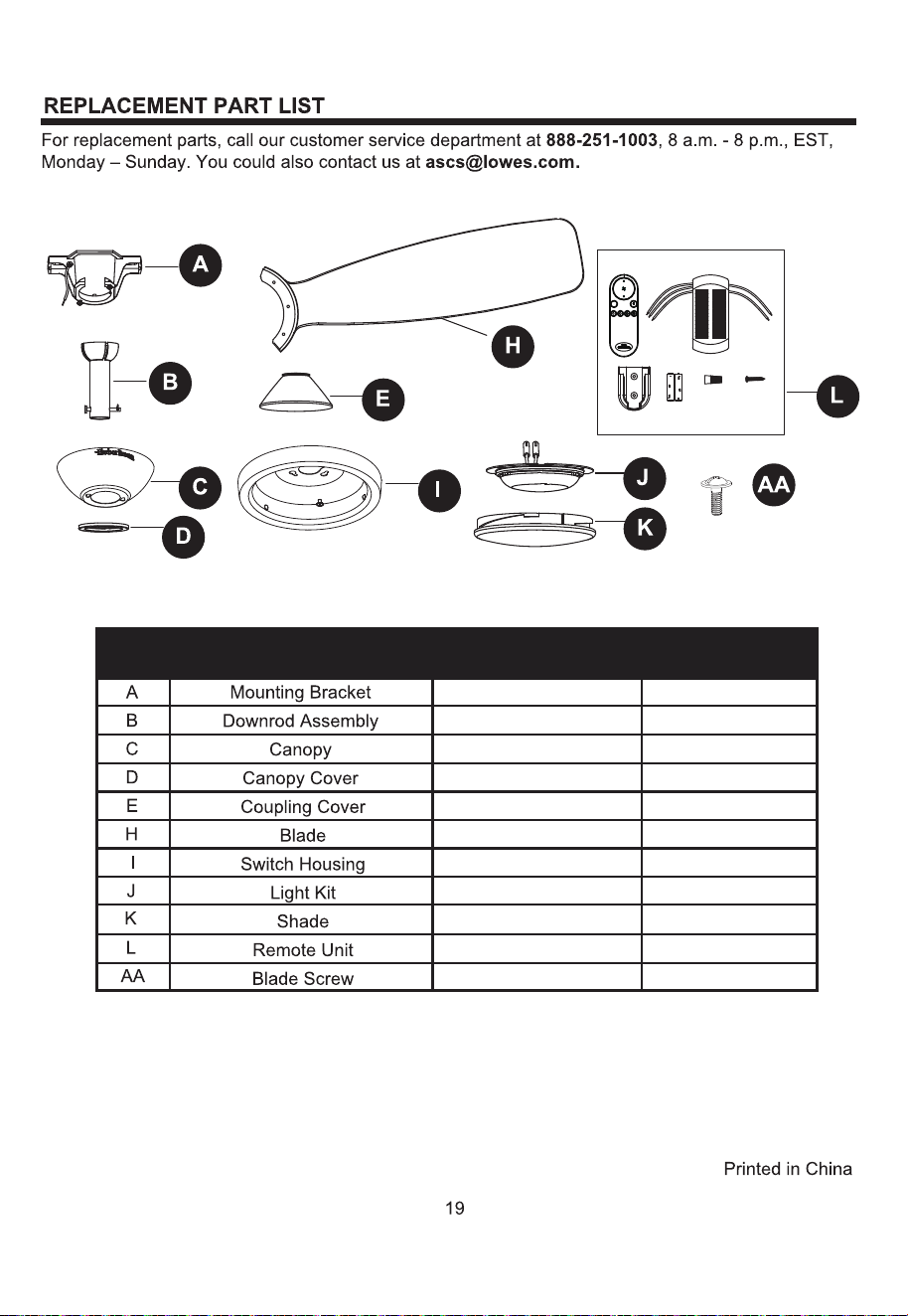
A102-0406084
A103-0328401
A101-0141401
A108-0013401
A106-C002401
A141-B049001
A188-C001401
A187-C001036
A182-0622038
A137-C054036
B166-1326084
YES
YES
YES
YES
YES
YES
YES
YES
YES
YES
YES
PART DESCRIPTION
COVERED UNDER
WARRANTY
PART#
DIM
R
X2
X6
A
A
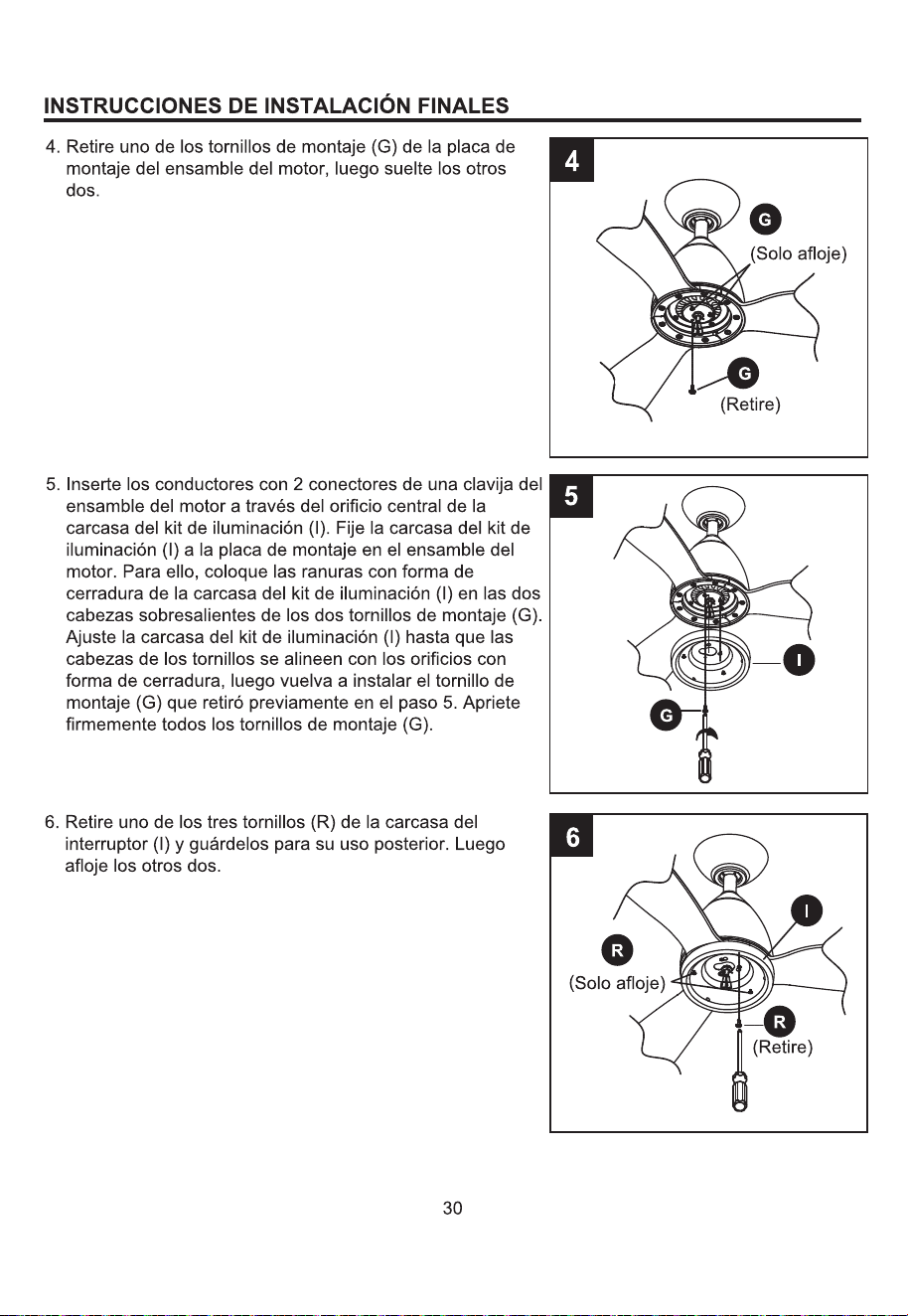
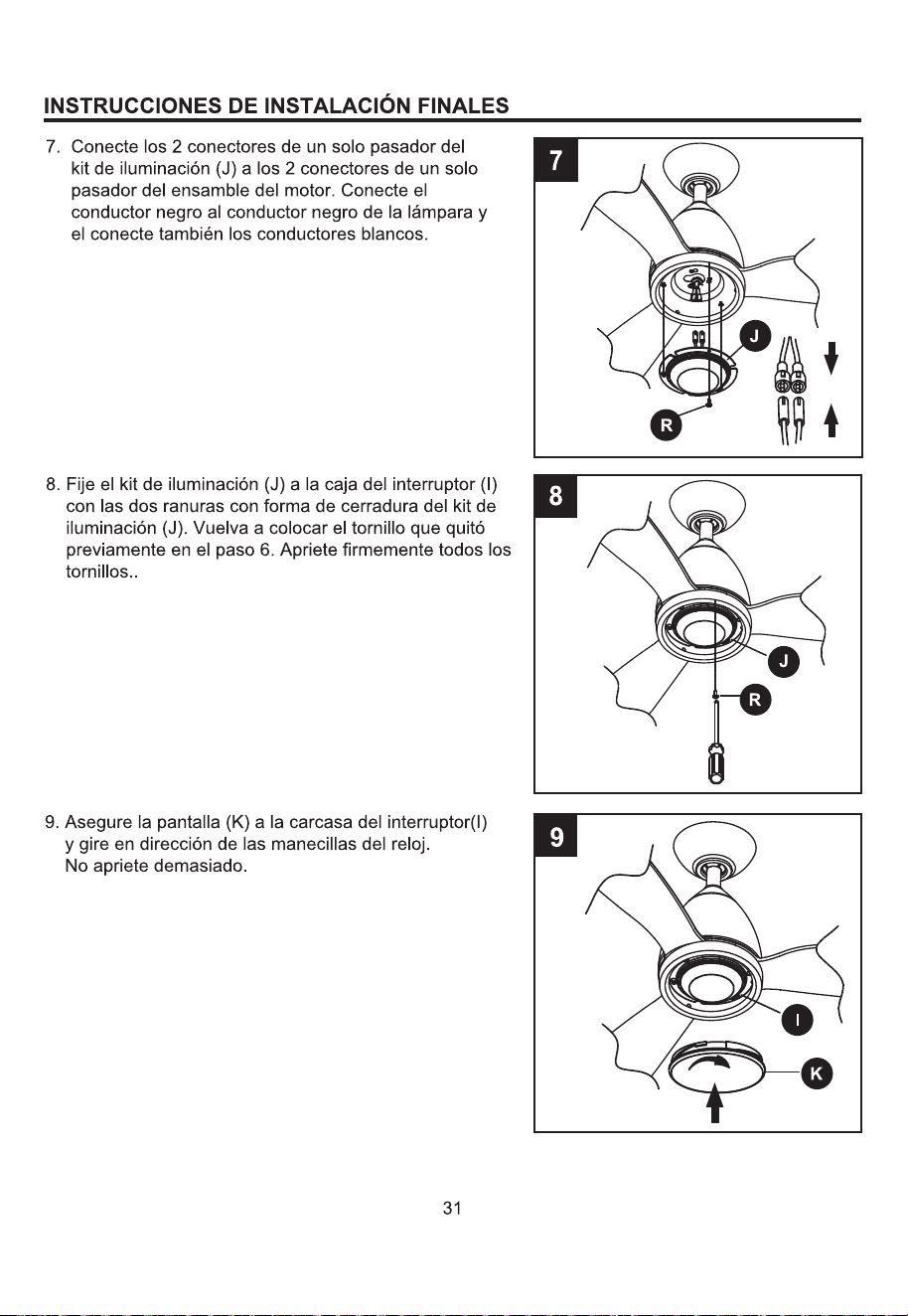
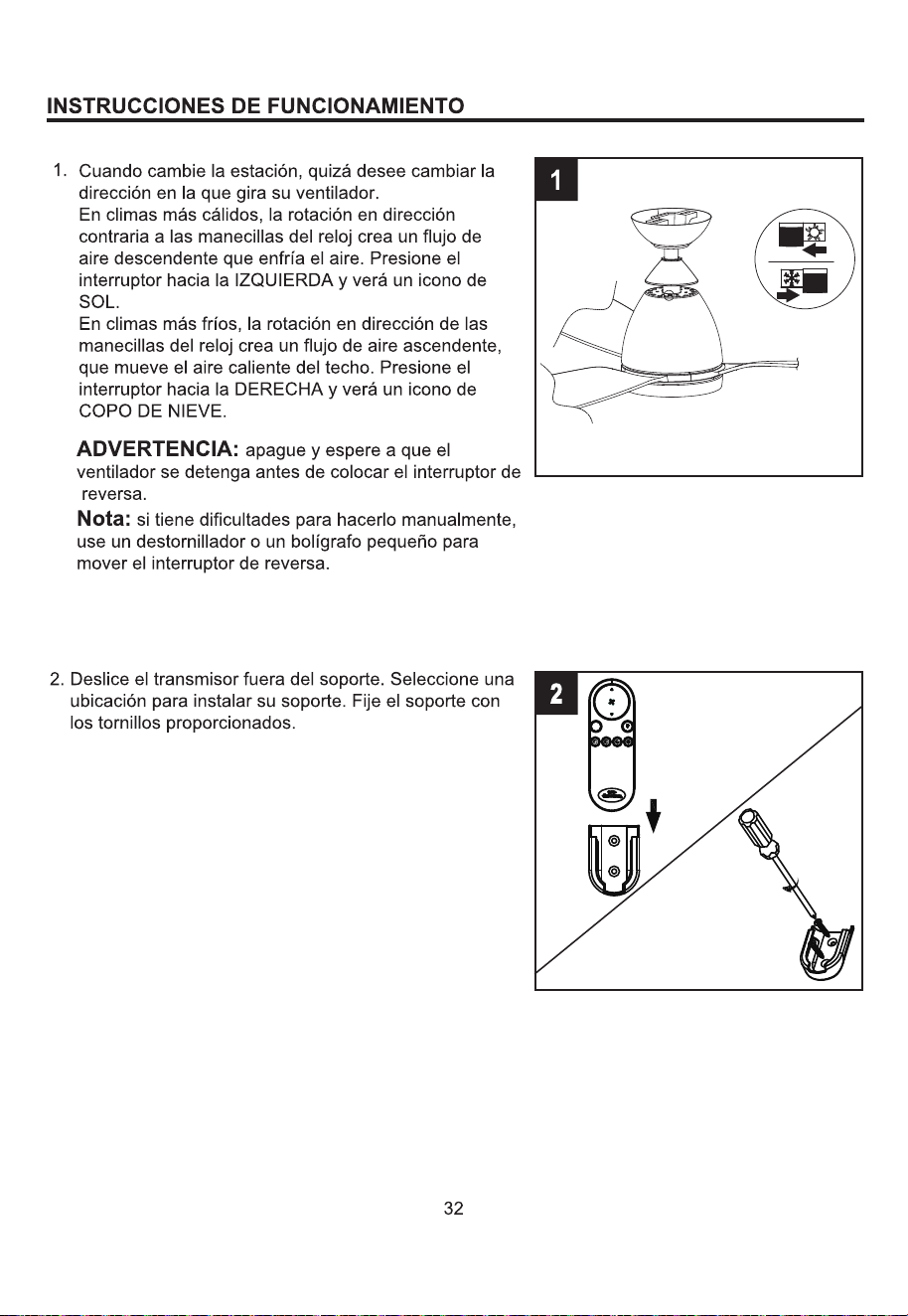
DIM
R
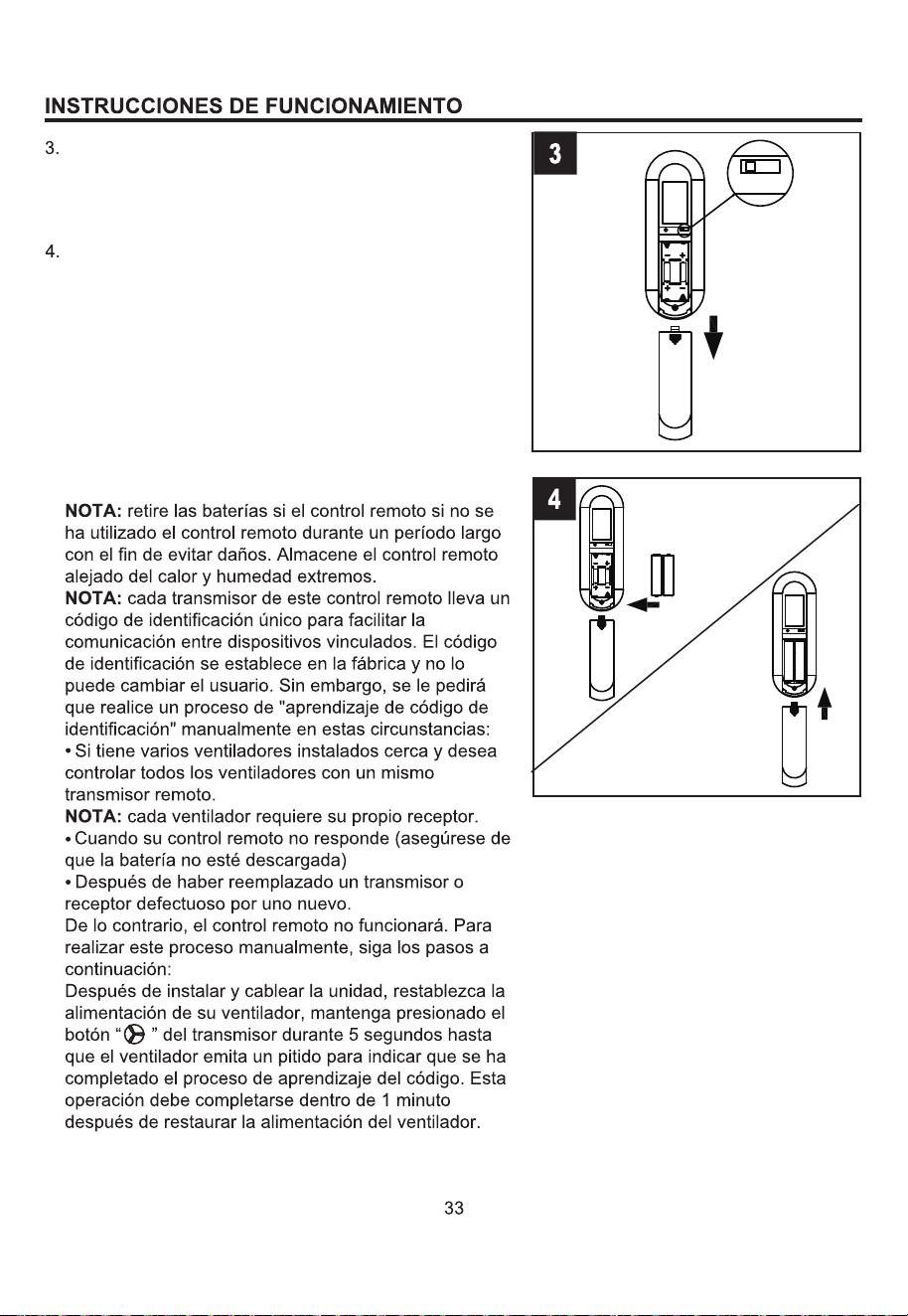
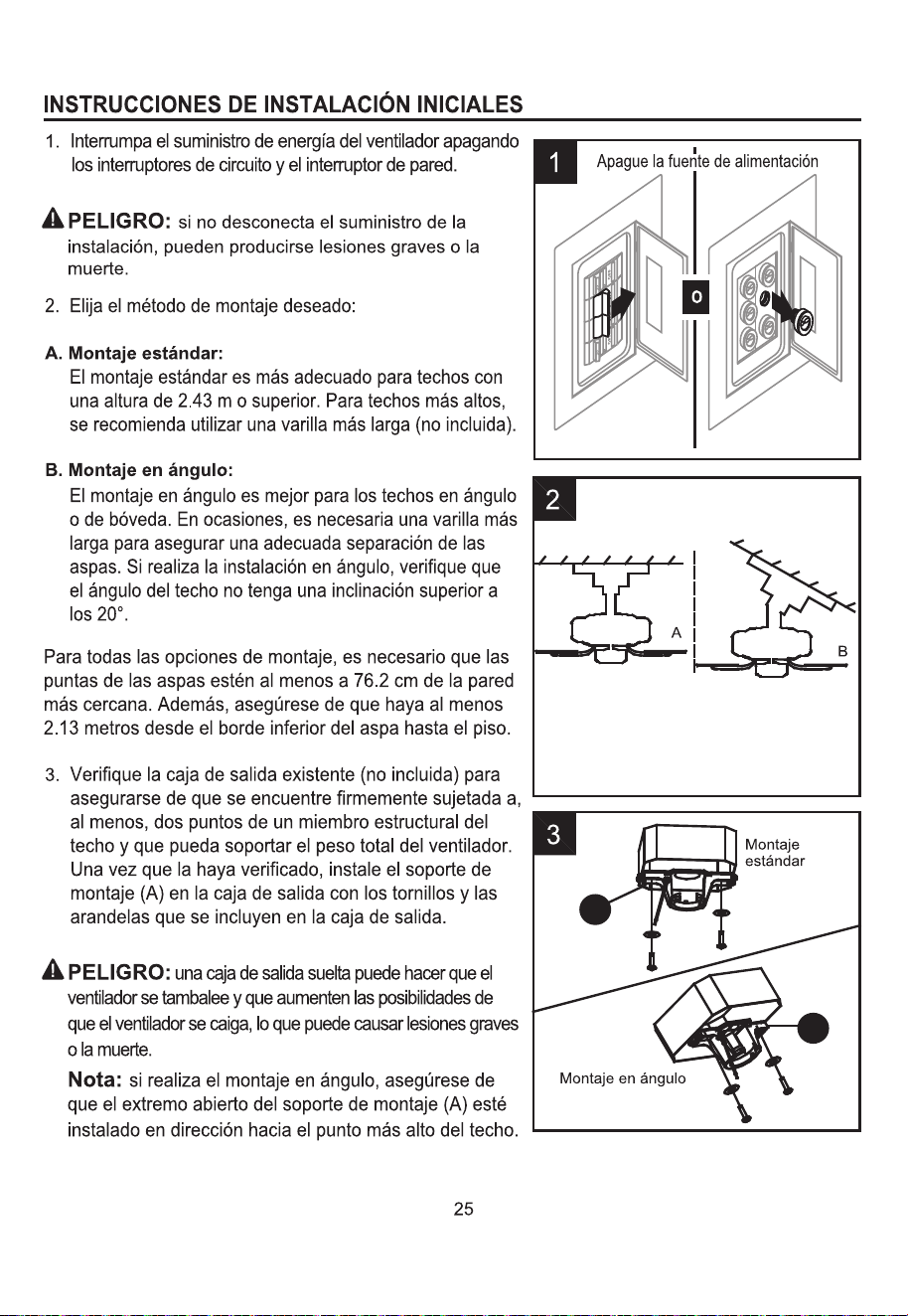
Abra la cubierta de las baterías.
NOTA: este control remoto utiliza dos baterías AAA de
1.5 voltios. Reemplace las baterías por otras del tamaño
y el tipo correcto. Limpie los contactos de la batería y el
área interior del dispositivo antes de instalar las baterías
nuevas. Asegúrese de que las baterías estén instaladas
de manera correcta en lo que se refiere a la
polaridad (+ y -).
Para que el ventilador funcione, instale dos baterías
AAA de 1.5 voltios (se incluye). Vuelva a colocar la
cubierta de las baterías.
ON
DIM
ON
A
UM-4 1.5VX2
A
A
A
A
A
FCC ID:M8C-EEC118RF433
DIM
This device complies with part 15 of the
FCC Rules. Operation is subject to the
following two conditions: (1)This device
may not cause harmful interference,
and (2)this device must accept any
Interference that may cause undesired
operation
A
UM-4 1.5VX2
A
-
+
AAA
A
A
A
A
-
+
A AA
DIM
ON
FCC ID:M8C-EEC118RF433
This device complies with part 15 of the
FCC Rules. Operation is subject to the
following two conditions: (1)This device
may not cause harmful interference,
and (2)this device must accept any
Interference that may cause undesired
operation
DIM
ON
FCC ID:M8C-EEC118RF433
This device complies with part 15 of the
FCC Rules. Operation is subject to the
following two conditions: (1)This device
may not cause harmful interference,
and (2)this device must accept any
Interference that may cause undesired
operation
ON
DIM
ON
A
UM-4 1.5VX2
A
A
A
A
A
FCC ID:M8C-EEC118RF433
DIM
9
This device complies with part 15 of the
FCC Rules. Operation is subject to the
following two conditions: (1)This device
may not cause harmful interference,
and (2)this device must accept any
Interference that may cause undesired
operation
DIM
1
2
3
4
7
8
5
6
R
888-251-1003
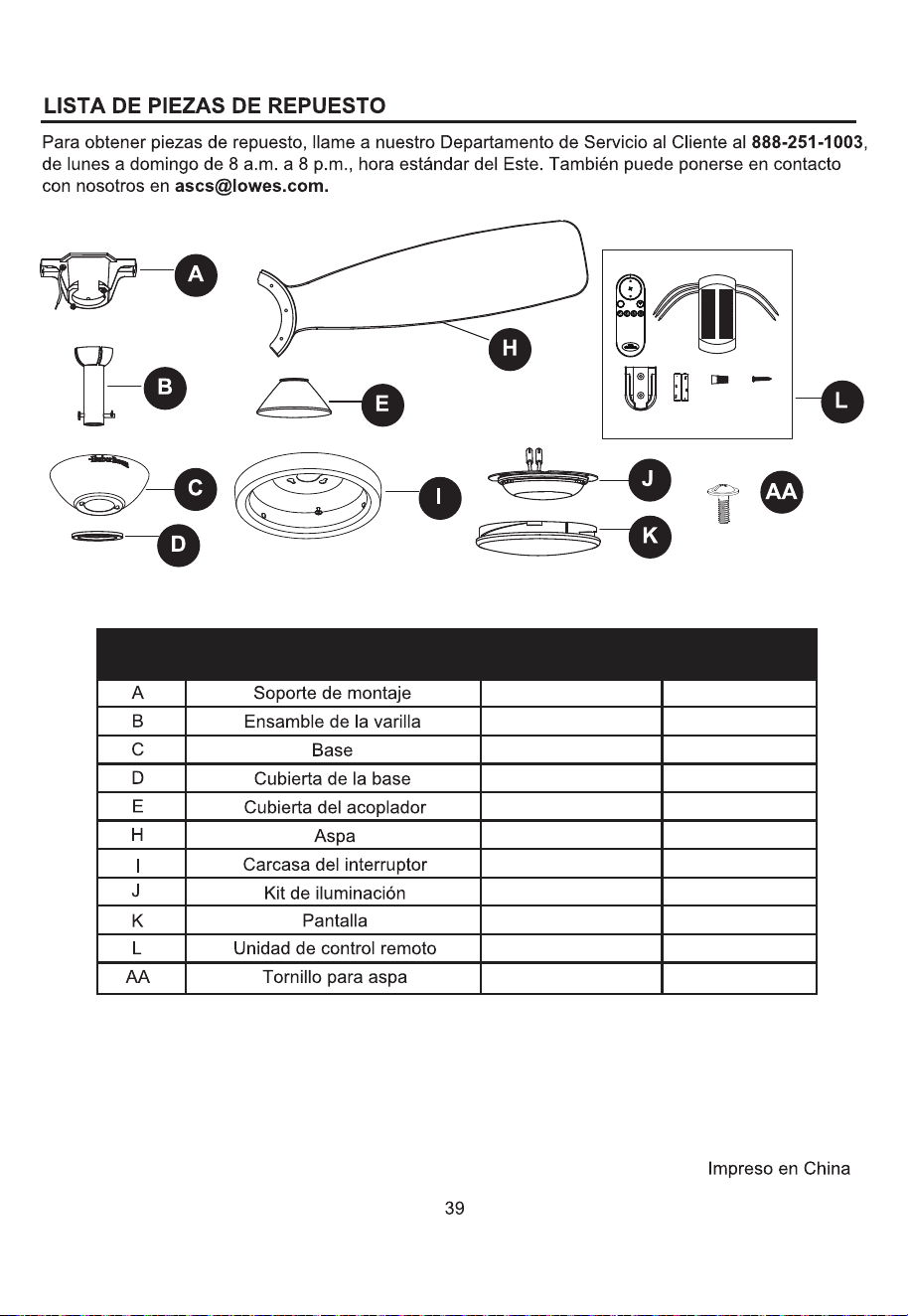
A102-0406084
A103-0328401
A101-0141401
A108-0013401
A106-C002401
A141-B049001
A188-C001401
A187-C001036
A182-0622038
A137-C054036
B166-1326084
DIM
R
X2
X6
SÍ
SÍ
SÍ
SÍ
SÍ
SÍ
SÍ
SÍ
SÍ
SÍ
SÍ
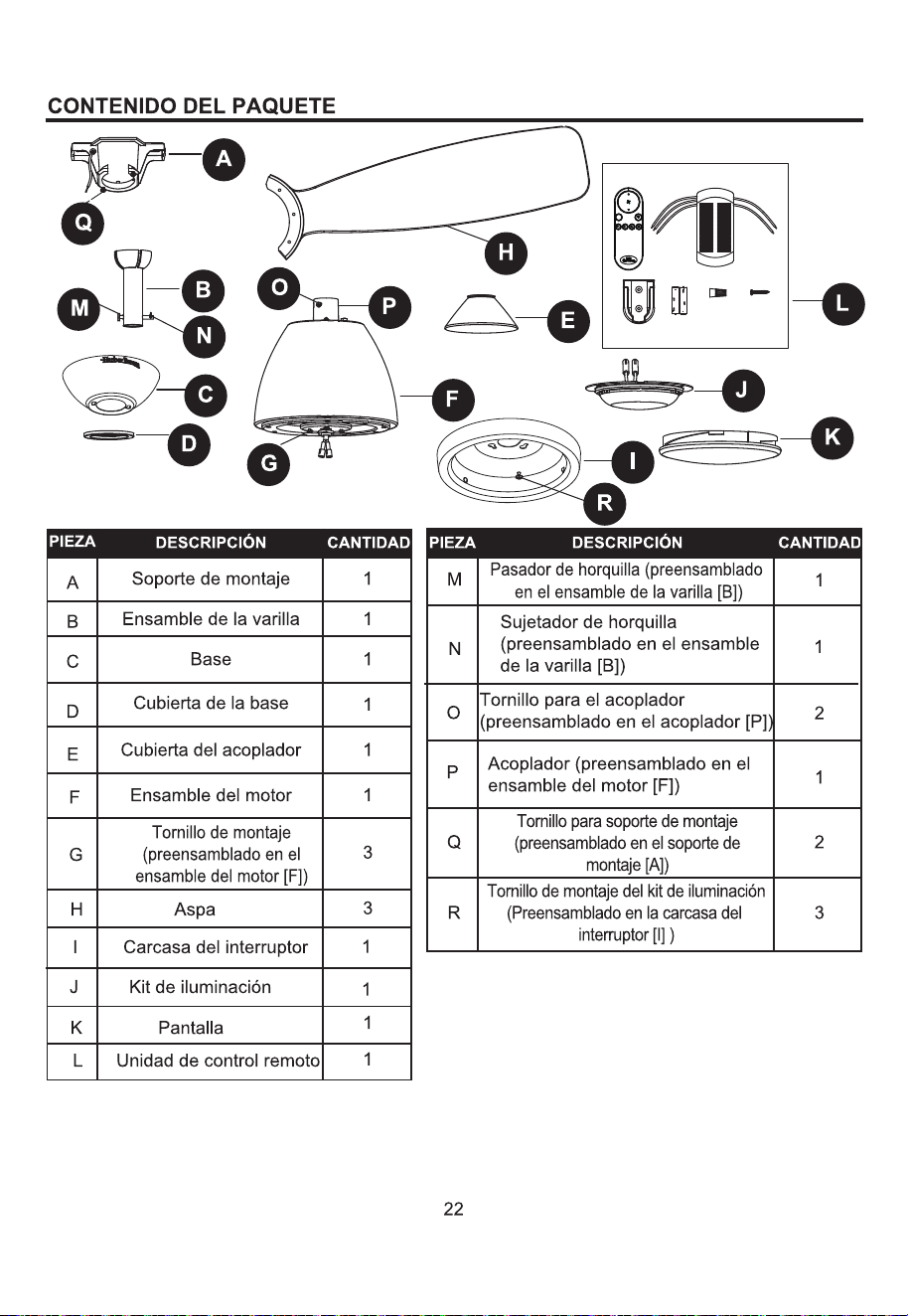
PIEZA
CUBIERTO POR
LA GARANTÍA
DESCRIPCIÓN
PIEZA#