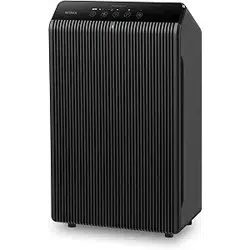
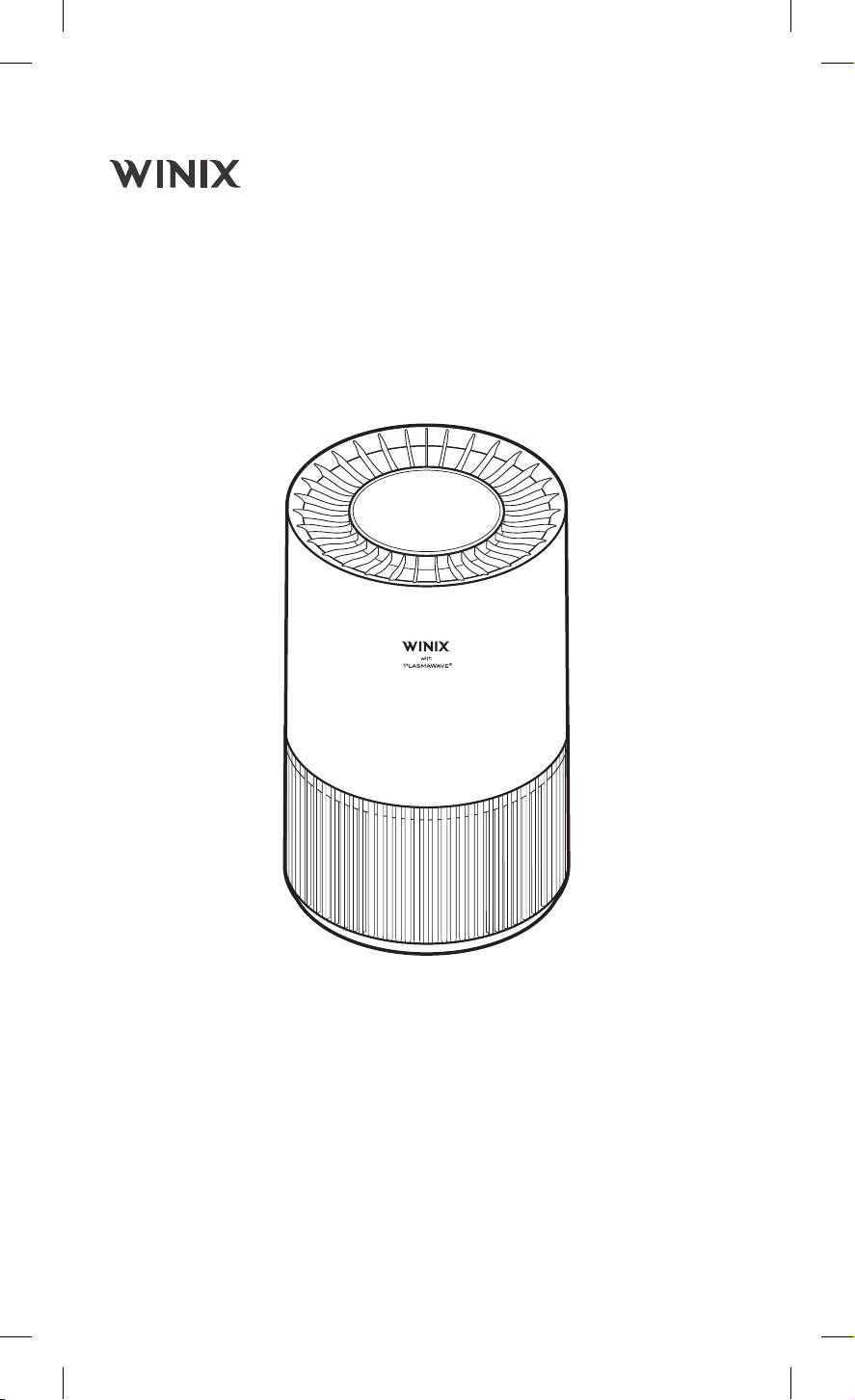
AIR PURIFIER
Model: WXAP300
WXAP310
EN
AIR PURIFIER User Manual
USER MANUAL
English
English
2
Before operating this equipment, carefully
read and follow these safety cautions.
Ensure filters are inserted before running unit
Running the unit without filters may shorten
the lifespan of the unit and cause electric
shock or injury.
Be sure foreign objects are NOT inserted into
the vents on the unit
Objects can include pins, rods, and coins.
Do not touch any part of the interior of the
unit with wet hands
The high voltage may cause electric shock.
Ensure unit intake and outlet vents do not
become blocked
Blockage may lead to increased internal
temperatures causing product failure and
deformation.
Do not use the unit as a step stool or place
heavy objects on it
Personal injury may occur or product failure
and deformation.
When turning the product upside down,
install the filter with care in the direction so
that the bottom (blocked) side of the filter is
visible from the top
If the filter direction is not installed properly, it
may cause product damage and user injury.
WARNING
Follow these instructions to reduce the risk
of serious injury or death and to reduce risk
of damaging the unit.
If the supply cord is damaged, it
must be replaced by a special cord
or assembly available from the
manufacturer or its service agent.
This appliance can be used by children
aged from 8years and above and
persons with reduced physical, sensory
or mental capabilities or lack of
experience and knowledge if they have
been given supervision or instruction
concerning use of the appliance in a
safe way and understand the hazards
involved.
Children should be supervised to
ensure that they do not play with the
appliance.
Cleaning and user maintenance shall
not be made by children without
supervision.
Before cleaning or maintaining, ensure
unit is unplugged.
Do not pull on the power cord when
unplugging the unit.
Do not tie or knot the power cord when
unit is in operation.
If the unit becomes submerged in water,
unplug it and contact customer service.
Do not unplug or move the unit while in
operation.
Do not plug additional appliances into
the same outlet or power supply.
Do not touch the plug with wet hands.
Unplug the unit when not in operation
for extended periods of time.
Do not place around heating elements.
Do not use around mist or fumes from
industrial oil or around large quantities
of metallic dust.
The cord can become damaged by
forcefully bending, pulling, twisting,
bundling, pinching or placing heavy
objects on it.
Do not install in any sort of motor or
transport vehicle (trucks, boats, ships,
etc).
Do not place in an area with excessive
amounts of noxious gases.
Do not place near any flammable
materials (aerosols, fuel, gases etc).
Do not have the unit facing into wind or
drafts.
Do not place below any electrical outlet.
Do not place in excessively humid areas
where the unit may become wet.
To reduce the risk of fire or electric
shock, do not use this fan with any
solid-state speed control device.
Do not place unit closer than 30cm
from the wall during operation. It may
cause condensation to the wall and the
surrounding area.
SAFETY AND CAUTIONS

English
English
3
•
Do not repair or modify the unit. All
repairs should be completed by a qualified
technician.
•
Do not use if the power cord or plug is
damaged or the connection to the wall
outlet is loose.
•
Use AC 220 - 240 V only.
•
Do not damage, break, forcefully bend,
pull, twist, bundle, coat, pinch, or place
heavy objects on the power cord.
•
Periodically remove dust from the power
plug.
This will reduce the risk of shock due to
humidity build up.
•
Remove the power plug from the outlet
before cleaning the unit. When removing
the power plug, grasp by holding the plug
itself, never hold by the cord.
•
If the power plug is damaged, it must
be replaced by the manufacturer or a
qualified technician.
•
Remove the power plug from the outlet
when not in use.
•
Do not handle the power plug with wet
hands.
•
Do not operate the unit when using indoor
smoke-generating insecticides.
•
Do not clean unit with benzene or paint
thinner.
•
Do not spray insecticides on the unit.
•
Do not use the unit where it is humid or
where the unit may become wet, such as
the bathroom.
•
Do not insert fingers or foreign objects
into air intake or outlet.
•
Do not use the unit near flammable gases.
Do not use near cigarettes, incense, or
other spark-creating items.
•
Unit will not remove carbon monoxide
emitted from heating appliances or other
sources.
•
This appliance is not intended for use
by children or other persons without
assistance or supervision if their physical,
sensory or mental capabilities prevent
them from using it safely. Children should
be supervised to ensure that they do not
play with the appliance.
•
Do not block the intake or outlet vents.
•
Do not use near hot objects, such as a
stove.
•
Do not use where the unit may come into
contact with steam.
•
Do not use the unit on its side.
•
Keep away from products that generate
oily residue, such as a deep fryer.
•
Do not use detergent to clean the unit.
•
Do not operate without a filter.
•
Do not wash and reuse the True HEPA
Filter.
•
Hold the handle on the back of the unit to
transport.
•
Do not hold by the front panel.
•
Do not stick any small objects in the air
outlet vents or fan.
SAFETY INSTRUCTIONS
Thank you for purchasing a Winix air purifier. This product is for household use only.
IMPORTANT CAUTIONS FOR USING YOUR AIR PURIFIER
WARNING : Follow the instructions in this manual to reduce the risk of electric shock,
short circuit, and/or fire.
IMPORTANT PRECAUTIONS FOR USING YOUR AIR PURIFIER
English
English
4
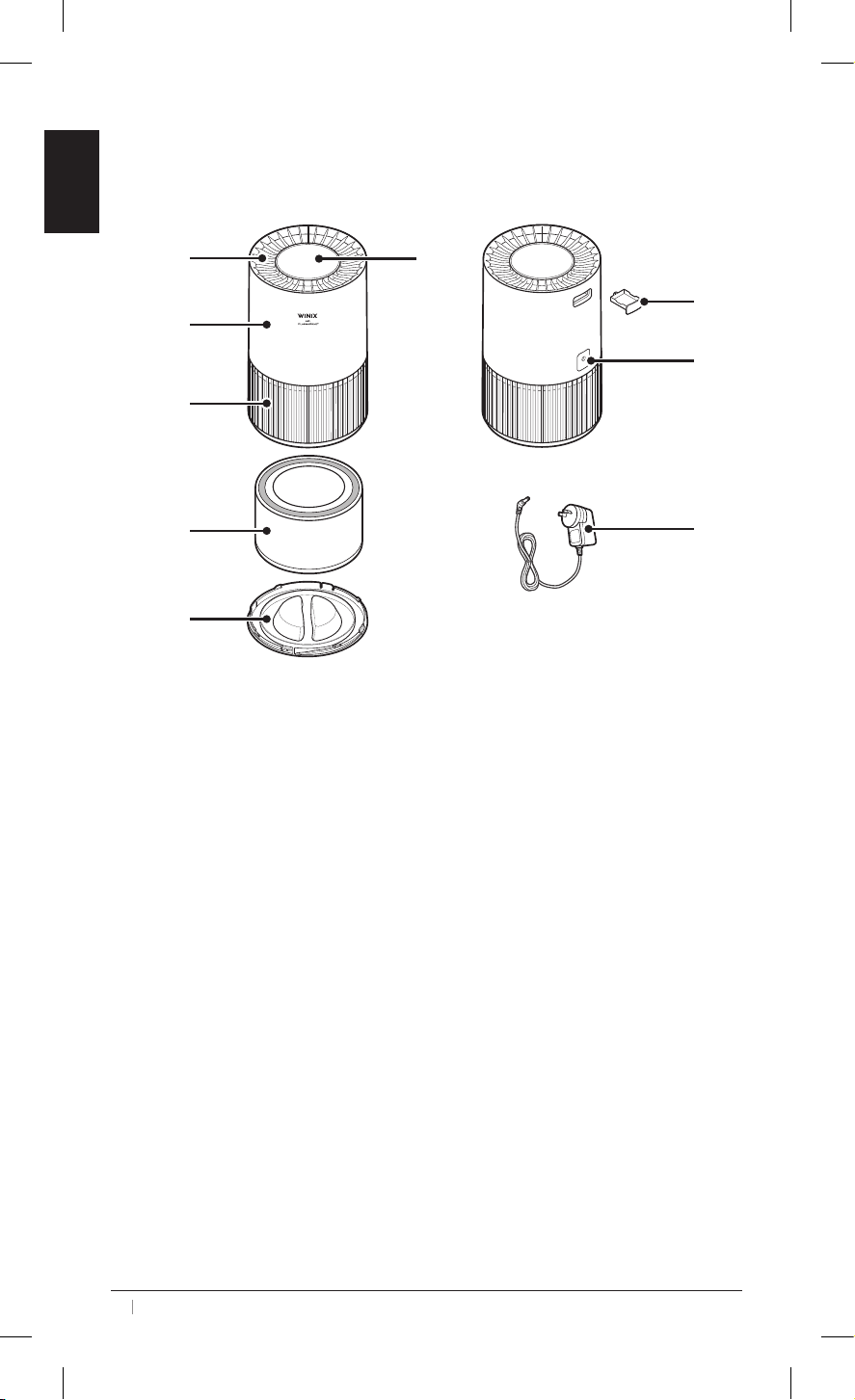
KNOWING YOUR AIR PURIFIER
Body
1
3
4
5
6
7
8
2
9
1. Air Outlet
2. Control Panel
3. Main
Bo
dy
4. Air Inlet
5. Filter 6. Base
7. Aroma Tray 8. DC Charging Port
9. Adapter
Air Cleaning System
1. Pre-Filter: Captures initial large particles and dust.
2. H13 HEPA Filter: Captures dust, smoke, pollen, and other allergens.
3. Carbon Filter: Eliminates odors and bad smells.
English
English
5
Setting Up
1. Preparation: When using your air purier for the rst time, lift your air purier from the box
and remove all packing materials.
2. Surface Requirements: Always place the purier on a rm, level and flat location.
3. Power Connection: Plug the power cord into a right voltage outlet.
Note
1. For proper air flow, allow at least 15 inches / 38 cm of clearance on all sides of the unit.
2. Keep away from anything that would block airflow.
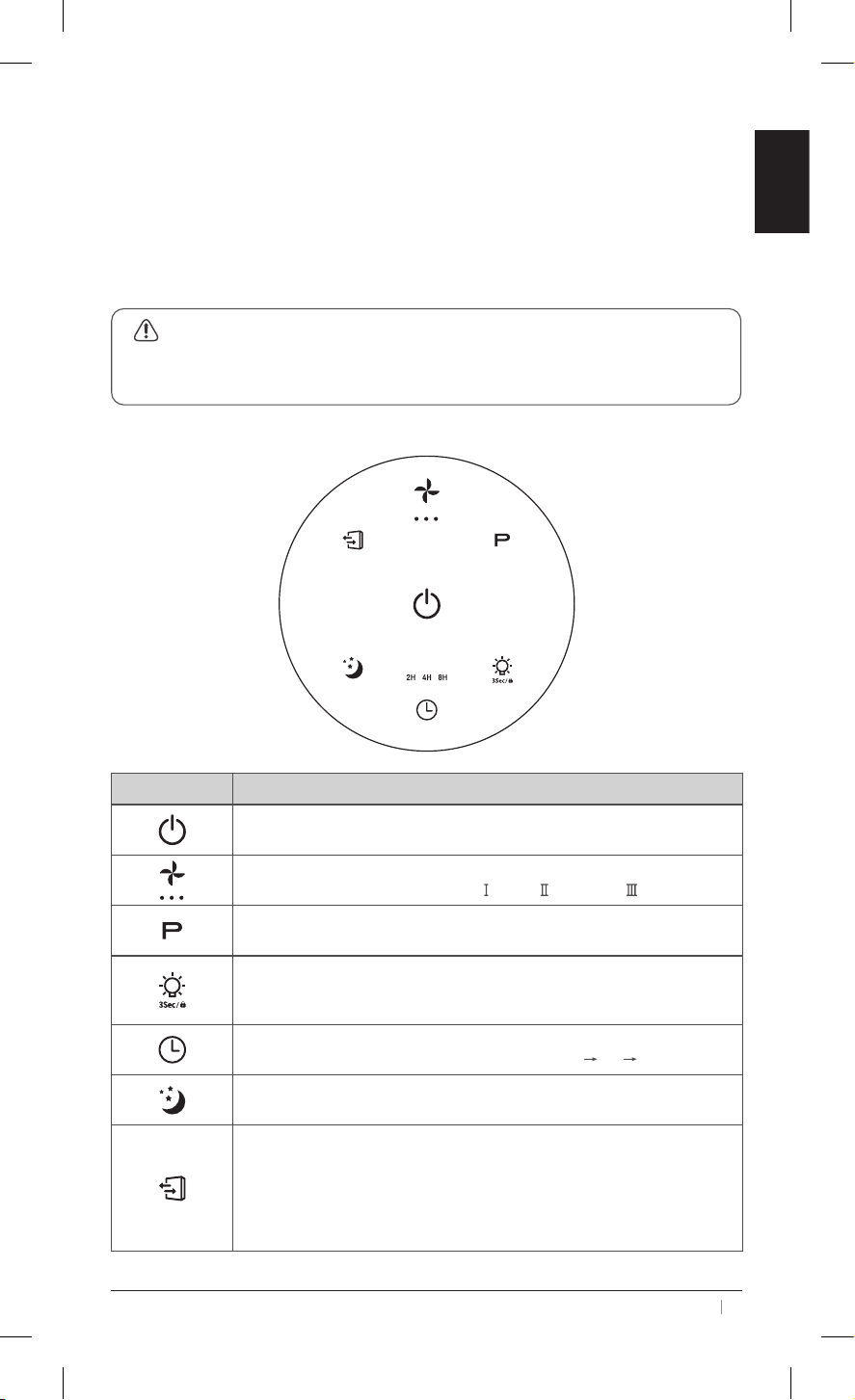
Touch Panel
Icon Description
Power
Short press to turn on/off the unit.
Fan Speed
Short press to cycle through Speed
, Speed and Speed .
Ion
Short press to turn on/off the Ion feature.
Mood Light & Child Lock
Short press to turn on/off the mood light.
Long press to turn on/off the Child Lock.
Timer
Short press to set an automatic shut-off timer: 2H
4H 8H.
Sleep Mode
Short press to enter (indicator flashes for 5s) or exit Sleep Mode.
Filter Replacement
• When the filter expires: The indicator stays solid red. Long press the
button for 3-5 seconds to reset.
• When the filter is not expired: Long press the button. The red indicator
will blink 20 times (once per second) and then stop. To reset, long press
again within this blinking period.
OPERATING YOUR AIR PURIFIER
English
English
6
Proper cleaning of your air purifier is essential to maintain optimal performance.
General Cleaning
1. Turn off and unplug the unit before cleaning.
2. Wipe the outside of the air purier with a clean, soft and dry cloth.
3. Clean the air inlet and air outlet with a soft dry cloth or brush.
Note
1. Never clean with abrasive chemicals or flammable cleaning agents.
2. It is recommended to clean the unit at least once a month.
3. Do not put the air purier in water or spray water directly on it.
4. Do not stick any foreign objects or your ngers inside the unit.
5. Do not use gasoline, benzene, thinner, harsh cleaners, etc. on and/or in the unit while
cleaning as they will damage the products. Never use alcohol or other solvents.
Filter Indicator Check
Depending on usage and your air quality conditions, the filter will last approximately 12months.
The filter replacement indicator
will illuminate red when it is time to replace the filter.
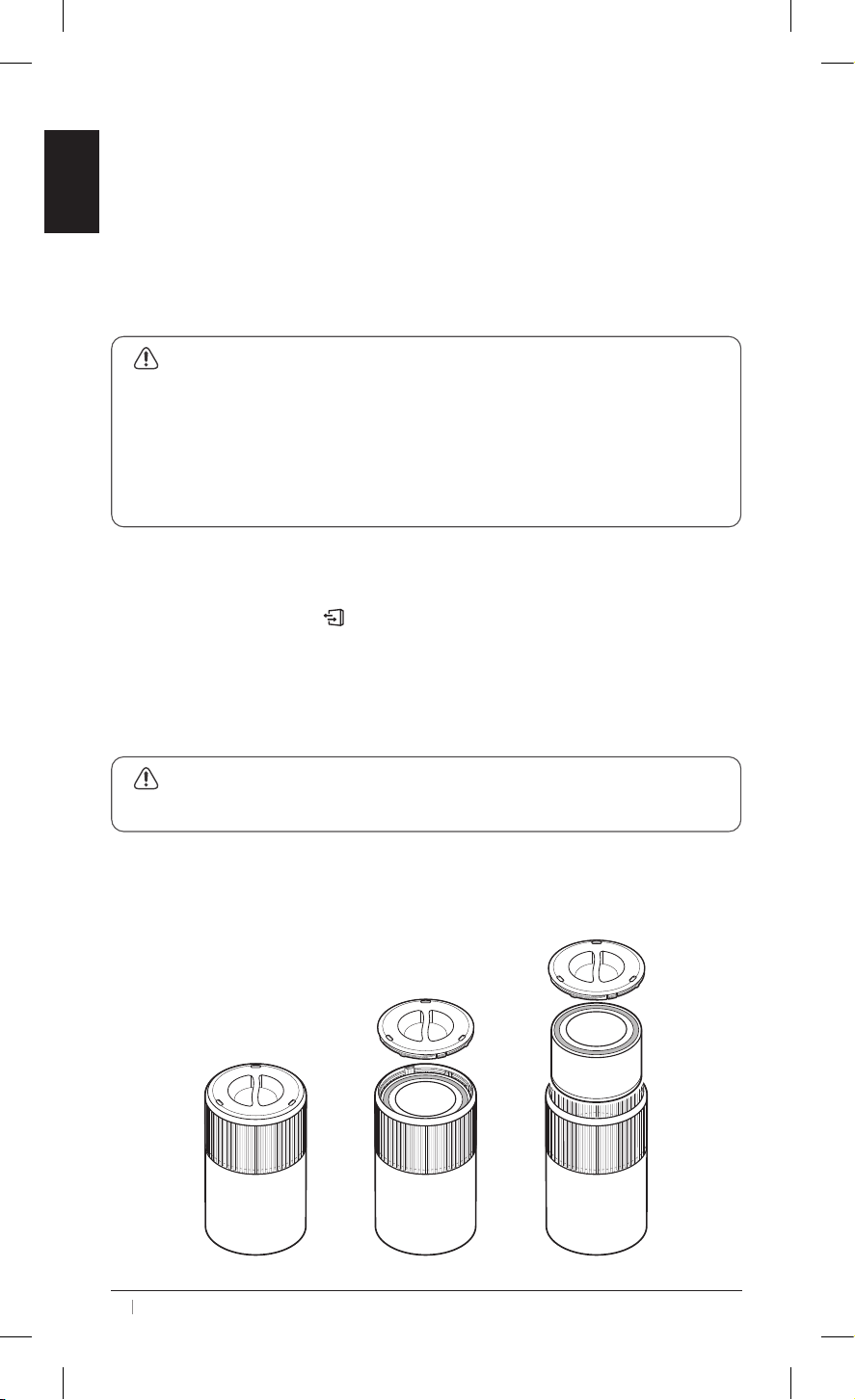
Filter Replacement
The filter should be replaced every 12months. You may need to replace your filter earlier or
later depending on how often you use your air purifier. Follow the instructions below to change
the filter.
Note
Remember to tear off the packing bag of the new filter before replacing it.
1. Turn off and unplug the air purier.
2. Rotate and lift the base cover.
3. Remove the old lter and replace it with a new one. Ensure that it is securely tted in place,
then reattach the base cover.
CLEANING & MAINTENANCE
English
English
7
Filter Indicator Reset
1. After replacing lter, turn on the air purier.
2. Press and hold the button
on the control panel to reset it.
3. The lter replacement indicator will turn off when successfully reset.
Storage
When preparing to store your air purifier after extended periods of non-use, follow these
instructions to ensure the longevity of the unit:
1. Cleaning is recommended before storage.
2. Pack both the air purier and the lter in plastic packing and store in a cool, dry place,
away from direct sunlight and extreme temperatures.
CLEANING & MAINTENANCE
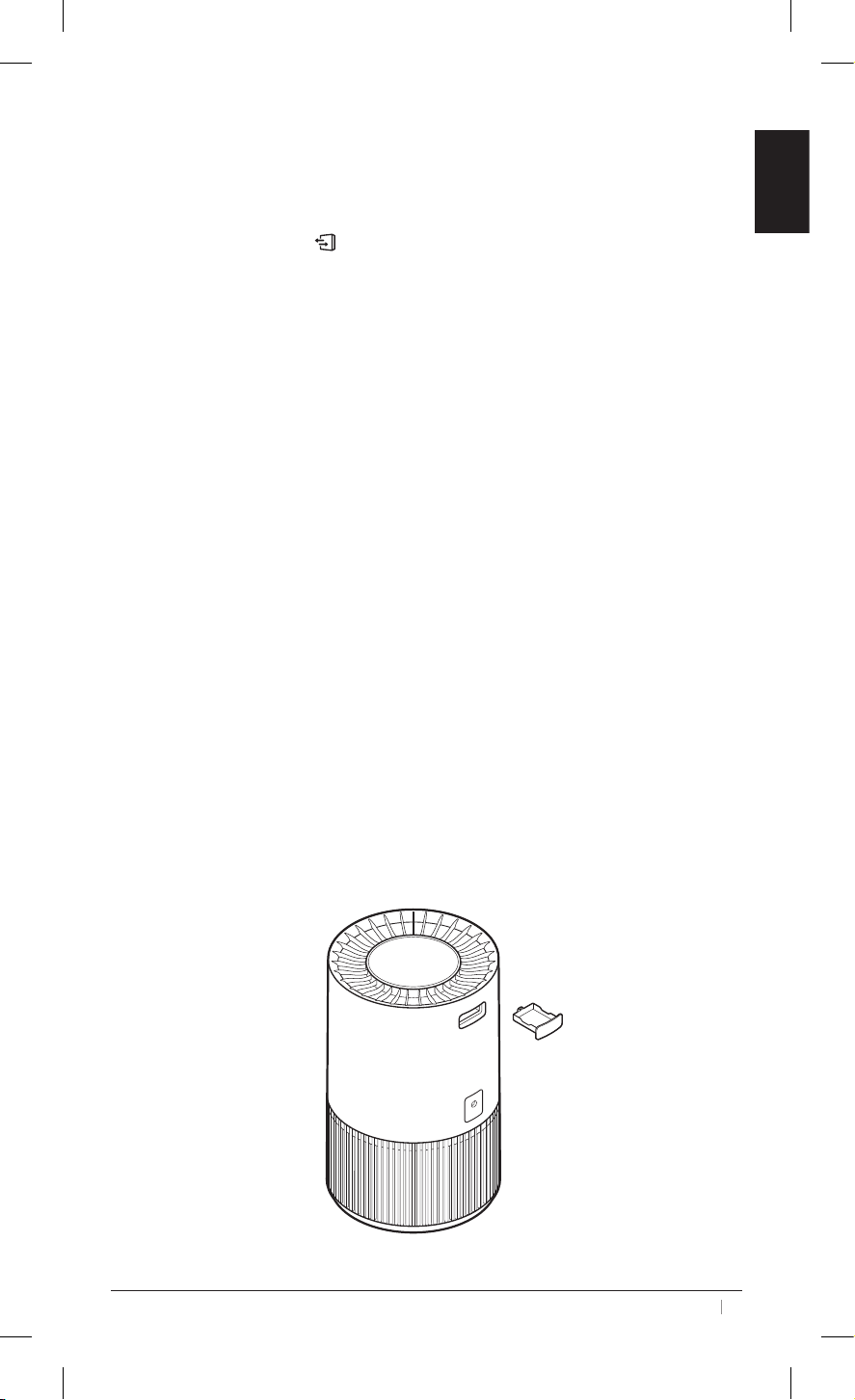
This air purifier features a built-in aroma tray, allowing you to diffuse your favorite essential
oils.
1. Locate the aroma tray on the back of the unit and remove it.
2. Apply 3-5 drops of essential oil to the included pad. For a stronger scent, you may add a
few more drops.
3. Reinsert the aroma tray. Make sure it click into place.
USING THE AROMA TRAY
English
English
8
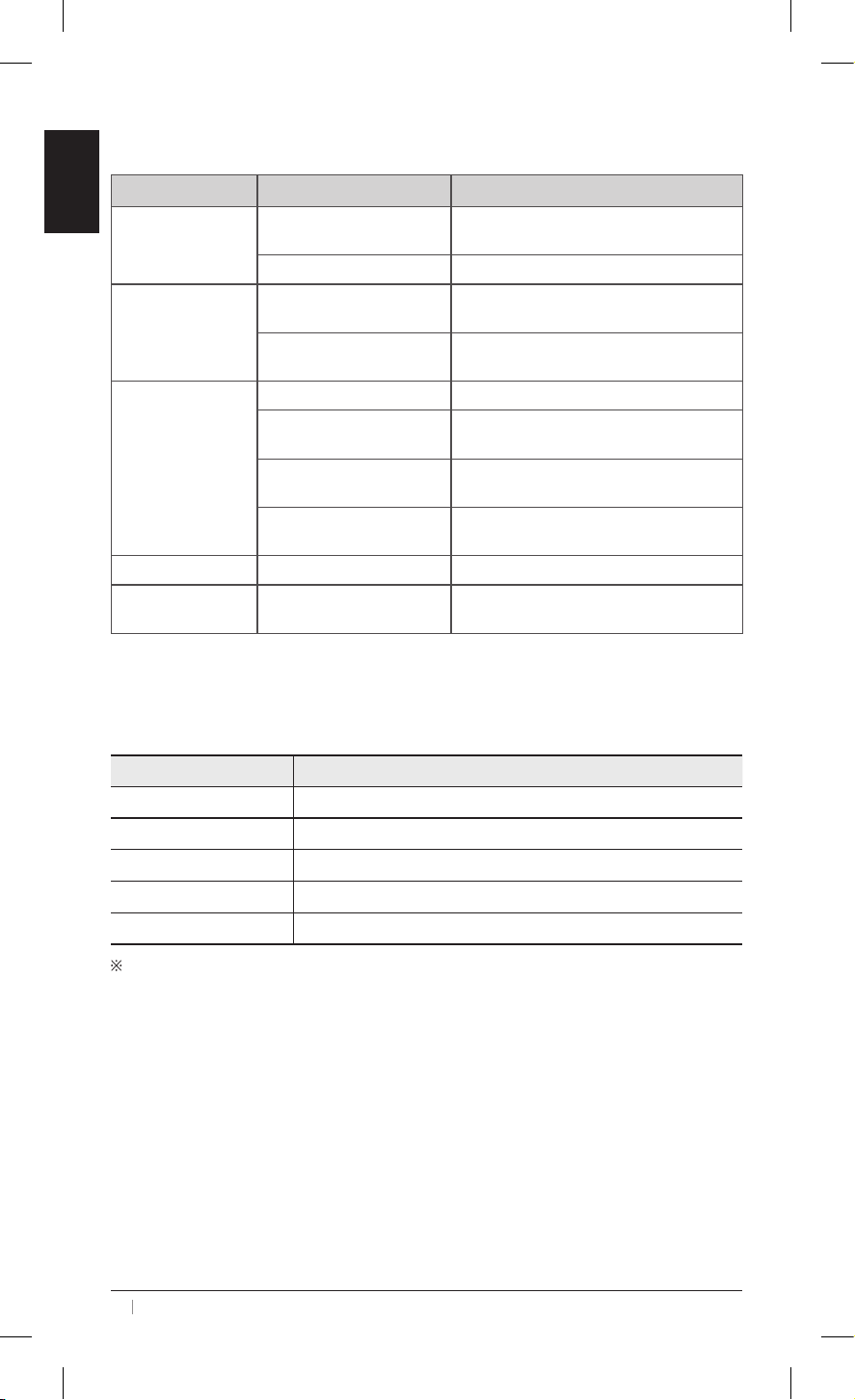
PROBLEM POSSIBLE CAUSE SOLUTION
Unable to Power On
Power Connection
Ensure the power plug is securely connected.
Unplug and then reconnect the unit.
Outlet Condition Check if the power outlet works.
Reduced Airflow
Insufficient Clearance
Maintain at least 15inches / 38cm of
clearance on all sides of the air purifier.
Dirty Filter
Filter isn’t clean. Clean or replace with a new
one if necessary.
Loud Noise
Level Placement Ensure the unit is on a flat, stable surface.
Improperly Positioned Filter
Make sure the filter is removed from its
packaging and properly in place.
Dirty Filter
Filter isn’t clean. Replace with a new one if
necessary.
Damaged Filter
Check the filter for damage. If damaged,
replace with a new one.
Unpleasant Odors Dirty Filter Clean the filter or replace it if necessary.
Filter Indicator
Illuminated Red
Filter replacement needed
Replace the air filter, then press and hold the
reset button to reset.
TROUBLESHOOTING
Model Name WXAP300, WXAP310
Power Voltage AC 220 - 240 V, 50 / 60 Hz
Power Rate 11W
Verified Room Size 29 m
2
Dimensions 173 mm (W) x 173 mm (D) x 280 mm (H)
Weight 1.35 kg
The exterior, design, and product specifications may be changed without prior notice to
improve product performance.
UNIT SPECIFICATIONS

MEMO

MEMO

MEMO
To expedite service, please specify the model name
and number, the nature of the problem, your contact
information, and your address.
Contact for product
related inquiries and
customer service
After sales and warranty enquiries, visit website
Website : www.ausclimate.com.au / www.ausclimate.co.nz
Distributed by the
CDB Group
WINIX REPLACEMENT FILTER CLUB
For exclusive savings on replacement filters
AUSTRALIA NEW ZEALAND