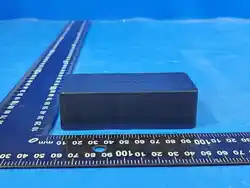

KeenMow Net Box User Manual
Module Safety and Installation Instructions
1 RF Exposure Requirements
To maintain compliance with RF exposure requirements, a separation distance of 35 cm between the device and the human
body must be maintained.
2 Installation Instructions
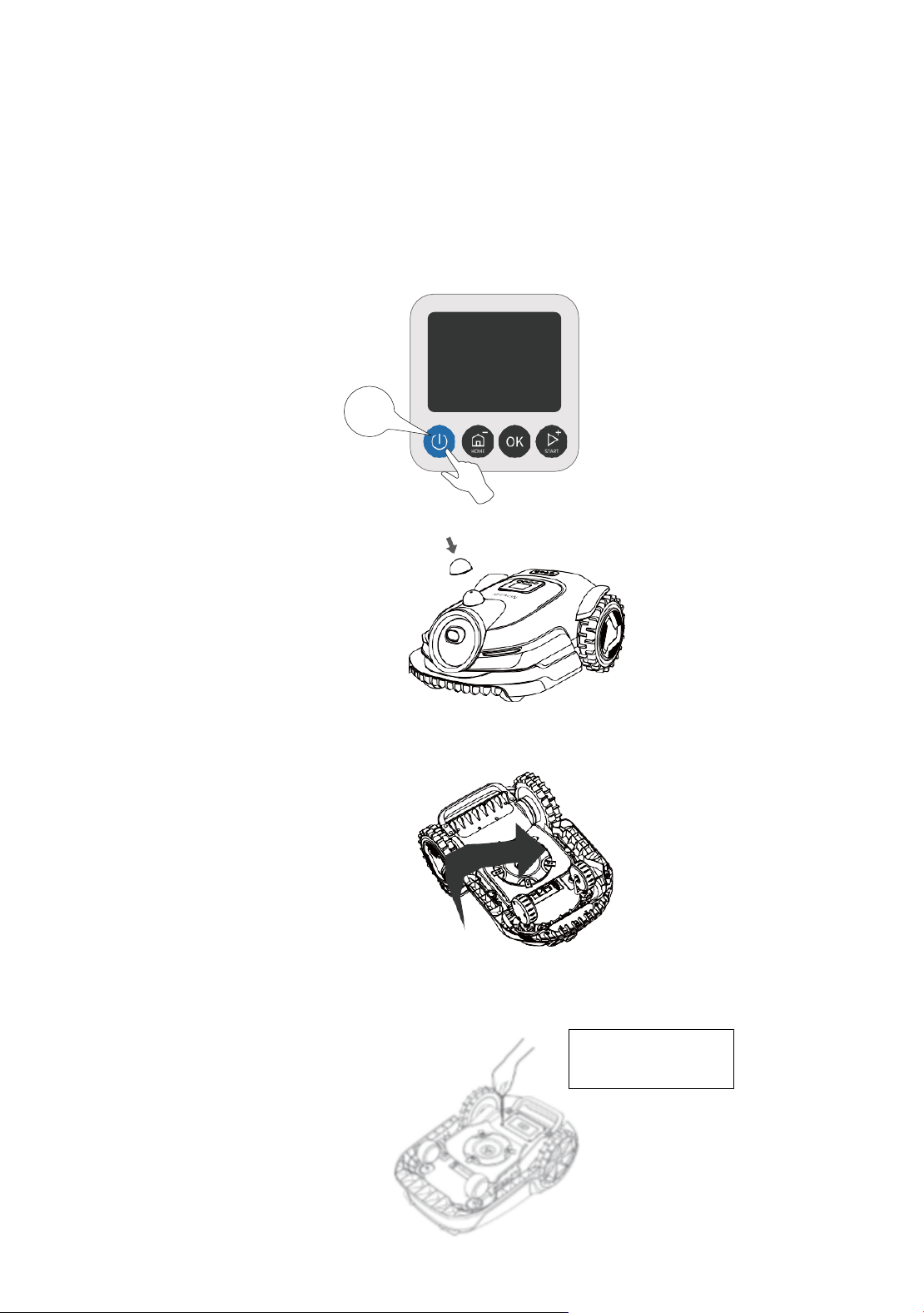
Caution: Wear protective gloves before installation to prevent injury.
Caution: Ensure the protective cover is installed on the LiDAR sensor before turning the robot over.
Steps:
1.
Power off the device
2.
Install the LiDAR protective cover.
3.
Place the mower upside down on a stable, soft surface.
4.
Use a screwdriver to remove the screws securing the battery compartment cover.
3s
示意图,需换成
KeenMow K1图
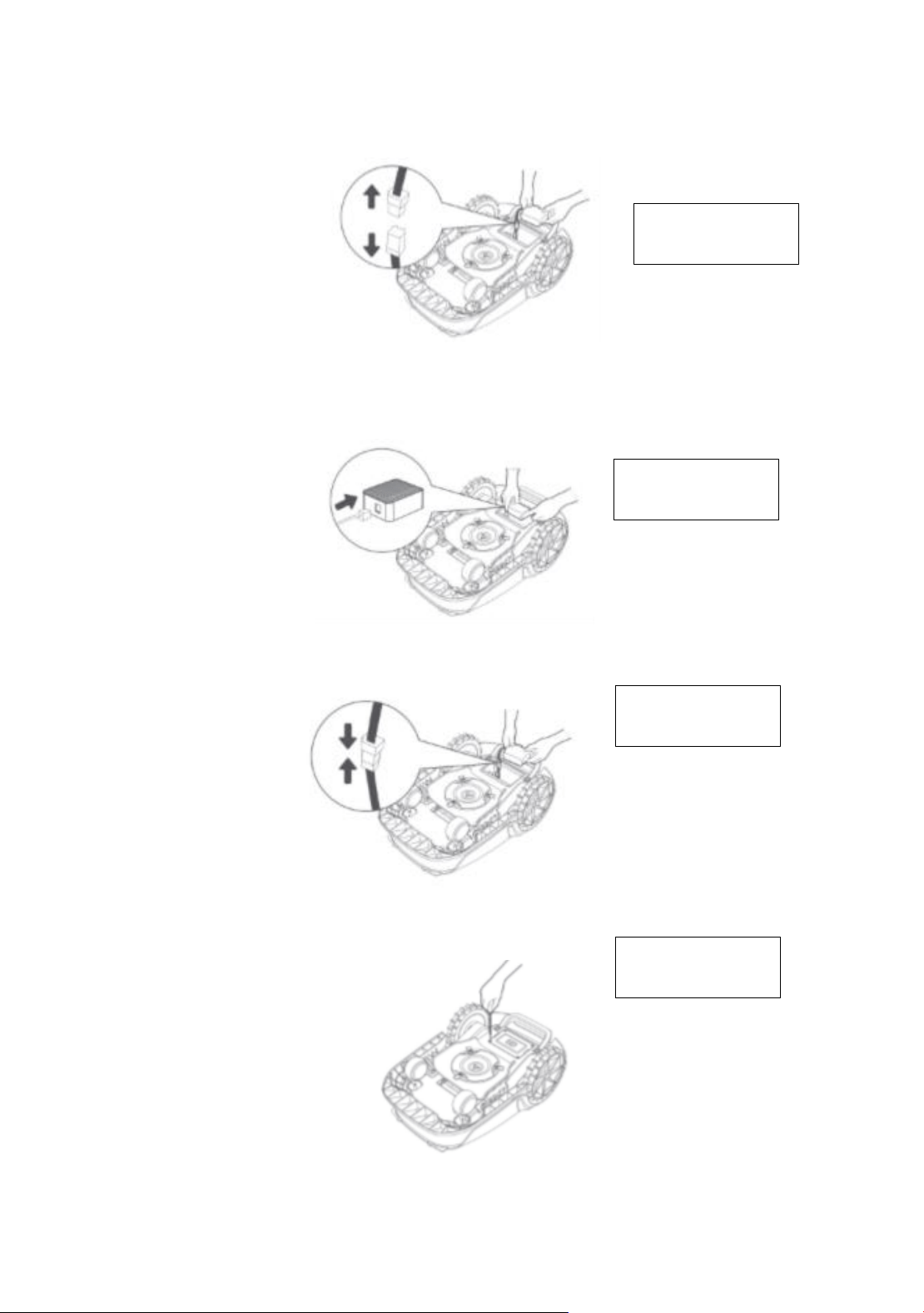
5、Remove the battery cover, then disconnect the battery connector.
6、Locate the module interface and connect the 4G module firmly until you hear a click. Insert the module with the
"KEENON" label facing upward. Organize the module cable neatly to avoid interference with other components.
7、Reconnect the battery connector and carefully place the battery back into its compartment.
8. Reinstall the battery cover and fasten it securely with the screws.
示意图,需换成
KeenMow K1图
示意图,需换成
KeenMow K1图
示意图,需换成
KeenMow K1图
示意图,需换成
KeenMow K1图
3 Usage Notes
After installing the 4G module, power on the robot. The 4G service will activate automatically. An icon will appear on
the robot’s display and in the app, confirming successful activation. You can check the module status and service
details under "Network" or "Connectivity" in the app.
Once the 4G service is activated, you can remotely monitor the robot’s status and start mowing tasks even without a
Wi-Fi connection. In addition, safety features and real-time location tracking will be available through the app after
activation.
The 4G service is provided free of charge for the first three years from the date of activation. After this period, you can
renew the service directly through the app. If you encounter any issues, please contact Keenon customer support at
support@keenmow.com.
Important: The 4G module is designed exclusively for use with Keenon robotic lawn mowers. If any abnormal
condition is detected in the service, your access may be temporarily suspended. In such cases, please reach out to the
Keenon support team at support@keenmow.com for assistance in restoring the service.
Important: If you do not contact Keenon customer support to renew the 4G service within one year after its expiration,
the module will be locked. To reactivate the service, you will need to contact Keenon customer support at
support@keenmow.com. Additional service or handling fees may apply for reactivation. Please pay attention to service
notifications within the app. To check the expiration date of your 4G service, navigate to Settings → Connectivity → 4G
Module in the app.
4 Technical Data
4G service (optional)
[1]
EU LTE-FDD: B1/3/7/8/20/28
LTE-TDD: B38/40/41
US LTE-FDD: B2/4/5/12/13/14/66/71
[1]Countries/Regions covered: Albania, Andorra, Austria, Belgium, Bosnia and Herzegovina, Bulgaria, Croatia, Cyprus,
Czech Rep, Denmark, Estonia, Finland, France, Germany, Greece, Guernsey, Hungary, Iceland, Ireland, Italy, Kosovo,
Latvia, Liechtenstein, Lithuania, Luxembourg, Macedonia, Malta, Moldova, Monaco, Montenegro, Netherlands, Norway,
Poland, Portugal, Romania, Serbia, Slovakia, Slovenia, Spain, Sweden, Switzerland, UK, Ukraine.
Standards
Band
Uplink
(MHz)
Downlink
(MHz)
Max RF Output
Power
GNSS
Frequency
band
LTE
1
1920 - 1980
2110 - 2170
23
±
2
GPS/
GLONASS/
BDS/
Galileo/
QZSS
1559 - 1592
MHz
3
1710 – 1785
1805 – 1880
7
2500 – 2570
2620 – 2690
8
880 – 915
925 – 960
28
703 – 748
758 – 803
38
2570 – 2620
2570 – 2620
40
2300 – 2400
2300 – 2400
41
2496 – 2690
2496 – 2690
GSM
3
1710 – 1785
1805-1880
30
±
2
8
880 – 915
925 – 960
33
±
2
WCDMA
1
1920 – 1980
2110 – 2170
23
±
2
8
880 – 915
925 – 960
23
±
2

FCC Caution.
This device complies with part 15 of the FCC Rules. Operation is subject to the following two conditions:
(1) This device may not cause harmful interference, and
(2) this device must accept any interference received, including interference that may cause undesired
operation.
Any Changes or modifications not expressly approved by the party responsible for compliance could void
the user's authority to operate the equipment.
Note: This equipment has been tested and found to comply with the limits for a Class B digital device,
pursuant to part 15 of the FCC Rules. These limits are designed to provide reasonable protection against
harmful interference in a residential installation. This equipment generates uses and can radiate radio
frequency energy and, if not installed and used in accordance with the instructions, may cause harmful
interference to radio communications. However, there is no guarantee that interference will not occur in a
particular installation. If this equipment does cause harmful interference to radio or television reception,
which can be determined by turning the equipment off and on, the user is encouraged to try to correct the
interference by one or more of the following measures:
-Reorient or relocate the receiving antenna.
-Increase the separation between the equipment and receiver.
-Connect the equipment into an outlet on a circuit different from that to which the receiver is connected.
-Consult the dealer or an experienced radio/TV technician for help.
FCC Radiation Exposure Statement:
This equipment complies with FCC radiation exposure limits set forth for an uncontrolled environment. This
equipment should be installed and operated with minimum distance 20 cm between the radiator & your
body.