LabelMaker User Manual
G15M Pro
1
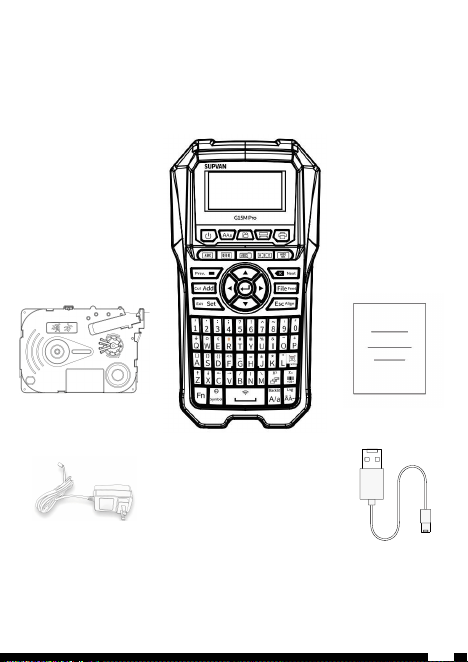
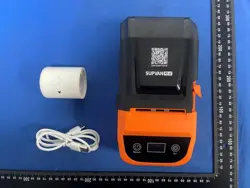
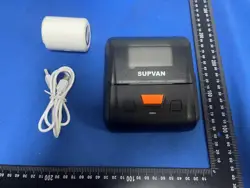
Trial Label Tape×1
Type-c Cable×1
User Manual×1
Label Maker×1
Note:Please confirm that the items are intact when opening the box.
If any items are damaged or missing, please contact the dealer.
01
Included Items
2
Adapter×1
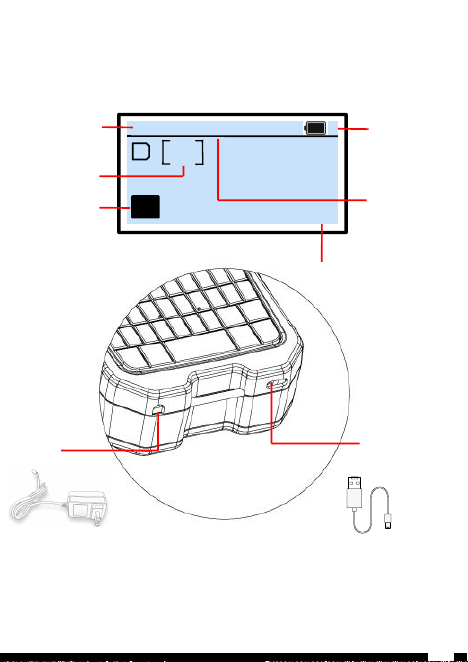
Language
Input content
1
1/3 12*6
∣
EN
Battery level
Current label/
Total label
Consumables
size
02
Display/Charging socket
3
Adapter socket
9V-2.5A
Type-c socket
Note:
1.Type-c cable supports charging lithium batteries.
2.This printer does not include adapter;The adapter supports batch
printing and continuous power supply, while also charging the
lithium battery.Please buy the SUPVAN 9V-3.5A adapter from the seller.
A/a
Uppercase/Lowercase
03
Key Functions
4
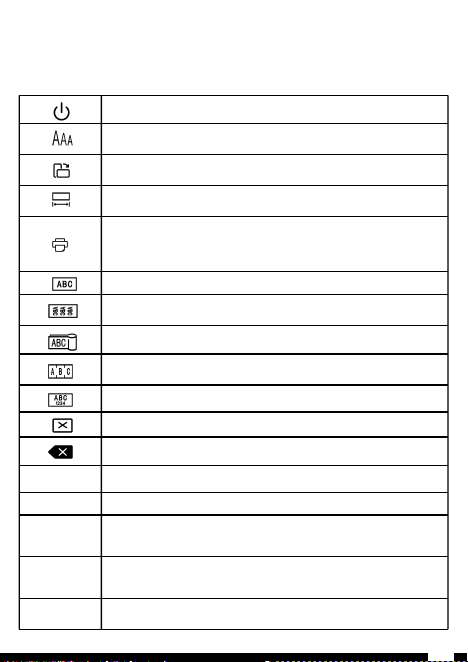
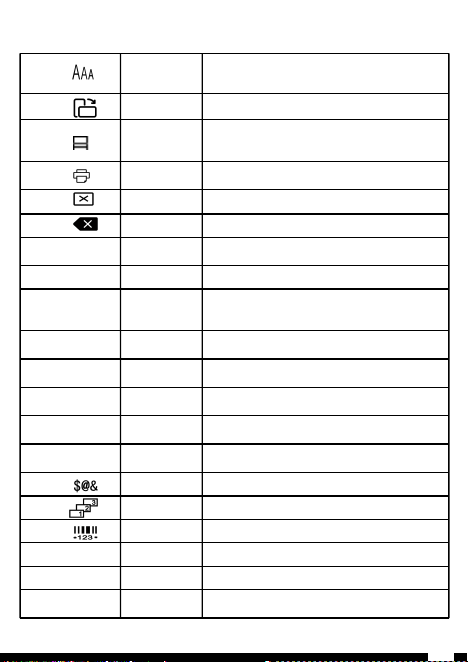
【 】
Turn on/off the printer
【 】
Set character size for the current and all subsequent
segments, Set auto or specify
【 】
Set the direction of the current label, horizontal/vertical
【 】
Set the length of the current label, set auto or specify
【 】
Press print key, and a settings interface (copy print and
repeat print) will pop up before printing. Press the print
key again to print the current label. Double click the print
key to directly print the current label
【 】
General label mode
【 】
Switch the label mode to wrap label in continuous label/ die-
cutting label mode
【 】
Switch the label mode to flag label in continuous label/ die-
cutting label mode
【 】
Switch the label model to terminal label in continuous
label/ die-cutting label mode
【 】
Set the mode of double row labels
【 】
Delete current segment/text+formatting/all text only
【 】
Delete the content in front of the cursor, long press to
delete the current line
【Add】
Create a new label
【File】
Save/save as/open/delete file
【Set】
settings for length, character size, width, font, align,
bold,light, frame, orientation, cut, character space, density,
margins,cleaning backlit, underline, format, and customize
【Esc】
Cancel the currently unconfirmed options or content; Under
the functional options, it is possible to return to the
previous function
【
▲▼
】
Direction keys
【
↵
】
Confirm all options; Create the next line within a label
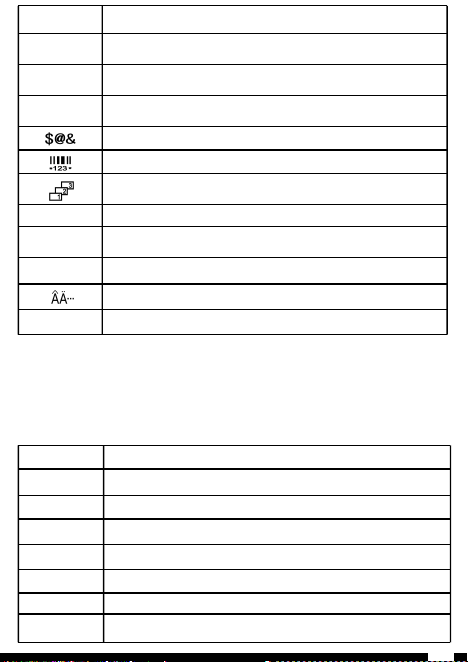
【Fn】
Needs to be used in combination with other keys
【0-9】
Number keys
【A-Z】
Letter keys
【 】
Symbol key, select to add commonly used simple symbols
【 】
Add barcode/qr code
【 】
Add sequence
【Symbol】
Graphic key, select add graphic symbol
【Space】
Space
【A/a】
Uppercase/lowercase
【 】
Select variant of the Latin letter
【Lng】
Long press for the system language selection
04
Combination Keys Description
Long press【Fn】,Simultaneously press on other keys
【
Fn
】
+
【Q-P】
Customize commonly used shortcut functions in the set section
【
Fn
】
+
【Z】
Adjust LCD contrast
【
Fn
】
+
【X】
Adjust LCD brightness
【
Fn
】
+
【
C
】
Copy
【
Fn
】
+
【
V
】
Paste
【
Fn
】
+
【
B
】
Printer automatic shutdown time setting
【
Fn
】
+
【
N
】
Read the current consumables usage information
【
Fn
】
+
【
M
】
Printing position adjustment and total printing length
statistics
5
6
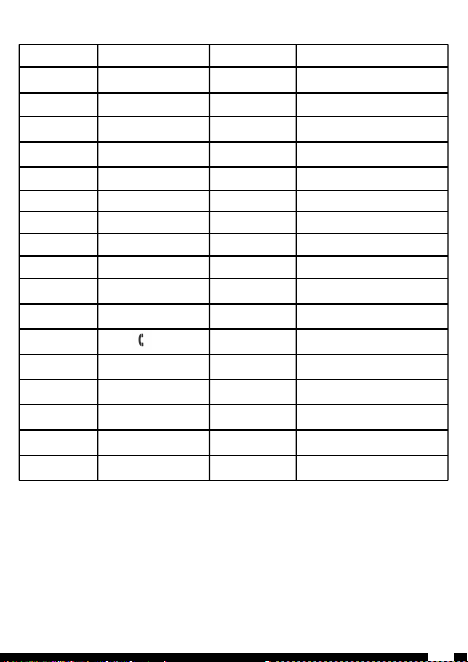
Click on【Fn】,then click on other function keys(only valid once)
【
Fn
】
-
【
】
Char space
Set the spacing between characters:-
0.5/0/0.5/1/1.5/2mm;Default:0mm
【
Fn
】
-
【
】
Bold
Set font bold:off/on;Default:off
【
Fn
】
-
【
】
Frame
Set frame style:
None/frame1/frame2/frame3/frame4/frame5;
Default:none
【
Fn
】
-
【
】
Range Print
Print Settings:you can set cursor print
and range print
【
Fn
】
-
【
】
Previous Label
Move to the previous label
【
Fn
】
-
【
】
Next label
Move to the next label
【Fn】-【Add】
Cut
Set cutting mode:cut/solid line/None
Default:cut
【Fn】-【File】
Feed
Feed some blank label
【Fn】-【Set】
Exit special
mode
Exit the current label special mode and
enter the general label editing interface
(only valid for wrap/flag/port/double row)
【Fn】-【ESC】
Align
Set align style: left/center/right/justify;
Default:center
【Fn】-【▲】
Home
Move the cursor to the beginning of the
edited label
【Fn】-【▼】
End
Move the cursor to the end of the edited
label
【Fn】-【◀】
Home
Move the cursor to the beginning of the
edited segment
【Fn】-【▶】
End
Move the cursor to the end of the edited
segment
【Fn】-【 】
Symbol
Insert symbol
【Fn】-【 】
Superscript
Insert superscript
【Fn】-【 】
Subscript
Insert subscript
【Fn】-【Symbol】
Arrow symbol
Insert arrows symbol
【Fn】-【Space】
Bluetooth
Set Bluetooth function: on/off
【Fn】-【A/a】
Backlit
Set backlight mode: on/off (automatically
turns off after 10 seconds)
7
【
Fn
】
-
【1】
,
【
Fn
】
-
【
O
】
-
【
Fn
】
-
【
2
】
.
【
Fn
】
-
【
P
】
+
【
Fn
】
-
【
3
】
:
【
Fn
】
-
【
A
】
[ ]
【
Fn
】
-
【
4
】
;
【
Fn
】
-
【
S
】
{ }
【
Fn
】
-
【
5
】
?
【
Fn
】
-
【
D
】
( )
【
Fn
】
-
【
6
】
!
【
Fn
】
-
【
F
】
< >
【
Fn
】
-
【
7
】
^
【
Fn
】
-
【
G
】
_
【
Fn
】
-
【
8
】
~
【
Fn
】
-
【
H
】
=
【
Fn
】
-
【
9
】
’
【
Fn
】
-
【
J
】
±
【
Fn
】
-
【
0
】
"
【
Fn
】
-
【
K
】
*
【
Fn
】
-
【
Q
】
⏚
【
Fn
】
-
【
L
】
°
【
Fn
】
-
【
W
】
Ω
【
Fn
】
-
【
Z
】
↑
【
Fn
】
-
【
E
】
【
Fn
】
-
【
X
】
↓
【
Fn
】
-
【R】
$
【
Fn
】
-
【
C
】
←
【
Fn
】
-
【
T
】
#
【
Fn
】
-
【
V
】
→
【
Fn
】
-
【
Y
】
@
【
Fn
】
-
【
B
】
/
【
Fn
】
-
【
U
】
%
【
Fn
】
-
【
N
】
|
【
Fn
】
-
【
I
】
&
【
Fn
】
-
【
M
】
\
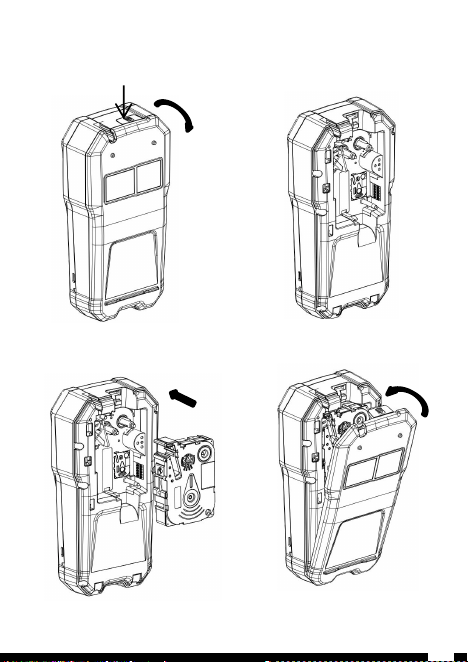
1.Press down on the indicated
arrow to open the back cover
2.Observe the installation diagram
of cassette on the printer body
4.Close the back cover
of the printer
3.Install cassette according to the
diagram and ensure that it has been
installed in the correct position
05
Install Consumables Cassette
8
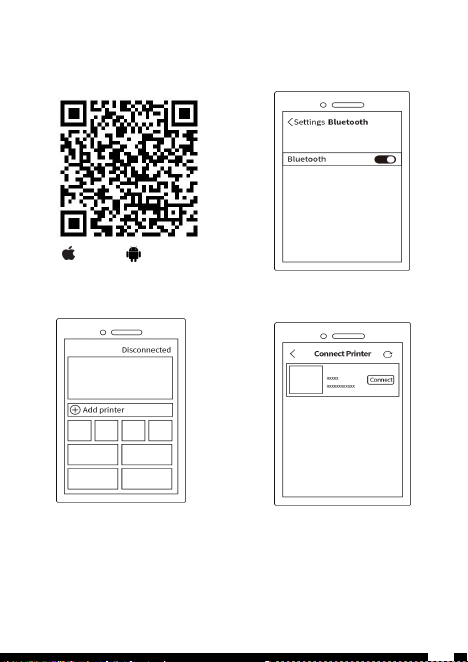
Note:
When download app for Android phone, it is recommended to search for
Suprint from the Google Play or scan the QR code directly to download;
When there are multiple printers around you that cannot distinguish printers
or when the phone does not have location enabled, you can operate the printer
by [Fn]+[Space] to select the quick connect code, use the APP to scan the qr
code to quickly connect to Bluetooth.
1.Scan the qr code to download
the APP
iPhone
Android
2.Ensure that the Bluetooth
function of the phone is on
3.Open the app and click on
"Disconnected"
4.Find the corresponding model
and click on the connect
06
APP Download and Connection
9
10
07
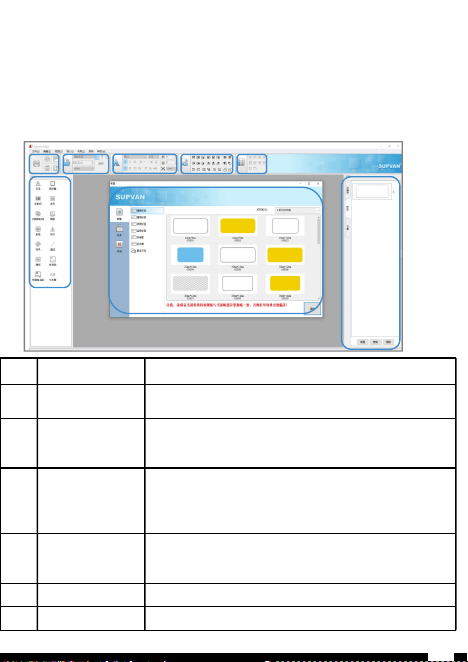
Software Download and Introduction
Software download path:
www.supvan.com-En-Service-Download-SupvanEditor(E)
①
② ③ ④ ⑤ ⑥
⑦
⑧
No.
Introduction
Description
1
Media type
1.Select [G15M Pro printer]
2.Select the corresponding media type and size.
2
Printing and
file management
1.Click the [Print] button to set the print
settings.
2.Can open,new and save the file.
3
Media setting
1.can set the length, horizontal or vertical
and switch media .
2.Label can be clicked on the [Read] button to
automatically identify media specifications.
4
Content edit
Can set the font, size, character spacing,
line spacing, alignment, borders, 690
underline, superscripts and subscripts, etc.
5
Text edit
Can set align, rotate, combine, layer, etc.
6
Table edit
Edit the inserted table.

11
No.
Introduction
Description
7
Common shortcut
icons
Common shortcut keys, support one click
editing
8
Preview
Can preview the edited label, click the label
to refresh, and right-click to edit.

Multiple consumables
Can print continuous/die cut labels, heat shrink tubing, tags,
etc
Batch print
Can print multiple labels at once to meet batch requirements。
Automatic detection
The printer can detect the position of the first label. If it
is not in the correct printing position, the label will be
automatically returned to the starting printing position which
can avoid wasting of first label.
Thermal Transfer
Thermal transfer technology ensures clear printing and more
durable
Automatic recognition
Printer and the APP can automatically recognize the consumables
and directly jump to the corresponding interface for user-
friendly operation and use.
08
Feature
12
Automatic full cutting
Automatic full cutting after printing, no need for manual cutting。
Multiple charging methods
Built in 1200mAh lithium battery, supports Type-c cable and
adapter charging
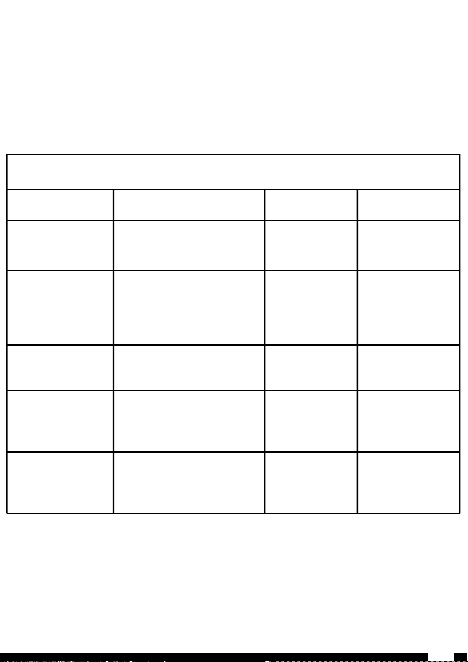
Troubleshooting
Tip
Phenomenon
Cause
Solution
Battery low
Printing is blurry
Battery
Charge
Unrecognized
Tape
Consumables installed,
Printer does not recognize
consumables
Incorrect
consumables/
cassette is not
installed
properly
Replace
consumables/
Reinstall
consumables
End of tape
The printer no action
end of
consumables
Replace new
consumables
Not feed
The printer is running
normally and cover is
closed, but consumables
not come out from outlet
Consumables
jam
Check the outlet
and reinstall
cassette
Cover is open
The printer is running
normally , but
consumables not come out
from outlet
Cover is open
Close cover
1、Fault indication
Normally, when a printer malfunctions or experiences abnormal
conditions, the app will display a fault prompt
2、Print head maintenance
Turn off the printer, open the cover and remove the cassette;
Dip a cotton cloth or cotton swab in medical alcohol, gently wipe
the print head, clean the print head for 1-2 minutes, and wait
for the alcohol to evaporate before using the machine normally.
09
Troubleshooting
13

Name:Label Maker
Model:G15M Pro
Printing Method:Thermal Transfer
Resolution:203DPI
Consumables Width:≤15mm
Effective Printing Width:10mm
Printing Speed:25mm/s
Cutting mode:Auto full cut
Battery capacity:1200mAh
Dimension:190mm×100mm×53mm
Data Transmission:Bluetooth 5.0
Connectivity:APP and PC connected
Power Supply:Type-c 5V⎓ 1A/Adapter 9V⎓ 2.5A
Internal Memory:10 files
Operating Environment :10℃~35℃
Storage Environment:-10℃~55℃
Working Humidity:20%~90%non-condensing
Storage Humidity:20%~90%non-condensing
Printing Instructions:
It is recommended that a single continuous printing
should not exceed 7m or one roll of consumables
Battery usage instructions:
If not in use for a long time, please charge the lithium battery
every 3 months to avoid prolonged natural wear and tear and
inability to use it。
10
Specification
14

Attention
l Please read this user manual carefully before using this
product;
l Please keep this product and accessories out of reach of
children to avoid danger;
l Please do not disassemble the printer by yourself;
l Do not open the cover when printing;
l Please use Supvan original consumables, otherwise it may result
in poor printing quality and damage to the printer;
l During the printing process of the printer, please do not
forcefully pull the label to avoid damage to the printer;
l This product is a precision product. Please use it in a flat
area to prevent damage from falling and to prevent impact and
vibration;
l The print head of this product is a precision component, please
do not scratch it to avoid affecting the printing effect;
l Do not throw the printer into fire or high temperature;
l Please use a single power outlet instead of multiple outlets
that have already been plugged into multiple devices, as this may
cause fire or electric shock;
l Please do not use adapters that do not support outputting DC 5V;
l Do not wet the printer/power supply/power socket when charging,
and do not use wet hands to plug and unplug the power plug to
prevent electric shock;
l Please do not allow metal or liquid to enter the printer, as it
may cause fire, electric shock, and damage to the interior
l Please use the printer in a clean place and do not use it on
carpets or felt, otherwise a large amount of dust can easily cause
short circuits;
15

Attention
l Please keep the printer away from flammable solvents such as
alcohol and gasoline, as well as from sources of ignition, to
prevent ignition and potential fires
l Please do not touch the print head with your hands. When the
device finishes working, touching it may cause skin burns;
l Please do not press the equipment heavily;
l This printer and consumables should be stored in a dry,
ventilated, and sun free place;
l If you notice any unusual odor or noise while using the printer,
please immediately turn off the printer and contact your seller;
l During long-term operation of this printer, the lithium battery
may generate heat and transmit it to the cover, which is a normal
phenomenon. The printer can be temporarily stopped and allowed to
cool before resuming printing work.
16
Declaration
l We reserves the right to change the content of this user
manual due to printer upgrades.
l Our company will not be responsible for any consequences
caused by your failure to operate according to the instructions
in the user manual.
l The logos or trademarks of other companies referenced in
this user manual are owned by other companies.
l If you want to learn more about this device or our company,
you can visit the official website of Supvan.
17
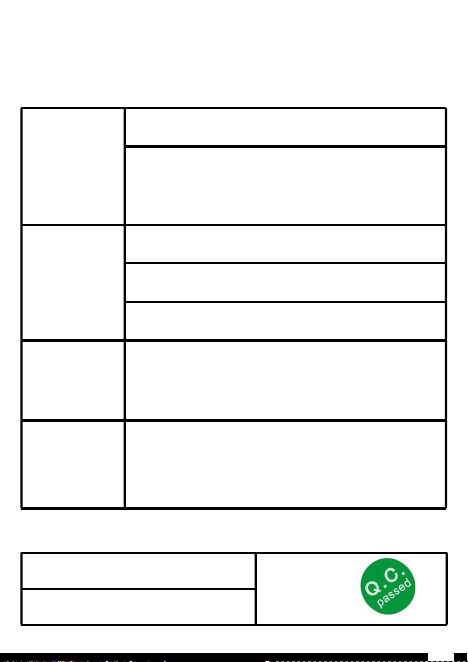
Warranty Card
□Replacement
□Return
□Repair
Customer
Information
Name: Gender: Phone:
Address:
Product
Information
Purchase Date:
Printer Model:
Printer Serial No.:
Return or
Replacement
record
Reason:
Repair
record
Qualified Certificate
Inspector:
Inspection:
Date of Production:
18

19
SU
PVAN
O
r
g
a
ni
z
ed
,
S
im
p
l
e
,
D
o
n
e
.

FCC Warnning:
This equipment has been tested and found to comply with the limits for a Class B digital device,
pursuant to part 15 of the FCC Rules. These limits are designed to provide
reasonable
protection against harmful interference in a residential installation. This equipment generates,
uses and can radiate radio
frequency
energy
and,
if
not
installed
and
used
in
accordance
with
the
instructions,
may cause
harmful
interference
to
radio
communications.
However,
there
is
no
guarantee
that interference
will
not
occur
in
a
particular
installation.
If
this
equipment
does
cause
harmful interference to radio or television reception, which can be
determined by turning the equipment off
and
on,
the
user
is
encouraged
to
try
to
correct
the interference
by
one
or
more
of
the following measures:
•
Reorient or relocate the receiving antenna.
•
Increase the separation between the equipment and receiver.
•
Connect the equipment into an outlet on a circuit different from that to which the receiver is
connected.
• Consult the dealer or an experienced radio/TV technician for help.
Caution:
Any
changes
or
modifications
to
this
device
not
explicitly
approved
by
manufacturer
could void your authority to operate this equipment.
This
device
complies
with
part
15
of
the
FCC
Rules.
Operation
is
subject
to
the
following
two
conditions:
(1)This
device
may
not
cause
harmful
interference,
and
(2)
this
device
must
accept
any
interference received, including interference that may cause undesired operation.
This
equipment
complies
with
FCC
radiation
exposure
limits
set
forth
for
an
uncontrolled
environment.
This
equipment
should
be
installed
and
operated
with
minimum
distance
0cm
between the radiator and your body.

ISED Statement
‐
English:
This device contains licence-exempt transmitter(s)/receiver(s) that
comply with Innovation, Science and Economic
Development Canada’s licence-exempt RSS(s).
Operation is subject to the following two conditions:
(1) This device may not cause interference.
(2) This device must accept any interference, including interference that may cause undesired
operation of the device.
‐
French:Cet appareil contient des émetteurs/récepteurs exempts de licence qui sont
conformes aux CNR exempts de licence d’Innovation, Sciences et
Développement économique
Canada. Le fonctionnement est soumis aux deux conditions suivantes :
(1) Cet appareil ne doit pas causer d’interférences.
(2) Cet appareil doit accepter toute interférence, y compris les interférences susceptibles de
provoquer un fonctionnement indésirable de l’appareil.
This
equipment
complies
with
Canada
radiation
exposure
limits
set
forth
for
an
uncontrolled
environment.
This
equipment
should
be
installed
and
operated
with
minimum
distance
0cm
between
the
radiator & your body.
Cet équipement est conforme Canada limites d'exposition aux radiations dans un environnement
non contrôlé.
Cet équipement doit être installé et utilisé avec une distance minimale de 0 cm entre le
radiateur et votre corps.