ROG RAIKIRI II
PRO PC
Wireless Gaming Controller GC701

English ........................................................................................................ 3
繁體中文 ...............................................................................................................................11
Français .................................................................................................... 19
Deutsch ..................................................................................................... 24
4]GGñðυ .................................................................................................... 29
˂IXMRE ...................................................................................................... 34
Dansk ........................................................................................................ 39
Nederlands ............................................................................................... 44
Suomi ........................................................................................................ 49
Magyar ...................................................................................................... 54
Italiano ...................................................................................................... 59
Norsk......................................................................................................... 64
Português ................................................................................................. 69
Polski ........................................................................................................ 79
6SQʜRʹ .................................................................................................... 84
Slovenský .................................................................................................. 89
Svenska .................................................................................................... 94
ÞñχσϏôψþñσ ............................................................................................... 99
Port ......................................................................................................... 104
Português do Brasil ............................................................................... 109
ÞñχσϏ ....................................................................................................... 114
日本語 .....................................................................................................119
ଞ˲߭ ..................................................................................................... 124
˫˶ .......................................................................................................... 129
Türkçe ..................................................................................................... 134
Q27846 / First Edition / August 2026
ΔϳΑέόϟ
ʺʩʸʡʲ
ROG RAIKIRI II PRO PC wireless gaming controller 3
English
Wireless Gaming Controller
ROG RAIKIRI II Pro PC
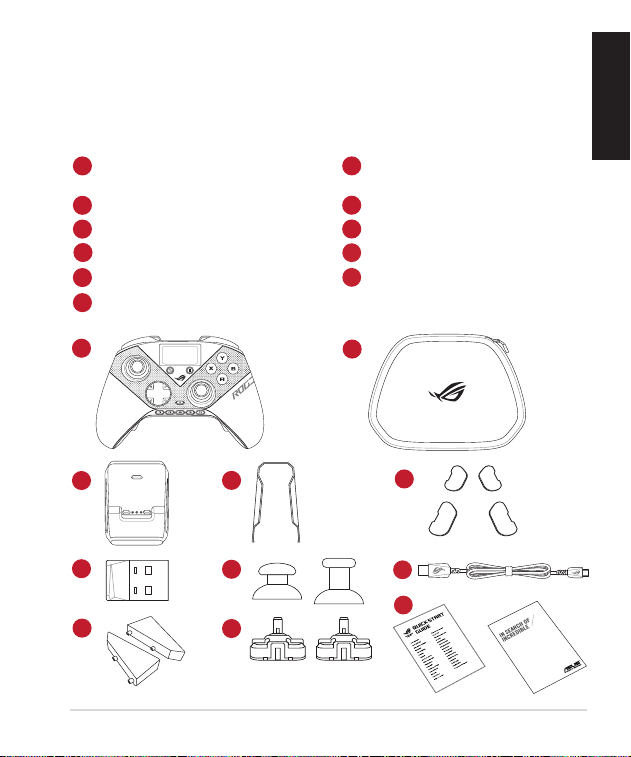
Package contents
1
1 x ROG RAIKIRI II PRO PC wireless
gaming controller
7
2 x Replacement thumbstick
modules
2
1 x Charging dock
8
1 x ROG bag
3
1 x USB wireless dongle
9
4 x Rear button covers
4
1 x Stand holder set
10
1 x USB Type-C
®
cable
5
1 x Thumbstick module puller
11
Technical documents
6
2 x Replacement thumbstick caps
Warranty Card
1
2
3
4
5
6
7
8
9
10
11
Quick Start Guide4
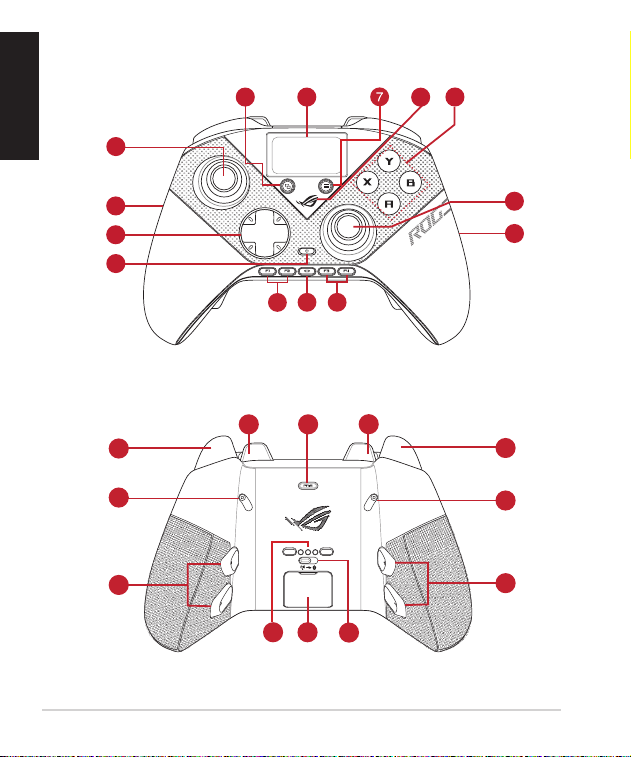
Device features
Top view
Bottom view
1
2
3
4
5
6
8
9
11
1
2
10
10
12
12
13
14
15
16
16
15
14
17 18
19
English
ROG RAIKIRI II PRO PC wireless gaming controller 5
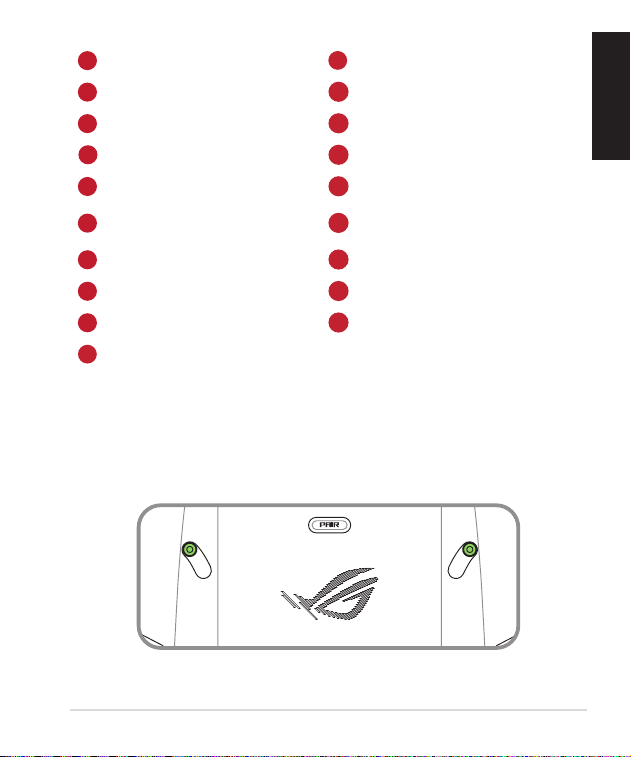
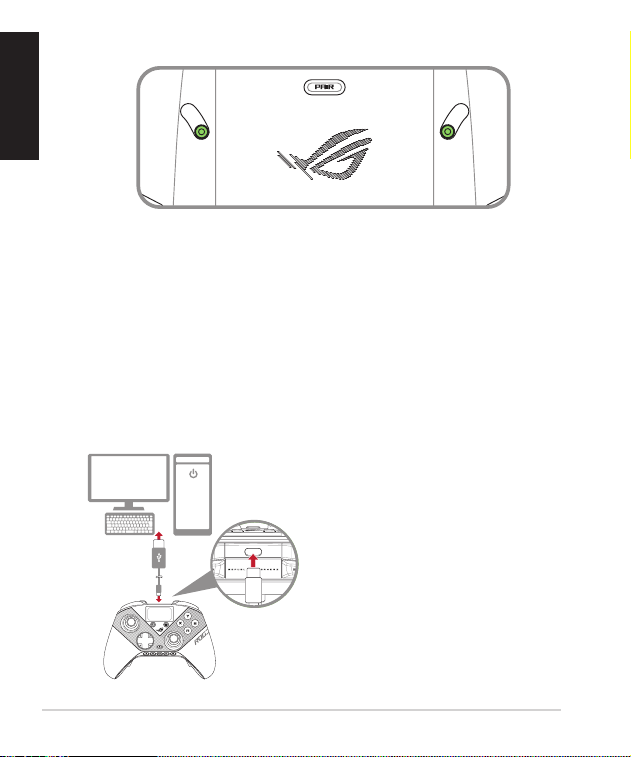
Enabling/Disabling Selectable Step Triggers
You can enable the switches to shorten the travel distance of the left and right
triggers by sliding the switches outwards. To go back to full trigger mode, simply
slide the switches inwards.
Short trigger mode
1
Thumbsticks
11
Display control button
2
ROG Aura RGB LED
12
Bumpers (LB/RB)
3
Hybrid D-pad
13
Pairing button
4
Power button
14
Triggers (LT/RT)
5
View button
15
Step trigger switches
6
Display panel
16
Multi-functional rear buttons
(M1/M2/M3/M4)
7
Menu button
17
Pogo pin
8
ROG logo
18
USB dongle with cover
9
ABXY buttons
19
Connection switch
10
F keys (F1/F2/F3/F4)
English
Quick Start Guide6
Full trigger mode
Getting started
PC
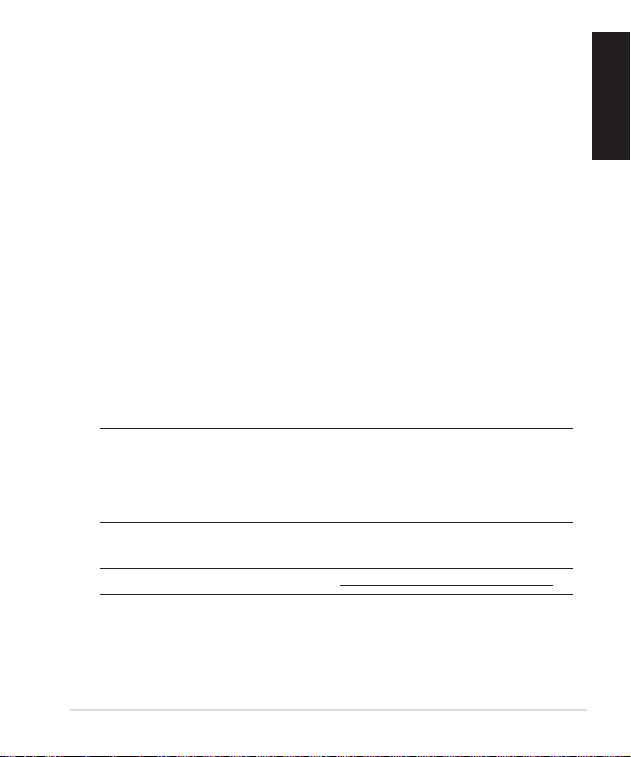
Connect to PC
Via wired connection
1. Set the connection switch to USB mode.
2. Connect your controller to the PC with the bundled USB Type-C
®
cable, and
the controller will automatically power on.
English
ROG RAIKIRI II PRO PC wireless gaming controller 7
Via 2.4GHz
1. Set the connection switch to 2.4GHz mode.
2. Open the dongle cover on the back of the controller to pick up the bundled
USB dongle.
3. Insert the USB dongle into an available USB port on your PC.
4. Press the power button on your controller to power it on.
Via Bluetooth
1. Set the connection switch to Bluetooth mode.
2. Press the power button on your controller to power it on.
3. Press and hold the pairing button until the display panel displays “Pairing...”,
indicating that the controller has started pairing.
4. Find the Bluetooth icon on the task bar on your PC, then click Add a device >
ROG RAIKIRI II PRO PC > Finish.
5. The display panel displays “Pairing successful”, indicating that the controller
has been connected to the PC successfully.
NOTE:
• Your controller will automatically pair with the previously paired PC.
• If pairing is not successful within 1 minute, the F keys indicator will turn off.
• IOS and macOS devices are not supported for Bluetooth connection.
6. Execute the driver for installation.
NOTE: Download and install the driver from https://rog.asus.com/controllers-group/.
English
Quick Start Guide8
On-screen control settings
With display control button
You can press and hold the display control button for 3 seconds to enter or exit
the on-screen control menu. When enabled, use the left or right buttons on the
L]FVMH(TEHXSREZMKEXIXLVSYKLSTXMSRW4VIWW%XSGSRƼVQEWIPIGXMSRSVTVIWW
B to go back.
ƍ 4VSƼPIGLERKI7[MXGLFIX[IIRTVSƼPIWXS
NOTE: =SYGEREPWSTVIWWXLIHMWTPE]GSRXVSPFYXXSRFVMIƽ]XSG]GPIXLVSYKLTVSƼPIW
ƍ &YXXSRWIXXMRK'SRƼKYVIVIQETTMRKQEGVSWERHXYVFSJYRGXMSRW
• 0MKLXMRKFVMKLXRIWW Adjust the brightness of the RGB LED lighting.
ƍ %RMQEXMSR7IXXMRK Select the display animation.
ƍ 4ERIPFVMKLXRIWW Adjust the brightness of the display panel.
ƍ :MFVEXMSR Adjust the controller vibration level.
ƍ 'EPMFVEXMSR Calibrate the thumbsticks.
ƍ *EGXSV]VIWIX Reset the controller to factory settings.
With F keys
=SYGERTVIWW*OI]W****XSGSRƼKYVIFYXXSRVIQETTMRKQEGVSERH
turbo functions.
ƍ *Remap buttons.
ƍ *Assign macro functions.
ƍ *'SRƼKYVIXYVFSJYRGXMSRW
ƍ *Turn the turbo function on or off.
NOTE: Utilize Gear Link https://gearlink.asus.com to customize F Keys of your
controller.
English
ROG RAIKIRI II PRO PC wireless gaming controller 9
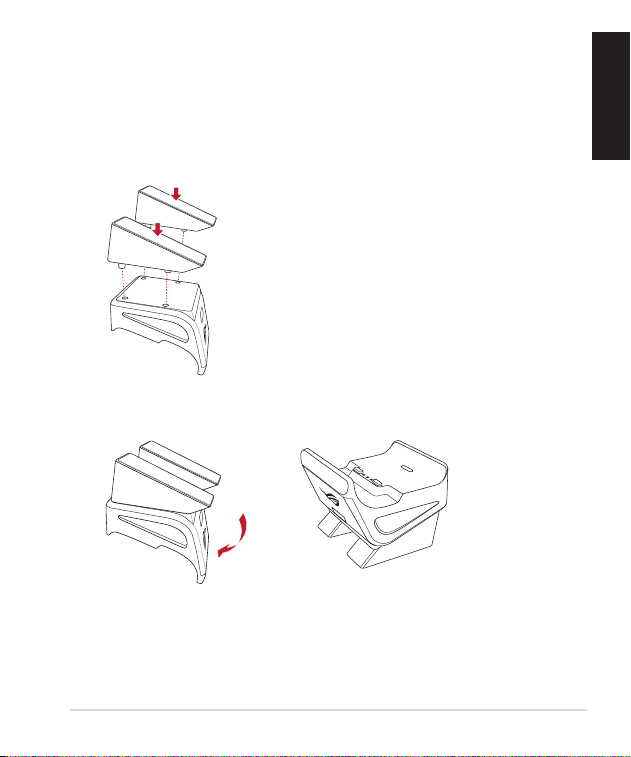
Using the stand holders
Your controller is bundled with stand holders for the charging dock, allowing you
to charge your controller outside the ROG bag.
To install the stand holders:
1. Attach the stand holders to the bottom of the charging dock.
2. Flip the charging dock with its top facing upwards.
English
Quick Start Guide10
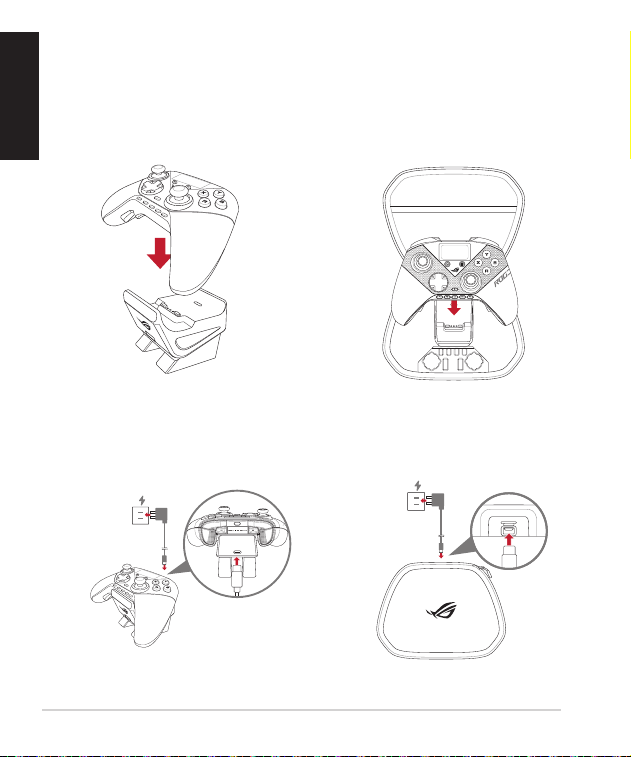
Charging your controller
To charge your controller:
1. Align the female Pogo pin on the bottom of your controller with the male
Pogo pin on the charging dock.
OR
2. Press your controller down onto the charging dock until it is fully seated.
3. Connect the charging dock to a power source using the bundled USB
Type-C
®
cable.
OR
English
ROG RAIKIRI II PRO PC wireless gaming controller 11
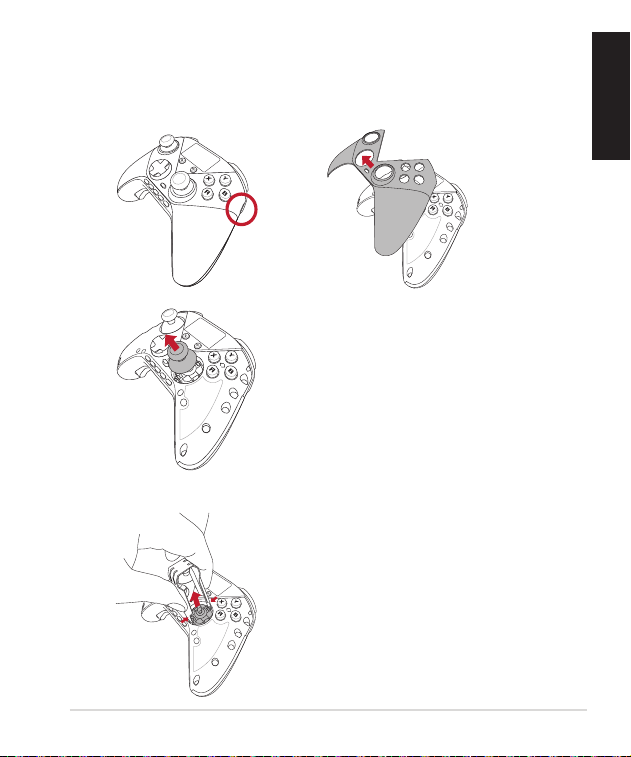
Replacing the thumbstick caps and/or thumbstick modules
To replace the thumbstick caps and/or thumbstick modules:
1. Locate the notches on both sides of your controller to remove the magnetic
top cover.
2. Pull off the thumbstick cap.
English
3. If you need to replace the thumbstick, use the thumbstick puller to release
the latches on the thumbstick module, then pull it upward to remove it.
Quick Start Guide12
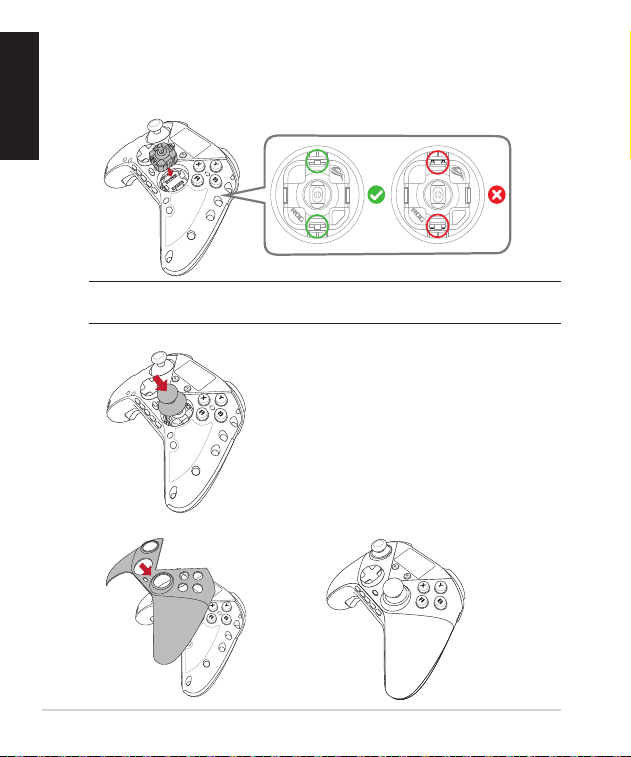
Align the female Pogo pin on the replacement thumbstick module with the
male Pogo pin on your controller, then press the thumbstick module into
]SYVGSRXVSPPIVYRXMPMXMWƼVQP]TPEGIH)RWYVIXLEXXLIWRETMRJIIXEVIJYPP]
engaged with a “click” sound.
NOTE: Make sure you calibrate the thumbstick module throught the display panel or via
Gear Link after replacing the thumbstick module.
4. Attach the thumbstick cap.
5. Install the magnetic cover that you removed before.
English
ROG RAIKIRI II PRO PC wireless gaming controller 13
Using the rear button cover
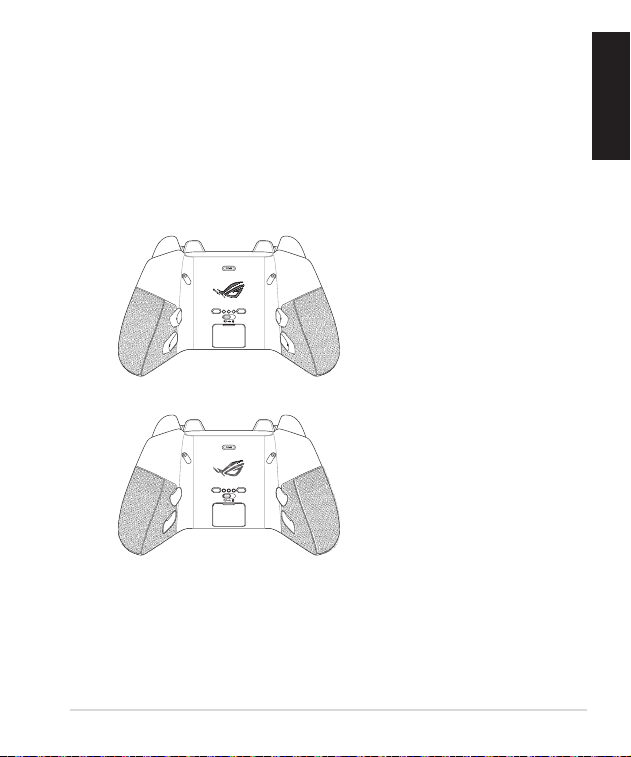
Your controller comes with four magnetic covers for the magnetic multi-
functional rear buttons, allowing you to easily replace the unused rear buttons
with covers to avoid misclicks.
To install the rear button cover:
1. Remove the multi-functional rear button from your controller.
2. Insert the rear button cover into the slot and ensure it is securely placed.
English

Quick Start Guide1414
Safety Guidelines
Keep the device away from liquid, humidity, or moisture. Operate the device only within the
WTIGMƼGXIQTIVEXYVIVERKISJq'q*XSq'q*;LIRXLIHIZMGII\GIIHWXLI
maximum temperature, unplug or switch off the device to let it cool down.
Notices
Limitation of Liability
Circumstances may arise where because of a default on ASUS’ part or other liability, you are entitled
to recover damages from ASUS. In each such instance, regardless of the basis on which you are
entitled to claim damages from ASUS, ASUS is liable for no more than damages for bodily injury
(including death) and damage to real property and tangible personal property; or any other actual
and direct damages resulted from omission or failure of performing legal duties under this Warranty
Statement, up to the listed contract price of each product.
ASUS will only be responsible for or indemnify you for loss, damages or claims based in contract, tort
or infringement under this Warranty Statement.
This limit also applies to ASUS’ suppliers and its reseller. It is the maximum for which ASUS, its
suppliers, and your reseller are collectively responsible.
UNDER NO CIRCUMSTANCES IS ASUS LIABLE FOR ANY OF THE FOLLOWING: (1) THIRD-PARTY
CLAIMS AGAINST YOU FOR DAMAGES; (2) LOSS OF, OR DAMAGE TO, YOUR RECORDS OR DATA;
OR (3) SPECIAL, INCIDENTAL, OR INDIRECT DAMAGES OR FOR ANY ECONOMIC CONSEQUENTIAL
DAMAGES (INCLUDING LOST PROFITS OR SAVINGS), EVEN IF ASUS, ITS SUPPLIERS OR YOUR
RESELLER IS INFORMED OF THEIR POSSIBILITY.
RF Exposure Information (SAR)
This device meets the government’s requirements for exposure to radio waves. This device is
designed and manufactured not to exceed the emission limits for exposure to radio frequency (RF)
energy set by the Federal Communications Commission of the U.S. Government.
8LII\TSWYVIWXERHEVHIQTPS]WEYRMXSJQIEWYVIQIRXORS[REWXLI7TIGMƼG%FWSVTXMSR6EXISV
SAR. The SAR limit set by the FCC is 1.6 W/kg. Tests for SAR are conducted using standard operating
TSWMXMSRWEGGITXIHF]XLI*''[MXLXLI)98XVERWQMXXMRKEXXLIWTIGMƼIHTS[IVPIZIPMRHMJJIVIRX
channels.
CAUTION! The SAR compliance for body operating condition must provide a minimum separa-
tion distance of 0.5cm between the device and the body.
ᒓရ僕ᙜヱᑓ⏝ရ働傿傏僔ᶵჾ僑僕⏝傽僐傪働債僆傻傪傏ᶵჾ僔◚ᦆ僨傽債僕傎ⅆ⅏僪ឤ㟁僔ཎᅉ
僎僐僱傹僎傲储僰僤傿傏䣞
⬱ℐ婒㖶
ġĮġ㬌忲㇚㍏⇞☐⎒ㅱ⛐㹓⹎ᶵ檀㕤ġĵıƱń炷IJıĵƱŇ炸䘬䑘⠫ᶳἧ䓐ˤ
ġĮġ⬱墅拗婌✳嘇䘬暣㰈⎗傥㚫⮶农䆮䁠ˤ

ROG RAIKIRI II PRO PC wireless gaming controller 1515
The FCC has granted an Equipment Authorization for this device with all reported SAR levels
evaluated as in compliance with the FCC RF exposure guidelines. SAR information on this device is
SRƼPI[MXLXLI*''ERHGERFIJSYRHYRHIVXLI(MWTPE]+VERXWIGXMSRSJwww.fcc.gov/eot/ea/fccid
after searching on FCC ID: MSQ-GC701/:MSQ-GC701D
Federal Communications Commission Statement
This device complies with Part 15 of the FCC Rules. Operation is subject to the following two
conditions:
• This device may not cause harmful interference.
• This device must accept any interference received including interference that may cause
undesired operation.
This equipment has been tested and found to comply with the limits for a Class B digital
device, pursuant to Part 15 of the FCC Rules. These limits are designed to provide reasonable
protection against harmful interference in a residential installation. This equipment generates,
uses and can radiate radio frequency energy and, if not installed and used in accordance
with manufacturer’s instructions, may cause harmful interference to radio communications.
However, there is no guarantee that interference will not occur in a particular installation. If
this equipment does cause harmful interference to radio or television reception, which can be
determined by turning the equipment off and on, the user is encouraged to try to correct the
interference by one or more of the following measures:
• Reorient or relocate the receiving antenna.
• Increase the separation between the equipment and receiver.
• Connect the equipment to an outlet on a circuit different from that to which the receiver is
connected.
• Consult the dealer or an experienced radio/TV technician for help.
CAUTION! The use of shielded cables for connection of the monitor to the graphics card is
VIUYMVIHXSEWWYVIGSQTPMERGI[MXL*''VIKYPEXMSRW'LERKIWSVQSHMƼGEXMSRWXSXLMWYRMXRSX
expressly approved by the party responsible for compliance could void the user’s authority to
operate this equipment.
• The portable device is designed to meet the requirements for exposure to radio waves
established by the FCC/ISED. These requirements set a SAR limit of 1.6 W/kg averaged over one
gram of tissue.
Compliance Statement of Innovation, Science and Economic Development
Canada (ISED)
This device complies with Innovation, Science and Economic Development Canada licence exempt
RSS standard(s). Operation is subject to the following two conditions: (1) this device may not cause
interference, and (2) this device must accept any interference, including interference that may cause
undesired operation of the device.
CAN ICES(B)/NMB(B)

Quick Start Guide1616
Déclaration de conformité de Innovation, Sciences et Développement
économique Canada (ISED)
Le présent appareil est conforme aux CNR d’Innovation, Sciences et Développement économique
Canadaapplicables aux appareils radio exempts de licence. L’exploitation est autorisée aux deux
conditions suivantes : (1) l’appareil ne doit pas produire de brouillage, et (2) l’utilisateur de l’appareil
doit accepter tout brouillage radioélectrique subi, même si le brouillage est susceptible d’en
compromettre le fonctionnement.
CAN ICES (B) / NMB (B)
Radio Frequency (RF) Exposure Information
The radiated output power of the Wireless Device is below the Innovation, Science and Economic
Development Canada (ISED) radio frequency exposure limits. The Wireless Device should be used in
such a manner such that the potential for human contact during normal operation is minimized.
8LMWHIZMGILEWFIIRIZEPYEXIHJSVERHWLS[RGSQTPMERX[MXLXLI-7)(7TIGMƼG%FWSVTXMSR6EXI
(“SAR”) limits when operated in portable exposure conditions. (Antennas are greater than 5mm (for
Dongle) / 0mm (for Wireless Gaming Controller) from a person’s body.
Informations concernant l’exposition aux fréquences radio (RF)
0ETYMWWERGIVE]SRRʣIHIPƅETTEVIMPWERWƼPIWXMRJʣVMIYVIEY\PMQMXIWHƅI\TSWMXMSREY\
radiofréquences établies par Innovation, Sciences et Développement économique Canada (ISDE).
0ƅETTEVIMPWERWƼPHSMXʤXVIYXMPMWʣHIQERMʢVIʚQMRMQMWIVPIWVMWUYIWHIGSRXEGXLYQEMRTIRHERXWSR
fonctionnement normal.
'IXETTEVIMPEʣXʣʣZEPYʣIXHʣGPEVʣGSRJSVQIEY\PMQMXIWHYHʣFMXHƅEFWSVTXMSRWTʣGMƼUYI(%7
Hƅ-7()PSVWUYƅMPIWXYXMPMWʣHERWHIWGSRHMXMSRWHƅI\TSWMXMSRTSVXEFPIW0IWERXIRRIWWSRXWMXYʣIWʚ
TPYWHIQQTSYVPIHSRKPIQQTSYVPEQERIXXIHINIYWERWƼPHYGSVTWHƅYRITIVWSRRI
Précautions d’emploi de l’appareil :
E 7S]I^TEVXMGYPMʢVIQIRXZMKMPERXUYERXʚZSXVIWʣGYVMXʣPSVWHIPƅYXMPMWEXMSRHIGIXETTEVIMPHERW
certains lieux (les aéroports, les hôpitaux, les stations-service et les garages professionnels).
F ʈZMXI^HƅYXMPMWIVGIXETTEVIMPʚTVS\MQMXʣHIHMWTSWMXMJWQʣHMGEY\MQTPERXʣWPSVWHƅYRETTIP
XʣPʣTLSRMUYI7MZSYWTSVXI^YRMQTPERXʣPIGXVSRMUYIWXMQYPEXIYVWGEVHMEUYIWTSQTIWʚ
insuline, neurostimulateurs…), veuillez impérativement respecter une distance minimale de 15
GIRXMQʢXVIWIRXVIGIXETTEVIMPIXPƅMQTPERXTSYVVʣHYMVIPIWVMWUYIWHƅMRXIVJʣVIRGI
c. Utilisez cet appareil dans de bonnes conditions de réception pour minimiser le niveau de
rayonnement. Ce n’est pas toujours le cas dans certaines zones ou situations, notamment les
parkings souterrains, les ascenseurs, en train ou en voiture ou tout simplement dans un secteur
mal couvert par le réseau.
H 8IRI^GIXETTEVIMPʚHMWXERGIHYZIRXVIHIWJIQQIWIRGIMRXIWIXHYFEWZIRXVIHIWEHSPIWGIRXW
ROG RAIKIRI II PRO PC wireless gaming controller 1717
Proper disposal
Lithium-Ion Battery Warning
CAUTION: Danger of explosion if battery is incorrectly replaced. Replace only with the same or
equivalent type recommended by the manufacturer. Dispose of used batteries according to the
manufacturer’s instructions.
ASUS Recycling/Takeback Services
ASUS recycling and takeback programs come from our commitment to the highest standards for
protecting our environment. We believe in providing solutions for you to be able to responsibly recycle
our products, batteries, other components as well as the packaging materials. Please go to https://
esg.asus.com/en/Takeback.htm for detailed recycling information in different regions.
REACH
Complying with the REACH (Registration, Evaluation, Authorisation, and Restriction of Chemicals)
regulatory framework, we published the chemical substances in our products at ASUS REACH
website at https://esg.asus.com/en/Takeback.htm.
(3238XLVS[XLIHIZMGIMRƼVI(3238WLSVXGMVGYMXXLIGSRXEGXW
DO NOT disassemble the device.
The Waste Electrical and Electronic Equipment (WEEE) Directive (Directive 2012/19/EU) is a
European Union law that aims to reduce the environmental impact of electrical and
electronic equipment. It mandates producers to take responsibility for the end-of-life
management of their products, promoting collection, treatment, and recycling to minimize
waste and encourage resource recovery.
Do not throw your electrical and electronic equipment in municipal waste.
The symbol of the crossed-out wheeled bin on the product or packaging indicates that this product
(including any batteries it contains) must not be disposed of with your household waste.
To prevent potential harm to the environment and human health, a collection framework should
be used to return, recycle, and recover waste electrical and electronic equipment (WEEE), and
this product has been designed to enable the reuse of parts and facilitate the recycling of certain
materials.
Improper disposal may involve risks due to the presence of hazardous substances within electrical
and electronic equipment, such as lead and BFR and other harmful components.
Check your local recycling services for electronic products.
(https://esg.asus.com/en/circular-economy/resource-regeneration/global-take-back-service)
For more information on the multi-language version please scan below:
Quick Start Guide1818
电器电子产品有害物质限制使用标识:图中之数字为产品之环保使用期
限。仅指电器电子产品中含有的有害物质不致发生外泄或突变,从而对环境造
成污染或对人身、财产造成严重损害的期限。
China RoHS EFUP
Labelling
有害物质
部件名称
印刷电路板及
电子组件
外壳 按键
外部信号连接
头及线材
电池
铅
(Pb)
×
○○○
×
汞
(Hg)
○○○○○
镉
(Cd)
○○○○○
六价铬
(Cr(VI))
○○○○○
多溴联苯
(PBB)
○○○○○
多溴二苯醚
(PBDE)
○○○○○
邻苯二甲酸二异丁酯
(DIBP)
○○○○○
邻苯二甲酸二(2- 乙基)己酯
(DEHP)
○○○○○
邻苯二甲酸二正丁酯
(DBP)
○○○○○
邻苯二甲酸丁苄酯
(BBP)
○○○○○
注1:
○:表示该有害物质在该部件所有均质材料中的含量均不超出电器电子产品有害物质限制使用国家标准要求。
X:表示该有害物质至少在该部件的某一均质材料中的含量超出电器电子产品有害物质限制使用国家标准要求。
注2:以上未列出的部件,表明其有害物质含量均不超出电器电子产品有害物质限制使用国家标准要求。
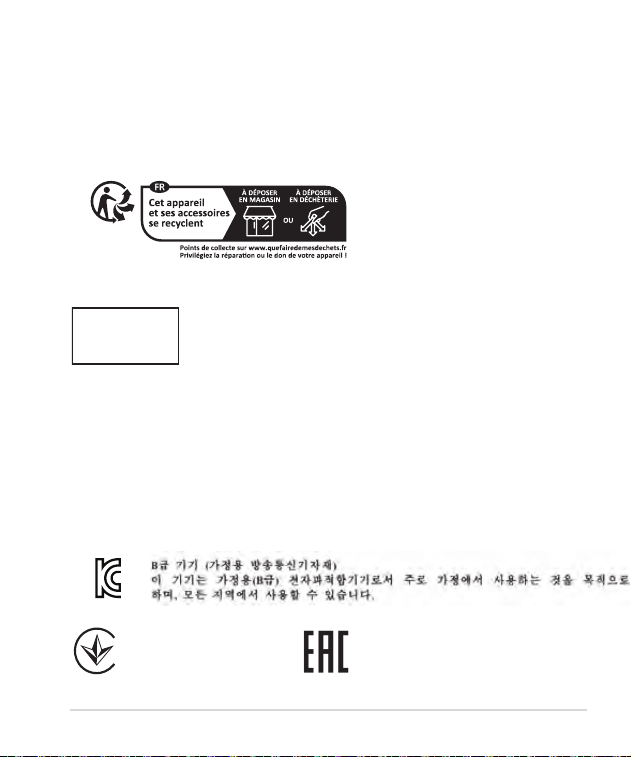
單元
限用物質及其化學符號
鉛 (Pb) 汞 (Hg) 鎘 (Cd)
六價鉻
(Cr
+6
)
多溴聯苯
(PBB)
多溴二苯醚
(PBDE)
印刷電路板及電子組件 -○○○ ○ ○
外殼 ○○○○ ○ ○
滾輪裝置 ○○○○ ○ ○
其他及其配件
-○○○ ○ ○
備
考1. “O”係指該項限用物質之百分比含量未超出百分比含量基準值。
備考2. “-”係指該項限用物質為排除項目。
「產品之限用物質含有情況」之相關資訊,請參考下表:
ROG RAIKIRI II PRO PC wireless gaming controller 1919
NCC: Wireless Statement
取得審驗證明之低功率射頻器材,非經核准,公司、商號或使用者均不得擅自變更頻
率、加大功率或變更原設計之特性及功能。低功率射頻器材之使用不得影響飛航安全及干擾
合法通信;經發現有干擾現象時,應立即停用,並改善至無干擾時方得繼續使用。前述合法
通信,指依電信管理法規定作業之無線電通信。低功率射頻器材須忍受合法通信或工業、科
學及醫療用電波輻射性電機設備之干擾。
France sorting and recycling information
Regional notice for Singapore
This ASUS product complies with IMDA
Standards.
Complies with
IMDA Standards
DB103778
警告VCCI準拠クラスB機器(日本)
この装置は、情報処理装置等電波障害自主規制協議会(VCCI)の基準に基づくクラスB情
報技術装置です。この装置は、家庭環境で使用することを目的としていますが、この装置がラ
ジオやテレビジョン受信機に近接しaて使用されると、受信障害を引き起こすことがあります。
取扱説明書に従って正しい取り扱いをして下さい。
VCCI: Japan Compliance Statement
VCCI Class B Statement
KC: Korea Warning Statement
R-R-MSQ-GC701
Ukraine Certification Logo
EAC Certification Logo
Quick Start Guide2020
India E-waste (Management) Rules 2016
This product complies with the "India E-Waste (Management) Rules, 2016" and prohibits use of lead,
mercury, hexavalent chromium, polybrominated biphenyls(PBBs) and polybrominated diphenyl ethers
(PBDEs) in concentrations exceeding 0.1 % by weight in homogenous materials and 0.01 % by weight
in homogenous materials for cadmium, except for the exemptions listed in Schedule II of the Rule.
ASUS products sold in Vietnam, on or after September 23, 2011,meet the requirements of the Vietnam
Circular 30/2011/TT-BCT.
'ʛGWСRTLЧQ%797FʛRXПM:MхX2EQZʚSRKʚ]XLʛRKRʹQXVѝZпWEYпYTLСMʛTѧRK
GʛG]ʤYGХYGѥE8LʭRKX88&'8GѥE:MхX2EQ
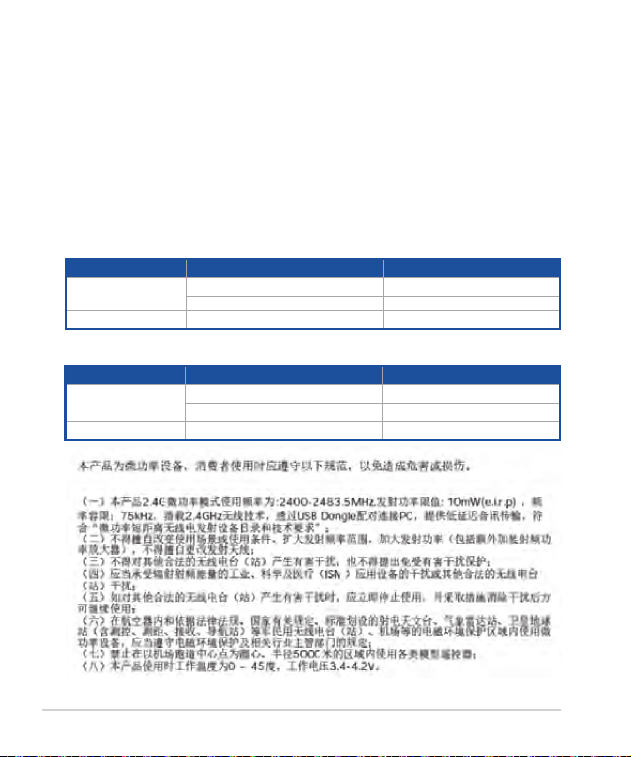
UKCA RF Output table (The Radio Equipment Regulations 2017)
Function Frequency Maximum Output Power (EIRP)
2.4GHz wireless
(2402 - 2480MHz) - Controller 5.45 dBm
(2402 - 2480 MHz) - Dongle 4.47 dBm
BLE (2402 - 2480MHz) - Controller 5.59 dBm
CE RED RF Output table (Directive 2014/53/EU)
Function Frequency Maximum Output Power (EIRP)
2.4GHz wireless
(2402 - 2480MHz) - Controller 5.45 dBm
(2402 - 2480 MHz) - Dongle 4.47 dBm
BLE (2402 - 2480MHz) - Controller 5.59 dBm
ROG RAIKIRI II PRO PC wireless gaming controller 2121
CE Mark Warning
English ASUSTeK Computer Inc. hereby declares that this device is in compliance with the essential
requirements and other relevant provisions of related Directives. Full text of EU declaration of
conformity is available at: www.asus.com/support.
Français %WYW8IO'SQTYXIV-RGHʣGPEVITEVPETVʣWIRXIUYIGIXETTEVIMPIWXGSRJSVQIEY\GVMXʢVIW
essentiels et autres clauses pertinentes des directives concernées. La déclaration de conformité de
Pƅ9)TIYXʤXVIXʣPʣGLEVKʣIʚTEVXMVHYWMXI-RXIVRIXWYMZERX www.asus.com/support.
English ASUSTeK Computer Inc. hereby declares that this device is in compliance with the essential
requirements and other relevant provisions of related Directives. Full text of EU declaration of
conformity is available at: www.asus.com/support.
Français %WYW8IO'SQTYXIV-RGHʣGPEVITEVPETVʣWIRXIUYIGIXETTEVIMPIWXGSRJSVQIEY\GVMXʢVIW
essentiels et autres clauses pertinentes des directives concernées. La déclaration de conformité de
Pƅ9)TIYXʤXVIXʣPʣGLEVKʣIʚTEVXMVHYWMXI-RXIVRIXWYMZERX www.asus.com/support.
Deutsch ASUSTeK Computer Inc. erklärt hiermit, dass dieses Gerät mit den wesentlichen
Anforderungen und anderen relevanten Bestimmungen der zugehörigen Richtlinien übereinstimmt.
Der gesamte Text der EU-Konformitätserklärung ist verfügbar unter: www.asus.com/support
Italiano %7978I/'SQTYXIV-RGGSRPETVIWIRXIHMGLMEVEGLIUYIWXSHMWTSWMXMZSʢGSRJSVQIEM
requisiti essenziali e alle altre disposizioni pertinenti con le direttive correlate. Il testo completo della
HMGLMEVE^MSRIHMGSRJSVQMXʚ9)ʢHMWTSRMFMPIEPPƅMRHMVM^^S www.asus.com/support.
οωψψñðυγφóõσôðā%797ïσāëòāτöùöφÿöφωψöχφυψöëφψφφöëτöψöëωτöφψôφëôýóöχτêφëσôðāó
ðíχωìðóψφφöëτöψöëωĀûðóωψòφëðāóψφφöëτöψöëωĀûðϊíðχτñöðëξφíχφêôωĀðô÷φχóσøðĀ
õφîσòωυψöσψóφöχðöτôσwww.asus.com/support.
Øüòìσχψñðπôσψöφāûφöφ%7978I/'SQTYXIV-RGíτñòσχðχσùτöφëσωψöχφυψöëφτë
ψüφöëτöψöëðτψüψψüûτψöëτôðöτðïðψñëσôðāðíχωìðöτõχðòφîðóðõφψöσôφëòτôðāôσ
ψëüχïσôðöτíðχτñöðëðξüòôðāööτñψöôσíτñòσχσøðāöσïσψüφöëτöψöëðτôσιπτíφψöüõôσôσ
σíχτψwww.asus.com/support
Hrvatski%7978I/'SQTYXIV-RGSZMQM^NEZPNYNIHENISZENYVIENWYOPEHERWFMXRMQ^ELXNIZMQEM
SWXEPMQSHKSZEVENYʽMQSHVIHFEQEZI^ERMLHMVIOXMZE'MNIPMXIOWX)9M^NEZISWYOPEHRSWXMHSWXYTERNI
na: www.asus.com/support.
˂IXMRE7TSPI˃RSWX%7978I/'SQTYXIV-RGXʧQXSTVSLPEYNIIXSXS^Eʧ^IRʧWTP˶YNI^ʛOPEHRʧ
TSEHEZO]EHEPʧTʧWPYRʛYWXERSZIRʧWSYZMWINʧGʧGLWQˏVRMG4PRʣ^RˏRʧTVSLPʛIRʧSWLSHˏ)9NIO
dispozici na adrese: www.asus.com/support.
Dansk ASUSTeK Computer Inc. erklærer hermed, at denne enhed er i overensstemmelse
med hovedkravene og andre relevante bestemmelser i de relaterede direktiver. Hele EU-
SZIVIRWWXIQQIPWIWIVOPVMRKIROERƼRHIWTʟ
www.asus.com/support.
Nederlands ASUSTeK Computer Inc. verklaart hierbij dat dit apparaat voldoet aan de essentiële
vereisten en andere relevante bepalingen van de verwante richtlijnen. De volledige tekst van de EU-
verklaring van conformiteit is beschikbaar op: www.asus.com/support.
Eesti Käesolevaga kinnitab ASUSTeK Computer Inc, et see seade vastab asjakohaste direktiivide
oluliste nõuetele ja teistele asjassepuutuvatele sätetele. EL vastavusdeklaratsiooni täielik tekst on
Quick Start Guide2222
saadaval järgmisel aadressil: www.asus.com/support.
Suomi ASUSTeK Computer Inc. ilmoittaa täten, että tämä laite on asiaankuuluvien
direktiivien olennaisten vaatimusten ja muiden tätä koskevien säädösten mukainen. EU-
yhdenmukaisuusilmoituksen koko teksti on luettavissa osoitteessa:
www.asus.com/support.
ΐÄÄÁΦÃΣΞΕ¿ÊΤÆ»ÇΪΦÁ%WYW8IO'SQTYXIV-RG¾ÁÄάΦ¿ÃΪÊûËÊΠÁÉËÉΣ¿ËΠÉËΥΥΤÇÌάΦ¿Ê»Ã
Υ¿ÊÃÈÂ¿Υ¿ÄÃά¾¿ÃȻƻÃÊΠÉ¿ÃÈΣ»ÃΞÄÄ¿ÈÉΧ¿ÊÃΣΟȾûÊΞÅ¿ÃÈÊÎΦΗ¾Á½ÃάΦÊÁÈΐΐΙΤÆÄΠÇ¿È
Σ¿ΡΥ¿ΦΤÊÁȾΠÄÎÉÁÈÉËΥ¼»ÊΪÊÁʻȿΡΦ»Ã¾Ã»ÂΟÉÃΥΤÉÊÁ¾Ã¿ΫÂËΦÉÁwww.asus.com/support.
Magyar Az ASUSTeK Computer Inc. ezennel kijelenti, hogy ez az eszköz megfelel a kapcsolódó
-VʛR]IPZIOPʣR]IKIWOʯZIXIPQʣR]IMRIOʣWIK]ʣFZSREXOS^ʬVIRHIPOI^ʣWIMRIO%^)9QIKJIPIP˽WʣKM
R]MPEXOS^EXXIPNIWW^ʯZIKIMRRIRPIXʯPXLIX˽ www.asus.com/support.
Latviski%7978I/'SQTYXIV-RGEVSTE^M˴SOE˝MIV˝GIEXFMPWXWEMWX˝XS(MVIOX˝ZYFXMWOENʷQ
TVEW˝FʷQYRGMXMIQGMXMIQWEMWXSENMIQRSWEG˝NYQMIQ4MPRW)7EXFMPWX˝FEWTE^M˴SNYQEXIOWXW
TMIINEQWIMXwww.asus.com/support.
0MIXYZMƊ%7978I/'SQTYXIV-RGƈMYSXZMVXMREOEHMWˡVIRKMR]WEXMXMROETEKVMRHMRMYWVIMOEPEZMQYWMV
OMXEWWZEVFMEWWYWMNYWMHMVIOX]ZRYSWXEXEW:MWʻ)7EXMXMOXMIWHIOPEVEGMNSWXIOWXʻKEPMQEVEWXM
www.asus.com/support.
Norsk ASUSTeK Computer Inc. erklærer herved at denne enheten er i samsvar med hovedsaklige
krav og andre relevante forskrifter i relaterte direktiver. Fullstendig tekst for EU-samsvarserklæringen
ƼRRIWTʟwww.asus.com/support.
Polski*MVQE%7978I/'SQTYXIV-RGRMRMINW^]QS[MEHG^EIYV^ʻH^IRMIXSNIWX^KSHRI^
^EWEHRMG^]QM[]QSKEQMMMRR]QM[EGM[]QMTSWXERS[MIRMEQMTS[Mʻ^ER]GLH]VIOX][4IR]XIOWX
HIOPEVEGNM^KSHRSGM9)NIWXHSWXˍTR]TSHEHVIWIQwww.asus.com/support.
Português A ASUSTeK Computer Inc. declara que este dispositivo está em conformidade com os
requisitos essenciais e outras disposições relevantes das Diretivas relacionadas. Texto integral da
HIGPEVEʡʝSHE9)HMWTSRʧZIPIQwww.asus.com/support.
6SQʜRʹ%7978I/'SQTYXIV-RGHIGPEVʹGʹEGIWXHMWTS^MXMZWIGSRJSVQIE^ʹGIVMRIPSVIWIRMEPI
MEPXSVTVIZIHIVMVIPIZERXIEPIHMVIGXMZIPSVGSRI\I8I\XYPGSQTPIXEPHIGPEVEMIMHIGSRJSVQMXEXIE
9RMYRMM)YVSTIRIWIKʹWIXIPEwww.asus.com/support.
Srpski%7978I/'SQTYXIV-RGSZMQM^NEZPNYNIHENISZENYVIENYWEKPEWRSWXMWESWRSZRMQ^ELXIZMQE
MHVYKMQVIPIZERXRMQSHVIHFEQETSZI^ERML(MVIOXMZE4YRXIOWX)9HIOPEVEGMNISYWEKPEIRSWXMNI
dostupan da adresi: www.asus.com/support.
Slovensky7TSPS˃RSW%7978I/'SQTYXIV-RGXʴQXSZ]LPEWYNIIXSXS^EVMEHIRMIZ]LSZYNI
^ʛOPEHRʴQTSMEHEZOʛQESWXEXʴQTVʧWPYRʴQYWXERSZIRMEQTVʧWPYRʴGLWQIVRʧG'IPʴXI\X
Z]LPʛWIRMES^LSHITVIXʛX])ʖNIHSWXYTRʴREEHVIWI
www.asus.com/support.
7PSZIR˃MRE ASUSTeK Computer Inc. izjavlja, da je ta naprava skladna z bistvenimi zahtevami in
HVYKMQMYWXVI^RMQMHSPS˃FEQMTSZI^ERMLHMVIOXMZ'IPSXRSFIWIHMPS)9M^NEZISWOPEHRSWXMNIREZSPNS
na spletnem mestu: www.asus.com/support.
Español Por la presente, ASUSTeK Computer Inc. declara que este dispositivo cumple los requisitos
básicos y otras disposiciones pertinentes de las directivas relacionadas. El texto completo de la
declaración de la UE de conformidad está disponible en: www.asus.com/support.
Svenska ASUSTeK Computer Inc. förklarar härmed att denna enhet överensstämmer med de
ROG RAIKIRI II PRO PC wireless gaming controller 2323
grundläggande kraven och andra relevanta föreskrifter i relaterade direktiv. Fulltext av EU-försäkran
SQʯZIVIRWWXʞQQIPWIƼRRWTʟwww.asus.com/support.
ÞñχσϏôψþñσ%7978I/'SQTYXIV-RGïσāëòāăûφøτυõχðψöχώυëώíõφëώíσăφψôφëôðóëðóφìσóöσ
ώôúðóëώíõφëώíôðóõφòφîτôôāóëώíõφëώíôðϊÙðχτñöðëξφëôðυöτñψöíτñòσχσøώϏëώíõφëώíôφψöώ
ψöσôíσχöσóÓπíφψöωõôðυôσwww.asus.com/support.
Türkçe%WYW8IO'SQTYXIV-RGFYE]KXRXIQIPKIVIOWMRMQPIVPIZIMPMOMPM=ʯRIVKIPIVMRHM˓IVMPKMPM
OSYPPEV]PEY]YQPYSPHY˓YRYFI]ERIHIV%&Y]KYRPYOFMPHMVMQMRMRXEQQIXRMYEHVIWXIFYPYREFMPMV
www.asus.com/support.
Bosanski%7978I/'SQTYXIV-RGSZMQM^NEZPNYNIHENISZENYVIENYWOPEIRWEFMXRMQ^ELXNIZMQEM
SWXEPMQSHKSZEVENYʽMQSHVIHFEQEZI^ERMLHMVIOXMZE'MNIPMXIOWX)9M^NEZISYWOPEIRSWXMHSWXYTERNI
na: www.asus.com/support.
Simplified UKCA Declaration of Conformity
ASUSTeK Computer Inc. hereby declares that this device is in compliance with the essential
requirements and other relevant provisions of related UKCA Directives. Full text of UKCA declaration
of conformity is available at: www.asus.com/support
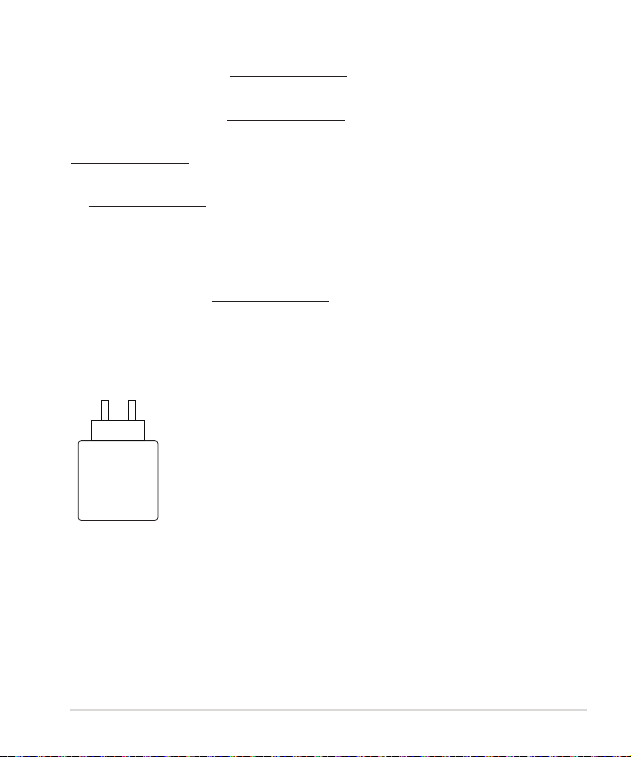
0.105 - 5.25
W
Quick Start Guide2424
ASUS contact information
%7978I/'31498)6-2'
Address 1F., No. 15, Lide Rd., Beitou Dist., Taipei City 112
Telephone +886-2-2894-3447
Fax +886-2-2890-7798
Web site https://www.asus.com
Technical Support
Telephone +86-21-38429911
Online support https://qr.asus.com/techserv
ASUS COMPUTER INTERNATIONAL (America)
Address 48720 Kato Rd., Fremont, CA 94538, USA
Telephone +1-510-739-3777
Fax +1-510-608-4555
Web site https://www.asus.com/us/
Technical Support
Support fax +1-812-284-0883
Telephone +1-812-282-2787
Online support https://qr.asus.com/techserv
ASUS COMPUTER GmbH (Germany and Austria)
Address Harkortstrasse 21-23, 40880 Ratingen, Germany
Web site https://www.asus.com/de
Online contact https://www.asus.com/support/Product/ContactUs/
Services/questionform/?lang=de-de
Technical Support
Telephone (DE) +49-2102-5789557
Telephone (AT) +43-1360-2775461
Online support https://www.asus.com/de/support

ROG RAIKIRI II PRO PC wireless gaming controller 25