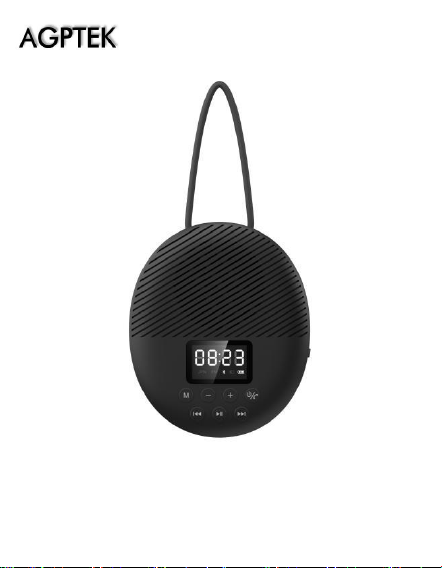
BTS141 User Manual
EN 01/14
DE 15/29

1
Thank you for purchasing AGPTEK product. Please read
this [User Manual] carefully before using the product,
retain it in for future use.
Note:
To find out how to use S2 or if you have a problem,
please refer to User Manual.
This [User Manual] can help you understand how to use
and troubleshoot the problem.
For better use this product, please connect the speaker
to computer with USB 2.0/3.0 port or a 5V/1A charger
(not quick charger) by the included USB cable. Usually,
it will be fully charged in 3hours.
Register AGPTEK Forum
Please visit www.agptek.com/forum and register
AGPTEK official forum to get better customer support.
Manufacturer: Betrue Technology Company Limited.
Address: D07, 5/F, King Yip Factory Building, 59 King Yip
Street, Kwun Tong, Kowloon, Hong Kong.
E-mail: support@agptek.com.
2
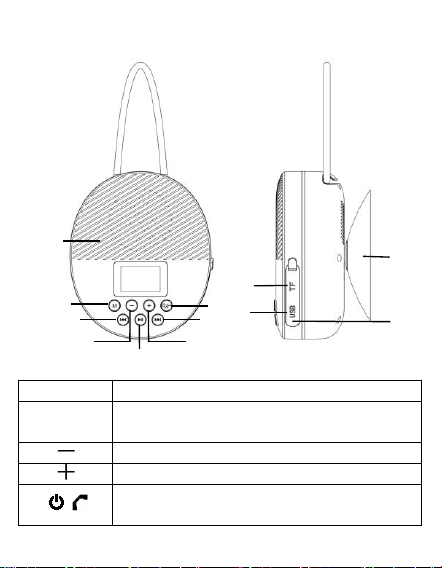
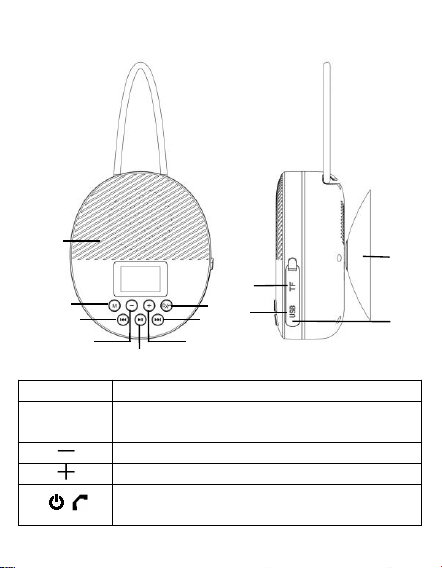
A. Buttons & Controls
1
MIC Hole (For Hand-Free)
2 M
M Button (Cycle Time/Bluetooth/FM
/TF mode)
3
Volume down
4
Volume up
5 /
Power On/Off, Pick up/Ignore/Hang
up/Last dialed call
⓬
❶
❷
❻
❺
❽
❸
❼
❹
❿
⓫
❾
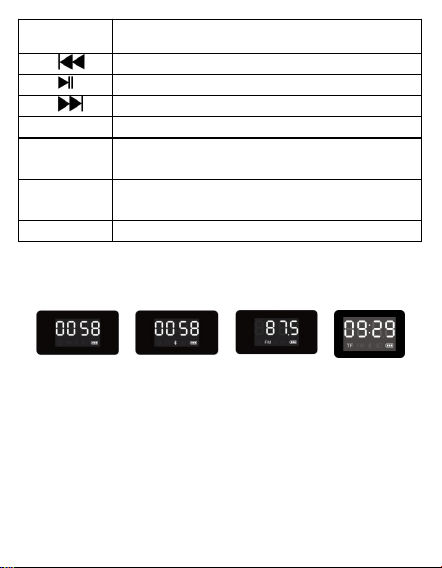
3
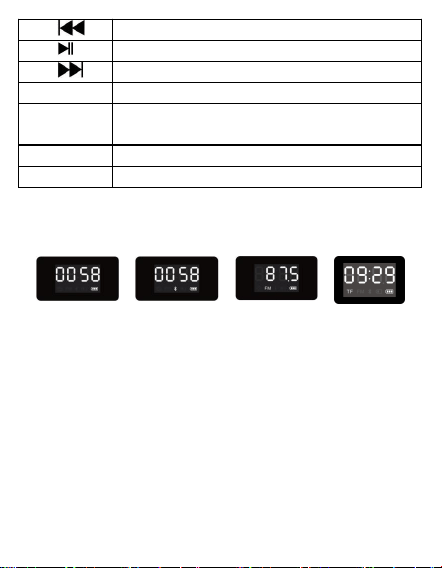
6
Previous track
7
Play, Pause
8
Next track
9
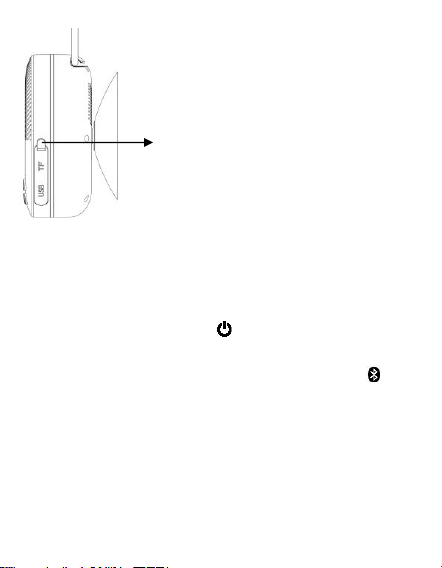
TF card slot
10
Micro USB socket(Under Rubber Seal
Cover)
11
Reset hole(Under Rubber Seal Cover)
12
Vacuum Cupule
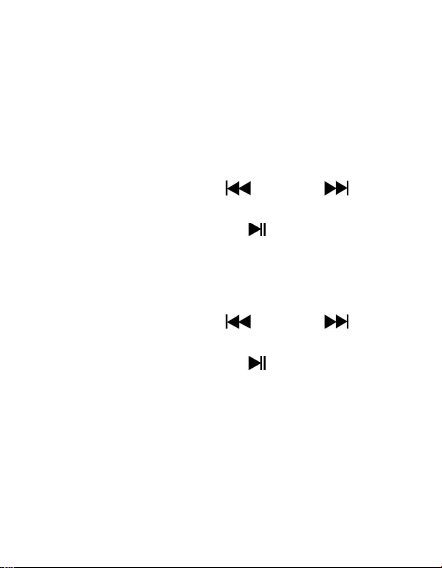
B.LED Digital Screen
→ → →
❶ ❷ ❸ ❹
After booting up this product, this speaker will display
the Time Calibration Interface ❶ firstly. Press M
button to cycle through different interface, such as
Bluetooth Mode❷, FM Function❸, TF Card
Mode❹(Available when TF card is inserted).
C. Time Calibration
1. In power on mode, press the “M” to switch to clock
4
mode if it is in other mode.
2. Press and hold the “M” to go to hour set, the
number of hour will blink on LED display.
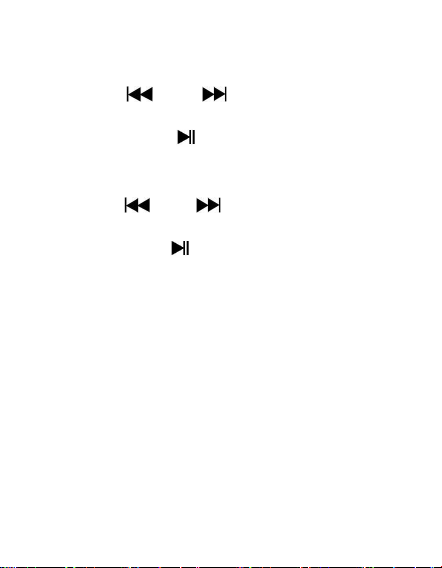
3. Press the “ ” or “ ” button for adjusting the
hour time as current time.
4. Short press the “ ” button to confirm the hour
time set and go for Minute set. The number of
minute will blink on LED display.
5. Press the “ ” or “ ” button for adjusting the
minute time as current time.
6. Short press the “ ” button to confirm the minute
time set.
Note:
(1) For maintain the battery life and performance, if
speaker isn't used for a while, the battery might
need to be recharged. Charge the battery at least
once every month.
(2) Connect the Micro USB socket with the PC's USB
port Power or DC 5V, 1000mA through USB cable.
5
(3) Disconnect the USB cable when it is done.
D. Playing Music Via Bluetooth
Power on and Pairing
1. Press and hold button to turn on the device. A
series of tones will sound. If it is in clock mode, press
button M to switch to Bluetooth mode, the icon
is blinking quickly.
2. Then turn on your device’s Bluetooth, the device will
enter to Bluetooth searching mode automatically, if
not, please search manually, then tap the related
selection to manually enter to searching mode.
(Refer to the user manual when necessary).
3. Your device show "AGPTEK S2" to select it for
Note: Please tighten the Rubber
Seal Cover after charging to
prevent water from penetrating
into the speaker.

6
pairing. Waiting for some seconds, you will see
connected message as shown on your device. (For
some Bluetooth devices, you may need to input
"0000" as pairing password).
4. If pairing is successful, the icon will constantly
show on the display. Then you can start to play
music by the device.
5. Press and hold to turn off the device when it is
not in use.
Disconnect from paired device
1. Press and hold to switch to new
"Searching/Pairing" mode, the paired device will be
disconnected. Or, you can choose "Disconnect" from
Bluetooth paired device list on your mobile device.
In this case; the Bluetooth Speaker will turn back
into "Searching/Pairing" mode in seconds, a series
of tones will sound and the is blinking fast.
2. Now, you can process for new mobile device pair or
power off the Bluetooth Speaker. Note: If Bluetooth
is not connected for more than 8 minutes, this
device will shut down automatically.
Auto re-connect with paired device and New
pairing
7
1. Every time you turn on the speaker and enter into
Bluetooth mode; it will firstly searching for the
mobile device, which has been paired previously
and still in record. The Speaker will re-connect this
mobile device as priority if it is in Bluetooth
searching device mode.
2. If not found in some seconds, the Bluetooth Speaker
then is turn into new pairing mode internally.
3. Now you can process for new mobile device pair.
(Refer to “Power on and Pairing”)
After Bluetooth Paring
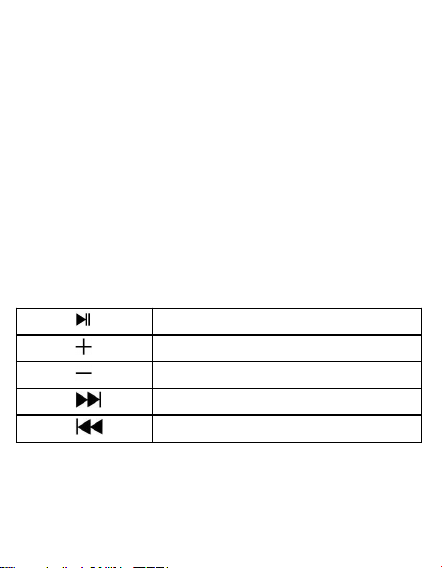
After Bluetooth pairing, the speaker can be operated by
the following buttons while playing music.
press
to pause/resume the music
Press
increase the volume level
Press
decrease the volume level
Press
go to next music
Press
go to previous music
Note: When maximum or minimum volume is reached,
a series of tones will sound.
E. Call Function
8
About how to use Hand free Function
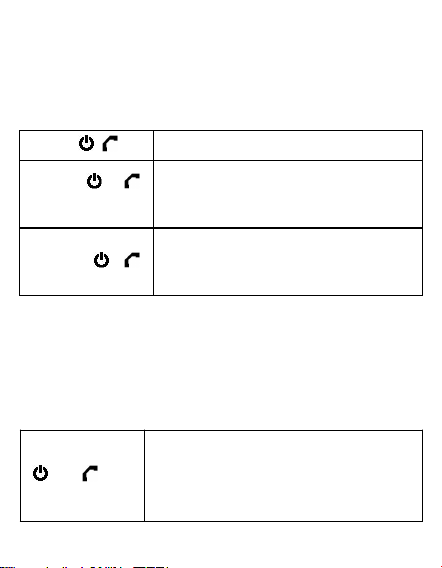
When there is an incoming call during Bluetooth music
playing mode;
The ringing sound will up and the playing music will
pause automatically.
Press /
pick up the call if you want
Press /
again
hang up the call when finished.
And the paused music will start to
play automatically
Press and hold
button /
for 3 seconds
ignore the incoming call
Tip: speak to the MIC hole directly with distance in
30~60cm to get the best speakerphone performance
when necessary.
Redial for last call Function
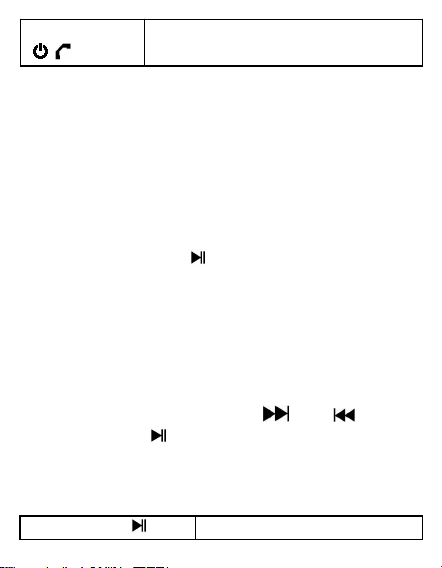
To redial for last called number by the Speaker, even it
is in music playing mode.
Press the
/ for
twice
enter into redial function, the
playing music will pause and
switch to hand free function for
redial.
9
Press the
/ again
hang up the redial call
Note: Make sure that your mobile phone has have last
dial call used, if not, the redial for last call function
cannot be activated.
F. FM Function
Auto Tune Radio Frequency:
In Bluetooth mode, press button M to enter into FM
mode.
Press and hold button to enter into auto searching
mode.
(1) The FM radio will search up the frequency from 87.5
MHz to 108.0MHz and will save the searched
stations automatically.
(2) When finished searching, it will play from the firstly
searched station automatically. You can select radio
station P01-P40 through the “ ” or “ ” button,
and press the “ ” button again to confirm.
FM playing control:
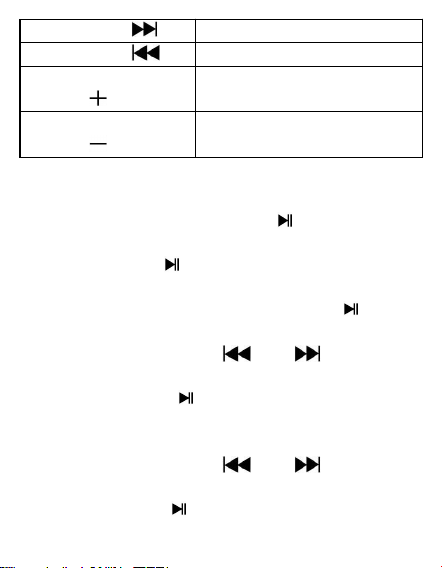
To switch back to Bluetooth mode, press twice button
M.
Press button
to pause/resume the music
10
Press button
go to next station
Press button
go to previous station
Press and hold
button
increase the volume level
Press and hold
button
decrease the volume level
G. How to set the clock
(1) In time mode, press and hold “ ” button to enter
alarm clock set. “AL” will show on the screen. You
can press the “ ” button to turn ON the alarm
clock.
(2) When “ON” show on the screen, press “ ” button
to go to hour set.
(3) Press or pressing the “ ” or “ ” button for
adjusting the hour time as you desired.
(4) Short press the “ ” button to confirm the hour
time set and go for Minute set. The number of
minute will blink on LED display;
(5) Press or pressing the “ ” or “ ” button for
adjusting the minute time as you desired.
(6) Short press the “ ” button to confirm the minute
11
time set.
(7) When the alarm is set, it will emit a series of beeps
and then adjust the alarm volume.
(8) Press or pressing the “ ” or “ ” button for
adjusting the volume level as you desired.
(9) Short press the “ ” button to confirm the volume
level and the volume of alarm clock set is
completed.
(10) Press once “ / ” button to stop the alarm.
H. Low Power Reminder and Auto Sleep
1.The Bluetooth Speaker will send tones from speaker
by every minute. When you heard this reminder,
please connect the device to the USB power for
charging, if you still want to use the device.
2.If not, the Bluetooth Speaker will power off
automatically when the battery is keeping low
energy level in some minutes.
3.In this case, the device cannot be turned on, until
you recharging the battery at least 10~15 minutes,
because the rechargeable battery has not enough
energy.
I. Reset the Device

12
1. In some circumstances the device’s function may
hanging and need to reset. To reset the Bluetooth
speaker;
2. Insert a needle into reset hole near Micro USB
socket. Then the device will reset automatically.
3. After that, turn on the Bluetooth Speaker by press
and hold button / .
Note: Do not reset the device if it is in properly
working.
J. Splash Proof Handling
The Bluetooth Speaker can handle a brief jet of water
on its surface (IPX5 water resistant). However, it should
never be operated under running water and under no
circumstance it should never be fully immersed in water.
Before use the Shower Bluetooth speaker in bathroom,
make sure that the splash proof "Rubber Seal Cover " is
tighten closed at the right position.
After used in bathroom, always wipe the outside of the
cabinet thoroughly if it becomes wet with moisture or
water splashes. This will help to prevent the internal
parts of the unit from entry of water and possible
moisture damage.

13
Note: If water get into the USB socket, please always
clean the water thoroughly before charging the device.
K. Specifications
Dimension
80(L)x35(W)x95mm(H)
(Not include Vacuum Cupule)
Weight
149g (Approximate)
Bluetooth
Specification
V5.0
Supported
Profile
WAV/FLAC/APE/
WMA/FIA/NWT/
AMR/DTS
Effective
Distance
20m(In open
area)
FM Radio
Tuning Range
87.5– 108MHz
Presets
up to 40 stations
Antenna
Wireless type
Built-In
Battery
Lithium3.7V, 2000mAh
Charging Time: around 3 H
Playing Time: around 10.5-12H(at
max. volume setting, Bluetooth
mode)
Power
Micro USB Port

14
Source
PC’s USB port Power or DC 5V, 1A
Water
Resistance
Splash-ProofIPX5
Operating
Temperature
0 to 40℃

15
Vielen Dank für Ihren Einkauf des AGPTEK Produkt S2.
Lesen Sie bitte diese Bedienungsanleitung sorgfältig
und vollständig, bevor Sie das Produkt benutzen und
bewahren Sie es bitte zur späteren Verwendung auf.
Hinweis:
Mit der Bedienungsanleitung kann man das Produkt
leicht bedienen und Probleme besser beheben.
Um das Produkt besser nutzen zu können, laden Sie es
bitte zuerst auf: Schließen Sie den Lautsprecher über
das mitgelieferte USB-Kabel an einen Computer mit
USB 2.0/3.0-Anschluss oder ein 5V/1A-Ladegerät (kein
Schnellladegerät) an. Normalerweise wird es in 3
Stunden vollständig aufgeladen.
Registrieren Sie bei dem AGPTEK Forum
Besuchen Sie www.agptek.com/forum und registrieren
Sie sich im Forum, um eine bessere
Kundenunterstützung zu erhalten.
Hersteller: Betrue Technology Company Limited.
Addresse: D07, 5/F, King Yip Factory Building, 59 King
Yip Street, Kwun Tong, Kowloon, Hong Kong.
E-mail: support@agptek.com.
16
A. Tasten & Bedienelemente
1
MIC-Loch (für Hand-Frei)
2 M
M Taste (Zykluszeit/Bluetooth/FM/
TF-Modus)
3
Lautstärke -
4
Lautstärke +
5 /
Ein-/Ausschalten, Annehmen/
Ignorieren/Auflegen/Zuletzt gewählter
⓬
❶
❷
❻
❺
❽
❸
❼
❹
❿
⓫
❾
17
Anruf
6
Vorheriger Titel
7
Spielen/Pausen
8
Nächster Titel
9
TF-Karten-Slot
10
Micro-USB-Buchse (unter der
Gummidichtung)
11
Rückstellbohrung (unter der
Gummidichtung)
12
Vakuum Cupule
B.LED Digitaler Bildschirm
→ → →
❶ ❷ ❸ ❹
Nach dem Hochfahren dieses Produkts zeigt der
Lautsprecher zunächst die Zeitkalibrierungsschnittstelle
❶ an. Drücken Sie die M-Taste, um durch die
verschiedenen Schnittstellen zu blättern, z. B.
Bluetooth-Modus❷, FM-Funktion❸, TF-Kartenmodus
❹ (verfügbar, nur wenn eine TF-Karte eingelegt ist).
18
C. Zeitkalibrierung
1. Drücken Sie die Taste "M" um in den Uhrzeitmodus
zu wechseln, wenn sich dieser in einem anderen
Modus befindet.
2. Drücken und halten Sie die Taste "M", um zur
Stundeneinstellung zu gelangen. Die entsprechende
Stundenzahl blinkt auf der LED-Anzeige.
3. Drücken Sie die Taste “ ” oder “ ”, um die
aktuelle Stunden-zeit einzustellen.
4. Drücken Sie kurz die Taste “ ”, um die eingestellte
Stundenzeit zu bestätigen und gelangen Sie zu
Minuten-einstellung. Die Minutenzahl blinkt auf der
LED-Anzeige.
5. Drücken Sie die Taste “ ” oder “ ”, um die
aktuelle Minuten-zeit einzustellen.
6. Drücken Sie kurz die Taste “ ”, um die eingestellte
Minutenzeit zu bestätigen.
Hinweis:
(1) Wenn der Lautsprecher längere Zeit nicht benutzt
wird, muss man den Akku möglicherweise einmal im
Monat aufladen, um die Lebensdauer und Leistung
des Akkus zu aufrechterhalten.
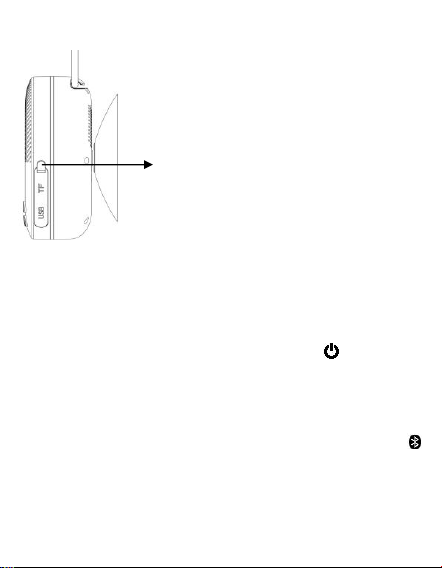
(2)Verbinden Sie die Micro-USB-Buchse über ein
19
USB-Kabel mit dem USB-Anschluss des PCs.
(3) Ziehen Sie das USB-Kabel ab, wenn Sie fertig sind.
D. Musikwiedergabe über Bluetooth
Einschalten und Pairing
1. Drücken und halten Sie die Taste um den
Lautsprecher einzuschalten. Es ertönt eine Reihe
von Tönen. Wenn Sie sich im Uhrmodus befinden,
drücken Sie bitte die Taste M, um in den
Bluetooth-Modus zu wechseln. Das Symbol
blinkt schnell.
2. Schalten Sie dann das Bluetooth Ihres Geräts ein.
Das Gerät wechselt automatisch in den
Bluetooth-Suchmodus. Wenn nicht, suchen Sie
Hinweis: Bitte ziehen Sie die
Gummidichtung nach dem
Aufladen wieder fest, damit
kein Wasser in den
Lautsprecher eindringen kann.

20
manuell und tippen Sie auf die entsprechende
Auswahl, um manuell in den Suchmodus zu
wechseln. (Siehe die Bedienungsanleitung wenn
nötig)
3. Wenn auf Ihrem Gerät "AGPTEK S2" angezeigt wird,
wählen Sie es zum Koppeln aus. Nach einigen
Sekunden wird eine verbundene Nachricht auf
Ihrem Gerät angezeigt. wird die auf Ihrem Gerät
angezeigte verbundene Nachricht angezeigt. (Für
manche Bluetooth-Geräten müssen Sie "0000" als
Pairing-Passwort eingeben.)
4. Wenn das Pairing erfolgreich ist, wird das Symbol
ständig auf dem Display angezeigt. Dann können Sie
mit dem Gerät Musik abzuspielen.
5. Wenn das Gerät nicht verwendet wird, drücken und
halten Sie bitte , um es auszuschalten.
Verbindung zum gekoppelten Gerät trennen
1. Drücken und halten Sie , um in den
"Suchen/Koppeln" Modus zu wechseln. Das
gekoppelte Gerät wird getrennt. Oder wählen Sie
"Verbindung trennen" von der Bluetooth-Liste der
gekoppelten Geräte auf Ihrem Mobilgerät aus. In
diesem Fall kehrt der Bluetooth-Lautsprecher nach

21
einigen Sekunden in den "Suchen/Koppeln"
Modus zurück, es ertönt eine Reihe von Tönen und
das Symbol blinkt schnell.
2. Jetzt können Sie ein Pairing für ein neues Mobilgerät
durchführen oder den Bluetooth-Lautsprecher
ausschalten. Hinweis: Wenn innerhalb von 8
Sekunden keine Bluetooth-Verbindung hergestellt
wird, wird dieses Gerät automatisch
heruntergefahren.
Automatische Verbindung mit dem
gekoppelten Gerät und neue Koppelng
1. Jedes Mal, wenn Sie den Lautsprecher einschalten
und in den Bluetooth-Modus wechseln, er wird
zunächst nach dem mobilen Gerät gesucht, das
zuvor gekoppelt wurde und jetzt noch in der
Pairing-Aufzeichnung steht. Der Lautsprecher
verbindet dieses Mobilgerät vorrangig erneut, wenn
es sich im Bluetooth-Suchgerätemodus befindet.
2. Wird der Bluetooth-Lautsprecher nach einigen
Sekunden kein gekoppeltes Gerät gefunden,
wechselt er in den neuen Pairing-Modus.
3. Jetzt können Sie zum Pairing nach einem neuen
Mobilgeräte suchen. (Sehen Sie bitte “Einschalten
22
und Pairing”)
Nach dem erfolgreichen Bluetooth Paring
Nach der Bluetooth-Kopplung kann der Lautsprecher
während der Musikwiedergabe mit den folgenden
Tasten bedient werden.
drücken
Musik anhalten/fortsetzen
drücken
Lautstärke erhöhen
drücken
Lautstärke verringern
drücken
Weiter zur nächsten Musik
drücken
Zurück zur vorherigen Musik
Hinweis: Wenn die maximale oder minimale Lautstärke
erreicht ist, ertönt eine Reihe von Tönen.
E. Anruf Funktion
Über die Verwendung der Freihandfunktion
Wenn im Bluetooth-Musikwiedergabemodus ein Anruf
eingeht, ertönt der Klingelton und die
Musikwiedergabe wird automatisch unterbrochen..
/ drücken
den Anruf entgegen nehmen,
falls Sie es wollen
23
/ erneut
drücken
den Anruf auflegen. Die
angehaltene Musik wird
automatisch abgespielt
/ drücken
und für 3
Sekunden
halten
den eingehenden Anruf
ignorieren
Tipp: Sprechen Sie direkt mit dem Mikrofonloch in
einem Abstand von 30 bis 60 cm, um bei Bedarf die
beste Freisprechleistung zu erzielen.
Wahlwiederholung für letzten Anruf Funktion
Um erneuten Wählen der zuletzt vom Lautsprecher
angerufenen Nummer, auch wenn sich der
Lautsprecher im Musikwiedergabemodus befindet.
/ zwei
mal drücken
Die Musikwiedergabe wird
angehalten und der Lautsprecher
wechselt sich in die
Wahlwiederholungsfunktion, die
Freisprechfunktion öffnet sich
selbst.
/ erneut
drücken
Wahlwiederholung auflegen
Hinweis: Stellen Sie sicher, dass auf Ihrem Mobiltelefon
24
der letzte Wählanruf verwendet wurde. Andernfalls
kann die Wahlwiederholung für den letzten Anruf nicht
aktiviert werden.
F. FM Funktion
Autotuning - Radiofrequenz:
Drücken Sie im Bluetooth-Modus die Taste M, um in
den FM-Modus zu wechseln. Halten Sie die Taste
gedrückt, um in den automatischen Suchmodus zu
wechseln.
(1) Das UKW-Radio sucht die Frequenz von 87,5 MHz
bis 108,0 MHz und speichert die gesuchten Sender
automatisch.
(2) Nach dem Suchen wird der zuerst gefundene Sender
automatisch abgespielt. Mit der Taste “ ” oder
“ ” können Sie ein Sender zwischen den P01-P40
auswählen und durch erneutes Drücken der Taste
“ ” bestätigen.
FM-Spielsteuerung:
Um in den Bluetooth-Modus zurückzukehren, drücken
Sie zweimal die Taste M.
drücken
Musik anhalten/fortsetzen
drücken
zur nächsten Station gehen
25
drücken
Zur vorherigen Station
gehen
drücken und
halten
lautstärke erhöhen
drücken und
halten
Lautstärke verringern
G. Wie stellt man die Uhr ein?
(1) Halten Sie im Zeitmodus die Taste “ ” gedrückt, um
den Weckereisntellung aufzurufen. Auf dem
Bildschirm wird "AL" dann angezeigt. Sie können die
Taste “ ” drücken, um den Wecker einzuschalten.
(2) Wenn auf dem Bildschirm „ON“ angezeigt wird,
drücken Sie die Taste „ “, um zur
Stundeneinstellung zu gelangen.
(3) Drücken Sie bitte die Taste “ ” oder “ ”, um die
Stunden wie gewünscht einzustellen.
(4) Drücken Sie kurz die Taste “ ”, um die eingestellte
Stundenzeit zu bestätigen und gehen Sie zu
Minuten-einstellung. Die Minutenzahl blinkt auf der
LED-Anzeige.
(5) Drücken Sie bitte die Taste “ ” oder “ ”, um die
26
Minuten wie gewünscht einzustellen.
(6) Drücken Sie kurz die Taste “ ”, um die eingestellte
Minuten zu bestätigen.
(7) Wenn der Alarm eingestellt ist, ertönt eine Reihe
von Signaltönen. Die Alarmlautstärke können Sie
einstellen.
(8) Drücken Sie die Taste “ ” oder “ ”, um die
Lautstärke wie gewünscht einzustellen.
(9) Drücken Sie kurz die Taste “ ”, um den
Lautstärkepegel zu bestätigen und die Lautstärke
des eingestellten Weckers zu vervollständigen.
(10) Drücken Sie einmal die Taste “ / ”, um den
Alarm zu stoppen.
H. Niedrigen Stromwerte Mahnung und
Auto-Sleep Funktion
1.Der Bluetooth-Lautsprecher sendet jede Minute
Töne aus dem Lautsprecher. Wenn Sie diese
Erinnerung gehört haben, schließen Sie bitte das
Gerät zum Aufladen an den USB-Anschluss an,
wenn Sie das Gerät weiterhin verwenden möchten.
2.Wenn nicht, der Bluetooth-Lautsprecher wird sich
nach einigen Minuten automatisch ausschalten.

27
3.In diesem Fall kann das Gerät erst eingeschaltet
werden, wenn Sie den Akku mindestens 10 bis 15
Minuten lang aufgeladen haben, da der Akku nicht
genügend Energie enthält.
I. Das Gerät zurücksetzen
1. Unter bestimmten Umständen kann die Funktion
des Geräts hängen bleiben und muss zurückgesetzt
werden. So setzen Sie den Bluetooth-Lautsprecher
zurück:
2. Führen Sie eine Nadel in das Reset-Loch ein, was in
der Nähe der Micro-USB-Buchse liegt. Das Gerät
wird dann automatisch zurückgesetzt.
3. Danach schalten Sie bitte den Bluetooth
Lautsprecher ein, indem Sie die Taste /
drücken.
Hinweis: Ohne Problemen setzen Sie das Gerät nicht
zurück.
J. Wasserdichtheit Erklärung
Der Bluetooth-Lautsprecher kann einem kurzen
Wasserstrahl auf Ihre Oberfläche widerstehen (IPX5
wasserdicht). Er sollte jedoch niemals unter fließendem

28
Wasser betrieben werden und keinesfalls in Wasser
getaucht werden. Vergewissern Sie sich vor
Verwendung des Bluetooth-Lautsprechers im
Badezimmer, dass die spritzwassergeschützte
"Gummidichtungsabdeckung" an der richtigen Stelle
festgezogen ist. Und wischen Sie bitte nach der
Verwendung im Badezimmer die Außenseite des
Gehäuses immer gründlich ab, wenn es mit
Feuchtigkeit oder Spritzwasser nass wird.
Hinweis: Wenn Wasser in die USB-Buchse gelangt,
reinigen Sie das Wasser immer gründlich, bevor Sie das
Gerät aufladen.
K. Specifikationen
Größe
80(L)x35(B)x95mm(H)
(Vakuum Cupule nicht enthaltet )
Gewicht
149g (ungefähr)
Bluetooth
Version
V5.0
Unterstützte
Profile
WAV/FLAC/APE/
WMA/FIA/NWT/
AMR/DTS
Effektive
Entfernung
20m(Im offenen
Bereich)

29
FM Radio
Tuning
Bereich
87.5– 108MHz
Voreinstellu
-ngen
Bis zu 40
stationen
Antenne
Kabelloser Typ
Eingebaute
Batterie
Lithium3.7V, 2000mAh
Aufladen zeit: ca. 3 H
Spieldauer: ca. 10.5-12H (bei
maximaler Lautstärkeeinstellung,
Bluetooth-Modus)
Energiequelle
Micro USB Anschluss
PC’s USB Anschluss Power or DC
5V, 1A
Wasserbestän
-digkeit
Spritzwasser-resistent IPX5
Betriebstempe
-ratur
0 bis 40℃