
User Manual for 6th Sense Smart Sensor Device by FireCat
Table of Contents
1. Introduction
2. Device Overview
▪ Main Unit
▪ Integrated Sensor
3. Features and Specifications
4. Getting Started
▪ Charging the Device
▪ Turning the Device On/Off
▪ Connecting the Heart Rate Sensor
5. Using the Device
▪ Motion Detection
▪ Panic Buttons
▪ Heart Rate Sensor
6. The Mobile App
▪ App Overview
▪ Configuring Users and Devices
▪ Viewing and Managing Data
7. Data Security
8. Regulatory information
9. Frequently Asked Questions (FAQs)
10. Contact Information
Warning: Changes or modifications to this unit not expressly approved by the party
responsible for compliance could void the user’s authority to operate the equipment.
1. Introduction
Welcome to the user manual for the 6th Sense smart sensor device by Firecat. This device
is designed to aid uniformed personnel such as police, firefighters, and military personnel in
managing dangerous situations more effectively. By providing real-time data and alerts, the
6th Sense helps prevent critical incidents before they escalate.
Purpose of the Device
The 6th Sense enhances safety and operational efficiency by delivering crucial information through
sensors integrated into the user's attire, allowing commanders to monitor their team remotely and
respond quickly in emergencies.
Key Features
The system includes GPS, motion detection, a high-G impact sensor, heart rate monitoring, and panic
buttons, all working together to provide comprehensive situational awareness.
Usage Context
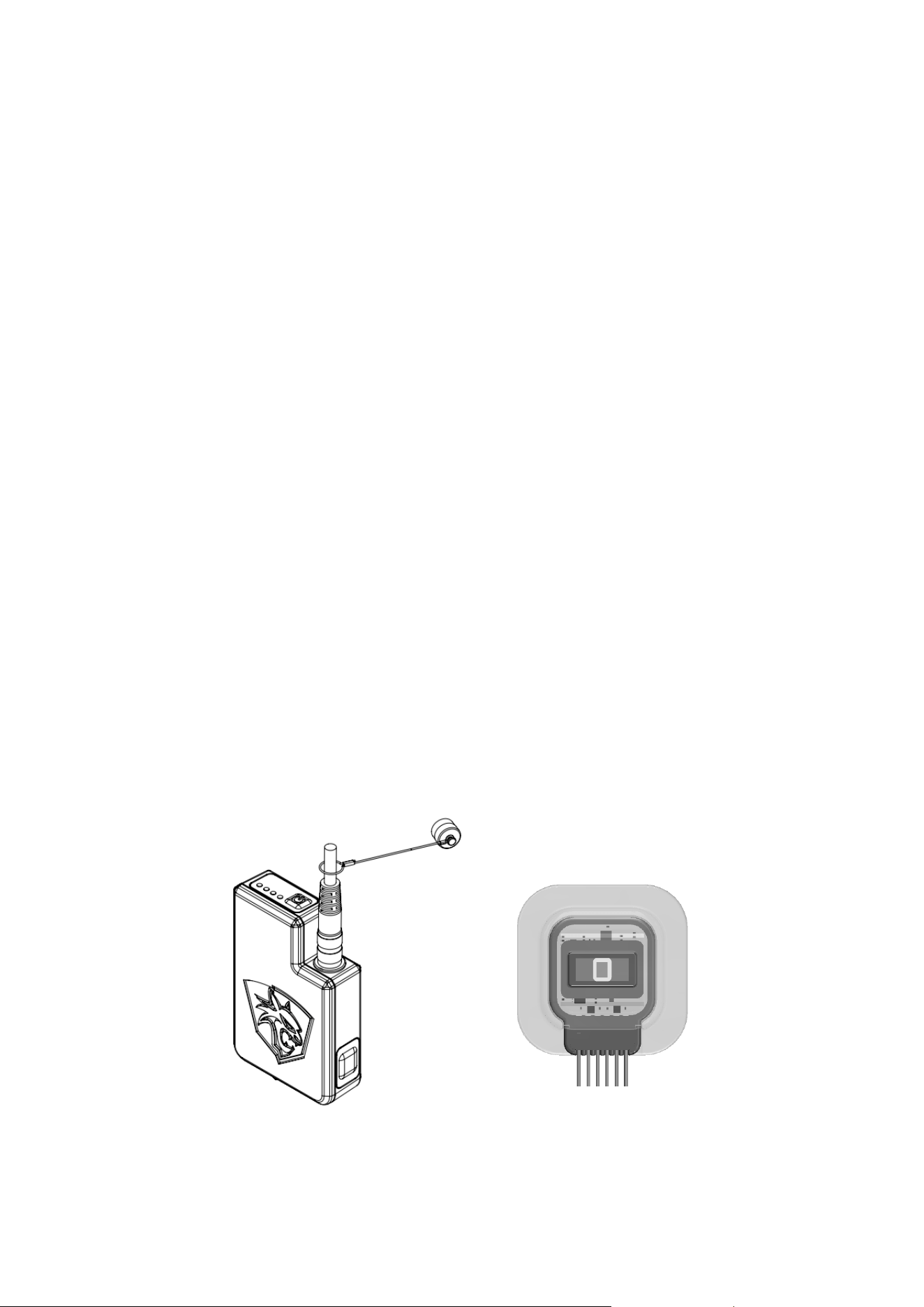
Designed for tough environments, the 6th Sense is water and dust resistant. It consists of a main unit
worn on the belt or in the breast pocket and an integrated sensor in the shirt sleeve, connected by a
washable, flexible cable.
Limitations of Liability
The 6th Sense is a tool, not a guarantee of safety. It is not a medical device, and the data provided
may not be 100% accurate. Firecat and its affiliates do not accept responsibility for outcomes resulting
from the use of this device in critical situations. Users should continue to employ standard safety
protocols and use the 6th Sense as an additional resource.
By using the 6th Sense, you acknowledge these limitations and agree to use the device as intended,
understanding that it supports but does not replace traditional safety measures.

2. Device Overview
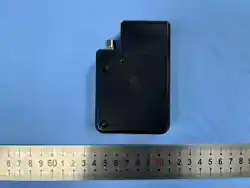
The 6th Sense Smart Sensor consists of two main components:
• Main Unit: Worn either on the user's belt in a holster or in the breast pocket. It is water and dust-
resistant and connects to the sensor embedded in the uniform via a flexible cable.
• Integrated Sensor: This precision sensor is integrated into the sleeve of the user's shirt. It is washable,
always stays in the shirt, and securely connects to the main unit.
3. Features and Specifications
GPS and Assisted GPS: High accuracy with typical GPS limitations.
Details: The GPS provides precise location tracking, crucial for real-time monitoring and response. However,
it may face challenges in acquiring a signal indoors or in areas with dense infrastructure. The assisted GPS
is a cloud enabled support feature helping in faster location acquisition through software services and cell
tower triangulation, improving response times.
Note: Assisted GPS typically comes with lower accuracy meaning that at times, the avatar on the map can
be >200m from it’s actual position.
Motion Sensor with AI: Detects various motions such as laying down, crawling, walking, running,
and idling.
Details: The AI-driven motion sensor categorizes user activity, helping commanders understand the
wearer's status. Motions are categorized into “laying down”, “crawling”, “walking”, “idle”, “running”. The
different motions are shown with icons in the app. The icons use different colors to indicate potential risks. A
user who is “laying down” for example is shown with an orange/red icon whereas a user who is “idle” has a
green icon.
High-G Impact Sensor: Triggers alarms during high-impact events.
Details: The high-G impact sensor is sensitive to sudden and intense forces, automatically triggering alarms
of possible accidents. Proper calibration is critical to avoid false alarms or missed alerts and should be done
in consultation with Firecat's support team prior to roll-out. When a high-G impact is triggered, the app will
show a “Critical” emergency notice as well as sound an alarm.
Panic Buttons: Activates alarms when pressed simultaneously.
Details: Located on the main unit, these buttons provide a manual way to send distress signals. When both
buttons are pressed, an alarm is activated, and red LEDs blink to confirm the alert has been sent. When the
emergency alarm is triggered, the app will show an “emergency” notice as well as sound an alarm.
Heart Rate Sensor: Measures heart rate and oxygen saturation
Details: Integrated into the shirt sleeve, the heart rate sensor provides vital signs monitoring. It helps in
assessing the wearer's physical condition, indicating normal, elevated, or risky heart rates through color-
coded alerts in the app.
The app interface is centered around heartrate as the most crucial health indicator with visualisation both
around the avatars on the map and in the main user data section. In addition, the app shows Blood Oxygen
Saturation (SPO2) levels in the “See more” section of each user. SPO2 levels have lower accuracy when a
user is moving and should be used as health indicators rather than medical data. To improve accuracy, a
user can hold still for 1-2 minutes.
On/Off Button: Powers the device on and off.
Details: A long press on the On/Off button turns the device on or off, with green and red LEDs indicating the
status. A double press shows the battery level. The system may take up to a minute to fully power on or off.
Rechargeable Battery: Long-lasting with a minimum of 12 hours of operation.
Details: The rechargeable battery ensures the device operates throughout a typical shift. Charging takes
approximately 3 hours, and software updates may improve battery life. LEDs on top of main unit function as
battery level indicators.

4. LED indicators
The main unit has four LED slots on the top. These are used to communicate various information to the user.
• ON and operational: One green LED is always on when the system is working
• Battery indication: double press the power button to see battery level. Each LED lighting up represents
25%
• Turning off: When pressing the power button once, the system turns off which is indicated by a single
red LED
• Alarm triggered: When an emergency alarm is triggered, all four LEDs are blinking red until the signal
has been successfully sent from the device to the cloud
• HR sensor update: When the heartrate sensor is updating, a single red LED is shining until update is
complete. The system cannot be used in the meantime.
• Charging: When the device is charging, a single blue LED is blinking and will be constantly on when the
battery is full.
5. Getting Started
Charging the Device
• Charge the device using a USB-C charger cable.
• Charging time is approximately 3 hours.
• To check the battery level, double-press the On/Off button. Each LED represents 25% of the battery. A
blinking red LED indicates low battery.
Turning the Device On/Off
• To Turn On: Long press the On/Off button until the green LED lights up. The device takes up to a
minute to power on.
• To Turn Off: Long press the On/Off button until the red LED lights up. The device takes up to a minute
to power off.
Connecting the Heart Rate Sensor
• Attach the cable connector from the shirt to the main unit.
• Ensure the connector is firmly attached by screwing it firmly onto the main unit.
• Before washing the shirt, disconnect the heart rate sensor and seal the cable with the attached metal lid.
6. App Overview
Availability: The app is available for both Android and iOS devices.
Details: This cross-platform compatibility ensures that commanders and supervisors can access real-time
data from their preferred mobile devices, enabling flexibility and ease of use in various operational settings.
User Interface: The app features an intuitive map-based interface showing avatars of wearers.
Details: Avatars display current motion patterns and heart rate, providing an at-a-glance overview of team
status. The map can be toggled between illustrated and satellite views for better situational awareness. Press
an avatar to access deeper data on the user such as pulse, distance moved, connectivity status and current
motion pattern.
Adding a New User: Press the three dots on the right side of the screen and follow the instructions.
Details: Users can choose icons from the Greek alphabet or take a photo with the device’s camera to
personalize the avatar profile. This helps in quickly identifying each wearer on the map.
Adding a New Device: Press the three dots on the right side of the screen and follow the instructions.
Details: Use the QR code on the back of each main unit for easy and quick device registration. This process
ensures that each device is correctly linked to the system.
Pairing a User and a Device: Press the three dots on the right side of the screen and follow the
instructions.
Details: This step links the user profile with the device, creating a complete avatar that shows up on the map.
Viewing and Managing Data
Monitoring Avatars: The main map interface shows avatars with their current status.

Details: Clicking on an avatar provides additional data such as distance travelled and detailed motion
patterns. This feature helps commanders assess the situation and make informed decisions.
Emergency Alarms: Serious emergencies trigger an alarm popup on the screen.
Details: The app user must acknowledge the alarm in the app to turn it off. This ensures that critical alerts are
not missed and are promptly addressed. Emergency alarms are triggered either when a user presses the
alarm buttons or when the high impact sensor is triggered.
7. Using the Device
Motion Detection
Functionality: The AI-powered motion sensor automatically detects various user activities.
Details: It identifies actions such as lying down, crawling, walking, running, and idling. This information helps
assess the wearer’s status and detect potential risks, such as prolonged inactivity, which may indicate an injury.
Panic Buttons
Activation: Press both panic buttons simultaneously to trigger an alarm.
Details: The manual alarm system is essential when the wearer needs immediate assistance. Blinking red
LEDs confirm that the alarm has been successfully sent.
Heart Rate Sensor
Integration: Located in the shirt sleeve, it measures both heart rate and blood oxygen saturation (SPO2).
Details: The heart rate sensor continuously monitors vitals when connected to the main unit. Alerts
in the app are color-coded: green for normal, yellow for elevated, and red for risky heart rates.
Press “See more” in the app to access SPO2 levels.
On/Off Button
Usage: Long-press the button to power the device on or off; double-press to check the battery
status.
Details: The LED indicators provide clear visual confirmation of the device's power and battery
status.
Battery Management
Rechargeable Battery: Offers a minimum of 12 hours of continuous operation.
Details: Efficient battery management is vital to ensure uninterrupted use during long shifts.
Battery performance will improve over time with future software updates.
8. Regulatory information
FCC Compliance Statement This device complies with Part 15 of the FCC Rules. Operation is
subject to the following two conditions: (1) this device may not cause harmful interference, and (2) this
device must accept any interference received, including interference that may cause undesired
operation.
Warning Changes or modifications to this unit not expressly approved by the party responsible for
compliance could void the user’s authority to operate the equipment.
Note: This equipment has been tested and found to comply with the limits for a Class B digital device,
pursuant to Part 15 of the FCC Rules. These limits are designed to provide reasonable protection
against harmful interference in a residential installation. This equipment generates, uses and can
radiate radio frequency energy and, if not installed and used in accordance with the instructions, may
cause harmful interference to radio communications.
However, there is no guarantee that interference will not occur in a particular installation. If this
equipment does cause harmful interference to radio or television reception, which can be determined
by turning the equipment off and on, the user is encouraged to try to correct the interference by one or
more of the following measures:
- Reorient or relocate the receiving antenna.
- Increase the separation between the equipment and receiver.
- Connect the equipment into an outlet on a circuit different from that to which the receiver is
connected.
- Consult the dealer or an experienced radio/TV technician for help.
RF Exposure Information:
Specific Absorption Rate (SAR) information
The SAR limit of USA (FCC) is 1.6 W/kg averaged over one gram of tissue. This model (FCC ID:
2BT6K6THSENSE) has also been tested against this SAR limited. The highest SAR value reported
under this standard during product certification for use at the body is 0.794W/kg.
9. Data Security
We take data security seriously to protect the sensitive information gathered by the 6th Sense device.
Key security measures include:
No Personal Data Storage: The device itself stores no personal information.
Details: This design choice minimizes the risk of data breaches and ensures compliance with data
protection regulations.
State-of-the-Art Encryption: All data transmitted from the device is secured with advanced
encryption.
Details: This includes end-to-end encryption to protect data from interception during transmission.
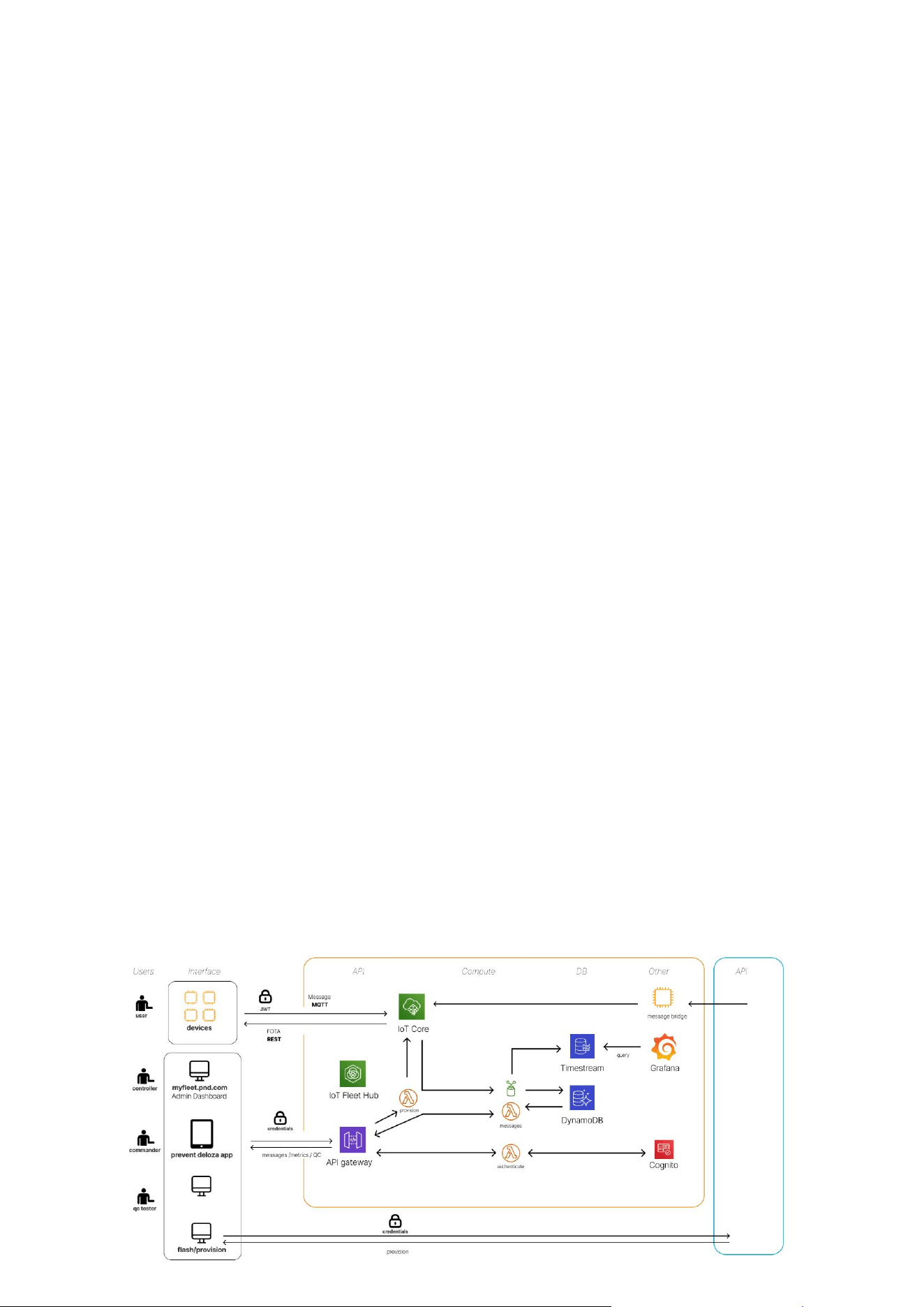
Cloud Services: Hosted on AWS, employing robust security protocols.
Details: AWS provides scalable and secure cloud infrastructure, ensuring data integrity and
availability. Customers can also opt for their own cloud services with proper integration.
Data Privacy: Users can opt for generic or non-identifiable names in the app to avoid GDPR issues.
Details: It’s important for organizations to have agreements in place with wearers regarding data
sharing, ensuring transparency and consent.
No Backward Communication: The app does not communicate back to the device.
Details: This unidirectional data flow enhances security by preventing potential remote manipulation
of the device.
Mobile App

10. Frequently Asked Questions (FAQs)
How long does it take to charge the battery?
Approximately 3 hours depending on the charger. Make sure to fully charge the battery before first
use to ensure maximum battery life and performance.
How long does the battery last?
The battery lasts for a minimum of 16 hours on a full charge. Battery life may vary based on usage
and environmental conditions. Software updates periodically improve battery efficiency, so keeping
the device updated ensures better performance.
Is the user data real-time?
The data transfer has a delay of 10-30 seconds, depending on connectivity. The system reboots
periodically to prevent data corruption, which can result in up to 2 minutes of missing data. This brief
delay ensures data integrity and accurate monitoring.
Is there always connectivity?
Connectivity can be lost in remote locations or deep within structures. It is recommended to activate
all main units and check connectivity from the app before deployment. Use the app to check signal
strength and ensure reliable operation in your working area.
Is my pulse accurate?
The heart rate sensor may show higher readings during quick movements due to data noise.
Algorithms smooth sudden changes, so there may be a 10-20 second adjustment period. If a red alert
persists, verify the wearer’s condition immediately to ensure their safety.
Is the system waterproof?
Integrated parts (cables and heart rate sensor) are waterproof and can be washed in 30 degrees with
the garment, provided the metal cap on the cable end is sealed. The main unit is water-resistant but
not waterproof, so it should not be submerged or put through laundry.
How is the stress level determined?
Stress level is determined using heart rate, oxygen saturation, and blood pressure data if these
features are ordered. This combination provides a comprehensive view of the wearer’s physiological
state, helping to identify stress levels and potential health issues.
The position seems poor indoors?
GPS works best outdoors and may struggle indoors, especially in buildings with thick concrete walls.
For indoor positioning, additional chips and software can be provided. Contact your account manager
for solutions tailored to indoor environments.
Is there connectivity in my country?
We use LTE-M and NB-IOT for global connectivity, covering most countries. Check with your account
manager to verify connectivity in your specific region. This ensures the device will work effectively
wherever it is deployed.
Can I use my own cloud services?
Yes, custom cloud service integration is possible. Contact your account manager to discuss migration
and integration projects. This flexibility allows you to use your preferred cloud services while
maintaining data security and functionality.

What should I do if an alarm is triggered?
Acknowledge the alarm in the app to turn it off. Ensure the wearer is safe and take necessary actions.
If alarms from the high impact sensor are triggered too often or not often enough, talk to your account
manager so that we can update the settings to be more relevant to your use case.
How do I check the battery level?
Double-press the On/Off button to check the battery level. Each of the four LEDs represents 25% of
the battery charge. If the battery is low, one LED will blink red.
Can the heart rate sensor be used without the main unit?
No, the heart rate sensor requires a connection to the main unit to send data. Ensure the cable is
properly connected to receive accurate heart rate monitoring. Disconnect the sensor before
laundering the shirt to prevent damage.
How do I set up the device for the first time?
Charge the main unit fully, connect the heart rate sensor, and pair the device with a user profile in the
app. Follow the in-app instructions to add and configure users and devices.
What happens if the device is damaged?
If the device is damaged, contact Firecat support for assistance. Do not attempt to repair the device
yourself, as this may void the warranty. Proper handling and regular maintenance help ensure the
device’s longevity and reliability.
How do I update the device software?
Software updates are provided periodically to improve performance and add new features. These are
rolled out automatically and do not require user input.
Can the device be used in extreme temperatures?
The device is designed to operate in a wide range of temperatures, but extreme heat or cold may
affect battery life and performance. Avoid exposing the device to temperatures beyond its specified
operating range to maintain reliability.
How do I clean the device?
The main unit should be cleaned with a damp cloth and mild detergent. Do not submerge it in water.
The integrated sensor and cables can be laundered in 30 degrees with the shirt, provided the cable
end is sealed with the metal cap.
What should I do if the device loses connectivity?
If the device loses connectivity, move to an area with better signal reception. Check the connectivity
strength in the app before deployment to minimize disruptions. Reliable connectivity is crucial for
continuous monitoring.
11. Contact Information
For further assistance or inquiries, please contact your account manager or visit our website
www.fire-cat.eu. Thank you for using the 6th Sense smart sensor device by FireCat. Stay
safe and secure!