文件名称: Contact Sensor说明书英文版设计
材质和工艺:
封面 157g铜板
内页 128g铜版纸,骑马钉
版本号: Contact Sensor-EN-2107
设计师:ZBH
成品尺寸:
60mm X 60mm
完成时间:2021/07/21
更改内容:
备注:
此页从虚线下开始印刷,表格不印刷
新增NCC警语认证,文案内容调整。
User Manual
Contact Sensor
www.switch-bot.com

1. In the Box
2. Device Instruction
3. Preparation
4. Getting Started
5. Safety Information
6. Detection Range
7. Light Sensor
8. How to Use
9. Battery Replacement, Firmware
Update and Factory Reset
10. Q&A
11. Specification
12. Return and Refund Policy
13. Contact and Support
01
02
03
04
05
06
08
09
15
16
18
19
20
Contents
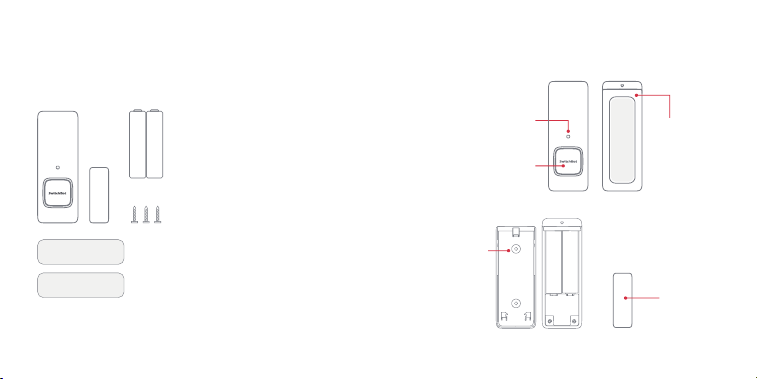
1. In the Box
2. Device Instruction
• Contact Sensor
• Magnet
• AAA Batteries x 2
• User Manual
• Screw Pack
• Sticker
(adhered to Contact Sensor)
• Sticker
(adhered to Magnet)
LED Indicator Light
& Light Sensor
Fresnel Lens &
Reset Button
Screw Hole
Magnet
Battery Case
01 02
3. Preparation 4. Getting Started
• A smartphone or tablet with Bluetooth 4.2
or above
• Download the SwitchBot app
• Create a SwitchBot account and sign in
• (Optional) If you intend to use the Cloud
Service feature, you need to set up a
SwitchBot Hub Mini (sold separately) and
connect your phone to the internet
Remove the Battery Case. Install two AAA
batteries into the battery box following the
"+" and "-" signs. Then put the Battery Case
back.
1
On the app, tap the "+" icon on the top right
of the homepage. Tap the "Contact Sensor"
icon and follow the instructions to complete
the setup.
3
Open the SwitchBot app and sign in.
2
03 04

5. Safety Information 6. Detection Range
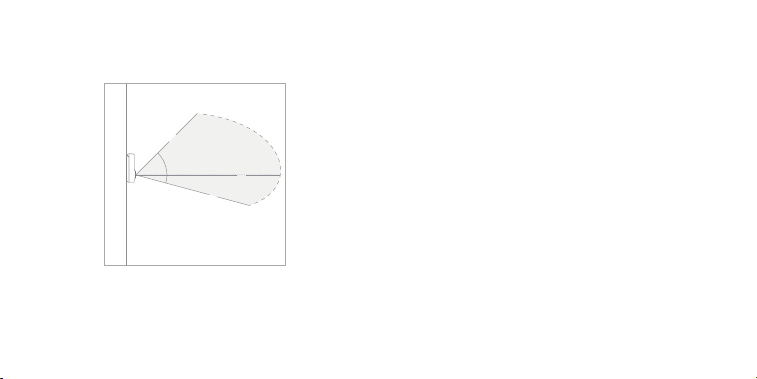
Maximum Detection Distance: 5m
Maximum Detection Range (Horizontal): 90º
• Keep the device away from humid or hot
environments.
• Remove the batteries when not used for
long period of time.
• Do not attempt to disassemble, repair, or
modify the device.
• Do not use any other batteries than those
recommended.
45° 45°
5m
2m 2m
05 06
7. Light Sensor
Maximum Detection Range (Vertical): 55º
The data above is obtained from lab experiments
conducted under
77ºF (25°C).
Light Sensor is used for detecting whether it is
bright or dark in the target environment. You
can define the threshold for being bright or
being dark in the app. Navigate to the Settings
page of Contact Sensor in the app for more
information.
5m
3m
45°
10°
4m
07 08
8. How to Install
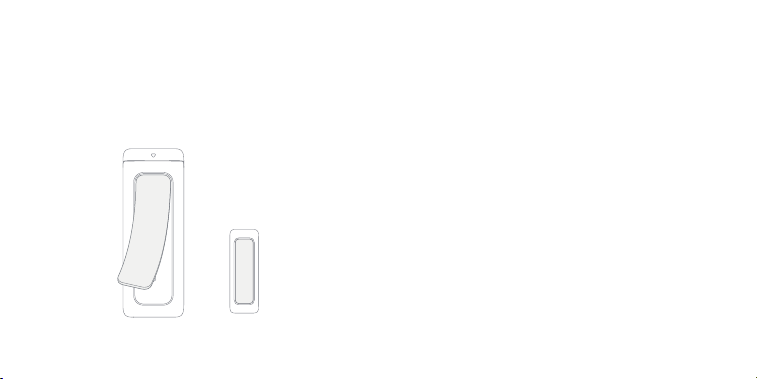
Peel off the protective film from the Contact
Sensor and Magnet.
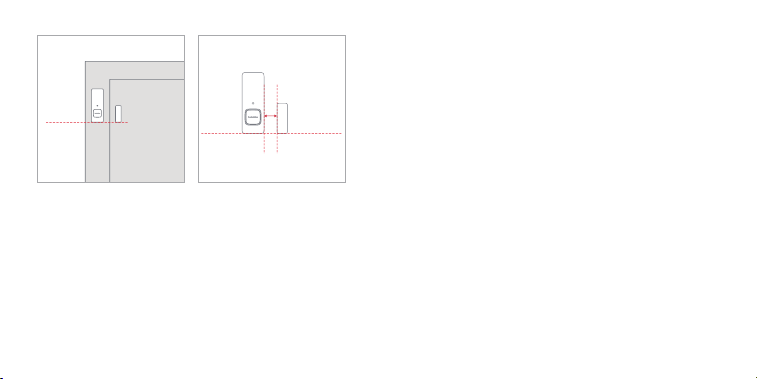
Line up Contact Sensor and Magnet on the door
or window and make sure the Magnet is aligned
with the bottom of Contact Sensor.
Stick the Contact Sensor on the door/window
and Magnet on the frame or the other way
around. Make sure the gap between the sensor
and the magnet is less than 30mm when the
door or window is closed.
Apply pressure to the Contact Sensor and
Magnet for 60 seconds so that they are firmly
attached.
Adhere to a door or a window
09 10
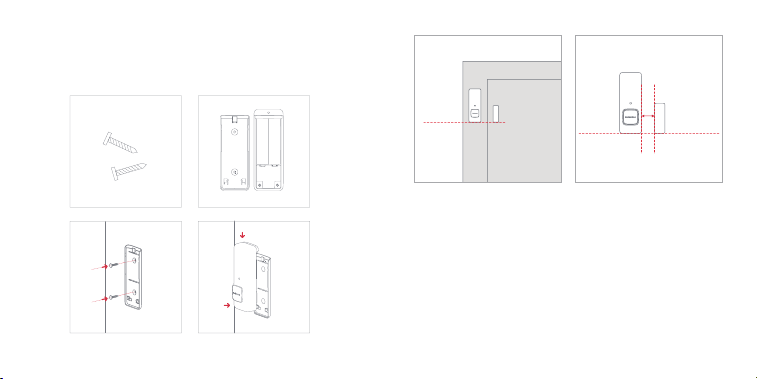
Remove the Battery Case from Contact Sensor.
Mount the Battery Case to the target surface
using the screws provided. You don't need to peel
the protective film off during this process.
Install the Contact Sensor back to the Battery Case,
that has been mounted to the target surface.
Line up the Contact Sensor and the Magnet on the
door or window and make sure the Magnet is
aligned with the bottom of the Contact Sensor.
Peel the protective film off Magnet and stick it to
the surface near the Contact Sensor. Make sure the
gap between the sensor and the magnet is less
than 30mm when the door or window is closed.
Mount to a surface using screws
30mm
Magnet is aligned with the
bottom of Contact Sensor
11 12
• Make sure the target surface is dry and clean.
• Avoid any heat sources, such as light bulbs.
• Avoid facing towards a glass door or window
to reduce reflection and interference.
• Avoid facing towards constantly moving objects.
Important Notice
30mm
Magnet is aligned with the
bottom of Contact Sensor
Apply pressure to Magnet for 60 seconds so it
is firmly attached.
13 14

9. Battery Replacement, Firmware
Update and Factory Reset
10. Q&A
Remove the Battery Case. Follow the "+" and "-"
marks, replace the old batteries with new ones.
Put the Battery Case back.
Q: Is there any difference in using Contact Sensor
on a door or window?
A: When installed to a window, the motion
sensing feature will be automatically disabled
because the cool air or hot air may interfere with
the bulit-in motion sensor beneath the
Reset Button which may trigger false alarms.
Q: How to enable Cloud Service?
A: You need to purchase a SwitchBot Hub Mini
(sold separately) and set it up under your account.
Then navigate to the app Home page.
Battery Replacement
Please make sure you have the up to date
firmware by upgrading in time.
Firmware Update
Long press the Reset Button for 15 seconds or
until the LED Indicator Light is on.
Factory Reset
Note: After the device is reset, all settings will be set to the
default values and the activity logs will be erased.
15 16

11. Specification
If you see a cloud icon showing up on the
Contact Sensor device card, this means it is
being scanned by Hub Mini. Navigate to the
Settings page of Contact Sensor to enable
Cloud Service from there.
Scan the QR code below to view more solutions.
https://support.switch-bot.com
Model Number: W1201500
Size: 70.5mm x 25.5mm x 23mm (Contact Sensor);
35mm x 12mm x 12.5mm (Magnet)
Weight: 43g (Contact Sensor with batteries);
13g (Magnet)
Battery Life: 2 x AAA batteries roughly 3 years
(triggered 80 times door open & door close
respectively, button press and light sensing 40 times
and 20 times by local scenes under 77°F (25°C) by
daily use)
Working Condition: 14ºF~140ºF (-10℃~60℃),
20~85% RH
Maximum Detection Distance: 5m, results obtained
from lab experiments under 77ºF (25°C)
Maximum Detection Range: 90° horizontally and
55° vertically, results obtained from lab experiments
under 77ºF (25°C)
17 18

12. Return and Refund Policy
This product has one-year warranty
(start from the purchasing day).
The situations below do not fit the Return
and Refund Policy.
• Intended damage or abuse.
• Inappropriate storage (drop down or
soaking in water).
• Modify or repair of product.
• Natural wearing of product.
• Natural disasters.
The batteries are not in the warranty.
13. Contact and Support
Setup and Troubleshooting:
support.switch-bot.com
Support Email:
Feedback: If you have any concern or problem
when using our products, please kindly send
feedback from the Profile > Feedback page in
the SwitchBot app.
19 20

Manufacturer's Name: Woan Technology (Shenzhen)
Co., Ltd.
This product is a fixed location. To comply with RF
exposure requirements, a minimum separation
distance of 20cm must be maintained between the
user’s body and the device, including the antenna. Use
only the supplied or an approved antenna.
This device in compliance with the essential
requirements and other relevant provisions of Direc-
tive 2014/53/EU. All essential radio test suites have
been carried out.
1.CAUTION : RISK OF EXPLOSION IF BATTERY IS
REPLACED BY AN INCORRECT TYPE. DIS- POSE OF USED
BATTERIES ACCORDING TO THE INSTRUCTIONS
2.The device complies with RF specifications when the
device used at 20cm from your body
CE Warning
FCC Warning
This device complies with part 15 of the FCC Rules.
Operation is subject to the following two conditions:
(1) This device may not cause harmful interference,
and (2) this device must accept any interference
received, including interference that may cause
undesired operation. Any Changes or modifications
not expressly approved by the party responsible for
compliance could void the user's authority to operate
the equipment.
This equipment has been tested and found to comply
with the limits for a Class B digital device, pursuant to
part 15 of the FCC Rules. These limits are designed to
provide reasonable protection against harmful
interference in a residential installation.
This equipment generates uses and can radiate radio
frequency energy and, if not installed and used in
accordance with the instructions, may cause harmful
21 22

interference to radio communications. However,
there is no guarantee that interference will not occur
in a particular installation.
If this equipment does cause harmful interference to
radio or television reception, which can be
determined by turning the equipment off and on, the
user is encouraged to try to correct the interference
by one or more of the following measures:
• Reorient or relocate the receiving antenna.
• Increase the separation between the equipment
and receiver.
• Connect the equipment into an outlet on a circuit
different from that to which the receiver is
connected.
• Consult the dealer or an experienced radio/TV
technician for help.The device has been evaluated to
meet general RF exposure requirement. The device
can be used in portable exposure condition without
restriction.
FCC RF exposure statement:
The equipment complies with FCC Radiation exposure
limit set forth for uncontrolled environment. This
equipment should be installed and operated with
minimum distance 20cm between the radiator and
your body.
23 24

UKCA DOC
Hereby, Woan Technology (Shenzhen) Co., Ltd.
declares that the radio equipment type W1201500 is
in compliance with UK Radio Equipment Regulations
(SI 2017/1206).
The full text of the UK declaration of conformity is
available at the following internet address:
www.www.switch-bot.com
인증받은자의 상호: Woan Technology (Shenzhen) Co., Ltd.
제품명/모델명: SwitchBot Contact Sensor/W�������
특정소출력 무선기기(무선데이터통신시스템용 무선기기) /
W�������
제조자 및 제조국가: Woan Technology (Shenzhen) Co., Ltd.
/China
제조년월: ����.��
인증번호: R-R-Woa-W�������
이 장치는 보안성이 없으므로 통신보안에 위배되는 사항의 통신을
금지하며 운용 중
KCC 경고
25 26

27
取得審驗證明之低功率射頻器材,非經核准,公司、商號或使
用者均不得擅自變更頻率、加大功率或變更原設計之特性及
功能。
低功率射頻器材之使用不得影響飛航安全及干擾合法通信;
經發現有干擾現象時,應立即停用,並改善至無干擾時方得繼
續使用。
前述合法通信,指依電信管理法規定作業之無線電通信。
低功率射頻器材須忍受合法通信或工業、科學及醫療用電波
輻射性電機設備之干擾。
NCC 警語: