
RIAGE
®
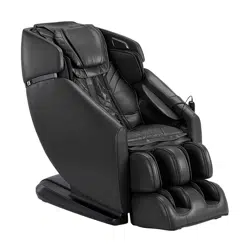
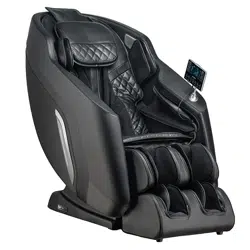
4D DUALFLEX
MASSAGE CHAIR
User Manual
Welcome to
Thank you and congratulations on purchasing an Infinity Massage Chair - you’ve made a
great choice.
With over a decade of experience designing, building and servicing massage chairs,
Infinity takes pride in every chair sold, including yours. We are here for you. The US-
based Customer Care team can be reached at (603) 910-5000 or visit us online at www.
infinitymassagechairs.com and find valuable self service resources under the SUPPORT tab,
including electronic copies of all documents and video tutorials.
Inside this manual, you will find everything you need to setup and safely enjoy your chair.
Please review the entire manual, including all safety information, before assembling or
using your chair. If you are assembling the chair yourself, please see the Assembly Guide
next and reference the online assembly video.
For convenience, we’ve also created a Quick Start Guide. We suggest you keep it near the
chair as a tool to get to know all the features of your new chair.
Get ready to sit back, relax and enjoy the Ultimate Massage Experience.
We know you can’t wait to sit in your new Infinity Massage chair! Take a picture of you enjoying the ultimate
massage experience and make sure to tag us on social media with the hashtag #infinitymassagechairs
Register your product at www.infinitymassagechairs.com/warranty
to ensure it is in our system. This will simplify the warranty process
should you ever need it.
Alternatively, scan the QR code to go directly to the URL above.
Before assembling your chair, watch an assembly video at:
www.infinitymassagechairs.com/assembly-tutorials
Alternatively, scan the QR code to go directly to the URL above.
THE ULTIMATE MASSAGE EXPERIENCE
@infinitymassagechairs@infinitymassagechairs
@infinity_chairs@infinity_chairs
@infinitymassagechairs@infinitymassagechairs
SCAN CODE
SCAN CODE
Warranty Registration
Assembly Video
Table of Contents
Your Chair
Chair Features
External Structure
3
Before Getting Started
Chair Setup
Taking Control
Set Your Environment
Set Your Environment (Cont.)
Settings
Installation Site
Floor Protection
Move Methods
Connect to Power
Main Power Switch
Adjust Pillow
Increase Intensity of Massage - Manually
TrueFit
®
Body Scanning
Getting out of the Chair
Chair Entry and Exit Hazards
4
5
6
6
7
7
8
8
8
8
9
9
10
11
12
13
14
16
16
17
17
17
17
17
18
18
18
18
18
19
19
19
19
20
20
20
20
20
20
21
21
21
21
22
22
22
22
22
23
23
23
23
23
24
24
25
25
26
26
26
26
26
26
26
26
26
27
30
30
31
32
Touch Screen Tablet Layout
Touch Screen Tablet Operation
Smart Dial + Quick Access Control Panel
Tablet: Fixed Navigation Settings
Auto Programs
In-Use Screen
Program Generator
Mode (Technique)
4D Intensity
Mechanism Speed
Waist & Leg Heat
Foot & Calf Rollers
Manual Mode
Upper/Lower Mech
Technique
4D Intensity
Speed
Rollers
Focus Zones
Massage Width
Air Settings
Adjustments
Backrest Incline
Leisure
Weightless Zero Gravity Recline
Backrest Incline/Recline
Footrest Raise/Lower
Footrest In/Out
MyMemory
®
Saved Programs
Save a Program
Remove a Program
Health Scan
Blood Oxygen
Heart Rate
Microcirculation
Fatigue Value
Intelligent Voice Command + Control
Turn Off Listening
Turn On Listening
Activating Voice Control
Voice Command List
SootheMe
®
Sounds
Volume Level
Chromotherapy Lights
Sleep Mode (ZZZ)
System
Brightness
Language
Voice Demo
Bluetooth
®
Beep
Voice Command
Display Timeout
Wireless Pad & USB-C Charging Port
Safety Information
Trouble Shooting
Specifications
Frequently Asked Questions
Warranty Information
Staying Safe
Fixing Issues
Warning! Read important safety information
found on page 27 before using or operating chair.
WARNING
TrueFit
®
Body
Scanning
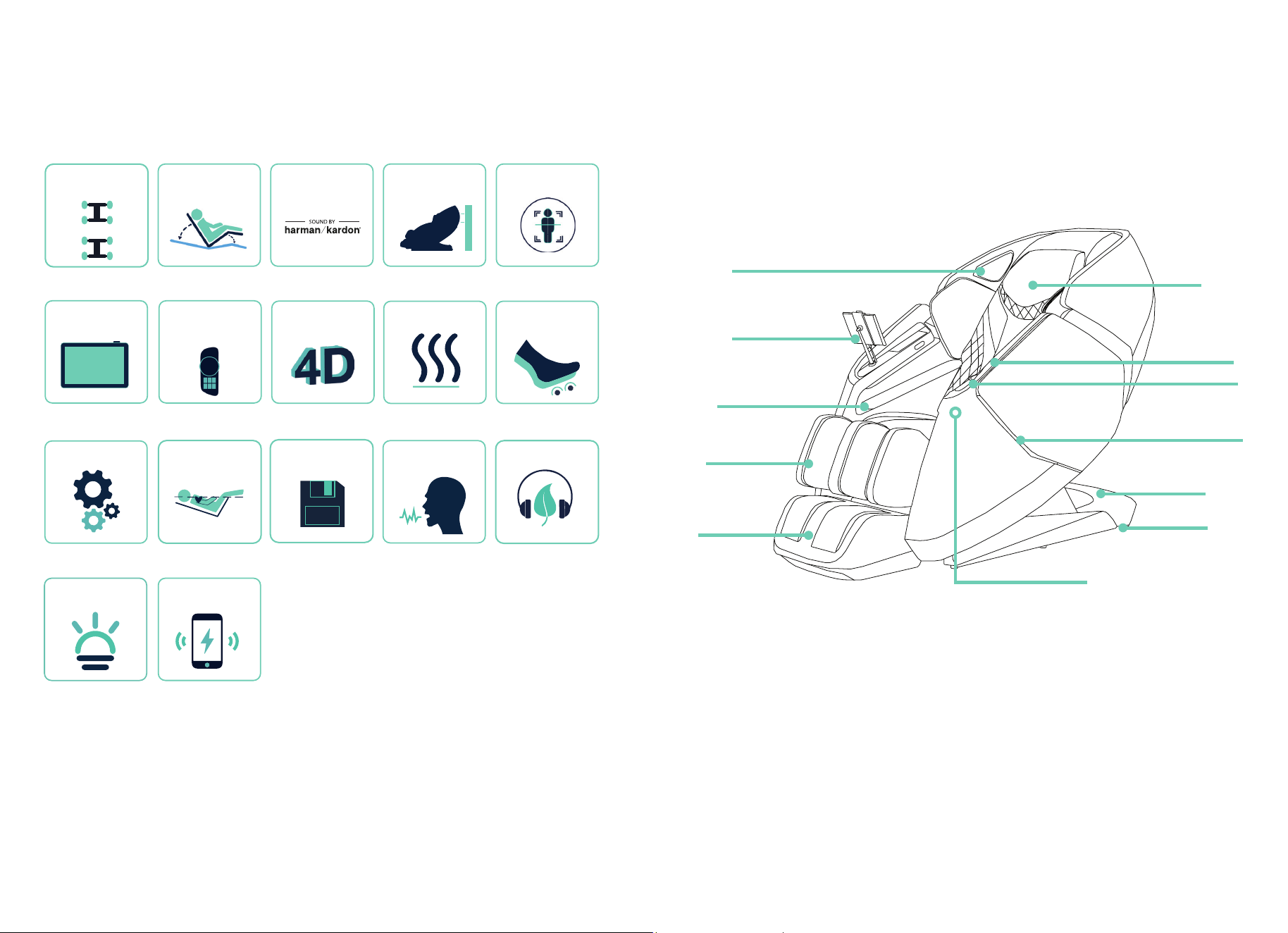
Chair Features
4
Your Chair
4D Back Mechanism
& Intensity
Page 10
Page 6
Page 8
Zero Wall Fit
®
Space-
Saving Technology
Dual Reflexology
Foot Rollers
Premium Bluetooth
®
Speakers
Page 17 Page 17
Page 23
Page 25
Dual Back
Mechanism
8” Touch Screen
Tablet
Intelligent Voice
Command + Control
Page 20
Page 24
Page 25
Waist & Leg Heat
Page 17
Page 21
Chromotherapy
LED Lights
Page 12
SootheMe
®
Sounds
Weightless Zero
Gravity Recline
Quick Access
Control Panel +
Smart Dial
MyMemory
®
Programs
Page 18
Wireless Charging &
USB-C Charging Port
Flexible Track
Manual Massage
5
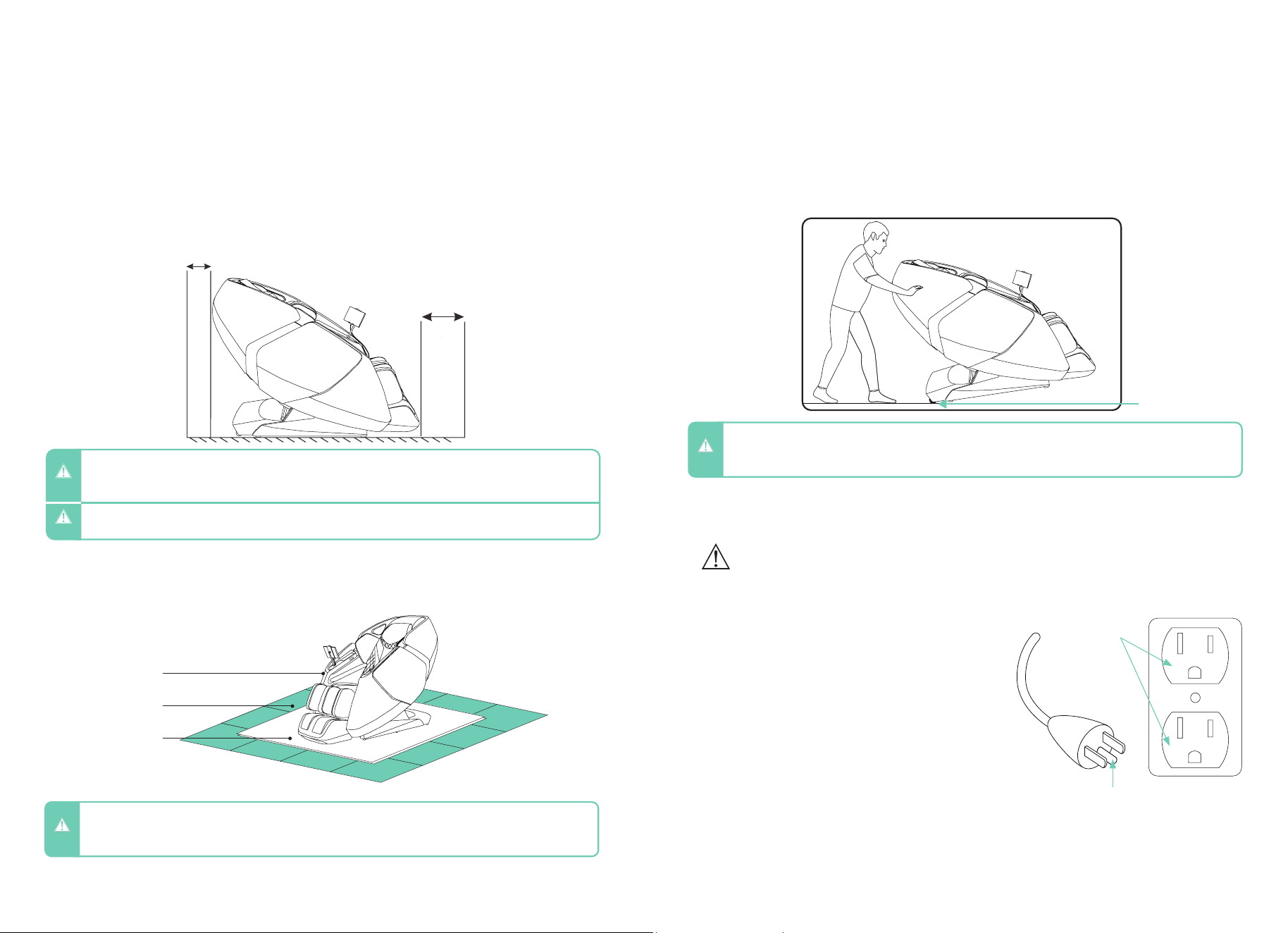
External Structure
8
Casters
Power Box
LED Light
Health Sensor (Inside)
Quick Access
Wireless
Charging Pad
Pillow
8” Tablet
Harman/Kardon
®
Speakers
Foot Rest
Calf Rest
Arm Massage
6 7
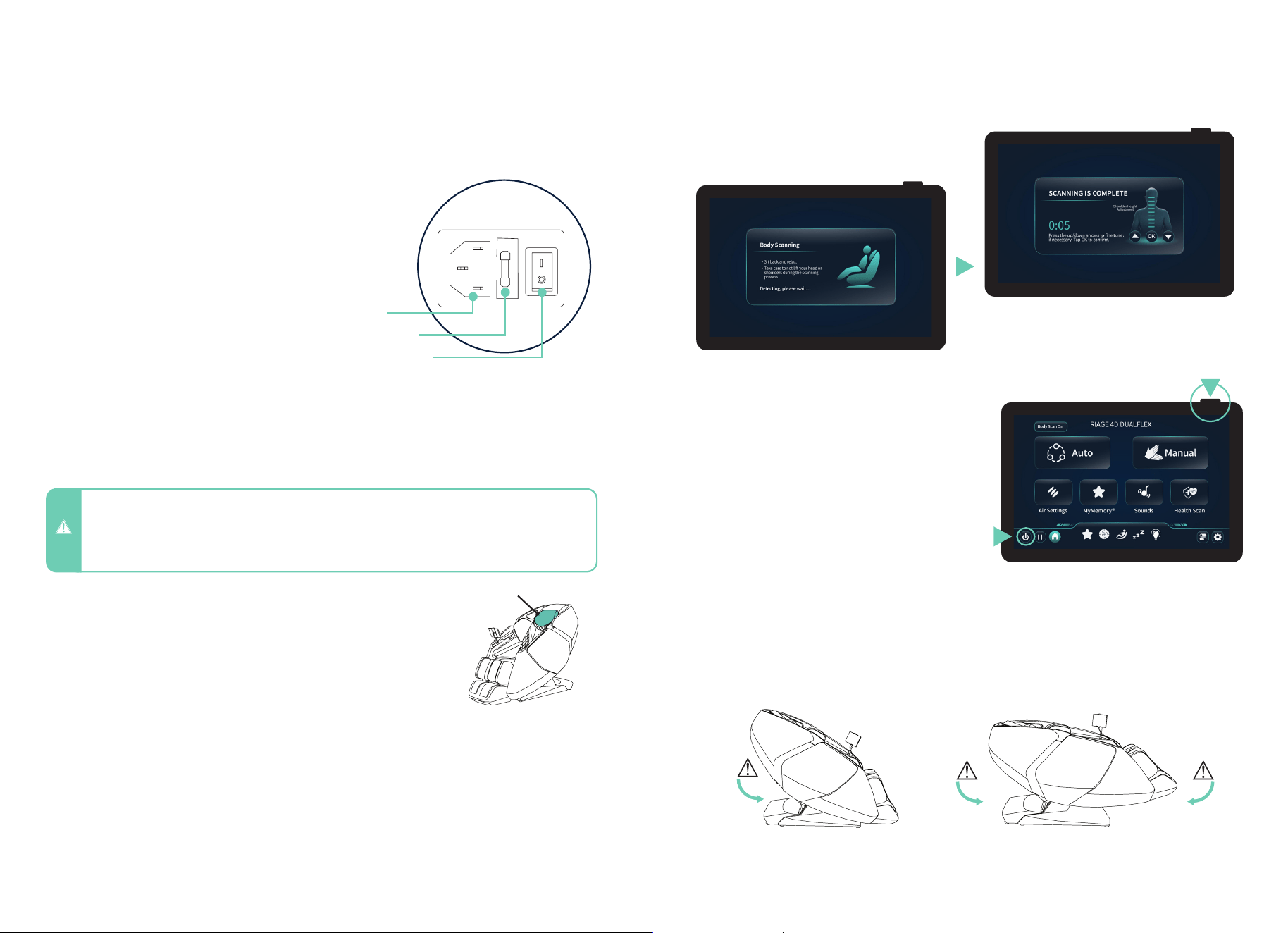
- 4” clearance for the recline of the backrest; 24” clearance for the extension of footrest and
sliding forward of the chair.
- Keep it 3 feet away from the TV, radio or other audio & video appliance to avoid signal
interference.
Clearance Space for the Chair
Installation Site
Before Getting Started
To protect ANY floor type, hard surface or carpeted, from scratches or other markings,
place the chair on a pad or mat that extends from under the footrest to the rear of the chair.
Floor Protection
- Do not use the massage chair in high moisture environment such as near a swimming pool or bathroom to
prevent electric shock accident.
- Please keep the massage chair away from heated surfaces to prevent fire hazard or damage to the product.
WARNING
- Keep the distance between the power socket and power switch within 60” to avoid damage of power cord
while massage chair sliding forward.
- Straighten the power cord while in use to avoid tangle or damage.
CAUTION
- To avoid serious injury or death, before sliding chair forward or backward check to make sure area is clear
of children, pets, or obstacles.
WARNING
Apply pressure to the back of the massage chair from behind to pivot on the casters.
Have a second person up front to guide the Footrest until in the correct position. Maintain
clearances as mentioned above. Gently lower into place. Do not pull on the side arms.
Move Methods
Connect to Power
CAUTION
- Do not move the chair when there is user inside.
- Chair is heavy. Use caution and get assistance when lifting to avoid injury. Do NOT lift chair by footrest or
armrests to avoid damage to product.
Plug into a 120V grounded outlet.
WARNING – Improper connection of the equipment-
grounding conductor can result in a risk of electric shock. Check
with a qualified electrician or serviceman if you are in doubt as to
whether the product is properly grounded. Do not modify the plug
provided with the product – if it will not fit the outlet, have a proper
outlet installed by a qualified electrician.
This product is for use on a nominal 120V circuit and has a
grounding plug that looks like the plug illustrated. Make sure that
the product is connected to an outlet having the same configuration
as the plug. No adapter should be used with this product.
Earthing
This massage chair is a Class 1 electrical appliance. Make sure to
use a grounded outlet to the grounded power supply circuit and a
properly installed earth grounding rod with ground connection, to
avoid electric shock.
Grounding Instructions
To avoid risk of electrical shock, turn power switch off before plugging unit into electrical outlet. Use only
with properly grounded outlet (3 prong). Do not plug into ungrounded outlet.
Grounded
outlet
Grounding pin
WARNING
Massage Chair
Floor
Pad/Mat
4”
24”
Casters
8 9
Getting Comfortable
Chair Setup
- When not in use for a long period of time, we recommend that the chair be covered, the power cord be coiled
and that the unit be placed in an environment free of dust and moisture.
- To avoid possible damage to product or injury to unsupervised children, always turn off power switch and
unplug massage chair from electrical outlet immediately after use.
CAUTION
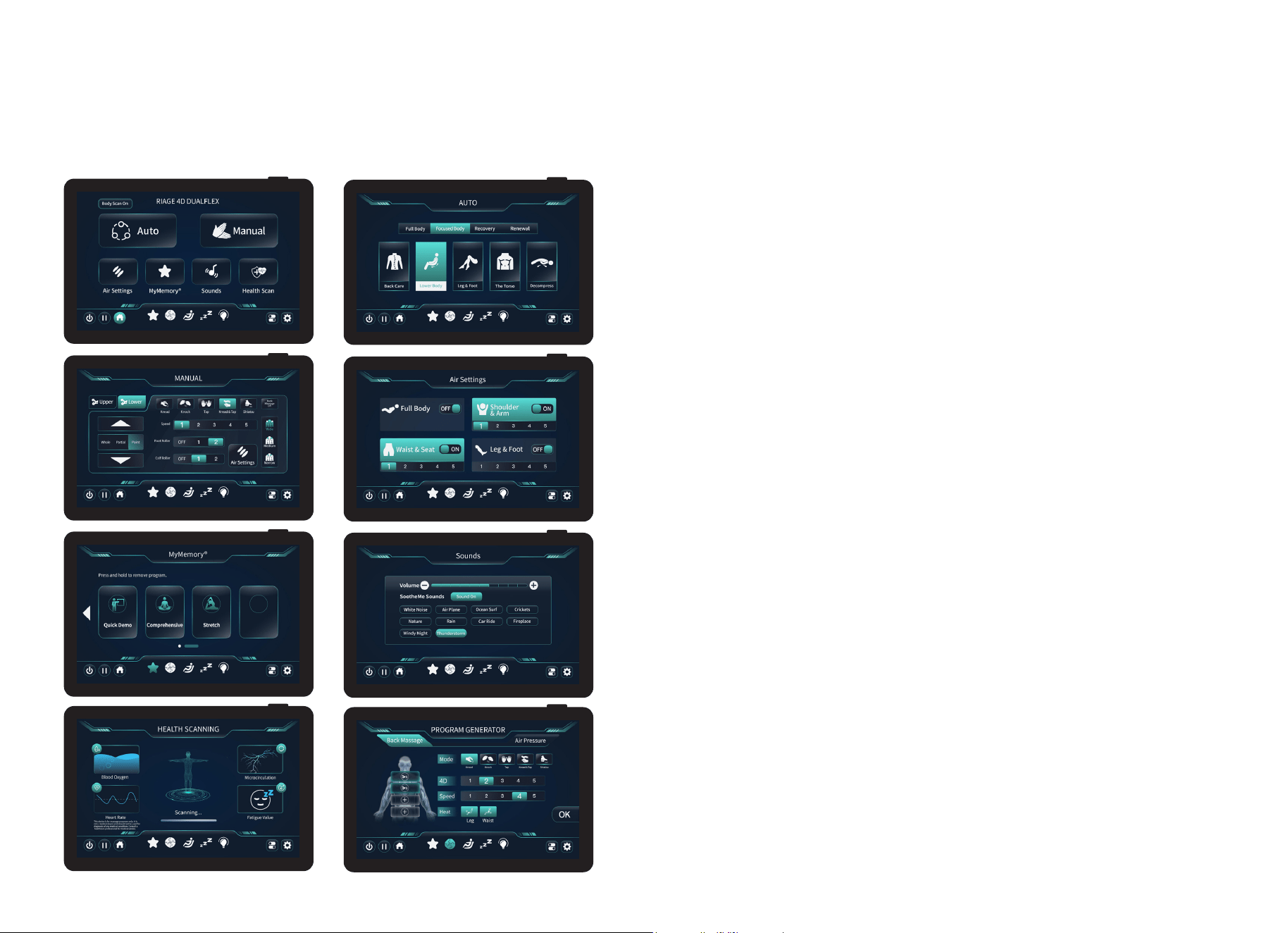
To power up the chair, plug the power cord into the power
port on the back of the massage chair, then connect the
other end to a grounded 120V outlet. Turn on the chair by
switching the power button to “I” or “ON.”
Main Power Switch
Take note of where the pillow rests on your neck. Adjust the pillow
so that it rests comfortably in the arch of your neck.
Adjust Pillow
To make the massage more intense, flip the pillow between you and the massage
mechanism in the seat back. To remove the pillow, simply unzip the zippers and place the
pillow aside.
Increase the Intensity of your Massage - Manually
TrueFit
®
Body Scanning
Power Button
After starting any auto program or manual massage, the chair will automatically begin
scanning your body, mapping your back, shoulders, and neck. During this process it is
important to remain seated back into the chair without lifting your head. Use the up or down
arrows to move the back mechanism in increments or tap and hold to move continuously.
After turning the chair’s main power switch ON, the touch screen tablet can be powered on
using one of two methods. Press and hold the Power Button located on the top-right corner
of the touch screen tablet until the display turns on, or press and hold the Power Button on
the left armrest’s Quick Access Control Panel until the display activates.
To exit the massage chair at any time, tap the Power
button located in the lower-left corner of the Home
screen. Alternatively, press and hold the Power
button on the top-right corner of the touch screen
tablet or the Power button on the Quick Access
Control Panel located on the armrest. The chair will
automatically return to its default upright position,
allowing you to exit safely.
WARNING! Check to make sure children and pets
are clear of chair before tapping power button to
return chair to upright position.
Getting Out of The Chair
Chair Entry and Exit Hazards
WARNING! The areas under the footrest and behind the back rest are potentially dangerous for a child or
pet. The chair back is heavy and reclines with force. A small child or pet located behind the chair could be
crushed as chair is reclined resulting in serious injury or death. When chair is reclined, small children or pets
who have crawled under the leg rest may not be visible to the user and could be crushed when leg rest is
lowered or when chair is returned to upright position. To avoid serious injury or death, check these areas
carefully before reclining, lowering leg rest, or returning chair to upright position.
Make sure to check for children
or pets between the chair back
and the base of the chair before
entering zero gravity recline.
TrueFit
®
Body Scanning
Make sure to check for children or
pets underneath the footwell before
exiting zero gravity recline and
returning to upright position.
Make sure to check for
children or pets between the
footrest and the chair body
before lowering the legrest.
When TrueFit
®
Body Scanning is running, use
the mech’s up and down arrows to adjust the
mechanism to your preferred shoulder height,
then press “OK”.
Power Port
Tube Fuse
Power Switch
Pillow
10 11
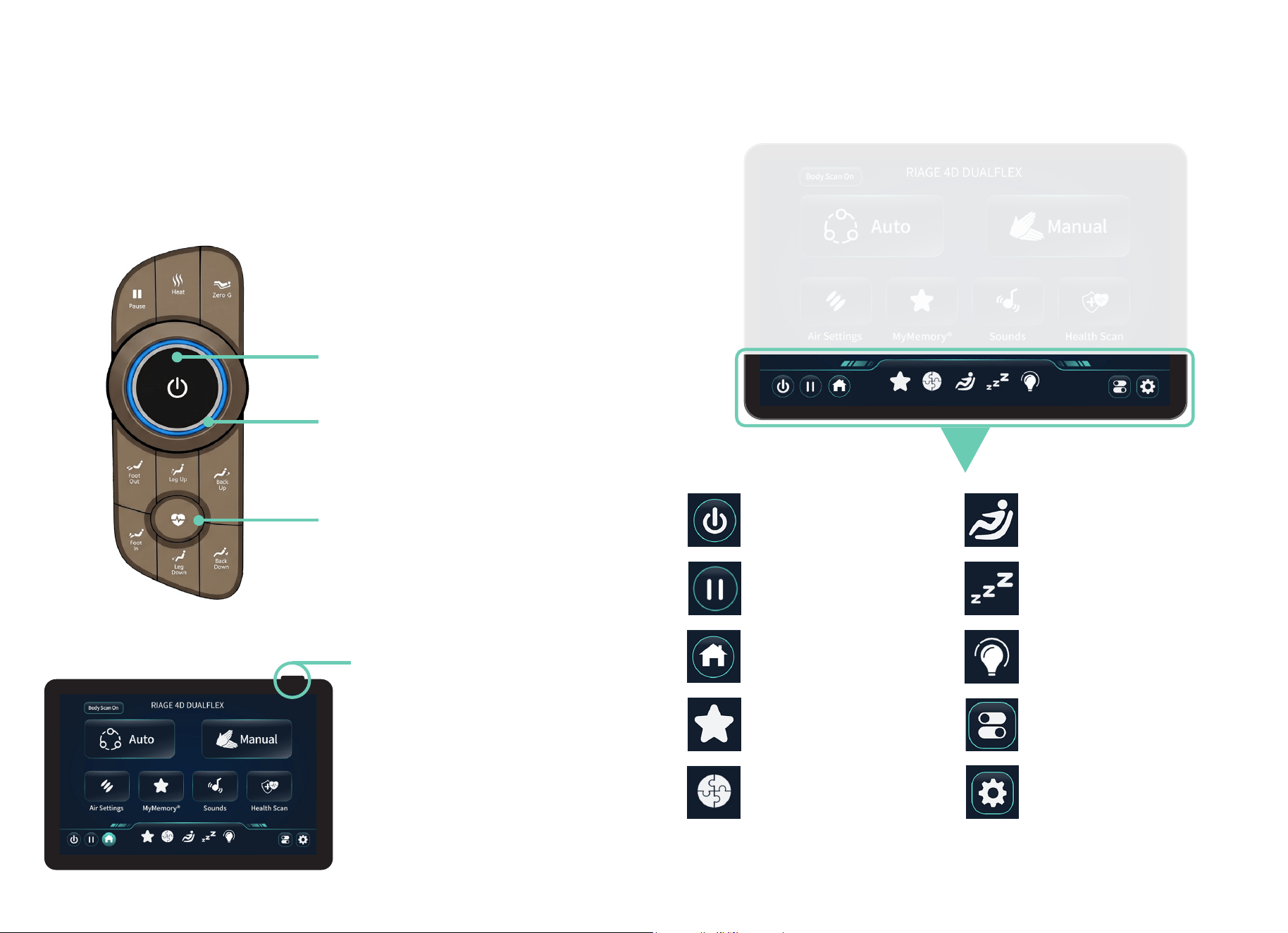
Touch Screen Tablet Layout
1.
3.
5.
7.
2.
4.
6.
8.
Taking Control Taking Control
Touch Screen Tablet Operation
1. Home Screen – After turning on your chair, this is the first screen displayed on the touch
screen tablet. Use this screen to navigate all menu options. Tap the screen to make a
selection, and tap the house icon to return to the home screen.
2. Auto Programs – Use this screen to browse and select from 20 preset auto programs,
including a demo mode showcasing the chair’s features. Tap your desired program to begin
the TrueFit
®
Body Scan, followed by your selected massage session.
6. Sounds – Tap to browse 10 immersive SootheMe
®
sound options, adjust volume levels,
and stream your favorite Bluetooth
®
audio through premium Harman/Kardon
®
speakers for a
rich listening experience.
4. Air Settings
– Tap to customize your airbag compression massage session. Select body
zones and adjust air intensity levels to apply gentle to firm pressure for enhanced comfort
and support. Note: When full body is selected, all airbags become active.
5. MyMemory
®
– Tap to save your favorite massage settings for future use. Select a
memory slot to store your current session and quickly recall your personalized massage
anytime.
3. Manual Mode – Target specific areas with greater precision using manual mode.
Customize your massage by adjusting techniques, intensity, and focus zones to create a
personalized experience.
7. Health Scan – Tap to begin a health scan. Place your finger on the health sensor to
measure key wellness metrics and receive two recommended massage programs based on
your health results.
8. Program Generator – Dual 4-node massage mechanisms simulate the feel of two
professional massage therapists. Customize up to 4 massage zones, select massage
techniques, adjust 4D intensity and roller speed, activate leg or waist heat, and add air
compression therapy. Save your personalized program to MyMemory
®
for quick access
anytime.
12 13
Taking Control
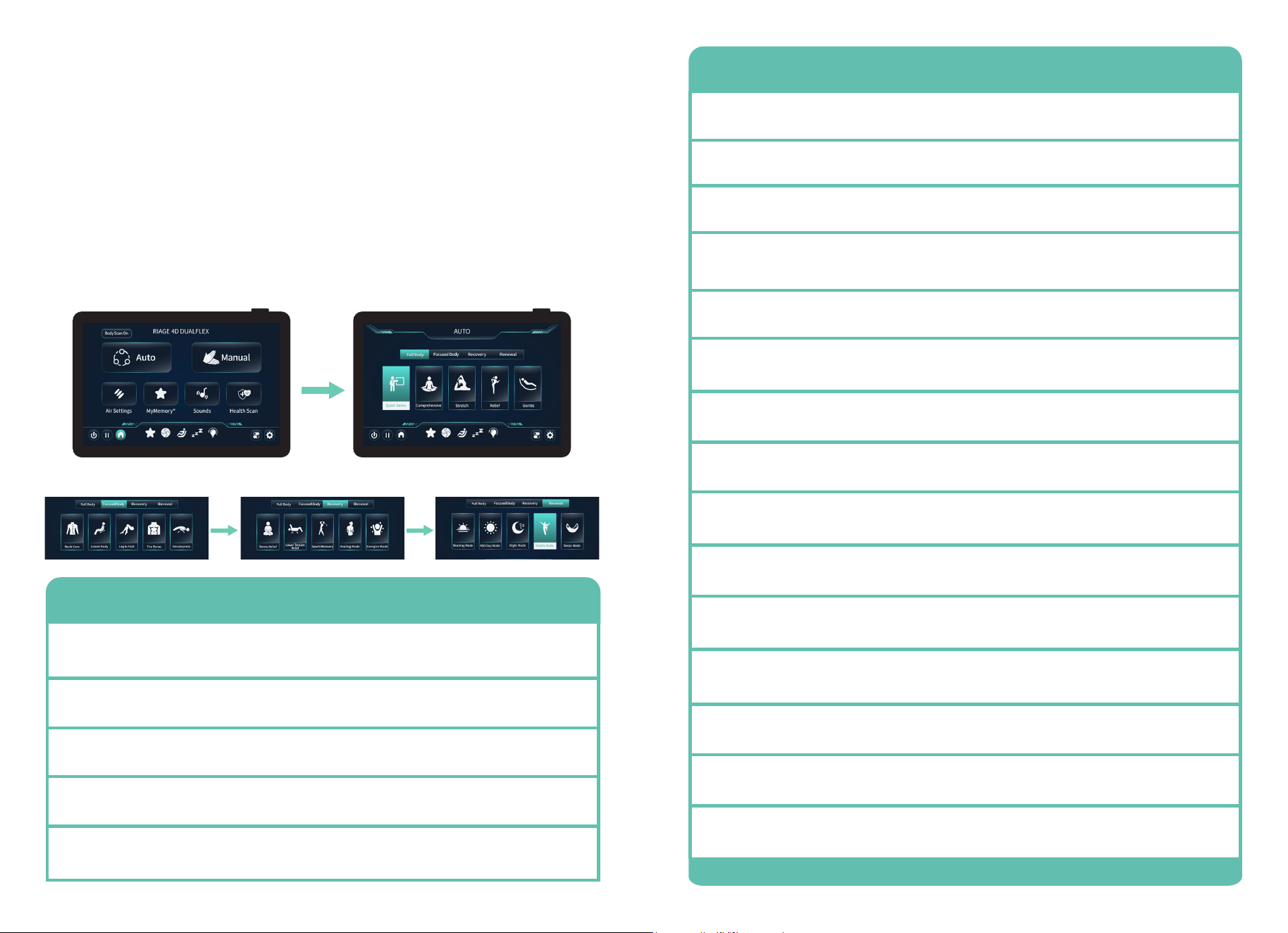
Smart Dial, Quick Access Control Panel, and Touch
Screen Tablet Power Button Options
Tablet: Fixed Navigation Settings
Program Generator - Create a
personalized massage program.
Customize techniques, intensity, and
settings to build a session.
System - Adjust brightness, language,
voice features, and Bluetooth
®
. Control
button sounds, view voice commands,
set screen timeout, and enable wireless
charging.
Power - Tap to power the massage
chair on or off. When powering down,
the chair will automatically return to its
upright default position unless Sleep
Mode is activated.
Adjustments - Adjust incline, recline, Zero
Gravity, and preset positions during your
massage.
Pause - Tap this button to pause your
massage, then tap again to resume.
Sleep Mode - When on, the chair remains
reclined after your session ends. When
off, it returns to an upright position.
Home - Tap this button to quickly
return to the home screen.
Chromotherapy - Exterior side panel
lights add a soft ambient glow to your
space. Choose from 12 different colors.
MyMemory
®
- Save your massage
programs for quick, easy access
anytime.
In-Use Screen - Access controls while
your massage is in progress. Adjust
settings in real time to refine your
experience without stopping your session.
Health Scan
Power Button
Smart Dial
Power Button
Button shortcut that brings you to the
Health Scan page on the tablet.
Press and hold the top right power
button on the tablet to turn on/off the
massage chair.
Turn right to increase the intensity of the
4D back massage. Turn left to decrease
the intensity.
Press and hold to power on the chair. Press
and hold to safely power off the chair.
After turning the chair’s main power switch ON, press and hold either of the power buttons
shown below until the touch screen tablet powers on.
14 15
Set Your Environment
Auto Programs
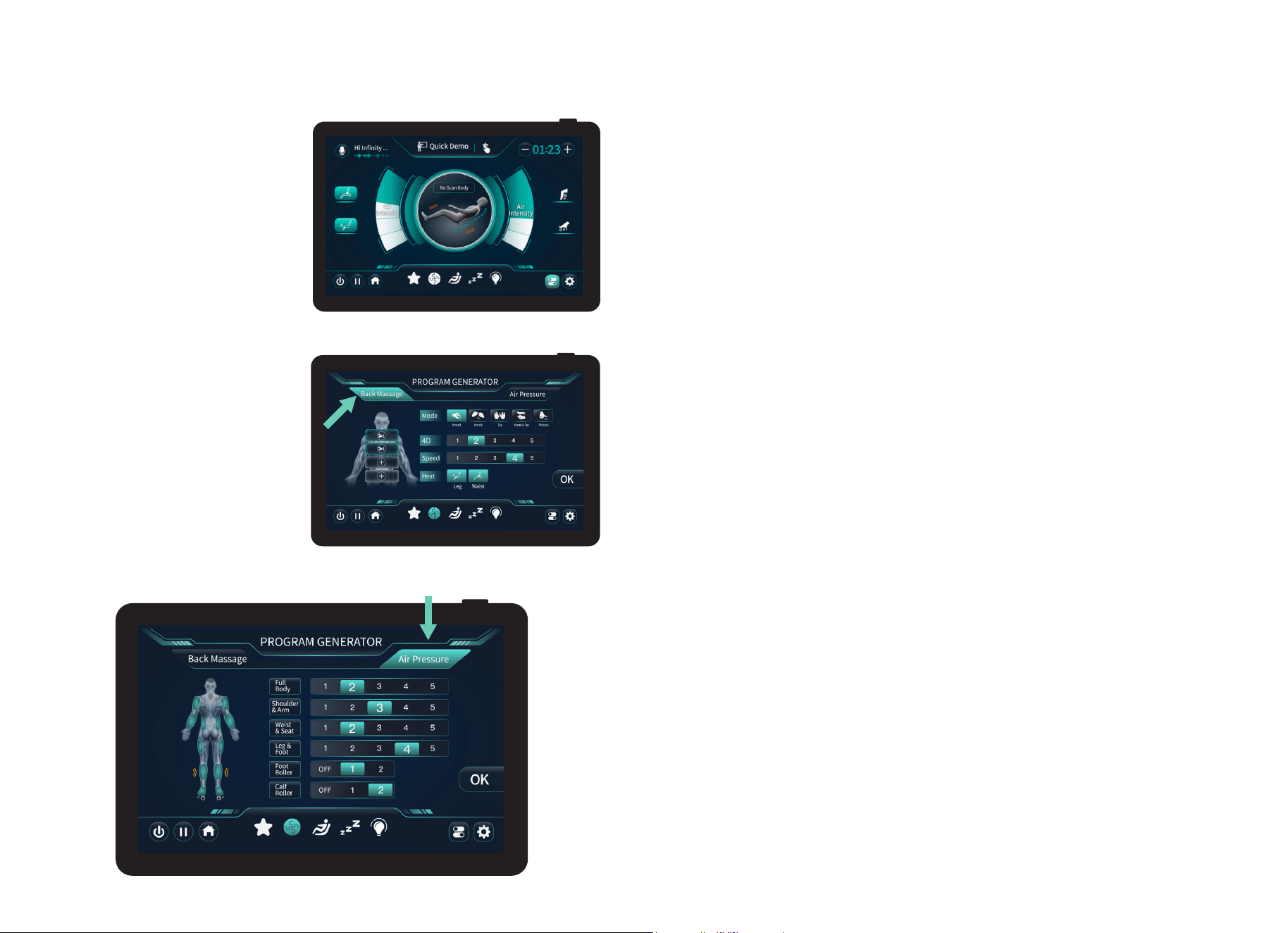
From the home screen, tap the AUTO button to enter Auto Program Menu. Choose from
4 different categories containing 20 programs. Full Body: Quick Demo, Comprehensive,
Stretch, Relief, or Gentle. Focused Body: Back Care, Lower Body, Leg & Foot, The Torso, or
Decompress. Recovery: Stress Relief, Lower Tension Relief, Sports Recovery, Healing Mode,
or Energize Mode. Renewal: Morning Mode, Mid-Day Mode, Night Mode, Vitality Mode, or
Siesta Mode. To enter the program you desire tap the screen. Selected program will show
on the In-use screen.
Tap Auto Programs button and cycle through categories & massage programs
Program Description
Quick Demo
A quick way to feel all the massage techniques and chair movements in a
brief 5 minute session. Quick demo can also be accompanied by a voice
over which can be turned off in system.
Stretch
Gently elongates your muscles and joints using a series of lifting and
extending motions. It’s designed to improve flexibility, release deep tension,
and leave your body feeling open and refreshed.
Relief
Gentle
Focuses on easing tight, stressed muscles with steady, soothing
techniques. It’s ideal for melting away everyday tension and helping your
body unwind.
Offers a soft, calming massage perfect for relaxation or sensitive areas.
It soothes muscles with light, rhythmic motions for a serene, comforting
experience.
Comprehensive
Delivers a full-body massage that relaxes major muscle groups and eases
away tension. It’s a well-rounded session designed to leave you feeling
balanced and restored.
Program Description
Lower Body
Focuses on your hips, thighs, calves, and feet. It relieves tension, improves
circulation, and leaves your legs feeling refreshed and energized.
The Torso
Targets the back, shoulders, and core, providing focused relief to key upper-
body areas. It helps release tension, improve posture, and restore overall
comfort.
Decompress
Gently stretches and elongates your spine to relieve pressure and tension. It
promotes relaxation, improves posture, and helps your body feel more open
and balanced.
Back Care
Targets the muscles along your spine, shoulders, and lower back. It helps
relieve tension, improve posture, and promote overall spinal comfort.
Stress Relief
Lower Tension
Relief
Sports Recovery
Healing Mode
Night Mode
Energize Mode
Vitality Mode
Morning Mode
Siesta Mode
Mid-Day Mode
Focuses on easing tension throughout the body with soothing, rhythmic
motions. It helps calm the mind, relax muscles, and restore a sense of
balance and well-being.
Targets tightness in the lower back, hips, and legs. It helps release built-
up stress, improve mobility, and leave the lower body feeling relaxed and
refreshed.
Uses targeted techniques to soothe sore muscles and aid post-workout
recovery. It helps reduce stiffness, improve circulation, and restore energy
for optimal performance.
Focuses on gentle, restorative massage techniques to support recovery and
overall wellness. It soothes tired muscles, relieves tension, and promotes a
sense of calm and rejuvenation.
Gently relaxes your body with soothing, calming massage techniques. It
helps release tension, quiet the mind, and prepare you for a restful night’s
sleep.
Revitalizes the body with dynamic, stimulating massage techniques. It
increases circulation, awakens fatigued muscles, and leaves you feeling
refreshed and ready for the day.
Energizes both body and mind with a balanced, stimulating massage. It
boosts circulation, relieves tension, and helps you feel refreshed, alert, and
ready for action.
Gently awakens your body with light, refreshing massage techniques. It
boosts circulation and energy, helping you start the day feeling alert and
revitalized.
Offers a gentle, calming massage designed for short rest periods. It soothes
muscles, eases tension, and helps you feel refreshed and rejuvenated in
minutes.
Refreshes and recharges your body with balanced, invigorating massage
techniques. It eases tension, restores energy, and helps you feel alert and
focused for the rest of the day.
Leg & Foot
Concentrates on your calves and feet, using kneading and compression to
ease tension. It promotes circulation and leaves your lower limbs feeling
relaxed and revitalized.
16 17
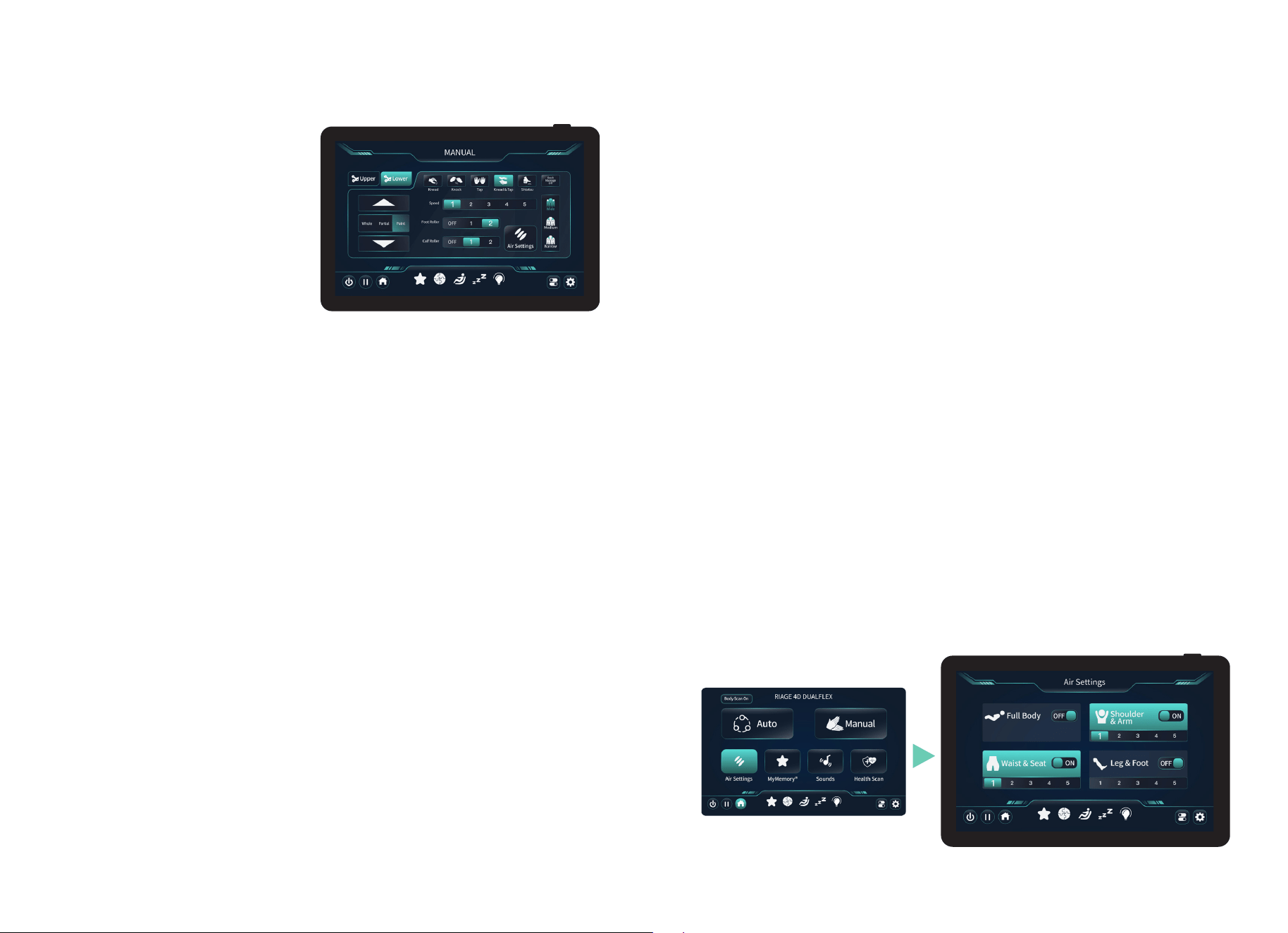
The In-Use Screen appears during an
Auto Program or Manual Mode massage
session, giving you quick access to
massage controls and chair features
in real time. Adjust massage time,
activate Intelligent Voice Command, and
customize settings such as Heat, Calf
Rollers, Foot Rollers, 4D Intensity, and
Air Intensity throughout your massage.
In-Use Screen
Program Generator
Your chair features custom settings
for a personalized massage session.
Tap Back Massage to assign massage
techniques to up to four zones, adjust
the upper 4D intensity and speed, then
tap Air Pressure to customize airbag
compression therapy settings.
When finished, press OK to begin your
massage and save your personalized
session to MyMemory
®
for quick recall
later.
Set Your Environment
Mode (Technique)
Activate massage techniques:
Knead - Gently lifts and rolls the muscles in smooth, circular motions to melt away tension and
comfort the back. This technique promotes better circulation and delivers a soothing, hands-on
therapeutic feel.
Knock - Applies rhythmic tapping motions along the back to help loosen tight muscles. This
technique stimulates circulation and relieves deep-seated tension for an invigorating massage
experience.
Tap - Uses light, rapid tapping motions to gently stimulate the muscles. This technique helps
refresh and energize the body while easing surface tension.
Knead & Tap - Combines smooth, circular kneading with gentle, rhythmic tapping motions. This
dual-action technique relaxes deep muscle tension while stimulating circulation for a balanced,
rejuvenating massage.
Shiatsu - Applies deep, finger-like pressure along key points of the back, mimicking the
traditional Japanese massage technique. It helps release tension, improve circulation, and
restore balance for a deeply relaxing and therapeutic experience.
4D Intensity
Use this control to increase or decrease the maximum intensity of the 4D back mechanism
that works the back and shoulder regions. 1 = light, 2, 3, 4, 5 = firm.
Mechanism Speed
Increase or decrease speed of the back mechanism. 1 = slow, 2, 3, 4, 5 = fast.
Waist & Leg Heat
Use this control to set heat for waist and leg. Tap the button to turn on or off.
Set Your Environment
Foot Roller - Gently massage the soles of your feet using rotating rollers. Tap the button to
activate them, relieving tension, stimulating circulation, and providing a soothing, reflexology-
like experience. 0 = off, 1 = slow, 2 = fast.
Calf Roller - Rotating rollers to massage the calves. Tap the button to activate them, easing
muscle tension, improving circulation, and delivering a relaxing, invigorating massage.
0 = off, 1 = slow, 2 = fast.
Foot & Calf Rollers
18 19
Manual Mode
Have a particular spot that needs more
work? Take the power of massage into
your own hands. Tap Manual on the home
screen to enter the Manual display screen.
Use this screen to fully customize your own
massage and find the perfect treatment for
you.
Upper/Lower Mech
This will allow you to control either the upper or lower mech. Simply tap “Upper” or “Lower”
to control each mech and its settings. Note: The lower mech does not have 4D settings.
Technique
Activate massage techniques:
Knead - Gently lifts and rolls the muscles in smooth, circular motions to melt away tension and
comfort the back. This technique promotes better circulation and delivers a soothing, hands-on
therapeutic feel.
Knock - Applies rhythmic tapping motions along the back to help loosen tight muscles. This
technique stimulates circulation and relieves deep-seated tension for an invigorating massage
experience.
Tap - Uses light, rapid tapping motions to gently stimulate the muscles. This technique helps
refresh and energize the body while easing surface tension.
Knead & Tap - Combines smooth, circular kneading with gentle, rhythmic tapping motions. This
dual-action technique relaxes deep muscle tension while stimulating circulation for a balanced,
rejuvenating massage.
Shiatsu - Applies deep, finger-like pressure along key points of the back, mimicking the
traditional Japanese massage technique. It helps release tension, improve circulation, and
restore balance for a deeply relaxing and therapeutic experience.
Set Your Environment
Foot Roller - Gently massage the soles of your feet using rotating rollers. Tap the button to
activate them, relieving tension, stimulating circulation, and providing a soothing, reflexology-
like experience. Off, 1 = slow, 2 = fast.
Calf Roller - Rotating rollers to massage the calves. Tap the button to activate them, easing
muscle tension, improving circulation, and delivering a relaxing, invigorating massage.
Off, 1 = slow, 2 = fast.
Rollers
4D Intensity
Use this control to increase or decrease the maximum intensity of the 4D back mechanism
that works the back and shoulder regions. 1 = light, 2, 3, 4, 5 = firm.
Speed
Increase or decrease speed of the back mechanism. 1 = slow, 2, 3, 4, 5 = fast.
Focus Zones
Controls the range of motion of the back mechanism, Whole travels the entire length of
the track, Partial travels a short distance and reverses direction for focused relief, Point
stops on the track for targeted relief. Tap the Up/Down arrow to adjust your focus zone,
tap and hold to move the mechanism continuously. Note: The lower mech does not have 4D
settings.
Air Settings
Choose your desired airbag region/s: Full Body, Shoulder & Arm, Waist & Seat, Leg & Foot.
To turn a particular airbag region off, tap the setting from “On” (button is lit) to “Off” (button
is unlit). Selecting Full Body will over ride any selections and ALL airbags become active.
Change the airbag intensity 1 = light, 2, 3, 4, 5 = firm. Tap the home button to return to the
main menu.
Massage Width
Increase or decrease width of back mechanism. Choose from: Narrow, Medium, or Wide.
Set Your Environment
20 21
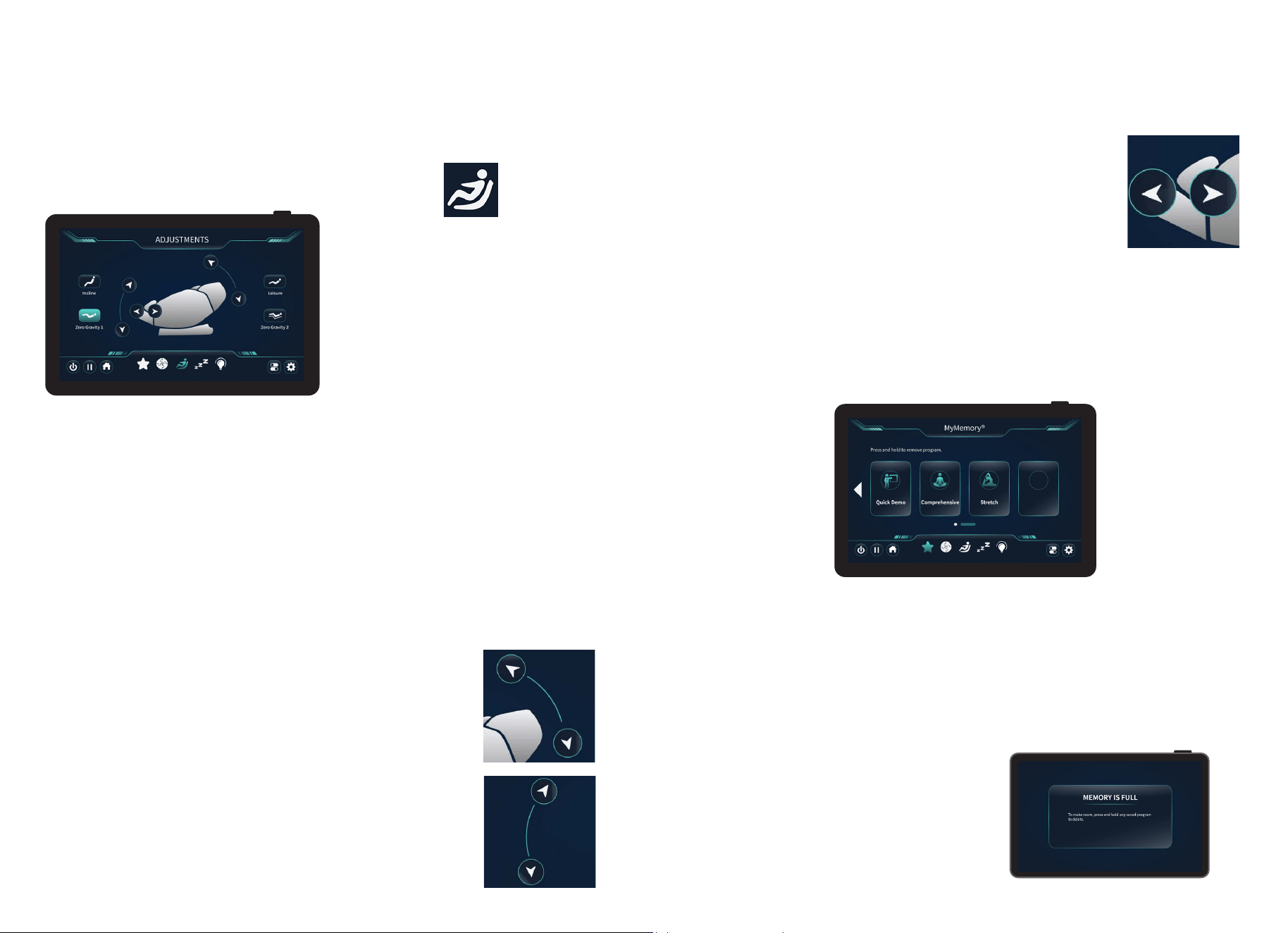
To change settings during an auto program
or manual massage, tap this icon to head to
the Adjustments screen.
The Adjustments screen can be used to
tailor your massage exactly to your needs.
Here you will have complete control over
the recline/incline, lifting/lowering the
footrest, controlling the footrest’s in/out
function, and adjusting the levels of zero
gravity.
Adjustments
Weightless Zero Gravity Recline
Use this control to enter Weightless Zero Gravity Recline. Zero Gravity elevates your feet up
over your heart to improve overall circulation and reduces gravitational force on your spine
for a sense of weightlessness. Zero Gravity 1 will put the chair into a standard recline, Zero
Gravity 2 will recline the chair into complete Weightless Zero Gravity Recline.
Backrest Incline
Use this control to smoothly raise the backrest to your preferred angle, providing
personalized comfort and optimal support while seated.
Backrest Incline/Recline
Tap the up arrow to incline the chair to its default position. Tap the
down arrow to recline the chair. Tap and hold to continuously move
the chair inclining/reclining.
Footrest Raise/Lower
Tap the up arrow to raise the footrest and tap the down arrow to
lower the footrest. Tap and hold to continuously move the chair
raising/lowering.
Leisure
Use this control to gently recline the backrest, allowing you to relax and settle into a
comfortable, restful position.
Set Your Environment
MyMemory
®
Saved Programs
Footrest In/Out
Adjusts the length of the footrest to comfortably support your legs
and feet. Tap the left arrow to move the footrest out, tap the right
arrow to move the footrest in.
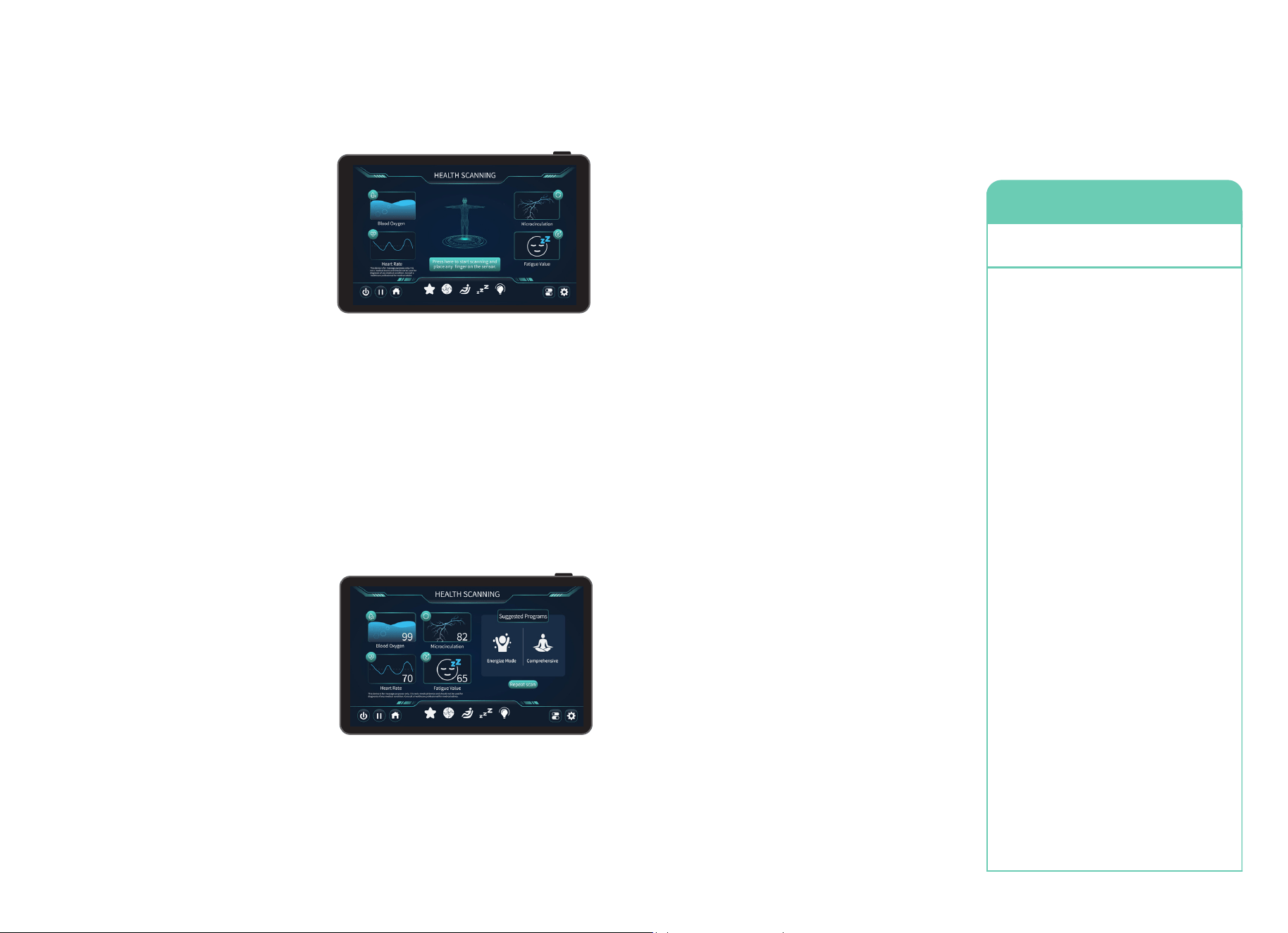
Your chair comes with MyMemory
®
,
a feature where you can save your favorite programs
to memory for easy recall later. Start by choosing an auto program or build your own using
the Program Generator. During your massage, on the in-use screen, tap the top right icon
(finger pointing to the star) to save your program to one of 8 slots on the MyMemory
®
screen. Alternatively, tap the star icon on the bottom navigation to head to the memory
screen. From here you can tap any empty memory tile to add the running program.
Save a Program
Remove a Program
Start an auto program or customize a program in the Manual, or Program Generator screen.
After your body scan has completed you will be taken to the in-use screen. Tap the top icon
(finger pointing to a star) to quickly save your program to memory.
Select the program that you would like to remove, tap and hold the memory slot until the
program disappears.
Memory is Full
Once you have saved 8 programs, the
memory screen will be too full to add more.
Return to the memory screen and remove
one or more programs to make space for new
ones.
Set Your Environment
22 23
Heart Rate
Heart rate refers to the number of times a
person’s heart beats per minute and is a vital
indicator of cardiovascular health. It can vary
based on factors such as physical activity,
stress, illness, and overall fitness levels for
adults.
Microcirculation
Measures how well blood is flowing through
the smallest vessels in your finger during the
health scan. This helps the chair assess your
overall circulation quality, providing insights
into wellness factors like oxygen delivery,
fatigue levels, and general vascular health.
Blood Oxygen
Blood oxygen levels refer to the amount of oxygen circulating in the blood, typically
measured as a percentage known as oxygen saturation (SpO2). Reviewing Blood Oxygen
is important to ensure that organs and tissues receive the oxygen they need to function
properly.
Fatigue Value
Extreme tiredness, reduction in energy, motivation, and ability to concentrate. Displays your
fatigue level and suggests two programs to get you back to normal.
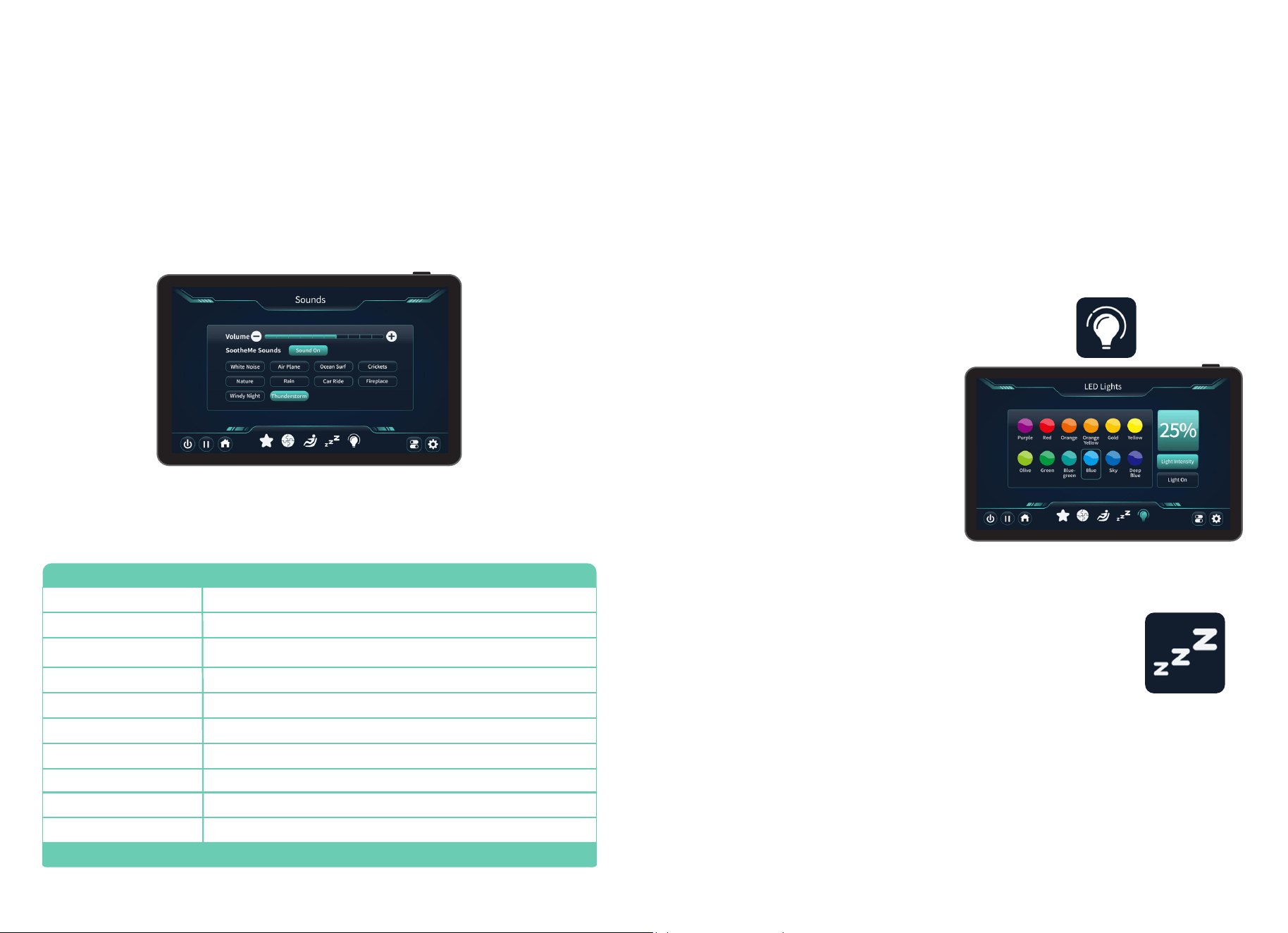
Health Scan
Health Scan uses sensors to personalize your
massage experience. From the home page
tap Health Scan then tap Start Scanning.
After the scanning is complete, the top 2
suggested programs will appear based on
your scan results.
Note: Your finger must be touching the
health sensor which is located on the left
side of the arm rest.
WARNING: This device is for massage purposes only. It is not a medical device and should not
be used for diagnosis of any medical condition. Consult a healthcare professional for medical
advice.
Set Your Environment
Set your Environment
Commands
Your chair is equipped with intelligent, built-in
voice command and control, giving you the
freedom to enjoy a fully hands-free massage
experience. Simply speak one of the many
available commands, and the chair will
respond instantly; adjusting settings, selecting
programs, and creating the perfect relaxation
experience without you lifting a finger.
Turn Off Listening
You can turn off intelligent voice command +
control by heading to the System screen and
tapping the Voice Command button until it is
no longer illuminated.
Turn On Listening
You can turn on intelligent voice command +
control by heading to the System screen and
tapping the Voice Command button until it is
illuminated.
Activating Voice Control
To activate, simply say ‘Hi Infinity’ or ‘Hey
Infinity’. You may now give your chair any of
the commands to the right within 5 seconds.
Make sure to speak clearly and slowly. After
5 seconds the Intelligent Voice Command
function will go to sleep automatically and
must be awakened again.
Voice Command List
In addition to the list to the right, you
can always find the complete list of voice
commands by using your touch screen tablet
controller. To access the voice command
list, tap System from Home display, then tap
Command List.
Intelligent Voice Command + Control
Quick Demo
Comprehensive
Stretch Mode
Relief Mode
Gentle Mode
Back Care
Lower Body
Leg & Foot
The Torso
Decompress Mode
Stress Relief
Lower Tension Relief
Sports Recovery
Healing Mode
Energize Mode
Morning Mode
Mid-Day Mode
Night Mode
Vitality Mode
Siesta Mode
Zero Gravity
Upright
Stop Massage
Switch Off Voice Control
Volume Up
Volume Down
Lights On
Lights Off
Pause Massage
Resume Massage
Say Phrase
‘Hi Infinity’ or ‘Hey Infinity’
Then speak one of the following
Commands
24 25
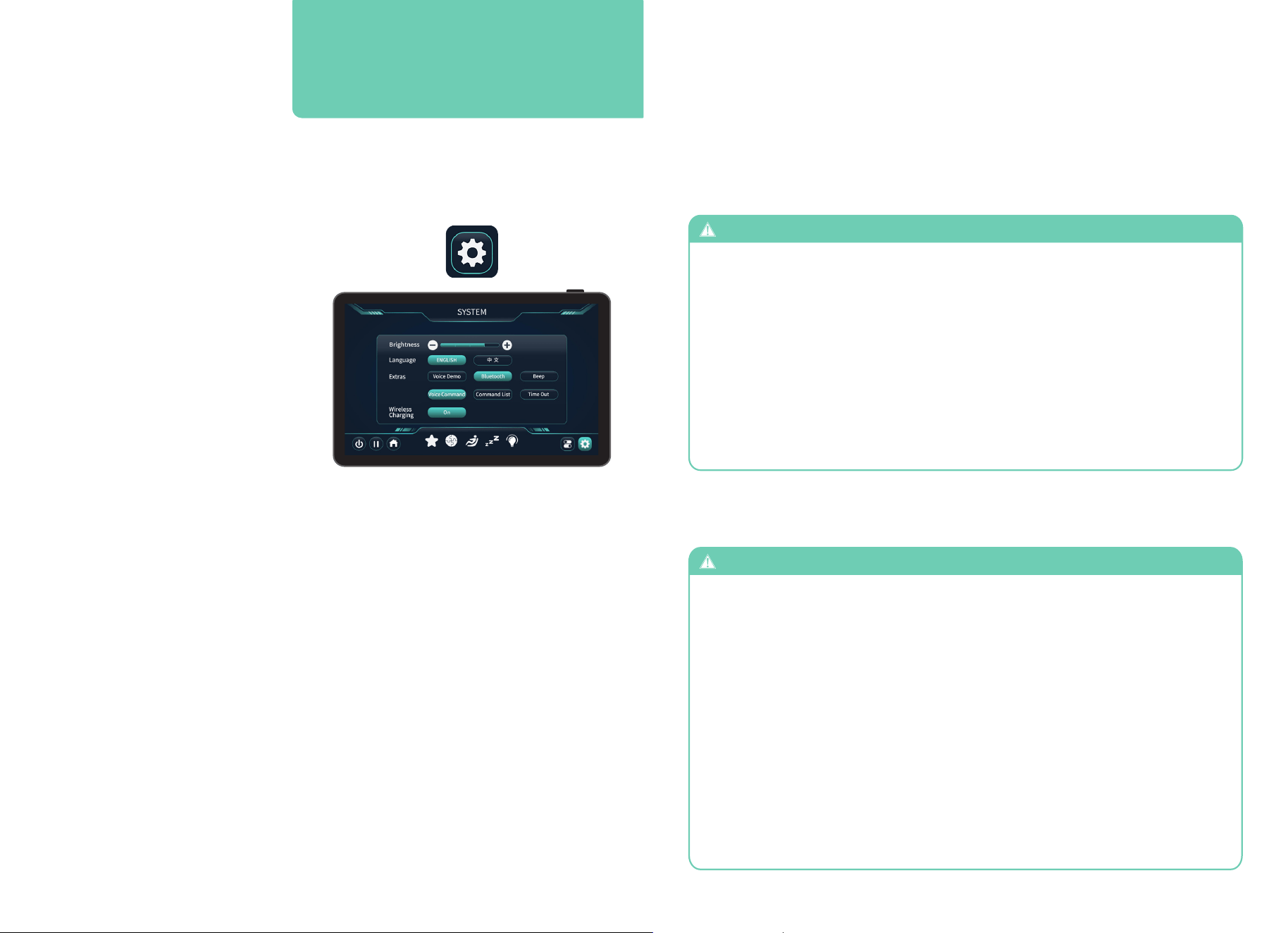
Tap Sounds on the home display to enter the Sound display screen. Use this screen to select
and control the SootheMe
®
Sound Therapy feature of your chair. The selected sound will play
from the premium Harman/Kardon
®
speakers next to your head. To turn SootheMe
®
Nature
Sounds off, de-select the activated sound or tap SootheMe
®
: Sound Off.
Sounds
Volume Level
Increase or decrease volume of
SootheMe
®
Nature Sounds. 1 = low, 10 = high, or Off. Tap
SootheMe
®
Sounds to “Sound Off”. Note: Bluetooth must be turned on for
SootheMe
®
Sounds to work.
Set your Environment
Chromotherapy uses color spectrum to help balance one’s physical, emotional, spiritual, and
mental energy. Select the color that best fits your mood, turn down the lights in your room,
adjust the light intensity and your favorite color.
Activate one of 12 chromotherapy lights: Purple, Red, Orange, Orange Yellow, Gold, Yellow,
Olive, Green, Blue-Green, Blue, Sky, and Deep Blue.
Chromotherapy Lights
Sleep Mode
Percentage %
ZZZ
Light Intensity
Light On
The percentage shows how much light
is being illuminated from the source. See
below on how to change these numbers.
Toggle your desired sleep mode setting: On or Off. When sleep mode is
on the chair will stop in the reclined position after Auto Programs. When
sleep mode is off the chair will return to a fully upright position after
each Auto Program.
Adjust the light intensity from 0% (Off) to
100% (Bright).
Turns Chromotherapy On or Off. When the
button is illuminated Chromotherapy is on,
when not illuminated, the light will stay off.
Set your Environment
Crickets
Night time in the suburbs. Chirping crickets, water trickling from a pond, and faint
traffic noises
A constant, even loop of pure white noise to mask out distractions
Soothing ocean waves rolling onto the shore
Quiet, light, refreshing rain falling to the ground
Heard from inside a cabin, a howling wind blows constantly outside
Heavy rainstorm with thunder
Crackling of fire in a fireplace
Calming inner-city traffic featuring cars, trucks, and motorcycles
A Cessna propeller airplane motor idling
Refreshing sounds of small birds peacefully singing along a tranquil stream
Note: Bluetooth
®
must be turned ON for sounds to work.
Sounds What is it?
Rain
Nature
Air Plane
Car Ride
Fireplace
Thunderstorm
Windy Night
Ocean Surf
White Noise
26 27
Tap System (gear icon) on the bottom right corner of the screen. You’ll be taken to a new
screen that offers a number of settings to change.
System
Smart tip: In order to play music from your
Bluetooth enabled audio device, Bluetooth
must first be turned on in settings.
Settings
Brightness
Language
Voice Demo
Bluetooth
®
Beep
Voice Command
Command List
Time Out
Wireless Charging Pad & USB-C Charging Port
Control your desired screen brightness
setting: 1 = dimmest, 4 = brightest. Tap + or
– buttons on screen to change setting.
Easily choose your preferred language—
English or Chinese.
When selected, a narrated audio track
describes the benefit of massage and actions
of the massage chair. Note: voice demo only
works with the demo auto program.
Toggle your chair’s Bluetooth
®
setting: On or Off. Open Bluetooth from an audio device and
pair with Riage
®
DualFlex to play music. Note: Bluetooth
®
must be on in order to listen to a
Bluetooth
®
enabled device such as your smartphone.
Controls the sound feedback from the chair’s buttons and controls. When turned on, the
chair will emit a soft beep to confirm your selections; when turned off, all button presses are
silent and will not make any sound until the setting is turned back on.
Toggle your chair’s Intelligent Voice Command + Control listening: On, or Off.
Tap Voice Command List to access a complete list of the chair’s voice commands.
Turns the display off after using it for a short period of time. Turn off so that the massage
chair tablet stays illuminated without powering it off.
Tap this button to activate the built-in wireless charging pad on the left armrest and the USB-C
charging port on the right armrest. Place your device on the charging pad or connect it to the
USB-C port to charge. Tap again to turn off.
Note: Wireless Charging must be turned on for device charging to function properly.
SAFETY INFORMATION
Staying Safe
To ensure safe use of the massage chair and avoid injury or unsafe conditions, please
read and follow all instructions before using product. SAVE THESE INSTRUCTIONS.
Household use only.
- The areas under the footrest and behind the back rest are potentially dangerous for
a child or pet. The chair back is heavy and reclines with force. A small child or pet
located behind the chair could be crushed as chair is reclined resulting in serious
injury or death. When chair is reclined, small children or pets who have crawled
under the leg rest may not be visible to the user and could be crushed when leg rest
is lowered or when chair is returned to upright position. To avoid serious injury or
death, check these areas carefully before reclining, lowering leg rest, or returning
chair to upright position.
- Chair should not be used by children under age 14. Small children could be trapped
or injured by airbags, heating mechanism, or moving parts. When chair is not in use,
unplug unit and secure chair so that children cannot accidentally power on and operate
chair.
- Children over age 14, persons with reduced physical, sensory, or mental capabilities,
and elderly or frail persons should exercise caution and use massage chair only when
supervised or assisted by a person over 16 years of age.
- Chair has a heated surface and could cause burns, particularly in persons with reduced
sensitivity to heat. Such persons should use the chair only after consulting with a
physician and should use extreme caution during any physician-approved use.
WARNING
WARNING
To avoid possible death or serious injury to user or others, please read and follow these
instructions:
USE NOT RECOMMENDED FOR CERTAIN PERSONS
WARNING
Use of massage chair may not be safe or suitable for persons with certain medical
conditions and could cause serious injury or death in some circumstances. If you
have any of the following conditions, please consult a physician before using the
massage chair:
- Use of implanted electronic medical
devices (such as a cardiac pacemaker)
- Pregnancy
- Cancer, malignant tumors, or other
growths
- Osteoporosis or spinal fracture
- Other fractures or musculoskeletal injuries
- Loss of or reduced sensitivity to heat
- Implanted medical fixation devices such
as rods, pins, etc.
- Recent surgery or sutures
- Skin diseases or skin injury
- High fever
- Certain pulmonary or breathing
conditions
- Impaired circulation
28 29
- Do not stand or stack heavy objects on footrest.
- Do not operate heating features of chair while under a blanket or pillow. Excessive heating
can occur and cause fire, electric shock, or injury to persons.
- To avoid pinching or crushing, please do not place body parts, especially fingers and toes,
between parts of chair and keep clear of moving parts.
- To avoid overheating, injury or discomfort from overuse, do not fall asleep while using
massage chair and do not use for extended periods of time (longer than 20 minutes).
- Avoid use while under the influence of alcohol, medications or other substances that my
cause drowsiness, disorientation, or impairment of judgment or motor skills.
- Do not use the massage chair right after a meal, as it may cause discomfort.
- If you feel any abnormal discomfort during the operation of the massage chair, turn off the
power immediately and discontinue use.
- Do not use this appliance when ambient temperature is over 40 C (104 F).
- Do not use this appliance in humid or dusty environment, or when any part of the body is in
contact with plumbing or any similar ground.
- Never operate the appliance with the air openings blocked. Keep the air openings free of
lint, hair, dust and the like.
- Do not use outdoors.
- Do not operate where aerosol (spray) products are being used or where oxygen is being
administered.
- Place the product on a flat, level floor to reduce risk of tipping or overturning.
- Do not use or store near heat or open flame.
- Intended only for users who weigh below 300 lbs.
- Use this product only for its intended use as described in this manual. Do not use
attachments not recommended by the manufacturer.
- Massage chair intended only for use by one person. Do not use by two or more persons at
the same time to avoid damage to the product.
- Do not allow children to stand, jump, or play on or around massage chair, even when it is
not powered on or in use.
- Remove personal accessories such as jewelry from arms and empty pockets, and remove
loose clothing while using the massage features of the chair.
- Check the upholstery under the cushions and other spots for damage or loose objects that
may cause injury or damage chair while operating. If any damage is present, do not use the
massage chair and refer to a qualified service professional for servicing.
- To avoid damage to chair, walls, or other objects, make sure there are no obstacles behind
the chair and there is enough clearance before adjusting the backrest or leg rest angle.
- Please be seated properly while using the product.
- To avoid damage to chair or floors, do not drag or push the chair or roll its casters on wood
floor or carpet. See instructions on p.7 for safely moving chair.
- If massage chair is not working properly, has been dropped or damaged, or has been
dropped into water or exposed to flooding, return the appliance to a service center for
examination and repair before attempting to use.
- Do not drop or insert any object into any openings in chair.
CAUTION
CAUTION
To avoid the risk of minor injury or discomfort, or damage to the massage chair or
other property, please read and follow these instructions for safe use of massage chair:
WARNING
Read and follow these instructions concerning safe use of the power cord and
power unit to avoid possible electric shock, fire hazard, use of chair by and injury to
unattended children, or damage to chair or other property.
Do not disassemble, dismantle or attempt to repair massage chair. Such actions, as well
as misuse of product, may cause damage to or failure of massage chair and may void the
manufacturer’s warranty. For repairs, please contact an authorized dealer or repair agent
at 603-910-5000. For additional details concerning terms, conditions and limitations of
warranty, see https://infinitymassagechairs.com/warranty-info.
Staying Safe
-
To avoid risk of electric shock, connect this unit to a properly grounded outlet only. See
Grounding Instructions on pg. 7.
- Always unplug massage chair from the electrical outlet immediately after use and
before cleaning. An appliance should never be left unattended when plugged in. To
disconnect, turn all controls to the off position, then remove plug from outlet.
- Do not use massage chair and unplug from outlet during thunder or lightning storms,
and before putting on or taking off parts.
- To ensure safe operation, power must be supplied only at standard 110 voltage, to the
specifications of the appliance. Confirm that the power voltage stated on the rating
label corresponds to your local electricity supply.
- The massage chair should be used only with the power supply unit provided. Do not
use with any other power source.
- Do not use a wet or damp hand to unplug the cord to avoid electric shock.
- Do not pull on the power cord to unplug. Grip by plastic end nearest outlet to unplug
power cord.
- Do not squeeze, over bend, pull hard, or twist the power cord.
- Keep the power cord away from heated surfaces.
- Do not carry or drag the chair by power cord or use cord as a handle.
- If there is any smoke or unusual smell while using massage chair, stop using
immediately and unplug the power cord.
- Never operate the chair if it has a damaged power cord or plug. If the power cord is
damaged, it must be replaced by the manufacturer or its service agent or a similarly
qualified person to avoid a hazard.
WARNING
30 31
Fixing Issues
If problem remains, please contact Infinity for maintenance.
Tip: Do not attempt to repair this product yourself, our company shall not be liable for the injury or damage caused by
any servicing without authorizations. Thank you for you cooperation
Spec
ifi
cat
i
ons
Model
Rated Current
Power Consumption
Dimension of Main Body (in)
Necessary Clearance to Wall (in)
Net Weight (lbs)
Shipping Weight (lbs)
Max. User Weight (lbs)
Voltage
Riage
®
4D DualFlex
65”x 31” x 48”
4”
311.5
363.1
1.67A
110-120V
300
200W
No. Symptoms Possible Causes Possible Solution
Noise is heard while in
use
Massage Chair does not
start
No music from the
speaker
Backrest or footrest
cannot incline/recline
Airbag malfunction
Friction between the rollers
and faux leather cover
Power cord not plugged in,
not switched on, the fuse
might be blown
Volume turned to lowest
setting
Excessive load on backrest
and/or footrest
Air hose is blocked
No need to take any
measures
Remove and re-insert the
power cord, turn on the
switch, replace fuse
Adjust the device volume
then make sure Bluetooth
and speaker are both on
Reduce the load and try
again
Straighten the air hose and
clear the blockage
1
2
3
4
5
31
Frequently Asked QuestionsTroubleshooting
Q: I find the chair is too intense to be comfortable. What can I do?
Q: My chair is not performing as expected. What should I do?
Q: I can never seem to get in my Infinity Massage chair, someone is
always in it.
A:
Your Infinity massage chair is an amazing combination of programming and robotics.
On occasion the chair just may need to be rebooted. To do this power down the chair and
unplug from the wall for 5 minutes then plug back in and power back up to see if it self-
healed. If you are still having an issue, give Infinity a call at 603-910-5000.
A: We know. It happens. Tell your friends to get their own Infinity Chair.
For more information and access to further questions, and resources, visit our website at
www.infinitymassagechairs.com
Fixing Issues
Q: My massage chair comes with foot pads?
A:
Your body needs to become acclimated to therapeutic massage. To be effective, the
massage techniques must compress the tissue in your body. We recommend the following
steps to help get started. Then over time as your body acclimates you can increase the
intensity by reducing the layers between you and the chair.
1. Use the pillow to reduce upper body intensity, flip the pillow over the seat back for a
more intense massage.
2. From the In-Use screen, open 4D intensity and turn the setting down. Alternatively,
open Air Intensity and turn the setting down.
3. Adjust the recline on the touch screen tablet. More upright will be less intense.
Weightless Zero Gravity Recline will be more intense.
4. If after adjustments and attempt to acclimate, you still experience discomfort,
discontinue use and consult a physician.
A: Foot pads are removable inserts placed inside the footrest to adjust the intensity and fit
of the foot massage. Adding the foot pads creates a tighter fit around the feet, increasing
pressure from the rollers and airbags for a more concentrated massage. Removing the foot
pads provides additional space and a gentler massage experience.
32 33
Warranty
32
This Infinity Massage Chairs is protected by Infinity’s 5 Year U.S Residential Limited
Warranty. For more information, scan the QR code below and click on the Infinity Care
Residential Warranty tab.
SCAN CODE
72 Stard Road, Seabrook, NH 03874
603-910-5000
www.infinitymassagechairs.com
Version 1.2
72 Stard Road, Seabrook, NH 03874 | (603) 910-5000 | www.infinitymassagechairs.com