AI Printer User Manual
Important Notice
Dear Valued Customer,
Thank you for choosing our premium smart product.
1. Please read this manual carefully before using the product. By using this product,
you are deemed to have fully read and understood this user manual.
2. The copyright of this manual belongs to the manufacturer. No part of this manual
may be reproduced or translated for commercial purposes without prior written
authorization.
3. This manual is compiled based on the latest product specifications. Product
features and parameters are subject to change without prior notice. Please refer to
the actual product for the most up-to-date information.
Safety Precautions
This section provides guidelines for safe and proper operation of the device to ensure
optimal performance. Please read and follow all instructions carefully.
• Avoid operating in temperatures above 35°C or below -5°C.
• Do not subject the main unit to severe impact or drop from height.
• Keep away from chemicals such as benzene and thinners.
• Do not place near strong magnetic or electric fields.
• Keep away from direct sunlight and heat sources.
• Do not disassemble, repair, or modify the device on your own.
• Avoid listening at excessive volume to prevent hearing damage.
• Dispose of packaging materials, batteries, and old electronics properly according to
local recycling regulations.
I. Buttons and Function Description
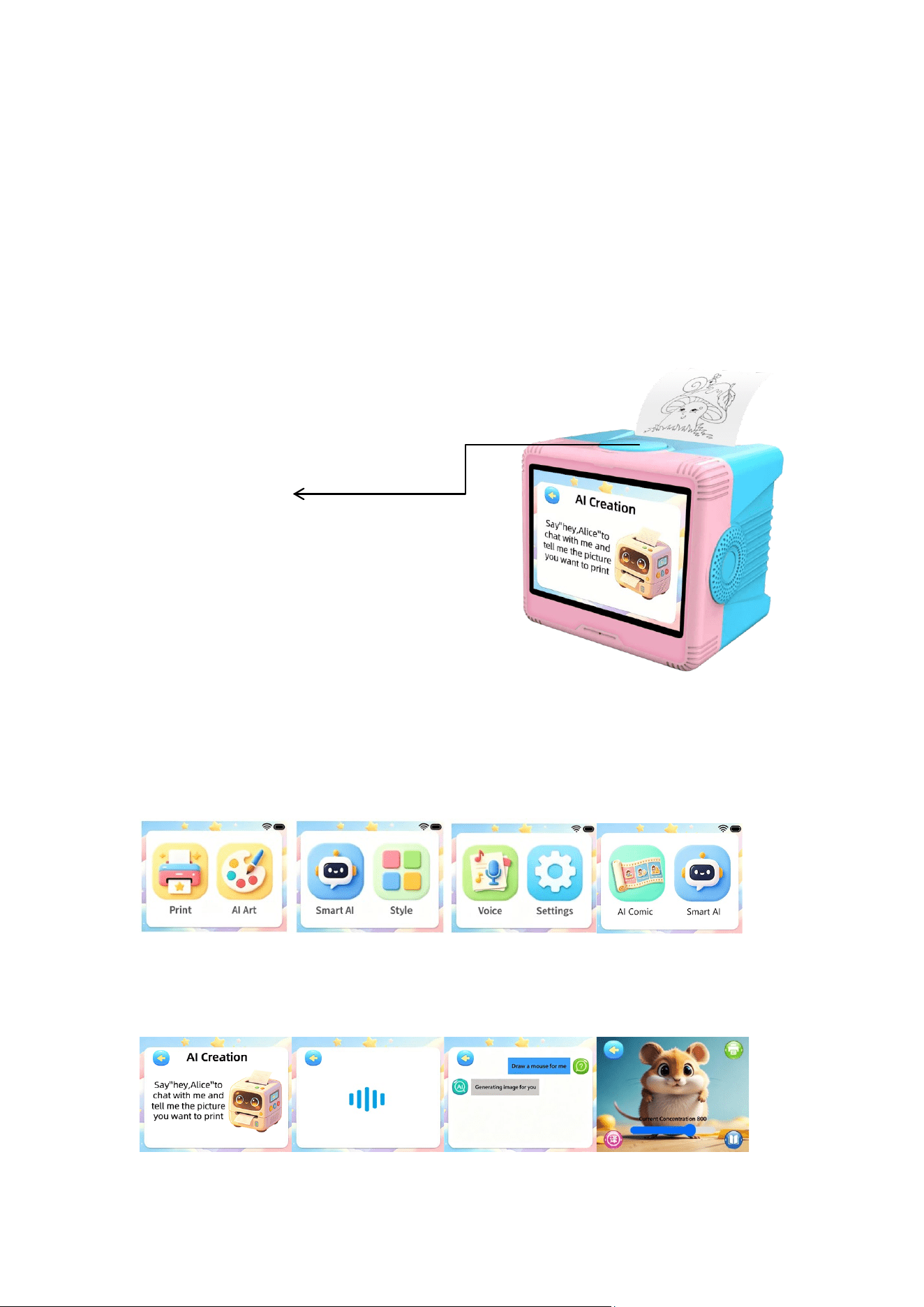
Power Button
1. Long press to power on/off the device.
2. Short press to wake up AI.
3. On the printing interface, short press to
print images directly.
II. Basic Functions
Main Interface:
(1) Voice-Activated Printing: Say "Hey, Alice" to wake up the AI. The AI will generate
an image based on your description and print it automatically.
(2) AI Creation: Say "Hey, Alice" to wake up the AI, then say "Please generate..."
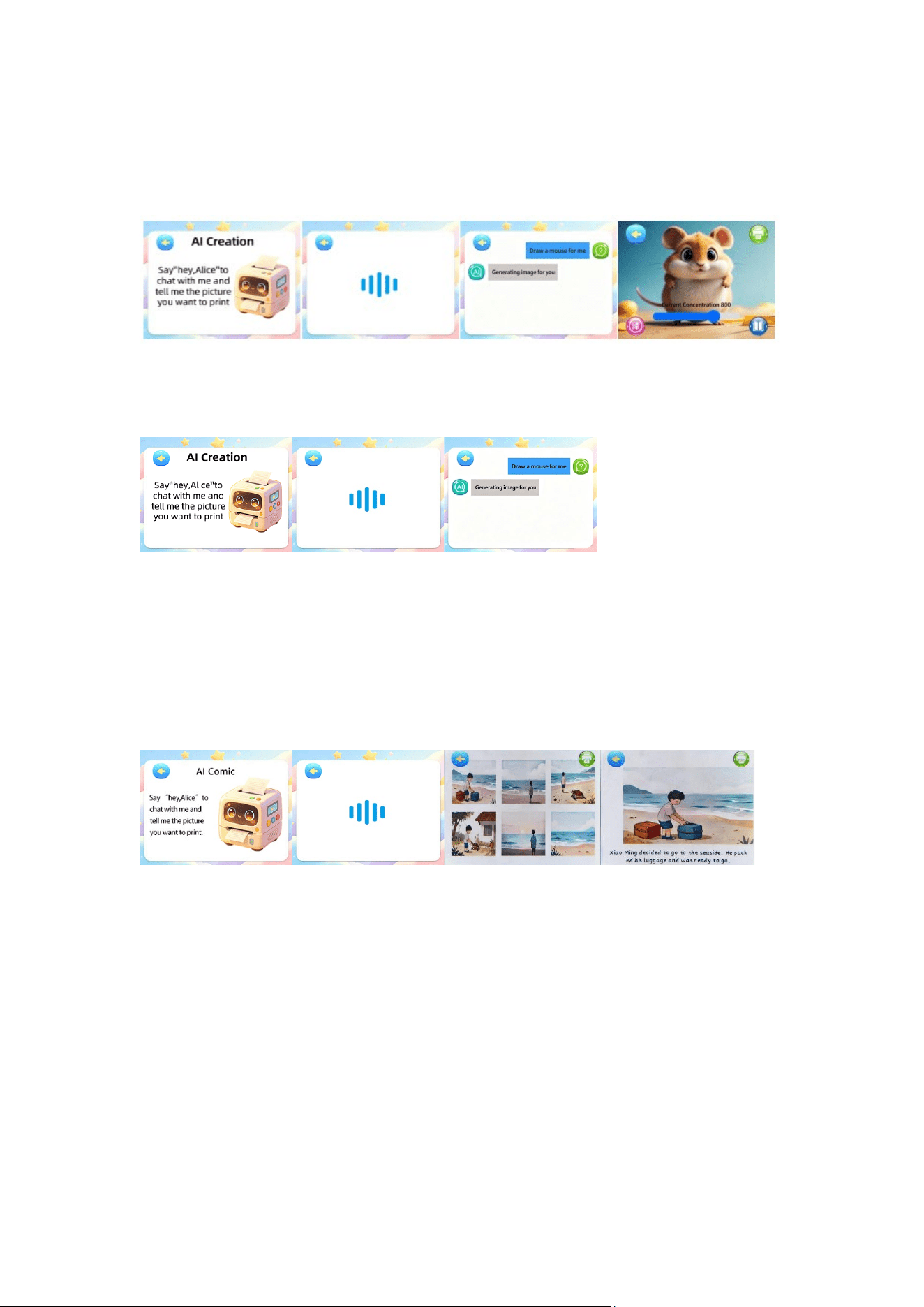
followed by your request (e.g., "Please generate a cute kitten"). The AI will create the
corresponding image. Tap the Print button to print, the Translate button to auto-
translate to English and play audio, or the Story button to hear a story related to the
image.
(3) Smart AI Chat: Say "Hey, Alice" to wake up the AI and chat with the large
language model. You can have conversations, check the weather, hear jokes, or
access general knowledge. Say "Hey, Alice" again to interrupt voice playback.
(4)
AI Comic Generator:Wake up the AI by saying “hey, Alice”. To generate artwork,
use the command “Please generate......”, “Please generate the story of Tang Monk’s
pilgrimage for scriptures”. The AI will output a set of six sequential images.
A print button is displayed at the top-right corner. Users may tap the print button to
print the full set of six images, or tap any single image to print it individually. Each
image is paired with a descriptive caption underneath. Print density adjustment is
available for all printing operations.
(5) Style Selection: Switch between 33 different art styles for printed images,
including: Sketch, Cyberpunk, 3D Rendering, Children's Drawing, Picture Book, CG
Animation, Portrait Photography, Anime, Cartoon, Manga, Figure Photography,
Landscape, Pencil Sketch, Ink Wash Painting, Chinese Style, Flat Illustration, Retro
Anime, Hong Kong Style Anime, Film Photography, Pixel Art, Oil Painting,
Printmaking, Classical, Watercolor, Colored Pencil, Ink Printing, Fluorescent Painting,
Monet, Matisse, Baroque, Rembrandt, Picasso, and Abstract.
(6) Voice Selection: Choose from 31 different voice tones for all device audio output,
including: Girl Next Door, Cute Child, Sunny Boy, Lovely Female, Gentleman,
Intellectual Female, Teen Boy, Soft Female, Knowledgeable Uncle, Emotional
Shanshan, Happy Xiaodong, Gentle Peach, Warm Sister, Oriental Hero, Fresh
Female, Sunny Zhe, Urban Lady, Honest Afeng, Bright Female, Commentator
Xiaoming, Confident Male, News Female, American English Female, London Accent
Female, Deep British Male, Storytelling Female, Storytelling Male, and Encyclopedia
Narrator Female.
(7) Settings:
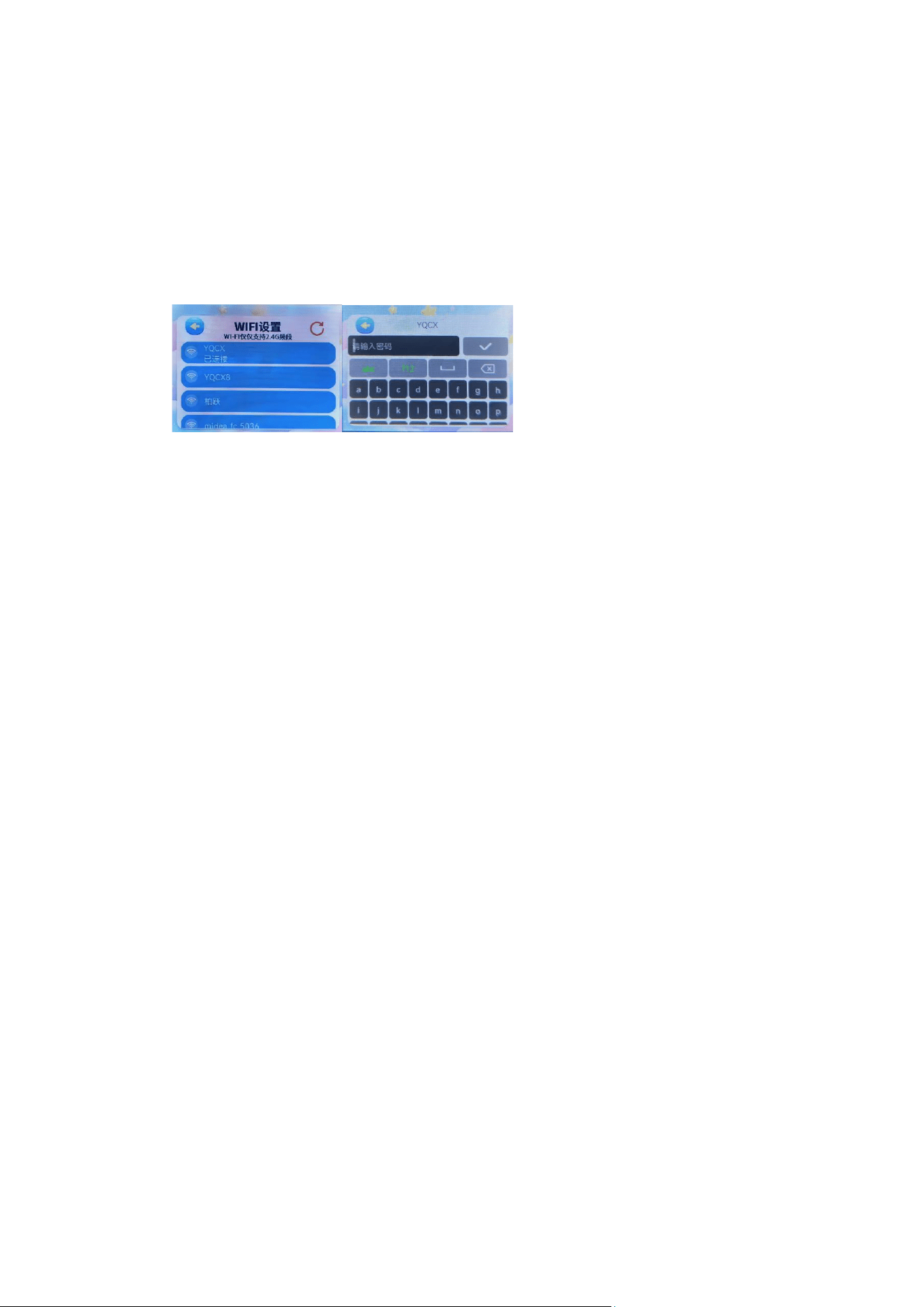
6.1 Wi-Fi Setup: Tap the refresh button to display available Wi-Fi networks, enter
the password, and connect. A Wi-Fi icon will appear in the top-right corner of the
screen when connected.
7.2 Screen Brightness: Adjust the display brightness.
7.3 Print Density: Adjust the printing density level for different output effects.
7.4 Language Selection: Supports 17 languages: Chinese, English, Arabic,
German, Spanish, French, Italian, Japanese, Korean, Russian, Vietnamese,
Portuguese, Hindi, Thai, Persian, Turkish, and Indonesian.
7.5 Volume Control: Adjust the speaker volume level.
7.6 Local Images: Insert an SD card to select and print your own images.
7.7 About Device: Displays device information, firmware version, etc.
7.8 System Update: Supports OTA (Over-the-Air) online firmware updates.
7.9 Factory Reset: Restore all settings to factory defaults and clear user
configurations.

Wi-Fi Connection Notes:
a. The device does not support 5GHz Wi-Fi networks.
b. Ensure a strong and stable Wi-Fi signal with internet access. Keep the device
within 1–15 meters of the router.
c. Use Wi-Fi network names consisting of letters and numbers only; avoid Chinese
characters.
Package Contents
The following accessories are included with the product:
Accessories Description
Power Cable*1PCS For device charging
User Manual*1PCS Operation instructions
Certificate of Conformity*1PCS Product quality certification
Charging
The charging indicator lights up during charging, and a battery icon appears on the
screen. The indicator turns off when the battery is fully charged.

Warranty Information
Dear Valued Customer,
Thank you for purchasing our product. In accordance with the national "Three
Guarantees" quality service regulations, we provide a one-year limited warranty for
this product.
Warranty Terms and Conditions:
1. Within one (1) year from the date of purchase, if the main unit malfunctions due to
defective components or software issues under normal use, our technical team will
confirm the fault and provide repair service or replacement parts free of charge.
Accessories such as USB cables are not covered under the one-year warranty.
2. The following cases are NOT covered under warranty:
• Products with no functional defects.
• Products beyond the one-year warranty period.
• Damage caused by improper use or user negligence.
• Products without identifiable brand markings or serial numbers.
• Damage caused by inadequate packaging or improper shipping when returning the
product to our service center.
• Damage resulting from unauthorized disassembly, self-repair, modification, or
repair by non-authorized service providers.
• Cosmetic damage (scratches, abrasions, etc.) — returns and exchanges are not
applicable.
• Products without a valid warranty card and proof of purchase, or where the
warranty card lacks purchase date and dealer stamp.
Note: The manufacturer reserves the right to determine the cause of product failure
and retains the final interpretation of all warranty terms.

FCC Warning
This device complies with Part 15 of the FCC Rules. Operation is subject to the following two
conditions:
(1) This device may not cause harmful interference, and (2) this device must accept any
interference received, including interference that may cause undesired operation.
NOTE 1: This equipment has been tested and found to comply with the limits for a Class B digital
device, pursuant to part 15 of the FCC Rules. These limits are designed to provide reasonable
protection against harmful interference in a residential installation. This equipment generates, uses
and can radiate radio frequency energy and, if not installed and used in accordance with the
instructions, may cause harmful interference to radio communications. However, there is no
guarantee that interference will not occur in a particular installation. If this equipment does cause
harmful interference to radio or television reception, which can be determined by turning the
equipment off and on, the user is encouraged to try to correct the interference by one or more of
the following measures:
- Reorient or relocate the receiving antenna.
- Increase the separation between the equipment and receiver.
-Connect the equipment into an outlet on a circuit different from that to which the receiver is
connected.
-Consult the dealer or an experienced radio/TV technician for help.
NOTE 2: Any changes or modifications to this unit not expressly approved by the party
responsible for compliance could void the user's authority to operate the equipment.
The device has been evaluated to meet general RF exposure requirement. The device can be used
in portable exposure condition without restriction.

Customer Service Record Card
Model:______________________________________________________________
Date of Purchase: ____________________________________________________
Place of Purchase: ___________________________________________________
Dealer Name: ________________________________________________________
Dealer Phone:________________________________________________________
Dealer Signature/Stamp: ______________________________________________