1x
28mm(1-1/8")
1x
1x
1x
22mm(7/8")
1x
1x
Thissetdoesnotincludeaphonecase.●本套装不包含⼿机壳●Cekit
necomprendpasdecoquedetéléphone.●DiesesSetenthältkeine
Handyhülle.●このセットには電話ケースは含まれていません。●Este set
noincluyeunafundaparateléfono.●Estekitnãoincluiumacapa
paratelefone.●Questosetnonincludeunacustodiapertelefono.
●В этот комплект не входит чехол для телефона.●本套裝不包
含⼿機殼●.ه
ة لا ــ اء ●이 세트에는 전화 케이스가 ●Zestaw
niezawieraetuinatelefon.
25mm(1")
1x
32mm(1-1/4")
Handlebar Mount PRO(Rechargeable)
QM02C
⻋把减震⽀架PRO(充电款)
1
4
本产品经严格检验,符合品质标准,并准予销售。●Ce produit est confirmé
pourrépondreauxnormesdequalitéetestautoriséàlaventeaprès
une inspection stricte.●Es wurde bestätigt, dass dieses Produkt
denQualitätsstandardsentsprichtundnachstrengerPrüfungzum
Verkaufzugelassenwird.●販売が許可されています●Seconfirmaque
esteproductocumpleconlosestándaresdecalidadysepermitesu
venta después de una estricta inspección.●Este produto está
confirmadopara atender aos padrões de qualidade e é permitido
para venda após inspeção rigorosa.●Questo prodotto rispetta i
parametri di qualità e ha superato i controlli ispettivi interni.
●Данный продукт соответствует стандартам качества и
д о п у щ е н к п р о д а ж е п о с л е с т р о г о й п р о в е р к и .
●●本产品經嚴格
檢 驗,符 合 品 質 標 準,並 准 予 銷 售 。● 본 제 품 은 품 질 기 준 에 부 합 함 을
확인하였으며, 엄격한 검사를 거쳐 판매가 허가된 제품입니다.●Po dokładnej
kontroli potwierdzono, że ten produkt spełnia standardy jakości I
jestdopuszczonydosprzedaży.
Thisproductisconfirmedtomeetqualitystandards
andispermittedforsaleafterstrictinspection.
QCInspector:___________
质检员〇QCInspecteur〇QCInspektor〇品質管理擔當者〇QCInspectora
〇Inspetor de QC 〇Ispezione qualità〇Инспектор ОТК〇QC 검사관
〇〇質檢員〇Kontrolajakośći
CERTIFICATEOFQUALITY
6
7
5
3
2
4
9
8
https://www.outplorer.com
24°
Illustration of One-Handed Operation●单⼿操作⽰意图●Schéma d'utilisation à
une main●Darstellung der Einhandbedienung●⽚⼿操作図●Ilustración de
operaciónconunamano●Ilustraçãodeoperaçãocomumamão●Изображение
работы одной рукой●單⼿操作⽰意圖●한 손 사용 가이드 이미지●Schemat obsługi
jedną ręką●ةاو ر●Illustrazionedell'usoconunamano
RED
BLACK
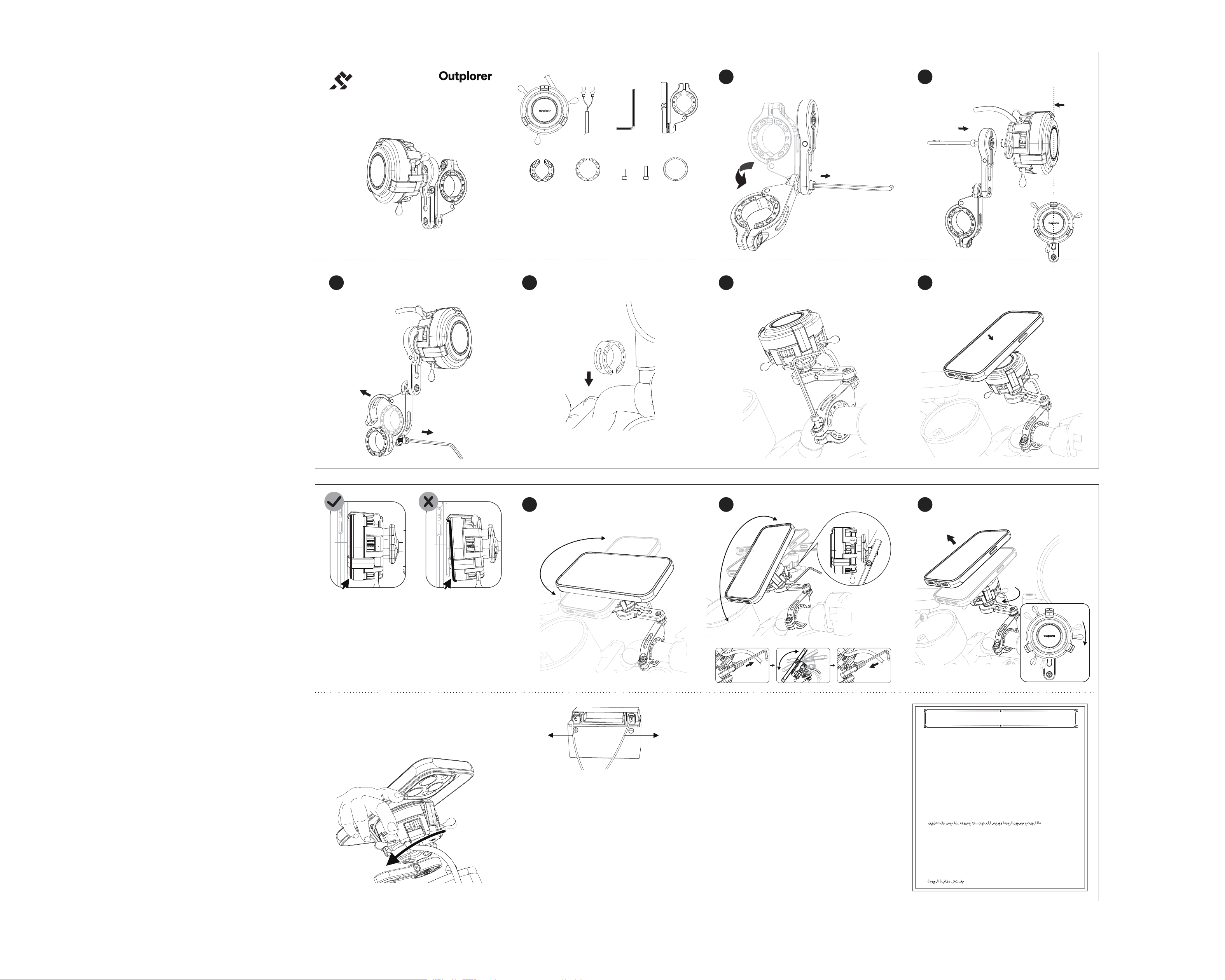
Wheninstallingyourphone,pressdownonthephonecasetoensureitisfullyseated
in the holder●安装⼿机时请按压⼿机壳使其完全卡⼊⽀架内●Lors de l'installation de
votretéléphone,appuyezsurlecoquepourqu'ilsoitcomplètementenclenchédans
le support●Drücken Sie beim Einsetzen Ihres Telefons auf die Hülle, damit es
vollständig imHalter einrastet●電話を取り付ける際は、ホルダーに完全に収まるように電
話ケースを押し込んでください●Al instalar su teléfono, presione la carcasa para que
encajecompletamenteenelsoporte●Aoinstalarseucelular,pressioneacapapara
queeleseencaixecompletamentenosuporte●Приустановкетелефонанажмите
начехол,чтобыонполностьюзафиксировалсявдержателе●安裝⼿機時請按壓⼿
機殼使其完全卡⼊⽀架內●핸드폰을 장착할 때는 거치대에 완전히 끼워지도록 핸 드 폰 케이스를
눌러주세요●Podczas instalowania telefonu naciśnij na etui, aby całkowicie wsunąć je do
uchwytu●ا اد ن ءا ـــــا●Quandoinstalliiltelefono,premila
custodiaperfarloscattarecompletamentenelsupporto.
2x
M4x14
M4x16
M4x16
M4x14
●1.Betriebsspannung:12.5V-16V.2.SchließenSiedasroteKabelandenPluspolunddasschwarzeKabelandenMinuspolan.3.DauerhaftgrünesLichtstehtfürStandby-Modus,dauerhaft
blauesLichtfürLademodus.4.Esistnormal,dassdasgrüneLichtnachdemAusschaltenmitVerzögerungerlischt.5.LegenSiekeineMetallgegenständezwischendenHalterunddasTelefon.
6.EinblinkendesblauesLichtzeigteineAnomaliean(prüfenSieaufÜberhitzungodereingeklemmteMetallgegenstände;fallsdasProblemweiterhinbesteht,sendenSiedasGerätbittezur
Reparaturein).●1.動作電圧:12.5V〜16V.2.⾚線をプラス極、黒線をマイナス極に接続してください。3. 緑⾊点灯はスタンバイ状態、⻘⾊点灯は充電状態を⽰します。4.電源オフ後に緑⾊ランプが少し遅れて消
灯するのは正常です。5.ホルダーと電話の間に⾦属物を挟まないでください。6.⻘⾊ランプの点滅は異常です(過熱や⾦属物の挟まりを確認してください。解決しない場合は修理に出してください)。●1.Voltajede
funcionamiento:12.5V-16V.2.Conecteelcablerojoalpositivoyelcablenegroalnegativo.3.ElLEDverdefijoindicaelmododeespera,elLEDazulfijoindicaelmododecarga.4.Esnormalque
elLEDverdeseapagueconunretrasodespuésdeapagareldispositivo.5.Nocoloqueobjetosmetálicosentreelsoporteyelteléfono.6.UnLEDazulparpadeanteindicaunaanomalía(verifique
sihaysobrecalentamientouobjetosmetálicosatrapados;sielproblemapersiste,devuélvaloparareparación).●1.Tensãodeoperação:12.5V-16V.2.Conecteofiovermelhoaopositivoeofio
pretoaonegativo.3.Luzverdefixaindicamododeespera,luzazulfixaindicamododecarregamento.4.Énormalquealuzverdeseapaguecomatrasoapósdesligar.5.Nãocoloqueobjetos
metálicosentreosuporteeocelular.6.Luzazulpiscandoindicaanormalidade(verifiquesuperaquecimentooupresençadeobjetosmetálicos;seoproblemapersistir,envieparareparo).●
1. Рабочее напряжение: 12.5 В‒16 В.2. Подключите красный провод к плюсу, а чёрный ‒ к минусу.3. Зелёный индикатор означает режим ожидания, синий ‒ режим зарядки.
4. Нормально,еслизелёныйиндикатор гаснет с задержкой после выключения.5.Не помещайте металлические предметымежду держателем и телефоном.6. Мигающий синий
индикаторуказываетнанеисправность(проверьтеперегревилиналичиеметаллическихпредметов;еслипроблемунеудаётсярешить,отправьтеустройствовремонт).●1.⼯作電
壓:12.5V-16V.2.紅線接正極,⿊線接負極3.綠燈常亮為待機狀態,藍燈常亮為充電狀態4.關機後綠燈延時熄滅屬正常現象5.請勿在⽀架與⼿機間夾帶⾦屬物品6.藍燈閃爍為異常(請檢查是否過熱或是否夾帶
⾦屬物件,無法解決請返修)●1. 작동 전압: 12.5V-16V.2. 빨간색 선은 양극에, 검은색 선은 음극에 연결하세요.3. 녹색 점등은 대기 상태, 파란색 점등은 충전 상태를 나타냅니다.4. 종료 후 녹색등이 지연되어 꺼
지는 것은 정상 현 상입니다 .5. 거 치대와 핸드폰 사이에 금속 물체를 끼우지 마세요.6. 파란색 점멸은 이상 상태입니 다 ( 과열 또는 금 속 물 체 끼 임을 확인하고 , 해결되지 않으면 수리를 위해 반품하세 요 ).
●1. Napięcie robocze: 12.5 V - 16 V.2. Podłącz czerwony przewód do bieguna dodatniego, a czarny do bieguna ujemnego.3. Stałe zielone światło oznacza tryb czuwania, stałe niebieskie światło
oznacza tryb ładowania.4. Normalne jest, że zielone światło gaśnie z opóźnieniem po wyłączeniu urządzenia.5. Nie wkładaj metalowych przedmiotów między uchwyt a telefon.6. Migające niebieskie
światło oznacza nieprawidłowość (sprawdź przegrzanie lub obecność metalowych przedmiotów; jeśli problem nie ustąpi, wyślij urządzenie do naprawy).●1. لﯾﺻوﺗﺑ مﻗ .٢.تﻟوﻓ ١٦ - تﻟوﻓ ١٢٫٥ :لﯾﻐـــــــــــــــــــــــــــﺷﺗﻟا دﮭﺟ
.٦.فﺗﺎﮭﻟاو لﻣﺎﺣﻟا نﯾﺑ ﺔﯾﻧدﻌﻣ ءﺎﯾﺷأ ﻊــﺿﺗ ﻻ .٥.لﯾﻐــﺷﺗﻟا فﺎﻘﯾإ نﻣ ةرﯾــﺻﻗ ةرﺗﻓ دﻌﺑ رــﺿﺧﻷا ءوــﺿﻟا ﺊﻔطﻧﯾ نأ ﻲﻌﯾﺑطﻟا نﻣ .٤.نﺣــﺷﻟا ﻊﺿو ﻲﻧﻌﯾ تﺑﺎﺛﻟا قرزﻷا ءوــﺿﻟاو،دادﻌﺗﺳﻻا ﻊﺿو ﻲﻧﻌﯾ تﺑﺎﺛﻟا رــﺿﺧﻷا ءوــﺿﻟا .٣.بﻟﺎـﺳﻟا بطﻘﻟﺎﺑ دوﺳﻷا كﻠـﺳﻟاو بﺟوﻣﻟا بطﻘﻟﺎﺑ رﻣﺣﻷا كﻠـﺳﻟا
.١.(حﻼﺻﻺﻟ زﺎﮭﺟﻟا دﻋأ ،ﺔﻠﻛـــــــــــﺷﻣﻟا ترﻣﺗﺳا اذإ ؛ﺔﻘﻟﺎﻋ ﺔﯾﻧدﻌﻣ ءﺎﯾﺷأ دوﺟو وأ ةرارﺣﻟا عﺎﻔﺗرا نﻣ ﻖﻘﺣﺗ) لﻠﺧ دوﺟو ﻲﻧﻌﯾ ضﻣاوﻟا قرزﻷا ءوــــــــــﺿﻟا ●Tensioneoperativa:12.5V-16V.2.Collegailfilorossoalpositivoeilfiloneroalnegativo.
3.Spiaverdefissaindicamodalitàstandby,spiablufissaindicamodalitàdiricarica.4.Ènormalechelaspiaverdesispengaconunleggeroritardodopolospegnimento.5.Noninserireoggetti
metallicitrailsupportoeiltelefono.6.Laspiablulampeggianteindicaun'anomalia(verificailsurriscaldamentoolapresenzadioggettimetalliincastrati;seilproblemapersiste,restituisciil
dispositivoperlariparazione).
1.⼯作电压:12.5V-16V;2.红线接正极,⿊线接负极;3.绿灯常亮为待机状态,蓝灯常亮为充电状态;
4.关机后绿灯延时熄灭属正常现象;5.请勿在⽀架与⼿机间夹带⾦属物品;6.蓝灯闪烁为异常(请检查
是否过热或是否夹带⾦属物件,⽆法解决请返修)●1. Operating voltage: 12.5V-16V.2. Connect
theredwiretopositiveandtheblackwiretonegative.3.Solidgreenlightindicatesstandby
mode;solidbluelightindicateschargingmode.4.Itisnormalforthegreenlighttoturnoff
witha delayafterpoweringoff.5.Donotplaceany metalobjectsbetweentheholderand
thephone.6.Flashingbluelight indicates an abnormality(check for overheatingor metal
objects trapped inside; if the issue persists, please return for repair).●1. Tension de
fonctionnement:12.5V-16V.2.Connectezlefilrougeàlabornepositiveetlefilnoiràla
bornenégative.3.Levoyantvertfixeindiquelemodeveille,levoyantbleufixeindiquele
modecharge.4.Ilestnormalquelevoyantverts'éteigneavecuncertainretardaprèslamise
hors tension.5. N'insérez pas d'objets métalliques entre le support et le téléphone.6. Un
voyantbleuclignotantindiqueuneanomalie(vérifiezunesurchauffeoulaprésenced'objets
métalliques. Si le problème persiste, retournez l'appareil pour réparation).

This device complies with part 15 of the FCC Rules. Operation is subject to the
following two conditions: (1) This device may not cause harmful interference, and (2)
this device must accept any interference received, including interference that may cause
undesired operation.
Any Changes or modifications not expressly approved by the party responsible for
compliance could void the user's authority to operate the equipment.
Note: This equipment has been tested and found to comply with the limits for a Class B
digital device, pursuant to part 15 of the FCC Rules. These limits are designed to
provide reasonable protection against harmful interference in a residential installation.
This equipment generates uses and can radiate radio frequency energy and, if not
installed and used in accordance with the instructions, may cause harmful interference
to radio communications. However, there is no guarantee that interference will not
occur in a particular installation. If this equipment does cause harmful interference to
radio or television reception, which can be determined by turning the equipment off and
on, the user is encouraged to try to correct the interference by one or more of the
following measures:
-Reorient or relocate the receiving antenna.
-Increase the separation between the equipment and receiver.
-Connect the equipment into an outlet on a circuit different from that to which the
receiver is connected.
-Consult the dealer or an experienced radio/TV technician for help.
This equipment complies with FCC radiation exposure limits set forth for an
uncontrolled environment. This equipment should be installed and operated with
minimum distance 20cm between the radiator & your body.