1.Overview
Please tear lens lm before using
[10]
[14]
[13]
[3]
[4]
[6]
[5]
[7]
[1]
[2]
[3]
[9]
[11]
[12]
[8]
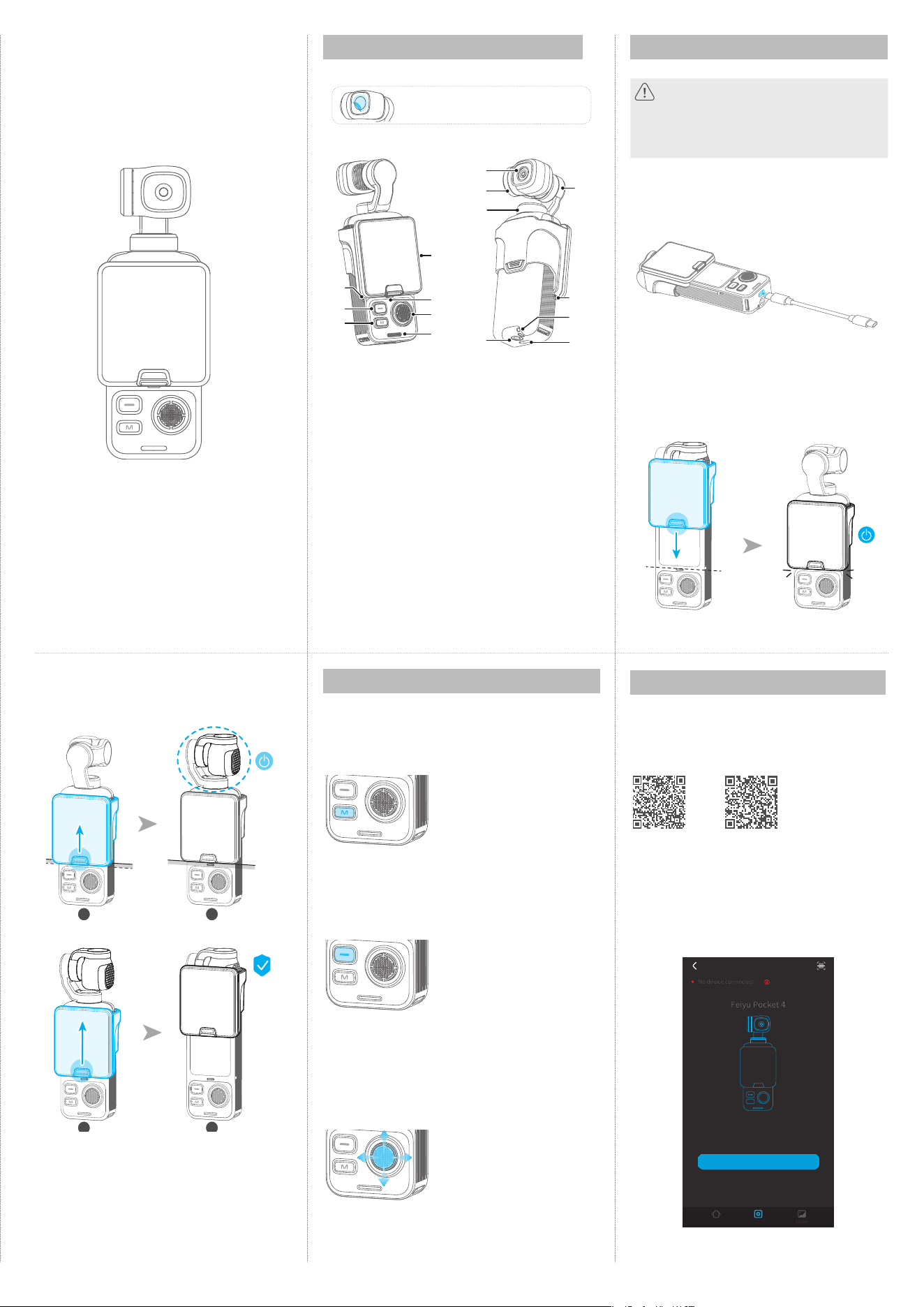
[1] Shortcut button
[2] Shutter button
[3] Microphone
[4] Sliding touchscreen
[5] Indicator
[6] 5-way joystick
[7] Speaker
[8] Lens
[9] Tilt axis
[10] Roll axis
[11] Pan axis
[12] 1/4-inch interface
[13] Lanyard hole
[14] USB-C charging port
2.Start to Use
(1) Please fully charge the battery before powering on
the product for the rst time.
(2) When not in use, power o the product.
(3) It is recommended to charge it at least once a month
2.1 Charging
Use the USB-C cable to connect to the charging port to
charge.
2.2 Power On / Power O
·
Power ON
Slide the movable screen downward to power on.
ON
·
Power O
Slide the screen upward to position A, where the motor
enters the retracted state; then slide it upward again
within 5 seconds to protect the motor
1 2
3 4
OFF
5s
≤
3.Button Operations
3.1 Shortcut button
Single tap: PF mode /PTF mode /FPV mode
(Switch in turn)
Double tap: Recenter
3.2 Shutter button
Single tap: Shutter / Return to home page
(In other pages)
Long press: Power on/Power o
3.3 5-way joystick
Push: Control tilt and pan axis rotation.
Double tap: Digital zoom / Control tilt axis
Long press: Enter lock mode
(Release to exit)
4. App
Connect with FeiyuCam App to achieve more functions.
Scan the QR code to download the app, or search for
"FeiyuCam" in the App Store or Google Play.
* Requires iOS 13.0 or above, Android 6.0 or above.
iOS Android
4.1 Connect with App
Turn on FeiyuCam App, tap [ Feiyu Pocket ] option, long
press shutter button to turn on Wi-Fi, follow the prompts
to connect Feiyu pocket 4.
MANUAL CONNECTION
CONNECT OTHER DEVICES
Home
Album
Feiyu Pocket
Steps
1. Long press round button to turn on WI-FI.
2. Enter WI-FI code to connect new devices.
CONNECTING DEVICES FY_Pocket4_XXXX
No device connected
Help
Connect pocket
Feiyu Pocket 4
- 1 -
- 5 -
- 2 -
- 4 -- 3 -
Quick Start Guide
videocapture slow
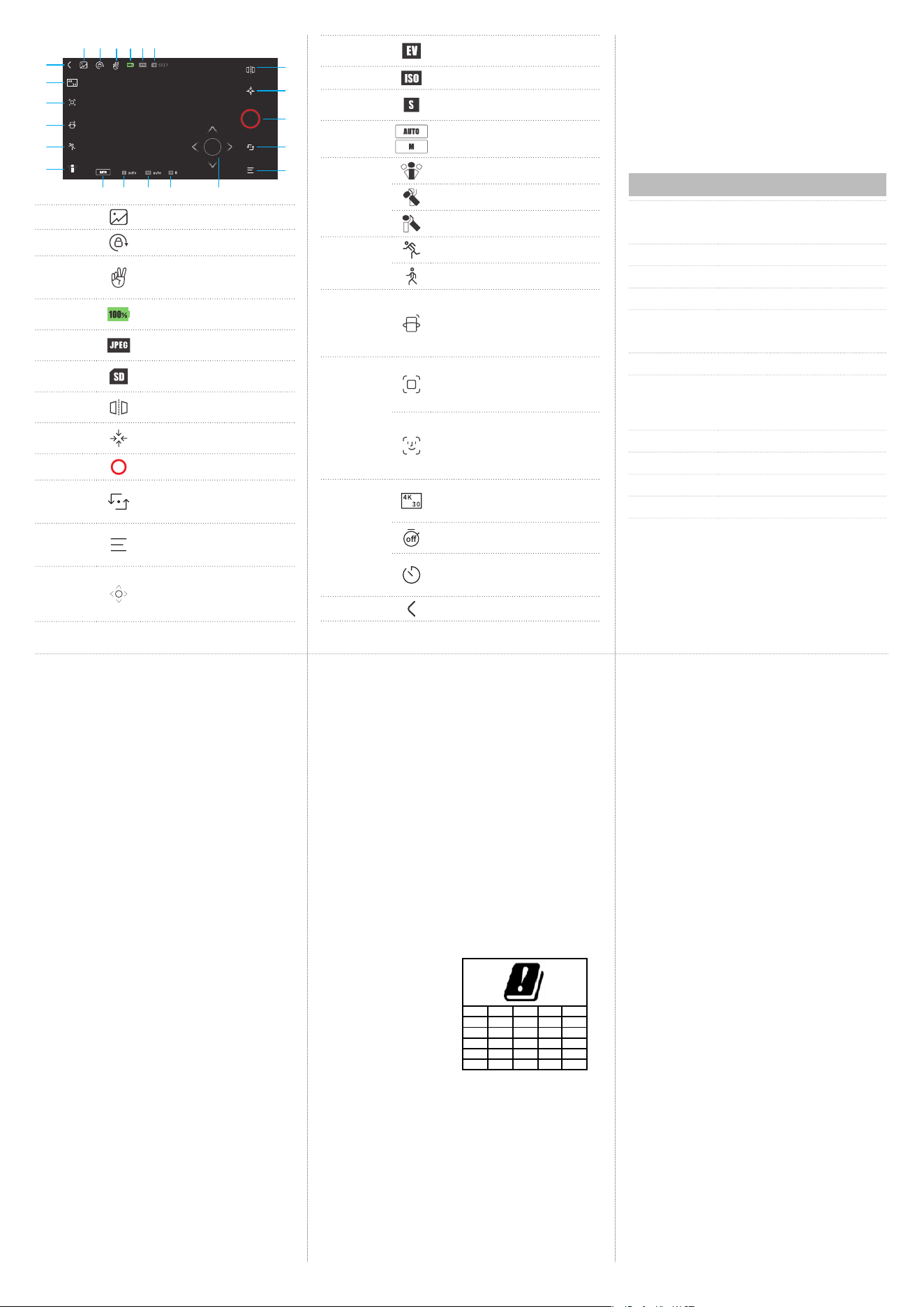
[1] [2] [3] [4] [5] [6]
[7]
[8]
[9]
[10]
[11]
[12][13]
[14][15][16]
[17]
[18]
[19]
[22]
[20]
[21]
[1] Album Enter album
[2] Lock Screen orientation lock
[3] Gesture
shooting
Make a "V" gesture in front of
the camera to take photo or
start recording.
[4] Battery
indicator
Show battery level of Feiyu
pocket.
[5] File
format
Prompt the le format of the
saved le.
[6] Storage
spaces
Display remaining storage
spaces.
[7] Mirror
Images from the camera are
mirrored after turn it on.
[8] Recenter
Lens return to center and keep
towards front or back as before.
[9] Shoot
Start recording or take photo.
[10] Camera
turn around
Camera horizontally rotate 180°
to shoot, which can be used to
take sele
[11] Camera
settings
Set parameters of current
shooting mode, format microSD
card, view device information.
[12]
Joystick
Long press the circle and turn
left and right to control pan axis,
turn up and down to control tilt
axis.
- 6 - - 7 - - 8 -
[13] Exposure
compensation
Set or display current exposure
compensation.
[14] ISO
Set or display current ISO.
[15] Shutter
speed
Set or display current shutter
speed.
[16] Auto/
manual mode
Switch between auto/ manual
mode.
[17] Follow
mode
All follow mode (FPV)
Follow mode
Pan mode
[18] Follow
sensitivity
Fast follow
Smooth follow
[19]
Smartphone
motion
sensing mode
Users can use smartphone to
control pan and tilt axis through
motion sensing.
*Need smartphone gyroscope
sensor support.
[20] AI
tracking
Object tracking: Select the object
in camera interface to lock it, and
camera will auto rotate to follow
the object movement.
Face tracking: Once enabled, the
face target will be automatically
locked in the camera interface, and
the gimbal will follow the target to
keep the lens tracking the target.
[21]
Parameter
settings
Will show in video mode to set
video resolution, FPS and quality of
video.
Will show in photo mode to set
countdown time of shooting.
Will show in timelapse mode to set
shooting interval , duration and
path.
[22] Return
Return to the previous menu
4.3 Firmware update
Open the Feiyu Cam App, go to the [Home] tab, tap the
"..." in the upper right corner of the user info bar, and
select "Upgrade Feiyu Pocket rmware". Make sure
your mobile network is working properly and the device
battery is at least 20%. The upgrade will take about 3
minutes.
Specications
Rotation range
Tilt: -180° ~ + 139.5°
Roll: -90° ~ + 229.5°
Pan: -180° ~ + 270°
Max. Speed 180° /s
Dimensions 140.5*52*31.7mm (storage state)
Weight About 205g
Material of main
body
Machine body material: Aviation
aluminum-magnesium alloy,
plastic
Waterproof rating Not waterproof
Battery
Capacity: 1300 mAh
Type: Lithium-ion battery
Voltage: 7.4 V
Operating temperature: 0℃ ~ +40℃
Battery Life About 2.5 hours
Charging time About 50 minutes
Display screen 2.64 Inc
Wi-Fi / Bluetooth 2.4G Wi,5G Wi,Bluetooth,BLE
80 :Network API
554:Pull Stream API
FCC statement
This device complies with part 15 of the FCC Rules. Operation is
subject to the
following two conditions:
(1) This device may not cause harmful interference, and
(2) this device must accept any interference received, including
interference that may cause undesired operation.
Any changes or modifications not expressly approved by the party
responsible for compliance could void the user's authority to
operate the equipment.
This equipment has been tested and found to comply with the
limits for a Class B digital device, pursuant to part 15 of the FCC
Rules. These limits are designed to provide reasonable protection
against harmful interference in a residential installation. This
equipment generates, uses and can radiate radio frequency
energy and, if not installed and used in accordance with the
instructions, may cause harmful interference to radio
communications. However, there is no guarantee that
interference will not occur in a particular installation. If this
equipment does cause harmful interference to radio or
television reception, which can be determined by turning the
equipment off and on,the user is encouraged to try to correct the
interference by one or more of the following measures:
-Reorient or relocate the receiving antenna.
-Increase the separation between the equipment and receiver.
-Connect the equipment into an outlet on a circuit different from
that to which the receiver is connected.
-Consult the dealer or an experienced radio/TV technician for
help.
FCC Radiation Exposure Statement
This equipment complies with FCC radiation exposure limits
set forth for an uncontrolled environment.
Manufactured by: Guilin Feiyu Technology Incorporated Company
Address: Feiyu Intelligent Industry Park, No.2, Chuangyou Road,
Information Industry Park, Qixing District, Guilin,
Guangxi, 541004, China
Tel: +86 773-8860800
E-
mail: [email protected]
Website: www.feiyu-tech.com
For CE:
MANUFACTURER INFORMATION:
Guilin Feiyu Technology Incorporated Company
Feiyu Intelligent Industry Park,No.2,Chuangyou
Road,Information Industry Park,Qixing
District,Guilin,Guangxi,China
Transmitter Frequency:
BT/BLE: 2402-2480MHz
2.4G WIFI: 2412-2472MHz/2422-2462MHz
5G WIFI:5150-5250MHz,5725-5850MHz
RF-Output Power :
BT:2.113dBm
BLE:1.359dBm
2.4G WIFI: 9.755dBm
5G WIFI:5.2G:9.472dBm; 5.8G:9.465dBm
For 5.2G band(W52):indoor use only
AT BE CY CZ DK
EE FI FR DE EL
HU IE IT LV LT
LU MT NL PL PT
SK SI ES SE
BG
RO HR