SHENZHEN JASSWAY INFOTECH CO.,
>> USER MANUAL <<
U
URANUS KDS
LTD

Disclaimer
✓ Please read the instructions carefully before equipment installation
and using the device.
✓ Do not put the product in high temperature, humid or dusty environment.
✓ Do not drop, crash or break down this product.
✓ Do not power off the device when it’s formatting or upgrading,
otherwise it will cause operation system error.
✓ Use only approved add-on enhancements.
Content
packing
list............................................................................................................................0
Product Description ............................................................................................................1
Hardware Instruction .......................................................................................................2
Precautions and example images................................................................................. 3
Interface Description...........................................................................................................4
Wall-mounted installation and maintenance instructions ........................................5
Warranty Notice .................................................................................................................6
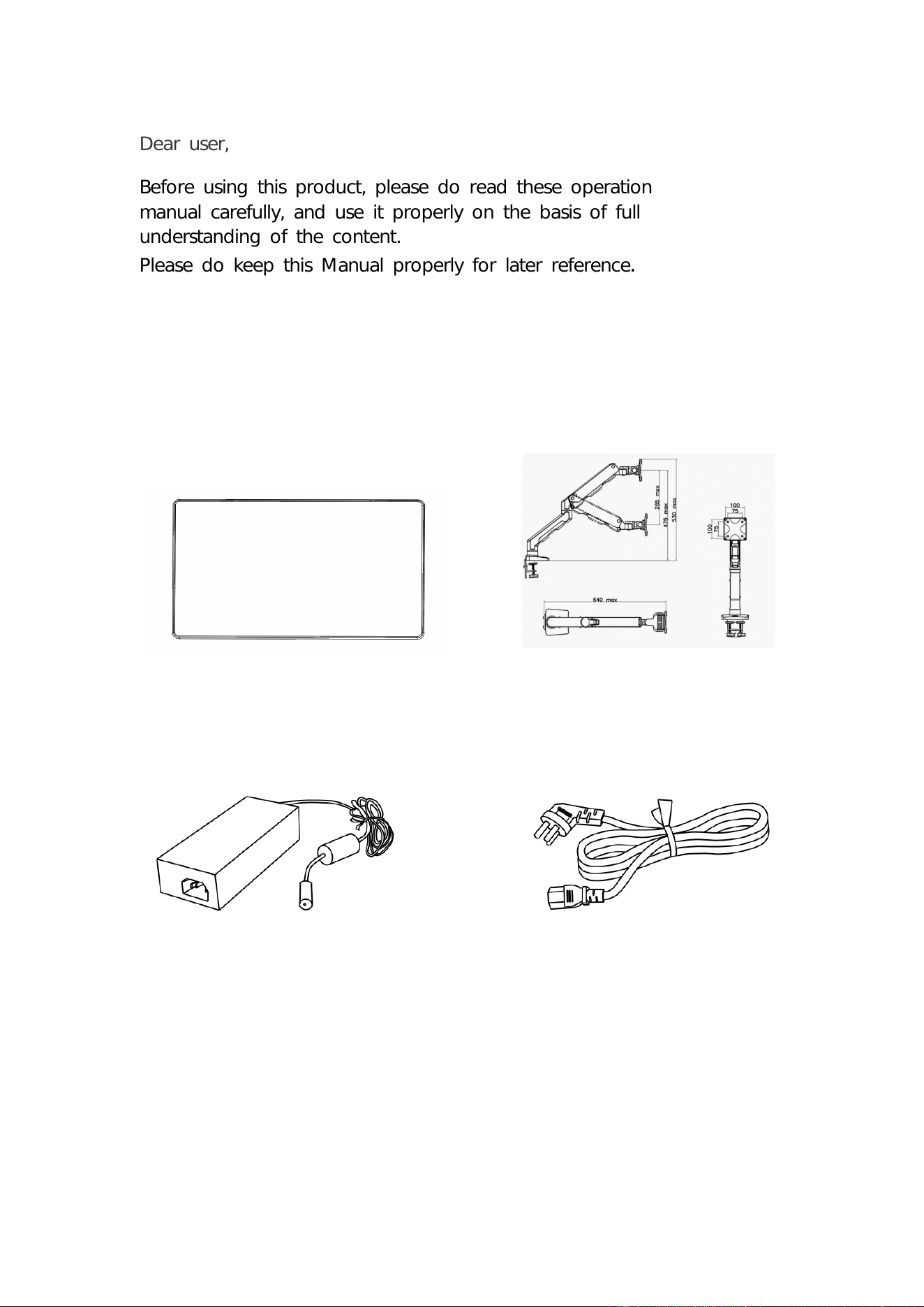
Power Adapter Power Cord
Wall-mounted
host
Dear user,
Before using this product, please do read these operation
manual carefully, and use it properly on the basis of full
understanding of the content.
Please do keep this Manual properly for later reference
packing list
.
0
1
Product Description
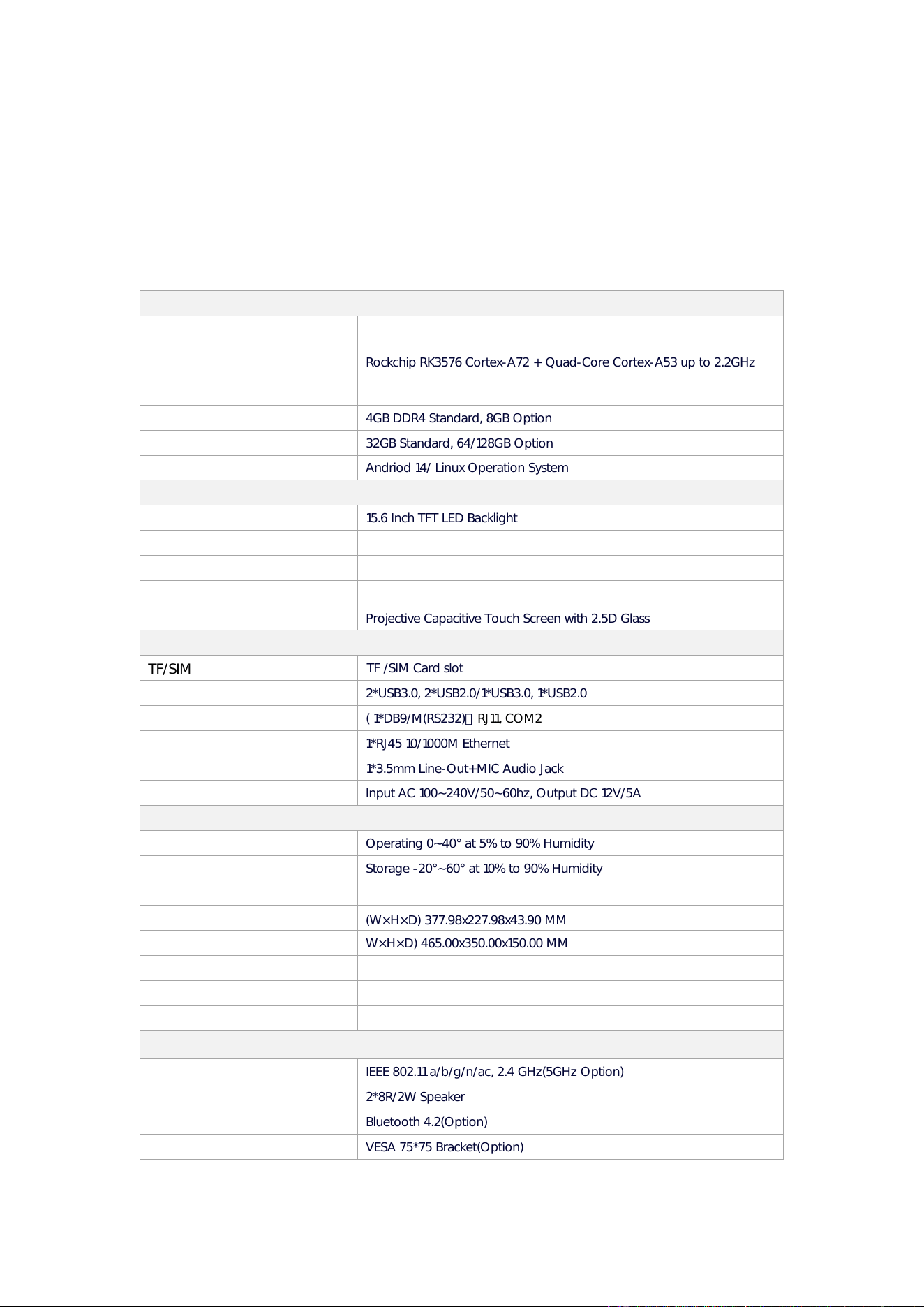
URANUS KDS is a multifunctional touch all-in-one system, 16:9 widescreen display, equipped with touch
LCD panel, easy to integrate the core peripheral equipment and display system, suitable for a
diversified
self-service terminal and various interactive multimedia terminal, can meet the needs of different
application fields. The panel design can be embedded, so that the product is also suitable for
industrial control systems. The URANUS KDS series of touch control all-in-one computer is the best
choice to improve user satisfaction, enhance brand value and help optimize business profits.
Overview – Specifications
SYSTEM
Processor
Rockchip RK3576 Cortex-A72 + Quad-Core Cortex-A53 up to 2.2GHz
Memory
Storage
32GB Standard, 64/128GB Option
OS
Andriod 14/ Linux Operation System
DISPLAY
Type
15.6 Inch TFT LED Backlight
Resolution
1920*1080
Aspect Ratio
16:9
Brightness
250 nits
Touchscreen
Projective Capacitive Touch Screen with 2.5D Glass
INTERFACE
USB
2*USB3.0, 2*USB2.0/1*USB3.0, 1*USB2.0
Serial
( 1*DB9/M(RS232),RJ11, COM2
LAN
1*RJ45 10/1000M Ethernet
Audio
1*3.5mm Line-Out+MIC Audio Jack
Power DC-IN
Input AC 100~240V/50~60hz, Output DC 12V/5A
PHYSICAL&ENVIRONMENTAL
Operating Temperature
Operating 0~40° at 5% to 90% Humidity
Storage Temperature
Storage -20°~60° at 10% to 90% Humidity
Cooling Fanless
Dimensions(W×H×D)
(W×H×D) 377.98x227.98x43.90 MM)
Packing Dimensions(W×H×D)
W×H×D) 465.00x350.00x150.00 MM
Net Weight 2.5KG
Packing Weight 3.0KG
Color Black
OPTIONS & PERIPHERALS
WIFI
IEEE 802.11 a/b/g/n/ac, 2.4 GHz(5GHz Option)
Speaker
2*8R/2W Speaker
Bluetooth
Bluetooth 4.2(Option)
VESA
VESA 75*75 Bracket(Option)
4GB DDR4 Standard, 8GB Option
TF/SIM
TF /SIM Card slot
2
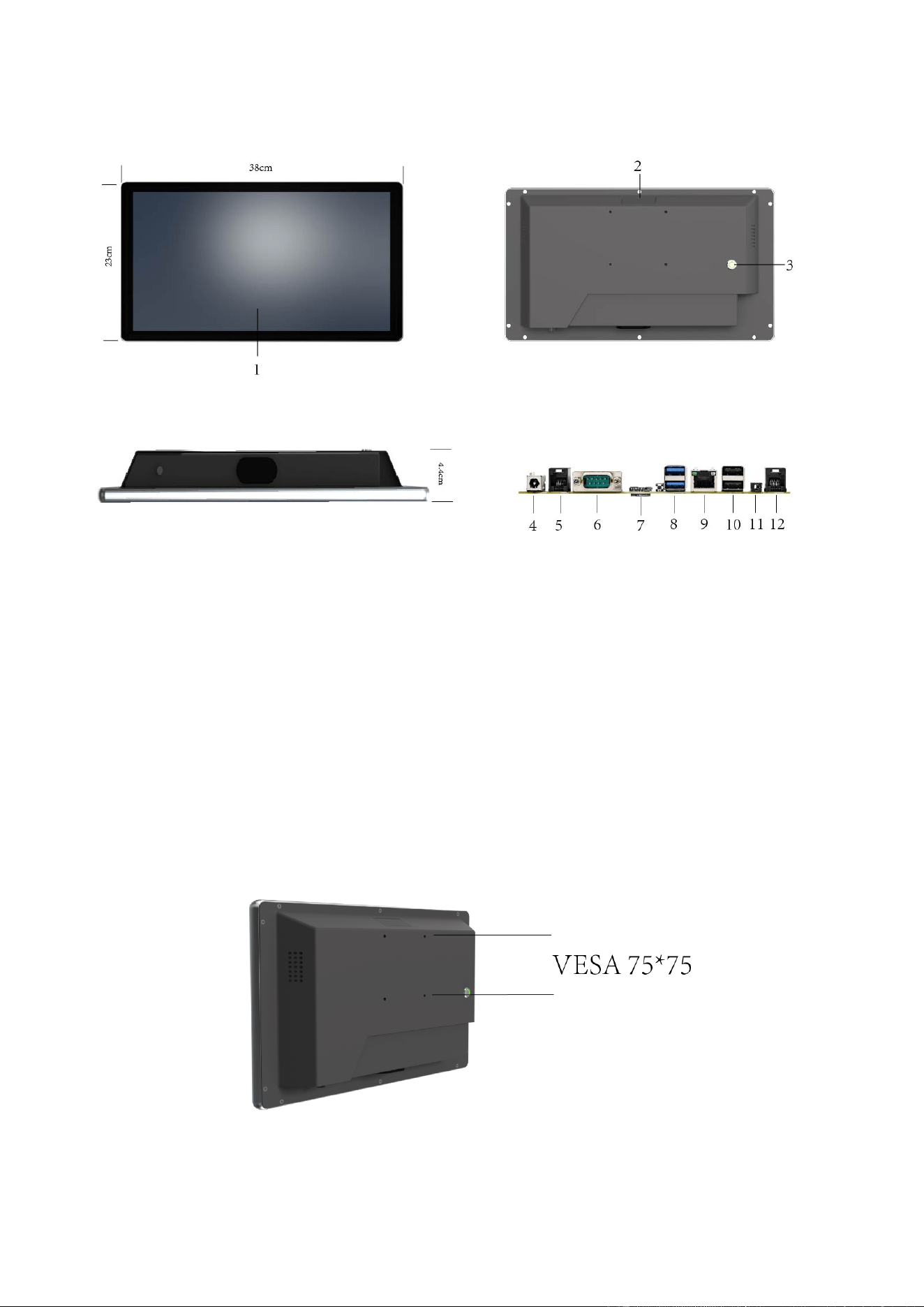
Hardware Instruction
1. 15.6 inch Display
2. Wi-Fi Antenna
3. Power Button
4. DC12V In
5. RJ11
6. COM
Dimension
Unit:
7. SIM/TF
8. USB*2*/3.0
9. LAN Port
10. USB*2*/2.0
11. Line-Out + MIC 2in1 3.5mm Jack
12. RS232
mm
Note
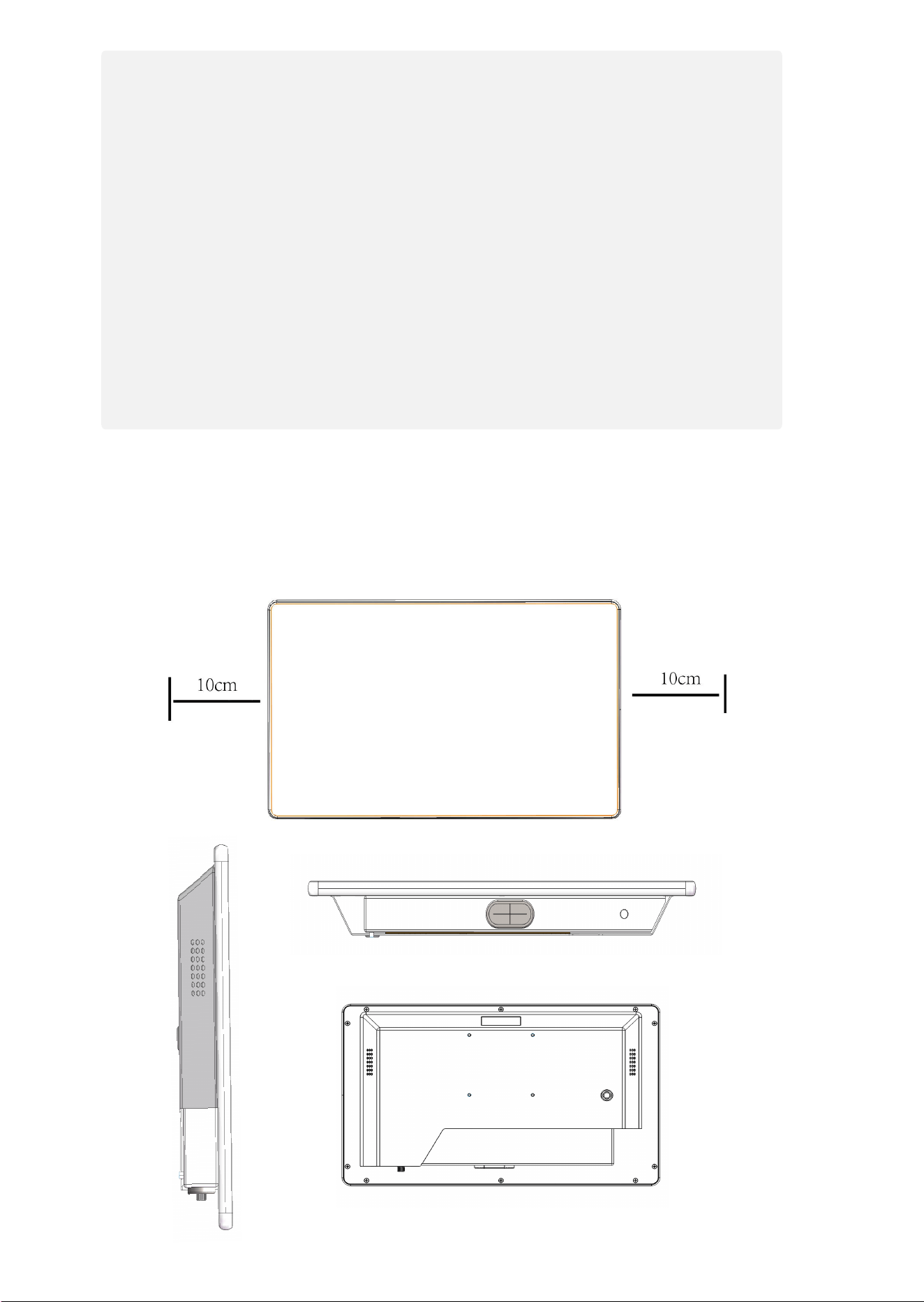
Attention should be paid to the following considerations when the cash register is installed. Otherwise, it may
cause fire, electric shock or personal injury.
* When you remove protective film from the display screen, ensure slow
operation. If the action is too quick, statics may be produced, which may
damage the display screen.
* Avoid placing the equipment into following adverse environments:
①direct sunlight ② high temperature and high humidity frequent
temperature change ④excessive vibration ⑤dirt and smoke
* Away from any equipment that gives out magnetic field or electromagnetic wave.
* Away from open fire.
* Ensure that the cash register is placed at a horizontal and stable surface.
1,Ensure that at least 10cm space is left at front, back, left and right of thecash register for heat
dissipation to prevent damage to cash registercaused by blocked ventilation or airflow obstruction.
Hidden Line Indicator Map
3
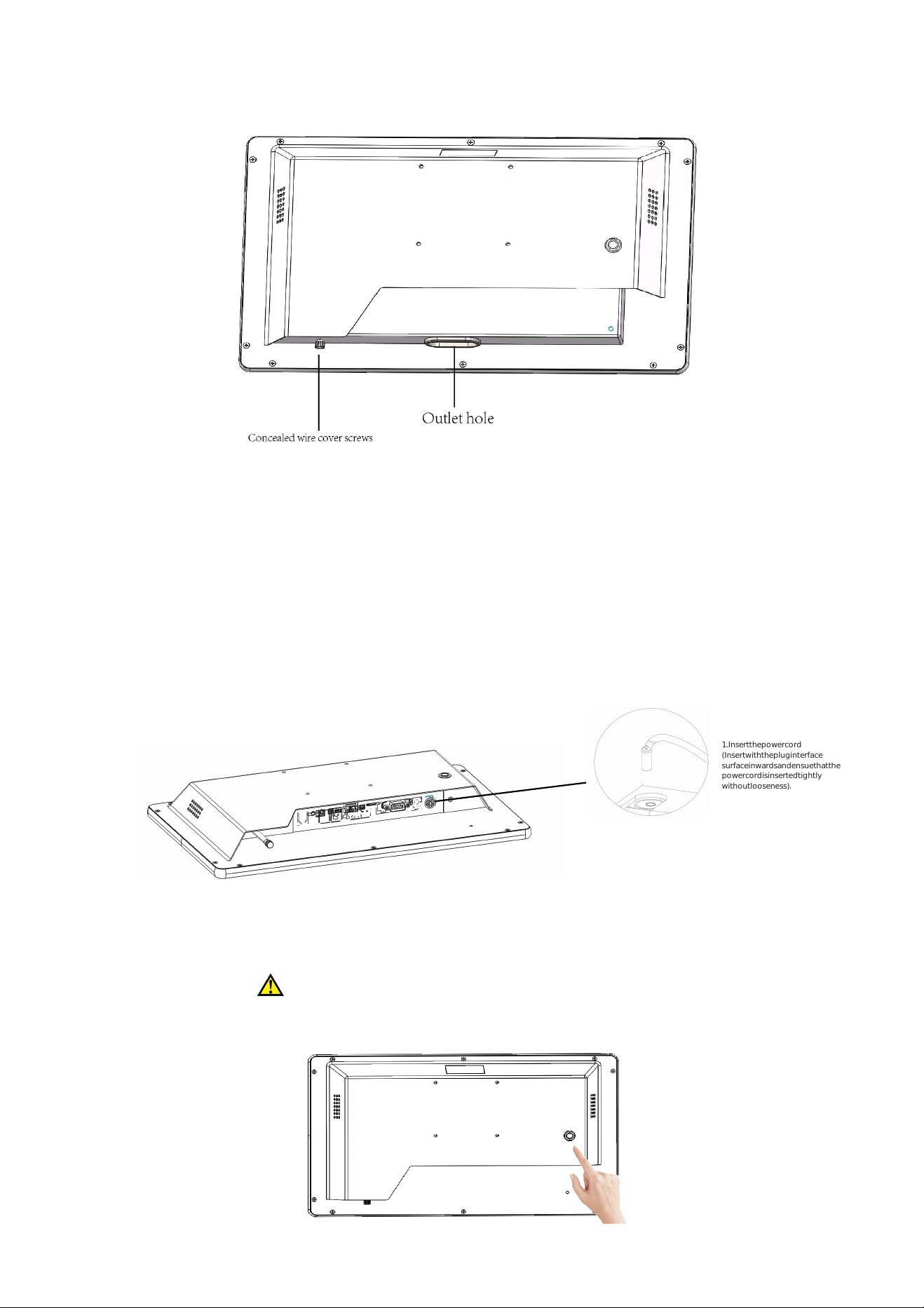
Hidden Line Indicator Map
1.Insertthepowercord
(Insertwiththepluginterface
surfaceinwardsandensuethatthe
powercordisinsertedtightly
withoutlooseness).
Note!
①Beforethepowercordisconnected,ensurethatitisnotatthe
energizedstate.
②Beforeoperation,
ensurethatthemachineisplacedonahorizontal
surfacetopreventdropofthedevice.
1,Start-up procedure
2. Hold down the power key
1、Android devices automatically power on when plugged in.
2、To power off, press and hold the button or click the power off icon in the status bar
on the home screen.
4
The machine does not start when powering on and the power light of the
machine is not on.
1、Check whether the socket is energized. Other electric devices may be used for test.
2、Check that the cash register's power cord is securely plugged in. The power cord may
become loose if the cash register is moved or its wall-mounted location is changed.
Maintenance
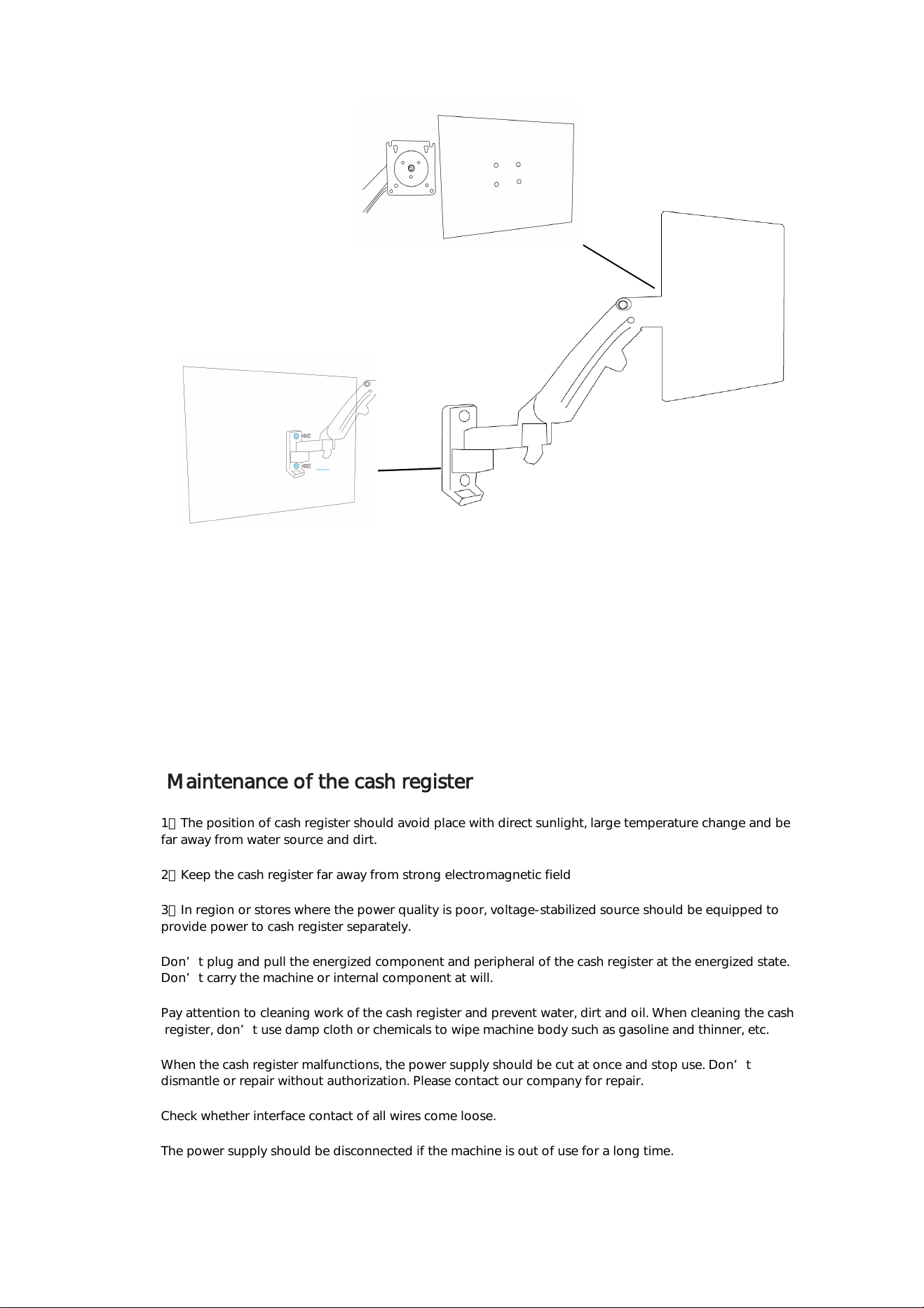
Fix to the wall
Mounted to host screen
Wall-mounted installation
Maintenance of the cash register
1、The position of cash register should avoid place with direct sunlight, large temperature change and be
far away from water source and dirt.
2、Keep the cash register far away from strong electromagnetic field
3、In region or stores where the power quality is poor, voltage-stabilized source should be equipped to
provide power to cash register separately.
Don’t plug and pull the energized component and peripheral of the cash register at the energized state.
Don’t carry the machine or internal component at will.
Pay attention to cleaning work of the cash register and prevent water, dirt and oil. When cleaning the cash
register, don’t use damp cloth or chemicals to wipe machine body such as gasoline and thinner, etc.
When the cash register malfunctions, the power supply should be cut at once and stop use. Don’t
dismantle or repair without authorization. Please contact our company for repair.
Check whether interface contact of all wires come loose.
The power supply should be disconnected if the machine is out of use for a long time.
5

6
Installation
Unpacking Verify that the box contains:
•
•
• URANUS KDS terminal
Power Adapter
Regional Specific power cord
Remove all protective materials from the device.
Inspect the device for any damage during shipment.
Contact us immediately if system has damage and/or missing items as listed above, keep the
• VESA stent(Option)
shipment carton for logistics claim.
Getting started
1. Install the URANUS KDS to our VESA bracket with 4*M4 screws, or customer could use their own
bracket to
fix the system on wall. Re
2. Connect Ethernet cable through RJ45 connector. For users who order URANUS KDS with Wi-Fi, You
can connect directly using the Wi-Fi function.
3. Connect power adapter with URANUS KDS, press and release the power button, display will be on
after
Warranty notice
Thank you for purchasing the company’s products! The warranty regulation is formulated hereby in
order to protect your legal rights and interest and remove your future worries and improve after-sale
service for customers. You are asked to read carefully and propose valuable opinion and suggestion.
Respected users:
Ⅰ. The company's products enjoy free warranty of 18 months since the Shipment date. If it exceeds
the warranty period, reasonable service expense and material cost will be charged.
Ⅱ. The product for repair should be packed and transported properly. If there is any damage or loss
during the process of transportation, our company will not take responsibility.
Ⅲ. Our company has the right to refuse to provide service or charge material and service cost where
appropriate with occurrence of the following items within the free warranty period.
1. Product failure or damage caused by improper use of users;
2. The accident of burning caused of electric shock or improper installation;
3. Damage caused by dismantling of non repairmen.
4. The label indicating fragile product is damaged.
Ⅳ. Please read the user manual carefully before the company’s product is installed and used.
Ⅴ. The warranty card must be stamped with seal and indicate the date by the selling unit to ensure
your rights and interest.

FCC Warning
This device complies with part 15 of the FCC rules. Operation is subject to the following two
conditions: (1) this device may not cause harmful interference, and (2) this device must accept
any interference received, including interference that may cause undesired operation.
Changes or modifications not expressly approved by the party responsible for compliance could
void the user's authority to operate the equipment.
NOTE: This equipment has been tested and found to comply with the limits for a Class B digital
device, pursuant to part 15 of the FCC Rules. These limits are designed to provide reasonable
protection against harmful interference in a residential installation. This equipment generates
uses and can radiate radio frequency energy and, if not installed and used in accordance with the
instructions, may cause harmful interference to radio communications. However, there is no
guarantee that interference will not occur in a particular installation. If this equipment does
cause harmful interference to radio or television reception, which can be determined by turning
the equipment off and on, the user is encouraged to try to correct the interference by one or
more of the following measures:
• Reorient or relocate the receiving antenna.
• Increase the separation between the equipment and receiver.
• Connect the equipment into an outlet on a circuit different from that to which the receiver is
connected.
• Consult the dealer or an experienced radio/TV technician for help.
Radiation Exposure Statement
This equipment complies with FCC radiation exposure limits set forth for an uncontrolled
environment. This equipment should be installed and operated with minimum distance 20cm
between the radiator and your body.