PRE-FLIGHT PREPARATION
飞行前准备
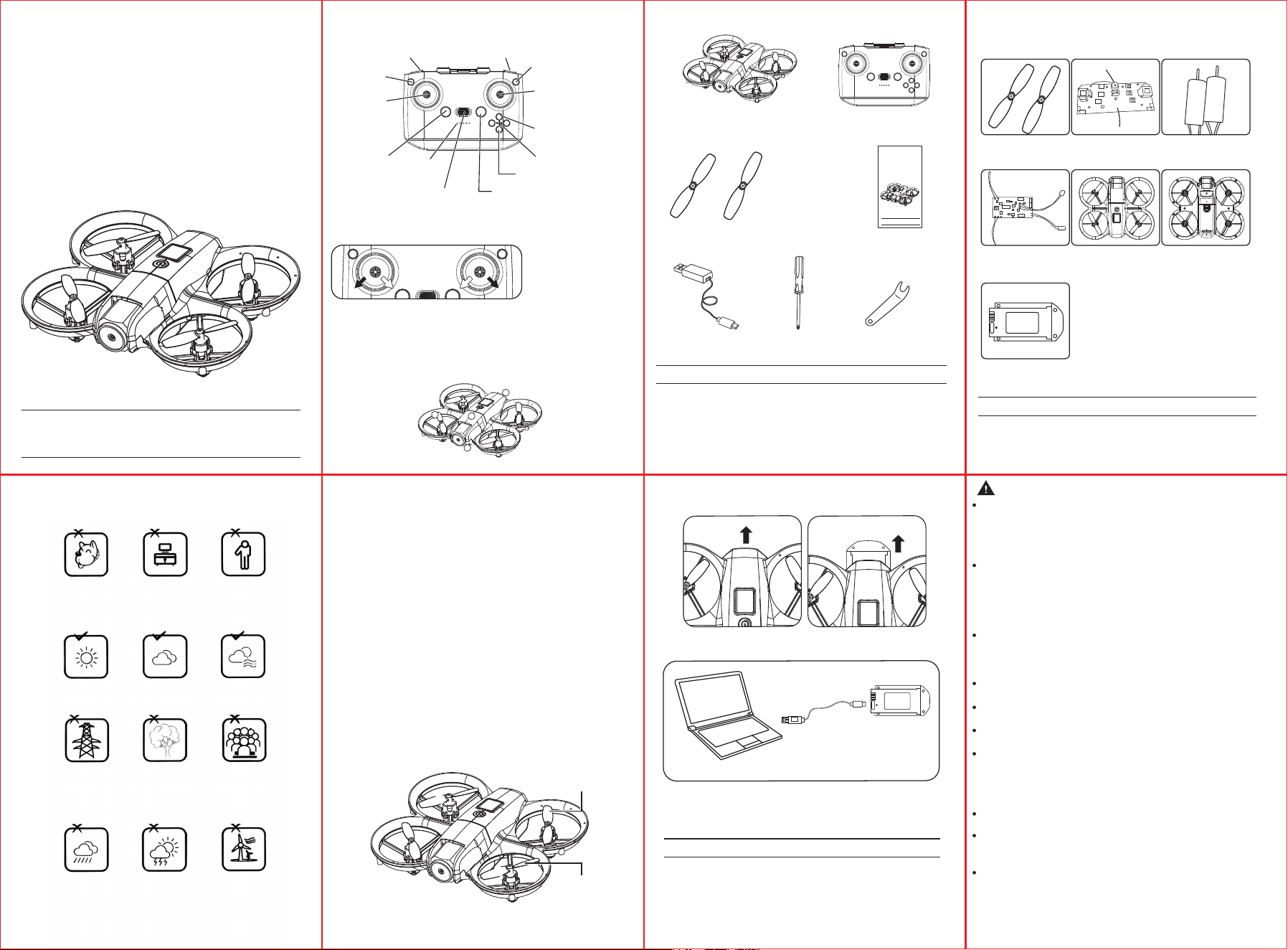
FLIGHT ENVIRONMENT 选择飞行环境
Indoor: Spacious spaces away from barriers, crowds or pets are
preferred.
在室内飞行:请选择附近无障碍物、人群和宠物的开阔空间
飞行。
Outdoor: Sunny, windless and breezy weathers are preferred.
在室外飞行:请选择晴朗无风的天气或微风的天气飞行。
Please keep the drone in sight during the flight and keep it away
from barriers, high-tension cables, trees and people.
飞行时请保持飞行器在视线范围之内,并远离障碍物、高压
线、树木、人群等。
Do not fly in extreme environment, such as hotness, coldness,
strong wind or heavy rain.
切勿在极端恶劣的环境下飞行,如过冷、过热、强风、暴
雨等。
AIRCRAFT
FUNCTION OPERATING MANUAL
飞行器
使用说明书
*Please read this manual carefully before operation and keep
it properly for future reference.
*请在飞行前仔细阅读说明书并妥善保管以便日后参考。
AGES 14+
If any of the above accessories are damaged during
operation, you can contact the seller to purchase.
操作过程中,如有以上配件损坏,可自行联系卖家购买。
Please check the number of accessories carefully(as shown
above), Please provide proof of purchase and contact the
store for replacement if any missing parts.
请仔细清点各配件及数量(如配件表),如果发现不齐全,
请提供购买凭证,及时联系销售商家补换货。
Notes 注意:
Notes 注意:
OPTIONAL ACCESSORIES LIST
可另购配件表
Propellers
风叶
Battery
电池
Lower Casing
机身下盖
Upper Casing
机身上盖
Receiving board
接收板
Motor
电机
Launch board
发射板
DRONE x1
(Battery included)
无人机 x1(内含电池)
ACCESSORIES 配件表
Remote Control x1
遥控器 x1
Backup Propellers AB
备用风叶 AB
BA
User Manual x1
说明书 x1
USB Charger x1
USB 充电器 x1
Screwdriver x1
十字螺丝刀 x1
Fan blade tool x1
风叶拆卸工具 x1
KNOW YOUR DRONE
认识你的无人机
With 2.4G frequency band for long remote control distance. Drone allows multiple flights at the same
time without any interference. Use can control it to fly, hover and take photos/ videos with APP and
WiFi connection on smart phone.
无人机采用 2.4G 频段,可多人同时操作而互不干扰。通过遥控器操控无人机实现飞行、翻滚、
微调、一键起飞、一键降落、速度、校正、定高功能。
① Upper Casing
机身上盖
② Lower Casing
机身下盖
③ Propeller
风叶
⑤ Motor
电机
④ Battery
电池
AIRCRAFT
FUNCTION OPERATING MANUAL
飞行器
使用说明书
*Please read this manual carefully before operation and keep
it properly for future reference.
*请在飞行前仔细阅读说明书并妥善保管以便日后参考。
AGES 14+
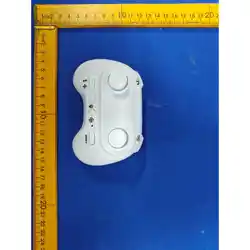
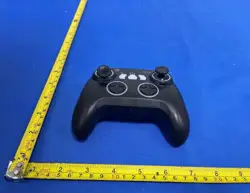
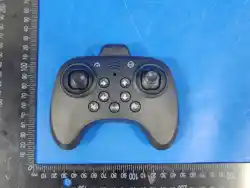
KNOW YOUR REMOTE CONTROL
认识你的遥控器
上升/下降/ 左/右转向
Ascend/Descend
Turn Left/Turn Right
Left joystick
左操作杆
One-key Ascend
One-key Landing
一键起飞/一键降落
Power Switch
电源开关
Power Indicator
电源指示灯
Right joystick 右操作杆
前进/后退/左右侧飞
Forward / Backward /
Left Sideward Flight /
Right Sideward Flight
Long Press: Trim 长按微调
3
2
5
1
4
BATTERY CHARGING FOR DRONE
机身充电方法
Connect USB charging cable with the charging interface of
the lithium battery.
USB 充电器连接电池与 USB 充电接口
B.
LED lights on when charging and light turn off when full charging
completes.Charging time is about 120 minutes.
充电时电池灯亮,充电完成时电池灯灭,充电时间约为 2 小
时左右。
Notes 注意:
USB charging
USB充电
Lithium
-polymer
battery
锂聚电池
A. Remove the lithium battery from the bottom of the drone.
按下箭头指示的位置,把电池箱往外拉出,取出电池。
Note: Hold the 3D flip button, turn on the remote control power to switch to right-hand throttle.
54 6 7
1 2 3
BATTERY INSTRUCTIONS 电池使用注意
There is a certain risk when using lithium battery. It may cause fire, body
injury or property loss. Users must be aware of the risks and take full
responsibility of using battery improperly.
使用锂电池有一定风险,可能对人和财产造成重大损失,请谨慎使
用,自行承担所有相关责任。
If battery leakage occurs, please avoid contacting your eyes or skin with
electrolyte. Once it happens, please wash your eyes with clean water and
seek medical care immediately.
如果电池发生泄漏,请避免液体与皮肤和眼睛接触。若接触到皮
肤,请立即以香皂和清水清洗。若接触到眼睛,请立即以大量冷水
冲洗并立即就医。
Please remove the plug immediately if you sense any peculiar smell,
noise or smog.
如果充电器发出可疑异味、噪音或者烟雾,请立即拔除电源。
Do not dispose the battery as daily rubbish. Please familiarize yourself
with the local garbage disposal method and dispose it according to the
special requirement.
此设备由电子元件和电池构成。关于电子电器垃圾,请按照当地垃
圾处理要求,进行特殊处理。
Please use the charger from original factory to ensure your safe usage.
请使用原厂配送的专用充电器充电,严禁使用破损或其他品牌充电器。
Do not charge dilatant or outworn battery.
请勿对膨胀、泄漏或破损的电池充电。
Do not over charge battery. Please unplug the charger once fully charged.
请勿对电池过度充电。当电池完全充满后,请拔出充电器。
Do not charge the battery next to inflammables, such as carpet, timber floor or
wood furniture or on the surface of electro-conductive objects.
Please always keep an eye on the battery when charging.
请勿在靠近易燃物(地毯、木地板、实木家具等)或导电的物体表面上
充电。充电时请保持电池在视线范围内。
Do not charge battery which not cool down yet.
切勿在使用产品后电池尚热时立即充电。
The charging temperature should be between 0℃ to 40℃.
充电的温度应该处于 0℃到 40℃之间。
Battery Recycling 回收
Battery Charging 充电
Unlock / Lock 解锁/上锁
飞行速度切换
Speed Switch
R1 button R1按键
R2 button R2按键
注:按住3D翻滚按键,打开遥控电源,切换右手油门
Short press: 3D Flip 短按3D翻滚
Long press: Headless Mode 长按无头模式
Short press: Left Light Switch
短按左灯光切换
短按右灯光切换
Short press: Right Light Switch
Unlock the inner eight/
calibrate the outer eight
内八解锁 / 外八校准
Clockwise
Propeller (B)
正桨
桨叶字母B
反桨
桨叶字母A
How to Replace the Propellers
After the drone crashes, the propellers may become deformed or fall off. In
this case, replace them with spare propellers. First, use the propeller
remover to take the propeller off the motor. When removing the propeller,
hold the motor instead of the frame guard. Force applied during removal
may easily deform the frame guard.
The spare propellers include 2 clockwise propellers (B) and 2
counter-clockwise propellers (A). Install them as shown in the figure below.
Mount counter-clockwise propellers (A) on the bottom-left and top-right
motors. Mount clockwise propellers (B) on the top-left and bottom-right
motors.
如何更换螺旋桨
飞行器在撞击之后, 螺旋桨可能会变形或者脱落,这个时候需要更换备
用螺旋桨。首先,需要用取桨器把螺旋桨从马达上取下来。取螺旋桨时
需要注意用手拿住马达,不要拿机架保护环,取桨用力时容易造成机架
保护环变形。
备用螺旋桨包括两片正桨(B),两片反桨(A)。安装的位置如下图所示。反
桨(A)安装在左下和右上马达位置,正桨(B)安装在左上和右下马达位置。
ASSEMBLING PROPELLERS
风叶安装
Counter-clockwise
Propeller (A)
R
R
L
L
B
B
A
A
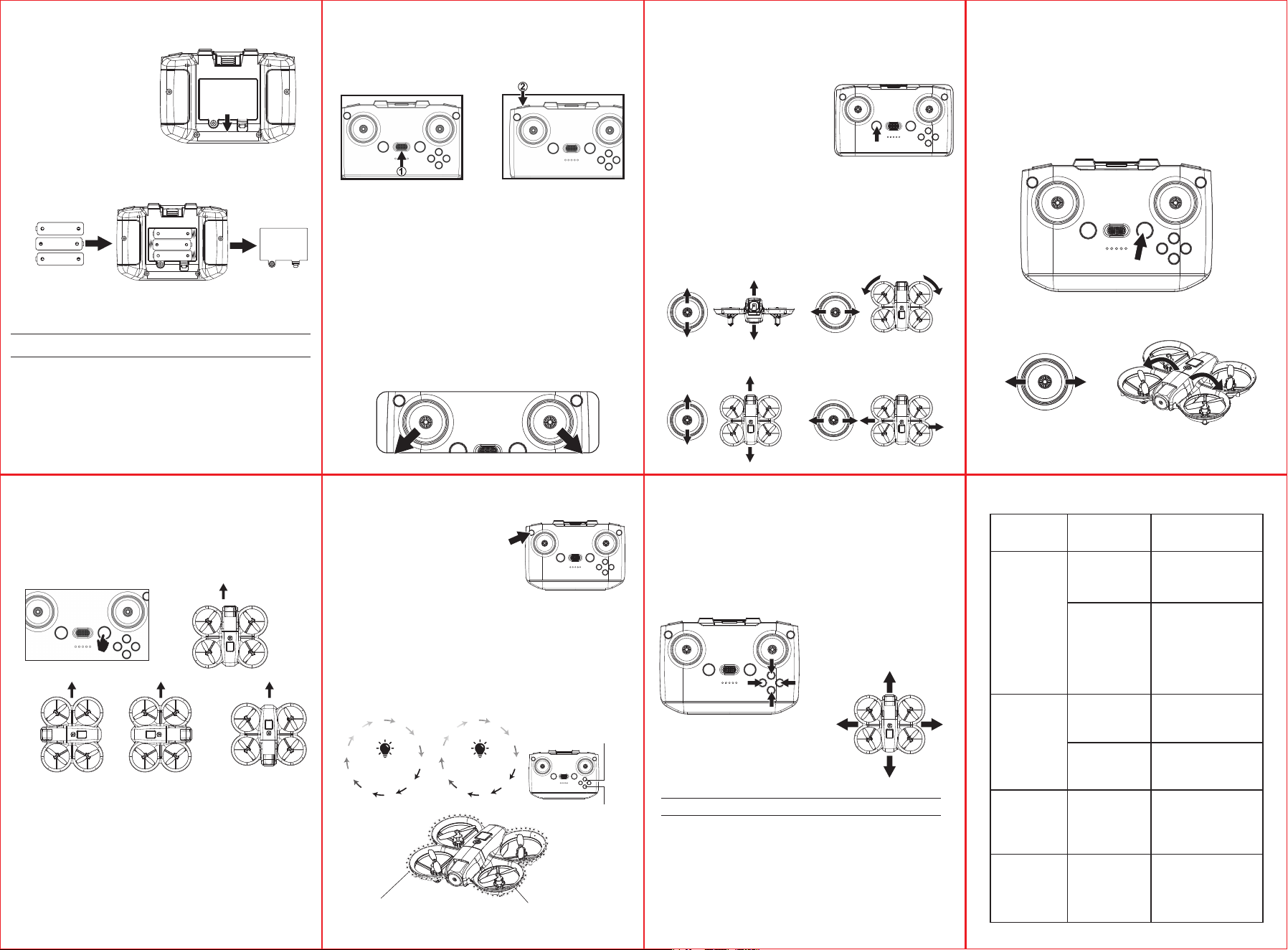
BATTERY INSTRUCTIONS
电池安装方法
SIGNAL CONNECTION OF TRANSMITTER
AND RECEIVER 遥控器与无人机对频
START YOUR FLIGHT 开始飞行
Speed Control
速度控制
FINE-TUNING FUNCTION
微调功能
FAQ
遇到问题不用慌
Lightly press the button to control the
speed of the drone, a "di" sound is a slow
speed, and then tap the button again, a
"di" and a "di" sound twice as a fast
speed, and then the cycle repeats. The
default speed of the drone is low speed.
When the drone spins or drifts in any direction during flight, use trim to
correct its movement.
Long press the trim button for adjustment and calibration to keep the drone
flying steadily.
当飞行器在空中打转或倾向不同方向时,可使用微调修正动作。
长按微调按键调节校正,使无人机平稳飞行。
轻按按键对无人机进行速度控制,“滴” 一声为中档,再次轻按按
键,“滴”“滴” 两声为中档,之后轻按按键,“滴”“滴”“滴
” 三声为快档,之后循环往复。无人机默认速度为低速。
① 向前微调 Forward fine tuning
② 向右微调 Right fine tuning
③ 向后微调 Back fine tuning
④ 向左微调 Left fine tuning
When the drone is within 30cm from the ground, it will be affected by the
blade vortex made by itself and become unstable. This is "ground
effect". The lower the drone is, the greater the effect will be.
“地效反应” 指当无人机飞行越低时,地面反应影响则越大。当无
人机在距离地面 30cm 以内的位置,无人机会受到自身桨叶涡流的
影响而变得不稳定。
Notes 注意:
Control failure
遥控器失灵
PROBLEMS
问题
CAUSES
原因
SOLUTIONS
处理方法
Not connected with
the quadcopter
battery.
无人机电池没连接
Too strong wind
force.
风力太大
Connect the quadcopter
battery in right way.
把无人机电池按正确方
向连接
Do not fly in windy days.
The performance and the
control of the quadcopter will
be affected by the strong
winds.
切勿在有风的情况下飞行,
有风会对无人机造成局限,
或会妨碍你的控制飞行
Push up the throttle
joystick.
动力操纵杆向上推
The rotation speed
of main blades is too
slow.
旋翼转动速度太慢
The battery of the
quadcopter is not fully
charged.
无人机未完成充电
The throttle stick is
pulled down too
fast.
过快将动力操纵杆
回位
Beyond the effective
controlling distance.
超出有效遥控距离
Please full charge the
quadcopter.
为无人机完全充电
Ensure operation within the
controllable distance: remote
control of 100 meters and
WiFi control of 40-50 meters.
确保遥控距离在 100m 内,
WiFi 操控在 40-50m 内
Pull down the throttle stick
slowly to perform a smooth
landing.
慢慢的拉动动力操纵杆让
无人机慢慢着陆
Fail to ascend
无人机不能
升高
Landing too
soon
无人机很快
跌落
Out of control
失控
AAA batteries
7 号碱性电池
Open the battery cover and insert the 3 AAA batteries correctly according
to the electrode instructions. (Batteries not included)
打开电池盖,依照电极指示正确放入 3 粒 AAA 电池。(电池需另购)
Notes 注意:
Turn on the drone power switch and place the drone on a level surface.
开启机身电源开关
,
将无人机放置在水平面。
Use the left joystick to control the flight altitude and turn left/right, the right
joystick to control the forward, backward, left and right side flight
directions.
左操纵杆控制飞行高度与左右转方向,右操纵杆控制前进、后退以及
左右侧飞方向。
If the drone cannot ascend vertically during takeoff, it can be calibrated by
turning the left and right control levers to the left and right respectively. When
you hear a "beep" sound, the indicator light on the drone will flash rapidly.
Wait for the indicator light to stay on for calibration to be completed. When
executing calibration commands, they must be executed in a steady state
parallel to the horizontal line, otherwise it will affect the calibration effect.
若无人机起飞不能垂直上升,可对无人机校正,将左右控制杆分别拨
向左下和右下,听到 “滴” 一声,此时无人机上指示灯快速闪烁,等
待指示灯常亮,校正完成。在执行校正命令时,必须在与水平线平行
的平稳状态下执行,否则会影响校正效果。
TRANSMITTER CALIBRATION 遥控器校准
Flips & Rolls
翻滚
When the drone is reaching more than 3 meters high, click
"360° flips and rolls" and move the right joystick to a certain
direction, the drone will rotate in that direction.
无人机飞到 3 米以上高度后,点击翻滚键并将右操纵杆(方
向舵)向一个方向移动,可实现在此方向的翻滚动作。
Right joystick 右操纵杆
Right joystick 右操纵杆
Left joystick 左操纵杆
Flip to
left
左翻
Ascent 上升
Flip to
right
右翻
Forward 前进
Backward 后退
Left Side Flight
左侧飞
Right Side Flight
右侧飞
Descent 下降
Turn Left
左转
Turn Right
右转
2. Basic Flight 基本飞行
Press the "One-key Ascend" button, the
drone blades rotate and automatically fly
to a height of 1.5 meters. Press the button
again to land the drone with one button.
按下 “一键起飞” 按键,无人机风叶
转动,自动飞到 1.5 米左右的高度。再
次按下按键无人机一键降落。
One-key Ascend and One-key Landing
一键起飞与一键降落
1.
Make sure the battery are loaded correctly according to the polarity
indications on the battery compartment.
Please do not mix old and new batteries together.
Please do not mix different types of batteries together.
装入电池时必须认准电池正负极,且不能装反。
请勿混合使用新旧电池。
请勿混合使用不同类型的电池。
1.
2.
3.
1.
2.
3.
Open the remote control
battery cover
遥控器电池盖的开启
①
Remote control battery installation
遥控器电池的安装
②
②
①
③
④
②
①
③
④
1.5V “AAA”
1.5V “AAA”
1.5V “AAA”
1.5V “AAA”
1.5V “AAA”
1.5V “AAA”
1312 14 15
98 10 11
1. Turn on remote controller power switch.
Remote controller and drone indicator lights
change from flashing to steady on.
1.打开遥控器电源开关,遥控器和无人机指
示灯由闪烁转为常亮。
2.Press the unlock button to arm the drone. The
propellers will start spinning. Push the throttle stick
upward, or press the One-Take Off button to fly.
2.按下解锁按键解锁飞行器,此时飞行器螺旋桨
启动,向上推油门,或者按一键起飞飞行。
In flight, long press the Headless Mode button to enter Headless Mode.
Long press again to exit Headless Mode.
飞行状态下,长按无头模式键进入无头模式;
再次长按可退出无头模式。
飞机校正时,或者对码后机头指向始终是切换到无头模式后的遥杆
前进方向,无论机头旋转到任何方向,前进方向始终不变。
After drone calibration or binding, the nose direction will correspond to
the forward direction of the joystick once Headless Mode is activated.
No matter which direction the drone nose turns, the forward direction
remains unchanged.
机头指向
前进
前进
机头
前进
机头
前进
机头
无头模式
Headless Mode
Left Colorful Light
左边七彩灯光
七彩灯转换
短按灯键:飞行器指示灯颜色循环转换颜色(如图)。
Short press the light button: The aircraft indicator light cycles through colors
(as shown in the figure).
Right Colorful Light
右边七彩灯光
Colorful Light Switch
灯效
1
灯效
2
红红
橙橙
黄黄
绿绿
青青
蓝蓝
紫紫
关闭关闭
七彩灯转换
Lighting
Effects 1
Lighting
Effects 2
Colorful Light
Cycle Switching
RedRed
Orange
YellowYellow
Cyan
BlueBlue
PurplePurple
OFFOFF
Green
右灯光切换
左灯光切换
Left Light Switch
Right Light Switch

FCC Caution
This device complies with part 15 of the FCC Rules. Operation is subject to the following two conditions:
(1) This device may not cause harmful interference, and
(2) this device must accept any interference received, including interference that may cause undesired operation.
Any Changes or modifications not expressly approved by the party responsible for compliance could void the user's authority to operate the equipment.
Note: This equipment has been tested and found to comply with the limits for a Class B digital device, pursuant to part 15 of the FCC Rules. These limits are designed to provide
reasonable protection against harmful interference in a residential installation. This equipment generates uses and can radiate radio frequency energy and, if not installed and used in
accordance with the instructions, may cause harmful interference to radio communications. However, there is no guarantee that interference will not occur in a particular installation. If
this equipment does cause harmful interference to radio or television reception, which can be determined by turning the equipment off and on, the user is encouraged to try to correct
the interference by one or more of the following measures:
-Reorient or relocate the receiving antenna.
-Increase the separation between the equipment and receiver.
-Connect the equipment into an outlet on a circuit different from that to which the receiver is connected.
-Consult the dealer or an experienced radio/TV technician for help.
The device has been evaluated to meet general RF exposure requirement. The device can be used in portable exposure condition without restriction.