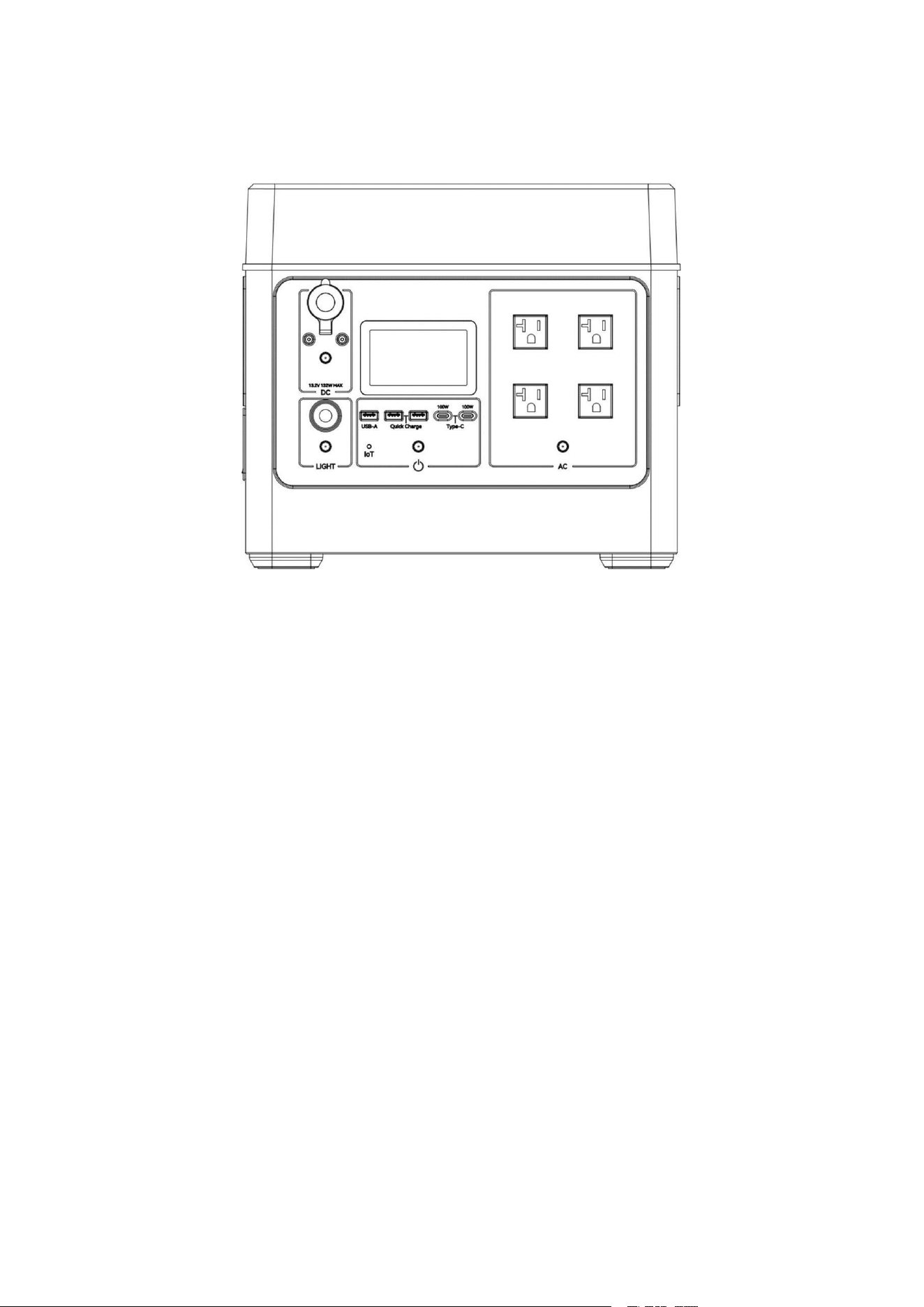
Portable Power Station
Singo2000Plus
User Manual
Version:V1.0

Contents
About This Manual.............................................................................................................................I
Applicable Model................................................................................................................................I
Target Audience.................................................................................................................................I
How to Use This Manual.................................................................................................................. I
Symbol Explanation..........................................................................................................................II
1
Safety Instructions .........................................................................................................................1
1.1
General................................................................................................................................ 1
1.2
Operation.............................................................................................................................2
1.3
Maintenance Instructions..................................................................................................2
1.4
Battery Safety Instructions................................................................................................3
2
Product Description.......................................................................................................................4
2.1
Package Contents ..............................................................................................................4
2.2
Product Views .....................................................................................................................4
2.3
Operating Instruction......................................................................................................... 5
2.3.1
Product Details........................................................................................................5
2.3.2
LCD Display Instruction......................................................................................... 6
3
Instructions for Use....................................................................................................................... 8
3.1
Storage and Transportation..............................................................................................8
3.2
Charging Instructions .........................................................................................................9
3.3
Battery Disposal................................................................................................................. 9
4
Operating Instruction ...................................................................................................................10
4.1
Power ON/OFF.................................................................................................................10
4.2
DC Output......................................................................................................................... 10
4.3
Reading Light................................................................................................................... 11
4.4
AC Output..........................................................................................................................11
4.6
Smart Drive Mode............................................................................................................12
4.7
Other.................................................................................................................................. 13
4.8
Device Charging...............................................................................................................14
5
Failure and Maintenance............................................................................................................17
5.1
Failure................................................................................................................................17
5.2
Troubleshooting................................................................................................................19
5.3
Maintenance..................................................................................................................... 20
6
Specification................................................................................................................................. 21

I
About This Manual
This manual describes the product information, installation, electrical connection, commissioning,
troubleshooting, and maintenance. Read through this manual before installing and operating the
product. All the installers and users have to be familiar with the product features, functions, and
safety precautions. This manual is subject to update without Notice.
Features
①Home backup Portable Power Station.
②0%~100%, 1.5 hours super-fast charging.
③
LiFePO
4
battery cells, 4000+ life cycles.
④Multi-function output ports.
Applicable Model
The manual can not include complete information about the photovoltaic (PV) system.
This manual is only for the product below:
Target Audience
This manual applies to trained and knowledgeable technical professionals. The technical personnel
have to be familiar with the product, local standards, and electric systems.
How to Use This Manual
Read the manual and other related documents before performing any operation on the product.
Documents must be stored carefully and be available at all times. Contents may be periodically
updated or revised due to product development. The information in this manual is subject to change
without notice.
Model
Rated Output Power
Battery Capacity
Singo2000Plus
2500W
2048Wh
II
Symbol Explanation
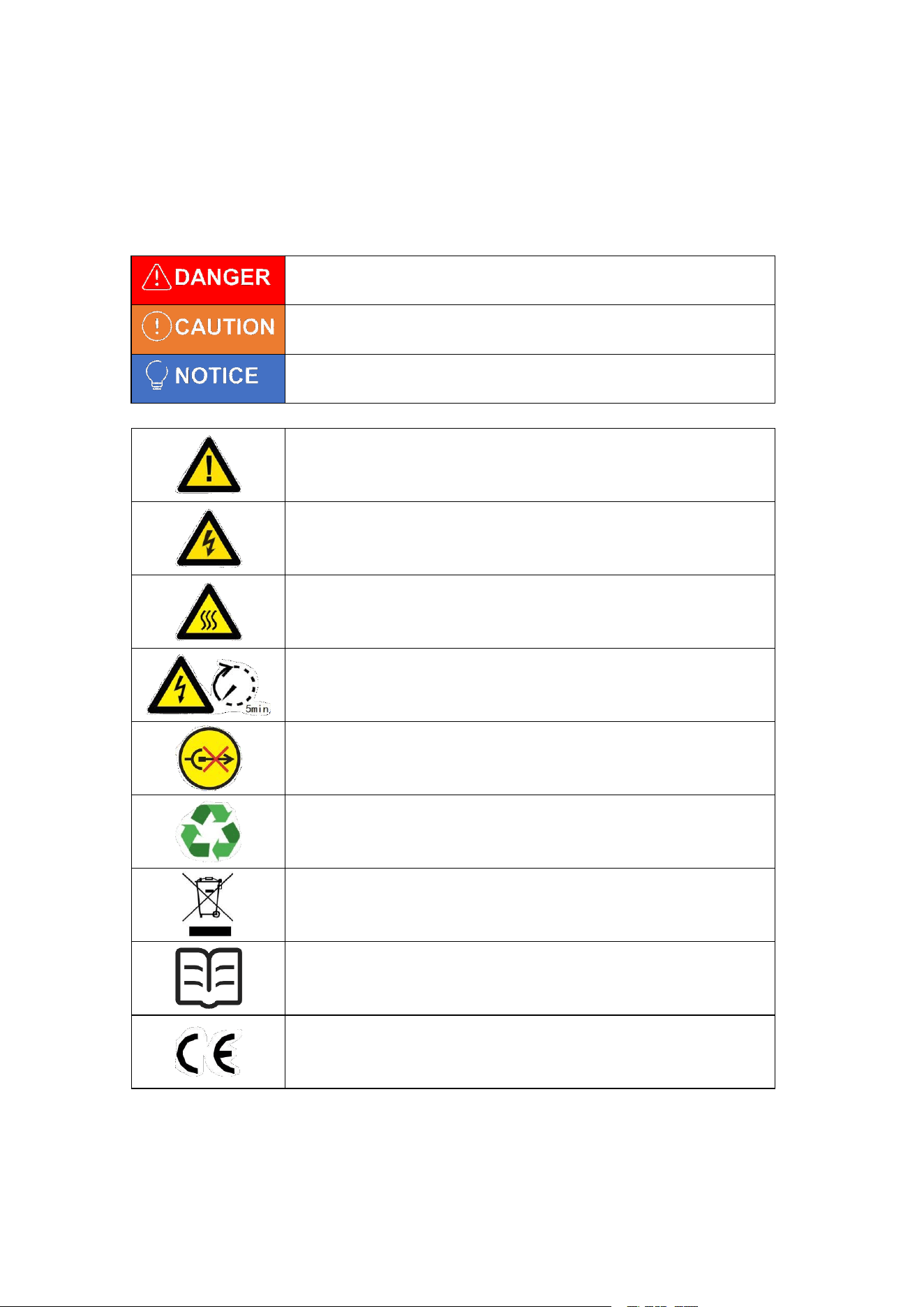
Singo2000Plus is designed and tested in strict accordance with international safety regulations.
Read all safety instructions carefully prior to any work and observe them at all times when working
on or with the product operation and maintenance,as any improper operation might cause personal
injury or property damage.
Potential risks exist. Wear proper PPE before any operations.
DANGER High voltage hazard. Disconnect all incoming power and
turn off the product before working on it.
High-temperature hazard. Do not touch the product under operation
to avoid being burnt.
Wait five minutes after power failure to ensure that the capacitor is
discharged to a safe voltage.
Do not disconnect under load.
The components of the product can be recycled.
It must not be disposed of as ordinary garbage, but recycled in a
special way.
Read through the user manual before any operations.
CE mark.
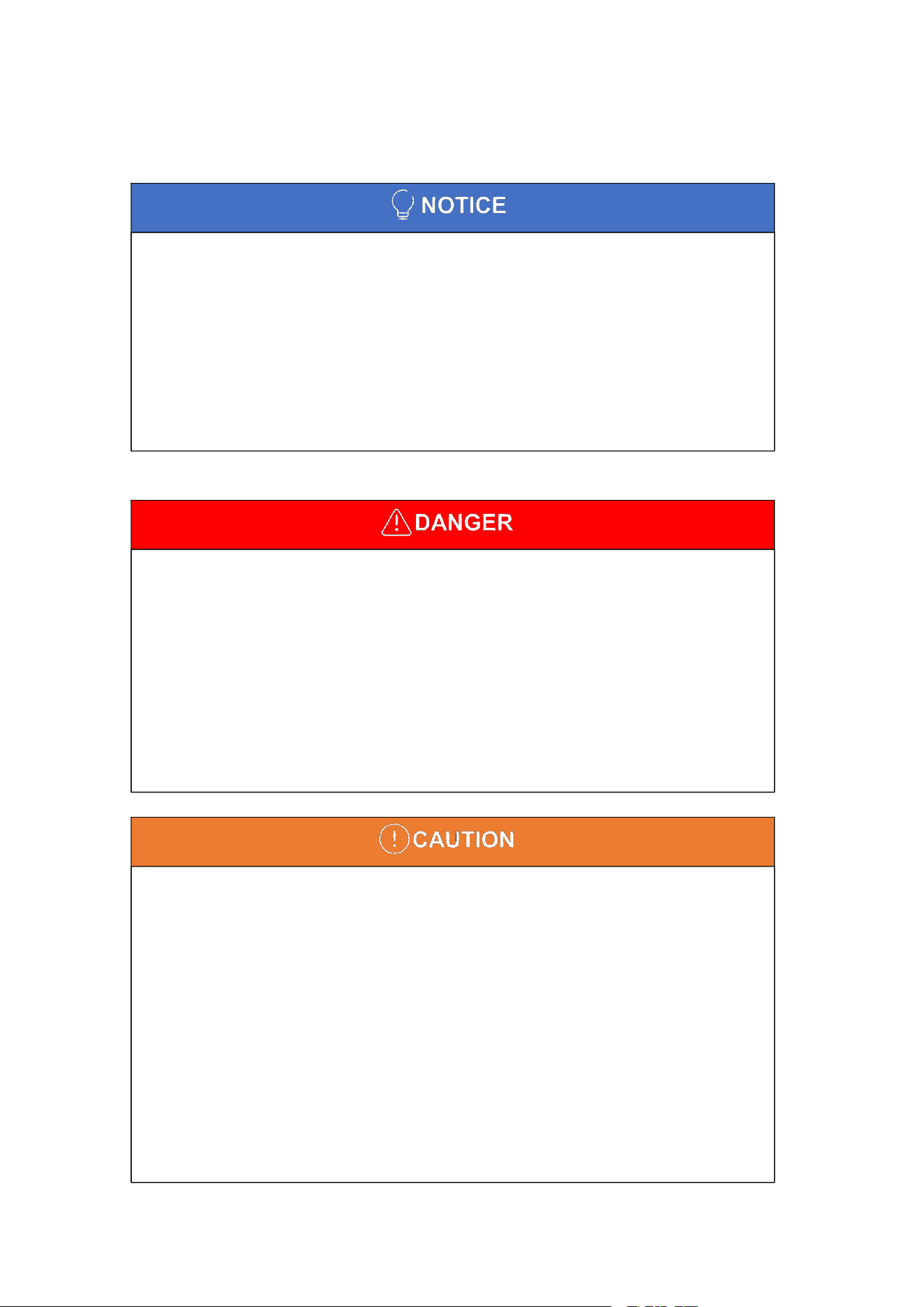
Failure to follow instructions may result in property damage, major
accidents and serious injury.
Failure to follow instructions may result in property damage and more
serious injuries.
Failure to follow instructions may result in property damage and
minor injuries.
1
■
The product has been designed and tested strictly according to international safety
regulations. Read all safety instructions carefully prior to any work and observe them at all
times when working on or with the product.
■
Personnel who install or maintain the device must be strictly trained and learn about
safety precautions and correct operations.
■
Only qualified professionals or trained personnel are allowed to install, operate, maintain,
and replace the device or parts.
■
Appropriate methods must be adopted to protect the product from static electricity
damage. Any damage caused by static electricity is not warranted by the manufacturer.
■
Do not disassemble or puncture the battery with sharp objects in any way without official
authorization, as we are not responsible for spontaneous combustion of the battery or any
danger to persons.
■
Damage to the battery may cause the electrolyte to leak. If the electrolyte leaks, do not
touch the leaked electrolyte or evaporated gas and contact the after-sales service center
immediately for assistance.
■
If the product accidentally falls into water during use, after taking the product out of the
water, place it in a safe open area until it is completely dry. After drying, the product should
not be used again and should be disposed of according to the disposal method in this
manual.
■
This product contains batteries, do not place this product near a heat source, such as a
fire source or a heating furnace, or it will cause spontaneous combustion of the batteries
and may even cause an explosion.
■
This product cannot come into contact with any liquid, do not immerse this product in
water or get it wet. Do not use the product in the rain or in a wet environment.
■
Do not use this product in an environment with strong static electricity or strong magnetic
fields, as some of the protective functions of the machine may malfunction.
■
Do not use unofficial parts or accessories. If you need to replace them, please check the
relevant purchase information from our official sales channels.
■
Do not hit, drop or step on the device. If there is any serious external impact, please turn
off the power and stop using it immediately.
■
If the product is seriously damaged, please keep it away from combustible materials and
people, ensure the safety of the surroundings, and scrap it according to the requirements of
1
Safety Instructions
Please strictly follow these safety instructions in the user manual during the operation.
1.1 General
2
■
Too high a temperature may cause the battery to catch fire; too low a temperature will
seriously degrade the product's performance and may not meet the requirements for normal
use. When using this product, please strictly follow the ambient temperature of this user
manual.
■
If there is any dirt on the interface of this product, please use a dry cloth to wipe it clean,
otherwise it will cause poor contact, which may lead to energy loss or failure to charge.
■
Prohibit stacking other heavy objects on top of this product.
■
Avoid using the product in dusty places, otherwise it will cause the fan to be clogged.
■
Keep the product out of reach of children and pets to prevent accidents.
■
Do not disconnect under load while the unit is running.
■
The temperature of the surface can exceed 50℃ during operation. Make sure it has
cooled down before touching it and make sure the product is out of reach of children.
■
High voltages may cause electric shock, resulting in serious property damage, serious
injury or death, or severe property damage Before performing maintenance, turn off the
power of product and strictly observe the safety precautions in this document.
■
Turn off the power of the product and wait at least 5 minutes before performing
maintenance tasks.
■
Do not touch energized device when it is too hot.
local laws and regulations.
1.2 Operation
1.3 Maintenance Instructions
3
■
If the battery is fully discharged, recharge it in strict accordance with the user's manual.
■
Factors such as temperature, humidity, and weather conditions may limit the battery's
current and affect its load.
■
If the battery fails to start, contact the after-sales service immediately. Otherwise, the
battery may be permanently damaged.
1.4 Battery Safety Instructions
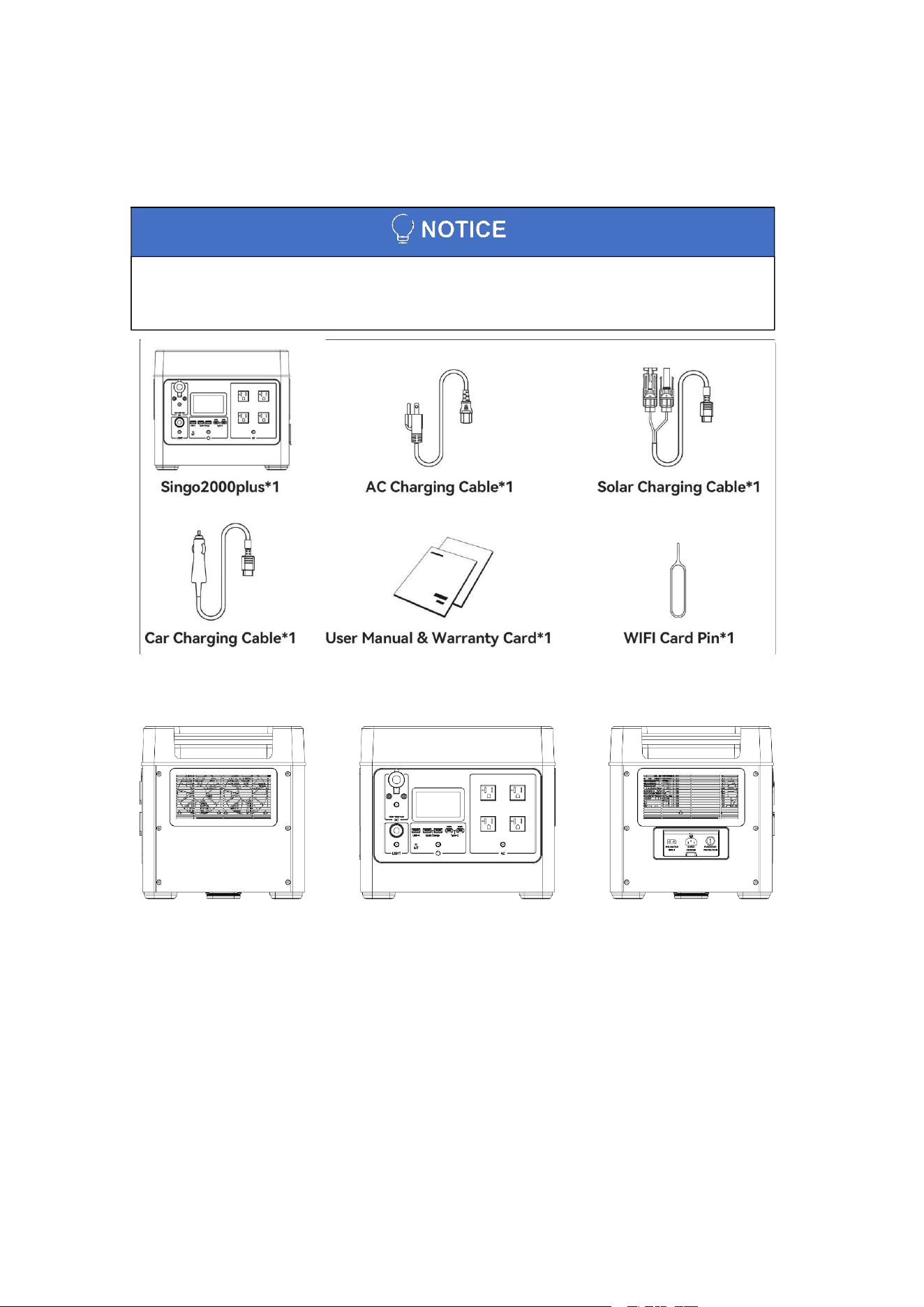
4
■
After receiving the outer packaging of the product, please check whether the product
delivery is complete according to the packaging information. If there is any abnormality,
please contact the after-sales service centre as soon as possible.
2
Product Description
2.1 Package Contents
2.2 Product Views
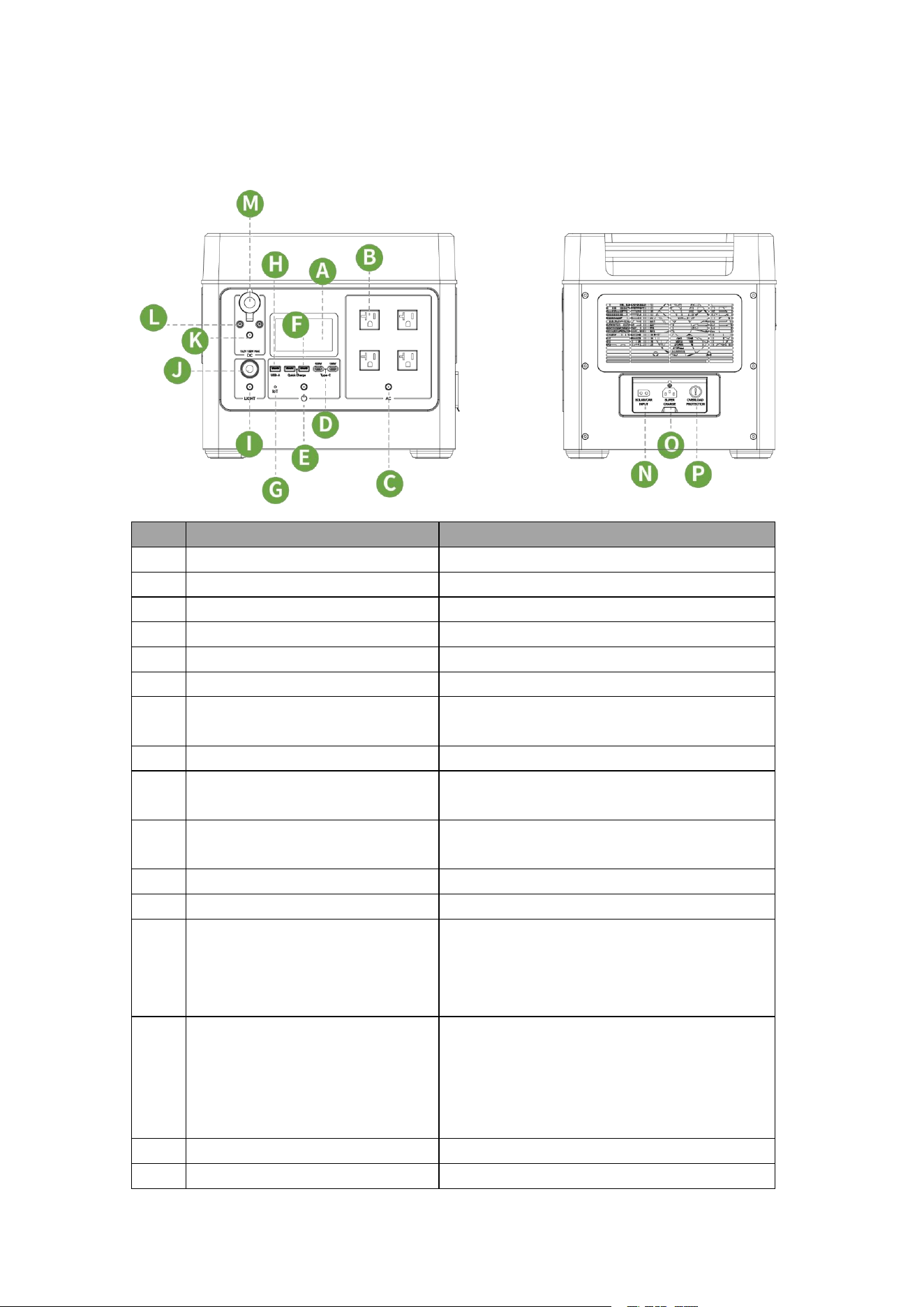
5
2.3 Operating Instruction
2.3.1 Product Details
No.
Name
Description
A
Display Screen
Display user interface information.
B
AC Output Ports
Provide AC output.
C
AC Power Switch
Short press to switch AC output on/off.
D
Type-C Quick Charge Port
100W Type-C Quick Charge Port.
E
Main Power Switch
Press and hold to power on/off.
F
USB-A Quick Charge Port
18W USB-A Quick Charge Port.
G
IoT Switch
Use the card pin to press and hold to
networking configuration.
H
USB-A Port
12W USB-A Port.
I
Reading Light Switch
Short press to switch the reading light on and
off and switches the light mode.
J
Reading Light
Provision of lighting (Low light mode/strong
light mode/SOS rescue beacon mode).
K
DC Power Switch
Short press to switch DC output on/off.
L
DC Output Ports
Charging of devices through the DC 5525 port.
M
Cigarette Lighter Output
Used for general-purpose on-board electrical
appliances, and to charge 12V lead-acid
batteries for small cars (please operate and
use under the guidance of professionals).
N
Photovoltaic/Car Charging Port
Maximum support for 1000W solar charging;
car charger can support 12V/24V maximum
10A car power input (please be sure to start
the car when using, so as not to cause the car
battery loss of power can not start).
O
AC Charge Port
Connect to the grid for charging.
P
Overload Protection Switch
When the input current is too high during the
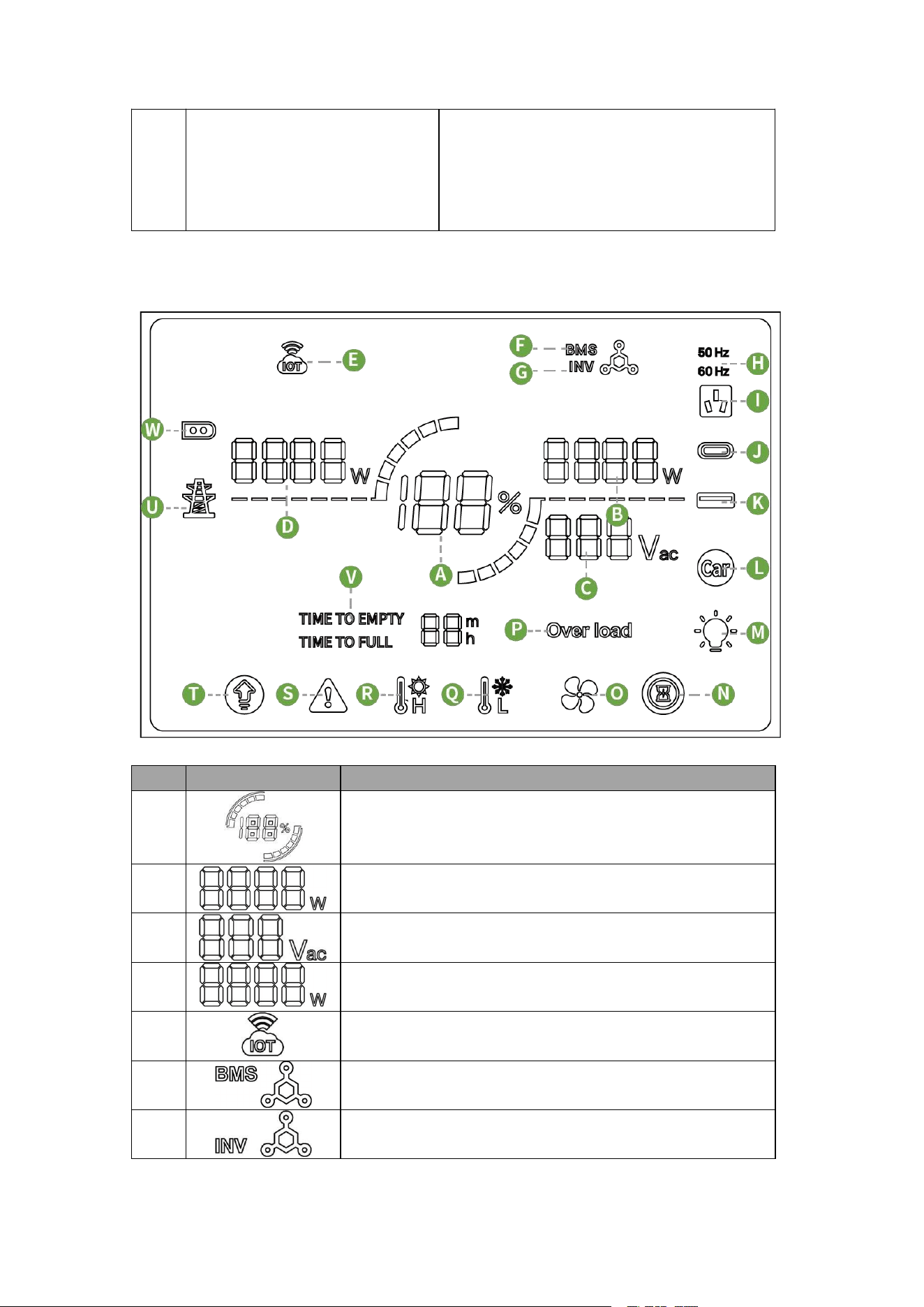
6
charging process, the AC charging port will be
protected (manifested by the protection button
popping up). After confirming that the machine
has no faults, press the protection switch to
reset and resume charging.
2.3.2 LCD Display Instruction
No.
Icon
Description
A
Indicates battery charging/discharging status and displays
the battery SOC in real time.
B
Real-time total output power.
C
Real-time AC output voltage.
D
Real-time total input power.
E
Indicates monitoring connection status.
F
Indicate BMS communication abnormality.
G
Indicate inverter communication abnormality.
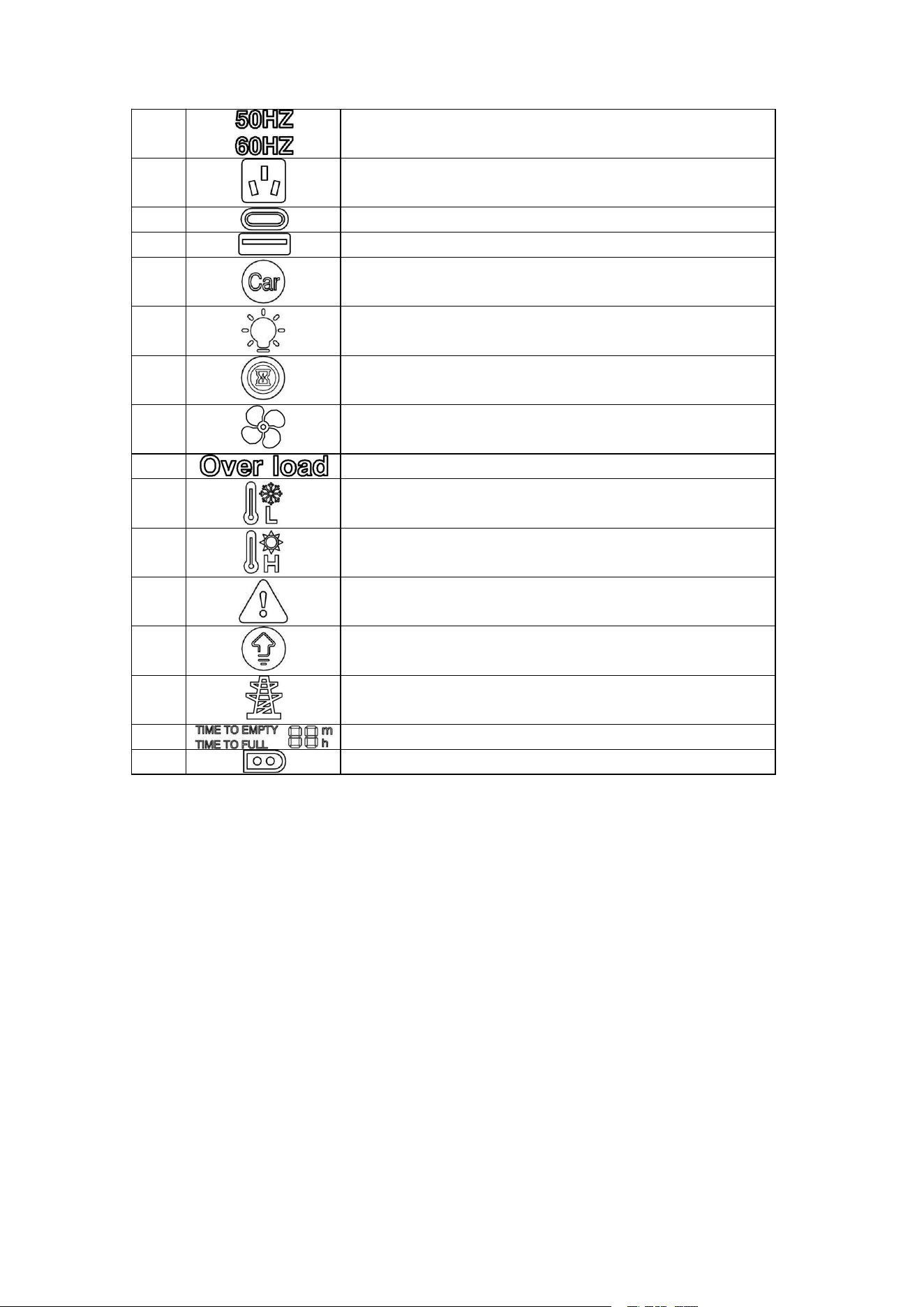
7
H
Display frequency.
I
Indicate AC output active status.
J
Indicate the active status of the PD Type-C interface.
K
Indicate the active status of the USB-A interface.
L
Indicate DC output active status.
M
Indicate the active status of the Reading light.
N
Indicate silent charging active status.
O
Indicate fan active status.
P
Indicate that the device is overloaded.
Q
Indicates low temperature fault.
R
Indicates over temperature fault.
S
Indicate battery failure.
T
Indicate AC constant power mode.
U
Indicate AC charge active status.
V
Indicate the time to be fully charged or discharged to empty.
W
Indicate PV charging/Car charging status.
8
■
Do not place the product near sources of heat, such as in a car in direct sunlight, a fire
source or a heating oven.
■
Do not transport products with more than 30% battery power.
■
Do not carry this product on board.
■
The device should be stored in a clean and dry place and protected from dust and water
vapour.
■
When storing this product, seal it with an outer bag to avoid dust from entering and
clogging the fan opening.
■
It is prohibited to store or transport the machine with metal necklaces, glasses, watches,
hairpins or other metal objects.
■
If the machine is left unused for a long period of time, it will have an impact on its
performance.
■
Please fix the product when transporting and avoid vibration and impact.
■
Maintain the storage temperature at -20°C to +45°C and the humidity at 5% to 95% RH
without condensation.
■
The height and orientation of the device should follow the instructions on the box. The
device must be stacked carefully to prevent falling.
■
Periodic inspections are required during storage. Replace the packing material if
necessary.
■
After long-term storage, the device must be inspected and tested before it is put into
service. Inspections and tests must be carried out by qualified personnel.
■
Keep this product out of the reach of children. If a child accidentally swallows parts, seek
immediate medical attention.
■
If the machine Indicate a low battery at the end of use, please charge it before storing it.
Otherwise, storing it in a low battery state for a long time may damage the battery inside the
product. If the battery is severely low and has been idle for too long, the battery will enter
deep sleep mode. If the battery enters deep sleep mode, it is necessary to charge the
battery to wake up the product to restore the function of the product from sleeping state.
3
Instructions for Use
3.1 Storage and Transportation
When the storage and transport of device is required, the following requirements shall be met:
9
■
The portable energy storage power station must be charged using the officially designated
charging cable. We will not be responsible for any damage and all consequences caused by
charging with a charging cable that is not officially provided.
■
After the machine has been continuously discharged at full capacity, if the product battery
is in a high temperature state, it is recommended to wait for the product temperature to drop
to ambient temperature before charging, otherwise the battery high temperature protection
function may be triggered and charging may be prohibited. The product can be charged in
the temperature range (0°C ~ 45°C). The ideal charging temperature range (15°C ~ 35°C)
significantly extends the life of the battery.
■
When charging, please place the machine on a level floor and make sure there are no
flammable or explosive materials around. When charging the product, please arrange for
someone to be present to prevent accidents.
■
Always place the machine battery in the designated battery recycling bin only after it has
been thoroughly discharged. Batteries are hazardous chemicals and should not be placed
in the general waste bin.
■
Be sure to comply with local battery recycling and disposal laws and regulations.
3.2 Charging Instructions
3.3 Battery Disposal
10
■
The display will be automatically extinguished when the unit has continued for half an hour
without any operation. When there is a change in operation, the display will be automatically
lit.
■
This product will enter sleep mode after 1 hour without input charging and without any
loads connected to the device.
4
Operating Instruction
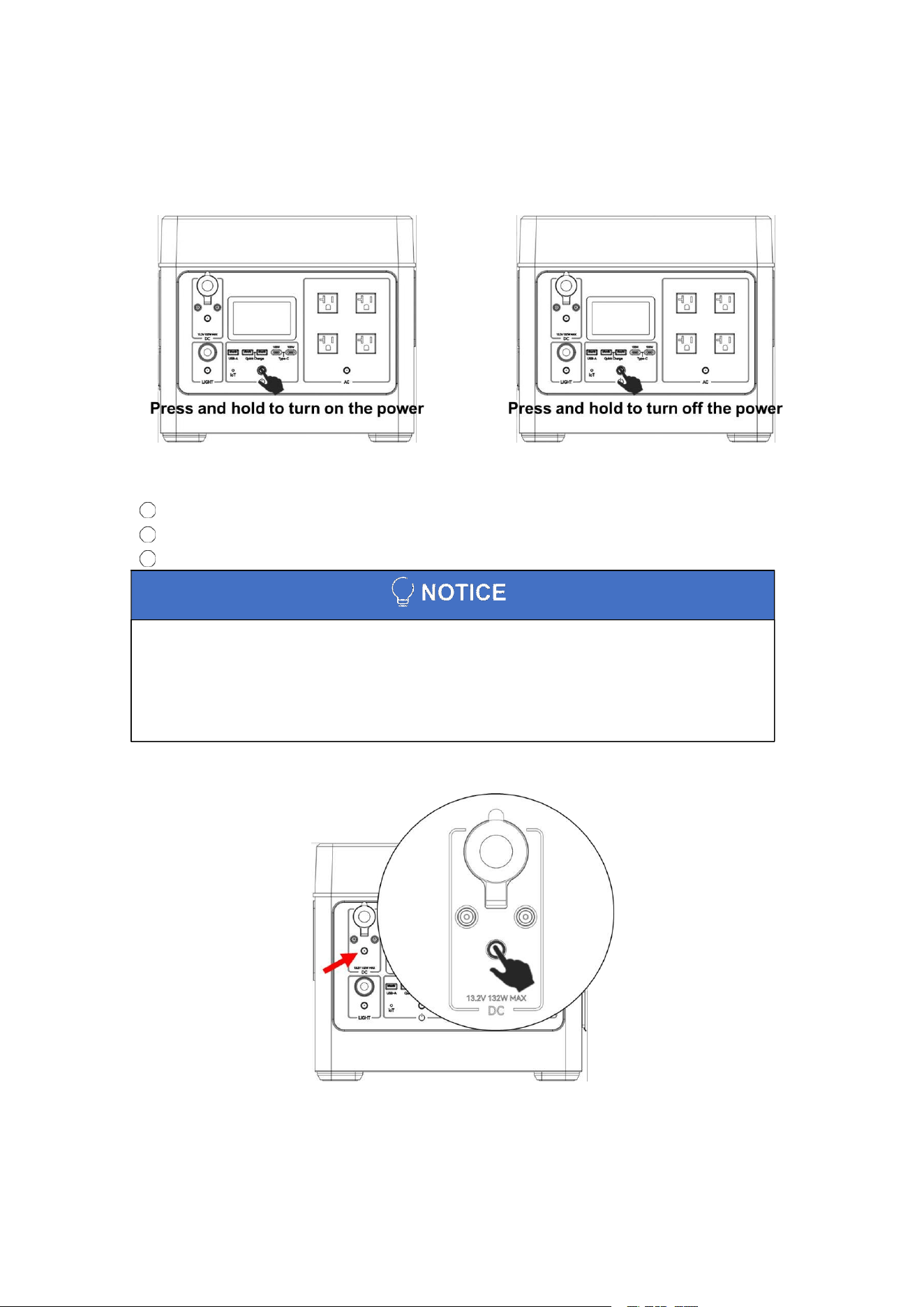
4.1 Power ON/OFF
Power ON/OFF Ways:
Press and hold the power button for 3~5 seconds to switch on.
AC/Solar charger charging input access, the device is automatically powered on.
3 Press and hold the power button for 3~5 seconds to switch off.
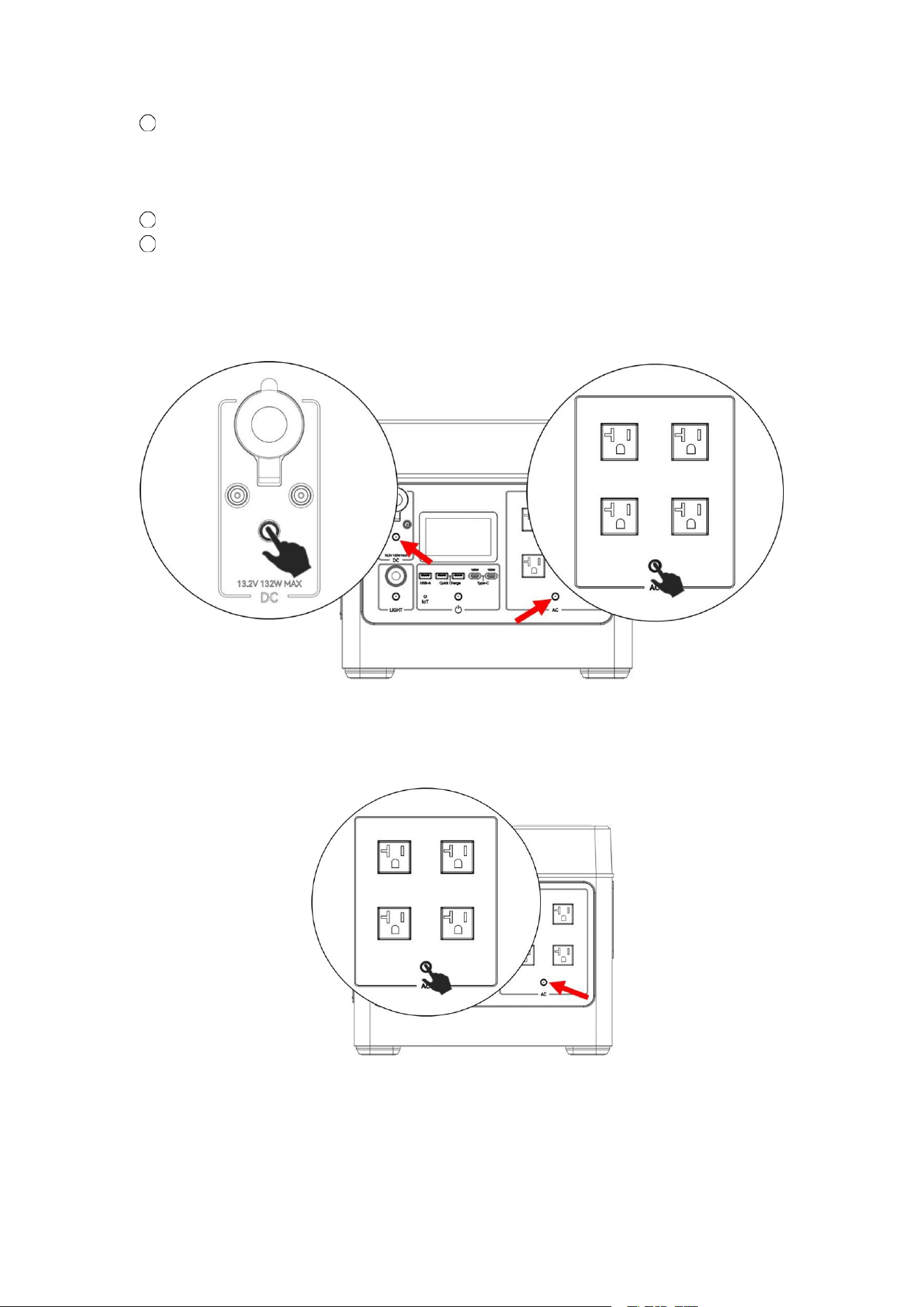
4.2 DC Output
Short press to switch DC output on/off.
1
2
11
■
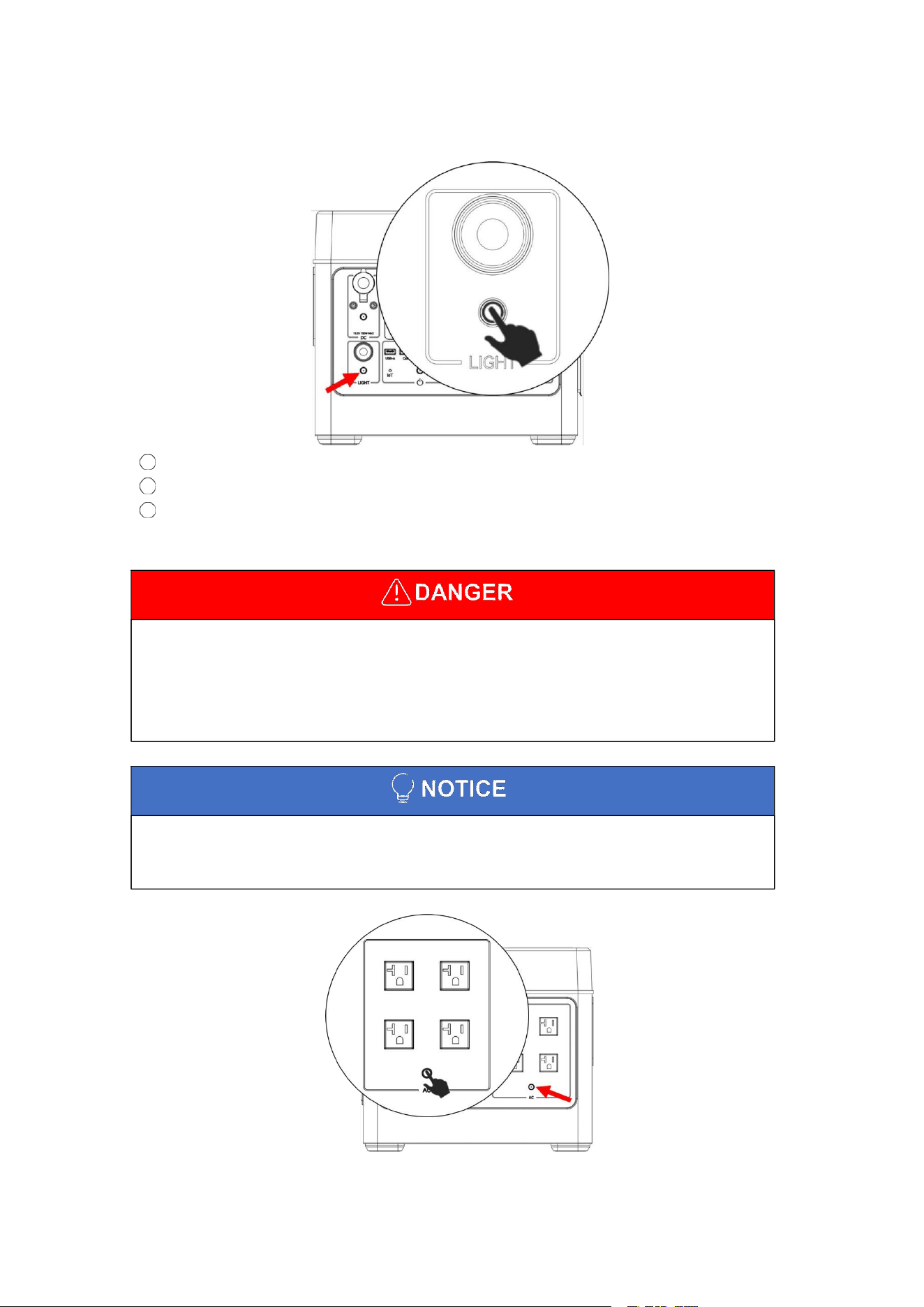
AC output has two kinds of specifications: 110V/230V, specific to receive the physical shall
prevail, the specifications are set in the factory to complete, high-voltage and low-voltage
specifications can not be changed. Before using the device, please check the voltage level
of the device in advance, and regulate the use of electrical appliances, so as not to cause
harm to the device, personal injury.
■
When the AC output is not in use, turn it off promptly to avoid loss of battery power.
■
If you want to turn off the power when the AC output power switch is on, turn off the AC
output power switch first.
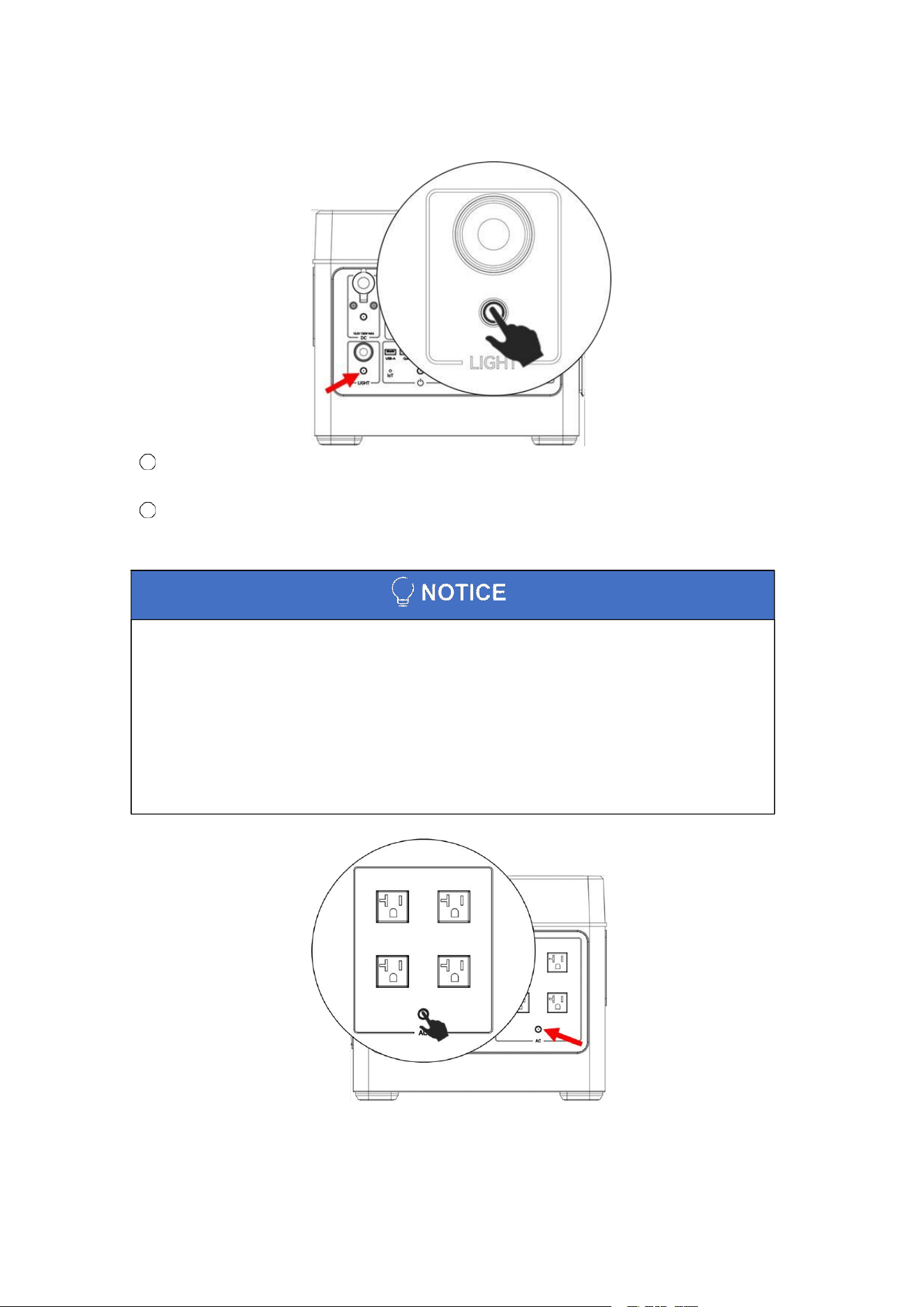
4.3 Reading Light
Short press to switch the reading light on/off.
Short press to switch the light mode.
Light mode: Low light mode/strong light mode/SOS rescue signal flash.
4.4 AC Output
Short press to switch AC output on/off.
1
2
3
12
When using the Smart Drive Mode, please note the following:
■
This product cannot be grid-connected.
■
Smart Drive Mode is not available in charging status.
■
Smart Drive Mode is designed for resistive loads and is not suitable for all appliances
such as electric heaters, electric saw, induction cookers, etc. Some electrical appliances
with voltage protection(such as precision instruments, etc) are also not suitable for using
Smart Drive Mode.
4.5 Slow/Silent Charging
Slow/Silent Charging: when this feature is on, the device will run at 0.3C charging power
when charging at 600W.
Press and hold the reading light switch to turn on/off slow/silent charging.
4.6 Smart Drive Mode
1
2
13
When the load power is higher than the rated output power, Smart Drive Mode will be
activated. When the portable power station recognizes that the power required by the
load is higher than the rated output power, it can still power to the load. This allows you to
use more types of electrical appliances, so that you can get an extraordinary experience.
This product is enabled in Smart Drive Mode by default.
Press and hold the AC output switch to turn Smart Drive Mode on/off.
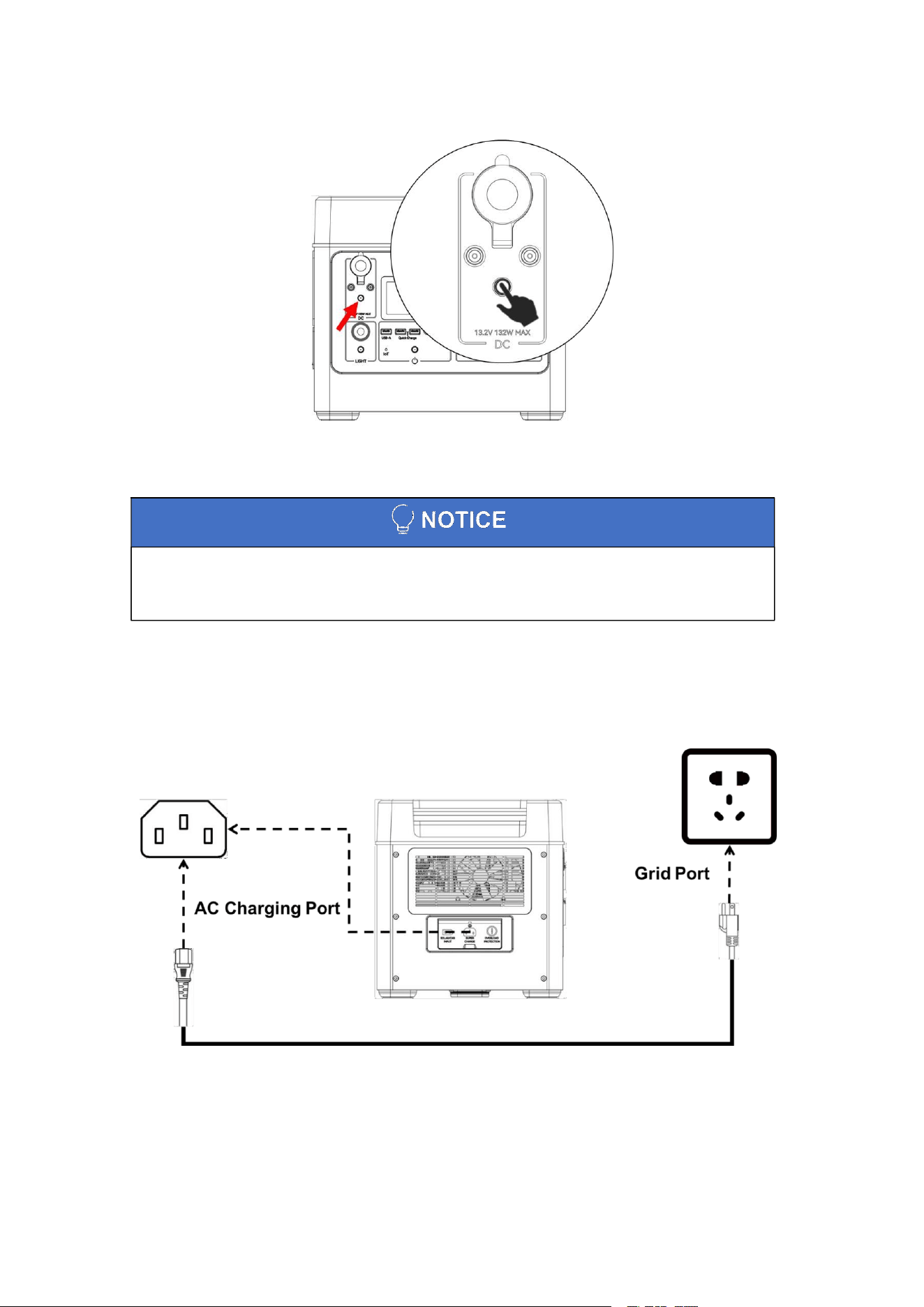
4.7 Other
Switching frequency:
Press and hold the AC output switch and DC output switch simultaneously to switch the
frequency 50Hz/60Hz.
Switching Voltage:
Double-click the AC output switch five times in a row to switch the AC output voltage.
110V specification device, switchable voltage: 100V/110V/120V.
220V specification device, switchable voltage: 220V/230V/240V.
1
2
3
14
■
The charging process equipment determines the charging power based on factors such
as the temperature and capacity of the battery cell, ensuring that the battery is in its optimal
state.
Viewing device version number:
Press and hold the DC output switch to view the current device version number.
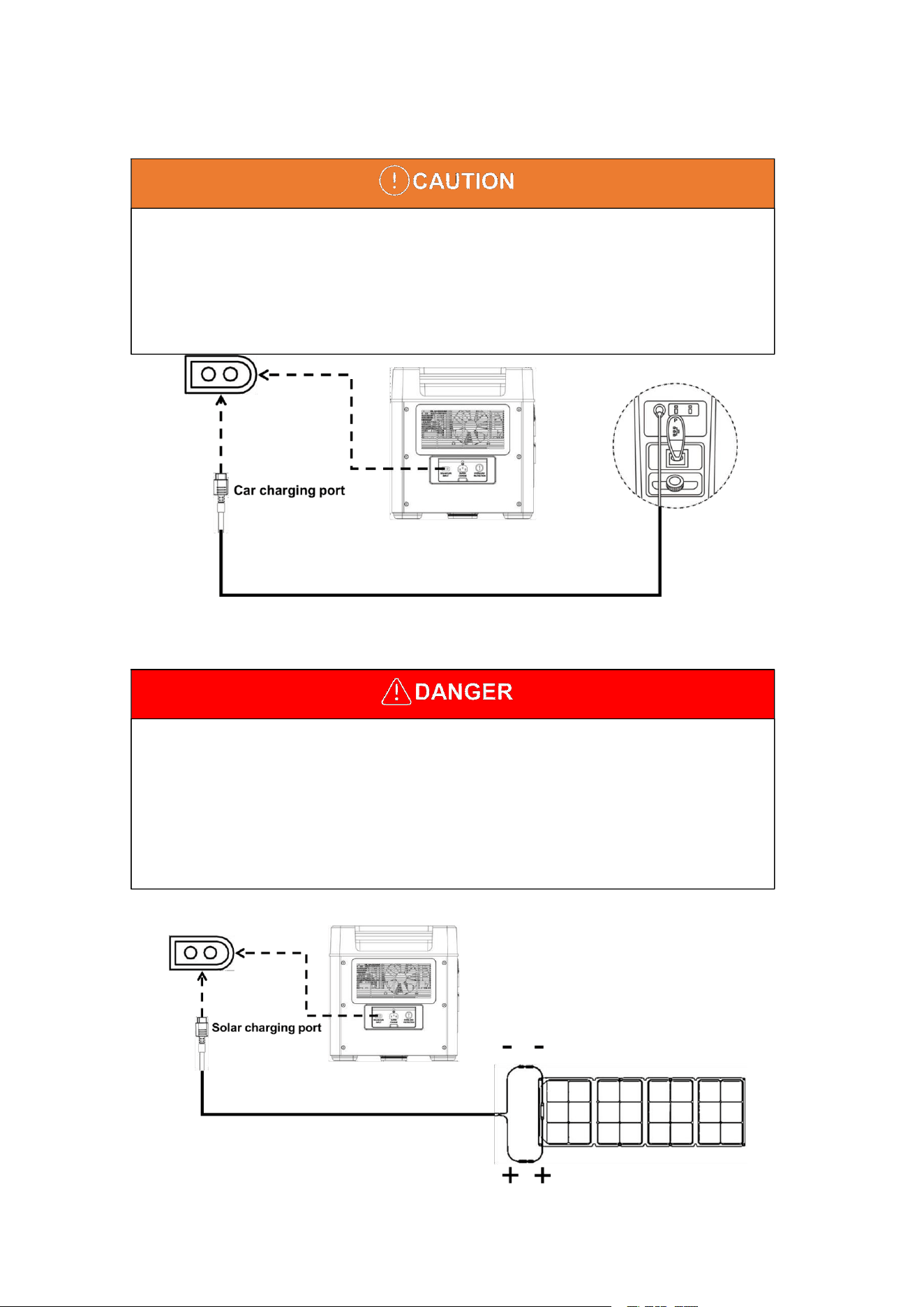
4.8 Device Charging
AC charging
The inverter has a bi-directional current converter, which can either output AC power or charge
the battery from the grid. The connection is shown in the figure below.
15
■
This product can be charged by the cigarette lighter in your car. The connection method is
shown in the instruction below. You need to use the car charger to charge the car after the
ignition is turned on, so as not to cause the car battery to lose power and unable to start.
Meanwhile, please make sure that the cigarette lighter plug of the car ignition port and the
input cable of the car charger are in good contact. We will not be responsible for any
damage caused by non-compliance with the specification.
■
Users can use the universal solar panel with MC4 interface standard to charge the
portable power station, as long as the voltage and current meet the requirements (12-60V
12A MAX).
■
The use of solar panels that do not comply with this standard will cause irreversible
damage to the equipment.
■
Please pay attention to the connection order of positive and negative poles of the
interface, wrong connection will make the device at risk of damage.
Car charging
Solar charging
Solar charging single photovoltaic panel connection diagram
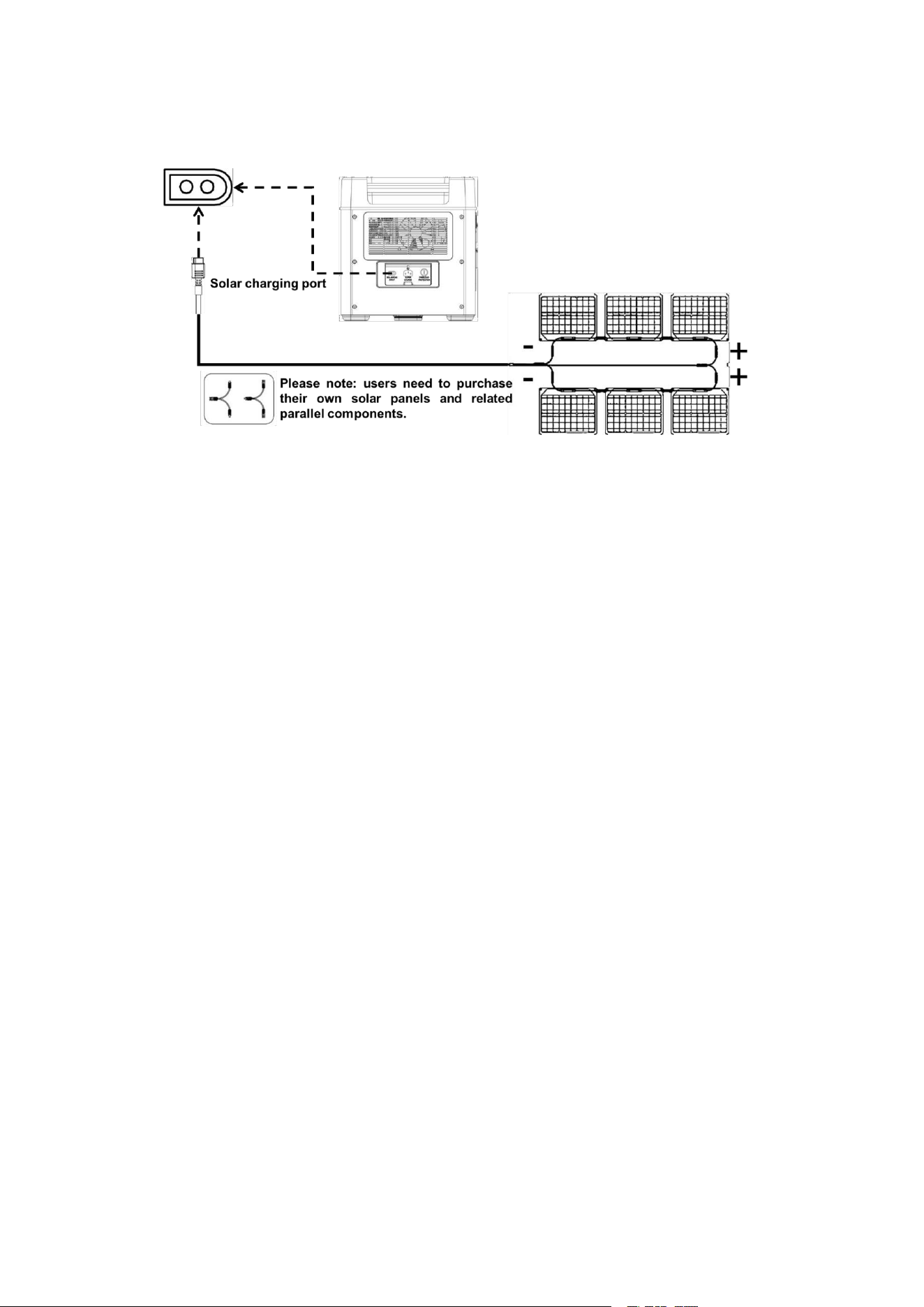
16
Schematic diagram of the connection of two photovoltaic panels for
solar charging
17
5
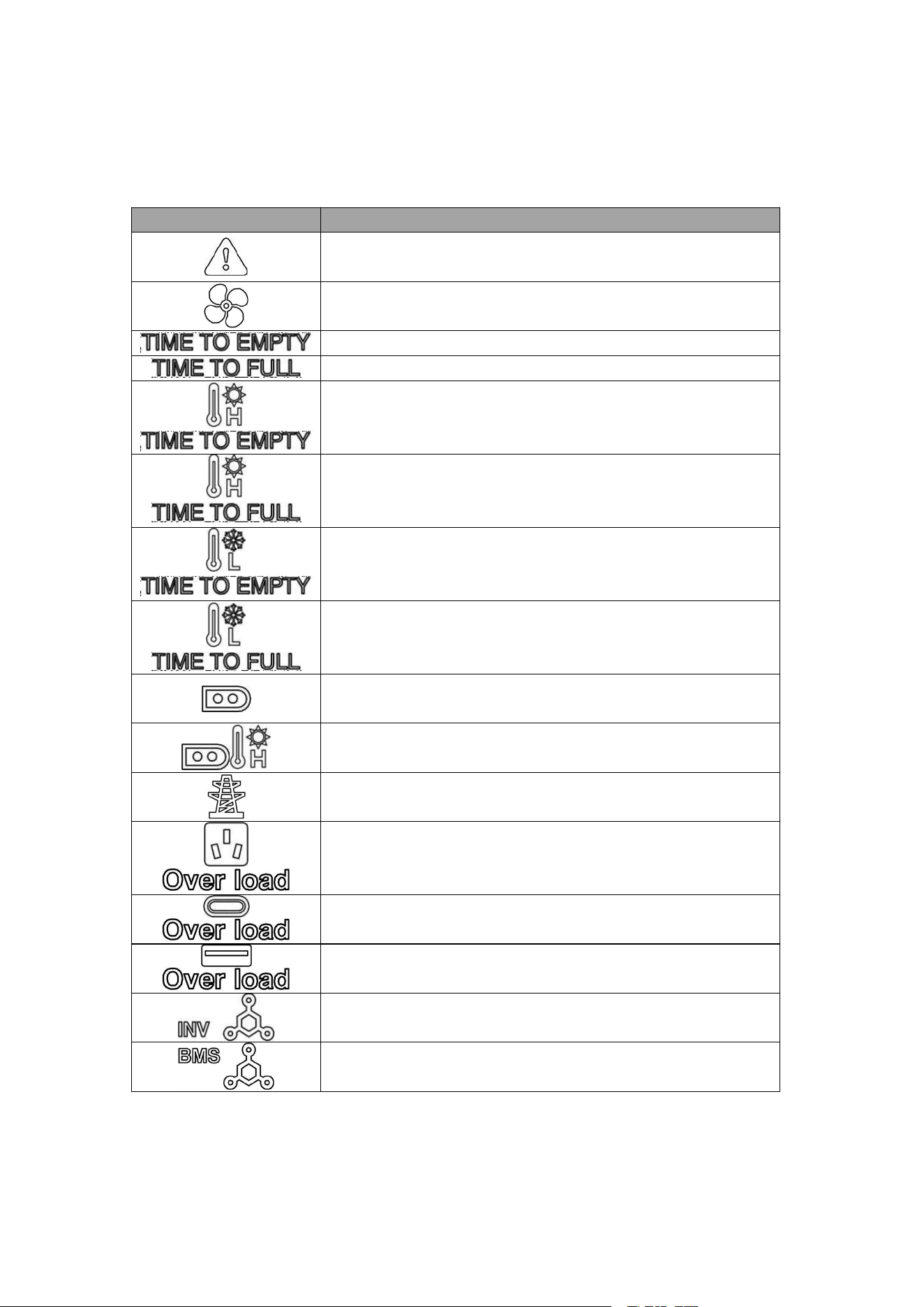
Failure and Maintenance
5.1 Failure
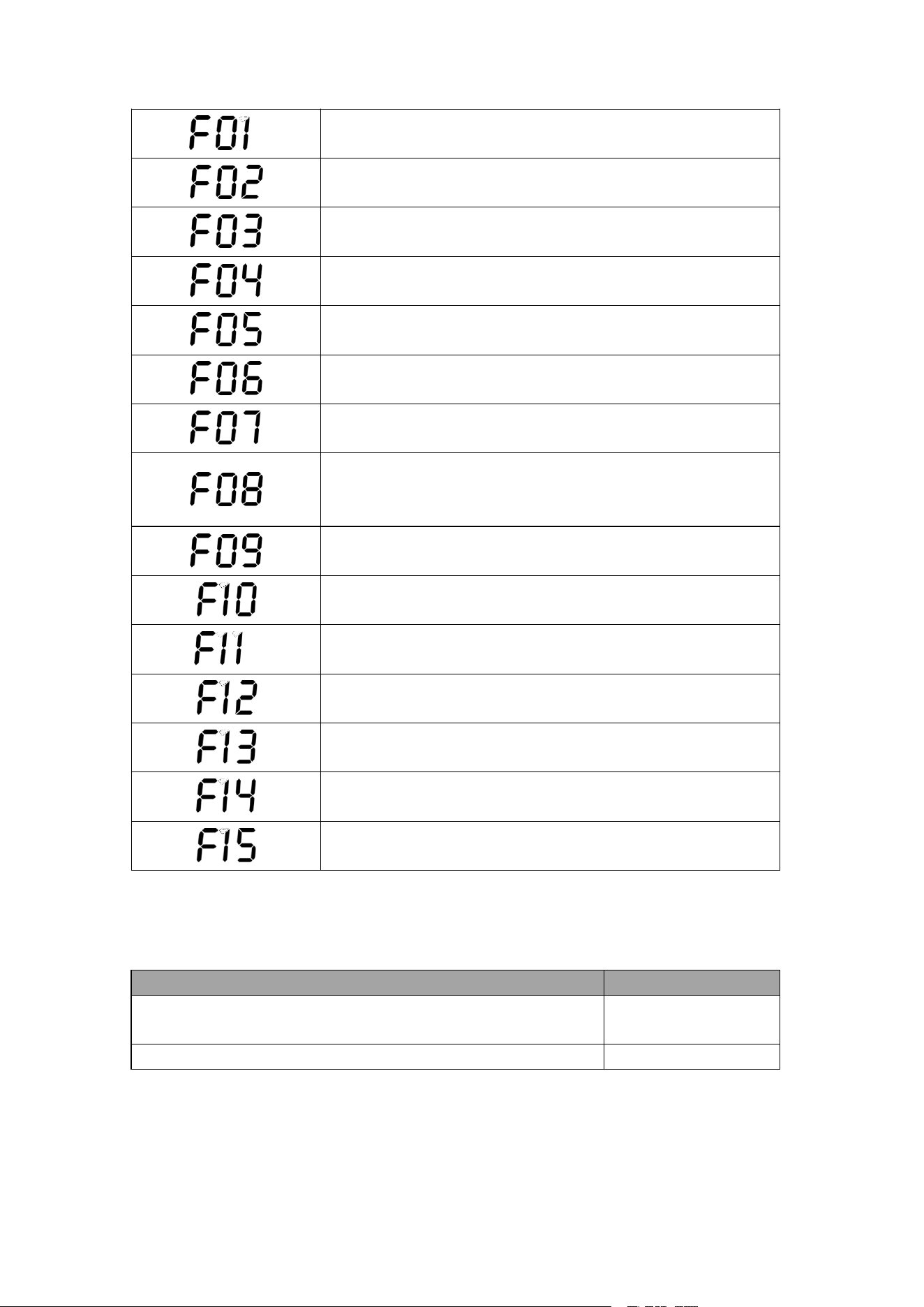
Icon
Fault Analysis
Battery pack failure (blink)
Fan failure (blink)
Device undervoltage (blink)
Battery fully charged (blink)
Battery discharge over temperature (blink)
Battery charge over temperature (blink)
Battery discharge low temperature (blink)
Battery charge low temperature (blink)
PV charge overvoltage/overcurrent (blink)
PV charger radiator over temperature (blink)
Grid over undervoltage/underfrequency (blink)
AC output overload (blink)
Type-C output overload (blink)
USB output overload (blink)
Communication failure between DC module and AC module
(blink)
Communication failure between BMS module and DC module
(blink)
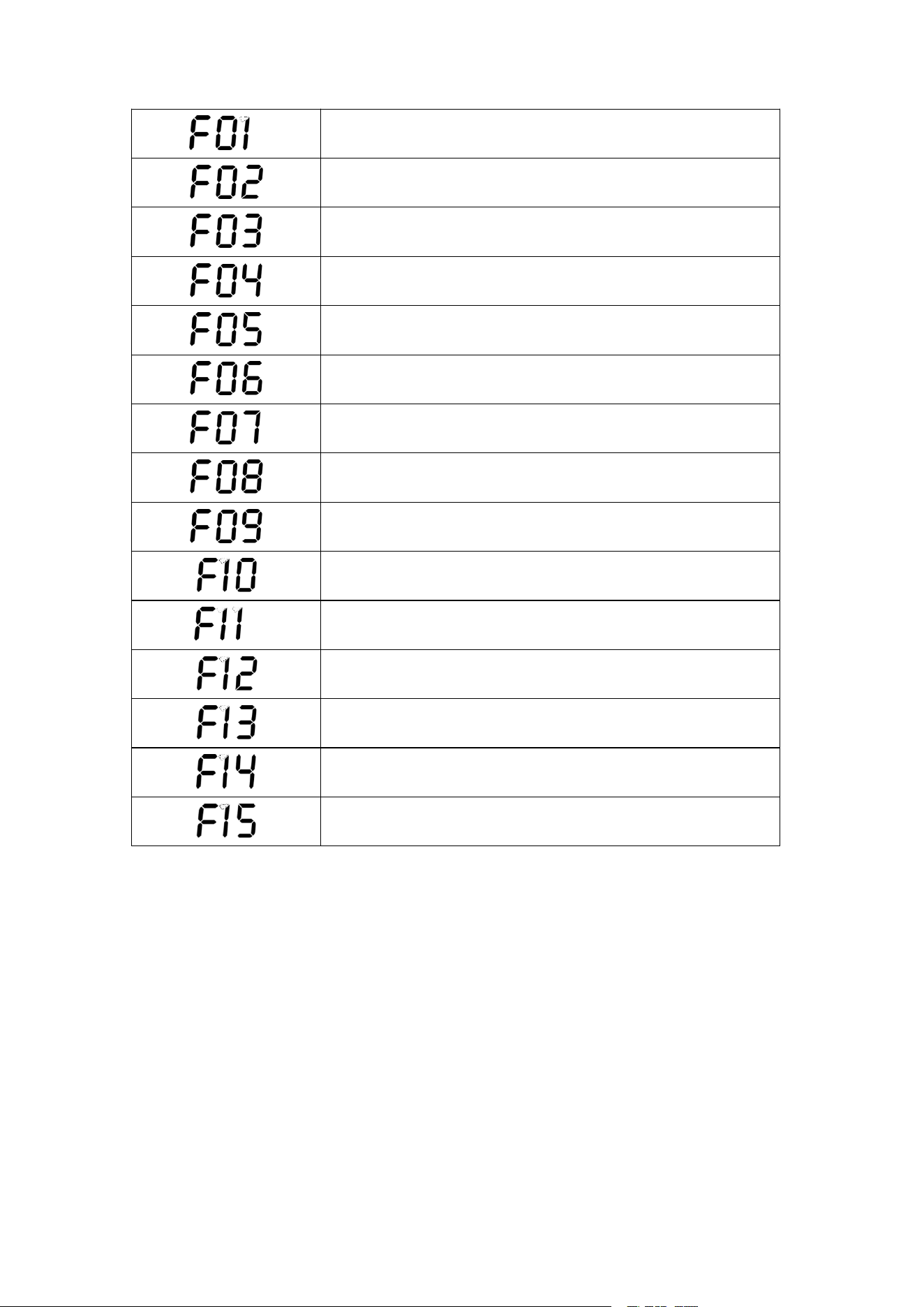
18
Inverter BUS soft start fault
Inverter output short circuit fault
Inverter BUS undervoltage fault
Inverter BUS overvoltage fault
Inverter BUS short circuit fault
Inverter output overcurrent fault
Inverter DC component too high fault
Inverter over temperature fault
Inverter discharge overcurrent fault
Inverter charging overcurrent fault
Inverter current sensor fault
Inverter output over-undervoltage/over-frequency faults
AC load short circuit
Inverter main relay fault
Inverter fan fault
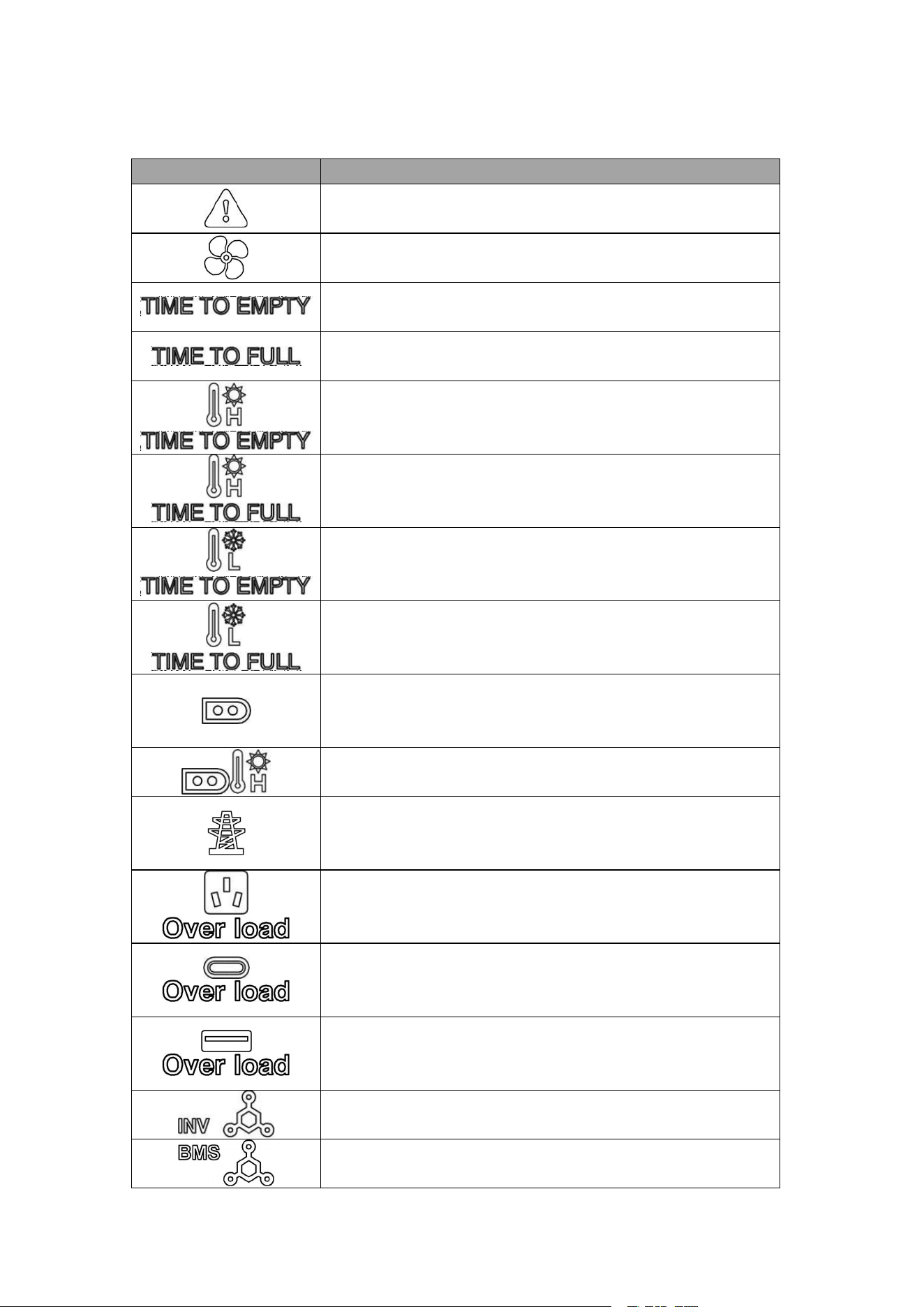
19
5.2 Troubleshooting
Icon
Solution
Restart the device, if the fault still exists, please contact the
distributor.
Check the fan for foreign matter.
Connect the charger to powering, if the fault still exists, please
contact the distributor.
Unplug the charger, if the fault still exists, please contact the
distributor.
Place the device in a cool place and wait for the battery to cool
down before restoring.
Place the device in a cool place and wait for the battery to cool
down before restoring.
Place the device in a warm place and wait for the battery to
warm up before restoring.
Place the device in a warm place and wait for the battery to
warm up before restoring.
Restart the device, if the fault still exists, please contact the
distributor(Ensure that the input voltage is within the rated power
range).
Place the device in a cool place and wait for the radiator to cool
down before restoring.
Restart the device, if the fault still exists, please contact the
distributor(Ensure that the input voltage is within the rated power
range).
Restart the device, if the fault still exists, please contact the
distributor. (Ensure that electrical appliances are within the rated
power range)
Restart the device, if the fault still exists, please contact the
distributor. (Ensure that electrical appliances are within the rated
power range)
Restart the device, if the fault still exists, please contact the
distributor. (Ensure that electrical appliances are within the rated
power range)
Restart the device, if the fault still exists, please contact the
distributor.
Restart the device, if the fault still exists, please contact the
distributor.
20
Restart the device, if the fault still exists, please contact the
distributor.
Restart the device, if the fault still exists, please contact the
distributor.
Restart the device, if the fault still exists, please contact the
distributor.
Restart the device, if the fault still exists, please contact the
distributor.
Restart the device, if the fault still exists, please contact the
distributor.
Restart the device, if the fault still exists, please contact the
distributor.
Restart the device, if the fault still exists, please contact the
distributor.
Check whether the device working environment temperature is
within the working temperature range of the device and wait for
cooling.
Restart the device, if the fault still exists, please contact the
distributor.
Restart the device, if the fault still exists, please contact the
distributor.
Restart the device, if the fault still exists, please contact the
distributor.
Check whether the power grid voltage, frequency, is within the
working range of the device.
Check whether the output is short circuited or overload, please
disconnect and restart the device.
Restart the device, if the fault still exists, please contact the
distributor.
Restart the device, if the fault still exists, please contact the
distributor.
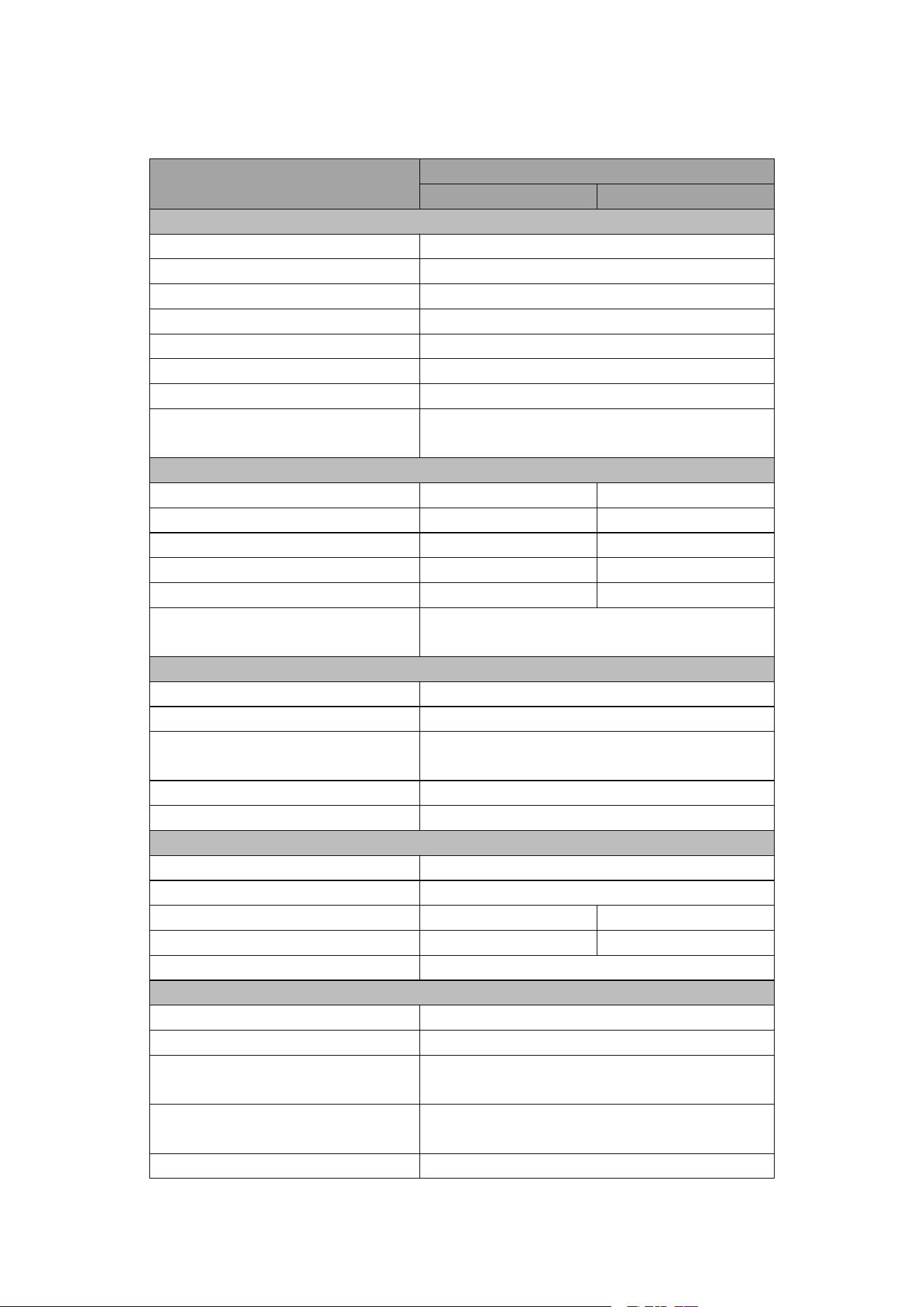
5.3 Maintenance
Maintenance item
Maintenance cycle
Clean housing and output (including DC output/AC socket/USB
output port) with a clean dust-free cloth.
Three months
The battery should be fully discharged and charged for one cycle.
Three months
21
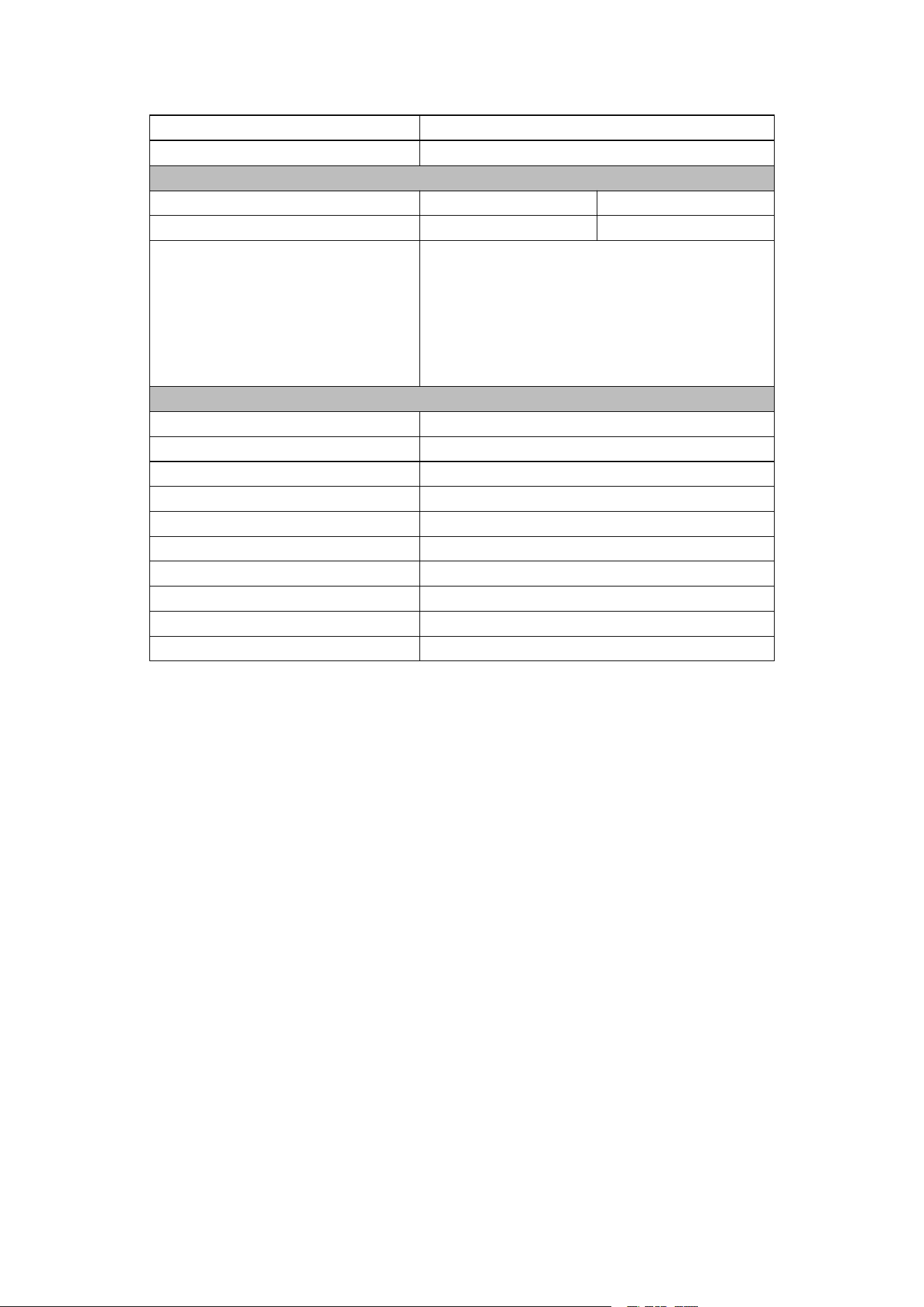
6
Specification
Model
Singo2000Plus
120Vac
230Vac
Battery Parameters
Cell Type
LiFePO
4
Battery Capacity (Wh)
1920
Input Voltage (V)
48
Input Voltage Range (V)
40 ~ 60
Nominal Input Current (A)
50
Nominal Output Current (A)
70
Max Output Current (A)
90
Life Cycles(@25℃, 0.5C Discharge,
DOD80%)
4000
AC Input
AC Input Power (W)
1800
1800
Nominal Voltage (Vac)
100/120
230
Voltage Range (V)
85~135
180~264
Frequency (Hz)
60
50
Frequency Range (Hz)
55~65
45~55
Power Factor(@Max. Charging
Power)
>0.99
DC /PV Input
Max. Car Charging Input Power (W)
100
DC Charging Input Power (W)
240W Max,(12V/8A,24V/10A)
Max. Solar Charging Input Power
(W)
500
Voltage Range (V)
12 ~ 60
Max. DC/PV Input Current (A)
12
AC Output
Nominal AC Power (W)
2400
Surge Power (W)
5000
Nominal Grid Voltage (Vac)
100/120
230
Nominal Grid Frequency (Hz)
60
50
THDv (@Nominal Power) (%)
<1.5%
DC Output
USB-A (×1)
12W, 5V, 2.4A
Quick Charge 3.0 (×2)
18W Max/each port, (5V/3A, 9V/2A, 12V/1.5A)
USB-TypeC (×2)
100W Max/each port, (5V, 9V, 12V, 15V/3A,
20V/5A)
Car Port + DC Port Max. Output
Power (W)
132W
Car Port (×1)
132W, 13.2V, 10A
22
DC Port (×2)
132W Max/each port, (13.2V, 10A)
Wireless Charging (Optional)
10W
Efficiency
Battery To AC Max. (%)
93.0
94.0
AC To Battery Max. (%)
93.0
94.0
Protection
AC output over current, AC output short circuit,
AC charging over current; AC output over
voltage/under voltage, inverter over temperature;
AC charging over voltage/under voltage, battery
over temperature/under voltage, battery over
voltage/under voltage
General Parameters
Dimensions (W*H*D) (mm)
356*284*314
Weight (Kg)
20.5
LCD (mm)
97*48
Cooling
Forced Air Cooling
Operation Temperature Range (℃)
0~40℃(Charging),-20~40℃(Discharging)
Operation Relative Humidity [RH(%)]
0~95%, Non condensation
Ingress Protection
IP20
Noise (dB)
<65dB
Communication Interface
WIFI / Bluetooth (Optional)
LCD Light (W)
3W
FCC Statement
This equipment has been tested and found to comply with the limits for a Class B digital
device, pursuant to part 15 of the FCC Rules. These limits are designed to provide
reasonable protection against harmful interference in a residential installation. This
equipment generates, uses and can radiate radio frequency energy and, if not installed
and used in accordance with the instructions, may cause harmful interference to radio
communications. However, there is no guarantee that interference will not occur in a
particular installation. If this equipment does cause harmful interference to radio or
television reception, which can be determined by turning the equipment off and on, the
user is encouraged to try to correct the interference by one or more of the following
measures:
Reorient or relocate the receiving antenna.
Increase the separation between the equipment and receiver.
Connect the equipment into an outlet on a circuit different from that to which the receiver
is connected.
Consult the dealer or an experienced radio/TV technician for help.
Caution: Any changes or modifications to this device not explicitly approved by
manufacturer could void your authority to operate this equipment.
This device complies with part 15 of the FCC Rules. Operation is subject to the following
two conditions: (1) This device may not cause harmful interference, and (2) this device
must accept any interference received, including interference that may cause undesired
operation.
RF Exposure Information
This equipment complies with FCC radiation exposure limits set forth for an uncontrolled

23
environment. This equipment should be installed and operated with minimum distance
20cm between the radiator and your body.