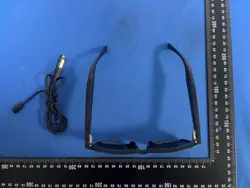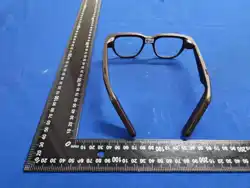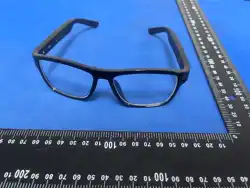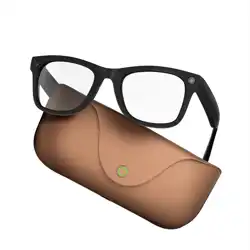

Smart Glasses User Manual

I. Download and Connect
1. Download and install the “Wearfit Pro” app on your phone.
Search for “Wearfit Pro” directly in your phone's app store to download it, or scan the QR code below to jump to the
download link. You can scan the code using a browser, WeChat, or other apps.

(1) 2. Connecting Glasses
(2) (1) Turn on your phone's Bluetooth

(3) To turn on the smart glasses: Press and hold the right button for 3 seconds. Release the button after hearing the
startup chime to indicate the glasses are powered on.
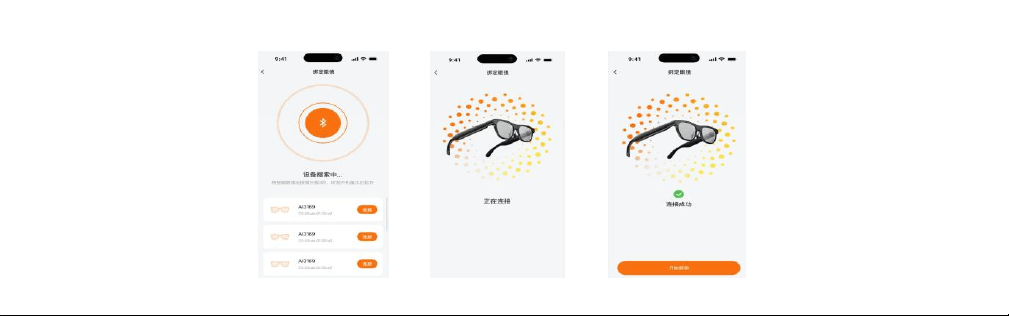
(4) Open the “Wearfit Pro” app to search for devices, locate the glasses' Bluetooth name, and connect to pair them.

II. Key Definitions
Left button
Single tap
Wake up AI voice assistant (when device is on)
Single tap
Interrupt broadcast and exit (during AI voice broadcast)
Double tap
Wake up phone voice assistant
Press and hold for 10 seconds
Hard reset
Right button
Single tap
Take photo/Stop video recording/Stop audio recording/Answer
incoming call/End call
Double tap
Start video recording/Reject incoming call
Triple tap
Start audio recording
Press and hold for 3 seconds
Power on/Power off
Right touch area
--Slider
Single tap
Play/Pause music
Double tap
Skip to next track
Triple tap
Skip to previous track
Swipe forward
Volume up
Swipe backward
Volume down
Left button + Right button
Press and hold for 6 seconds
Restore factory settings

III. Indicator Light Explanation
Red light
Flash twice
Power Off
Flash five times
Low Battery
Continuous flashing
Charging/Factory Reset
Blue light
Flash twice
Power On
Flash rapidly three
times
Connecting
Solid on
Fully Charged/Firmware Update in Progress
Fill light
Flash once
Take Photo
Every 5 seconds
Record Video

IV. Quick Voice Commands
Serial Number
Scene
Voice commands
Chinese
English
1
Wake-up word
Hey~ Xiao Fan/Xiao Fan Xiao Fan
Hey Fans
2
Voice-activated photo capture
Take a photo
take a picture
3
Voice-activated video
recording
Start recording video
take a video
4
Voice-activated audio
recording
Start recording audio
take a record
5
Voice-activated call answer
Answer the call
Take the call
6
Voice-activated call end
I'm busy right now
I’m busy now
7
Volume up
Turn up the volume
Increase the volume.

8
Volume down
Turn down the volume
reduce the volume
1.
V. Basic Functions
Photo: Take pictures by clicking the right button on the glasses.
Video Recording: Record videos by double-clicking the right button on the glasses.
Audio Recording: Start audio recording by triple-clicking the right button on the glasses.
Music Playback: Supports playing music from your phone.
After connecting via Bluetooth, it defaults to playing phone music (if the phone's music player isn't open, a voice prompt will
notify the user: [Please open your phone's music player]).
Answer Calls: Press once to answer, double-press to reject. Press once during a call to hang up.
Gallery: Stores photos and videos captured by the glasses. Supports importing via USB or device LAN to the app's gallery. Supports
sharing.
Audio: Stores audio recordings made by the glasses. Supports importing via USB or device LAN to the app's audio section. Supports
sharing.
OTA Firmware Update: Update via connected glasses and app.
Find Device: Locate device by pressing button in app.
System Settings: Multimedia settings / Wear detection toggle / Button definitions / Low-power mode / New user guide / Factory reset
/ Device info / Delete device.

Auto Shutdown: Automatically powers off after 5-minute inactivity.
1. VI. Key Features
Smart Image Recognition: Wake up the AI voice assistant and ask questions to initiate AI Q&A based on content captured by the glasses.
Schedule Reminders: Wake up the AI voice assistant to set schedule reminders, or configure them via the app.
Voice Announcements: The glasses support voice announcements for alerts like device storage warnings and low battery notifications.
AI Voice Assistant: Wake up the AI voice assistant with a short press of the left button to converse with the AI large model.
Smart Navigation: Supports voice-activated navigation by dictating destinations to the AI. Alternatively, set navigation routes
via the app.
1.
2. VII. Special Features
3. AI Assistant: Interact directly with large language models without an internet connection.
4. Meeting Tool: Instantly capture, organize, and save audio and text from meetings or events.
5. Simultaneous Interpretation: Translate speakers' words into target languages in real time and play them back.
6. One-Click Translation: Quickly convert text or speech into different languages, effortlessly bridging communication gaps.
7. Face-to-Face Translation: Translate conversations in real time.
8. Real-Time Communication: After selecting a call method, send a communication link via third-party chat software. Initiators can
choose their own language and the recipient's language for communication.
9. Live Video Streaming: Hands-free operation—stream what you see in real-time HD from the glasses' first-person perspective.

10. Bluetooth Network Sharing: After connecting via Bluetooth network sharing, devices can independently utilize AI large models for
conversational interaction.
1、 Important Notes
Avoid using this product in high-temperature, humid, or strong magnetic field environments to prevent affecting its performance
and lifespan.
This product is precision electronic equipment. Do not subject it to impact, crushing, or dropping, as this may damage internal
components and affect normal use. Store the glasses properly and avoid collisions with hard objects.
Keep the lenses clean. Use a clean, soft cloth to gently wipe them. Avoid using chemical solvents or rough materials to clean the
lenses.
The company reserves the right to modify the contents of this manual without prior notice. Certain features may vary across
corresponding software versions, which is normal.
Basic Parameters
Product Name: AI Glasses:
Frame Material: Bluetooth:

Device Requirements::
Caution: Danger
1. Do not charge in damp or wet environments;
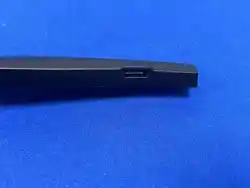
2. Ensure the charging port of the glasses makes clean, full contact with the charger surface;
3. When not in use, store the glasses in a dry, well-ventilated area away from direct sunlight. Use a glasses case or protective
cover to prevent impacts, squeezing, or scratches, reducing the risk of damage;
4. Use only the original charger to charge the glasses. Avoid using low-quality chargers to prevent safety issues such as overheating
or fire caused by improper charging. Avoid overcharging and over-discharging. Charge promptly when the battery level drops below
20%. Unplug the charger immediately after a full charge. Periodically perform a full charge and discharge cycle to maintain battery
performance.
5. Keep the glasses away from strong magnetic fields and high-temperature environments, as these can interfere with electronic
components, disrupt normal operation, and damage the battery and internal parts. Avoid such conditions during use and storage.
6. Regularly check for and install software and firmware updates to access new features, enhance performance, and fix security

vulnerabilities. Ensure sufficient battery charge and a stable network connection during updates to prevent device malfunctions
caused by interruptions.

FCC Statement
This device complies with part 15 of the FCC Rules. Operation is subject to the following two
conditions: (1) This device may not cause harmful interference, and (2) this device must
accept any interference received, including interference that may cause undesired operation.
This equipment has been tested and found to comply with the limits for a Class B digital device,
pursuant to Part 15 of the FCC Rules. These limits are designed to provide reasonable
protection against harmful interference in a residential installation. This equipment generates
uses and can radiate radio frequency energy and, if not installed and used in accordance with
the instructions, may cause harmful interference to radio communications. However, there is
no guarantee that interference will not occur in a particular installation. If this equipment does
cause harmful interference to radio or television reception, which can be determined by turning
the equipment off and on, the user is encouraged to try to correct the interference by one or
more of the following measures:
-- Reorient or relocate the receiving antenna.
-- Increase the separation between the equipment and receiver.
-- Connect the equipment into an outlet on a circuit different from that to which the receiver is
connected.
-- Consult the dealer or an experienced radio/TV technician for help.
Any Changes or modifications not expressly approved by the party responsible for compliance
could void the user's authority to operate the equipment.
This equipment complies with the FCC radiation exposure limits set forth for an uncontrolled
environment, This transmitter must not be co-located or operating in conjunction with any other
antenna or transmitter.