Module
Questions
Answers (to Customer)
Wearing
Guide
How do I wear the
earbuds correctly?
Make sure the speaker is positioned towards your ear canal. Wearing the
earbuds backward can affect their performance and overall experience.
How do I choose
the right ear grips?
You may not need ear grips, but if the earbuds feel loose or don't fit
snugly, we've included M and L ear grips in the accessory box to help
secure the fit. Larger sizes offer more stability. Ensure the ear grips are
installed correctly for the best experience.
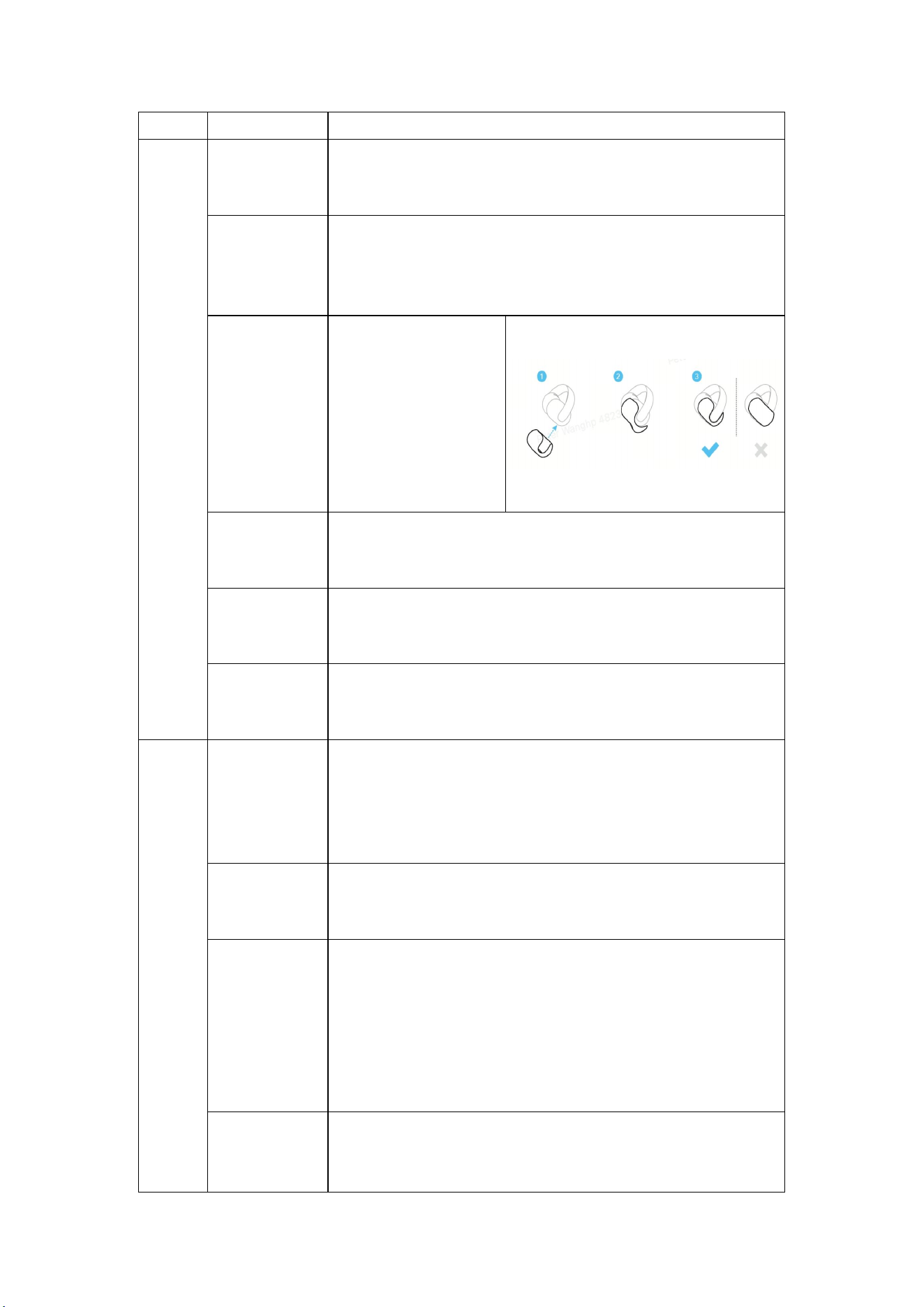
How do I attach
the ear grips?
As shown in the
illustration, attach the ear
grip to the rear side of the
earbud. Ensure the side
with the larger coverage
area faces the inner side of
the earbud. Be careful not
to install them backward.
How do I find the
ideal wearing
angle?
Slide the earbuds up and down to find the most comfortable wearing
position. Play audio and adjust the earbuds for the best listening
experience.
What should I do
if the earbuds feel
loose?
The product includes M and L-size ear grips. Choose the appropriate
size for a better fit. Larger sizes provide more stability.
What should I do
if the earbuds are
uncomfortable?
If you experience discomfort or pain, try adjusting the wearing angle or
switching or removing the ear grips.
Opration
s
How do I turn on
AeroClip?
Open the charging case lid. The LED indicator will stay on for 2 seconds
and then start flashing, indicating that AeroClip is on and in pairing or
reconnection mode.
Note: Remove the insulation film before using AeroClip for the first
time.
How do I turn off
AeroClip?
Place the earbuds back into the charging case and close the lid. The LED
indicator will stay on for 2 seconds and then turn off, indicating that
AeroClip is powered off.
How do I pair
AeroClip with
devices?
1. Upon first power-on, AeroClip automatically enters pairing mode
without any extra steps. Just remove the insulation film, place the
earbuds into the charging case, close the lid, and then reopen it to power
on the earbuds.
2. After powering off by placing the earbuds into the charging case,
reopening the case will automatically reconnect AeroClip to the last
paired device.
How do I use Dual
Connections on
AeroClip?
1. Dual Connections is enabled by default on AeroClip. You can turn it
on or off, or disconnect devices through the settings in the soundcore
app.
2. The earbuds enter pairing mode once powered on. After connecting to
the first device, place them in the case and press the case button for 3
seconds to re-enter pairing mode. The LED indicator on the case will
flash rapidly, allowing you to connect to a second device.
How does Dual
Connections
work?
With both your smartphone and computer connected to the earbuds, the
earbuds will play audio from the device that starts playback last. For
example, if your computer starts playing music first and then your
smartphone starts playing audio, the earbuds will switch to the
smartphone and pause the computer's audio.
Note: Due to compatibility issues, notification sounds may be mistaken
as audio and can override the playback.
How do I control
music with
AeroClip?
1. Triple-tap the touch control area to skip to the next track.
2. Double-tap the touch control area to play or pause.
3. The controls can be customized in the soundcore app.
How do I manage
calls with
AeroClip?
1. Double-tap the touch control area to answer an incoming call.
2. Double-tap the touch control area to hang up during a call.
3. Triple-tap the touch control area to reject an incoming call.
4. If connected to two phones, and Phone A is on a call while Phone B
receives a call, double-tap to hang up Phone A and answer Phone B, or
triple-tap to reject the call on Phone B.
How do I adjust
the volume using
tap controls?
Volume adjustment via tap controls is disabled by default. You can
enable it by customizing the tap controls in the soundcore app.
Does AeroClip
support voice
assistants?
The feature is disabled by default. Enable it through the Controls settings
in the soundcore app.
How do I reset
AeroClip?
Place the earbuds in the charging case and leave the lid open. Press and
hold the case button for 10 seconds until the light turns red. It will flash
red three times and then flash white, indicating a successful reset.
How long does
AeroClip turn off
if I don't use it?
If not connected to any Bluetooth device, the earbuds will automatically
power off after 30 minutes. You can customize this power-off time in the
soundcore app.
How do I turn off
AeroClip's
prompts?
The tap prompt tone and low battery tone can be turned on or off in
"More Settings" in the soundcore app.
What sound
effects does
AeroClip support?
By default, AeroClip uses the soundcore Signature.
Additional sound effects available in the soundcore app include Bass
Booster, Volume Booster, Classical, Podcast, Treble Booster, and
Custom EQ.
Can I expand the
joints of the
earbuds?
Yes, you can gently expand the joints for a more comfortable fit but do
not expand it more than 5mm to avoid damaging your AeroClip. The
joint is made from 0.5mm memory titanium wire and soft TPU to

accommodate your ear shape and evenly distribute pressure.
Abnorma
l Tapping
Function
Why can't
AeroClip answer
or end calls in
apps using tap
controls?
AeroClip only supports answering, hanging up, and rejecting calls for
carrier-based phone calls on your mobile device. It doesn't support call
functions for third-party apps or software.
Why can't
AeroClip pause or
play music using
tap controls?
1. AeroClip only controls audio players. Video apps may not respond to
play/pause commands.
2. Some devices may not be compatible with the play/pause function.
3. On Windows computers, music controls don't work when the screen is
locked. Please unlock the screen and try again.
4. Make sure only one music player app is open to avoid conflicts that
could prevent the play/pause commands from working.
5. If the issue persists, please contact soundcore customer support for
assistance.
Abnorma
l Dual
Connecti
ons
Experien
ce
Why can't
AeroClip use Dual
Connections
during a call?
AeroClip can't enter pairing mode during a call. To use Dual
Connections, please end the call and try again.
Why does
AeroClip
experience sound
delay when using
Dual
Connections?
When AeroClip is connected to both a phone and a computer, a short
delay of about 3-5 seconds may occur when switching between the two.
This happens because the phone needs to release the A2DP channel
before the computer can take over. A similar delay occurs when
switching from the computer to the phone, which is normal.
What should I do
if there's no sound
after switching
devices with Dual
Connections?
If Device A is paused and the audio doesn't automatically switch to
Device B, you may need to manually switch the audio to Device B.
Bluetooth
Connecti
on
Related
Why can't I find
my AeroClip in
the Bluetooth list?
Make sure the earbuds are in Bluetooth pairing mode before searching
for them. Here's how to enter pairing mode:
1. For first-time use, remove the earbuds from the case, take off the
insulation film, place them back into the case, close the lid, then reopen
it to power on the earbuds. They will automatically enter pairing mode.
2. For subsequent uses, press the case button for 10 seconds until the
light turns red, and they will enter pairing mode.

Why can't my
AeroClip
automatically
reconnect to
previously paired
devices?
1. Reconnecting with one device after power-on takes 10 seconds, and
reconnecting after going out of range takes 10 minutes. For two devices,
the reconnection time doubles. Ensure the Bluetooth on the device is
turned on within this time frame. Turn on the earbuds and keep them
close to the device to reconnect.
2. Try the following:
a. Restart the earbuds and try again.
b. On the device, click the earbuds in the Bluetooth list to initiate
reconnection.
c. Access the soundcore app on a connected device and select a
previously paired device to reconnect.
d. Delete the Bluetooth pairing records, activate pairing mode on the
earbuds, and try reconnecting.
e. Reset the earbuds and try reconnecting.
3. Keep the earbuds close to the device and avoid obstacles like walls in
between.
How to fix lagging
or disconnection
issues with
AeroClip?
1. Keep the earbuds close to the device and avoid obstacles like walls in
between.
2. Avoid poor network conditions or interference. Try switching to a
different network or changing your surroundings to minimize
interference from high power interference sources.
3. Make sure both the earbuds' firmware and the device's system are up
to date.
4. In crowded areas (e.g., train station waiting zones), signal interference
and frequency band overload may cause lag or disconnections, which is
normal.
What should I do
if AeroClip isn't
charging or
disconnecting
from Bluetooth
when returned to
the case?
1. Check if the charging contacts in the case are recessed. If they are,
apply a small amount of alcohol to them, then gently press the contacts
with tweezers or a pointed tool a few times until they pop back out. After
that, wipe off any residual alcohol.
2. Check if there is any dirt or debris on the earbuds or charging
contacts. Clean them with alcohol and a cotton swab if needed.
3. Ensure that the ear grips are properly installed and securely in place.
Sound
Related
What should I do
if AeroClip
disconnects, the
sound is choppy,
or there's no sound
during calls?
1. Avoid gaming during calls.
2. Some phones may have a high power output, which can cause voice
distortion or excessive noise during calls when the earbud volume is
high. Try lowering the volume.
3. If you're using a call software, try moving the earbuds closer to the
device. Make sure the input and output are set correctly in the software.
Switch the output to your device's speaker and then back to the earbuds
to restore normal call quality.
4. Avoid poor network conditions or interference. Try switching to a
different network or changing your surroundings to minimize
interference from high power interference sources.

5. Make sure your earbuds, call software, and device system are up to
date. Update them to the latest versions.
What should I do
if the music
quality is poor?
1. Adjust the EQ settings in the soundcore app to improve sound quality.
2. If the earbuds are connected to your phone and music plays during a
call, the sound quality will deteriorate, as transmission through HFP
lowers its quality.
3. When connected to a MacBook, opening the input/output settings
page can cause the earbuds to enter call mode, which lowers audio
quality. Close the settings page. If using a Windows computer, ensure
"soundcore AeroClip" is selected as the output device.
4. Check the quality of the song being played. Use the original version
for the best sound experience.
5. Check if the video has sound quality issues. Try changing the video
source.
What should I do
if the sound from
the left and right
earbuds is
unbalanced?
1. Ensure you are not wearing the earbuds backward.
2. Adjust the position of the earbuds to align the speaker with your ear
canal.
3. Reset the earbuds. Return the earbuds to the case, close the lid, then
reopen it. Press the case button for 5 seconds to reset the device, then
pair it again.
Call
Related
What should I do
if there's no
ringtone in the
earbuds when I get
an incoming call?
1. Check if the device is in silent mode.
2. On iPhone, disable Attention Aware features. Go to Settings > Face
ID & Passcode, and turn off Attention Aware Features.
3. For some calling apps, if the app isn't open, you may not hear the
ringtone for incoming calls. Ensure the app is open or permitted to
receive call notifications in the background.
What should I do
if no sound comes
out of the earbuds
after I pick up a
call on my
iPhone?
If you answer the call by tapping the earbuds, your iPhone will
automatically route the audio to the earbuds.
If you answer on the phone, the audio will come through the phone
speaker.
To route the audio to your earbuds, on your iPhone, go to Settings >
Accessibility > Touch > Call Audio Routing, and select Bluetooth
Headset.
What should I do
if the call quality
is poor?
1. Make sure you're wearing the earbuds in the correct ears and
orientation.
2. Adjust the earbuds to bring the speaker closer to your ear canal.
3. Check if the microphone is blocked. If it is, clean the mesh.
4. Call quality can be affected by software issues, signal strength, or
environmental factors.

What should I do
if the other party
cannot hear me
during a call?
1. Check the Microphone Status: Ensure your earbud microphone and
the call software are not muted.
2. Check the Input Settings of the Call App: Use the input detection
feature in the app to ensure it's properly set up to use the earbud
microphone. Restart the call if needed.
3. For Windows Users (Win 10):
- In Settings, search for "Turn on or off mono audio."
- Go to Change Other Sound Settings > Playback.
- Disable Stereo mode and enable Hands-Free mode for optimal audio
performance.
What Are the Two Modes:
Stereo Mode: Does not support microphone usage. It provides better
sound quality with high-quality stereo transmission.
Hands-Free Mode: Allows microphone use for voice calls and audio
playback simultaneously, but the sound quality is generally lower.
App
Related
What should I do
if I cannot enter
the soundcore
app?
1. When the earbuds are connected to two devices, you can only access
the soundcore app on one of them. Check if the app is open on both
devices. If so, fully close it on one of the devices and try again.
2. If you're using an iOS phone, check if you're attempting to open the
app during a call. The app cannot be entered during a call; try again after
the call has ended.
What should I do
if I can't find
AeroClip in the
soundcore app?
1. Connect AeroClip to your phone.
2. Open the soundcore app.
3. On the main screen, tap the earbud icon.
4. Select "AeroClip" to connect.
Why isn't the EQ
setting working?
1. The sound effects in the soundcore app only apply to media audio, not
to calls.
2. The custom EQ adjustment range is limited to a maximum of 6 dB.
What should I do
if the firmware
upgrade fails on
AeroClip?
1. Do not disconnect during the upgrade.
2. Do not disconnect from the network during the upgrade.
3. Do not close the app during the upgrade.
4. Keep the earbuds in standby mode during the upgrade.
5. Go to your phone's settings and clear the soundcore cache in
application management.
6. If the upgrade fails, try again.
Charging
Related
What should I do
if the AeroClip is
not charging?
1. Ensure the case's charging port and the cable connectors are clean and
free of any debris.
2. Try a different charging cable. While the original cable is
recommended, test with another cable to see if the issue persists.
3. Ensure that the output current of the charging adapter is sufficient.
Check the required input current on the charging case and confirm the
adapter's output exceeds it.
5. Inspect the pins inside the case for any debris and clean them if
necessary.
6. Check if the pins inside the case are recessed or damaged.
7. Check the earbud pins for dirt or grime and clean them if necessary.
Indicator
Related
What do the
indicator lights
mean for powering
on/off and
Bluetooth status?
1. Power On: When you open the case, the LED indicator turns on for 3
seconds.
2. Power Off: When you close the case, the LED indicator turns on for 3
seconds.
3. Bluetooth Pairing Mode: The white light flashes every second.
4. Bluetooth Pairing Successful: The white light stays on for 3 seconds,
then turns off.
5. Bluetooth Disconnected: You'll hear a disconnection tone, and there
will be no light indication.
6. Bluetooth Reconnected: You'll hear a prompt tone, and there will be
no light indication.
What do the
indicator lights
mean for battery
level?
1. Charging: The white light breathes every 2 seconds (this may be
interrupted by other actions).
2. Fully Charged: The white light stays on for 10 seconds, then turns off.
3. Battery Life Notifications: You'll hear a notification when the battery
has 30 minutes remaining, and again at 15 minutes.
Specificat
ions
How long does
AeroClip's battery
last?
The battery typically lasts about 8 hours with continuous music playback
at 50% volume using the default soundcore Signature sound effect.
However, battery life can vary based on the audio content and volume.
The higher the volume, the shorter the battery life.
Note: Enabling additional features in the app, like changing sound
effects, may reduce the battery life.
Loudest Volume
84 dB
Charging Time
Earbuds: 50 minutes
Charging Case: 2 hours
Bluetooth Version
5.4
Supported Audio
Codecs
SBC, AAC
Volume
Related
What should I do
if the bass is weak
on AeroClip?
You can select different sound effects in the soundcore app.
To enhance the bass, go to Sound Effects > Bass Booster to enhance the
bass.
To customize EQ, go to Sound Effects > Custom EQ.

What should I do
if the earbuds'
volume is not
synchronized with
the connected
device?
If the volume is low and adjusting it doesn't help, it could be due to one
of the following issues. Here's a troubleshooting guide:
1. Volume Sync Issue (Android Phones)
- Open your phone's settings.
- Go to Bluetooth.
- Find your connected Bluetooth headphones.
- Enable the "Media Volume Sync" option.
2. Volume Sync Issue (iOS Phones)
- Disable Reduce Loud Audio as it limits the maximum volume of the
earbuds.
3. Desktop Computer or Laptop Compatibility
- Ensure the volume is set to maximum on both the computer and the
earbuds.
What should I do
if the earbuds'
volume is low?
1. Adjust the wearing angle. If the speaker is too far from your ear canal,
it may result in low volume. Adjust the earbuds to bring the speaker
closer to your ear canal for better sound.
2. Check if the left and right earbuds are swapped. Wear them in the
correct ears.
3. Check if the earbuds are worn backward. Make sure they're correctly
oriented.
4. Consider the environment. In noisy environments, the volume may
seem lower. Try moving to a quieter area.
5. Check if the speaker is blocked. If so, clean it to restore optimal sound
quality.
What should I do
if the sound
quality is poor or
unclear?
You can adjust the sound in the soundcore app: Sound Effects > Custom
EQ.
What should I do
if there's sound
leakage?
1. As AeroClip is designed as open-ear air-conduction earbuds, some
sound leakage is normal at high volumes.
2. We recommend choosing an appropriate volume level based on your
use and environment.
3. Adjust the earbuds to move the speaker closer to your ear canal to
minimize sound leakage.
Battery
Related
Why does the
battery life
decrease over
time?
Battery health naturally declines with prolonged use of electronic
devices, leading to shorter battery life. To help slow down this process,
avoid letting the battery drop below 20% or waiting until it completely
depletes before charging the earbuds and case. Additionally, charge the
earbuds and case at least once a month to prevent over-discharging the
battery.

Waterpro
of
Related
What is the
waterproof rating
of AeroClip?
1. soundcore AeroClip has an IPX4 water resistance rating, meaning it
can withstand light sweat and slight rain, making it suitable for exercise.
However, IPX4 does not protect against submersion in water. Higher
ratings like IPX7 or IPX8 are needed for such protection. To prevent
damage, avoid activities that cause excessive sweating while using the
earbuds.
2. After exercise, if there's moisture or sweat on the earbuds, clean them
before returning them to the charging case.
Maintena
nce
How can I better
maintain and care
for AeroClip?
1. We recommend using the earbuds at least once a month to avoid
battery depletion and over-discharge, which can affect the battery life.
2. Avoid letting the battery drop below 20% or waiting until it
completely depletes before charging the earbuds and case.
3. Store them on a dry, flat surface. If the earbuds or charging case
accidentally get wet, dry them with a hairdryer on the cool setting.
4. Do not use the earbuds in a low-pressure environment.
5. Avoid excessive force that can cause irreversible damage to the
earbuds or charging case.
6. Do not use the earbuds in a humid environment.
How should I deal
with foreign
objects and liquids
entering the
charging port?
Remove any foreign objects and liquids from the charging port and let it
air dry for 24 hours before charging.
Comparis
on with
previous
models
How does
AeroClip compare
to C30i?
1. Clearer sound with enhanced detail and layering.
2. Exquisite and durable appearance.
3. Upgraded chip for a higher Bluetooth version and more stable
connection.
4. Improved battery life.
5. The soundcore app offers more customization features.
6. AeroClip's joints are more flexible.
How does
AeroClip compare
to C40i?
1. Higher maximum volume, enhanced detail and layering,
dual-microphone noise reduction, and more intuitive control through
tapping.
2. Exquisite and durable appearance.
3. Upgraded chip for more stable functionality and longer battery life.
4. The soundcore app offers more customization features.
5. AeroClip's joints are more flexible, offering a more comfortable fit.