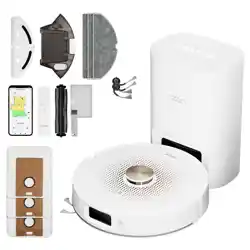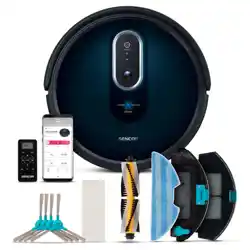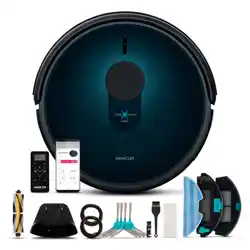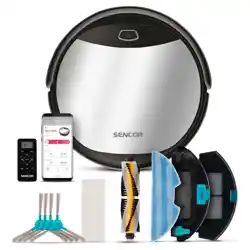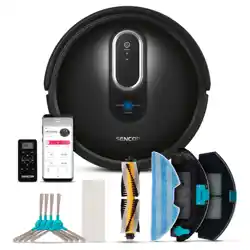
SRV 9020BK
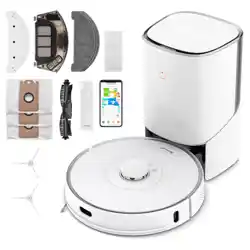
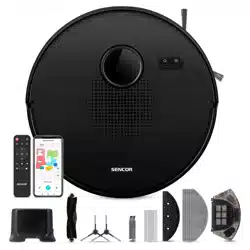
SRV 9085BK
EN
ROBOTIC VACUUM CLEANER
Translation of the original manual

SRV 9020BK
SRV 9085BK
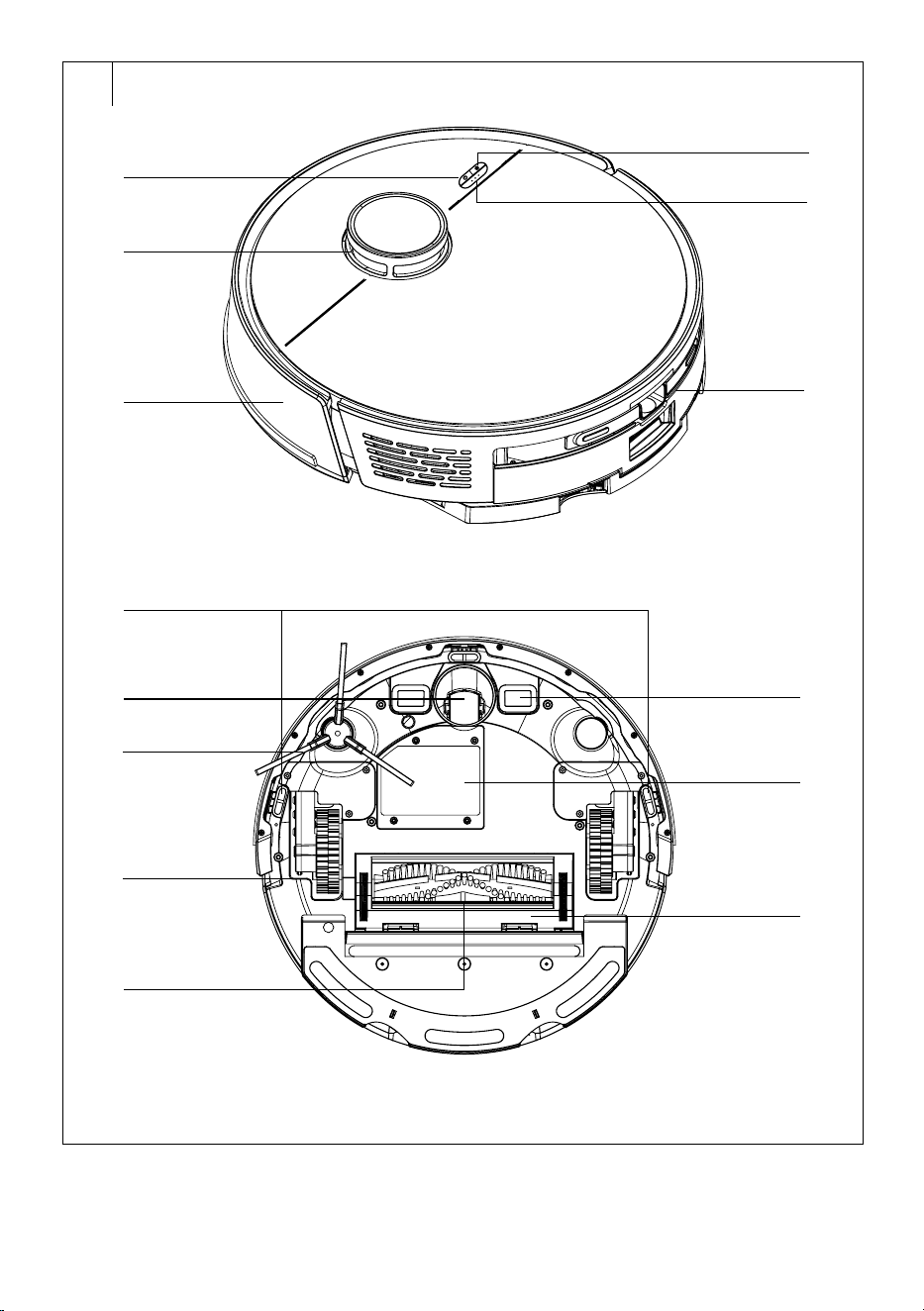
A
1
2
3
4
5
6
11
14
13
12
7
8
9
10
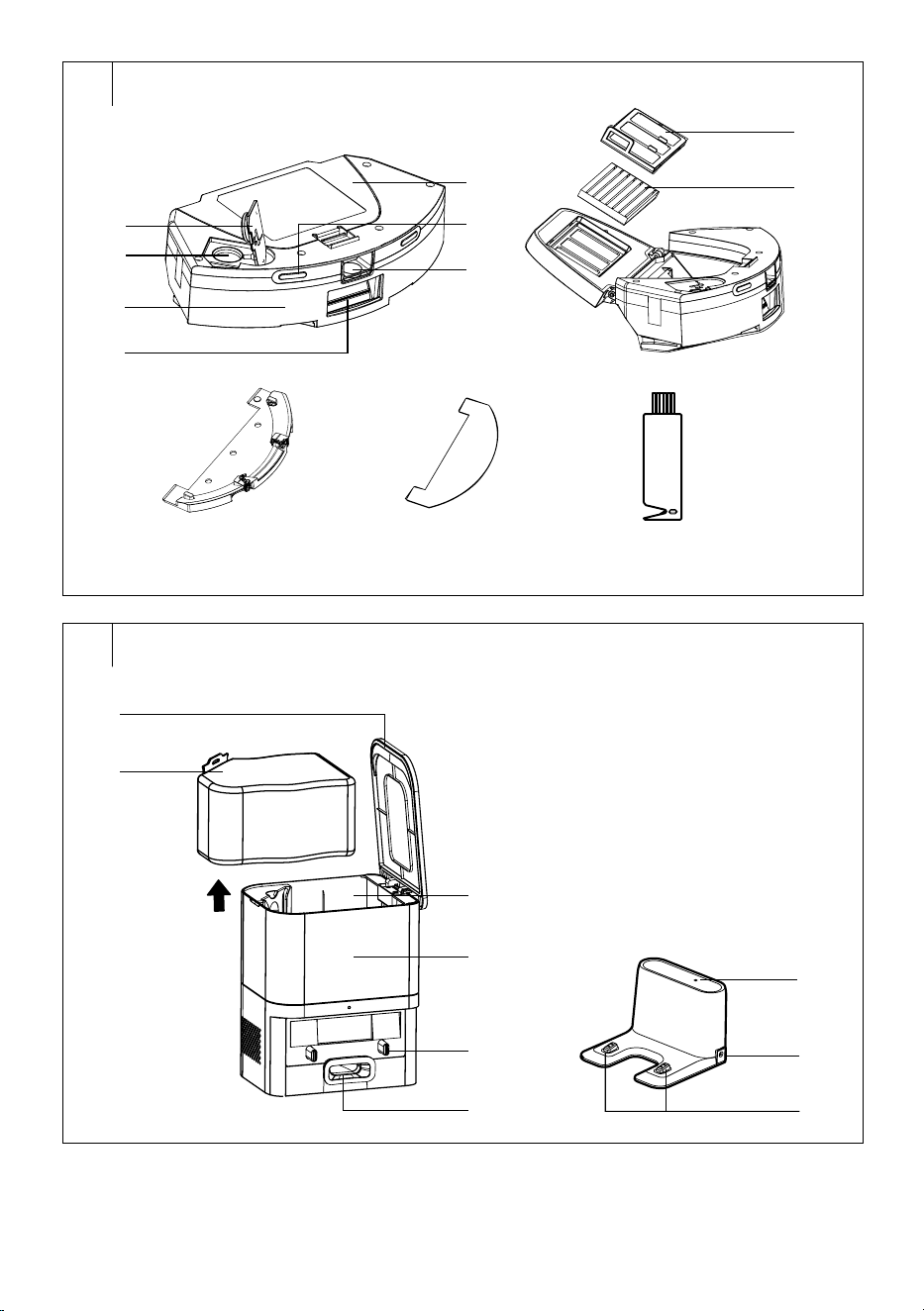
A
24
15
16
17
18
19
20
21
23
24 25 26
B
1
2
3
4
5
6
7
8
9
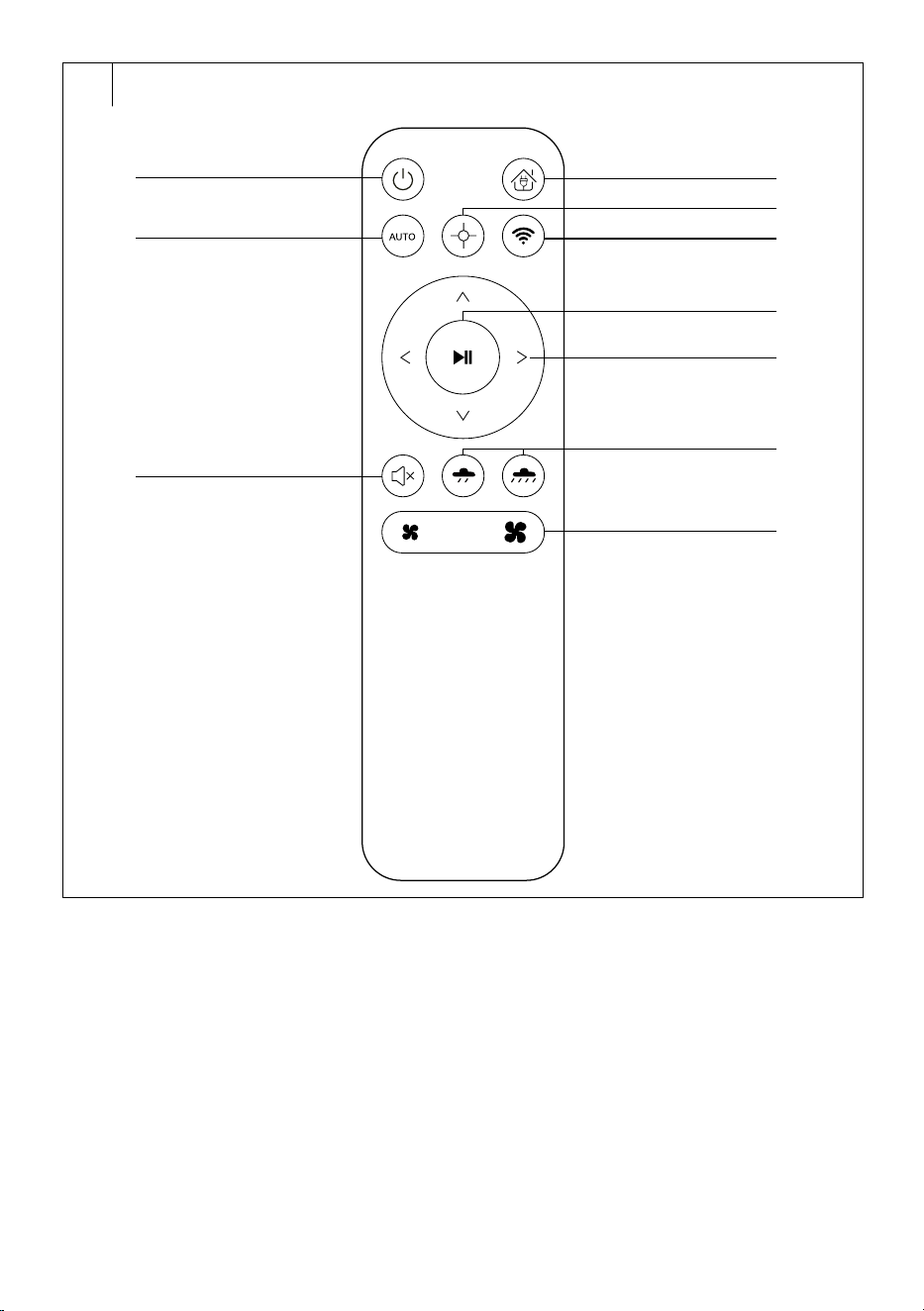
C
1
2
3
4
5
6
7
8
9
10
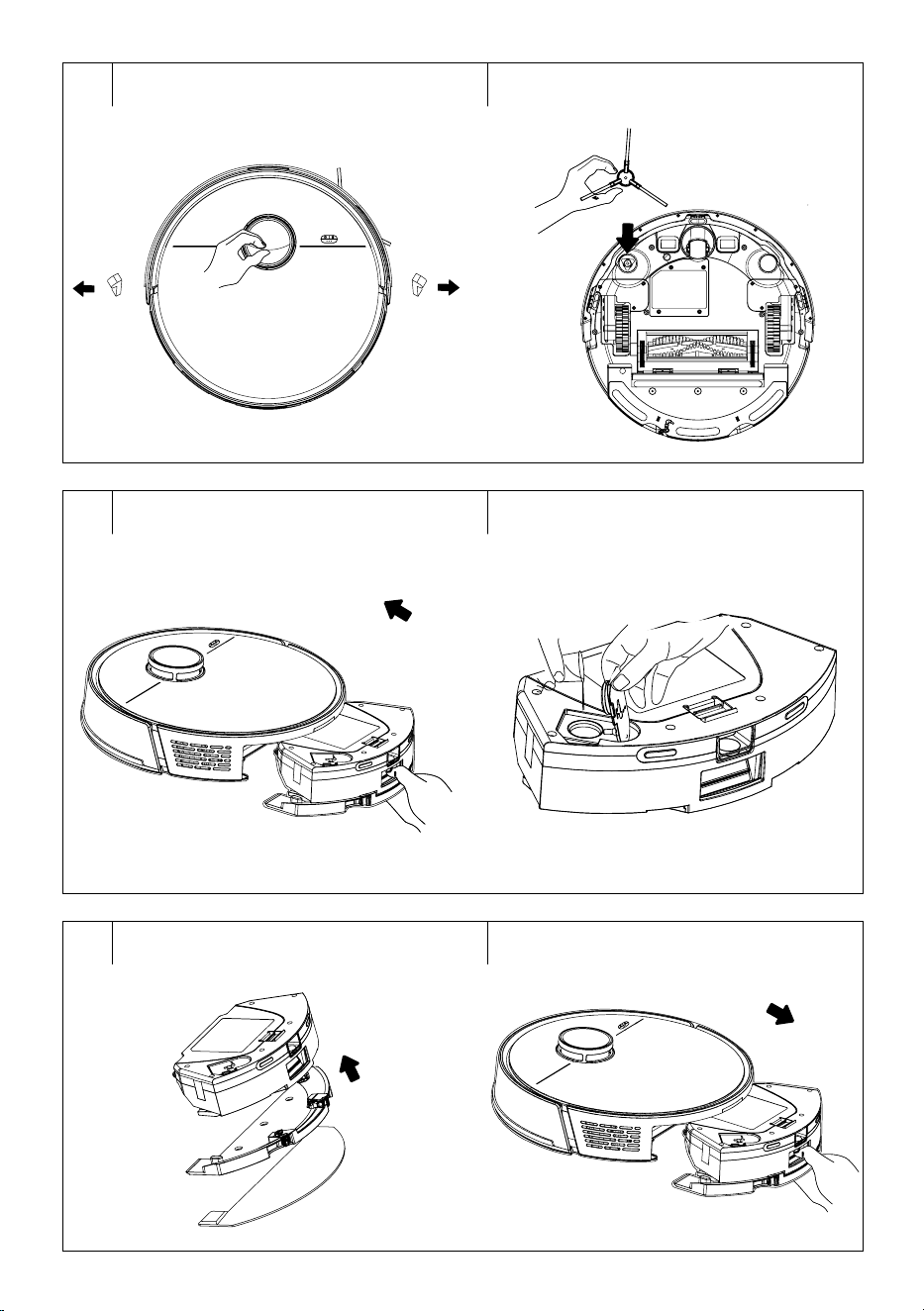
D1 D2
E1 E2
E3 E4
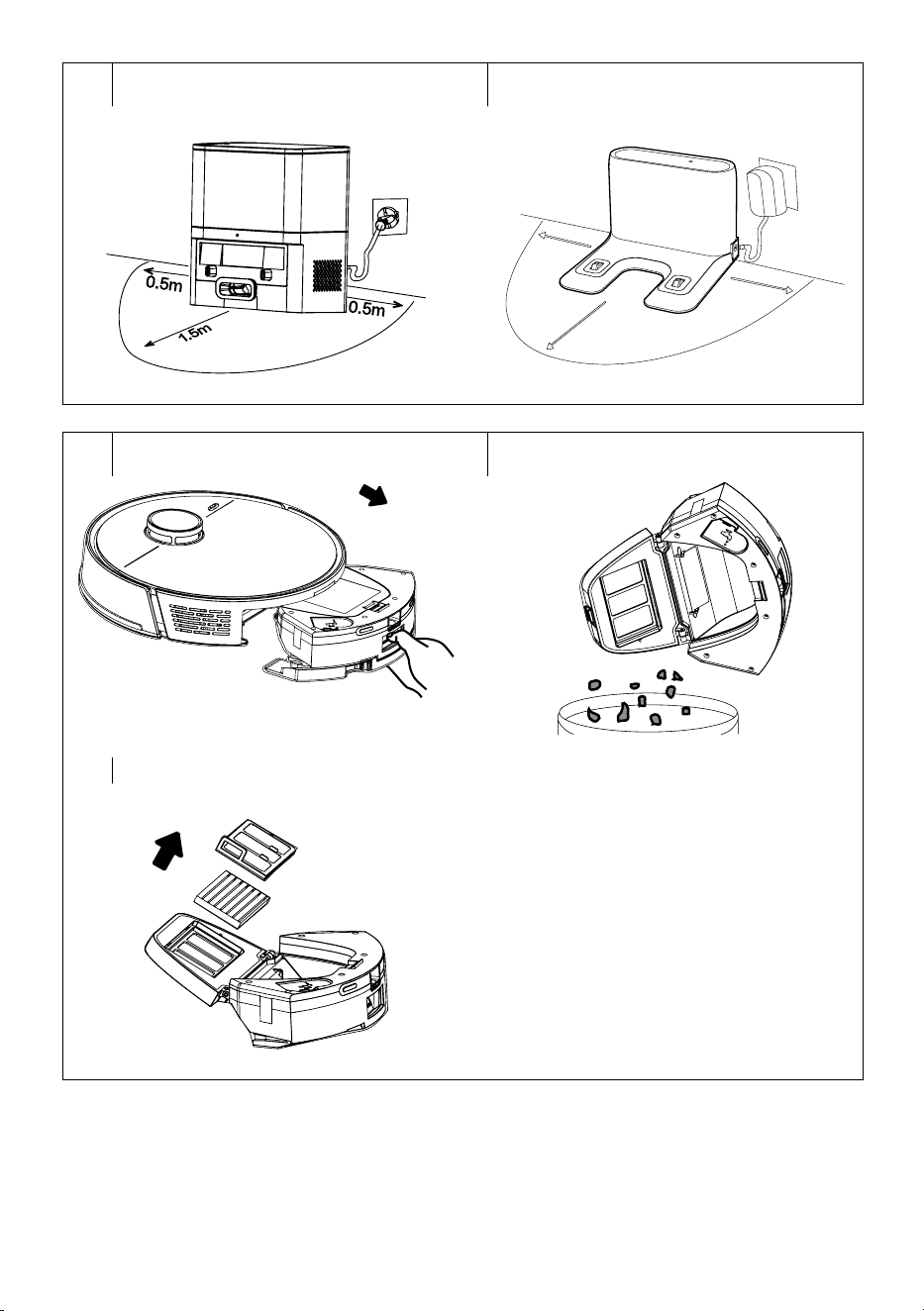
F1 F2
0,5 m
1,5 m
0,5 m
G1 G2
G3
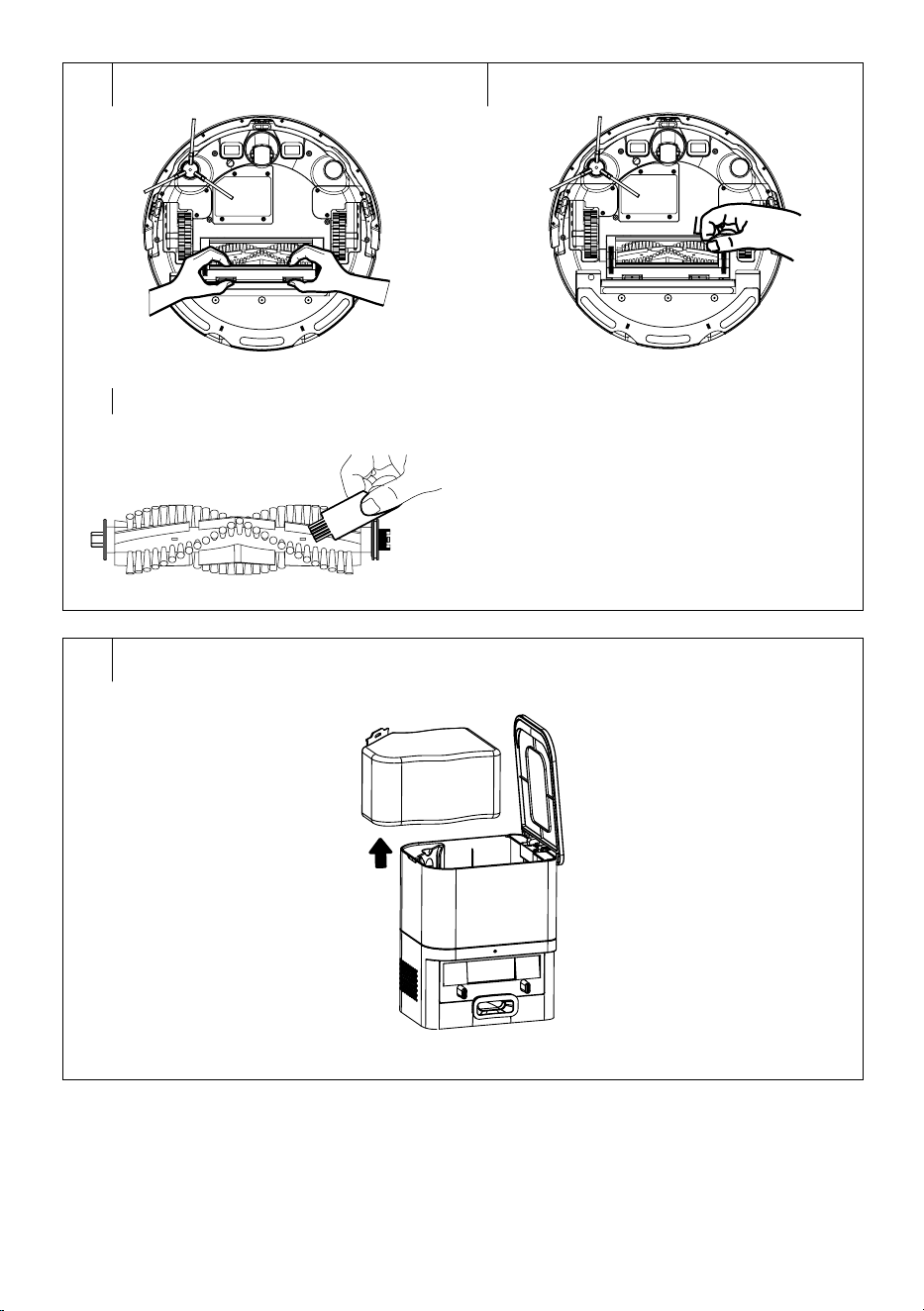
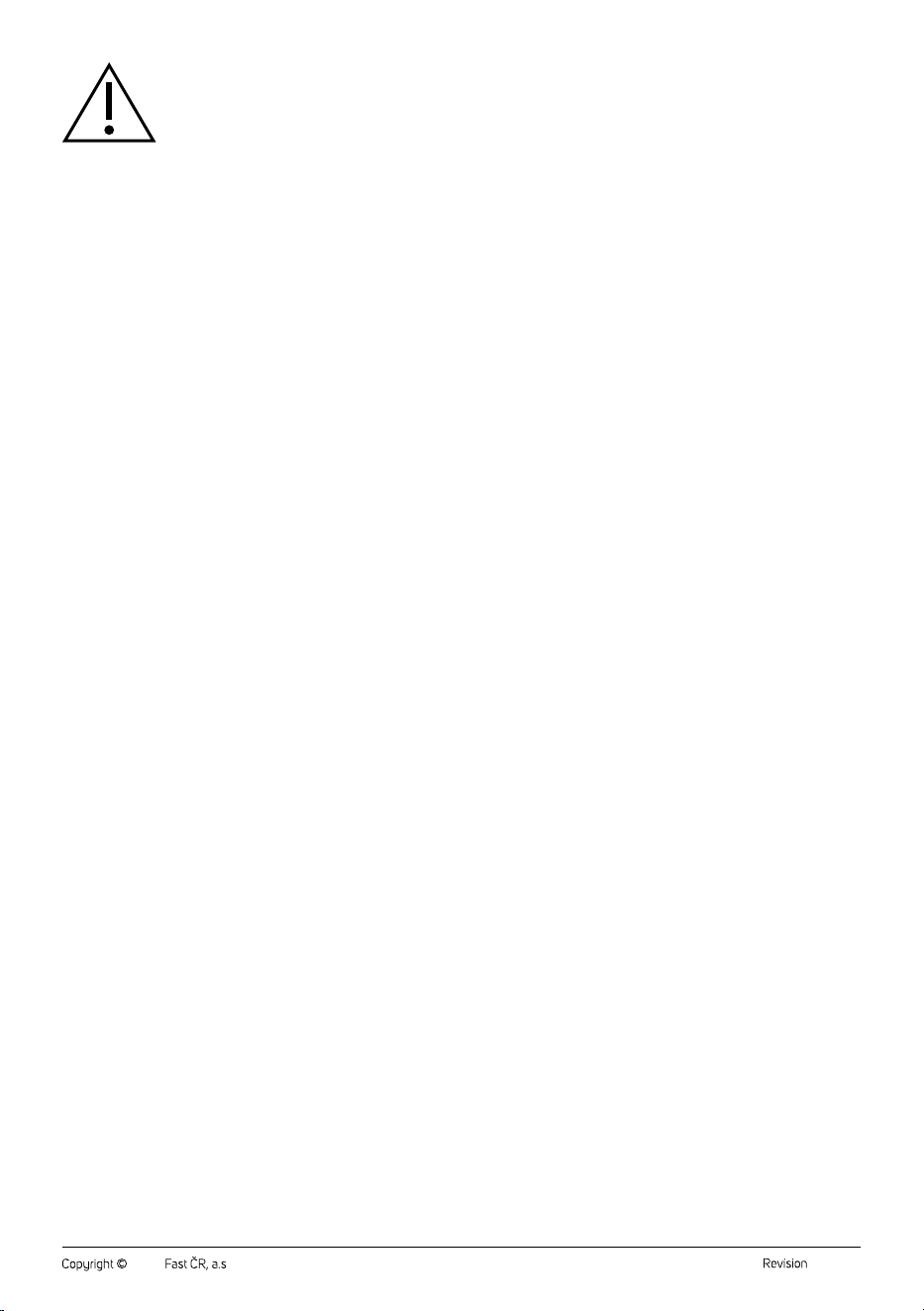
H1 H2
H3
I

– 1 –
06/2024
2024, .
EN Robotic Vacuum Cleaner
Important Safety Instructions
READ CAREFULLY AND STORE FOR FUTURE USE.
• This appliance may be only used by children aged 8
years and older and by persons with physical, sensory or
mental impairments or lack of experience and knowledge,
if they are supervised or have been instructed on the safe
use of the appliance and understand the potential hazards.
• Children must not play with the appliance. Cleaning and
maintenance must not be performed by unsupervised
children.
• If the power cord of the collection station or charging
station base is damaged, have it replaced in aprofessional
service centre in order to prevent adangerous situation. It
is forbidden to use the appliance with adamaged power
cord, collection station or charging station.
• Prior to cleaning or maintenance, always disconnect the
appliance from the power socket and turn it off using the
main power switch.
• The appliance must only be used with the collection
container (model SRV 9085BK) or with the charging
station (SRV 9020BK) supplied with the appliance.
– 2 –
06/2024
2024, .
WARNING:
Do not use the collection container or charging
station to charge batteries or appliances that are not
designed for this purpose.
Connect the collection station or power adapter only
to apower socket withaprotective contact.
Electrical Safety
• Before connecting the charging station adapter or the power cord of the collection station to apower socket, check that the technical details on the
rating label match the electrical voltage in the socket.
• Connect the power adapter or power cord only to aproperly grounded socket. Do not use an extension cord.
• Do not disconnect the power adapter or power cord from the socket by pulling on the power cord. This could damage the power adapter / power
cord or the socket. Disconnect the power adapter or power cord from the power socket by pulling the plug.
• Do not lay the power cord of the power adapter or the power cord of the collection station over sharp objects. Make sure that the cord does not hang
over the edge of the table or touch aheated or hot surface.
• Keep the power adapter or power cord dry.
• Do not connect or disconnect the power adapter or power cord to or from the power socket with wet hands.
• Do not uncover the electronic parts of the robotic vacuum cleaner or its battery. They do not contain any components repairable by the user. Have
the appliance serviced by qualified persons.
• To prevent possible electric shock, do not spray the robotic vacuum cleaner, the power supply unit or the power adapter with water or immerse it in
water or other liquids.
• Do not use the robotic vacuum cleaner when it is not working correctly, if it has been damaged or has been submerged in water.
• To avoid the danger of injury by electrical shock, do not repair the robotic vacuum cleaner yourself or make any adjustments to it. All repairs should
be carried out by an authorised service centre. Tampering with the robotic vacuum cleaner during the warranty period may void the warranty.
• Prior to cleaning or maintenance, always disconnect the robotic vacuum cleaner from the power socket and turn it off using the main power switch.
Safety in Use
• This robotic vacuum cleaner is designed for use in households, offices and similar types of areas. Do not use it in industrial surroundings or outdoors.
• The robotic vacuum cleaner is not intended for vacuuming water and, therefore, must not be used in damp or wet areas, for example in laundries,
bathrooms or around swimming pools. If it were to come into contact with water, the internal electronics of the vacuum cleaner would be destroyed.
• Do not use the robotic vacuum cleaner to vacuum the following items:
- smouldering cigarettes, burning or flammable items, matches or ash;
- water and other liquids;
- sharp items, for example splinters, needles, pins, etc.;
- flour, wall plaster and other building materials;
- larger pieces of paper or plastic bags, which can easily block the suction port.
• Do not expose the robotic vacuum cleaner to direct sunlight and do not place it near an open fire or appliances that are asource of heat.
• Do not use the robotic vacuum cleaner on narrow raised surfaces such as tables, wardrobes, etc. If the vacuum cleaner does not have sufficient
space for manoeuvring, it may fall and be damaged.
• Only use the robotic vacuum cleaner with original accessories from the manufacturer.
• Ensure that the robotic vacuum cleaner has adust filter correctly installed in the dust container before use.
• Before putting the robotic vacuum cleaner into operation, check that the entry door into your flat or house is closed. From the floor surfaces remove
clothing, paper, toys, power or extension cords and other items that the vacuum cleaner could suck in or catch. Lift curtains and drapes that reach to
the floor so that they do not get caught in the vacuum cleaner.
• Do not place any items on to the robotic vacuum cleaner and do not step or sit on it.
• If the robotic vacuum cleaner is running, watch out for children and household pets.
• When the robotic vacuum cleaner is running, ensure that the air outlet openings are not covered and that the suction opening is not blocked.
Otherwise, the robotic vacuum cleaner may be damaged.
• Follow the cleaning andmaintenance instructions provided inthis user manual.
Laser
• The laser sensor meets the laser safety class according to standard EN 60825-1.
• When using, handling or performing maintenance tasks on the robotic vacuum cleaner with alaser sensor, always adhere to the following
instructions:
- Prior to any handling, switch off the robotic vacuum cleaner using the main power switch.
- Do not point the laser beam at people.
- Do not look into the direct or reflected beam of the laser.
- Modifications or repairs of the laser sensor that are not performed by an authorised service centre are forbidden.
– 3 –
06/2024
2024, .
Warning:
Not following the instructions contained in this user'smanual may result in dangerous irradiation!
– 4 –
06/2024
2024, .
• Thank you for purchasing our SENCOR product; we hope it will serve
to your satisfaction.
• Before using this appliance, please familiarise yourself with the user
manual, even if you are already familiar with using similar types of
appliances. Use the appliance only as described in this user manual.
Keep the manual for future reference.
• It is recommended to keep the original packaging, packing material,
receipt and confirmation of the extent of the seller'sliability or warranty
certificate at least for the duration of the legal right of defective
performance or quality guarantee. When transporting the appliance,
we recommend packaging it again in the original box provided by the
manufacturer.
. . . . . . . . . . . . . . . . . . . . . . . . . . . . . . . . . . . . . . . . . . . . . . . . . . . . . . . . . . . . . . . . . . . .
DESCRIPTION OF THE ROBOTIC VACUUM CLEANER
A4 button
(turning on and
turning off / starting automatic
cleaning)
A2 Laser module
A3 Bumper
A4
send to collection station /
charging station button
A5 Wi-Fi indicator light
A6
Combination 2-in-1 dust
container with water tank
A7 Anti-collision sensors
A8 Front swivel wheel
A9 Side rotary brushes
A10 Travel wheels
A11 Rotary brush
A12 Charging contacts (SRV
9020BK only)
A13 Battery (located under cover)
A14 Rotating brush frame
A15 Water tank opening cover
A16 Water tank filler opening
A17 Water tank
A18 Suction hole
A19 Dust container lid
B20 Charging contacts
A21 Dust container release button
2-in-1
A22 Coarse filter
A23 HEPA filter + foam filter
A24 Mop sleeve holder
A25 Mop sleeve
A26 Cleaning brush
. . . . . . . . . . . . . . . . . . . . . . . . . . . . . . . . . . . . . . . . . . . . . . . . . . . . . . . . . . . . . . . . . . . .
DESCRIPTION OF THE COLLECTION STATION
B1 Lid of the collection station
B2 Dust bag
B3 Dust bag installation
compartment
B4 Lid of the collection station
B5 Charging contacts
B6 Suction opening
. . . . . . . . . . . . . . . . . . . . . . . . . . . . . . . . . . . . . . . . . . . . . . . . . . . . . . . . . . . . . . . . . . . .
DESCRIPTION OF THE CHARGING STATION
B7 Charging indicator
B8 Power adapter connection
socket
B9 Charging contacts
. . . . . . . . . . . . . . . . . . . . . . . . . . . . . . . . . . . . . . . . . . . . . . . . . . . . . . . . . . . . . . . . . . . .
REMOTE CONTROL DESCRIPTION
C1
button toturn the robotic
vacuum cleaner on/off
C2
button to start automatic
cleaning
C3
button to turn off voice
alerts
C4
button to return to the
collection station / charging
station
C5
button to start cleaning
the selected area
C6
Wi-Fi reset button
C7 Cleaning start/stop button
C8 Directional buttons to move
the vacuum cleaner forward/
backward/left/right
C9 Buttons for adjusting the
intensity of water output when
mopping
C10 Suction power setting buttons
. . . . . . . . . . . . . . . . . . . . . . . . . . . . . . . . . . . . . . . . . . . . . . . . . . . . . . . . . . . . . . . . . . . .
SRV 9085BK PACKAGE CONTENTS
• Robotic Vacuum Cleaner
• Collection station
• Remote control
• Mop sleeve holder
• Mopping sleeve (3 pcs)
• HEPA filter (2 pieces: 1 filter installed on the vacuum cleaner; 1 spare
HEPA filter)
• Side rotary brush (2 pieces: 1 installed on the vacuum cleaner; 1 spare
side rotary brush)
• Dust bag (3 pieces)
• Cleaning brush
• AAA batteries (2 pcs)
. . . . . . . . . . . . . . . . . . . . . . . . . . . . . . . . . . . . . . . . . . . . . . . . . . . . . . . . . . . . . . . . . . . .
SRV 9020BK PACKAGE CONTENTS
• Robotic Vacuum Cleaner
• Charging Base
• Remote control
• Mop sleeve holder
• Mopping sleeve (3 pcs)
• HEPA filter (2 pieces: 1 filter installed on the vacuum cleaner; 1 spare
HEPA filter)
• Side rotary brush (2 pieces: 1 installed on the vacuum cleaner; 1 spare
side rotary brush)
• Cleaning brush
• AAA batteries (2 pcs)
Note:
The SRV 9020BK can be purchased together with the
collection station. There are two models available:
SRX 0030 or SRX 0029. Please contact our dealer.
. . . . . . . . . . . . . . . . . . . . . . . . . . . . . . . . . . . . . . . . . . . . . . . . . . . . . . . . . . . . . . . . . . . .
PURPOSE OF USE AND FEATURES OF THE ROBOTIC VACUUM
CLEANER
• The robotic vacuum cleaner is intended for cleaning various types
of hard floors such as wooden or laminate floating floors, tiles, vinyl,
etc. and carpets with alow pile height. While vacuuming, it effectively
combines various routes to optimally clean the entire floor area.
• The main rotary brush effectively removes hair, animal fur, etc. The
side rotary brush brushes dirt out of hard-to-reach places along walls
and furniture and out of corners. The motorised rubber castors protect
sensitive floors against scratching and can travel over threshold strips
up to aheight of 1.6 cm and ride on to a1.6 cm high carpet.
• The suspended bumper enables the vacuum cleaner to dampen the
approach to an obstacle and to efficiently clean around it. The infrared
sensors in the front bumper prevent the robotic vacuum cleaner from
colliding with obstacles. Safe operation in rooms with stairs is made
possible by the bottom anti-stair-fall sensors.
• The vacuum cleaner is equipped with GYRO MAPPING function
(orientation in space), which can identify the space geometry of,
aroom in which it is cleaning, thereby the vacuum cleaner is able to
better clean the floor. The vacuum cleaner is also equipped with laser
navigation by means of which it maps out each room and then starts
to clean it systematically. Both functions are built-in and cannot be
affected in any way.
. . . . . . . . . . . . . . . . . . . . . . . . . . . . . . . . . . . . . . . . . . . . . . . . . . . . . . . . . . . . . . . . . . . .
EN
Robotic Vacuum Cleaner
User Manual
– 5 –
06/2024
2024, .
ROBOTIC VACUUM CLEANER CLEANING MODES
Automatic Cleaning Mode
• The robotic vacuum cleaner dynamically plans the cleaning path
according to the map created by scanning andgradually completes
the cleaning of different zones. Ineach zone, the robotic vacuum
cleaner first starts cleaning along the edges and then cleans the rest
in azigzag pattern. After finishing the cleaning, the robotic vacuum
cleaner will automatically return to the collection station / charging
station.
Note:
Prior to starting the robotic vacuum cleaner, always check
that it is charged and that all obstacles, foreign objects,
cables, etc. have been removed from the area.
Note:
You can select additional cleaning modes of the robotic
vacuum cleaner directly in the app or on the remote control.
. . . . . . . . . . . . . . . . . . . . . . . . . . . . . . . . . . . . . . . . . . . . . . . . . . . . . . . . . . . . . . . . . . . .
PREPARING THE ROBOTIC VACUUM CLEANER
• Take the robotic vacuum cleaner and all its accessories out of the
packaging. Check that you have removed all the parts.
• Check the robotic vacuum cleaner and its accessories for damage.
• Remove protective foils and advertising labels from the robotic
vacuum cleaner and all accessories, including protective tapes that
are located on both sides of the robotic vacuum cleaner – see figure
D1.
Installing the Side Rotary Brush
• The side rotary brush is intended for smooth floor surfaces and
ensures effective cleaning in corners, along walls and around furniture.
• Turn the vacuum cleaner upside down. Press the rotary brush
precisely andforcefully against the pin that is intended for it – see
figure D2. Turn the vacuum cleaner back to the operating position.
• When using the vacuum cleaner to clean rooms with carpets, remove
the rotary brush. To remove it, proceed in the reverse sequence.
. . . . . . . . . . . . . . . . . . . . . . . . . . . . . . . . . . . . . . . . . . . . . . . . . . . . . . . . . . . . . . . . . . . .
COMBINATION 2-IN-1 DUST CONTAINER WITH WATER TANK
• The combination dust container with water tank enables the floor to be
vacuumed and wiped at the same time. The robotic vacuum cleaner
vacuums dirt and dust from the floor and then wipes it. Depending on
the intended use of the robotic vacuum cleaner, it is necessary to pour
water into the water tank and to attach the holder with the mop sleeve.
Using the Robotic Vacuum Cleaner Only for Vacuuming
1. When using the robotic vacuum cleaner only for vacuuming, before
using it, ensure that the dust container is inserted in the vacuum
cleaner and that it is empty.
2. In order to be able to remove the dust container, press the dust
container release button and pull the dust container out of the
vacuum cleaner – see figure E1.
3. Insert the dust container into the robotic vacuum cleaner so that
the dust container lid is pointing upwards and the outlet is point
outwards – see figure E1. Gently push down on the dust container
from behind until you hear aclick. This indicates that the dust
container is correctly secured in the vacuum cleaner.
Using the Robotic Vacuum Cleaner for Vacuuming and Wiping the Floor
In order to use the robotic vacuum cleaner for vacuuming and wiping the
floor at the same time, it is necessary to put water into the water tank
and to attach the holder with the mop sleeve on to the bottom side of the
container.
1. Remove the dust container from the robotic vacuum cleaner
by pressing the dust container release button and pull the dust
container out of the vacuum cleaner – see figure E1.
2. Release the water tank cover and pour water into the water tank
through the opening – see figure E2. Close the cover tightly.
Note:
For mopping, we recommend using clean water. If you use
acleaning agent, it may foam up and thereby worsen the
dripping of the water on to the sleeve, or potentially cause
smudges on the floor after it dries.
3. Put the mop sleeve on to the holder – see figure E3. We recommend
soaking and rinsing out the sleeve slightly before putting it on. This
speeds up the soaking process and subsequent mopping of the floor.
4. Attach the holder to the container from below. Gently push down on
the holder until you hear aclick. This indicates that the holder with
the mop sleeve is correctly secured.
5. Insert the dust container into the robotic vacuum cleaner so that
the dust container lid is pointing upwards and the outlet is point
outwards – see figure E4. Gently push down on the dust container
from behind until you hear aclick. This indicates that the dust
container is correctly secured in the vacuum cleaner.
Warning:
Do not use the robotic vacuum cleaner to vacuum
and wipe door mats, runners, etc. Before vacuuming
carpets, it is necessary to remove the holder with the
mop sleeve.
. . . . . . . . . . . . . . . . . . . . . . . . . . . . . . . . . . . . . . . . . . . . . . . . . . . . . . . . . . . . . . . . . . . .
LOCATION OF THE COLLECTION STATION / CHARGING STATION
• The collection station / charging station is used toautomatically
recharge the battery and the vacuum cleaner must have good access
to it.
• Place the collection station / charging station against awall on ahard,
horizontal anddry surface withinreach of the power socket – see
Figure F1 (collection station) or F2 (charging station). Ensure that there
are no steps or obstacles within 0.5 m to the left andright and 1.5 m in
front of the collection station / charging station that would prevent the
vacuum cleaner from locating the collection station/ charging station
and docking successfully.
• Connect the power cord connector to the socket of the collection
station / charging station and plug the male plug into the power
socket. Position the power cord so that it will not get tangled in the
rotary brushes of the vacuum cleaner.
• If you will not be using the vacuum cleaner for along time, disconnect
the collection station / charging station from the power socket
andstore it in adry, clean andcool place.
. . . . . . . . . . . . . . . . . . . . . . . . . . . . . . . . . . . . . . . . . . . . . . . . . . . . . . . . . . . . . . . . . . . .
CHARGING THE ROBOTIC VACUUM CLEANER
• The vacuum cleaner can be charged in the collection station /
charging station, which the vacuum cleaner automatically seeks out
when it has finished cleaning.
• If the robotic vacuum cleaner is in the collection station, it will activate
automatically andthere is no need to turn it on.
Charging the Vacuum Cleaner for the First Time
• Before first use, it is necessary to fully charge the robotic vacuum
cleaner. Allow the robotic vacuum cleaner to charge for up to 12 hours.
• Grasp the vacuum cleaner and manually place it into the collection
station so that the charging contacts on the underside of the vacuum
cleaner and the charging contacts on the dust collection station are
connected. When the contacts are connected, the charging process
will start.
Automatic Charging
• The robotic vacuum cleaner utilises the automatic charging function
whenever it finishes cleaning and in cases, where during operation,
it detects low power on the battery. Therefore, the robotic vacuum
cleaner will start to actively seek out the collection station / charging
station. It is thus important that it is always connected to apower
source and is freely accessible for the vacuum cleaner so that it can
dock in it.
• The robotic vacuum cleaner can be sent to be charged also by
pressing the charging button directly on the vacuum cleaner, in the
application or on the remote control. In such acase, the operation of
– 6 –
06/2024
2024, .
the robotic vacuum cleaner will stop and it will seek out the collection
station / charging station.
• After docking in the collection station / charging station, the charging
cycle will commence. Acomplete charge takes approximately 5 to
6 hours. The actual charging time depends on the power level of the
battery at the start of the charging process.
• Full charge ensures up to 130 minutes of operation (low suction power
set).
• In the event that the charging contacts are disconnected during the
charging cycle, the vacuum cleaner will move away from the charging
station and then re-dock itself to resume the charging process, unless
it is prevented from doing so by an obstacle.
• In the event of apower outage, the charging cycle will be interrupted
and will continue after the power supply is renewed.
• In the event that the maximum charging current is exceeded, the
charging process will be automatically interrupted.
• If the robotic vacuum cleaner is completely discharged, e.g. due to the
vacuum cleaner being unable to locate the collection station or dock in
it, it must be manually positioned.
. . . . . . . . . . . . . . . . . . . . . . . . . . . . . . . . . . . . . . . . . . . . . . . . . . . . . . . . . . . . . . . . . . . .
CONTROLLING THE VACUUM CLEANER USING ITS BUTTONS
The buttons on the vacuum cleaner are used for basic control. For
advanced control, use the mobile app or remote control for your robot
vacuum cleaner. You will find more information further in the user manual.
Switching the Robotic Vacuum Cleaner On/Off
Press and hold down the button
for 3 seconds to turn on the robotic
vacuum cleaner. The robotic vacuum cleaner will switch to the stand-by
mode.
Press and hold down the button for 3 seconds to turn off the robotic
vacuum cleaner. The robotic vacuum cleaner is turned off.
Note:
It is not possible to turn off the robotic vacuum cleaner
during the charging process.
Starting Automatic Cleaning
• While the robotic vacuum cleaner is in stand-by mode, press the
button and the robotic vacuum cleaner will start automatic cleaning.
Pausing the Cleaning Process
• If the
button is pressed during the operation of the robotic vacuum
cleaner then the operation of the robotic vacuum cleaner will be
paused. Pressing the button again will resume its operation.
Sleep Mode
• The robotic vacuum cleaner will switch to sleep mode after 10 minutes
of inactivity if it is outside the charging station. And the indicator lights
will turn off. By pressing the
button or restarting in the app, the
robot vacuum cleaner switches to stand-by mode.
Note:
The robotic vacuum cleaner will not switch to sleep mode
while charging.
If the robotic vacuum cleaner is in sleep mode for more than
12hours, it will automatically turn off.
Charging
• Press the
button briefly if you need to send the robotic vacuum
cleaner for charging. This will end the currently running cleaning
process and the vacuum cleaner will start seeking out the collection
station, where it will dock.
. . . . . . . . . . . . . . . . . . . . . . . . . . . . . . . . . . . . . . . . . . . . . . . . . . . . . . . . . . . . . . . . . . . .
OPERATION USING THE REMOTE CONTROL
• Push down the latch of the cover on the rear side of the remote control
to release it and remove the cover.
• Insert two type AAA (1.5 V) batteries into the remote control. When
inserting the batteries ensure the correct polarity as shown inside the
battery compartment. Put the cover back on and click it into place.
• In the event that the batteries are flat, replace them with new ones. Do
not combine various types of batteries or new and old batteries.
• The signal range of the remote control is approximately 6 m.
• When replacing batteries, first remove the flat batteries and then insert
the new ones.
Note:
Never combine flat and new batteries nor various types of
batteries.
Switching the Robotic Vacuum Cleaner On/Off
• Press the
button to turn the robotic vacuum cleaner on. If you
need to turn off the robotic vacuum cleaner, press the
button.
Starting Cleaning
1. Automatic cleaning: Press the
button to start automatic
cleaning.
2. To clean aselected place: Press the
to start cleaning the
selected area.
3. Manual cleaning: Use the direction buttons on the remote control to
start manual cleaning andmove the vacuum cleaner forward/back/
left/right.
Pausing the Cleaning Process
• If the
button is pressed during the operation of the robotic vacuum
cleaner then the operation of the robotic vacuum cleaner will be
paused. Pressing the
button again will resume its operation.
End of Cleaning/Charging
• If you need to end the cleaning, press the button
, the robotic
vacuum cleaner will stop, end the cleaning process, seek out the
collection station / charging station and dock in it.
Setting the Suction Power
• Set the desired suction power using the suction power setting buttons.
The
button reduces the suction power, the button increases the
suction power.
Setting the Intensity of Water Dipensing During Mopping
• You can set the intensity of water dispensing during mopping using
the buttons on the control. Use the
button to decrease the
intensity of water output, use the
button to increase the intensity
of water output.
Wi-Fi Reset
• Press the
button to reset the Wi-Fi function.
. . . . . . . . . . . . . . . . . . . . . . . . . . . . . . . . . . . . . . . . . . . . . . . . . . . . . . . . . . . . . . . . . . . .
CONTROLLING THE VACUUM CLEANER USING THE MOBILE
APPLICATION
• The robotic vacuum cleaner can be controlled via the Sencor HOME
application.
• Download the application to your smartphone, register and control
your robotic vacuum cleaner via the application.
If you already have the application installed, add the robotic vacuum
cleaner to your devices.
Note:
Make sure you have both location services and Bluetooth
enabled in the phone settings for the app.
Adding the Robotic Vacuum Cleaner to the Device List via Bluetooth
You can add the robotic vacuum cleaner to the Sencor HOME app by
pairing via Bluetooth.
1. Turn on the Bluetooth function on your mobile phone.
2. Turn on the robotic vacuum cleaner.
3. Reset Wi-Fi. Press andhold the
button for 3 seconds, or press
the
button on the remote control to reset the Wi-Fi function. The
Wi-Fi indicator light will start flashing.
– 7 –
06/2024
2024, .
4. Open the app and on the app'shome page, click the “+” icon.
5. The device itself will offer the “Do not add / Go to add” options.
6. Click on “Go to add” and the app will automatically guide you
through the addition.
Note:
If the Bluetooth connection fails or is not possible, make
sure there are no solid obstacles between your phone and
the robotic vacuum cleaner and that the two devices are
close together.
Adding the Robotic Vacuum Cleaner to the Device List via aQR Code
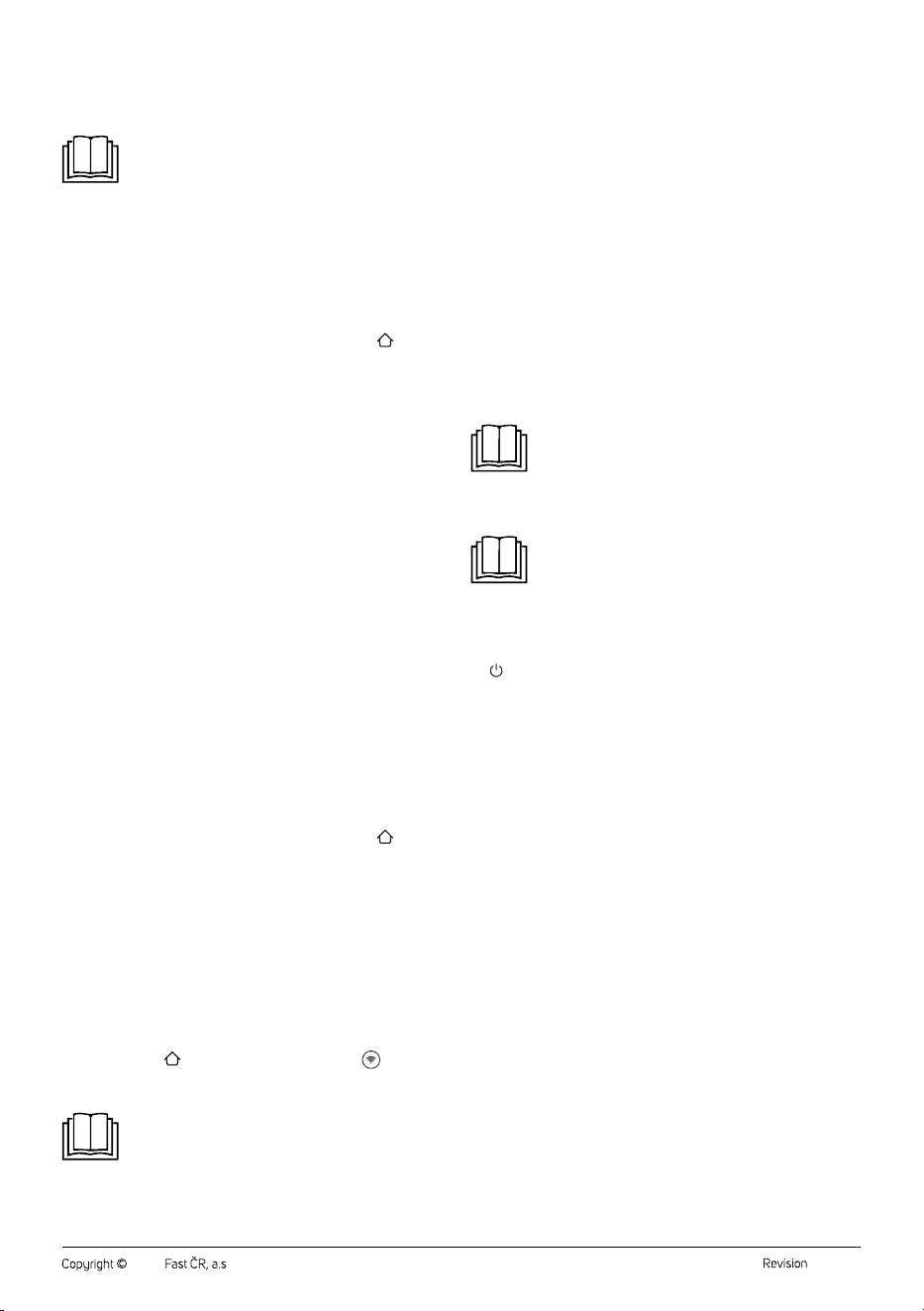
• The robotic vacuum cleaner can also be added to the Sencor HOME
application using the QR code provided below. On the home screen
of the application, click on the “+” icon and on the Add device screen,
click on the [–] icon in the top right hand corner.
• After scanning the QR code, you will be prompted to select aWi-Fi
network. Select the network, enter your password andclick “Next”.
• You will be prompted toreset the device. Hold down the
button
for about 3 seconds. The Wi-Fi indicator light will start flashing.
This means that the robotic vacuum cleaner is ready for pairing.
Instructions can also be found on the application screen.
• Inthe app, confirm that the Wi-Fi light is blinking, then click “Next”.
• Click on “Connect”. Then in the Wi-Fi settings on your mobile device
connect the Wi-Fi to the robotic vacuum cleaner. Then return to the
application and wait until the pairing of the robotic vacuum cleaner is
complete.
• In the device list on the main screen, click on the icon of the robotic
vacuum cleaner to enter control interface.
QR Code for Adding the Control Panel of the Robotic Vacuum Cleaner to
the Application Sencor HOME
SRV 9085BK SRV 9020BK
Manually Adding the Robotic Vacuum Cleaner to the Device List
• On the home page, click on “Add Device” or the “+” in the top right
corner, and then click on "Add Device".
• Ascreen with appliance categories and alist of appliances will appear.
• Click on “Robotic vacuum cleaners” and select the robotic vacuum
cleaner model from the list of products.
• On the next screen, you will be prompted toselect aWi-Fi network.
Select the network, enter your password andclick “Next”.
• You will be prompted toreset the device. Hold down the
button
for about 3 seconds. The Wi-Fi indicator light will start flashing.
This means that the robotic vacuum cleaner is ready for pairing.
Instructions can also be found on the application screen.
• Inthe app, confirm that the Wi-Fi light is blinking, then click “Next”.
• Click on “Connect”. Then in the Wi-Fi settings on your mobile device
connect the Wi-Fi to the robotic vacuum cleaner. Then return to the
application and wait until the pairing of the robotic vacuum cleaner is
complete.
• In the device list on the main screen, click on the icon of the robotic
vacuum cleaner to enter control interface.
Wi-Fi Reset
Press andhold the
button for 3 seconds, or press the button on
the remote control to reset the Wi-Fi function. The Wi-Fi indicator light will
start flashing.
Note:
We recommend that you turn off mobile data in your
mobile phone settings when connecting to Wi-Fi.
Robotic Vacuum Cleaner Functions
• The list below shows the most important functions of the robotic
vacuum cleaner that can only be set in the application.
− cleaning scheduling
− all map work, including setting restricted areas and virtual walls
− activation/deactivation of power boost on carpet
− language selection and volume setting of voice messages
− switching the vacuum cleaner buttons backlight off/on (do not
disturb mode)
. . . . . . . . . . . . . . . . . . . . . . . . . . . . . . . . . . . . . . . . . . . . . . . . . . . . . . . . . . . . . . . . . . . .
DUST AND DIRT COLLECTION STATION (SRV 9085BK only)
• The collection station is equipped with adust bag into which the
robotic vacuum cleaner empties the contents of the dust container
after the cleaning is completed, or if it detects that the dust container
is full. In this case, the robot vacuum cleaner locates the collection
station and drives to it so that the opening in the dust container is
aligned with the suction opening at the bottom of the collection station.
Once contact is made, both openings open and pressure sucks the
contents of the container into the dust bag. The openings are then
closed and the robotic vacuum cleaner will start charging or continue
cleaning.
• To ensure proper operation of the collection station, make sure it is
connected to power.
Note:
After parking in the station, the vacuum cleaner will
automatically start charging and the indicator lights on
boththe vacuum cleaner and the station will slowly blink
during charging. When charging is complete, the indicator
lights will turn off.
Note:
The collection station can be purchased for the
SRV 9120BK model. There are two models
available: SRX 0030 or SRX 0029.
. . . . . . . . . . . . . . . . . . . . . . . . . . . . . . . . . . . . . . . . . . . . . . . . . . . . . . . . . . . . . . . . . . . .
CLEANING AND MAINTENANCE
• Before cleaning, always turn off the vacuum cleaner with the button
, place it outside the collection station / charging station and
disconnect it from the power supply.
• Never use abrasive cleaning agents, solvents, etc. for cleaning.
• Neglecting cleaning and maintenance may negatively affect
the working order of the vacuum cleaner and lead to its reduced
performance.
ROBOTIC VACUUM CLEANER
Emptying the Dust Container (model SRV 9085BK)
On the SRV 9085BK model, the container is automatically emptied
into the dust collection container both after every use and also during
the cleaning process when the vacuum cleaner detects the maximum
amount of dirt and dust in the container. It is possible to set how frequently
the dust container will be emptied out.
Emptying the Dust Container (model SRV 9020BK)
1. In order to be able to remove the dust container, press the dust
container release button and pull the dust container out of the
vacuum cleaner – see figure G1.
2. Take the dust container over agarbage bin and turn it upside down
so that the lid of the dust container points downwards.
3. Press the dust container lid release button and carefully tilt open the
lid. Dump the contents of the dust container into the garbage bin –
see figure G2.
4. Close the lid and gently push on it until you hear aclick. This
indicates that the lid is properly secured in place.
Cleaning the Dust Container
1. In order to be able to remove the dust container, press the dust
container release button and pull the dust container out of the
vacuum cleaner – see figure G1.
2. Press the dust container lid lock and tilt open the dust container lid.
3. Press the coarse filter lock. Take the coarse filter, foam filter and the
HEPA filter out of the lid – see figure G3.
4. Tap out the HEPA filter and the foam filter and remove the dirt and
dust from them using afine brush or soft wiping cloth. In the event of
heavy soiling, you can vacuum them out using adifferent vacuum
– 8 –
06/2024
2024, .
cleaner with an attached brush nozzle. Do not wash the HEPA filter
in water. This may damage the appliance. In the event that the HEPA
filter is already heavily soiled or deformed, replace it with anew one.
We recommend replacing the HEPA filter based on the frequency of
use at least once every six months.
5. Rinse the coarse filter under running water and wipe dry with aclean
wiping cloth.
6. Wipe the dust container out using alightly dampened sponge and
wipe dry using aclean wiping cloth. If necessary, you can pour
asmall amount of water into the dust container and wipe it out with
asponge. Then thoroughly wipe it dry using aclean wiping cloth.
7. Insert the HEPA filter, the foam filter and then the coarse filter into
the area in the lid. Gently push down on the coarse filter until you
hear aclick. This indicates that the coarse filter is properly secured in
place.
8. Close the dust container lid. Gently push down on the lid until you
hear aclick. This indicates that the lid is properly closed.
Warning:
Prior to inserting the filter into the dust container and
closing the cover, always ensure that all the parts
are clean and completely dry. Otherwise, the robotic
vacuum cleaner may be damaged.
Cleaning the Water Tank and Mop Sleeve
To prevent the formation of moulds and damaging microorganisms that
may cause unpleasant odours and be damaging to health, it is necessary
to clean the water tank, mop sleeve holder and the mop sleeve after
every use.
1. Carefully release the mop sleeve holder and remove it from the
bottom of the robotic vacuum cleaner.
2. Carefully remove the mop sleeve from the holder.
3. In order to be able to remove the dust container, press the dust
container release button and pull the dust container out of the
vacuum cleaner.
4. Take the dust container over awash basin or sink and release the
water tank cover. Turn the container upside down and allow the
water remaining in the water tank to flow out. If necessary, gently
shake the water tank to ensure that all the water has flowed out.
5. Leave the water tank cover open and allow the water tank to dry out
in adry and well ventilated location.
6. Wipe the mopping sleeve holder using alightly dampened sponge
and wipe dry using aclean wiping cloth.
7. Hand wash the mopping sleeve in lukewarm water with asmall
amount of fine washing powder, wring it out by hand and allow
it to dry naturally. Do not wash the mopping sleeve in awashing
machine or dry it in aclothes dryer.
Cleaning the Central Rotary Brush
We recommend that you regularly clean the central rotary brush, at
least once per week, to ensure the constant suction power of the robotic
vacuum cleaner. Hair and lint on the brush can reduce the performance of
the robotic vacuum cleaner as well as its efficiency.
1. Turn the robotic vacuum cleaner upside down.
2. Press the lock of the central rotary brush cover – see Figure H1;
and remove the cover and then the rotary brush from the vacuum
cleaner – see Figure H2.
3. Use adry wiping cloth to clean out the area in which the rotary
brush is housed. Check and clean out the suction opening. Dirt and
dust that accumulates around the suction opening may reduce the
suction power of the vacuum cleaner.
4. Remove any dirt and material (dust, wound on hair, animal fur, etc.)
from the rotary brush – see picture H3.
5. Insert the rotary brush back into the vacuum cleaner and put on the
cover. Gently push down on the cover until you hear aclick. This
indicates that the cover is properly secured in place.
Cleaning the Side Rotary Brush
1. Remove the side rotary brush by pulling it upwards.
2. Remove any dust and dirt from the location where the brush was
mounted.
3. Remove all dust and dirt from the brush. If necessary you may wash
the brush under running water. If the bristles were deformed while
the vacuum cleaner was running, dip them in warm water to allow
them to return to their original shape. Allow the brush to dry before
reattaching to the vacuum cleaner.
4. After cleaning, attach it back.
Cleaning the Sensors
• The sensors on the robotic vacuum cleaner are important for its proper
control and safe operation. It is therefore important that you clean
them regularly andkeep them ingood condition.
• Wipe the sensors using asoft dry wiping cloth or cotton bud.
Cleaning the Outer Surface of the Robotic Vacuum Cleaner
• Regularly wipe the surface of the vacuum cleaner using asoft dry
wiping cloth.
• Clean the front swivel wheel, motorised castors, suction hole, rotary
brush and the bottom sensors at least once per week or more
frequently.
• First remove any coarser dirt from the front swivel wheel and the
motorised castors. Then clean them around their entire perimeter
using alightly dampened cloth and wipe them dry. Do not forget to
also clean the area around the castors.
Replacing the HEPA and Foam Filter
1. Take out the dust container and open the dust container lid. Take out
the coarse filter, old foam filter and old HEPA filter.
2. Insert anew HEPA filter, anew foam filter and then the coarse filter
into the area in the lid. Gently push down on the coarse filter until
you hear aclick. This indicates that the coarse filter is properly
secured in place.
3. Close the dust container lid. Gently push down on the lid until you
hear aclick. This indicates that the lid is properly closed.
Note:
The wear and tear status of the HEPA filter can be
monitored in the mobile application.
Note:
The HEPA and foam filters are always replaced at the
same time.
Replacing the Side Brush
The rotary brush wears out during use. After acertain time it is necessary
to replace the used brush with new one. To order anew brush, please
contact your vendor or an authorised service centre.
1. Take the old side rotary brush out of the vacuum cleaner by pulling it
upwards.
2. Fit the new side rotary brush into the robotic vacuum cleaner.
. . . . . . . . . . . . . . . . . . . . . . . . . . . . . . . . . . . . . . . . . . . . . . . . . . . . . . . . . . . . . . . . . . . .
COLLECTION STATION
Cleaning the Collection Station
• Wipe the outer surface of the collection station with adry soft cloth.
Replacing the Dust Bag
The indicator light at the station will illuminate after approximately
40cycles, which is the recommended time when the dust bag should be
replaced. However, we recommend checking the dust bag continuously
andreplacing it as needed. When replacing it, proceed as follows:
1. Open the cover of the collection station.
2. Hold the bag holder andgently pull it up – see picture I. This will
close the dust bag inlet and keep dust and dirt safely contained in
the dust bag.
3. Dispose of the used dust bag in standard communal waste.
4. Place the new dust bag into the collection container. It is important
that the inlet opening in the bag is aligned with the outlet opening in
the inner space of the collection container.
5. Close the cover.
Cleaning the Sensors
Sensors at the collection station are important for its safe operation. It is
therefore important that you clean them regularly andkeep them ingood
condition.
Wipe the infrared sensors andcharging contacts with adry soft cloth or
cotton swab.
Battery Replacement
In the event that you need to replace the battery, proceed as follows:
– 9 –
06/2024
2024, .
1. Make sure that the vacuum cleaner is turned off using the
button.
Turn the vacuum cleaner upside down.
2. Using ascrewdriver, loosen the screws of the battery cover, remove
it and carefully remove the battery.
3. Connect the new battery and insert it into the internal area. The
battery can only be connected in one way. The connector is coded
and cannot be turned around.
4. Put on the bottom cover and secure it in place using the screws. Turn
the vacuum cleaner back to the operating position.
5. Place the vacuum cleaner into the collection station and allow the
battery to charge to full capacity.
Note:
The robotic vacuum cleaner is supplied with the battery
already inserted.
. . . . . . . . . . . . . . . . . . . . . . . . . . . . . . . . . . . . . . . . . . . . . . . . . . . . . . . . . . . . . . . . . . . .
CLEANING THE CHARGING STATION
Cleaning the Charging Station
Wipe the outer surface of the collection station with adry soft cloth.
Cleaning the Sensors
The sensors on the charging station are important for its operation.
It is therefore important that you clean them regularly andkeep them
ingood condition.
Wipe the infrared sensors andcharging contacts with adry soft cloth or
cotton swab.
. . . . . . . . . . . . . . . . . . . . . . . . . . . . . . . . . . . . . . . . . . . . . . . . . . . . . . . . . . . . . . . . . . . .
LONG-TERM STORAGE
When not using the vacuum cleaner for an extended period of time, do
the following:
• Clean the vacuum cleaner as described in chapter CLEANING AND
MAINTENANCE.
• Disconnect the collection station from the power socket. Store the
vacuum cleaner with all its accessories in adry, clean and cool place.
• It is recommended to charge the vacuum cleaner every 3 months as
this will extend the lifetime of the built-in battery.
• Remove the battery from the remote control.
. . . . . . . . . . . . . . . . . . . . . . . . . . . . . . . . . . . . . . . . . . . . . . . . . . . . . . . . . . . . . . . . . . . .
TROUBLESHOOTING
Problem Cause Solution
The vacuum
cleaner is not
charging itself.
The charging contacts
are not touching.
Check that the contacts
are touching when
inserting the vacuum
cleaner into the charging
station.
The charging station is
disconnected from the
power source.
Insert the power adapter
into apower socket and
keep the charging station
permanently connected.
The vacuum
cleaner is stuck in
asingle location.
The vacuum cleaner
has become entangled
in wires/cables lying on
the ground, in curtains or
other foreign objects on
the carpet.
The vacuum cleaner
will always attempt to
free itself on its own,
however, we recommend
to remove it by hand from
the stuck location.
The vacuum
cleaner returned
to the charging
station without
completing the
cleaning process.
The vacuum cleaner
detected alow battery
charge level and
automatically returned
to the charging station to
recharge.
This is anormal
occurrence. Allow the
vacuum cleaner to
recharge.
Problem Cause Solution
The vacuum
cleaner does
not perform the
cleaning process
automatically as
scheduled.
The vacuum cleaner
is not switched on and
cannot perform the
cleaning process as
scheduled.
Swich on the vacuum
cleaner.
The vacuum cleaner
battery is almost flat.
Allow the vacuum cleaner
to recharge.
The vacuum cleaner
has become stuck or
is blocked by aforeign
object.
Switch off the vacuum
cleaner, empty out the
dust container. Turn the
vacuum cleaner upside
down and remove dust
and dirt from the castors
and brushes.
The remote
control doesn't
work.
(Recommended
distance is 5 m.)
Batteries are flat. Replace the batteries in
the remote control.
The vacuum cleaner
battery is almost flat.
Allow the vacuum cleaner
to recharge.
The remote signal
receiver on the vacuum
cleaner or the signal
transmitter on the
remote control is blocked
or soiled.
Wipe the signal receiver
and transmitter using
aclean wiping cloth.
The remote control
signal is being interfered
with by another device in
its vicinity.
Do not use the remote
control in the vicinity of
devices with an infrared
signal.
Whilst the vacuum
cleaner is running,
vacuuming
locations are being
left out, its travel
path is chaotic, it
is travelling in the
opposite direction
or seems to
vacuum the same
places over and
over again.
The floor is too smooth,
the central wheel
slides on the floor, the
vacuum cleaner is on
acarpet with too high
apile, or the vacuum
cleaner travels over low
obstacles, thresholds
and strips, and this
affects its decision
making process
regarding the cleaning
area in the entire home.
We recommend closing
the doors of individual
rooms and ato allow
them to be cleaned
individually. The vacuum
cleaner is equipped
with afunction for the
identification of asingle
room. It will return to its
starting location.
The floor is washed and
polished or too smooth,
which reduces friction
between the wheels and
the floor.
We recommend cleaning
the floor after it has been
waxed.
Cables, foreign objects
on the floor affect the
operation of the vacuum
cleaner.
Prior to starting the
vacuum cleaner, it is
important to remove
from the floor any cables,
slippers, toys and other
foreign objects to reduce
the number of obstacles,
which the vacuum
cleaner will need to drive
around.
Dirt remains on
the floor after
cleaning is
finished.
The central rotary brush
is blocked.
Clean out the central
rotary brush and move
the robotic vacuum
cleaner into an open area.
The side rotary brush is
blocked.
Clean out the side rotary
brush and move the
robotic vacuum cleaner
into an open area.
The combination 2-in-1
dust container is not
correctly inserted in the
robotic vacuum cleaner.
Insert the combination
2-in-1 dust container
into the robotic vacuum
cleaner.
The dust container is
full, the HEPA filter is
clogged or the central
rotary brush is dirty.
Empty out the dust
container, clean the HEPA
filter and the central
rotary brush.
– 10 –
06/2024
2024, .
Problem Cause Solution
It is not possible
to switch on the
vacuum cleaner.
The battery is depleted. Allow the battery to fully
charge.
The vacuum
cleaner has
problems with
movement on the
floor.
Front swivel wheel is
blocked.
Clean out the front swivel
wheel and move the
robotic vacuum cleaner
into an open area.
The vacuum
cleaner will seek
out the charging
station but does
not dock in it.
The charging station
is blocked or is too
far away, it is not
connected to apower
source; foreign objects
are caught on the mop
sleeve holder or the mop
sleeve is rolled up.
Place the charging station
into an open area and
place the robotic vacuum
cleaner into its vicinity
and turn it on; insert the
plug of the power adapter
into apower socket; clean
out the mop sleeve holder
and straighten out the
mop sleeve.
The vacuum
cleaner is
not behaving
normally.
Internal fault. Switch off the robotic
vacuum cleaner and
then switch it on again
and start it. If the problem
persists, switch off the
vacuum cleaner and
contact an authorised
service centre.
Abnormal sounds
are made during
the cleaning
process.
Aforeign object has
become stuck to the
central rotary brush, side
rotary brush or on the
central swivel wheel.
Switch off the robotic
vacuum cleaner and
remove the foreign object.
The water tank
does not release
water into the
sleeve or is only
releasing asmall
amount of water.
There is an insufficient
amount of water in the
water tank; the sleeve is
excessively soiled; the
holder is not inserted.
Refill the water tank with
water; clean the sleeve;
correctly insert the mop
sleeve holder.
The water tank
is releasing too
much water.
The water tank is not in
its place; the water outlet
is set to maximum.
Check that the water
tank is properly inserted;
adjust the water outlet
using the application.
It is not possible
to connect to the
application.
Abnormal Wi-Fi network,
incorrect Wi-Fi password
or abnormal behaviour of
the application.
Check whether the
robotic vacuum cleaner
is within range of the
Wi-Fi network; enter the
correct password or reset
the Wi-Fi; download and
install the latest version of
the application.
The vacuum
cleaner is not able
to return to the
charging station.
The distance from the
charging station is too
large.
If the charging station
is too far away, it is
possible that the robotic
vacuum cleaner will not
be able to find it. Put the
robotic vacuum cleaner
into the charging station
manually.
. . . . . . . . . . . . . . . . . . . . . . . . . . . . . . . . . . . . . . . . . . . . . . . . . . . . . . . . . . . . . . . . . . . .
TECHNICAL SPECIFICATIONS
Robotic Vacuum Cleaner
Power input of the robotic vacuum cleaner .............................. 14.4 V
0.6 A
Rated power ............................................................................................................ 40 W
Battery ...........................................................................Li-ion / 14.4 V/ 2,600 mAh
Dimensions (diameter × height) ...................................................Ø 320 x 97 mm
Weight .....................................................................................................................2.8 kg
Operating time per single charge ................................................................130 min
Dust container capacity ...................................................................................340 ml
Water tank capacity ..........................................................................................250 ml
Collection station
Input voltage ...........................................................................................220–240 V~
Input frequency............................................................................................50–60 Hz
Output voltage ...........................................................................................................19 V
Output current .........................................................................................................0.7 A
Rated power .........................................................................................................680 W
Dimensions ...............................................................................215 x 180 x 269 mm
Weight ......................................................................................................................2.1 kg
Charging Base
Input voltage ................................................................................100–240 V~ 0.6 A
Output voltage ........................................................................................19 V
0.6 A
Dimensions ................................................................................... 98 x 130 x 151 mm
Text and technical specifications are subject to change.
Original consumable accessories
SRX 6404 HEPA filter
SRX 6403 Side rotary brush
SRX 6402 Mopping sleeve
SRX 0028 Dust bag (only for SRV 9085BK)
SRX 0027 Spare battery
Note:
The collection station can be purchased for the
SRV 9120BK model. There are two models available:
SRX 0030 or SRX 0029.
The product is intended for household use only. The product
is not intended for outdoor use.
Safety Class for Electric Shock Protection:
Class II – Electric shock protection is provided by double or
heavy-duty insulation.
This symbol indicates that the appliance must not be used if
the power plug is damaged.
. . . . . . . . . . . . . . . . . . . . . . . . . . . . . . . . . . . . . . . . . . . . . . . . . . . . . . . . . . . . . . . . . . . .
BATTERY DISPOSAL
Prior to disposing of the product or handing it over at
aspecialised collection facility, it is necessary to ensure
that the battery is removed. Before removing the battery, it
is necessary to start the vacuum cleaner and wait until it is
completely flat. The battery contains environmentally
harmful substances and should not be disposed of in
regular household waste. Proper disposal shall be ensured by the relevant
collection point.
SENCOR hereby declares that the SRV 9020BK and SRV 9085BK
radio types comply with Directive 2014/53/EU. The full version of the EU
Declaration of Conformity is available at: www.sencor.com
– 11 –
06/2024
2024, .
. . . . . . . . . . . . . . . . . . . . . . . . . . . . . . . . . . . . . . . . . . . . . . . . . . . . . . . . . . . . . . . . . . . .
INSTRUCTIONS AND INFORMATION ON DISPOSAL OF USED
PACKAGING MATERIAL
Dispose of used packaging material at the location designated by the
municipality for waste disposal.
DISPOSAL OF USED ELECTRICAL AND ELECTRONIC EQUIPMENT
This symbol on the products or accompanying documents
indicates that used electrical and electronic products
should not be disposed of with regular municipal waste.
For proper disposal and recycling of these products, deliver
them to designated collection points. Alternatively, in some
European Union states or other European countries the
products can be returned to the local retailer when buying
an equivalent new product. By properly disposing of this
product, you help preserve valuable natural resources and contribute to
preventing potential negative impacts on the environment and human
health resulting from improper waste disposal. For further details, contact
your local authorities or the nearest collection point. Fines may be
imposed for improper disposal of this type of waste in accordance with
national regulations.
For Business Entities in European Union States
To dispose of electric or electronic equipment, request necessary
information from your retailer or supplier.
Disposal in Other Countries Outside the European Union
This symbol is valid in the European Union. To dispose of this product
elsewhere, request necessary information on the correct disposal method
from local authorities or your retailer.
This product complies with all the essential requirements of
the applicable EU directives.