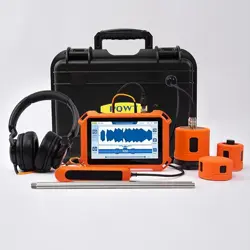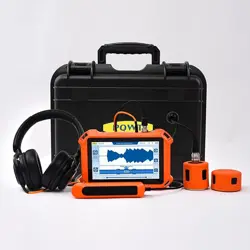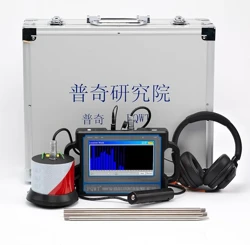

Operation Manual for Latest PQWT-CL200/300/400/500/600
Water Pipe Leak Detector
Contents
Foreword.......................................................................................................................2
Caution..........................................................................................................................2
Technical Parameters...................................................................................................3
Instrument structure and name...............................................................................3-6
PQWT-CL200..........................................................................................................3
PQWT-CL300.........................................................................................................4
PQWT-CL400........................................................................................................4
PQWT-CL500.........................................................................................................5
PQWT-CL600.......................................................................................................5
Introduction and how to use..................................................................................6-16
Headset Instructions............................................................................................6-7
Function Overview..............................................................................................7-8
Function Introduction.......................................................................................8-10
How to use......................................................................................................10-16
Instrument Working Mode.....................................................................................16
Spectral Analysis..............................................................................................17
Filter Analysis................................................................................................. 17
Location Mode.................................................................................................18
Long-Term Mode.........................................................................................18-22
Faults and Diagnostics.............................................................................................22
Guide for After-sale Services......................................................................................22
Statement....................................................................................................................22
First Edition, 2025

Foreword
Hunan Puqi Geologic Exploration Equipment Institute is a professional institution in
china who engaged in the R & D, manufacturing and selling of Geophysical
Prospecting Instruments, Pipeline leak detector, Underground metal detector and
Borehole inspection equipment. More than 200 staffs, including 16 senior engineers,
49 intermediate engineers.
Over the years, Puqi focuses on Hydrogeological exploration, Intelligent data-capture
technology and Application of special technique, carrying out Scientific research,
Technical services and Marketing application. We have completed more than 65 items
including National ministries, Sino-foreign cooperation and major scientific research
projects. Having the honour to win a number of national research awards, with more
than 117 national patents.
Meanwhile, Puqi has established long term cooperation relationship with many
scientific research institutes in Germany, US, Australia, Hong Kong and other
countries and regions. Number of geological data laboratories has been established at
multiple places in china, using our own unique software to carry out long term data
collection, analysis and detection for different geologic structure, and set up the
differential database of different geologic structure area.
Caution
1. The instrument early in the design has been fully taken into account the use of the
extreme environments. But still have to pay attention to the correct method of
operation, please do not fall equipment deliberately, proper use will extend the life
of the instrument.
2. The instrument is not waterproof, please do not immerse the instrument in water or
operate in the rain.
3. Please do not strike LCD screen, do not expose the monitor for a long time in direct
sunlight, if there is a touch faulty, please shutdown and restart.
4. To ensure the high sensitivity of the sensor, please gently, do not beat;
5. After using, please clean the instrument and load it into special box, please place
the parts into the corresponding position, do not crush the screen.
6. The instrument should be placed in a cool and dry space.
7. Please do not disassemble the instrument, otherwise it will cause the sensor failure
and system crashes.
8.The battery internal circuit will turns off the output when charging, You don’t need
to take out the battery for charging
6
Technical Parameters
Instrument picture
PQWT-CL200/300/400/500/600
Model No.
Dept
h
Frequenc
y Range
Frequen
cy
Binning
Audio
Amplifier
gain
Operation
Mode
LCD
Live
Record
Power
Supply
Worki
ng
Tempe
rat
ure
Stand-b
y Time
PQWT-CL2
00
2
meter
1-5000Hz
31
central
frequenci
es
and
Common
frequenci
es
Adjustable
within 100
levels
Spectrum
Analysis
、
Filter
Analysis
、
Point Measure
ment
and Precise M
easurement
7-
inch cap
acitive t
ouch scr
een(80
0x480)
The device has
long-
term recording
storage and pl
ayback functio
ns.
The data will n
ot be lost when
the device is tu
rned off.the dat
a can be delete
d and recorded
repeatedly
3.7V/4000
mAh
Lithium
Battery
-10℃
-
+50
℃
10
Hours
PQWT-CL3
00
3
meter
1-6000Hz
PQWT-CL4
00
4
meter
1-7000Hz
PQWT-CL5
00
5
meter
1-8000Hz
PQWT-CL6
00
6
meter
1-9000Hz

6
Headset Instructions
1 Button Instructions
1) < : Volume increase (when the headphone volume is at the maximum or least, the
headset will produce a short fine tuning)
2) > : Volume reduction
3) : MFB function button (ON/OFF)
4) AUX-IN: 3.5 mm interface
5) Micro USB charging interface
6) Noise reduction switch indicator light
7) ANR: Noise reduction switch button (To open the Noise control, hold down the
ANR button till green light on. To shut down the Noise control, hold down the ANR
button till green light off)
2 Charging Instructions
Attention: Please charge it to full electricity before first using.
Connect the USB socket on the headphone shell with any device with USB port via
the USB charging line, and the LED indicator becomes red light indicate charging.
The first charge time is 2-3 hours, then 1-2 hours each time for charging. When the
charging indicator shows the green light, it is full of electricity.
3 Operation instructions for Power switch
1) Turn on the machine: Press and hold the switch button until you hear the prompt,
then the LED is blue and the button can be loosened.
2) Shut down the machine: Press and hold the switch button, until you hear the
shutdown prompt, the blue LED flashing 2 seconds then go out, you can release the
button.
4 Noise reduction function description
1) When you open the ANR the switch button is to open the noise reduction function,
at this time you can hear the hissing noise, which belongs to the normal phenomenon
of switching function, and the indicator light is green. If the light does not shine, you
need to charge it before using.
2) Noise reduction function is mainly to eliminate low-frequency noise, but it does not
mean totally noise reduction.
3) The effect of noise reduction depends on the way you wear headphones. Please
wear them correctly.
4) If you are in a very quiet environment, you should not open the noise reduction
function.
5 Data specification

6
1) Headphone data 2) Battery data

7
Horn unit: Φ4*1.5mm
Magnet: 0mni-directional
S.P.L:-42 + 3DB S.P.L at 1KHz
Impedance: ≤ 2.2KΩ
Frequency response: 100Hz - 10000Hz
Operating voltage: 2V
Battery type: 360mah polymer
Charging mode: Micro USB
Stand-by: more than 480 hours
Charging time: 1-2 hours.
Running temperature: -10℃ - 70℃
Storage temperature: -25 - 60
6.Common fault description
A1. Why can't turn on the machine?
Answer: If headset has no power, please use USB charging.
A2. Why does the noise reduction function not work?
Answer: Please check whether the noise reduction function is turned on. If the green
light is on, the noise reduction function is turned on. If not, please turn on or charge
the machination.
A3. Why the noise reduction function is so bad?
Answer: Maybe the ear cap is aging or loose. Please check the ear cap or replace it.
Introduction and how to use
Function Overview
PQWT-CL200,300,400,500,600 series type pipeline leak detector is high performance
leak detection equipment, has powerful anti-jamming and data processing capabilities,
you can make your work easier. It has the following main features.
1. The use of latest digital signal processing chip and a digital filter chip, 16M cache
controller integrated, more responsive. In particular, it can filter with the interference
of environmental noise, screening out the leakage noise, allowing the operator to lock
leakage points quickly.
2. 7-inch high-definition digital color LCD touch screen with a resolution of 800 *
480, provide 12 display pages, can show the measurement parameters more clearly
and intuitively, and full touch screen design, simple operation.
3. Each has 1 ~ 5000Hz, 1 ~ 6000Hz, 1 ~ 7000Hz, 1 ~ 8000Hz, 1 ~ 900Hz, frequency
range ( spectrum analysis ) , can be displayed the distribution of the noise signal at
each frequency in real time.
4. Automatic drawing continuous noise curve ( Location Mode) within a certain time,
so that the leakage point position is determined more quickly.
5. Sensor is built-in preamp circuit, using a rubber ring seal and cushion, and the
application of professional acoustic methods, making the ability to capture the noise is
higher than similar products.
6. Adopt latest noise detecting element, sounds clear.
7. The number and time of recordings is unlimited, which is not lost after shut down,
could be analyzed at any time.
8. Using a large capacity battery, can work for more than ten hours , and can be
removed charging and online charging.
9. Super anti-jamming circuit design, digital signal and analog signal effectively
isolate and eliminate the noise generated by the digital circuit.
Function Introduction
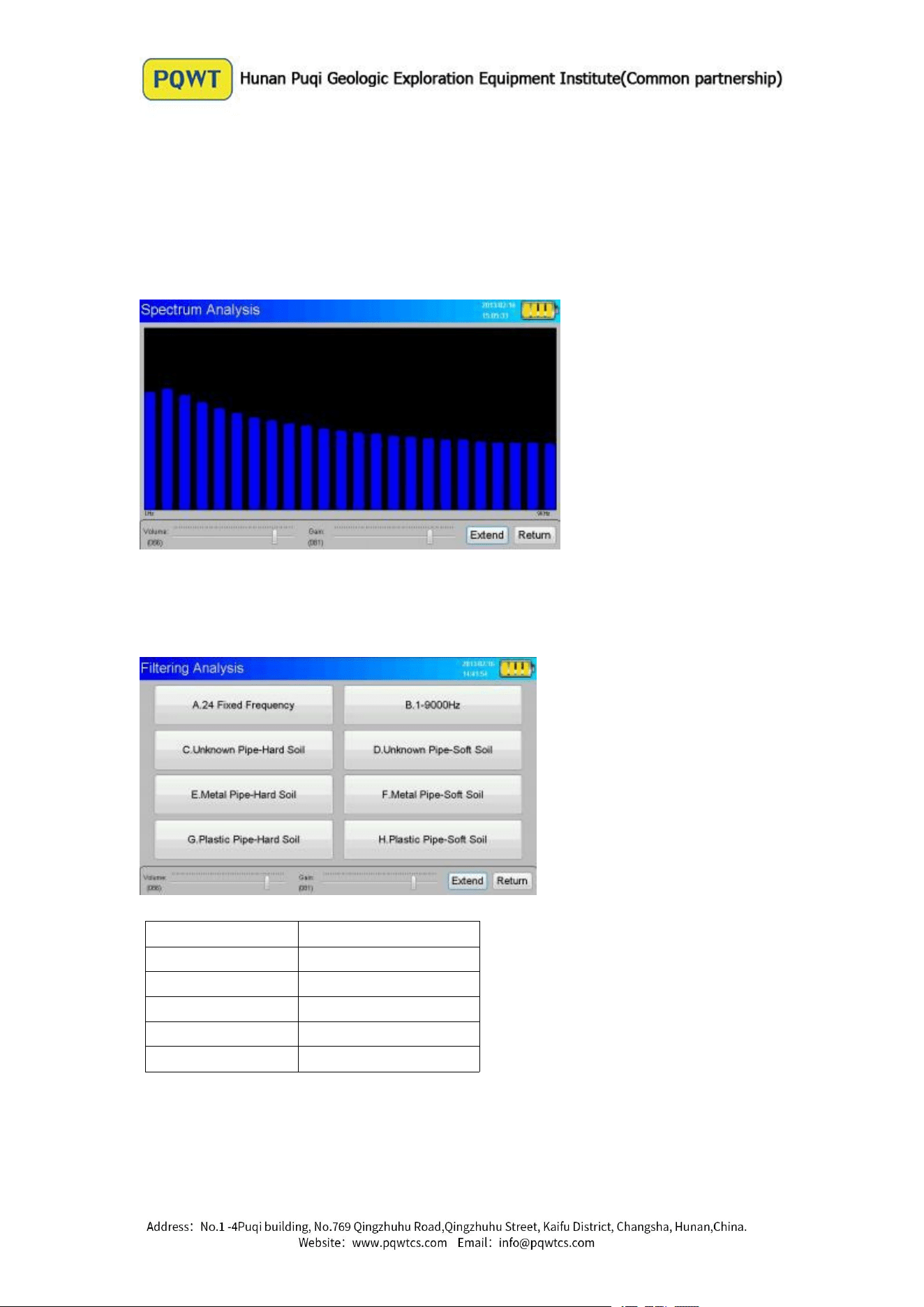
Spectrum Analysis
It can display the corresponding instantaneous noise signal in corresponding
frequency range.
Filtering Analysis
Choose to display corresponding transient noise signal within a frequency range.
Model No.
Frequency Range
PQWT-CL200
1-5000HZ
PQWT-CL300
1-6000HZ
PQWT-CL400
1-7000HZ
PQWT-CL500
1-8000HZ
PQWT-CL600
1-9000HZ
NOTE: Above is the corresponding frequency range table to each model No.
Live Recording
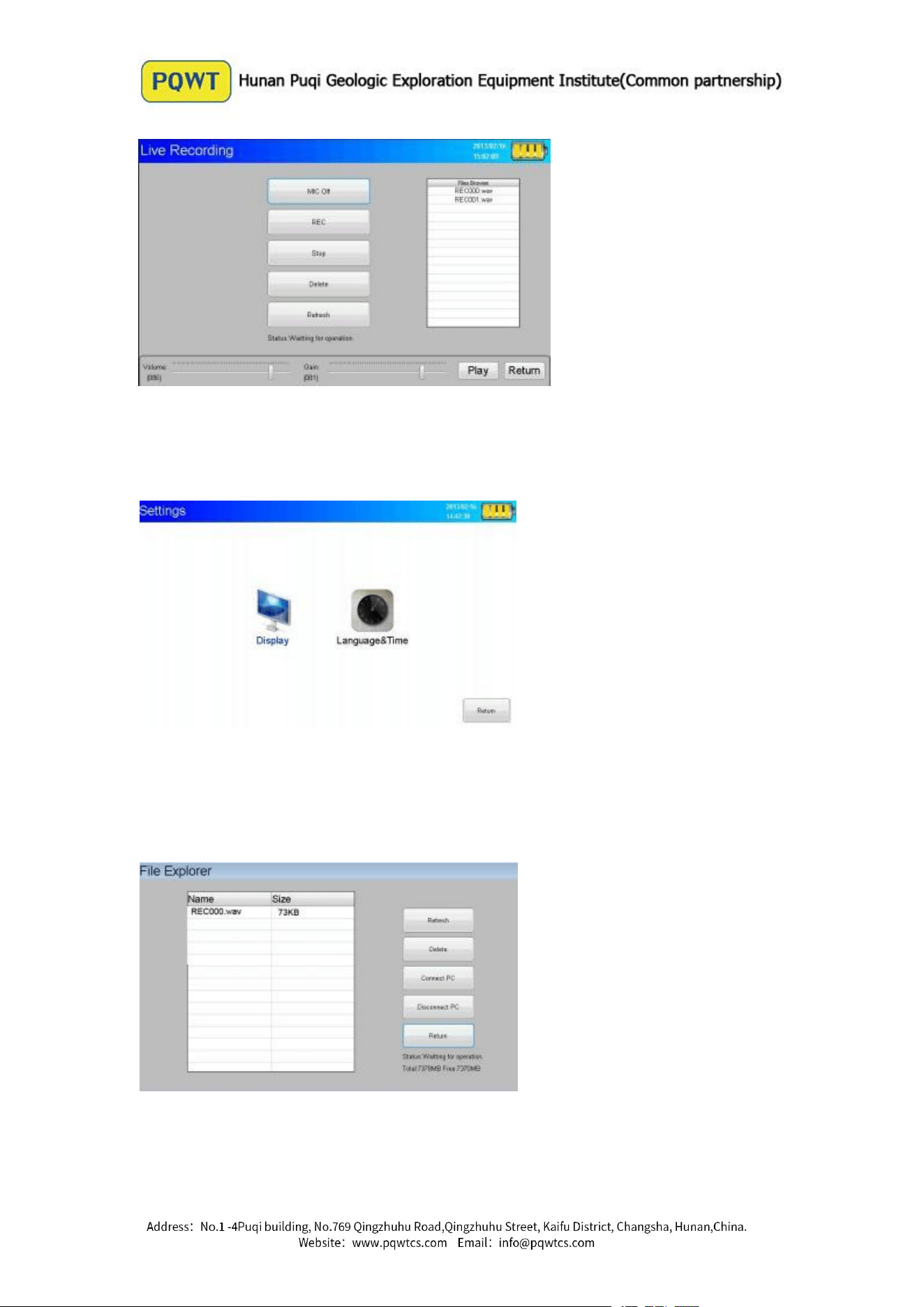
The number and time of recordings is unlimited, which is not lost after shut down,
could be analyzed at any time.
Settings
Brightness adjustment and calibration of the touch screen(To adjust brightness large to
observe easyly in bright light, turn down brightness in point measurement mode or
without viewing screen to reduce power consumption, extend the single-use time)
File Explorer
You can always view the saved noise file to facilitate the late positioning of the leak, and use the
USB to connect the computer to save the noise file
About
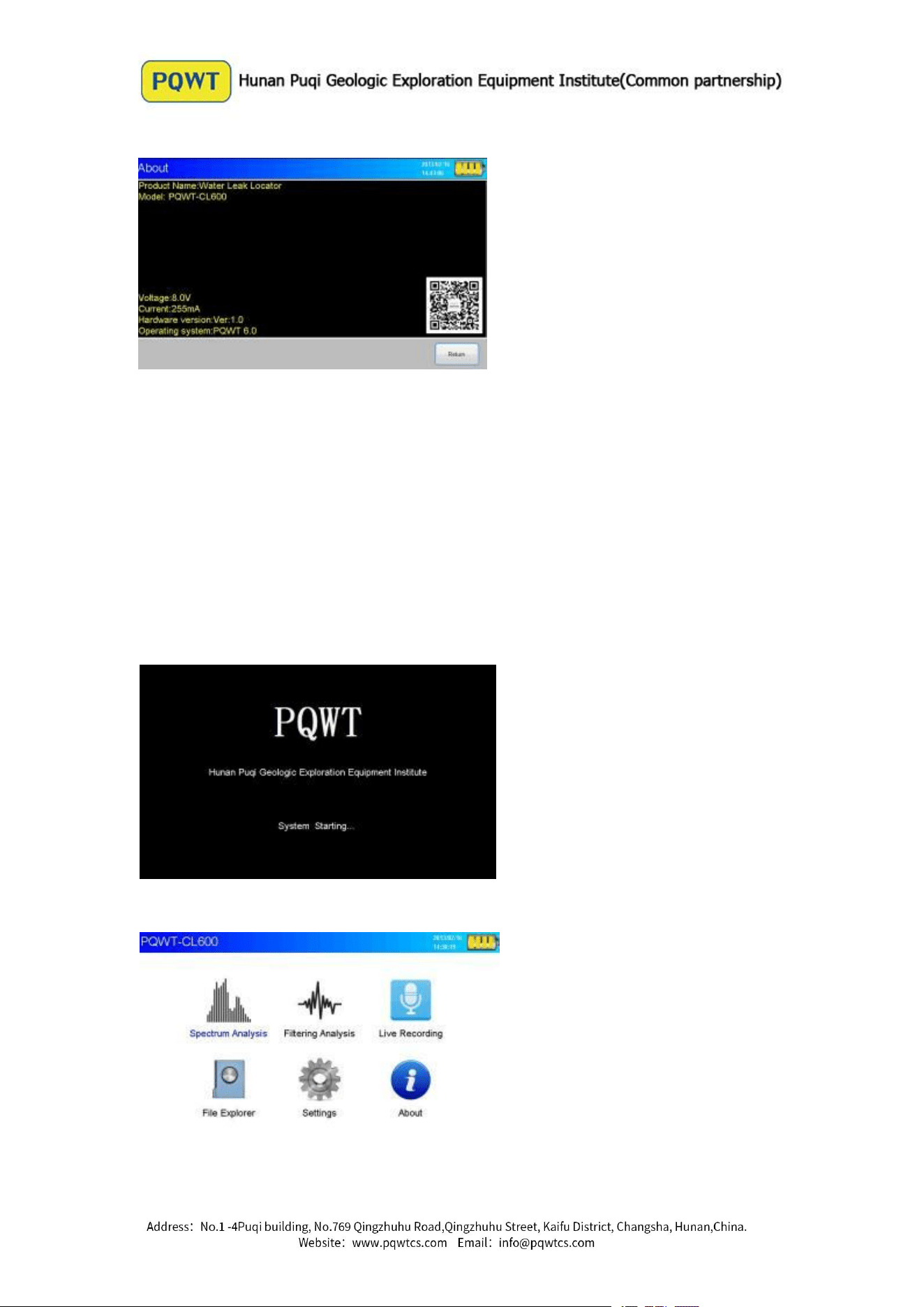
How to use
Assembly
Before starting work, need to assemble the various components according to the
following requirements to ensure work properly.
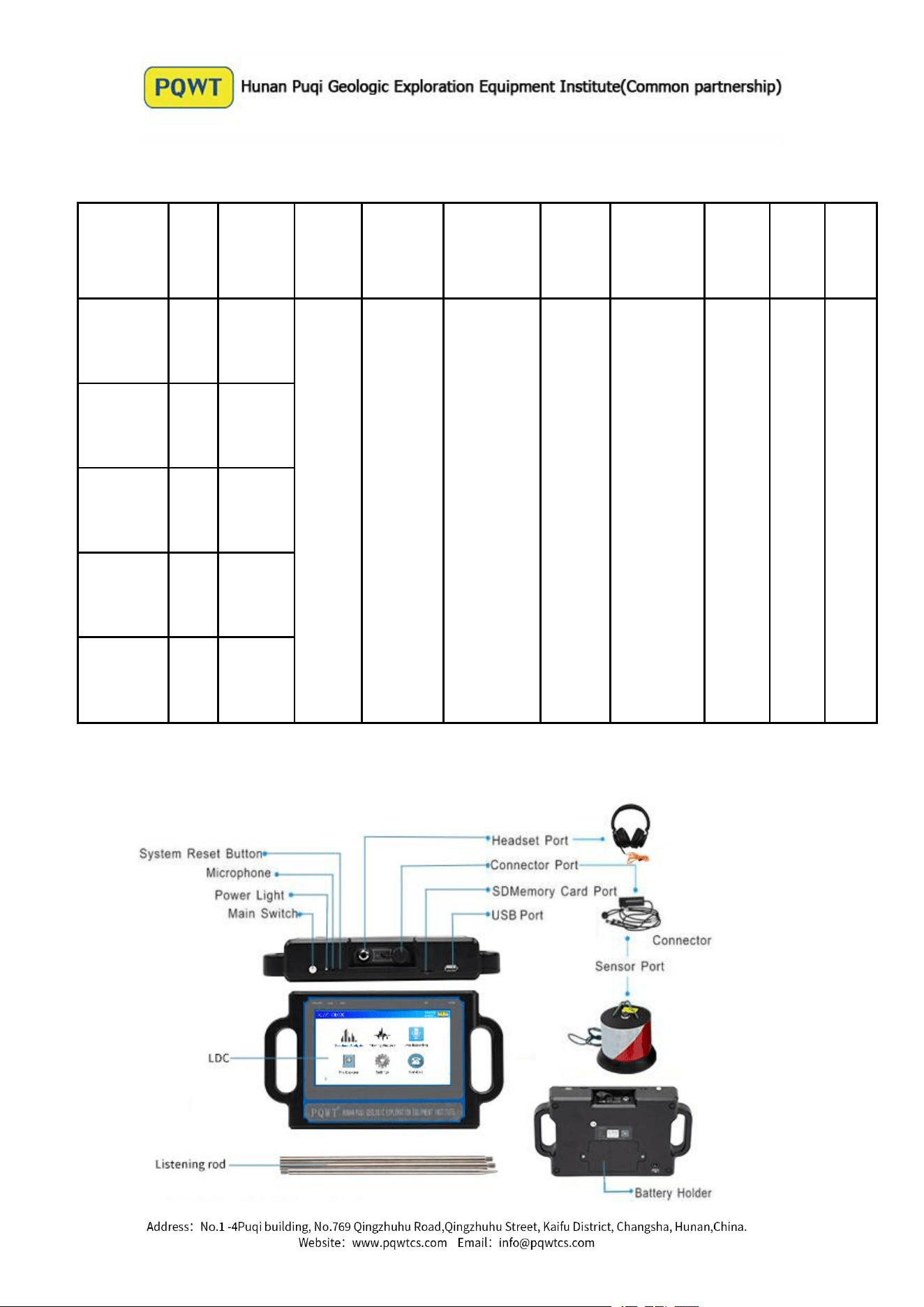
( 1) Plug five core cable into the host sensor interface and screw locking
( 2 ) Plug four-core cable into the interface of sensor and mounting screws ;
( 3 ) Headphone into the headphone jack and make sure the connection is correct .
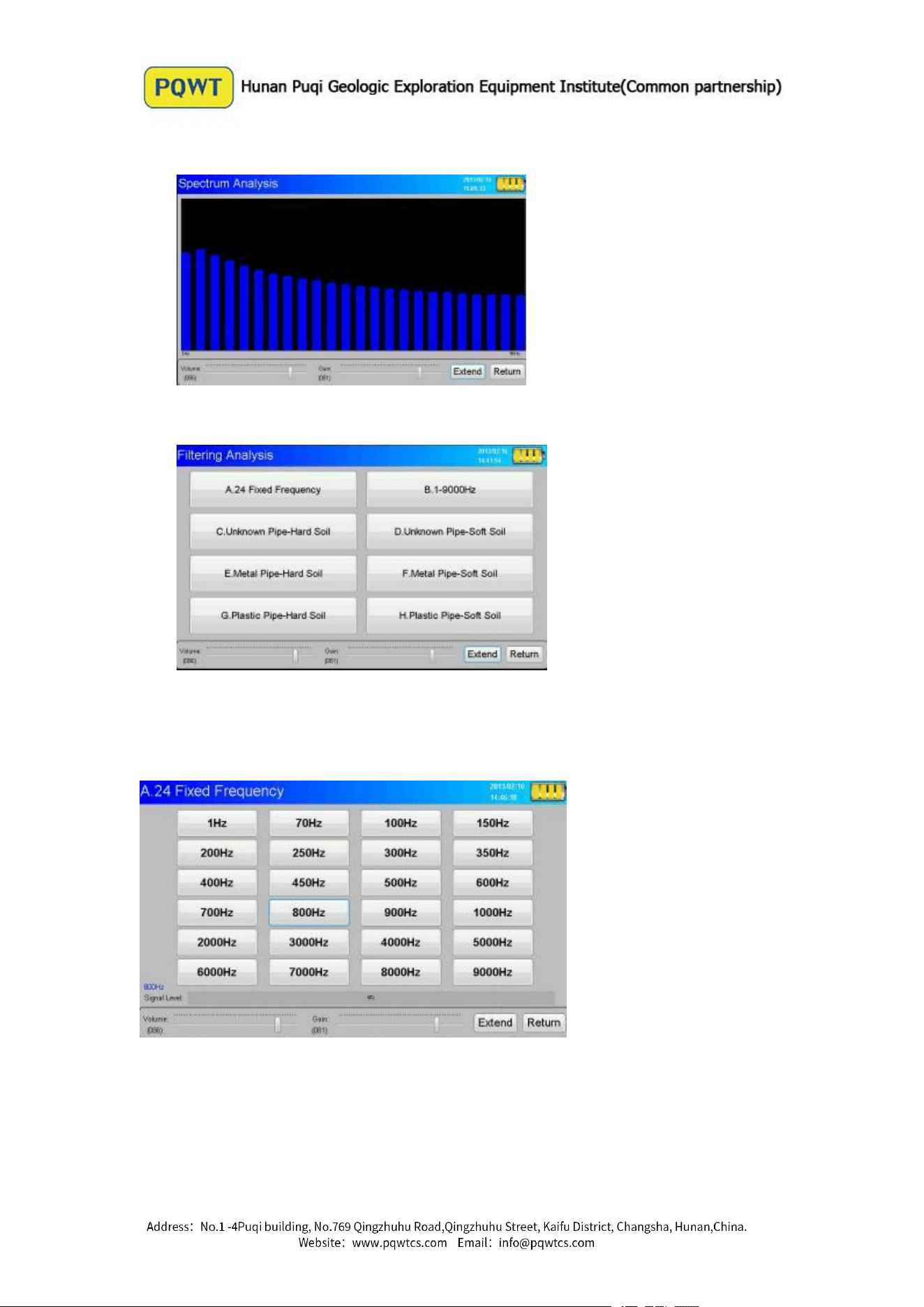
2. Operation (PQWT-CL600 as example )
Turn on the power switch into the boot interface
System enters standby screen after a successful start
In the standby interface can see the current battery power and six function menu, click
one of them can be selected, double click can enter into directly.
11
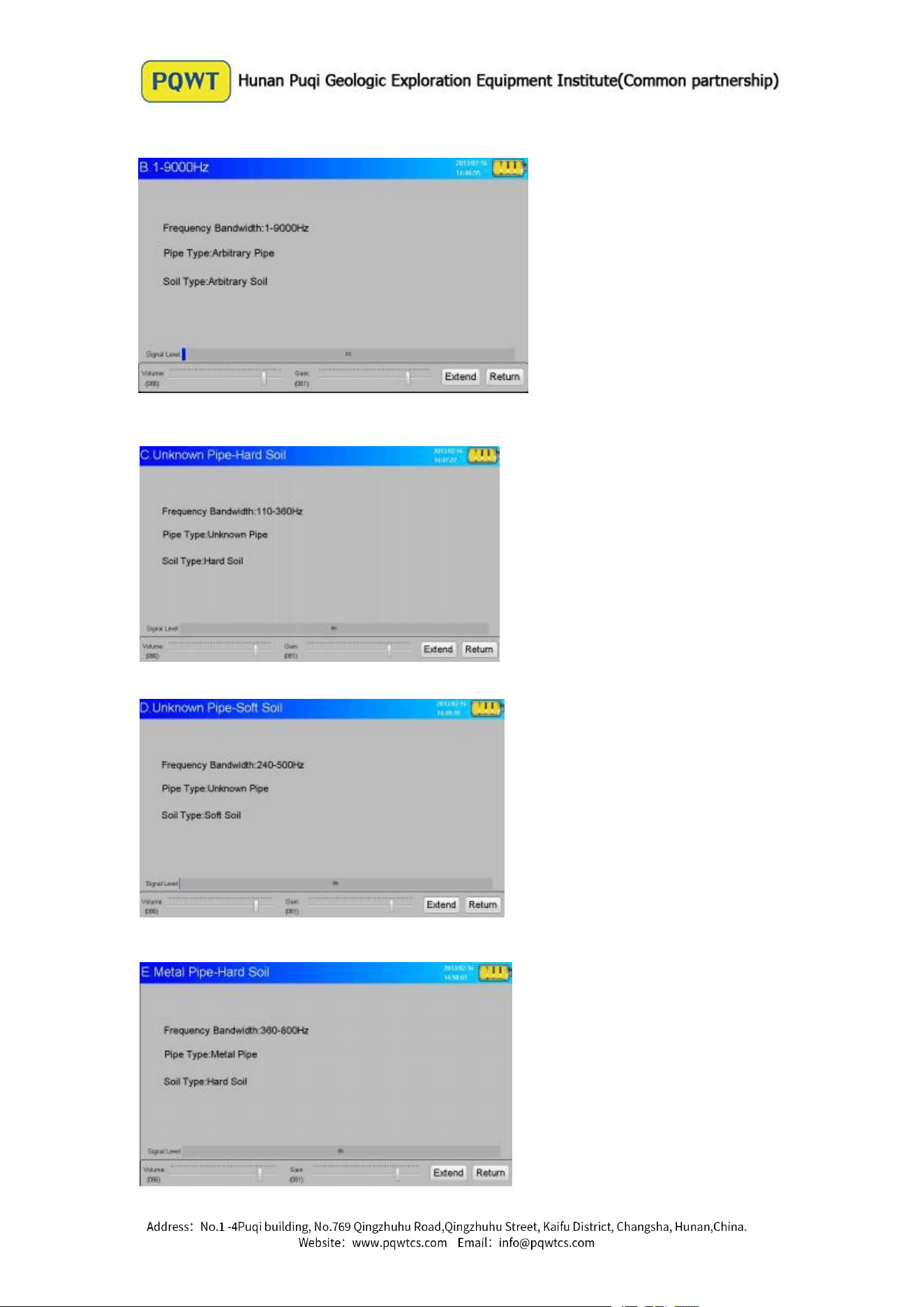
Enter the " Spectrum Analysis "
Enter into the " Filter Analysis ", the eight options, click into the item
respectively.
Select and enter "A. 24 fixed frequency ", you can see there are 24 center
frequency within the menu, click to select one of the center frequency. The center
frequency of each model as shown below:
Select and enter " B. 1-9000Hz "
Select and enter " C. Unknown Pipe - Hard Soil "
Select and enter " D. Unknown Pipe - Soft Soil "
Select and enter " E. Metal Pipe - Hard Soil "
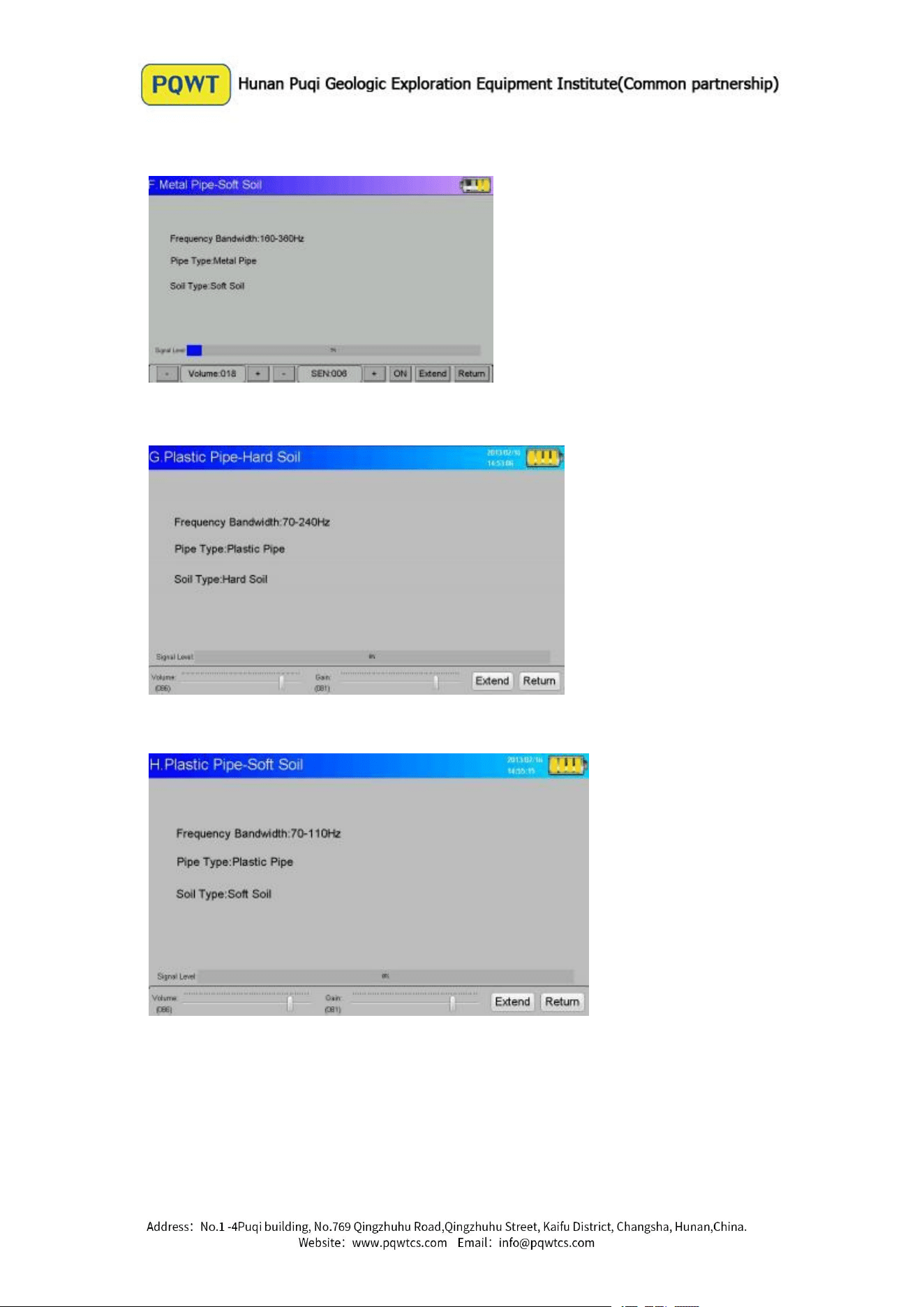
Select and enter " F. Metal Pipes - Soft Soil "
Select and enter " G. Plastic Pipe - Hard Soil "
Select and enter " H. Plastic Pipes - Soft Soil "
Select and enter into the " Live Recording "
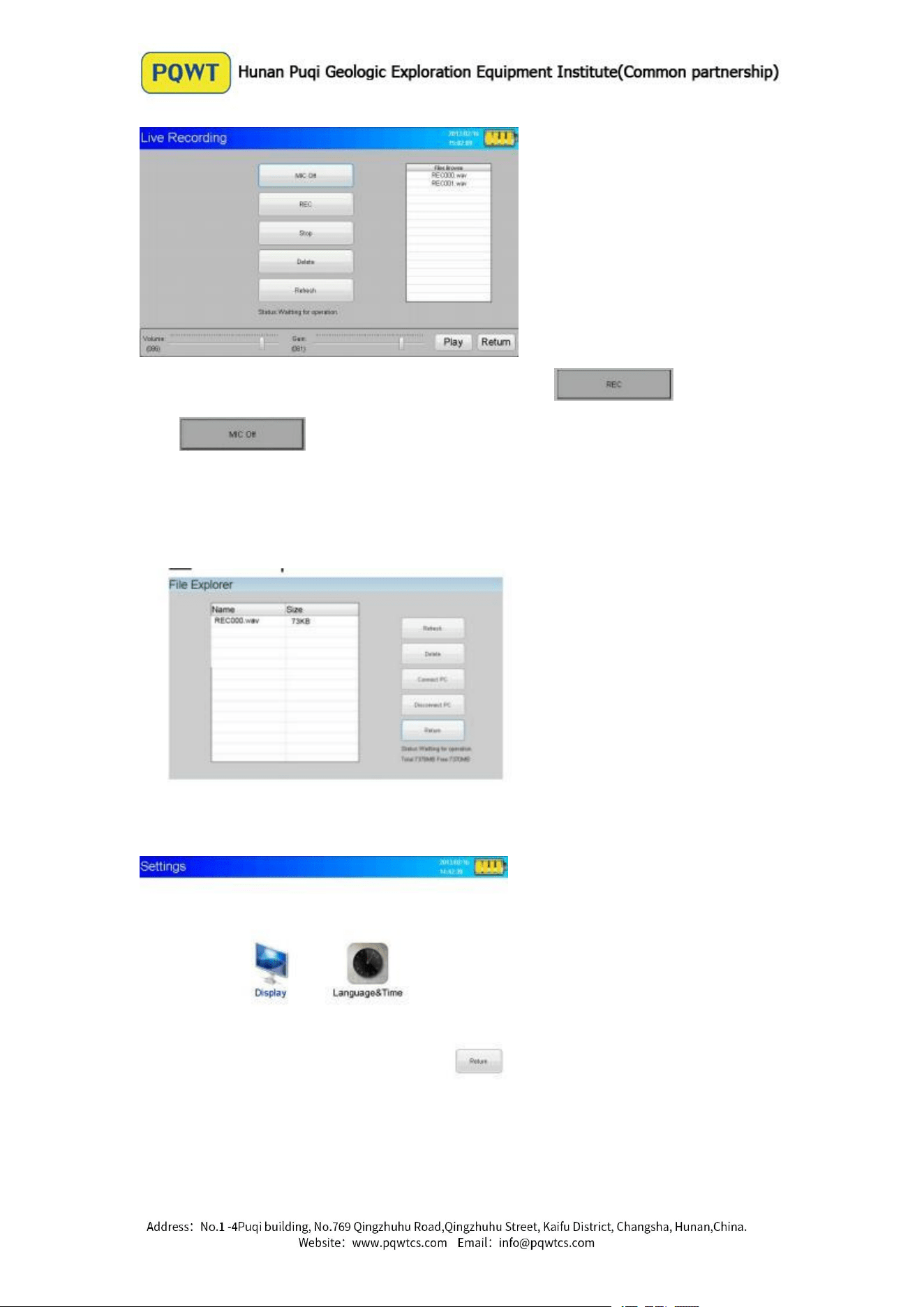
After entering, it can Save the recording of noise, Click start recording.
Click , the operator can record voice, it is convenient to distinguish
the location later. Click “Stop”,the recording information will be saved to the SD card.
Selecting “ Files Management”, you can intuitively see their own stored files can also
be connected to the computer to view.
Selecting “ settings”, you can see two function selection, click to enter separately.
Click to enter “Display” for brightness adjustment.
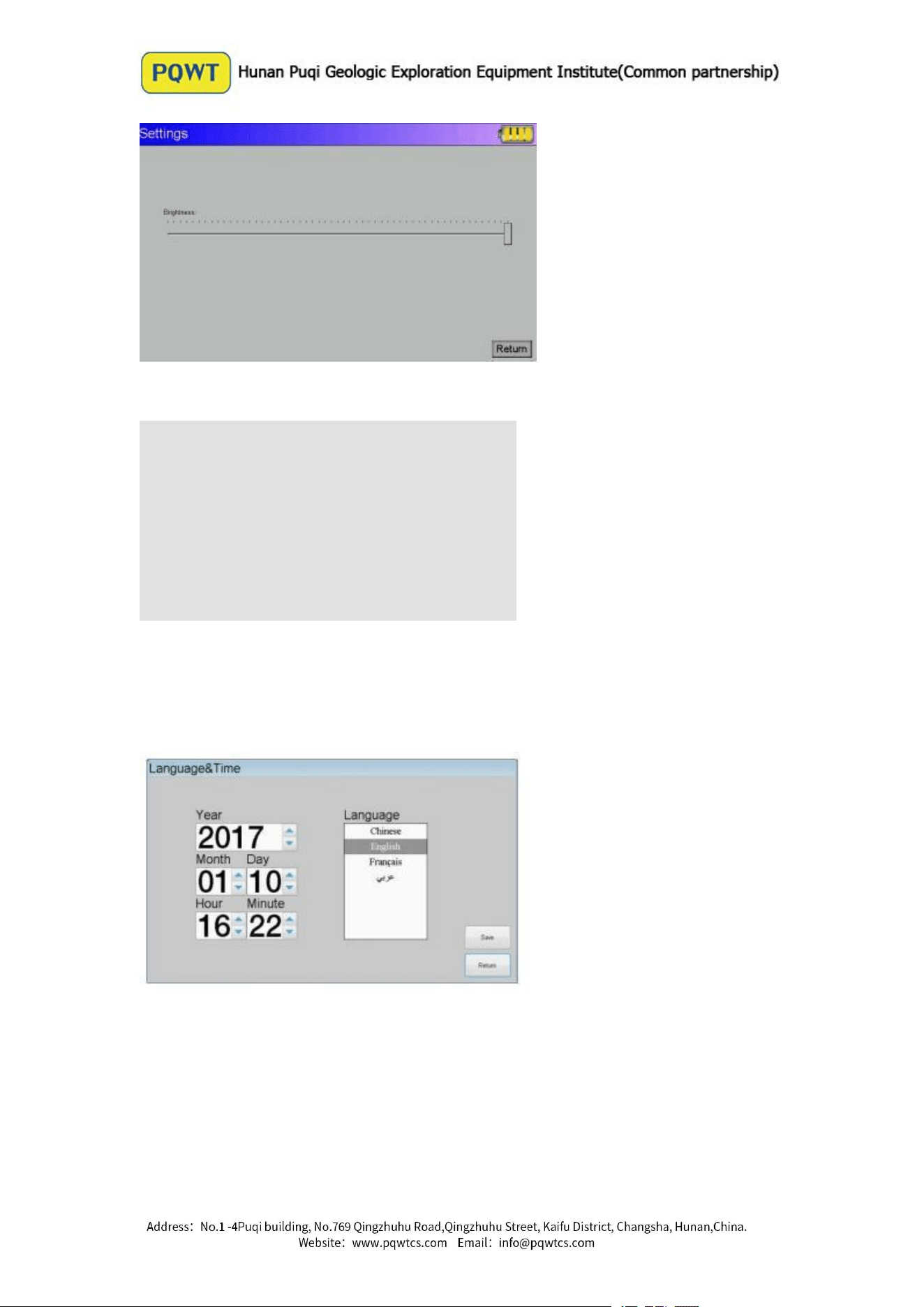
Click into Touch Calibrate.
After entering the calibration interface, follow the prompts on the interface to
calibrate the screen (you can also press and hold the screen for several seconds with
your fingers until you enter the screen).
Click and enter into the “ Time & Language”
You can set “ Time & Language” in there
Instrument Working Mode
Spectrum Analysis Mode
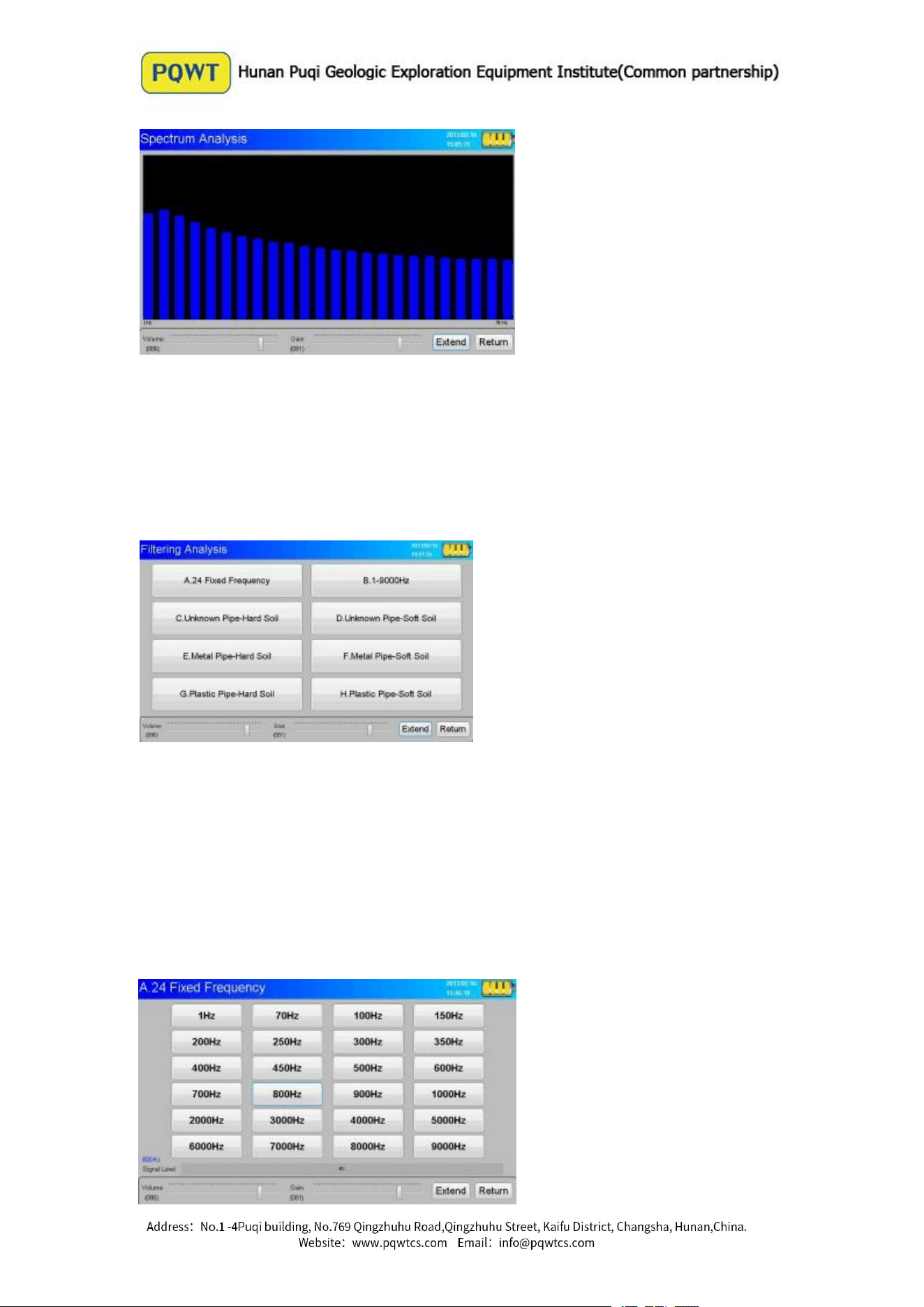
Screen display instantaneous noise signal within 1-9000Hz range. Scroll bars
indicate the noise intensity corresponding to the band. Volume and sensitivity default
is 100 , through the "+ - " to adjust.
( The volume is according to the demand like 35,
and the regular the Gain is around 10)
Filtering Analysis Mode
A ~ H screen display total of 8 select buttons , this options is the eight test
conditions were based on the actual frequency corresponding configuration. Click to
select one of the options, once again click to enter the option.
PQWT-CL600 as a example, "A. 24 Fixed Frequency ", you can see the 24 selection
buttons, click to select one which indicates the center frequency of the band-pass filter.
Scroll bar on-screen indicates the instantaneous intensity of the center frequency of
the noise signal , and the right side of the scroll bar represents the corresponding value
of the noise signal . (
Regular choose the frequency at 200-1000Hz)
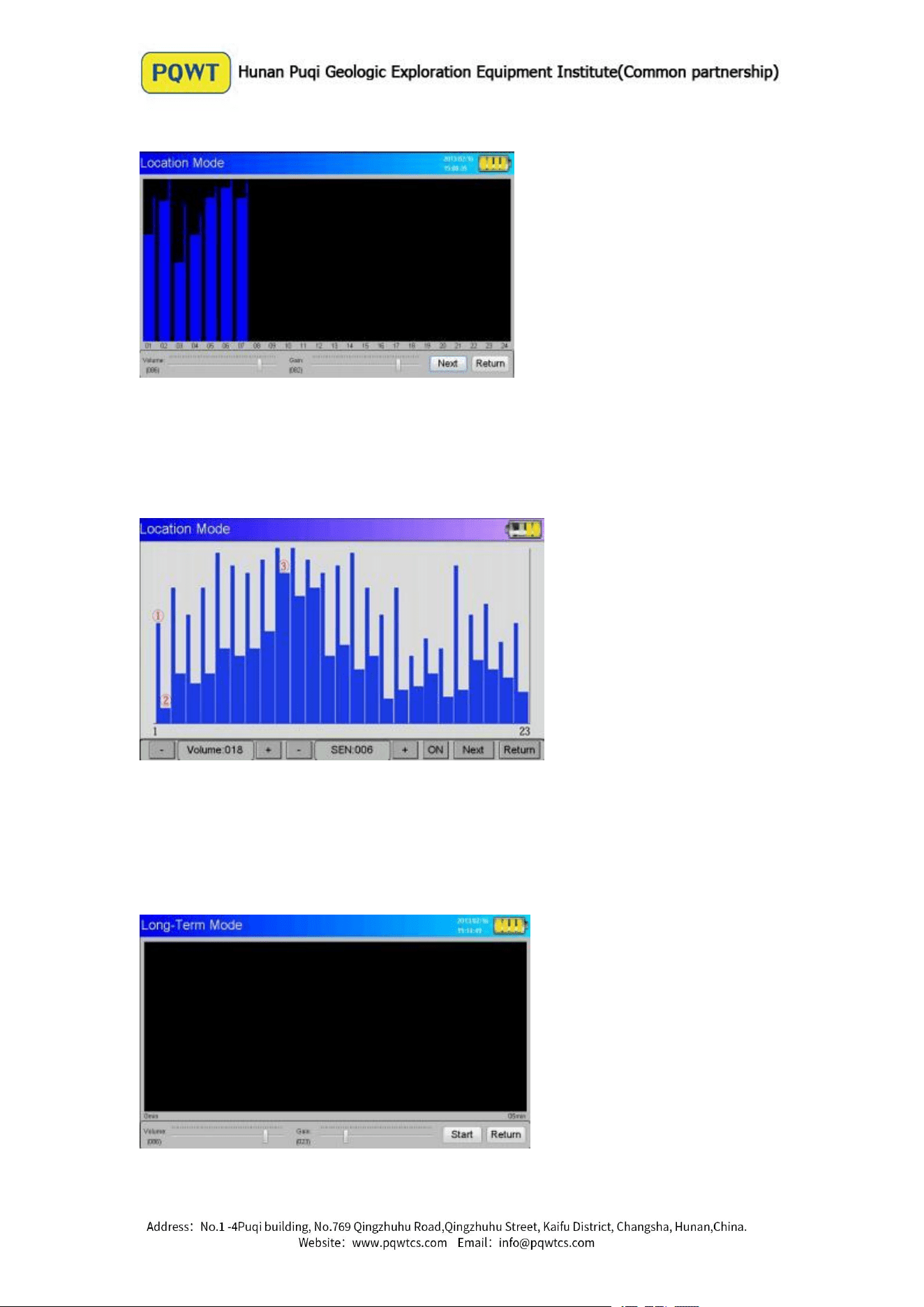
Location Mode
Location mode refers to the precise detection mode. It is designed for detecting in a
noisy environment. Don’t need to wear headphones while using this mode, it can
eliminate the interference of environmental noise, capture suspected leak signal by
software automatically. The following diagram as example :
instantaneous Value (The slimline is Ambient Noise)
2. The Minimum Value ( The thick line is Leak Noise)
3. Suspected Leakage Point ( The high spectrum indicate the leaking point)
Long-Term Mode
Long-Term Mode refers to conduct further analysis to determine the suspicious
leakage points detected in preliminary investigation. It is in order to exclude
suspected leak but is actually three direct links, noise impact sound of water at the
valve or other underground facilities issued in order to find the true leakage points and
design. Also you don’t need to wear headphones while using this mode.
Using point measurement mode, the sensor must be fixed at a certain suspicious
leakage point, choose a good monitor time (5 minutes, 10 minutes, 15 minutes, 20
minutes, 25 minutes, 30 minutes) to record the minimum value of each segment of the
noise signal within a given time automatically.
Long-Term Mode can be divided into the following two conditions:
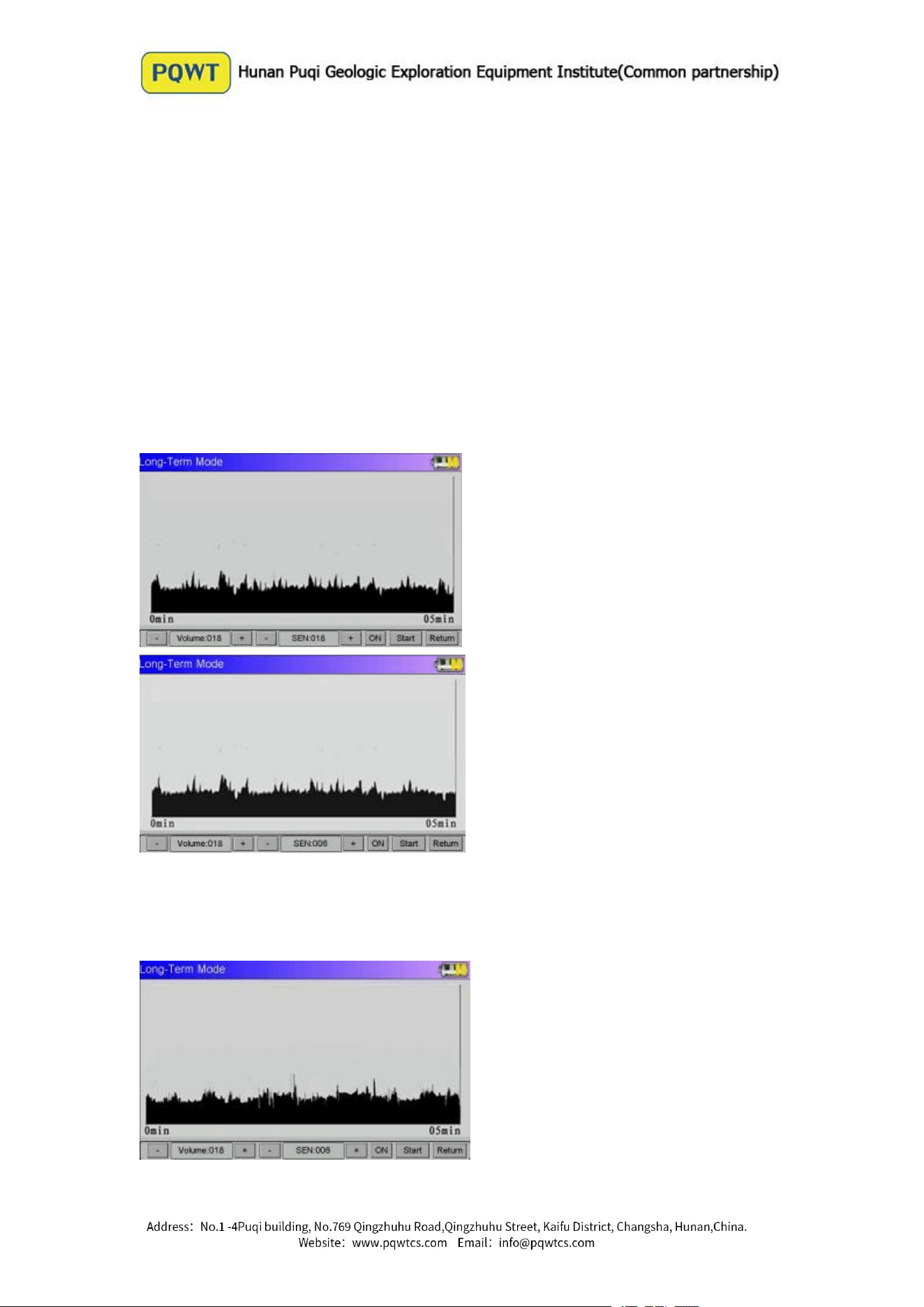
(1) The sensor direct contact with the pipe for continuous monitoring
Pipeline flow is small: whether to raise or lower the sensitivity, the curve
volatility is not big, can judge where is not the leakage point. (See Figure 1,
Figure 2 )
Figure 1
Figure 2
Whether to raise or lower the sensitivity, the curve volatility is big, can judge where
leaks . (See Figure 3, Figure 4 )
Figure 3
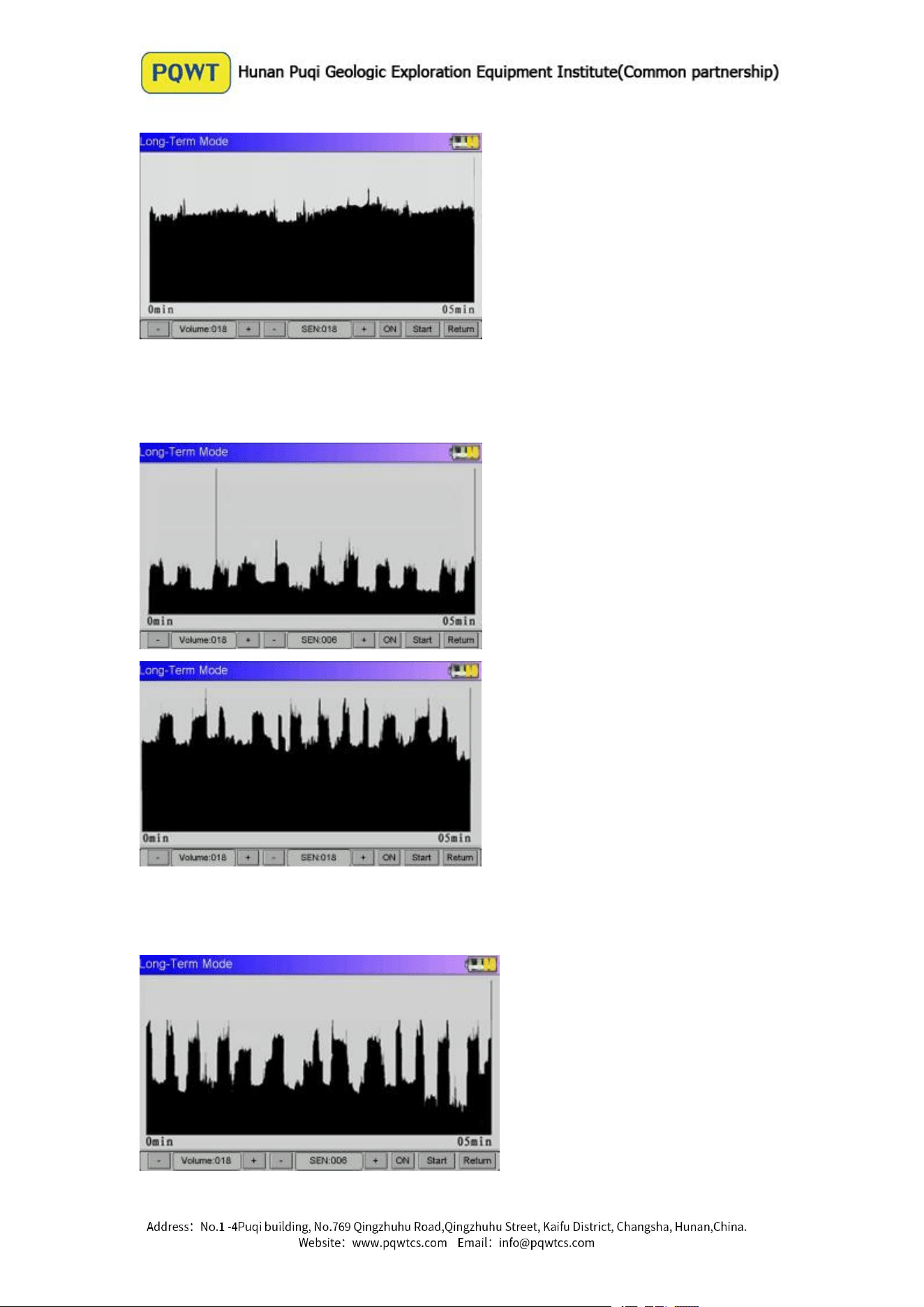
Figure 4
Intermittent increase and decrease in water pipes and a larger amplitude: whether
to raise or lower the sensitivity, the recess amplitude of increase and decrease is
not big, can judge where no leaking. ( See Figure 5 , Figure 6
)
Figure 5
Figure 6
Whether to raise or lower the sensitivity, the recess amplitude of increase and
decrease is big, can judge where is the leakage point. ( See Figure 7, Figure 8
)
Figure 7
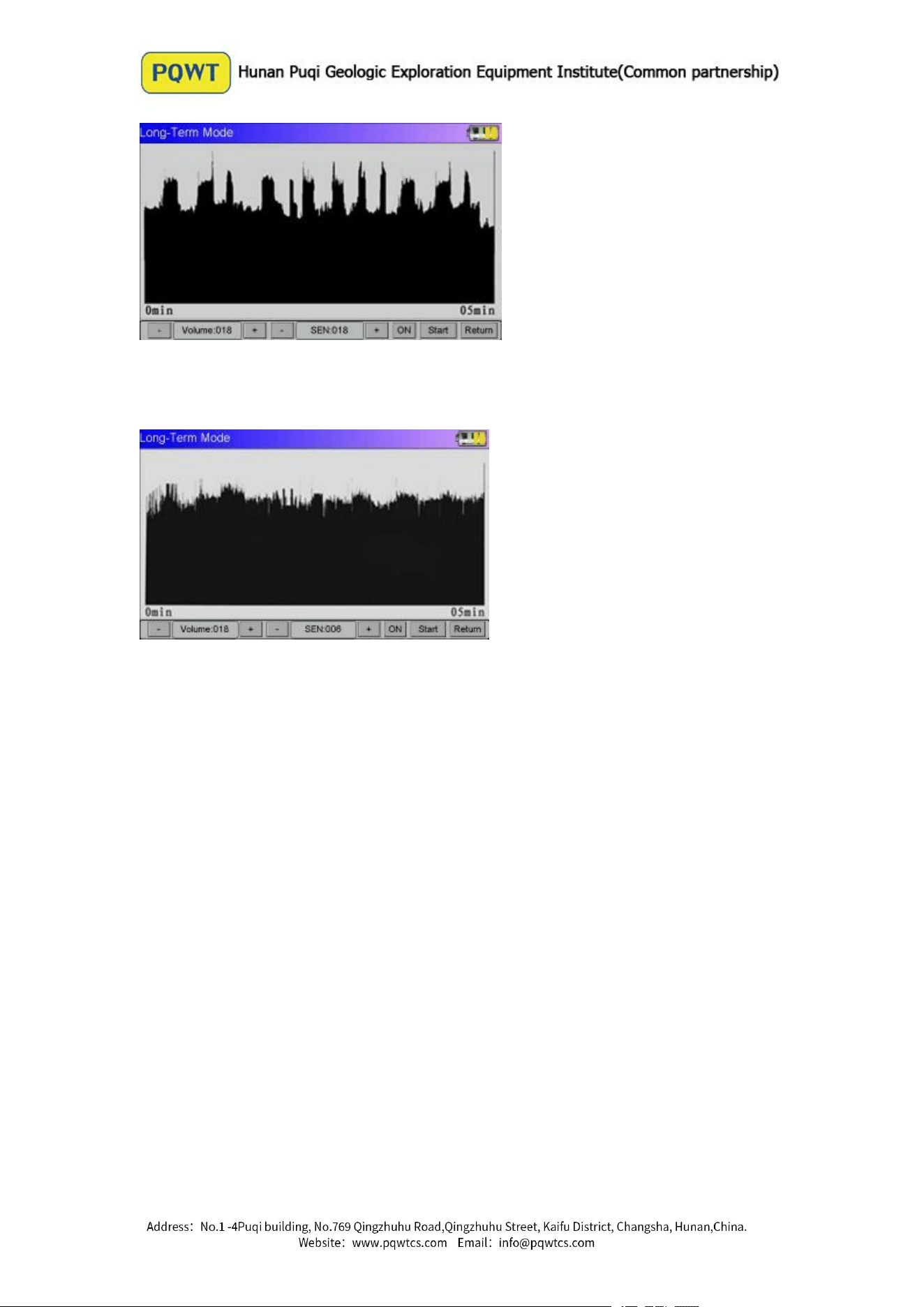
Figure 8
Pipeline Flow is Larger
Whether the sensitivity is raised or lowered, curve magnitude has been higher in value,
can’t judge the leakage point, should find another time monitoring. (See Figure 9)
Figure 9
(2) The sensor is placed on the ground above the water leakage point, carrying out the
continuous monitoring of two different periods of peak water and low peak. In this
case, the value of the sensitivity should be set to the same value.
In the same suspected leakage point, curve amplitude is high in peak water while the
curve is at the low peak showed higher amplitude. Proving low water peak, because
the water pressure increased, leakage noise enhance, resulting in the amplitude of
curve increased, can judge where leaks. ( See Figure 10 , Figure 11
)
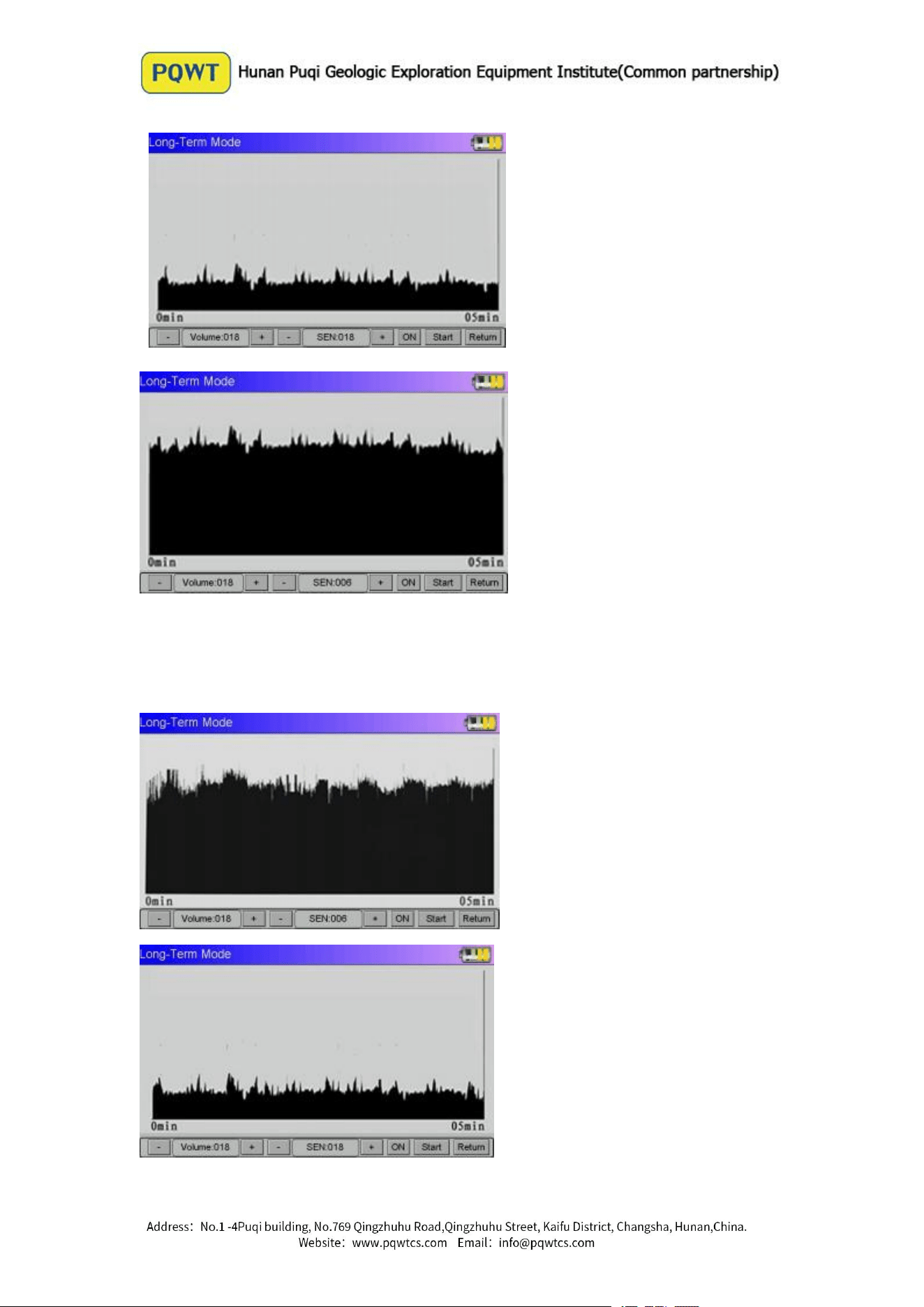
Figure 10
Figure 11
In the same suspected leakage point, curve amplitude is higher in peak water
while the curve amplitude reduce at the low water peak. ( See Figure 12, Figure
13
)
Figure 12
Figure 13

Proving in water peak, the monitored noise is the sound of water or other external
causes, it can judge where is not the leakage point.
Faults and Diagnostics
Fault Description
Caused Reason
Method of Exclusion
Booth No Display
Low battery
Test takes about 5
seconds
The internal circuit close
when charging status
Charge the battery or
replace
Waiting for self-test
Unplug the charger
Instruments Boot No
Reaction
Sensor poor contact
Low battery
Check the sensor cable
Charge the battery or
replace
No Sound From
Headphones
No signal output from
main interface
Headphones failure
Click into work mode
Replace the headset
Headphones Too Loud
Volume or sensitivity is too
high
Turn down volume or
sensitivity
Touch Unresponsive
Operation Error
Equipment failure
Press the power key to
restart
Contact vendor to inspect
Guide for After-sale Services
Within two years of the purchase date, if instrument quality problems, please send
us the photos, we will send the required part or repair for you. Each of us shall
take care of the corresponding shipping cost on each side.
Instrument warranty does not cover the accident, misuse, neglect, alteration,
modification, magnetized, unauthorized service and damage caused by prolonged
exposure in corrosive salt mixture.
If need to purchase related accessories, you can contact Hunan Puqi Geologic
Exploration Equipment Institute customer service.
Copyright Notice
1. Hunan Puqi Geologic Exploration Equipment Institute has the final interpretation
of the operating instructions.
2. Hunan Puqi Geologic Exploration Equipment Institute reserves right to modify
equipment specification without any advance notice.
3. All pictures for reference only in operation manual, please in kind prevail.
4. Please observe local laws and regulations, Hunan Puqi Geologic Exploration
Equipment Institute will not be responsible for any legal issues which caused by the
instrument.

5. The products of Hunan Puqi Geologic Exploration Equipment Institute are patented
products, If anyone imitates, we would investigate his legal liability.