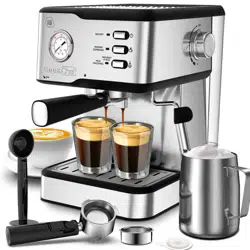
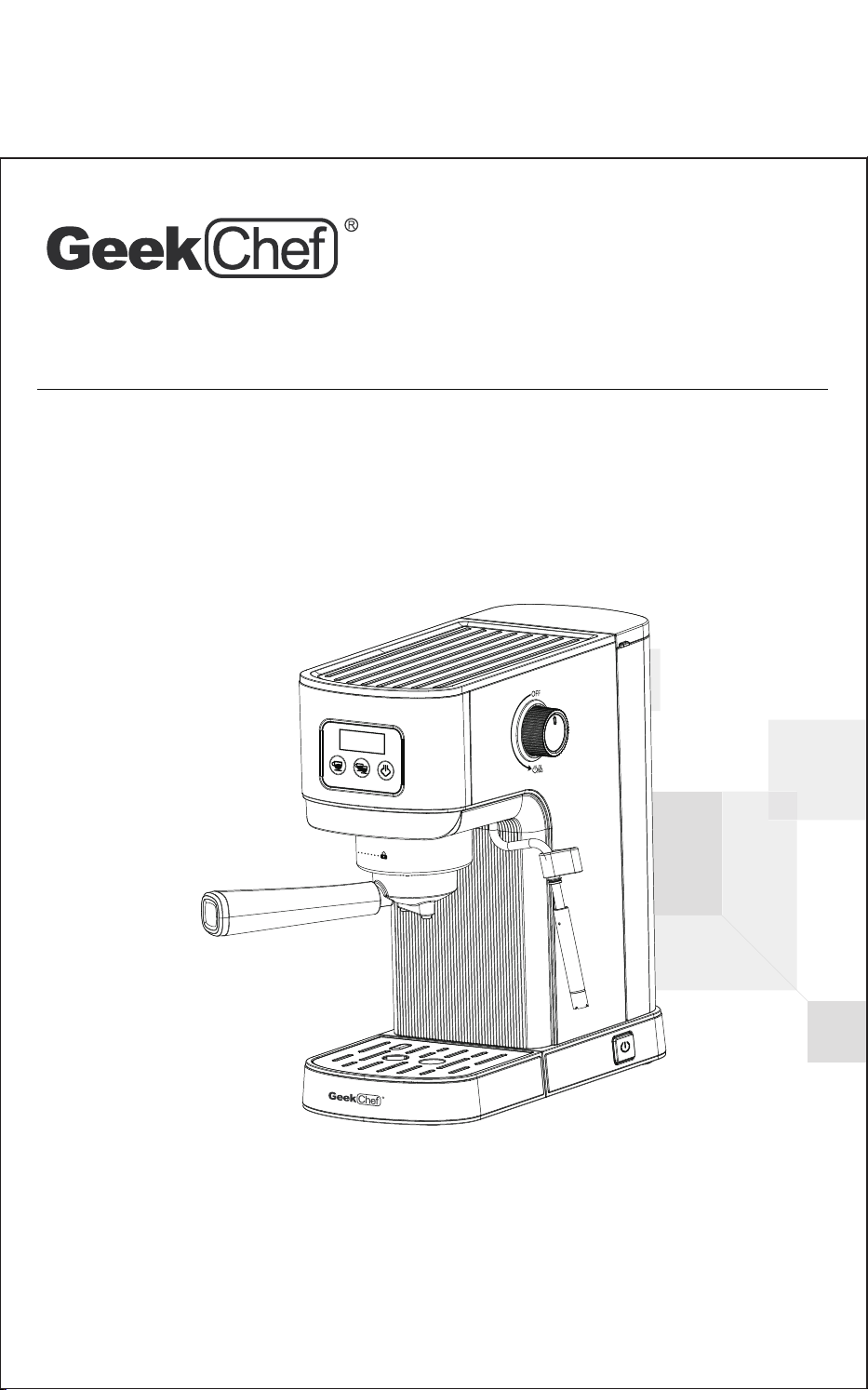
Model No.: GCF20H
User Manual
Espresso Coffee Maker
Toll Free: 1-844-801-8880
IMPORTANT: Read the instructions carefully before operating the
appliance and keep them for future reference.
Model No.: GCF20H
Power : 1350 W
Voltage: 120V~ 60Hz
Pump Pressure: 20 Bar
Capacity of Water Tank: 1.2L / 40.6 fl.oz
Safety Instructions
Product Components
How To Use
2
4
6
Cleaning And Maintenance 17
Troubleshooting 19
Limited Warranty 21
TECHNICAL SPECIFICATIONS
TABLE OF CONTENTS
Scan the QR code for more
assistance and support

SAFETY INSTRUCTIONS
2
IMPORTANT SAFETY INSTRUCTIONS
Before using this appliance, the following basic precautions should always be
followed:
1. Read all the safety and operating instructions carefully and retain them for
future reference.
2. Before using, check that the voltage of the wall outlet corresponds to the
voltage marked on the rating plate.
3. To protect against fire, electric shock, and injury do not immerse the cord or
plug in water or other liquids.
4. The appliance must not be immersed in water.
5. Do not place the espresso machine on a hot surface or beside an open flame,
or near a hot gas or electric burner, or in a heated oven.
6. Do not use appliance for other than intended use.
7. To disconnect, turn to “OFF”, then remove the plug from wall outlet.
Always hold the plug. But never pull the cord.
8. Be careful not to get burned by the steam and hot water.
9. Do not let the espresso machine operates without water.
10. Scalding may occur if the water tank is removed during the brewing cycle.
11. Remove plug from wall outlet before cleaning and when not in use. Allow
appliance to cool down completely before taking off or attaching components
or before cleaning.
12. Do not operate any appliance with a damaged cord or plug or after the
appliance malfunctions, or is dropped or damaged in any manner.
Return appliance to the nearest authorized service facility or similarly qualifi-
ed persons for examination, repairs or adjustments in order to avoid a hazard.
13. The use of accessory attachments not recommended by the appliance manu-
facturer may result in fire, electric shock or injury.
14. Place appliance on a flat surface or table, do not hang power cord over the
edge of table or counter.
15. Ensure the power cord does not touch the hot surface of the appliance.
16. Do not remove the filter holder when in use or when steam or hot water
escape from the holder.
17. This appliance is not intended for use by persons (including children) with
reduced physical, sensory or mental capabilities, or lack of experience and
knowledge, unless they have been given supervision or instruction concerning
use of the appliance by a person responsible for their safety.
18. Children should be supervised to ensure that they do not play with the
appliance.

SAFETY INSTRUCTIONS
3
SAVE THESE INSTRUCTIONS!
HOUSEHOULD USE ONLY
19. This appliance can be used by children aged from 8 years and above and
persons with reduced physical, sensory or mental capabilities or lack of
experience and knowledge if they have been given supervision or instruction
concerning use of the appliance in a safe way and understand the hazards
involved. Children shall not play with the appliance.
20. Check the appliance before each use and ensure that the appliance, power
cord and plug are not damaged and no parts have come loose.
21. Cleaning and user maintenance shall not be made by children without supervision.
22. This appliance is intended to be used in household and similar applications such as:
a) staff-kitchen areas in shops, offices and other working environments;
b) farm houses;
c) by clients in hotels, motels and other residential type environments;
d) bed and breakfast type environments.
23. The heating element surface is subject to residual heat after use.
24. Never touch the hot appliance parts like the steam/hot water outlet, the metal
part of the filter holder / portafilter or the filter during or shortly after use.
Only touch the heat insulated handles, switches or selectors.
25. Never take the filter holder / portafilter off while the appliance performs a
brewing process or steams milk-the appliance is pressurized!
26. Never point the steam/hot water wand towards persons, animals or steam and
moisture sensitive furniture! The escaping steam or the water is very hot and
could cause scalding!
27. Only cups and tamper may be placed on the cup tray. Do not place any other
items on the appliance.
28. Do not leave the espresso machine unattended when in use. This applies
especially when children are nearby.
29. The appliance becomes very hot during use! Allow the appliance to cool down
before removing or attaching parts, moving, relocating or cleaning it.
30. After prolonged use, the cup shelf gets so hot that you might scald yourself on it!
31. Oils or lubricants must not be used with this appliance.
32. Pull the plug after every use. Only then, the appliance is fully switched off.
33. Do not use outdoors. Keep it away from sources of heat, direct sunlight,
humidity (never dip it into any liquid) and sharp edges.
KNOW YOUR ESPRESSO COFFEE MACHINE
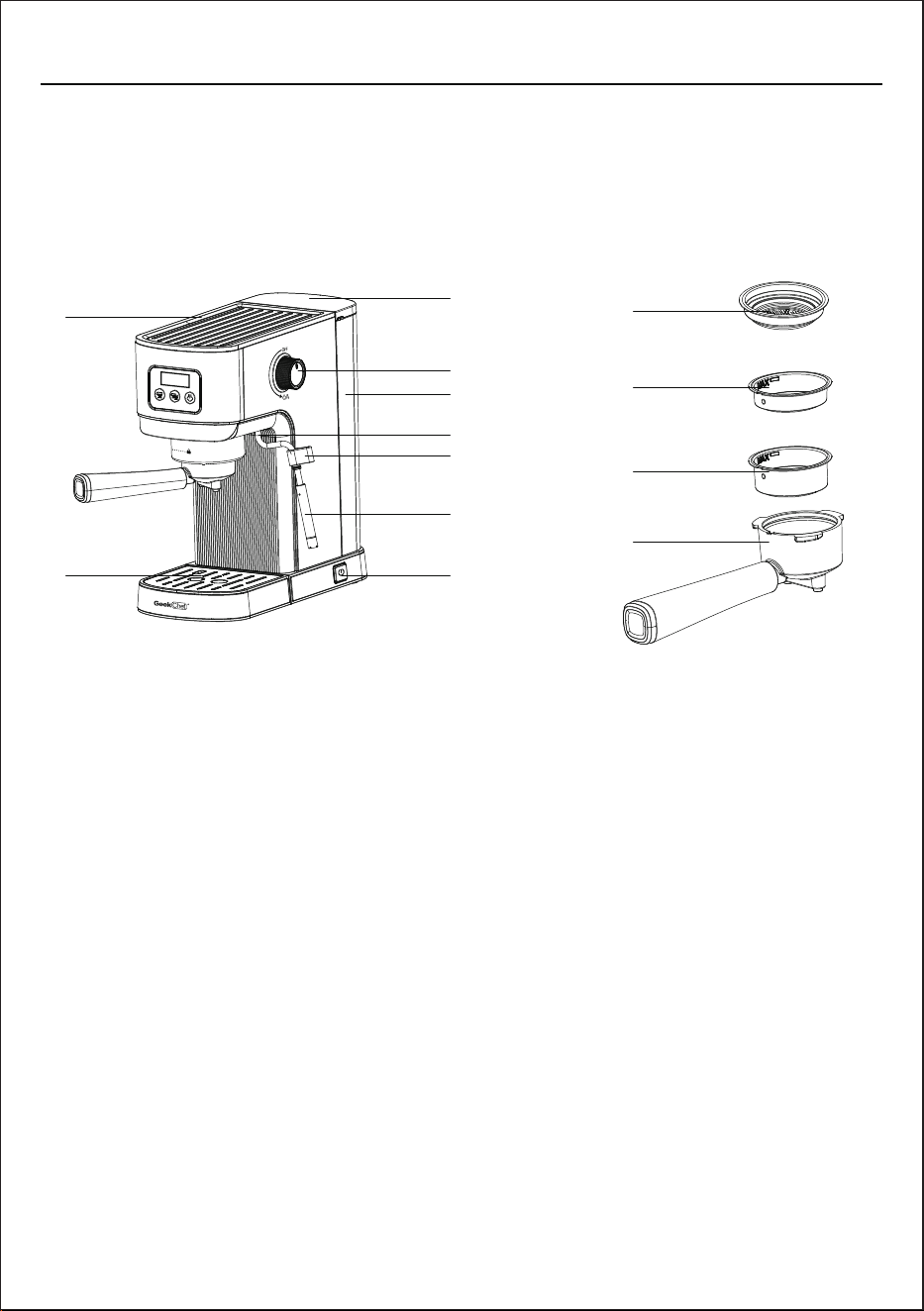
PRODUCT COMPONENTS
4
1. Cup Warmer
1
2. Detachable drip tray
3. Power switch
4. Steam wand cover
5. Steam wand handle
6. Steam wand
7. Water tank
8. Steam control knob
9. Water tank cover
10. E.S.E (Easy Serve Espresso) pod filter
11. Single Shot Filter
12. Double Shot Filter
13. Filter Holder / Portafilter
2
12
11
10
13
3
4
5
6
7
8
9
CONTROL PANEL
PRODUCT COMPONENTS
5
A
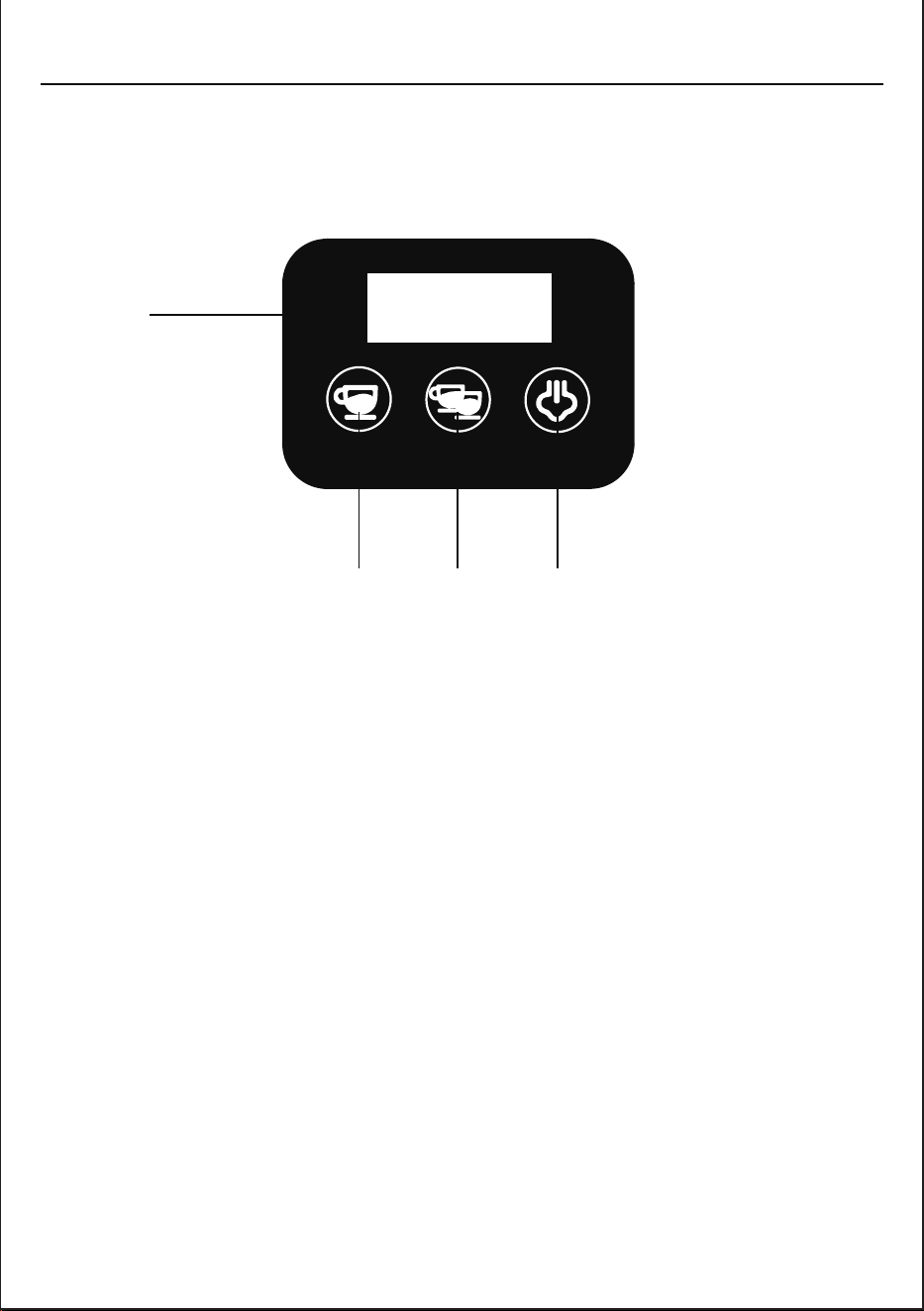
A: LED Display
B: Single-shot Espresso Switch and Indicator
C: Double-shot Espresso Switch and Indicator
D: Steam Switch and Indicator
A B C
BEFORE THE FIRST USE
INITIAL USE
CLEANING THE UNIT PRIOR TO THE FIRST USE
HOW TO USE
6
1. Carefully remove the unit from the packaging and remove all packaging materials.
2. Remove all accessories from the packaging and from the unit.
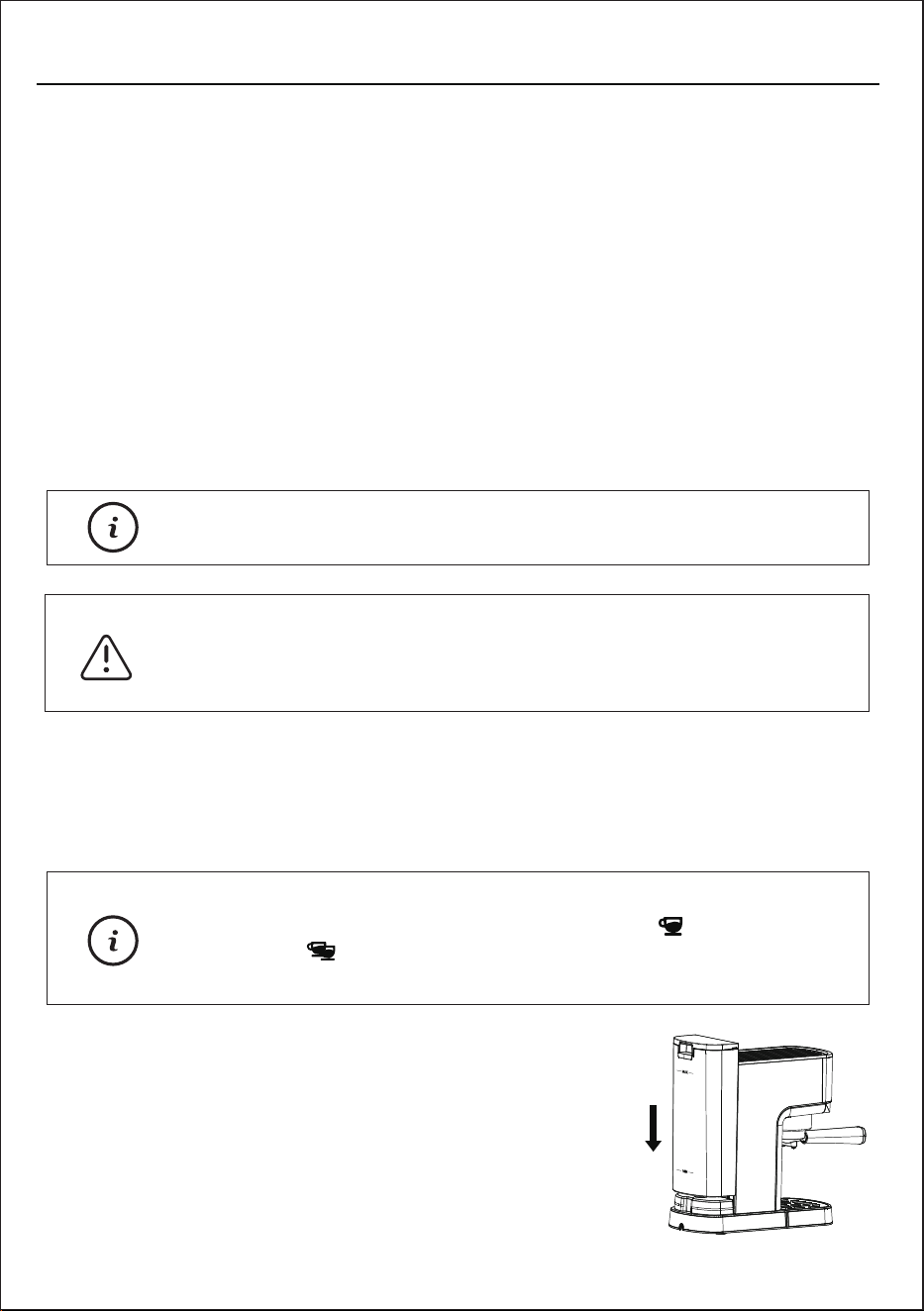
3. Remove the water tank.
4. Wash the water tank with the lid, the milk reservoir, the measuring scoop/
tamper, the filters and the filter holder in a mixture of mild detergent and water.
Rinse and dry each thoroughly and place them back into the unit.
5. Wipe the body of the coffee machine and the drip tray and grid with a soft, damp
cloth and dry all parts.
6. Make sure that the milk reservoir is assembled well.
1. Turn the steam control knob to the locked/OFF position.
2. Fill the water tank with cold water
up to the “MAX” line of the tank.
Note:
The filter holder and filters are not dishwasher safe.
Note:
If the steam control knob turned on before the power on, the
machine will alarm, and the single-shot " " and double-
shot " " indicators are blinking at the same time.
Turn off the steam control knob to remove the alarm.
Do not immerse the main body of the appliance or power
cord and plug in water or attempt to reach any of its
internal parts.
Warning:
HOW TO USE
7
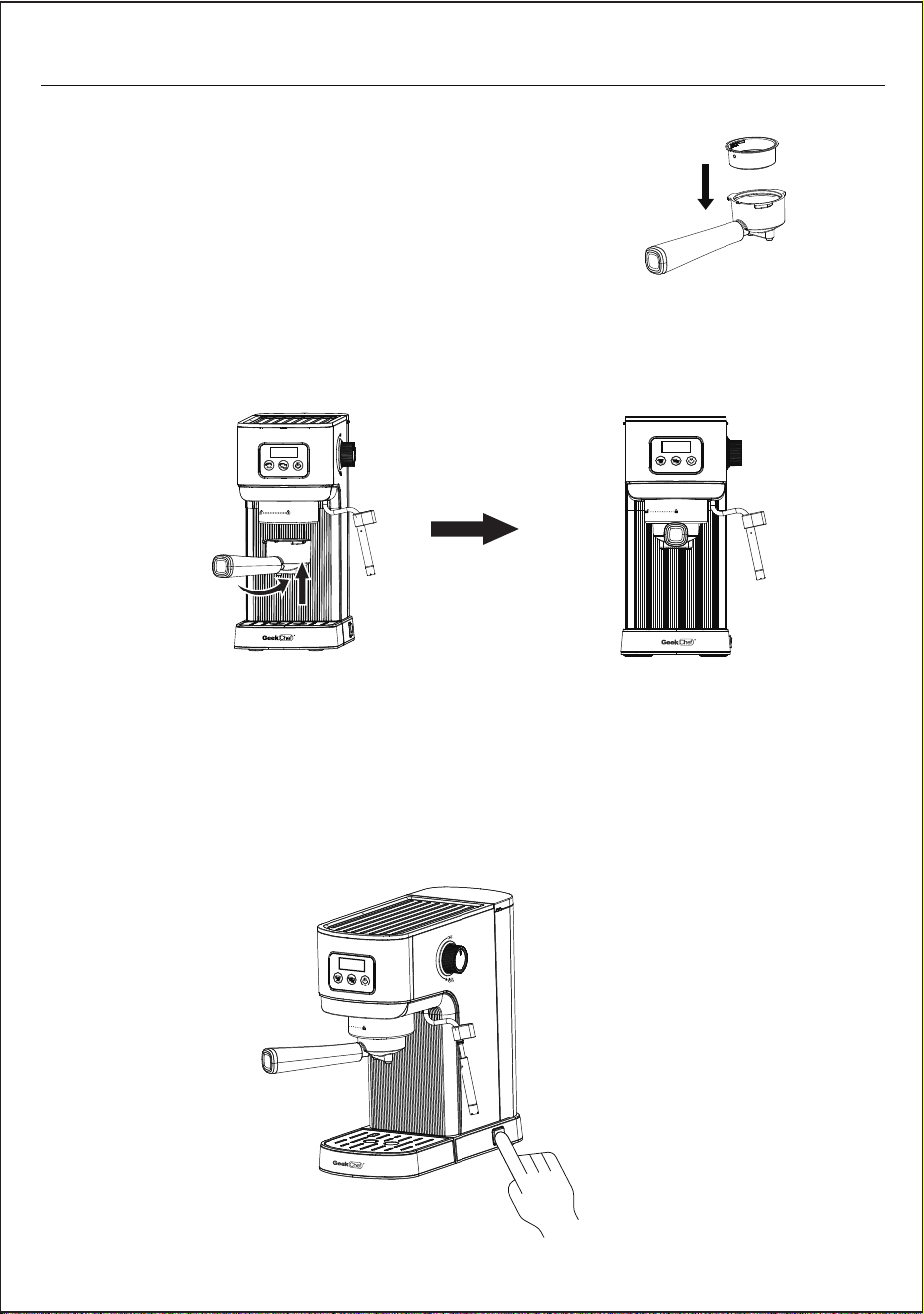
3. Insert the filter into the filter holder, making sure
to align the filter dimple to the filter holder notch.
4. Place the filter holder WITHOUT coffee grounds into the brew head ensuring
it is properly locked. The filter holder must be perpendicular to the machine or
slightly tilted towards the right.
5. Plug the appliance into the appropriate outlet.
6. Press the Power Switch, the display turns on and flashes, the coffee machine
starts to preheat automatically. Once the preheating is finished, all the switches
will light up continuously. This preheating process takes about 2 minutes.
Note:
There will be a loud noise and little shake when the machine
running first time. It's normal for a 20bar pump. The noise will
be weak in the future using.
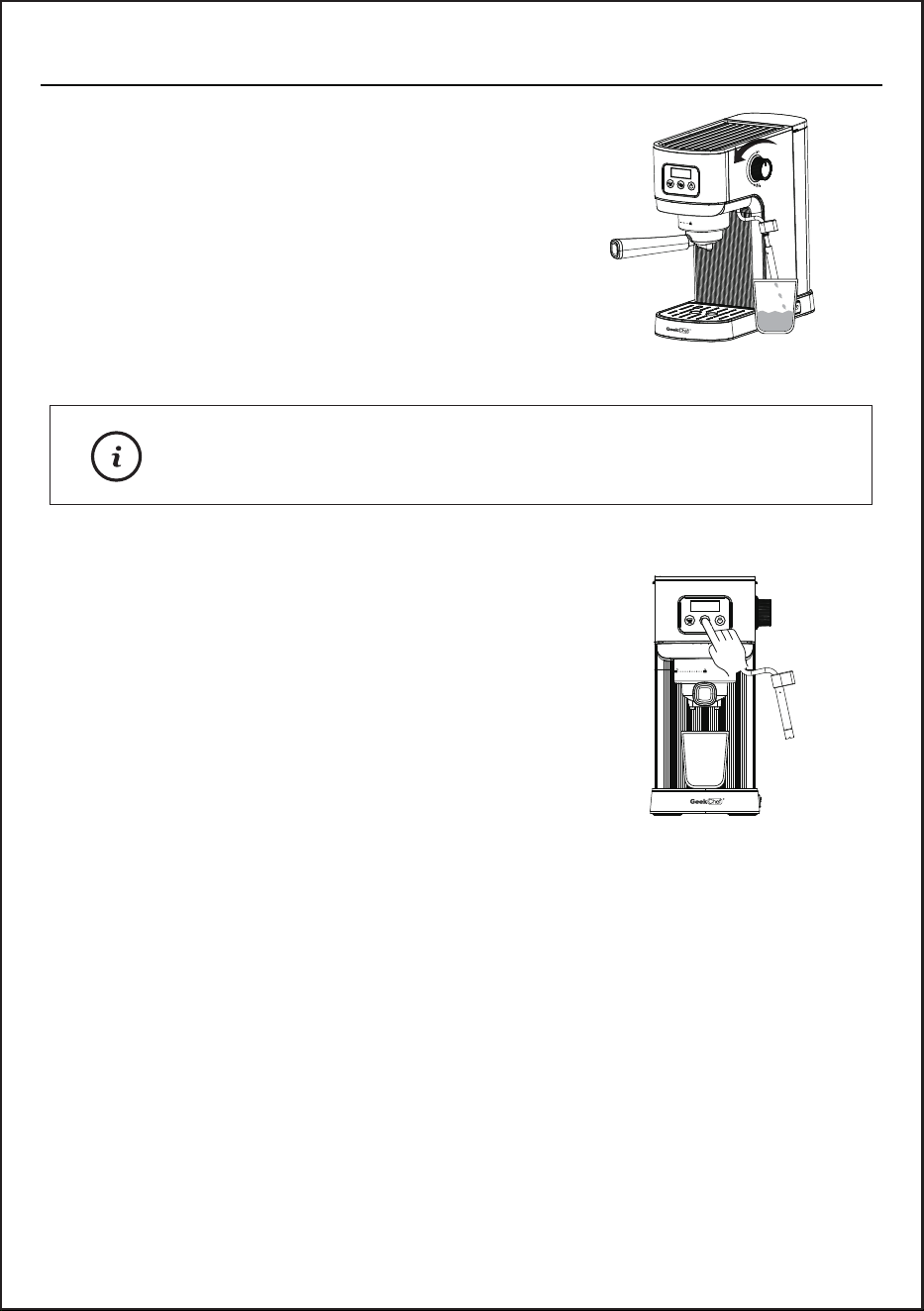
7. Place an empty cup under the steam wand.
Turn the steam control knob to the maximum
level slowly, the machine will start to make
hot water. Turn off the steam control knob
after making hot water for 1~2 minutes.
This process allows the water to flow into the
empty pump for the first use.
8. Dispose of the water in the cup and place the
empty cup under the brewing head, and press
the double-shot espresso switch to brew.
9. After the brewing cycle has finished, pour the water out.
Now your espresso coffee machine is ready to use.
HOW TO USE
8
PREPARING THE ESPRESSO
Using a cold filter holder, cold filter or cold cup(s) can reduce the extraction
temperature enough that it significantly affects the quality of your espresso.
We recommend to run a brewing cycle without coffee grounds to preheat
them before brewing (see steps 5-8 of Initial Use).
HOW TO USE
9
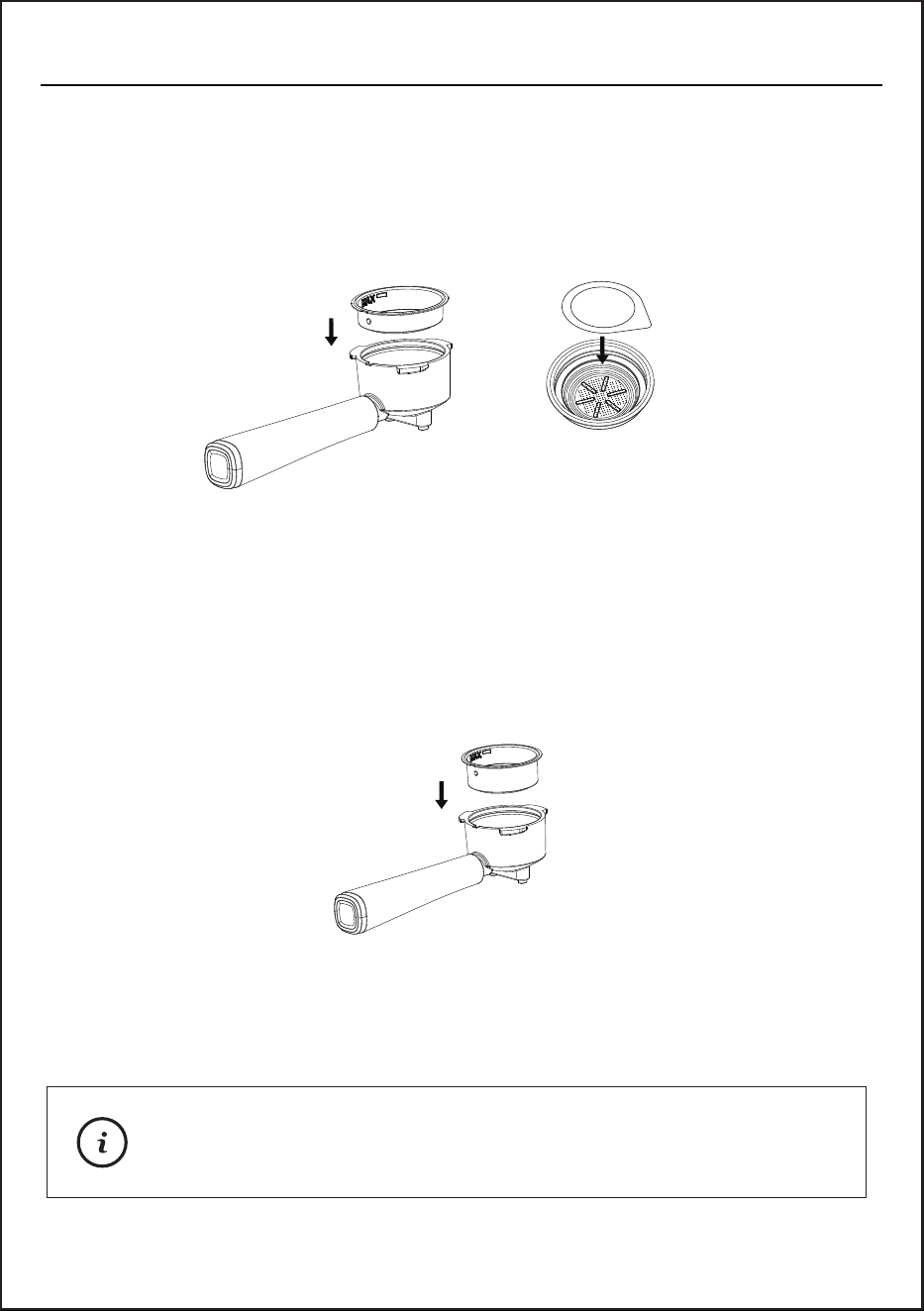
1. Select the filter to be used as follows:
FOR A SINGLE SHOT – use the filter for a single shot of espresso if using
ground coffee, or use the E.S.E. filter if using E.S.E. (Easy Serving
Espresso) pods.
FOR A DOUBLE SHOT OR TWO SINGLE SHOTS – use the filter for a
double shot of espresso. By placing two small cups underneath the filter
holder, you may prepare two single shots of espresso at once.
2. Remove the filter holder and fill the filter with coffee grounds using the
measure scoop provided with the machine.
We recommend 7-9g for single shot and 13-15g for double
shot. The amount will vary depending on your preferences
and the coffee grounds you used.
Tip:
E.S.E
HOW TO USE
10
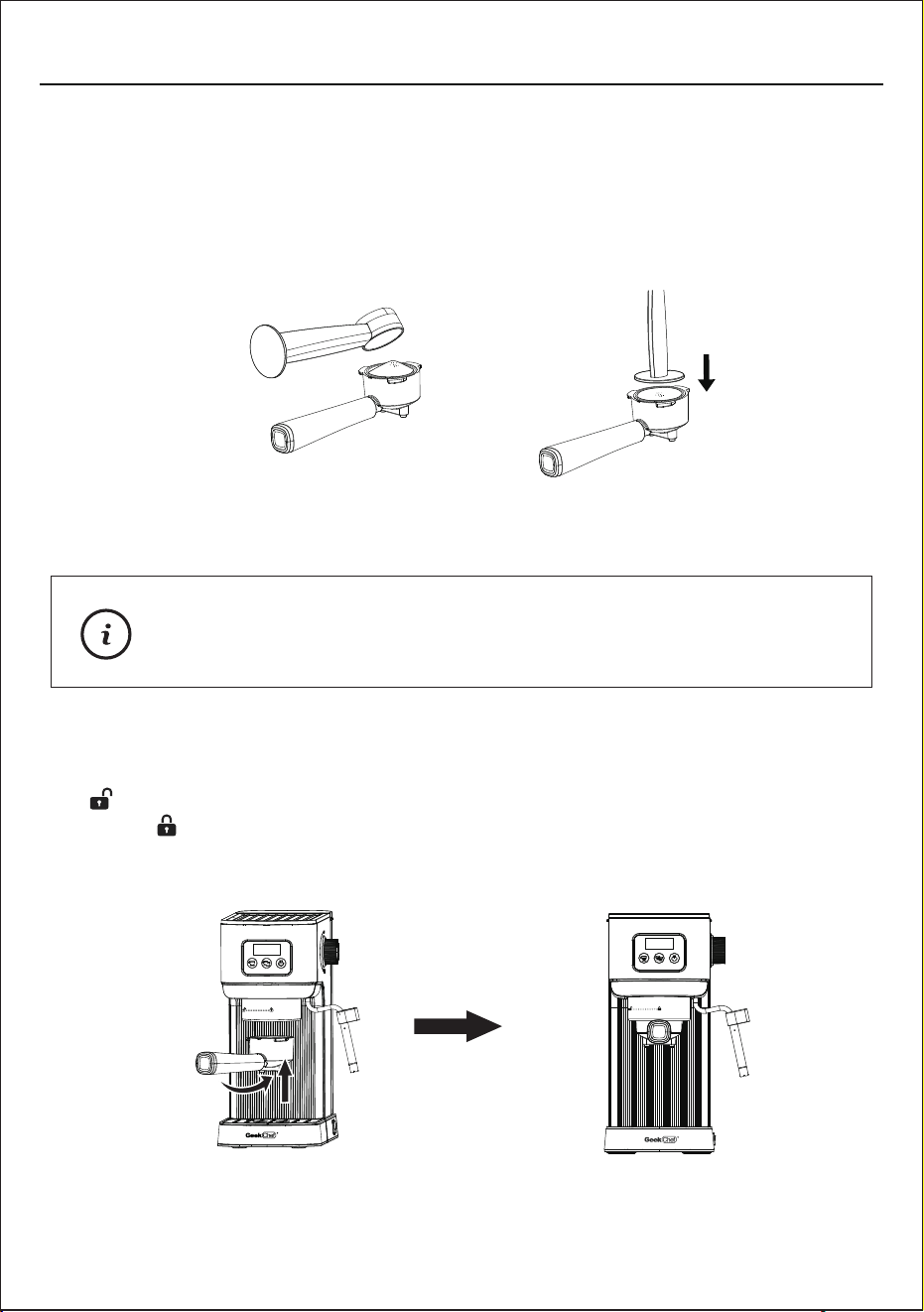
3. Using the tamping part of the measure scoop, push the coffee grounds
downwards as far as the tamper will go to. The coffee grounds must be
pressed evenly to obtain a well levelled and flat surface.
4. Insert the filter holder into the brew head, align the filter holder with the UNLOCK
" " mark and fits into the groove, and turn it counter-clockwise to the
LOCK " " position.
Clean any excess coffee from the rim of the filter holder
to ensure proper fit under brew head.
Note:
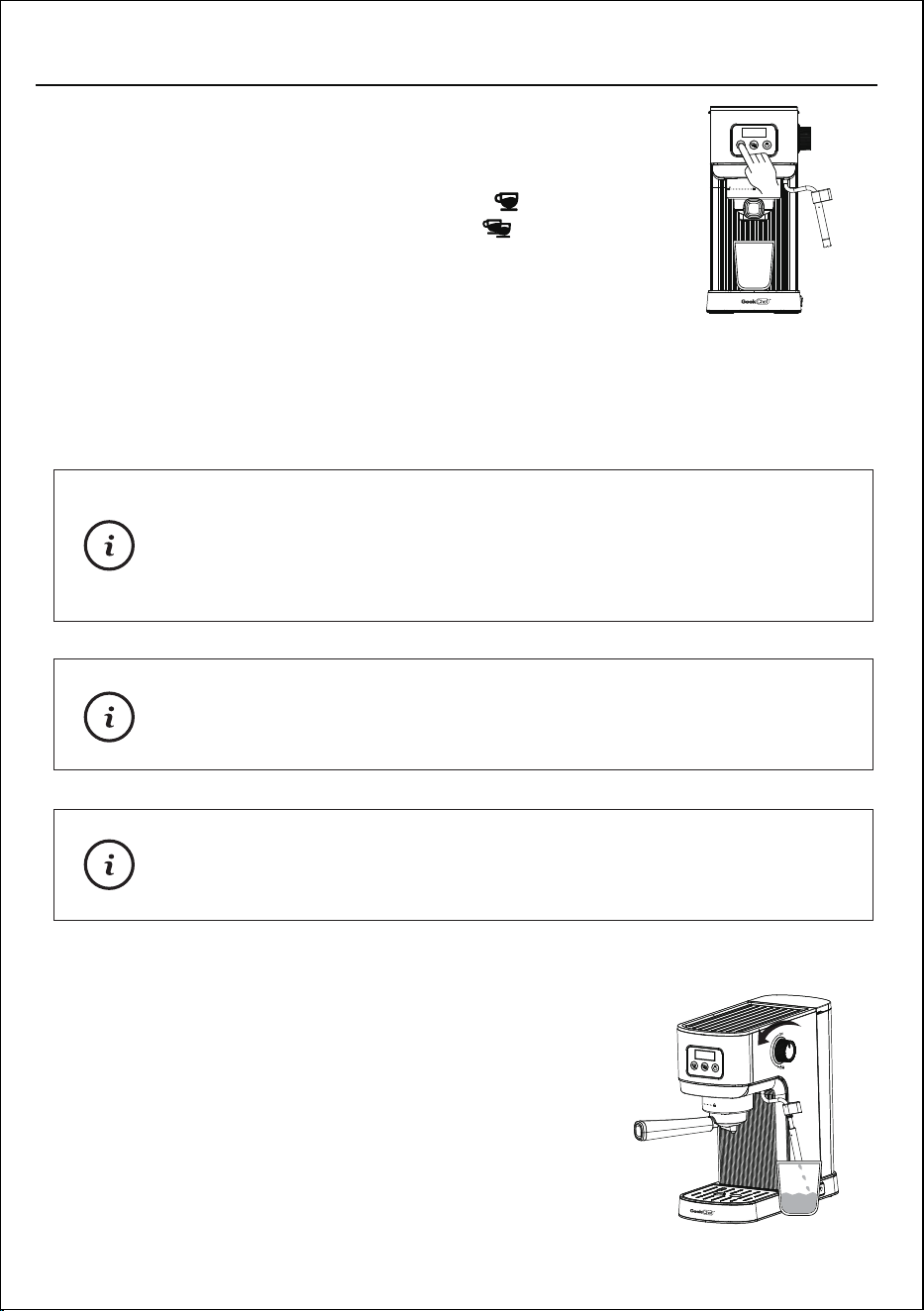
3. The machine will start brewing the espresso according to your selection.
The machine will turn off automatically and all indicators will fully illuminate
in a solid light, indicating that the cycle has been completed. Your delicious
espresso is ready to be enjoyed!
MAKING HOT WATER
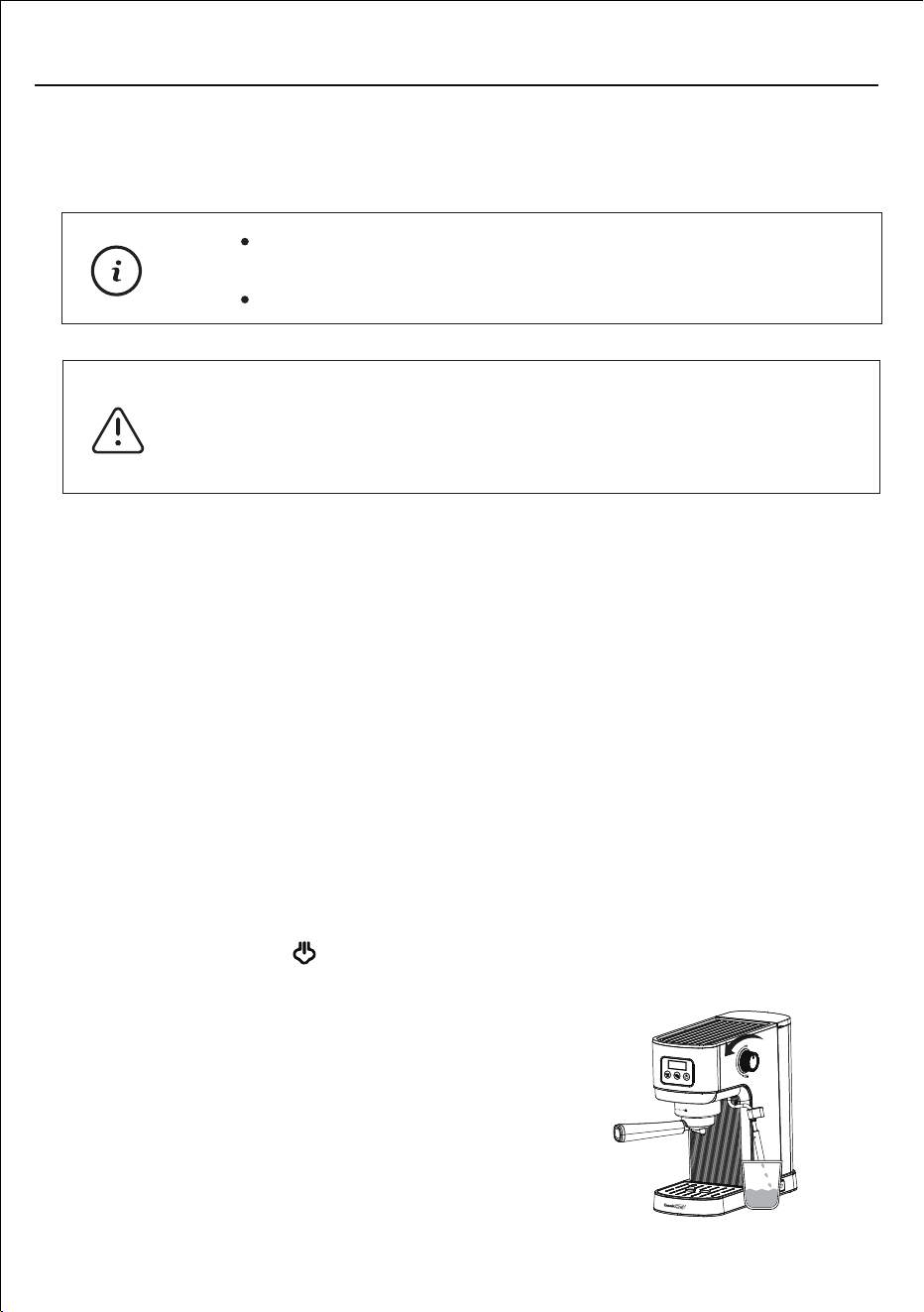
1. Put a big cup or container under the steam wand.
2. When all indicators stay on, turn the steam knob
to the maximum position, hot water will come out
from steam wand nozzle. In the process of making
hot water, the coffee indicators flash slowly.
11
HOW TO USE
The flavor of your coffee will depend on many factors, such
as the type of coffee beans, degree of roast, freshness,
coarseness or fineness of the grind, dose of ground coffee,
and tamping pressure. Experiment by adjusting these factors
just one at a time to achieve the taste of your preference.
Tips:
There will be noise during the operating process.
This is normal for a 20bar pump.
Note:
To brew less coffee than the preset serving, press the
Espresso switch at any time to stop the brewing process
when the amount of coffee desired is reached.
Note:
1. Place pre-warmed cup(s) underneath the filter holder.
2. Press the single-shot espresso switch " " for a single
shot, or double-shot espresso switch " " for a double
shot, the machine will start brewing.
MAKING ESPRESSO
FROTHING MILK
To prepare a traditional cappuccino or latte, we recommend:
1. Continue as follows: Using cold (39°F-50°F), fresh whole milk. The density
of the frothed milk will depend on the milk fat content.
2. Using stainless steel, circular, rounded milk jugs, narrower at the top, with a
spout, necessary to make cappuccino decorations.
3. Before starting, it is important to slightly move the steam wand outwards in
order to insert the jug directly under it and facilitate the movements required
to froth the milk correctly.
Continue as follows:
1. Use whole, fresh cold milk, and pour 1/3 milk in cup/jug. The volume of milk
will increase after frothing.
2. Press steam switch" ", it starts preheating, the steam indicator is
flashing, when machine preheating finished the steam indicator lights on.
3. Put an empty cup under the steam wand,
turn the steam control knob counter-clockwise
to the maximum position, release a little water
in the steam wand, and turn the steam control
knob clockwise to turn off the steam after the
steam comes out.
HOW TO USE
12
3. When the hot water reaches the required amount, turn the steam knob clockwise
to the OFF position, and the hot water stops flowing out.
The hot water function can also be used to quickly cool down
the coffee machine after making steam process.
You cannot run hot water and extract espresso at the same time.
Note:
When the machine is working, be careful of the hot parts of
the machine. Especially the coffee outlet, filter holder, steam
wand and nozzle. When operating, please do not put your
hands on the above parts for any reason.
Warning:
HOW TO USE
13
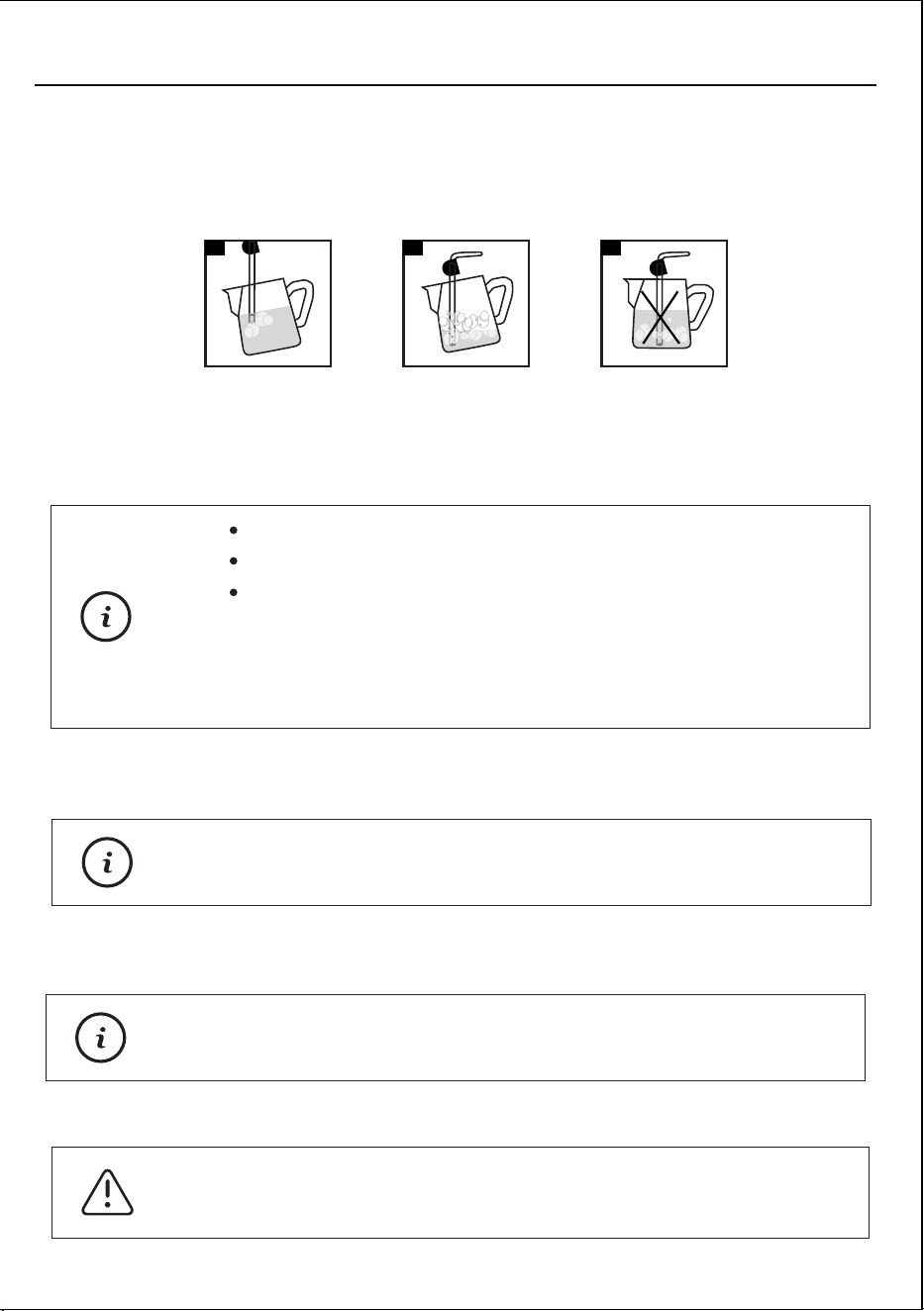
4. Put the cup/jug with milk under the steam wand, place the steam nozzle just
below the surface of the milk. If it is inserted too deep, the milk will not be
frothed; if it is not inserted deep enough, big bubbles will be produced and
then disappear immediately.
It is important to keep the nozzle not at the center but close to the edge of the
jug, with an appropriate angle to produce a stronger vortex.
5. Rotate the steam control knob counterclockwise to let the steam comes out
6. Once the desired frothing has been achieved, the steam nozzle must be pushed
deeper to heat the milk well.
7. Once the desired result has been achieved, close the steam control knob, by
rotating it clockwise, to stop dispensing steam and remove the jug.
8. Pour the frothed milk into prepared espresso, now cappuccino is ready.
It is advisable to always keep a hand on the rounded part
of the jug to feel the temperature increase of the unfrothed milk.
Tips:
To make the froth more compact, it is advisable to lightly tap
the jug on a flat surface after frothing.
Tips:
The steam pressure increases as the knob is rotated.
The entire operation should last no longer than 60 seconds.
To froth the milk correctly, the steam nozzle must always be
in contact with the milk and not with the froth. Therefore, as
the layer of froth increases, the jug must be slightly raised
trying to keep the nozzle in contact with the milk, without
touching the bottom of the jug.
Note:
The steam wand may be very hot during and after use.
To avoid burns, move it only by placing your fingers on
the rubber tip fitted on the steam wand.
Warning:
21 3
B. SETTING THE BREWING TEMPERATURE
When the machine run into menu setting mode, please follow the steps below
to set the coffee temperature:
1. Press single-shot espresso switch " " when single-shot indicator lights up
enter into the setting program to set the temperature of the coffee, single-
shot indicator flashes, the rest indicators turn off, the display shows the
current setting of the coffee temperature: the default temperature is 180°F.
2. Press the single-shot espresso switch " " again to select temperature
160°F-170°F-180°F in turn. After selected, the buzzer will beep twice,
the setting is completed, display shows selected temperature.
The machine automatically exits the menu setting mode and restore to
standby mode.
CUSTOMIZE THE MACHINE SETTINGS
A. MENU SETTING MODE
Before enter the setup menu program, please confirm that the machine is in
the ready stage first, and then keep pressing the steam switch " " 5
seconds. Until the three switches flash in turn, release the switch, then the
machine enters the menu setting mode, you can set the menu program
according to your own requirements.
If no operation for 25s, the machine will automatically exit the menu setting
mode and restore to standby mode.
C. DESCALING REMINDER
The descaling reminder can be set according to the hardness of tap water in
different areas. The machine defaults to hard water status. The temperature
for descaling is about 120°F.
Recommend descaling cycle (Counting from the first cup of coffee made):
9. Place an empty cup under the steam wand. Press steam switch" " to turn off
the steam mode, the coffee indicators
" " and " " will be flashing.
Turn on the steam control knob and making hot water for 5s in order to clean the
inside of steam wand nozzle. Turn off the steam control knob, ready to make the
next cup of coffee.
After frothing milk, please promptly clean the steam wand with
a damp cloth to prevent any milk residue from clinging to it.
Note:
HOW TO USE
14
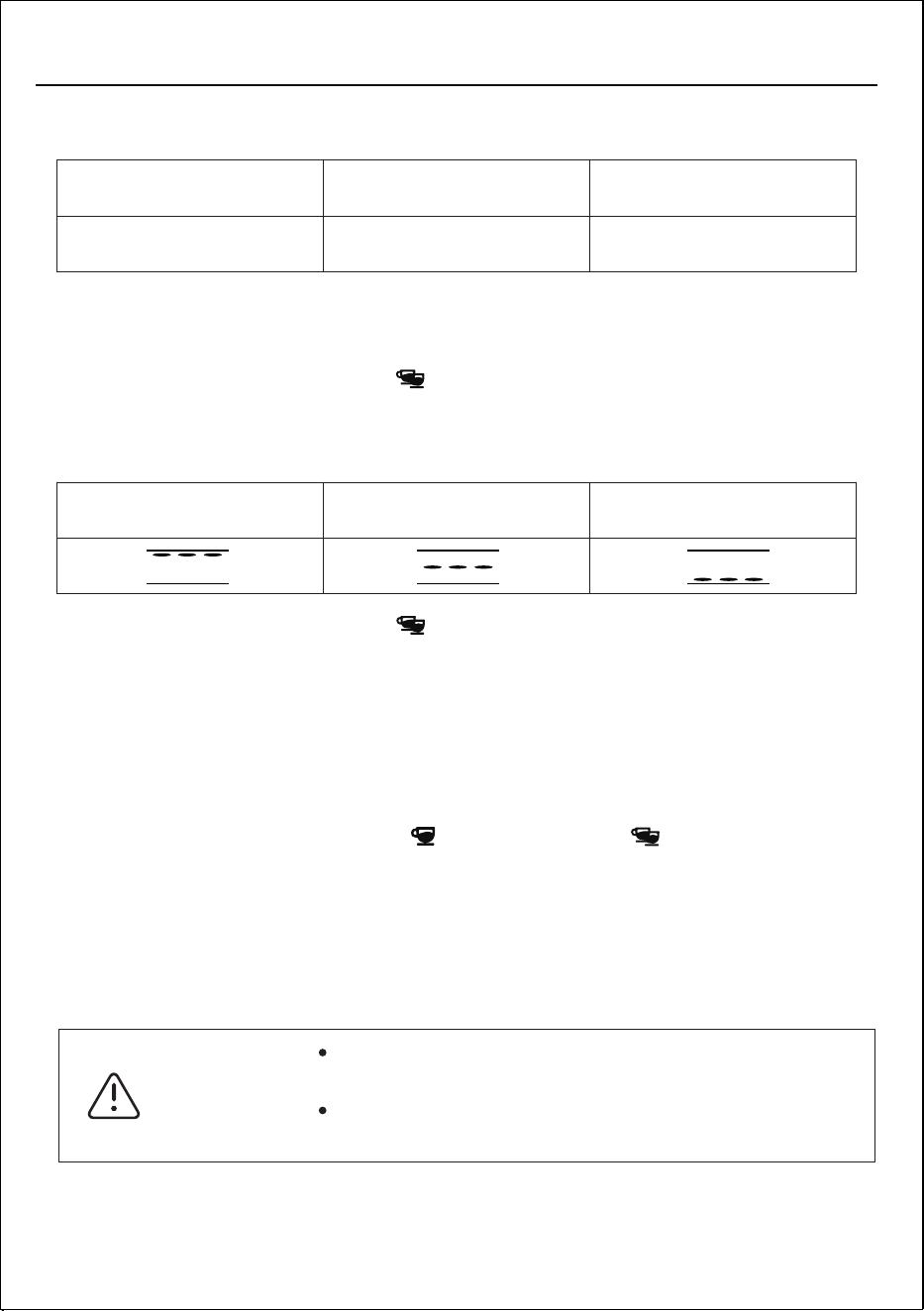
When the machine run into menu setting mode, please follow the steps
below to set the descaling time:
1. Press the double-shot switch " " when double-shot indicator lights up
enter into the water hardness setup program. The double-shot switch
indicator lights on and the screen displays below:
2. Press the double-shot switch " " to select the water hardness based on
your location. After selected, the buzzer will beep twice, the machine
automatically exits the menu setting mode and restore to standby mode.
D. SET UP THE BREWING TIME
If you want to brew more or less coffee, please follow the step:
1. Put a cup under the outlet of the coffee.
2. Keep pressing the single-shot " " or double-shot " " espresso switch 3
seconds and the corresponding indicator is flashing. The machine starts
making coffee, the screen will show the brewing seconds.
3. When the time reach what you want, press the switch again to confirm the
customized brewing time and stop making coffee.
4. The available brewing time range is 15s~75s.
It is necessary to have someone to supervise during
making coffee.
To prevent spills, do not remove the filter holder while
the machine is brewing coffee.
Warning:
Recommend descaling cycle (Counting from the first cup of coffee made):
Soft water
after 1500cups
Medium hardness water
after 1000cups
Hardness water
after 500cups
HOW TO USE
15
Soft water Medium hardness water Hardness water
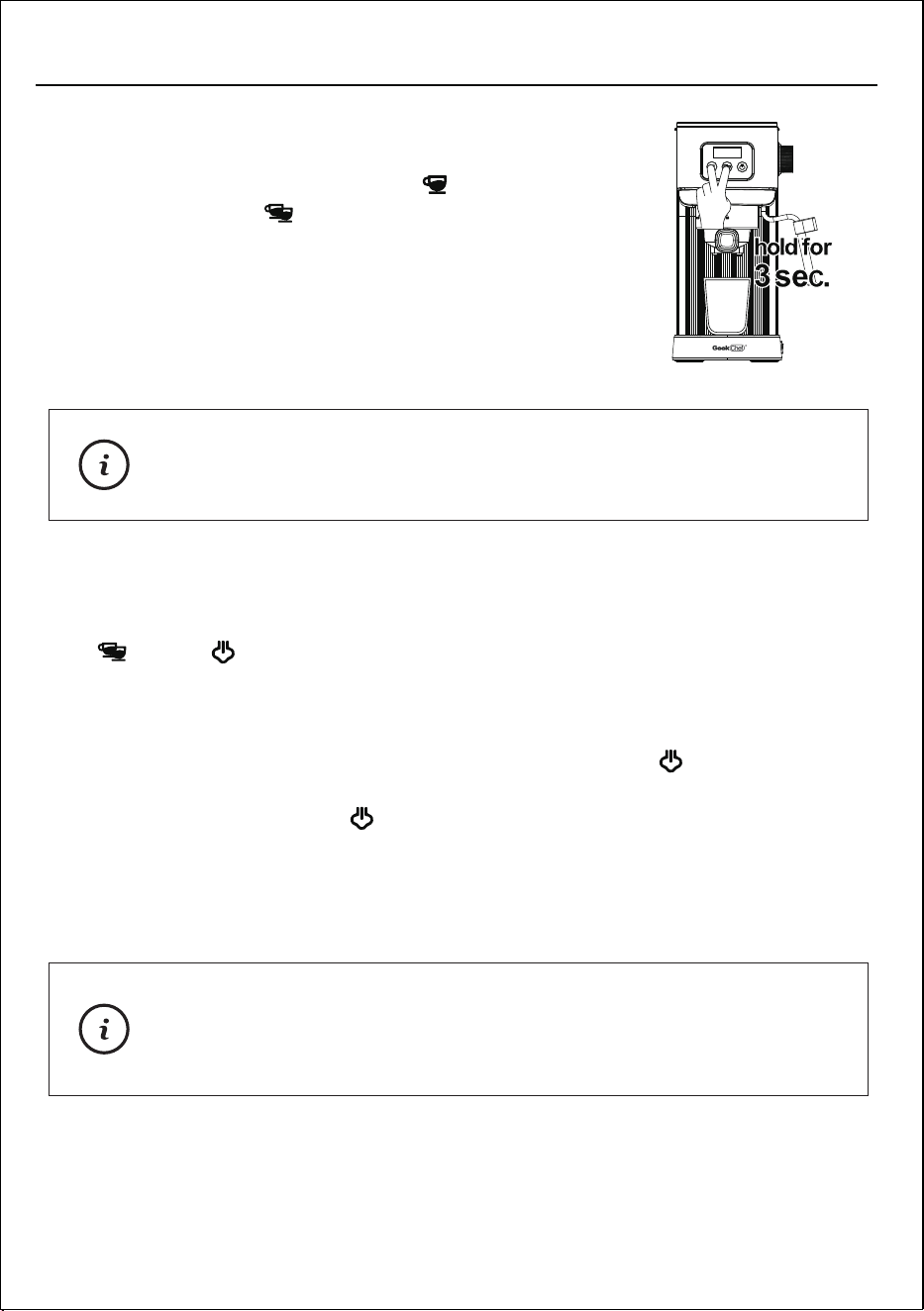
DESCALING REMINDER AND DESCALING FUNCTION
1. When the number of cups of coffee made reaches the setting, the two switches
( " " and " " ) will be steady on and the screen displays E-1. The machine
doesn’t work, reminder the user that the machine needs to be descaled.
2. Dilute the descaling liquid according to the instructions in the descaling
liquid manual and pour it into the water tank. Please put a large container
under the coffee outlet, and press the steam switch " " for 5 seconds.
Until the three switches flash successively.
3. Press the steam switch " " again when steam indicator lights up to
start descaling, descaling liquid flow from the coffee outlet of the product.
Descaling time is about 5 minutes and the screen displays countdown.
During the descaling process, press steam switch again to stop process
at any time.
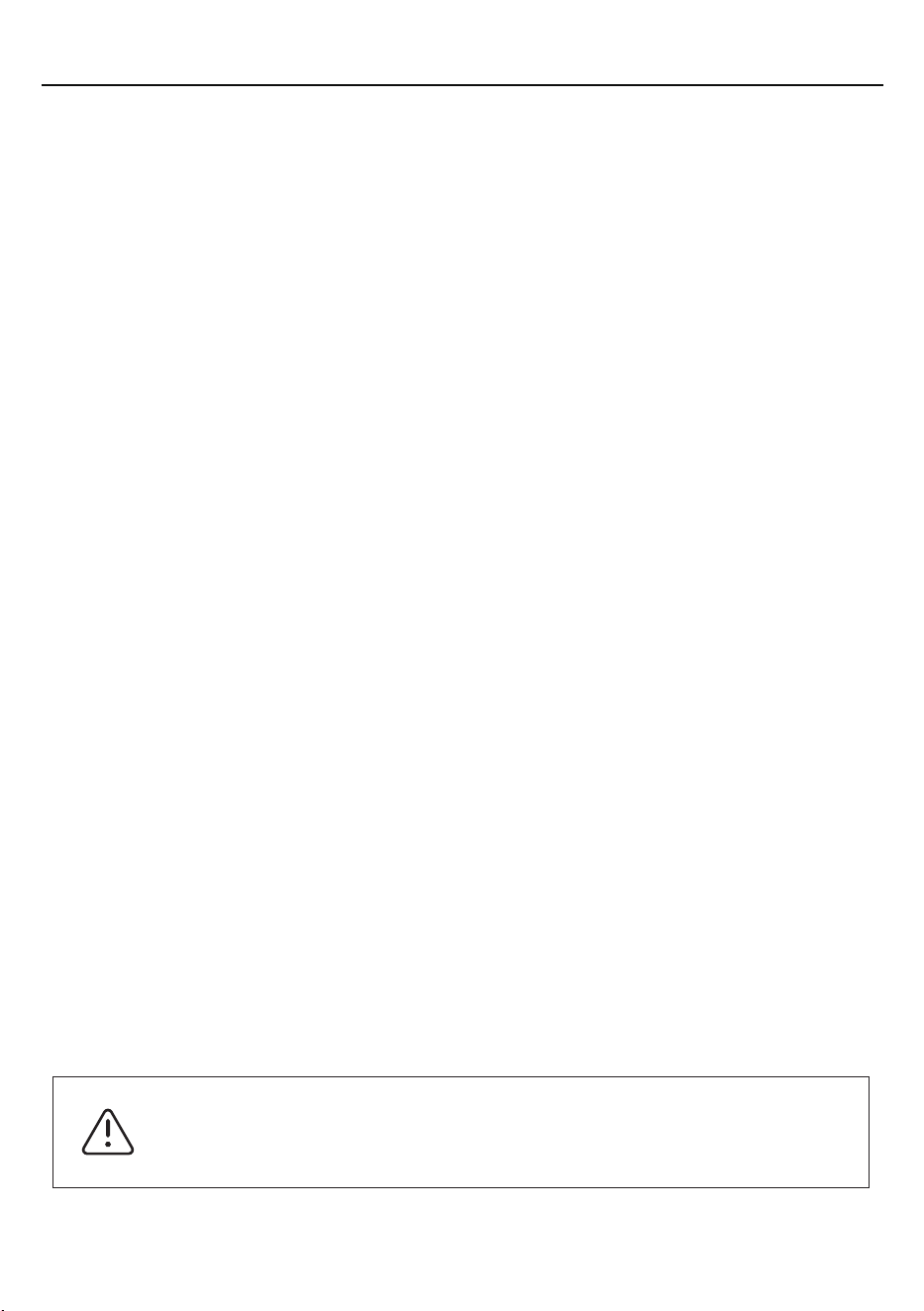
E. RESTORE FACTORY SETTINGS
Within 15 seconds of powering on the machine,
press single-shot espresso switch " " and
double-shot switch " " together for 3 seconds.
All indicators will flash 3 times, and the machine
will beep 3 times to indicate that the reset is
completed.
This operation will reset the menu settings and coffee volume
to the default values set at the factory.
Note:
During the descaling process, if the steam wand needs to be
cleaned, the descaling liquid can be discharged from the steam
wand by turning on the steam control knob, don’t forget to put a
large container under the steam wand.
Note:
4. After descaling is completed, take out the water tank and wash it with clean
water, then fill clean water to the maximum water level of the water tank,
and rinse the machine again with descaling function. After the descaling
process, the machine will resume to normal stage.
HOW TO USE
16
SAFETY FUNCTIONS
Automatic shutdown function
If the product has no operation within 30 minutes, the product will automatically
shut down and enter standby state, and all the indicators will be turned off.
If you need to restart the machine, press any switch on the control panel and
enter the usable state after the preheating is completed.
CLEANING AND MAINTENANCE
CLEANING AND MAINTENANCE
To avoid bums, the filter must only be replaced when
the filter holder has cooled down completely.
Warning:
Regular cleaning and maintenance keep the machine in working condition and
ensures perfect coffee flavor, a constant flow of coffee, and excellent milk froth
for an extend period. Disconnect the appliance from the mains and let it cool
before cleaning it with damp cloth.
CLEANING THE FILTER HOLDER AND THE FILTER
The filters should be kept clean to guarantee perfect results.
1. Remove the filter from the filter holder and wash it with warm water.
2. If you notice a malfunction when brewing coffee, immerse the filter in boiling
water for 10 minutes and then rinse with running water.
Program protection
If NTC is abnormal (such as short circuit, open circuit, etc.), the machine will
enter the protection state, and the three indicator lights will flash at the same
time, the screen shows , which will give an alarm prompt and the machine
will not operate. Please contact the service center.
17
CLEANING THE BREW UNIT
Regularly remove any residual coffee grounds from the Brew unit using a brush
and wash with hot water following the steps below.
1. Do not insert the Filter holder.
2. Place an empty cup under the Brew unit.
3. Press the coffee switch and fill the cup with water.
4. Wait the machine stop automatically, or press the coffee switch again to stop.
CLEANING AND MAINTENANCE
18
To avoid burns, the tank should be cleaned only when
the machine is turned off. The drain hose may reach
high temperatures during operation.
Warning:
CLEANING THE STEAM WAND
After each milk frothing:
1. Clean the steam wand with a damp cloth. To clean it more thoroughly, you
can unscrew the nozzle and wash it with running water.
2. Turn on the steam control knob, allowing the steam to escape for one or
two seconds to clear the nozzle hole.
3. Clean the nozzle with wet sponge.
CLEANING THE GRID AND DRIP TRAY
Remove the drip tray and the grid and wash them with water.
Do not use abrasive cleaning tools.
CLEANING THE WATER TANK
To clean the Water tank often. Remove the Water tank and wash it with fresh water.
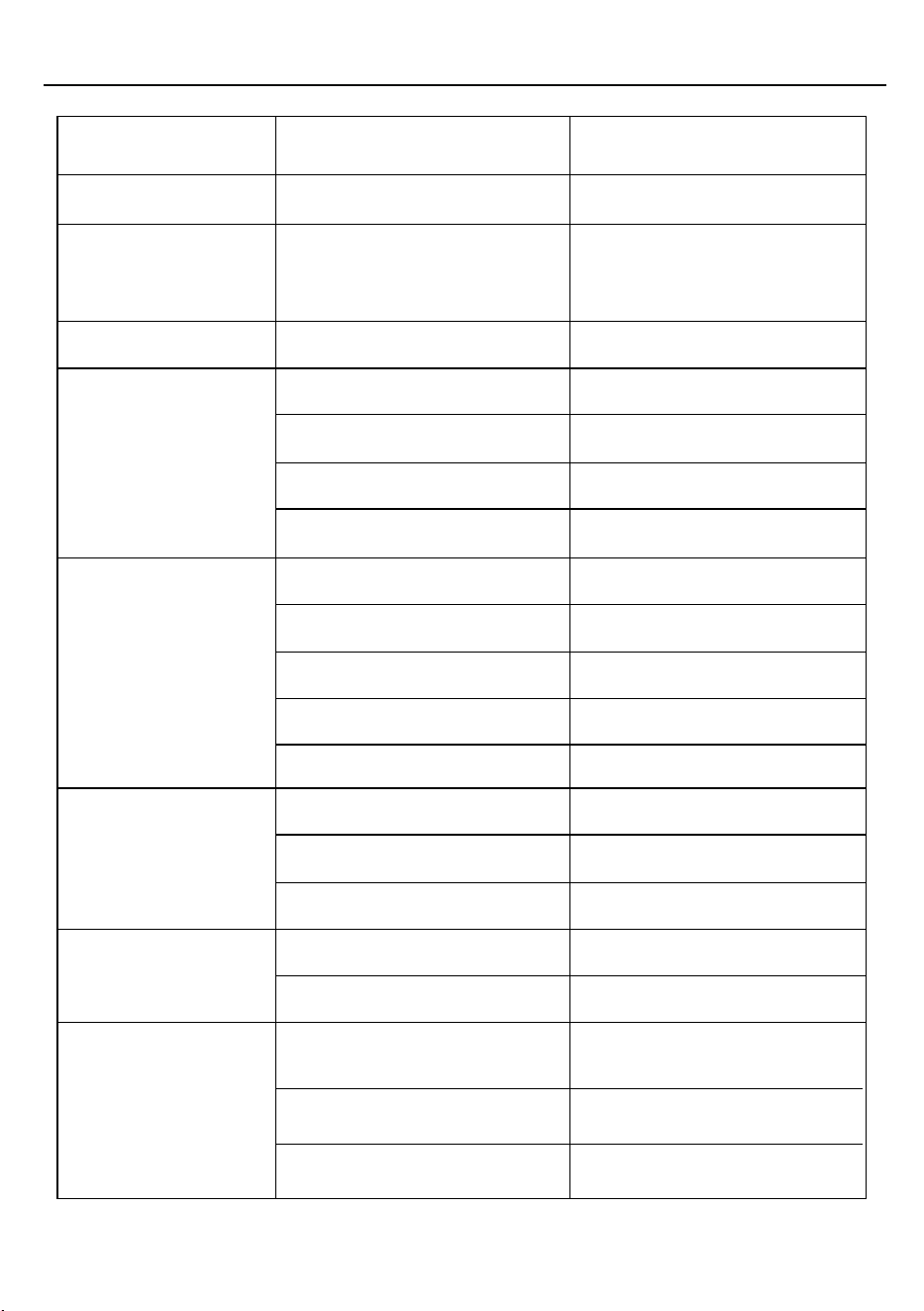
TROUBLESHOOTING
PROBLEM CAUSE / RESULT SOLUTION
Needs to descaling.E-1
E-2
E-3
The coffee machine
is not flowing coffee
from the outlet.
Coffee is overflowing
from the gap in the
funnel.
Coffee is cold
The pump is
making excessive
noise.
The coffee is too
weak.
The inner temperature is
too high.
NTC is abnormal.
Follow the instructions for
descaling.
Please contact the service
center.
Pour water to the water tank.
The filter is clogged.
The water tank is empty.
The coffee outlet id clogged.
The coffee grounds are
packed too tightly.
There are coffee grounds
around the filter mouth.
The sealing ring is aging.
The water tank is not
properly installed.
There are foreign objects in
the seal ring.
The coffee grounds are too
fine.
Replace with slightly coarser
coffee grounds.
Reduce the pressure.
Clean the filter mouth before
screwing it into the machine.
Please contact the service
center.
The indicator light is not
constantly
Operation after the indicator
light is constantly on.
Preheat before use.
Preheat the cup before use.
The coffee machine is not
preheated.
The coffee cup is not
preheated.
The water tank is empty. Pour water to the water tank.
Properly installed the water
tank.
The water tank is not
properly installed.
The filter is clogged.
Clean the coffee outlet.
Clean the seal ring.
Properly installed the water
tank.
Let the machine cold down
or turn on the knob to release
the hot water to cool.
The coffee grounds aren’t
properly tamped.
Not enough coffee grounds.
The coffee grounds are too
coarse.
Tamp the coffee grounds
again.
Add coffee grounds.
Use espresso machine-
specific coffee grounds.
19
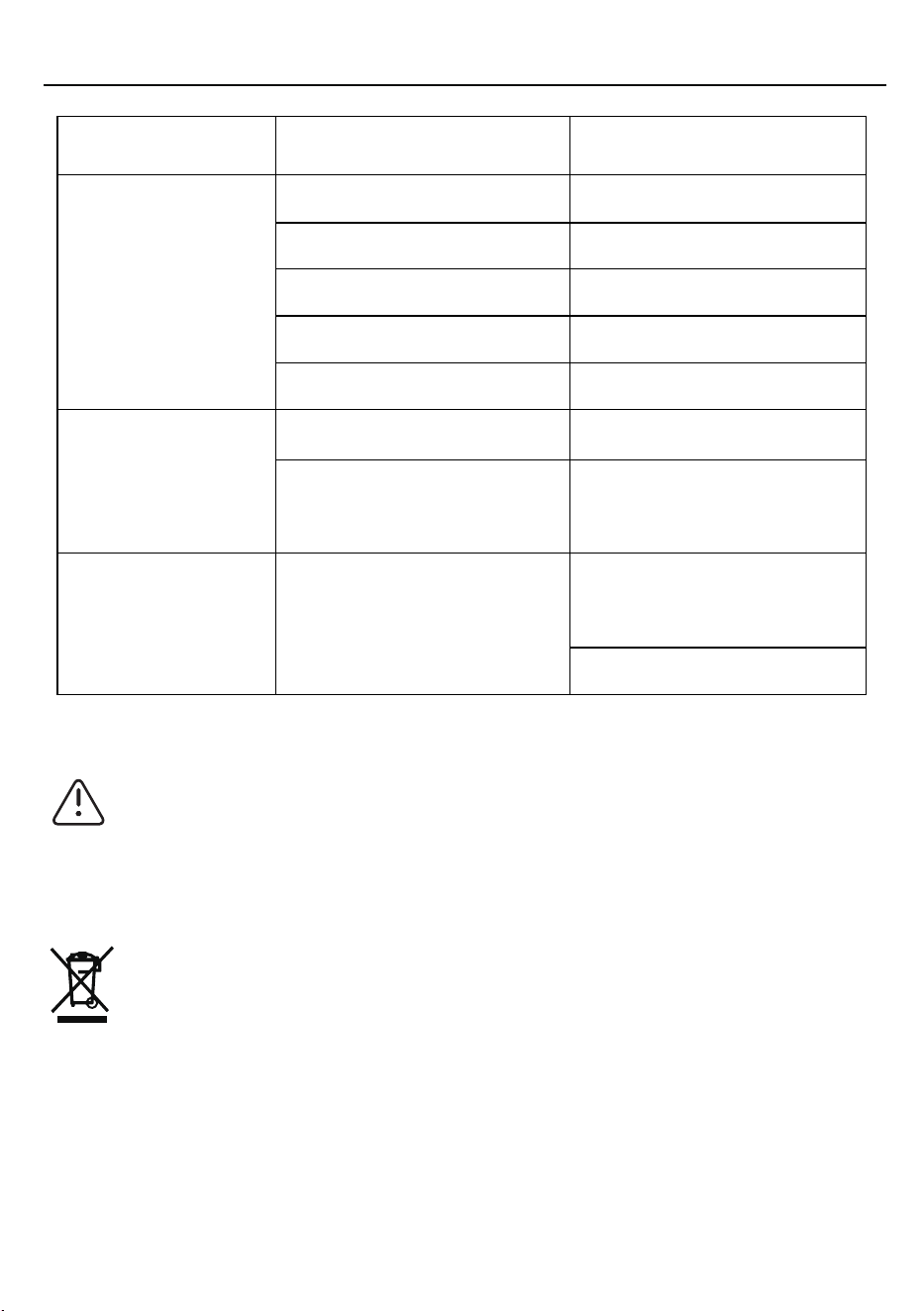
TROUBLESHOOTING
PROBLEM CAUSE / RESULT SOLUTION
The coffee grounds are too
fine.
The coffee handle
cannot rotate to the
locked position.
The coffee making
is normal, but cannot
make the milk foam.
The coffee outlet id clogged.
The coffee handle cannot
rotate into place even
without coffee grounds.
Too much coffee grounds.
Use the right coffee grounds.
Please contact the service
center.
Steam wand sleeve is
clogged.
Use a paperclip to insert into
the steam wand from the
end to unclog it.
Add edible vinegar to the
water tank.
Clean the coffee outlet.
Reduce the coffee grounds.
20
DO NOT TAKE APART THE APPLIANCE. CONTACT AN AUTHORIZED
SERVICE FACILITY. DISASSEMBLING THE MACHINE BY YOURSELF
WILL VOID THE WARRANTY.
The coffee color
is too dark.
The filter is clogged. The filter is clogged.
The coffee grounds are
tamped too tightly.
Too much coffee grounds.
Reduce the tamping pressure.
Reduce the coffee grounds.
This marking indicates that this product should not be disposed with other
household wastes throughout the USA. To prevent possible harm to the environ-
ment or human health from uncontrolled waste disposal, recycle it responsibly to
promote the sustainable reuse of material resources. To return your used device,
please use the return and collection systems or contact the retailer where the product
was purchased. They can take this product for environmentally safe recycling.
CORRECT DISPOSAL OF THIS PRODUCT

LIMITED WARRANTY
LIMITED WARRANTY
Geek Technology Ltd. warrants to the original consumer or purchaser this Geek Chef
Espresso Coffee Maker is free from defects in material or workmanship for a period of
One (1) year from the date of purchase. If any such defect is discovered within the
warranty period, Geek Technology Ltd. at its discretion, will repair or replace the Product
at no cost. This limited warranty is good only to the original purchaser of the product and
effective only when used in United States.
For warranty or repair service: Call 1-844-801-8880 and choose the appropriate prompt, or
email info@geektechnology.com. Please have your Product’s model number, date code(on
rating label),your name, address, city, state, zip code and phone number ready.
NO OTHER WARRANTY IS APPLICABLE TO THIS PRODUCT. THIS WARRANTY IS IN LIEU
OF ANY OTHER WA
RRANTY, EXPERSS OR IMPLIED. INCLUDING WITHOUT LIMITATION,
ANY WARRANTY OF MERCHANTABILITY OR FITNESS FOR A PARTICULAR PURPOSE.
TO THE EXTENT ANY IMPLIED WARRANTY IS REQUIRED BY LAW. IT IS LIMITED IN
DURATION TO THE EXPRESS WARRANTY PERIOD ABOVE. NEITHER THE MANUFAC-
TURER NOR ITS U.S.DISTRIBUTOR SHALL BE LIABLE FOR ANY INCIDENTAL,
CONSEQUENTIAL, INDI RECT, SPECIAL, OR PUNITIVE DAMAGES OF ANY NATURE.
INCLUD ING WITHOUT LIMITATION. LOST REVE- NUES OR PROFITS, OR ANY OTHER
DAMAGE WHETHER BASED IN CONTRACT, TORT, OR OTH ERWISE, SOME STATES
AND/OR TERRITORIES DO NOT ALLOW THE EXCLUSION OR LIMITATION OF INCIDEN-
TAL OR CONSEQUENTIAL DAMAGES OR LI
MITATIONS ON HOW LONG AN IMPLIED
WARRANTY LASTS. SO THE ABOVE EXCLUSION OR LIMITATION MAY NOT APPLY TO
YOU. THIS WARRANTY GIVES YOU, THE ORIGINAN PURCHASER, SPECIFIC LEGAL
RIGHTS AND YOU MAY ALSO HAVE OTHER RIGHTS THAT VARY FROM STATE TO
STATE OR TERRITORY TO TERRITORY.
THIS LIMITED WARRANTY DOES NOT APPLY TO :
1. Failure of product to perform during power failures and interruptions or inadequate electrical
service.
2. Damage caused by transportation or handling.
3. Damage caused to the product by accident, vermin, lightning, winds, fire, floods, or acts of God.
4. Damage resulting from accident, alteration, misuse, abuse, or improper installation, repair, or
maintenance. Improper use includes using an external device that alters or converts the voltage
or frequency of electricity.
5. Any unauthoriz
ed product modification, repair by unauthorized repair center, or use of
non-approved replacement parts.
6. Abnormal cleaning and maintenance as described in the user's manual.
7. Use of accessories or components that are not compatible with this product.
21

Geek Technology Ltd.
1275 Bloomfield Ave
Fairfield, NJ 07004
Toll Free 1-844-801-8880