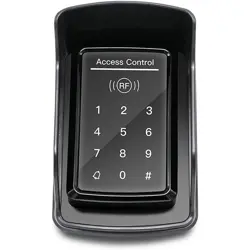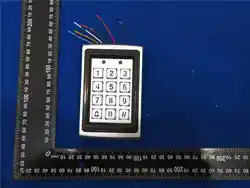
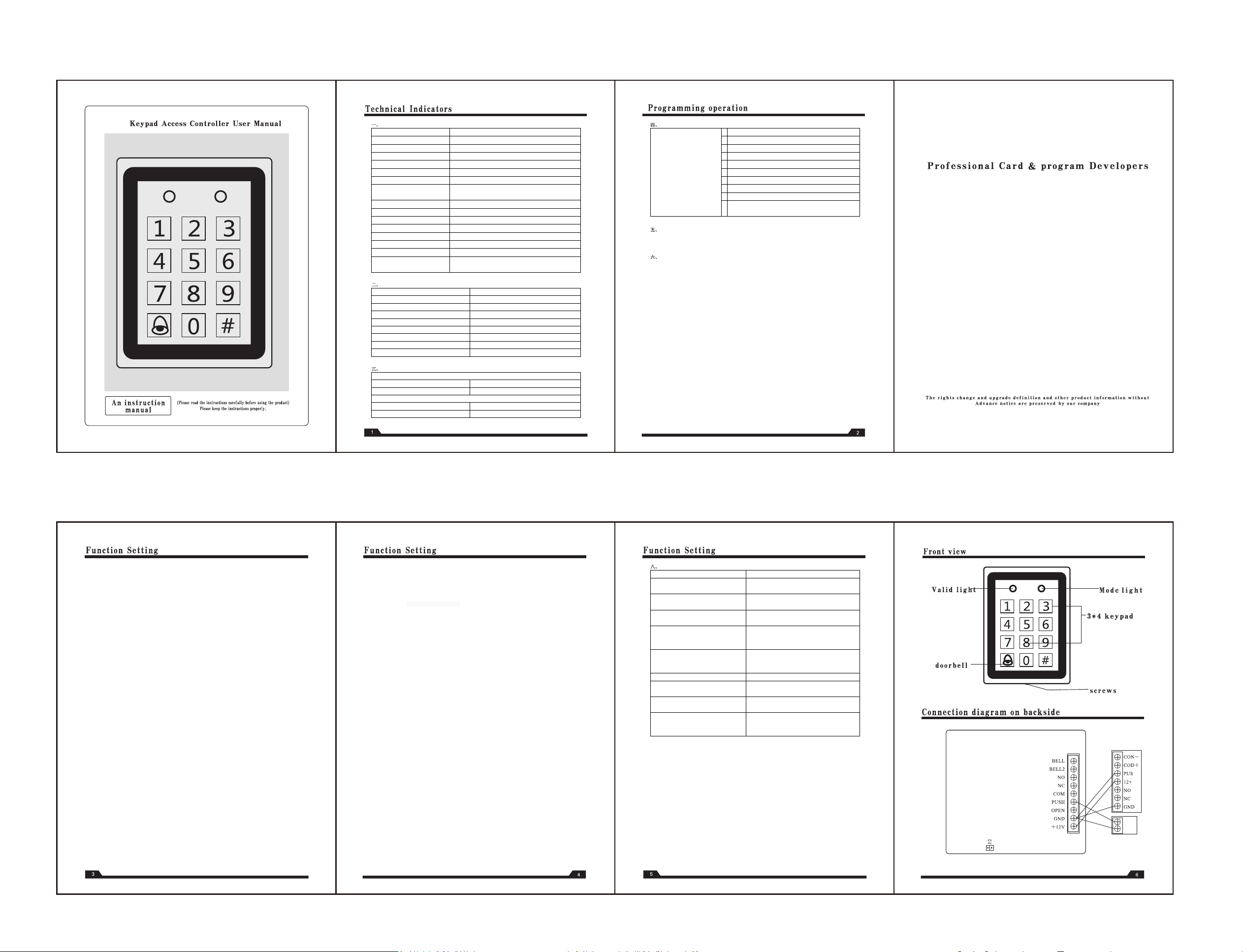
different models come with different diagram, please refer to the connection ports.
switch
short connect J2
一、Technical Specification
Item
Specification
Voltage
12VDC±12%/1.2A
Lock Relay 12VDC/2A
Environmental temperature
Working:0C~45
℃
Storage:-10C~55
℃
Relative humidify
Working:40%~90%RH Storage:20%~90%RH
Valid Card Capacity A:1000 张 (卡编码: 001~999)
Password Capacity
Public Password: 1Private Password: 1000
Card Type
ID type:125KHz
IC type
:13.56M125KHz EM Type or 13.56Mhz Mifare Type
Card Read Distance
EM Type: 5-15CM Mifare Type: 3-5CM
Card reading distance
ID
型
:5-15CM IC
型:
3-5CM
Relay output or level output (option)
Relay output or level output (option)
Exit Button Interface
1
Doorbell Interface
1
Door Status Interface
1 (level output)
Alarm Interface
1 (level output)
WG26 Output/Input
Standard Wiegand
26 output and Wigand Input to connect with
extra reader
二
、Factory Defult
Item
Factory default
Programming password 881122
Door open mode Card or Fingerprint
Unlock time
3seconds
Anti- break Alarm
off
Anti- break Alarm
off
Lock status
off
Alarm Delay
0 seconds
Modify personal password function
off
三
、Buzz and Light Indicate
Normal Working Condition
Valid Command A Shhort Beep Sound
Invalid Command
A Long Beep Sound
Programming Mode ,Green Led light on
Valid Command
Two Short Beep Sound
Invalid Command
Three Short Beep Sound
四
、Function Setting
p
ress [#] + [6 –digit programming
password] (default: 881122)
E
nterin the programming mode,
can operate to realize 0-9
functions on the right
0
Modify digit programming password]
1
Card or password card+ password Door open setting
2
Time of lock/unlock setting
3
Modify Common Code
4
Add or remove fingerprints
5
Delete card (A program deletion,B management card deletion)
6
Restore factory settings
7
Two machine (master and slave ) data copy
8
Restore the factory setting (non reserved registered data )
9
Registraton manage
ment card (A. programming registration B
hardware registration)
五
、Cancel Command
Command have not all been completed, press [#] key, you can cancel the command
六
、 Function setting
Enterthe programming mode:
press [#] + [6 –digit programming password] (default: 881122)
Function (0) Modify programming Code
Press [0] + [new 6-digit programming password]
+ [confirm the new 6-digit programming password]
Disable the door opening method of general password (default)
(1) Disable the door opening method of general password (default)
【1】+【0】 toot -toot
Start the door opening method of general password (default)
【1】+【1】 toot -toot
Start the function of modifying personal password 【1】+【2】 toot toot
(disable the modify personal password function: Press[1] + [3]) toot toot
(Set lock/unlock by swiping+personal password)
【1】+【4】 toot toot
(unset lock/unlock by swiping+personal password ) (default)【1】+【5】 toot toot
Change personal password under nonprogramming)
[swipe card] toot -toot toot
Pess [#] for 3 seconds till sound TOOT-TOOT TOOT. If it make sounds toot -toot toot after press [#] for 2
seconds, it means changing passwords function failed.
(enter 4 origin passwords( default:0000)
Function (2), Set opening time
Press [2] + [TT], TT stands forthe unlock time in seconds, such as unlock time in 3 seconds, then TT=03
Function (3), modify common code
Press [3] + [4 digit code], (default: 1234)
Add or Delete Fingerprint
1、Add fingerprint
Press【4】+【1】(enter 3 digits fingerprint code ),sudh as 0001-9999) toot toot
Enter 4 times toot -toot succeses
2、 Delete fingerprint (A B C three mode)
A、【 4】+【2】 Delete fingerprint ((3 digit fingprint code 001-999 toot -toot
B :press 【4】+【2】+ fingerprint toot -toot
C. Management card deletion
In standby mode, swipe the management card for 4 times to enter the delete fingerprint mode [enter the
3-digit fingerprint code 001-999] or scan the fingerprint
Function (5), add valid card A, add cards under programming process B,add management card delelte card)
A, add cards under programming process
Press [5] + [4 digit card number, such as 0001-9999], toot - toot
Swiping Prox cards, sucess while it makes sound toot toot.
A、Add management card
1、Creat management card A ,Registraton management card【5】+【3】swipe card·B,hardware registration
please refer to Function 9)
2.Add a new user by the management card: swipe the management card once in standby mode + input the
3-digit card code 0001-9999 + swipe any blank card + add successfully
Supplementary description of function 5:
Remark(1), 3 digit card number must be from 001 to 999 and can’t be repeated. Please keep the card code
properly.
Remark (2), when continuous enroll cards , the card number will increase progressively. For example, input 4 digit
card number 0015, when swipe second card, it will be 0016
Delete card methods:
A: Delete single card number: press [5] + [ 2]digit card number
B: Swipe cards:press [5] +【2】 swipe that card
C:by management card: swipe the management card twice under standby mode till green light flash→enter 4
digit card numbers or swipe cards
D: delete all users: Restore the factory setting
Please use function 8: Restore the factory setting
Funtion 6: Set anti disassembly function
turn off Anti disassembly alarm function: press 【6】+【0】 toot – toot
Turn on Anti disassembly alarm function press 【6】+【1】
功能 7 两机(主机、副机)数据拷贝 Function (7) data copy
Step1: Corresponding to connect the host and auxiliary P2 wires.
1.1 login in host to programming mode→press[7] + [1]→Green light on,red light flash→Enter host mode
successfully.
1.2 login in Auxilary to programming mode→press[7] + [2]→red light on, green light flash→Enter Auxiliary mode
successfully.
Step2: Auto connect successfully after step1, green and red lights of host and auxiliary are on, then copy
automatically.
Step3: Buzzer rings after copy completed, then return to standby status.
Function 8 restore to factory default
1 Press [8686] rings toot toot, toot, toots after 5 seconds, controller turns to factory
default(reserved registered data)
2.Short circuit J2 in the energized, controller turns to factory default(non reserved registered data)
Function 9 enroll management card by hardware
Short circuit J2 connect under power-off→ then power-on→ ring toot toot→disconnect J2 into adding
management card mode→Swipe card
Supplymentary applications
Input password time should be within 2 seconds
press [#] to cancel the password while enter 4 digits failed.
Card +
Private Code opening method
swipe card -toot toot +
personal password press [#] to cancel the password while enter 4 digits failed.
八
、Frequently Questions
Question
Possible Error and Solutions
oots 8times while lock/unlock
Insufficient voltage:Add a DC power supply or replace
higher power supply.then reset cards
Short reading distance or insensitive while
keys are normal
Avoid controll on metal surface adjust the positlow
power supply
No action after swipe card
Press 【#】
before reading cards, wait and reread cards
on standby
Unlock failed but rings Toot.
It is se
t to detect the state of the door when unlocking,
door magnetic is disconnected or door is not close. Set
off the detect or close the door magnetic
Press[#]+[programming password]there is
long beep and cannot enter the programming
mode
Other keys are pressed before pressing the [#] key;
Keep on pressing [#] key till long beep. Then press
[#]+programming password.
Press [5],there are 3 beeps
controller code capacity is full
Press[5]+[4 code](ring 3 toot)
This code was already used, must press[5]+[4 new
codes]
Press[5]+[4 code](ring 2 toot)+induction
card(ring 3 toot)
This card already registered
, this code can be used in
other cards.
No operation in programming state, then
controller exits
In programming mode, if there is not
input in 20
seconds, the controller exits programming mode
automatically to normal working state
1
. Front view
2. Mode light
3. Valid light
4. 3*4 keypad
5. doorbell
6. screws
7. wiring diagram
8. wiring diagram on backside
9. lock relay output
10. alarm relay output
11. back to factory default, short connect J2 Forcibly restore factory programmed password, short circuit J2,
then disconnected.
The above wiring diagram corresponds to different products, please Please connect according to the
corresponding model of the terminal on the back of the product(The technical parameters and specifications of
our products are subject to change without notice).If any questions, please contact the manufacturer.

FCC Warnning:
This equipment has been tested and found to comply with the limits for a Class B digital device,
pursuant to part 15 of the FCC Rules. These limits are designed to provide
reasonable
protection againstharmful interference in a residential installation. This equipment generates,
uses and can radiateradio
frequency
energy
and,
if
not
installed
and
used
in
accordance
with
the
instructions,
maycause
harmful
interference
to
radio
communications.
However,
there
is
no
guarantee
thatinterference
will
not
occur
in
a
particular
installation.
If
this
equipment
does
cause
harmfulinterference to radio or television reception, which can be
determined by turning the equipmentoff
and
on,
the
user
is
encouraged
to
try
to
correct
the
interference
by
one
or
more
of
thefollowing measures:
•
Reorient or relocate the receiving antenna.
•
Increase the separation between the equipment and receiver.
•
Connect the equipment into an outlet on a circuit different from that to which the receiver is
connected.
• Consult the dealer or an experienced radio/TV technician for help.
Caution:
Any
changes
or
modifications
to
this
device
not
explicitly
approved
by
manufacturer
could void your authority to operate this equipment.
This
device
complies
with
part
15
of
the
FCC
Rules.
Operation
is
subject
to
the
following
two
conditions:
(1)This
device
may
not
cause
harmful
interference,
and
(2)
this
device
must
accept
any
interference received, including interference that may cause undesired operation.
This
equipment
complies
with
FCC
radiation
exposure
limits
set
forth
for
an
uncontrolled
environment.
This
equipment
should
be
installed
and
operated
with
minimum
distance
20cm
between the radiator and your body.