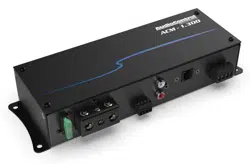
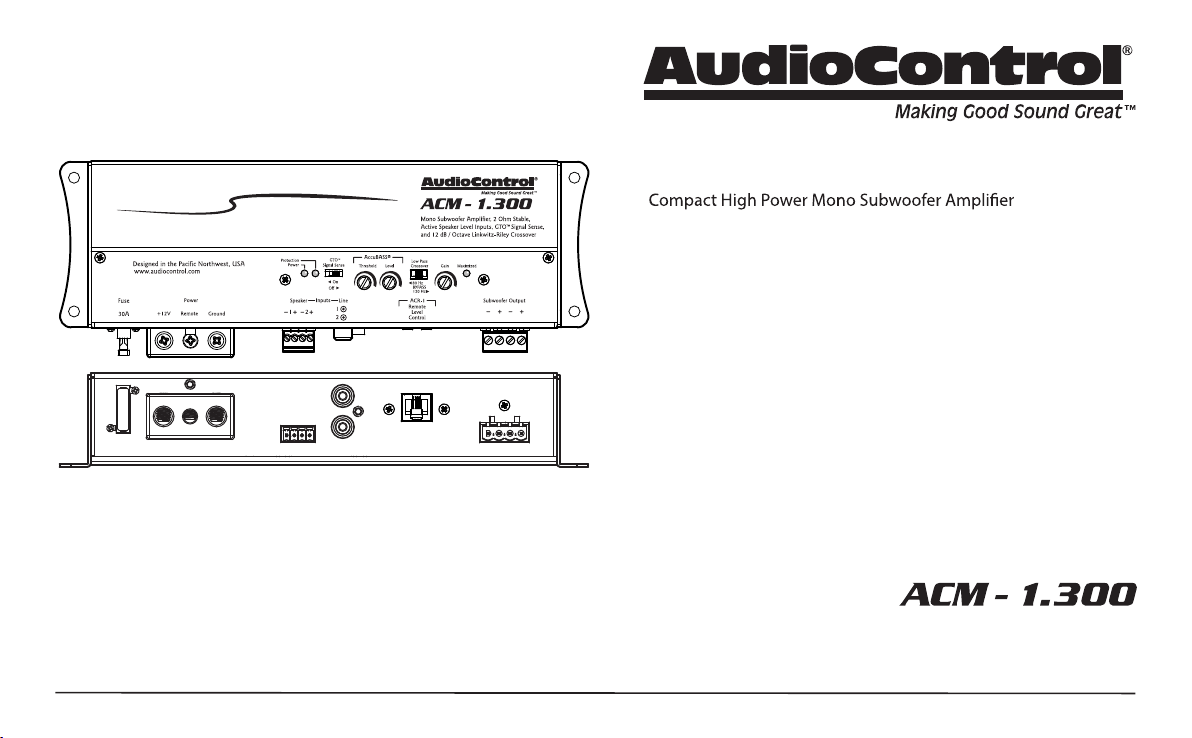
COMPACT HIGH POWER MONO SUBWOOFER AMPLIFIER
Quick Start Guide
Features
•
• High Current Design
• 1x175 Watts @ 4 Ohm, 1x300 Watts @ 2 Ohm
• 12 dB/Octave Linkwitz-Riley Alignment Crossover
• GTO™ Signal Sense
• PFM Subsonic Filter
• 2 Line-Level RCA Inputs, summed
2 Active Speaker-Level Inputs, summed
• AccuBASS® Bass Restoration
• Filled with home-grown audio goodness
•
• Optional wired ACR-1 Remote Control for Output Level
2
Quick Start Guide
Important Safety Instructions
1. Read these instructions.
2. Keep these instructions.
3. Heed all warnings.
4. Follow all instructions.
5. Do not use this apparatus near water.
6. Clean only with a dry cloth.
7. Do not block any ventilation openings. Install in accordance with the
manufacturer’s instructions.
8.
9. WARNING: Improper installation may lead to permanent injury or death.
personnel, to prevent damage to fuel lines, power and other electrical
wiring, hydraulic brake lines, and other systems, that might compromise
vehicle safety.
10.
ACM-1.300 this means 8 gauge wire or
thicker.
11. Use rubber grommets to protect wiring whenever passing wires through
metal openings or bulkheads.
12.
13.
when the apparatus has been damaged in any way, such as the power in-
put terminals are damaged, liquid has been spilled or objects have fallen
into the apparatus, the apparatus has been exposed to rain or moisture,
does not operate normally, or has been dropped.
14. This apparatus shall not be exposed to dripping or splashing, and no
15. Fuses shall be replaced only with the correct type and fuse value, and
16. Exposure to high sound pressure levels may lead to permanent hearing
loss. Take every precaution to protect your hearing.
triangle is intended to alert the user to the presence of uninsulated
“dangerous voltage” within the product’s enclosure, that may be of
The exclamation point within an equilateral triangle is intended to
alert the user of the presence of important operating and mainte-
nance (servicing) instructions in the literature accompanying the
appliance.
Caution: to reduce the risk of electric shock, do
not disassemble the apparatus, other than to
remove the top panel to access the controls.
There are no user-serviceable parts inside. Refer
its destiny, do not throw it out into the trash. It has to be carefully
recycled for the good of mankind, by a facility specially equipped
for the safe recycling of electronic apparatii. Please contact your
local or state recycling leaders for assistance in locating a suitable
nearby recycling facility. Or, contact us and we might be able to
repair it for you.
3
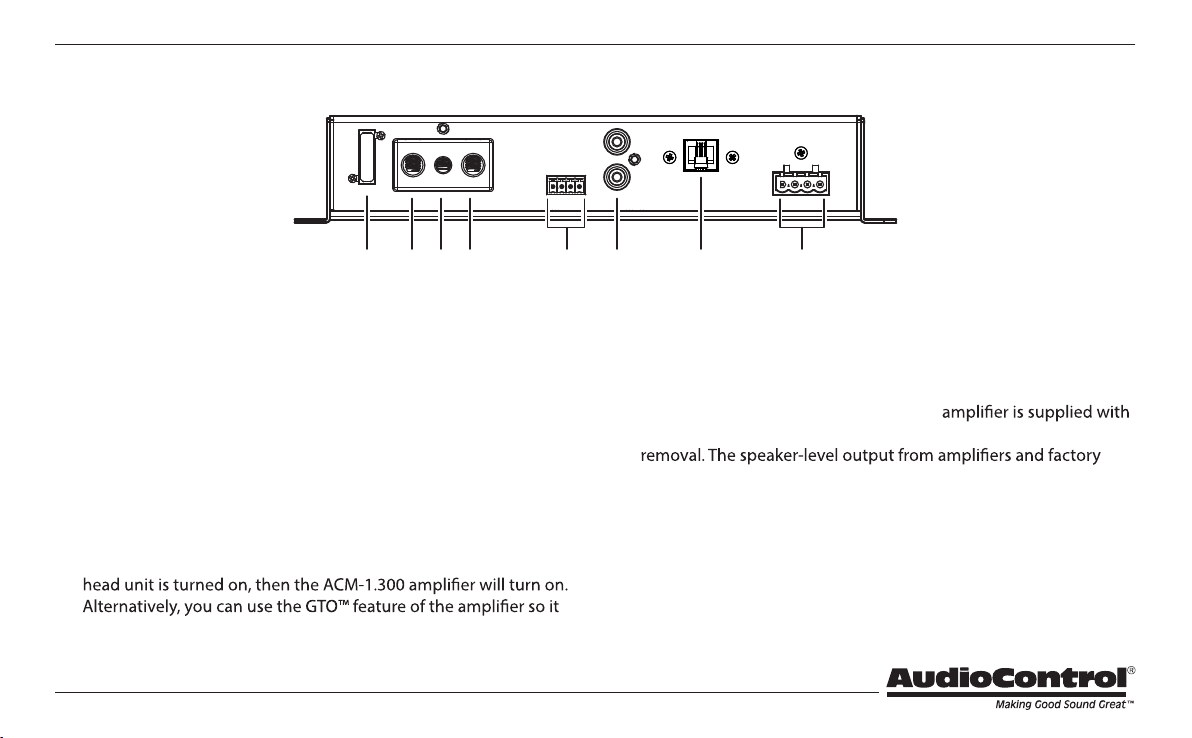
1. Fuse 30A – Replace the fuse only with the exact same style and
Ampere rating. Disconnect 12V power before changing or inspect-
ing the fuse.
2. Power Input Terminal +12V – This screw terminal connects to
the +12V battery binding post of the vehicle. Use quality insulated
wiring of the recommended wire gauge, such as wire gauge 8 or
thicker. Thinner wire may cause an overheating hazard due to the
large currents involved.
3. Remote Power Input Terminal – This screw terminal connects
to the 12V remote trigger output of some head units. When the
will turn on when an audio signal is detected at the speaker-level
or line-level inputs.
4. Power Input Terminal Ground – This screw terminal connects to
a good ground connection on the vehicle.
5. Speaker-Level Inputs – The ACM-1.300
a standard 4-conductor plug that allows for easy installation and
installed radios can connect here, so the ACM-1.300 will receive
the audio signals and do its subwoofer thing. The left and right
audio signals are summed internally to produce a mono subwoof-
er signal. Make sure that you follow the plus and minus polarity
markings on the ACM-1.300 and match it to the polarity of the
speaker wiring. Do not use the RCA Line-level inputs if you are
using the speaker-level inputs.
Connection Panel Features
1 2 3 4 5 6
8
7

4
Quick Start Guide
6. RCA Analog Line-Level Inputs – The line-level output from the
head unit or factory installed radios can connect here, so the
ACM-1.300 will receive the line-level audio signals. The left and
right signals are summed internally to produce a mono subwoofer
signal. Do not use the speaker-level inputs if you are using the
RCA line-level inputs.
7. Remote Control Connector
8. Speaker-Level Output Terminals – These screw terminals con-
nect with speaker wire to the subwoofer, or multiple subwoofers.
Make sure that the average combined speaker impedance does
not dip below 2 Ohm. The ACM-1.300 has four connections (2 plus
and 2 minus). These four connections allow you to easily add a
second subwoofer in parallel, as long as the impedance of both
subwoofers is 4 Ohms or greater.
– This connects to the optional ACR-1
remote control and allows you to remotely control the output
level.
5
Control Panel Features
8 9 10 11 12
13
14
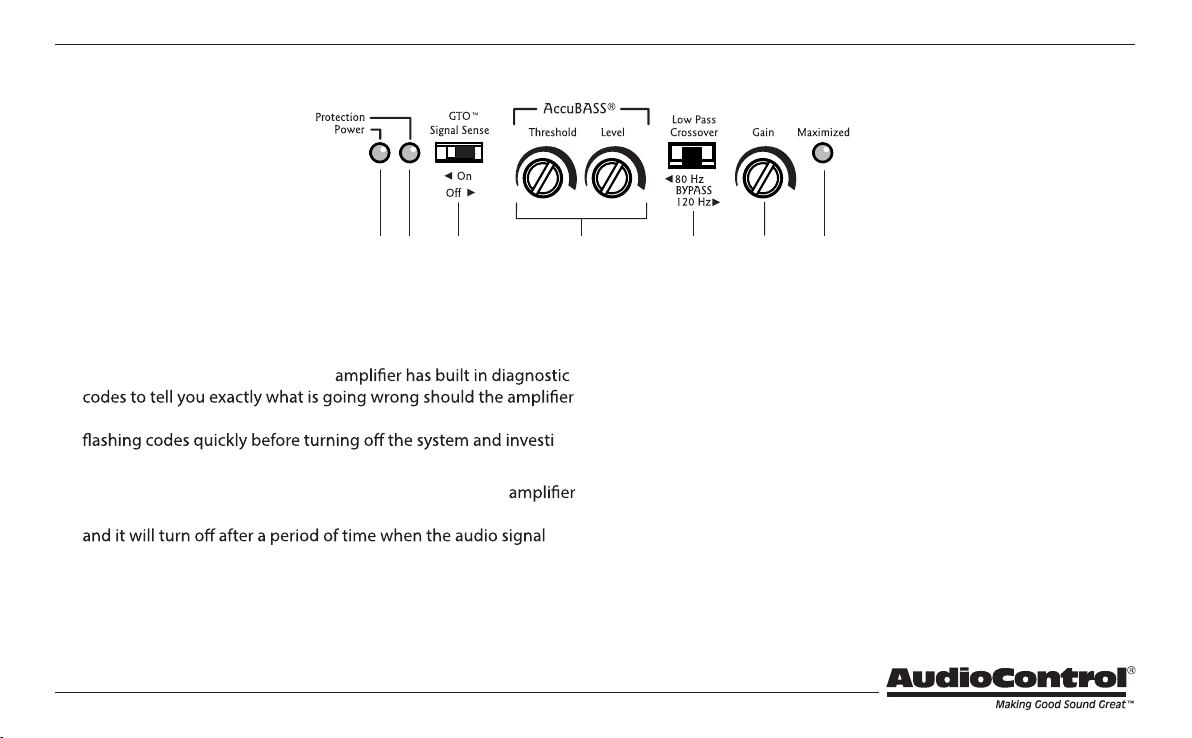
8. Power LED – If you have connected your battery power, vehicle
ground, and turn-on lead (or GTO™ signal sensing) correctly, then
this light should turn on to indicate the power is ON.
9. Protection LED – The ACM-1.300
detect a problem. If the protection LED should come on, read the
-
gating. (See the specs page for a list of diagnostic codes.)
10. GTO™ Signal Sense – In the ON position, the ACM-1.300
will turn on gracefully when it detects an incoming audio signal,
fades away to silence. In some situations, factory installed audio
systems may turn on or “wake up” due to convenience features
like door chimes, alarms, and cell phone signals that trigger the
source unit in the vehicle to come on. To prevent these from
turning your audio system on unexpectedly, you can bypass the
GTO™ circuit by moving this switch to the OFF position and use
a switched 12-volt signal connected to the Remote In terminal
instead.
11. AccuBASS®
The renowned AccuBASS® will work wonders on the lower bass of
the speaker outputs.
AccuBASS® Threshold – Selects the level at which the AccuBASS®
will begin to work.
AccuBASS® Level – Adjusts the level of the AccuBASS®.
6
Quick Start Guide
12. Crossover Frequency – Since component speakers (like woofers)
are designed to reproduce certain frequency ranges, a crossover
allows you to match the speaker to the appropriate frequency
range. Most manufactures list a recommended crossover fre-
crossover point will provide increased speaker reliability and
optimum sound quality. The ACM-1.300
12 dB/Octave Linkwitz-Riley crossover points at 80 Hz, 120 Hz, and
a “bypass” option. The ACM-1.300 will play the frequency range
below the crossover point. Select the crossover frequency on the
ACM-1.300
subwoofer’s manufacturer. If you do not know this value, select
the position that suits your subwoofer system best.
13. Gain Control – This control allows you to adjust the overall vol-
ume output level, with counterclockwise decreasing the volume,
and clockwise increasing. The setting procedure is given on the
next page, and involves nerves of steel, a steady hand, grit, deter-
mination, and the thought that you are making the world a better
place for deep bass.
14. Gain Maximized LED – This LED indicates when the ACM-1.300
7
Quick Start
running:
1. Undo the +12V and Ground connections to the car battery
2. Pick a mounting location that will provide access to the controls
and connections, provide plenty of good ventilation, and also
3. The ACM-1.300
the four mounting holes located in each corner.
4. Before drilling any holes, take every precaution to prevent
any damage to fuel lines, power and other electrical wir-
ing, hydraulic brake lines, and other systems, that might compro-
mise vehicle safety.
5. When making connections, designate red RCA plugs as right,
and designate white, black, or grey plugs as left. This is a good
idea for all signal connections made in your audio system. The
key is consistency. Stick with the same color coding and you’ll
reduce possible problems.
6. Use quality interconnect cables.
7. Connect the +12V input terminal of the unit to the +12V termi-
nal of the vehicle battery. Use 8 gauge insulated wire or thicker.
8. Connect the Ground terminal of the unit to the chassis of the
vehicle using the same wire gauge as the +12V power wire.
9. Connect the remote power terminal of the unit to the remote
turn-on switch of your source unit. Alternatively, you can skip
this connection and use the GTO™ Signal sensing.
10. Connect your audio inputs to the unit – either speaker-level or
line-level RCA… not both.
11. Connect your subwoofer (2 Ohms minimum load).
12. When all connections are made, reconnect the vehicle battery.
13. Adjust your gain setting to maximise your signal level.
14. Set the ACM-1.300 crossover to the frequency recommended by
your subwoofer manufacturer.
15. Enjoy the drive!
8
Quick Start Guide
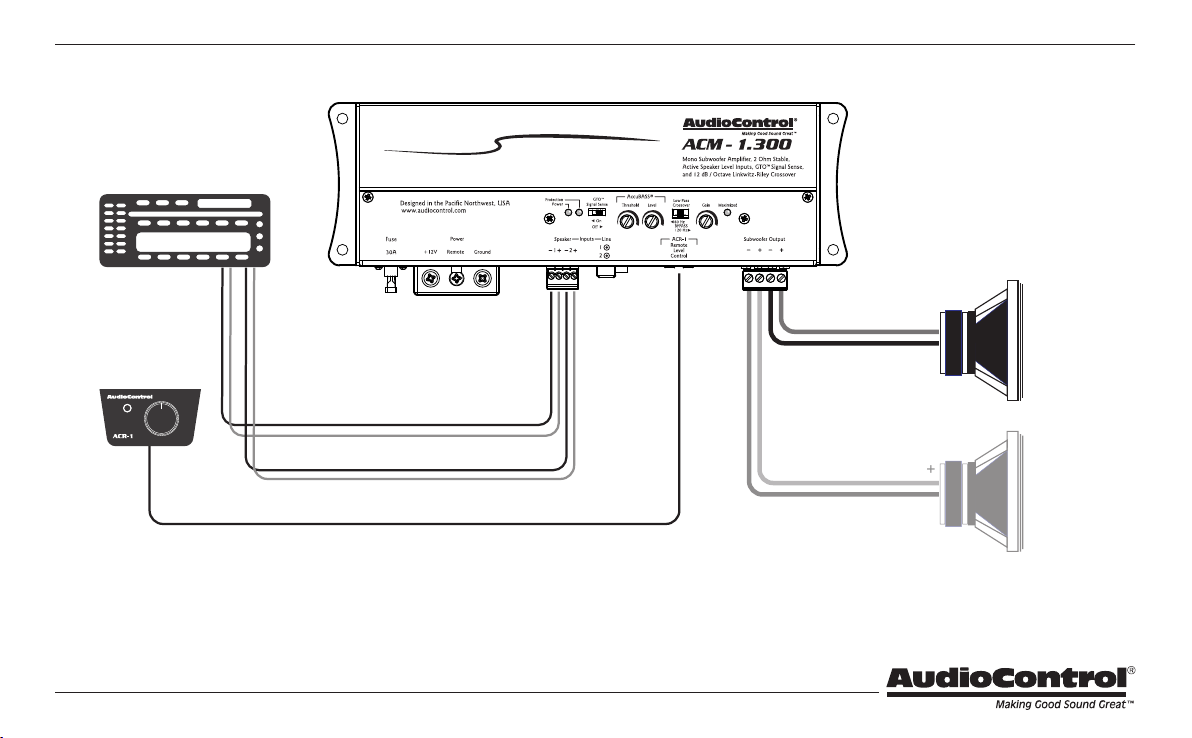
Power Connections
Ground
Head Unit
Remote Amplifier
+12V Trigger
+12V
In this example, the head unit has a +12V trigger
output that is connected to the ACM-1.300 remote
input terminal. When the head unit is turned on, it
will turn on the ACM-1.300
Alternatively, the GTO™ signal sense feature can
be used to gently turn on the ACM-1.300
when an audio input signal is detected. (The con-
nection to the ACM-1.300 remote input terminal is
not required when using the GTO™ signal sense.)
9
System #1: Adding a Subwoofer to a Factory Radio using Speaker-Level Inputs
Factory
Radio
Speaker-level
outputs
+
+
+
+
+
+
Subwoofer
Optional
Subwoofer
in parallel
lf two subwoofers are connected like this, they are in parallel, and the
impedance of each subwoofer must be 4 Ohms or greater.
ACR-1
(optional)
10
Quick Start Guide
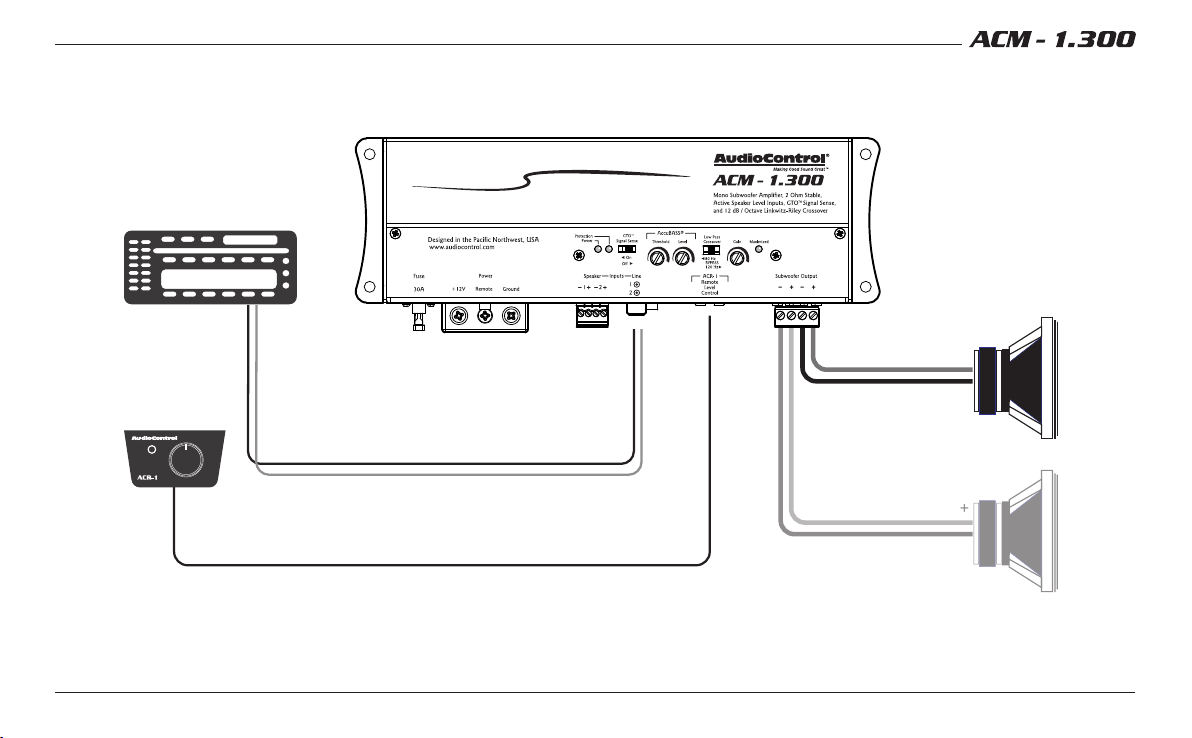
System #2: Adding a Subwoofer to an Aftermarket Head Unit
using Line-Level Inputs
lf two subwoofers are connected like this, they are in parallel, and the
impedance of each subwoofer must be 4 Ohms or greater.
Aftermarket
Head Unit
Line-level
L/R outputs
+
+
LR
+
Subwoofer
Optional
Subwoofer
in parallel
ACR-1
(optional)
11
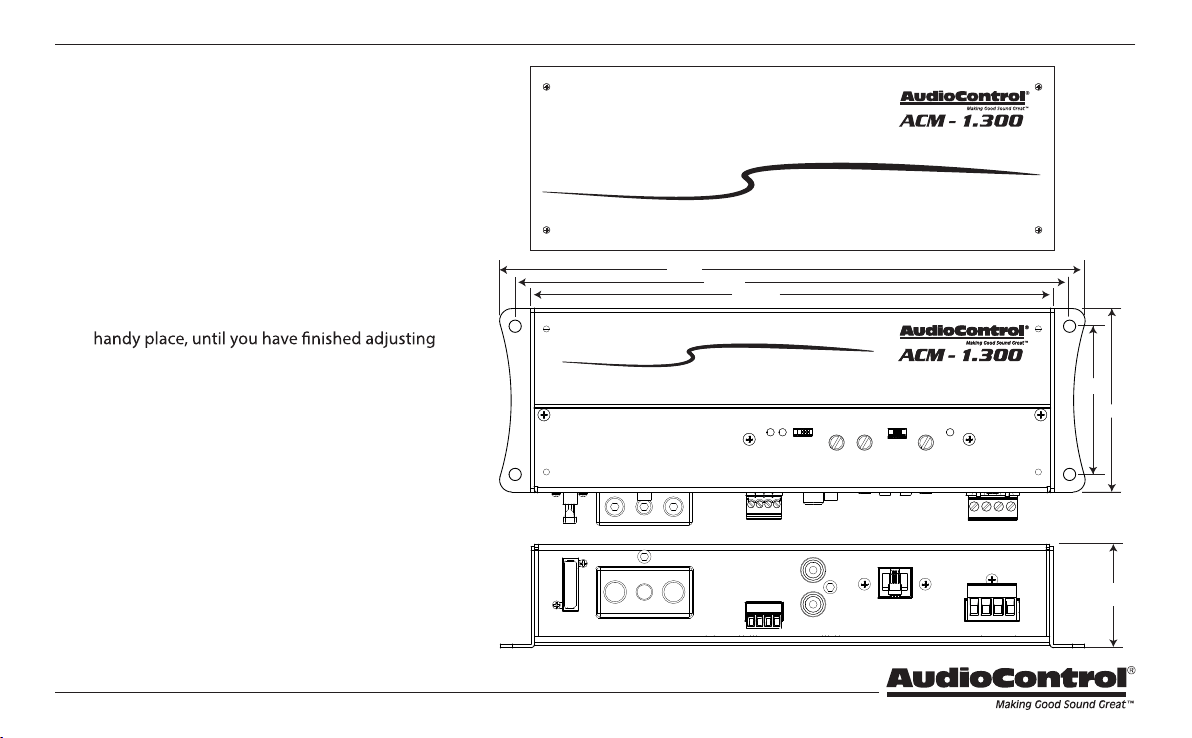
Cover Plate Removal
The cover plate must be removed to gain access to
the controls, and then put back on again to protect
the controls from dust bunnies.
Removal Procedure
1. Locate the top four screws that hold the cover
plate in place.
2. Use a philips screwdriver to remove the four
screws.
3. Keep the cover plate and screws in a safe and
the controls to your immense satisfaction.
8.300”
8.910”
9.410”
2.97”
2.38”
1.75”
Quick Start Guide PN 914-017-0 Rev D
Power Output (RMS) ............................ 175 Watts @ 4 Ohms
. . . . . . . . . . . . . . . . . . . . . . . . . . . . . . . . . . . . . . . . . . . . . . . . . 300 Watts @ 2 Ohms
Input Voltage (RCA) Range ........................500 mV to 6 V RMS
Speaker-Level Input Voltage Range . . . . . . . . . . . . . . . . . . . 3 V to 40 V RMS
Total Harmonic Distortion . . . . . . . . . . . . . . . . . . . . . . . . . . . . . . . . . . . < 0.01%
S/N Ratio .......................... 102 dBa, Ref 175 Watts @ 4 Ohms
Bass Processing .......................................... AccuBASS®
Recommended Power / Ground Wire Gauge .................8 Gauge
Fuse Rating .............................................1 X 30 Amps
Crossover. . . . . . . . . .12dB/Octave Linkwitz-Riley, 80 Hz, 120 Hz, Bypass
PFM Subsonic Filter ........................................... 24 Hz
Weight .......................................................2.1 lbs
Dimensions ............................... 9.41" W X 2.97" D X 1.75" H
©2018 AudioControl. All rights reserved.
Warranty
For details of the limited warranty for your ACM-1.300, please visit the follow-
ing page on our website: http://www.audiocontrol.com/warranty
Please keep your receipt in a safe place.
AudioControl
22410 70th Avenue West, Mountlake Terrace, WA 98043 USA,
Phone 425-775-8461, FAX 425-778-3166
e-mail: [email protected]om
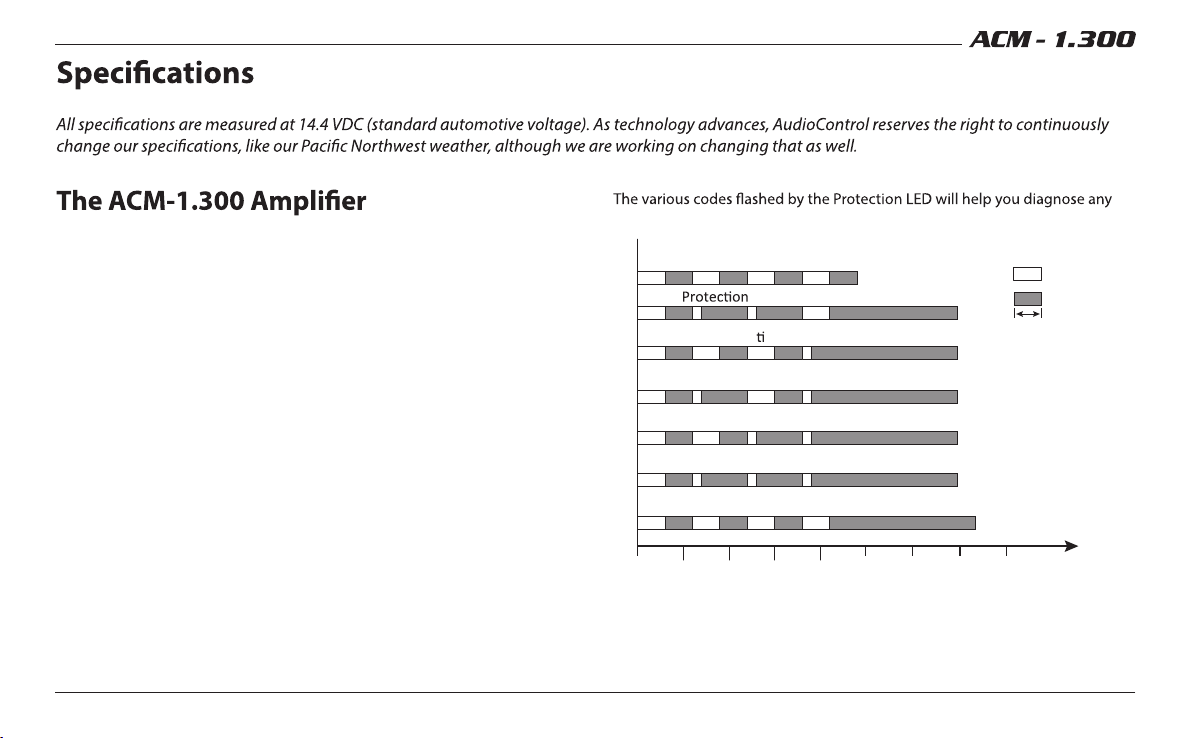
Protection Codes
problems with your system.
Turn On Delay
KEY
LED ON
LED OFF
300 mS
Short
DC Output Protec on
Transformer Overtemp
Heatsink Overtemp
Overvoltage
Undervoltage
0 0.5 1.0 1.5 2.0 2.5
Time sec
3.0 3.5 4.0