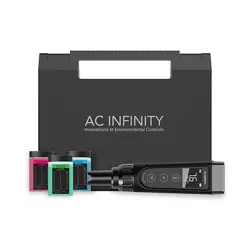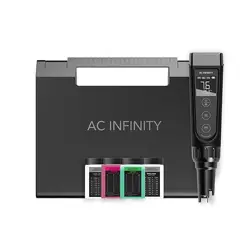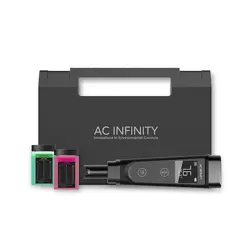

USER MANUAL
pH METER
HYDROPONIC TESTER


3
WELCOME
Thank you for choosing AC Infinity. We are committed to product quality and friendly
customer service. If you have any questions or suggestions, please don’t hesitate to
contact us. Visit www.acinfinity.com and click contact for our contact information.
EMAIL
support@acinfinity.com
WEB
www.acinfinity.com
LOCATION
Los Angeles, CA
4
MANUAL CODE PHM2304X1
PRODUCT
pH Meter
pH Meter PRO
Hydroponic Meter PRO
MODEL
AC-PHM3
AC-PHM5
AC-PHM7
UPC-A
819137024205
819137023987
819137024212
NOTE
Water droplets are added during the production of this product to maintain the
probe's moisture. This is normal practice and is not indicative of a used product.
Do NOT use this product under freezing cold conditions. Wait until your space
warms to room temperature before using this product.
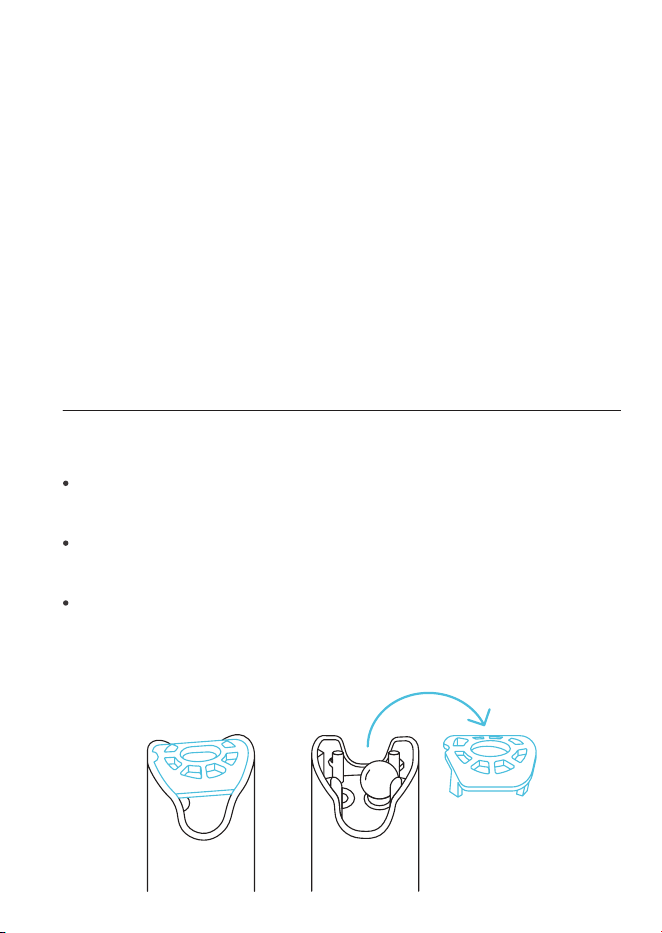
This testing device is equipped with a sensor shield that protects the glass bulb
from accidental collisions (see image below). You may remove this shield to
clean the sensor and put it back when you are finished.

5
MANUAL INDEX
Manual Index .................................................................................
Product Warning ............................................................................
Key Features .................................................................................
Product Contents ...........................................................................
Powering and Setup ......................................................................
Programming .................................................................................
Other Settings ...............................................................................
Calibration Notes ...........................................................................
Calibration .....................................................................................
Measurement .................................................................................
Maintenance ..................................................................................
Troubleshooting Guide ...................................................................
FAQ................................................................................................
Other AC Infinity Products .............................................................
Warranty ........................................................................................
Page 5
Page 6
Page 7
Page 8
Page 9
Page 12
Page 13
Page 15
Page 16
Page 19
Page 21
Page 24
Page 25
Page 26
Page 27

6
Read all instructions before using this product.
Do not fully submerge this product underwater.
Do not operate this product if it malfunctions, has been dropped, or is
damaged in any manner.
Wash hands thoroughly after handling calibration solutions.
Do not consume the calibration solutions. Seek medical attention and rinse
mouth in case of consumption. Keep solutions out of reach from children
and animals.
1.
2.
3.
4.
5.
PRODUCT WARNING
TO REDUCE THE RISK OF FIRE, ELECTRIC SHOCK, OR INJURY TO PERSONS,
OBSERVE THE FOLLOWING:
7
KEY FEATURES
SECURE BUILD
Detachable sensor
shield protects glass
electrode probe to
handle heavy usage.
HIGHLY ACCURATE
Lithium glass membrane
sensor quickly delivers
precise pH readings with
±0.1 accuracy.
DURABLE DESIGN
IP67 protection
rating ensures high
resistance against
heat, liquids, and dust.
PREMIUM DISPLAY
Vivid LCD screen with
locking capabilities
provides a sharp layout for
convenient observation.
LONGER LIFESPAN
pH 4.00 solution extends
the pH meter’s longevity
by supplying ideal storage
conditions in between use.
WELL-REGULATED
Calibration solutions
balance the probe to
ensure consistently
accurate readings.
8
PRODUCT CONTENTS
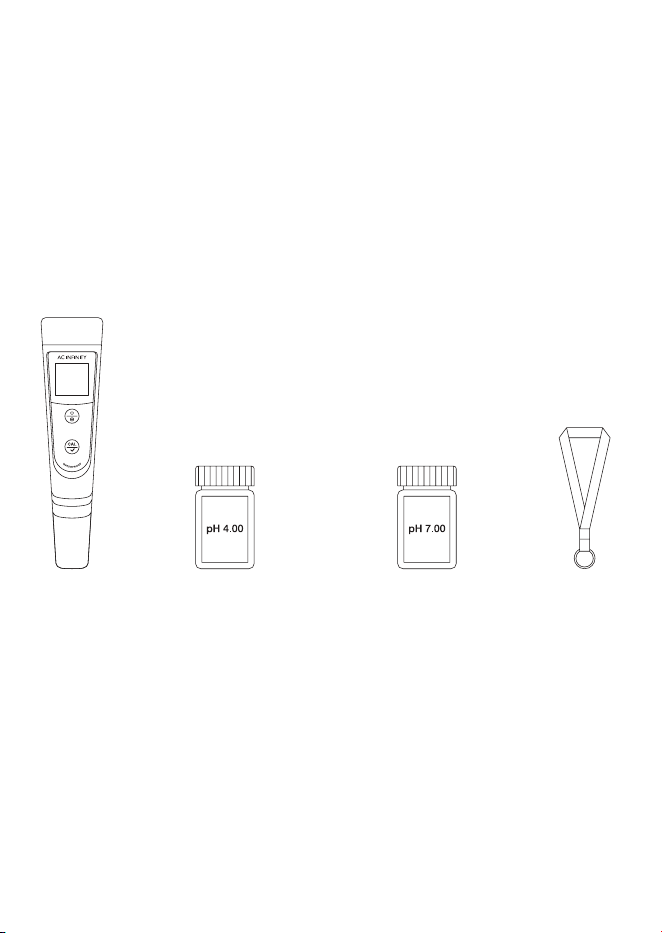
pH 4.00 CALIBRATION
BUFFER SOLUTION
(x1)
pH 7.00 CALIBRATION
BUFFER SOLUTION
(x1)
TRAVEL
LANYARD
(x1)
pH
METER
(x1)
9
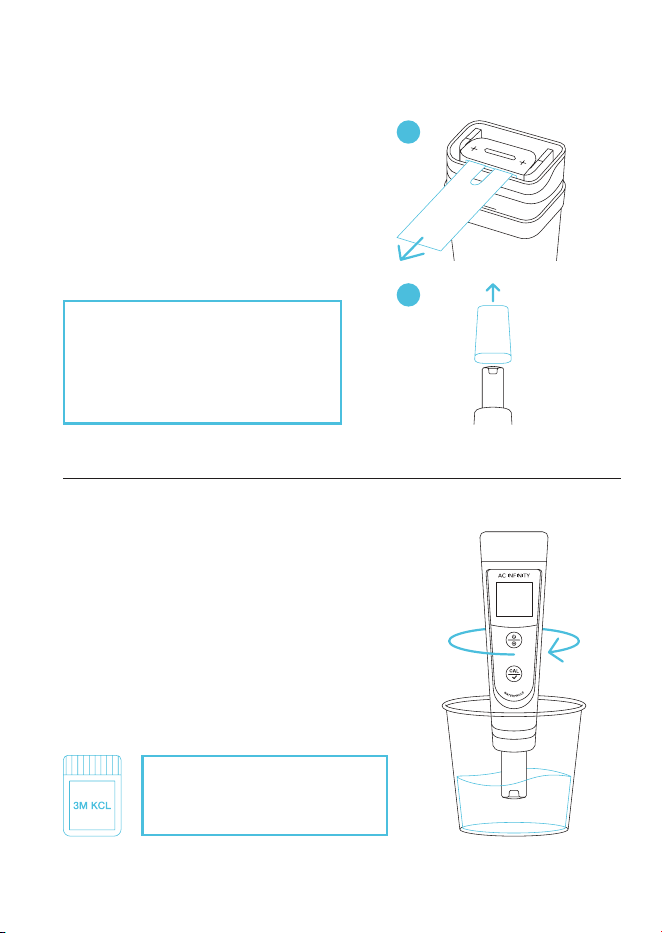
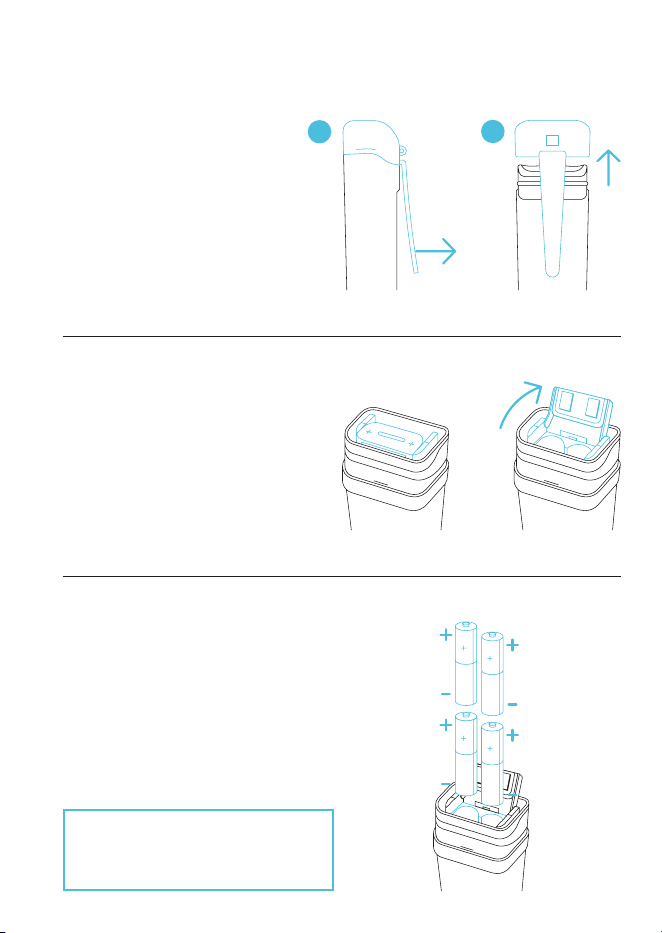
STEP 1
Pull off the battery insulation paper and
remove the probe cap.
POWERING AND SETUP
FIRST TIME USE
Your pH meter will come shipped
with 3M KCL droplets in the probe
cap. You may see this substance as
white sediment, which can be rinsed
off and will not affect its usability.
A
STEP 2
Fill a cup with 8-16 oz. of distilled or deionized
water for probe rinsing. Shake off excess water.
If unused for a month or longer,
soak in 3M KCL (not included)
for 30 minutes before use.
B
10
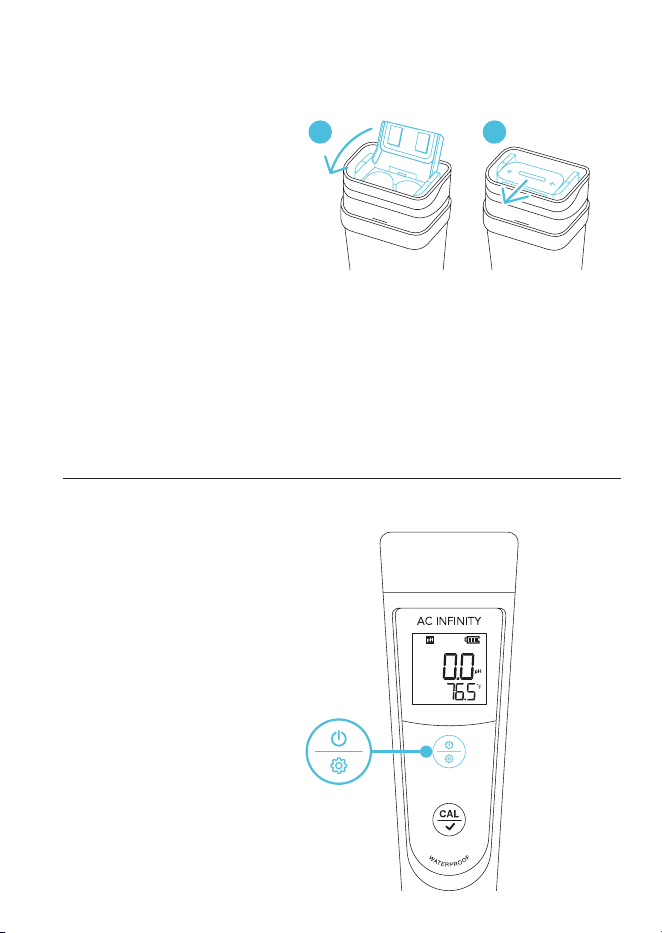
STEP 3
Insert the batteries as shown. The
positive end (+) of each battery must
face upwards.
POWERING AND SETUP
BATTERY REPLACEMENT
STEP 1
Remove the cap.
A
B
STEP 2
Pull the battery tab open.
CAUTION: Incorrectly inserted
batteries may damage your pH
meter and cause potential hazards.
11
POWERING AND SETUP
BATTERY REPLACEMENT
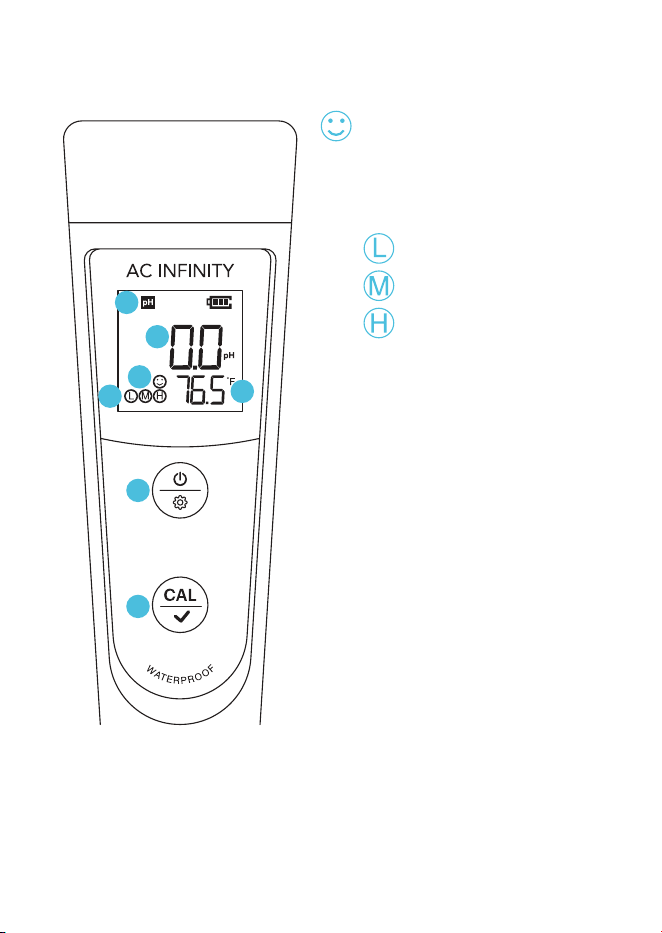
STEP 5
Press the power/setting button
to power it on.
STEP 4
Push the battery tab down and
forward to lock it. Place the cap
back on.
A B
PRESS
12
PROGRAMMING
1
2
3
4
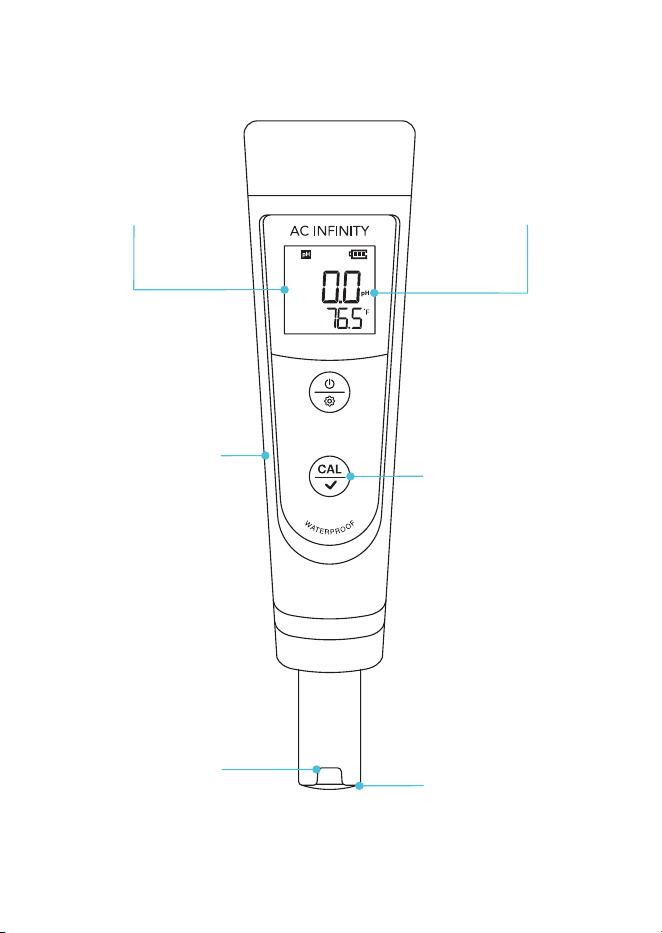
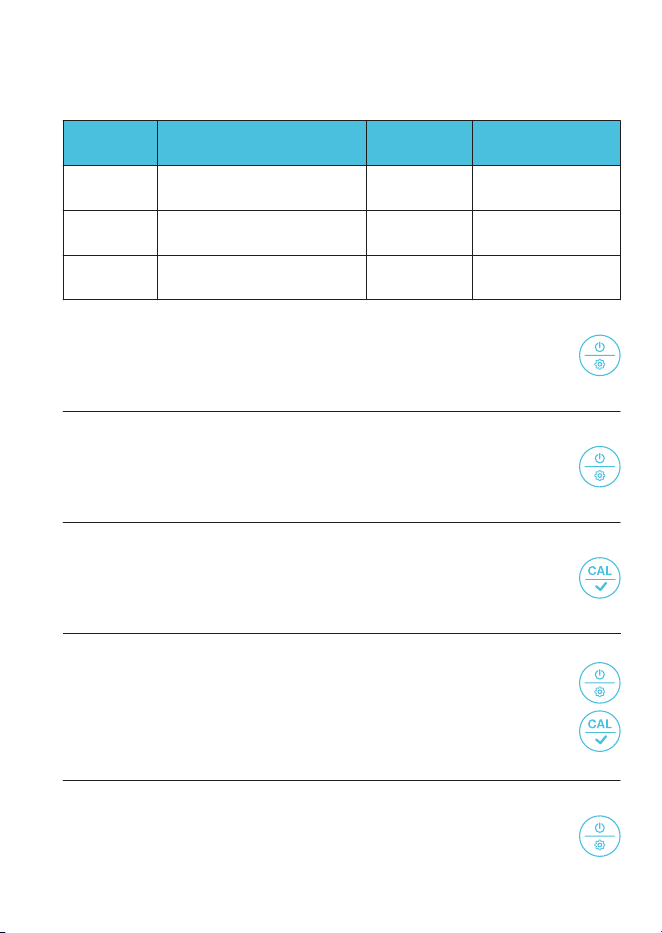
1. SMILE ICON
Indicates a stabilized reading
that lasts 2 seconds or longer.
3. POWER/SETTING BUTTON
Powers your pH meter ON/OFF
or adjusts settings. Cancels
calibration in CALIBRATION
Mode. Enters Settings while
your pH meter is OFF.
4. CALIBRATION BUTTON
Enters CALIBRATION Mode,
initiates the calibration, and
confirms changes.
2. CALIBRATION ICONS
= pH 4.00
= pH 7.00
= pH 10.01
7. PROBE TEMPERATURE
Displays the current temperature
that the probe is detecting.
6. PROBE pH
Displays the current pH level that
the probe is detecting.
5. MEASUREMENT MODE
Displays the parameter indication.
5
7
6

13
OTHER SETTINGS
START CALIBRATION
Press the calibration button.
PRESS +
CONFIRM CHANGES
In SETTINGS and CALIBRATION mode, press the calibration
button to confirm changes.
PRESS +
ACCESS CALIBRATION MODE
In MEASUREMENT mode, hold to enter CALIBRATION mode.
HOLD +
CANCEL CALIBRATION
In CALIBRATION mode, press the power/settings button.
PRESS +
CHANGE PARAMETER
In SETTINGS, press the power/settings button.
PRESS +
POWER ON
Press the power/settings button.
PRESS +
ACCESS SETTINGS
While off, hold the power/settings button to enter SETTINGS.
HOLD +
POWER OFF
Hold the power/settings button.
HOLD +
GENERAL SETTINGS
14
OTHER SETTINGS
Settings Adjustment
Selects pH Buffer Series
Restores Factory Settings
Selects Temperature Scale
Category
P1
P3
P2
Settings
USA / NIST
No / Yes
°F / °C
Factory Settings
USA
No
°F
ENTER SETTINGS
Holding the power/settings button will enter settings
while your pH meter is off.
HOLD +
1.
CYCLE THROUGH SETTINGS
Pressing the power/settings button switches between
P1-P2-P3.
PRESS +
2.
UNLOCK SETTINGS
Pressing the calibration button will enable you to
adjust your current setting which will flash.
PRESS +
3.
ADJUST SETTINGS
Pressing the power/settings button adjusts settings.
Pressing the calibration button confirms the settings change.
PRESS +
PRESS +
4.
JUMP TO MEASUREMENT MODE
Holding the power/settings button returns you to the
MEASUREMENT mode.
HOLD +
5.
PARAMETER SETTINGS
15
The 1
st
point calibration must be 7.00 pH. Perform the 2
nd
and 3
rd
point
calibrations (4.00 and 10.01 respectively) after the 1
st
point calibration
is complete.
A.
"Er2" will appear when the calibration button is pressed while the calibration
process is incomplete (smile icon does not appear on the screen).
B.
This testing kit comes included with pH 4.00 and pH 7.00 buffer solutions
only. You may purchase a pH 10.01 buffer solution separately if your target
pH level is > 8.0 pH.
C.
The included pH buffer solutions can be used for up to 10 calibrations. After
use, tightly close the bottle and store it at room temperature. Replace the
solutions after their 10 uses to help keep your pH measurements reliable.
D.
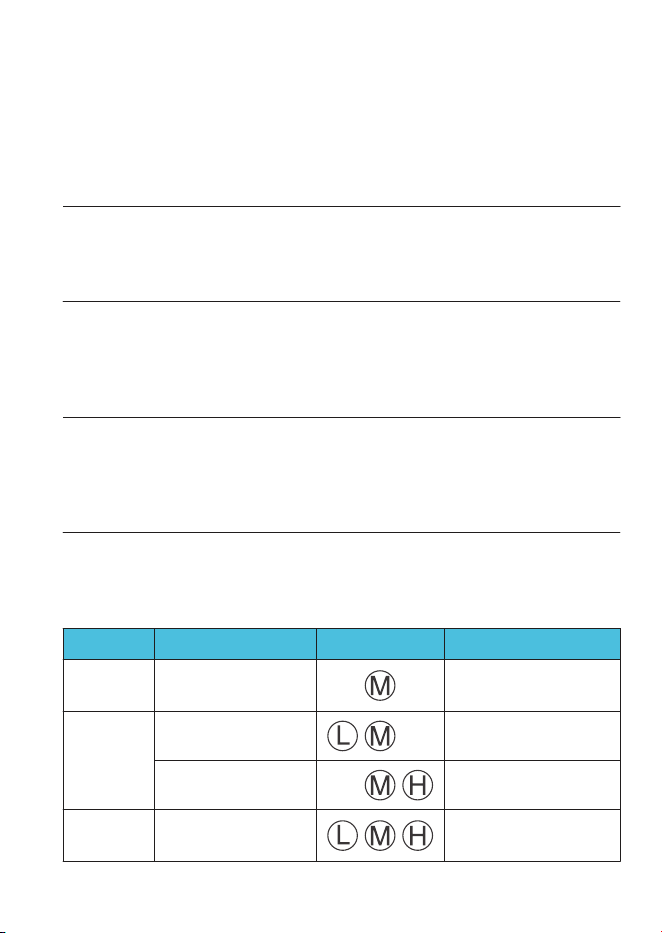
This pH meter will automatically recognize the pH buffer solution it is in. You
may select the following calibration points:
E.
CALIBRATION NOTES
Calibration Icon
7.00 pH, 4.00 pH,
and 10.01 pH
7.00 pH and 10.01 pH
7.00 pH and 4.00 pH
7.00 pH
Calibration Solution
Wide measuring range
Target pH level > 8.0 pH
Target pH level < 8.0 pH
Required Accuracy
≥ 0.3 pH
Application
2-Point
3-Point
1-Point
Calibration
16
CALIBRATION
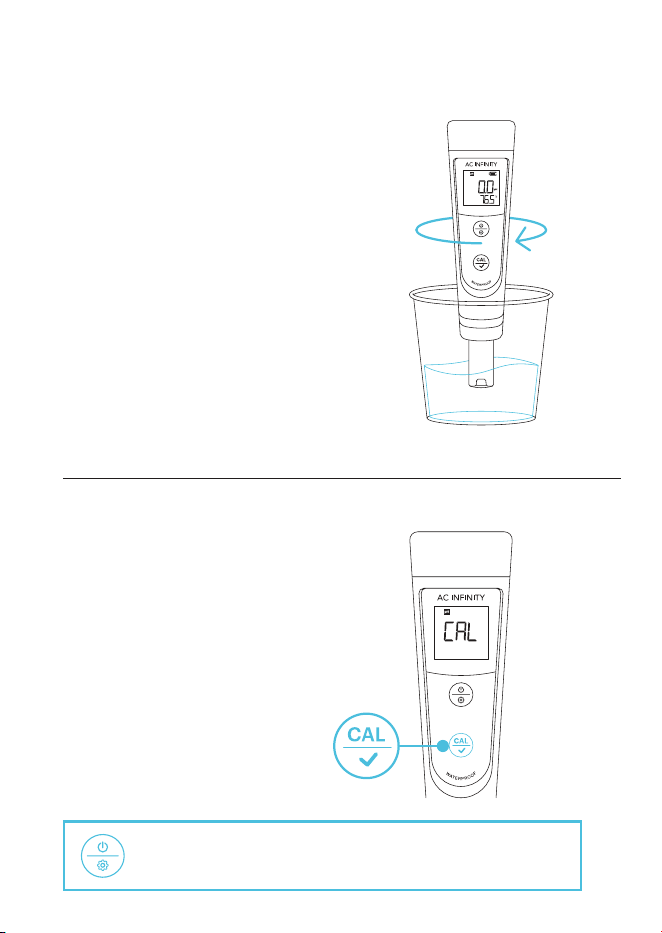
STEP 1
Rinse the probe in distilled water and
shake off excess moisture.
STEP 2
Hold the calibration button to enter
CALIBRATION Mode.
HOLD
You may cancel the calibration and return to
MEASUREMENT Mode by pressing the power/setting button.
17
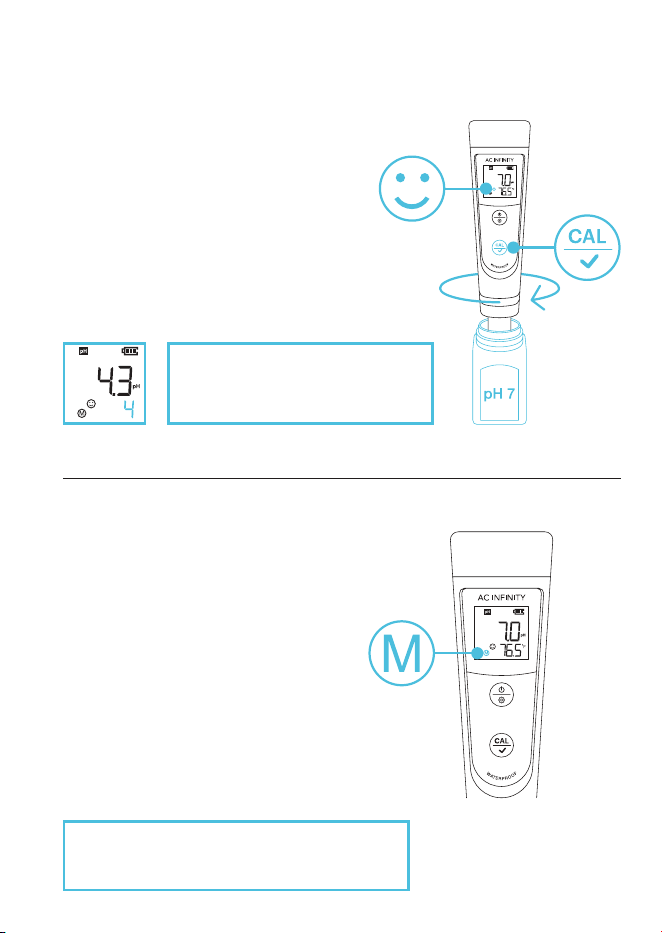
STEP 3
Quickly stir the probe in the 7.00 pH
buffer solution, then hold it still.
Wait for the smile icon to appear, then
press the calibration button to finish the
1
st
point calibration.
STEP 4
Your pH meter will return to
MEASUREMENT mode once the
calibration process is complete.
"M" will display on the lower left
corner, indicating a successful 1
st
point calibration (the middle point).
CALIBRATION
Once the calibration is confirmed,
the next solution will be indicated
at the bottom right of the screen.
To continue calibration, DO NOT turn off your
pH meter after you finish each calibration.
PRESS
18
CALIBRATION
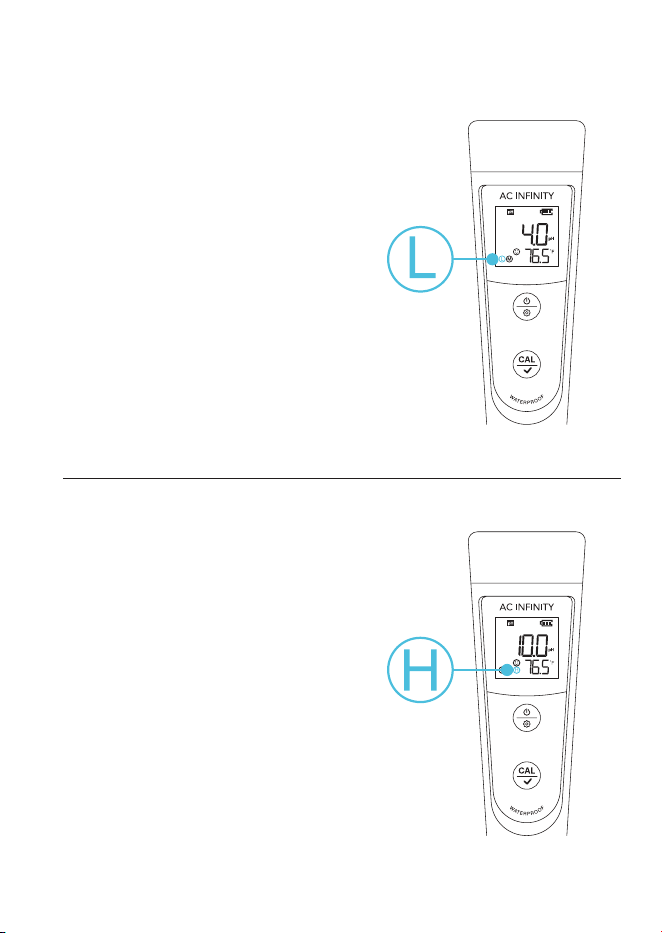
STEP 5
Repeat steps 1-3 to calibrate the
2
nd
point, using the 4.00 pH buffer
solution instead.
"L" will display next to "M," indicating
a successful 2
nd
point calibration.
STEP 6
You may optionally repeat steps 1-3 to
calibrate the 3
rd
point (target pH > 8.0),
using a standard 10.01 pH buffer solution
(not included).
"H" will show up next to "L" and "M,"
indicating a successful 3-point calibration.
19
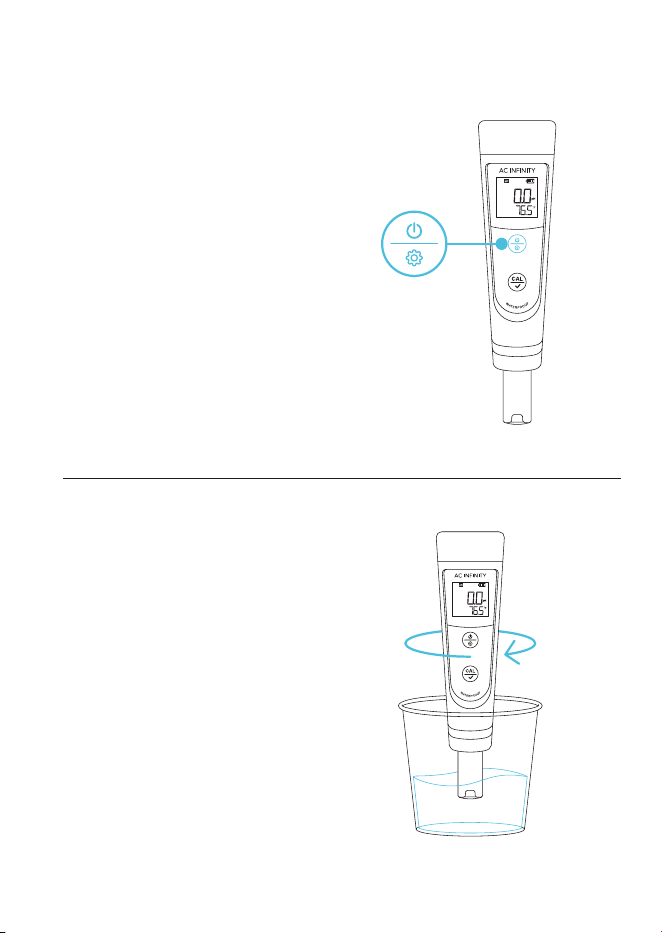
STEP 1
Press the power/settings button
to power on your pH meter, then
remove the probe cap.
STEP 2
Rinse the probe in distilled water and
shake off excess moisture.
MEASUREMENT
PRESS
20
MEASUREMENT
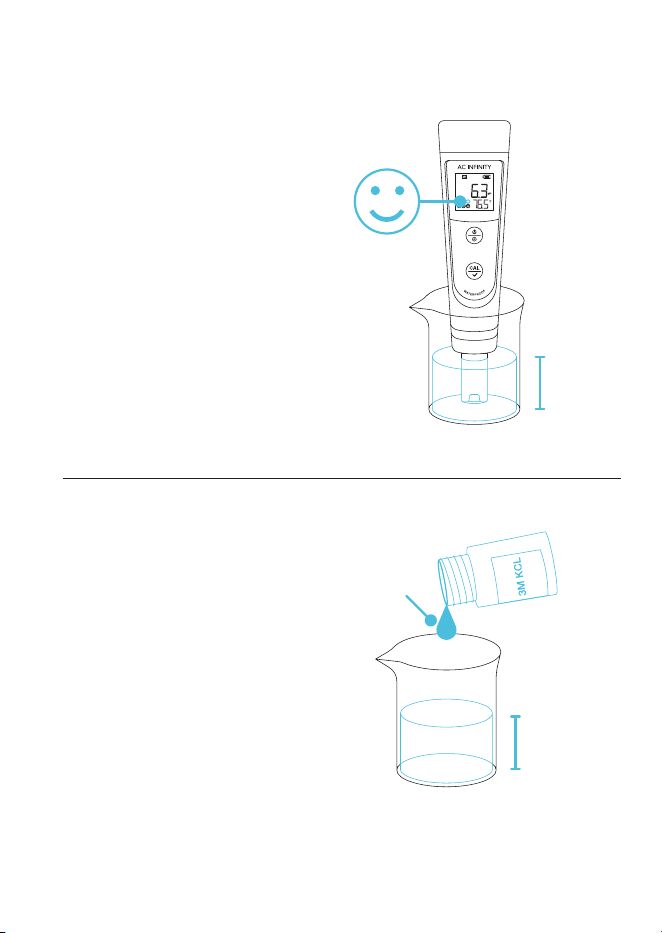
STEP 3
Submerge the probe at least 1 in.
deep into your sample solution, then
hold it still.
Record the readings after the reading
is stabilized, indicated by the smile
icon on the screen.
PURE WATER MEASUREMENT
Readings will take longer to fully
stabilize (~1-5 min.) when testing pure
water like, drinking water, RO water, and
distilled water.
If your readings are not stabilizing, add
a 1:1000 ratio of 3M KCL solution to
your pure water (e.g. 1 ml KCL to 1000
ml water) to accelerate the stabilization
while minimizing pH change.
1 ml
1000 ml
1 in.
21
MAINTENANCE
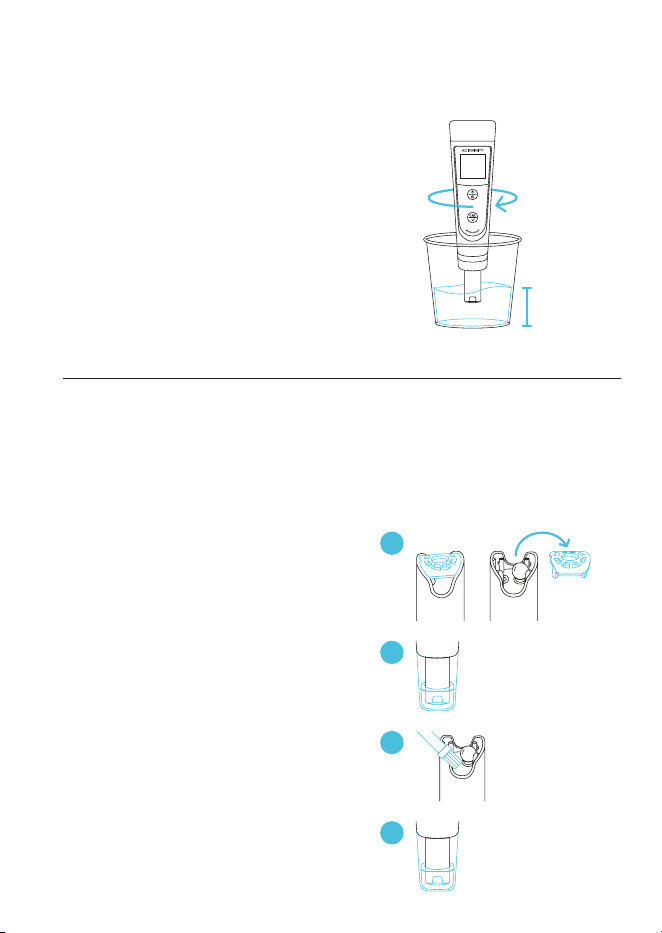
PROBE CLEANING
RINSING THE PROBE
Thoroughly rinse off the probe with
8-16 oz. of distilled or deionized water
before and after each test to ensure
accurate readings.
REMOVING TOUGH CONTAMINANTS
Detach the sensor shield and soak the
probe in a cleaning solution or detergent
water for about 30 minutes.
Use a soft brush to remove
the contaminants.
Soak the probe in 3M KCL solution for
at least 1 hour. Rinse it off, then
re-calibrate the pH meter before using it.
8-16 oz.
1
2
CLEANING
SOLUTION
~30 min.
4
3M KCL
SOLUTION
≥1 hr.
3
The lifespan of your pH meter's probe is 1-3 years. This will depend on how
often it is used and how well-maintained it is. Follow the guide below to help you
extend and properly maintain the probe's lifespan.
22
MAINTENANCE
PROBE STORAGE
REGULAR USAGE (DAILY OR WEEKLY)
Make sure the probe cap stays moist by
closing the probe when not in use.
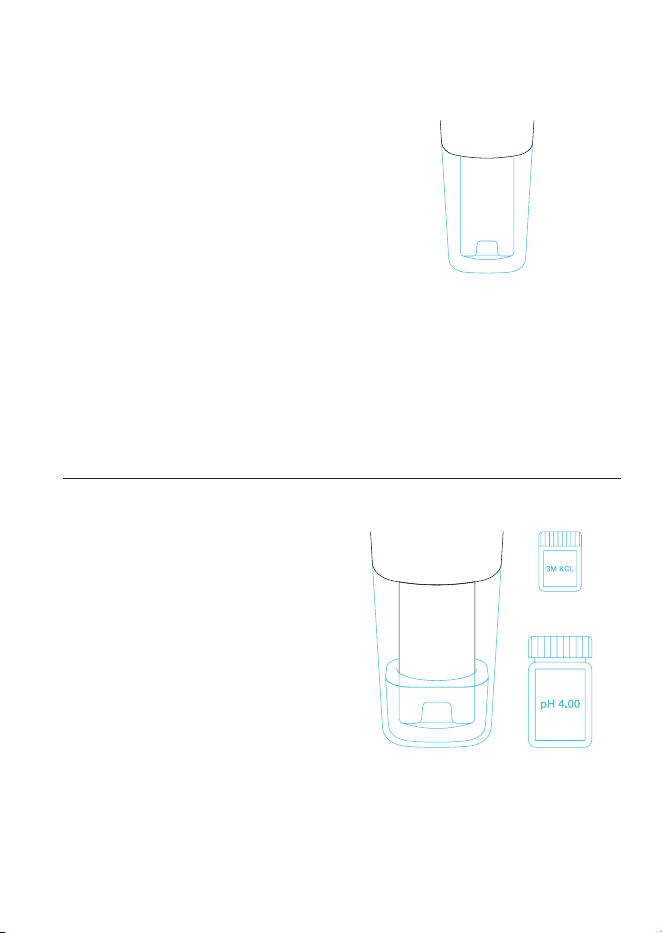
LONG-TERM STORAGE
Add 3M KCL solution or pH 4.00 buffer
solution up to one quarter of the probe
cap. Close the probe cap tightly to store
the probe in it.
OR
23
MAINTENANCE
PROBE STORAGE
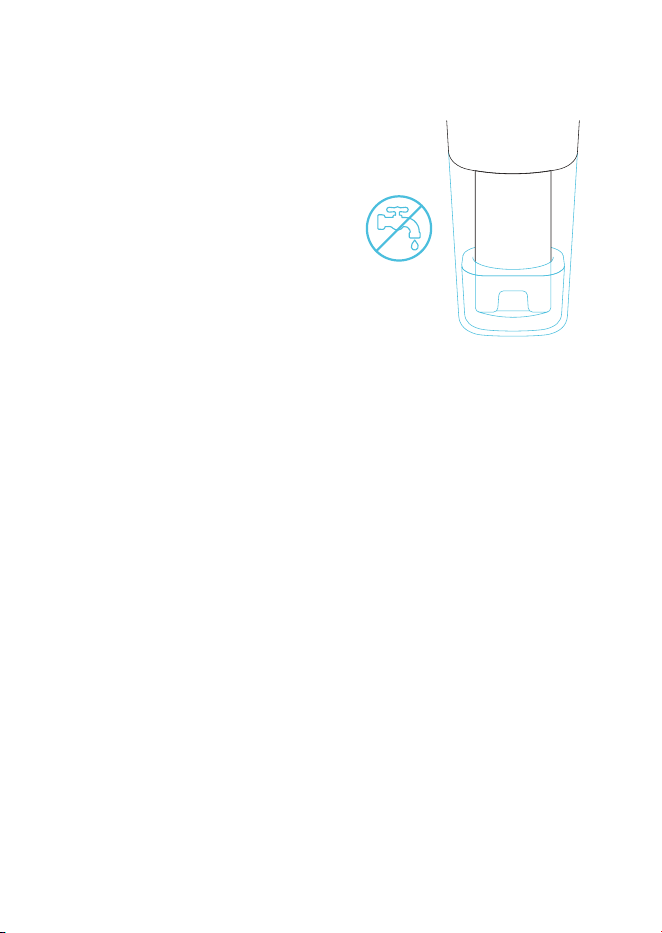
PROPER STORAGE
NEVER store the probe in tap, RO,
distilled, or deionized water. Doing so
may damage the probe.
If stored in this matter, immediately
soak the probe in 3M KCL solution
overnight, then re-calibrate it before
using your pH meter.
Pure water must only be used to rinse
the probe.
24
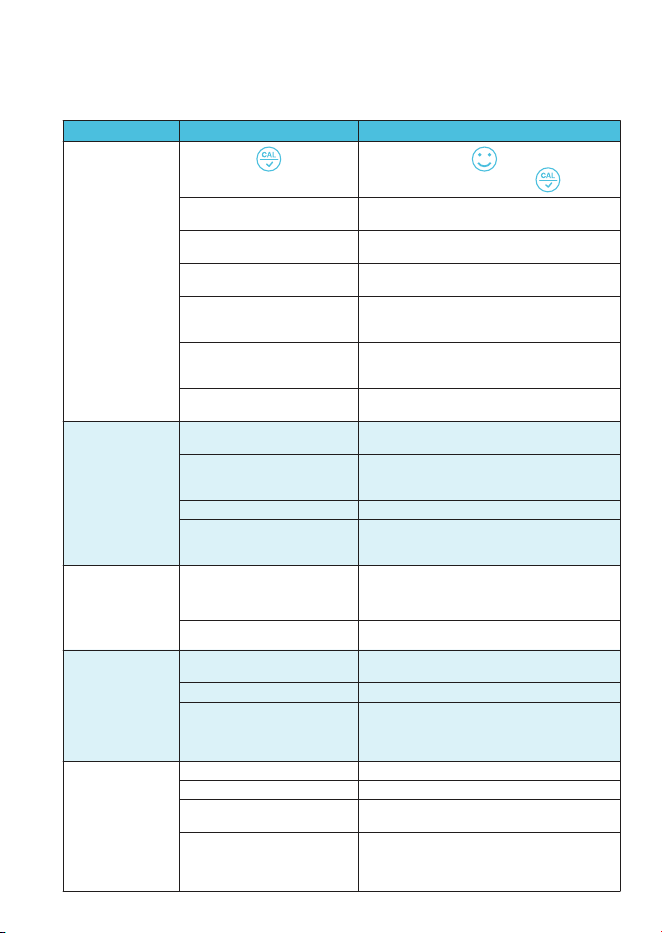
TROUBLESHOOTING GUIDE
Cannot
Calibrate
Reading is
always slowly
changing, won't
stabilize
Displays similar
readings in
any solution or
always displays
7.0 pH
Reading
keeps jumping
Calibration is
successful, but
reading is not
accurate
ISSUE REASON
Poor quality standard solutions
("Er1" displayed)
Contaminated sensor
("Er1" displayed)
Incorrect calibration order
("Er1" displayed)
Broken probe
("Er1" displayed)
Broken probe
Probe is not properly connected
or the pin connector is broken
Comparison with other pH
meters, test strips, or drop tests
Air bubbles around the sensor
("Er1" displayed)
Contaminated sensor
Clogged junction
Testing pH of low iconic
strength solutions like tap/
drinking/RO/distilled water
Probe is not fully submerged
in the solution
Clogged junction
Air bubbles around the sensor
Probe is not fully
submerged solution
("Er1" displayed)
(showing "Er2")
Pressing too soon
Aged probe
pH meter defect
Aged probe
Air bubbles around the sensor
HOW TO FIX
Replace with clean standard calibration
solutions made by reputable manufacturers.
Use a soft brush to clean the probe with
probe cleaning solution or detergent water.
Reboot your pH meter, calibrate pH 7 first,
then pH 4. For details, refer to pages 16-17.
If you don't see any damage to the probe,
contact AC Infinity customer support. If there
is visible damage, replace your pH meter.
If you don't see any damage to the probe,
contact AC Infinity customer support. If there is
visible damage, replace your pH meter.
Check the probe's connector, make sure it's
connected and not broken. Align the probe
correctly before plugging in. Do not force it.
Ensure that the connector is not exposed.
To compare with other pH meters, make
sure to calibrate all testers in the same pH
7 solution, then test pH 4. Test strips or drop
tests' accuracy is not comparable to pH meters.
Stir in the solution to remove bubbles.
Use a soft brush to clean the probe with
cleaning solution or detergent water.
Use a soft brush to clean the probe with
cleaning solution or detergent water, then soak
it in 3M KCL soaking solution overnight.
Wait 1-5 minutes to reach a fully stabilized
reading. if still not stabilizing, then soak in
3M KCL soaking solution overnight.
Make sure the probe is fully immersed
at least 1 in. deep into the solution.
Clean the probe with cleaning solution, then
soak in 3M KCL soaking solution overnight.
Stir in the solution to remove bubbles.
Make sure the probe is fully immersed
at least 1 in. deep into the solution.
Wait for to stay on
screen before pressing
Replace your pH meter.
Contact AC Infinity customer support.
Replace your pH meter.
Stir in the solution to remove bubbles.

25
FAQ
Why is moisture in my new pH meter?
New pH meters are stored in a special solution to maintain the integrity of the
electrode and its glass membrane. This glass membrane must be kept moist
in order for the pH meter to function properly.
Q:
A:
How often should I calibrate the pH/conductivity?
Your meter's accuracy depends on several factors like the environment
it's used in and how often it is used. We recommend calibrating your pH
meter once a month, after testing a series of samples, or if readings don't
appear accurate.
Q:
A:
What is the difference between conductivity, TDS and salinity?
Conductivity is a measure of a solution's ability to conduct electricity,
while TDS (total dissolved solids) and salinity are measures of a solution's
concentration of dissolved solids and salt, respectively.
Q:
A:
What is the difference between USA and NIST in the settings?
The USA and NIST settings differ in the buffer solutions used for calibration.
The USA settings use three buffer solutions with pH values of 4.00, 7.00, and
10.00 while NIST uses the pH values of 4.01, 6.86, and 9.18.
Q:
A:
Why did my pH meter turn off?
Your pH meter will automatically turn off after 8 minutes of inactivity.
Q:
A:
26
Discover the latest innovations in environmental controls at acinfinity.com
AC INFINITY PRODUCTS
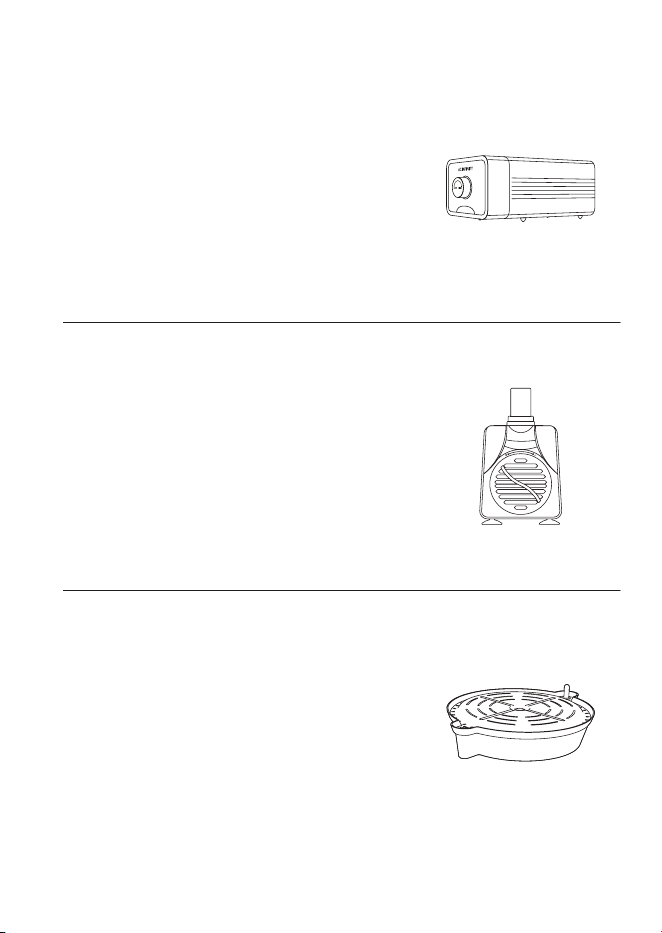
Water Pump
A submersible pump designed to circulate and
deliver water to plant roots for enhanced yields in
hydroponic settings. Featuring a high-performance
motor and interchangeable nozzles, this water
pump is capable of quietly and efficiently enhancing
water flow for multiple irrigation systems.
Self-Watering Fabric Pot Base
A set of potted plant stands designed to eliminate
the need for active irrigation by automatically
drawing water to fabric pots through adjustable wick
lines. Features a heavy-duty drip tray to capture
runoff water and support planters up to 100 pounds
as well as a water gauge to display hydration levels.
Air Pump
An adjustable air pumping system designed to
benefit hydroponic systems by enrichening oxygen
levels for enhanced plant growth. Built with a
durable shell and multi-layered internal muffler, this
air pump securely delivers one way-oxygenation
while remaining ultra-quiet with minimal vibration.

27
This warranty program is our commitment to you, the product sold by AC Infinity
will be free from defects in manufacturing for a period of two years from the date
of purchase. If a product is found to have a defect in material or workmanship, we
will take the appropriate actions defined in this warranty to resolve any issues.
The warranty program applies to any order, purchase, receipt, or use of any
products sold by AC Infinity or our authorized dealerships. The program covers
products that have become defective, malfunctioned, or expressively if the
product becomes unusable. The warranty program goes into effect on the date
of purchase. The program will expire two years from the date of purchase. If
your product becomes defective during that period, AC Infinity will replace your
product with a new one or issue you a full refund.
The warranty program does not cover abuse or misuse. This includes physical
damage, submersion of the product in water, incorrect Installation such as wrong
voltage input, and misuse for any reason other than intended purposes. AC
Infinity is not responsible for consequential loss or incidental damages of any
nature caused by the product. We will not warrant damage from normal wear
such as scratches and dings.
Contact our dealers department at dealers@acinfinity.com or (626) 838-4656
for more information about our dealers and distributors program. Contact our
customer service department at support@acinfinity.com or 626-923-6399 for
product and warranty assistance. Our business hours are Monday through Friday,
9:00 am to 5:00 pm PST.
If you have any issues with this product, contact
us and we’ll happily resolve your problem or
issue a full refund!
WARRANTY

COPYRIGHT © 2023 AC INFINITY INC. ALL RIGHTS RESERVED
No part of the materials including graphics or logos available in
this booklet may be copied, photocopied, reproduced, translated
or reduced to any electronic medium or machine readable form, in
whole or in part, without specific permission from AC Infinity Inc.




www.acinnity.com