User Manual
This product is a radar device based on millimeter wave technology. It perfectly realizes non-
contact, non-intrusive and uninterrupted detection of human vital signs such as respiration, heart
rate and body movement. It achieves millimeter-level detection of vital signs in the human chest
and abdomen area, and through technologies such as computing, big data and AI, it can conduct
real-time detection of human presence, activity status (body movement index), respiratory
waveform and heart rate for both lying and sitting people. It provides intelligent analysis, trend
alarm and other functions. The product features easy installation and simple maintenance, and is
suitable for scenarios such as home care, nursing home care, smart washrooms, and on-duty
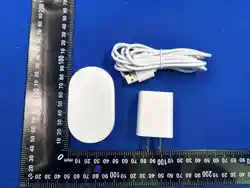
monitoring. The product appearance is shown in Figure 1.
Functional Features
• Cutting-edge Technology: Edge computing, big data, AI
• Remote Upgrade: Remote OTA for online firmware upgrade
• Easy Installation: Wall-mounted, simple to use and maintain
• Anti-interference: Strong anti-interference performance, low power consumption and
low radiation
• Privacy Protection: Non-contact, non-intrusive, 24-hour uninterrupted monitoring
• Powerful Functions: Real-time detection of human presence, activity status, heart rate
and respiration, and sleep report generation through intelligent algorithms
Sleep Report
• Daily Report: Light/deep sleep, number of sleep episodes, number of turns, number of
bed exits, sleep score
• Weekly Report: Compilation of daily reports, generating in-bed duration, respiratory K-
line chart, heart rate K-line chart and turn frequency chart
• Monthly Report: Compilation of weekly reports, generating average sleep quality,
average sleep duration, minimum sleep duration and maximum sleep duration
Installation Instructions
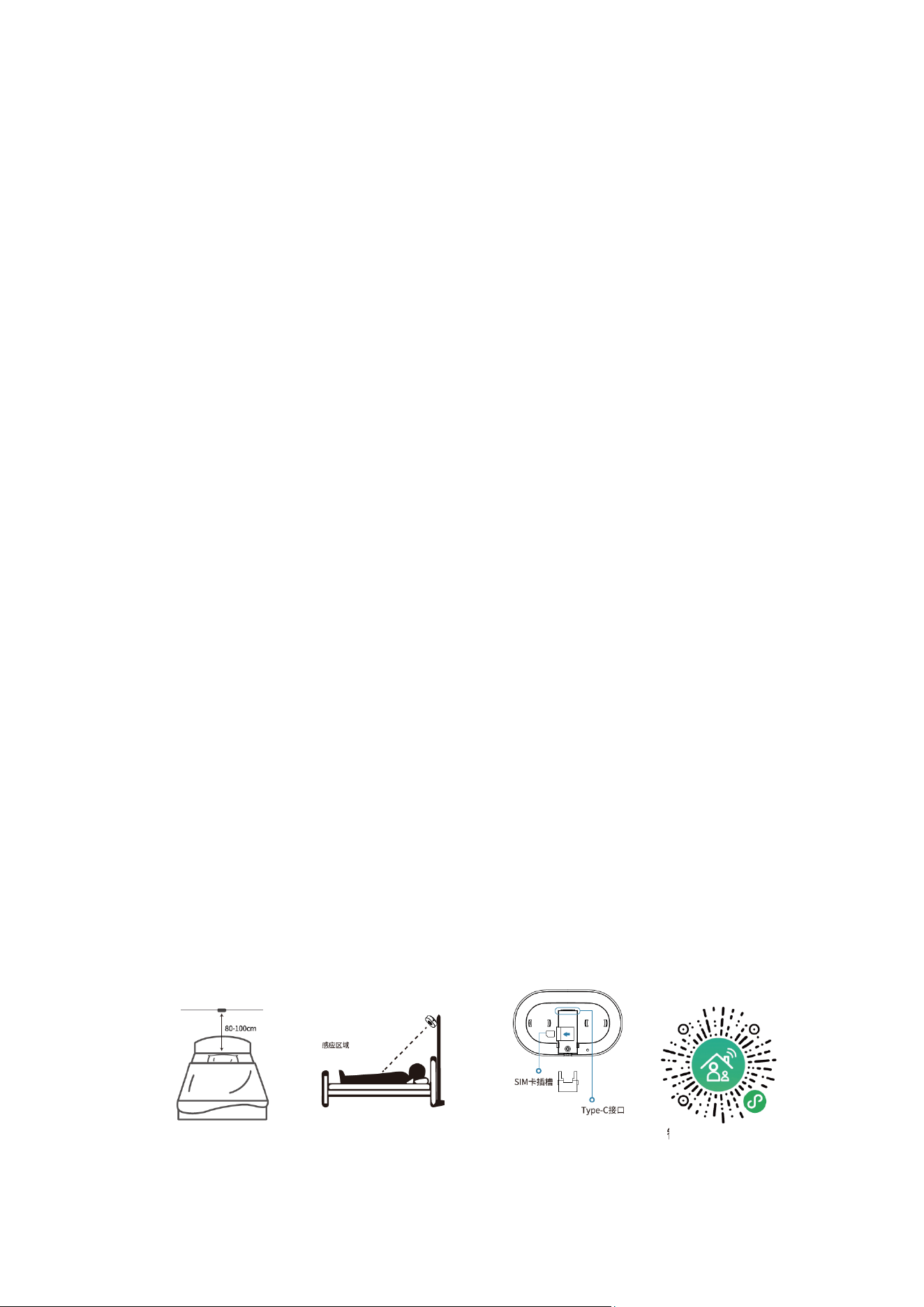
1. Optimal Position: Select a suitable installation location and mount the product on the
wall above the head of the bed. The optimal installation distance is about 80-100 cm
above the bed board, as shown in Figure 2.
2. Installation and Fixation: Fix the mounting bracket on the wall with 3M adhesive tape or
screws.
3. Power Supply Wiring: Insert the USB adapter and connect the TYPE-C plug.
(Horizontal Position: 80-100cm - Figure 2-1; Sensing Area - Figure 2-2; Type-C Interface - Figure 3)
Smart Elderly Care Case Mini Program
Pairing Operations
Figure 2-1
Figure 2-2
Figure 3
APP
1. Dual-network Version Description
• The dual-network version supports independent network configuration and normal
operation via either WiFi.
2. Adding a Device via the Mini Program
1. Enter the mini program: Scan the mini program QR code to access the Case Mini Program
and log in with your account and password.
2. Add a device (as shown in the right figure): a. Click the "+" icon at the bottom right of the
home page; b. Enter the device serial number (scan the device QR code or enter
manually), set a device name, select the affiliated location (default or custom), and save.
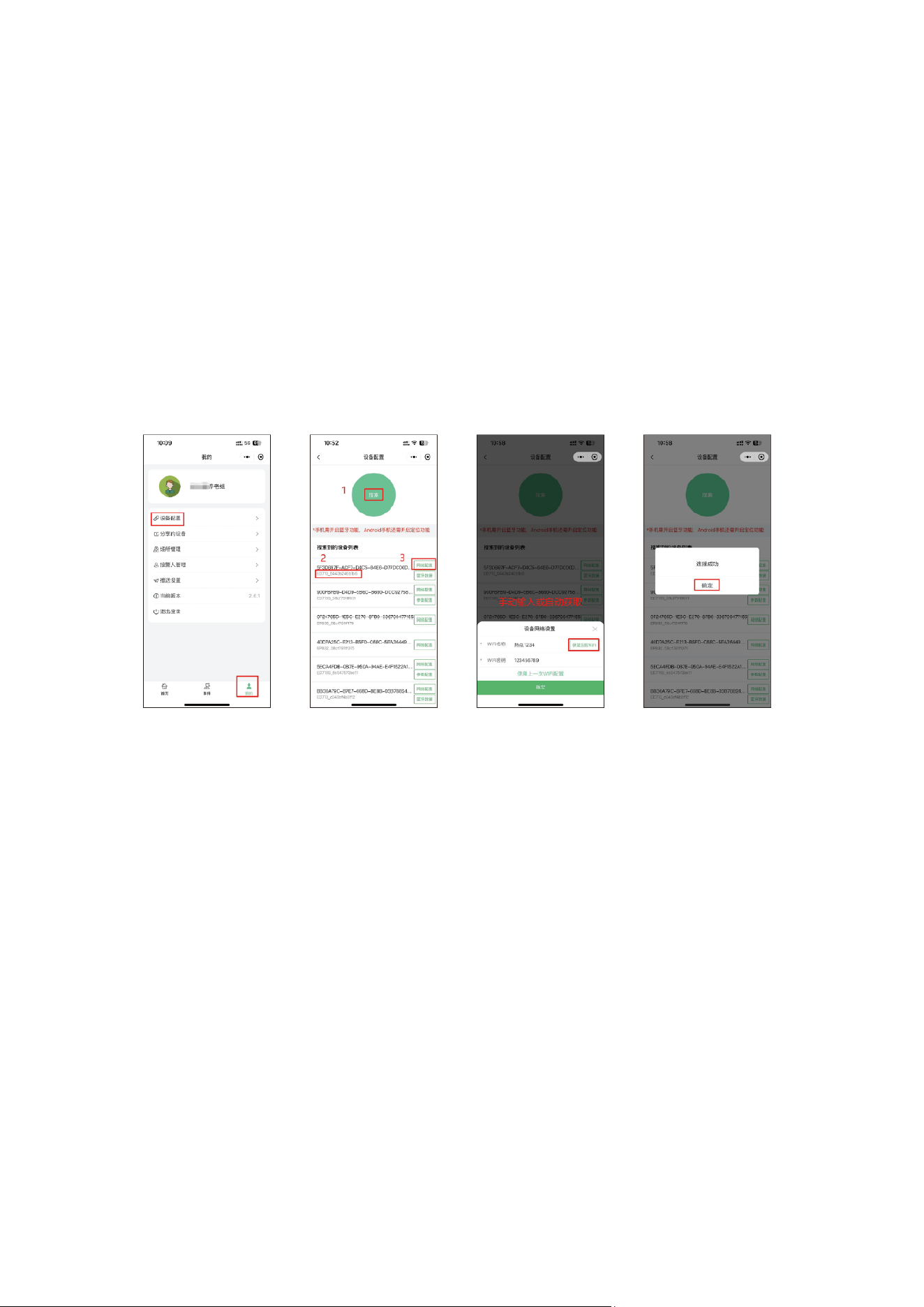
3. WiFi Configuration (Bluetooth and 2.4GHz WiFi must be enabled)
Click Mine > Device Configuration > Search > select the device MAC address > Network
Configuration; enter the WiFi name and password, and click Confirm. The device shows online
status after successful WiFi configuration.
4. Device Details
Click the device icon to enter the device details page, where you can view real-time monitoring
data, sleep reports, firmware version, device logs, etc. You can rename the device, perform reset
and parameter settings, and share or delete the device.
Indicator Light Status
(Indicator Light, Type-C Interface, Reset Button, Charging Cable Buckle - Back of the Device)
Indicator Light Status
Description
Blue light flashes after power-on
Initialization for WiFi configuration
Blue light flashes
Flashes when configuring a new WiFi
Blue light turns off
Successful configuration of the new WiFi
Red light flashes
Device is being updated
Installation Notes
1. The product should be installed at least 1.5 meters away from curtains.
2. This product can only monitor one person. For monitoring two people simultaneously,
install two devices with an interval of at least 1.5 meters to avoid co-channel
interference.
3. The product must be kept away from air outlets (e.g., electric fans, air conditioners,
heaters) during use and avoid humid environments (e.g., areas with humidifiers,
bathrooms).

4. This product is for indoor use only. Do not cover its surface, and there should be no
obstacles (except bedding) between the product and the monitored person's chest
cavity.
5. The product is recommended to be mounted on the wall 0.8-1 meter above the head of
the bed. Ensure the installation position is stable and non-shaking; improper installation
may affect data accuracy.
Usage Notes
1. False alarm of "no person" when someone is present: This may occur if the human body
is at the boundary of the device's detection range, shielded by metal or extra-thick
objects, or in a side-lying or prone sleeping position where the subtle respiratory
movements cannot be detected, leading to a temporary judgment of "no person".
2. Failure of data storage and transmission: Power failure or network disconnection of the
product may cause data storage and transmission failure. If respiratory/heart rate data
and sleep reports are suddenly unavailable, try re-powering the device, check WiFi
availability.
3. False alarm of "person present" when no one is there: Due to the complexity of
electromagnetic wave propagation and processing, the product may be affected by
environmental factors in actual use. For example, vibrations from facilities such as air
conditioners, fans and motors; passing animals such as cats, dogs, mice and birds;
swaying mosquito nets on the bed or nearby curtains may all cause the device to
misjudge the environment.
(Keep dry, Do not cover, Keep stable, Keep away from air outlets)
Installation Method by Wall Type
Installation
Method
Lime
Wall
Latex Paint
Wall
Silicone Mud
Wall
Wallpapered
Wall
Wall Cloth
Wall
Ceramic
Tile/Glass Wall
Screw Fixing
√
√
√
√
√
×
3M Adhesive
Tape
√
√

FCC Caution.
This device complies with part 15 of the FCC Rules. Operation is subject to the following two
conditions:
(1) This device may not cause harmful interference, and
(2) this device must accept any interference received, including interference that may cause
undesired operation.
Any Changes or modifications not expressly approved by the party responsible for compliance
could void the user's authority to operate the equipment.
Note: This equipment has been tested and found to comply with the limits for a Class B digital
device, pursuant to part 15 of the FCC Rules. These limits are designed to provide reasonable
protection against harmful interference in a residential installation. This equipment generates
uses and can radiate radio frequency energy and, if not installed and used in accordance with the
instructions, may cause harmful interference to radio communications. However, there is no
guarantee that interference will not occur in a particular installation. If this equipment does
cause harmful interference to radio or television reception, which can be determined by turning
the equipment off and on, the user is encouraged to try to correct the interference by one or
more of the following measures:
-Reorient or relocate the receiving antenna.
-Increase the separation between the equipment and receiver.
-Connect the equipment into an outlet on a circuit different from that to which the receiver is
connected.
-Consult the dealer or an experienced radio/TV technician for help.
This equipment complies with FCC radiation exposure limits set forth for an uncontrolled
environment. This equipment should be installed and operated with minimum distance 20cm
between the radiator & your body.