1. Overview
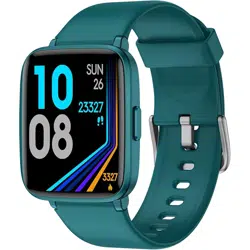
The LIVIKEY Fitness Tracker is a wearable device designed to monitor daily activity, health metrics, and provide smart notifications. It features a 1.3-inch square touchscreen display and connects to your smartphone via Bluetooth.

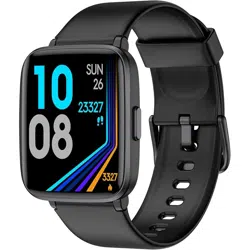
The tracker is available in multiple colors including Cyan, Black, Blue, Gray, Light Pink, and Purple.
2. Key Features
2.1 Heart Rate Monitoring
The tracker monitors your heart rate automatically throughout the day. You can also select manual monitoring mode through the companion app. The data helps you understand your physical state during rest and activity.
Note: The heart rate data is for reference and fitness purposes and is not a medical-grade measurement.

2.2 Sleep Monitoring
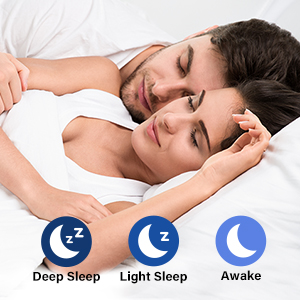
The device automatically tracks your sleep at night, analyzing sleep stages including deep sleep, light sleep, and awake time. This data is intended to help you develop healthier sleep habits.
Note: Sleep data is only viewable within the companion app.
2.3 Activity Tracking & Sport Modes
The tracker records daily steps, distance traveled, calories burned, and active minutes. It includes 9 pre-set sport modes (e.g., running, walking) for more detailed activity tracking. You can set daily step goals via the app.
When connected to your smartphone's GPS, the tracker can map your outdoor workout routes.

2.4 Smart Notifications
The device can display notifications from your paired smartphone, including calls, SMS messages, and alerts from social media apps (Facebook, Twitter, Gmail, etc.). This allows you to stay updated without checking your phone.
Important: The watch cannot make calls or send text messages independently.

2.5 IP68 Water Resistance
With an IP68 rating, the tracker is resistant to sweat, rain, and water splashes. It is suitable for hand washing and swimming. This allows you to wear it during most workouts and daily activities.

2.6 Additional Smart Functions
- Breathing Guide: Provides guided breathing exercises to help manage stress and relax.
- Sedentary Alert: Reminds you to move after prolonged periods of inactivity.
- Stopwatch & Alarm Clock: Basic timekeeping functions.

3. Use Guide
3.1 Initial Setup
- Charge the device using the included charging cable.
- Power on the tracker by pressing the side button (if applicable) or by placing it on the charger.
- On your smartphone, download the companion app ("Da Fit" or similar - check the device or packaging for the correct app name).
- Enable Bluetooth on your smartphone.
- Open the app and follow the in-app instructions to pair the tracker with your phone. The device should appear in your phone's Bluetooth list as "ID205U" or similar.
3.2 Wearing the Device
For accurate heart rate and activity tracking, wear the band snugly but comfortably on your wrist, with the sensor on the back of the device in contact with your skin.
3.3 Navigating the Screen
The 1.3-inch touchscreen allows you to swipe left/right or up/down to access different functions and data screens, such as:
- Time/Date
- Heart Rate
- Step Count
- Weather (when connected to phone)
- Notification Center
- Sport Modes Menu
- Settings Menu
Tap the screen to select an item or return to the main watch face.
3.4 Using Sport Modes
- Swipe to find and select the "Workout" or "Sport" icon.
- Scroll through the list of 9 activities and select the one matching your exercise (e.g., Running, Walking).
- Tap to start the workout. The screen will display relevant metrics like duration, heart rate, and calories.
- Tap to pause or end the workout session.
3.5 Charging the Device
The device uses a built-in lithium polymer battery.
- Connect the proprietary charging cable to the pins on the back of the tracker.
- Plug the USB end into a standard USB power adapter or computer port.
- A full charge takes approximately 2 hours and provides 5-7 days of typical use.
- A battery icon on the screen indicates charging status.
4. Specifications
- Model Name: Fitness Tracker (ID205U)
- Display: 1.3-inch Square Touchscreen, 240 x 240 resolution
- Water Resistance: IP68
- Battery: Built-in Lithium Polymer
- Charging Time: ~2 hours
- Typical Usage: 5-7 days
- Sensors: Heart Rate Monitor, Pedometer
- Connectivity: Bluetooth 4.0 or above
- Compatibility: Smartphones with iOS 8.0 / Android 4.0 or above, Bluetooth 4.0 or above.
- GPS: No built-in GPS. Uses connected smartphone's GPS for route tracking.
- In the Box: Fitness Tracker, Charging Cable.

5. Care & Maintenance
- Clean the device and band with a soft, slightly damp cloth. Do not use chemicals or abrasives.
- Ensure the device and charging port are completely dry before charging.
- While IP68 rated, avoid exposing the device to high-velocity water (e.g., shower jets, diving) or extreme temperatures.
- Store in a cool, dry place when not in use.
6. Troubleshooting
- Device won't turn on: Place on charger for at least 30 minutes.
- Cannot pair with phone: Ensure Bluetooth is on. Restart both the tracker and your phone. Delete the device from your phone's Bluetooth list and the app, then try pairing again.
- Data not syncing: Open the companion app and ensure it is connected. Manually trigger a sync within the app.
- Inaccurate heart rate reading: Ensure the band is worn snugly and the sensor on the back is clean and in contact with your skin.
- Notifications not appearing: Check the app settings to ensure notification permissions are granted for the correct apps.
7. Warranty & Support
For warranty information about this product, please click here.