
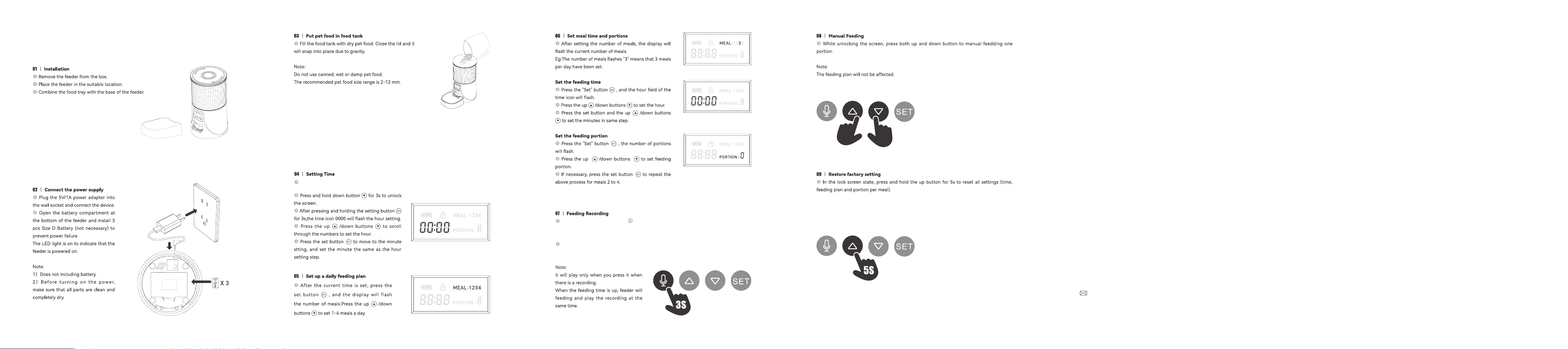
Cleaning and Maintenance
Please clean the feeder regularly to keep your pet's health.
When it stas to get diy and a lot of loose food in the food trough, you can remove the food
cover to clean it.
Clean the feeder base containing the control panel with a soft, damp cloth. Do not wet this
pa. Remember not to rinse it directly with running water.
Do not put the product in the dishwasher, otherwise it will be permanently damaged!
Packing List
After opening the product package, please conrm whether the machine is in good condition.
Please check the list to conrm whether the accessories are complete.
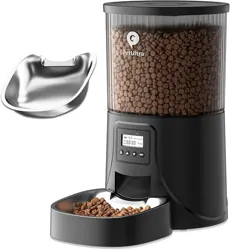
Automatic Pet Feeder ×1
Food Bowl ×1
Power Adapter ×1
Power Cable ×1
Desiccant Bag ×1
User Manual ×1
Huizhou Huayi Trading Co., Ltd.
36 Months Warranty
Petultr[email protected]
Automatic Pet Feeder
User Manual
Model: DU4LB-KY
Safety Instruction
1.Children need to be used in the company of adults;
2.Do not use the feeder for pets who cannot reach the food tray or have physicaldisabilities.
3.Do not immerse the base pa in water, which will damage electronic components such as
control panel.
4.Do not place any foreign objects in the pet feeder.
5.Do not put canned, wet or wet food in the feeder.
6.Do not disassemble the equipment by yourself.
7.Do not modify the pet feeder.
8.lf the equipment has faults or damaged accessories, do not t to repair the pet feeder by
yourself. Contact the seller immediately and solve it.
9.Be sure to unplug the power plug when not using the product or cleaning theproduct.
10.lf the power plug of the equipment is damp, please turn o the power of the socket and do
not t to unplug the power plug.
Notice
1.Do not let your pet chew or swallow any accessories. lf you are worried about the power
cord, please buy wire conduit (hard plastic protector) and protect the power cord at the
hardware store.
2.Do not install or put the pet feeder in an exposed place.The temperature should be within the
range of - 10 ℃~40 ℃.
3.Please use alkaline Size D batte for power supply. Do not use rechargeable batteries.
4.Check the batte regularly. If you travel or travel for a long time, be sure to replace the
batte.
5.Do not lift the pet feeder directly with the cover, food bucket and food tray. Hold the base
with both hands to lift and car, while keeping the device in an upright position.
6.Only applicable to d food with a diameter of 3-13mm. Larger foods may get stuck or block
the Food Outlet.
7.Please carefully read and follow all impoant instructions listed on the pet feeder and
package.
Display the current power: External power supply display full power status, batte power
is displayed according to batte power.
Unlock/lock: Unable to operate in locked state, long press the button to unlock status
then can operate it.
Can set 4 meals, in the setting mode, press the and button can switch the selected
number of meals.
Display the current time.
Display the feeding poions.
Button Description
Recording button: In the unlock mode, long press for 3s, release your hand when you hear
"di", feeder will sta recording, the recording time does not exceed 10s, after recording, please
press the button again to complete, when you will hear "didi" to indicate that it has been
saved. If you are not satised, you can repeat this step to replace the previous recording.
Up/Reset Button: This button can be set to switch numbers, and button also as a reset
button. When the screen is locked, long press the button for 5s to reset the time and feeding
setting.
Down/Unlock Button: the button can be switch numbers, and button also as a unlock
button. When the screen is locked, long press the button to unlock, after unlocking, the
settings can be operated.
Setting Button: when enter the operation of setting button to setting.
Note: The screen will automatically lock after 30s standby.
Show Icon Denition
PetUltra
*Design by milita time clock, example: 5pm
would be 17:00.
In the unlock mode, long press for 3s, release your hand when you hear "di", feeder will
sta recording, the recording time does not exceed 10s, after recording, please press the
button again to complete, when you will hear "didi" to indicate that it has been saved.
If you are not satised, you can repeat this step to replace the previous recording.If you want
to completely erase the recording, record a blank voice overlay.
Specication
Model: DU4LB-KY
Food Tank Capacity: 4L
Material:BPA-Free ABS
Screen: LCD screen
Power supply: DC 5V/1A power adapter; 3pcs alkaline batteries(not included)
Power adapter: AC110-240V input, DC5V output
Troubleshooting
Question Answer
Q:I press any button but can not work.
A:Lock the screen when there is no operation within 30s. Please press and hold the unlock
button for 3s to unlock the screen.
Q:I forgot the specic content of the feeding plan.
A:Unlock the screen and press the setting button, you can see meals displayed (but not
poion per meal).
Q:Can't get food.
A:1) Make sure to put in d food and the diameter of the food should be between 3-13 mm.
2) Check whether the batte power is low.
3) Whether the power adapter is connected.
4) Whether the power is cut o when the batte is not installed, if the power is cut o, please
reset the feeding plan.
Q:The display does not light up.
A:1) Without any operation within 30s, the screen is locked and dimmed. Please press and
hold the unlock button for 3s to unlock the screen.
2) Check whether the power adapter is connected or the batte is installed.
3) When the device is connected to the power supply, the display still does not light up, please
contact the seller to solve it.
Q:Cannot hear any recordings while feeding.
A:Make sure you have successfully recorded——unlock the screen and press the record
button to check. If no sound is heard, you need to record again.
Note: If you have any questions, please contact the after-sales suppo.
Petultrahelp@outlook.com