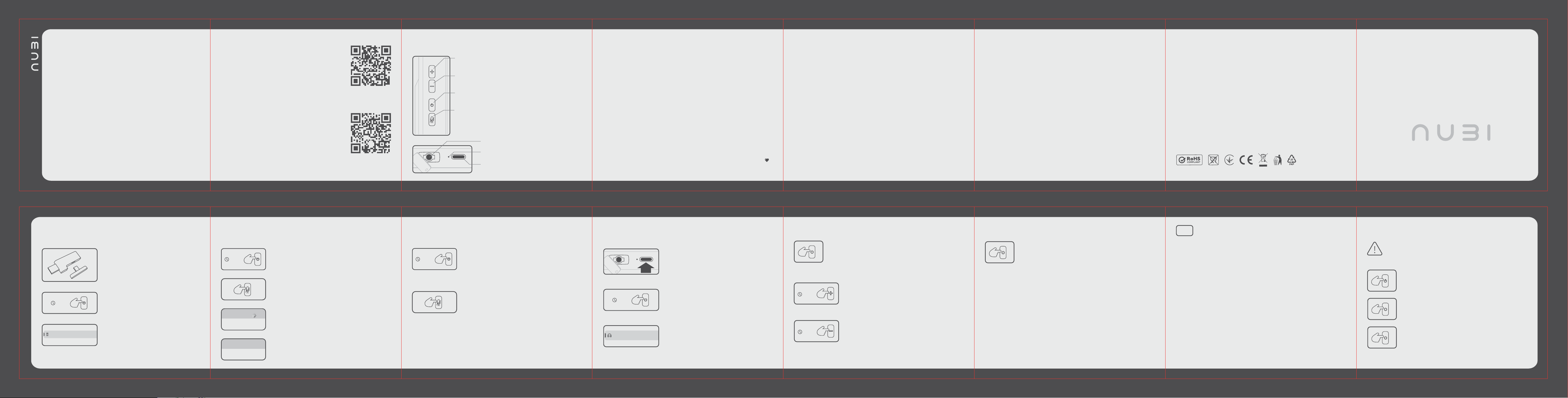
Connect the receiver to a USB-A
or USB-C port. The NU31 NH1 Pro Wireless
receiver works with devices that have either
Type-A or Type-C connectors.
1
Turn on the headset by holding the power
button for 3 seconds until you hear the
power-on sound.
2
All set! Your NU31 NH1 Pro Wireless headset
is connected via Dongle and ready to use.
3
FIRST POWER-UP AND CONNECTING
WITH 2.4G
FIRST POWER-UP
AND BLUETOOTH CONNECTION
FIRST POWER-UP AND WIRED CONNECTION VOLUME AND MEDIA CONTROL SWITCHING EQUALIZER MODES
CALL MANAGEMENT
Volume up
(next track)
Volume down
(previous track)
Headset on/o
(equalizer mode switch)
Microphone on/o
(Dongle mode / Bluetooth switch)
Detachable microphone
Status and charge indicator
Type-C port for charging and
wired connection
MAIN PARTS
3 sec
3 sec
3 sec
Turn on the headset by holding down the power
button for 3 seconds until you hear the power-on
sound.
1 1
Double-press the headset power button to switch the
equalizer mode.
1
You’ll hear the mode switch sound.
Clear – equalizer mode with a smooth, studio-monitor-like sound, high quality
and detail. Great for most tasks, from gaming to audio work.
Game – equalizer mode designed mainly for gaming. We cut the lows and boost
the mids to make footsteps easier to hear, while keeping explosions and gunshots
from masking your position. The highs remain unchanged.
Bass – equalizer mode for bass lovers. It emphasizes the low frequencies, while
mids and highs stay close to their default values.
Vocal – equalizer mode with more emphasis on high frequencies. We’ve raised the
highs to make voices more expressive. The lows and mids remain unchanged.
If you want more detailed sound control, we recommend installing the NU31
software. It lets you adjust the EQ, microphone noise reduction, and many other
headset features.
2
The equalizer modes cycle as follows: Clear > Game > Bass > Vocal. Switching
between modes is cyclical: after Vocal, Clear is activated again.
3
Pause playback with a quick press of the power button, then
press it again to resume.
To answer a call, simply press the headset power button once
(a quick press).
Important: Answering calls with the headset is only possible when
it’s connected via BT.
Here are a few tips to help extend the life
of your new headset:
Do not connect the headset to an electrical outlet or other high-voltage power sources. This
may damage the device’s circuit board and render the headset inoperable. We recommend
charging the headset only from the USB port of your computer or laptop.
Do not use the headset in wet environments (in the rain or during sports). If moisture gets into
the headset, turn it o (disconnect) immediately and contact a service center.
We strongly recommend using the supplied cable for wired connections.
Keep your headset clean and take care of it regularly. This will help extend the life of your
device.
If you decide to replace the ear pads with the ones included in the set, we’ve designed the
headset to accommodate this. Replacing the ear pads does not aect the warranty, so you can
swap in the included pads without any problems and still retain your warranty.
The warranty period is 12 months from the date of purchase. If you have questions or
problems after the warranty expires, please contact our technical support team. We’re happy
to help resolve any issues, even after the warranty period has ended.
Please take good care of your headset. We really aimed to make the NU31 NH1 Pro Wireless the
best option and invested a lot of time, eort, and money into developing this new headset
line. We built it the way we’d want to use it ourselves
1
2
3
4
5
6
7
Skip to the next track by holding the volume up
button for 2 seconds.
Power on the headset by pressing and holding
the power button for 3 seconds until you hear
the power-on sound.
Connect the headset to the device with the
Type-C cable.
2
Done! The headset is connected in wired mode.
You can use the headset and charge it at the
same time.
3
Double-click the «microphone on/o» button to
switch the headset to Bluetooth mode. Wait for the
mode switch sound.
2
In the settings of the device you want to connect
to, select the NU31 NH1 Pro Wireless headset.
3
After successful pairing, you will hear the device paired
sound. The NU31 NH1 Pro Wireless headset is
connected.
4
х2
If you’re having connection issues or questions, contact our tech support. We’re
happy to help.
х1
х2
х1
To reject a call, press the headset power button twice (in
quick succession).
х2
To end the call, press the headset power button once (during
the call).
х1
2 sec
Go back to the previous track by holding the volume
down button for 2 seconds.
2 sec
EQ
NH1 PRO WIRELESS
user manual
NU31 NH1 Pro Wireless
MY DEVICES
Connected
NU31 NH1 Pro Wireless
OTHER DEVICES
NU31 NH1 Pro Wireless
NU31 NH1 Pro Wired mode
х2
To switch back to Dongle mode, press the
«microphone on/o» button twice again. You will
hear the mode switch sound.
6
8 sec
If pairing fails, press and hold the «on/o» button for
8 seconds. All previously connected Bluetooth
devices will be reset. Then repeat starting from step
1.
5
Congrats on getting your hands on the agship NU31
NH1 Pro Wireless gaming headset! We’ve poured our
heart, energy, and years of experience into making this
device. We listened to what gamers wanted, ran
countless tests and tweaks, and spent over a year
crafting the NU31 NH1 Pro Wireless just for you.
Inside, you’ll nd cutting-edge tech and a whole lineup
of upgrades. We packed in a agship sound chip for
premium audio detail, made the ear cushions thicker
and comer (and yeah, we added two extra sets in the
box), and gave the battery one of the biggest capacities
out there — meaning 80+ hours of nonstop gameplay.
And that’s just the start — you’ll discover the rest of the
awesome features right here in this manual.
Thanks for believing in NU31 — it means the world to
us! We know you’ll love the NH1 Pro Wireless as much as
we loved making it. Built with passion, just like we’d
build it for ourselves.
Got questions about your order or the headset itself?
Just hit up our support team at [email protected] — we’ll
sort it out, no problem.
Download Software
Tech Support
start
END
Purpose of product: Computer accessory Model: NH1 Pro Wireless Trademark: NU31
Connection type: USB, Dongle mode, BT
Product material: ABS, PET, metal
Package Contents: Headphones, microphone, 2 additional ear pads, 1.8-m., USB-A to Type-C cable, Type-C (Type-A)
dongle, user manual, sticker
Additional information
Manufacturer: NU31 LTD, Oce 3906, 39th, The Center, 99 Queen's Road Central, Central, Hong Kong
EU Importer: FS Holding LTD Proti Ilias 4, Germasogeia, Limassol, Cyprus, 4046 E-mail:
[email protected] Tel: +357 25 26 01 66
UA Імпортер: ТОВ "ФС Дистрибьюшн" вул. Чавдар Єлизавети, будинок 13, Н/П 394А, 02072, Київ, Україна.
E-mail: [email protected] Tel: +38 044 592 4990
The importer is responsible for processing claims from buyers. Made in China.
U.S. Responsible Party (FCC): MIRAMONT SOLUTIONS LLC, 19 GEORGETOWN, IRVINE, CA 92612, USA.
FRN:0036313369. Phone: +1 (951) 401-3633, Contact Person: Wenyi Wang
USA Distributor: Nubi Limited
Date of manufacture: Indicated on the package Serial number: Indicated on the package
FCC ID: 2BWHR-NH1P
TECHNICAL SPECIFICATIONS
Dimension . . . . . . . . . . . . . . . . . . . . . . . . . . . . . . . . . . . . . . . . . . . . . . . . . 50mm
Sensitivity . . . . . . . . . . . . . . . . . . . . . . . . . . . . . . . . . . . . . 112±3dB (1kHz at 1mW)
Impedance . . . . . . . . . . . . . . . . . . . . . . . . . . . . . . . . . . . . . . . . . . . . . . . . 32Ohm
Frequency range . . . . . . . . . . . . . . . . . . . . . . . . . . . . . . . . . . . . . . . 20Hz - 20 000Hz
Speakers
Microphone
Dimension . . . . . . . . . . . . . . . . . . . . . . . . . . . . . . . . . . . . . . . . . . . . . . Ф6x2.7mm
Mic sensitivity . . . . . . . . . . . . . . . . . . . . . . . . . . . . . . . . . . . . . . . . . . . . . . -38±3dB
Mic impedance . . . . . . . . . . . . . . . . . . . . . . . . . . . . . . . . . . . . . . . . . . . . .2.2kOhm
Frequency range . . . . . . . . . . . . . . . . . . . . . . . . . . . . . . . . . . . . . . . .50Hz-10 000Hz
Detachable . . . . . . . . . . . . . . . . . . . . . . . . . . . . . . . . . . . . . . . . . . . . . . . . . . . Yes
Battery
Working hours . . . . . . . . . . . . . . . . . . . . . . . . . . . . . . . . . . 80 hours (volume at 70%)
Battery capacity . . . . . . . . . . . . . . . . . . . . . . . . . . . . . . . . . . . . . . . . . . . 1050mAh
Cable interface . . . . . . . . . . . . . . . . . . . . . . . . . . . . . . . . . . . . . . . . . . . . . . Type-C
Additional Specifications
Connection type . . . . . . . . . . . . . . . . . . . . . . . . . . . . . . . . . . . . . . . . . . BT 5.3, USB
Connectors . . . . . . . . . . . . . . . . . . . . . . . . . . USB Type-C, 3.5mm (for the microphone)
Cable interface . . . . . . . . . . . . . . . . . . . . . . . . . . . . . . . . . . . . . . . . . . . . . . Type-C
Compatibility . . . . . . . . . . . . . . . . . . . . . . . . . . . PC, MAC, smartphones, PS4/5, Switch
Weight . . . . . . . . . . . . . . . . . . . . . . . . . . . . . . 315g (excluding microphone and cable)
Rules and Conditions for Installation, Storage, Transportation,
Sale, and Disposal
The device does not require any installation or permanent mounting.
The product must be stored in its packaging in heated rooms at the manufacturer’s and consumer’s
premises at an air temperature of 5°C to 40°C and relative humidity of no more than 80%. There must be
no aggressive impurities (acid or alkali vapors) in the rooms that could cause corrosion.
The device must be transported in a dry environment.
The device requires careful handling. Protect it from dust, dirt, impact, moisture, fire, etc.
The device must be implemented in accordance with local legislation.
The crossed-out wheelie bin symbol means that you must not dispose of this product with unsorted
household waste. Electrical devices can contain harmful substances that may cause environmental
damage or harm to your health if not disposed of correctly. Please dispose of these products separately. As
the end user, you are required by law to dispose of used electrical equipment at an official recycling point.
For information about local recycling points, contact your local authority, civic amenity site, or the
business where you purchased this product. By disposing of electrical products at an official recycling
point, you are helping ensure that equipment is recycled correctly and professionally, and our
environment is protected. Whenever possible, remove any batteries before disposing of the device. Under
the law, you risk penalties if you dispose of devices and batteries illegally.

This equipment has been tested and found to comply with the limits for a Class B digital device,
pursuant to part 15 of the FCC Rules. These limits are designed to provide reasonable protection
against harmful interference in a residential installation. This equipment generates, uses and can
radiate radio frequency energy and, if not installed and used in accordance with the instructions, may
cause harmful interference to radio communications. However, there is no guarantee that interference
will not occur in a particular installation. If this equipment does cause harmful interference to radio or
television reception, which can be determined by turning the equipment off and on, the user is
encouraged to try to correct the interference by one or more of the following measures:
•Reorient or relocate the receiving antenna.
•Increase the separation between the equipment and receiver.
•Connect the equipment into an outlet on a circuit different from that to which the receiver is
connected.
•Consult the dealer or an experienced radio/TV technician for help.
Caution: Any changes or modifications to this device not explicitly approved by manufacturer could
void your authority to operate this equipment.
This device complies with part 15 of the FCC Rules. Operation is subject to the following two
conditions: (1) This device may not cause harmful interference, and (2) this device must accept any
interference received, including interference that may cause undesired operation.
RF Exposure Information
The device has been evaluated to meet general RF exposure requirement. The device can be used in
portable exposure condition without restriction.
FCC Statement