Charge
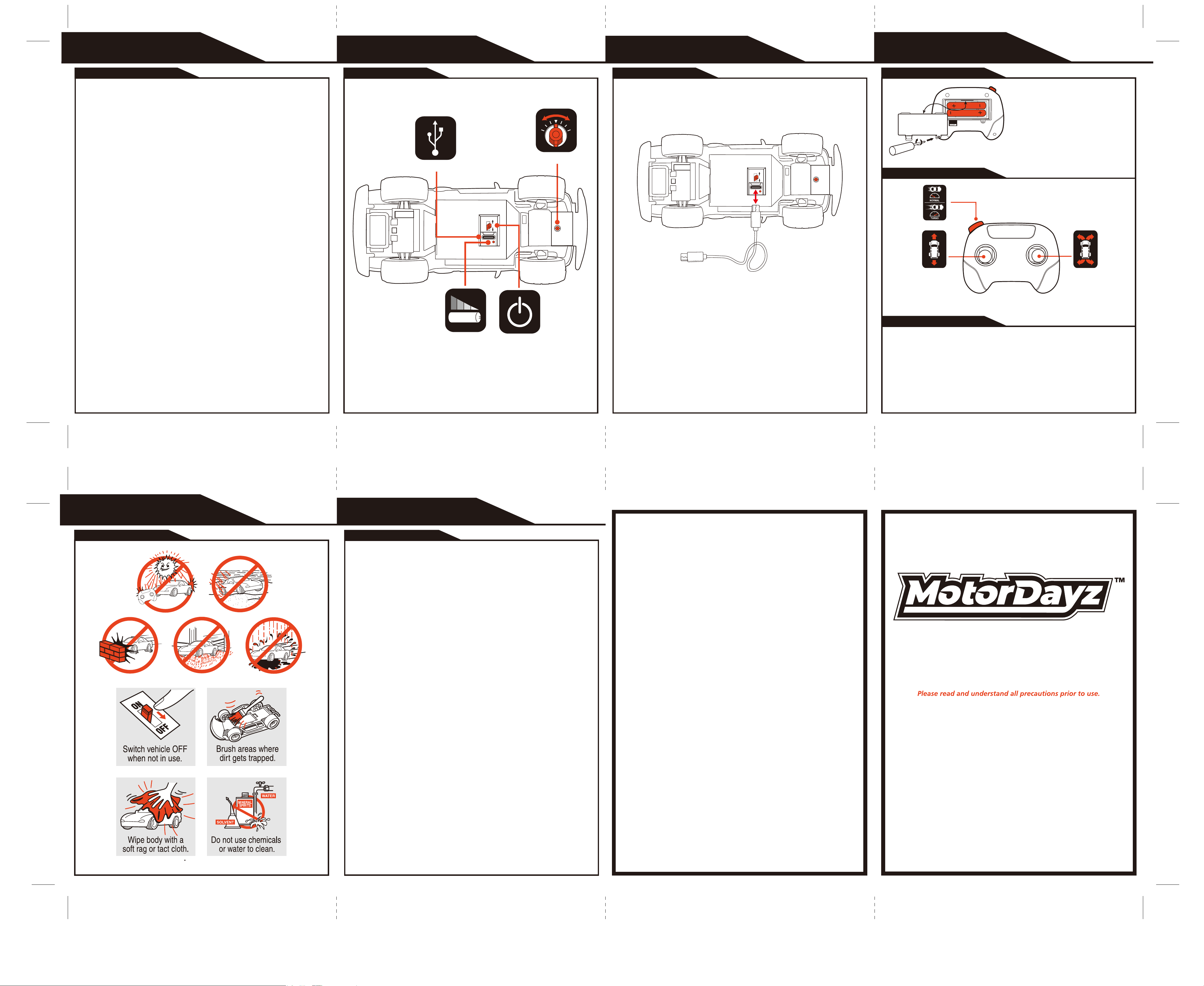
Status Light
* If vehicle pulls to the left or right during forward driving the Wheel Alignment
may need to be adjusted. The Wheel Alignment Dial is located on bottom of
chassis between the front wheels.
ON/OFF Switch
Wheel Alignment
Features & Functions
VEHICLE
Component Checklist
WHAT’S INCLUDED
1. Locate the ON/OFF switch on the under-side of the vehicle.
2. Turn the ON/OFF switch to the “OFF” position.
3. Insert the USB cable into the charging port under the vehicle.
4. Cord can be plugged into any 5V DC computer or 5V DC USB outlet
adapter (not included).
5. While charging, the LED under the vehicle will be on. Once fully charged
the LED will turn off. Charging is completed in approximately 1 hour.
Please store the USB cable before operation.
This vehicle is equipped with an internal Lithium-Ion battery that is recharged via USB.
ON/OFF Switch must be in the OFF position prior to charging.
Charging the Battery
VEHICLE
Forward/Reverse
Driving
Turbo botton
Left/Right
Steering
This transmitter is equipped with 2.4GHz technology which allows up to 6 vehicles to be
raced at the same time.
Before first use and after any time the batteries are replaced, the transmitter must be paired
to the vehicle.
To sync transmitter and vehicle, follow the steps below:
1. Correctly install batteries in the transmitter.
2. Place vehicle upside down, and turn Vehicle ON/OFF switch to the ON position. The
Vehicle is only in sync mode for 30 seconds.
3. Immediately press and hold the Forward/Reverse joystick on the transmitter. Keep
holding until wheels move (up to 30 sec.).
Battery Installation
Functions
Syncing
TRANSMITTER
Note:
When replacing Transmitter batteries:
Do not mix old and new batteries.
Do not mix alkaline, standard or rechargeable
batteries.
Use alkaline batteries only.
• (1) R/C Vehicle
• (1) Transmitter
• (1) USB Charging Cord
• (2) AAA Batteries
Type-C Charging Port
When the vehicle is in motion the lights will turn ON, Lights will turn off when vehicle stops.
书纸正反印
两次中间对折
正面
反面
File Name: R5-16C34U-RD Eng(013-26)INS.ai
Software: Illustrator CS5
Color: K+1788C
By: Tracy
Date: 2026 02 04
USB Charging Cable
OWNER’S MANUAL
JN013-26
Precautions & Care
PROPER USE
Motor Dayz Customer Service
3000 N. Pontiac Trail
Commerce Township, MI 48390
http://www.motordayz.com/
USA & Canada
90-Day Limited Warranty
Motor Dayz warrants to the original purchaser that this product will be free of defects in materials and
workmanship for ninety (90) days from the date of purchase. If a defect arises within the warranty
period, Motor Dayz will, at its sole discretion, provide replacement parts, replace the product, or offer
a coupon for our website for a new product of at least equal value. This Warranty does not cover
damage resulting from unauthorized modifications, accidents, misuse, or abuse. A dated sales
receipt is required for coverage under this Warranty. Purchases from unauthorized retailers,
resellers, or distributors are not covered under this Warranty.
Should your item have a defect covered under this Warranty, either call the Consumer Service team
by phone or email using the contact details listed below. Most issues can be resolved through
troubleshooting in this manner. If necessary, you will be issued a Case Number and be provided
instructions on how to obtain replacement parts, a replacement product, or a coupon.
Please allow 2 to 4 weeks for processing and delivery, depending on your location. Motor Dayz
covers the cost of shipping for valid claims within the USA and Canada. DO NOT send any product
to Motor Dayz. Any unsolicited product returns will be refused delivery and returned at the sender’s
expense.
Motor Dayz’s liability for defects in materials and workmanship under this warranty is limited to
providing replacement parts, a replacement product, or a coupon at Motor Dayz’s sole discretion. In
no event shall Motor Dayz be responsible for any incidental, consequential or contingent damages.
Valid only in the USA & Canada.
For full Warranty details, visit,
USA: https://www.motordayz.com/customer-support/warranty/
Canada: https://www.motordayz.ca/customer-support/warranty/
For more information regarding our product line, please visit,
USA: www.motordayz.com. For Canada, please visit: www.motordayz.ca
For Service in the USA
Email: [email protected]
Call: 248-863-3110
Monday- Friday,
8:30am- 7:00pm Eastern Time
For Service in Canada
Email: [email protected]
Call: 888-225-7378
Monday- Friday,
8:30am- 5:00pm Eastern Time
Problem - Vehicle does not move or moves slowly.
- Make certain there are fresh alkaline batteries in the transmitter and that they
have been installed in the correct position. You may need to re-sync the
transmitter and vehicle. Refer to sync instructions.
- Are the (+) and (–) markings on the alkaline batteries in the same position as the
(+) and (–) markings in the Transmitter Battery Compartment?
- Are the metal contact tabs touching, rusty or dirty in the transmitter?
- Has the vehicle been fully charged?
- Make certain that the vehicle ON/OFF switch is in the “ON” position.
Problem - Vehicle moves by itself or exhibits reduced range from
the transmitter.
- Make certain there are no outside radio interference in your area. The best way
to test this is to take the vehicle as far away from radio towers, electrical lines or
tall buildings as possible to ensure no further radio interference will occur.
Always remove Batteries from transmitter when not in use.
Do not dispose batteries in fire. Leakage, explosion and personal injury may occur.
Do not attempt jumps or tricks with this vehicle.
Do not attempt to remove internal battery.
Do not use included USB cord for anything other than its intended purpose.
Always keep USB cord stored when not in use.
Adult supervision recommended.
Troubleshooting & Support
SUPPORT
F.C.C. CAUTION:
Changes or modifications not expressly approved by the party responsible for
compliance could void the user’s authority to operate the equipment.
This device complies with Part 15 of the FCC Rules. Operation is subject to the
following two conditions: (1) this device may not cause harmful interference, and
(2) this device must accept any interference received, including interference that
may cause undesired operation.
NOTE:
This equipment has been tested and found to comply with the limits for a Class B digital device, pursuant to Part 15 of the FCC Rules.
These limits are designed to provide reasonable protection against harmful interference in a residential installation. This equipment
generates, uses and can radiate radio frequency energy and, if not installed and used in accordance with the instructions, may cause
harmful interference to radio communications. However, there is no guarantee that interference will not occur in a particular installation. If
this equipment does cause harmful interference to radio or television reception, which can be determined by turning the equipment off and
on, the user is encouraged to try to correct the interference by one or more of the following measures:
- Reorient or relocate the receiving antenna.
- Increase the separation between the equipment and receiver.
- Connect the equipment into an outlet on a circuit different from that to which the receiver is connected.
- Consult the dealer or an experienced radio/TV technician for help.
REF R5-16C34U-RD