
Welcome to
MOVA Stellar X10 Plus
Air Purifier
The illustrations provided in this manual are for
reference only. Please refer to the actual product
for accuracy.


EN
..........................................................................
P01~P09
FR
...........................................................................
P10~P19
DE
..........................................................................
P20~P29
IT
..........................................................................
P30~P39
ES
..........................................................................
P40~P49
PT
..........................................................................
P50~P59

Table of Contents
1. Safety Precautions
....................................................
1
2. Product Overview
.....................................................
2
3. Connect to MOVAhome App
.........................................
3
4. Product Usage
.........................................................
4
5. Care & Maintenance
..................................................
5
6. Common Issues
........................................................
6
7. Basic Specifications
...................................................
7
Original Instructions

1
EN
To prevent accidental injuries such as electric shock or fire caused by improper operation,
please carefully read the User Manual before use and store it properly.
• The appliance is not intended for use by persons (including children) with reduced
physical, sensory or mental capabilities, or lack of experience and knowledge, unless
they have been given supervision or instruction concerning use of the appliance by a
person responsible for their safety.
• Children should be supervised to ensure that they do not play with the appliance.
• Before cleaning and maintaining the air purifier, always disconnect the power supply.
• Do not expose the product or its power cord to heat sources or direct sunlight to pre-
vent fire.
• Before long-term disuse, maintenance, or repair, unplug the power cord and ensure the
air purifier is powered off.
• Do not pull or apply excessive pressure to the power cord.
• When unplugging, grasp the plug rather than the power cord.
• Do not use power extension cords.
• Do not place the power cord under the product.
• The air purifier must not be placed directly beneath a power outlet.
• Do not place textiles, curtains, or any other flammable materials near the product's air
outlet.
• Fire hazard warning: Do not apply any type of fragrance to the air purifier's filter. These
types of products are known to contain flammable chemicals which may cause the air
purifier to catch fire.
• Do not pull the product by its head.
• Do not use the product if it is damaged or submerged in water.
• Do not place the product on an unstable surface to prevent damage from falling or
potential harm to users.
• In the event of product drop, damage, or any other abnormalities, please contact af-
ter-sales service for repair. Do not attempt disassembly on your own.
• Use only accessories and replacement components recommended by MOVA.
• This product is designed for installation and use exclusively in dry indoor environments.
• Do not allow water, other liquids, or flammable cleaning agents to enter the product to
prevent electric shock or fire.
• Do not spray any flammable materials such as insecticides or perfumes around the
product.
• Before connecting the product to the power supply, check if the product's voltage rat-
ing matches the local power supply voltage.
• This product is not a substitute for normal ventilation, routine vacuuming, or the use of
a range hood during cooking.
• The product must be placed and operated on a stable, flat, and level surface.
• The lower air inlet of the product requires a minimum clearance of 30 cm, while the
upper air outlet must maintain at least 50 cm of unobstructed space.
• Before turning on the power, ensure that the filter and filter cover are properly installed.
• Do not insert fingers or objects into the air outlet or inlet to prevent physical damage or
malfunction of the product.
• The appliance is only to be used with the power supply unit provided with the appli-
ance.
• This appliance can be used by children aged from 8 years and above under supervision.
Warnings
1. Safety Precautions
2
EN
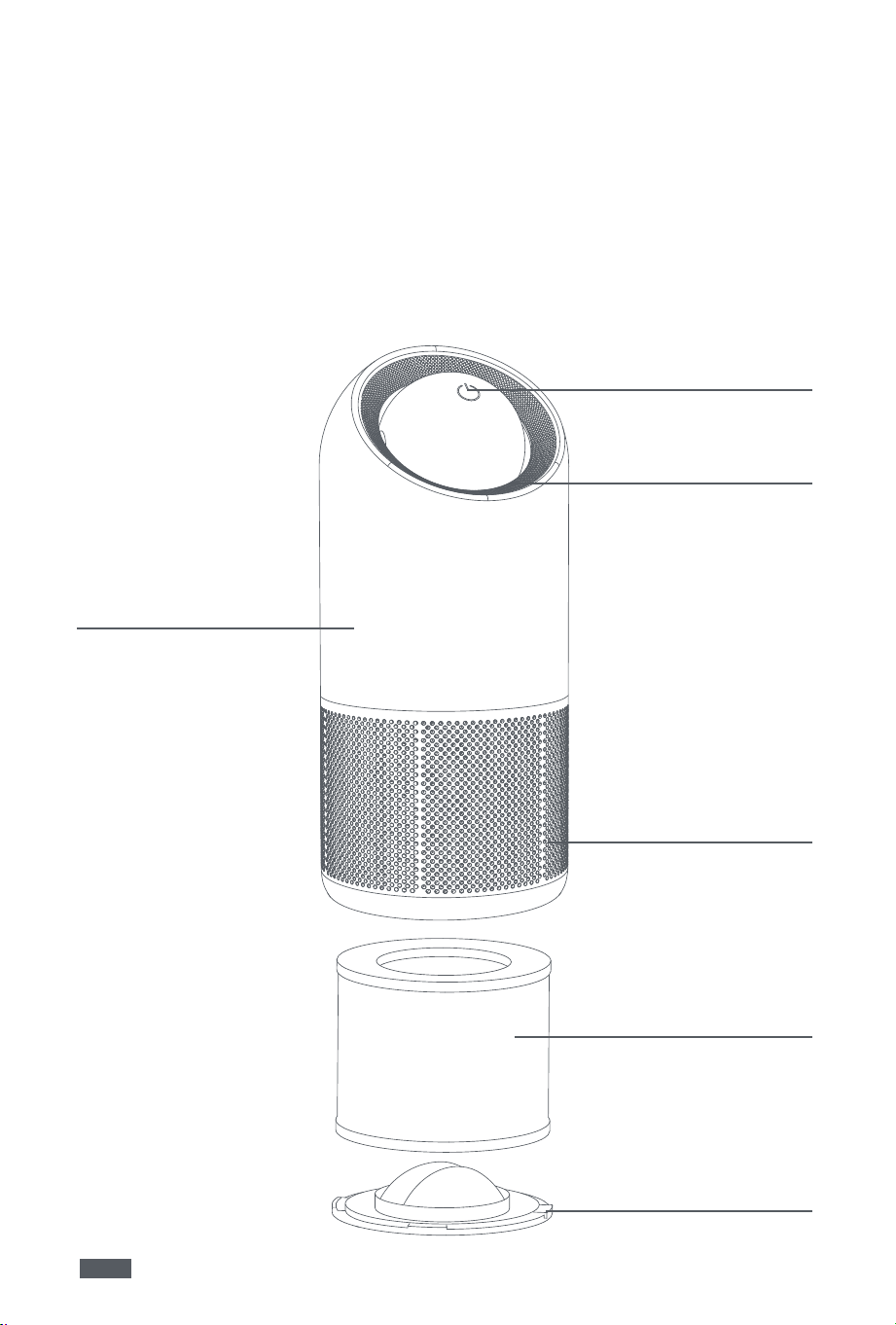
Air Purifier
2. Product Overview
Air Outlet
Filter
Power Button
Bottom Cover
Purifier Body
Air Inlet
• This appliance can be used by persons with reduced physical, sensory or mental ca-
pabilities or lack of experience and knowledge if they have been given supervision or
instruction concerning use of the appliance in a safe way and understand the hazards
involved.
• Cleaning and user maintenance shall not be made by children without supervision.
3
EN
3. Connect to MOVAhome App
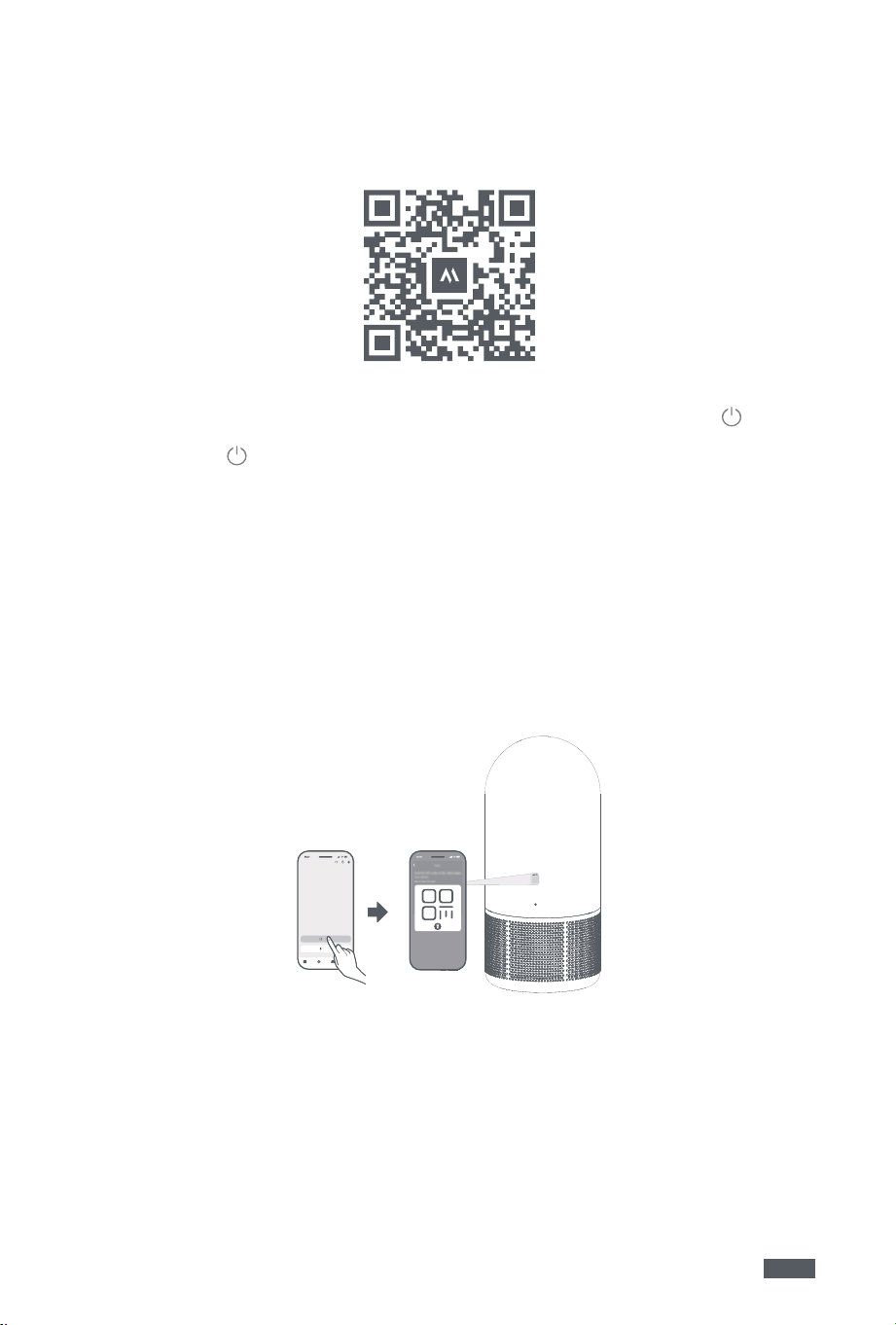
1. Scan the QR code to download the App, or search for "MOVAhome" in the App Store or
Google Play. After installation is complete, please create an account and log in.
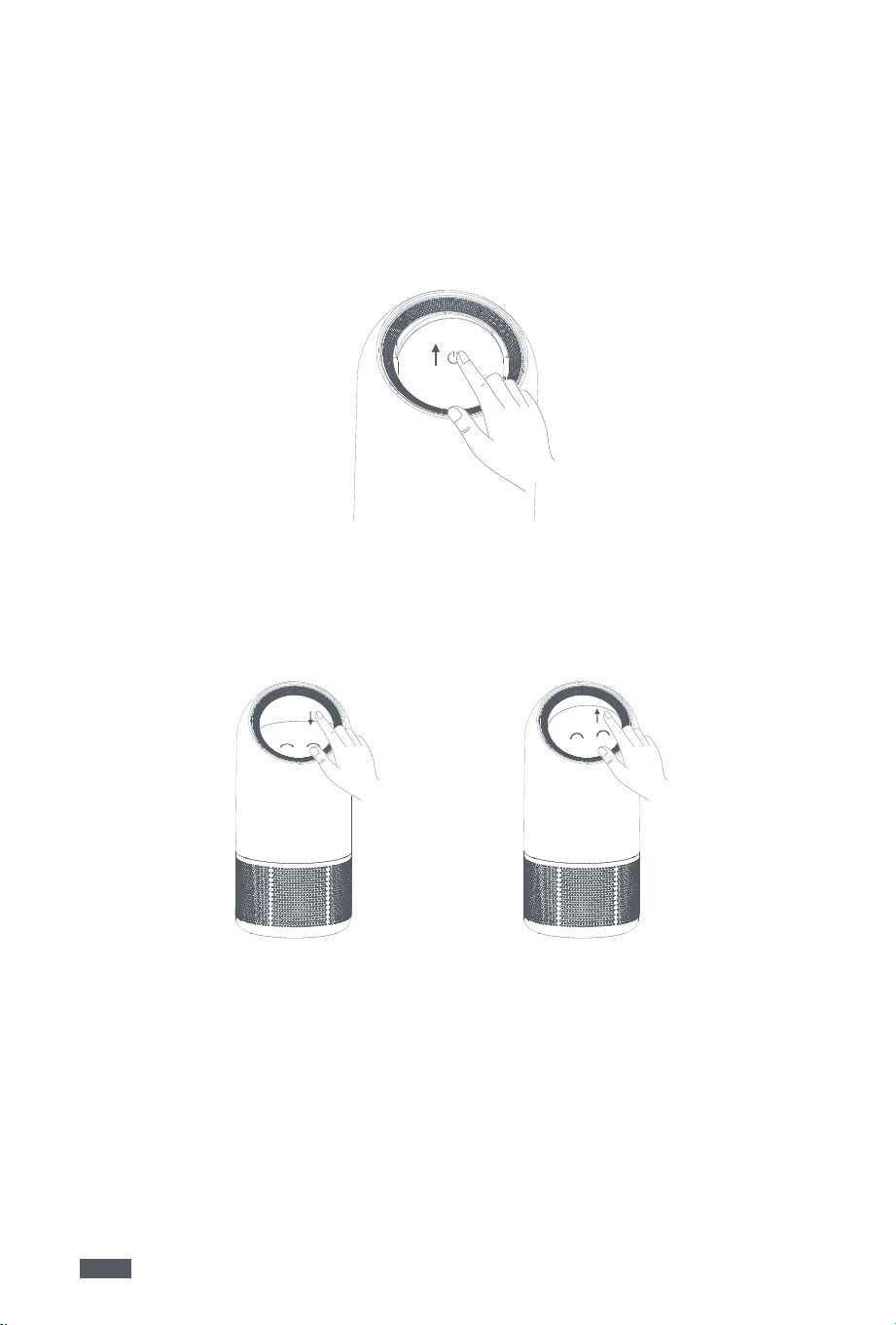
2. The device automatically turns on when connected to power. Please turn off the device
first by pushing the eyeball downwards until the side with the Power button
facing
upward. When you hear a "click", the device is turned off.
3. Long-press the
to turn on the device. After you hear a "beep", the device is turned
on and the eyeball will blink orange, indicating that the device is ready for connection.
Before connecting, please check the following:
• Ensure that both your mobile phone and the device are within the same Wi-Fi network
coverage range with a strong signal.
• Ensure the current Wi-Fi network is a single-band network of 2.4 GHz frequency.
• Bring your phone close to the device (the distance between your phone and the de-
vice should be within 1 m).
• Do not change the Wi-Fi network during connection.
4. Open the App, go to the Device page, tap the "+" in the upper-right corner to add your
device. Alternatively, you can choose either of the following methods to add your de-
vice:
A. Scan to add: Go to the Device page, tap Scan to Connect, scan the QR code on the
device, and follow the App instructions to complete the connection.
B. Add manually:
• Go to the Device page, tap Add, choose your device model, and key in the Wi-Fi pass-
word.
• Make sure the device is restarted and in pairing mode, then tap"next step".
• Follow the App instructions to switch your Wi-Fi network to the device hotspot "mova-
airp-xxx", and return to the App to complete the connection.
Note: Please complete the connection within 5 minutes after the device enters pairing
mode. If the connection times out, unplug the adapter for 30 seconds and then repeat the
steps above.
*Actual procedures may vary due to App updates. Please refer to the App instructions for
accuracy.
4
EN
Filter Replacement
Filter replacement reminders will be pushed to your phone via the app. Only use genuine
filters. Do not use non-genuine filters.
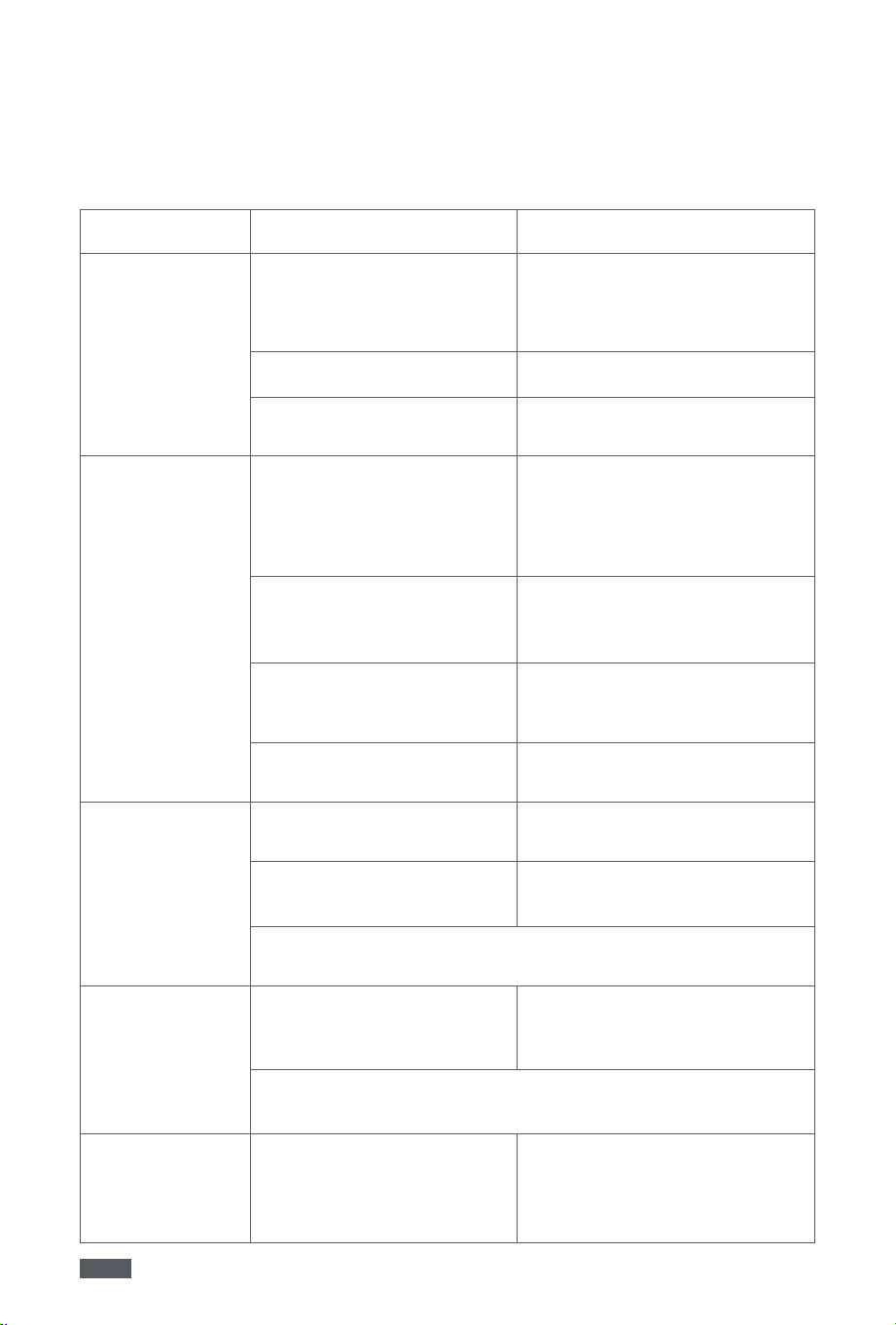
1. Always unplug the air purifier from the power outlet first.
Turn the air purifier upside down with the base facing upward. Then hold the handle
and rotate the base in the direction marked "OPEN" to unlock and open the base.
2. Remove the filter from the air purifier.
3. Remove the packaging materials from the new filter.
4. Install the new filter into the air purifier.
Install the base into the air purifier, hold its handle, and rotate the base in the direction
marked "CLOSE" to secure it firmly.
After replacing the filter, plug the air purifier into the power outlet.
Mode Selection
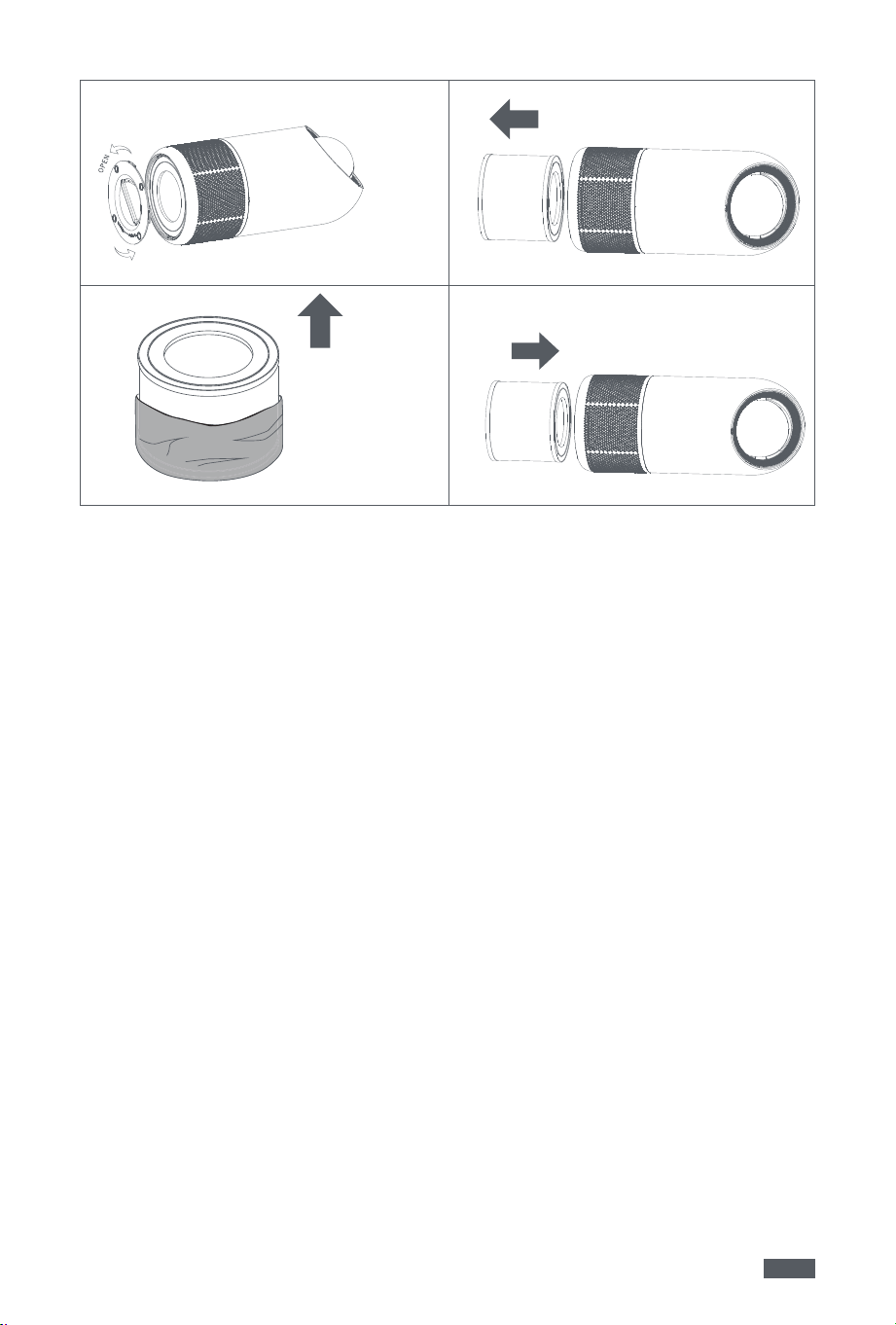
Manual mode
When the air purifier is off, gently push the eyeball control module by hand. The machine
will switch between different stepless purification levels based on the push angle.
Push the eyeball control module towards the side with the power button facing upward to
turn off the air purifier.
4. Product Usage
Mode Selection
Auto mode
Press the power button to activate the automatic purification mode. The air purifier will
automatically adjust to the corresponding purification level based on indoor air quality,
while the screen shows different emoticons to indicate current air conditions.
5
EN
Reminder:
Before using the new product, remove the packaging materials from the filter.
Always unplug the air purifier from the power outlet before removing/installing the filter.
Regularly clean the dust from the filter. The filter is not washable or reusable.
Only use MOVA genuine filters. Do not use non-genuine filters.
5. Care & Maintenance
1
3
2
4
Caution: When cleaning the air outlet, ensure no water droplets fall into the air purifier.
• Before performing maintenance, always turn off the purifier and unplug the power cord.
• Do not immerse the air purifier in water or any other liquid.
• Do not use abrasive, corrosive, or flammable cleaning agents (such as bleach or alcohol)
to clean any components of the air purifier.
• Power off and unplug the device, then neatly coil and secure the adapter cable.
• Cover the clean unit with a dust-proof cover/bag and store it in a well-ventilated area
away from direct sunlight.
• If the air purifier remains unused for an extended period, it is advisable to periodically
power it on and operate it for several minutes to maintain its optimal performance.
• Power off and unplug the power cord
• Clean the air inlet/outlet, and wipe the exterior casing of the air purifier with a neutral
detergent and a soft cotton cloth.
Precautions:
Storage:
Cleaning:
6
EN
6. Common Issues
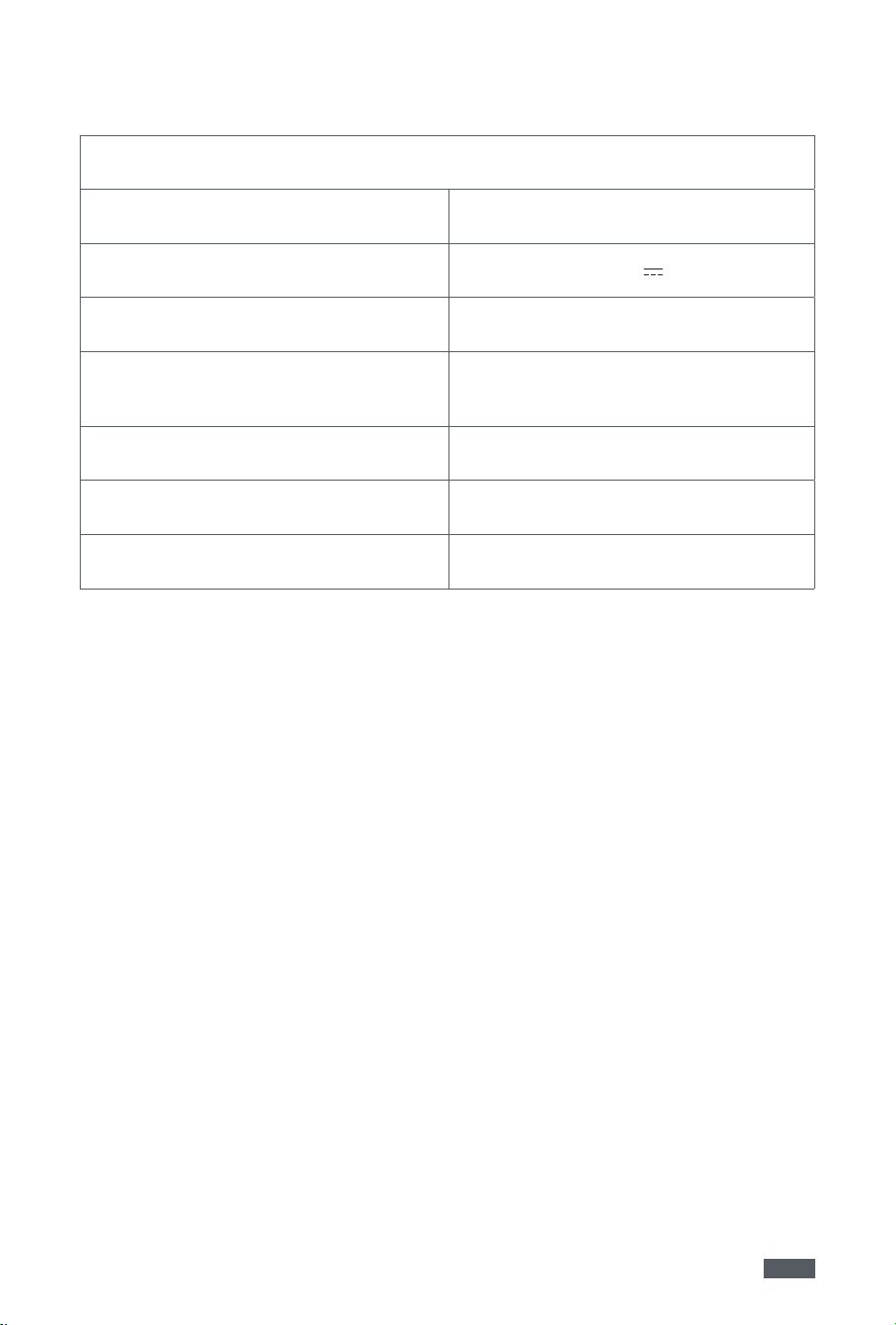
The air purifier will automatically shut down in case of abnormal operation. Please refer
to the troubleshooting table for possible causes and corresponding solutions. If the issue
persists, please contact after-sales service for repair.
Common issues Possible Causes Solutions
The product fails to
power on
Power is not connected or
plug is not fully inserted
Check if the power cord is
properly connected to the outlet.
Ensure the power plug is securely
inserted before operation.
The outlet has no power Try another power outlet
The air purifier is damaged
Please contact after-sales service
for repair
The product emits
unpleasant odors
First-time use of the new
product
A slight plastic odor during initial
use is normal. If the odor persists
after removing the filter, please
contact after-sales service for
repair
Excessive absorption of
gaseous pollutants
It is recommended to replace
the filter or place it in a well-
ventilated area to dissipate odors
Filter dampness
Dry the filter thoroughly and
ensure the product is placed in a
dry environment
Expired service life for the
filter
Replace with a new filter and
reset the filter life
The product is
making unusual
noise
The product is not placed on
a stable surface
Place the product on a stable
surface
Excessive noise during
nighttime operation
Set the fan speed to a lower level
in manual mode
If the issue persists after excluding the cases above, please contact
after-sales service for repair
Airflow direction
cannot be
adjusted
The product's eyeball
component rotates
unsmoothly
Check the product's head rotation
area for any foreign object
blockages
If the issue persists after excluding the cases above, please contact
after-sales service for repair
Filter replacement
still prompts filter
expiration
Filter life is not reset
After replacing with a new filter,
reset the filter life
7
EN
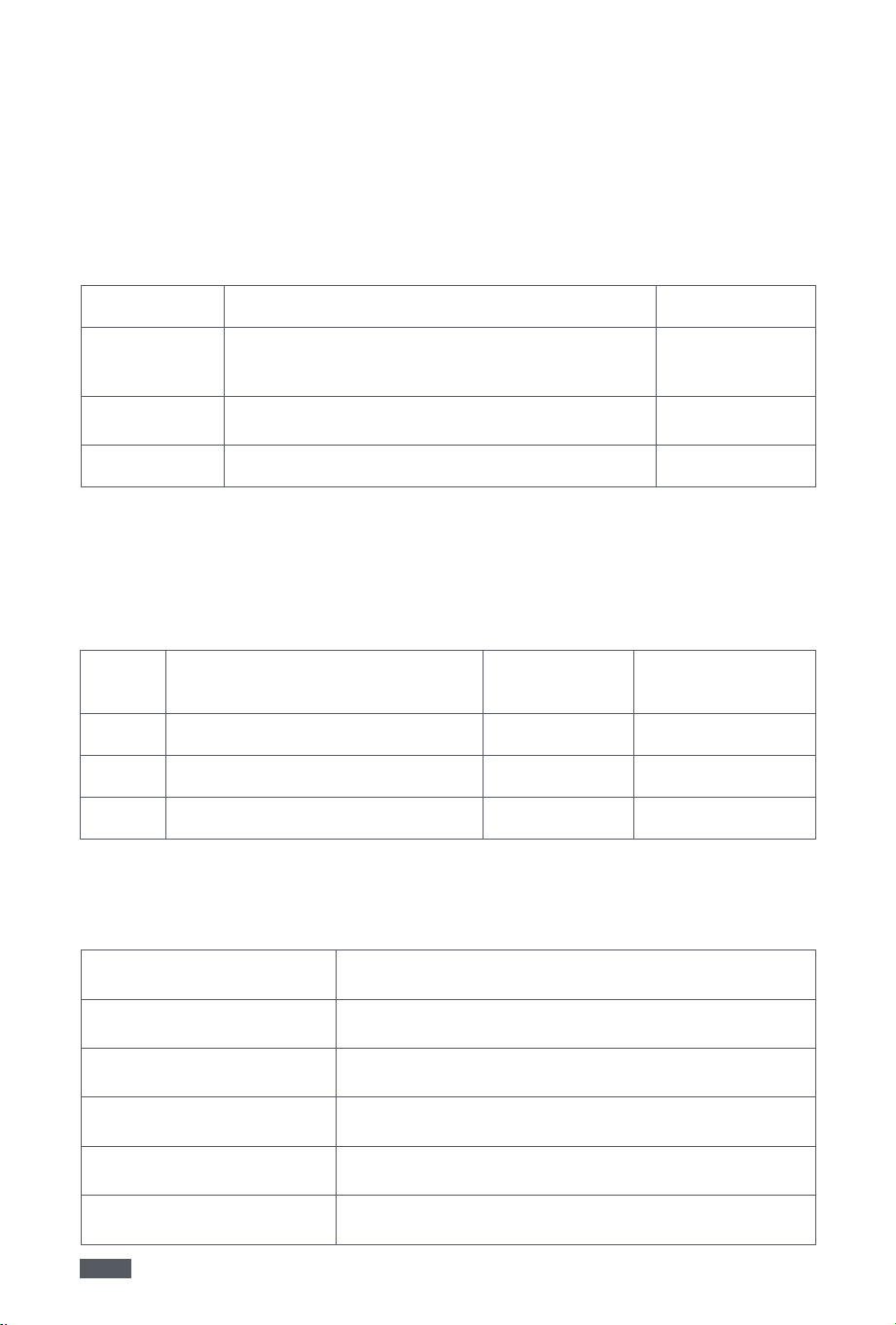
7. Basic Specifications
Air Purifier
Model X10 Plus
Rated Voltage 24 V
Rated Power 45 W
Dimensions
(length × width × height)
244 × 244 × 544 mm
Wireless Frequency Range Wi-Fi: 2412-2472 MHz
Max. RF Output Power WIFI: 19.99 dBm
Accessories/Components 2.4G Wi-Fi Module
Note: Hereby, XingKuang Innovation Technology (Suzhou) Co., Ltd. declares that the radio
equipment type X10 Plus is in compliance with Directive 2014/53/EU
The full text of the EU declaration of conformity is available at the following internet
address: https://www.mova.tech/pages/contact-us
8
EN
After-Sales Service Policy
For products within the warranty period, any damage caused by manufacturing defects
or component failures under normal usage conditions, as verified by MOVA's maintenance
personnel, will be covered by free warranty service.
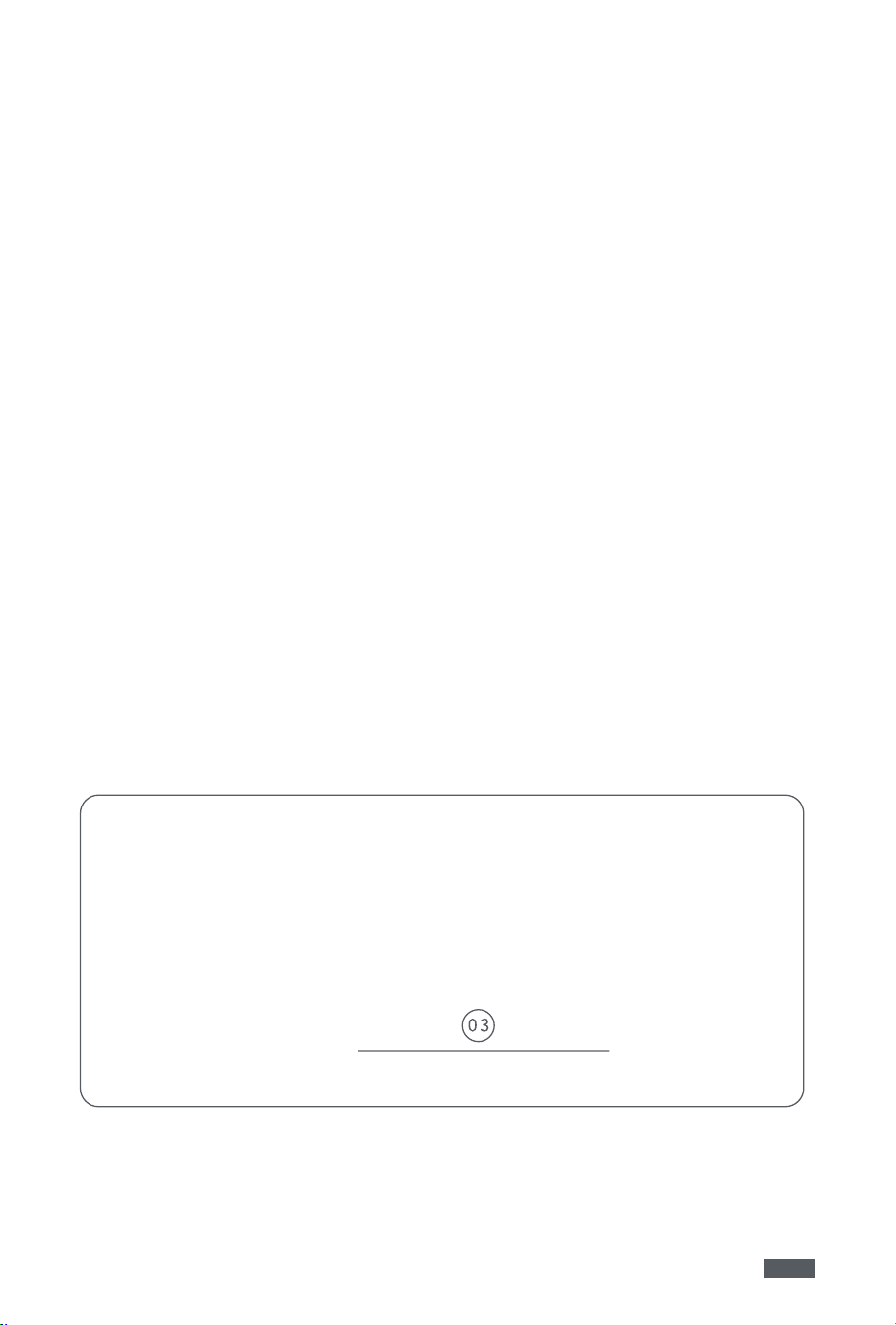
Care & Maintenance
Serial
No.
Fault Description and Replaced
Component
Service Date Service Center
1
2
3
Product Warranty Card
User Name
Mailing Address
Contact Number
Product Name and Model
Product Serial No.
Purchase Date
Warranty Coverage
Type Warranty Coverage Warranty Period
Machine
Machine (excluding accessories and consum-
ables)
1 year
Motor
Motor
1 year
Consumables Filter No warranty
In the event that the warranty period mandated by national laws exceeds the duration
specified in this User Manual, the statutory requirements shall prevail.
9
EN
After-Sales Service Policy
Service policy/Notification/Technical support
Service Policy:
MOVA strictly complies with the product repair and return liability regulations and pro-
vides guarantee for repair, refund and change of goods for consumers who purchase our
product.For detailed service policies, please refer to the official after-sales policy section
of the MOVA brand at https://www.mova.tech/.
*Please note that the following circumstances are excluded from the coverage of our
guarantee policy:
1. Warranty period expiration;
2. Damage caused by failure to use, maintain, or store the product in accordance with the
instruction manual;
3. Damage caused by disassembly or repair performed by service providers unauthorized
by MOVA;
4. No valid warranty certificate or valid invoice provided (except when the product's war-
ranty period can be otherwise verified);
5. Unauthorized alteration of the warranty certificate;
6. Inconsistency of the product model or serial number on the physical warranty certificate
with the actual product;
7. Lack of manufacturer name, factory address, production date, or product certification;
8. Damage caused by force majeure;
9. Normal wear and tear parts (such as filters).
Technical Support:
If you require additional assistance or encounter any operational issues while using this
product, please contact us for further technical support.
Certificate of Compliance
Inspector