©2024 Dorel Juvenile Group, Inc. (800) 544-1108 www.maxicosi.com. Styles, colors, and labeling may vary. Made in China.
Distributed by Dorel Juvenile Group, Inc., 2525 State St., Columbus, IN 47201-7494. Dorel Juvenile Canada, 2233 Argentia
Road, Suite 110, Mississauga, ON L5N 2X7. Representante exclusivo en Chile: DOREL JUVENILE CHILE S.A. Av. del Parque
4161, oficina 602 A, Huechuraba, Santiago, Chile - Fono: 56 2 24971500 - www.infanti.cl - www.dorel.cl. Importado y
distribuido en Perú por: COMEXA COMERCIALIZADORA EXTRANJERA S.A. SUCURSAL DEL PERÚ - Los Libertadores 455,
San Isidro, Lima 27, Lima, Perú RUC 20431062870 – Fono: 4413029 – www.infanti.com.pe. En Centro América, Caribe y
Ecuador por: Best Brands Group S.A. – Av. Balboa, Bay Mall Plaza, Planta Baja, local 9, Panamá. - Fono: (507) 300 2884. En
Colombia por: Baby Universe S.A.S. - Vía 40 No. 77-29, Barranquilla, Colombia - Fono: (575) 353 1110 Importador: DJGM,
S.A. DE C.V. Gabriel Mancera No. 1041 Col. Del Valle, Benito Juárez C.P. 03100 México, Ciudad de México R.F.C.
DJG140305GN9 Tel. (55) 67199202 03/24 4358-8510A
Learn More
Text 1-812-203-4747
(US and Canada only, carrier fees may apply)
Visit maxicosi.com/connected-support
Call 1-800-544-1108
Email connected@maxicosi.com
Keep these instructions for future reference.
BT099
Starling
Smart Bassinet
featuring CryAssist
™

2 3
Our Maxi-Cosi Kindred Collection is inspired by the ancestry, connection, and
inseparable bonds of Family. When you choose to invite us into your home,
you allow us to become a part of your life.
These pieces are more than furniture or baby products—they’re carriers and
keepers of cherished memories and family ties. Their exceptional quality
and craftsmanship mean that the memories they’ll make are countless.
Each Maxi-Cosi Kindred Collection piece is thoughtfully created, reects a
timeless design, features special metals and EcoCare premium, recycled
fabric made from plastic bottles, and is meant to be loved and shared.
The Maxi-Cosi Kindred Collection
Lineage in design.
Introducing
the Maxi-Cosi
Kindred Collection
54
Table of Contents
Features of Your Starling Smart Bassinet
WARNINGS ..................................................................7
ASSEMBLY ....................................................................11
Parts .........................................................................12
Legs ..........................................................................14
Bassinet Basket ................................................... 15
Plugging in ............................................................. 17
USE ...................................................................................19
Navigating the Touch Panel .............................20
Locking the Touch Panel ................................... 20
Resetting your Bassinet ....................................20
Pairing with your Smartphone ........................21
Wi-Fi Connectivity for Smartphones ............ 21
Power ....................................................................... 22
Motions ....................................................................22
Sleep Modes ..........................................................22
Sounds and Music ............................................... 23
Enabling the Bluetooth
®
Speaker .................. 24
Scenes ......................................................................25
Timer ........................................................................25
CARE AND MAINTENANCE ..................................27
Replaceable Parts ............................................... 28
Warranty Information ......................................... 29
Disposal ..................................................................29
FCC Statement .....................................................30
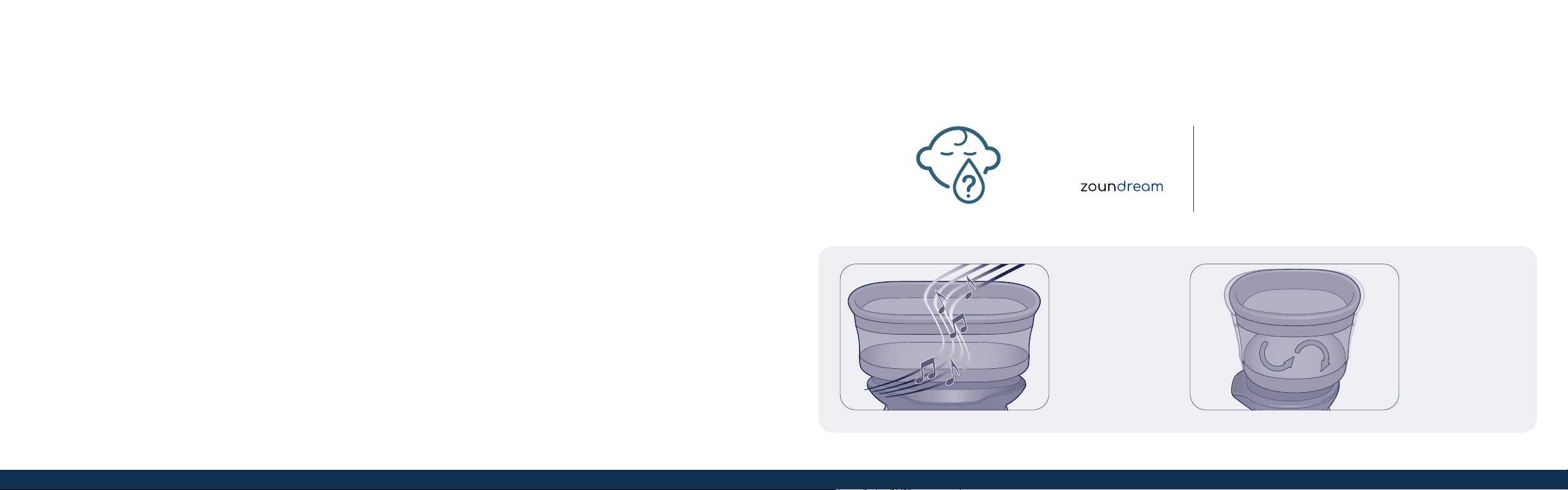
Includes 6 months of CryAssist
cry translation service
Activates sounds
and motions when
baby is crying to
help pacify your
little one
Gently calm
your baby with 5
natural rocking
motions, each
with 3 speeds
CryAssist
™
Powered by
5
See back cover for contact
information and support.

6 7
Warnings
9888
For indoor use only. Suitable for infants up to 20 lbs.
Read all instructions before assembly and use of product. Keep instructions for future reference.
WARNING
Failure to follow these warnings and the instructions could result in death or serious injury.
SUFFOCATION HAZARD
Babies have suffocated:
• On pillows, comforters, and extra padding.
• In gaps between a wrong-size mattress, or extra padding and product sides.
• NEVER add soft bedding or padding.
• Use ONLY mattress provided by manufacturer.
• ALWAYS place baby on back to sleep to reduce the risk of SIDS and suffocation.
FALL HAZARD—To help prevent falls, do not use this product when the infant begins to push up on hands and knees or has reached 20 lbs,
whichever comes first.
• If a sheet is used with the pad, use only the one provided by the product manufacturer or one specifically designed to fit the dimension of
the product mattress.
WARNING
• Strings can cause strangulation! DO NOT place items with a string around a child’s neck, such as hood strings or pacifier cords. DO NOT
suspend strings over a product or attach strings to toys.
• DO NOT use if any part of the bassinet is broken, torn, or missing. Contact Consumer Care for replacement parts and instructional
literature if needed.
• To reduce the risk of fire or electrical shock, DO NOT expose this product to water or moisture.
• The monitor function is not intended to be used as a medical monitor and its use should not replace proper adult/parental supervision. You
should check your child’s activity at regular intervals as this monitor will not alert parents to the silent activities of a child.
• NEVER attempt to disassemble the product. This is dangerous and will void the warranty.
• Test monitor function periodically when in use and changing locations.
• Use only the adapter supplied with this product. Incorrect adapter polarity or voltage can seriously damage the product.
• To prevent entanglement and overheating, DO NOT use extension cords.
• The adapter and device may become slightly warm to the touch during operation. This is normal.
• ALWAYS unplug the AC adapter from the wall during extended periods of non-use.
• Check to make sure wall outlet plates are not unusually hot to the touch. If they are, immediately unplug cords from these outlets.
• Check that all outlet connections are in good condition so that adapter is not loose or that no wiring is exposed. Have a qualified,
licensed electrician check the wiring as soon as possible.
• This monitor allows internet users to hear activity. Use the security feature included with this device to restrict internet viewership.
• DO NOT place adapter/wall plug under a window where a child might use it to step on and/or to reach something that might be dangerous.

10 11
Assembly
1312
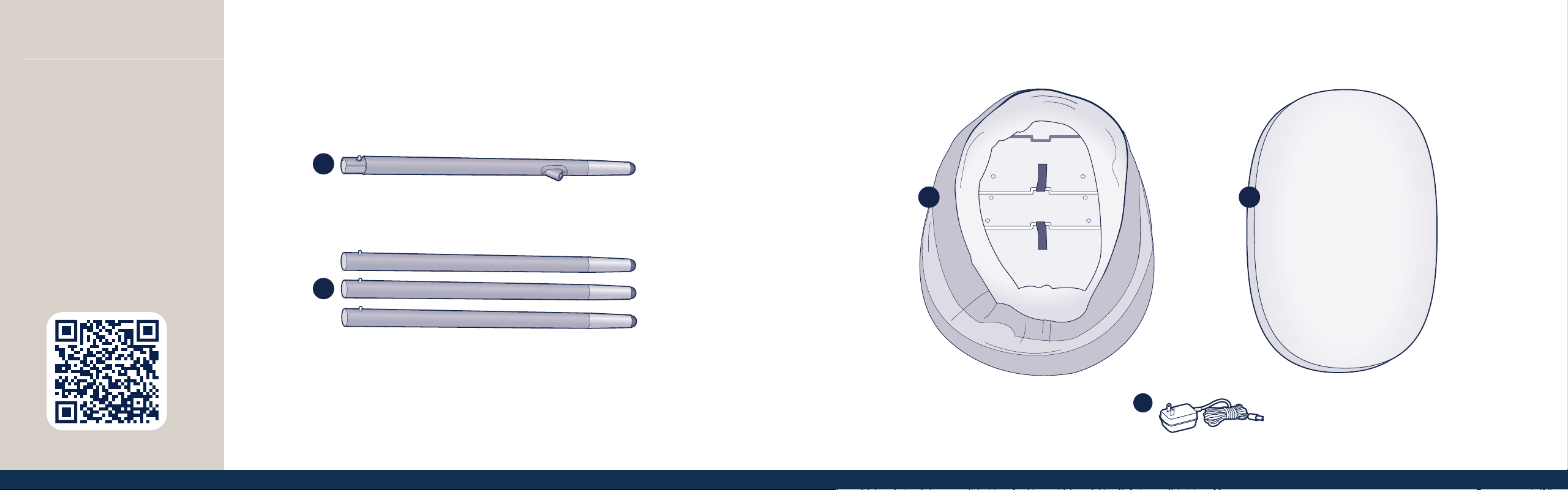
Parts
A Wood leg with electrical plug (1)
B Wood legs (3)
C Bassinet basket
D Mattress pad and cover
E Power cord
Adult assembly required.
No tools required.
Download our easy-to-use
Connected Family app, where you
can manage your Starling Smart
Bassinet and all other Maxi-Cosi
Connected devices.
C
E
Learn More
A
B
D
13
1514
1 2
3
3
4
AssemblyAssembly
Bassinet Basket
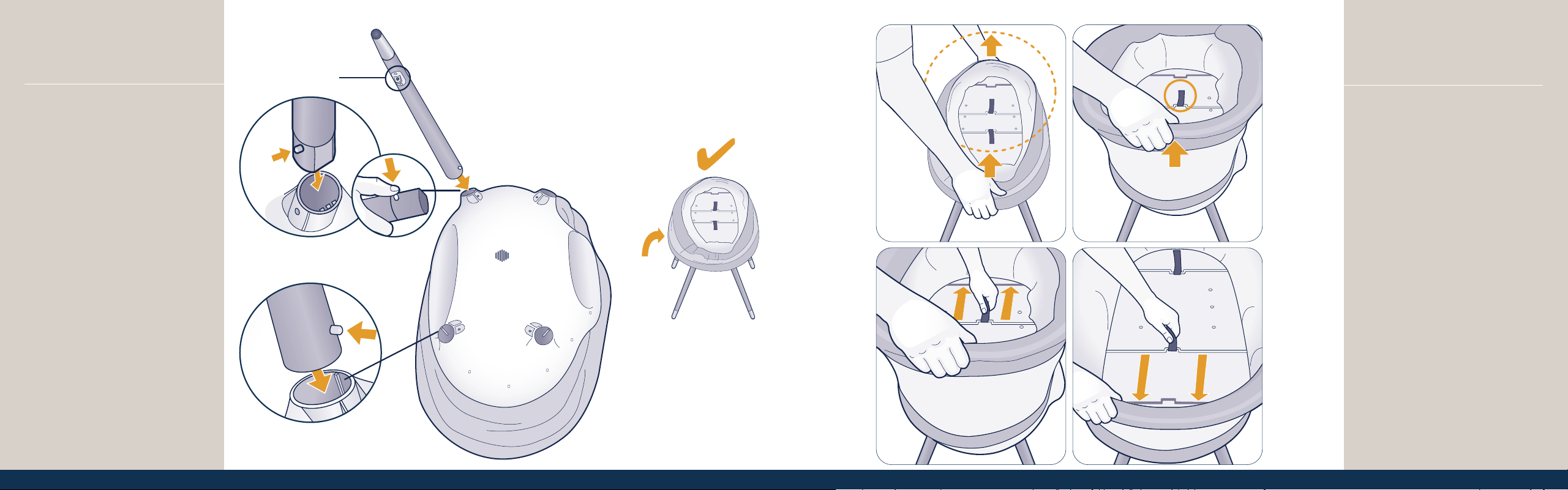
To assemble the bassinet basket, lift
the rim up with both hands (Figure 1).
While holding the rim with one hand
(Figure 2), pull one tab towards the
end of the bassinet until the bar
enters the slot (Figure 3). Repeat with
the other tab (Figure 4). Conrm that
both tabs are securely in place by
pushing the rim down and ensuring
the bassinet does not collapse.
Legs
On a at, clean surface, turn the
bassinet upside down, and identify
the four leg openings.
While pressing in the pin, insert the
wood leg with electrical plug into
the ribbed opening (Figure 1) until
you hear the pin click into position.
Pull on the leg to ensure it is locked
in place.
Repeat with the other three legs
(Figure 2), pulling on each to ensure
they are locked in place. Note: These
three legs are interchangeable.
Once all four legs are in place, turn
the bassinet right side up (Figure 3).
1
2
Electrical plug
1716
Assembly
Plugging in
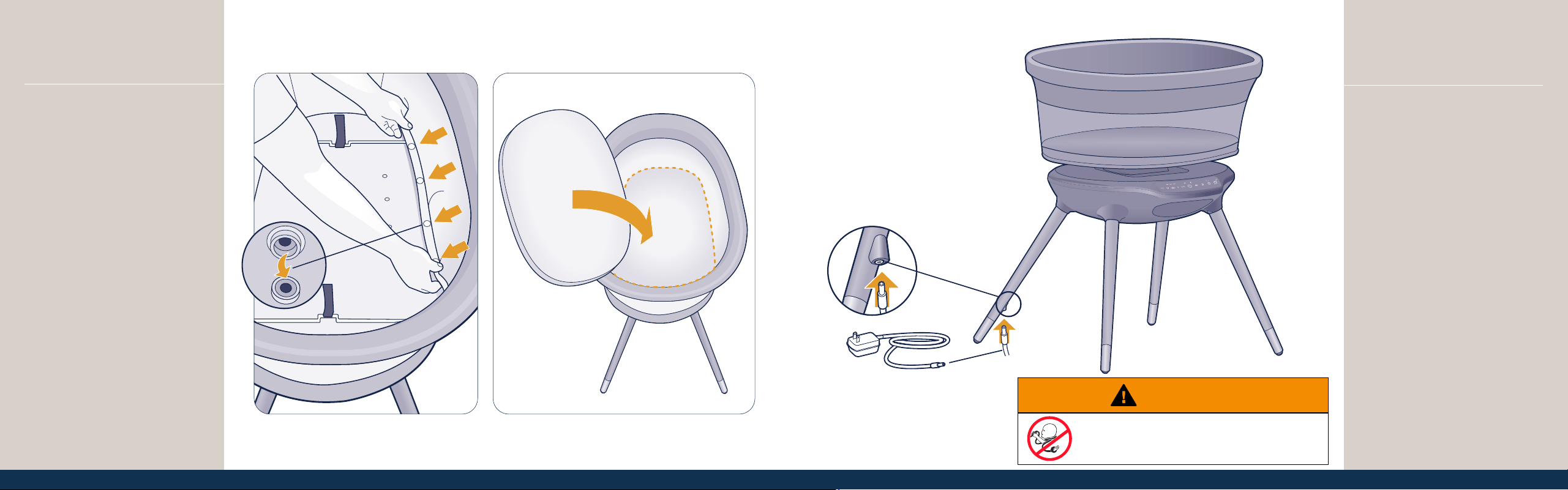
Plug the power adapter into a nearby
wall outlet, and insert the other end
of the plug into the port on the leg.
Power adapter:
Input: 110 VAC 50/60Hz
Output: 12 VDC 3A (Bassinet input)
WARNING
STRANGULATION HAZARD
• Children have STRANGLED in cords.
• Keep this cord out of the reach of children.
Assembly
Bassinet Basket
On each side of the bassinet, snap
the bottom of the mesh sides to the
base to secure (Figure 5).
Place the mattress pad with cover
into the bassinet (Figure 6).
5
6
18 19
Use
2120
Pairing with Your
Smartphone
Download the Connected
Family app to manage your
Starling Smart Bassinet,
activate CryAssist
TM
, and
access baby diary.
Wi-Fi Connectivity for Smartphones
Connecting to this Starling Smart Bassinet via your smartphone requires a 2.4 GHz, 5
GHz, or dual-band home network. Certain shared networks such as those in hotels may
not function. We recommend a connection with network speeds of 2 Mbps or greater
at the location the bassinet will be placed. Your internet service provider can verify the
quality of your internet connection.
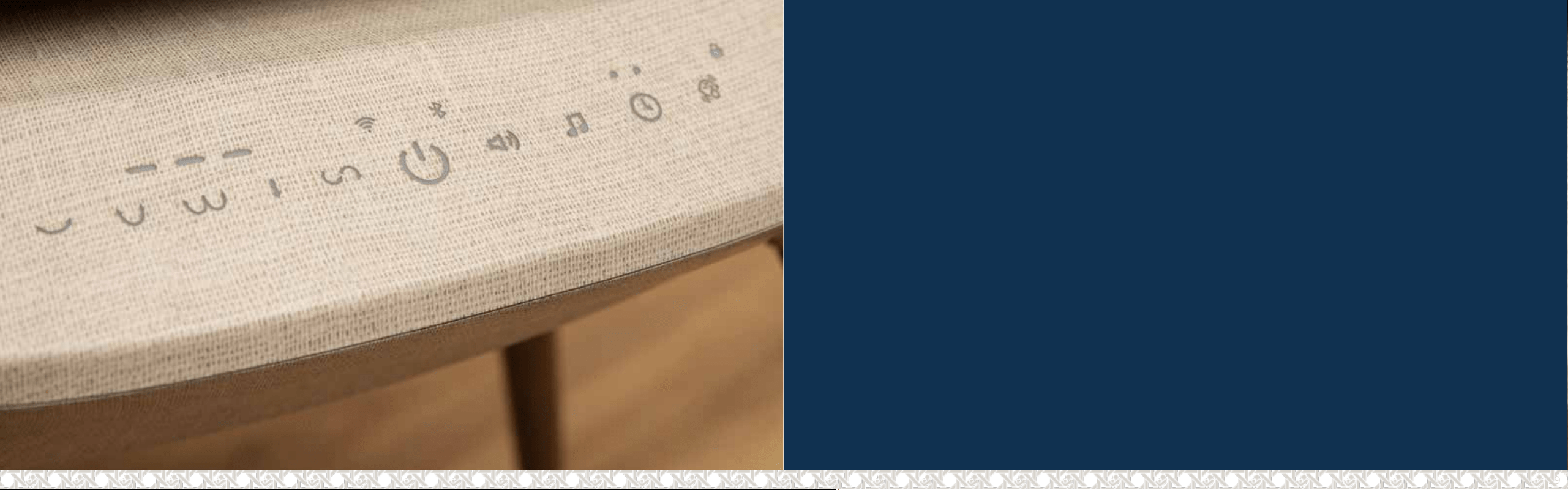
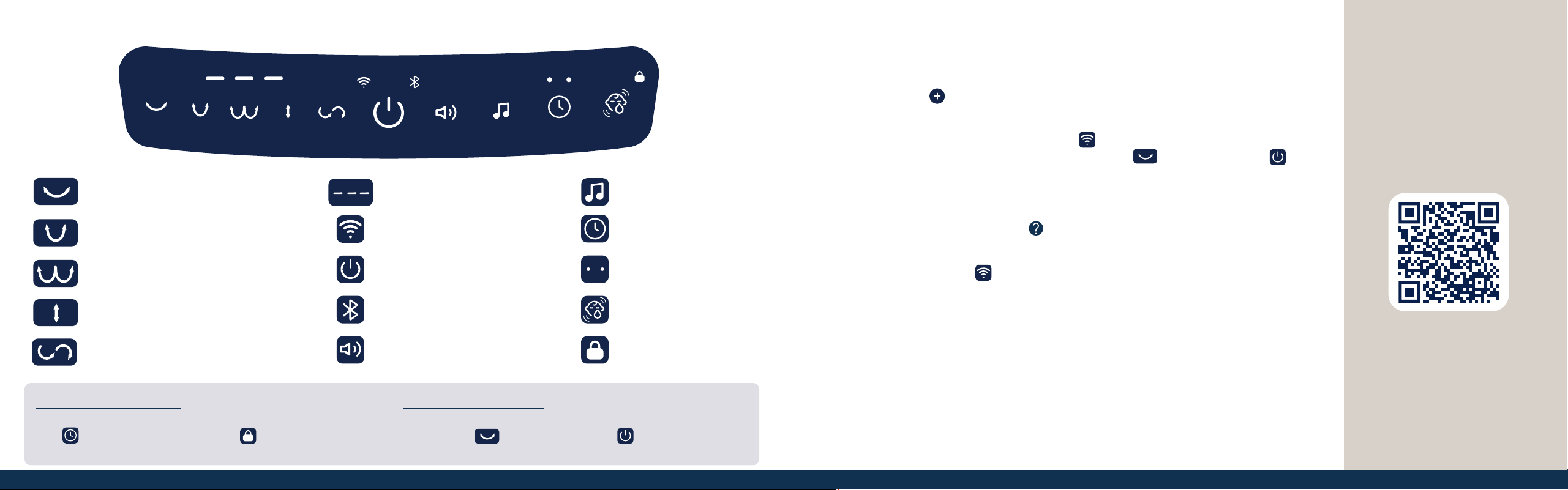
Navigating the Touch Panel
Motion 1 — Cradle
Lulls your child back and forth.
Motion 2 — Sway
Rocks from side to side.
Motion 3 — Flutter
Loops out and around.
Motion 4 — Cascade
Gently lifts up and down.
Motion 5 — Zephyr
Wafts in an arc and curls back.
Sounds and Music
Timer
Timer Indicators
Scenes
Lock/Unlock Indicator
Motion Speed Indicators
Wi-Fi Indicator
Power
Bluetooth
®
Speaker
Volume
1. Download the Connected Family app to manage your Starling Smart Bassinet. Make
sure your smartphone is connected to your home’s Wi-Fi network.
2. In the app, tap
. Then select Maxi-Cosi followed by Starling Smart Bassinet to
begin pairing your device.
3. While in pairing mode, the Wi-Fi indicator
will blink white. To enter pairing mode,
reset the bassinet by pressing and holding Motion 1
and the Power icon for
10 seconds.
4. Follow the step-by-step instructions in the app to complete pairing.
5. In the Connected Family app, tap
to learn more. You can also enable CryAssist,
share access, congure notications, and more.
Tip: If the Wi-Fi indicator
blinks quickly, it has failed to connect to a known network.
Review your network credentials or consult your internet service provider for issues
with your connection.
Locking the Touch Panel
To lock and unlock the touch panel, press and hold the Timer
icon
for 5 seconds. The Lock icon will shine white at
full brightness.
Resetting Your Bassinet
To reset the bassinet to its original settings, press and hold both
the Motion 1
and the Power icons
for 10 seconds.
21
Note: CryAssist requires an
internet connection and must
be set up in the Connected
Family app.
232222
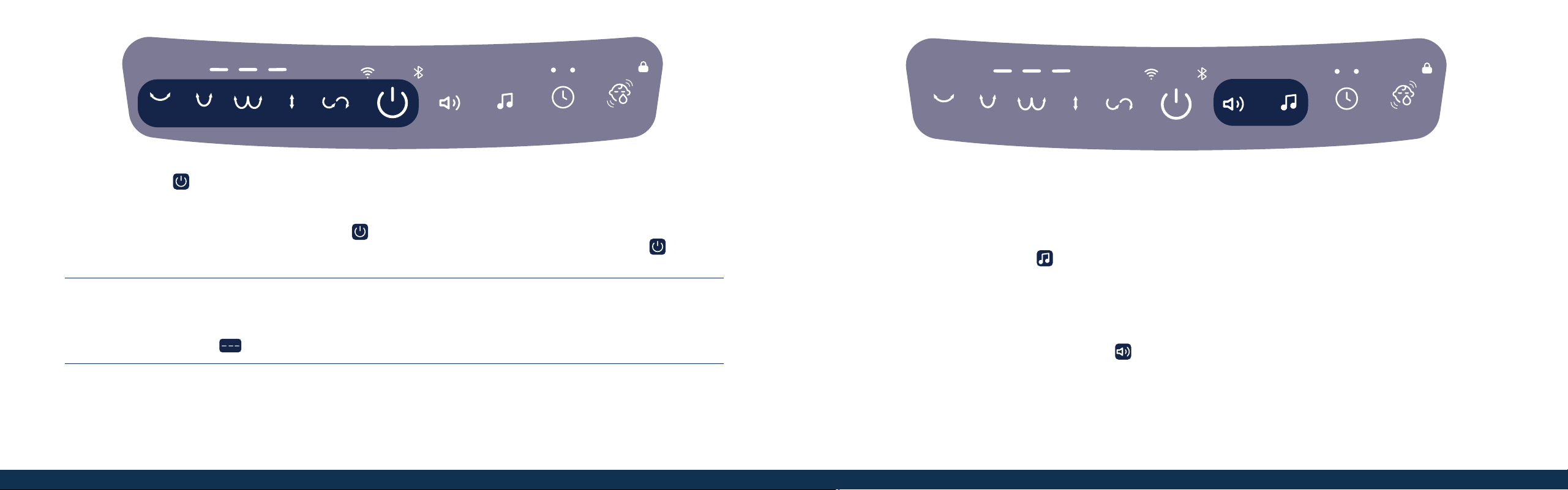
Power
Tap the Power icon to turn the bassinet on. Both the Power icon and the Wi-Fi indicator (if paired with your
smartphone) will shine white. All other icons will be dim until activated. Note: The bassinet will enter standby after 8
hours of continuous motion, without interaction on the touch panel or app.
Tip: If the bassinet stops moving and the Power icon
is blinking red, then the bassinet may have encountered an
obstruction that prohibits movement. To restart the bassinet, remove the obstruction and tap the Power icon
. Keep
clear of the bassinet while restarting it.
Motions
The Starling Smart Bassinet includes 5 motions with 3 speeds each. Tap a motion icon to begin movement. Additional taps
on the same motion will increase the speed. The 4th tap turns the motion off and returns the bassinet to the home position.
The Motion Speed indicators
show the selected speed level for the current motion.
Sleep Modes
The touch panel will enter Sleep Mode after 15 seconds of inactivity and all active functions will dim (inactive icons will
remain off). Tap any icon to wake, showing all active icons with full brightness and all inactive icons dimmed.
While in Night Mode, the Power icon will be dimmed with all other icons turned off. This mode can be activated in the
Connected Family app.
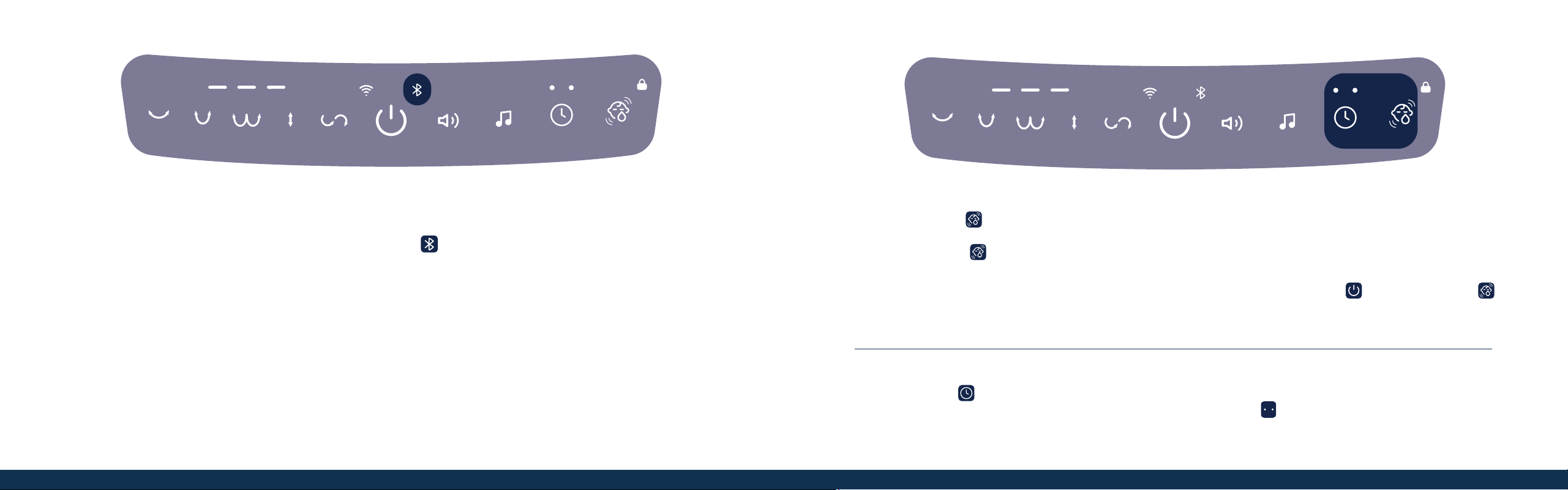
Sounds and Music
Tap the Sounds and Music icon to cycle through the 5 soothing built-in sounds. Press and hold the Sounds and
Music icon for 2 seconds to turn sounds off.
When Bluetooth
®
is ON and paired with your smartphone, you can stream any media or music through the speaker.
Tap the Sounds and Music icon to Play/Pause Bluetooth sound playback. Press and hold the Sounds and Music icon
for 2 seconds to return to the built-in sounds.
Volume is controlled through the Volume icon
, with each tap cycling through the 5 different levels. The 6th tap
turns the volume off.
252424
Enabling the Bluetooth
®
Speaker
To enter Bluetooth pairing mode, press and hold the Bluetooth icon for 3 seconds. The Bluetooth icon will blink while in
pairing mode. Three fast blinks indicates a failed connection. Upon entering Bluetooth pairing mode, the bassinet will chime.
A subsequent chime will play when Bluetooth is successfully paired.
While connecting, the Bluetooth icon will blink constantly. When connected, the Bluetooth icon will remain solid white.
Open the Bluetooth menu on your smartphone and select Maxi-Cosi Starling from the list of devices.
Once Bluetooth is paired, tap the Bluetooth icon to switch from playing the built-in sounds and music to using the speakers to
play your own media.
Scenes
Tap the Scenes icon
to enable the default scene. The default scene features the “Cradle” motion at Speed 1 with
“Twinkle, Twinkle, Little Star” playing at Volume 2. To enable the default scene only when crying is detected, press and
hold the Scenes icon
for 3 seconds. The LED will blink 3 times and the bassinet will wait for the sound of a crying
baby to activate the scene.
To save the current conguration as default, simultaneously press and hold the Power icon
and the Scenes icon
for 2 seconds. Scenes can be created and managed through the Connected Family app.
To exit the scene, tap the Scenes icon again or change to another setting.
Timer
Tap the Timer icon to select from 2 default timers: Timer 1 (Naptime) is 30 minutes and Timer 2 (Bedtime) is 180
minutes. The 3rd tap of the icon will disable the timer. The Timer indicators
show whether Timer 1 (left) or Timer 2
(right) is activated. Timers can be customized through the Connected Family app.

26 27
Care and
Maintenance

292828
Cleaning the Bassinet Basket (A)
Unplug power cord before spot cleaning. Spot clean only the fabric and base board, using a dampened cloth. Do not use harsh
cleaning products.
Cleaning the Bassinet Base (B)
Clean with a slightly damp cloth or with an anti-static cloth. ALWAYS unplug from electrical outlet before cleaning. NEVER USE
cleaning agents or abrasive solvents. DO NOT clean any part of the product with thinners or other solvents and chemicals—this
may cause permanent damage to the part, which is not covered by the warranty. Keep product away from hot, humid areas or strong
sunlight, and do not let it get wet. Every effort has been made to ensure high standards of reliability of your product. However, if
something does go wrong, please do not try to repair it yourself—contact Consumer Care for assistance.
Washing the Mattress Cover
Remove the cover from the mattress pad.
Machine wash cold, gentle cycle, and line dry.
Care and Maintenance
• Wood leg with electrical plug
• Wood legs without electrical plug
• Power cord
• Mattress pad and cover
• To order parts, call 1-800-544-1108 or text 1-812-203-4747. Have the model number ready (BT099), the product serial number (found on the bassinet under
the mattress pad), and a brief description of the part.
Replaceable Parts
Two-Year Limited Warranty
Dorel Juvenile Group, Inc. warrants to the original purchaser that this product (Starling Smart Bassinet) is free from material and workmanship defects when used under
normal conditions for a period of two (2) years from the date of purchase. Should the product contain defects in material or workmanship Dorel Juvenile Group, Inc.,
will repair or replace the product, at our option, free of charge. Purchaser will be responsible for all costs associated with packaging and shipping the product to Dorel
Juvenile Group Consumer Care Department at the address noted on back cover and all other freight or insurance costs associated with the return. Dorel Juvenile Group
will bear the cost of shipping the repaired or replaced product to the purchaser. Product should be returned in its original package accompanied by a proof of purchase,
either a sales receipt or other proof that the product is within the warranty period. This warranty is void if the owner repairs or modies the product or the product has
been damaged as a result of misuse. This warranty excludes any liability other than that expressly stated previously, including but not limited to, any incidental or
inconsequential damages.
SOME STATES DO NOT ALLOW THE EXCLUSION OR LIMITATION OF INCIDENTAL OR CONSEQUENTIAL DAMAGES, SO THE ABOVE LIMITATION OR
EXCLUSION MAY NOT APPLY TO YOU. THIS WARRANTY GIVES YOU SPECIFIC LEGAL RIGHTS, AND YOU MAY ALSO HAVE OTHER RIGHTS THAT MAY
VARY FROM STATE TO STATE.
At the end of the product life cycle, you should not dispose of this product with normal household waste. Take this product to a collection point for the recycling
of electronic equipment in accordance with your local laws. Some of the product materials can be reused if you take them to a recycling point. By reusing some
parts or raw materials from used products, you make an important contribution to the protection of the environment.
Prior to disposal of this device, make sure to reset the device to its factory state and remove the device from your account, which will help clear the device of
personal data. Remove or securely erase any storage media, such as MicroSD cards, which may contain personal data like videos, photos, and documents.
Disposal
A
B

3130
FCC Statement
This device complies with part 15 of the FCC Rules. Operation is subject to the following two conditions:
1. This device may not cause harmful interference, and
2. This device must accept any interference received, including interference that may cause undesired operation.
RADIO AND TELEVISION INTERFERENCE:
This equipment has been tested and found to comply with the limits for a Class B digital device, pursuant to part 15 of the FCC Rules. These limits are
designed to provide reasonable protection against harmful interference in a residential installation. This equipment generates, uses and can radiate radio
frequency energy and, if not installed and used in accordance with the instructions, may cause harmful interference to radio communications. However,
there is no guarantee that interference will not occur in a particular installation. If this equipment does cause harmful interference to radio or television
reception, which can be determined by turning the equipment off and on, the user is encouraged to try to correct the interference by one or more of the
following measures:
1. Reorient or relocate the receiving antenna.
2. Increase the separation between the equipment and receiver.
3. Connect the equipment into an outlet on a circuit different from that to which the receiver is connected.
4. Consult the dealer or an experienced radio/TV technician for help.
Note: Changes or modications not expressly approved by Dorel Juvenile Group can void your authority to operate this equipment under Federal
Communications Commission’s rules.
Use of other accessories may not ensure compliance with the FCC exposure guidelines.
FCC Radiation Exposure Statement: This equipment complies with FCC radiation exposure limits set forth for an uncontrolled environment. This transmitter
must not be co-located or operating in conjunction with any other antenna or transmitter.
The Bluetooth
®
word mark and logos are registered trademarks owned by Bluetooth SIG, Inc. Other trademarks and trade names are those of their respective owners.