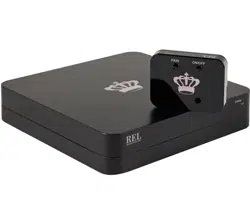
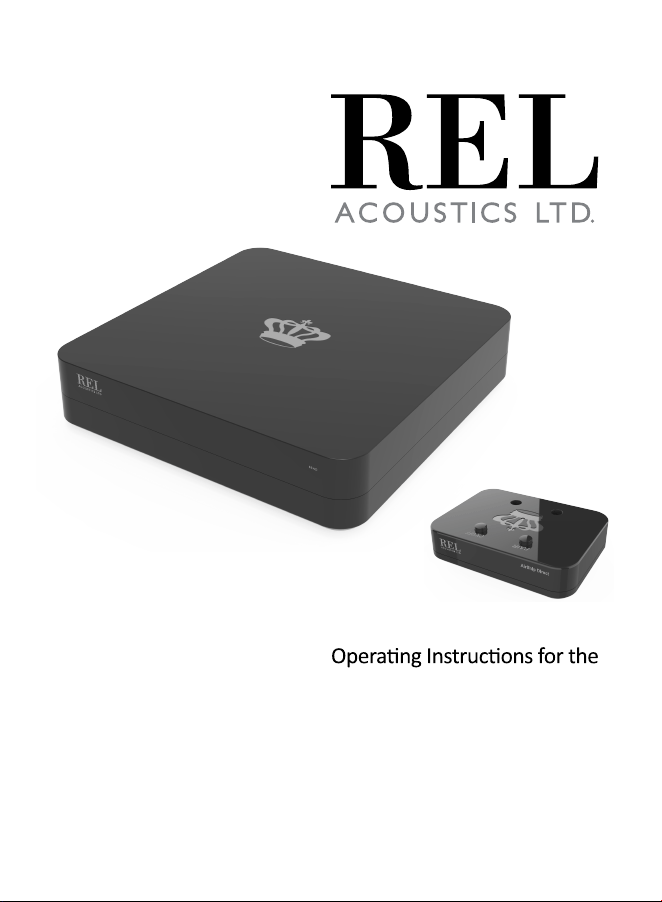
AirShip Direct™
Wireless
AirShip Direct
RE CE IV E
NOTE:

AirShip Direct™ Wireless:
AirShip Direct™ is our newest state of the art zero
compression wireless connecon for use with the latest
Serie S and many more RELs to come. Our goal with this
design is to deliver a true hardwired quality of
connecon wirelessly. We have prided ourselves on our
ability to deliver extremely high levels of sound quality
and rock solid wireless connecon protocols since our
first wireless design over a decade ago. AirShip Direct™
surpasses any earlier design using a 5.8 gigahertz signal, a
frequency previously reserved for military use by the US
military and NATO. It results in the fastest, most transpar-
ent wireless the design team has ever experienced and
verges on hardwired transparency levels.
Ultra-high quality wireless confers a number of benefits to
the REL owner, notably, freedom of placement. This
permits extreme performance without the cumbersome
tether of a cable, perming ideal placement without
being limited by the length of a wire and can lead to a
beer sounding, less cluered experience. This gives you
the ability to place subs in distant corners, along glass
walls, or on hardwood floors allows for a superior
experience, sonically and aesthecally.
AirShip Direct
FCC ID: 2AATQ-AIRSHIPDIRECT
LFE
INPUT
PWR
PAIR
BALANCED LFE INPUTHIGH LEVEL INPUT
LOW LEVEL
INPUT
DC IN
5V 500mA
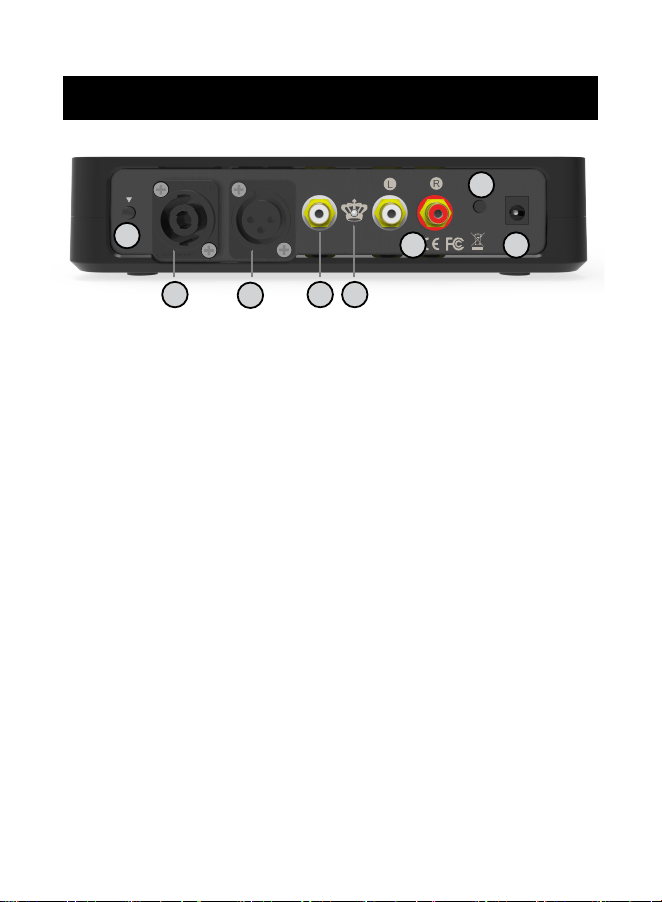
1 Power Switch: Used to turn on and off REL
AirShip Direct™ transmier.
2 Pair Buon: Used to pair REL AirShip Direct™ transmier
with receiver.
3 HIGH-LEVEL INPUT (Neutrik® Speakon® Socket):
Use to connect HIGH-LEVEL to the main front amplifier
speaker terminals.
4 BALANCED .1/LFE INPUT: Used to connect to the balanced
.1/LFE output from a home theatre processor with XLR cables.
2
3
4
1
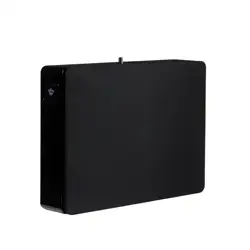
REL AirShip Direct™ Transmier
5 6
7 8
5 .1/LFE RCA INPUT: Used to connect to the .1/LFE output
from a home theatre processor. Should be used in
conjuncon with REL HIGH-LEVEL connecon for the
ulmate theatre experience.
6 PAIR LED : Indicates whether the REL AirShip Direct™
transmier is paired with the receiver or not.
7 LOW LEVEL RCA INPUTS: Used to connect to a stereo output
from a stereo pre-amp or home theatre processor.
8 Power Adapter Socket: DC input socket that accepts a
detachable power adapter.
REL AirShip Direct™ Panel Connecon Legend
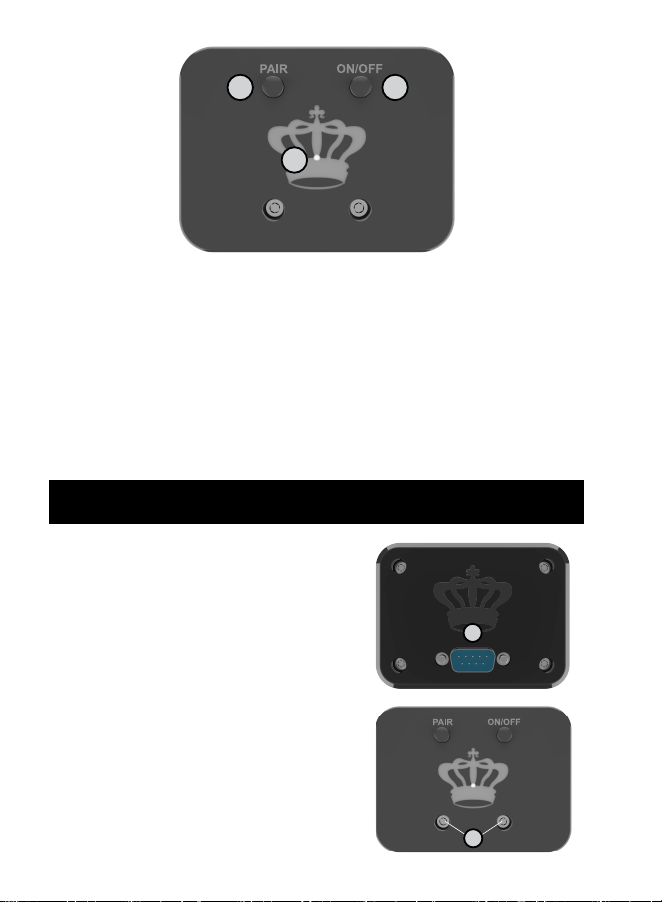
Pair Buon: Used to pair REL AirShip Direct™ receiver
with transmier.
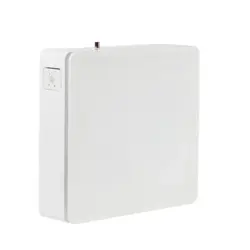
REL AirShip Direct™ Receiver
1
2 Power Switch: Used to turn on and off REL AirShip Direct™
reciever.
3 LED : Indicates whether the REL AirShip Direct™ receiver
is paired with the transmier or not.
2
3
1
Mounng Up
The receiver must be mounted
to the back panel of the SerieS
using supplied hardware.
Make sure the electrical
interface is fully engaged to
ensure proper performance
and the mounng screws need
only be finger ght.
Please turn the REL off and
make sure that the PWR switch
is in the off posion before
mounng the receiver.
1
2

The REL AirShip Direct™ wireless is intended to be used
with the Serie S sub bass system. The transmier will
require power from an AC wall plug using the power
adapter cable supplied.
It is not possible to use the AirShip Direct™ wireless
connecon and a direct connecon simultaneously. Using
both wired and wireless connecons simultaneously could
result in damage and voids all warranes.
Always switch your system off before disconnecng any
wires.
The transmier can be placed near an amplifier, pre-amp
or processor source. Make sure the electrical interface is
fully engaged to ensure proper performance.
There must be at least 12 inches between AirShip Direct™
and other wireless sources.
AirShip Direct™ permits simultaneous use of our new 5.8
gigahertz connecon for both HIGH-LEVEL connecon AND
the .1/LFE needed for high quality theatre. In this way,
both 2-channel music and mul-channel theatre are
supported simultaneously meaning the REL owner can use
their REL without adjusng anything further to any form of
music or theatre.

Our High-Level input is designed to accept the stereo
(two-channel) signals from the speaker terminals of your
receiver, integrated amplifier or power amplifier(s). This
has the advantage of ensuring that your subwoofer
receives exactly the same signal as the main speakers,
which means that the character of the bass from the main
system is carried forward into our Sub-Bass System. Along
with our extremely fast, natural sounding Filter Circuits,
AirShip Direct™ ensures you receive the benefits of REL’s
superior system integraon since RELs are known the
world over for their perfect, rich integraon without the
ability to sonically locate the subwoofer’s origin.
For top theatre performance, the .1/LFE circuit is granted
its own dedicated wireless channel which allows for the
largest, most dynamic special effects in theatre to be
properly replicated in all their glory. AirShip Direct™
delivers 2 channels in parallel, one for music and theatre in
High Level (or Low Level, increasingly needed for acve
wireless speakers for example) and a second channel for
.1/LFE in theatre use.
When both are used correctly, normal theatre transforms
because the cold, edgy sound most theatres deliver
becomes rich and full-bodied. Dialogue and atmospheric
effects take on new drama and realism because the full
range of sounds are provided every moment of the movie
by our High Level, whilst the .1/LFE channel delivers extra
emphasis during the 15-20 minutes of a movie that this
channel is acve. Truly the best of both worlds.

Connecng
HIGH-LEVEL connecon, using the enclosed cable with the
Neutrik Speakon connector, is always the first choice. This
connecon can be made without affecng the perfor-
mance of the amplifier because the REL’s amplifier input
impedance is 150,000 ohms, in effect not producing any
addional demand whatsoever on the rest of your system.
Connecng to the Power Amplifier Using the Speakon
HIGH-LEVEL INPUT
To engage the Neutrik Speakon plug, insert fully into
socket and rotate clockwise unl locked.
To remove the Neutrik Speakon plug, grip body of plug,
place thumb on chrome lever, move lever backwards,
rotate plug anclockwise quarter turn and withdraw.
The following are ways to connect to common amplifier
types. There is more detailed connecon informaon at
User Guides on REL.net.
Please note: Since REL AirShip Direct™ uses an external AC
to DC converter, it does not have an connecon to earth
ground, so a connecon with the BLACK wire of the high
level cable OR the collar of an RCA connecon must be
made to the stereo, or home theater system.
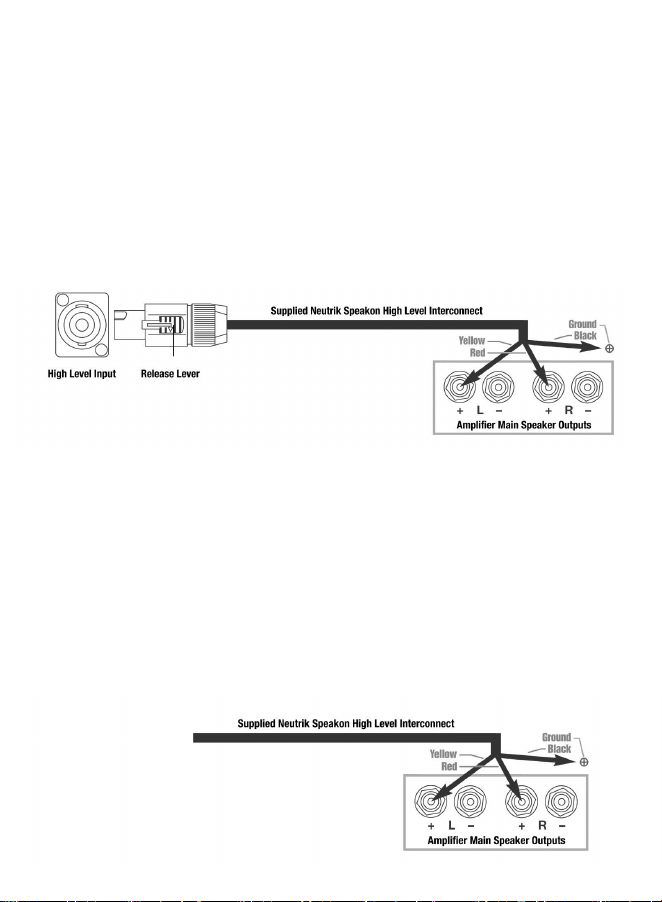
• The standard High Level hook up procedure is aaching
the red wire to the amplifier’s right posive speaker
output terminal; aach the yellow wire to the amplifier’s
le posive speaker output terminal; aach the black wire
to whichever of the amplifier’s chassis ground screws or
bolts is convenient; plug the Speakon® connector into the
Sub-Bass System’s HIGH LEVEL INPUT.
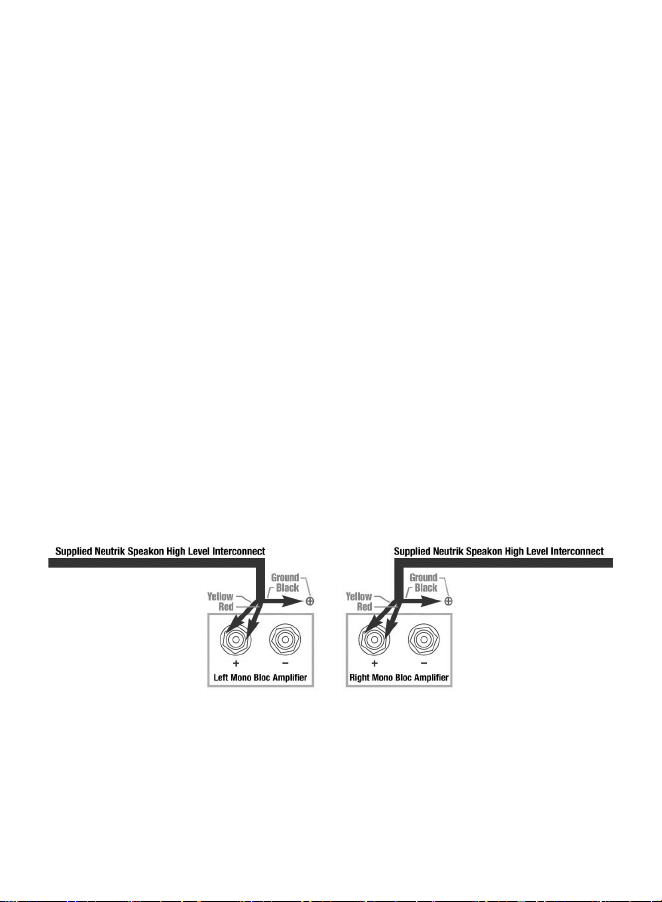
• For differenal (i.e. fully balanced) stereo amplifiers
using one REL, simply use the standard connecng scheme
of connecon to an exposed chassis ground screw or bolt.
It may also be allowed to “float” or hang down without
connecon to ANY terminal. Should hum occur using this
method, please return to connecng to chassis ground or
an unused RCA connector on the rear of a preamp or
amplifier. Please contact your dealer should there be any
quesons concerning this or any other hookup procedure.
NOTE: The REL AirShip Direct™ transmier is equipped
with internal circuitry to allow seamless connecon to
Class-D (digital) main amplifiers. If connecng to a Class-D
amplifier, follow the above connecon procedure for
differenal amplifiers.
When connecng RELs to Mono Bloc amplifiers (2) RELs,
one for each amplifier, must be used. Connect the black
wire of each REL to chassis ground screws or bolts of the
corresponding amplifier channel; twist together the red
and yellow wires of each REL separately and connect each
pair to the posive speaker terminal of the corresponding
amplifier channel. In some instances, this will result in
exceponally high gain (output) from the RELs. If it seems
simply too high in gain, please remove either the red or
yellow wire from the twisted pair. This will reduce output
by half and restore a natural dynamic.
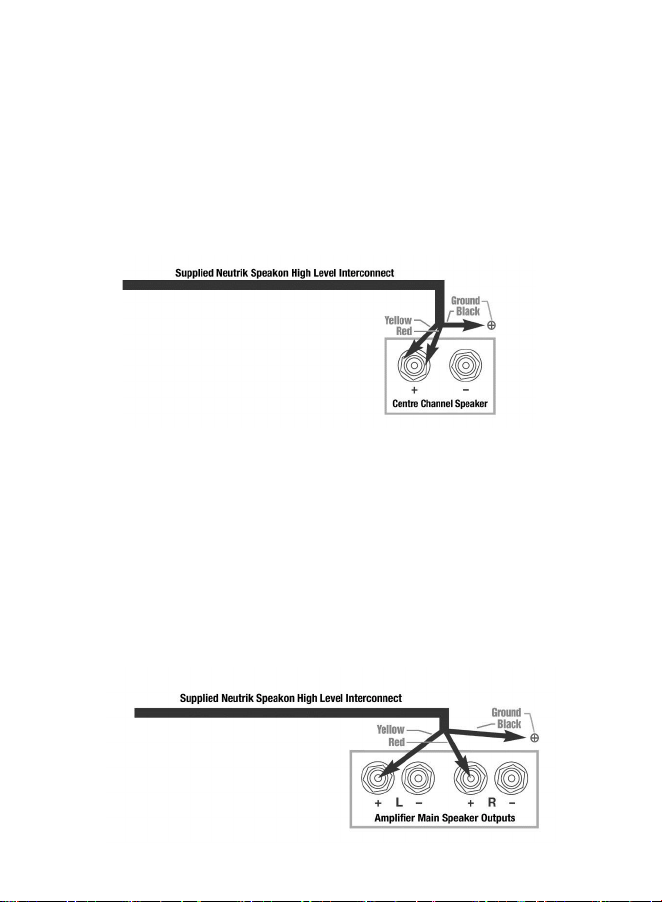
If connecng a single REL as a dedicated centre channel
sub, twist together the red and yellow wires and connect
these paired wires (red/yellow paired together) to the
posive centre channel amplifier terminal. Connect the
black wire to a ground lug or chassis screw on the
amplifier.
If connecng a REL as a dedicated rear channel sub,
connect the yellow wire to the le rear posive speaker
terminal; connect the red wire to the right rear posive
speaker terminal, connect the black wire to a ground lug or
chassis screw. If the amplifier is of balanced differenal
design, please follow the instrucons in the secon above
labeled Differenal Connecon.
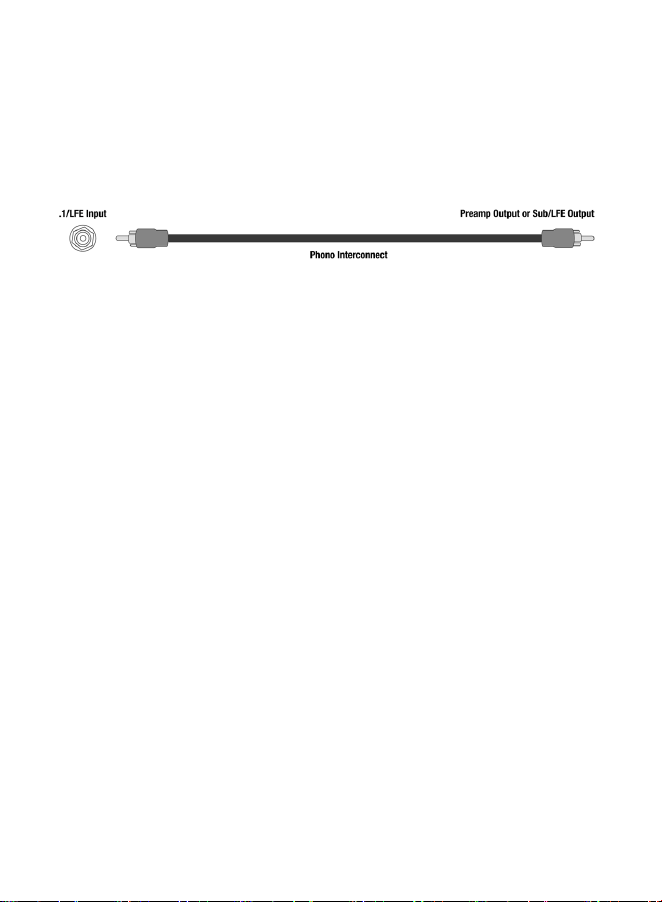
When connecng to a home cinema system where a .1/LFE
channel output is present, connect a single phono or XLR
cable between the sub output of the processor/receiver
and the .1/LFE input jack on the AirShip Direct™ wireless
transmier.
REL Theatre Reference™ Home Cinema
Applications
For home theatre systems, once the standard set-up for
two-channel outlined above is complete, the LFE output
from the processor or receiver should be connected to the
.1/LFE input and appropriate volume adjustments made
using the .1/LFE LEVEL control. For this configuraon, you
must set the processor to the “large” or “full range” seng
for the le and right speakers in order for the REL to
receive the bass signal via the high-level cable. In this
configuraon, the REL provides support for both the le
and right speakers for two-channel listening, and support
for the LFE when films are playing. Most processors will
allow you to defeat the subwoofer output when listening in
the two-channel mode. The effect of this set-up is one of
greatly increased dynamics in the mid-bass range, no bass
bloat, and a greater degree of space and ming from the
special audio effects.
The .1/LFE input is via an XLR, or RCA jack that connects to
the .1/LFE output of a home cinema amplifier/processor.
The AirShip Direct™ wireless transmier and receiver
should be paired with each other from the factory. When
the power is applied to both units, you should find that
the LED on each unit is on. If this is not the case, then it
will be necessary to pair them together. Follow the
instrucons below to pair the transmier to the receiver.
Make sure that the receiver is connected to the REL’s
amplifier panel as described in mounng up on page 9.
Turn the transmier power switch on and a blue LED on
the input face of the transmier will indicate the unit is
on by blinking in the standby paern which is one flash
per second.
At this point the transmier and receiver should find
each other and pair together. This will be indicated by
the “Pair” LEDs on both the transmier and control
panel staying lit (no flashing).
In the event that the transmier and receiver do not
automacally pair, simply exercise the momentary
“Pair” buon on receiver unl the LED flashes.
Turn the receiver power switch on.
Care and Polishing
Technical
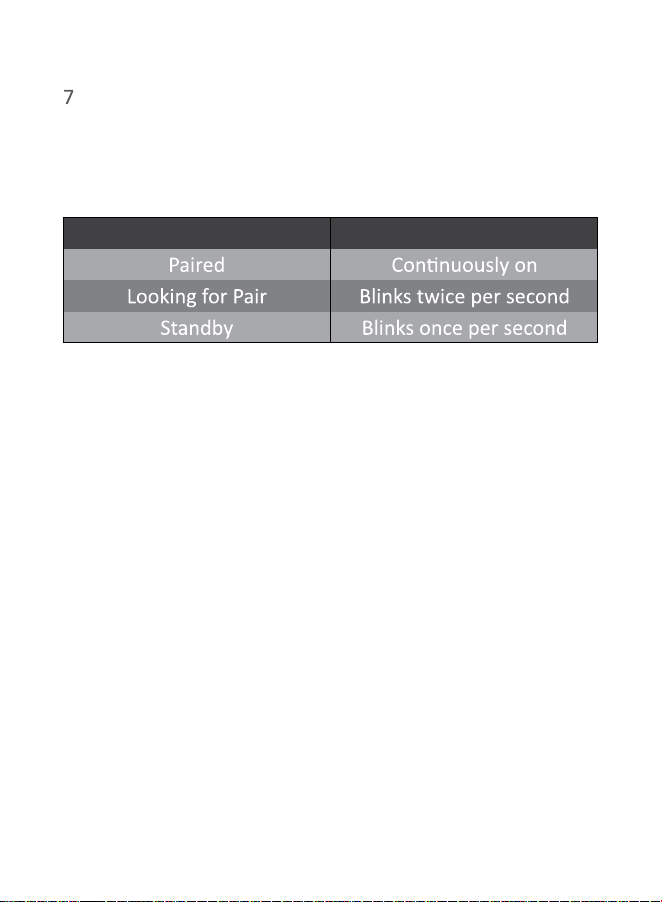
Status LED Indicator
Then exercise the “Pair” buon on the transmier.
8 When correctly paired, the LEDs on both units will stop
flashing and stay solid within 5 seconds.
The enclosures are best maintained by using a light
automove spray-on wax and a micro fiber cloth. Take
care not to spray the aluminum badge. Do not place
objects, such as drinks on top of your REL AirShip Direct™
transmier. Never use a dry cloth on this finish.
The AirShip Direct™ transmier provides true REL Theatre
Reference™ connecvity, perming both HIGH LEVEL and
LFE channels to be wirelessly fed to Serie S. This occurs
with virtually zero delay and a complete absence of
compression.
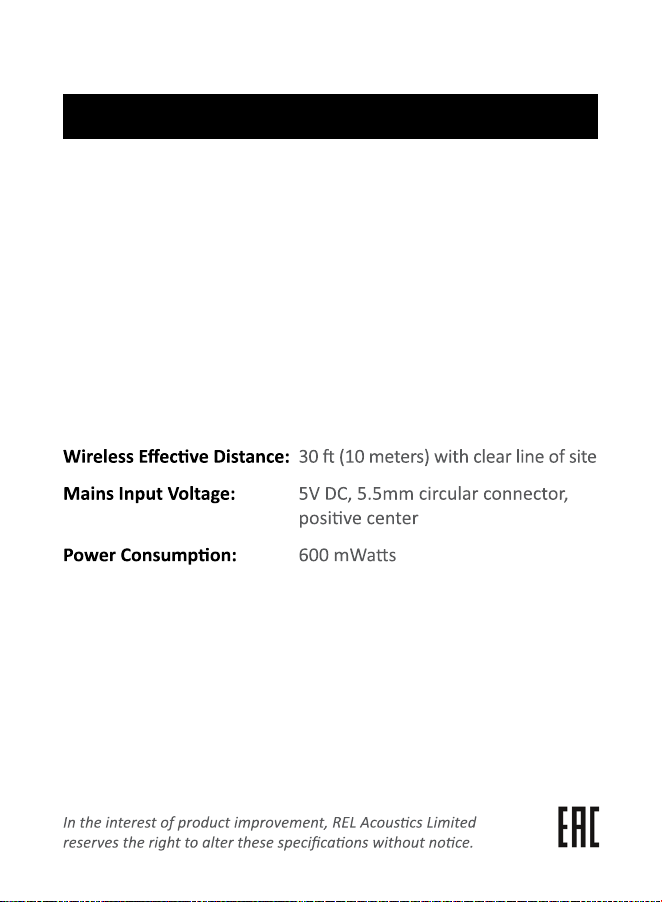
High-Level Neutrik Speakon,
L/R Low-Level RCA, LFE single phono RCA,
LFE balanced XLR
High-Level: 150k ohms
Low-Level: 10k ohms
RCA .1/LFE: 10k ohms
XLR .1/LFE: 10k ohms
Less than -3dBm
Input Connectors:
Input Impedance:
Wireless Output Power:
Dimensions (WHD):
Finish:
Supplied Accessories
Black
Transmier 8.5 x 8.5 x 1.8 in.,
(215.5 x 215.5 x 46.5 mm)
Receiver 3.15 x 2.40 x 0.7 in.,
(80 x 60 x 17.5 mm)
Power adapter
High Level cable
X2 RCA cable
Specificaons
AirShip Direct™ Transmier