Size Material Drawing No. Version
50 x 75 mm Bluetooth Remote Control B/W double-sided print RCT1003-001-S0 V0
Bluetooth Remote Control
Model:
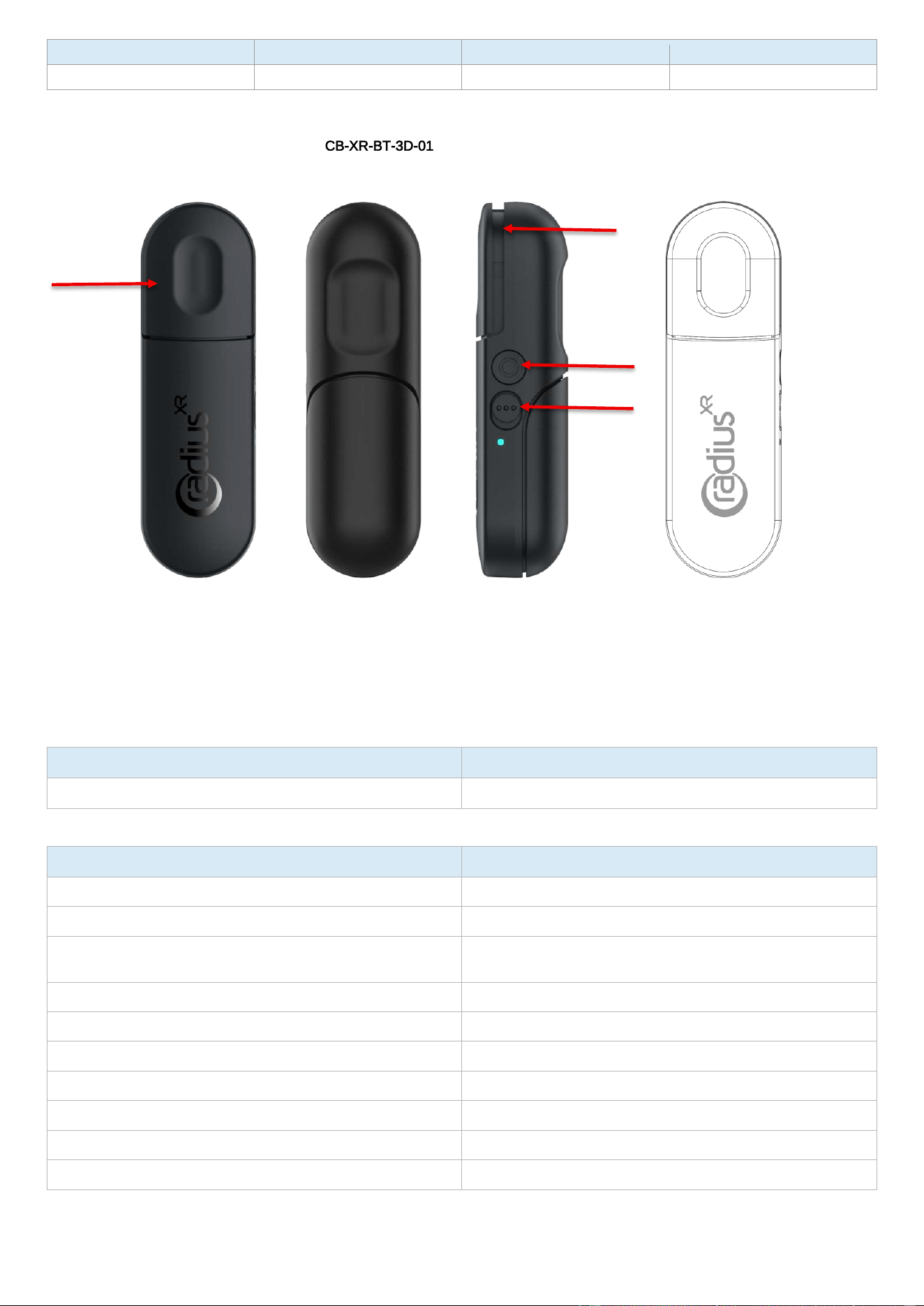
CB-XR-BT-3D-01 Bluetooth Name: CBXRBT_XXXX
Thank you for choosing this Bluetooth LE remote control. This product is designed for host devices that support Bluetooth LE remote input,
battery level reporting, and low-power reconnection behavior.
Precautions
1. Use the product in dry indoor conditions. Do not use it in water, high humidity, or near heat sources.
2. Avoid direct strong sunlight, heavy impact, and corrosive environments.
3. Do not disassemble or modify the product. Service should be performed only by qualified personnel.
4. Replace the batteries when the low-battery indicator flashes.
5. If the remote is replaced, remove the old pairing record from the host device before pairing again.
Contents
Item Quantity
Bluetooth remote control / User manual 1 pc each
Specifications
Parameter Description
MCU Nordic nRF54L15
Bluetooth protocol Bluetooth LE 6.2 or above
Bluetooth name
CBXRBT_XXXX, where XXXX is generated from the last two bytes of
the BLE address
RF band 2.400-2.4835 GHz ISM band
Modulation GFSK
Working voltage DC 1.8 V-3.0 V
Battery 2 x AAA batteries
Button force 260 g ± 50 g
Battery service Standard Bluetooth LE Battery Service supported
Device information Manufacturer: Ximmerse; software version: 1.6.3
Features
1. Bluetooth LE remote input with Switch Power Key and Trigger key and Pairing key.
2. Automatic connectable advertising after power-on, key wake-up, or disconnection.
Trigger key
Pairing key
Switch Power
Key
Ambient Lighting

3. Standard BLE Battery Service with controlled ADC sampling to reduce power consumption.
4. Low-battery warning with red LED flashing.
5. Connected low-power mode after 3 minutes of inactivity while keeping the BLE link alive.
6. Long-press key operation for clearing Bluetooth bonding records.
Bluetooth Operation
1. Power on the remote. It enters connectable advertising mode for 3 minutes.
2. Search for the Bluetooth device name CBXRBT_XXXX on the host and connect to it.
3. During normal power-on or key wake-up advertising, the first minute uses fast advertising and the remaining two minutes use slow advertising.
4. After disconnection, the remote starts a 3-minute fast reconnect advertising window.
5. If advertising has stopped, press any key to start a new 3-minute advertising window.
Key Operation
Operation
Connected Behavior
Disconnected Behavior
Data Value
Pairing Key press/release
Sends Pairing key event
Starts 3-minute advertising if not
already advertising
Byte 15: press 0x10, release 0x00
Pairing Key long press 3 s
Clears all Bluetooth bonding records,
plays LED confirmation, then restarts
advertising
Clears all Bluetooth bonding records,
plays LED confirmation, then restarts
advertising
N/A
Trigger Key press/release
Sends Trigger key event and triggers
battery refresh with 60 s lockout
Starts 3-minute advertising if not
already advertising
Byte 14: press 0xFF, release 0x00
Battery Level Reporting
The remote supports the standard Bluetooth LE Battery Service. After connection, the battery level is updated once per second for
approximately 30 seconds. After that, the remote refreshes the battery level by sampling once per second for 10 seconds every 5 minutes.
When connected, pressing Button 1 can trigger an immediate 10-second battery refresh. Repeated button-triggered refreshes are locked for
60 seconds to reduce power consumption.
LED Indication
State
LED Behavior
Advertising
Blue LED flashes: 50 ms on / 950 ms off
Connection successful
Blue LED turns on for 2 s, then turns off
Trigger Key press
Ambient Lighting turns on for 80 ms
Low battery
Red LED flashes: 250 ms on / 250 ms off
Clear bonding records
Blue LED flashes at 500 ms intervals for about 2 s
Low-Power and Low-Battery Behavior
1. If the remote is not connected, advertising stops automatically after 3 minutes to save power.
2. If the remote is connected and no user activity is detected for 3 minutes, it enters connected low-power mode while keeping the Bluetooth
connection alive.
3. Pressing a button or motion activity wakes the remote back to normal operation.
4. Low-battery warning starts when the measured voltage is about 2.0 V or the reported battery level is 18% or lower.
5. The low-battery warning clears when the measured voltage recovers to about 2.1 V and the reported battery level is 22% or higher.
Quick Guide
Operation
Action
Result
Power on
Install batteries or power-cycle the remote
Remote advertises for 3 minutes
Pair/connect
Select CBXRBT_XXXX on the host device
Remote connects and can be used normally
Wake/reconnect
Press any key when disconnected
Starts reconnect advertising
Power
Switch Power Key
Switching between power-off and power-on states
Trigger
Press Trigger Key
Sends Trigger event and refreshes battery if
connected
Pairing/Clear pairing
1.Press Pairing Key
2.Long-press Pairing Key for 3 seconds
1. Remote advertises for 3 minutes
2.Clears bonding records and restarts advertising
Low battery
Replace batteries when red LED flashes
Restores normal operation after battery
replacement
Note: Specifications and timing are based on production firmware. RF certification data should follow the final test report.

FCC Statement
This device complies with part 15 of the FCC Rules. Operation is subject to the following two
conditions: (1) This device may not cause harmful interference, and (2) this device must
accept any interference received, including interference that may cause undesired operation.
This equipment has been tested and found to comply with the limits for a Class B digital
device, pursuant to part 15 of the FCC Rules. These limits are designed to provide
reasonable protection against harmful interference in a residential installation. This
equipment generates, uses and can radiate radio frequency energy and, if not installed and
used in accordance with the instructions, may cause harmful interference to radio
communications. However, there is no guarantee that interference will not occur in a
particular installation. If this equipment does cause harmful interference to radio or television
reception, which can be determined by turning the equipment off and on, the user is
encouraged to try to correct the interference by one or more of the following measures:
•Reorient or relocate the receiving antenna.
•Increase the separation between the equipment and receiver.
•Connect the equipment into an outlet on a circuit different from that to which the receiver is
connected.
•Consult the dealer or an experienced radio/TV technician for help.
Caution: Any changes or modifications to this device not explicitly approved by manufacturer
could void your authority to operate this equipment.
RF Exposure Information
The device has been evaluated to meet general RF exposure requirement. The device can
be used in portable exposure condition without restriction.