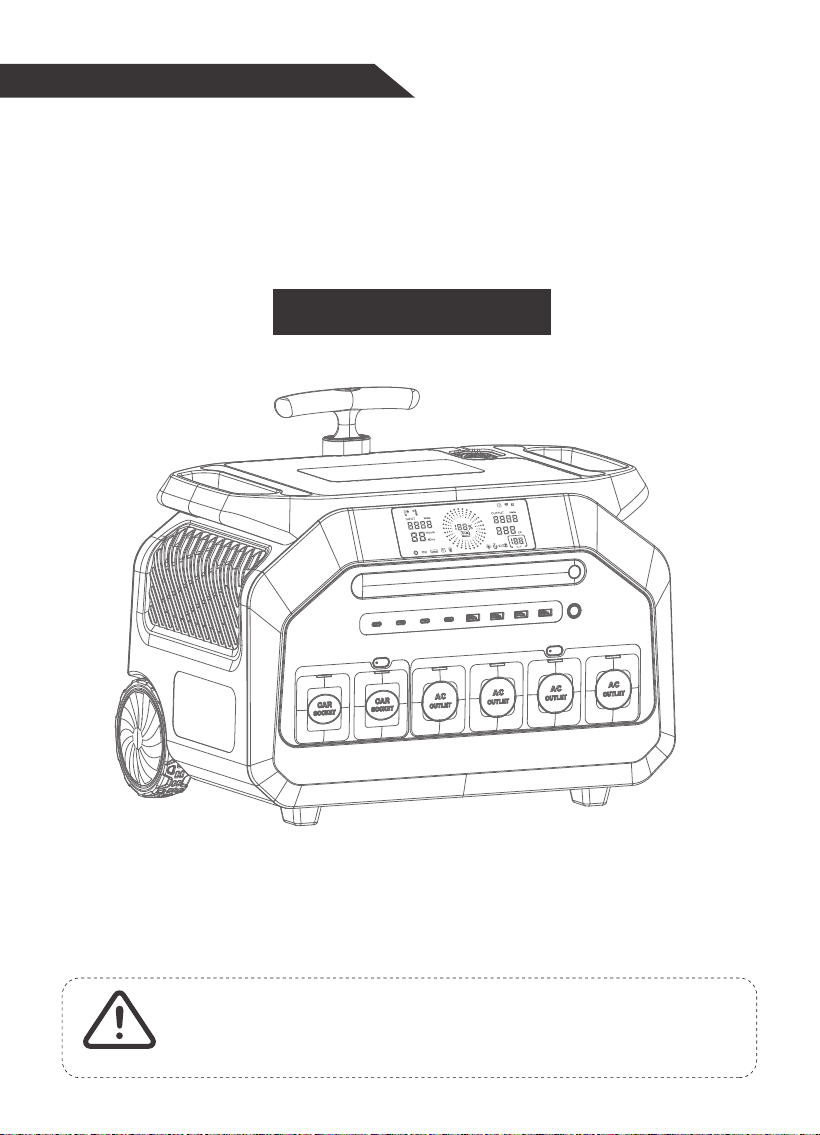
Portable Power Station
1. Please keep dry and stay away from fire.
2. Do not disassemble, puncture or squeeze the portable power station.
3. Please recycle and dispose of the product in accordance with local laws and regulations.
4. Please hand it over to a professional recycling company to dispose this portable power station.
5. Children and the disabled please use this product with guardian.
WARNING
Model: P3200
USER MANUAL V3.0

Get to Know Your Product
Charging Your Product
Using Your Product
Product Specifications
Product Error Code
Package Content
Caution
Cold Weather Usage
Disposal And Recycle
Disclaimer
03
04
07
12
13
15
15
15
16
16
CONTENTS
01

Glad you're using this portable Power Station, before starting using this product, please
read the instructions carefully!
Attention
Specifications and images in this manual are for reference only.
This product is for emergency use only; it is not a standard replacement for normal
AC house power. Actual AC outlets could be different depending on the location of
the customer.
Fully charge the product before using it for the first time.
02
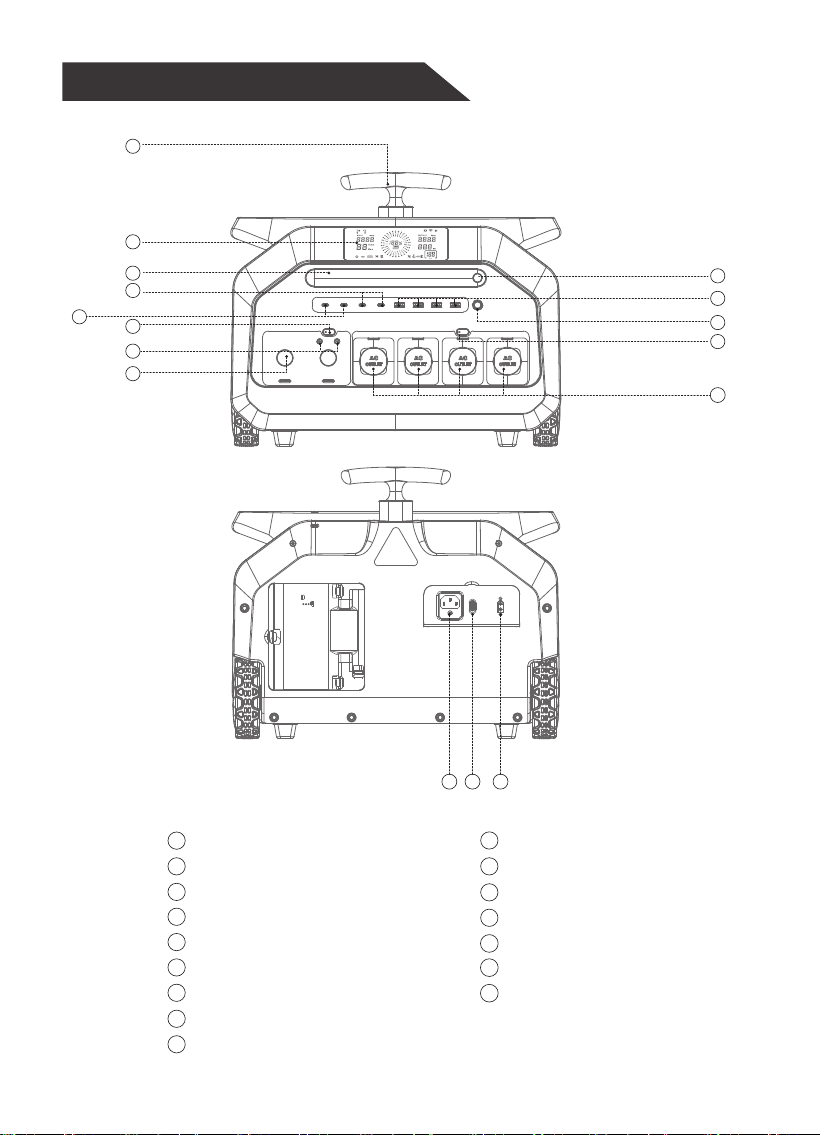
Get to Know Your Product
10
11
12
4
5
7
8
9
6
1
2
3
10
11
12
13
14
15
16
3
2
1
4
5
7
8
9
6
Handle
LCD Display
LED
PD 30W TYPE-C Output Port
PD 100W TYPE-C Output Port
DC ON/OFF Switch
DC Output port
Car port
LED Button
USB-A Output Port
Power Button
AC ON/OFF Switch
AC Output Port
AC Input Port
Switch
DC Input Port(XT60i)
13
14
15
03
24V/10A 13.2V/10A
DC 13.2V/8A DC 13.2V/8A
16
Charging Your Product
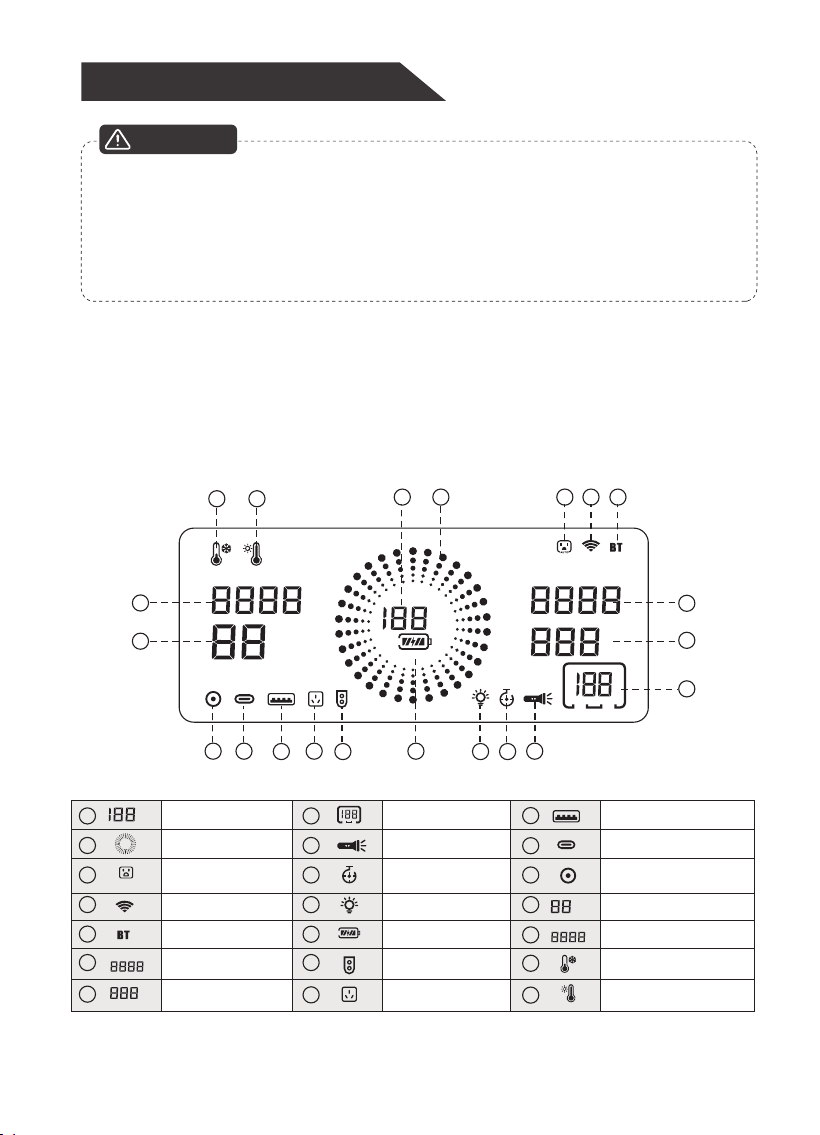
LCD Battery Display
The screen will display the remaining charging time and the percentage of battery
power level. When the percentage of power level is 100% and the charging power is 0,
the product is fully charged.
If either the room (ambient) temperature or the temperature of the battery gets
too high, the battery charging circuit will automatically shut down. When the temperature
falls below 122 degrees
°F (50 degrees °C), the battery will automatically resume
charging. If it is not used for a long time, it is best to fully charge it every three
months before storing it. If it has not been used for half of a year, please fully charge
the product before use. It is best to fully charge each charge.
ATTENTION
04
INPUT
Hours
ER
Mins
Watts
Supercharge
OUTPUT
Watts
%
a b c d e
f
g
h
i
j
l
m
n
o
p
k
r
S
t u
q
s
t
u
o
p
r
q
a
b
c
d
e
f
g
%
Battery Power Level %
Battery Power Level
AC output voltage
and error codes
Iuput Power
Low temperature protection
Over temperature protection
AC output frequency
Flashlight
Type-C Output
DC OutputSmart Power Mode
LED
Fast Charging
Solar Panel Input
AC Input
USB-A Output
AC automatically
shuts off
WIFI
Bluetooth
Remaining Usage Time/
Remaining charging Time
Output Power
Auto
INPUT
Watts
Hours
Mins
h
i
j
l
m
n
k
Supercharge
OUTPUT
Watts
ER
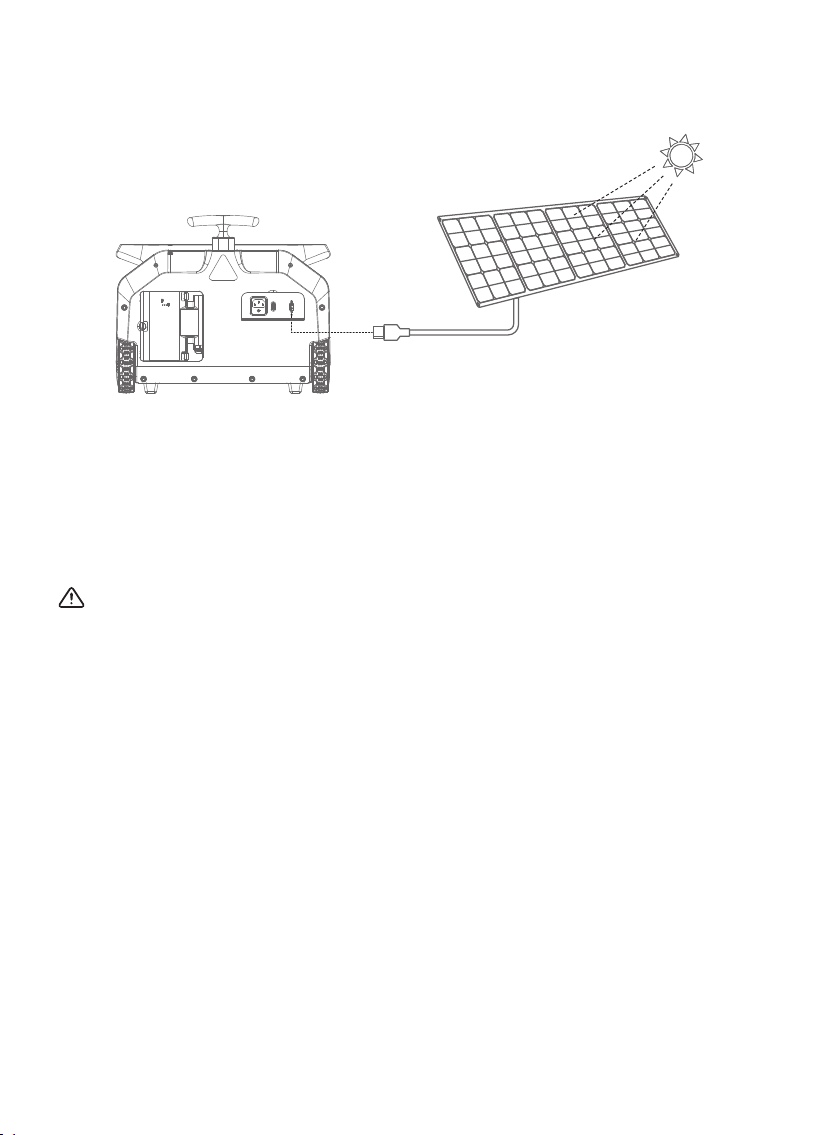
1. Charge Through Solar Panel
1. Place your solar panel where it will get as much strong direct sunlight as possible.
2. Connect the output port of the solar panel with the input port of the product to start
charging. You will know the product is being charged when the icon on the LCD
turns on. The product is fully charged when capacity level reaches 100% and the
incon INPUT blinks.
ATTENTION:
1. The actual charging efficiency may vary widely depending on weather, ambient
temperature, sunlight's strength, the angle that the solar panels face to the straight
sunlight, and other factors.
2. Use solar panels below 80V for charging, it will automatically cut off when input
higher than 82V.
05
06
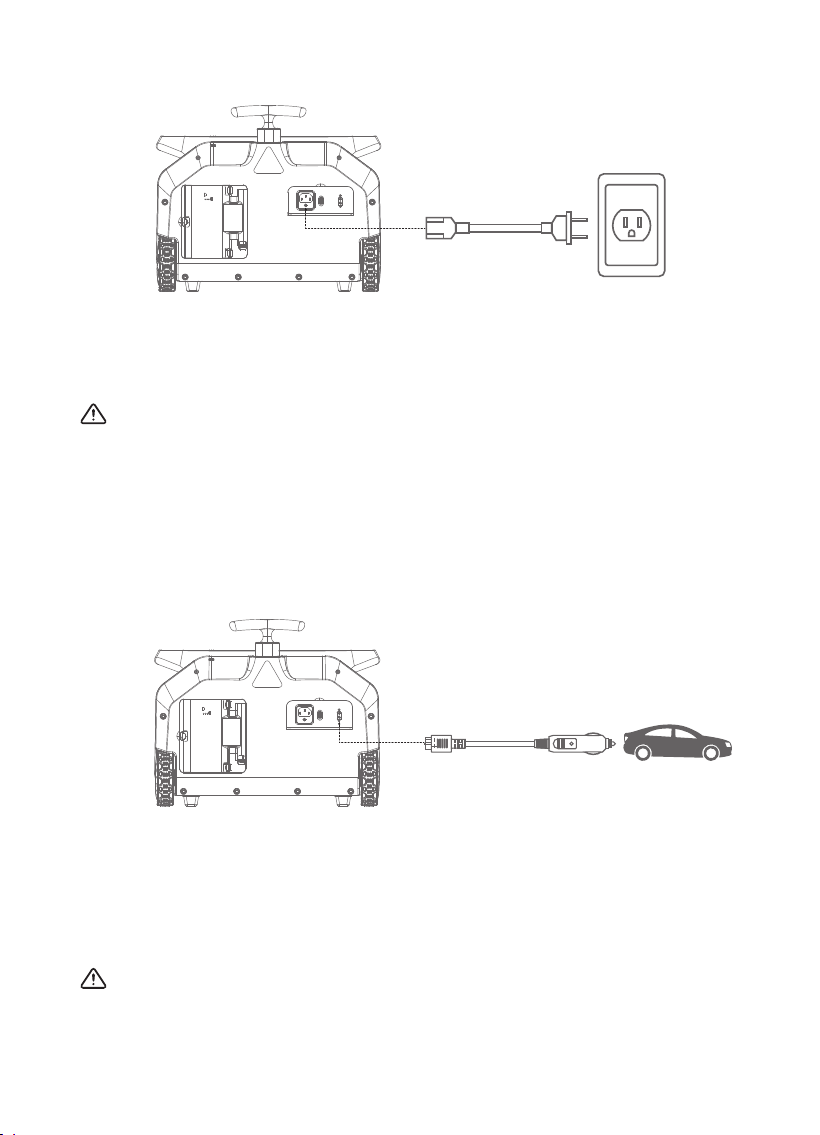
2. Charge Through AC
3. Charge Through Your Car
Connect the AC outlet and P3200's AC input port with the original AC charging cable,
you will see the battery is in charging status and know the input power, the remaining
charging time and the current battery power level.
ATTENTION:
1. The battery is fully charged when the percentage of the battery is 100% and input
power is 0 and remains still. After the battery is fully charged, it is best to unplug
the charging cables. The battery will not overcharge, but removing the cables is
the best way.
2. When charged by AC, it takes around 1.2-1.5 hours to be fully charged.
1. Plug the car charging cable provided with the battery into the cigarette lighter socket
of your car. Then plug the another end of the cable into the DC input port of the battery.
2. The car charger cable provided with the battery has a 10A protection fuse to protect your car.
3. The screen will show input power and remaining recharging time while the battery
is being charged.
ATTENTION:
To avoid car battery power loss, you should charge this product through your car cigarette
lighter socket only when your car engine is started. This function is for 12V/24V cars
only.
24V/10A 13.2V/10A
DC 13.2V/8A DC 13.2V/8A
Using Your Product
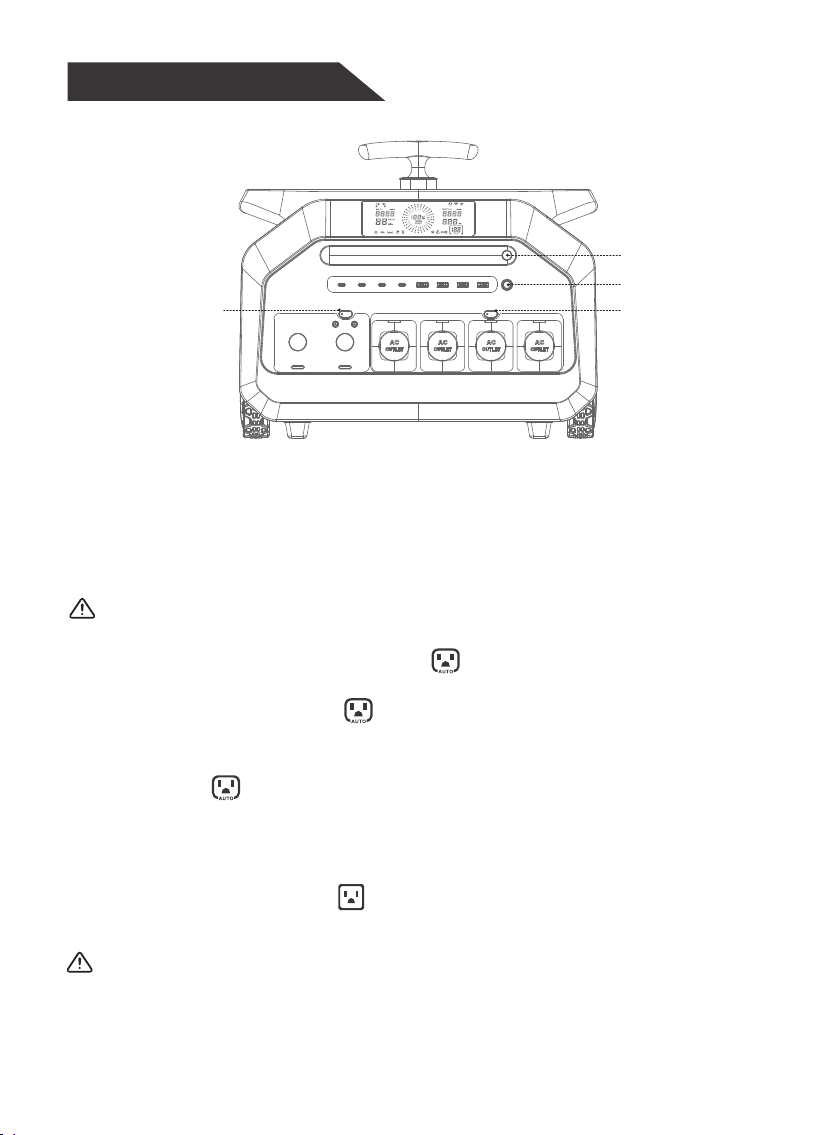
1. Button
Power Button
AC Button
DC Button
LED Light Button
1. Power Button
1. Long press the power button for 3 seconds to turn the P3200 on/off.
2. This machine would automatically shut down after 10 minute’s standby status, which
prevents wasting its power.
3. After using, long press the power button for 3 seconds to shut down.
ATTENTION:
1.
ATTENTION:
07
When the product is started, double-click the power button to turn on the AC
automatic shutdown function, and the icon will light up at the same time. When
the product is off, double-click the power button to turn off the AC automatic
shutdown function, and the icon will disappear at the same time. When you need
to use electrical appliances with intermittent power supply for a long time, please
turn off the AC automatic shutdown function!!
Long press the AC button to enter Smart Power Mode; double-press the AC button 5
times consecutively to switch the device’s AC output voltage; press and hold the
AC+DC buttons simultaneously for 3 seconds to switch the device’s AC output
frequency.
2. AC on/off Button
Short press the AC button to turn on the AC function (the AC icon will be displayed
on the screen at the same time ). Short press the AC button again to turn off
the AC function.
When this icon lights up and the load on the AC interface is below 10W, the AC
interface will shut down after 2 hours.
2.
08
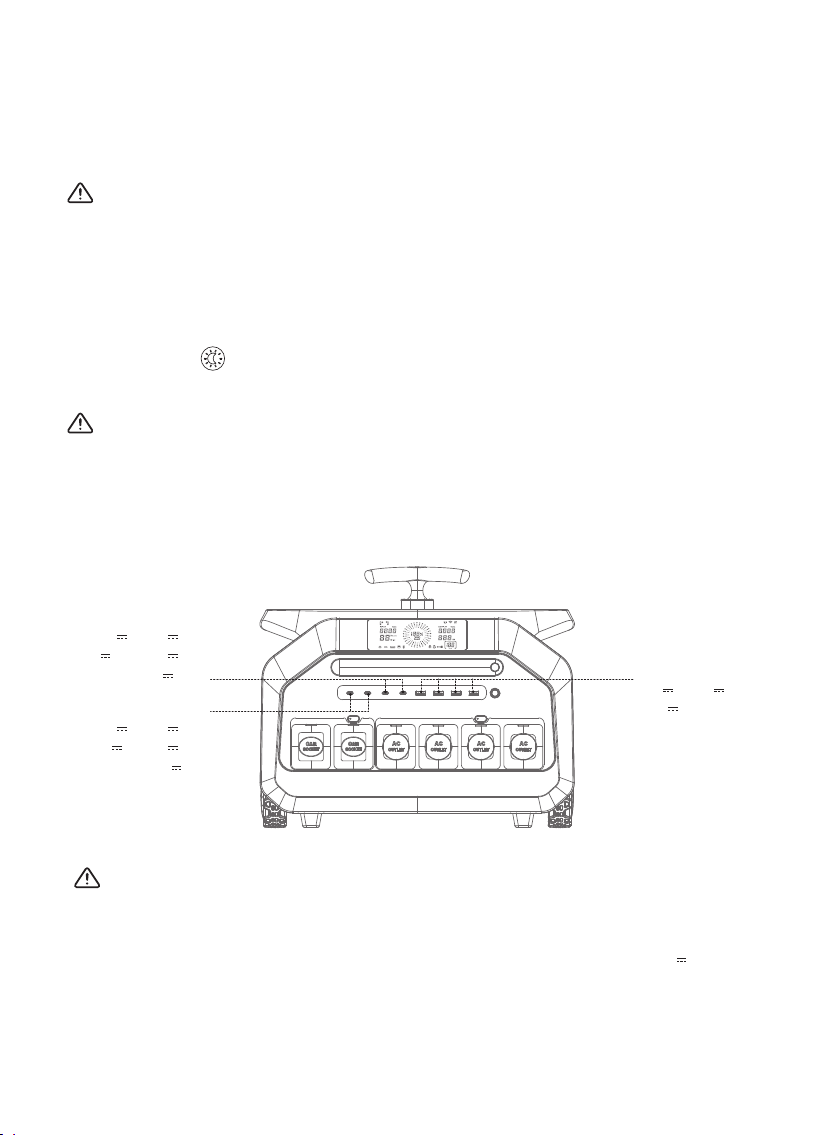
The above TYPE-C/USB output parameters are only single-channel output parameters.
If simultaneously using TYPEC-1 and TYPEC-2/TYPEC-3 and USB-1/TYPEC-4 and
USB-2/USB-3 and USB-4, the corresponding ports can only output 5V 3A. This
configuration may affect the simultaneous use of high-power appliances, depending on
the actual usage scenario.
Short press “ ” to turn on/off the LED and adjust the brightness (50%, 100%), and
turn on the SOS mode.
5. USB Outputs Function
4*USB Output:
5V 3A, 9V 3A,
12V 3A
2*TYPE-C Output:
5V 3A, 9V 3A,
12V 2.5A, 15V 2A,
20V 1.5A
2*TYPE-C Output:
5V 3A, 9V 3A,
12V 3A, 15V 3A,
20V 5A
3. DC on/off Button
4. LED Light Button
ATTENTION:
Short press DC button to turn ON the DC output (DC output icon will be displayed on
LCD). Short press DC button again to turn OFF the DC output.
ATTENTION:
Press and hold the DC button to display the software version of the device;
Simultaneously pressing the DC+LED button light can reset the WIFI distribution
network function.
ATTENTION:
Long press the LED button to turn on/off the silent charging function.

09
Protection Mode (USB Output)
1. Overcurrent Protection: When USB output port is overloaded, please unplug the
load and plug it back again, the product will return to normal.
2. Short-circuit Protection: When USB output port is short-circuited, please unplug
the load and plug it back again, the product will return to normal.
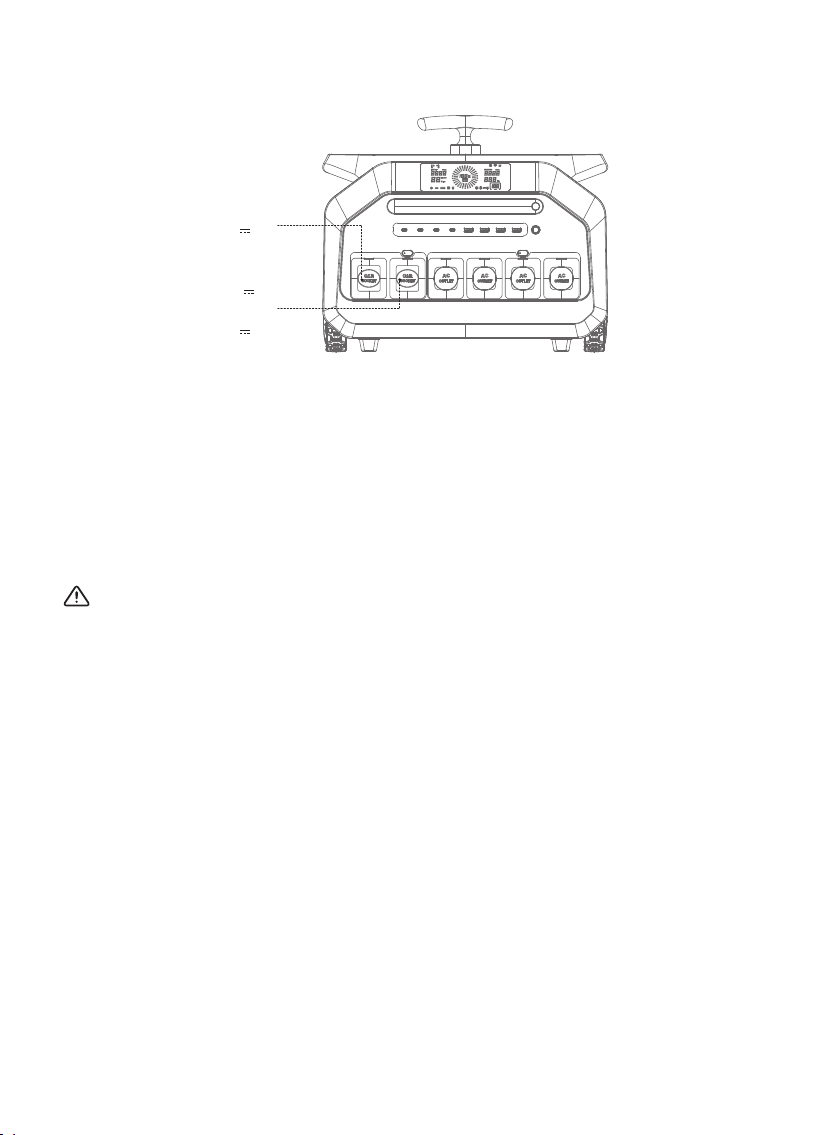
6. DC Outputs Function
1. The two DC5525 (5.5 mm diameter) 13.2V ports with a maximum of 8A of current.
2. The DC5525 13.2V ports automatically distribute the current according to the externally
connected devices to ensure the shortest charging times.
3. Each of the DC5525 ports can be connected with a cigarette lighter cable, however,
the output will be limited to 120W maximum.
4.
ATTENTION:
Protection mode (DC outputs)
2.
1.
Short-circuit Protection: When DC output ports are short-circuited, please remove
the device, and then press the DC button to restore the product to normal.
The output power of the left car port is limited to a maximum of 240W.
Overcurrent protection: When the DC output port is overloaded, the DC icon on the
screen will blink. Please remove the device, and then press the DC button to
restore the product to normal.
10
DC 5525 port:
13.2V 8A
Car port:
24V 10A
Car port:
13.2V 10A
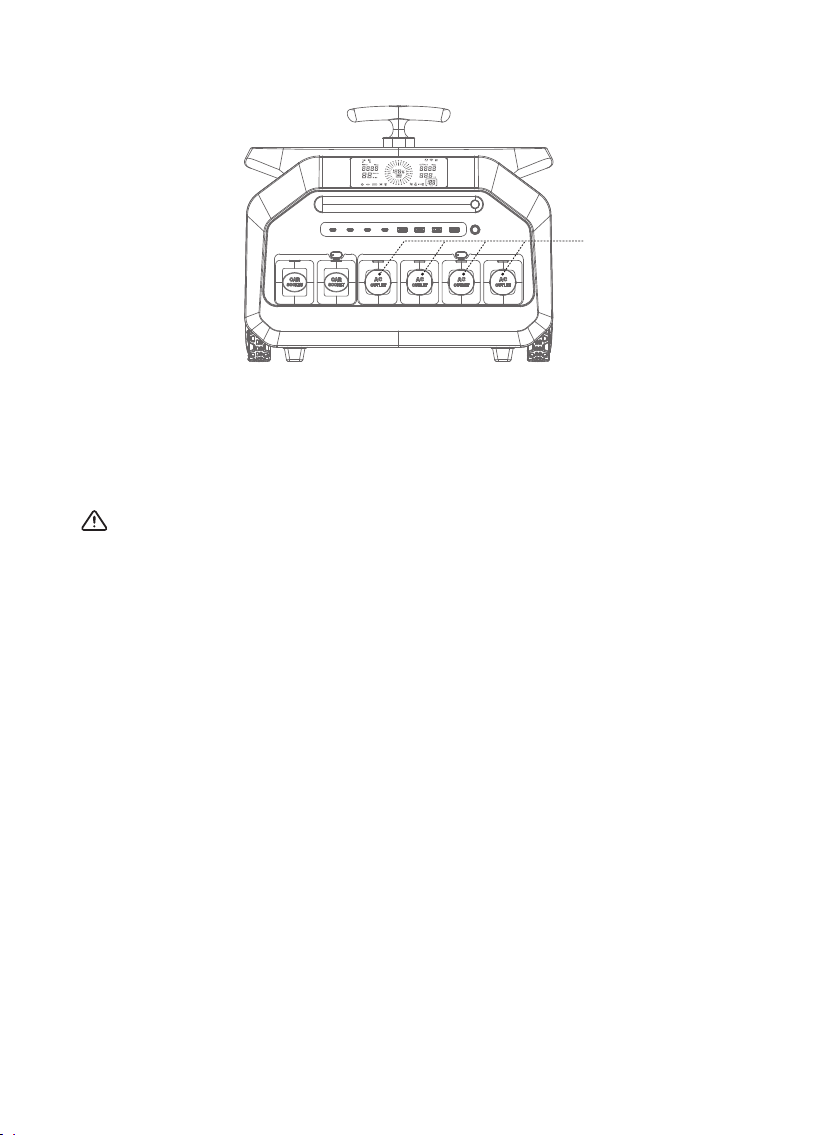
7. AC Outputs Function
4*AC Output
1. Plug the power cable of AC appliance into the AC outlet of the P3200. Press the AC
power button to enter AC mode.
2. Make sure the power of the connected AC appliance is less than 3200W.
ATTENTION:
11
This product is designed with under-voltage protection, overload protection,
short-circuit protection and over-temperature protection. It’s designed with double
isolation circuit, which is safe, reliable and high efficient.
When overload, over-temperature or short-circuit happens, the AC icon will blink
and the AC output function will be shut down automatically to make ensure safety.
When battery voltage is below 44.8V, AC output function will be forced to shut down.
It will return to normal after charging.
A.
B.
Protection Mode (AC Output):
Product Specifications
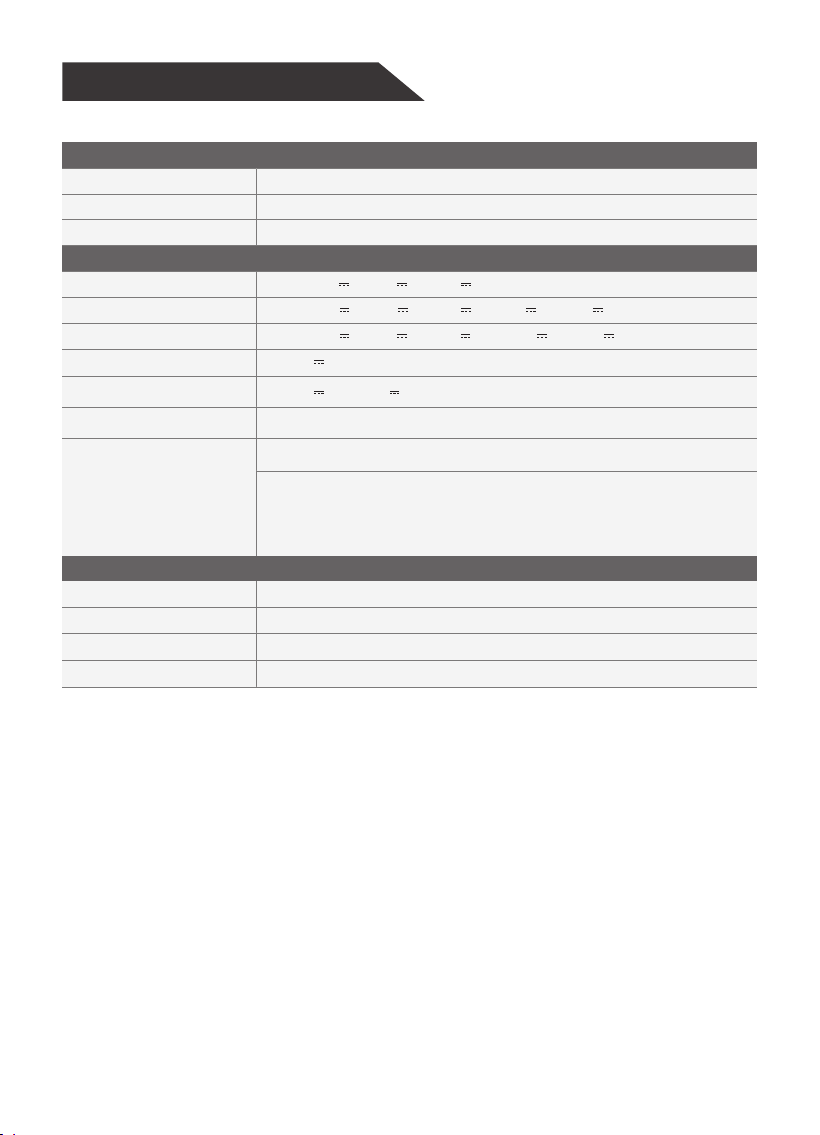
Battery
Battery
Battery Capacity
Lifecycles
Port
USB-1/2/3/4 Output
Type C-1/2 Output
Type C-3/4 Output
Car Output
AC Output
Charging Port
DC5525 Output
General
Weight
Dimensions
Operating Usage Temp
Display
LiFePO
4 Battery
2048Wh
4000+ Cycles
30W 5V 3A 9V 3A 12V 3A
100W 5V 3A 9V 3A 12V 3A 15V 3A 20V 5A
30W 5V 3A 9V 3A 12V 2.5A 15V 2A 20V 1.5A
13.2V 8A
3200W Pure Sine Wave
AC-1800W Max input: 85V~130V 60Hz / 180V~264V 50Hz
Car charging-120W;
PV charging-1000W: 12V~60V;
Max charging current: 20A
24Kg
445x298x371mm
0~40°C(Charging), -15~+40°C(Discharging)
LCD Screen
13.2V 10A 24V 10A
12
13
Product Error Code
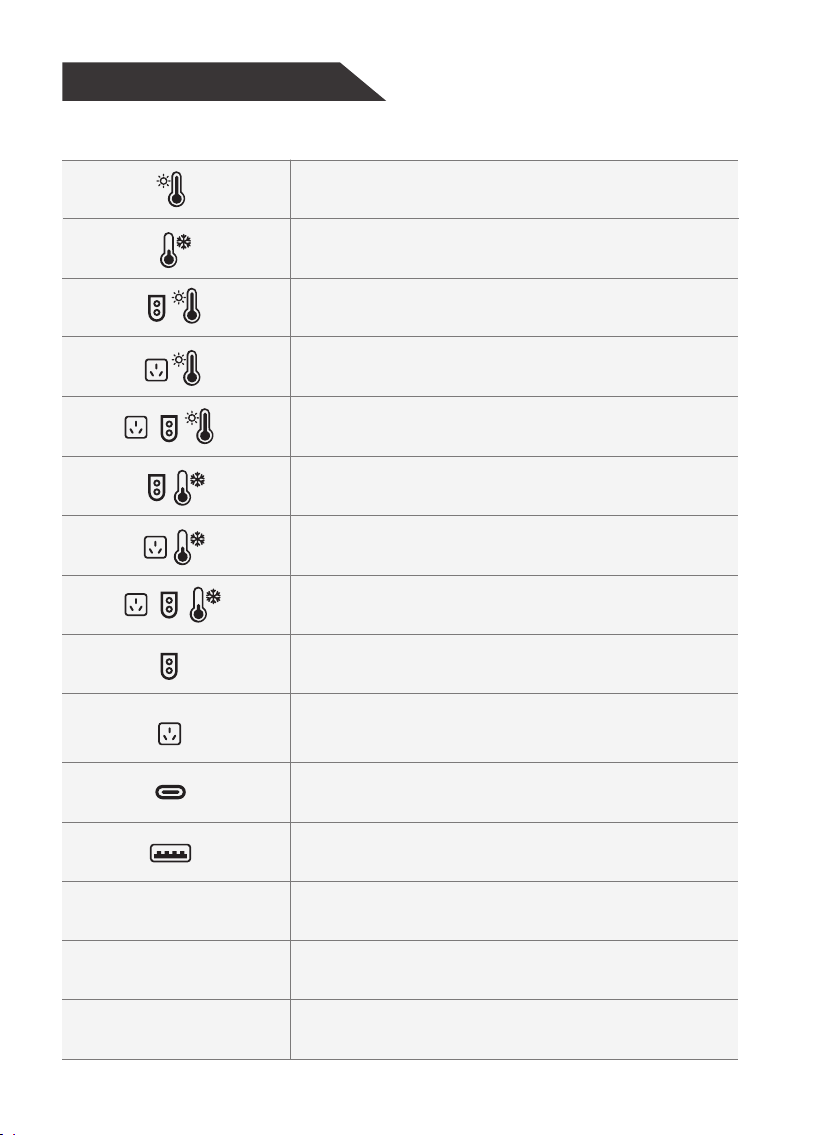
Icon (blink)/Code(Display) Error Cause
Blink-Battery discharge over-temperature
and charging over-temperature
Blink-Battery discharge under-temperature
and charging under-temperature
Blink-Battery charging over-temperature
caused by PV charging
Blink-Battery charging over-temperature
caused by grid charging
Blink-Battery charging over-temperature
caused by grid+PV charging
Blink-PV charging failure caused by battery
charging under-temperature
Blink-AC charging failure caused by battery
charging under-temperature
Blink-Grid+PV charging failure caused by battery
charging under-temperature
Blink-Charging voltage or over-current
is detected when PV charging
Blink-Grid under-voltage,
over/under-frequency, or grid charging
over-current is detected when grid charging
Blink-Type-C port is over-loaded or short-circuited
Blink-USB port is over-loaded or short-circuited
Inverter BUS soft start fault
Inverter output short circuit fault
Inverter BUS under-voltage fault
E01
E02
E03

14
1. This product has an internal, non-removable, LiFePO4 Rechargeable battery. Do
not attempt to remove the battery, as you may damage the device.
2. The battery can be charged and discharged over 4000+ cycles.
ATTENTION:
Inverter BUS short circuit fault
Inverter BUS over-voltage fault
Inverter output over-current fault
Inverter DC component too high fault
Inverter over temperature fault
Inverter discharge over-current fault
Inverter charging over-current fault
Inverter current sensor fault
Inverter output over/under-voltage
or over/under-frequency faults
AC load short circuit
Inverter main relay fault
Inverter fan fault
Inverter DSP and main-control MCU communication fault
Active MCU and BMS communication fault
E05
E04
E06
E07
E08
E09
E10
E11
E12
E13
E14
E15
E16
E17

Caution
Cold Weather Usage
1. Do not short-circuit the product. To avoid short-circuiting, keep the product away
from all metal objects.
2. Do not heat the product, or dispose it in fire, water or other liquids. Keep it away
from high ambient temperature. Do not expose the product to direct sunlight.
3. Keep the product away from humid, dusty places.
4. Do not disassemble or reassemble this product.
5. Do not drop, place heavy objects on, or allow a strong impact on this product.
6. This product is not intended to be used by persons with reduced physical,
sensory or mental capabilities.
7. Please keep this product away from children.
8. Do not cover the product with towels, clothing and other items.
9. Do not overcharge this product.
10. When fully charged, disconnect the product from the power source immediately.
11. If you are not going to use this product for a long time, please fully charge it
before storage
12. To charge some portable electronic devices, you may need to set those devices
in charge mode first. Refer to the corresponding user manual of those devices
for confirmation.
Cold temperatures(-20
°C~-10°C)can affect the product's battery capacity due to the
chemical characteristics of the battery. If you'll be living off grid in sub-zero
conditions, it is recommended to keep your product in an insulated cooler, and
connected to a power source (12V/24V car/wall outlet/solar panel). The natural heat
generated by the product contained in an insulated cooler will keep battery capacity
at its highest level.
Package Content
1. Power Station*1
2. AC charging cable*1
3. Solar charging cable*1
4. Car charging cable*1
5. User manual*1
6. Warranty card*1
7. 4-in-1 data cable*1 (Optional)
8. Jump-starter*1 (Optional)
15

Disposal And Recycle
This product should not be disposed along with household waste. Please dispose
of or recycle this product and the battery inside according to the local rules and
regulations.
Disclaimer
Our company cannot be held liable for damages caused by fire, earthquake, used by
a third party, other accidents, intentional misconduct on the part of the customer,
abuse or other abnormal conditions.
Do not repair any damage to the AC plug or power supply on your own.
The warranty covers all terms and conditions of the warranty. Contents that are
not specified in the warranty terms and conditions are beyond our responsibility.
Our company assumes no liability for damages caused by incorrect use or
non-compliance with this user manual.
Intended use:
A portable power station is intended as a power supply for electronic devices with a
maximum power consumption of 3200W. Our product is not suitable to be used with
equipment that relates to one's own personal safety and relies heavily on electricity,
such as medical devices, equipment for nuclear facilities, the manufacture of air and
spacecraft, etc. Therefore, we assume no liability for accidents involving personal
safety, fires, or machine failures caused by using our product with the aforementioned
devices.
16

Made in China

FCC Statement
Changes or modifications not expressly approved by the party responsible for compliance could void the user's authority
to operate the equipment.
This equipment has been tested and found to comply with the limits for a Class B digital device, pursuant to Part 15 of the
FCC Rules. These limits are designed to provide reasonable protection against harmful interference in a residential
installation. This equipment generates uses and can radiate radio frequency energy and, if not installed and used in
accordance with the instructions, may cause harmful interference to radio communications. However, there is no
guarantee that interference will not occur in a particular installation. If this equipment does cause harmful interference to
radio or television reception, which can be determined by turning the equipment off and on, the user is encouraged to try
to correct the interference by one or more of the following measures:
-- Reorient or relocate the receiving antenna.
-- Increase the separation between the equipment and receiver.
-- Connect the equipment into an outlet on a circuit different from that to which the receiver is connected.
-- Consult the dealer or an experienced radio/TV technician for help
This device complies with part 15 of the FCC rules. Operation is subject to the following two conditions (1)this device may
not cause harmful interference, and (2) this device must accept any interference received, including interference that may
cause undesired operation.
This equipment complies with FCC radiation exposure limits set forth for an uncontrolled environment. This equipment
should be installed and operated with minimum distance 20cm between the radiator & your body.