
Document Identification
doors://zvedoors01:36681/?version=2&prodID=0&view=00000002&urn=urn:telelogic::1-4875b3e076430ad2-M-00006a87
1 / 38
SIF-F-003
Document number
Code Type Document
Version
63150986
108
-d3
TRIXELL PROPRIETARY INFORMATION
Copyright © by 2025 TRIXELL. All rights reserved. This document and the information contained therein are TRIXELL’s exclusive property.
Any copy and/or disclosure thereof in any form whatsoever are subject to TRIXELL’s prior written consent.
pixium EZ3 NDT
Integration Manual and General Cautions

Document Identification
doors://zvedoors01:36681/?version=2&prodID=0&view=00000002&urn=urn:telelogic::1-4875b3e076430ad2-M-00006a87
2 / 38
SIF-F-003
Document number
Code Type Document
Version
63150986
108
-d3
TRIXELL PROPRIETARY INFORMATION
Copyright © by 2025 TRIXELL. All rights reserved. This document and the information contained therein are TRIXELL’s exclusive property.
Any copy and/or disclosure thereof in any form whatsoever are subject to TRIXELL’s prior written consent.
DOCUMENT HISTORY
Version
DOORS
Baseline
Date
Author
Description
DM
- draft 1
NA
January 23
th
,
2025
O. Chastel
Initial version
330761
- draft 2
NA
May 2
nd
, 2025
O. Chastel
Update according to IEC 62368-1
Add Japan RF certificate
330761
- draft 3
NA
September
10
th
, 2025
O. Chastel
Update mandatory text for FCC / IC declarations
Update main label
330761

Document Identification
doors://zvedoors01:36681/?version=2&prodID=0&view=00000002&urn=urn:telelogic::1-4875b3e076430ad2-M-00006a87
3 / 38
SIF-F-003
Document number
Code Type Document
Version
63150986
108
-d3
TRIXELL PROPRIETARY INFORMATION
Copyright © by 2025 TRIXELL. All rights reserved. This document and the information contained therein are TRIXELL’s exclusive property.
Any copy and/or disclosure thereof in any form whatsoever are subject to TRIXELL’s prior written consent.
CONTENTS
Document History .............................................................................................................................................. 2
Contents ............................................................................................................................................................ 3
List of Tables ...................................................................................................................................................... 5
List of Figures .................................................................................................................................................... 6
1. PRESENTATION ........................................................................................................................................ 7
1.1. INTRODUCTION ............................................................................................................................... 7
1.2. GENERAL DESCRIPTION ................................................................................................................ 7
1.3. DETECTOR ....................................................................................................................................... 7
1.4. DELIVERY ......................................................................................................................................... 8
1.5. IDENTIFICATION............................................................................................................................... 8
1.6. STANDARDS ..................................................................................................................................... 8
1.7. REFERENCE DOCUMENTS ............................................................................................................ 9
1.8. DEFINITION, ACRONYMS, ABREVIATION ...................................................................................... 9
2. INSTALLATION.......................................................................................................................................... 11
2.1. INSTALLATION REQUIREMENTS ................................................................................................... 11
2.2. INSTALLATION PROCEDURE ......................................................................................................... 11
2.2.1. Mechanical installation .............................................................................................................. 11
2.2.2. Connectics ............................................................................................................................... 12
2.2.2.1. Connector unit .................................................................................................................. 12
2.2.2.2. Accessory connector ....................................................................................................... 13
2.2.2.3. Cable EZ3: Power supply ................................................................................................ 14
2.2.2.4. Cable EZ3: TDLP link ...................................................................................................... 15
2.2.2.5. Cable EZ3: Detector connector ....................................................................................... 16
2.2.3. X-ray generator connection ..................................................................................................... 17
2.2.4. Cooling ..................................................................................................................................... 17
2.2.5. Maximum allowed weight on the detector ............................................................................... 17
2.2.6. Detector settings ...................................................................................................................... 17
2.2.6.1. Communication link settings ............................................................................................ 18
2.2.6.2. Other settings ................................................................................................................... 18
2.2.7. Additonal accessories .............................................................................................................. 18
3. FIRST OPERATION ................................................................................................................................. 19
3.1. SWITCH ON .................................................................................................................................... 19
3.2. SWITCH OFF................................................................................................................................... 19
3.3. SOFTWARE FEATURES ................................................................................................................. 19
3.4. OPERATION MODES ...................................................................................................................... 19
3.4.1. Table mode definition ............................................................................................................... 19
3.4.2. Spatial relationship .................................................................................................................. 20
4. CAUTIONS AND RECOMMENDATIONS ................................................................................................ 21
4.1. SAFETY MEASURES FOR THE SYSTEM INTEGRATOR ............................................................ 21
4.1.1. Operation cautions ................................................................................................................... 21
4.2. CYBERSECURITY .......................................................................................................................... 21
4.3. TEMPERATURE .............................................................................................................................. 22
4.4. EMC COMPLIANCE ........................................................................................................................ 22
4.4.1. Cables and connectors ............................................................................................................ 22
4.5. WARM-UP TIME FROM A COLD START ........................................................................................ 22

Document Identification
doors://zvedoors01:36681/?version=2&prodID=0&view=00000002&urn=urn:telelogic::1-4875b3e076430ad2-M-00006a87
4 / 38
SIF-F-003
Document number
Code Type Document
Version
63150986
108
-d3
TRIXELL PROPRIETARY INFORMATION
Copyright © by 2025 TRIXELL. All rights reserved. This document and the information contained therein are TRIXELL’s exclusive property.
Any copy and/or disclosure thereof in any form whatsoever are subject to TRIXELL’s prior written consent.
4.6. HUMIDITY........................................................................................................................................ 22
4.7. MAINTENANCE ............................................................................................................................... 23
4.8. SOFTWARE USE INFORMATIONS ................................................................................................ 23
5. TROUBLESHOOTING ............................................................................................................................. 24
5.1. POWER SUPPLY RANGE .............................................................................................................. 24
5.2. OTHER FAILURE ............................................................................................................................ 24
6. CLEANING AND DISINFECTIONS INSTRUCTIONS .............................................................................. 25
7. ECO-DESIGN ........................................................................................................................................... 27
7.1. RECYCLING/REFURBISHMENT .................................................................................................... 27
7.1.1. Battery ...................................................................................................................................... 27
7.1.2. Front End, backup cable and battery charger ......................................................................... 27
7.2. REACH INFORMATION (for Europe only) ...................................................................................... 27
8. MANUFACTURER.................................................................................................................................... 28
9. APPENDIX A: PIXIUM DETECTOR IDENTIFICATION LABELS ............................................................. 29
9.1. Labels .............................................................................................................................................. 29
9.1.1. Labels non CE marked by Trixell ..................................................... Erreur ! Signet non défini.
10. APPENDIX B: PIXIUM DETECTOR SUMMARY SHEET ........................................................................ 30
10.1. IMAGE GEOMETRY ........................................................................................................................ 30
10.2. ELECTRO-OPTICAL PERFORMANCES ........................................................................................ 30
10.3. ELECTRICAL INTERFACE ............................................................................................................. 30
10.4. MECHANICAL INTERFACE ............................................................................................................ 31
10.5. ENVIRONMENTAL CONDITIONS .................................................................................................. 31
10.5.1. TEMPERATURE ...................................................................................................................... 31
10.5.2. AIR PRESSURE ...................................................................................................................... 32
10.5.3. HUMIDITY ................................................................................................................................ 32
10.5.4. VIBRATIONS AND SHOCKS ................................................................................................... 32
11. APPENDIX D: RF certificates ................................................................................................................... 33
11.1. RED directive (Europe) .................................................................................................................... 33
11.2. FCC rules (U.S.A.) ........................................................................................................................... 35
11.3. IC (Canada) ..................................................................................................................................... 35
11.4. Other countries ................................................................................................................................ 36
12. APPENDIX E: RF communication ............................................................................................................ 37
12.1. RF features ...................................................................................................................................... 37
12.2. RF specifications ............................................................................................................................. 37
12.3. EIRP ................................................................................................................................................. 38

Document Identification
doors://zvedoors01:36681/?version=2&prodID=0&view=00000002&urn=urn:telelogic::1-4875b3e076430ad2-M-00006a87
5 / 38
SIF-F-003
Document number
Code Type Document
Version
63150986
108
-d3
TRIXELL PROPRIETARY INFORMATION
Copyright © by 2025 TRIXELL. All rights reserved. This document and the information contained therein are TRIXELL’s exclusive property.
Any copy and/or disclosure thereof in any form whatsoever are subject to TRIXELL’s prior written consent.
LIST OF TABLES
Table 1: Reference documents .......................................................................................................................... 9
Table 2: Acronyms ........................................................................................................................................... 10
Table 3: Connector pin-out for connector unit ................................................................................................. 12
Table 4: Connection pin-out for Accessory connector ..................................................................................... 13
Table 6: Power supply connector pin-out ......................................................................................................... 14
Table 7: RJ45 connector pin-out ...................................................................................................................... 15
Table 8: Connector pin-out for backup cable ................................................................................................... 16
Table 9: Cleaning agent list ............................................................................................................................. 25
Table 11: European countries .......................................................................................................................... 33
Table 12: RF specifications .............................................................................................................................. 37

Document Identification
doors://zvedoors01:36681/?version=2&prodID=0&view=00000002&urn=urn:telelogic::1-4875b3e076430ad2-M-00006a87
6 / 38
SIF-F-003
Document number
Code Type Document
Version
63150986
108
-d3
TRIXELL PROPRIETARY INFORMATION
Copyright © by 2025 TRIXELL. All rights reserved. This document and the information contained therein are TRIXELL’s exclusive property.
Any copy and/or disclosure thereof in any form whatsoever are subject to TRIXELL’s prior written consent.
LIST OF FIGURES
Figure 1: Top view (sensitive side) .................................................................................................................... 7
Figure 2: Bottom view (battery side) .................................................................................................................. 8
Figure 3: Backup cable connector ................................................................................................................... 12
Figure 4: Accessory connector ........................................................................................................................ 13
Figure 6: Power supply connector ................................................................................................................... 14
Figure 7: RJ45 connector ................................................................................................................................ 15
Figure 8: Backup cable connector ................................................................................................................... 16
Figure 9: Spatial relationship ........................................................................................................................... 20
Figure 10: Identification label ........................................................................................................................... 29
Figure 11: pixium 2430 EZ3 NDT main label ................................................................................................... 29
Figure 12: pixium 3543 EZ3 NDT main label ................................................................................................... 29
Document Identification
doors://zvedoors01:36681/?version=2&prodID=0&view=00000002&urn=urn:telelogic::1-4875b3e076430ad2-M-00006a87
7 / 38
SIF-F-003
Document number
Code Type Document
Version
63150986
108
-d3
TRIXELL PROPRIETARY INFORMATION
Copyright © by 2025 TRIXELL. All rights reserved. This document and the information contained therein are TRIXELL’s exclusive property.
Any copy and/or disclosure thereof in any form whatsoever are subject to TRIXELL’s prior written consent.
1. PRESENTATION
1.1. INTRODUCTION
This manual describes the installation and operation of a pixium EZ3 NDT digital X-ray detector. It also
provides information for service and safety operation. It is intended for use by a System integrator. Please read
this manual carefully before performing any installation or use of a pixium EZ3 NDT detector.
This manual is intended to help integrators in the installation of a pixium EZ3 NDT detector and its first
operation. The figures and data given in this manual shall be considered as indicative and are not contractual.
Consult TRIXELL for additional information.
1.2. GENERAL DESCRIPTION
pixium EZ3 NDT detector is a part of a digital image acquisition chain in an overall Radiological System. It
features a portable equipment designed for mobile applications.
pixium EZ3 NDT detector complies with ISO 4090 standard for the external dimensions.
1.3. DETECTOR
The detector consists of a complete carbon fibre housing. They integrate:
LEDs indicators for internal status,
NFC module for pairing with host system,
ON / OFF button,
Display,
Connector for a dedicated cable,
Specific connector for power supply / Ethernet link
A removable battery,
Identification, warning labels and RF certificate ID (refer to appendix A for label drawings).
It does not include internal lead shielding against X-rays.
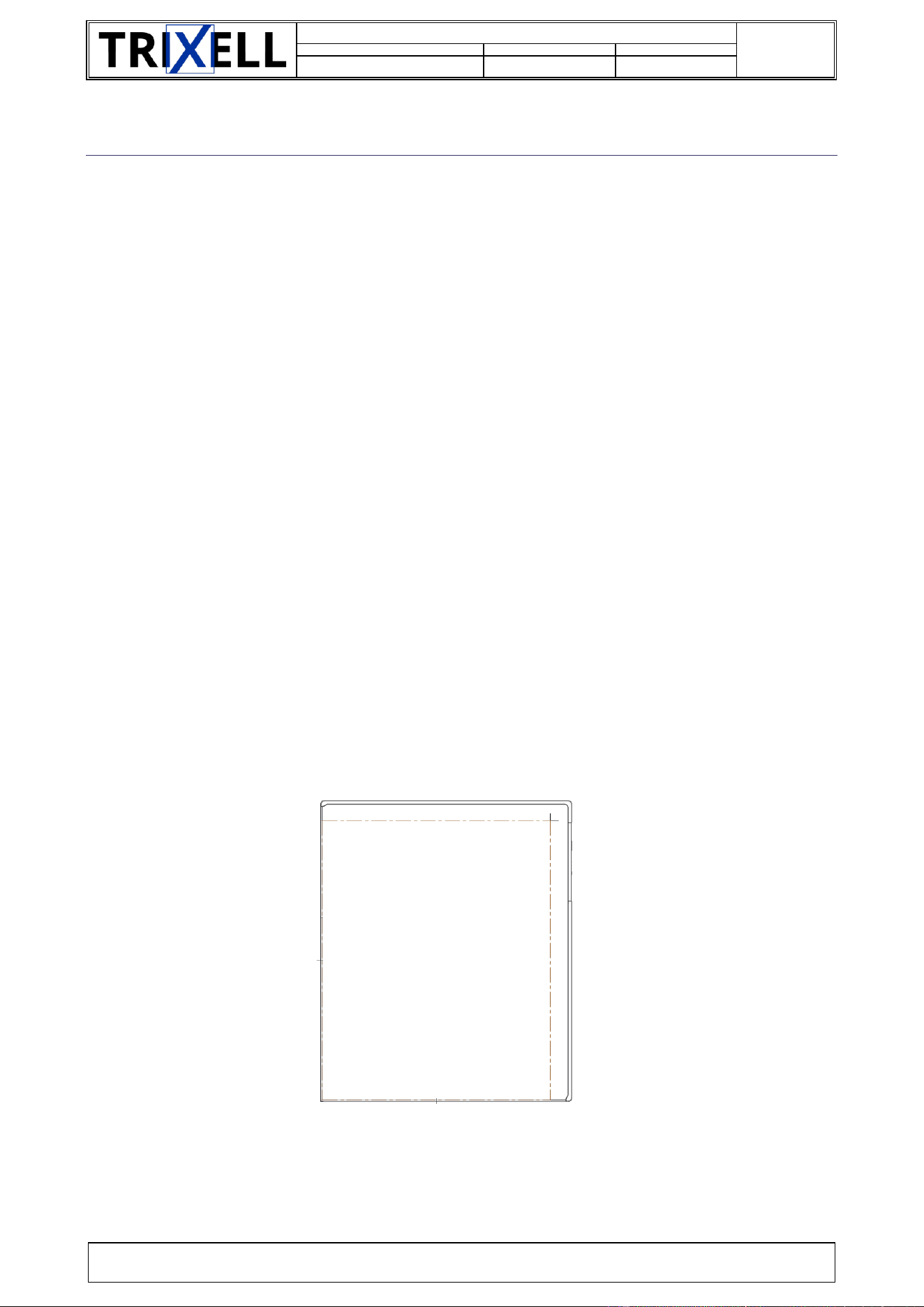
pixium 3543 EZ3 NDT
Figure 1: Top view (sensitive side)
Document Identification
doors://zvedoors01:36681/?version=2&prodID=0&view=00000002&urn=urn:telelogic::1-4875b3e076430ad2-M-00006a87
8 / 38
SIF-F-003
Document number
Code Type Document
Version
63150986
108
-d3
TRIXELL PROPRIETARY INFORMATION
Copyright © by 2025 TRIXELL. All rights reserved. This document and the information contained therein are TRIXELL’s exclusive property.
Any copy and/or disclosure thereof in any form whatsoever are subject to TRIXELL’s prior written consent.
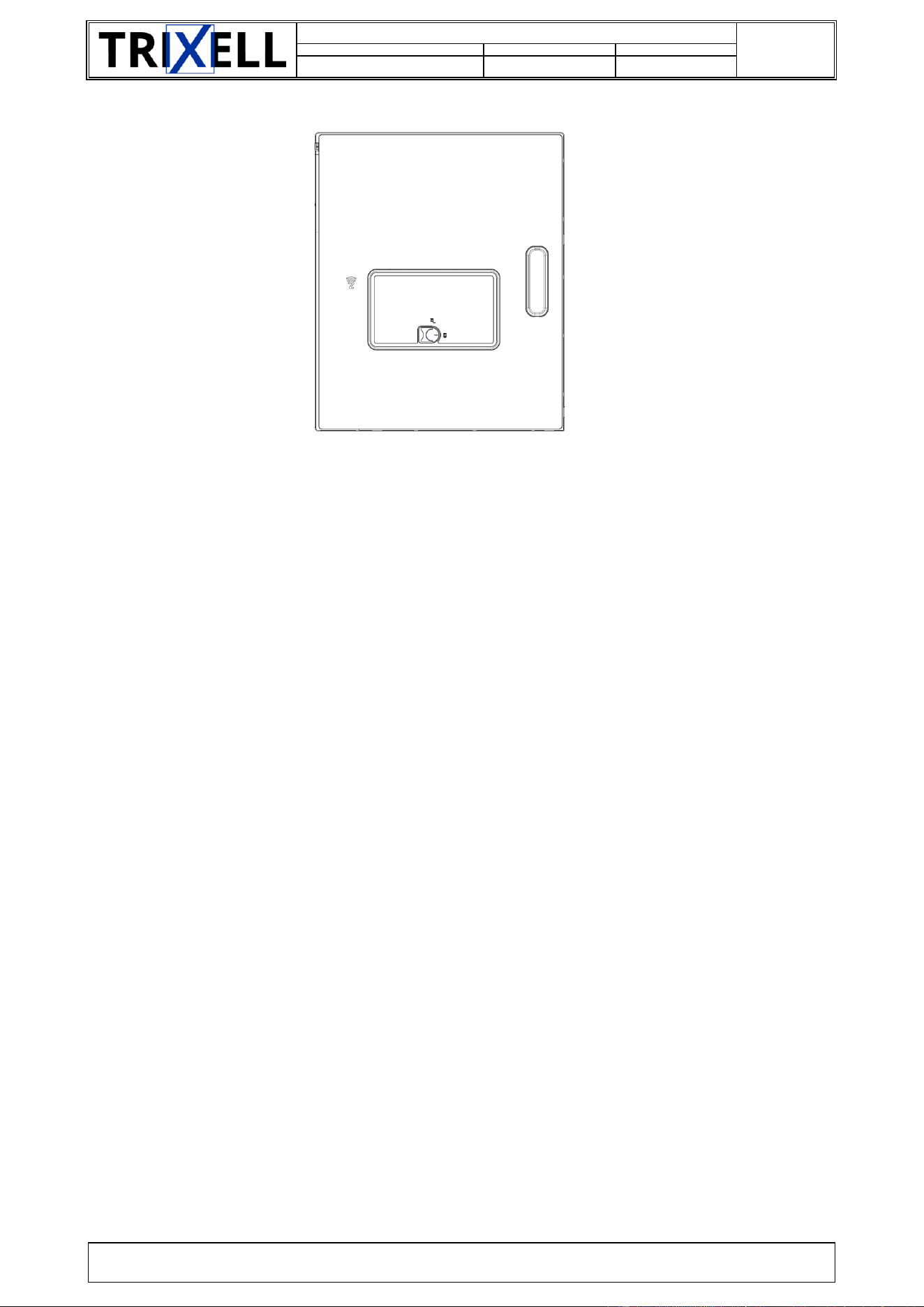
pixium 3543 EZ3 NDT
Figure 2: Bottom view (battery side)
Please note that the overfilm (color and printing) could be customized by customers on request.
1.4. DELIVERY
The standard pixium EZ3 NDT delivery includes:
the detector,
one backup cable(Cable EZ3),
one battery (Battery EZ X),
one battery charger (Charger EZ X),
accompanying documentation.
Note that each customer may have a specific configuration for delivery.
The standard pixium EZ3 NDT delivery does not include in particular:
an external power supply (part of the customer System),
1.5. IDENTIFICATION
The identification labels on the battery side of the detector housing provide information for :
type (pixium EZ3 NDT)
part number (P/N)
revision code (Rev.)
serial number (S/N)
manufacturing date
connections (power supply inputs / communication links)
various warnings and cautions
See appendix A for label models.
1.6. STANDARDS
The pixium EZ3 NDT is:
a class B product according to EN 55011 standard
The pixium EZ3 NDT is labeled as follow:
CE
Document Identification
doors://zvedoors01:36681/?version=2&prodID=0&view=00000002&urn=urn:telelogic::1-4875b3e076430ad2-M-00006a87
9 / 38
SIF-F-003
Document number
Code Type Document
Version
63150986
108
-d3
TRIXELL PROPRIETARY INFORMATION
Copyright © by 2025 TRIXELL. All rights reserved. This document and the information contained therein are TRIXELL’s exclusive property.
Any copy and/or disclosure thereof in any form whatsoever are subject to TRIXELL’s prior written consent.
1.7. REFERENCE DOCUMENTS
Bookmark
Document title
Reference
CTD
[EUM]
End User Manual
63150984
108
[PTS]
Product Technical Specification
63139627
306
[PSS]
Product Standard Specification
63139630
306
[MIS]
Mechnical Interface Specification
63139629
306
[EIS]
Electrical Interface Specification
63139138
306
[UCS]
Use Case Specification
63xxxxxx
306
[AID]
Application Interface Definition
63139620
108
[OUT_DRW]
Outline drawing
3543: 63140988
041
[DISM_DRW]
Dismantling drawing
63xxxxxx
066
[SCC]
Standard Compliance Certificate
3543: 63xxxxxx
600
[BATT_USR]
Battery EZ X user manual
63127737
108
[CHG_USR]
Charger EZ X user manual
63132829
108
[P3543_STR]
Unpacking instructions
62756802
108
Table 1: Reference documents
Note: Be sure to use the latest revision of these documents
1.8. DEFINITION, ACRONYMS, ABREVIATION
The following table presents the acronyms that may be used in this document:
Acronyms
Definition
CCK
Complementary Code Keying
ADC
Analog to Digital Converter
CE
Conformité Européenne (meaning European Conformity)
COA
Condition Of Acceptability
DC
Direct Current
EIRP
Equivalent Isotropically Radiated Power
EMC
Electro Magnetic Compatibility
ESD
Electro-Static Discharge
FCC
Federal Communications Commission
IEC
International Electro-technical Committee
ISO
International Standard Organization
ISM
Industrial, Scientific and Medical
LED
Light Emitting Diode
OFDM
Orthogonal Frequency-Division Multiplexing
PE
Protective Earth
RF
Radio Frequency
SIRN
Software Integration Release Note

Document Identification
doors://zvedoors01:36681/?version=2&prodID=0&view=00000002&urn=urn:telelogic::1-4875b3e076430ad2-M-00006a87
10 / 38
SIF-F-003
Document number
Code Type Document
Version
63150986
108
-d3
TRIXELL PROPRIETARY INFORMATION
Copyright © by 2025 TRIXELL. All rights reserved. This document and the information contained therein are TRIXELL’s exclusive property.
Any copy and/or disclosure thereof in any form whatsoever are subject to TRIXELL’s prior written consent.
Acronyms
Definition
TBD
To Be Defined
TDLP
Trixell Detector Link Protocol
Table 2: Acronyms

Document Identification
doors://zvedoors01:36681/?version=2&prodID=0&view=00000002&urn=urn:telelogic::1-4875b3e076430ad2-M-00006a87
11 / 38
SIF-F-003
Document number
Code Type Document
Version
63150986
108
-d3
TRIXELL PROPRIETARY INFORMATION
Copyright © by 2025 TRIXELL. All rights reserved. This document and the information contained therein are TRIXELL’s exclusive property.
Any copy and/or disclosure thereof in any form whatsoever are subject to TRIXELL’s prior written consent.
2. INSTALLATION
2.1. INSTALLATION REQUIREMENTS
Components needed for installation and operation are the following:
One pixium EZ3 NDT detector
One Charger EZ X (including its external power supply)
One Battery EZ X
One external single DC power supply (+12V) (not provided)
One access point (not provided)
During installation, ensure that neither a sharp corner nor edge can damage the cabling.
Mechanical fixation of cables and connectors must be provided in order to prevent unnecessary wear out of
the cables.
2.2. INSTALLATION PROCEDURE
Please follow the below instructions before switching on the detector:
Remove detector from its original packaging. Refer to [P3543_STR] for unpacking instructions.
In case a power supply is available, compliant with [EIS] requirement, power connector of the Cable
EZ3 shall be plugged to this power supply.
If a charged battery is available, it can be plugged into the detector on its backside, instead to use
the cable for power.
Battery EZ X delivered in its original packaging can be plugged directly into the detector.
Ethernet connector of the Cable EZ3 shall be plugged to network interface provided by the system
and the power connector shall be connected to external power supply provided by the system
Then the magnetic connector of the cable can be plugged to the detector. There are two possible
orientations to plug this cable: both orientations can be used for proper operation.
System shall be compatible with following default values of the detector for network compatibility:
o host IP address : 192.168.1.5
If this is not the case, user shall use the infra-red link or NFC to set correct network configuration to
the detector.
Configure the access point with the correct country code (please refer to user manual of access
point)
First operation shall be done either by cable or infra-red. Wi-Fi settings (Wi-Fi SSID, Wi-Fi password)
shall be performed through System interface during this first operation.
2.2.1. MECHANICAL INSTALLATION
pixium EZ3 NDT is compatible with ISO 4090 cassette holder size
Constraints: pixium EZ3 NDT is qualified to be exposed to variations of accelerations refer to Appendix B
environmental conditions section. The detector can’t be used with non-natural variations of pressure.
Tightness: pixium EZ3 NDT (alone as well as with the battery connected) has a degree of protection against
ingress of water of IP 65 / 67 according to IEC 60529.
Document Identification
doors://zvedoors01:36681/?version=2&prodID=0&view=00000002&urn=urn:telelogic::1-4875b3e076430ad2-M-00006a87
12 / 38
SIF-F-003
Document number
Code Type Document
Version
63150986
108
-d3
TRIXELL PROPRIETARY INFORMATION
Copyright © by 2025 TRIXELL. All rights reserved. This document and the information contained therein are TRIXELL’s exclusive property.
Any copy and/or disclosure thereof in any form whatsoever are subject to TRIXELL’s prior written consent.
2.2.2. CONNECTICS
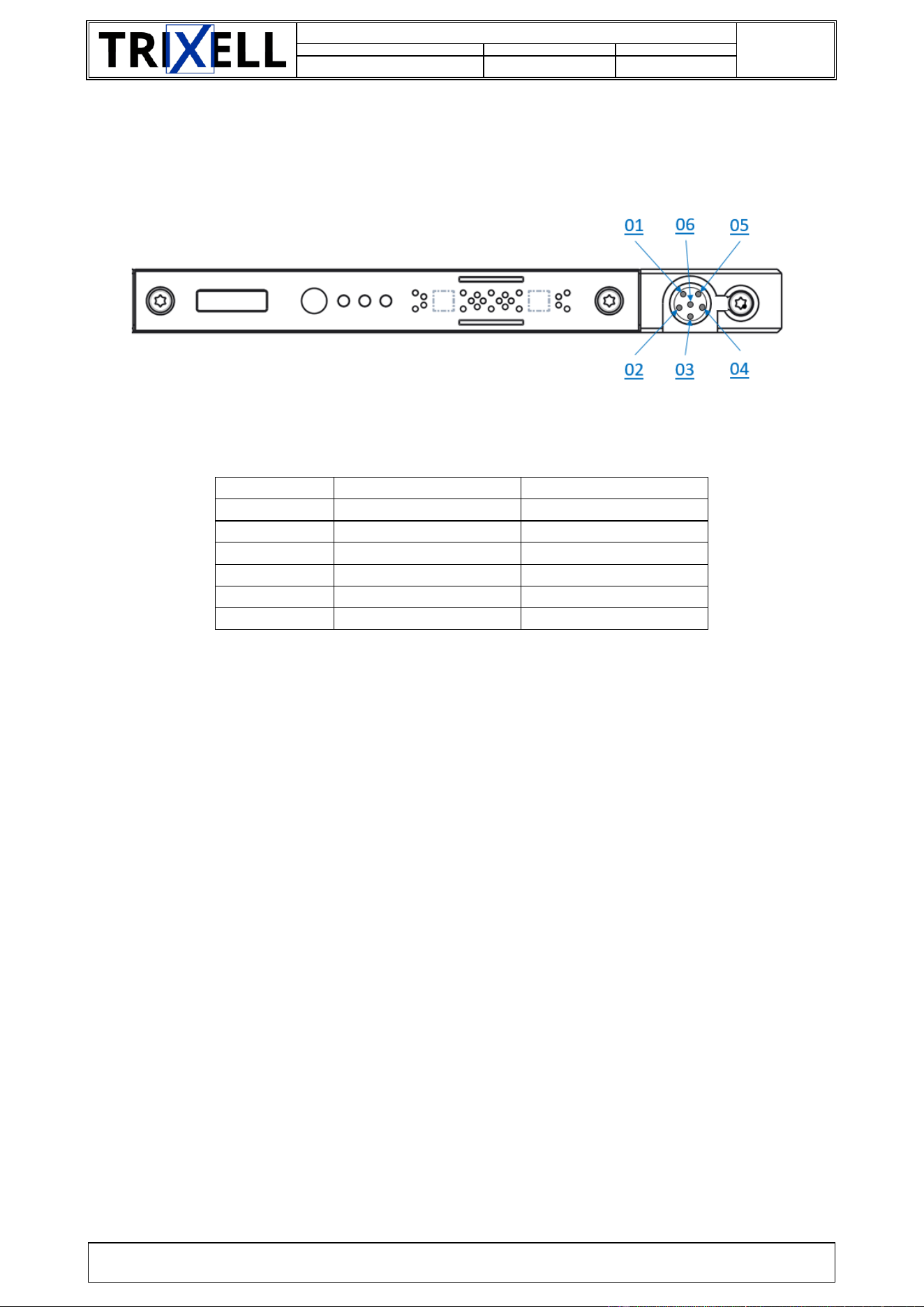
2.2.2.1. Connector unit
Figure 3: Backup cable connector
Pin number
Signal
01
GND_SHIELD
02
GND_SHIELD
03
GND_SHIELD
04
TXRXP_B
05
TXRXM_A
06
P12V
07
GND
08
GND
09
P12V
10
TXRXM_B
11
TXRXP_A
12
GND_SHIELD
13
GND_SHIELD
14
GND_SHIELD
15
GND_SHIELD
16
GND_SHIELD
17
TXRXP_C
18
TXRXM_D
19
TXRXM_C
20
TXRXP_D
21
GND_SHIELD
22
GND_SHIELD
Table 3: Connector pin-out for connector unit
Document Identification
doors://zvedoors01:36681/?version=2&prodID=0&view=00000002&urn=urn:telelogic::1-4875b3e076430ad2-M-00006a87
13 / 38
SIF-F-003
Document number
Code Type Document
Version
63150986
108
-d3
TRIXELL PROPRIETARY INFORMATION
Copyright © by 2025 TRIXELL. All rights reserved. This document and the information contained therein are TRIXELL’s exclusive property.
Any copy and/or disclosure thereof in any form whatsoever are subject to TRIXELL’s prior written consent.
2.2.2.2. Accessory connector
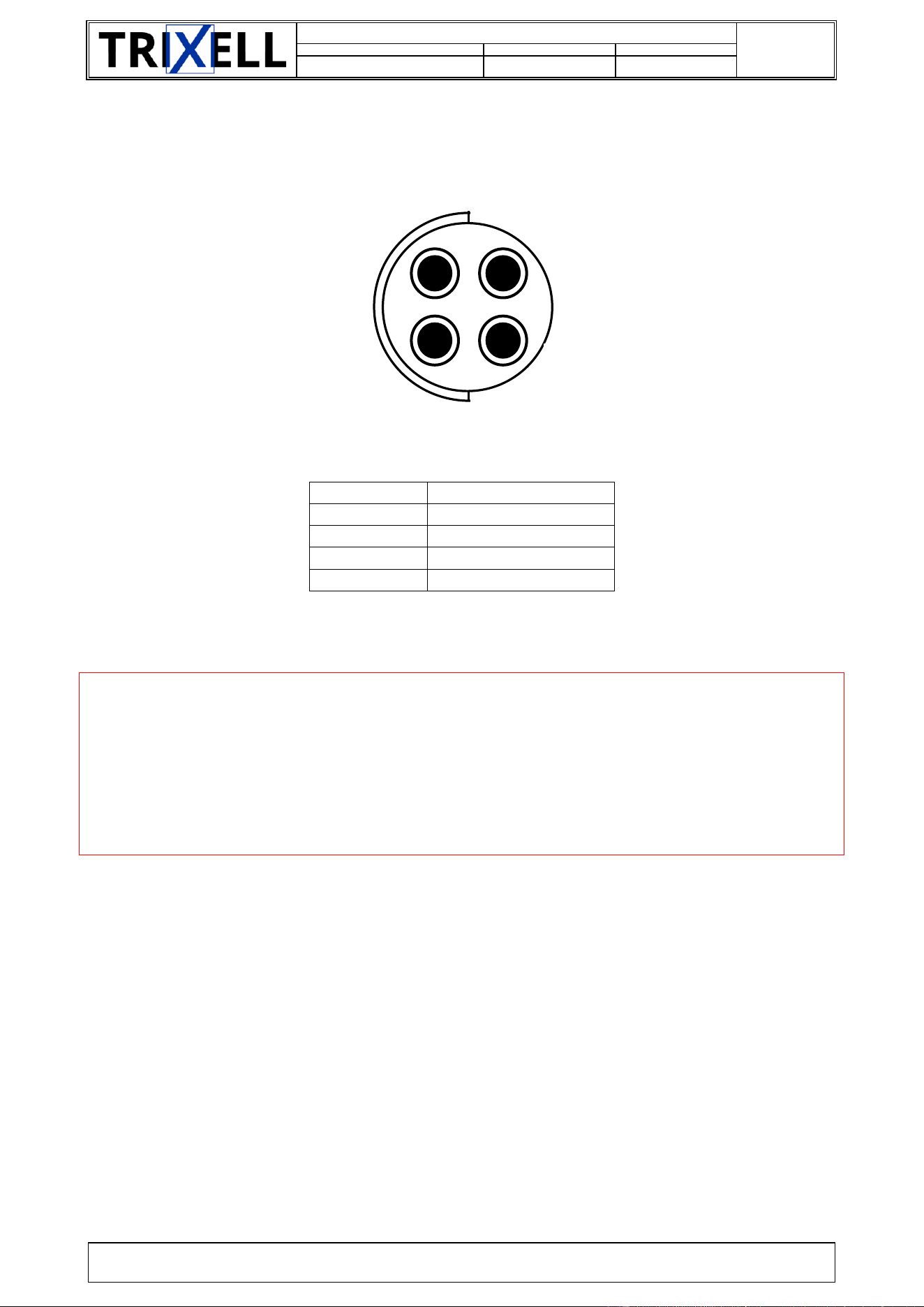
pixium EZ3 NDT includes an accessory connector for specific features as external AEC or external trigger
switch:
Figure 4: Accessory connector
Pin number
Signal
Comment
1
DEADMAN_SW
2
5VDC
3
RS232-TXD
4
RS232-RXD
5
GND
6
XR_ON
Maximum voltage: 5 V
Table 4: Connection pin-out for Accessory connector
Document Identification
doors://zvedoors01:36681/?version=2&prodID=0&view=00000002&urn=urn:telelogic::1-4875b3e076430ad2-M-00006a87
14 / 38
SIF-F-003
Document number
Code Type Document
Version
63150986
108
-d3
TRIXELL PROPRIETARY INFORMATION
Copyright © by 2025 TRIXELL. All rights reserved. This document and the information contained therein are TRIXELL’s exclusive property.
Any copy and/or disclosure thereof in any form whatsoever are subject to TRIXELL’s prior written consent.
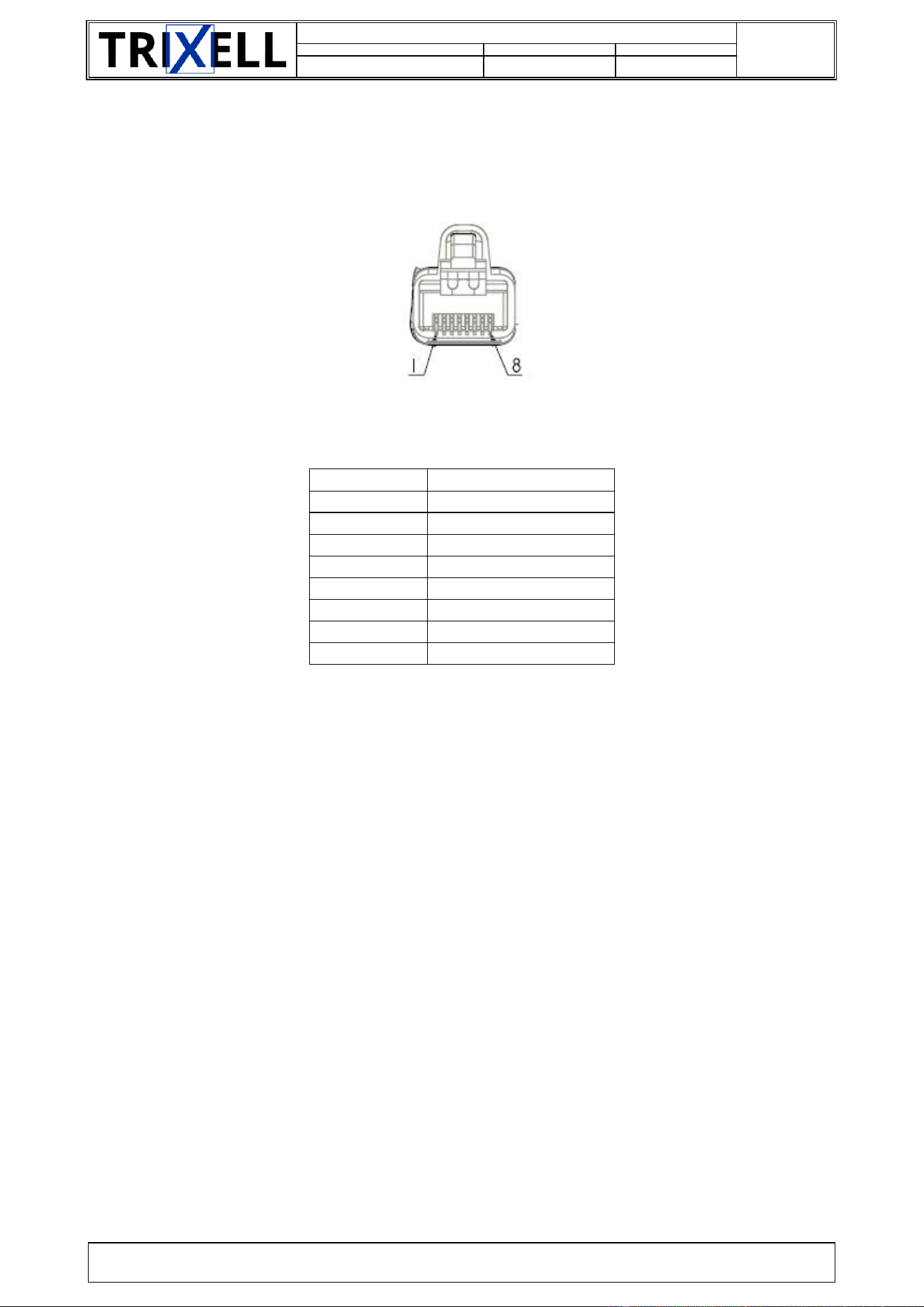
2.2.2.3. Cable EZ3: Power supply
Backup cable contains a double insulated connector on system side for power supply (connector reference
given in [EIS] document):
Figure 5: Power supply connector
Pin number
Signal
1
P12V
2
-
3
GND
4
-
Table 5: Power supply connector pin-out
- CAUTION -
Power supply polarity inversion or out of range power supply (including a missing power
supply) may harm the detector.
Be sure to correctly connect and clamp the power supply cable and the connector.
Check the power supply polarity before switching on. There is no hazard resulting from
switching on and off the power supply.
2
4
3
1
Document Identification
doors://zvedoors01:36681/?version=2&prodID=0&view=00000002&urn=urn:telelogic::1-4875b3e076430ad2-M-00006a87
15 / 38
SIF-F-003
Document number
Code Type Document
Version
63150986
108
-d3
TRIXELL PROPRIETARY INFORMATION
Copyright © by 2025 TRIXELL. All rights reserved. This document and the information contained therein are TRIXELL’s exclusive property.
Any copy and/or disclosure thereof in any form whatsoever are subject to TRIXELL’s prior written consent.
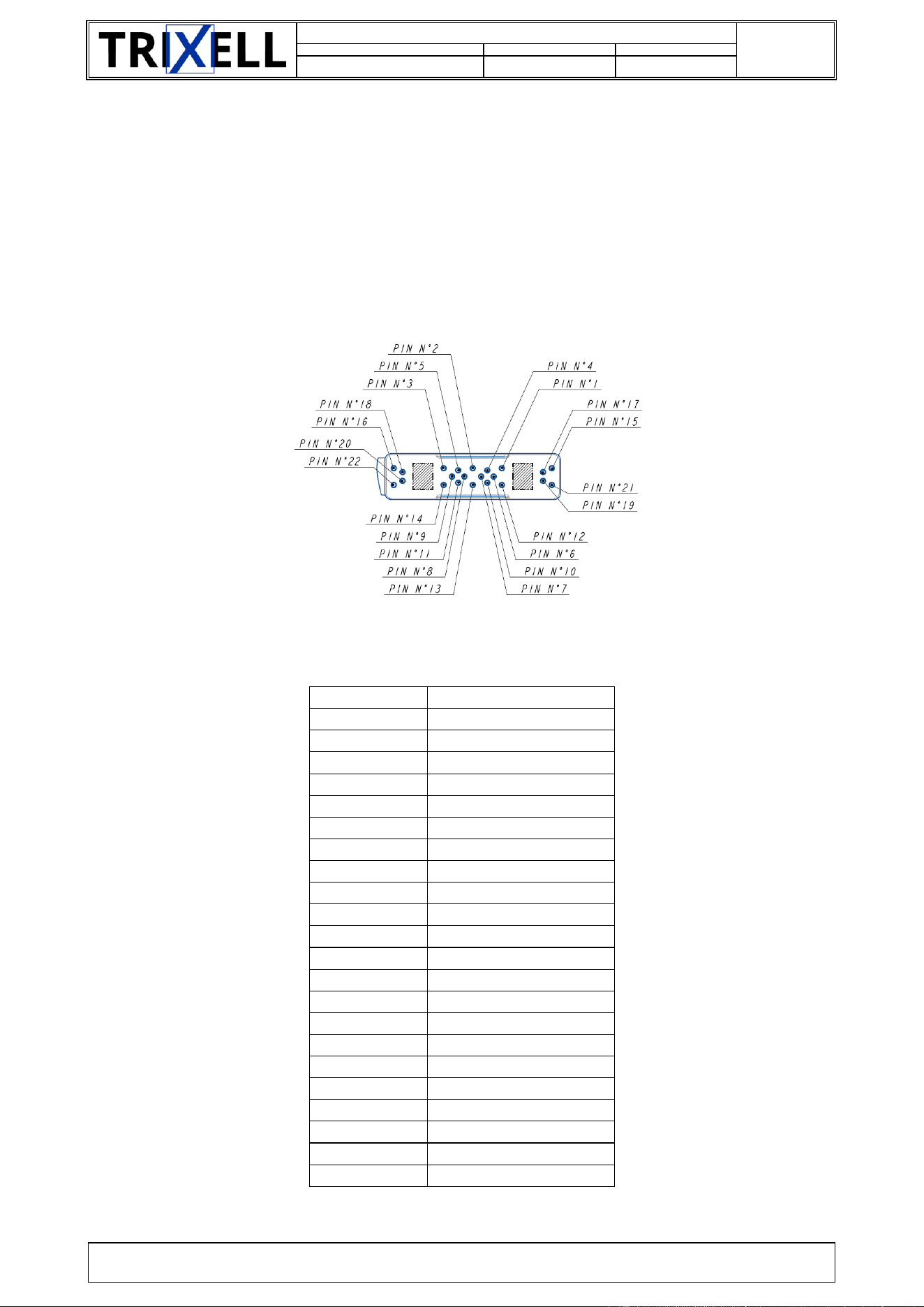
2.2.2.4. Cable EZ3: TDLP link
Cable EZ3 contains a RJ45 connector on system side:
Figure 6: RJ45 connector
Pin number
Signal
1
TXRXP_A
2
TXRXM_A
3
TXRXP_B
4
TXRXP_C
5
TXRXM_C
6
TXRXM_B
7
TXRXP_D
8
TXRXM_D
Table 6: RJ45 connector pin-out
Document Identification
doors://zvedoors01:36681/?version=2&prodID=0&view=00000002&urn=urn:telelogic::1-4875b3e076430ad2-M-00006a87
16 / 38
SIF-F-003
Document number
Code Type Document
Version
63150986
108
-d3
TRIXELL PROPRIETARY INFORMATION
Copyright © by 2025 TRIXELL. All rights reserved. This document and the information contained therein are TRIXELL’s exclusive property.
Any copy and/or disclosure thereof in any form whatsoever are subject to TRIXELL’s prior written consent.
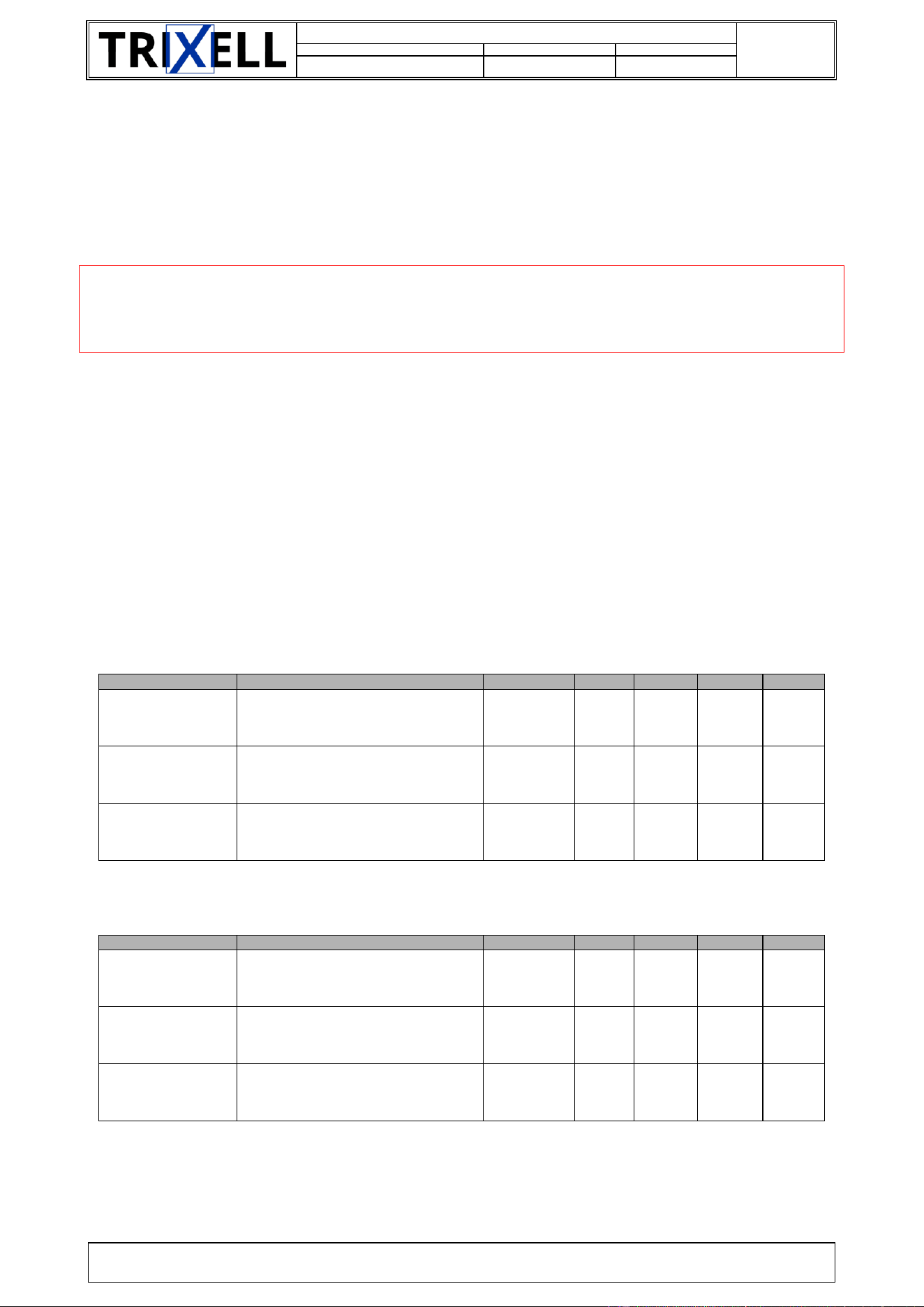
2.2.2.5. Cable EZ3: Detector connector
A connector is accessible on the left side of the detector housing, in order to connect a cable from the System.
The purpose is to recharge the battery when discharged and to allow going on with image acquisition.
The attachment of the cable to the detector can be done in two orientations (rotation of 180° is allowed without
impact on the connection).
When the cable is attached on System side and connected to the detector, the Wi-Fi operation is disabled and
data transfer is managed through this cable (Ethernet link). The cable can be “hot-plugged”, meaning it can be
plugged and unplugged at any time without special precaution.
Figure 7: Backup cable connector
Pin number
Signal
1
GND_SHIELD
2
GND_SHIELD
3
GND_SHIELD
4
TXRXP_B
5
TXRXM_A
6
P12V
7
GND
8
GND
9
P12V
10
TXRXM_B
11
TXRXP_A
12
GND_SHIELD
13
GND_SHIELD
14
GND_SHIELD
15
GND_SHIELD
16
GND_SHIELD
17
TXRXP_C
18
TXRXM_D
19
TXRXM_C
20
TXRXP_D
21
GND_SHIELD
22
GND_SHIELD
Table 7: Connector pin-out for backup cable
Document Identification
doors://zvedoors01:36681/?version=2&prodID=0&view=00000002&urn=urn:telelogic::1-4875b3e076430ad2-M-00006a87
17 / 38
SIF-F-003
Document number
Code Type Document
Version
63150986
108
-d3
TRIXELL PROPRIETARY INFORMATION
Copyright © by 2025 TRIXELL. All rights reserved. This document and the information contained therein are TRIXELL’s exclusive property.
Any copy and/or disclosure thereof in any form whatsoever are subject to TRIXELL’s prior written consent.
Note that Cable EZ is compatible with pixium EZ3 NDT. Nevertheless, the data rate will be reduced to
100Mb/s.
2.2.3. X-RAY GENERATOR CONNECTION
X-Ray source: The emission of the ionizing radiation is controlled by the system manufacturer.
- CAUTION -
X-ray Enable signal only indicates to the System that the detector is ready to receive X-rays.
It’s the System responsibility to control the actual emission of X-rays.
System accompanying documents must indicate:
Procedure for X-ray alignment measurement
Prohibition to order any radiation when a dysfunction is noticed by the operator, whatever this
dysfunction
2.2.4. COOLING
pixium EZ3 NDT detector has a passive cooling concept.
Thermal interface resistance is defined in §10.4.
2.2.5. MAXIMUM ALLOWED WEIGHT ON THE DETECTOR
The X-ray input window (upper side of the detector) is made of a carbon fibre composite substrate, to protect
the sensitive layer and active array of the detector.
This input window can withstand maximum weight without any image artefact:
PUID
Description
Product
Min
Value
Max
Unit
[PTS-REQ-1680]
PTS_perf_weight
The detector shall remain at full
performance for:
3543EZ3,
4343EZ3,
2430EZ3
A mechanical weight uniformly
distributed over the complete surface
of:
3543EZ3,
4343EZ3,
2430EZ3
150
kg
A mechanical weight uniformly
distributed over the surface of a 4 cm
diameter disc of:
3543EZ3,
4343EZ3,
2430EZ3
100
kg
This input window can withstand maximum weight without any irreversible degradation:
PUID
Description
Product
Min
Value
Max
Unit
[PTS-REQ-1670]
PTS_func_weight
The detector shall remain functional
for:
3543EZ3,
4343EZ3,
2430EZ3
A mechanical weight uniformly
distributed over the complete surface
of:
3543EZ3,
4343EZ3,
2430EZ3
300
kg
A mechanical weight uniformly
distributed over the surface of a 4 cm
diameter disc of:
3543EZ3,
4343EZ3,
2430EZ3
100
kg
2.2.6. DETECTOR SETTINGS
Initial detector settings are performed at the factory. Please refer to System Integrator installation procedure
for eventual image quality optimization.

Document Identification
doors://zvedoors01:36681/?version=2&prodID=0&view=00000002&urn=urn:telelogic::1-4875b3e076430ad2-M-00006a87
18 / 38
SIF-F-003
Document number
Code Type Document
Version
63150986
108
-d3
TRIXELL PROPRIETARY INFORMATION
Copyright © by 2025 TRIXELL. All rights reserved. This document and the information contained therein are TRIXELL’s exclusive property.
Any copy and/or disclosure thereof in any form whatsoever are subject to TRIXELL’s prior written consent.
2.2.6.1. Communication link settings
For Wifi configuration and Ethernet configuration, please refer to §2.2
2.2.6.2. Other settings
Not applicable
2.2.7. ADDITONAL ACCESSORIES
Spare battery is available upon request. Refer to Battery EZ X documentation for additional information.
Spare backup cable is available upon request.
No anti-scattered grid is delivered with the detector.
In some mode of operation, an automatic exposure control device can be used. This device is not part of the
detector; it must be supplied and installed by the System integrator.

Document Identification
doors://zvedoors01:36681/?version=2&prodID=0&view=00000002&urn=urn:telelogic::1-4875b3e076430ad2-M-00006a87
19 / 38
SIF-F-003
Document number
Code Type Document
Version
63150986
108
-d3
TRIXELL PROPRIETARY INFORMATION
Copyright © by 2025 TRIXELL. All rights reserved. This document and the information contained therein are TRIXELL’s exclusive property.
Any copy and/or disclosure thereof in any form whatsoever are subject to TRIXELL’s prior written consent.
3. FIRST OPERATION
3.1. SWITCH ON
Push the ON/OFF button to powered on the detector
3.2. SWITCH OFF
Push the ON/OFF button to powered off the detector.
Detector can also be stopped by a specific software command: refer to System information.
3.3. SOFTWARE FEATURES
The detector can send to the System, upon request, messages containing the hardware and software revision
numbers, and the detector's serial number and date code.
The detector has built-in self-test features to provide the System with information for malfunction diagnostic.
The detector can generate, upon request issued by the System, error or warning messages in case of
communication or internal electronics malfunctions (such as internal voltage drifts or breakdowns).
It is the System's responsibility to decide what to do in case of such an error or warning.
The detector has a built-in set of test patterns that can be used to check the operation of the detector's
electronics (analog test patterns) and of the image data transmission (digital test patterns): refer to mode table.
If the detector has to reboot due to an internal error, it is able to come up to a normal operating mode by itself.
3.4. OPERATION MODES
For information about available operationnal modes please refer to mode table in [PTS].
3.4.1. TABLE MODE DEFINITION
The table mode is given in a separate document called SIRN provided to system integrator with each software
version. Please refer to the SIRN before integrating a new software.
- CAUTION -
Modes that are not described in the SIRN are TRIXELL reserved.
Document Identification
doors://zvedoors01:36681/?version=2&prodID=0&view=00000002&urn=urn:telelogic::1-4875b3e076430ad2-M-00006a87
20 / 38
SIF-F-003
Document number
Code Type Document
Version
63150986
108
-d3
TRIXELL PROPRIETARY INFORMATION
Copyright © by 2025 TRIXELL. All rights reserved. This document and the information contained therein are TRIXELL’s exclusive property.
Any copy and/or disclosure thereof in any form whatsoever are subject to TRIXELL’s prior written consent.
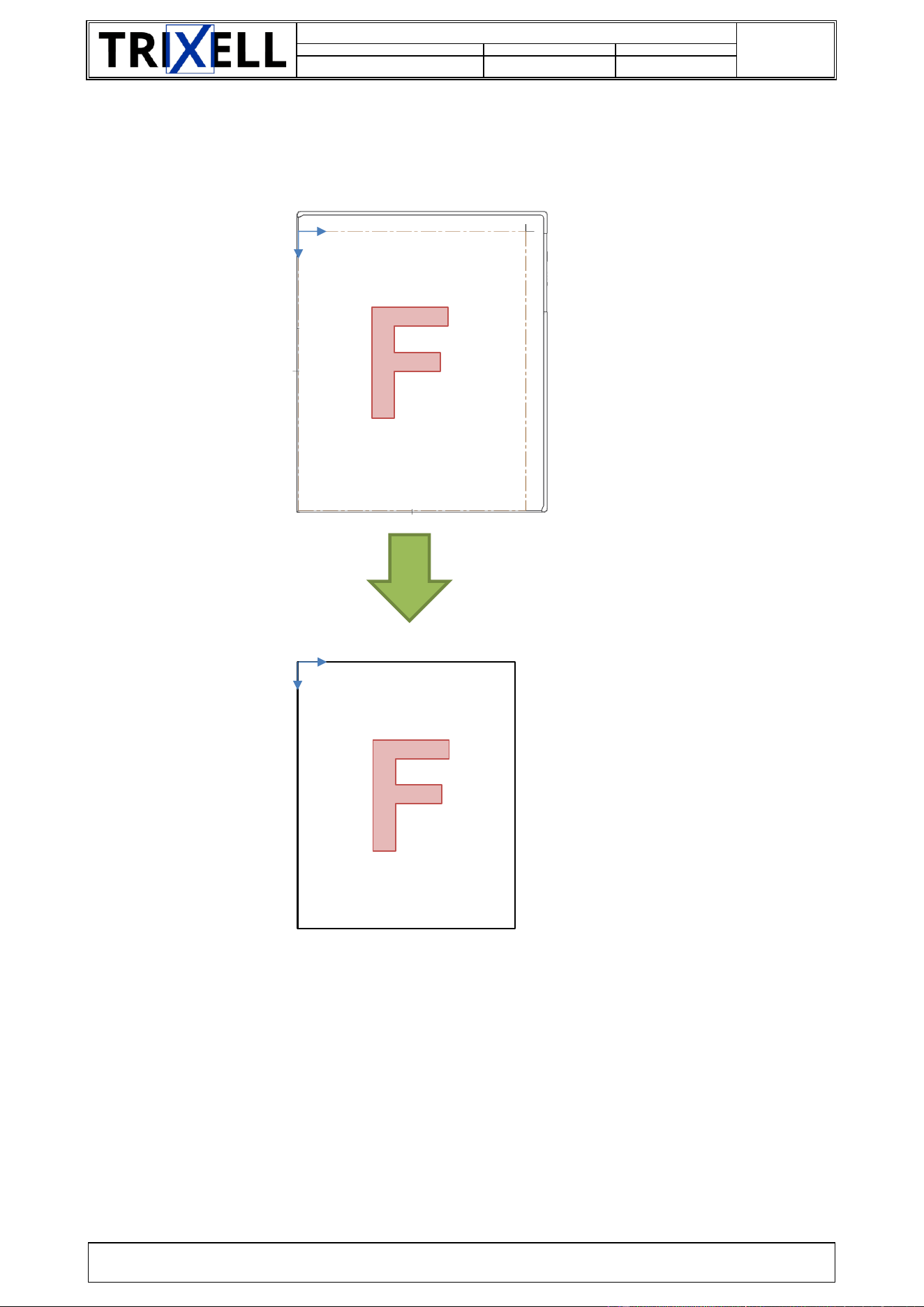
3.4.2. SPATIAL RELATIONSHIP
The relationship between the physical detectors and the corresponding images issued from an acquisition are
as follow:
Figure 8: Spatial relationship
Top
Top
Bottom
Bottom
Left
Left
Right
Right
Bottom
Left
Right
Top
x
y
0
x
0
y
x
0
y
Mapix side
Thalassa
side
0
x (image)
y (image)
Mapix side
Thalassa
side
0
x (image)
y (image)
Mapix side
Thalassa side
0
x (image)
y (image)

Document Identification
doors://zvedoors01:36681/?version=2&prodID=0&view=00000002&urn=urn:telelogic::1-4875b3e076430ad2-M-00006a87
21 / 38
SIF-F-003
Document number
Code Type Document
Version
63150986
108
-d3
TRIXELL PROPRIETARY INFORMATION
Copyright © by 2025 TRIXELL. All rights reserved. This document and the information contained therein are TRIXELL’s exclusive property.
Any copy and/or disclosure thereof in any form whatsoever are subject to TRIXELL’s prior written consent.
4. CAUTIONS AND RECOMMENDATIONS
4.1. SAFETY MEASURES FOR THE SYSTEM INTEGRATOR
4.1.1. OPERATION CAUTIONS
- CAUTION -
If pixium EZ3 NDT is modified, appropriate inspection and testing must be conducted to
ensure continued safe use of the equipment.
Software cautions:
WiFi environment is complex and actual WiFi performances depend on local environment and
installation. The System Integrator is responsible for the WiFi level of service.
The system integrator is responsible for battery management and powering the detector. The system
ensures that the detector is always powered during image cycle from the request image acquisition
to end of image storage or transmission, otherwise current image is lost.
The system integrator shall strictly follow the instruction given in the information files when a new
software version has been released.
The system integrator is responsible for managing the health check at detector startup. He must check
the detector health using the BIST features.
The system integrator must check that Hotswap is Available before doing any action with the battery
(i.e.: changing the battery)
4.2. CYBERSECURITY
Pixium detector was developed taking into account Cyber Security constraints. The methodology for Trixell
risk analysis is based on EBIOS and is compliant to ISO27K5.
Note: pixium EZ3 NDT detectors exists in two different SW versions:
Legacy version based on SIS
A secured version based on DDS
For legacy constraints, not all risk mitigations have been implemented in the SIS version.
System integrator and end customer shall put special care to limit non-authorized access to the detector. In
particular, the detector should be stored in a restricted area in order to avoid stealing or unauthorized access
to the detector.
Users shall take special care on WiFi password management:
It is recommended to change the default WiFi password before first installation and on a frequent basis
(at least every 90 days)
A strong complexity/entropy should be put in place (at least 12 characters, at least one number and at
least one none alpha numeric character)
System should keep at least the last 3 passwords in memory. User should use different password.
It is recommended to have a second spare battery available in order to avoid impact regarding image
acquisition, and transfer.
Document Identification
doors://zvedoors01:36681/?version=2&prodID=0&view=00000002&urn=urn:telelogic::1-4875b3e076430ad2-M-00006a87
22 / 38
SIF-F-003
Document number
Code Type Document
Version
63150986
108
-d3
TRIXELL PROPRIETARY INFORMATION
Copyright © by 2025 TRIXELL. All rights reserved. This document and the information contained therein are TRIXELL’s exclusive property.
Any copy and/or disclosure thereof in any form whatsoever are subject to TRIXELL’s prior written consent.
4.3. TEMPERATURE
The Battery EZ X includes a thermal protection that shuts down the battery power in case of very high
temperature causing the Front End unusable. Two situations can occur:
Software protection: the battery pack will be usable as soon as the temperature drops below a
specified limit,
Hardware protection: the battery pack must be exchanged.
For more information about overheating protection please refer to [PTS] and [SIS] documents.
4.4. EMC COMPLIANCE
Medical electrical equipment needs special precautions regarding EMC and needs to be installed and put into
service according to the EMC information.
- CAUTION -
The use of accessories, transducers and cables other than those specified may result in
increased emissions or decreased immunity of the equipment.
- CAUTION -
The detector should not be used adjacent to or stacked with other equipment and if
adjacent or stacked use is necessary, the operability of the detector must be tested in the
modified configuration.
For more information about electromagnetic compatibility, please refer to appendix D .
4.4.1. CABLES AND CONNECTORS
The system integrator must take care with the kind of cables used to connect the pixium to the system :
TRIXELL recommends using a shielded power supply cable. The shielding must be properly connected to the
dedicated connector metallic body in order to insure a good electrical connection. The EMC conformity of the
detector was checked with 360° shielded cables.
4.5. WARM-UP TIME FROM A COLD START
Specification
Product
Description
Min
Value
Max
Unit
[PTS-REQ-0280]
PTS_cold_start_tim
e_single
-
In single mode, the cold start time (time to
reach full image performance) is:
-
-
2
h
4.6. HUMIDITY
Operating humidity:
The operating humidity is valid within the operating temperature range. However customer shall ensure that
detector is never submitted to condensation.
Customer shall take care that NO CONDENSATION occurs on the detector surface.
Storage humidity:
If detector is shipped mounted on the System to final customer: it is the responsibility of customer to ensure
that detector is never exposed to condensation.
See Appendix B for environmental conditions.

Document Identification
doors://zvedoors01:36681/?version=2&prodID=0&view=00000002&urn=urn:telelogic::1-4875b3e076430ad2-M-00006a87
23 / 38
SIF-F-003
Document number
Code Type Document
Version
63150986
108
-d3
TRIXELL PROPRIETARY INFORMATION
Copyright © by 2025 TRIXELL. All rights reserved. This document and the information contained therein are TRIXELL’s exclusive property.
Any copy and/or disclosure thereof in any form whatsoever are subject to TRIXELL’s prior written consent.
4.7. MAINTENANCE
No other preventive maintenance action is required except the calibration needed for image quality, whose
periodicity is defined by the System program.
The battery can be replaced due to limited lifetime. In case of malfunction, the detector will be returned as it is
to the manufacturer for repair. However, possible software release can be realized using the control link:
contact TRIXELL customer service for instructions.
For maintenance please refer to system integrator maintenance manual.
4.8. SOFTWARE USE INFORMATIONS
When detector is powered on, the system must check the result of the pixium EZ3 NDT internal self-tests.
During operation, TRIXELL recommends the system to check:
the header of every image sent by the detector,
if possible, the internal temperature,
the level of battery when powered by Battery EZ X,
the WiFi link quality before requesting an image during free-cassette mode,
the status of the anti-scatter grid (presence and type) thanks to dedicated command.

Document Identification
doors://zvedoors01:36681/?version=2&prodID=0&view=00000002&urn=urn:telelogic::1-4875b3e076430ad2-M-00006a87
24 / 38
SIF-F-003
Document number
Code Type Document
Version
63150986
108
-d3
TRIXELL PROPRIETARY INFORMATION
Copyright © by 2025 TRIXELL. All rights reserved. This document and the information contained therein are TRIXELL’s exclusive property.
Any copy and/or disclosure thereof in any form whatsoever are subject to TRIXELL’s prior written consent.
5. TROUBLESHOOTING
5.1. POWER SUPPLY RANGE
During boot-up sequence, if the power supply fails out of the specified range, the detector might turn to a “Not
available” status and will not go to normal operation (no image generated).
When connected to an external power (backup cable), if power supply output is too low or too high, the detector
will not boot-up at all. Check your power supply to restart operation.
5.2. OTHER FAILURE
A “Not Available” status can also be issued by self-test functions, in case of internal failure on the electronic
board (firmware error, memory failure...).
After verifying that power supply range and internal temperature are correct, and if the detector is still issuing
a “Not Available” status, please contact Trixell field service.
If detector is not operational after reboot, Trixell recommends to retrieve error buffer through software
command to get more information about last error. To do this, a communication link with system is mandatory
(backup cable or wireless). See [AID] for detail.
Document Identification
doors://zvedoors01:36681/?version=2&prodID=0&view=00000002&urn=urn:telelogic::1-4875b3e076430ad2-M-00006a87
25 / 38
SIF-F-003
Document number
Code Type Document
Version
63150986
108
-d3
TRIXELL PROPRIETARY INFORMATION
Copyright © by 2025 TRIXELL. All rights reserved. This document and the information contained therein are TRIXELL’s exclusive property.
Any copy and/or disclosure thereof in any form whatsoever are subject to TRIXELL’s prior written consent.
6. CLEANING AND DISINFECTIONS INSTRUCTIONS
The detector housing can be cleaned using a sweet towel, with respect to ESD safety conditions. Note that
the detector has a degree of protection against ingress of water of IP 67 according to IEC 60529.
The sterilization, disinfecting, and cleaning conditions are defined by the customer in the context of the System
use.
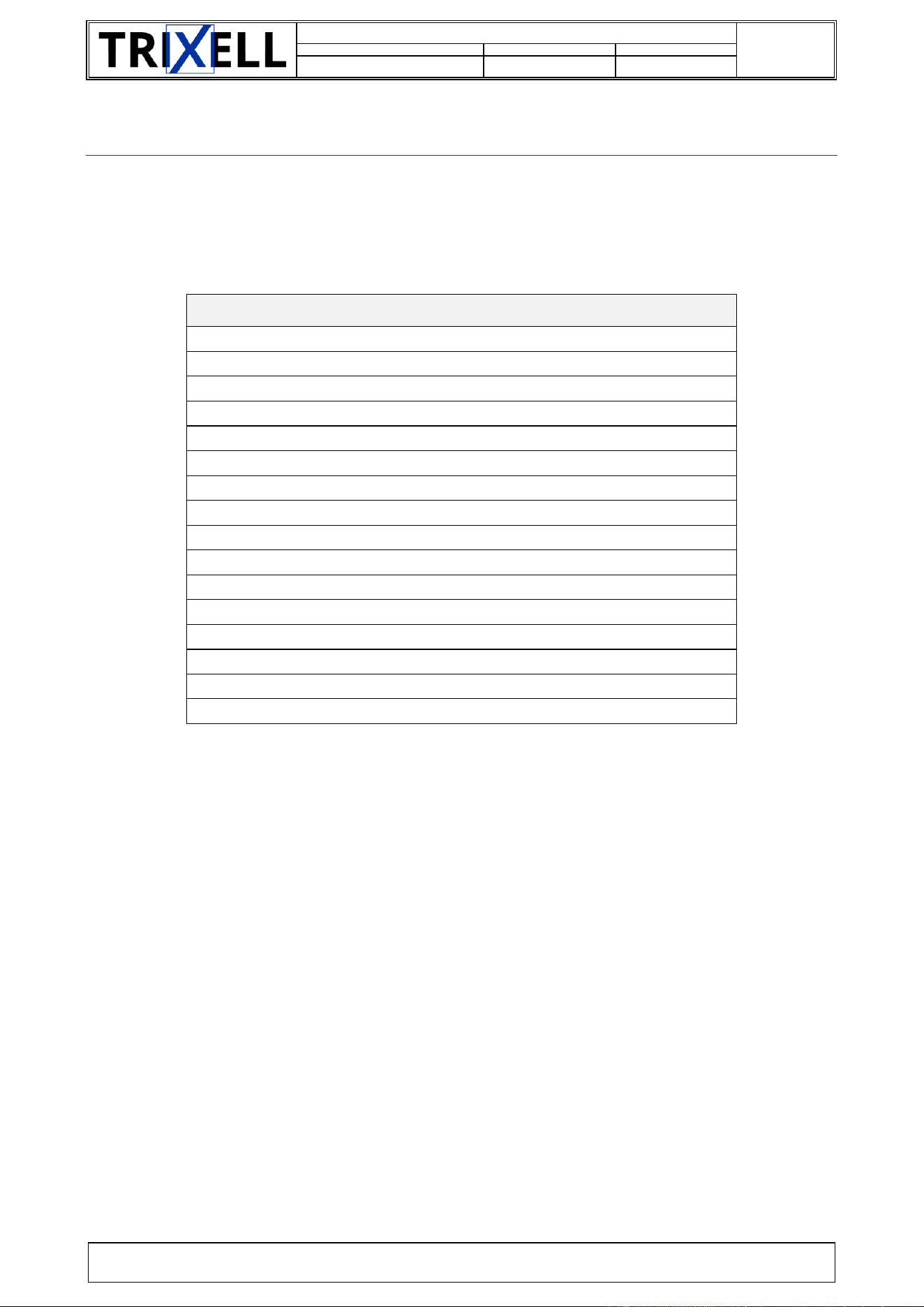
List of cleaning agents
#1 Metrex Caviwipes
#2 Schuelke Perform
#3 Bode Mikrobac tissues
#4 Ecolab Incidin plus
#5 Anios Surfa'safe
#6 PDI Sani-Cloth Active
#7 PDI Sani-Cloth Plus
#8 Virox / Diversey AccelTB
#9 Isopropyl alcohol
#10 Ethanol 70 %
#101 Clorox - Dispatch towels with bleach
#102 Clorox - Hydrogen peroxide
#104 - Freshening Industries - Hospicare 70
#105 - Freshening Industries - Hospicare Multi-Surface 60R
#106 - PDI - Sani-Cloth Prime
#107 - Tristel - Duo-wipes + ULT
Table 8: Cleaning agent list
In addition to this list, the external film is known to be free of any cosmetic degradation when exposed to the
following liquids:
#F01 Metrex Caviwipes XL
#F02 Schuelke Mikrozid sensitive wipes
#F03 Schuelke Terralin protect
#F04 Schuelke Mikrozid AF wipes
#F05 Schuelke Mikrozid PAA wipes
#F06 Bode Bacillol 30 Tissues
#F07 Bode Dismozon plus
#F08 Bode Bacillol AF
#F09 Bode Mikrobac forte
#F10 Ecolab Incidin pro
#F11 Ecolab Incidin active
#F12 Anios Surfanios premium
#F13 Dr Schumacher Biguanid Flache
#F14 Dr Schumacher Cleanisept (wipes 7.5% from liquid)
#F15 Lysoform Lysoformin 3000
#F16 Lysoform Clorina
#F17 BBraun Meliseptol Rapid
#F18 PDI Sani-Cloth AF3

Document Identification
doors://zvedoors01:36681/?version=2&prodID=0&view=00000002&urn=urn:telelogic::1-4875b3e076430ad2-M-00006a87
26 / 38
SIF-F-003
Document number
Code Type Document
Version
63150986
108
-d3
TRIXELL PROPRIETARY INFORMATION
Copyright © by 2025 TRIXELL. All rights reserved. This document and the information contained therein are TRIXELL’s exclusive property.
Any copy and/or disclosure thereof in any form whatsoever are subject to TRIXELL’s prior written consent.
#F19 PDI Sani-Cloth Super
#F20 PDI Sani-Cloth Bleach
#F21 Clorox Bleach germicidal wipes
#F22 Diversey - sealed air Accel Five TB Wipes
Battery EZ X is considered as a part of the Front End, so same list of liquids applies.

Document Identification
doors://zvedoors01:36681/?version=2&prodID=0&view=00000002&urn=urn:telelogic::1-4875b3e076430ad2-M-00006a87
27 / 38
SIF-F-003
Document number
Code Type Document
Version
63150986
108
-d3
TRIXELL PROPRIETARY INFORMATION
Copyright © by 2025 TRIXELL. All rights reserved. This document and the information contained therein are TRIXELL’s exclusive property.
Any copy and/or disclosure thereof in any form whatsoever are subject to TRIXELL’s prior written consent.
7. ECO-DESIGN
7.1. RECYCLING/REFURBISHMENT
Refer to pixium detector End Of Life datasheet (available on demand) for information about detector recycling
and refurbishment.
7.1.1. BATTERY
The end user must be clearly informed that battery packs Battery EZ X used in pixium EZ3 NDT contain
hazardous substances for the environment and must take all preventive actions to manage the battery end of
life (recycling plan).
7.1.2. FRONT END, BACKUP CABLE AND BATTERY CHARGER
TRIXELL is in charge of the recycling of pixium EZ3 NDT and their accessories (Cable EZ3 and Charger EZ
X). TRIXELL’s customers are in charge of managing the way to collect these products (end of their life or out
of order) and ship them to TRIXELL for recycling.
Information:
pixium EZ3 NDT contains Thallium-doped Cesium Iodide scintillator material (Thallium qty < 2 g)
pixium EZ3 NDT contains one or more lead plates of several sizes
TRIXELL expects its customers to take care of the recycling of the pixium EZ3 NDT within the framework of
the System recycling procedure.
7.2. REACH INFORMATION (FOR EUROPE ONLY)
Information on declarable substances are given in BOMcheck website (http://bomcheck.net/) accessible by
our direct customers.

Document Identification
doors://zvedoors01:36681/?version=2&prodID=0&view=00000002&urn=urn:telelogic::1-4875b3e076430ad2-M-00006a87
28 / 38
SIF-F-003
Document number
Code Type Document
Version
63150986
108
-d3
TRIXELL PROPRIETARY INFORMATION
Copyright © by 2025 TRIXELL. All rights reserved. This document and the information contained therein are TRIXELL’s exclusive property.
Any copy and/or disclosure thereof in any form whatsoever are subject to TRIXELL’s prior written consent.
8. MANUFACTURER
pixium EZ3 NDT is manufactured by:
THALES AVS FRANCE SAS
460, rue du Pommarin
38430 MOIRANS FRANCE
Contact your local representative for additional information.
Document Identification
doors://zvedoors01:36681/?version=2&prodID=0&view=00000002&urn=urn:telelogic::1-4875b3e076430ad2-M-00006a87
29 / 38
SIF-F-003
Document number
Code Type Document
Version
63150986
108
-d3
TRIXELL PROPRIETARY INFORMATION
Copyright © by 2025 TRIXELL. All rights reserved. This document and the information contained therein are TRIXELL’s exclusive property.
Any copy and/or disclosure thereof in any form whatsoever are subject to TRIXELL’s prior written consent.
9. APPENDIX A: PIXIUM DETECTOR IDENTIFICATION LABELS
9.1. LABELS
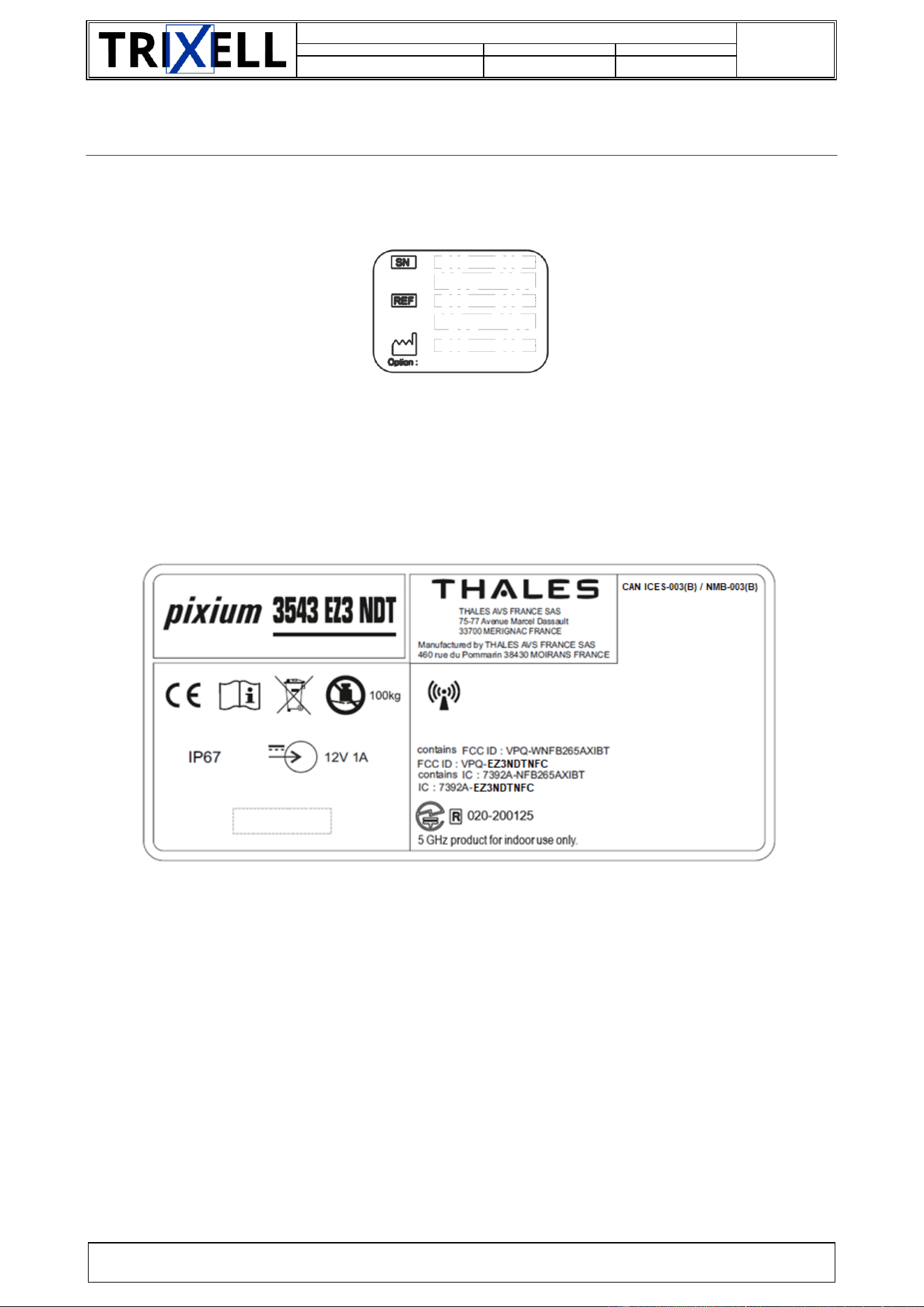
The labels presented below are not contractual and done for information
Figure 9: Identification label
TBD
Figure 10: pixium 2430 EZ3 NDT main label
Figure 11: pixium 3543 EZ3 NDT main label
Note that empty zone is reserved for RF certificate ID. Location of logos may slightly differ on the product.
Document Identification
doors://zvedoors01:36681/?version=2&prodID=0&view=00000002&urn=urn:telelogic::1-4875b3e076430ad2-M-00006a87
30 / 38
SIF-F-003
Document number
Code Type Document
Version
63150986
108
-d3
TRIXELL PROPRIETARY INFORMATION
Copyright © by 2025 TRIXELL. All rights reserved. This document and the information contained therein are TRIXELL’s exclusive property.
Any copy and/or disclosure thereof in any form whatsoever are subject to TRIXELL’s prior written consent.
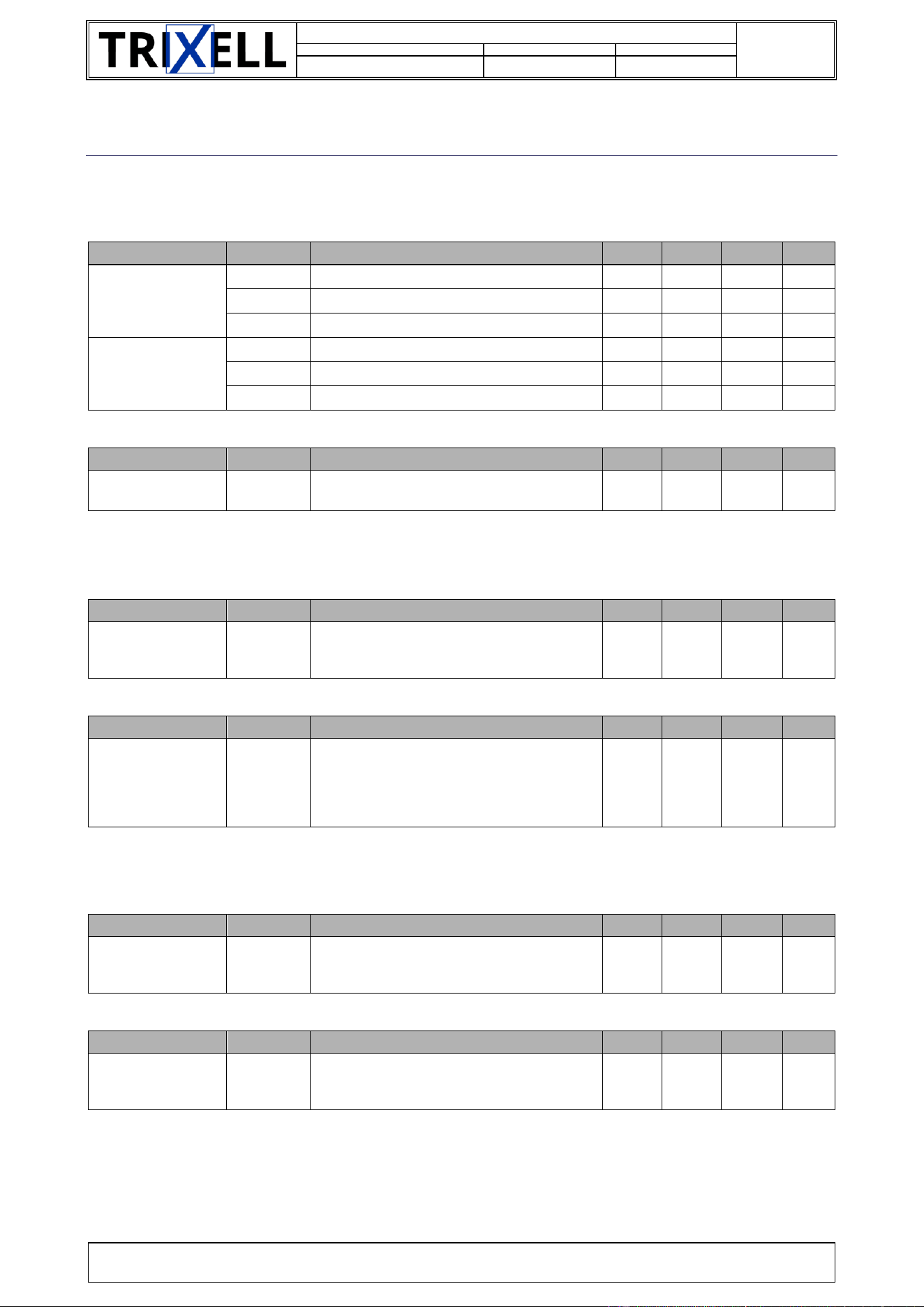
10. APPENDIX B: PIXIUM DETECTOR SUMMARY SHEET
10.1. IMAGE GEOMETRY
Transmitted image size:
Specification
Product
Description
Min
Value
Max
Unit
[PTS-REQ-0740]
PTS_transmitted_im
g_h
2430
Width:
-
-
2336
pel
3543
Width:
-
-
3520
pel
4343
Width:
-
-
4320
pel
[PTS-REQ-0750]
PTS_transmitted_im
g_v
2430
Height:
-
-
2880
pel
3543
Height:
-
-
4316
pel
4343
Height:
-
-
4316
pel
Pitch size:
Specification
Product
Description
Min
Value
Max
Unit
[PTS-REQ-0760]
PTS_pitch
-
Pitch:
-
98.75
-
µm
10.2. ELECTRO-OPTICAL PERFORMANCES
X-ray tube peak range:
Specification
Product
Description
Min
Value
Max
Unit
[PTS-REQ-1130]
PTS_x_ray_range_k
vp
-
The X-ray tube peak voltage range is:
40
-
150
kVp
Angle between the X-ray central propagation axis and the normal axis of the entrance plane:
Specification
Product
Description
Min
Value
Max
Unit
[PTS-REQ-1110]
PTS_x_ray_angle
-
The angle between the X-ray central
propagation axis and the normal axis of the
front-end entrance plane - taken at the center
point of the matrix - should remain within the
following range:
-45
0
45
°
10.3. ELECTRICAL INTERFACE
Main ADC characteristics:
Specification
Product
Description
Min
Value
Max
Unit
[PTS-REQ-0810]
PTS_quantization_d
epth
-
The quantization depth of the digitized image
data signals is equal to (independently of
possible modes):
-
16
-
bits
Input voltage on connector unit :
Specification
Product
Description
Min
Value
Max
Unit
[EIS-REQ-0510]
EIS_pwr_input_volt
age_V
-
DC input power supply voltage shall be in the
following range:
10.8
12
13.2
V
Document Identification
doors://zvedoors01:36681/?version=2&prodID=0&view=00000002&urn=urn:telelogic::1-4875b3e076430ad2-M-00006a87
31 / 38
SIF-F-003
Document number
Code Type Document
Version
63150986
108
-d3
TRIXELL PROPRIETARY INFORMATION
Copyright © by 2025 TRIXELL. All rights reserved. This document and the information contained therein are TRIXELL’s exclusive property.
Any copy and/or disclosure thereof in any form whatsoever are subject to TRIXELL’s prior written consent.
Input current on connector unit:
Specification
Product
Description
Min
Value
Max
Unit
[EIS-REQ-0040]
EIS_pwr_input_curr
ent_A
-
Typical and maximum sustained current in
mode 1, gain 4, image readout.
-
0.5
1
A
[EIS-REQ-0070]
EIS_pwr_input_inru
sh_A
-
Maximum peak current (at power ON or
during image acquisition) shall be lower than:
-
-
3.5
A
Thus, power supply must be conform to class PS1 (limited to 15 W max).
10.4. MECHANICAL INTERFACE
Information provided in Outline Drawing [OUT_DRW]
Specification
Product
Description
Min
Value
Max
Unit
[MIS-REQ-0250]
MIS_thermal
interface_resistance
-
The maximum thermal resistance (Rh) shall
be:
-
-
0.7
°C/W
10.5. ENVIRONMENTAL CONDITIONS
10.5.1. TEMPERATURE
Storage temperature range:
Specification
Product
Description
Min
Value
Max
Unit
[PTS-REQ-1220]
PTS_storage_packe
d_temperature
-
Ambient air temperature variation that can be
withstood by the detector during storage &
transport without any damage. Provision
shall be taken to avoid any condensing inside
the detector.
-10
-
+55
°C
Functional and operational (IQ) temperature range:
Specification
Product
Description
Min
Value
Max
Unit
[PTS-REQ-1570]
PTS_temperature_o
perational
-
The operational temperature range: is the
ambient temperature range where the
detector performances, reliability and image
quality are guaranteed within the
specifications. All the components shall
respect their temperature specification in
order to insure the reliability performance of
the product. The accessible parts
temperature limitations shall be respected.
+10
+25
+35
°C
[PTS-REQ-1600]
PTS_temperature_f
unctional
-
The functional temperature range: is the
ambient temperature range where the
detector functionality is guaranteed but not
the full image quality. All the components
shall respect their temperature specification.
-20
-
+50
°C
Document Identification
doors://zvedoors01:36681/?version=2&prodID=0&view=00000002&urn=urn:telelogic::1-4875b3e076430ad2-M-00006a87
32 / 38
SIF-F-003
Document number
Code Type Document
Version
63150986
108
-d3
TRIXELL PROPRIETARY INFORMATION
Copyright © by 2025 TRIXELL. All rights reserved. This document and the information contained therein are TRIXELL’s exclusive property.
Any copy and/or disclosure thereof in any form whatsoever are subject to TRIXELL’s prior written consent.
10.5.2. AIR PRESSURE
Air pressure range on packed detector:
Specification
Product
Description
Min
Value
Max
Unit
[PTS-REQ-1260]
PTS_storage_packe
d_pressure
-
The detector can be stored and transported
under following pressure conditions:
500
-
1100
mbar
Air pressure range for operational performances (IQ):
Specification
Product
Description
Min
Value
Max
Unit
[PTS-REQ-1640]
PTS_pressure_rang
e_operational
-
The functional and performance operating
conditions for air pressure are:
700
1000
1100
mbar
[PTS-REQ-1650]
PTS_dist_calib_pre
ssure
-
The reference restrictions for distance to
calibration conditions for air pressure are:
-50
-
+50
mbar
10.5.3. HUMIDITY
Humidity range when pixium detector is packed:
Specification
Product
Description
Min
Value
Max
Unit
[PTS-REQ-1240]
PTS_storage_packe
d_humidity
-
The packed detector can be stored and
transported without any damage in the
following humidity range:
(Provision shall be taken to avoid any
condensing inside the detector.)
5
-
95
%HR
Operational and functional humidity range:
Specification
Product
Description
Min
Value
Max
Unit
[PTS-REQ-1620]
PTS_humidity_rang
e_operational
-
The functional and performance operating
conditions for relative humidity (non
condensing) for a temperature up to 40°C
are:
20
-
80
%HR
[PTS-REQ-1620]
PTS_humidity_rang
e_operational
-
The functional and performance operating
conditions for relative humidity (non
condensing) for a temperature up to 35°C
are:
20
-
90
%HR
10.5.4. VIBRATIONS AND SHOCKS
Vibrations and shock on unpacked detector:
Specification
Product
Description
Min
Value
Max
Unit
[PTS-REQ-1280]
PTS_storage_unpac
ked_shocks
-
In the unpacked case, the parameters of the
test are:
-
-
10
g
[PTS-REQ-1320]
PTS_storage_unpac
ked_vibrations
-
In the unpacked case, the parameters of the
test are:
-
2
-
g
Document Identification
doors://zvedoors01:36681/?version=2&prodID=0&view=00000002&urn=urn:telelogic::1-4875b3e076430ad2-M-00006a87
33 / 38
SIF-F-003
Document number
Code Type Document
Version
63150986
108
-d3
TRIXELL PROPRIETARY INFORMATION
Copyright © by 2025 TRIXELL. All rights reserved. This document and the information contained therein are TRIXELL’s exclusive property.
Any copy and/or disclosure thereof in any form whatsoever are subject to TRIXELL’s prior written consent.
11. APPENDIX D: RF CERTIFICATES
It is important to refer to the relevant checklist to analyze the answer made by TRIXELL to the various clauses
of the standards.
It is the responsibility to system integrator and/or hospital maintenance staff to properly configure the
embedded WiFi module with respect to the country where pixium EZ3 NDT detector is installed.
Note that the WiFi functionalities can only be used in the countries listed hereafter. For other countries, pixium
EZ3 NDT family detectors must be used in wired configuration and the WiFi modules switched off.
11.1. RED DIRECTIVE (EUROPE)
pixium EZ3 NDT is certified to be used in the following European countries:
Country (country code according to ISO 3166)
Andorra (AD)
Austria (AT)
Bosnia and
Herzegovina
(BA)
Belgium (BE)
Bulgaria (BG)
Croatia (HR)
Cyprus (CY)
Czech Republic
(CZ)
Denmark (DK)
Estonia (EE)
France (FR)
Finland (FI)
Germany (DE)
Greece (GR)
Hungary (HU)
Iceland (IS)
Ireland (IE)
Italy (IT)
Latvia (LV)
Liechtenstein
(LI)
Lithuania (LT)
Luxembourg
(LU)
Malta (MT)
Monaco (MC)
Montenegro
(ME)
Netherlands
(NL)
Norway (NO)
Poland (PL)
Portugal (PT)
Romania (RO)
San Marino
(SM)
Serbia (RS)
Slovakia (SK)
Slovenia (SI)
Spain (ES)
Sweden (SE)
Switzerland
(CH)
The former
Yugoslav
Republic of
Macedonia
(MK)
Vatican city
state (VA)
-
-
-
Table 9: European countries
For all of these countries, the 5.15-5.35 GHz band is restricted to indoor use.
Regulatory Statement:
Document Identification
doors://zvedoors01:36681/?version=2&prodID=0&view=00000002&urn=urn:telelogic::1-4875b3e076430ad2-M-00006a87
34 / 38
SIF-F-003
Document number
Code Type Document
Version
63150986
108
-d3
TRIXELL PROPRIETARY INFORMATION
Copyright © by 2025 TRIXELL. All rights reserved. This document and the information contained therein are TRIXELL’s exclusive property.
Any copy and/or disclosure thereof in any form whatsoever are subject to TRIXELL’s prior written consent.
Operation of this device is subjected to the following National regulations and may be prohibited to use if
certain restriction should be applied.
English:
Hereby, TRIXELL, declares that the pixium EZ3 NDT is in compliance with the essential requirements and
other relevant provisions of Directive 2014/53/UE.
Finnish:
TRIXELL vakuuttaa täten että pixium EZ3 NDT tyyppinen laite on direktiivin 2014/53/UE oleellisten
vaatimusten ja sitä koskevien direktiivin muiden ehtojen mukainen.
Dutch:
Hierbij verklaart TRIXELL dat het toestel pixium EZ3 NDT in overeenstemming is met de essentiële eisen en
de andere relevante bepalingen van richtlijn 2014/53/UE.
Bij deze verklaart TRIXELL dat deze pixium EZ3 NDT voldoet aan de essentiële eisen en aan de overige
relevante bepalingen van Richtlijn 2014/53/UE.
French:
Par la présente, TRIXELL déclare que le pixium EZ3 NDT est conformes aux exigences essentielles et aux
autres dispositions de la directive 2014/53/UE qui lui sont applicables.
Swedish:
Härmed intygar TRIXELL att denna pixium EZ3 NDT står I överensstämmelse med de väsentliga
egenskapskrav och övriga relevanta bestämmelser som framgår av direktiv 2014/53/UE.
Danish:
Undertegnede TRIXELL erklærer herved, at følgende udstyr pixium EZ3 NDT overholder de væsentlige krav
og øvrige relevante krav i direktiv 2014/53/UE
German:
Hiermit erklärt TRIXELL, dass sich pixium EZ3 NDT in Übereinstimmung mit den grundlegenden
Anforderungen und den anderen relevanten Vorschriften der Richtlinie 2014/53/UE befindet". (BMWi).
Hiermit erklärt TRIXELL die Übereinstimmung des Gerätes pixium EZ3 NDT mit den grundlegenden
Anforderungen und den anderen relevanten Festlegungen der Richtlinie 2014/53/UE. (Wien).
Greek:
ΜΕ ΤΗΝ ΠΑΡΟΥΣΑ TRIXELL ΔΗΛΩΝΕΙ ΟΤΙ pixium EZ3 NDT ΣΥΜΜΟΡΦΩΝΕΤΑΙ ΠΡΟΣ ΤΙΣ ΟΥΣΙΩΔΕΙΣ
ΑΠΑΙΤΗΣΕΙΣ ΚΑΙ ΤΙΣ ΛΟΙΠΕΣ ΣΧΕΤΙΚΕΣ ΔΙΑΤΑΞΕΙΣ ΤΗΣ ΟΔΗΓΙΑΣ 2014/53/UE.
Italian:
Con la presente TRIXELL dichiara che questo pixium EZ3 NDT è conforme ai requisiti essenziali ed alle altre
disposizioni pertinenti stabilite dalla direttiva 2014/53/UE.
Spanish:
Por medio de la presente TRIXELL declara que los pixium EZ3 NDT cumple con los requisitos esenciales y
cualesquiera otras disposiciones aplicables o exigibles de la Directiva 2014/53/UE.
Portuguese:

Document Identification
doors://zvedoors01:36681/?version=2&prodID=0&view=00000002&urn=urn:telelogic::1-4875b3e076430ad2-M-00006a87
35 / 38
SIF-F-003
Document number
Code Type Document
Version
63150986
108
-d3
TRIXELL PROPRIETARY INFORMATION
Copyright © by 2025 TRIXELL. All rights reserved. This document and the information contained therein are TRIXELL’s exclusive property.
Any copy and/or disclosure thereof in any form whatsoever are subject to TRIXELL’s prior written consent.
TRIXELL declara que este pixium EZ3 NDT está conforme com os requisitos essenciais e outras disposições
da Directiva 2014/53/UE.
EU type examination certificate: RED_771
11.2. FCC RULES (U.S.A.)
This equipment has been tested and found to comply with the limits for a Class A digital device, pursuant to
Part 15 of the FCC Rules. These limits are designed to provide reasonable protection against harmful
interference when the equipment is operated in a commercial environment. This equipment generates, uses,
and can radiate radio frequency energy and, if not installed and used in accordance with the instruction manual,
may cause harmful interference to radio communications. Operation of this equipment in a residential area is
likely to cause harmful interference in which case the user will be required to correct the interference at his
own expense
- FCC CAUTION -
Any changes or modifications not expressly approved by the party responsible for
compliance could void the user's authority to operate this equipment.
RF Exposure mobile Device:
This device complies with FCC and IC radiation exposure limits set forth for general population. This device
must be installed to provide a separation distance of at least 20cm from all persons and must not be co-located
or operating in conjunction with any other antenna or transmitter.
This device complies with Part 15 of the FCC Rules. Operation is subject to the following two conditions: (1)
this device may not cause harmful interference, and (2) this device must accept any interference received,
including interference that may cause undesired operation. received, including interference that may cause
undesired operation.
contains FCC ID : VPQ-WNFB265AXIBT
FCC ID: VPQ-EZ3NDTNFC
11.3. IC (CANADA)
This device contains licence-exempt transmitter(s)/receiver(s) that comply with Innovation, Science and
Economic Development Canada’s licence-exempt RSS(s). Operation is subject to the following two conditions:
(1) this device may not cause interference, and (2) This device must accept any interference, including
interference that may cause undesired operation of the device.
L’émetteur/récepteur exempt de licence contenu dans le présent appareil est conforme aux CNR d’Innovation,
Sciences et Développement économique Canada applicables aux appareils radio exempts de licence.
L'exploitation est autorisée aux deux conditions suivantes : (1) l'appareil ne doit pas produire de brouillage, et
(2) l’appareil doit accepter tout brouillage radioélectrique subi, même si le brouillage est susceptible d’en
compromettre le fonctionnement.
RF Exposure mobile Device:
This device complies with ISED radiation exposure limits set forth for general population. This device must be
installed to provide a separation distance of at least 20cm from all persons and must not be co-located or
operating in conjunction with any other antenna or transmitter..
Exposition aux radiations de l’appareil mobile:
Document Identification
doors://zvedoors01:36681/?version=2&prodID=0&view=00000002&urn=urn:telelogic::1-4875b3e076430ad2-M-00006a87
36 / 38
SIF-F-003
Document number
Code Type Document
Version
63150986
108
-d3
TRIXELL PROPRIETARY INFORMATION
Copyright © by 2025 TRIXELL. All rights reserved. This document and the information contained therein are TRIXELL’s exclusive property.
Any copy and/or disclosure thereof in any form whatsoever are subject to TRIXELL’s prior written consent.
Le présent appareil est conforme aux niveaux limites d’exigences d’exposition RF aux personnes définies par
ISDE. L’appareil ne doit pas être installé à proximité ou être utilisé en conjonction avec une autre antenne ou
un autre émetteur.
- CAUTION -
The device for operation in the band 5150–5250 MHz is only for indoor use to reduce the
potential for harmful interference to co-channel mobile satellite systems.
- AVERTISSEMENT -
Le dispositif fonctionnant dans la bande 5150-5250 MHz est réservé uniquement pour une
utilisation à l’intérieur afin de réduire les risques de brouillage préjudiciable aux systèmes
de satellites mobiles utilisant les mêmes canaux.
contains IC: 7392A-NFB265AXIBT
IC: 7392A-EZ3NDTNFC
11.4. MIC (JAPAN)
No mandatory text required for Japan. Only label apposed on devices containing ID are required. Note that 5
GHz band is not allowed to be used outdoor.
This equipment contains specified radio equipment that has been certified to the Technical Regulation
Conformity Certification under the Radio Law
11.5. OTHER COUNTRIES
For countries not listed here before, the system integrator must disable the RF functionalities (see appropriate
command in document [SIS]). In such configuration, pixium EZ3 NDT is compliant with CISPR 32 class A
limits and can be considered as non-radio product.
In such countries, the end-users must not be allowed to activate the RF functionalities by their own.
020-200125
5 GHz product for indoor use only.

Document Identification
doors://zvedoors01:36681/?version=2&prodID=0&view=00000002&urn=urn:telelogic::1-4875b3e076430ad2-M-00006a87
37 / 38
SIF-F-003
Document number
Code Type Document
Version
63150986
108
-d3
TRIXELL PROPRIETARY INFORMATION
Copyright © by 2025 TRIXELL. All rights reserved. This document and the information contained therein are TRIXELL’s exclusive property.
Any copy and/or disclosure thereof in any form whatsoever are subject to TRIXELL’s prior written consent.
12. APPENDIX E: RF COMMUNICATION
Since pixium EZ3 NDT can be used without any cable, it exchanges data (as commands, synchronization
images…) thanks to radio frequency modules which are able to operate in the ranges 2.412GHz…2.484GHz,
5.180GHz…5.320GHz, 5.500GHz…5.700GHz and 5.725GHz…5.825GHz.
The availability of some specific channels and/or operational frequency bands are country dependent and are
firmware programmed at the factory to match the intended destination. The firmware setting is not accessible
by the end-user.
pixium EZ3 NDT also contains a NFC module operating in 13.553 MHz ...13.657 MHz band.
12.1. RF FEATURES
Operate at ISM frequency bands (2.4GHz and 5GHz)
IEEE standards compatible: IEEE 802.11a, IEEE 802.11b, IEEE 802.11g, IEEE 802.11n; IEEE
802.11ac and IEEE 802.11ax
WPA2-PSK/AES coding supported
12.2. RF SPECIFICATIONS
Functional specifications:
Standard
IEEE 802.11ax/ac/a/b/g/n (2T2R)
Operating frequency
2.400 GHz ~ 2.4835 GHz (2.4GHz ISM Band)
5.150 GHz ~5.850GHz (5GHz UNII Band)
Modulation techniques
802.11b: DSSS (DBPSK, DQPSK, CCK)
802.11g: OFDM (BPSK, QPSK, 16-QAM, 64-QAM)
802.11n: OFDM (BPSK, QPSK, 16-QAM, 64-QAM)
802.11a: OFDM (BPSK, QPSK, 16-QAM, 64-QAM)
802.11ac: OFDM (BPSK, QPSK, 16-QAM, 64-QAM, 256-QAM)
802.11ax: OFDMA (BPSK, QPSK, 16-QAM, 64-QAM, 256-QAM, 1024-
QAM)
Data Rate
802.11b: 11Mbps
802.11a/g: 54Mbps
802.11n: MCS0~15
802.11ac: MCS0~9
802.11ax: HE0~11
Network architecture
Infrastructure and Ad hoc modes
Transmission
MIMO 2x2
Table 10: RF specifications

Document Identification
doors://zvedoors01:36681/?version=2&prodID=0&view=00000002&urn=urn:telelogic::1-4875b3e076430ad2-M-00006a87
38 / 38
SIF-F-003
Document number
Code Type Document
Version
63150986
108
-d3
TRIXELL PROPRIETARY INFORMATION
Copyright © by 2025 TRIXELL. All rights reserved. This document and the information contained therein are TRIXELL’s exclusive property.
Any copy and/or disclosure thereof in any form whatsoever are subject to TRIXELL’s prior written consent.
12.3. EIRP
Measured EIRP (according to EN 300 328 v2.2.2 and EN 301 893 v2.1.1) are provided in [EUM].
END OF DOCUMENT