Installation Guide
Power Supply Module
7100001421 REV1.2.0 © 2025 TP-Link
この装置は、クラスA情報技術装置です。この装置を家庭環境で使用すると電波妨害を引き起こすことがあり
ます。この場合には使用者が適切な対策を講ずるよう要求されることがあります。 VCCI-A
FCC compliance information statement
This equipment has been tested and found to comply with the limits for a Class A digital device, pursuant to part
15 of the FCC Rules. These limits are designed to provide reasonable protection against harmful interference
when the equipment is operated in a commercial environment. This equipment generates, uses, and can radiate
radio frequency energy and, if not installed and used in accordance with the instruction manual, may cause
harmful interference to radio communications. Operation of this equipment in a residential area is likely to cause
harmful interference in which case the user will be required to correct the interference at his own expense.
This device complies with part 15 of the FCC Rules. Operation is subject to the following two conditions:
1) This device may not cause harmful interference.
2) This device must accept any interference received, including interference that may cause undesired operation.
Any changes or modications not expressly approved by the party responsible for compliance could void the
user’s authority to operate the equipment.
Product Name: AC Power Supply Module
Model Number: PSM500-AC/PSM900-AC
TP-Link Systems Inc.
Address: 10 Mauchly, Irvine, CA 92618
Website: https://www.tp-link.com/us/
Tel: +1 626 333 0234
Fax: +1 909 527 6804
E-mail: [email protected]
We, TP-Link Systems Inc., has determined that the equipment shown as above has been shown to comply with
the applicable technical standards, FCC part 15. There is no unauthorized change is made in the equipment and
the equipment is properly maintained and operated.
Issue Date: 2025/6/30
This is a class A product. In a domestic environment, this product may cause radio interference, in which case
the user may be required to take adequate measures.
CE Mark Warning
Продукт сертифіковано згідно с правилами системи УкрСЕПРО на відповідність вимогам нормативних
документів та вимогам, що передбачені чинними законодавчими актами України.
CAN ICES-003 (A)/NMB-003(A)
Industry Canada Statement
Safety Information
Keep the device away from water, re, humidity or hot environments.
Do not attempt to disassemble, repair, or modify the device. If you need service, please contact us.
Avoid using this product during an electrical storm. There may be a remote risk of electric shock from lightning.
Do not point or stare directly into the beam or into the optical port of the transceiver when it is operating, as this
can injure your eyesight.
TP-Link hereby declares that the power supply module is in compliance with the essential requirements and
other relevant provisions of the Electromagnetic Compatibility Regulations 2016 and Electrical Equipment
(Safety) Regulations 2016.
The original UK declaration of conformity may be found at https://www.tp-link.com/support/ukca/.
TP-Link hereby declares that the power supply module is in compliance with the essential requirements and
other relevant provisions of directives 2014/30/EU, 2014/35/EU, 2011/65/EU and (EU)2015/863.
The original EU declaration of conformity may be found at https://www.tp-link.com/en/support/ce/.
EU Declaration of Conformity
UK Declaration of Conformity
BSMI Notice
安全諮詢及注意事項
請使用原裝電源供應器或只能按照本產品注明的電源類型使用本產品。
清潔本產品之前請先拔掉電源線。請勿使用液體、噴霧清潔劑或濕布進行清潔。
注意防潮,請勿將水或其他液體潑灑到本產品上。
插槽與開口供通風使用,以確保本產品的操作可靠並防止過熱,請勿堵塞或覆蓋開口。
請勿將本產品置放於靠近熱源的地方。除非有正常的通風,否則不可放在密閉位置中。
請不要私自拆開機殼或自行維修,如產品有故障請與原廠或代理商聯繫。
警告:為避免電磁干擾,本產品不應安裝或使用於住宅環境。
限用物質含有情況標示聲明書
RoHS限用物質聲明請查看: https://www.tp-link.com/tw/support(型號/技術支援)
For technical support, replacement services, user guides, and more,
please visit https://support.omadanetworks.com/, or simply scan the
QR code.
Explanation of the symbols on the product label
產品標籤上符號的解釋
Note: The product label can be found at the bottom of the product.
Symbols may vary from products.
注意:產品標籤可在產品底部找到。符號可能因產品而異。
Symbol
符號
Explanation
說明
Class II equipment
二級設備
Class II equipment with functional earthing
具有接地功能的二級設備
Alternating current
交流電
Direct current
DC 電壓
Polarity of DC power connector
輸出端點的極性
For indoor use only
僅供室內使用
Dangerous voltage
危險電壓
Caution, risk of electric shock
請注意,有觸電的危險
Energy eciency marking
能源效率標誌
Protective earthng
保護接地
Earth
接地
Frame or chassis
框架或外殼
Functional earthing
功能接地
Caution, hot surface
請注意,表面過熱
Caution
警告
Operator's manual
操作手冊
Stand-by
待機
"ON"/"OFF" (push-push)
“開啟”/”關閉”(按壓式)
Fuse
保險絲
Fuse is used in neutral N
保險絲用於中性線 N
RECYCLING
回收
This product bears the selective sorting symbol for Waste electrical
and electronic equipment (WEEE). This means that this product must
be handled pursuant to European directive 2012/19/EU in order to be
recycled or dismantled to minimize its impact on the environment.
Users have the choice to give their product to a competent
recycling organization or to the retailer when they buy new
electrical or electronic equipment.
這個產品帶有歐盟指令 2012/19/EU 中關於廢棄電氣電子設備(WEEE)的
選擇性分類標誌。這意味著,該產品必須按照該指令處理,以便進行回收
或拆解,從而最大限度地減少對環境的影響。
用戶可以選擇將產品交給有資格的回收機構,或在購買新的電器或電子設
備時將其交給零售商進行回收。
Caution, avoid listening at high volume levels for long periods
請小心,避免長時間以高音量收聽。
Disconnection, all power plugs
斷線,所有電源插頭
m
Switch of mini-gap construction
迷你間隙結構開關
µ
Switch of micro-gap construction (for US version)
Switch of micro-gap / micro-disconnection construction (for other
versions except US)
小間隙結構開關(US 版本)
小間隙/小斷開結構的開關(非 US 版)
ε
Switch without contact gap (Semiconductor switching device)
無接觸間隙的開關(半導體開關設備)
Appearance
1
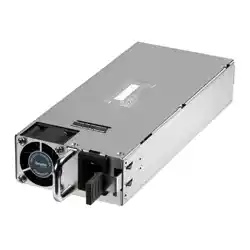
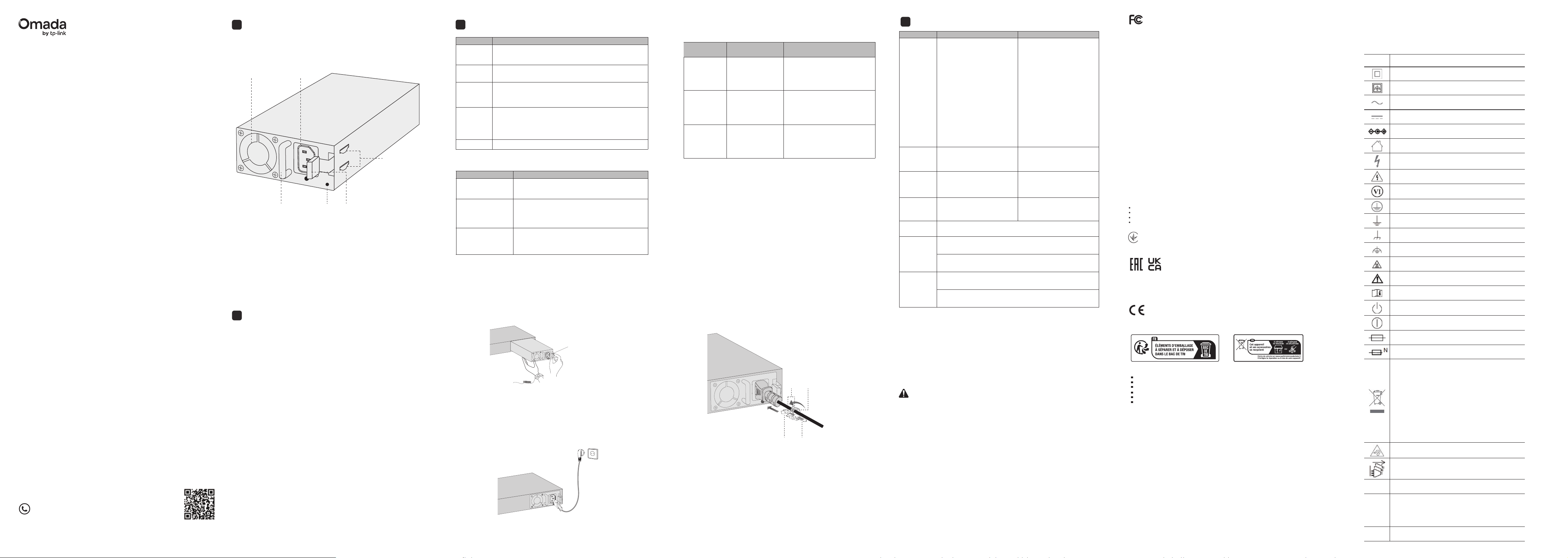
PSM500-AC/PSM900-AC is an AC-input power supply module. It can convert the
input voltage to 53.5V with a maximum output power of 500W/900W.
AC Power Cord Connector
Release Handle
LED
Power Supply Module Handle
Fan
Retainer Clips
LED and Feature Explanation
2
LED Status Description
The module may not be supplying power due to
abnormal events or serious faults in the circuit (e.g.,
over/undervoltage, overcurrent, short circuit, or low
input voltage).
Yellow
Flashing
The module is supplying power, but abnormal alarm
events (high temperature/high power/high current/abnor-
mal fan) occur.
The power supply module is o or faulty.
Feature Description
Protection Function
Redundant Backup
Hot Swappable
Supports dual power modules combining in parallel
to implement 1+1 redundancy for uninterruptible
power supply.
Includes overvoltage, undervoltage, short circuit,
overcurrent, and overheating protection.
In a 1+1 redundant power system, the module can be
inserted or removed without shutting down the
switch.
O
Yellow
On
Green
Flashing
Green On
The module is on but not supplying power to the device.
The module is on and either supplying power to the device or
in backup mode.
When the power supply module reverts to the protected state, its recovery
features are as follows:
Protection
Function
Protective Action Recovery Characteristics
Note:
When the power supply module is locked or auto-retries continually, you can
try the following steps to restore the device:
1. Disconnect the power cord from the external power supply system.
2. Disconnect the power cord from the power supply module.
3. Remove the power supply module from the device.
4. Reinsert the power supply module.
5. Connect the power cord to the power supply module again.
6. Reconnect the other end of the power cord to the external supply system.
Output
overvoltage &
undervoltage
protection
Power supply
module locked and
supply cut
The power supply module can
not recover automatically.
Output short
circuit
protection
Power supply
module locked and
supply cut
The power supply module reverts
to the auto-retry mode. It can
recover automatically when the
fault is cleared.
Output
overcurrent
protection
Power supply
module locked and
supply cut
The power supply module
reverts to the auto-retry mode. It
can recover automatically when
the fault is cleared.
3
Specications
Installation
4
Safety Information
To prevent damage or injury, only trained personnel may operate the product.
Please observe the following:
• When installing or removing a power supply module, please wear an
ESD-preventive wrist strap, and make sure that it has good skin contact
and is well grounded.
• Before installing a power supply module, ensure the external power supply
system voltage matches the module’s rated input, and the module’s output
voltage matches the device requirements to avoid damage.
• Do not touch any exposed wires or terminals to avoid bodily injury.
• Do not place the power module in a humid place or allow the liquid into the
power supply module.
• If there is a failure inside the module, please contact service personnel
instead of opening the housing of the module.
• The equipment must not be used in locations where children are likely to be
present.
• Plug the product into a wall outlet with an earthing connection through the
power supply cord.
• The socket-outlet must be installed near the equipment and shall be easily
accessible.
Install the Power Supply Module
1. Wear an ESD-preventive wrist strap and make sure that it has good skin
contact and is well grounded.
2. With one hand, press the Release Handle on the right side of the power
supply module inward. With the other hand, support the bottom of the
module and gently slide it into the slot along the guide rail.
3. Release the Release Handle to x the power supply module in place.
Connect the Power Cord and Connect to the Ground
1. Plug the female connector of the provided power cord into the power socket
of the device and the male connector into a power outlet. Meanwhile, keep it
connected to the ground via the power supply.
2. Conrm that the power supply LED is green.
Release Handle
Remove the Power Supply Module
If you need to remove the power supply module, please follow these steps:
1. Turn o the power at its source.
2. Wear an ESD-preventive wrist strap and make sure that it has good skin contact
and is well grounded.
3. Remove the power cord from the external power supply system and the power
module.
4. With one hand, press the Release Handle on the right side of the power supply
module inward. With the other hand, slide the power supply out.
Caution:
When installing or removing a power supply module, pay attention to the
following:
• Make sure that the power supply module is set correctly when installing.
• Do not force the power supply module into the slot. If resistance is
encountered or positions of the power supply module appear larger during
installation, you must rst remove the module and then reinstall the module.
• If the Retainer Clips cannot spring up and the power module is blocked, the
module may be improperly installed. Please check carefully.
• To better protect the power supply module during removal, it is recommend-
ed that you package it in an antistatic bag.
(Optional) Install the Locking Latch
The power supply module is designed with a locking latch slot.
If you need to secure the power cable with the included locking latch, please
follow these steps:
1. Wear an ESD-preventive wrist strap and make sure that it has good skin
contact and is well grounded.
2. Remove the instruction label on the locking latch slot.
3. Secure the strap in the power cord retainer by inserting it into the slot near
the power supply module to hold the clamp in place.
4. Slide the clamp around the AC power cord and press the tabs on the clamp
towards each other to secure the AC power cord.
5. Adjust the distance of the locking latch using clips to ensure the cable
is securely fastened.
Strap End Strip
Tabs Clamp
PSM550-AC PSM900-AC
Power Input
電源輸入
100V–240V~ 50/60Hz
8A
Output
Voltage
輸出電壓
Output
Current
輸出電流
Output
Power
輸出功率
500W (Maximum)
500 W(最大值)
900W (Maximum)
900 W(最大值)
Sea level to 3000 m
海平面至 3000 公尺
Altitude
高度
Temperature
溫度
Humidity
濕度
Operation: 0°C to 45°C (32 to 113°F)
操作:0°C 至 45°C(
32°F至113°F)
Storage: -40°C to 70°C (-40°F to 158°F)
儲存:-40°C 至 70°C
Operation: 10% to 90% RH Non-condensing
操作:10% 至 90% RH 不凝結
Storage: 5% to 90% RH Non-condensing
儲存:5% 至 90% RH 不凝結
100-120V (inclusive) ~
50/60Hz 12A (for locations
using low
For voltage, see specica-
tions for specic countries/re-
gions or refer to the user
guide)
120 (exclusive)-240V ~
50/60Hz 10A (for other
locations)
100-120V(含)~ 50/60Hz
12A(對於使用低壓的地區,
請參閱特定國家/地區的規格
或參閱使用者指南)
120(不含)-240V ~
50/60Hz 10A(其他地區)
53.5VDC 53.5VDC
9.35A (Maximum)
9.35A(
最大值)
16.5A (Maximum)
16.5A
(最大值)