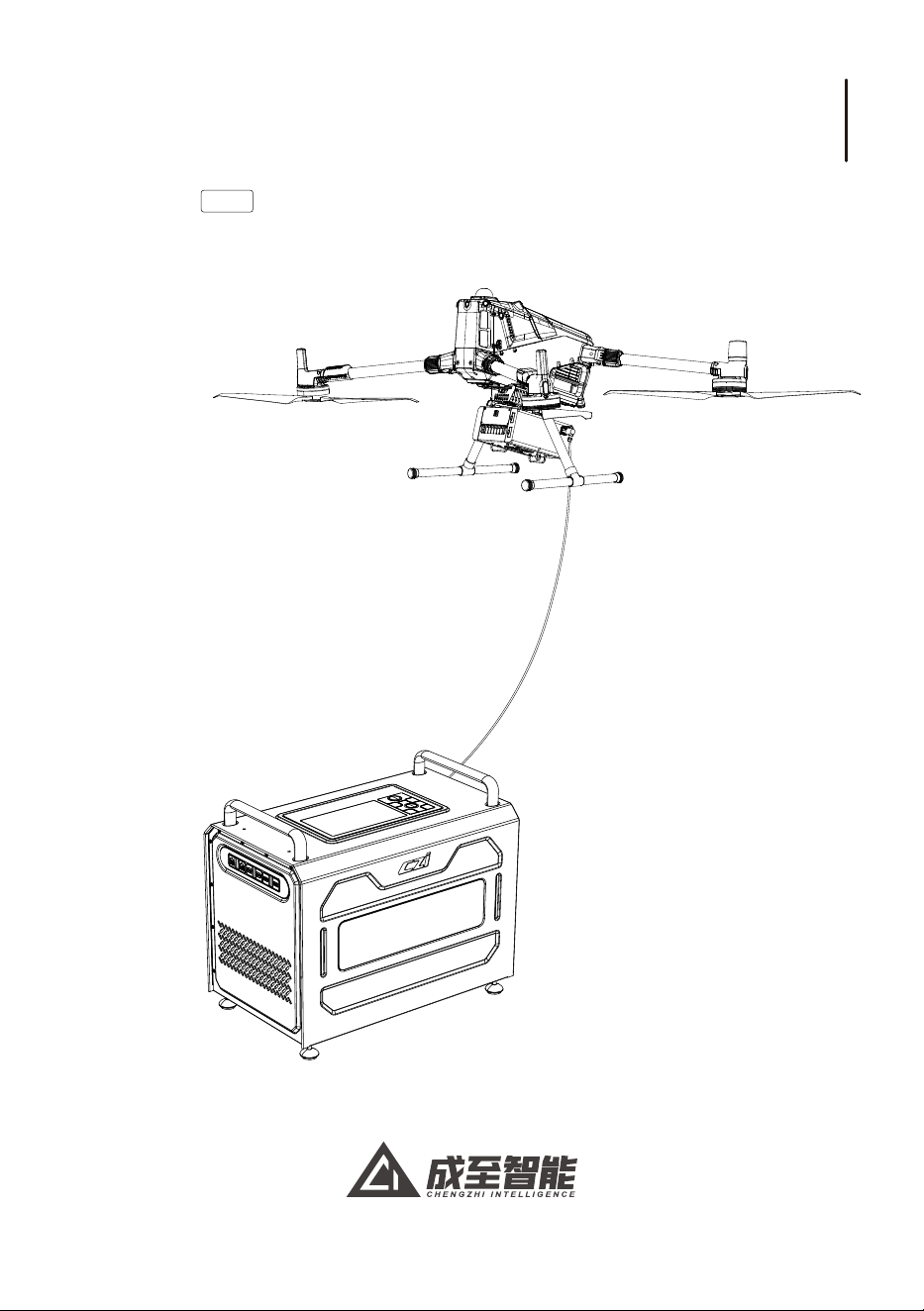
TK4
系留供电系统
用户手册
User Manual
V1.0
2026.1


一、免责声明与警告 .............................................................................................. 01
二、TK4供电系统介绍 ........................................................................................... 02
三、设备参数......................................................................................................... 03
四、TK4供电系统安装和使用教程 ......................................................................... 04
五、产品使用介绍.................................................................................................. 12
六、使用后拆卸及回收TK4_地面端的拆卸:(地面端拆卸之前确保关闭高压)............ 19
七、附录1:经测试可兼容的发电设备示例............................................................... 22
八、产品官网链接.................................................................................................. 23
目录
1.Disclaimers and Warnings ............................................................................. 24
2.Overview......................................................................................................... 25
3.Specifications................................................................................................. 26
4.Installation and Operation Guide.................................................................. 28
5.Product Operation Instructions .................................................................... 36
6.Post-Use Procedure........................................................................................ 43
7.Appendix 1: Examples of Tested Compatible Generators ............................ 46
8.Official Website Links ...................................................................................... 47
Contents
TK4系留供电系统用户手册 TK4 Tethered Power System User Manual
电子文档阅读/下载
一、免责声明与警告
注意:本文档内容会持续更新优化,将通过电子档形式更新,一切内容以最新版本说明书为依据!用户
可扫描二维码阅读或下载最新版《TK4系留供电系统使用说明》
感谢您购买成至智能产品。本文所提及的内容关系到您的安全以及合法权益与责任。使用本产品之
前,请仔细阅读本文以确保已对产品进行正确的设置。不遵循和不按照本文的说明与警告来操作可能会
给您和周围的人带来伤害,损坏本产品或者其他周围的物品。本文档及所有相关的文档最终解释权归成
至智能所有。如有更新,恕不另行通知。 请访问广州成至智能机器科技有限公司官方网站以获取最新的
产品信息。
①使用前需要详细阅读说明书,确保TK4线缆被正确连接到无人机上。为防止旋转的桨叶打到TK4线缆,
需要将系留线缆上的挂钩正确地固定在天空端上的挂环上。
②在使用无人机时,当地面端线缆出现余线5米的标识时,请勿继续增加飞行高度;请勿以手动方式拉扯
线缆;如未按本提示操作,导致线缆绷断、设备坠毁、人身伤害或第三方损失,相关责任由操作者承担。
③请确保市电输入交流电的范围在176-264V内,本设备建议使用市电,市电条件无法满足时,建议选购逆
变器配套使用。避免供电不良造成的设备故障。
④如没有市电的条件下,设备只支持变频发电机作为外部发电设备。为避免使用过程中的功率变化过大,
导致的过载或欠载问题,请勿使用定频发电机为设备发电。
经本公司技术部门严格测试,确认以下型号发电机与本产品完全兼容,性能稳定可靠。推荐型号:神驰
SC8000iF变频发电机(详情请看附录1)。
推荐兼容的发电机设备仅供参考,TK4系留供电系统 不对第三方设备的质量、安全性及后续固件更新
承担责任。使用中如遇冲突,建议优先联系对应设备制造商。
⑤为保证安全,使用市电时,需保证市电插头有输出4500W的能力。需保证市电的电压与电流稳定可靠。
⑥无人机飞行过程中,不能断开市电的插头或者关闭设备。
⑦接电顺序:连接电源线并接通市电后,再打开紧急断电开关。
⑧使用 此设备 时,无人机系留电池电量不要低于 60%。
⑨无人机起飞之前,开启“紧急断电开关”,否则无人机将无法起飞。
⑩为防止意外发生,禁止在雨雪、霜雾、雷霆、冰雹、沙尘和强风等环境下使用。
⑪为防止意外发生,任何时候都不可徒手触摸TK4线缆(高压800V)。如必须带电接触TK4电缆,请务必带
好绝缘手套(绝缘要求大于800V)。
⑫使用此设备时,在高压塔附近及设备没有接市电时,请务必接上外置接地钉。
⑬为确保设备散热效能,须保持通风口及进风口畅通,避免风道阻塞引发内部热量积累导致
的过热风险。
安全注意事项
TK4系留供电系统用户手册
1
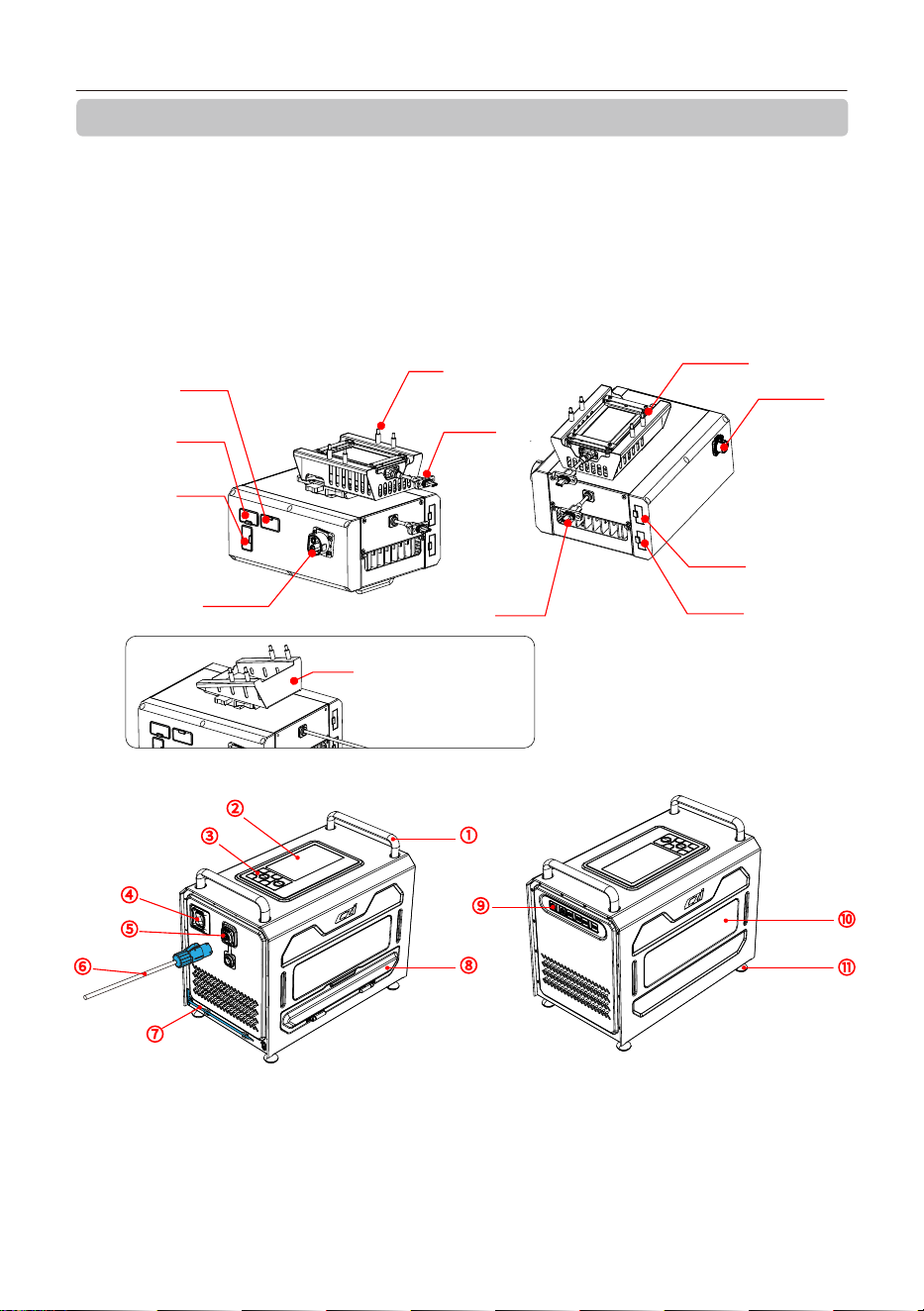
二、TK4供电系统介绍
成至TK4地面系留供电系统是一款高性能系留解决方案,专为无人机长时间作业设计。它通过高效
电力转换技术,将交流电转化为高压直流电,通过线缆传输至天空端,天空端通过降压技术将高压电
力转化为无人机系留电池可直接使用的低压电力,为无人机动力系统和任务载荷提供充足电力供应。
系统采用轻量化设计,配备高清显示屏和备用电源,适应严苛环境,具备优异的防护性能。适用于应急
照明、安防监控等场景,确保无人机实现全天候不间断飞行作业,满足复杂任务需求。
TK4系留供电系统用户手册
2
⑩
⑪
⑨
②
③
①
⑧
④
⑤
⑥
⑦
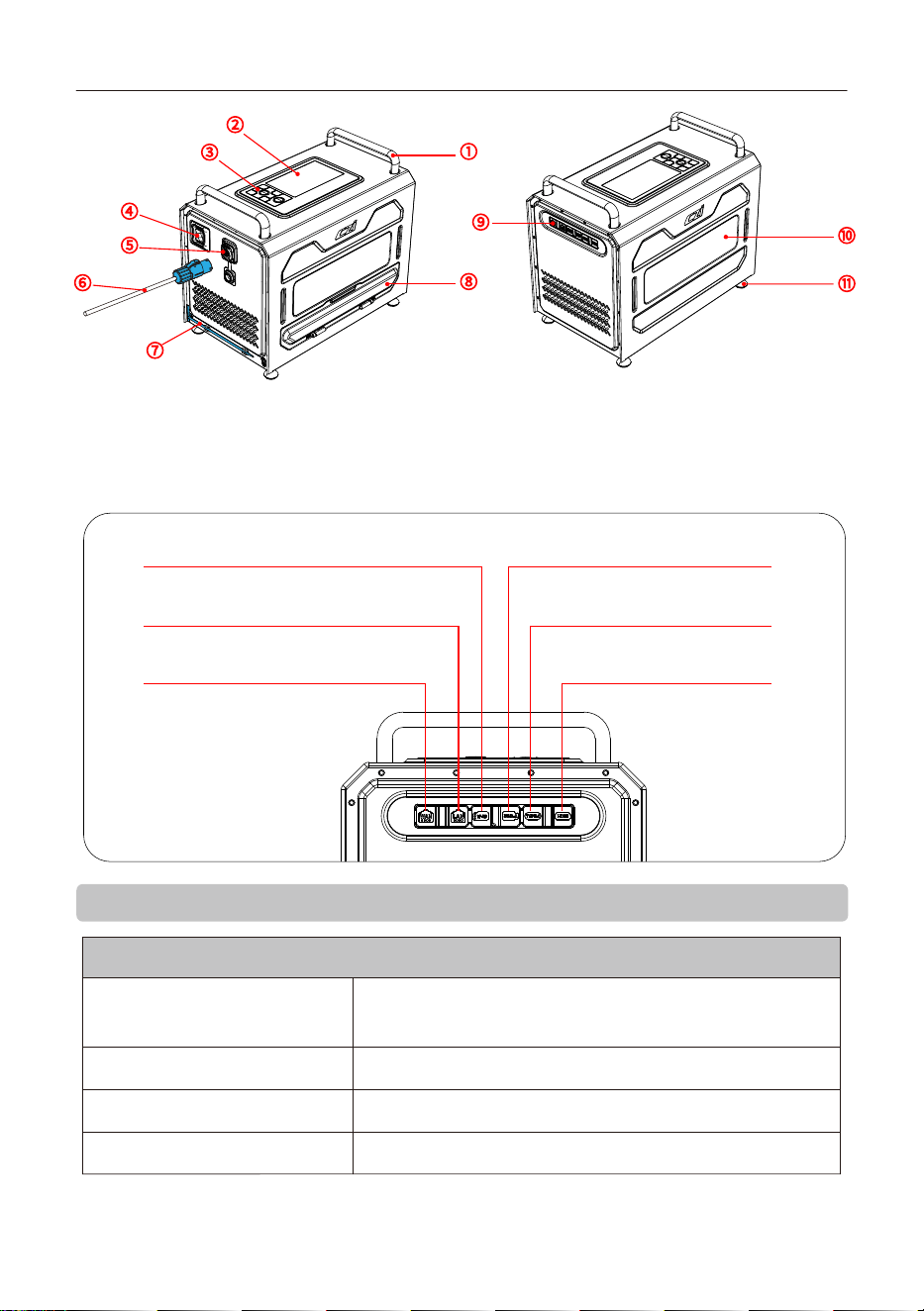
①扶手
②显示屏
③按键板
④紧急断电开关
⑤电源输入口
⑥电源线
⑦接地针
⑧导线盖
⑨外部设备连接
⑩观察视窗
⑪脚座
矩阵灯接口 2
(50V , MAX 800W)
矩阵灯接口 1
(50V , MAX 800W)
系留电池接口
妙算3TYPE C
4-M3*18
航空插头
E-Port V2同轴线
云台相机接口
妙算接口
云台灯接口
(50V , MAX 300W)
B安装支架(不含妙算模块)
本产品适配有两款安装支架,(分别为A支架,B支架)请参阅4.3节“天空端安装”相关内容介绍。
A安装支架(含妙算模块)
TK4系留供电系统用户手册
3
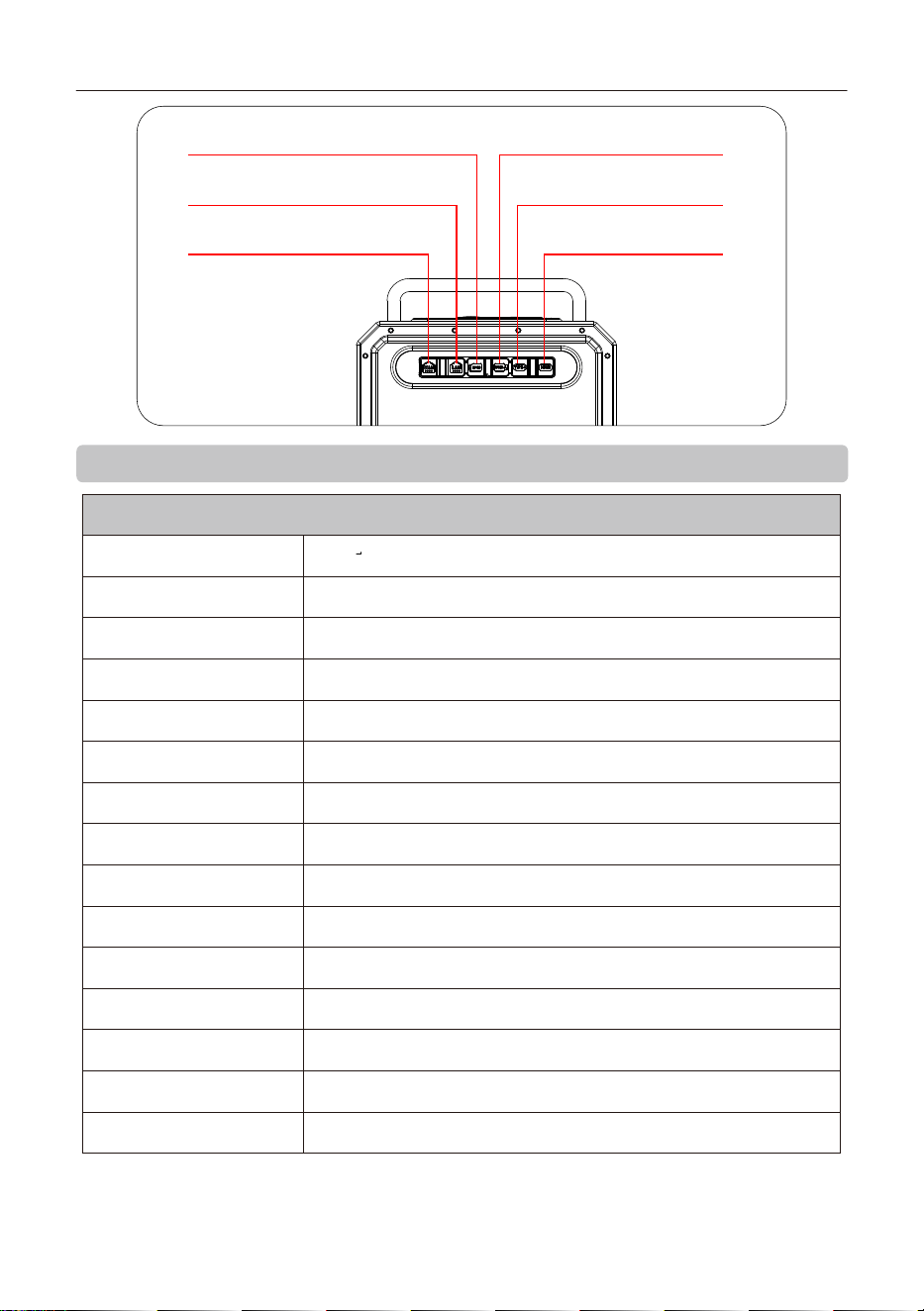
HDMI口:支持1080P高清视频实时回传
USB-A口:提供USB主机功能,支持USB
通讯/RTK线连接口
TF-SD口:数据传输与备份:可以将设备中的数据转移
到TF卡上进行备份
LAN口:连接外部电脑设备,通过局域网上传视频
源至本地设备
TYPE-C口:可为任务设备(如执法记录仪)进
行快速供电,可输出65W快充供电,支持PD3.0
WAN口:连接外部网络,通过网络可更新系统
或上传视频源
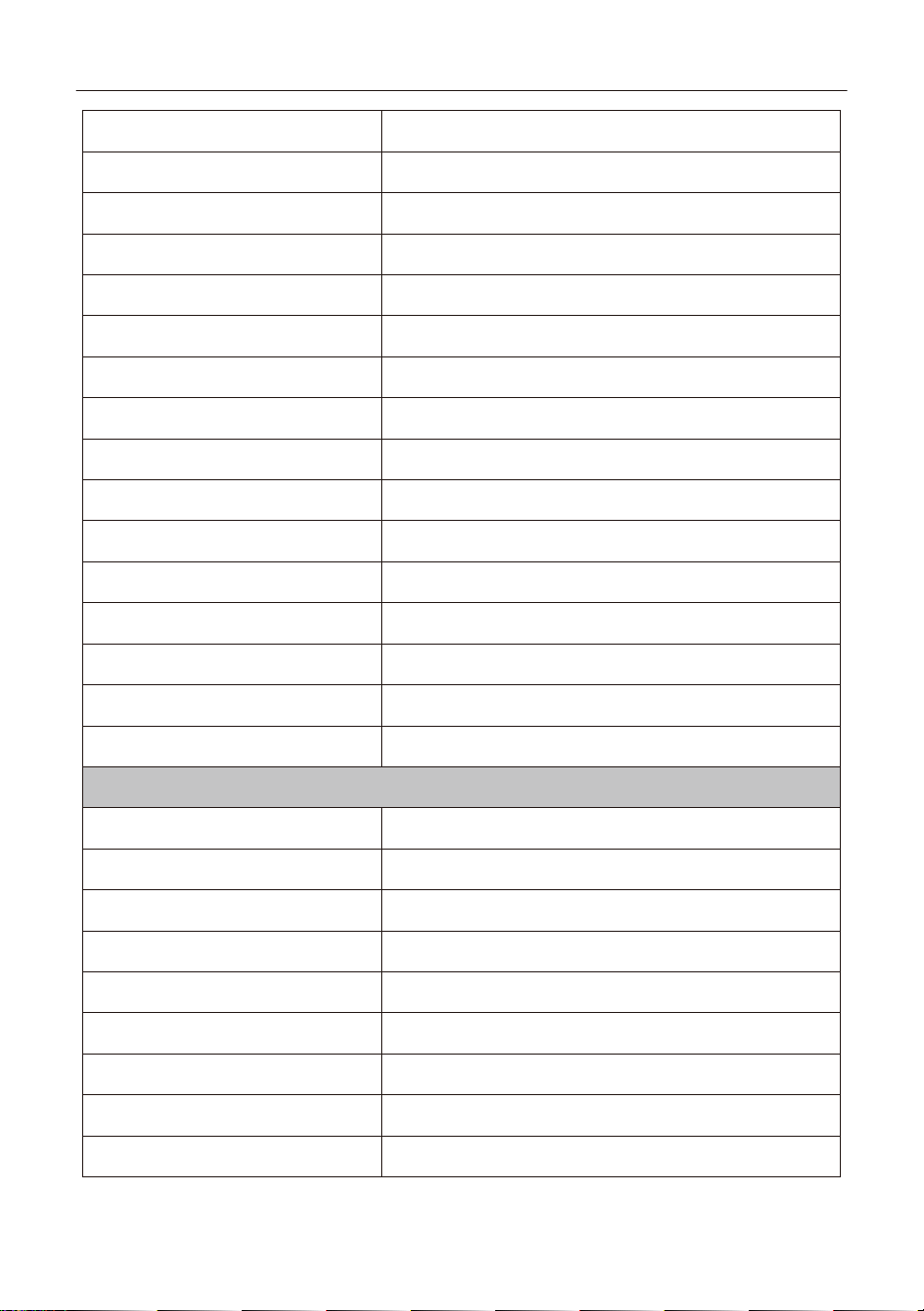
三、设备参数
TK4地面端规格参数
尺寸 413*345*254mm(包含提手与脚架)
重量 ≤13kg(含110m线缆)
输入电压 176-264VAC (50/60HZ)
输出电压 800v
输出功率 4.5kw
通信带宽 100M
TYPE-C快充接口 最大功率65W,支持PD3.0/QC协议
屏幕尺寸 5.5寸
屏幕分辨率 1920*1080
备用电池 2600mAh,22.2v
扬声器功率 10W
线缆长度 110m,最高可选200m
线缆耐压 DC 2000V
线缆载流 5A
线缆重量 1.25kg/100m
TK4系留供电系统用户手册
4
线缆抗拉强度 >50kg
视频输出接口 HDMI、网口
使用海拔高度 4000m
工作环境温度 -20℃~50℃(无太阳辐射)
存储温度 -40℃~+70℃
尺寸 ≤190*155*86mm(主体尺寸,不含插头等突出部分)
重量 ≤2kg(主体重量,不含固定件)
输出功率 额定4000w
输出电压 50v
视频输入接口 Type-c
防护等级 IP55
使用海拔高度
存储温度
工作环境温度
-40℃~+70℃
-20℃~50℃(无太阳辐射)
4000m
TK4天空端规格参数
四、TK4供电系统安装和使用教程
4.1 ML200-M400 矩阵灯的安装教程(如购买时无灯,请跳过4.1)
4.1.1 使用说明
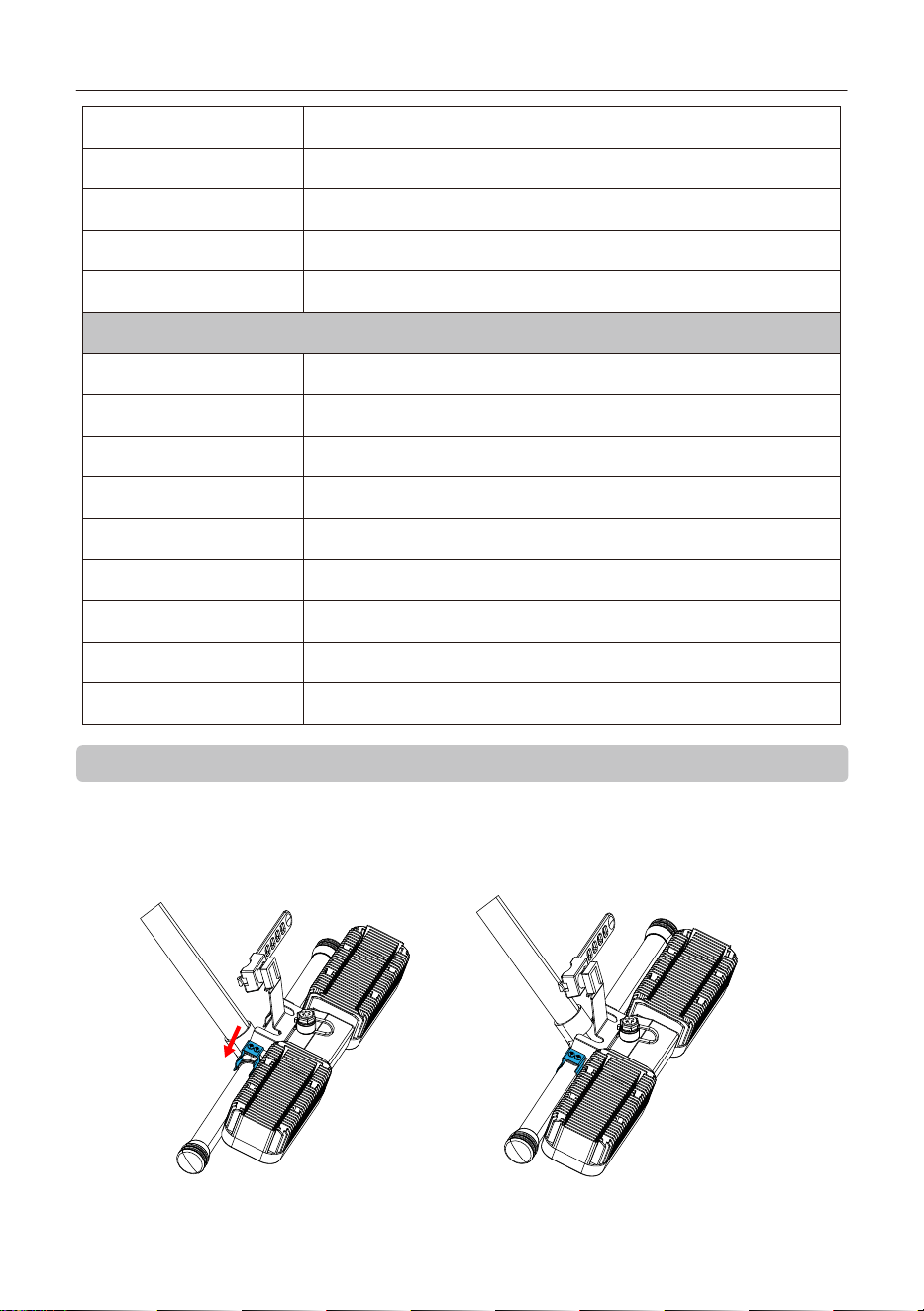
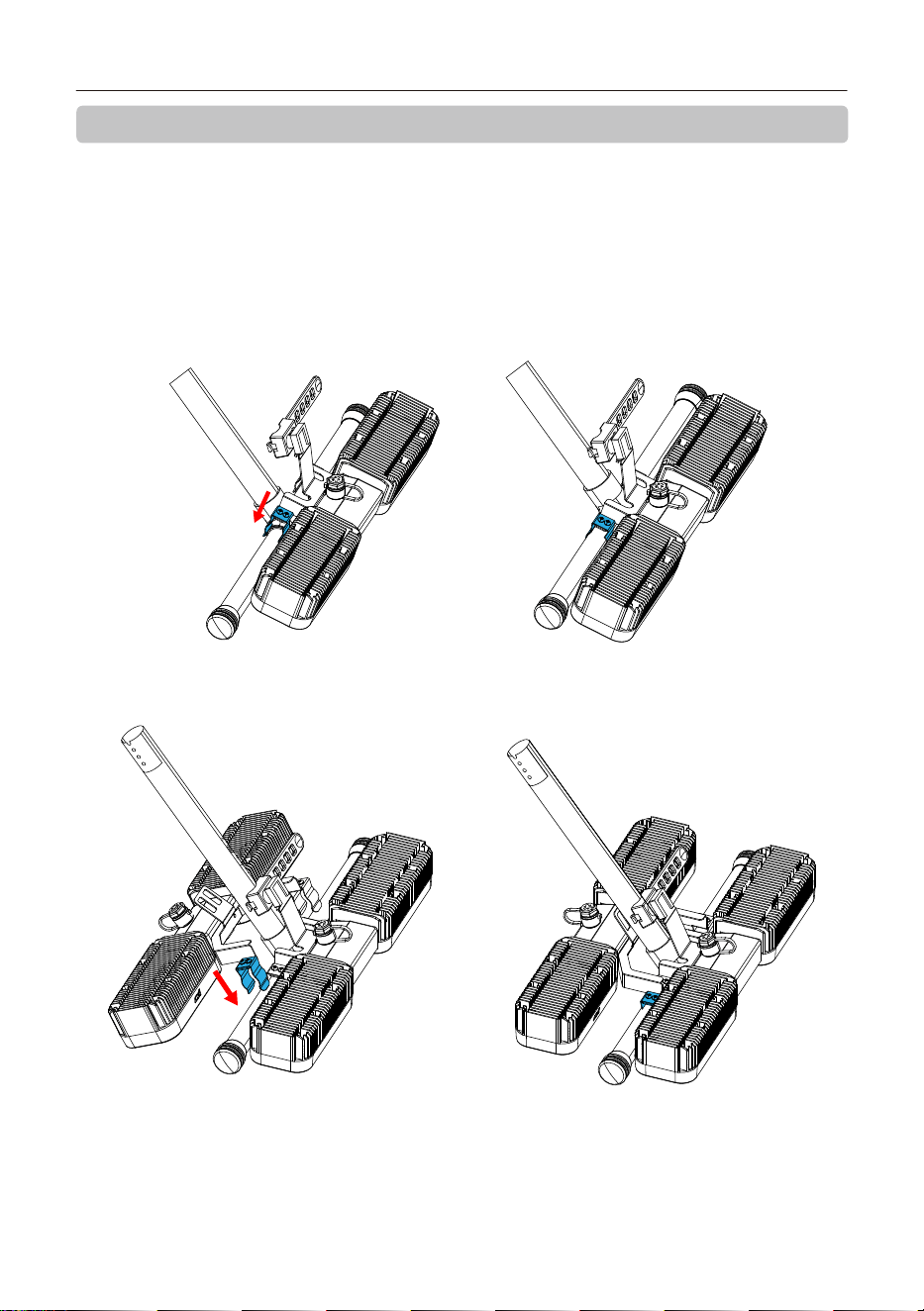
1)将照明灯主机的管夹开口对准支撑脚横杆(如下图左),再将主机向箭头方向压,直到管夹将支撑脚横
杆夹紧(如下图右);
TK4系留供电系统用户手册
5
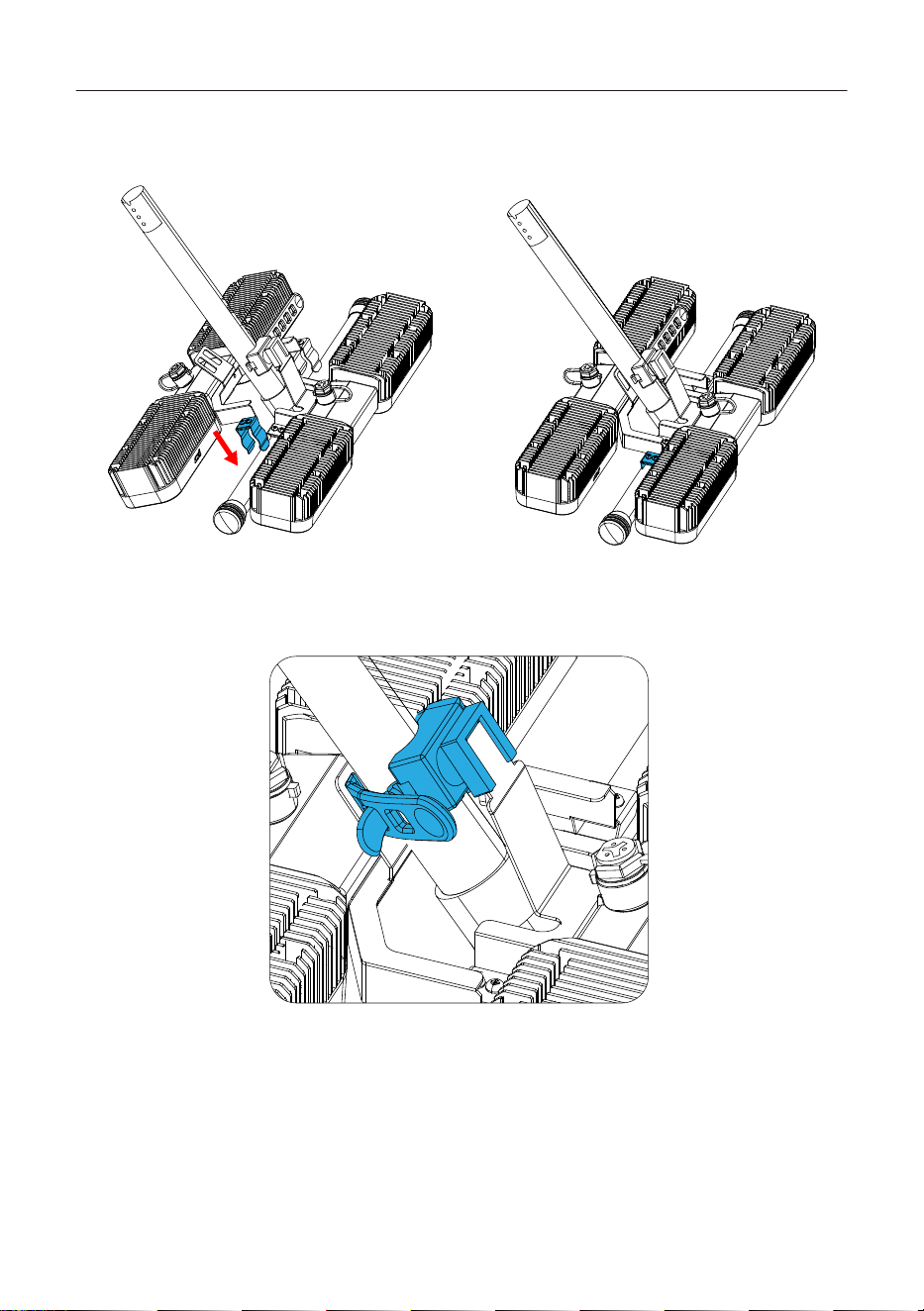
2)将照明灯副机的管夹开口对准支撑脚横杆(如下图左),然后将副机向箭头方向压,直到管夹将支撑脚
横杆夹紧(如下图右);
3)将橡胶绑带穿过副机的连接臂,拉紧橡胶绑带并扣在绑带卡扣上,如下图;
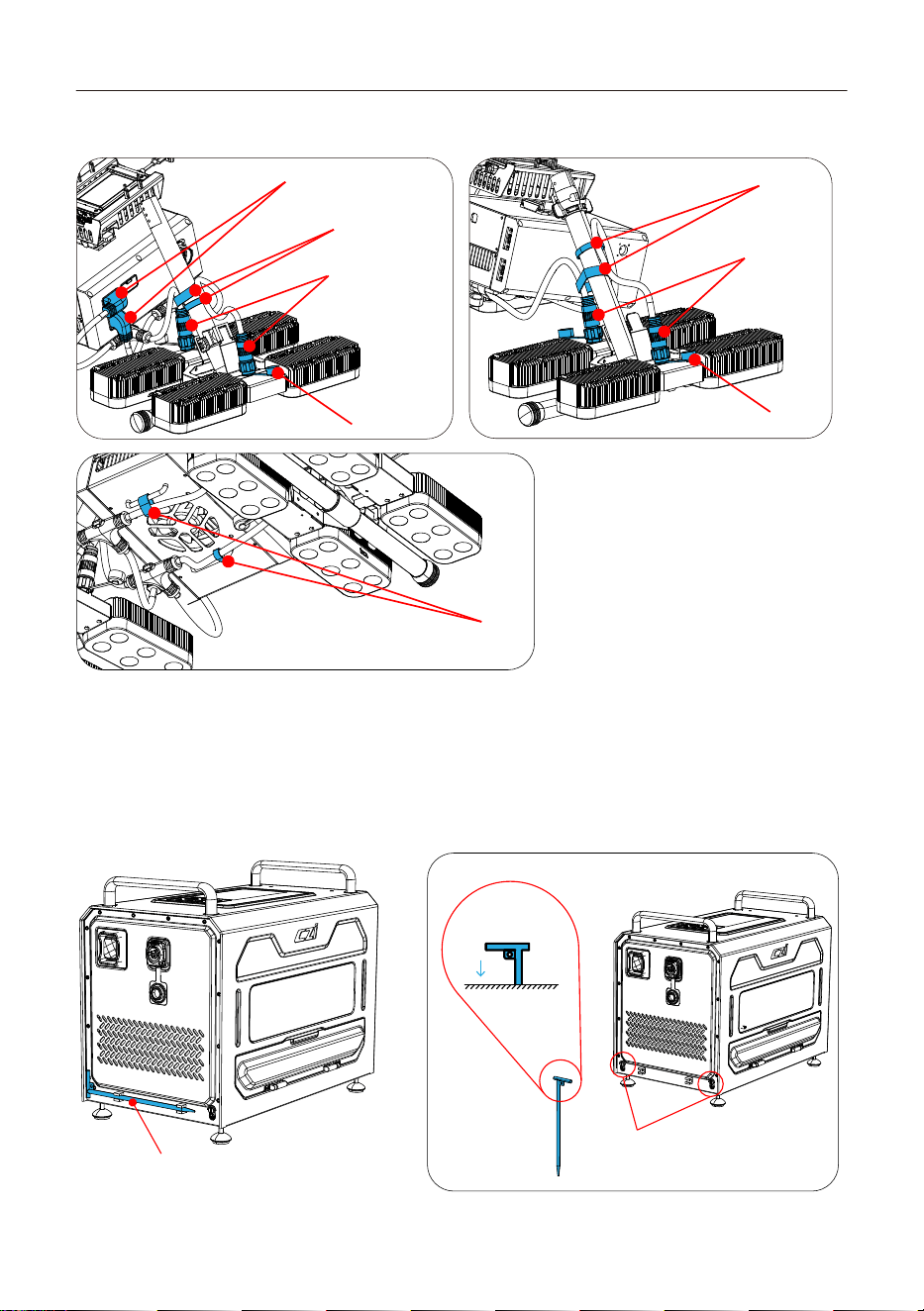
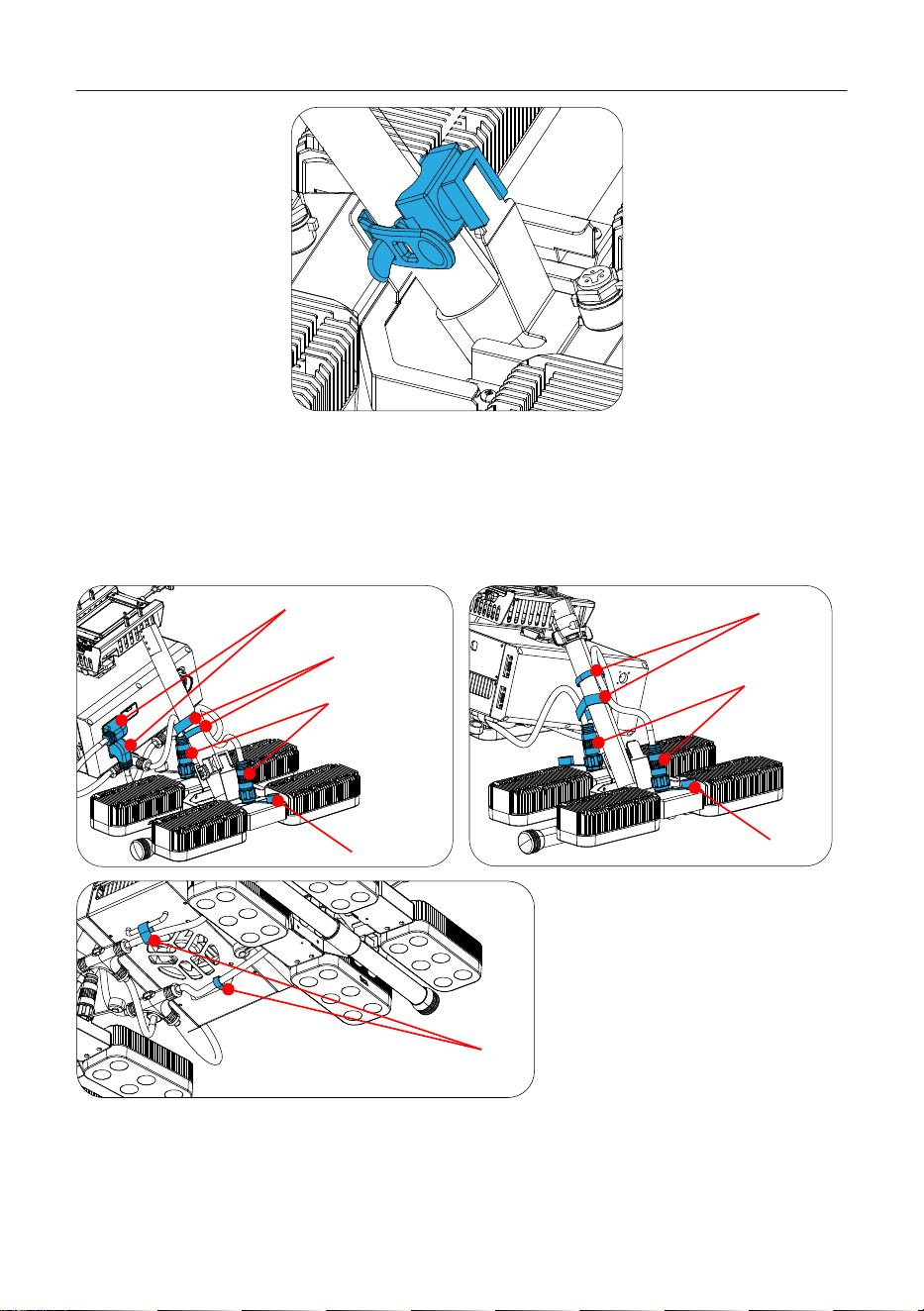
4) 拿出产品配置的电缆,逐一把端部的插头插入对应的插座内。
①依次插上两个天空端插头;
②拧开灯体上的插头防水盖再接线;
③依次插上灯体上的插头,并将插头上的螺母顺时针拧紧在插座上;
TK4系留供电系统用户手册
6
④将电缆按下图方式排布在两个支撑竖管上,用电缆自带的魔术贴将线缆固定,完成安装,如下图。
①
④
③
②
④
③
②
④
4.1.2 控制
上电后,系留地面端面板可控制开关灯。
4.2 TK4 地面端的安装教程
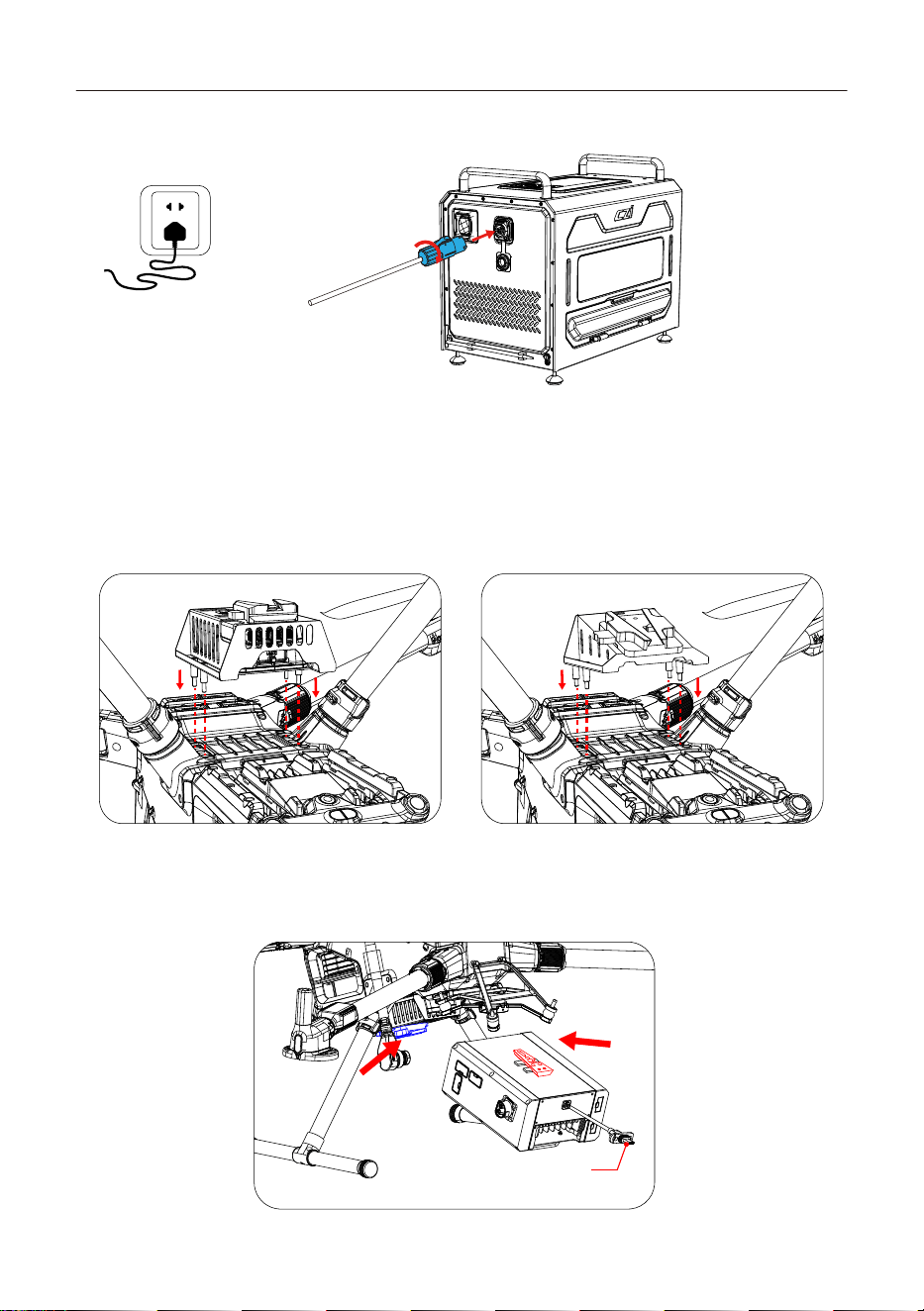
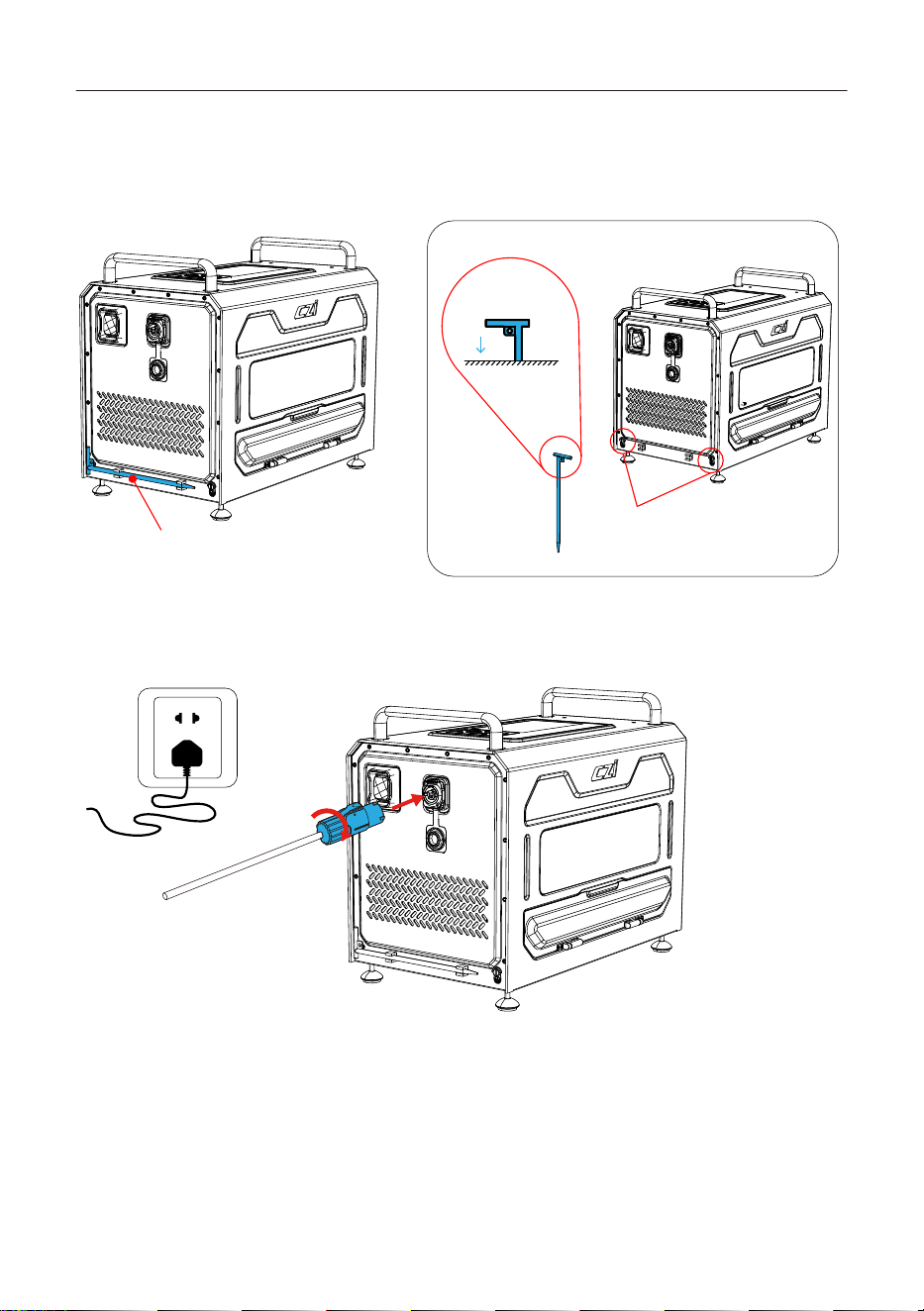
4.2.1 接地针安装:从附件包取出接地钉,将接地钉手拧螺丝松开,拧紧接地线,将插入地下20CM左右。
将接地钉从卡扣处取出
接地线安装孔
接地钉插入指示图
地底
TK4系留供电系统用户手册
7
4.2.2 地面端电源连接:打开电源座面盖,图示1处的接线柱与图示2的电源输入口对准后,将电源线插
入, 顺时针旋转,直到听到“咔”声,表示已完成。
①
②
4.3 TK4 天空端的安装教程
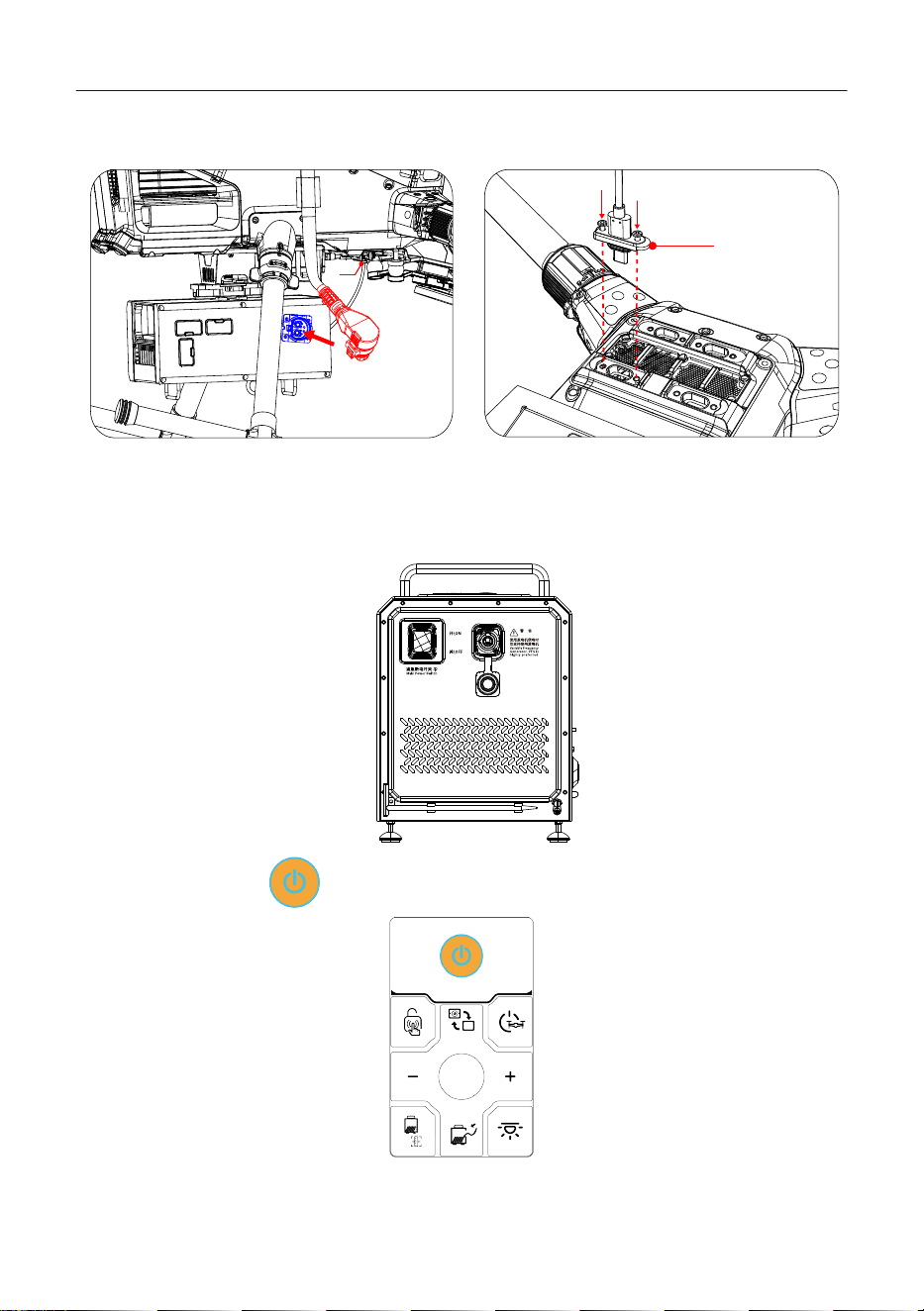
4.3.1 取出TK4天空端的安装支架(A支架已安装好妙算模块,B支架不含妙算模块),对准大疆无人机
M400底部的4个孔位,使用4个螺丝拧紧。
4.3.2 将TK4本体取出,将上面的Y型滑块对准支架底部的Y型快拆座,推进去直到听到“咔”声,表示已完
成。
A安装支架:推荐适配大疆单云台,适配的负载有;矩阵灯ML200-M400、云台灯GL310、云台相机C50N,中继CR20,大
疆云台相机H30T,大疆妙算3。
B安装支架:推荐适配大疆双云台,适配的负载有;矩阵灯ML200-M400、云台灯GL310、云台相机C50N,中继CR20,大
疆云台相机H30T。
C口
A安装支架(含妙算模块)示意图 B安装支架(不含妙算模块)示意图
TK4系留供电系统用户手册
8
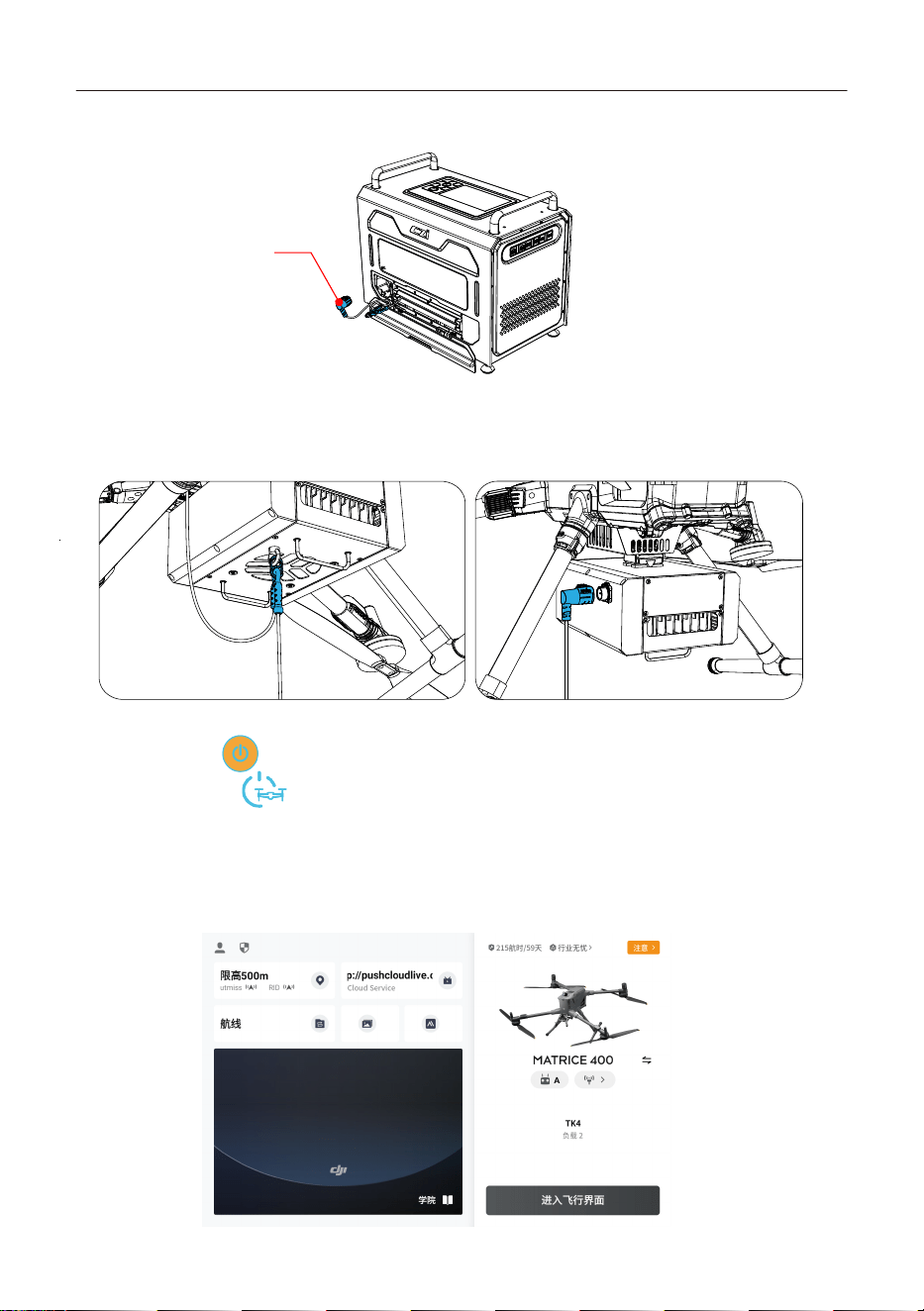
4.3.3 分别将无人机系留电池上的电源插头(红色)插到天空端的电源插座上(蓝色),然后天空端的C口
线安装在无人机的“E4”上,并用螺丝刀将C口旁的两颗螺丝锁住。
C口
4.4 TK4 地面端与天空端的连接教程
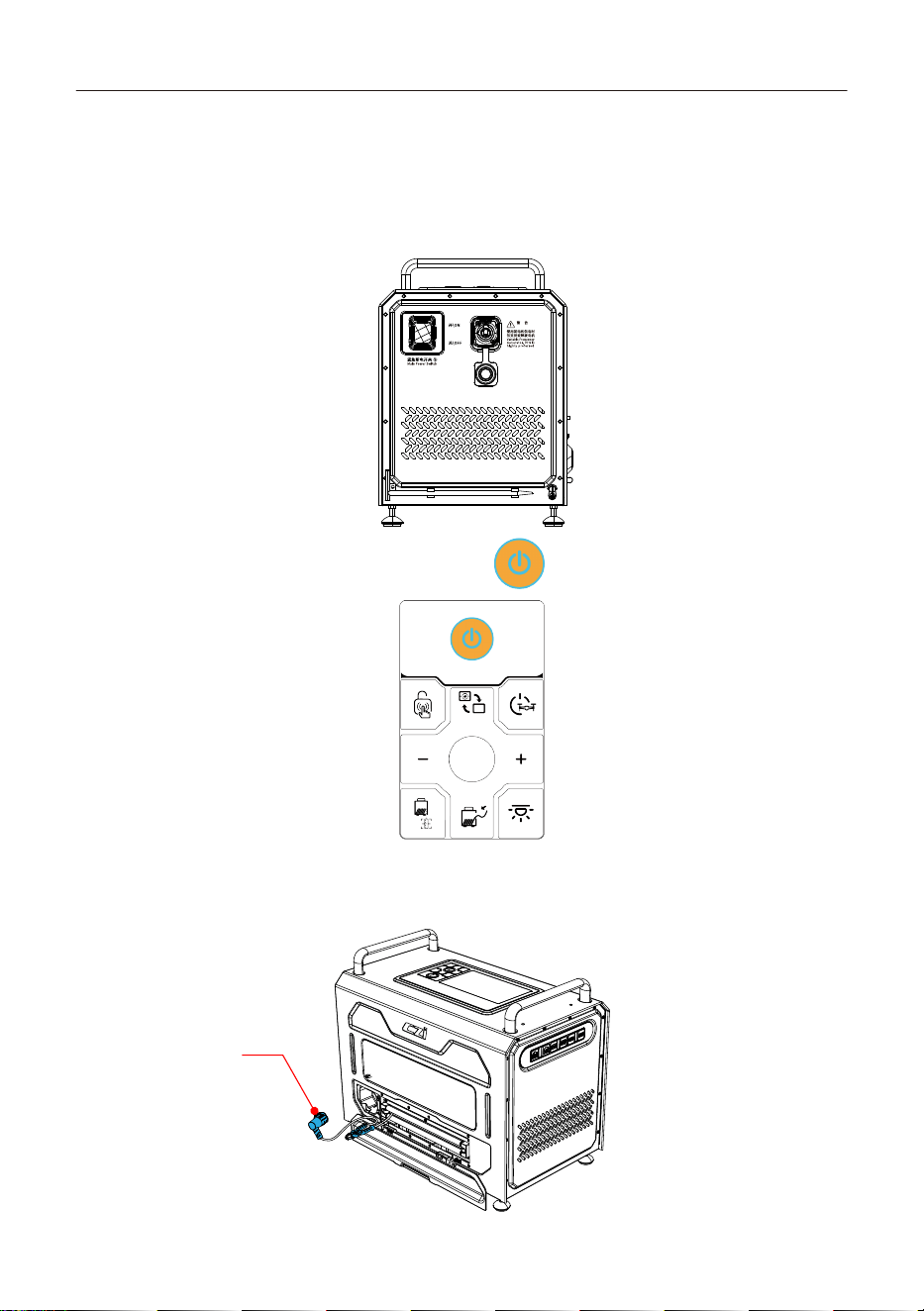
4.4.1 接电顺序:连接电源线并接通市电后,再打开紧急断电开关
打开地面端电源开关:开启地面端,开关打到“ON”。
WARNING
4.4.2 地面端开机:长按【 】电源按钮,设备开机。
C口
用螺丝刀锁住
E4
TK4系留供电系统用户手册
9
4.4.3 航空插头连接:打开导线盖,拉出系留线缆。*注意:拔出航空插头时按住银色金属按压位,航空插
头松动后再拔出插头。
银色金属按压位
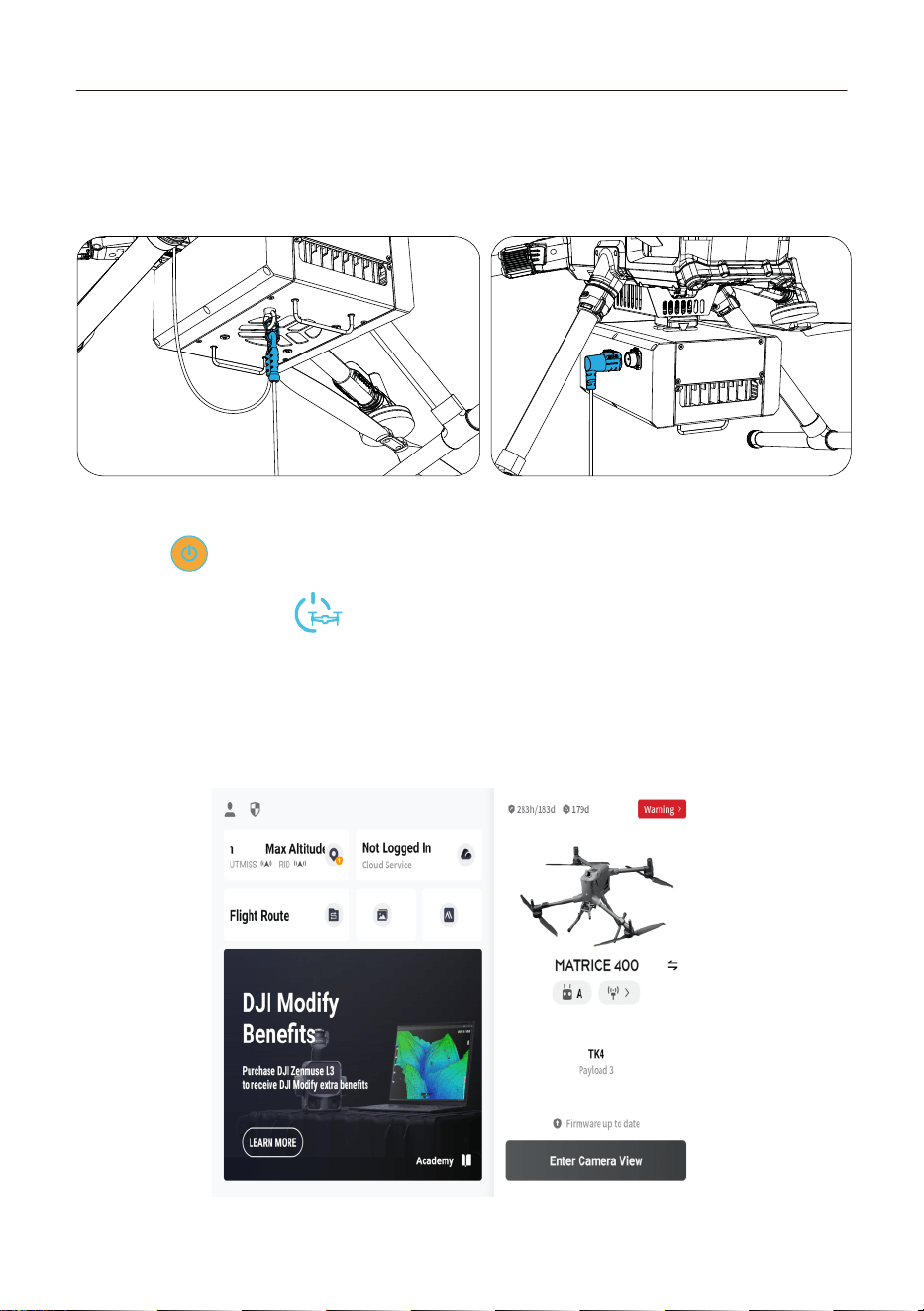
4.4.4 将系留线缆上的挂钩扣到天空端底部的系留线吊环上;然后打开天空端插头保护盖将地面端的航
空插头与天空端接头以正确的方向连接,直至听见“咔嗒”一声,即为连接成功 ;完成后检查是否连接牢
固,并检查地面端插头朝向是否正确。
4.4.5将无人机放置在合理作业场地,戴上静电手套。(详见安全使用事项)
打开系留电池的【 】按键,无人机进行自检,等待无人机完成自检。
4.4.6长按地面端的【 】按键,听到“开启高压”的声音,即打开高压输出。
4.5 遥控设置教程
4.5.1 打开遥控,进入飞行界面。
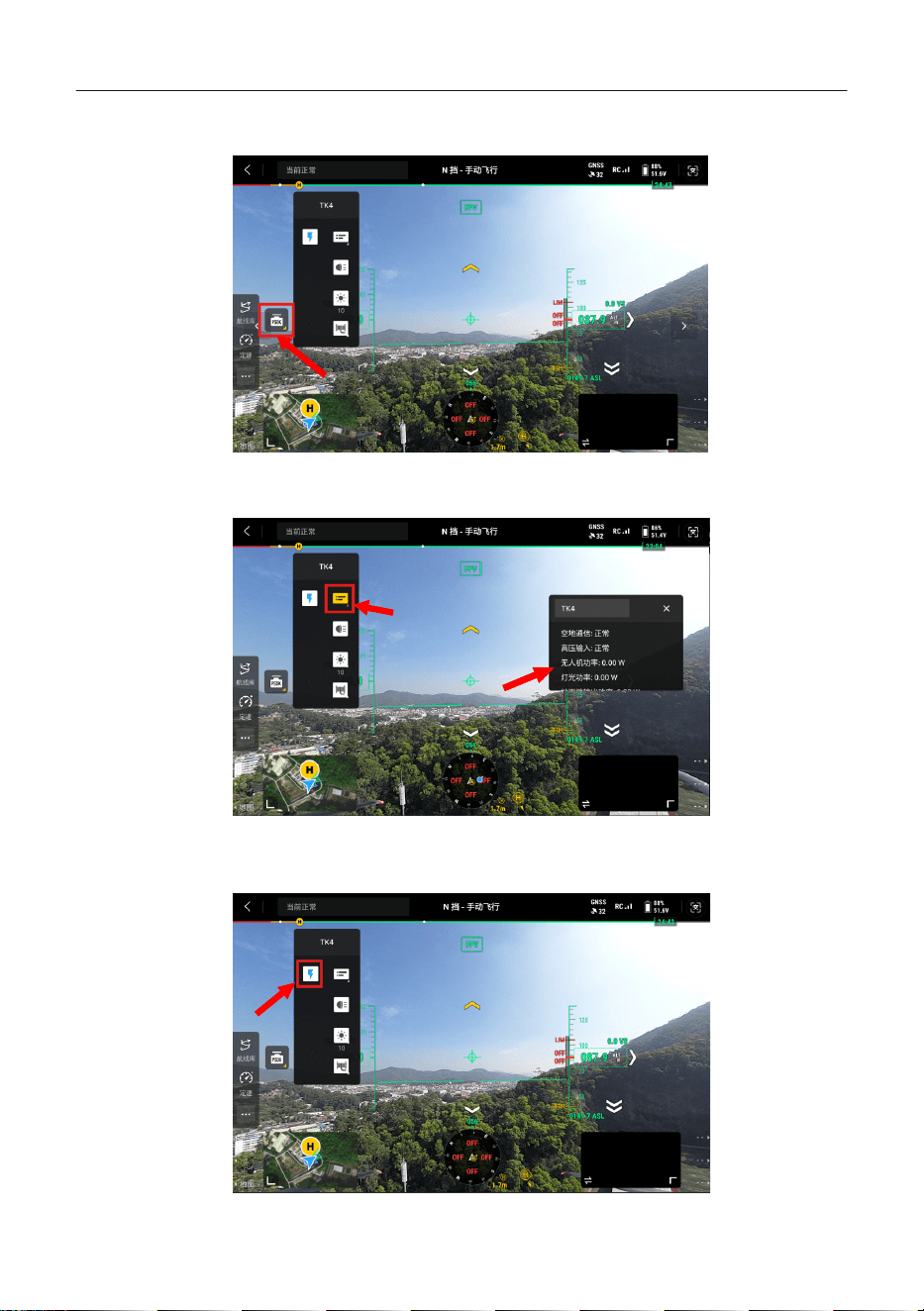
TK4系留供电系统用户手册
10
4.5.2 打开psdk栏,如下图所示。
4.5.3 点击浮窗开关,可以查看实时参数,如下图所示。
4.5.4 点击高压开关,可以控制地面端打开高压,如下图所示。
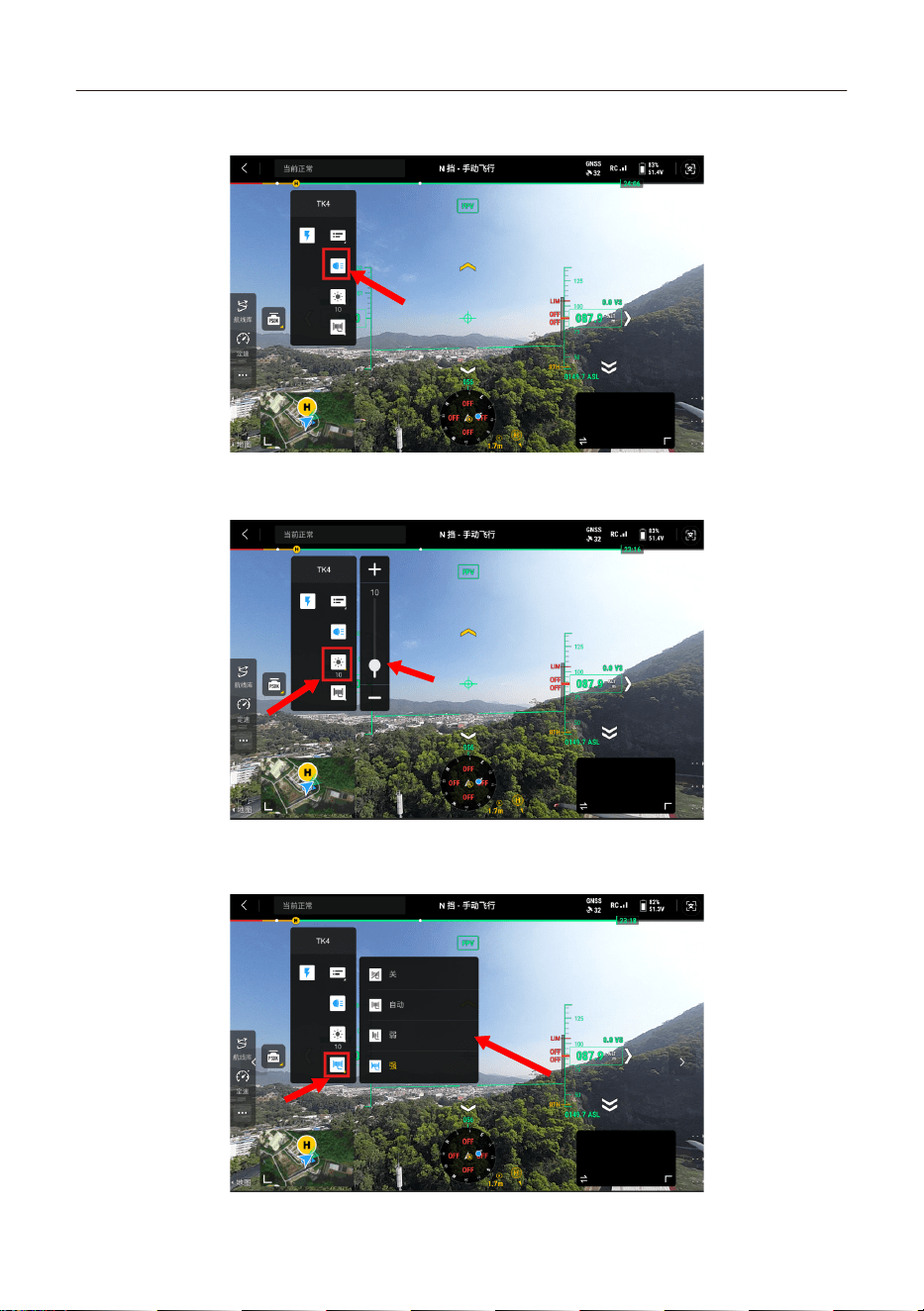
TK4系留供电系统用户手册
11
4.5.5 点击开灯按键,可控制矩阵灯开启,如下图所示。
4.5.6 点击亮度调节控件,可控制矩阵灯亮度,如下图所示。
4.5.7 点击收线控件,可控制地面端进行收线,如下图所示。
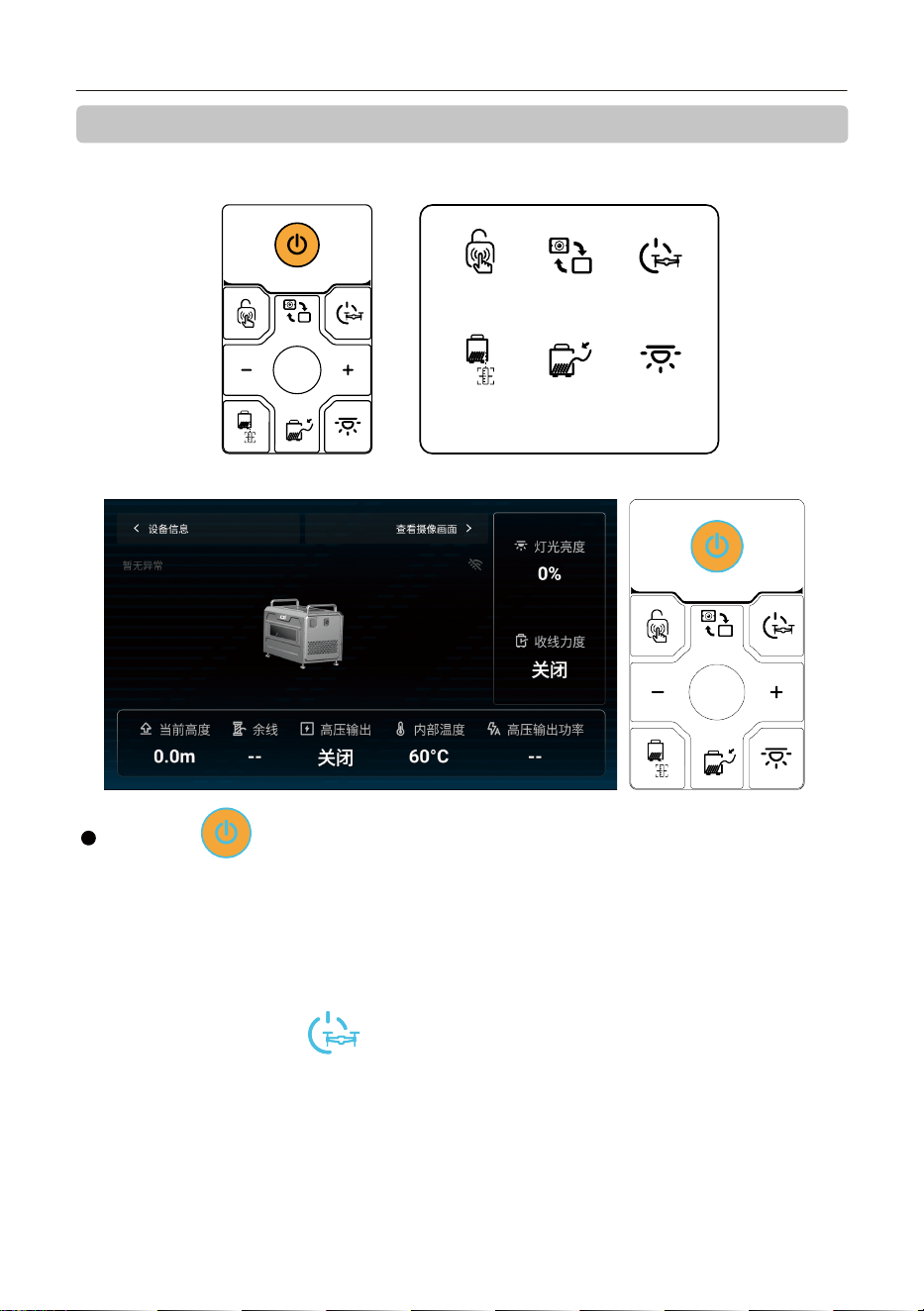
TK4系留供电系统用户手册
12
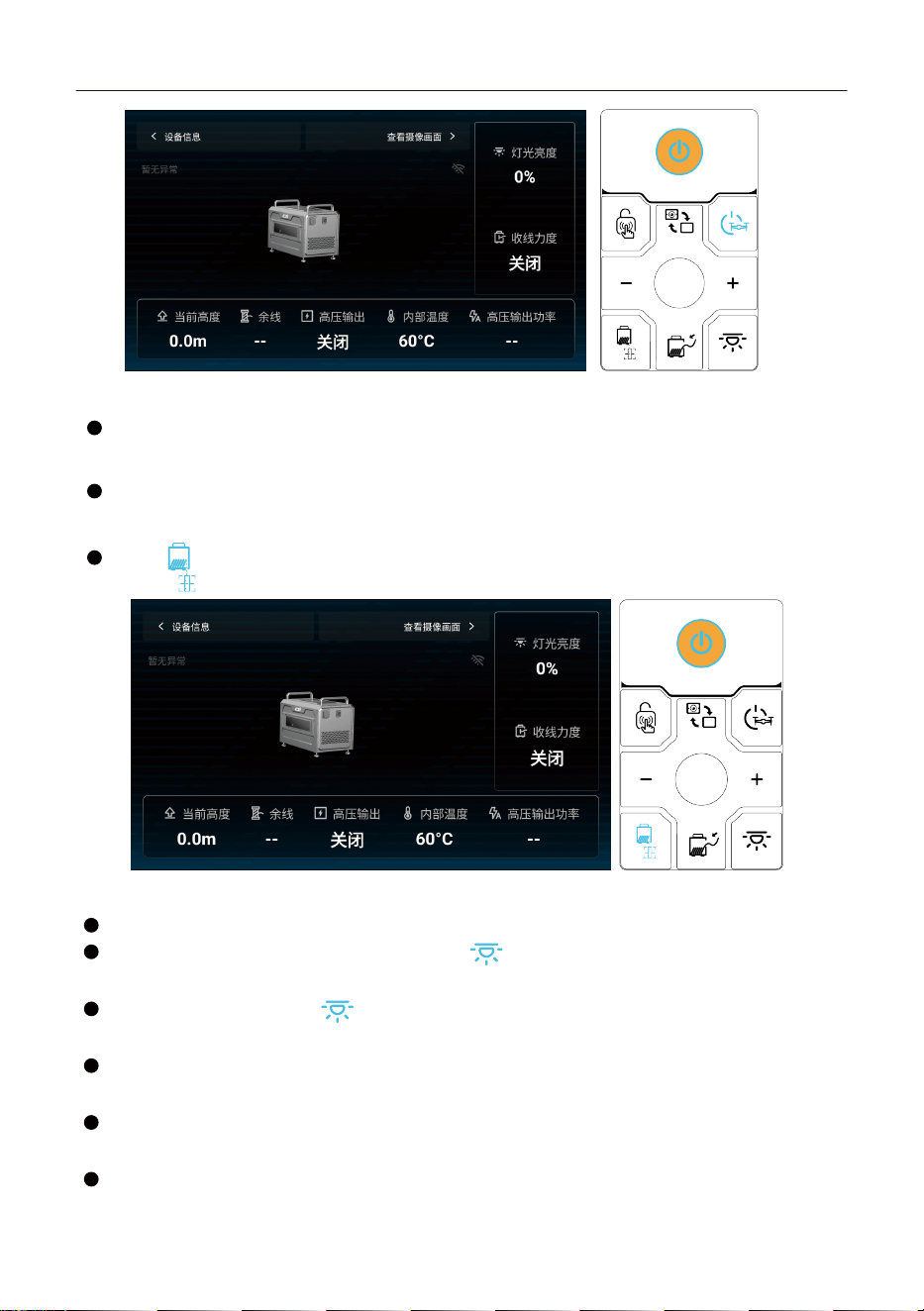
五、产品使用介绍
5.1 按键板
触控开关 屏幕切换 高压输出
余线检
测校准
收线强度 亮度调节
5.2 长按开/关机
关机状态下,长按3秒设备开机,按键由白色灯变为蓝色灯;
开机状态下,先短按1秒显示屏提示是否确认关机,3秒内再次按下代表确认关机,但此方式不适用于高
压开启情况。
开机状态下,长按3秒强制关机,此方法无视高压是否开启,无视飞机是否起飞,有安全隐患,仅作为紧急
情况使用。
电源按键【 】:
5.3 开启/关闭高压输出按键【 】:
长按3秒,按键白色灯变成蓝色灯,开始输出高压;
再次长按3秒,按键蓝色灯变成白色灯,停止输出高压;
TK4系留供电系统用户手册
13
5.4 起飞/降落
使用大疆遥控器控制飞机起飞/降落
5.5 设定高度
使用大疆遥控器调节飞机高度,由于线缆长度受限,飞行高度请勿超出100m
5.6 余线检测重置
长按【 】按键5秒,将余线复位。
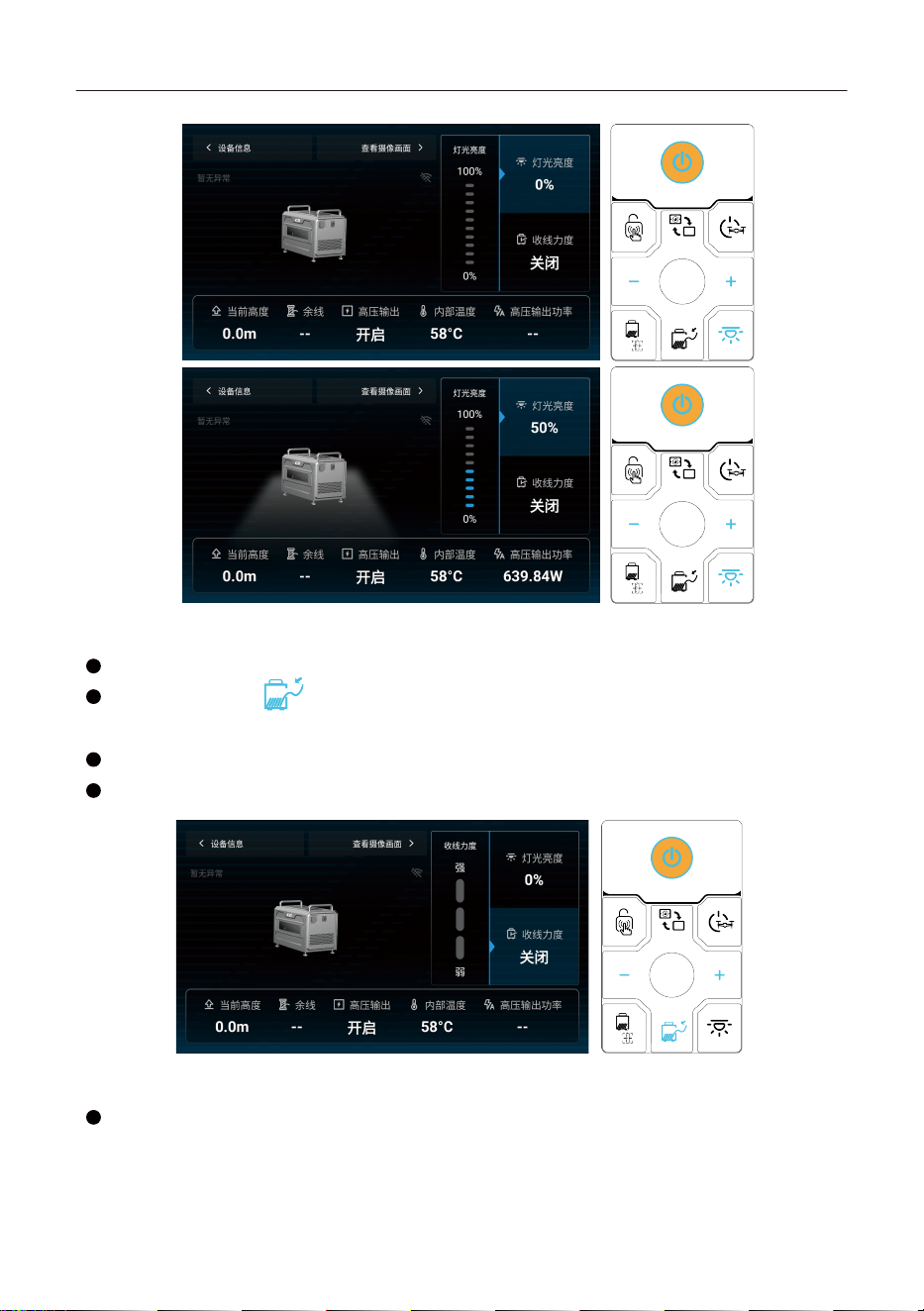
5.7 灯光亮度
可调节灯光亮度(刻度10%)最高值100%,最低值0
没起飞前灯光亮度默认为0,点击灯光亮度按键【 】,此按键及 +/- 两个按键变成亮蓝灯,按下
+/- 按键后,调节一次亮度±10%,最大亮度限制为10%
起飞后,点击灯光亮度按键【 】,此按键及 +/- 两个按键变成亮蓝灯,按下 +/- 按键后,调节一次
亮度±10%,亮度调节范围(0-100%)
自动开灯:无人机起飞,高度3米时,照明灯自动开启10%亮度,高度超过10米后,照明灯自动开到
100%。
自动关灯:无人机降落,高度降落到10米时,照明灯自动调整到10%亮度,高度降落到3米时,照明灯
自动关灯。
手动控制:无人机起飞后任何高度允许手动控制0-100%灯光亮度。
TK4系留供电系统用户手册
14
5.8 收线力度
可调节收线力度,挡位(关、自动、弱、中、强),开机默认【自动】挡位
点击收线强度按键【 】,按下此按键时,此按键及+/-两个按键变成亮蓝灯,+/-两个按键功能变
为按下后,调节一次收线强度
当处于自动挡位时,产品将根据无人机的状态自动调节收线力度,以保证系留线笔直拉伸。
弱挡位和中挡位、强挡位都是默认的力度。
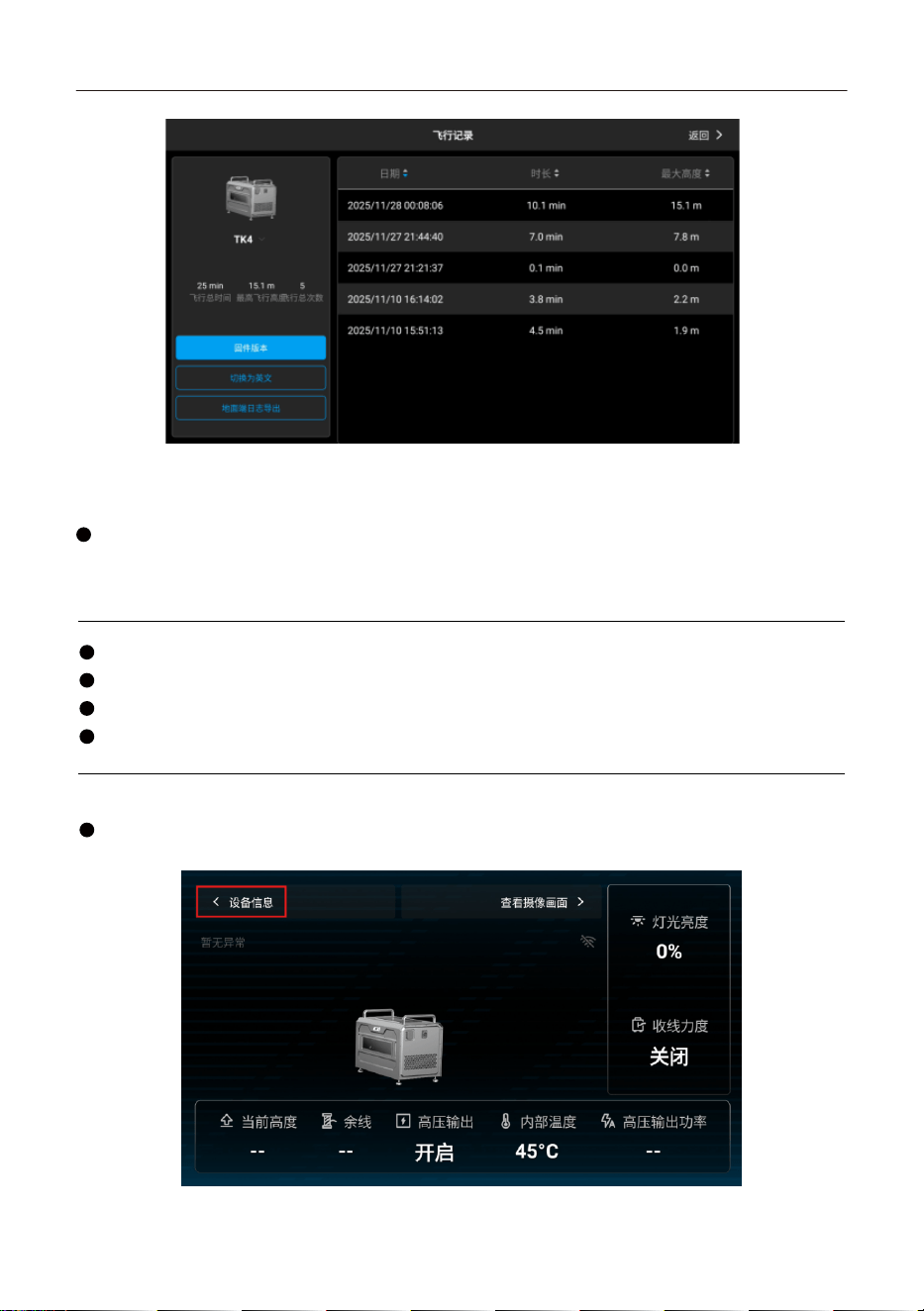
5.9 设备信息
飞行记录:可查看飞行日期、飞行时长、飞行最大高度,支持排序查询功能。
TK4系留供电系统用户手册
15
5.10 固件升级方法
首次使用或版本有更新则需要进行固件升级
离线固件包可从成至官方网站下载至外置存储设备(如TF卡、U盘)。运行czi GC App,进入设备信息
页面,点击固件版本,选择离线升级全部,可从外置存储设备中选择所需的固件包,进行一键升级。
注意事项
升级前确保无人机已与地面端连接,开启高压。
升级过程中请勿操作按键板或关闭设备电源。
升级时,务必使无人机远离人群及动物。
务必将固件更新至最新版本以保证飞行安全。
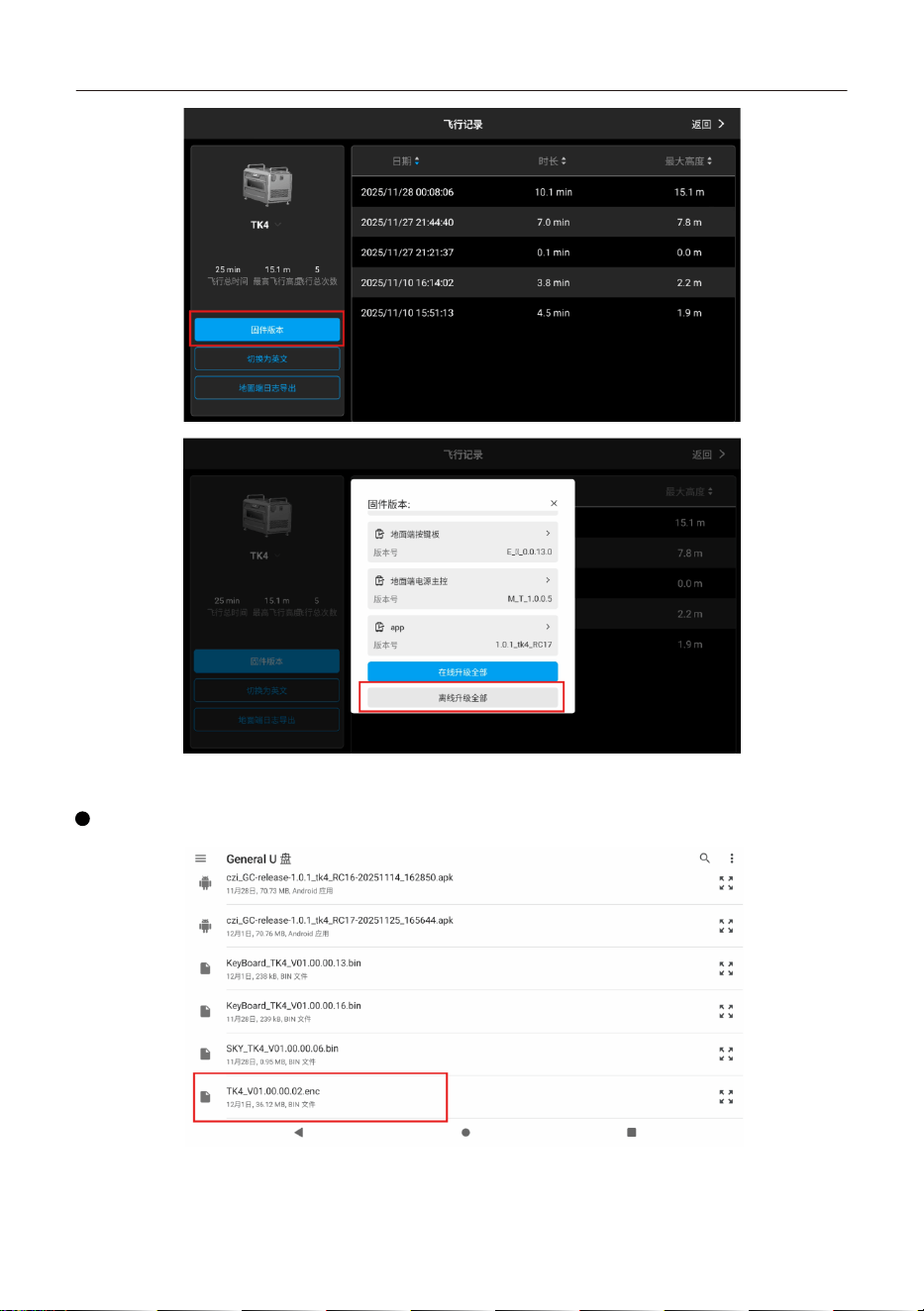
固件升级详细操作流程:
打开czi GC App后点击【设备信息】->【固件版本】,选择合适的升级方式。
TK4系留供电系统用户手册
16
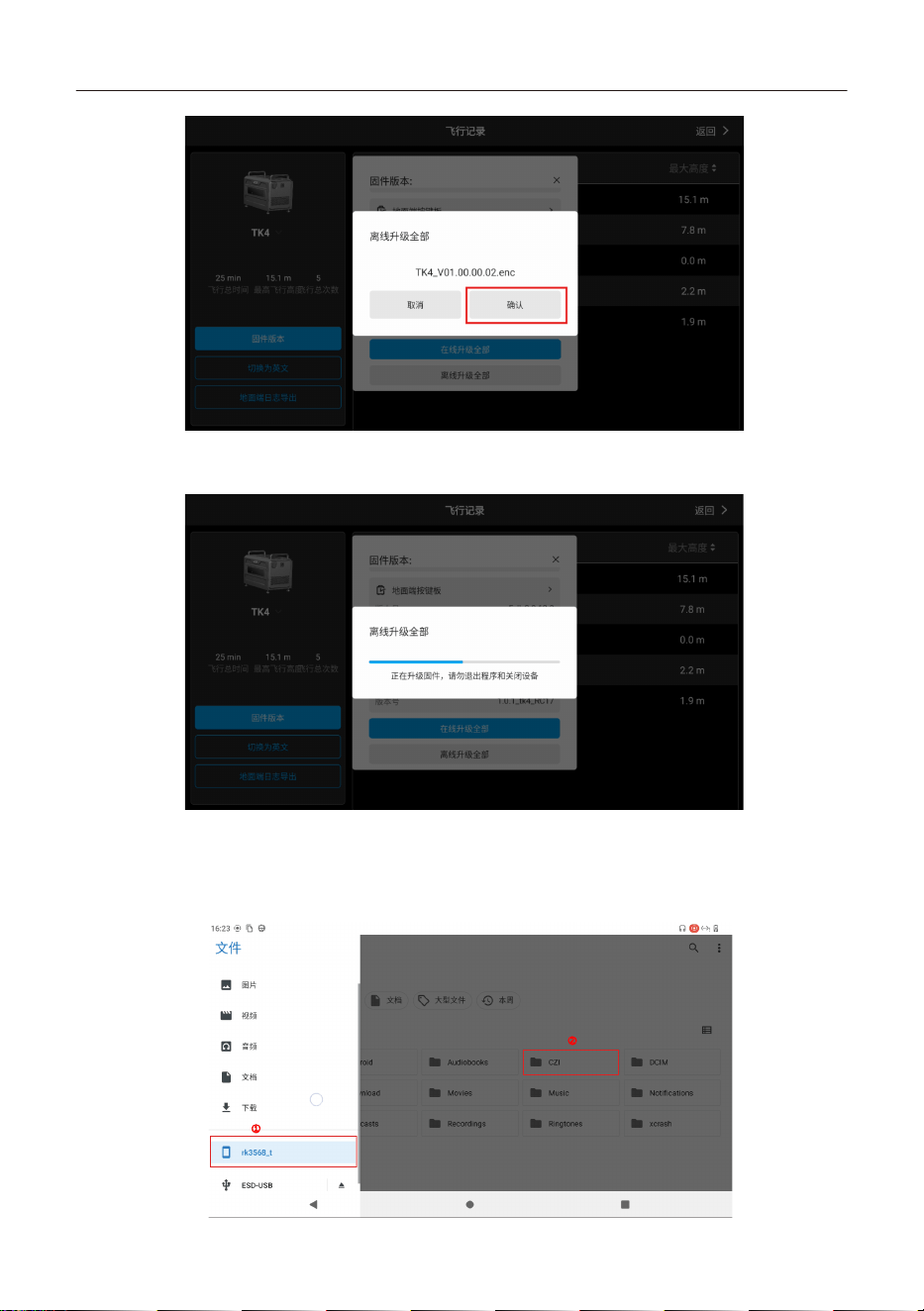
离线升级教程:
选择离线升级全部后,需要从U盘中选中下载的升级文件。
TK4系留供电系统用户手册
17
升级过程中需要5-10分钟,升级时请勿断电,等待升级完成。
5.11 日志导出方法
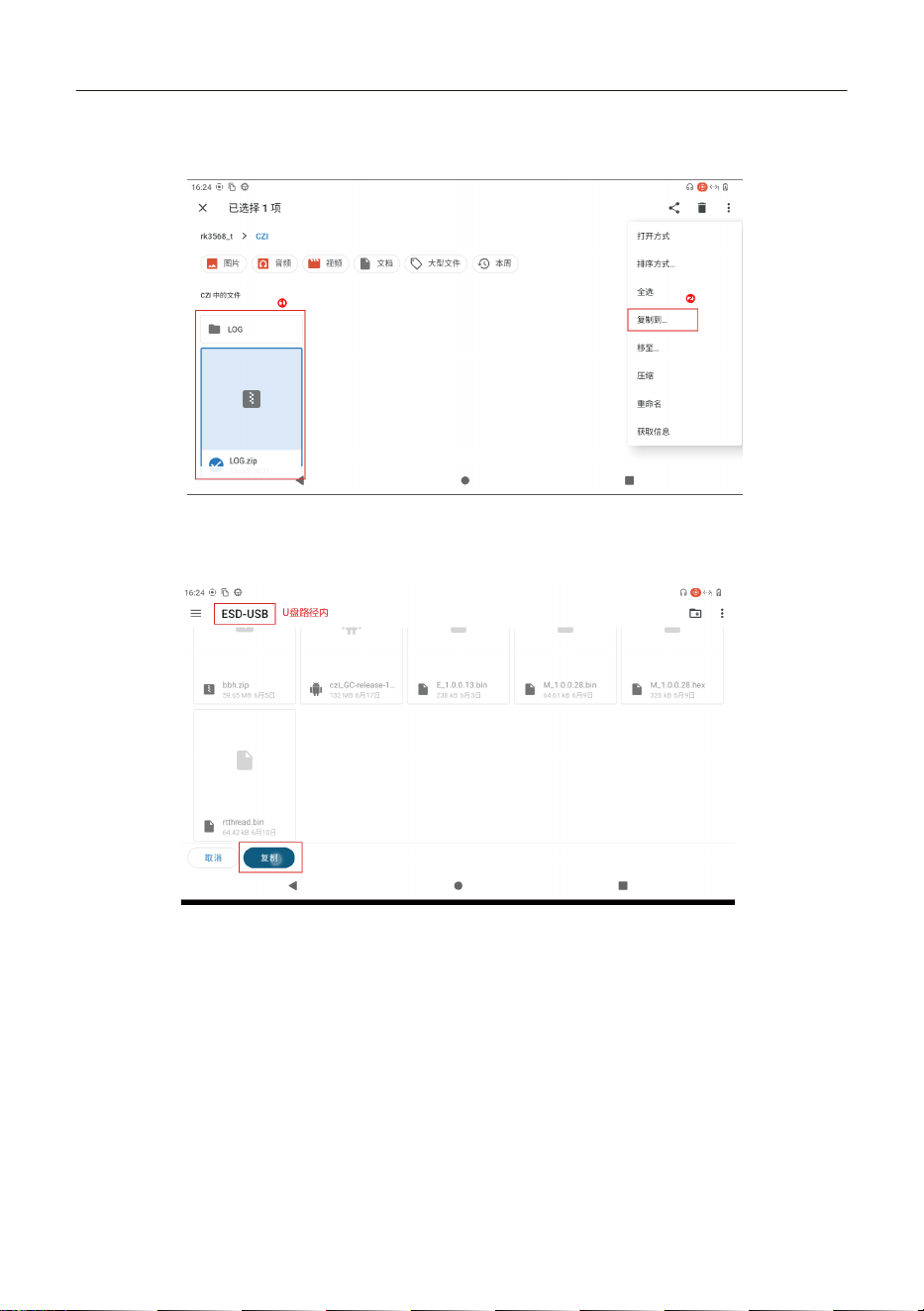
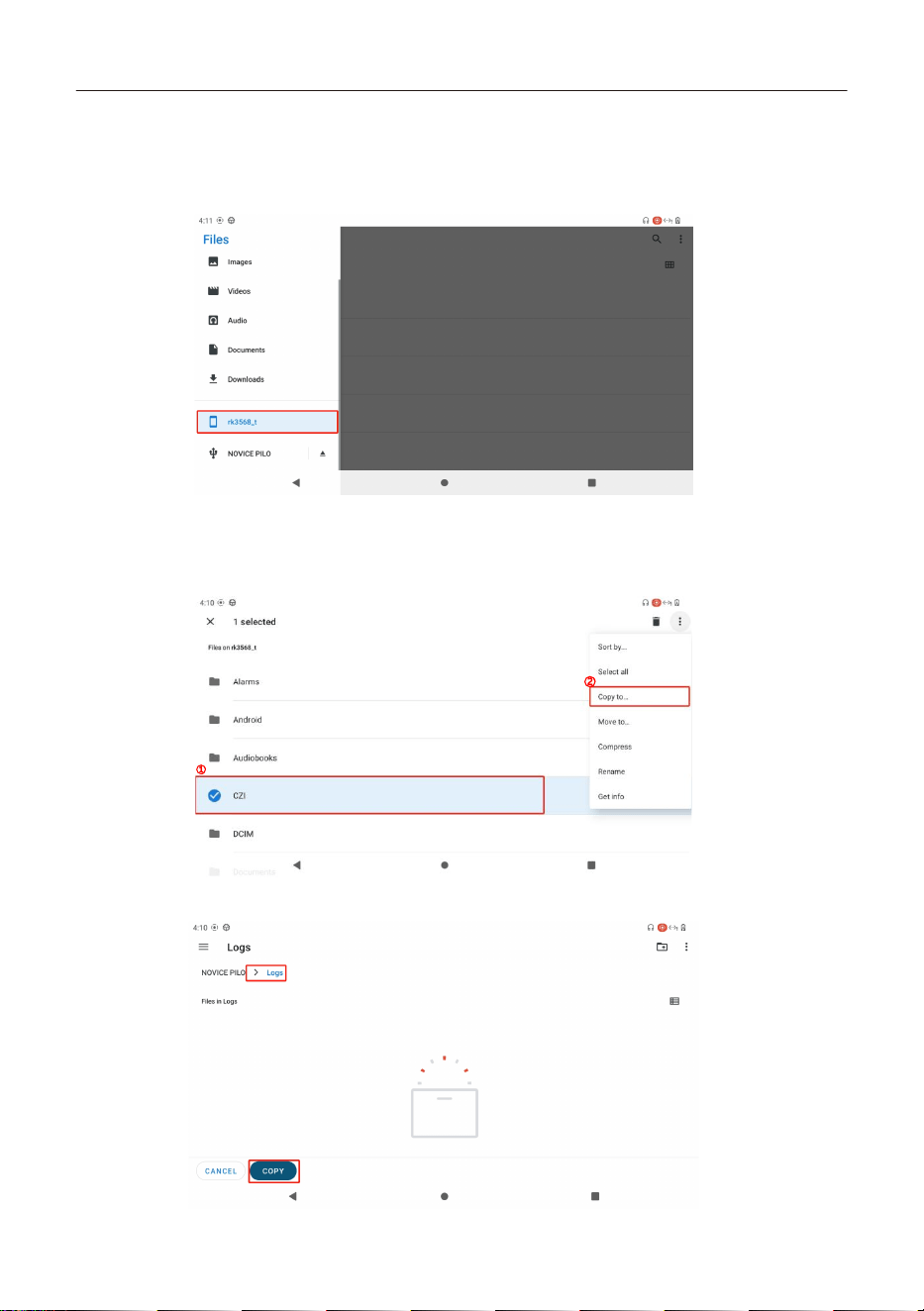
1. 运行日志的导出方式为:插入U盘,打开文件管理器,点击rk3568,这是内部存储路径,ESD-USB是U
盘存储路径,不同的U盘可能存在不同的命名。
①
②
TK4系留供电系统用户手册
18
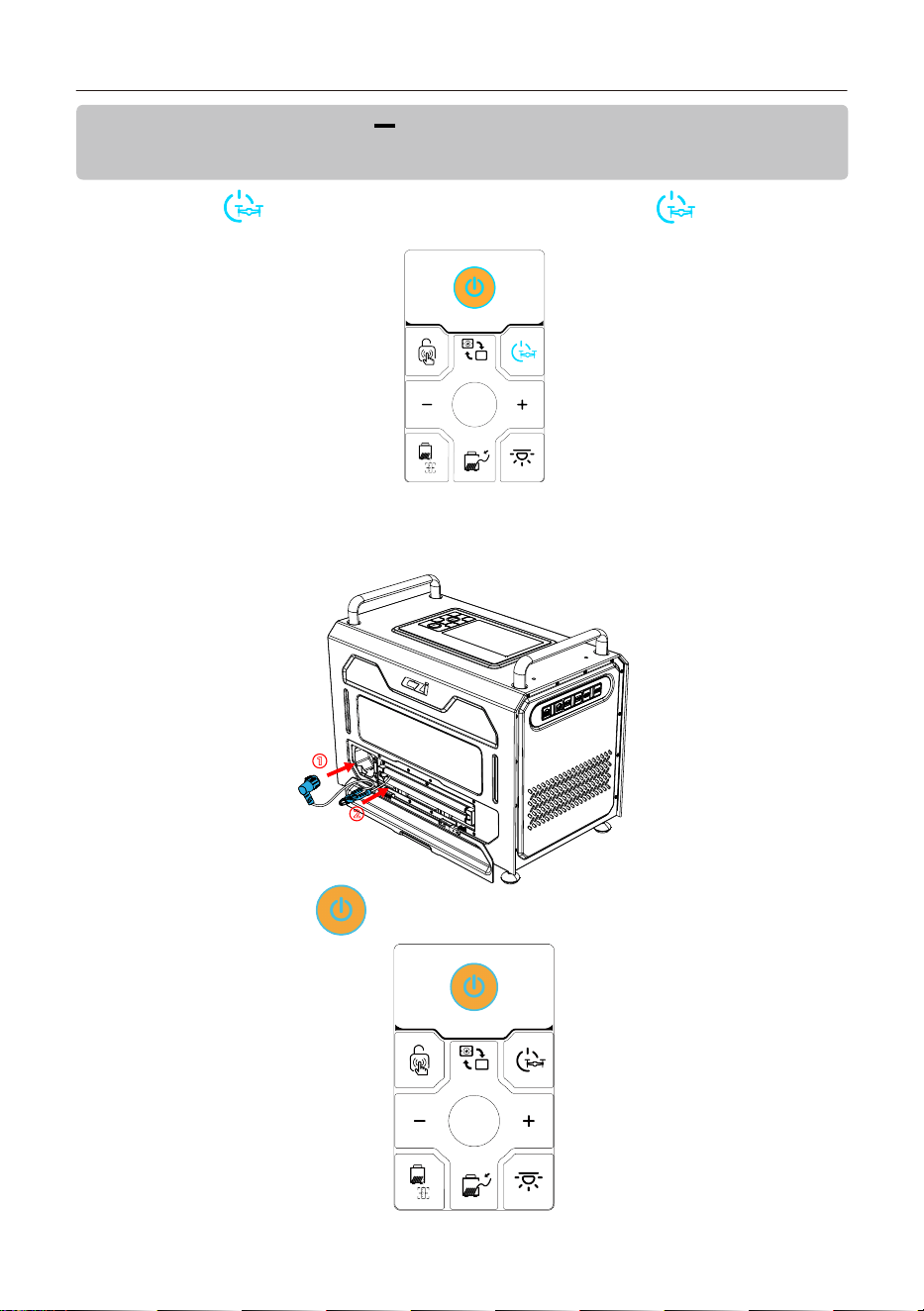
2. 把内部存储目录下 CZI/LOG 目录下的文件全部复制到U盘即可,长按选中需要拷贝的文件(文件夹
或压缩包都可以),然后点击右上角复制到...
3. 选中U盘目录,点击复制。
①
②
TK4系留供电系统用户手册
19
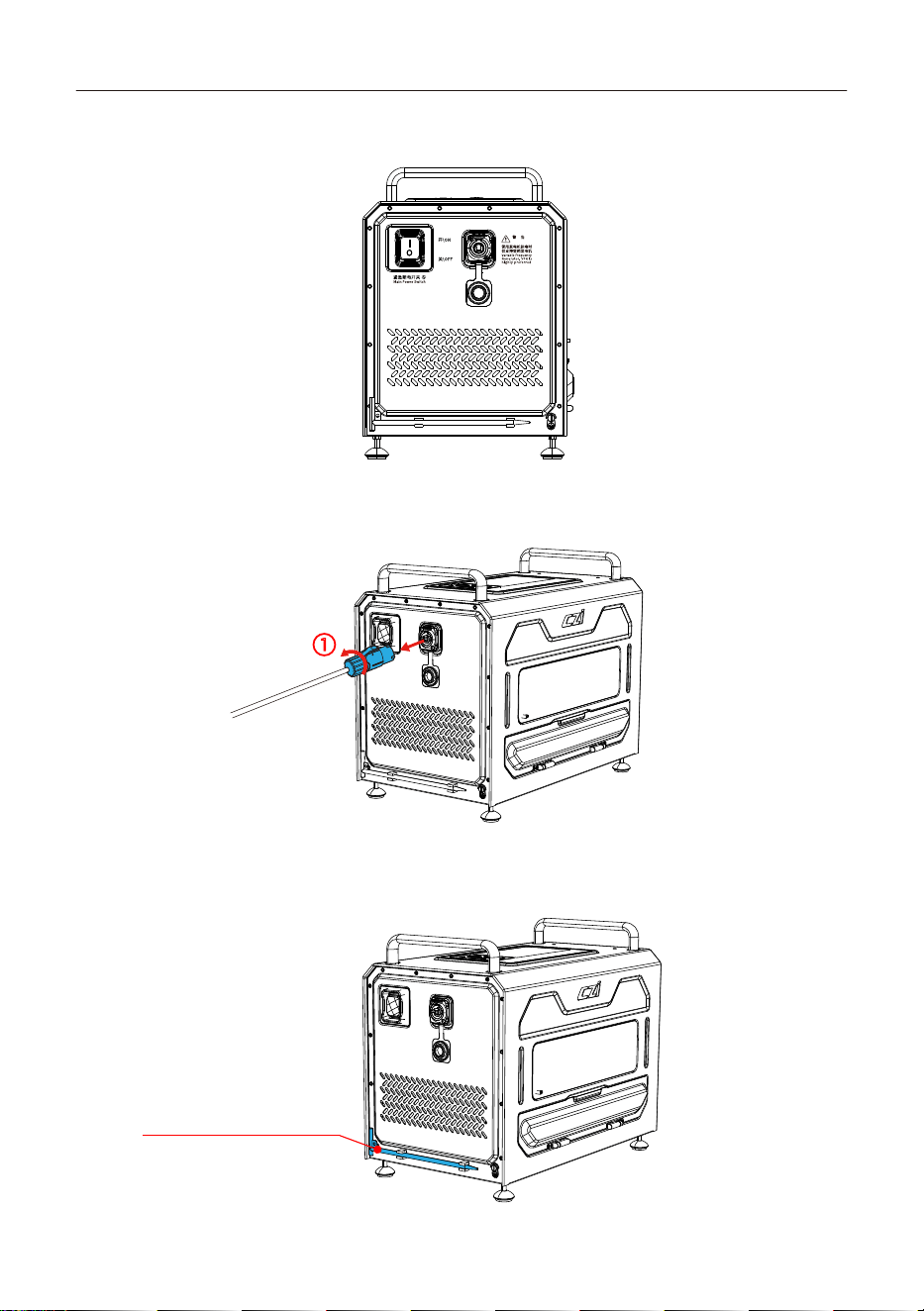
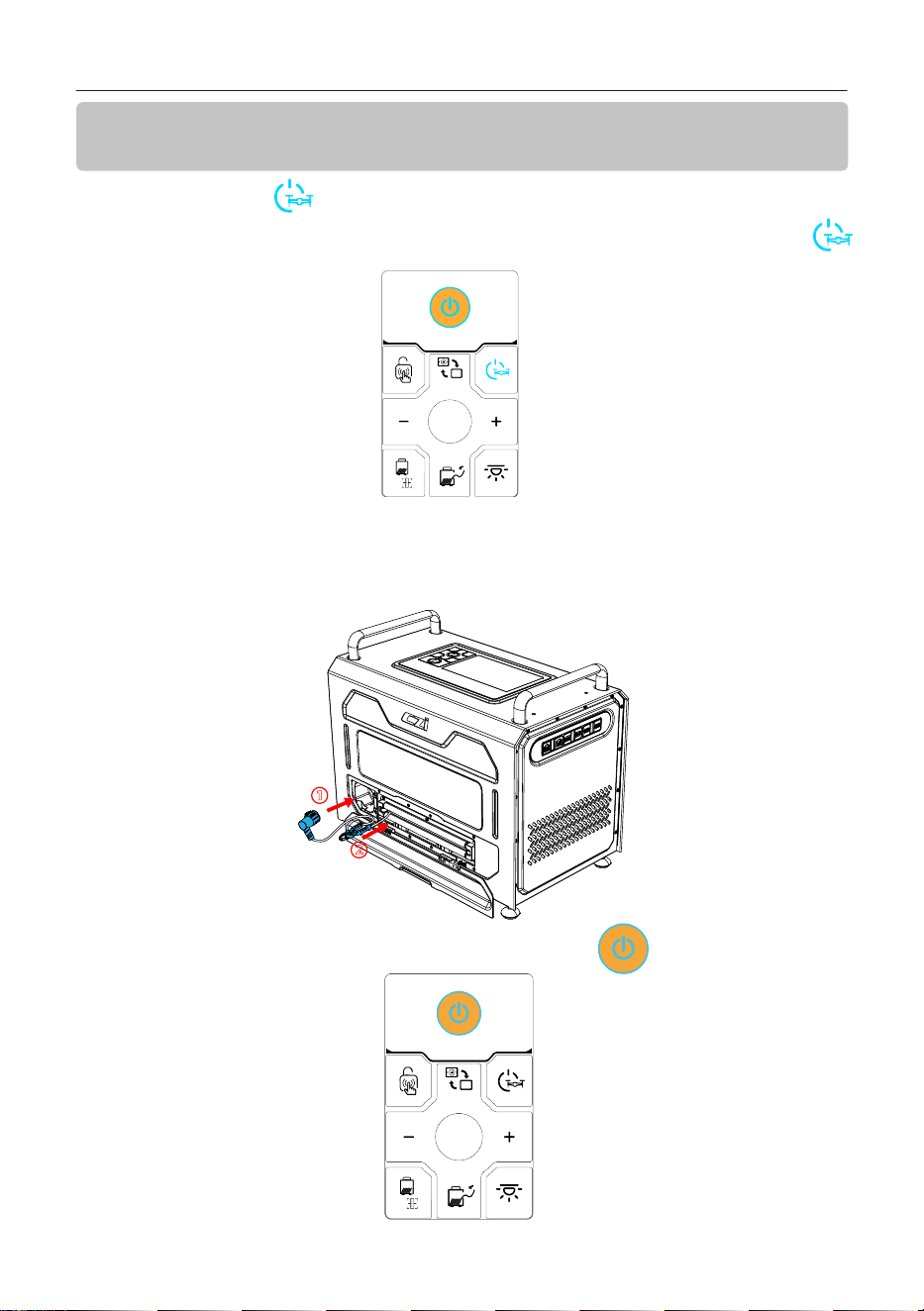
2. 取下航空插头:解开挂钩,将“航空插头”从天空端接口取下,通过地面端收回系留线缆,插头收回至
箭头1所示方向,挂钩收回至箭头2所示方向,关闭导线盖;
①
②
3. 地面端关机:长按电源按钮【 】,设备关机;
六、使用后拆卸及回收TK4 地面端的拆卸:(地面端拆卸之前确保关
闭高压)
1. 长按地面端的“ ”按键,听到“关闭高压”的声音,即关闭高压输出,“ ”按键亮蓝灯熄灯。
TK4系留供电系统用户手册
20
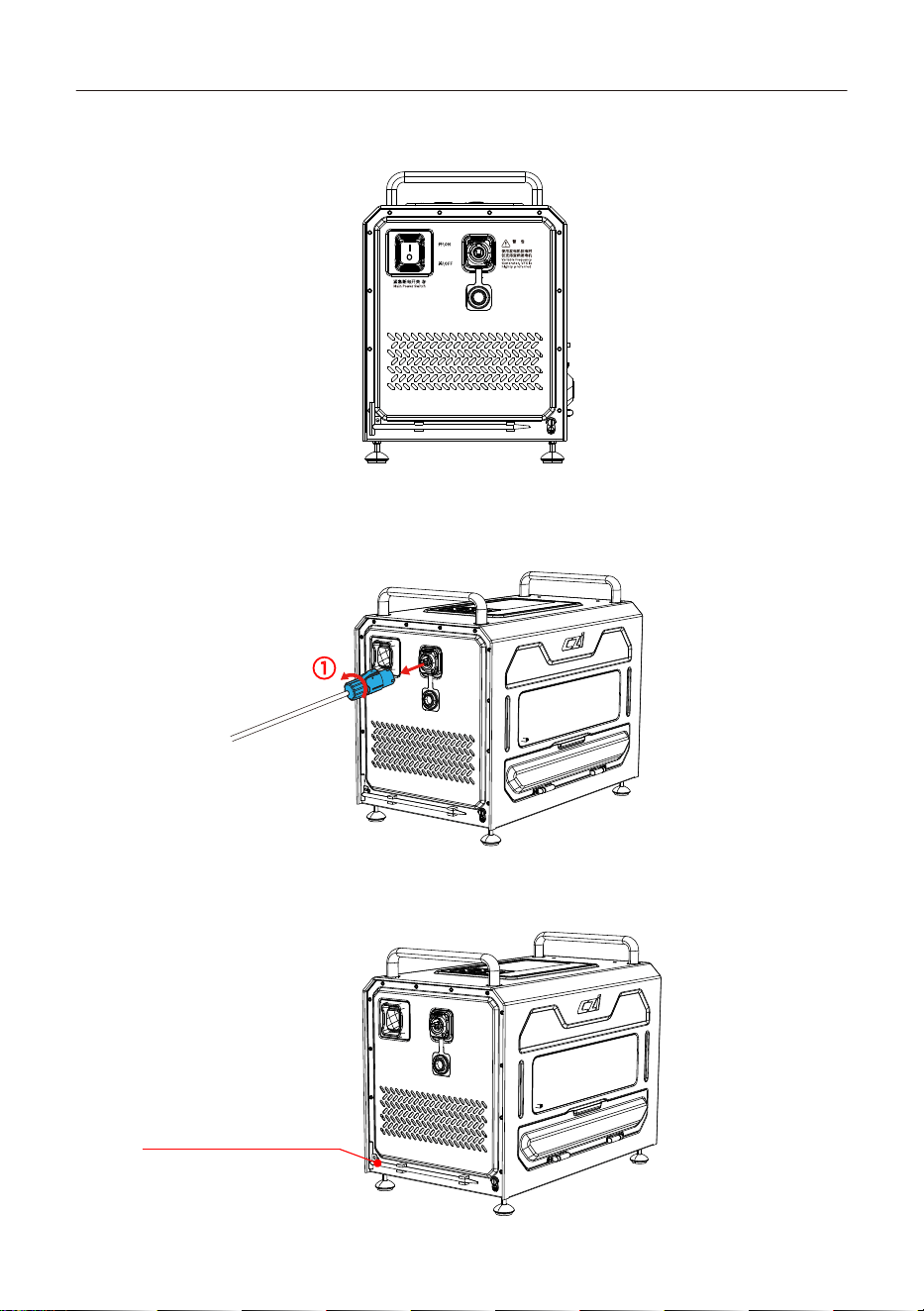
4. 地面端紧急断电开关:关闭地面端,开关打到“OFF”;
WARNING
将接地针从地下拔出,放回卡扣处
①
5. 地面端电源断开:电源线按钮往箭头 1 所示方向滑动,同时逆时针方向旋转,将电源线接头从插座上拔
下,把线收回并盖上电源盖;
6. 220V电源断开:将电源插头从市电(或者发电机)插座拔出;
7. 接地针回收:将接地针拔出,收回底部并关闭底部接地盖;
TK4系留供电系统用户手册
21
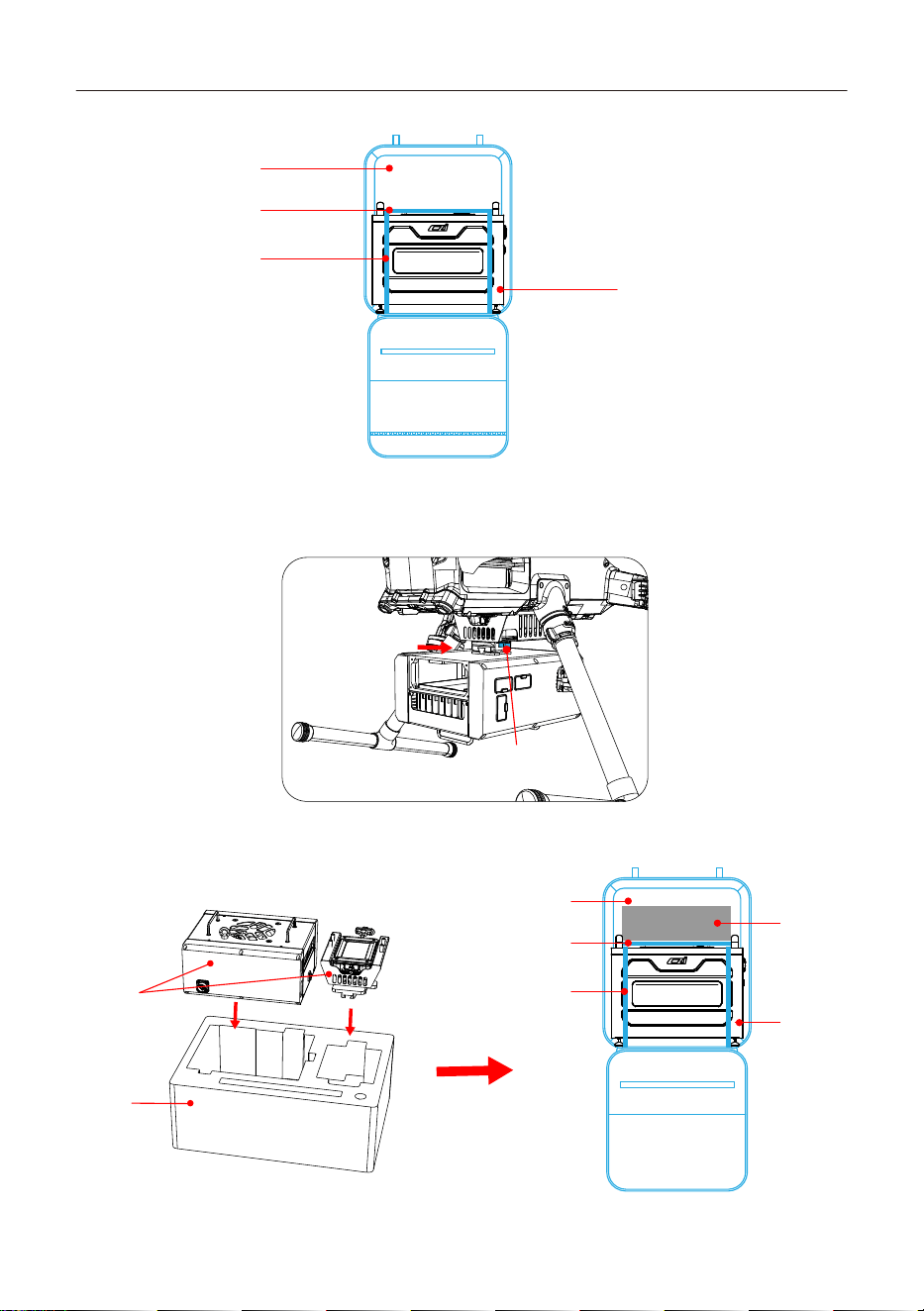
3. 收纳:将天空端放进背包里。
内衬
天空端
1. 将电源、c口拔出。
2. 将天空端从飞机拆下来。
8. 收纳:将地面端放进背包里;
TK4-天空端的收纳:
①按紧按键
②将天空端外推
背包
隔层
固定调节绳
地面端
背包
隔层
固定调节绳
地面端
天空端
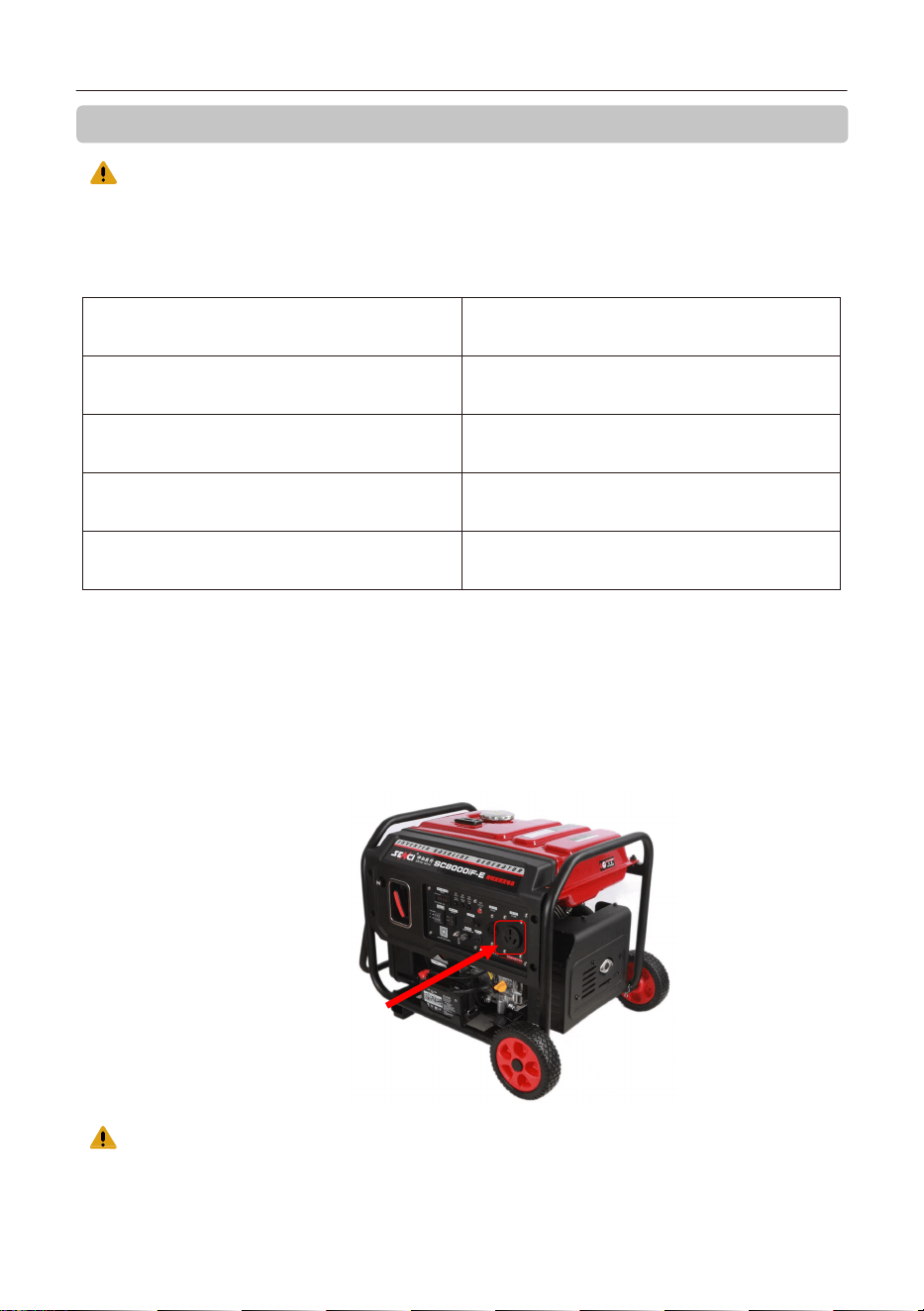
声明:用户自行确认第三方发电机的安全性及合规责任。推荐兼容设备列表仅供参考,TK4系留
供电系统不对第三方发电机的质量、安全性及后续固件更新承担责任。使用中如遇冲突,建议优先联
系对应发电机制造商。
TK4系留供电系统用户手册
TK4系留供电系统连接发电机的操作步骤:
1.根据发电机的使用说明,启动发电机组。
在发电机组启动之前,请勿连接TK4系留供电系统。
2.根据发电机的使用说明,将发电机电压调到适配TK4系留供电系统的电压(本设备建议220V)。
3.发电机组启动之后,将TK4电源线(客户自适配插头)连接到发电机上。
4.再根据TK4的操作步骤开启TK4系留供电系统。
推荐使用配套的发电机如下
注意,发电机在加机油时需将TK4产品的电源线与发电机断开,并将本产品远离发电机。
产品型号
最大功率(kw)
额定功率(kw)
额定频率(Hz)
额定电压(V)
神驰SC8000iF
6.5
6.0
50
230
七、附录1:经测试可兼容的发电设备示例
22
TK4电源线插入
23
详细的使用说明可以查阅电子版说明书(成至官网->服务与支持->下载中心->说明书下载)或产品教
学视频(成至官网->服务与支持->下载中心 ->教学视频);
www.czi.com.cn
服务热线:400-008-8306
如你对说明书有任何疑问或者建议
请通过以下电子邮箱联系我们:
成至技术支持
Made in China
成至官网:www.czi.com.cn
请扫码查看最新《用户手册》
八、产品官网链接
TK4系留供电系统用户手册
① Read this manual carefully before use and ensure the TK4 tether cable is properly connected
to the aircraft. To prevent the rotating propellers from striking the tether cable, securely fasten
the hook on the tether cable to the suspension ring on the airborne unit.
② When operating the aircraft, do not continue to increase flight altitude once the 5-meter
remaining cable mark is visible at the ground station. Do not pull or tension the tether cable
manually. Failure to follow this notice may result in cable breakage, equipment crash, personal
injury, or third-party property damage, for which the operator shall bear full responsibility.
③ Please ensure that the AC input voltage from the wall power socket is within the range
of 176‒264 V. This device is recommended to be powered by wall power. If wall power is
unavailable, it is recom- mended to use a matching inverter. This helps prevent equipment
failure caused by unstable or insufficient power supply.
④ When wall power is not available, the device only supports invert- er generators as an
external power source. To avoid overload or underload caused by excessive power
fluctuations during operation, do not use fixed-frequency generators to power the device.
After rigorous testing by our technical department, the following generator model has been
confirmed to be fully compatible with this product, with stable and reliable performance. Recom-
mended Model: Senci SC8000iF inverter generator (see Appendix 1 for details).
The recommended compatible generator models are provided for reference only. The TK4
Tethered Power System assumes no responsibility for the quality, safety, or subsequent firmware
updates of any third-party equipment. In the event of any compatibility issue during use, it is
recommended to contact the corresponding equipment manufacturer first.
⑤ For safety, when using wall power, ensure that the wall power socket is capable of
delivering at least 4500 W output. The voltage and current of the wall power supply must be
stable and reliable.
24
View/Download Digital Version
1.Disclaimers and Warnings
Note: This document will be continuously updated and improved. The latest version will be
available in digital format. Please refer to the latest version of the User Manual for accurate
information. You can scan the QR code to view or download the latest TK4 Tethered Power
System User Manual.
Thank you for purchasing czi products. The contents mentioned herein are related to your
safety, legal rights and responsibilities. Failure to follow and comply with the instructions and
warnings in this document may result in injury to you and others, damage to the product or
other surrounding items. This document and all related documents are subject to the final
interpretation of czi. Updates are subject to change without notice. Please visit the official
website at www.czi.com.cn for the latest product information.
Warnings
Safety Guide
TK4 Tethered Power System User Manual
25
⑥ During aircraft flight, do not disconnect the wall power plug or power off the device.
⑦ Power connection sequence: First connect the power cable and supply power from the wall
power socket, then turn on the main power switch.
⑧ When using this device, ensure the aircraft tether battery level is not lower than 60%.
⑨ Before takeoff, turn on the "Main Power Switch"; otherwise, the aircraft will not be able to
take off.
⑩ To prevent accidents, do not use the system in rain, snow, frost, fog, thunderstorms, hail,
sandstorms, or strong wind conditions.
⑪ To prevent accidents, never touch the TK4 tether cable (800V high voltage) with bare hands
at any time. If live contact is unavoidable, always wear insulated gloves (with insulation
rating exceeding 800V).
⑫ When using this device near high-voltage towers or when the system is not connected to the
wall power, ensure an external grounding rod is properly installed.
⑬ To ensure proper heat dissipation, keep all ventilation and air intake openings
unobstructed to prevent internal heat accumulation and overheating risks.
⑭ When the TK4 airborne unit been installed to M400, there is one gimbal Skyport it can be
applied at the front.
⑮ ML200 matrix lighting gear (to be fasten on the M400 legs) is not ready for overseas market,
since this would accumulates the TK4 overall power output to 4,000 watts. Without the
lights, TK4 max power rate is 1,500-2,500 watts.
The CZI TK4 Ground Tethered Power System is a high-performance tethering solution designed
for extended drone operations. Utilizing efficient power conversion technology, it converts
AC power into high-voltage DC and transmits it to the airborne unit through the tether cable.
The airborne unit then steps down the high-voltage input into low-voltage power that can be
directly used by the drone’s tethered battery, providing ample and continuous power to both
the propulsion system and mission payloads. The system features a lightweight design, a
high-definition display, and a built-in backup power source, ensuring stable operation even in
harsh environments. With excellent protection performance, the TK4 is ideal for applications
such as emergency lighting and security monitoring, enabling drones to achieve uninterrupted,
around-the-clock flight operations to meet the demands of complex missions.
2.Overview
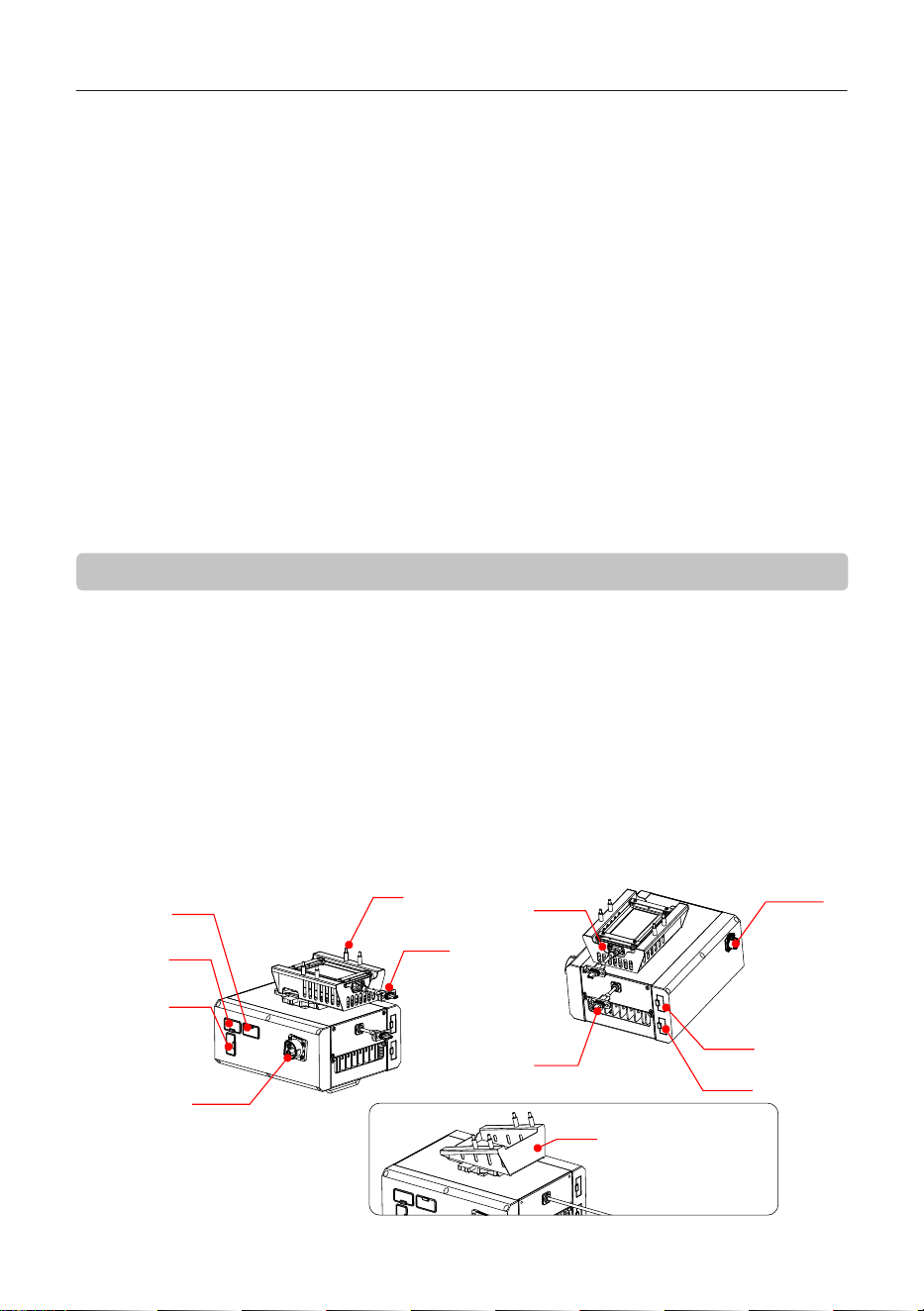
Matrix Light Port 2
(50V , MAX 800W)
Matrix Light Port 1
(50V , MAX 800W)
Tethered Battery Port
Manifold3 TYPE C
4-M3*18
Aviation
Connector
E-Port V2 Coaxial Cable
Gimbal Camera Port
Manifold Port
Gimbal Light Port
(50V , MAX 300W)
B Mounting Bracket
(without Manifold module)
A Mounting Bracket
(with Manifold module)
This product is compatible with two mounting brackets (Bracket A and Bracket B). Please refer
to Section 4.3 “TK4 Airborne Unit Installation” for relevant details.
TK4 Tethered Power System User Manual
26
①Handle
②Display
③Button Panel
④Main Power Switch
⑤Power Input Port
⑥Power Cable
⑦Grounding Rod
⑧Cable Cover
⑨External Device Interface
⑩Viewing Window
⑪Foot Base
⑩
⑪
⑨
②
③
①
⑧
④
⑤
⑥
⑦
HDMI Port: Supports real-time transmission of
1080P high-definition video.
Type-C Port: Provides fast power supply for mission
devices (e.g., body-worn cameras), supporting 65W
fast charging and PD 3.0 power delivery.
USB-A Port: Provides USB host functionality, supporting
USB communication and RTK cable connections.
TF-SD Port: Used for data transfer and backup. Enables
transferringand backing up data from the device to a TF card.
LAN Port: Connects to externa l computer devices for uploading
video sources to local equipment over a local area network.
WAN Port: Connects to an external network for system
updates or video source uploads via the internet.
3.Specifications
TK4 Ground Station
Dimensions
413*345*254mm
(including handle and foot base)
Weight ≤13kg (including 110 m cable)
Input Voltage 176-264VAC (50/60HZ)
Output Voltage 800v
TK4 Tethered Power System User Manual
27
Output Power 4.5kw
Bandwidth
100M
Type-C Fast Charging Port
Max power: 65 W, supports PD3.0/QC protocols
Screen Size
5.5 inches
Screen Resolution
1920*1080
Backup Battery
2600mAh,22.2v
Speaker Power
10W
Cable Length
110m
Cable Weight
1.25kg/100m
Cable Tensile Strength
>50kg
Video Output Interfaces
HDMI, Ethernet
Max Operating Ground Elevation
4000m
Storage Temperature
Operating Temperature
-40℃~+70℃
-20℃~50℃ (without solar radiation)
Cable Voltage Rating
DC 2000V
Cable Current Capacity
5A
Weight
Dimensions
Output Power
Output Voltage
Video Input Interface
Max Operating Ground Elevation
IP Rating
Operating Temperature
Storage Temperature
≤2kg(main body, excluding mounting hardware)
≤190*155*86mm(main body, excluding connectors)
Rated 4000w
50v
Type-c
4000m
IP55
-20℃~50℃ (without solar radiation)
-40℃~+70℃
TK4 Airborne Unit
TK4 Tethered Power System User Manual
28
4. Installation and Operation Guide
4.1 ML200-M400 Matrix Lights Installation Guide (If the matrix lights are not included at the
time of purchase, please skip Sections 4.1 )
4.1.1 Instructions
1. Align the clamp opening of the primary light unit with the landing
gear crossbar (as shown in the left figure below), then press downward until the clamp securely
attaches (as shown in the right figure below).
2. Repeat the process for the secondary light unit, as shown below.
3. Thread the rubber strap through the connecting arm of the secondary light unit, pull it
tight, and fasten it onto the buckle as shown below.
TK4 Tethered Power System User Manual
29
4. Connect the cables included with the product as follows:
①Plug in the two airborne-side connectors.
②Unscrew the waterproof cap on the light units before connecting the cable.
③Connect the plugs to the light units and tighten the locking nut clockwise.
④Route the cable along the two vertical landing gear bars as shown, and secure it using the
velcro straps attached to the cable. Installation is now complete.
①
④
③
②
④
③
②
④
4.1.2 Control
After powering on, the ground station panel allows control of the light units.
TK4 Tethered Power System User Manual
30
Remove the grounding rod from the buckle
Grounding cable installation hole
Grounding rod
insertion diagram
Underground
4.2 TK4 Ground Station Installation
4.2.1 Grounding Rod Installation: Remove the grounding rod from the accessory kit. Loosen the
hand-tightened screw on the grounding rod, secure the grounding cable, and insert the rod
approximately 20 cm into the ground.
4.2.2 Ground Station Power Connection: Open the power port cover. Align the terminal block at
position 1 with the power input port at position 2, insert, and rotate clockwise until a “click”is
heard.
①
②
TK4 Tethered Power System User Manual
4.3 TK4 Airborne Unit Installation
4.3.1 Remove the TK4 airborne unit mounting bracket (Bracket A is pre-installed with the
Manifold module, while Bracket B does not include the Manifold module). Align with the four
screw holes on the bottom ofthe DJI M400 aircraft and fasten with four screws.
Bracket A (recommended for DJI single-gimbal configurations) compatible payloads include:
Matrix Light ML200-M400, Gimbal Searchlight GL310, Gimbal Camera C50N, Relay CR20, DJI
Gimbal Camera H30T, DJI Manifold 3.
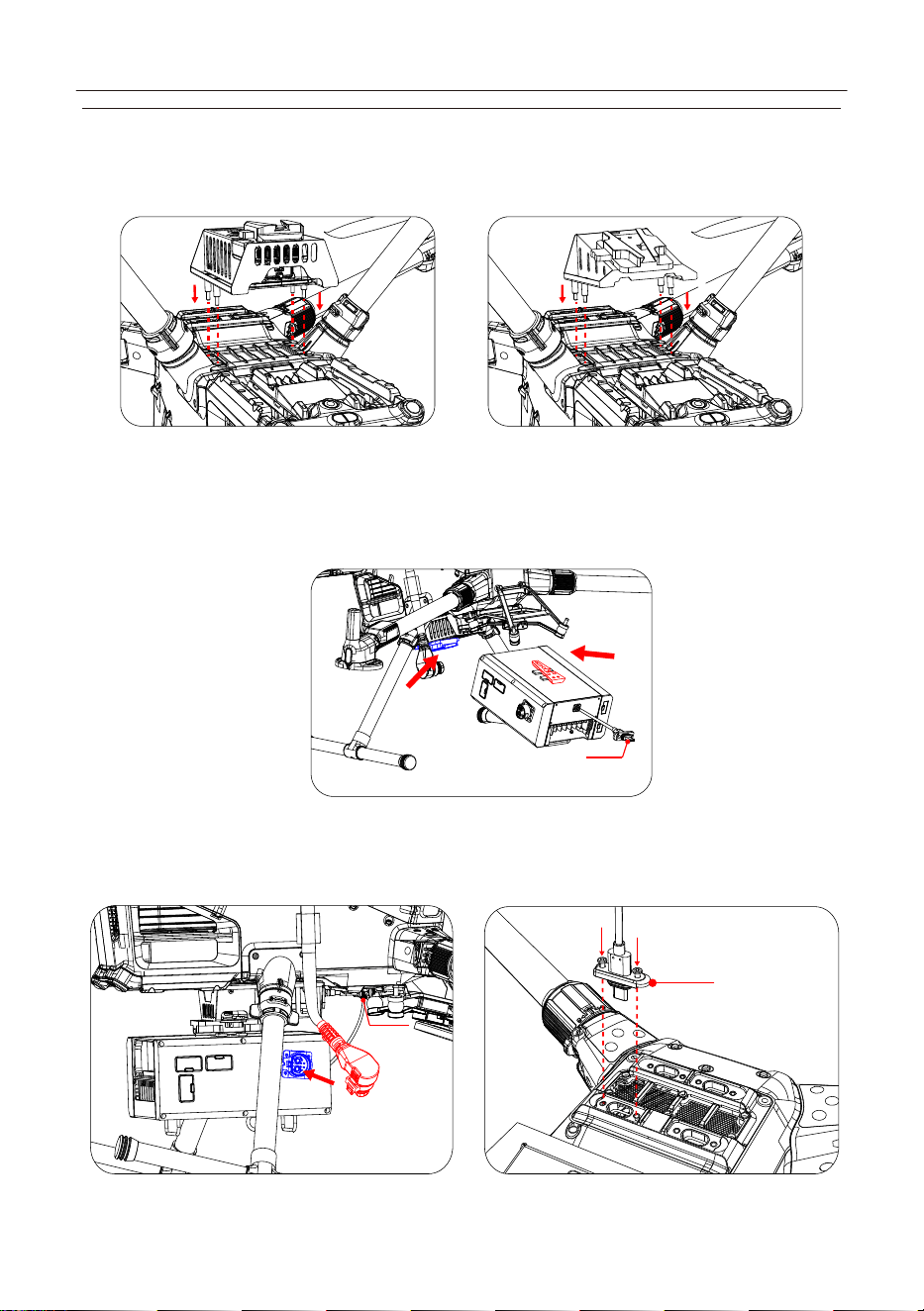
31
Bracket B (recommended for DJI dual-gimbal configurations) compatible payloads include:
Matrix Light ML200-M400, Gimbal Searchlight GL310, Gimbal Camera C50N, Relay CR20, DJI
Gimbal Camera H30T.
Type-C
Type-C
4.3.2 Remove the TK4 main unit. Align the Y-shaped slider on top with the Y-shaped quick-re-
lease mount at the base of the bracket. Push it in until a “click” is heard. (Aircraft is hidden for
clarity of the diagram).
4.3.3 Connect the power plug (red) of the tethered battery on the aircraft separately to the
power socket (blue) on the airborne unit. Then connect the Type-C cable of the airborne unit to
the aircraft’s “E4” port, and use a screwdriver to tighten the two screws next to the Type-C port.
A Mounting Bracket (with Manifold module) ‒ Illustration B Mounting Bracket (without Manifold module) ‒ Illustration
TK4 Tethered Power System User Manual
Type-C
Tighten with a screwdriver
E4
32
Silver Metal Button
4.4 Connecting the Ground Station and Airborne Unit
4.4.1 Power connection sequence: First connect the power cable and supply power from the wall
power socket, then turn on the main power switch.
Turn on the ground station power switch: Activate the ground station by setting the switch to
“ON”.
WARNING
4.4.2 Start the ground station: Press and hold the [ ] power button to turn on the device.
4.4.3 Connect the Aviation Plug: Open the cable cover and pull out the tether cable. *Note:
When disconnecting the aviation plug, press the silver metal button until the plug loosens,
then pull it out.
TK4 Tethered Power System User Manual
33
4.4.4 Attach the hook on the tether cable to the airborne unit’s tether ring. Then open the
airborne unit connector cover and insert the aviation connector from the ground station into
the airborne unit until a “click” is heard. After completion, verify the connection is secure and
check that the ground station plug is oriented correctly.
4.4.5 Place the aircraft in a suitable operating area and wear anti-static gloves. (See safety
precautions)
Press the [ ] button on the tethered battery to power on the system. The aircraft will begin
a self-check. Wait until the self-check is completed.
4.4.6 Press and hold the [ ] button on the ground station until the voice prompt “High
voltage on” is heard.
4.5 Remote Controller Settings
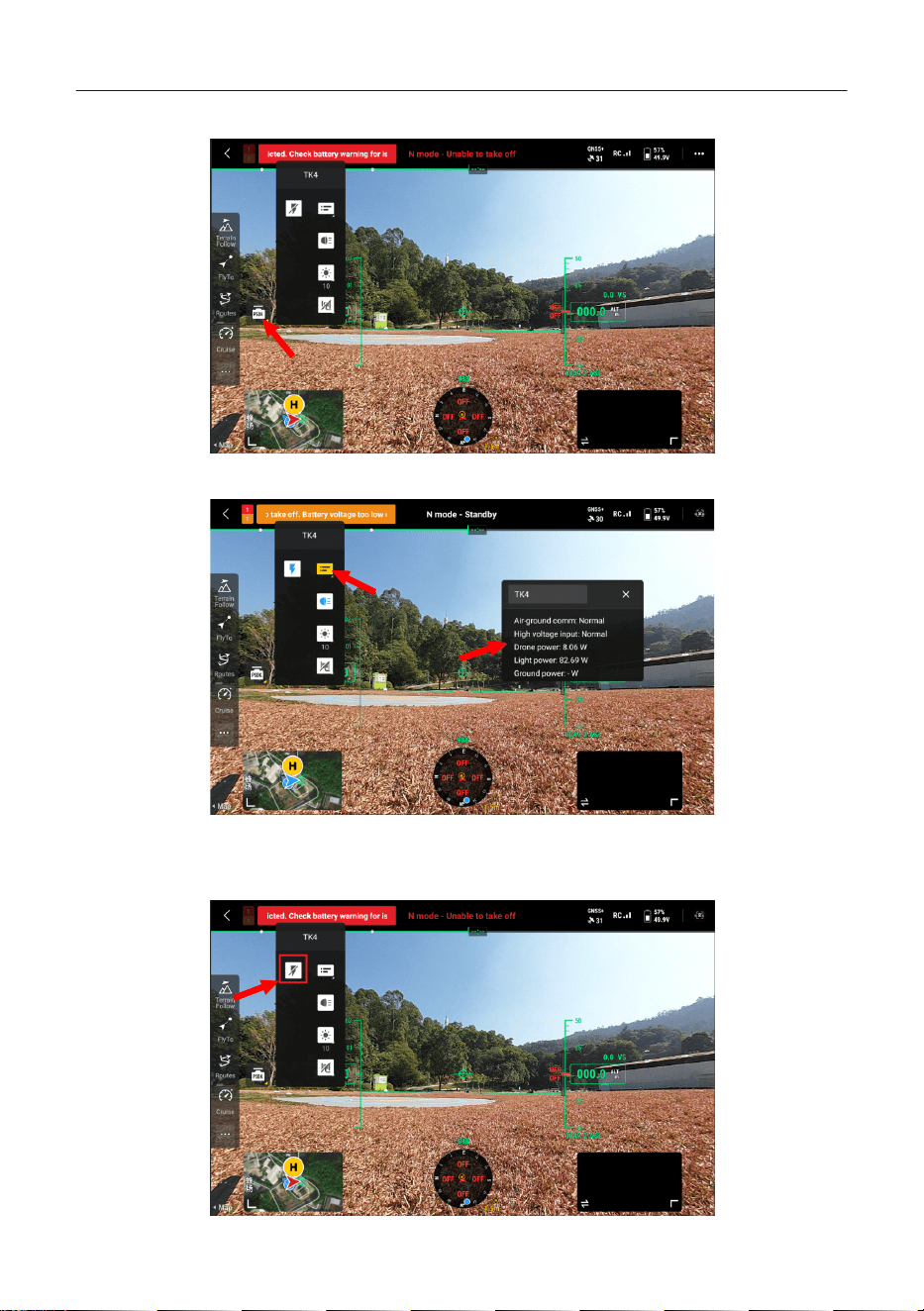
4.5.1 Turn on the remote controller and enter the flight interface.
TK4 Tethered Power System User Manual
34
4.5.2 Open the PSDK section as shown below.
4.5.3 Tap the floating window switch to view real-time parameters, as shown below.
4.5.4 Tap the high voltage switch to turn on/off the ground station’s high-voltage output,
as shown below.
TK4 Tethered Power System User Manual
35
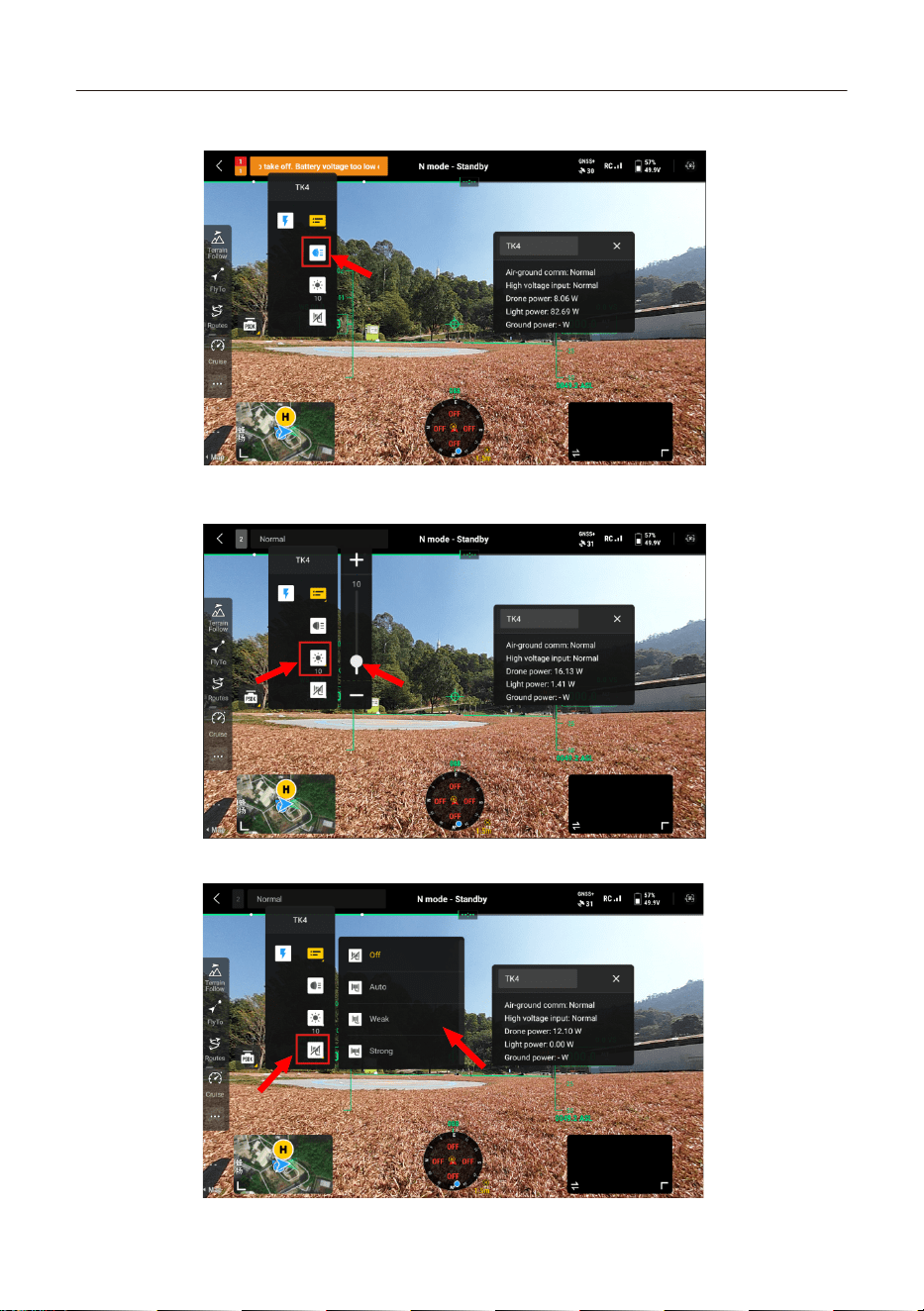
4.5.5 Tap the light switch to turn matrix lights on/off, as shown below.
4.5.6 Tap the brightness adjustment control to change matrix light intensity, as shown
below.
4.5.7 Tap the cable retraction control to retract the cable, as shown below.
TK4 Tethered Power System User Manual
36
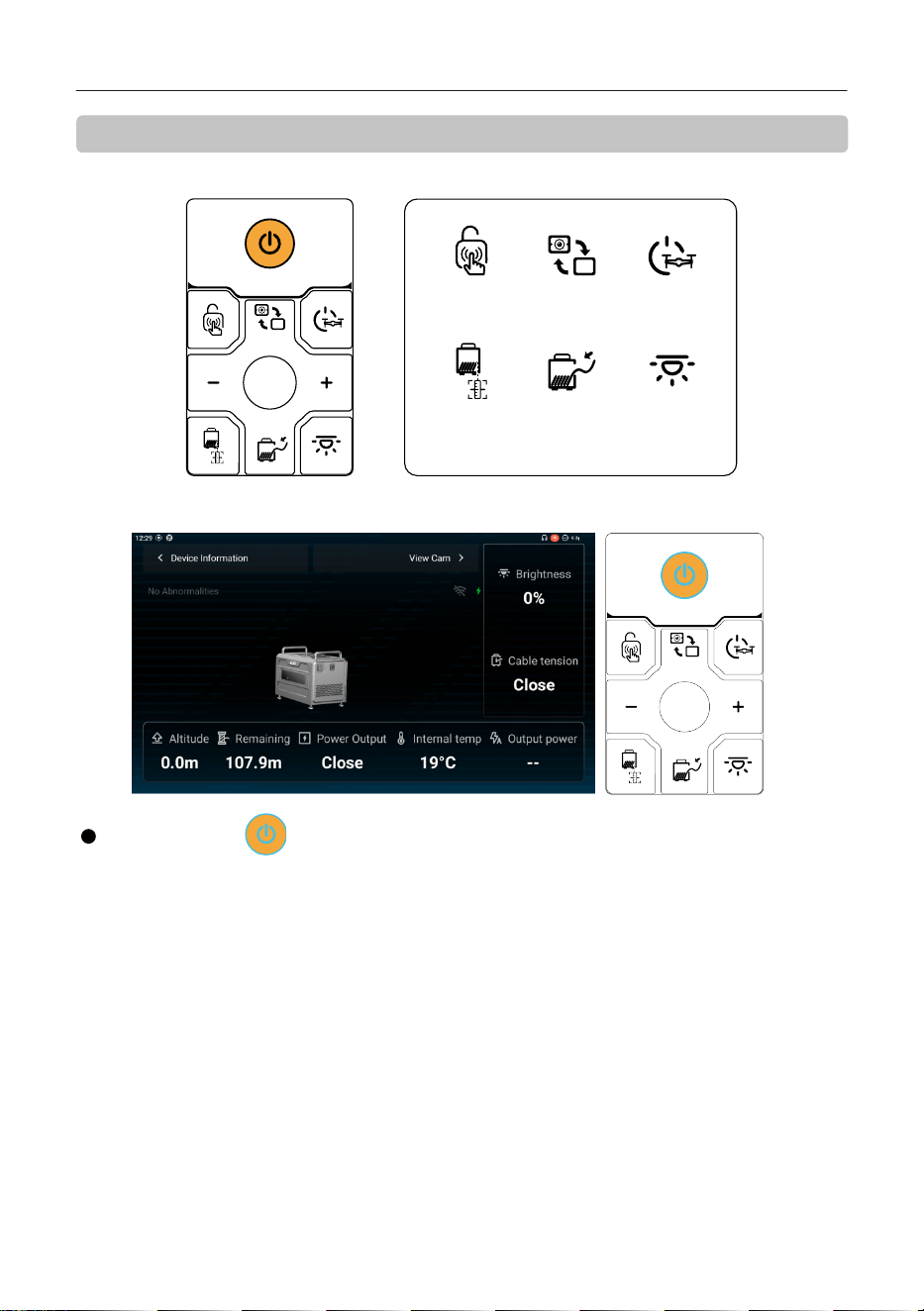
5. Product Operation Instructions
5.1 Button Panel
Drone Power
ON/OFF
Cam
Switch
Touch
Switch
TensionTether Length
Detection
Calibration
Brightness
5.2 Power On/Off
Power On: When the system is off, press and hold for 3 seconds to turn on. The indicator
changes from white to blue.
Normal Shutdown: When the system is on, a short press of 1 second will initiate a shutdown
confirmation prompt on the display. Press again within 3 seconds to confirm shutdown. (This
method is not available when high voltage is active.)
Forced Shutdown: When the system is on, press and hold for 3 seconds to force shutdown. (This
method works regardless of high voltage status or whether the aircraft is in flight. Use only in
emergencies due to potential safety risks.)
Power Button [ ]:
TK4 Tethered Power System User Manual
37
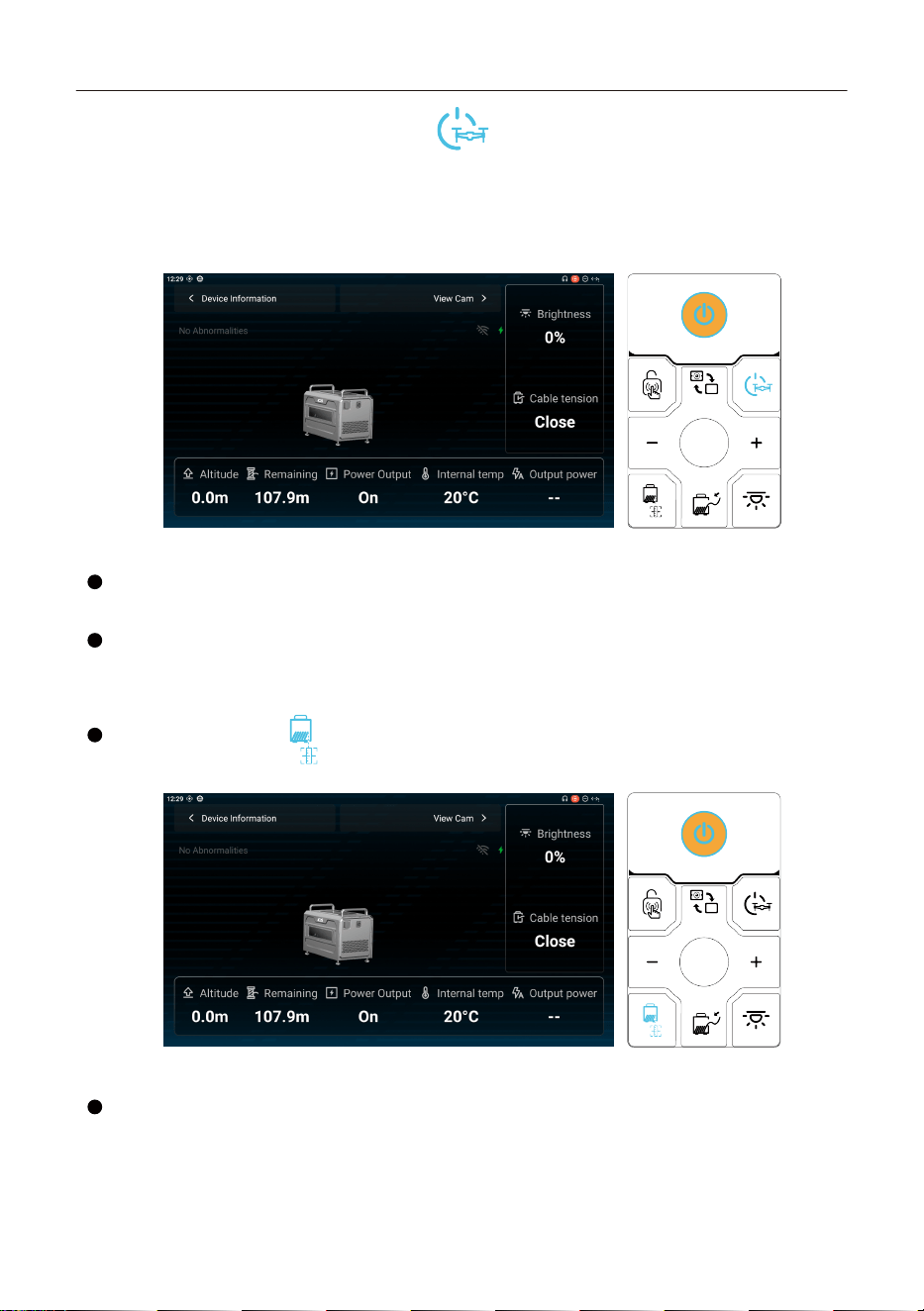
5.3 High-Voltage Output On/Off Button [ ]:
Press and hold for 3 seconds to activate high-voltage output. The indicator will change from
white to blue.
Press and hold for 3 seconds again to deactivate high-voltage output. The indicator will change
from blue to white.
5.4 Takeoff/Landing
Use the DJI remote controller to control aircraft takeoff and landing.
5.5 Set Flight Altitude
Use the DJI remote controller to adjust the aircraft altitude. Due to the tether length limit,
the recommended altitude is 100 m (when using a 110 m cable).
5.6 Remaining Cable Detection Reset
Press and hold the [ ] button for 5 seconds to reset the
remaining cable.
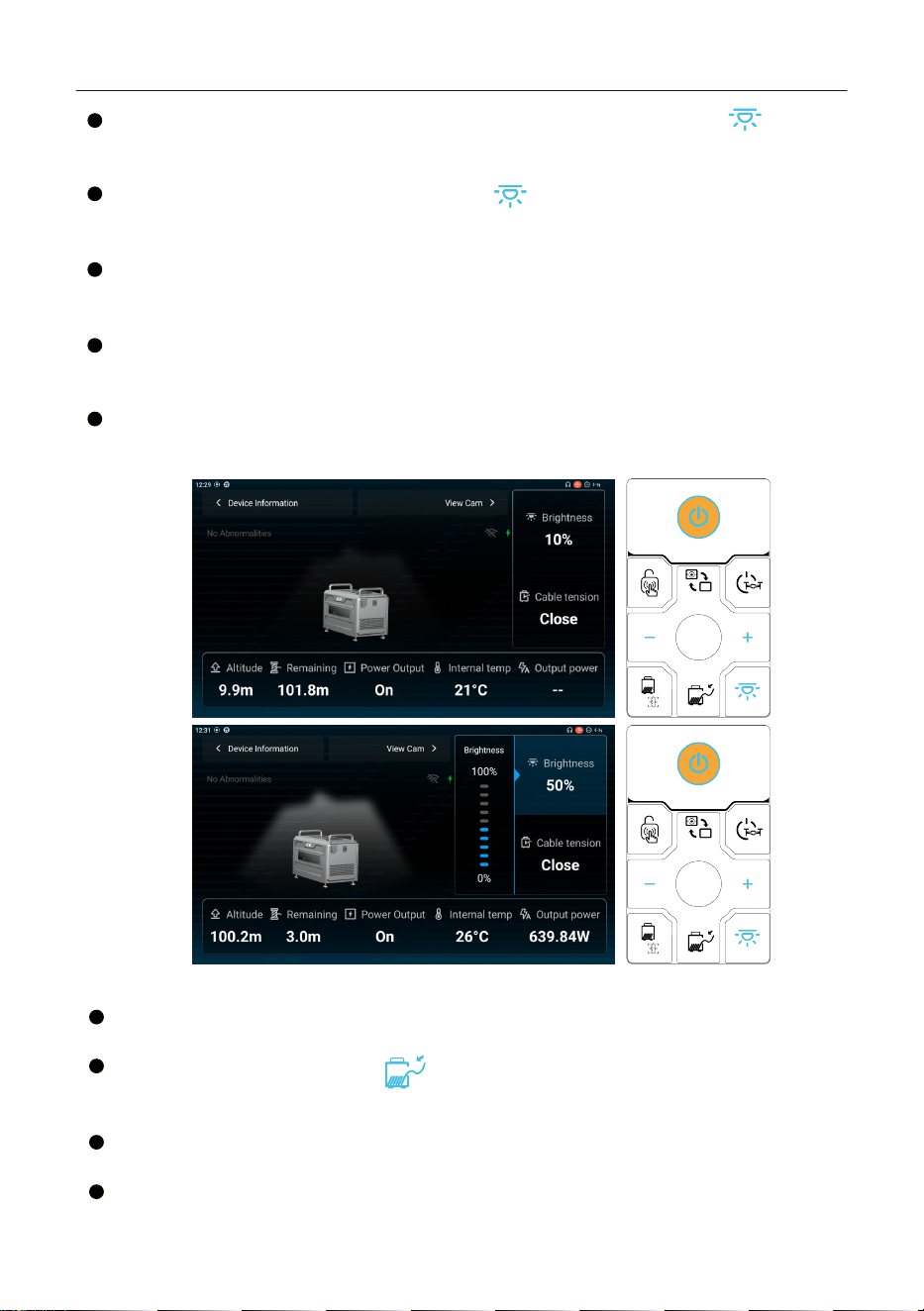
5.7 Light Brightness
The light brightness is adjustable in 10% increments, from a minimum of 0% to a
maximum of 100%.
TK4 Tethered Power System User Manual
38
Before takeoff, the default brightness is 0. Tap the light brightness button [ ]. The
button and the +/- buttons will turn light blue. Press the +/- buttons to adjust brightness by
±10% per step. The maximum brightness before takeoff is limited to 10%.
After takeoff: Tap the light brightness button [ ]. The button and the +/- buttons will
turn light blue. Press the +/- buttons to adjust brightness by ±10% per step within a range of 0
-100%.
Automatic Lighting ON: When the aircraft takes off and reaches an altitude of 3 m, the
lighting will automatically turn on at 10% brightness. When the altitude exceeds 10 m, the
lighting will automatically increase to 100% brightness.
Automatic Lighting OFF: During landing, when the aircraft descends to 10 m, the lighting
will automatically adjust to 10% brightness. When the aircraft descends to 3 m, the lighting will
automatically turn off.
Manual Control: After takeoff, the lighting brightness can be manually adjusted between
0‒100% at any altitude.
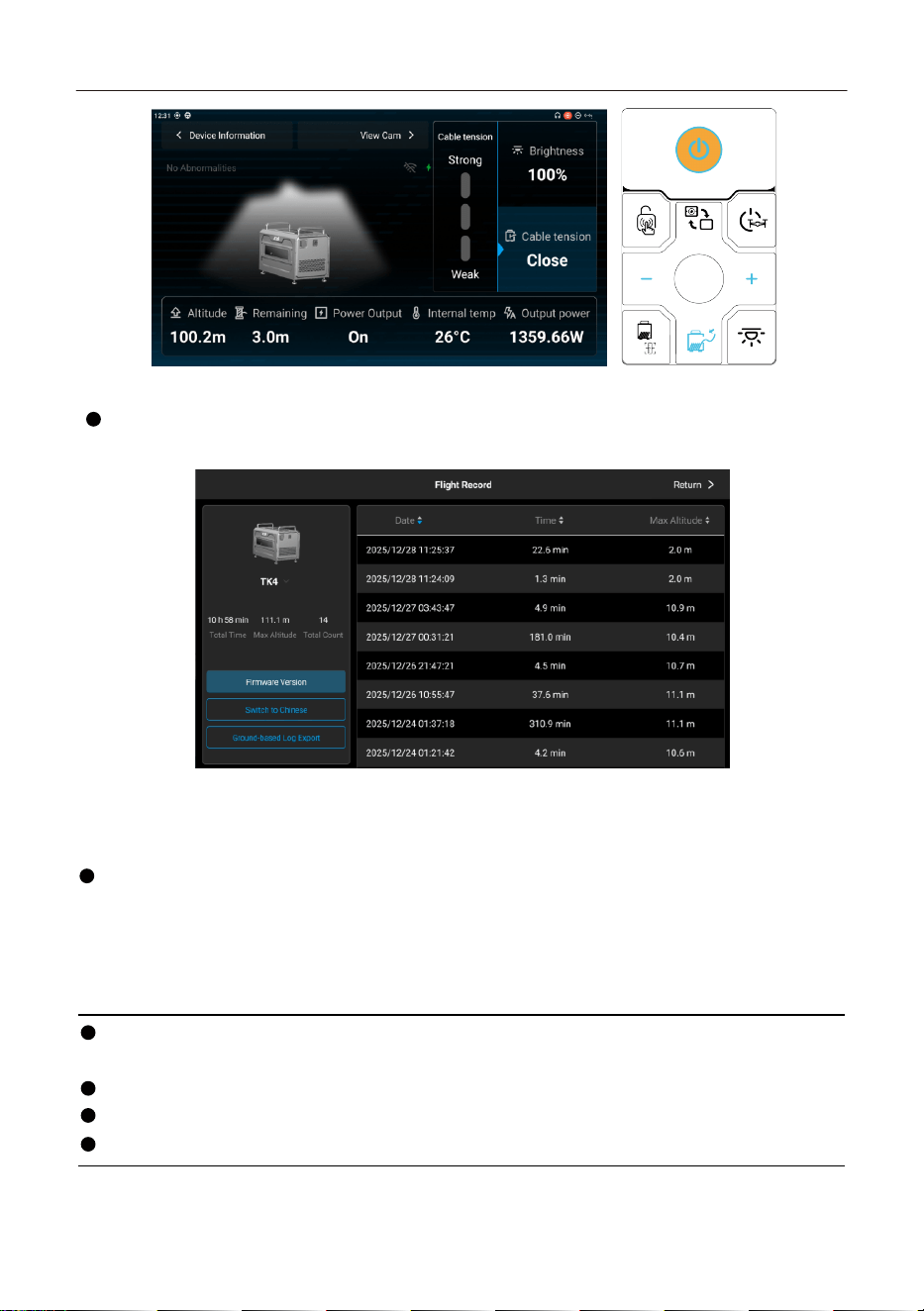
5.8 Cable Tension
Adjustable Cable Tension with Modes (Off, Auto, Weak, Medium, Strong).
Default mode on startup: [Auto].
Press the Cable Tension button [ ]. When pressed, this button and the +/ - buttons
will illuminate blue. The +/ - buttons will then enabled to adjust the Cable tension by one
press each.
When Auto mode is enabled, the system automatically adjusts the tension according to
the aircraft’s flight state to keep the Cable straight.
The Weak, Medium, and Strong modes provide fixed tension levels by default.
TK4 Tethered Power System User Manual
39
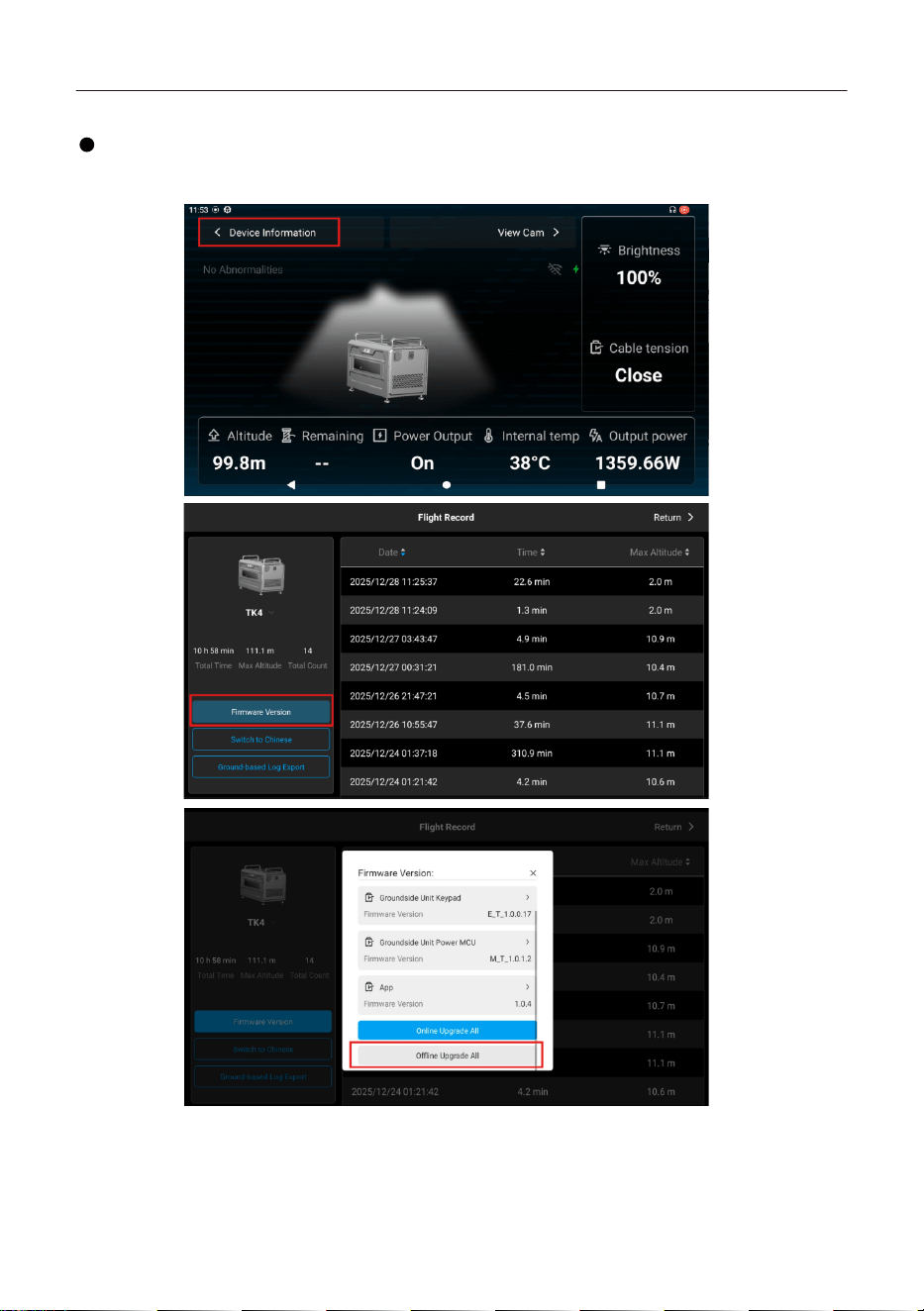
5.9 Device Information
Flight Record: View flight dates, flight duration, and maximum flight altitude. Supports
sorting and query functions.
5.10 Firmware Update
Firmware updates are required during first-time use or when a new firmware version is
released.
Offline firmware packages can be downloaded from the CZI official website and saved to an
external storage device (such as a TF card or USB flash drive). Launch the czi GC App, enter the
Device Information page, tap Firmware Version, and select Offline Update All. Choose the
required firmware package from the external storage device to perform a one-click upgrade.
Precautions
Before updating, ensure the aircraft is connected to the ground station and high-voltage
output is enabled.
Do not operate the control panel or power off the device during the upgrade process.
During the upgrade, keep the aircraft away from people and animals.
Always update the firmware to the latest version to ensure flight safety.
TK4 Tethered Power System User Manual
40
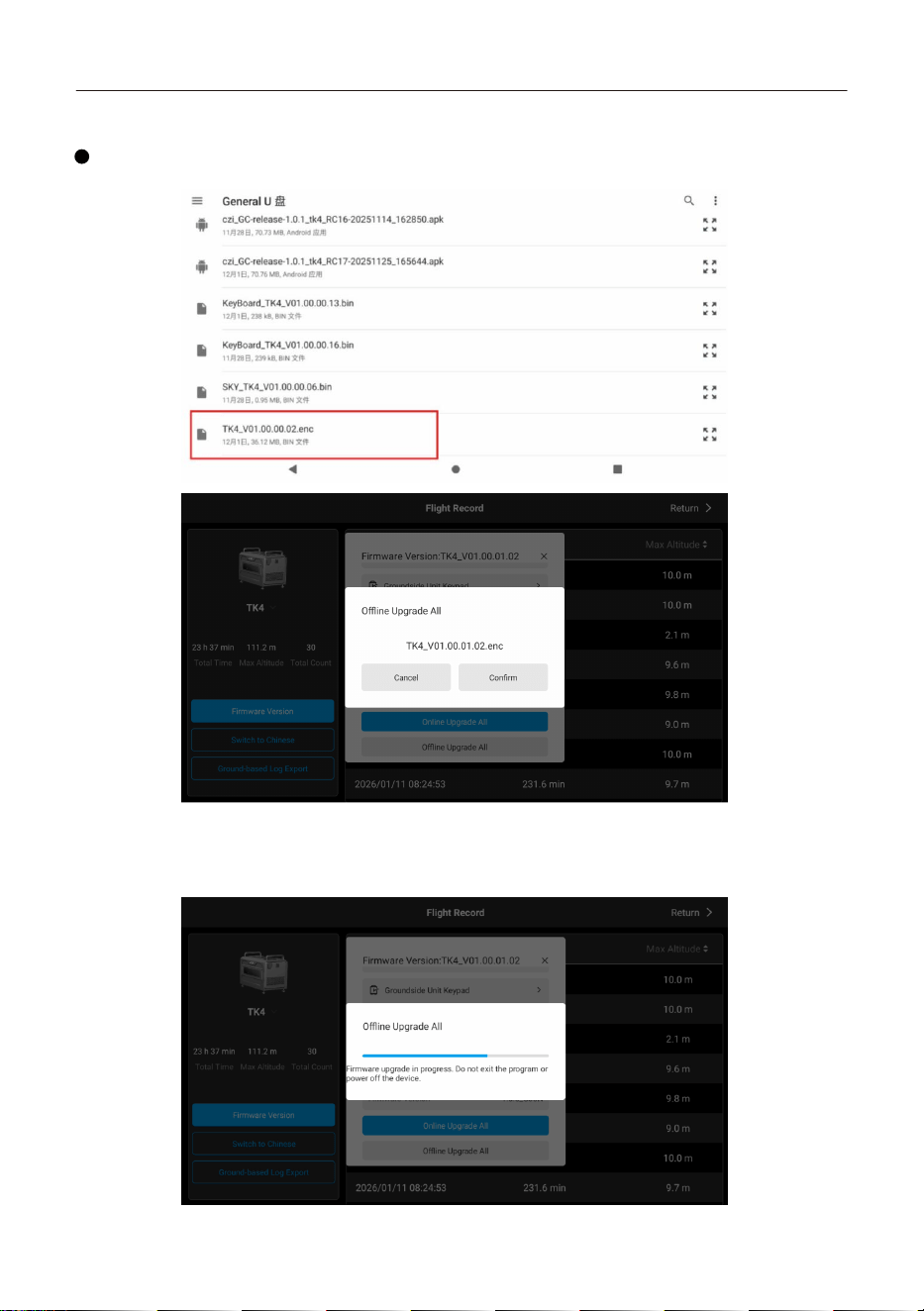
Firmware Update Procedure:
Open the czi GC App, then navigate to [Device Information] [Firmware Version], and
select the appropriate update method.
TK4 Tethered Power System User Manual
41
Offline Update:
After selecting Offline Update All, choose the downloaded firmware file from the USB flash
drive.
The update process takes approximately 5 -10 minutes. Do not power off the device during the
update. Wait until the upgrade is completed.
TK4 Tethered Power System User Manual
42
5.11 Log Export
1. To export the log file: Insert a USB drive, open File Manager, and tap rk3568. This is the
internal storage path. ESD-USB is the USB drive storage path. Different USB drives may have
different naming conventions.
2. Copy all files from the CZI/LOG directory within the internal storage directory to the USB drive.
Long-press to select the files that are to be copied (folders or compressed files are both accept-
able), then tap the Copy to... button in the upper-right corner.
3. Select the USB drive directory, then tap Copy.
①
②
TK4 Tethered Power System User Manual
43
6. Post-Use Procedure (Ensure high voltage is turned off
before proceeding.)
1. Press and hold the “ ” button on the ground station. When the voice prompt “High
voltage off” is heard, the high-voltage output is turned off. The blue indicator light of the “ ”
button will turn off.
2. Remove the aviation connector: Unhook the latch, detach the “aviation connector”from the
airborne unit interface, retrieve the tether cable via the ground station, retract the connector in
the direction indicated by arrow 1, retract the latch in the direction indicated by arrow 2, and
close the cable cover.
①
②
3. Ground Station power-off: Press and hold the power button [ ] to power off the device.
TK4 Tethered Power System User Manual
44
4. Ground Station main power switch: Turn off the ground station
power by setting the switch to “OFF”.
5. Disconnecting the Ground Station power supply: Slide the power cable button in the
direction of arrow 1 while rotating it counterclockwise. Remove the power cable connector
from the receptacle, retract the cable, and secure the power cover.
Return the grounding rod to its holder
WARNING
①
6. Disconnect 220V power supply: Unplug the power cord from the electrical outlet (or generator).
7. Grounding Rod Retrieval: Remove the grounding rod from the ground and secure it back into
the holder clip.
TK4 Tethered Power System User Manual
45
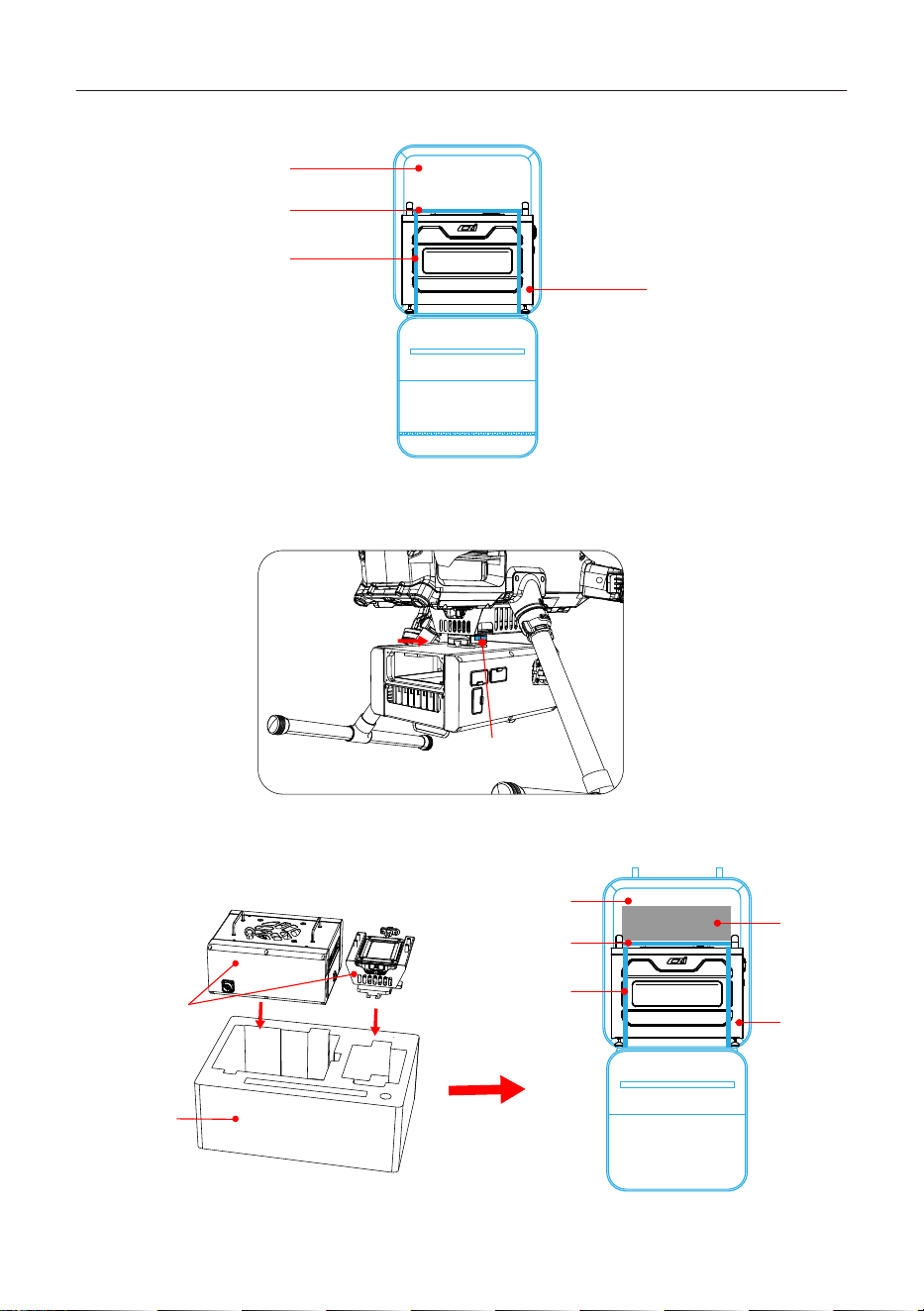
8. Storage: Place the ground station into the backpack.
Backpack
Compartment
Adjustable
Securing
Strap
Ground
Station
①Press and hold
the button
②Push the airborne
unit outward
1. Disconnect the power and Type-C cables.
2. Remove the airborne unit from the aircraft mount.
Airborne Unit Storage:
Inner Lining
Airborne Unit
Backpack
Ground
Station
Airborne
Unit
Compartment
Adjustable
Securing
Strap
3. Storage: Place the airborne unit into the backpack.
TK4 Tethered Power System User Manual
46
TK4 Tethered Power System User Manual
Disclaimer: The user is solely responsible for verifying the safety and regulatory compli-
ance of any third-party generator. The recommended compatible equipment list is provided
for reference only. The TK4 Tethered Power System assumes no responsibility for the quality,
safety, or subsequent firmware updates of any third-party generator. In the event of any
compatibility issue during use, it is recommended to contact the corresponding generator
manufacturer first.
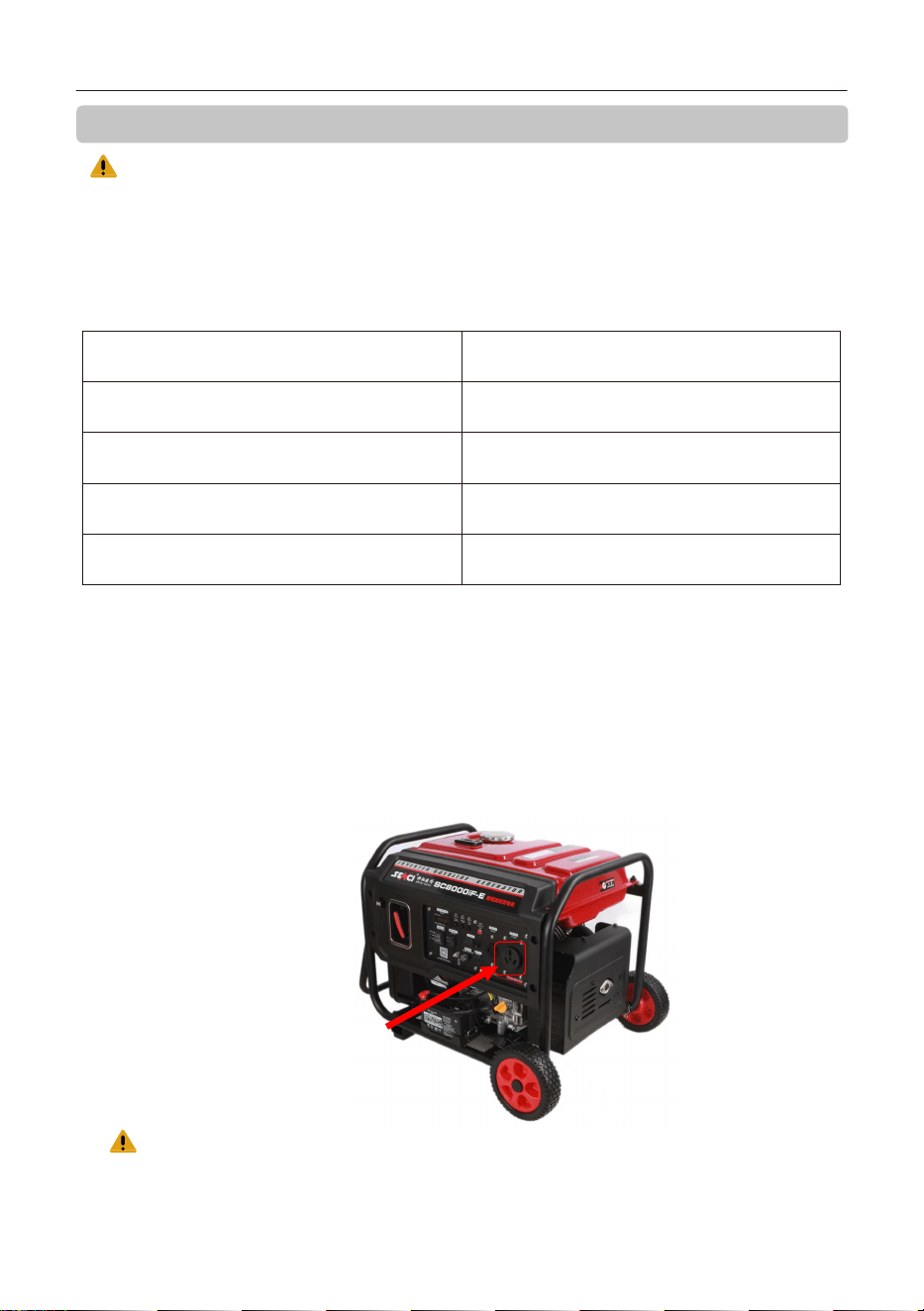
Operating Steps for Connecting the TK4 Tethered Power System to a Generator:
1.Start the generator set according to the generator user manual.
Do not connect the TK4 Tethered Power System before the generator set is started.
2.According to the generator user manual, adjust the generator output voltage to a level
compatible with the TK4 Tethered Power System. (The recommended voltage for this device
is 220 V.)
3.After the generator set has started, connect the TK4 power cable (customer-supplied plug)
to the generator.
4.Then power on the TK4 Tethered Power System by following the operating procedure for
the TK4.
The following generator is recommended for use with the system:
Product Model
Max Output Power (kw)
Rated Output Power(kw)
Rated Frequency(Hz)
Rated Voltage(V)
Senci SC8000iF
6.5
6.0
50
230
7. Appendix 1: Examples of Tested Compatible Generators
Insert the TK4 power cable
Caution: Before refueling the generator, disconnect the TK4 power cable from the
generator and keep the TK4 product away from the generator.
47
For detailed user instructions, please refer to: Electronic Manuals: [CZI Official Website ->
Support -> Download Center -> Manuals -> TK4] Product Tutorial Videos: [CZI Official Website
-> CZI Products -> TK4 ->Video]
www.czi.com.cn
Service Hotline: 400-008-8306
If you have any questions or suggestions regarding the
manual, please contact us via the following email address:
Chengzhi Technical Support
Made in China
CZI Officia l Website: www.czi.com.cn
Please scan the QR code to view the latest User Manual.
8.Official Website Links
TK4 Tethered Power System User Manual