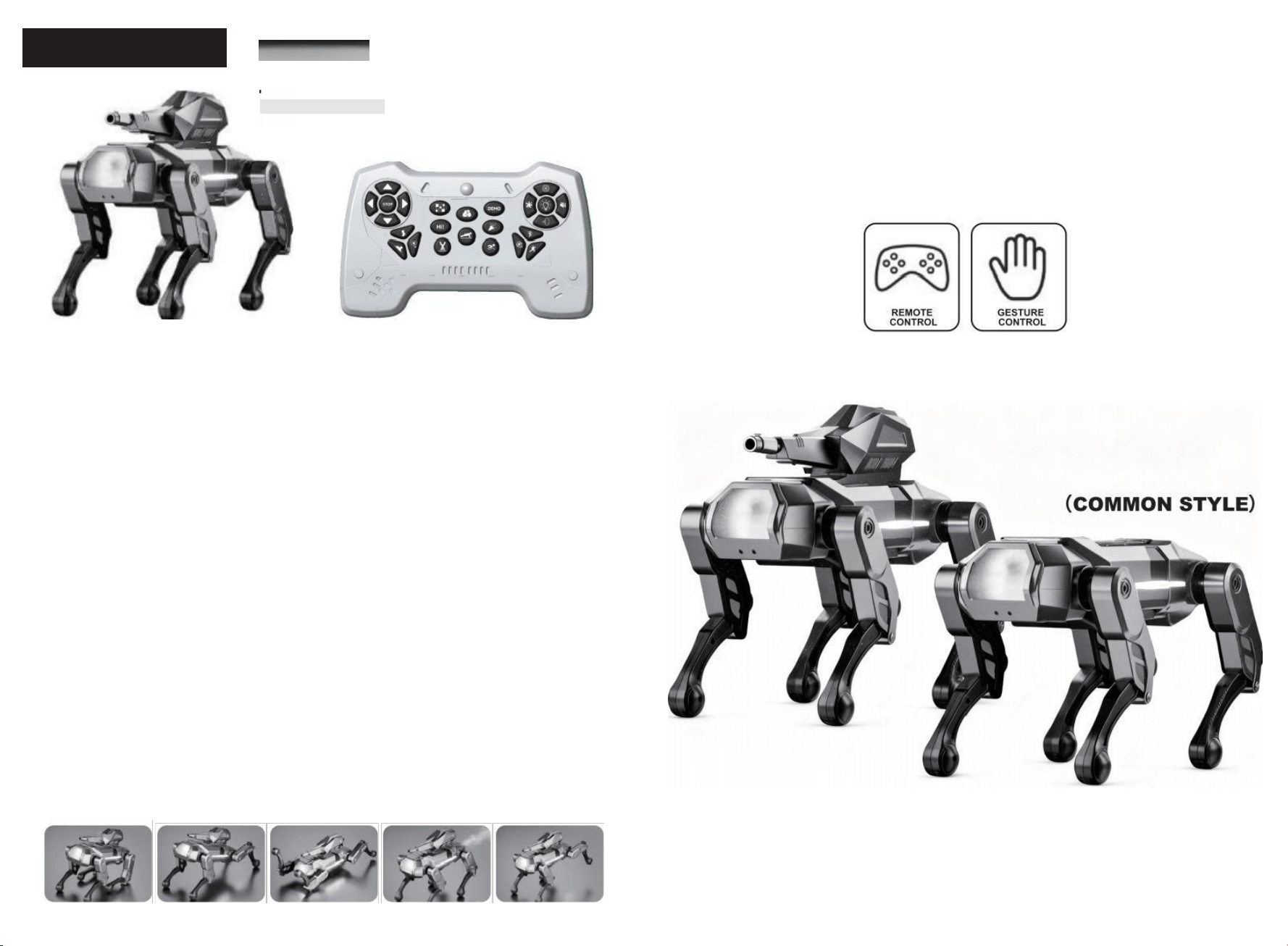
REMOTE CONTRO: After the remote control and the robot dog are
synchronized,press the button on the remote control,and the pet
will make the corresponding action.
GESTURE CONTROL:There is an infrared probe under the pet's head.
When a hand approaches,the pet will perform a "greeting"action.
*Note:When operating,only one of the control modes,remote
control and gesture control,can be executed.
FORWARD—Press and hold the "Forward"signal key for a long time,and the robot dog
will move forward.Until the word "move forward"is released Signal key,stop the action.
BACK——Press and hold the "Back"signal key to move the robot dog backward.Until the
"back"is released Signal key,stop the action.
LEFT TURN—Press and hold the "Left Turn"signal key for a long time,and the robot dog
will move to the left.Until the "left turn"is released Signal key,stop the action.
RIGHT TURN—L ong press the "Right Turn"signal key and the robot dog will move to the
right.Until the "right turn"is released Signal key,stop the action.
PROGRAMMING—Receive the "Programming"signal key,in addition to the "Stop -Al-
Song"signal key,the remote control All the signal keys on it can be programmed.After
programming is completed,press the "Demonstrate"key,and it will Execute the
programming content.
SAY HELLO—Upon receiving the "Say Hello"signal key,perform the action.
BLESSING—I wish all the children in the world to be smarter than scholars and have their
intelligence fill their heads.
URINATION—Upon receiving the "urination"signal button,the robot dog whistles to
perform the action.
KUNG FU—Upon receiving the "Kung Fu"signal key,the robot dog plays one Kung Fu
piece of music.
STOP—Upon receiving the "Stop"signal key,the robot dog stops all execution actions.
GET DOWN—The lidar detects danger ahead.Kids,come and climb down with me quickly.
cOQUETRY—Master,please give me the encouragement of love.
PUSH-UPS—Life lies in movement.Would you like to do some exercise with me,kids?
SONG—Upon receiving the "Song"signal key,the robot dog plays three pieces of music.
FART—Upon receiving the "fart"signal button,the robot dog will emit a spray effect.
VOLUME—You can adjust the volume and turn off the sound.
LIGHTING—You can adjust the color of the lights and turn them off.
SIT DOWN PRESS-UP SWIMMING BREAK WIND PEE
ROBOTD0G
SMART PET SERIES 》》
TWO CONTROL MODES
(FLAGSHIP STYLE)
USER'S MANUAL
PLEASE READ THROUGH THIS MANUAL BEFORE USE
FUNCTION INTRODUCTION
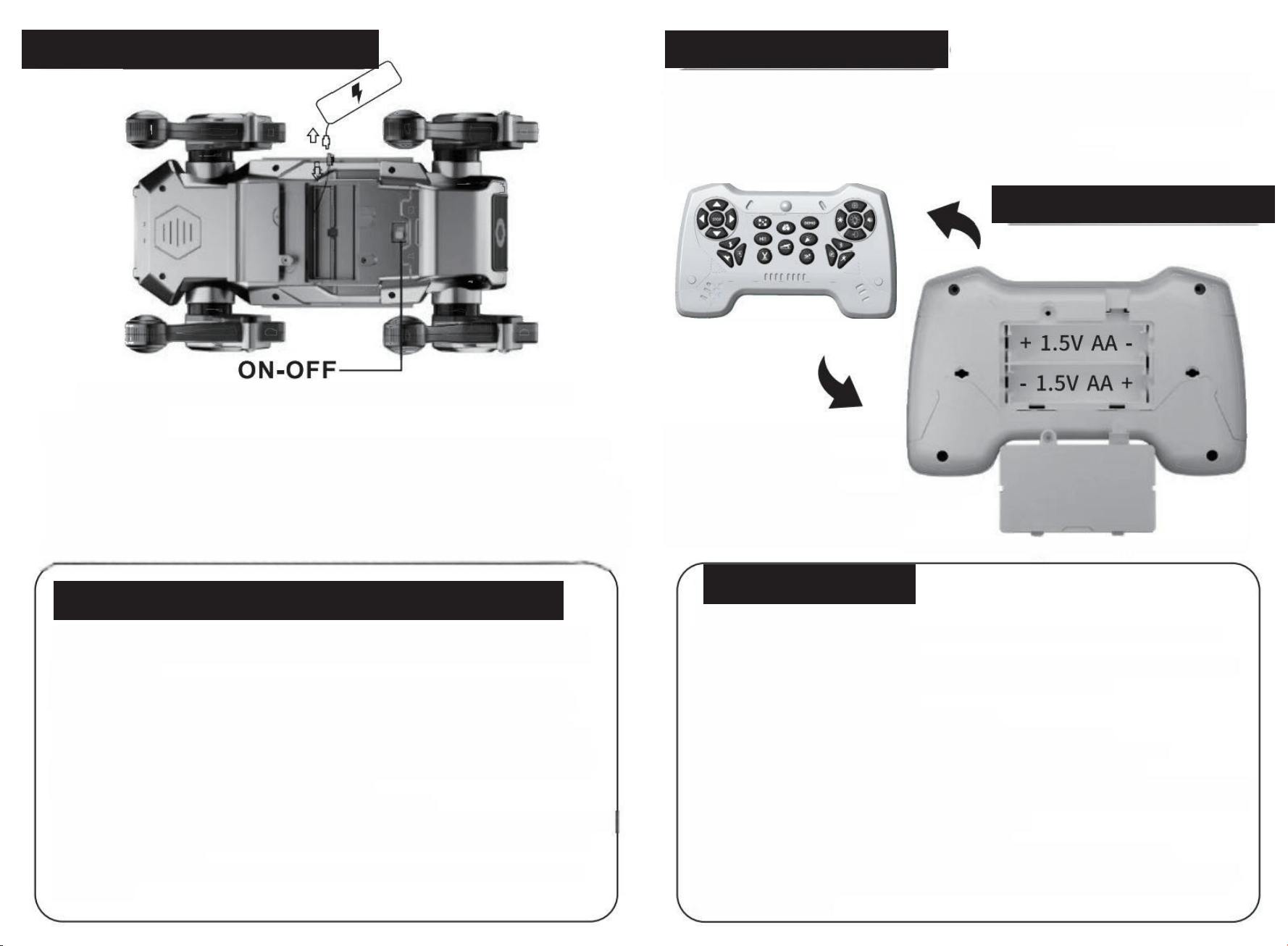
The product uses 1 set of 3.7V rechargeable lithium batteries
SWITCH:
First,turn the switch button at the bottom to the "ON"position.At this point,the pet will give
a voice prompt.A long time after startup If there is no operation,the pet will emit a prompt
sound once.If there is still no operation,the pet willautomatically shut down after the second
prompt.When the battery power is low,the pet will emit a prompt sound twice.The third prompt
indicates that the pet will automatically shut down.After the pet automatically shuts down,you
need to turn the switch button at the bottom to the "OFF"position,wait for 5 seconds,and then
turn it,The switch button should be turned ON to the "ON"position before it can be turned on.
1.When charging,personnel must not leave and the charging time should not be too long.If the
battery gets hot during the charging process,Please stop charging immediately to avoid battery
damage or fire,etc.
2.Do not charge the battery near flammable or explosive items when the battery is in useor
during charging lf any strange smell occurs or the battery suddenly becomes hot,deformed,
discolored or shows other abnormal phenomena,please stop immediately Use this battery.
3.If the battery leaks,please avoid contact of the liquid with skin and eyes.If in contact with the
skin and Eyes:Rinse immediately with plenty of cold water and seek medical attention promptly.
4.Only the original factory-provided charger can be used to charge the product,and make sure
the charger's voltage is suitable for you Local standards.
5.Do not place the battery in fire,microwave oven or pressure tank.
6.Do not clean the product or charger with solvents,industrial alcohol or other flammable solvents.
7.The product is composed of plastic,electronic components and batteries.Please do not treat
such items as daily waste.
For garbage disposal,please sort and handle it in accordance with the local garbage recycling
requirements.
Open the water tank cover at the rear of the device,use the small water bottle provided with the
product to draw up clean water without stains,and add it to the water tank.After filling is completed,
the water tank cap should be closed,and then the spray function operation can be carried out.
The spray water tank must be filled with clean water free of stains.
There should be no debris at the spray outlet and it should be kept clean.
When there is no water in the water tank,the spray function operation cannot be performed.
Unscrew the back cover of the remote
control with a screwdriver.
Install in the correct direction of the positive and negative poles
Put on the battery and then installthe battery cover
Ok.Use two 1.5V sections for the remote control
"AA"battery (to be provided by yourself)
1.The robot dog uses a 3.7V rechargeable lithium battery.The remote control uses two
1.5V AA non-rechargeable batteries;
2.The removal and installation of batteries should be carried out correctly in accordance
with the polarity and voltage marks on the toy battery compartment.
The battery should not short-circuit.
3.Non-rechargeable batteries cannot be charged:
4.Rechargeable batteries must be charged under adult supervision.
5.The rechargeable battery should be removed from the toy before charging.
6.Batteries of different types or new and old batteries must not be mixed.
7.Only batteries that are the same as or equivalent to the recommended ones can be used.
8.The exhausted battery should be removed from the toy.If the toy is not going to be used
for a long time,please remove the battery from the toy.
9.The power terminals must not be short-circuited.
10.Do not connect to more than the recommended number of power sources.
During the use of a USB cable,it is necessary to regularly check whether its plug,casing
and other components are damaged,When damage is found,stop using it immediately
until it
is fully repaired
BATTERY PRECAUTIONS
REMOTE-CONTROL UNIT INTRODUCE
INTRODUCTION TO SPRAY FUNCTION
RELEVANT
PRECAUTIONS
FOR THE
USE OF
LITHIUM
BATTERIES
INTRODUCTION TO CHARGING AND SWITCHING
FCC Warning
This device complies with Part 15 of the FCC Rules. Operation is subject to the following two
conditions:
(1) This device may not cause harmful interference, and (2) this device must accept any
interference received, including interference that may cause undesired operation.
NOTE 1: This equipment has been tested and found to comply with the limits for a Class B
digital device, pursuant to part 15 of the FCC Rules. These limits are designed to provide
reasonable protection against harmful interference in a residential installation. This equipment
generates, uses and can radiate radio frequency energy and, if not installed and used in
accordance with the instructions, may cause harmful interference to radio communications.
However, there is no guarantee that interference will not occur in a particular installation. If this
equipment does cause harmful interference to radio or television reception, which can be
determined by turning the equipment off and on, the user is encouraged to try to correct the
interference by one or more of the following measures:
- Reorient or relocate the receiving antenna.
- Increase the separation between the equipment and receiver.
-Connect the equipment into an outlet on a circuit different from that to which the receiver is
connected.
-Consult the dealer or an experienced radio/TV technician for help.
NOTE 2: Any changes or modifications to this unit not expressly approved by the party
responsible for compliance could void the user's authority to operate the equipment.
The device has been evaluated to meet general RF exposure requirement. The device can be
used in portable exposure condition without restriction.