
THANK YOU!
Thanks for your favor in our products, this manual is helpful for you to quickly know how to use, we believe this easy-to-use PoC
Radio will provide dependable and reliable communication to your operating at peak efficiency.
Please refer to the corresponding feature book for detailed features and operations.
UNPACKING AND CHECKING EQUIPMENT
Please unpack the radio and check the items listed below are received. If any item is missing or damaged, please contact your
dealer at once.
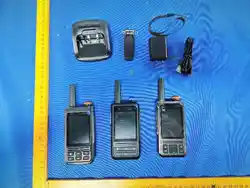
Packing List
DESCRIPTION
QUANTITY
Radio
1
Li-ion Battery Pack
1
Desktop Charger
1
Adapter
1
USB Cable
1
Belt Clip
1
User Manual
1
Hand Strap
1
PREPARATION
Charging the Battery Pack
1.Using the Battery Pack
The battery pack is not charged at the factory, please charge it before use. To extend the battery pack lifetime, please power off
the transceiver and remove the battery pack when not in use and do not leave the battery in hot or cold place.
2.Battery Pack Characteristics
The battery will slowly wear out even not in use. After charging and recharging, it's normal that the talk and standby times are
noticeably shorter than normal times. If leaving the battery in very hot place or conditions, it will reduce the capacity and lifetime
of the battery. Overcharging may also shorten its lifetime.
3.Charging the Battery Pack
Please charge your battery only with our approved charger. Initially charging the battery pack after purchase or extended storage
(greater than 2 months) will not bring the battery pack to its normal operating capacity. After repeating the charge/discharge
cycle two or three times, the operating capacity will increase to normal level.
Please charge the battery pack as follows:
1.Insert the adapter and make sure the contacts are in contact with the socket.
2.Plug the USB cable into the desktop charger at the back. Then slide the battery pack into the desktop charger.
3.The charging LED lights red and charging begins.
4.After charging when the light turns to green, it means the battery pack is fully charged. Then you can take off the battery pack
or radio with the battery pack and use it.
Caution:
•Make sure the radio is powered off before charging and do not use the radio during charging.
•Read the safety Information booklet in advance to get necessary safety information.
GETTING ACQUAINTED
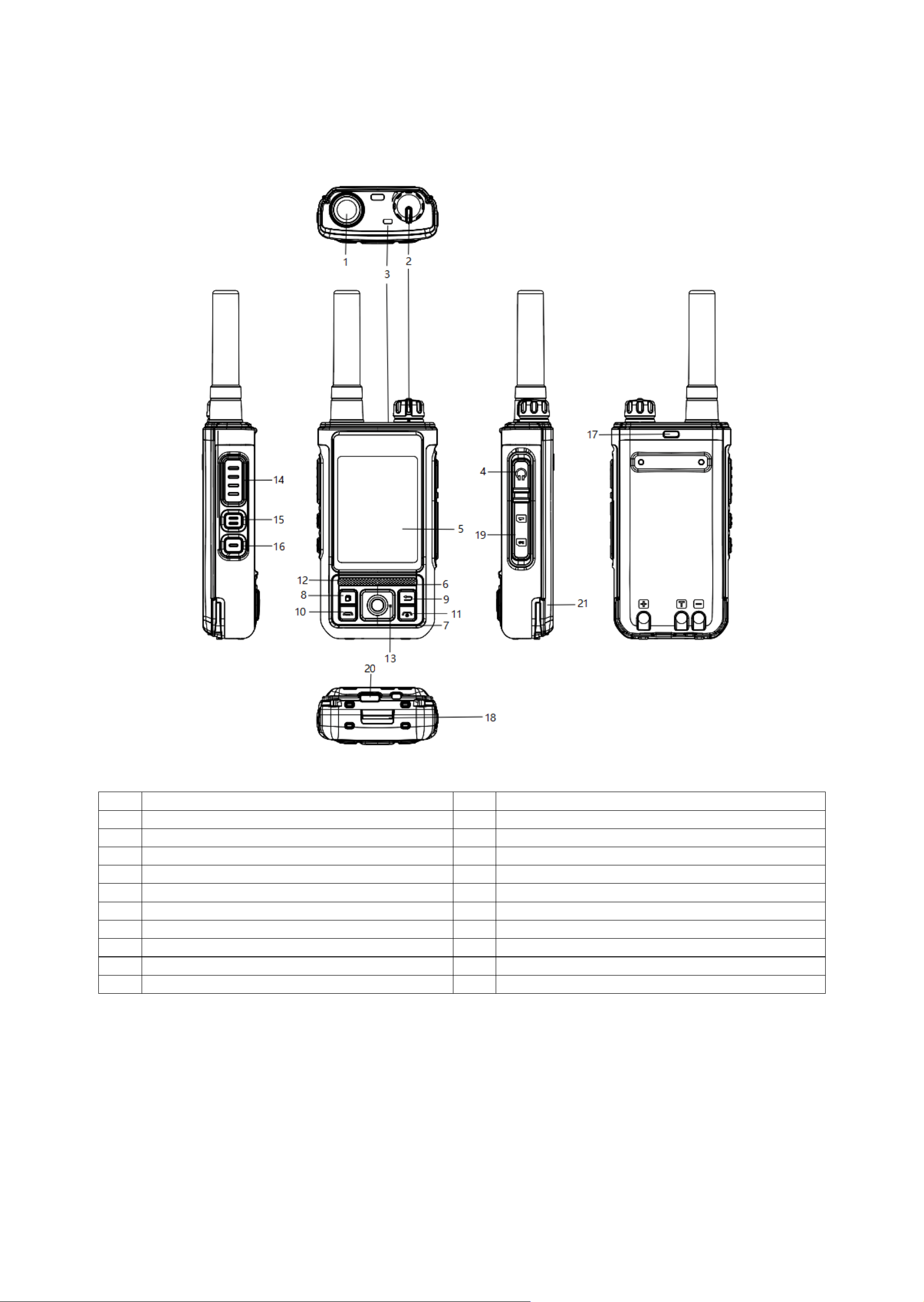
Orientation
1
Antenna
12
Speaker
2
Power On-Off/Volume Control Knob
13
Microphone
3
LED Indicator (TX: red, RX: green)
14
PTT Switch (PTT)
4
Accessory Jack
15
Backlight Switch
5
LCD Display
16
Quick Call Key
6
UP Key (UP)
17
Hand Strap Hook
7
Down Key (DN)
18
Battery Latch
8
Menu Key
19
SIM Card Slot
9
Back Key/Press Long Key For Lock and Unlock Key pad
20
Type-C USB
10
Programmable key 1
21
Battery Pack
11
Programmable key 2

MENU
No.
Main Menu
Function
Description
1
Group Sel.
Can Select Enter Group, Monitor, Quick Call
2
Member Sel.
Select Group MBB or Friend MBB to Mark Selcall or Quick Call
3
Dispatcher
SMS List
Use With Software PC
Delete All
4
Settings
Backlight
Can Select Continue,5, 10, Backlight 15,20,25,30 Second
Call Backlight
Can Select ON/OFF
Wallpaper
Can Select Item 1,2,3,4,5 Wallpaper
Beep Switch
Can Select ON/OFF
Profiles
Outdoor
Standard
Indoor
Earphone
Mic Mode
Low
Middle
High
Time Zone
Can Select World Time Zone (Factory Default is UTC+7)
Power Saving Conf.
Power Saving Level
Can Select Level 1,2,3, Automatic
Sleep Switch
Can Select ON/OFF
SIM Card
SIM Card 1
SIM Card 2
SIM Switch Auto
Can Select ON/OFF
PTT Tone
Can Select ON/OFF
Sound Quality
Standard
High Definition
Headphone Recognition
Automatic
Manual
Bluetooth settings
(optional)
Can Adjust: Switch, Bluetooth Scan, Connect Bracelet PTT,
Disconnect,
Bluetooth Connection Time
5
Device Info.
Account Info.
Check Current Account
App Ver
Check Current Platform Version
Module Ver
Check Current Device Module Model Number
IMEI
Check Current IMEI Number
ICCID
Check Current ICCID Number
POC Ver
Check the POC Version

FCC Statement
This device complies with Part 15 of the FCC rules. Operation is subject to the following
two conditions: 1) this device may not cause harmful interference, and 2) this device must
accept any interference received, including interference that may cause undesired
operation.
Note: This equipment has been tested and found to comply with the limits for a Class B
digital device, pursuant to part 15 of the FCC Rules. These limits are designed to provide
reasonable protection against harmful interference in a residential installation. This
equipment generates uses and can radiate radio frequency energy and, if not installed and
used in accordance with the instructions, may cause harmful interference to radio
communications. However, there is no guarantee that interference will not occur in
particular installation. If this equipment does cause harmful interference to radio or
television reception, which can be determined by turning the equipment off and on, the
user is encouraged to try to correct the interference by one or more of the following
measures:
--Reorient or relocate the receiving antenna.
--Increase the separation between the equipment and receiver.
--Connect the equipment into an outlet on a circuit different from that to which the
receiver is connected.
--Consult the dealer or an experienced radio/TV technician for help.
Changes or modifications not expressly approved by the party responsible for compliance
could void the user’s authority to operate the equipment.
RF Exposure Statement
SAR tests are conducted using standard operating positions according standards with the
device transmitting at its highest certified power level in all tested frequency bands,
although the SAR is determined at the highest certified power level, the actual SAR level of
the device while operating can be well below the maximum value.
This model product has been tested and meets the RF exposure guidelines with the test
distance 25mm for face and 0mm for body worn. The highest SAR1g value is 0.190W/Kg
for face and 0.750
W/Kg for body worn. The use of belt clips, holsters and similar
accessories should not contain metallic components in its assembly. The use of accessories
that do not satisfy these requirements may not comply with RF exposure requirements,
and should be avoided

