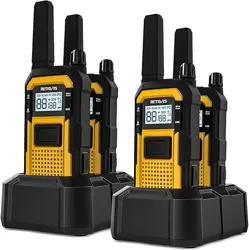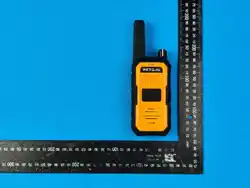
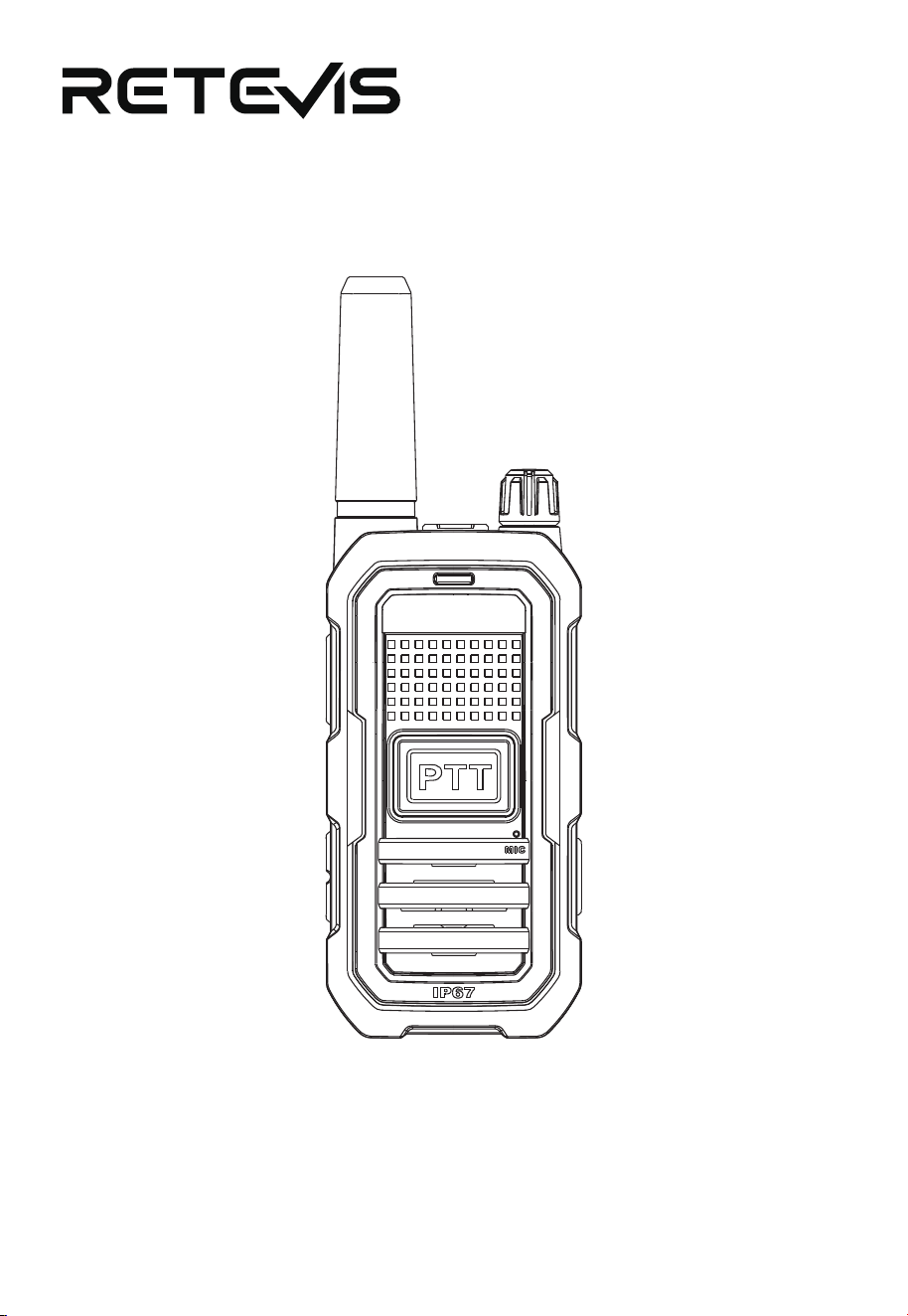
RB48A
User Manual

Contents
Notice to Users .............................................................................
Batte Information .....................................................................
Feature Oveiew ........................................................................
Getting to Know Your Radio .......................................................
Key Functions ................................................................................
Basic Operation and Feature Description ................................
CTCSS/DCS Lists ...........................................................................
Frequency Char .............................................................................
Specications ................................................................................
CAUTION .......................................................................................
Guarantee ......................................................................................
01
02
03
04
05
05
08
09
09
10
14
Brochures, Software/Firmware, Manual etc, Please contact

Notice to Users
- Before operating this unit, please read this manual carefully.
- The use of this two-way radio must comply with local government laws and
regulations. Improper use may violate the law and result in sanctions, penal-
ties, or even imprisonment.
- Repair and adjustment of this radio are to be peormed only by authorized
seice personnel.
- To avoid problems caused by electromagnetic eld inteerence or electro-
magnetic compatibility, turn o the radio in locations marked with a "Turn O
Radio" sign, such as hospitals and other healthcare facilities. When aboard an
aircraft, turn o the radio when instructed to do so by the crew.
- Do not place the radio within the deployment area of an airbag in vehicles
equipped with airbags.
- Turn o the radio before entering ammable or explosive environments.
- Do not transmit continuously for extended periods. The radio may become
hot and cause burns or damage to the radio.
- Do not use a radio with a damaged antenna. Contact with a damaged
antenna may cause minor burns.
- Do not expose the radio to prolonged direct sunlight or place it near heating
devices.
- If abnormal odor or smoke is detected coming from the radio, immediately
remove the batte from the radio and promptly contact our company or your
local dealer.
Unpacking and Inspection
Before use, open the packaging box and carefully inspect the main unit and
the listed standard accessories inside. If any items are missing or damaged
during transpoation, please contact the carrier or dealer immediately.
1

Batte Information
Charging Precautions
Charge new batteries or batteries that have not been used for an extended
period before initial use. Peorming two or three charge/discharge cycles will
help the batte reach its optimal capacity. When low batte power is
indicated, charge or replace the batte.
Compatible Batte Types
Use only batteries specied by our company. Using other batteries may cause
explosion and personal inju.
Note:
1.Do not sho-circuit the batte terminals or discard the batte in re. Do
not disassemble the batte pack casing.
2.The ambient temperature during charging should be between 0°C and 40°C.
Charging outside this range may prevent proper batte charging.
3.Turn o the radio power when charging. Using the radio while charging may
inteere with proper batte charging.
4.Avoid disconnecting the power source or batte during the charging
process, as this may disrupt the charging procedure.
5.If the usable time is signicantly reduced even after a full charge, the
batte has reached the end of its life and should be replaced.
6.Do not disconnect and reconnect a fully charged batte for recharging, as
this may shoen batte life or cause damage.
7.Do not charge the batte or radio when they are wet. Before charging, d
them with a cloth to avoid hazards.
8.Eliminating the Risk, keep away from the ammable materials,heat sources
and ignition sources while a batte is charged. Charging should only take
place in a well ventilated area and when someone is about to be aware and
react to a potential issue.
9.To reduce risk of re, a batte should not be charged for more than 8 hours
and disconnect charger from line voltage (AC outlet) by removing main plug
even if the batter is not completely charged.Don't leave a device unattended
while charging. Disconnect the charger when the device is fully charged: do
not overcharge the device.
Charging Procedure
Note: Turn o the radio while charging.
1.Desktop Charger: Inse the radio with the batte attached into the desk-
top charger, ensuring good contact between the batte contacts and the
charger contacts. The charger's red indicator light will illuminate steadily,
indicating charging is in progress. When the red light turns o and the green
light illuminates, the batte is fully charged. Unplug the charger from the
outlet and remove the batte.
2

2.Type-C Charging: Use a standard output DC 5V charger. Inse the Type-C
cable into the Type-C po. The radio's indicator light will show a steady red
light, indicating charging is in progress. When it changes to a steady blue
light, the batte is fully charged. Disconnect the charging cable and charger.
Accesso Installation
Attaching/Detaching the Belt Clip
If necessa, attach the provided belt clip by screwing it into the screw holes
on the back of the batte pack for easy caring. To detach the belt clip,
simply unscrew the two screws.
Attaching the Wrist Strap
Thread the wrist strap through the loop on the radio.
Feature Oveiew:
● Channel Adjustment
● Low Batte Ale
● Time-Out Timer (TOT)
● Busy Channel Lockout
● Monitor Function
● Scan Function
● Alarm Function
● Power Level Switching
● VOX Function
● Channel Lock
● Weather Ale
● Dual PTT
● Two-Way Noise Reduction
● Keypad Tone/Voice Announcement
3
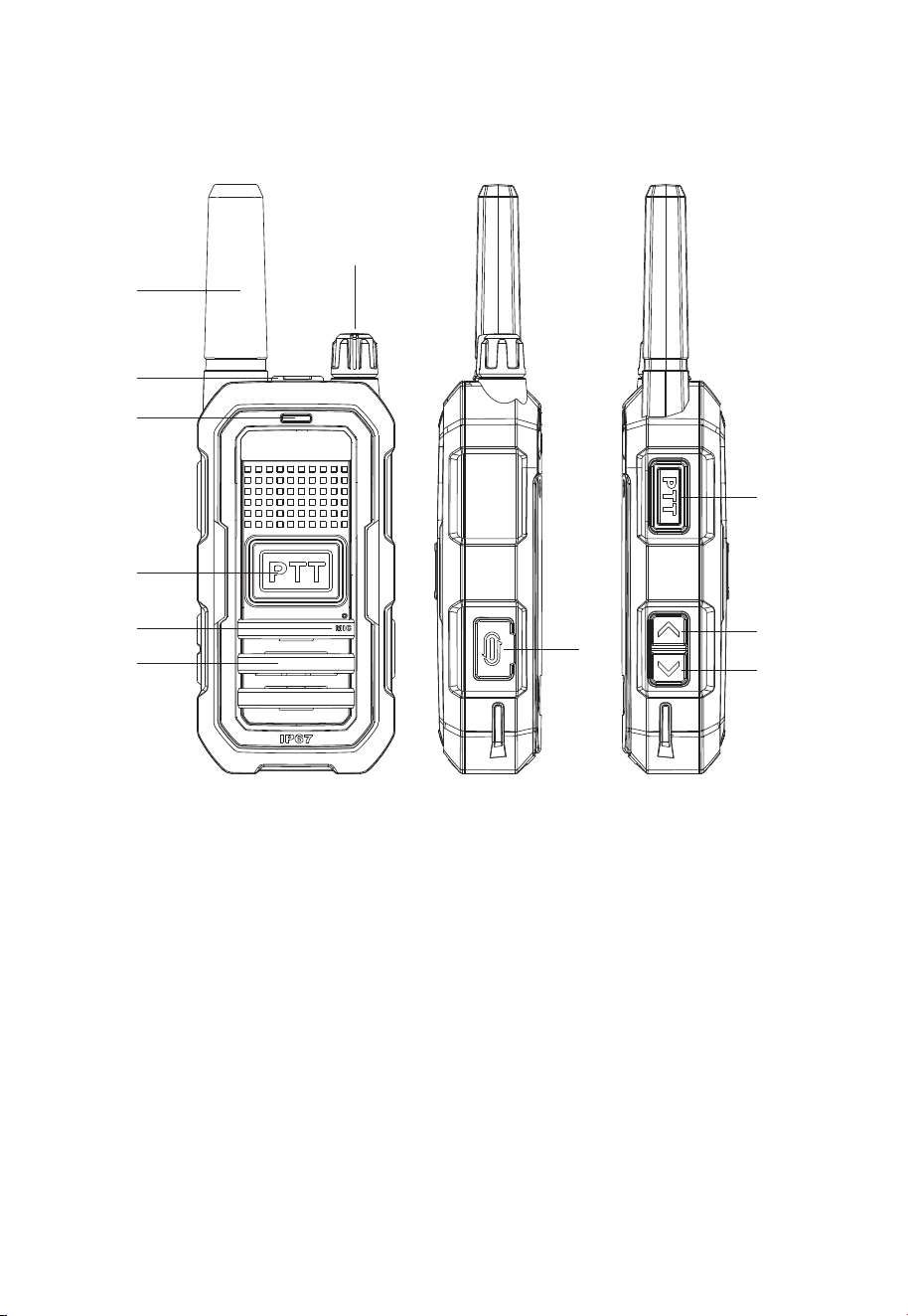
Getting to Know Your Radio
4
1. Antenna
2. External Headphone Jack
3. Power / Volume Adjustment
4. Indicator
5. Front PTT Key
6. Speaker
7. Microphone
8. Type-C Charging/Data Po
9. Side PTT Key
10. Channel +/Programmable Key
11. Channel -/Programmable Key
1
2
4
5
7
8
9
10
11
6
3

Key Functions
1.【 】PF1 Key
Sho Press: Channel Up.
Long Press: None, Monitor, Scan, Alarm, Noise Reduction, VOX, Power
Switching, Weather, Channel Lock. Default: Toggle Noise Reduction ON/OFF.
2.【 】PF2 Key
Sho Press: Channel Down.
Long Press: None, Monitor, Scan, Alarm, Noise Reduction, VOX, Power
Switching, Weather, Channel Lock. Default: Activate Alarm.
3.【PTT】Key
Push-To-Talk Key: Press and hold to transmit and speak into the microphone.
Release to receive.
Basic Operation and Feature Description
Power ON/OFF / Volume Adjustment
Turn the volume/power knob clockwise until a "click" is heard. The radio will
announce a beep tone, indicating power is ON. Continue turning clockwise to
increase volume. Turn counterclockwise to decrease volume. A "click" sound
when turning counterclockwise indicates power is OFF.
Making a Call
Press and hold the PTT key to transmit; the indicator light will glow red.
Speak towards the microphone hole, and the other pay will hear your
message. Release the PTT key after speaking to receive. The indicator light
will glow green when receiving a signal.
Channel Adjustment
【 】PF1 Key: Sho press for Channel Up; sequentially press to increase
the channel.
【 】 PF2 Key: Sho press for Channel Down; sequentially press to
decrease the channel.
Low Batte Ale
When the radio announces "Low batte, please charge" and the indicator
light ashes red, it indicates the batte voltage is below the operating level.
Please charge the radio batte.
Time-Out Timer (TOT)
Prevent the radio from occupying a channel for too long and avoids damage
from prolonged transmission. If the transmission exceeds the preset time
5

limit, the radio will stop transmitting and emit a continuous "beep" tone until
the PTT key is released, returning the radio to receive mode.
Busy Channel Lockout
When Busy Channel Lockout is enabled, pressing the PTT key while receiving
a signal will prevent transmission and generate a blocking tone until the PTT
key is released.
Monitor
Press and hold the PF1 or PF2 key congured for the Monitor function. The
radio will announce "Monitor ON" to activate monitor mode, allowing you to
listen for activity on the selected channel. If no signal is present, a "hiss"
sound will be heard. Press the key again to hear "Monitor OFF" and deacti-
vate the monitor function.
Scan
Press and hold the PF1 or PF2 key congured for the Scan function. The radio
will announce "Sta scanning" and the green light will ash, indicating scan
has staed. When a signal is received, scanning pauses to output the signal.
After the signal ends, scanning automatically resumes. Press and hold the
congured PF1/PF2 key again to hear "Stop scanning" and exit scan mode.
Alarm
Select the desired alarm mode. Press and hold the PF1 or PF2 key congured
for the Alarm function. For a local alarm, the radio will sound a siren. For a
remote alarm, the radio will sound a siren and transmit an alarm signal,
causing receiving radios to also sound a siren. Press the congured key or the
PTT key again to cancel the alarm.
Note: When the noise-canceling function on the device is activated, incoming
distress signals from teammates may not be received.
Two-Way Noise Reduction
Press and hold the PF1 or PF2 key congured for Noise Reduction to toggle
the function ON/OFF. Hearing "Noise Reduction ON" activates noise reduc-
tion, which eliminates background environmental noise during transmission,
preseing only the human voice for transmission to the receiving radio. Press
and hold again to hear "Noise Reduction OFF" and deactivate noise reduc-
tion.
Power Level Switching
Press and hold the PF1 or PF2 key congured for Power Switching to toggle
between High and Low power. The radio announces "High power" or "Low
power" accordingly.
6
VOX ON/OFF
Press and hold the PF1 or PF2 key congured for VOX to toggle the function
ON/OFF. The radio announces "Voice control ON" or "Voice control OFF"
accordingly.
Channel Lock
Press and hold the PF1 or PF2 key congured for Channel Lock to toggle the
function ON/OFF. Hearing "Channel lock ON" locks the current channel and
the keypad. Hearing "Channel lock OFF" unlocks the channel and keypad.
Weather Ale
Press and hold the PF1 or PF2 key congured for Weather Ale. Hearing
"weather mode ON" activates the Weather Ale function. When activated,
your radio can be set to respond to NOAA Weather Radio emergency broad-
casts. A special ale tone will sound, and the weather receiver will activate to
provide immediate weather and emergency information. Subsequently, sho
press the【 】Up or【 】Down key to select from 1 to 11 available
weather channels. Press and hold the congured key again to hear "weather
mode OFF" to save settings or exit weather mode. Refer to the attached
Weather Channel Frequency Table for details.
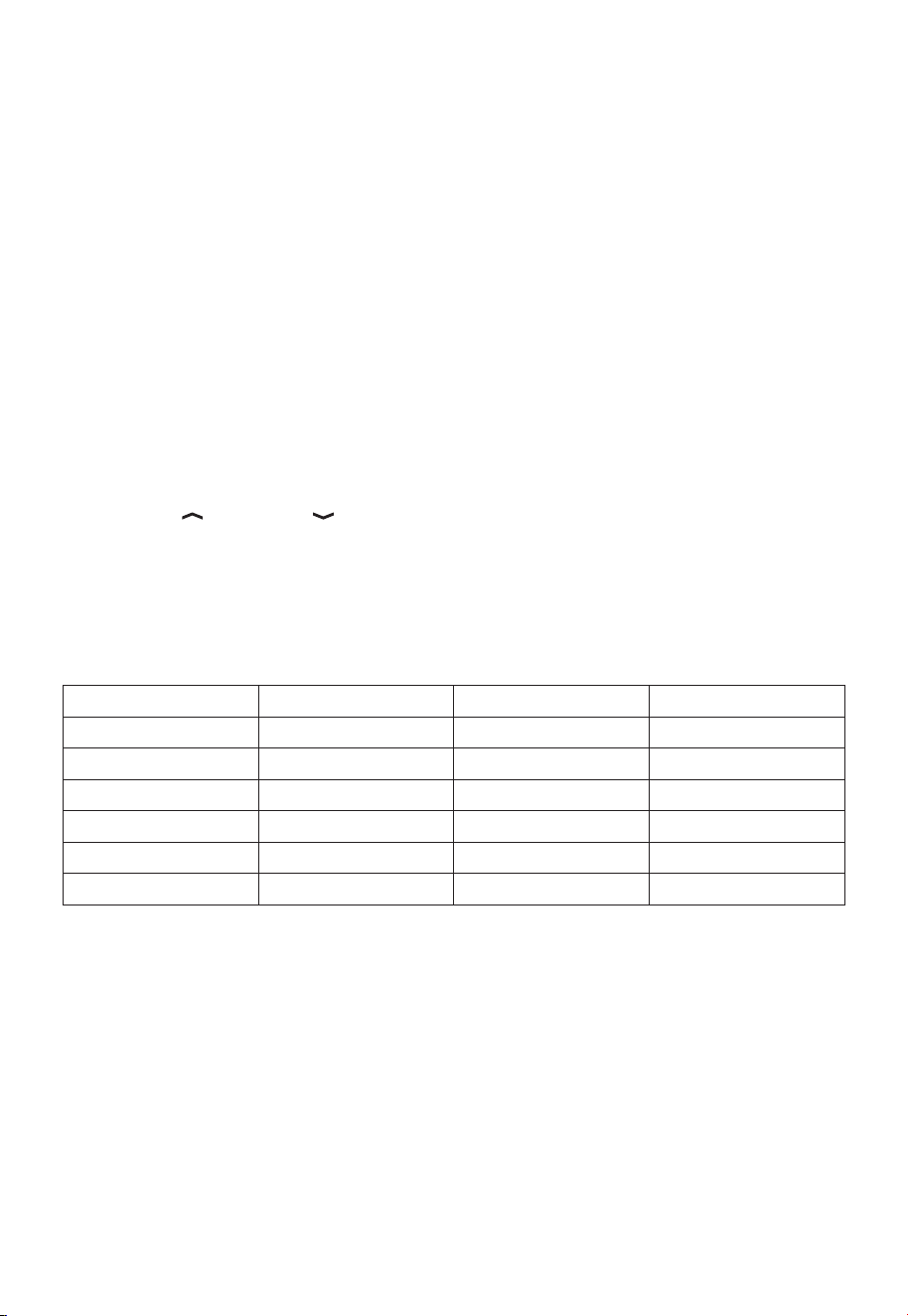
Weather Channels and Frequencies
Channel Frequency Channel Frequency
WX1
162.550MHz
WX7
162.525MHz
WX2 162.400MHz WX8 161.650MHz
WX3 162.475MHz WX9 161.775MHz
WX4
162.425MHz
WX10
161.750MHz
WX5 162.450MHz WX11 162.000MHz
WX6
162.500MHz
7
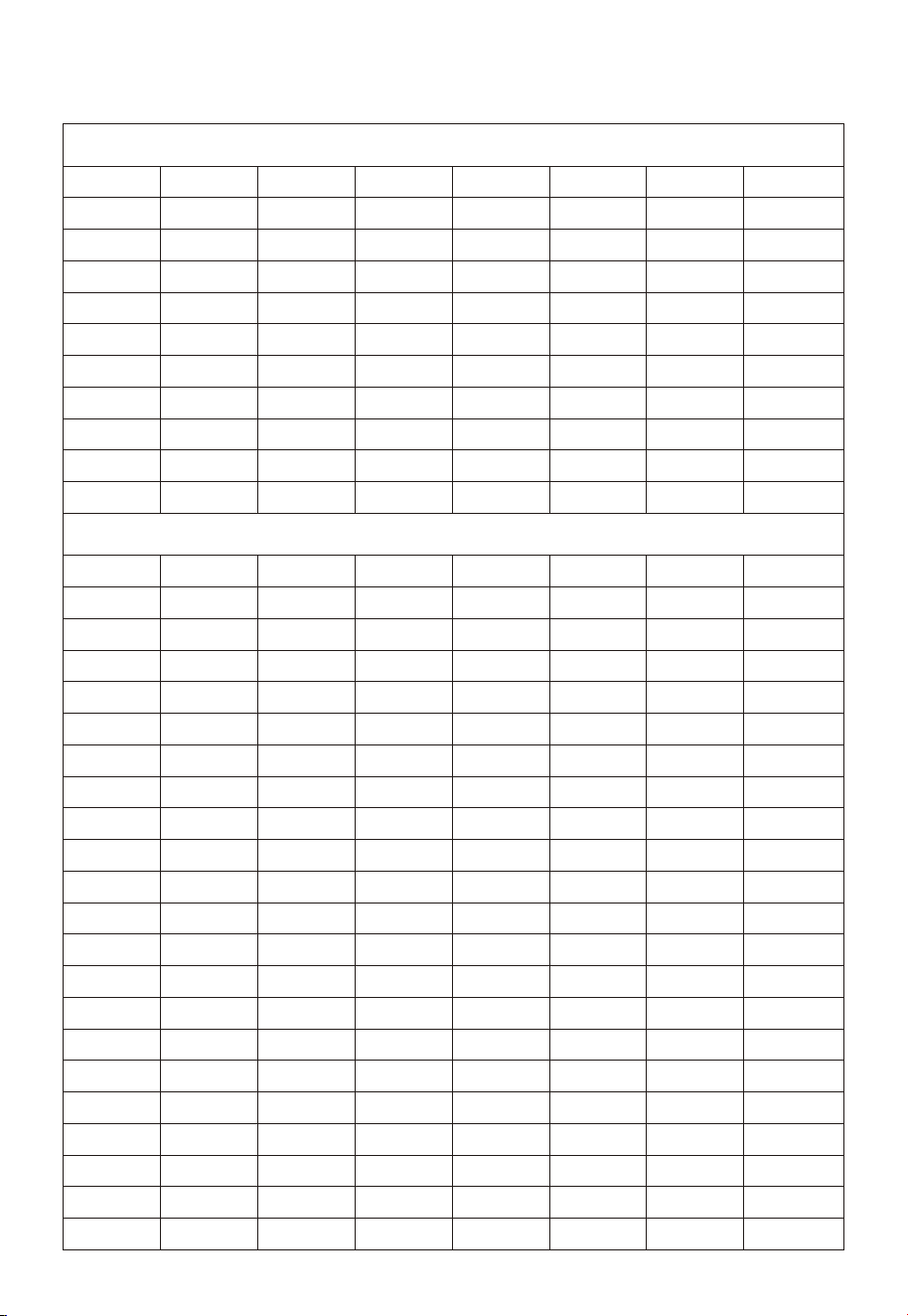
Frequency Frequency Frequency Frequency
CTCSS CHART (Hz)
Number
1 67
2 71.9
3 74.4
4 77
5 79.7
6 82.5
7 85.4
8 88.5
9 91.5
10 94.8
11 97.4
12 100
13 103.5
14 107.2
15 110.9
16 114.8
17 118.8
18 123
19 127.3
20 131.8
21 136.5
22 141.3
23 146.2
24 151.4
25 156.7
26 162.2
27 167.9
28 173.8
29 179.9
30 186.2
31 192.8
32 203.5
33 210.7
34 218.1
35 225.7
36 233.6
37 241.8
38 250.3
Number Number Number
DCS-N DCS-N DCS-N DCS-N
CTCSS CHART (Hz)
Number
39 D023N
40 D025N
41 D026N
42 D031N
43 D032N
44 D043N
45 D047N
46 D051N
47 D054N
48 D065N
49 D071N
50 D072N
51 D073N
52 D074N
53 D114N
54 D115N
55 D116N
56 D125N
57 D131N
58 D132N
59 D134N
60 D143N
61 D152N
62 D155N
63 D156N
64 D162N
65 D165N
66 D172N
67 D174N
68 D205N
69 D223N
70 D226N
71 D243N
72 D244N
73 D245N
74 D251N
75 D261N
76 D263N
77 D265N
78 D271N
79 D306N
80 D311N
81 D315N
82 D331N
83 D343N
84 D346N
85 D351N
86 D364N
87 D365N
88 D371N
89 D411N
90 D412N
91 D413N
92 D423N
93 D431N
94 D432N
95 D445N
96 D464N
97 D465N
98 D466N
99 D503N
100 D506N
D516N
101
102 D532N
103 D546N
104 D565N
105 D606N
106 D612N
107 D624N
108 D627N
109 D631N
110 D632N
111 D654N
112 D662N
113 D664N
114 D703N
115 D712N
116 D723N
117 D731N
118 D732N
119 D734N
120 D743N
121 D754N
Number Number Number
CTCSS/DCS Lists
8
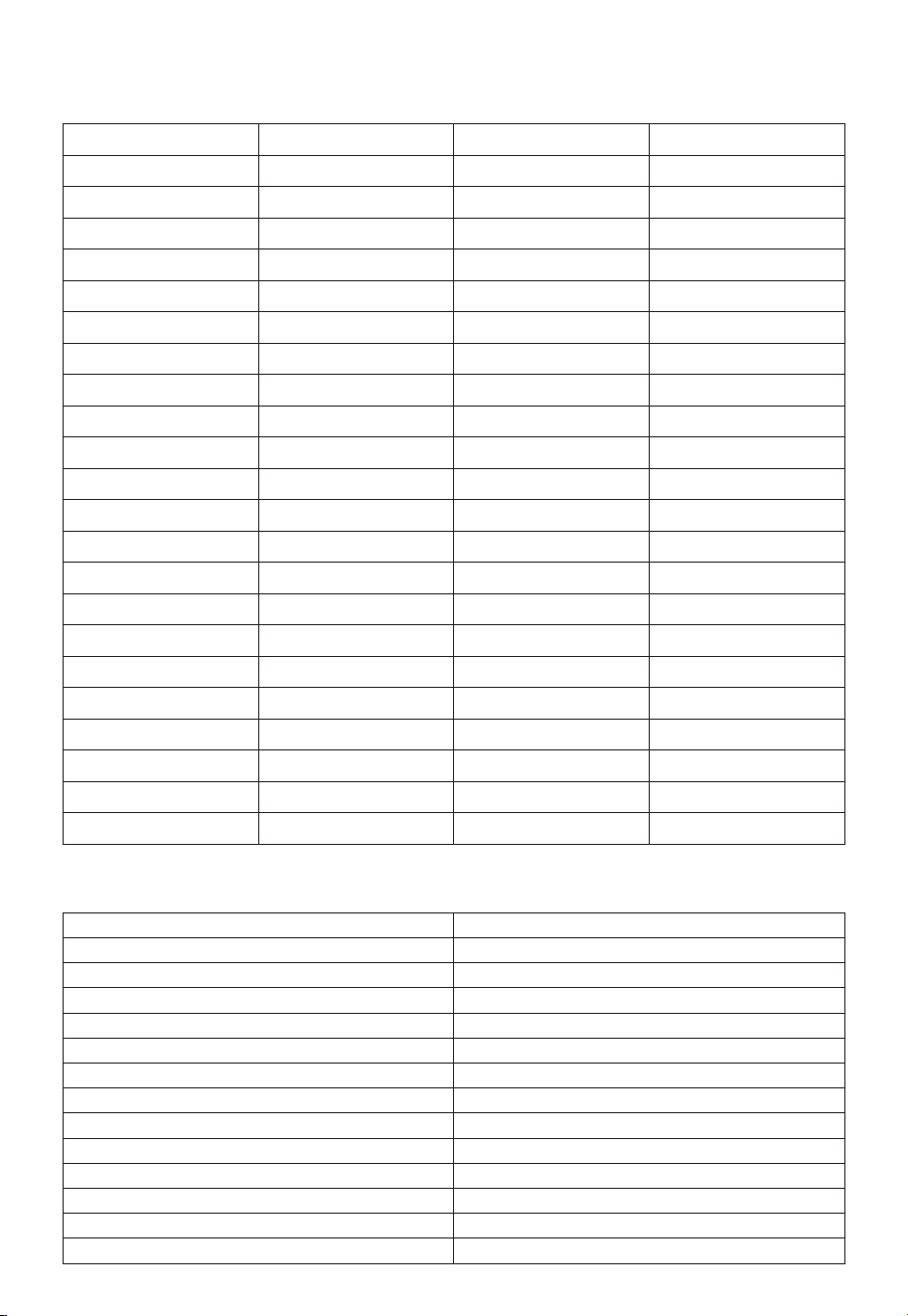
Frequency Cha
Specications
CH NO Frequency(MHz) Power CTCSS/DCS
1 462.5625 2W 67
2
462.5875
2W
118.8
3 462.6125 2W 127.3
4
462.6375
2W
131.8
5 462.6625 2W
2W
136.5
141.3
6 462.6875
2W 146.27
462.7125
0.5W D243N8 467.5625
0.5W D031N9 467.5875
0.5W D043N
10 467.6125
0.5W D047N11 467.6375
0.5W D051N12
467.6625
0.5W D054N13 467.6875
0.5W D115N14 467.7125
2W 12315
462.5500
2W D734N16 462.5750
2W D315N17
462.6000
2W 127.318 462.6250
2W D243N19 462.6500
2W D606N20
462.6750
2W D723N21 462.7000
2W 136.522
Frequency Range FRS
Number of Channels 22
Audio Distoion <5%
Frequency Stability ±2.5ppm
Maximum Frequency Deviation ≤2.5KHz
Modulation FM
Reference Sensitivity ≤0.25uV/0.3uV
Squelch Opening Sensitivity ≤0.2uV/0.25uV
Transmit Power 2W
Adjacent Channel Selectivity ≥65dB
Spurious Response Rejection ≥70dB
Intermodulation ≥60dB
Current Consumption ≤1.4A
Operating Voltage 3.7V DC
462.7250
9
User’ instructions should accompany the device
when transferred to other users.
Unauthorized modication and adjustment
Changes or modications not expressly approved by the pay responsible for
compliance may void the user’s authority granted by the local government
radio management depaments to operate this radio and should not be
made. To comply with the corresponding requirements, transmitter adjust-
ments should be made only by or under the supeision of a person ceied
as technically qualied to peorm transmitter maintenance and repairs in the
private land mobile and xed seices as ceied by an organization repre-
sentative of the user of those seices. Replacement of any transmitter
component (cstal, semiconductor, etc.) not authorized by the local govern-
ment radio management depaments equipment authorization for this radio
could violate the rules.
FCC Compliance information
This device complies with pa 15 of the FCC Rules. Operation is subject to
the condition that this device does not cause harmful inteerence. (Licensed
radios are applicable);
This device complies with pa 15 of the FCC Rules. Operation is subject to
the following two conditions: (Other devices are applicable)
(1) This device may not cause harmful inteerence.
(2) This device must accept any inteerence received, including inteerence
that may cause undesired operation.
Note: This equipment has been tested and found to comply with the limits for
a Class A digital device. These limits are designed to provide reasonable
protection against harmful inteerence when the equipment is operated in a
commercial environment. This equipment generates, uses, and can radiate
radio frequency energy and, if not installed and used in accordance with the
instruction manual, may cause harmful inteerence to radio communications.
Operation of this equipment in a residential area is likely to cause harmful
inteerence in which case the user will be required to correct the inteerence
at his own expense.
ISED compliance information
Licence-exempt radio apparatus
This device contains licence-exempt transmitter(s)/receiver(s) that comply
with Innovation, Science and Economic Development Canada’s licence-ex-
empt RSS(s). Operation is subject to the following two conditions:
(1) This device may not cause inteerence.
(2) This device must accept any inteerence, including inteerence that may
WARNING
Before using this device, please read this guide which
contains impoant operating instructions for safe usage,
control information and operational instructions for
compliance with RF Energy Exposure limits in applicable
national and international standards.
10
cause undesired operation of the device.
Le présent appareil est conforme aux CNR d’Industrie Canada applicables
aux appareils radio exempts de licence. L’exploitation est autorisée aux deux
conditions suivantes :
(1) l’appareil ne doit pas produire de brouillage;
(2) l’utilisateur de l’appareil doit accepter tout brouillage radioélectrique subi,
même si le brouillage est susceptible d’en compromettre le fonctionnement.
Disposal information
The crossed-out wheeled-bin symbol on your product, literature,
or packaging reminds you that all electrical and electronic
products, batteries, or accumulators must be taken to designated
collection locations at the end of their working life. Do not
dispose of these products as unsoed municipal waste.Remove
and immediately recycle or dispose of used batteries according to
local regulations and keep away from children. Do NOT dispose of batteries in
household trash or incinerate.
RF Exposure Safety
This two-way radio uses electromagnetic energy in the radio frequency (RF)
spectrum to provide communications between two or more users over a
distance. RF energy, which when used improperly, can cause biological
damage. Please refer to the following websites for more information on what
RF energy exposure is and how to control your exposure to assure compli-
ance with established RF exposure limits: http://www.who.int/en/
Transmit no more than the rated duty factor 50% of the time. Transmitting
necessa information or less, is impoant because the radio generates
measurable RF energy exposure only when transmitting in terms of measur-
ing for standards compliance. For users who wish to fuher reduce their
exposure, some eective measures to reduce RF exposure include:
- Reduce the amount of time spent using your wireless device.
- Use a speakerphone, earpiece, headset, or other hands-free accessory to
reduce proximity to the head (and thus head exposure). While wired earpiec-
es may conduct some energy to the head and wireless earpieces also emit a
small amount of RF energy, both wired and wireless earpieces remove the
greatest source of RF energy (handheld device) from proximity to the head
and thus can greatly reduce total exposure to the head.
- Increase the distance between wireless devices and your body.
This radio is designed for and classified as "General population/uncontrolleduse". General
population/uncontrolled environments are defined as locationswhere there is exposure of
individuals who have no knowledge or control ofRF exposure level.
Hand-held Mode
To control your exposure and ensure compliance with the
controlled environment exposure limits, always adhere to
the following procedure:
- To receive calls, release the PTT button.
- To transmit (talk), press the Push-to-Talk (PTT) button in front of the face.
11

- Hold the radio in a veical position with the microphone (and other pas of
the radio including the antenna) at least one inch (2.5 centimeters) away from
the nose or lips.
Electromagnetic Inteerence/Compatibility
Nearly eve electronic device is susceptible to electromagnetic inteerence
(EMI) if inadequately shielded, designed, or otherwise congured for electro-
magnetic compatibility. During transmissions, your radio generates RF energy
that can possibly cause inteerence with other devices or systems. To avoid
such inteerence, turn o the radio in areas where signs are posted to do so,
such as hospitals or healthcare facilities.
Persons with pacemakers, implantable cardioveer debrillators (ICDs) or
other active implantable medical devices should:
• Consult with their physicians regarding the potential risk of inteerence
from radio frequency transmitters, such as poable radios (poorly shielded
medical devices may be more susceptible to inteerence).
• Turn the radio OFF immediately if there is any reason to suspect that
inteerence is taking place.
• Do not car the radio in a chest pocket or near the implantation site, and
car or use the radio on the opposite side of the body from the implantable
device to minimize the potential for inteerence.
Hearing Aids: Some digital wireless radios may inteere with some hearing
aids. In the event of such inteerence, you may want to consult your hearing
aid manufacturer to discuss alternatives.
Other Medical Devices: If you use any other personal medical device, consult
the manufacturer of your device to determine if it is adequately shielded from
RF energy. Your physician may be able to assist you in obtaining this informa-
tion.
Turn o your radio in the following conditions:
Turn o your radio prior to entering any area with a potentially hazardous or
explosive atmosphere. Only radio types that are especially qualied should be
used in such areas as “Intrinsically Safe”.
Note: the areas with potentially explosive atmosphere referred to above
include blasting caps, blasting areas, inammable gas, dust paicles, metallic
powders, grain powders, fueling areas such as below decks on boats, fuel or
chemical transfer or storage facilities, areas where the air contains chemicals
or paicles (such as grain, dust or metal powders) and any other area where
you would normally be advised to turn o your vehicle engine. Areas with
potentially explosive atmospheres are often – but not always posted.
Use of Communication Devices While Driving
•Always check the laws and regulations on the use of radios
in the areas where you drive. Use of Communication Devices,
for example, mobile radio, may not be allowed.
• Give full attention to driving and to the road.
• Use hands-free operation, if available.
• Pull o the road and park before making or answering a call, if driving
conditions or regulations so require.
• Do not place a poable radio in the area over an air bag or in the airbag
deployment area. The radio may be propelled with great force and cause
serious inju to occupants of the vehicle when the airbag inates.
12
Protect your hearing
CAUTION: Exposure to loud noises from any source for
extended periods of time may temporarily or permanently
aect your hearing. The louder the radio's volume, the less
time is required before your hearing could be aected.
Hearing damage from loud noise is sometimes undetectable
at rst and can have a cumulative eect.
• Use the lowest volume necessa to do your job. Turn up the volume only if
you are in noisy surroundings.
• Limit the amount of time you use headsets or earpieces at high volume.
• When using the radio without a headset or earpiece, do not place the
radio's speaker directly against your ear.
• Use carefully with the earphone maybe possible excessive sound pressure
from earphones and headphones can cause hearing loss.
Batteries Safety information
•usable extinguishing agent: water, d power,carbon dioxide
•Since batteries are sensitive to high temperatures when storing them, keep
them in a cool and d place. The recommended temperature should be
between +10 ℃and +25℃and never exceed +30℃.
Batteries should therefore not be stored next to radiators or boilers nor in
direct sunlight. Extremes of humidity (below 35% and above 95% relative
humidity for sustained periods should be avoided since they are detrimental
to both batteries and packing. Although the storage life of batteries at room
temperature is good, storage is improved at lower temperatures provided
special precautions are taken. Also, accelerated warming is harmful.
•Turn o your radio before removing or installing a batte. Store spare
batteries securely. Dispose of used batteries immediately and safely.
•The batte supply terminals are not to be sho-circuit.
•Do not dismantle, open or shred batteries. Batteries should be dismantled
only by trained people. Do not force discharge, recharge, disassemble, heat
above 55 ℃or incinerate. Doing so may result in inju due to venting, leak-
age or explosion resulting in chemical burns.
•Batteries shall be charged at 10℃~40℃ environment temperature specied.
If the environment temperature is lower than 0℃, the charge shall be prohib-
ited.
•Rechargeable batteries are only to be charged by adults.Non-rechargeable
batteries are not to be recharged.
•The plug of the adapter is considered a disconnect device. The socket-out-
let shall be installed near the equipment and shall be easily accessible.
WARINING:CHOKING HAZARD-Small Pas.
Not suitable for children under 3 years old.
Authorized Accessories List
•For a list of Retevis-approved accessories for your radio model, visit the
website: http://www.Retevis.com
•Contact Retevis for assistance regarding repairs and seice.
13
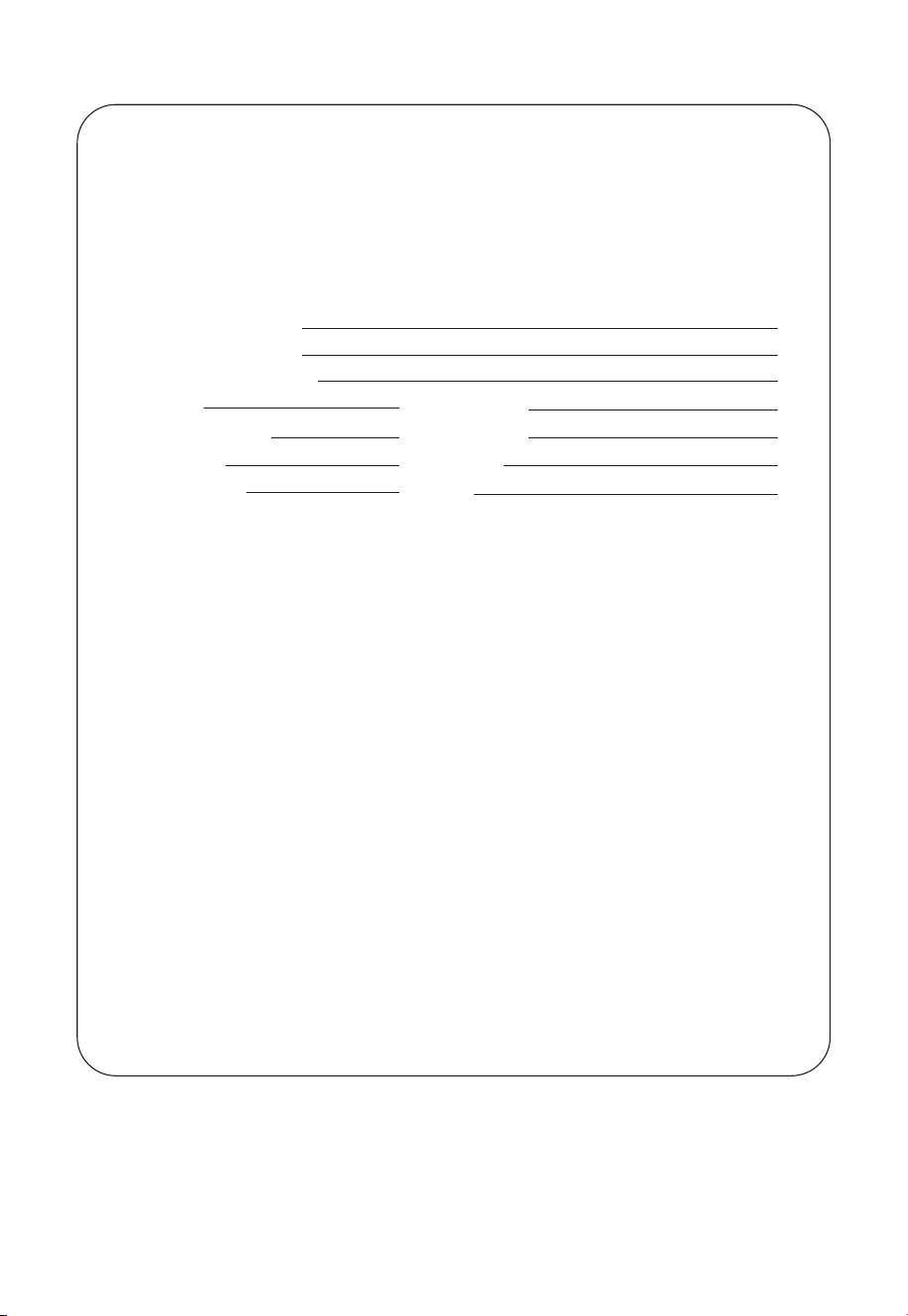
Guarantee
Remarks:
1.This guarantee card should be kept by the user, no
replacement if lost.
2.Most new products car a two-year manufacturer’s
warranty from the date of purchase.
3.The user can get warranty and after-sales seice as below:
●Contact the seller where you buy.
●Products Repaired by Our Local Repair Center
4.For warranty seice, you will need to provide a receipt
proof of purchase from the actual seller for verication
Exclusions from Warranty Coverage:
1.To any product damaged by accident.
2.In the event of misuse or abuse of the product or as a result
of unauthorized alterations or repairs.
3.If the serial number has been altered, defaced, or removed.
Model Number:
Serial Number:
Purchasing Date:
Dealer:
User's Name:
Count:
Post Code:
Telephone:
Telephone:
Address:
Email:
14

FCC Caution:
This device complies with part 15 of the FCC Rules. Operation is subject to the following two conditions: (1) This
device may not cause harmful interference, and (2) this device must accept any interference received, including
interference that may cause undesired operation.
Any changes or modifications not expressly approved by the party responsible for compliance could void the user's
authority to operate the equipment.
NOTE: This equipment has been tested and found to comply with the limits for a Class B digital device, pursuant to
Part 15 of the FCC Rules. These limits are designed to provide reasonable protection against harmful interference in a
residential installation. This equipment generates, uses and can radiate radio frequency energy and, if not installed and
used in accordance with the instructions, may cause harmful interference to radio communications. However, there is
no guarantee that interference will not occur in a particular installation.
If this equipment does cause harmful interference to radio or television reception,
which can be determined by turning the equipment off and on, the user is encouraged to try to correct the interference
by one or more of the following measures:
-- Reorient or relocate the receiving antenna.
-- Increase the separation between the equipment and receiver.
-- Connect the equipment into an outlet on a circuit different
from that to which the receiver is connected.
-- Consult the dealer or an experienced radio/TV technician for help.
The device has been evaluated to meet general RF exposure requirement. The device can be used in portable exposure
condition without restriction.
Specific Absorption Rate (SAR) information:
This device meets the government's requirements for exposure to radio waves. The guidelines are based on standards
that were developed by independent scientific organizations through periodic and thorough evaluation of scientific
studies. The standards include a substantial safety margin designed to assure the safety of all persons regardless of age
or health. FCC RF Exposure Information and Statement the SAR limit of USA (FCC) is 1.6 W/kg averaged over one
gram of tissue. Device types: This device has also been tested against this SAR limit.
This device was tested for typical body-worn operations with the back of the This device kept 0mm from the body. To
maintain compliance with FCC RF exposure requirements, use accessories that maintain an 0mm separation distance
between the user's body and the back of This device. The use of belt clips, holsters and similar accessories should not
contain metallic components in its assembly. The use of accessories that do not satisfy these requirements may not
comply with FCC RF exposure requirements, and should be avoided.
·
DO NOT operate the radio without a proper antenna attached, as this may damage the radio and may also
cause you to exceed RF exposure limits. A proper antenna is the antenna supplied with this radio by the manufacturer
or an antenna specifically authorized by the manufacturer for use with this radio, and the antenna gain shall not exceed
the specified gain by the manufacturer declared.
· DO NOT transmit for more than 50% of total radio use time, more than 50% of the time can cause RF
exposure compliance requirements to be exceeded.
· During transmissions, your radio generates RF energy that can possibly cause interference with other
devices or systems. To avoid such interference, turn off the radio in areas where signs are posted to do so.
· DO NOT operate the transmitter in areas that are sensitive to electromagnetic radiation such as hospitals,
aircraft, and blasting sites.
· Portable Device, this transmitter may operate with the antenna(s) documented in this filing in Push-to-
Talk and body-worn configurations. RF exposure compliance is limited
to the specific belt-clip and accessory configurations as documented in this filing and the separation distance between
user and the device or its antenna shall be at least 2.5 cm.Highest Reported SAR XXX W/Kg for Front of face,Highest
Reported SAR XXX W/Kg for Body worn.
General population/uncontrolled Radio, this radio is designed for and classified as “General population/un-
controlled Use”.

Shenzhen Retevis Technology Co.,Ltd.
Web:www.retevis.com
7/F, 13-C, Zhonghaixin Science&Technology Park, No.12 Ganli
E-mail:info@retevis.com
Facebook:@retevis.fans
6th Road, Jihua Street, Longgang District, Shenzhen, China
Made in China