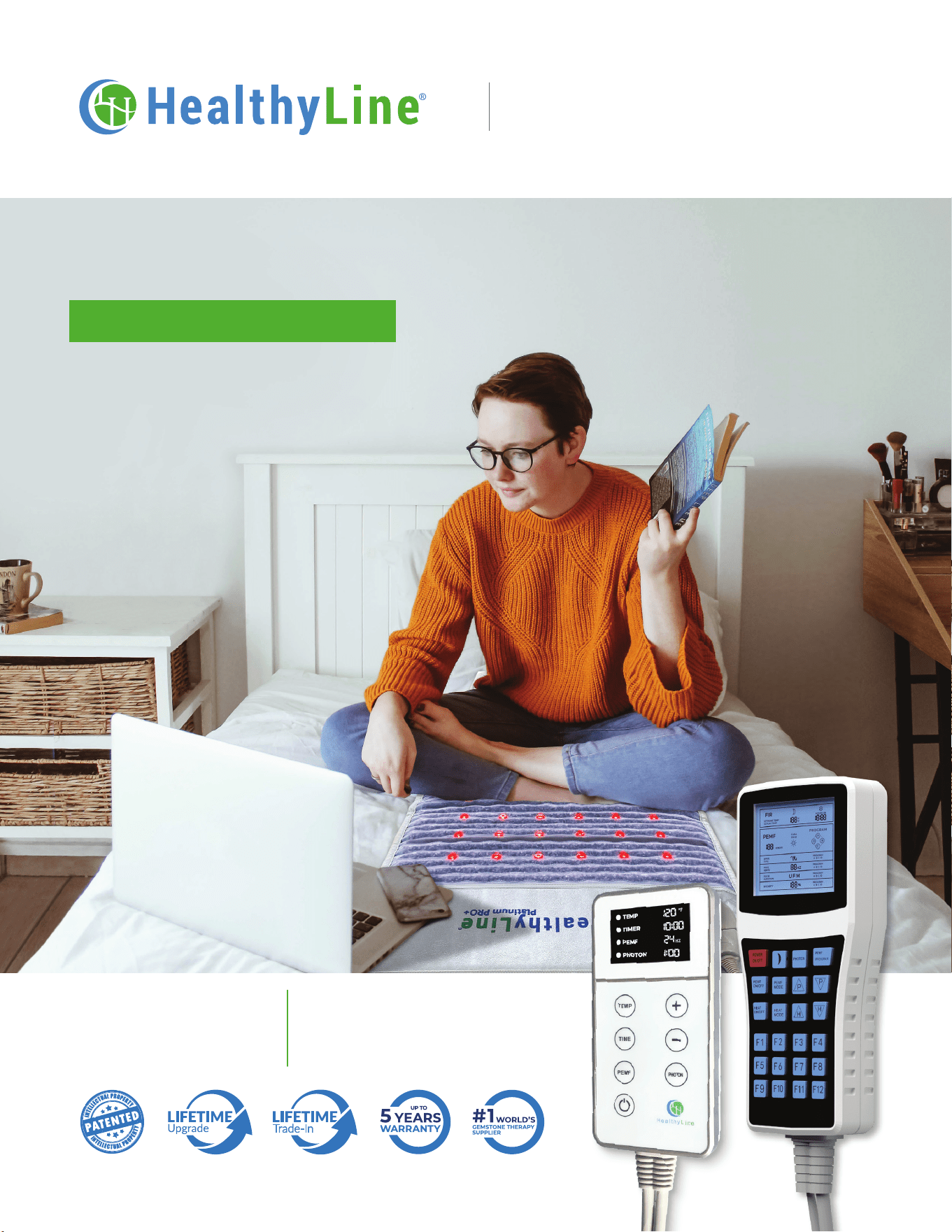
INSPIRED BY NATURE
PERFECTED BY SCIENCE
USER GUIDE
INFRAMAT PRO
far-infrared heang pads lled
with natural gemstones
HealthyLine is the leading innovator
in gemstone heat therapy technology
that's designed to enhance wellness.
Our nature-inspired medical devices will
enable you to feel good all year round.
PLATINUM SERIES

-
Quick Start Guide . . . . . . . . . . . . . 4
Usage and Tips . . . . . . . . . . . . . . . 4
Warnings . . . . . . . . . . . . . . . . . . 5
Temperature Control . . . . . . . . . . . . 6
Controller Instrucons . . . . . . . . . . . 7
Care . . . . . . . . . . . . . . . . . . . . 12
Comfort . . . . . . . . . . . . . . . . . . 12
Notes . . . . . . . . . . . . . . . . . . . 13
Featured Therapies. . . . . . . . . . . . 14
Our Policies . . . . . . . . . . . . . . . . 16
Troubleshoong . . . . . . . . . . . . . 17
Disclaimer . . . . . . . . . . . . . . . . . 17
Frequently Asked Quesons . . . . . . 18
The Inframat Pro is not just a heang pad. It’s a key that unlocks your wellness potenal.
When using it, you can feel it deep in your ssue, throughout your whole body.
Michael D.
“
2
CONTENT
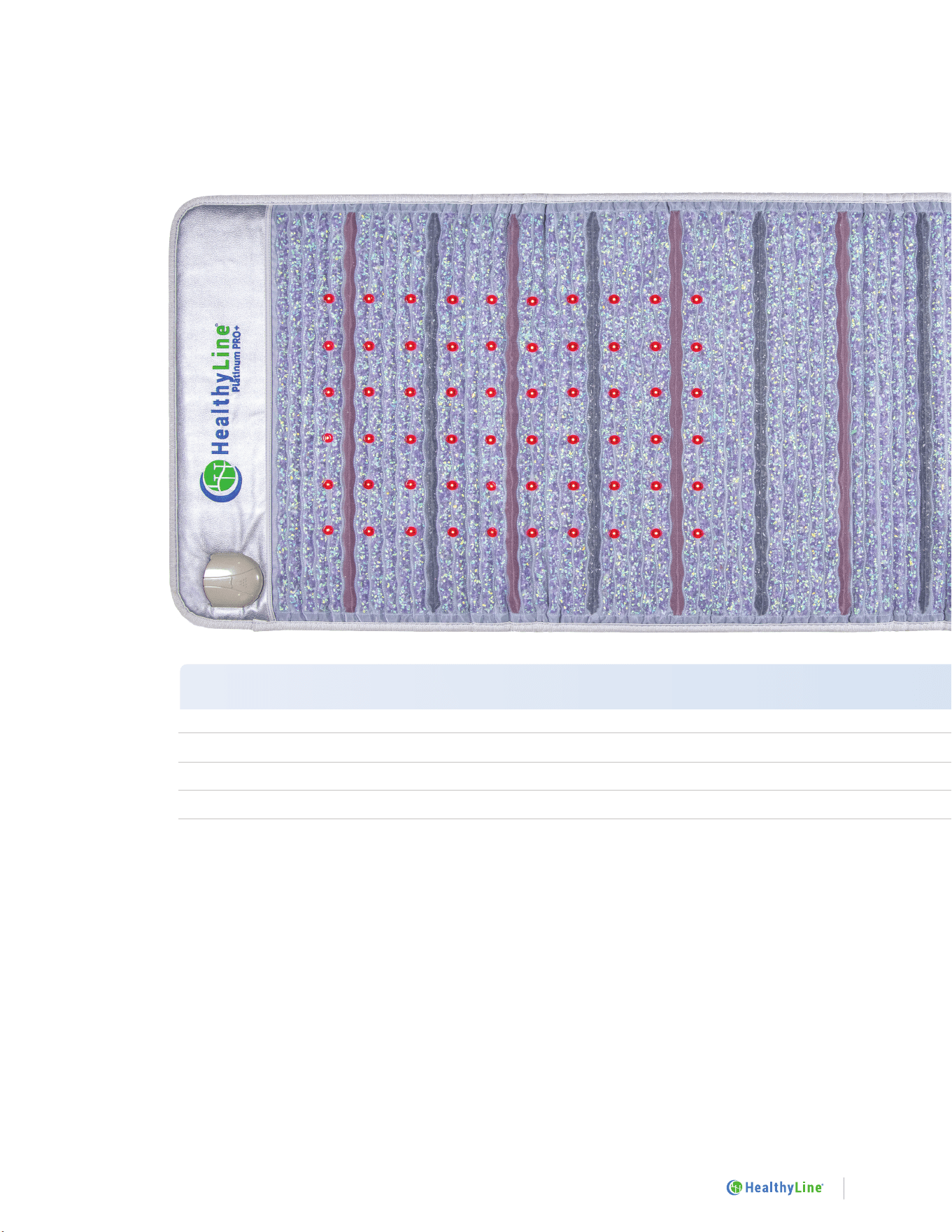
Models Dimentions, mm
Power, W Lights Qy PEMF Coils
Planum-3220-PhP-adv 800 x 500 x 30 80 30 4
Planum-Chair-4018-PhP-adv 990 x 450 x 30 90 60 4
Planum-6024-PhP-adv 1500 x 600 x 30 210 60 6
Planum-7224-PhP-adv 1800 x 600 x 30 260 60 6
Planum-7428-PhP-adv
(includind Planum Aura Mat)
1850 x 700 x 30 300 60 8
3
THANK YOU
Here at HealthyLine, we strive to achieve complete customer sasfacon by providing
high-quality products that will exceed your expectations. Since 2013, we have been
sharing our passion for health and wellness with the world. Our products incorporate
the most eecve natural materials and technologies that reach the common goal of improved
health. The most important thing for us is making a dierence in our customers’ lives, which is
why we oer up to a 5-year limited warranty for our products.
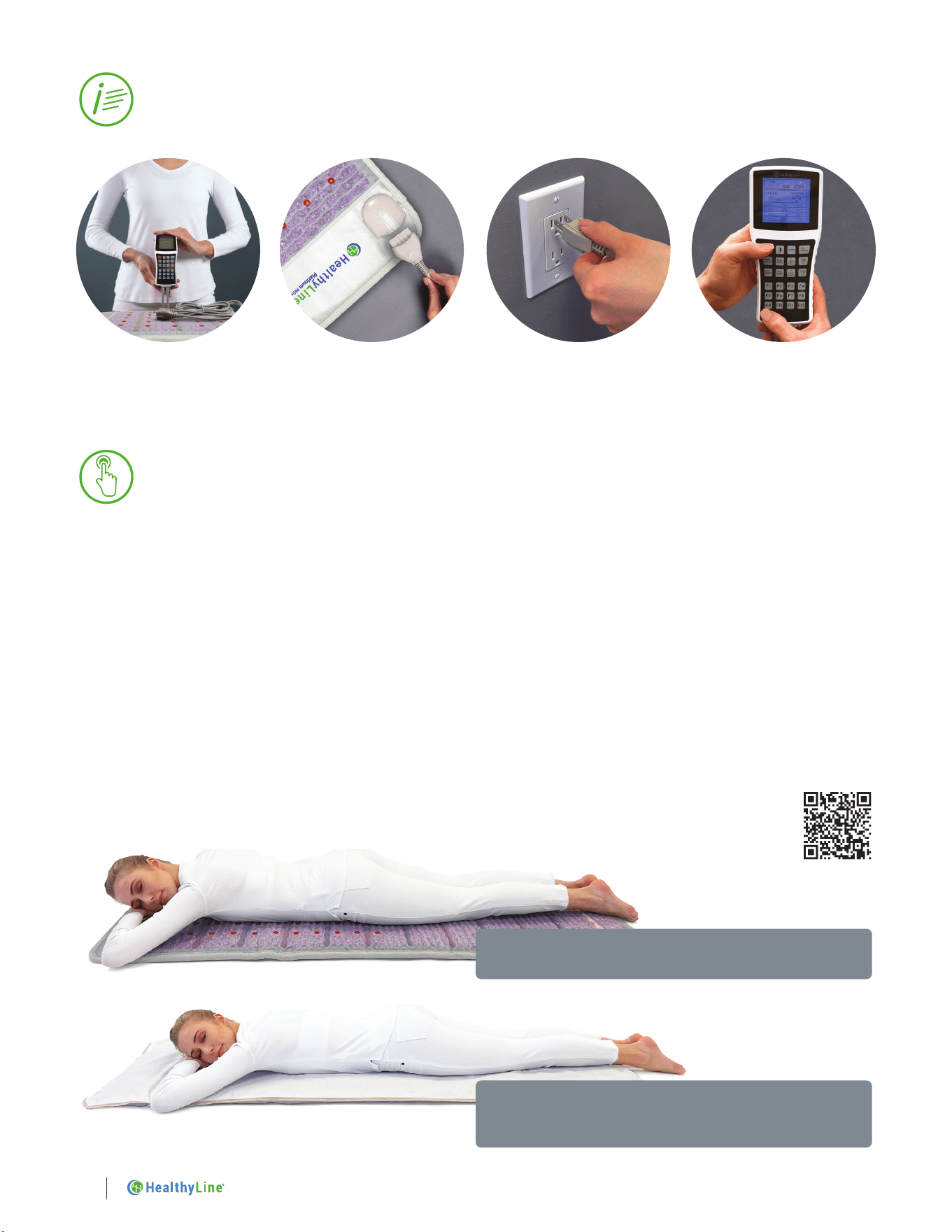
QUICK START
CONTENT REVIEW
Make sure you have your
controller and warranty card
1
PLUG IN
Plug one end of the
controller into the mat
2
POWER UP
Plug the other end into
an outlet
3
POWER ON
Press the Power buon.
Refer to the Controller
Instrucons (see page 7)
4
1. Please follow Safety Precauons at all mes when using
your heang pad (mat).
2. Preheat your mat for 15-20 min before use.
3. We suggest starng the rst few sessions with 104
o
F
(40
o
C) for 30-minute sessions, a few mes a week.
4. Gradually adjust the temperature/me sengs unl you
nd a comfortable level. Just pay aenon to how you
feel at dierent temperature sengs.
5. Only sleep on a mat with low heat sengs. Extended use
at high temperatures may result in dehydraon.
6. You can use your mat mulple mes a day with low and
medium sengs. At high temperatures, you should not
have more than one session per day.
7. Please allow up to 40 min for the surface to reach the
highest temperature.
8. Stay hydrated. If you use the mat at higher temperatures,
your body may lose water. It is important to drink plenty
of water before and aer use.
9. Cover the mat to protect it from moisture and stains, to
protect your body from direct contact with hot gemstones,
or to alleviate some heat if the surface is too hot for you.
Make sure you cover the enre surface. Using a cover also
helps gemstones to heat up faster.
10. A cover does not reduce the eects of FIR, negave ions,
or PEMF.
11. Scan this QR code for product registraon
or visit
healthyline.com/warranty.
USAGE AND TIPS
Lie on the mat in any way you choose.
With low sengs you can lie on the bare mat.
With medium and high temperature sengs you should
cover your mat with a towel or an optional cover to
protect it from spills, sweat, or stains
4
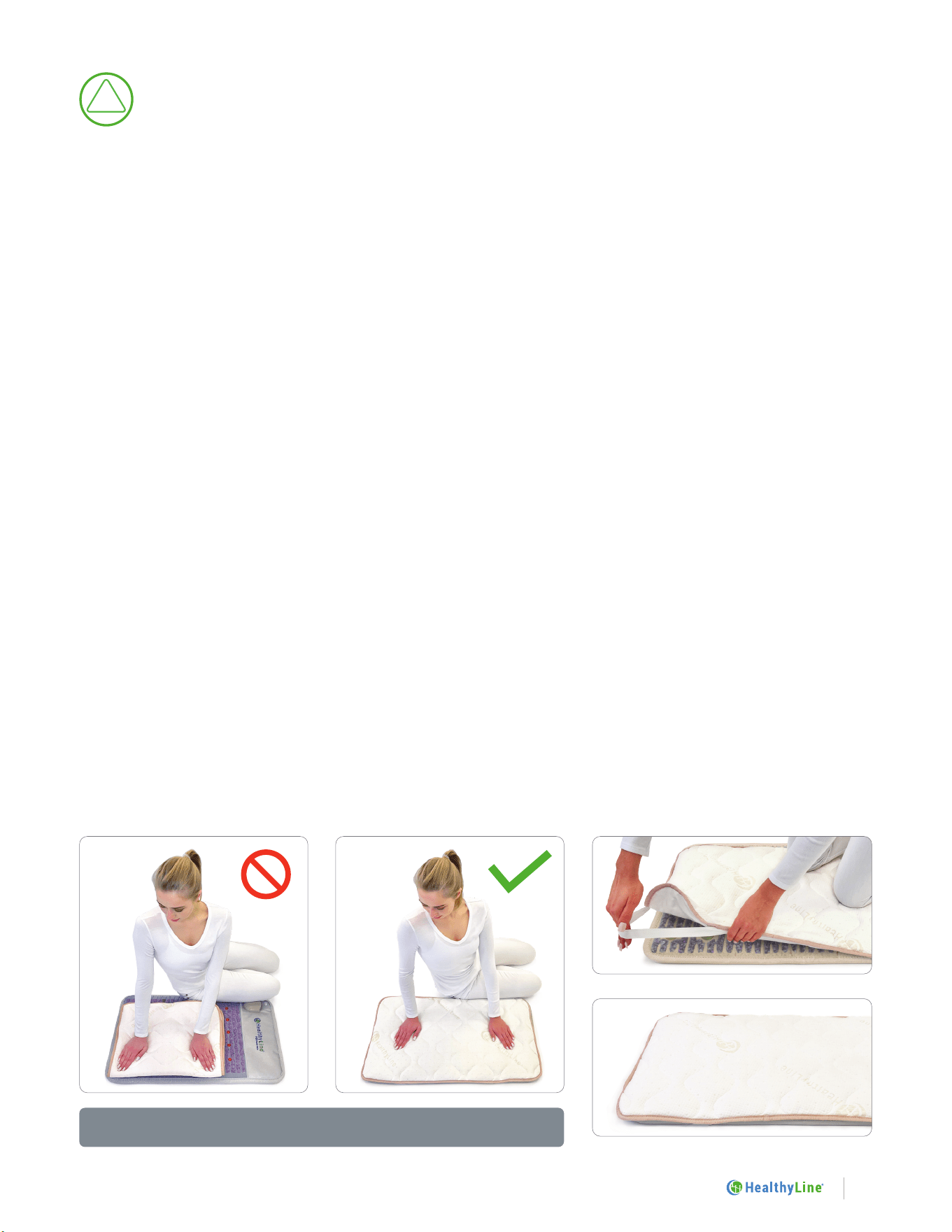
!
ATTENTION:
Always cover your mat completely.
12. If the device overheats due to misuse, turn o the heat
and place the controller on a table or other rm surface.
13. If you have any preexisng condions that may be cause
for concern, or if you have heart disease, hypertension,
or any other serious medical condion you should consult
with a doctor before using this or any other medical
device.
14. You should avoid heat therapy if you have vascular
disease, deep vein thrombosis, or mulple sclerosis.
15. Limit heat treatment at maximum temperature to one
hour per day to prevent dehydraon and hyperthermia.
16. Stay hydrated. It is important to drink plenty of water
before and aer using the mat.
17. Those who are pregnant, nursing, or have a pacemaker
should not be exposed to the increased heat from the mat.
18. PEMF therapy is not suitable for those who are pregnant
or individuals with a pacemaker.
19. Always unplug and power down the mat completely
before folding it to put away.
20. Only fold the mat in its predetermined posions.
21. Do not immerse in water.
22. Never unplug the mat by pulling on the cord.
23. Do not use an electrical outlet that has become loose or
does not engage the power plug ghtly.
24. Do not remove product labels.
25. Do not use the mat with liniment, salve, or ointment
preparaons that contain heat-producing ingredients. Skin
burns can result.
26. Do not leave your mat unaended while it is powered on,
especially if children are present.
1. Please take the me to properly familiarize youself with the
informaon in this user guide before using the InfraMat Pro
®
.
It is the owner’s responsibility that all individuals who may
use the mat are aware of the correct procedures.
2. Use your mat on at surfaces. A bed, oor, or massage
table makes for an ideal spot.
3. When using your mat in a bed or chair, we recommend
placing a bath towel between the backside of the mat and
the surface of the bed/chair as the backside of the mat
may slightly heat up.
4. Protect your mat from moisture at all mes. This includes
spills and perspiraon. You must cover your mat. You may
use a provided cover, towel, or blanket.
5. When you cover your mat, always cover the enre
surface. Do not parally cover your mat in any way. Paral
coverage can cause the heat sensors to malfuncon.
6. Never leave any objects on any part of the mat surface
while the mat is heang, especially the controller. This can
lead to uneven surface heang and possible damage to the
mat or heat damage to the object that is placed on the mat.
7. Do not aempt to take apart or open the mat or controller
for any reason. If an issue arises, please contact us rst.
8. We recommend you always use a surge protector. The
waage of the surge protector should be twice higher
than that of the mat.
9. Never use pins or other metallic fasteners to hold a mat
in place.
10. Do not handle the plug with wet hands.
11. Keep the controller ventilated to prevent it from
overheang. Do not put the controller on so surfaces
that may cover the vents.
WARNINGS
5
6
TEMPERATURE
CONTROL
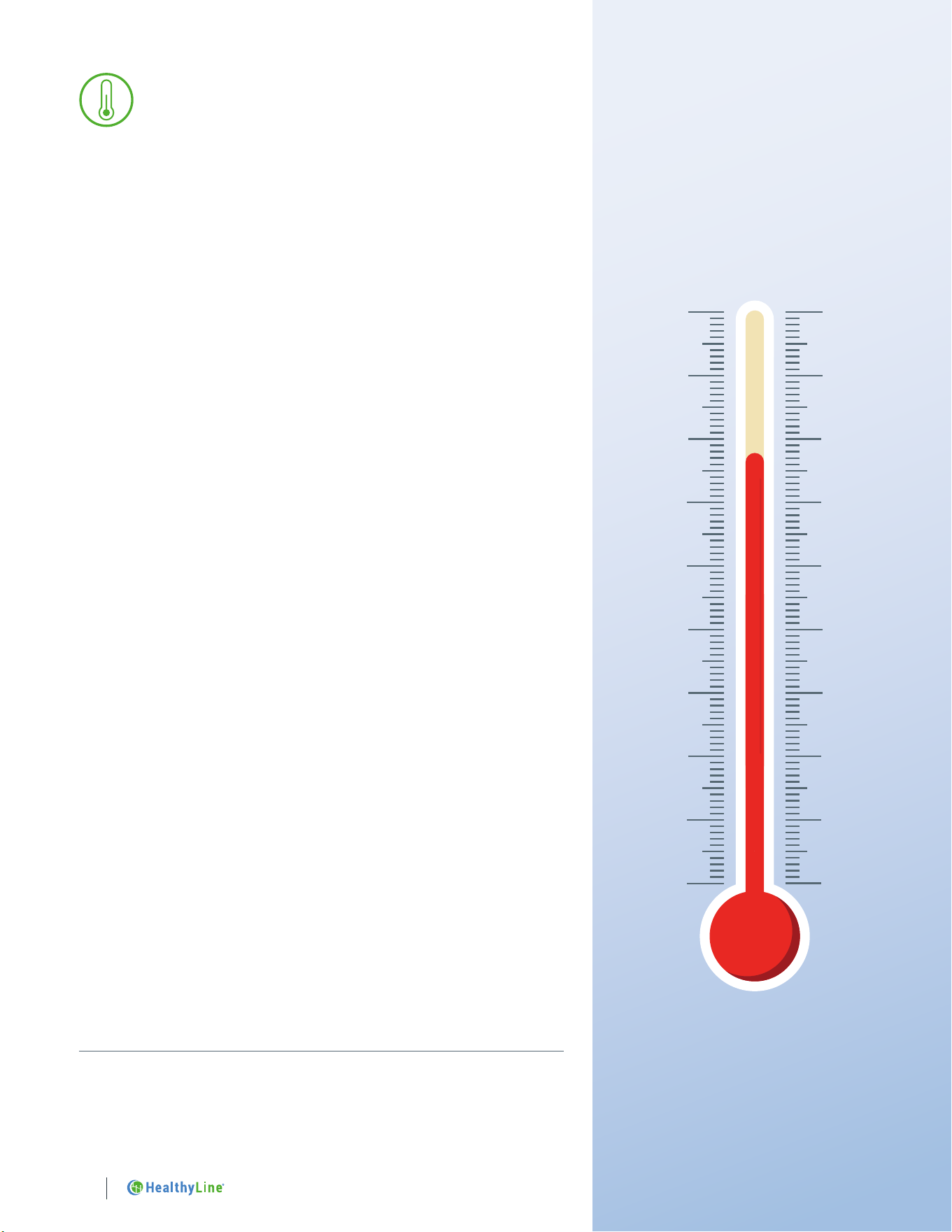
Heating the gemstones in your mat naturally releases far-infrared rays and
negative ions. Adjusting the strength of your exposure is as simple as adjusting
the temperature of your mat. The actual temperature of a mat may vary
depending on the model. The gemstones used are natural heat conductors: they
get hot quickly and slowly release their heat into the air. As a general rule of
thumb, the higher you set the temperature, the shorter the session should be.
Good for prolonged and overnight use. Promotes beer sleep and the relaxaon
of both mind and body. The safe seng for those who have a sensivity to heat.
95ºF - 105ºF (35-40ºC) | Overnight
Good for cycles of 2 hours or less*. Temporary relief of joint pain, sness, and
minor muscle pain; provides muscular relaxaon, and a temporary increase in
local circulaon where applied. Not too warm for the average person.
105ºF - 130ºF (45-55ºC) | UNDER 2 HR
Good for 30-90 min cycles*. Temporary relief of joint pain, sness, and minor
muscle pain; provides muscular relaxaon, and a temporary increase in local
circulaon where applied. A bit warmer than what the average person is used to.
Should only be used twice a day at this seng and nothing more.
130ºF - 150ºF (55-65ºC) | 30-90 MIN
Suitable for 30-60 min cycles*. Provides a far-infrared sauna experience when
the heat is trapped. Cover your body with the provided mylar blanket or with
a towel to trap the heat. When you relax in intense far-infrared heat, the body
works hard to release sweat, temporarily improving circulaon, and recovering
faster. Should only be used once a day at this seng and nothing more.
150ºF - 160ºF (65-70ºC) | 30-60 MIN
*A mat has to be covered in order to protect your body from direct contact with hot
gemstones, and to protect the mat from moisture and stains (see Usage and Tips, ‘9)
70
65
60
55
50
45
40
35
30
25
158
149
140
131
122
113
104
95
86
77
ºF ºC
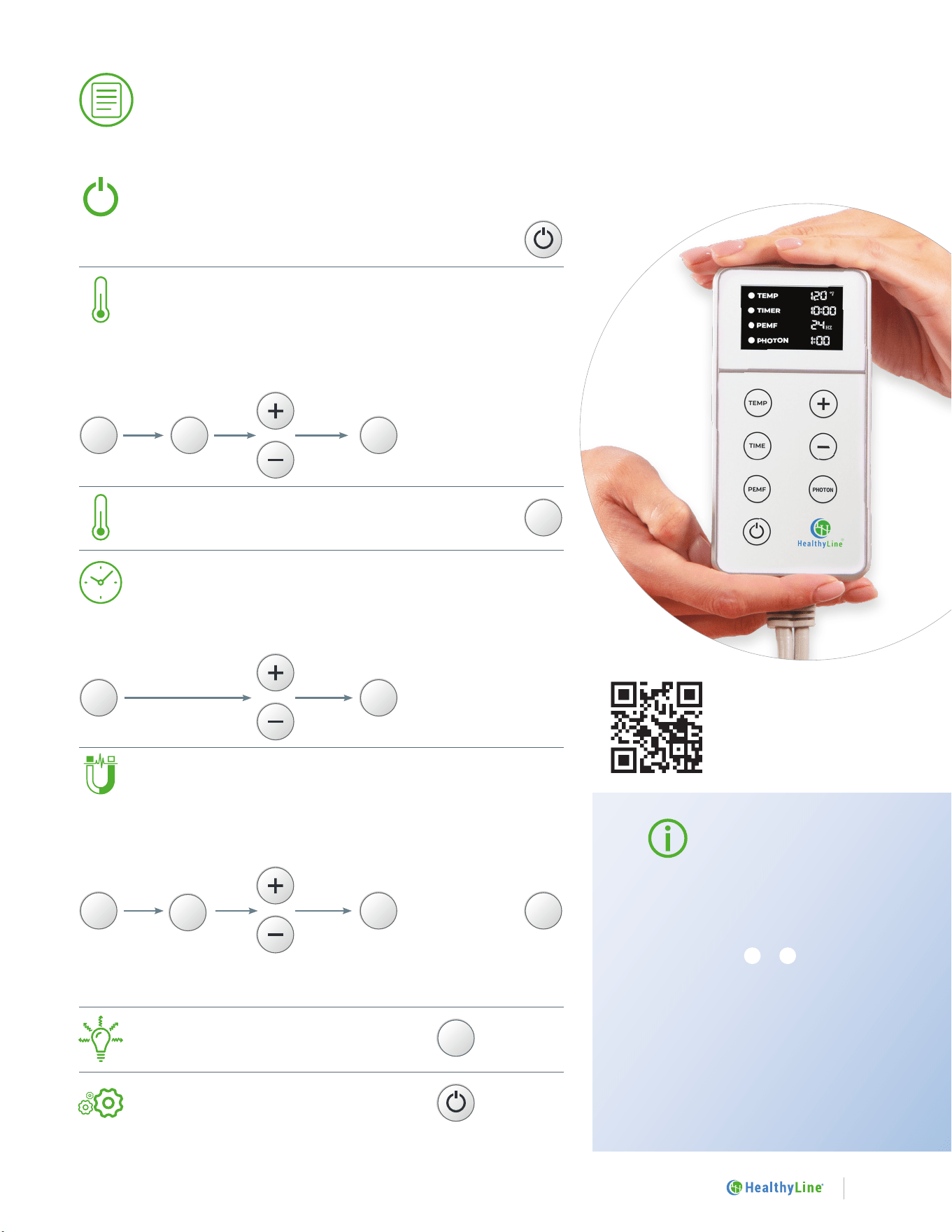
Press the Power buon to turn ON the controller. TEMP, TIMER,
PEMF, and PHOTON indicators will light up on the screen.
POWER
TEMP
TEMP TEMP
Press the TEMP buon once to turn ON the heat. Press TEMP again to iniate
temperature adjustment mode (the temperature indicator will start ashing).
Set the desired temperature and press TEMP again to save the seng.
TEMPERATURE
SET & ADJUST
TIME
Press & Hold for 6 sec to switch between
Fahrenheit & Celsius.
°F or °C
UNITS SET
TIME TIME
Press the TIME buon to iniate me adjustment mode (the me indicator will start
ashing). Set the desired me and press the TIME buon again to save the seng.
TIMER
SET & ADJUST
PEMF
Press & Hold
for 6 sec to turn
PEMF OFF
PEMF PEMF
PEMF
Press the PEMF buon once to turn PEMF ON. Press PEMF again to iniate
PEMF frequency adjustment mode (PEMF indicator will start ashing). Set the
desired frequency (1-30 Hz) and press the PEMF buon again to save the seng.
PEMF
SET & ADJUST
The controller will shut down and then turn back ON automacally.
Press
& Hold
Press the
PHOTON
INFORMATION
PHOTON LIGHT
ON/OFF
to turn lights
ON or OFF.
FACTORY RESET
WITH THE CONTROLLER ON
for 10 sec.
Once ashing temperature has
stopped, the indicator displays the
actual temperature measured at the
core of the Mat.
Press and hold + or – to reach
desired numbers faster.
Default PEMF frequency is set to
7.83 Hz and displayed as 8 Hz.
PEMF can be turned on or o at
any me with or without heat.
Controller instrucons can
be found at any me at
HealthyLine.com/controllers.
PEMF is set as cycles of 20 min on and 100 min o, for up to 12 hr with
automac shut-o (sleep mode).
7
Scan to view
video tutorial!
CONTROLLER INSTRUCTIONS
HEAT + PEMF + PHOTON CONTROLLER
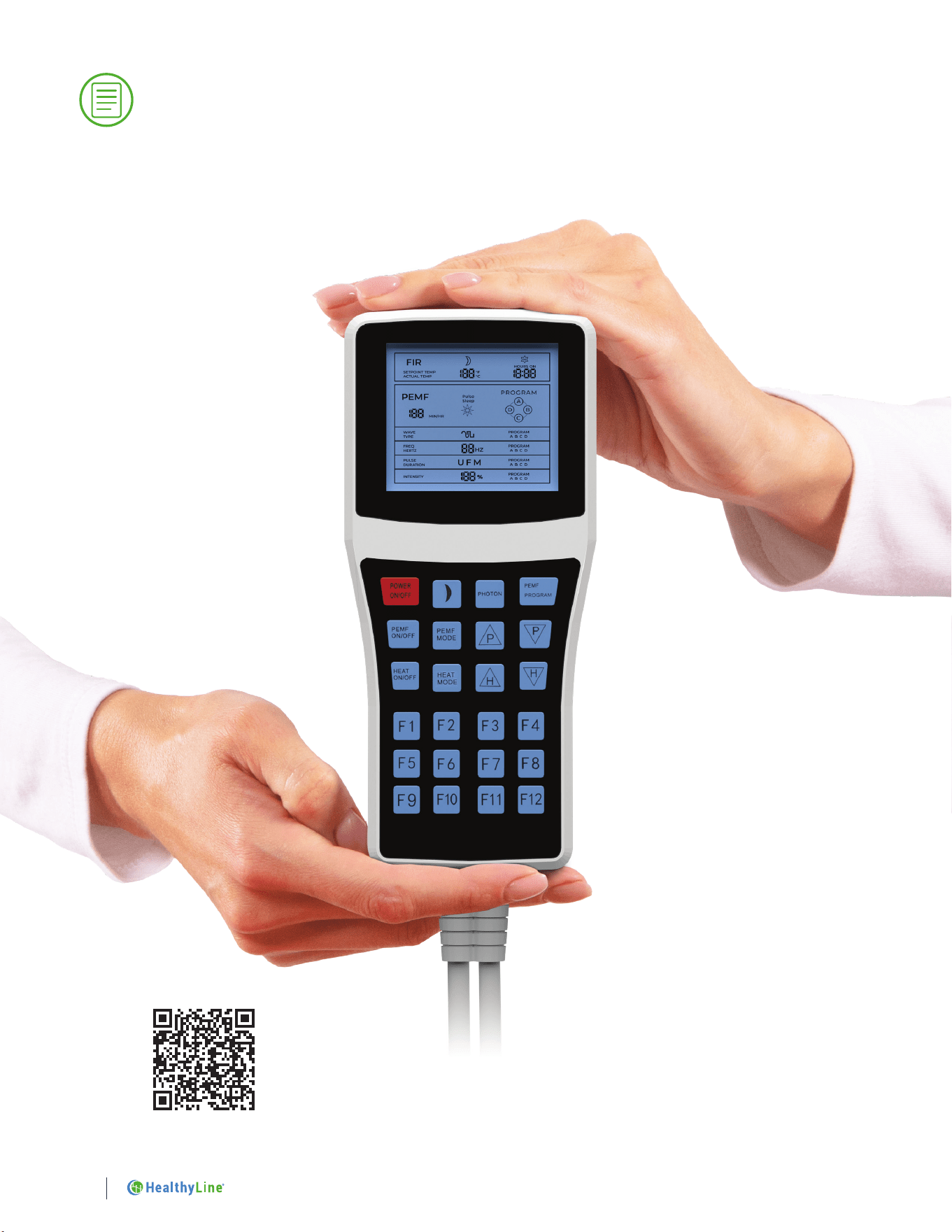
ATTENTION: This is a complex device, please read thoroughly
ADVANCED PEMF
With programmable features:
• Waveform (Sine, Square)
• Frequency (1 to 30 Hz with 7.83 Hz default)
• Pulse duraon (medium, fast, ultra fast)
• Intensity (10% to 100% of 3000 milligauss)
• Time (20 min, 1 hr)
• Billions of PEMF combinaons!
8
CONTROLLER INSTRUCTIONS
ADVANCED PEMF CONTROLLER
Scan to view
video tutorial!
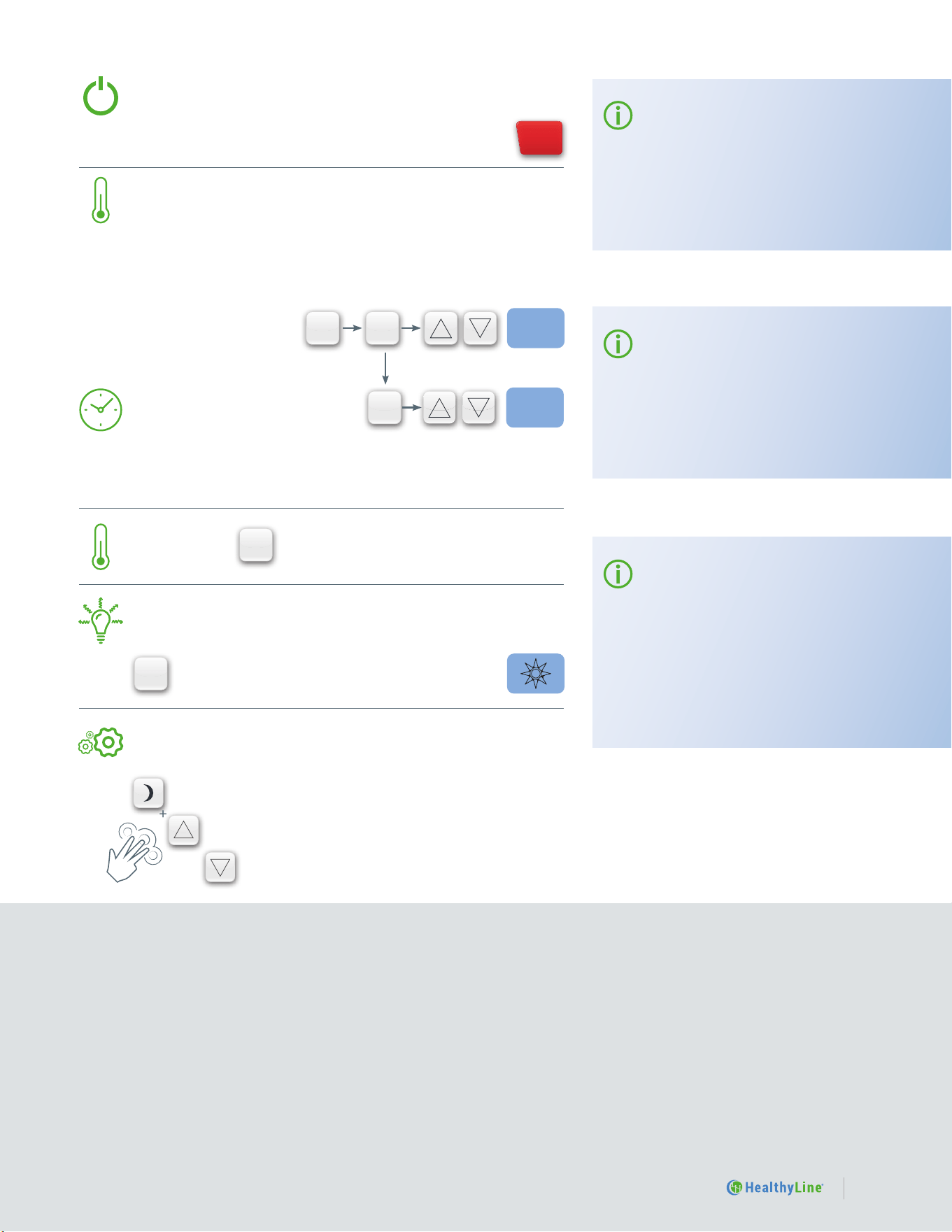
Press the Power buon to turn ON the controller. TEMP, TIMER,
PEMF, and PHOTON indicators will light up on the screen.
POWER
Press the TEMP buon once to turn ON the heat. Press TEMP again to iniate
temperature adjustment mode (the temperature indicator will start ashing).
Set the desired temperature and press TEMP again to save the seng.
TEMPERATURE
SET & ADJUST
HEAT TIMER
SET & ADJUST
When the desired temperature is set, press the Heat Mode buon again to
iniate heat mer adjustment. Set the desired me using the H-arrow buons
and press the Heat Mode buon again to save the seng.
°F or °C
UNITS SET
Press & hold the Heat Mode buon unll you
hear a BEEP to switch between
°
F &
°
C.
PHOTON LIGHT
ON/OFF
Press the Photon buon to turn ON the photon lights.
The photon light icon on the controller will light up.
FACTORY RESET
WITH THE CONTROLLER ON
To restore your controller to its factory sengs
Press and hold simultaneously unl you hear a beep
The controller will automacally reset and shut down
TERMS AND DEFINITIONS
INFORMATION
The controller backlight will automacally
turn o if the controller is untouched for
more than 2 min.
The controller automacally shuts down, if
it is not touched for more than 12 hr.
INFORMATION
Once ashing temperature has stopped, the
indicator displays the actual temperature
measured at the core of the Mat.
Please allow up to 40 min for the surface to
reach the maximum temperature.
INFORMATION
Photon lights turn OFF automacally aer 1 hr.
Photon lights can be turned ON/OFF at
any me.
Photon lights operate with or without heat.
Intensity of photon light is 2.5 mW/ cm2.
The Wavelength of photon light is 660 nm.
PEMF Pulse — A short burst of an electromagnec wave.
PEMF Wave — Oscillaon (disturbance) that travels through
space and maer, transporng energy from one place to another.
Waveform, Wave Type (Sine, Square) — The shape of pulses in
an electromagnec wave. In PEMF this can be Sine, Square, or
other types, such as sawtooth.
Frequency (Hertz, Hz) — The number of individual PEMF Pulses
per second. 1 Hz = 1 PEMF pulses per second.
Pulse Duraon — The me from the start of a PEMF pulse, to the
end of that PEMF pulse. This is also referred to as “Pulse Width”.
PEMF Intensity (Gauss, G) — The measured level of the PEMF
magnetic flux density. The unit of measurement is Gauss.
3 Gauss = 3000 milligauss = 0.0003 Tesla.
PEMF Funcons (F1-F12) — Factory preprogrammed PEMF
funcons. Each of the 12 funcons consists of 4 programs
(ABCD). Each ABCD program has its own PEMF sengs (PEMF
Time, Wave Type, Frequency, Pulse duraon, and Intensity).
9
POWER
ON/OFF
HEAT
MODE
H
H
HEAT
ON/OFF
150
°F
°C
To Adjust
HEAT
MODE
HOURS ON
6:00
H
H
To Adjust
HEAT
MODE
PHOTON
+
P
H
+
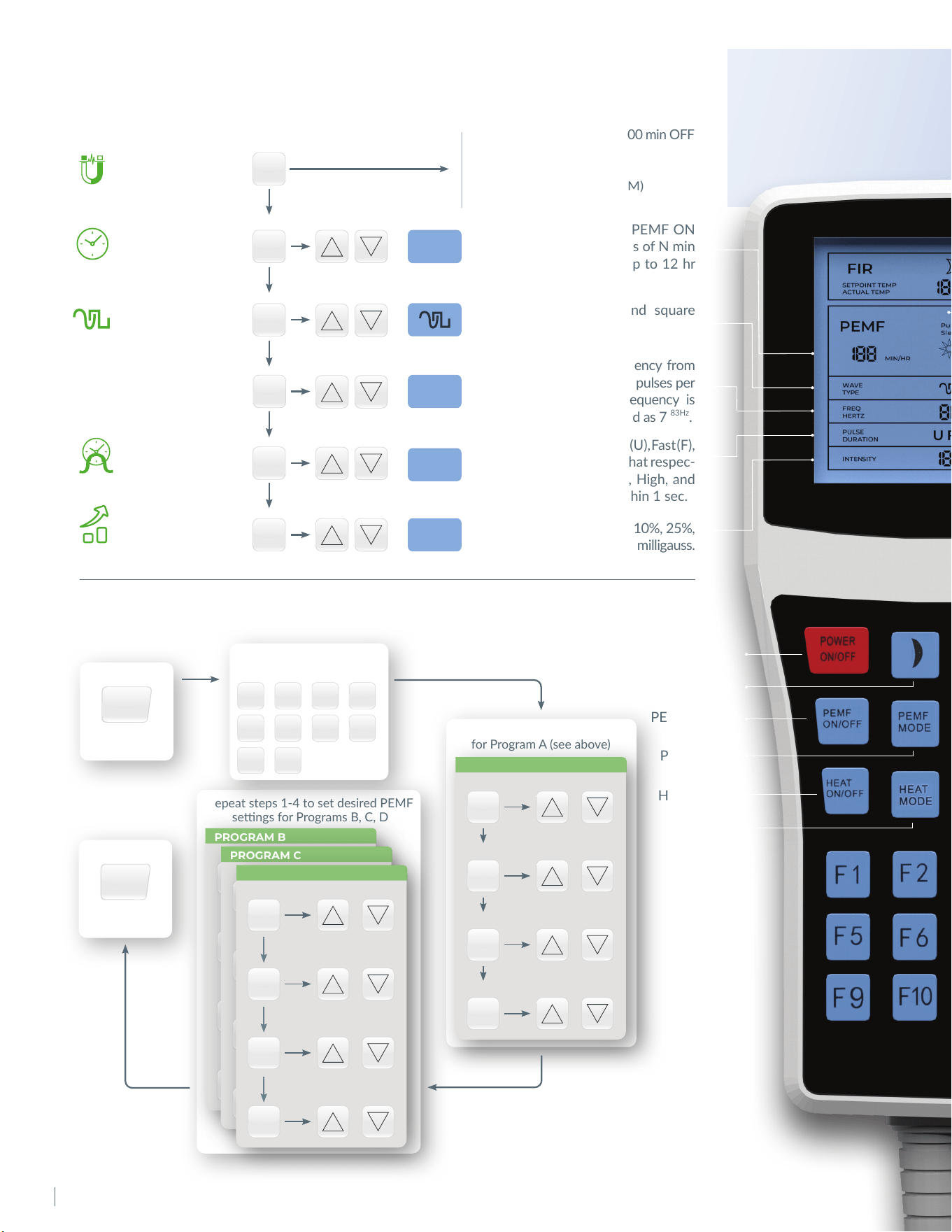
DEFAULT
SET and ADJUST
PEMF TIMER
SET and ADJUST
WAVE TYPE
SET and ADJUST
CHANGEABLE PEMF MODE
PEMF Time:
20 min ON - 100 min OFF
Wave Type: Sine
Frequency: 7.83 Hz
Pulse Duraon: Medium (M)
Intensity: 50%
PEMF
ON/OFF
To Adjust
20
MIN
P
P
PEMF
MODE
Set 10, 15, or 20 min of PEMF ON
me.
PEMF is set as cycles of
N min
on and 100 min o, for up to 12 hr
with automac shut-o.
PEMF
MODE
To Adjust
Choose between sine and square
wave types.
Hz
88
HZ
PEMF
MODE
Increase or decrease frequency from
1 to 30 Hz. 1 Hz = 1 PEMF pulses per
second. Default PEMF frequency is
set to 7.83 Hz and displayed as 7
83Hz
.
UFM
PEMF
MODE
To Adjust
Choose between Ultrafast (U), Fast (F),
and Medium (M) opons that respec-
vely reect the Highest, High, and
Low number of pulses within 1 sec.
Set the desired intensity as 10%, 25%,
50%, 75% or 100% of 3000 milligauss.
100
%
To Adjust
Sleep Cycle
PEMF Mode
Change
Heat Mode
Change
Heat On/O
PEMF On/O
Power On/O
www.HealthyLine.com
10
PEMF PROGRAMMING MODE
Repeat steps 1-4 to set desired PEMF
sengs for Programs B, C, D
PROGRAM B
PROGRAM C
PROGRAM D
WAVE TYPE
PEMF FREQUENCY
PULSE DURATION
PEMF INTENSITY
PEMF
MODE
P
P
PEMF
MODE
PEMF
MODE
PEMF
MODE
Set desired PEMF sengs
for Program A (see above)
PROGRAM A
WAVE TYPE
PEMF FREQUENCY
PULSE DURATION
PEMF INTENSITY
Step 4
Step 3
Step 2
Step 1
PEMF
MODE
P
P
P
P
PEMF
MODE
P
P
PEMF
MODE
P
P
PEMF
MODE
Choose a buon that will
be re-programmed
F2
F6
F10
F4
F8
F1
F5
F9
F3
F7
Selected mode
will start ashing
Press & Hold
unl
BEEP to
Save sengs
PEMF
PROGRAM
Press & Hold
PEMF
PROGRAM
unl
BEEP
to Start
Pulsed Electro
–
Magnetic Field
To Adjust
P
P
P
P
P
P
P
P
PEMF
WAVE
FREQUENCY
SET and ADJUST
PULSE
DURATION
SET and ADJUST
PULSE
INTENSITY
SET and ADJUST
PEMF
MODE
P
P
P
P
P
P
Hz
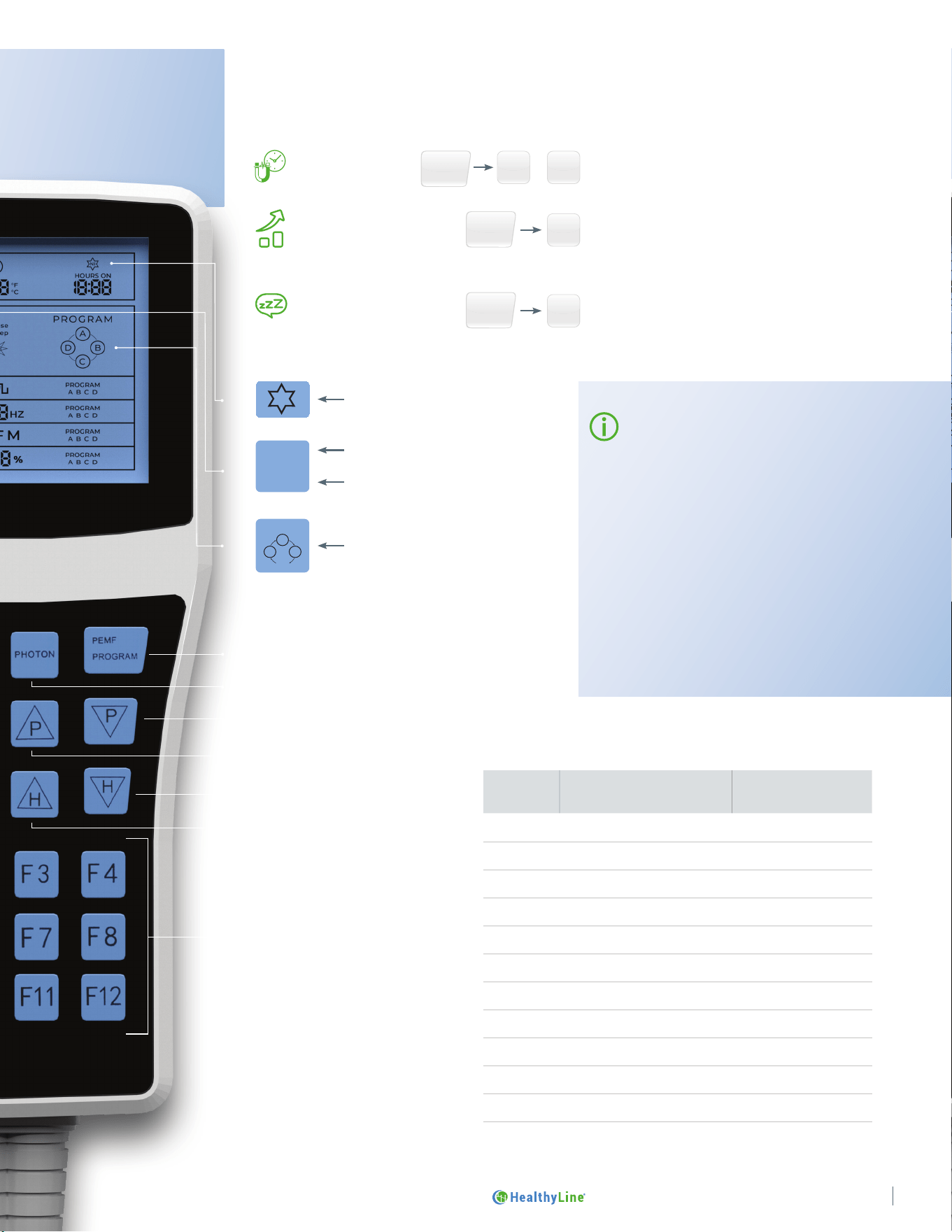
INFORMATION
Photon Lights On/O
Increase PEMF Sengs
Increase Heat Sengs
Decrease Heat Sengs
Decrease PEMF Sengs
Advanced PEMF Programming
Preset PEMF Programs
Each preprogrammed PEMF funcon F1–
F10 consists of 4 programs (ABCD). Each
ABCD program is 5 min long and has a unique
combinaon of PEMF Wave Type, Frequency,
Pulse duraon, and Intensity.
PEMF funcon can be changed at any me
by pressing dierent F-buons. Acve ABCD
program will restart according to the chosen
Funcon.
Funcons F1–F10 can be customized or reset to
the factory sengs at any me (see page 10, 9).
INSPIRED BY NATURE, PERFECTED BY SCIENCE.
11
The ashing arrow indicates
acve and upcoming
programs ABCD.
PROGRAM
A
C
BD
NI
The negave ion icon
is lit when the heat is on.
Pulse
Sleep
“Pulse” is displayed when
PEMF is acve.
“Sleep” is displayed during
PEMF 100 min OFF me.
Table 1 - Preset PEMF functions description
...
PEMF sengs of the acve program will be
displayed on the screen.
F10F1
20 MIN PEMF
PICK FROM TABLE 1
1 HR ENERGIZE
EASY PEMF MODE
Funcons will run in sequence: F10 - F8 - F6
(see Table 1). The controller will shut o aer
1 hr. This program is not customizable.
Funcons will run in sequence: F9 - F8 - F5
(see Table 1). The controller will shut o
aer 1 hr. This program is not customizable.
F12
1 HR RELAXATION
Pulsed Electro
–
Magnetic Field
Program
Buon
Program Type
Default Frequencies
in ABCD, Hz
F1
Low Frequencies 1, 3, 4, 6
F2
Medium Low Frequencies
7, 8, 10,12
F3
Medium Frequencies 14, 15, 17, 18
F4
High Frequencies 19, 21, 23, 25
F5
Before Sleep 5, 4, 3, 2
F6
Pain Assist 15, 16, 19, 20
F7
Sport Injury & Strain Assist
24, 24, 25, 25
F8
General Regeneraon 7.83, 7.83, 10, 10
F9
Earth Frequencies 7.83, 14, 21, 25
F10
Wake Up/Energy 7.83, 10, 11, 12
F11
Energize
Sequence: F10, F8, F6
F12
Relaxaon
Sequence:
F9, F8, F5
PREPROGRAMMED PEMF FUNCTIONS
PEMF
PROGRAM
PEMF
PROGRAM
EASY PEMF MODE
F11
PEMF
PROGRAM
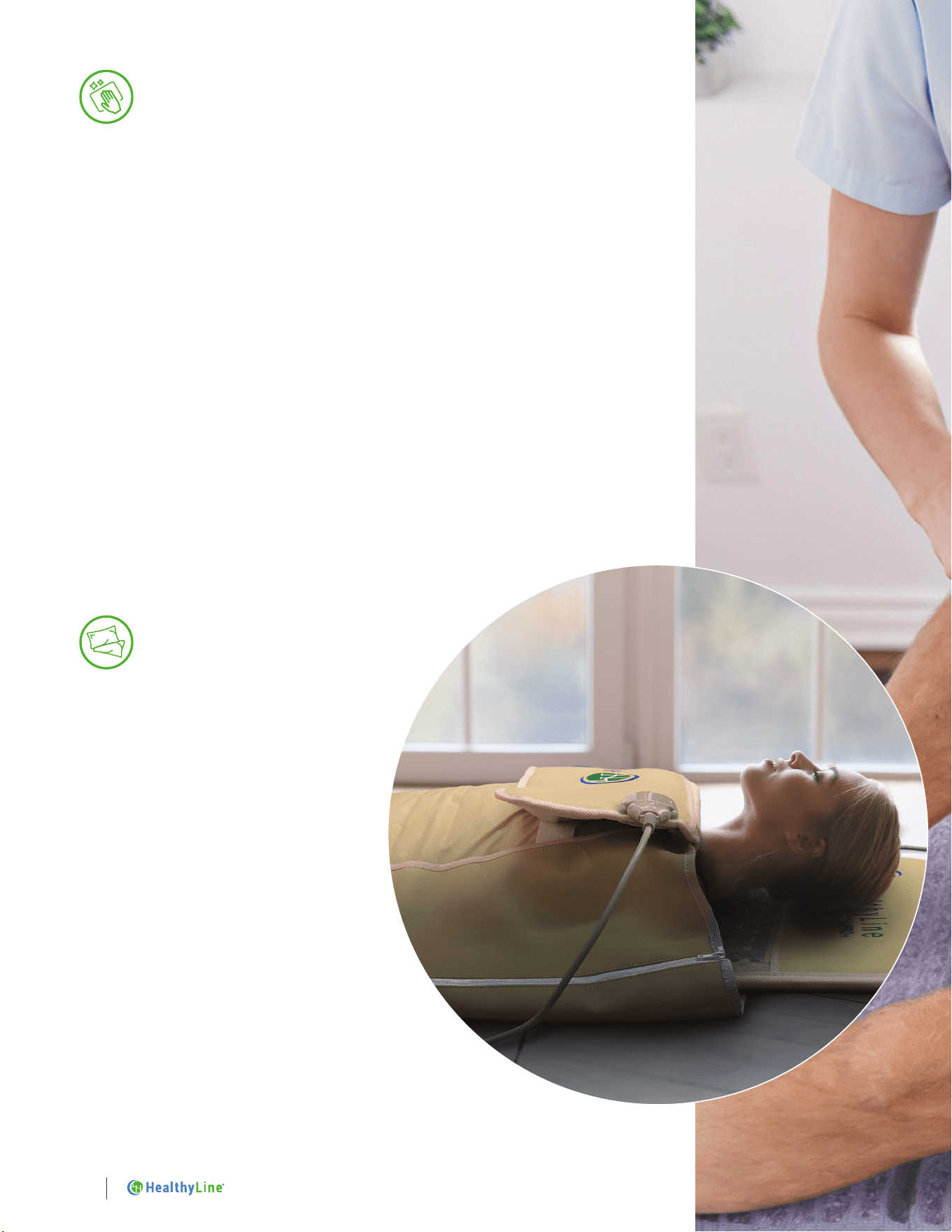
1. Protect your mat from moisture at all mes. Cover the enre mat with a blanket, towel,
or provided cover to protect your body from direct heat and to protect the mat from
sweat. You can also purchase a padded waterproof cover from HealthyLine.
2. For sanitary purposes, change and wash covers aer each user. You can also use a
disposable cover for each use.
3. Aer use, set the mat to a high temperature to allow any moisture to evaporate.
Aer 15-20 minutes power down the controller and unplug. Do not leave your mat
unaended while it is powered on.
4. Clean the surface of the mat and controller with a dry cloth as needed or use a slightly
damp sanizing wipe.
5. Do not use chemicals or solvents during cleaning.
6. If you need to store your mat, use the dustproof bag provided.
7. To fold the mat, unplug the controller, and then fold the mat inward at predetermined
places.
8. Keep the mat in a dry and venlated place.
9. Your mat will last longer the less you fold or bend it.
СOMFORT
Each HealthyLine mat is designed with the
sole purpose of improving your health and
wellness. It is a powerful wellness device.
Each mat contains several pounds of real
gemstones. The Planum models ulize
crushed gemstones that feel more like large
pieces of sand. This is not the same as lying
on a maress as there will be varying degrees
of rmness. This can be soened by covering
your mat with addional layers of padding to
cushion the surface.
СARE
12
13
NOTES
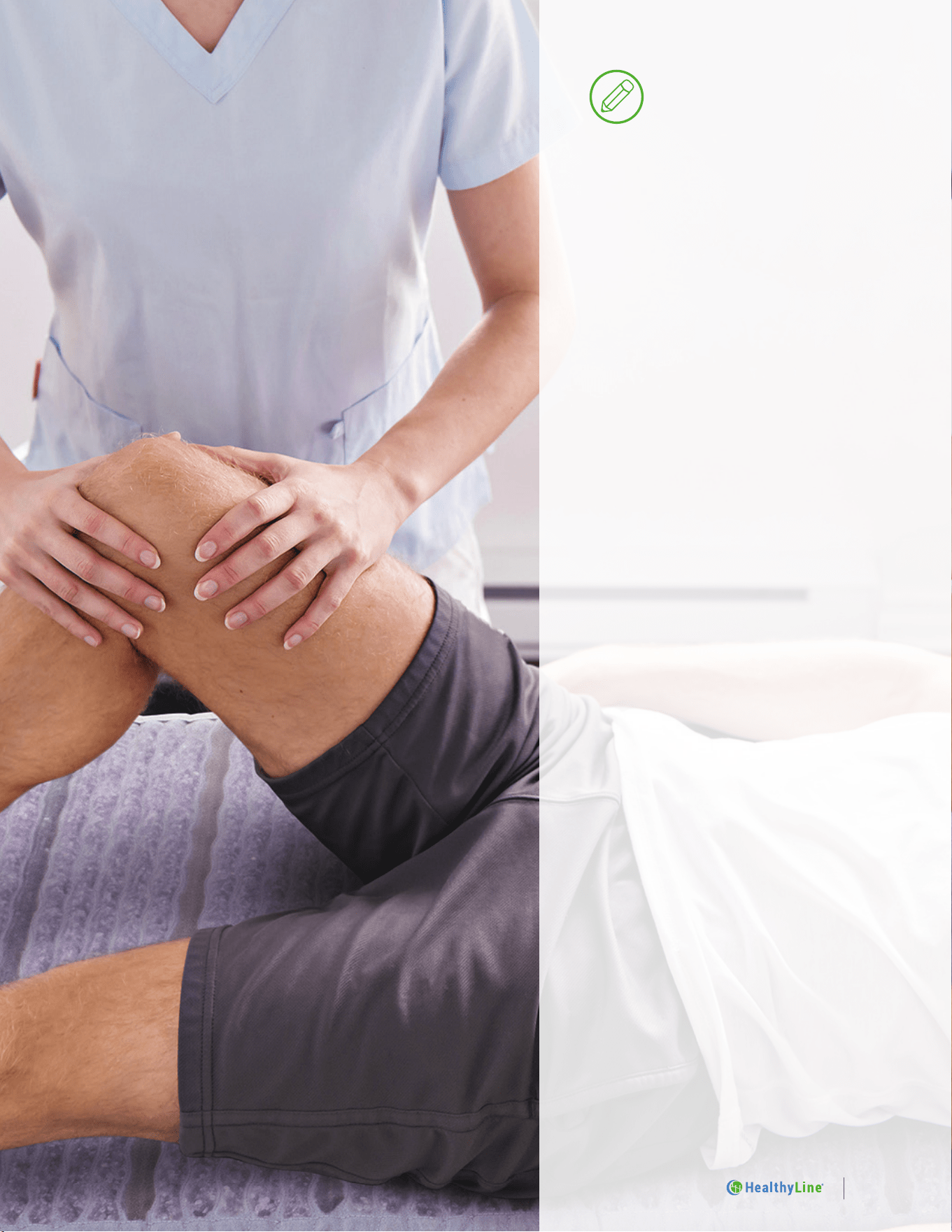
1. Our mats are good for people of all ages,
including children. Pets can benet from
the mats, too!
2. We only sell new mats. The box you
receive your package in may or may
not contain our branding. The box may
show signs of wear due to shipping.
3. Check our website for other products
and accessories. We have special models
designed for chairs, knees, arms, shoul-
ders, and non-powered energy bedding.
4. Spread the word! Share your experience
with friends, family, neighbors, social
media, and groups. You may also become
an aliate or referrer.
5. For helpful videos, please visit
HealthyLine.com/video.
14
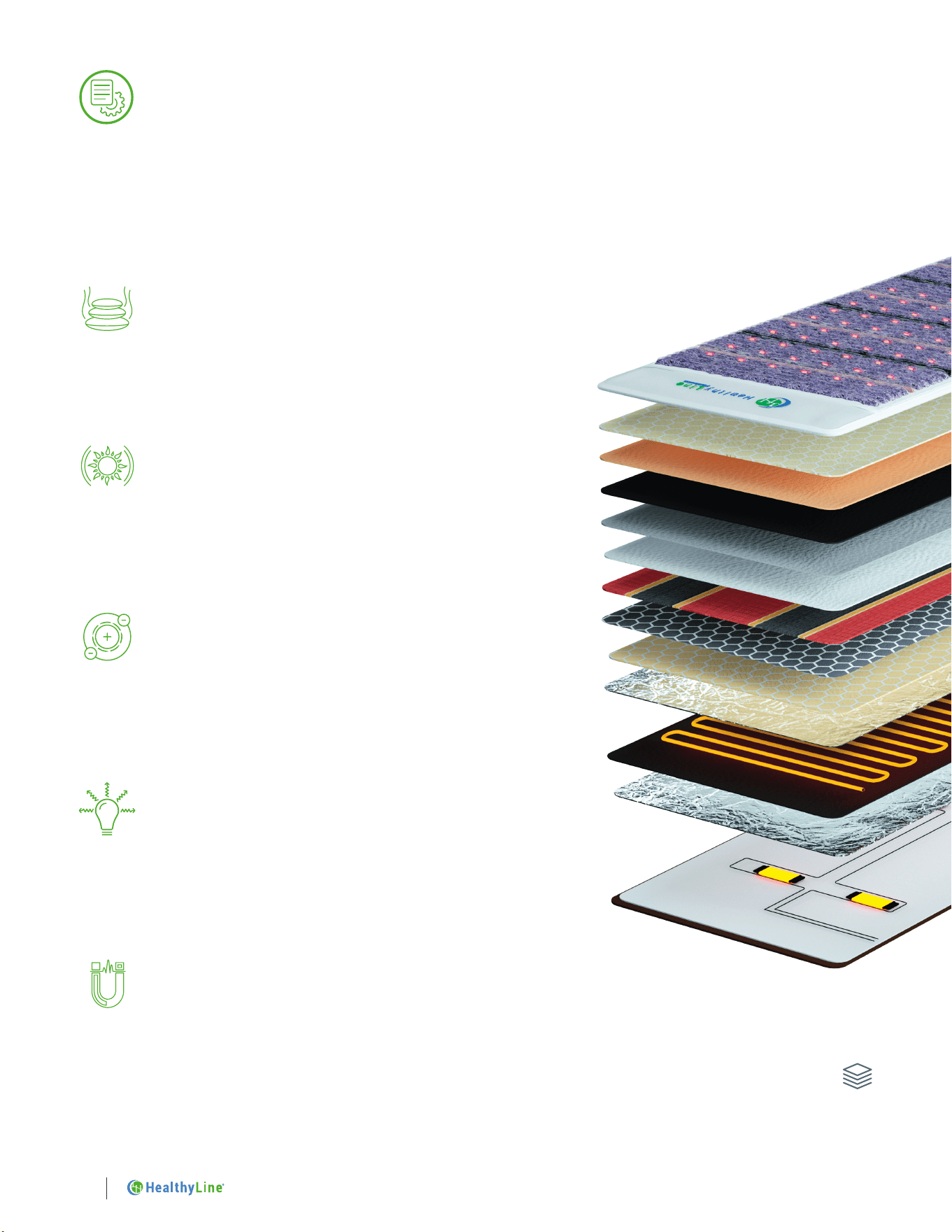
UP TO
21
LAYERS
PHOTON LIGHTS
The photon lights in HealthyLine products use visible red light at a wavelength
of 660 nm, that reaches just below the surface of your skin, penetrang the skin
on a cellular level. For maximum benets, photon lights should come into contact
with the skin directly. Benets are reduced when applied through a cloth or
a cover. Photon light therapy may help with skin rejuvenaon and improvements
to your overall levels of wellness.
FEATURES THERAPIES
Our gemstone heang pads are intended for muscular relaxaon, temporary
relief of sness, minor muscle and joint pain; for the temporary relief of joint
pain associated with arthris; for the temporary relief of muscle spasms, minor
sprains, and strains; for the temporary relief of minor muscular back pain; for the
temporary relief of sness, and increase of circulaon where applied.
HOT STONES
HealthyLine uses a variety of natural gemstones to create a natural healing
experience. These gemstones release far-infrared rays and negave ions when
heated. They can also impact pressure points to release tension in the body. Not
only can they help improve physical discomfort, but also achieve the common
goal of improved health.
FAR INFRARED
Advanced heang systems and natural gemstones deliver far-infrared rays (FIR).
FIR penetrates deep into the body, promong temporary relief from sness,
joint pain, and elevang muscle relaxaon. The higher you set the temperature,
the greater the level of far-infrared rays. Even organic heat from your body
acvates the gemstones to deliver far-infrared benets, but at a lower level.
NEGATIVE IONS
Negave ions are found in abundance in mountains, near waterfalls, and
beaches. They are also naturally emied from gemstones. When your mat is
turned on, the negave ion output signicantly increases. The higher you set the
temperature, the greater the level of negave ions you receive. The output of
negave ions varies from 300 to 3000 per cubic cenmeter, depending on the
type of gemstone and temperature.
PEMF
Our PEMF system replicates the Earth’s electromagnec eld, which is delivered
directly to your body. PEMF is the process of supplying the body with much-
needed magnec elds, bypassing the electrical polluon that aects our bodies
on a daily basis. By default, PEMF is emied at the frequency of 7.83Hz in a
pulsed sinusoidal waveform — the most consistent with the biorhythms of the
human body. The unique combinaon of revitalizing natural elements in our
mats takes wellness to the next level.
15
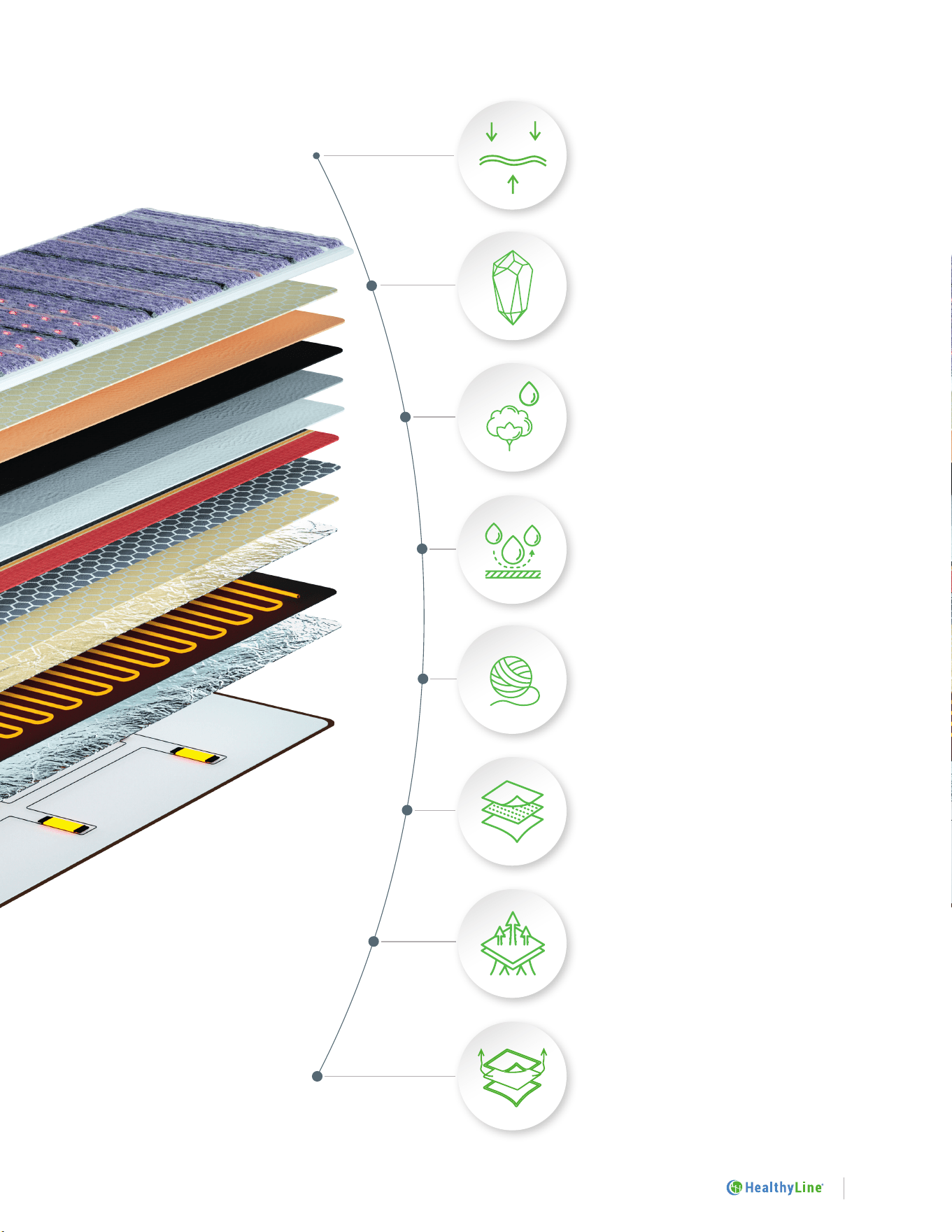
Photon LED lights.
Pulsed electromagnec eld (PEMF) system.
Waterproof eleusine cloth that
prevents wear.
Non-woven funconal fabric for increased
negave ion output.
Oxford waterproof fabric to reduce
damage from perspiraon.
Bamboo carbon ber coon. Adds an
addional layer of protecon.
Copper fabric net to shield from EMFs.
External casing. Flexible membrane that
keeps gemstones in place.
Synthec leather exterior. Durable and
easy to clean.
Yellow mud that maximizes negave ion output.
Charcoal layer. Magnecally charged layer to
boost energy.
Heat absorpon release layer. Redistributes
heat to avoid discrepancies.
Electric discharge patented layer.
Heang system. State-of-the-art silicon
heang wire with EMF ltraon and smart
heat sensors.
Thermal insulaon to prevent heat from
being conducted downwards.
Ecological compression coon for comfort.
Natural tourmaline, amethyst, jade, obsidian,
and quartz gemstones that produce far-
infrared rays and negave ions.
Thermal distribuon layer guarantees
even heat distribuon.
16
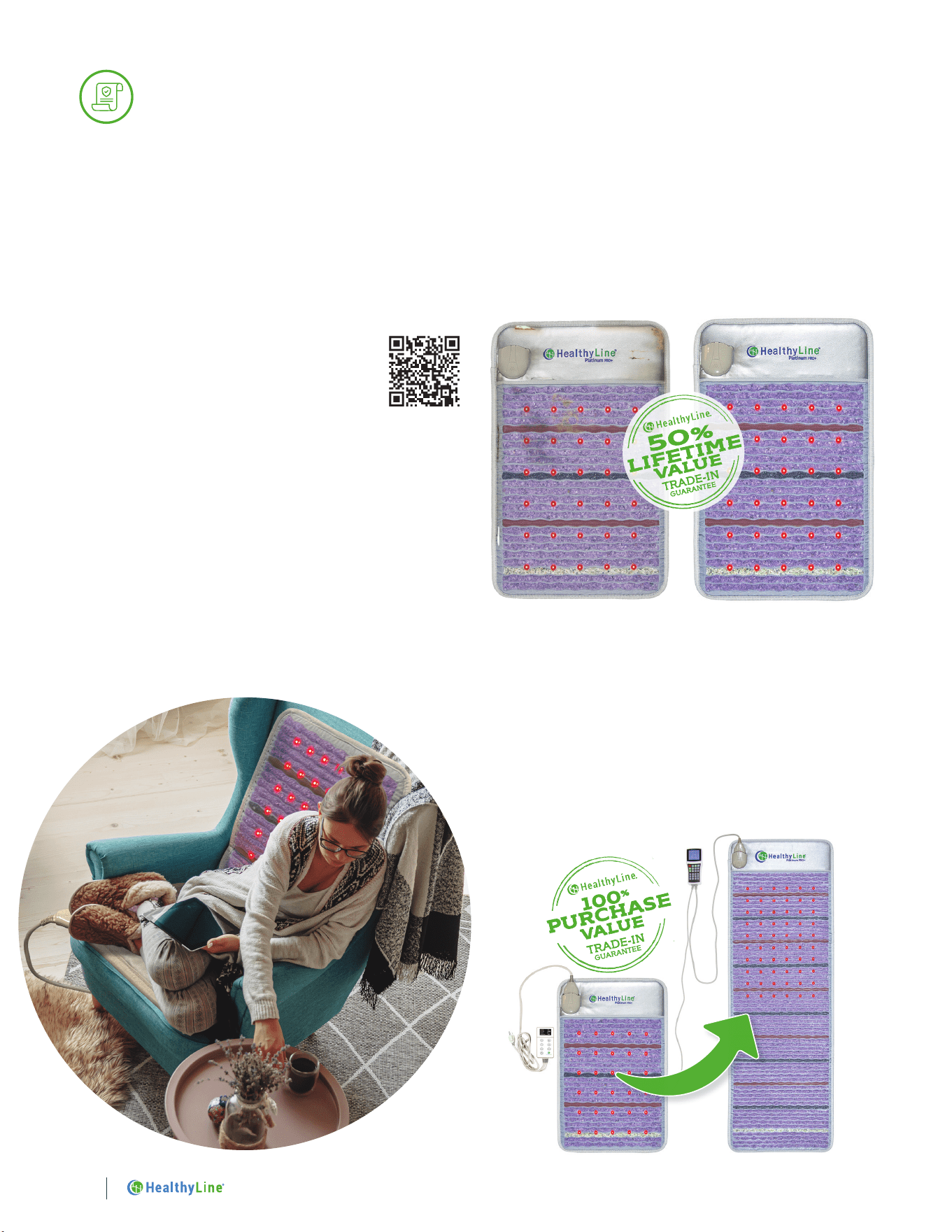
If at any point you decide you want a larger or more advanced
mat, you have the opon to upgrade your current one. Please
note that the new purchase must be at least twice the value
of the mat you are intending to upgrade. As long as your mat
is in good condion, simply send it in with assistance from
our customer service team and you will get a credit of the full
purchase price that will be put towards your new purchase of
one or more items.
LIFETIME UPGRADE
OUR POLICIES
WARRANTY
HealthyLine oers a 5-Year Limited
Warranty for all Planum
models.
In order to make a warranty claim, you will need to
provide a purchase conrmaon that veries the purchase
condion like new, purchase date, model, and serial number,
as well as the price paid (see page 17). For detailed informaon
please visit hps://healthyline.com/warranty-policy.
Scan this code for product registraon or visit
healthyline.com/warranty and conveniently
store all the informaon needed to verify your
claims if needed.
90-DAY FREE TRIAL
PERIOD AND PRICE
GUARANTEE
Price adjustments can be made within 90 days of your purchase
if an item is further reduced in price aer you purchased it.
Each purchase of an Inframat Pro comes with a 90-day free
trial period. You can purchase with condence, knowing that
you can return your product within that period for a full refund.
LIFETIME TRADE-IN
HealthyLine oers the world’s best lifeme trade-in policy.
Aer the warranty period is over, regardless of your mat’s
condion, you can always send it to us as a trade-in and use
half of the price you paid for a new purchase. So, if something
happens to your mat — it will never become a complete loss.

17
This informaon is not intended to cure, diagnose, advise, or treat any medical condion, nor is reading this a substute for reading the
product User Guide. Please consult with a physician before use of this product. These statements have not been evaluated by the Food and
Drug Administraon. These products are not intended to diagnose, treat, cure or prevent any disease. Informaon with regard to our products
does not reect or represent product claims. HealthyLine assumes no responsibility for the improper use of its products or for a user’s self-
diagnosis and/or treatment using its products. HealthyLine products should not be used as a substute for medically supervised therapy. If
you suspect you suer from clinical deciencies, consult a licensed, qualied medical doctor. No acon should be taken solely on the content
provided by HealthyLine; regardless of any perceived scienc merit, readers should consult healthcare professionals on any maer related
to their health. The informaon in HealthyLine’s materials was obtained from materials that are believed to be accurate, as presented by their
respecve authors, but HealthyLine assumes no liability for any errors or personal interpretaon. Users and customers who fail to consult their
physicians prior to the purchase or use of any product assume the risk of any adverse eects incurred. The Food and Drug Administraon has
not approved or evaluated the informaon contained in the literature here or on the website. Any printed reference or direct link to a specic
product is for your informaon or convenience only and may not be construed as an encement to purchase and further is not intended or
implied to be used in the migaon, diagnosis, treatment, cure, or prevenon of any disease. Except as specically stated, neither HealthyLine
nor any of its directors, employees, or other representaves will be liable for damages arising out of or in connecon with the use of this product
or informaon. This is a comprehensive limitaon of liability that applies to all damages of any kind, including (without limitaon) compensatory,
direct, indirect, or consequenal damages, loss of data, income or prot, loss of or damage to property, and claims of third pares.
- All informaon in this booklet is subject to change without noce.
- HealthyLine is not responsible for any mistakes or misprints.
- Check the latest updates at HealthyLine.com.
TROUBLESHOOTING
If for any reason your mat does not work, please be advised
that this may be a minor issue that can be easily resolved.
Make sure you set your mat correctly according to the
instrucons provided.
If there is an issue, try disconnecng the controller from the
mat and the outlet; fold and unfold the mat to make sure that it
lies at so that it can funcon normally; turn on the controller
again. Try using dierent sockets. Make sure you plug the
controller all the way in on both ends and set the mer before
trying to adjust the temperature (your mat will not heat up if the
mer has not been set). Heat the covered mat at the maximum
temperature for 30 minutes to check the controller is showing
an increase in temperature. If you’re sll having problems,
please prepare the following informaon and then contact us:
1. Have your order number or a copy of your invoice ready.
2. Determine if your product is sll within the 5 year limited
warranty period.
3. Find the model number and the serial number of your mat
on the tag of your mat.
4. Your shipping address, including zip code.
5. Once you have this informaon ready, contact us by email
at [email protected] or call us at 1-888-774-4422
DISCLAIMER
18
How is 20 lbs. of gemstones so aordable?
It would cost a fortune to buy small quanes. If you were to
buy 100 lbs, it costs considerably less. At HealthyLine, we buy
thousands of pounds of cered gemstones each year. Because
of this, we can aord to sell our mats at a fracon of its cost!
How long can I use the mat?
You can use this mat for short or extended periods — even
overnight. It all depends on your preference. For extended or
overnight use, sengs should be at a low or comfortable seng.
Can I use my mat overseas?
All mats use 110V power for the USA and Canada, but you can
sll use the mat overseas with a good power converter. Most
models are now available in 220V power — just ask or look
carefully through the website.
Can I wash and protect my mat?
Covering your mat fully with a towel, bed sheet, or waterproof
cover will help avoid messy issues. If you must clean your mat,
unplug it, and use a damp towel. If your mat is truly dirty, unplug
it, and use a damp cloth with a small amount of soap. To rinse
the soap, use a damp cloth and then let it air dry.
If I have a serious illness, can I use this mat?
If you have any preexisng condions that may be cause for
concern, or if you have heart disease, hypertension, or any
other serious medical condion you should consult with a
doctor before using this or any other medical device.
Can I use it on the oor or bed?
Yes, our mats can be used on any at surface such as a bed,
massage table, or oor.
How can I burn calories?
Using our mat at high temperature gives your body similar
eects to doing cardiovascular exercise. As a reference, an hour
of cardio can burn up to 500 calories. Seng the infrared heat
to a temperature of 122
o
F-140
o
F (50
o
C-60
o
C) will increase
your heart rate, boost metabolism, increase your energy, and
elevate blood circulaon on a cellular level. You can also use
the sauna eect for the calorie burner. Set the temperature to
158
o
F and cover your body with a regular or a mylar blanket.
You will receive all the benets of a sauna, including sweat and
detoxicaon. At these temperatures, please keep it reasonably
under one hour. And always drink plenty of water, before
and aer.
Is your mat protected against EMFs?
Yes, we use industry leading double insulated wiring for
advanced EMF shielding. The system is then placed under
EMF-ltering copper mesh layer. Mats are also made with
grounding for addional EMF protecon.
What size should I get to sleep on?
72” x 24” is recommended to sleep on. However, if you roll over
during the night, you might consider geng a 74” x 28”.
FAQ

19
What to do in case of a spill
of something smelly?
1. Unplug and turn o the controller;
2. Use paper towels or dry so cloth to absorb excess moisture
as much as possible;
3. Thoroughly wipe the aected area with mul-surface
cleaning wipes.
4. Spray odor remover on the damaged area from 6-8 inches
away. Leave the mat in a well-venlated area unl it dries
completely.
5. Turn on the mat and set the maximum temperature. Aer
the maximum is reached keep the mat running for 30-60
minutes. Do not cover the mat so that it can venlate. Do
not leave the mat unaended.
6. Repeat steps 2-5.
I have a slight headache aer using the mat.
What do I do?
A headache is a sign of detoxing too fast and being dehydrated.
Use a lower temperature and drink more water. Enjoy the
process. Maximize your wellness at a comfortable pace.
Can I fold the mat?
Yes, you can. PEMF models are rigid and should only be folded
inward at predetermined places.
Please note that your mat will last longer the less you fold
or bend it.
I see your mats are made with dierent
gemstones. Which gemstone mat should I buy?
Each mat is made with a dierent combinaon of gemstones.
What you choose should depend on ailments or the area of
wellness you would like to focus on. In general, the best
mats come with a combinaon of gemstones, along with
built-in PEMF.
If I have more quesons what is the best way
to get answers?
You can always email us at [email protected], and we’ll
get right back to you, typically that same day.

ONLINE
FAR INFRARED HEAT THERAPY MATS
FILLED WITH NATURAL GEMSTONES
SCAN QR CODE TO SHOP
FAR INFRARED HEATING MATS FILLED WITH NATURAL GEMSTONES
INFRAMAT PRO
1 888 774 44 22
@healthylineshop
@healthylinebrand
515 7th Avenue,
New York, NY 10018