INSTRUCTION
MANUAL
Please read all the instructions completely before use
and save this manual for future reference.

This page left blank intentionally.

CCRadio-EP PRO
3
Owners Record
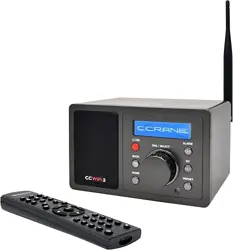
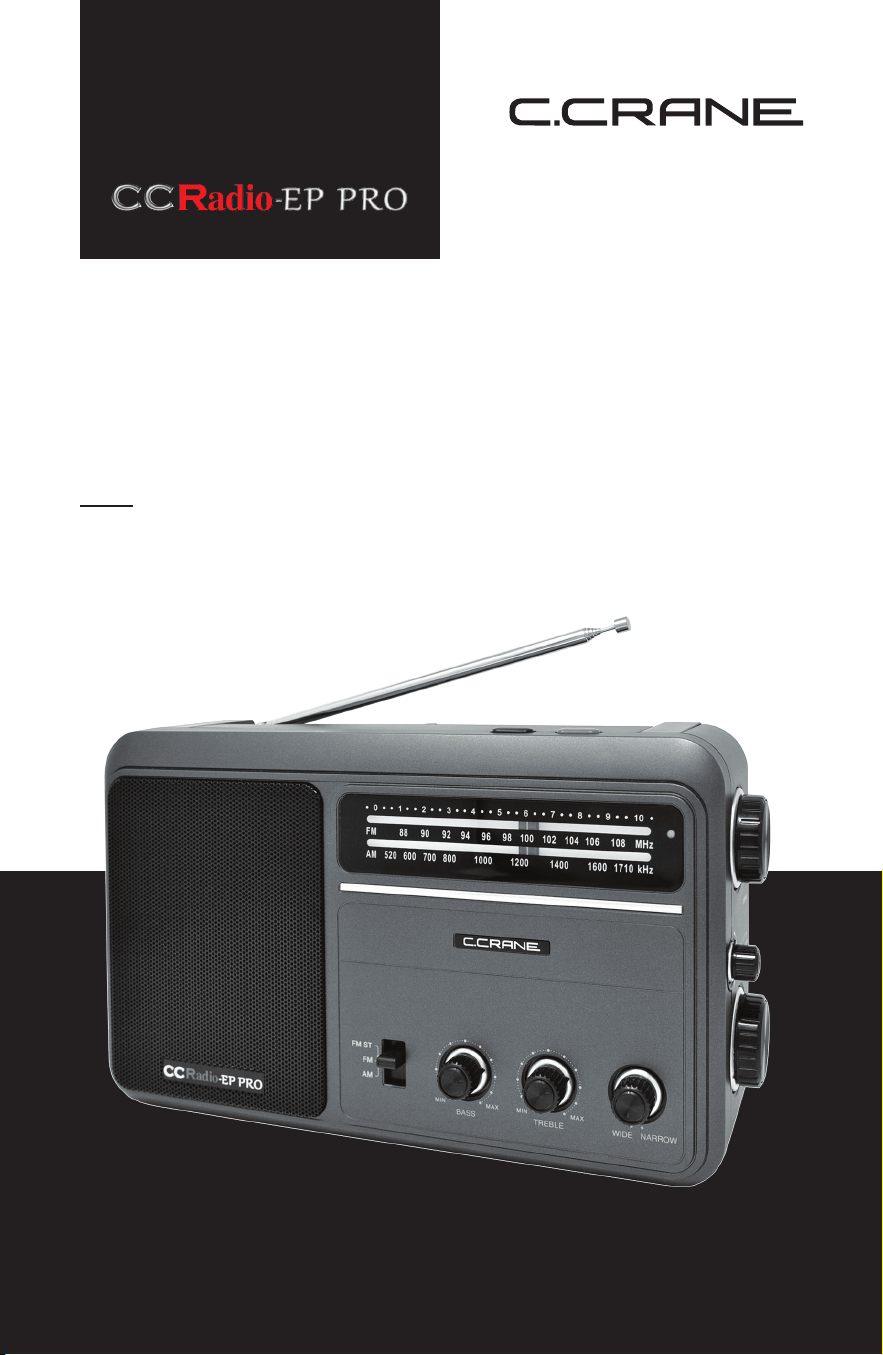
Thank you for purchasing a CCRadio-EP PRO.
It is a radio built specically for “ease of use” that addresses the
desires of some of our customers. Inside, it has the technology we
have developed over the years to help tune in a station more clearly
and provide excellent audio. Built-in is the patented Twin Coil Ferrite
®
AM Antenna. There is also a large high-quality speaker along with bass
and treble controls so that the audio is accurate and rich. We hope
the CCRadio-EP PRO will give you many years of learning, news and
entertainment. If you have questions about your radio, please give us a
call or email: [email protected]
FOR YOUR FUTURE REFERENCE:
Serial No. (Found inside battery compartment):
Date of purchase/Name & address of dealer:
UNPACKING
The box should contain the CCRadio-EP PRO, an AC Power Adapter,
this manual and a warranty card. If anything is missing or damaged,
please contact C. Crane immediately. We recommend that you keep
the box in the unlikely event that your radio needs to be returned for
warranty purposes.
CCRadio-EP PRO
4
Safety Instructions
Please read IMPORTANT SAFETY INSTRUCTIONS before use. It is
important to read and understand all instructions. Keep these precautions
and instructions where all who will use this radio will read them.
WARNING: To prevent re or electric shock hazard do not expose
this product to rain or moisture.
CAUTION: To reduce the risk of electric shock, do not remove the
radio back. No user serviceable parts inside. Refer servicing to
qualied service personnel.
THE LIGHTNING FLASH AND ARROWHEAD WITHIN
THE TRIANGLE IS A WARNING SIGN ALERTING YOU OF
“DANGEROUS VOLTAGE” INSIDE THE RADIO.
THE EXCLAMATION POINT WITHIN THE TRIANGLE
IS A WARNING SIGN ALERTING YOU OF IMPORTANT
INSTRUCTIONS ACCOMPANYING THIS RADIO.
CAUTION:
• Before turning the unit on, set your volume control to a low setting.
• Slowly increase the sound until you can hear it comfortably and clearly
without distortion.
• Long-term exposure to loud sounds may cause hearing damage. It
is best to avoid high volume levels when using headphones/earbuds,
especially for extended periods.
READ BEFORE OPERATING EQUIPMENT. SAVE THESE
INSTRUCTIONS.
To prevent damage to your radio or possible injury to you or others, read
these safe ty precautions and instructions entirely before applying power
to your radio.
1. COMMON CARE
Check the radio, AC adapter, batteries and any accessories regularly.
Do not use the radio if there is any sign of damage. Only operate in
accordance with the instructions in this manual.
CAUTION
RISK OF ELECTRIC SHOCK DO NOT OPEN
CCRadio-EP PRO
5
2. PROPER BATTERY HANDLING
Never mix different types of batteries or use old batteries with new.
This may cause the batteries to leak or explode. Dead batteries
are also prone to leakage. Remove the batteries when no charge
remains. Orientate the batteries correctly in the unit according to the
diagram. Do not store batteries with metal objects like paper clips. We
recommend you remove batteries from the radio if you are not going to
use the radio for one month or more.
3. DISCONNECT THE RADIO IN CASE OF MALFUNCTION
If you smell or notice smoke, disconnect the AC adapter and remove
the batter ies immediately to avoid burns. Contact C. Crane for
inspection and service before any future operation. Only use the AC
adapter supplied with the unit and replace it if wires become frayed or
exposed.
4. KEEP OUT OF REACH OF CHILDREN
The radio is heavy when batteries are installed. Use only on a stable,
level surface. Dropping the radio can cause damage or injury. Keep
the AC Adapter cord in a position so someone cannot trip and cause
the radio to fall.
5. KEEP AWAY FROM WATER AND MOISTURE
Keep the radio dry. Liquids and moisture can damage the radio. If a
liquid leaks into the radio do not operate and seek a qualied service
shop. To clean, remove the power adapter and use a damp cloth on
the exterior only.
6. KEEP AWAY FROM EXTREME TEMPERATURES
Extreme temperatures can damage the radio. Do not leave or use the
radio where it can be subjected to high or very cold temperatures.
7. DO NOT ATTEMPT TO SERVICE RADIO
Refer all service work to a qualied service shop when the radio does
not appear to operate normally, exhibits a change in performance or
the radio has received damage. Never open the radio as this may
expose you to dangerous voltages and this will void all warranties.
8. OUTSIDE ANTENNAS OR CABLES
Outside antennas or cables should not be used with this radio unless
installed by qualied personnel.
Safety Instructions

CCRadio-EP PRO
6
03
04
07
08
10
10
10
12
13
Table of Contents
Owners Record __________________________________________
Safety Instructions ________________________________________
Quick Start Guide ________________________________________
Radio Controls and Functions _______________________________
Getting Started
Powering Your Radio ______________________________________
AC Operation ___________________________________________
Installing the Batteries _____________________________________
Specications __________________________________________
Troubleshooting Guide ___________________________________
CCRadio-EP PRO
7
Quick Start Guide
1. Plug in the supplied AC Power Adapter or 4 “D” batteries (see
“Powering Your Radio” on Page 10).
2. Turn the radio on by pressing the red POWER button on the top of
the radio (see “Radio Controls and Functions on Page 8 for location).
3. Adjust the VOLUME knob to your preferred listening level.
4. Select the BAND switch to either AM, FM or FM Stereo.
5. For best FM reception, lift, extend and rotate the FM WHIP ANTENNA.
6. Adjust the TUNING knob until your desired radio station frequency is
indicated on the dial or until your station has best reception.
7. For best AM reception please tune slowly to nd your AM station so
you can hear the audio. If you tune too fast it may appear to skip over
your station. Typically, you will nd a weak station image right before
the station you want. If you tune a little further, you will nd the main
signal of the station comes in much clearer.
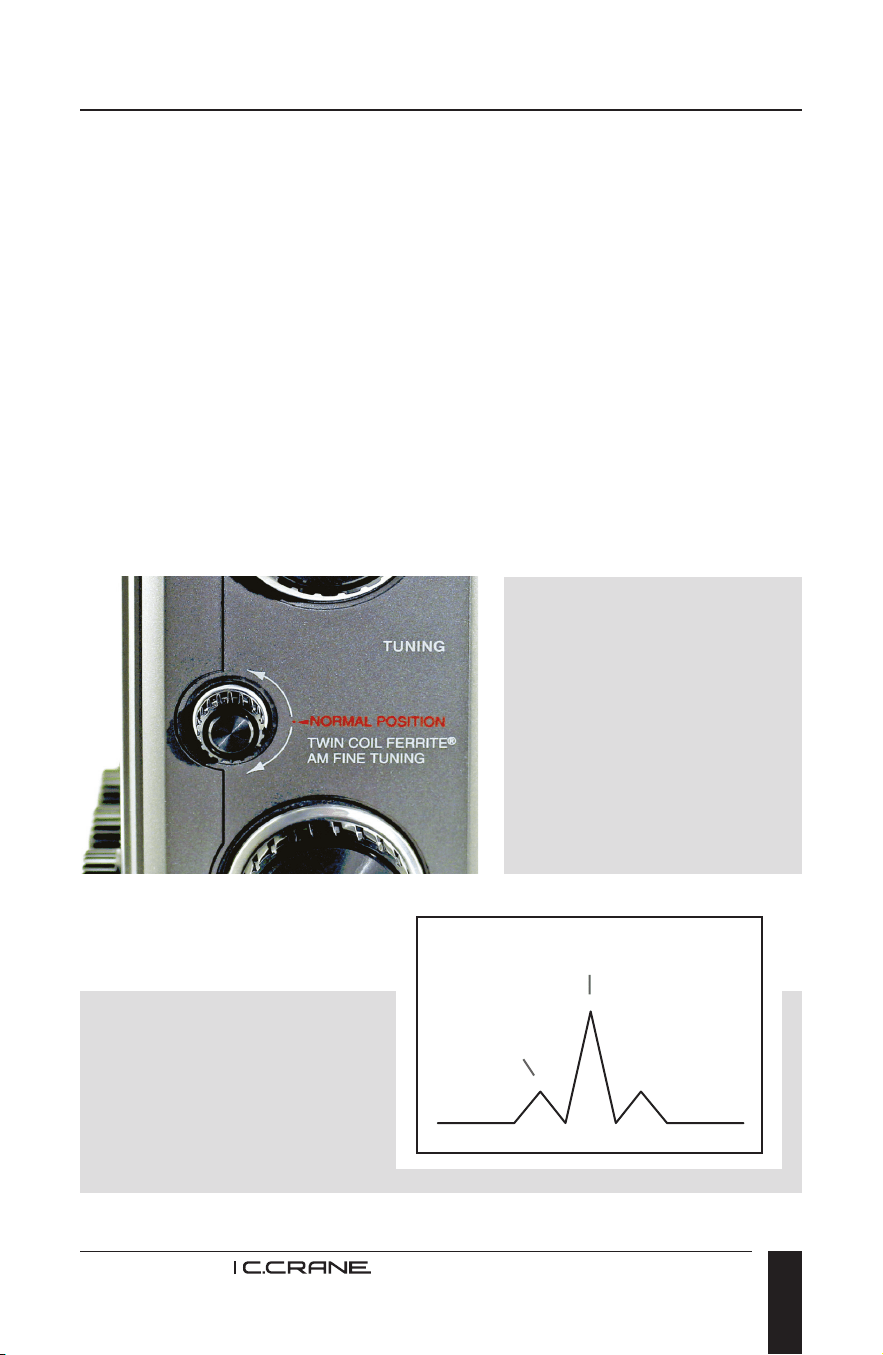
You can often enhance
AM reception by tuning
the small “AM FINE
TUNING” knob (on the
right side of the radio) by
“ear”, for maximum clarity.
The radio comes with this
knob locked in position,
so you must remove the
sticker rst.
Main signal AM station
Weak station
image
Finally, rotate the entire
radio until station reception
is best. Adjust the WIDE-
NARROW knob for your
sound preference along
with the Bass and Treble.
CCRadio-EP PRO
8
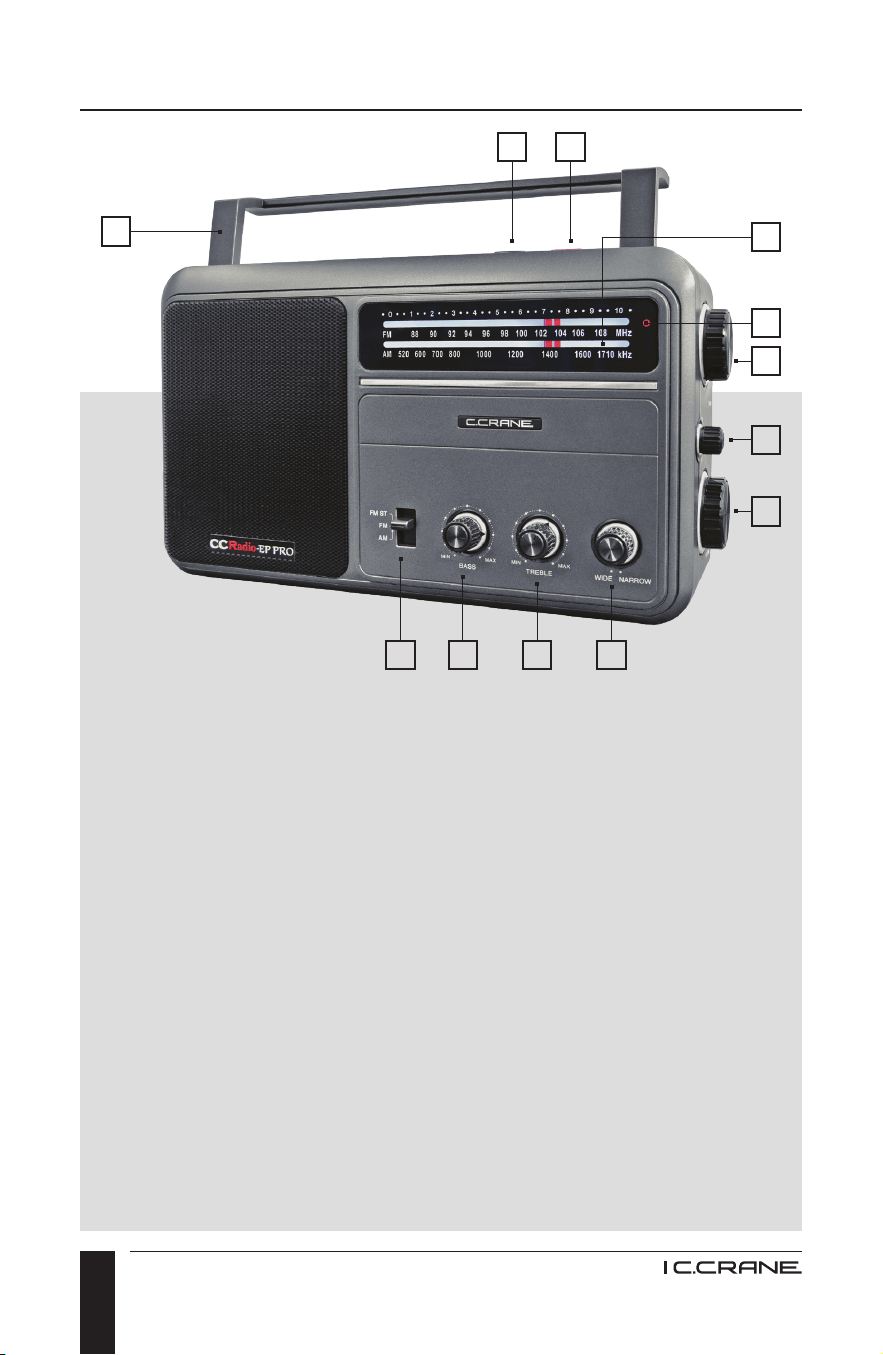
Radio Controls and Functions
1. DISPLAY LIGHT BUTTON
Use to turn the dial backlight
ON or OFF.
2. POWER BUTTON
Turn the power ON or OFF.
3. TUNING LIGHT
Lights when tuned to a station.
4. AM/FM TUNING DIAL
Sliding pointer indicates the
station frequency being
received on AM or FM.
5. AM/FM TUNING KNOB
Rotate to tune in a radio
station to AM or FM.
6. AM FINE TUNING KNOB
Rotate for ne tuning once
your station has been selected.
7. VOLUME KNOB
Rotate to raise or lower the
volume level.
8. WIDE/NARROW SWITCH
(AM only) Adjust for optimal
audio clarity when listening to
music or voice.
9. TREBLE KNOB
Adjust high pitch tones to your
preferred listening level.
10. BASS KNOB
Adjust low pitch tones to your
preferred listening level.
11. BAND SELECTION SWITCH
Select between AM, FM and
FM Stereo.
12. FLIP UP HANDLE
For easy portability.
1 2
891011
3
5
6
7
4
12
CCRadio-EP PRO
9
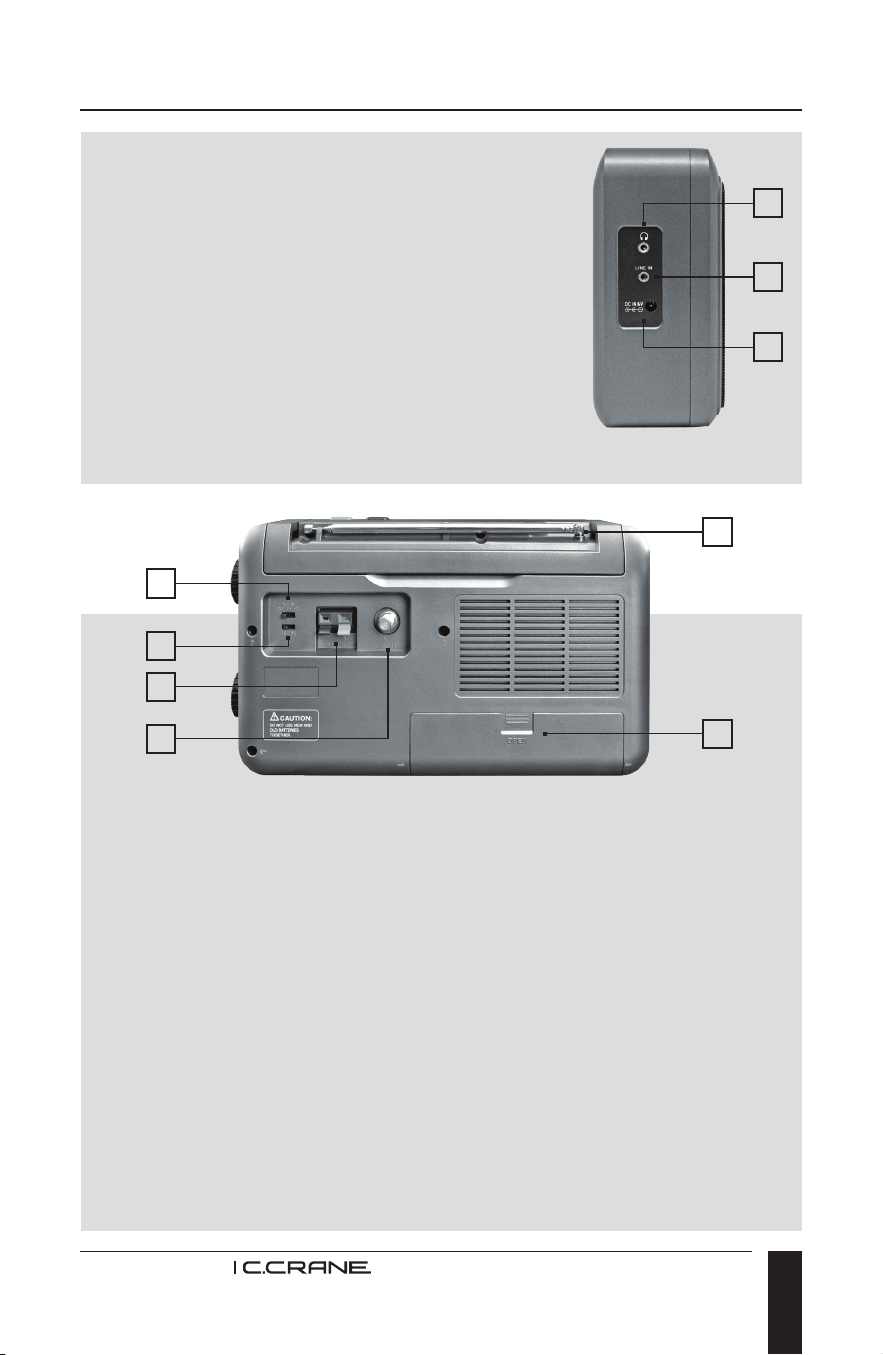
16. ANTENNA SELECTION SWITCH
Normally keep it set to ‘INT’ (left) except when an external antenna
is used (right).
17. 9K-10K AM TUNING STEP SWITCH
Set this switch to ‘10K’ (right) for use in the United States. ‘9K’
(left) steps are used in Europe and many other countries.
18. EXTERNAL AM ANTENNA CONNECTION and GROUND
To connect and ground an external AM antenna.
19. EXTERNAL FM ANTENNA CONNECTION
Connect an external FM antenna.
20. BATTERY COMPARTMENT
Insert four “D” cell batteries.
21. FM WHIP ANTENNA
Lift and fully extend: rotate for best FM radio reception.
13. HEADPHONE JACK
Use for private listening with optional
headphones or earbuds. Can also be used
as an audio output for an optional recording
device or to connect amplied speakers.
14. LINE INPUT JACK
For connecting a portable music player or
other device which would use the radio as
the speaker.
15. POWER JACK
Use to connect the AC Power Adapter for continuous power to radio.
13
14
15
Radio Controls and Functions
21
16
17
18
19
20
CCRadio-EP PRO
10
Getting Started
POWERING YOUR RADIO
Before powering your radio be sure to read the Safety Instructions on
page 4.
The CCRadio-EP PRO will run on four “D” size alkaline batteries or on
120V AC house current using the included AC power adapter. Batteries
are optional.
AC OPERATION
Before you plug the AC power adapter into the radio, be sure the AC
voltage is 120 Volts/60 Hz.
NOTE: If you have batteries in the radio and you use the AC power
adapter the batteries will automatically be disconnected.
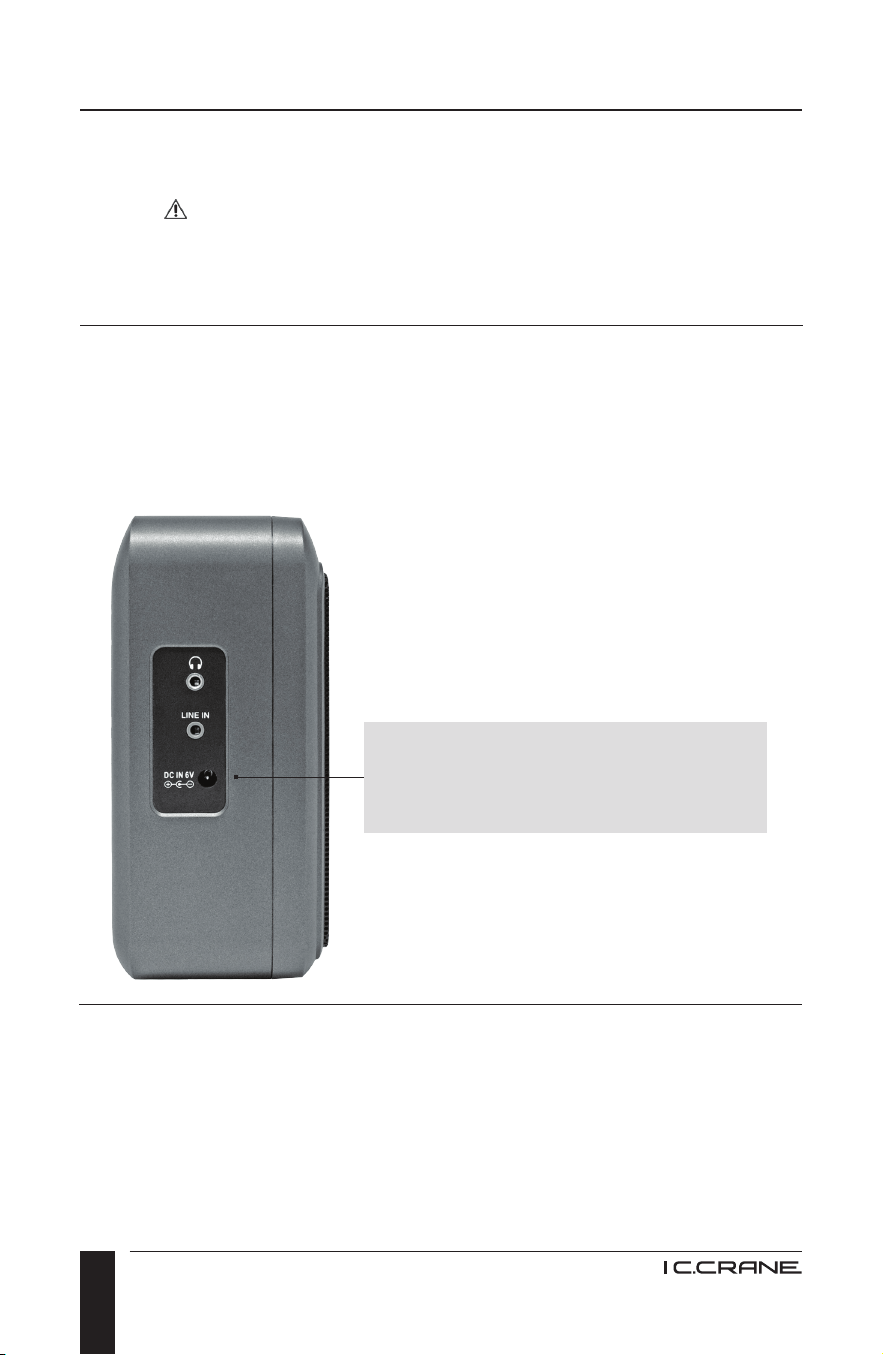
Plug the supplied AC power adapter
into the “DC IN 6V” power jack on
the left side of the radio.
INSTALLING THE BATTERIES
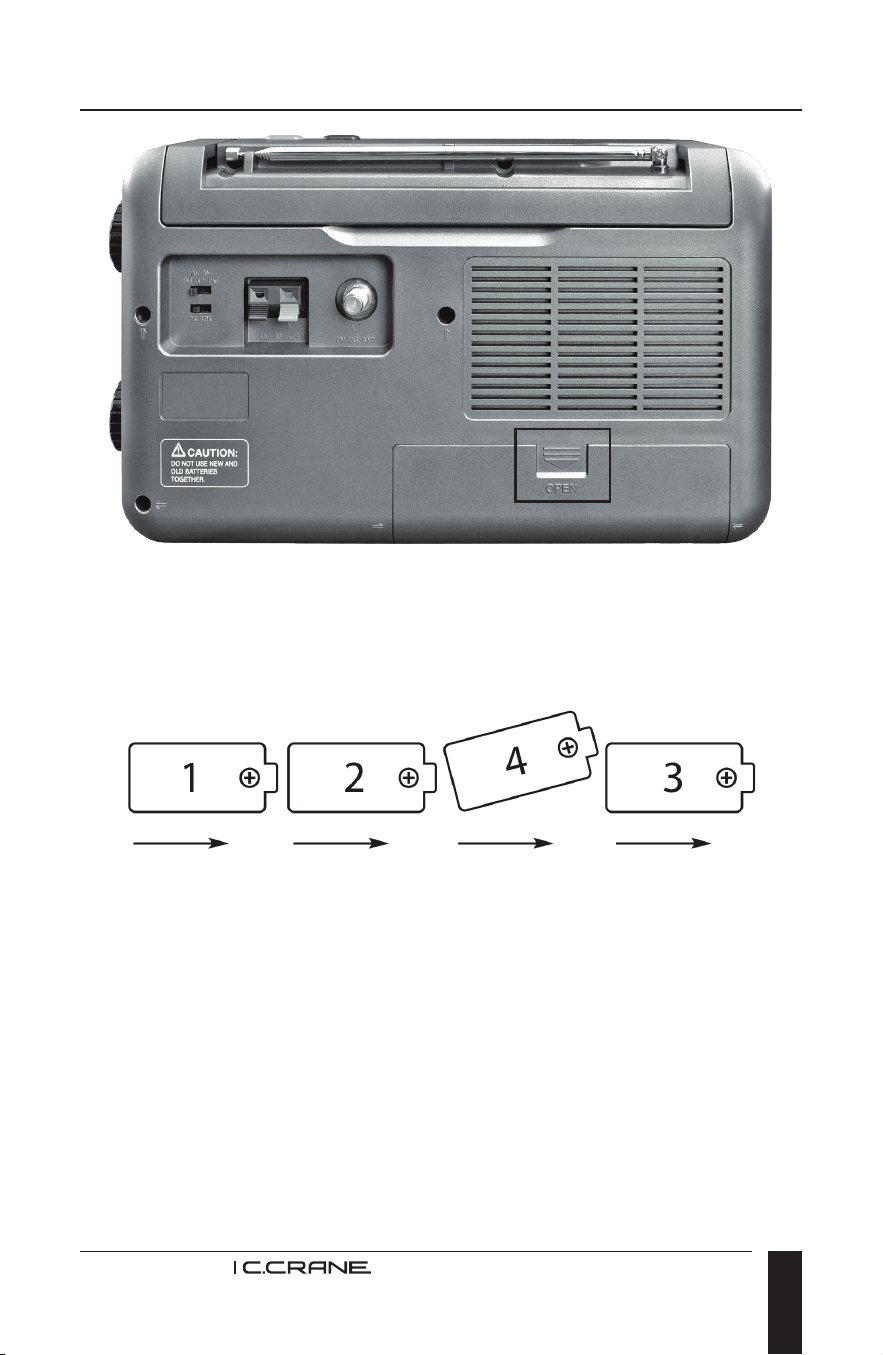
1. Position the radio face down on a soft surface, with the bottom of the
radio facing you.
2. On the battery compartment see the arrow marked “OPEN”. Use two
ngers on the arrow to press the cover down and toward you until the
cover slides off.
CCRadio-EP PRO
11
Getting Started
3. Insert four “D” batteries as shown in the diagram inside the battery
compartment. Notice that the fourth battery is inserted between the
second and third batteries for easiest insertion. Be sure that the “+”
polarity mark on the batteries point to the right.
4. Replace the battery compartment door by sliding it towards the top of
the radio.
NOTE: When the batteries are very low you may notice a decrease in
volume or that radio operation has become irregular. Test the radio by
using the AC power adapter to conrm that low batteries are the problem.
IMPORTANT: Since batteries have been known to sometimes leak, we
recommend removing the batteries when not in use for more than 30
days or if the radio is primarily used with the AC power adapter.

CCRadio-EP PRO
12
Specications
DIMENSIONS:
11.4” W X 7.3” H X 2.75” D
WEIGHT:
3.1 pounds without batteries
INPUT POWER:
4 “D” size batteries
6V DC 800 mA tip negative
AUDIO OUTPUT:
2 Watt RMS
SPEAKER:
5 Watts 8 Ohms
HEADPHONE JACK:
3.5mm 32 Ohms
FREQUENCY COVERAGE:
FM Band: 87.50 - 108 MHz
AM (MW) Band: 520 - 1710 kHz
SENSITIVITY:
FM > 5uv
AM (MW) > 0.2 mV/m
BANDWIDTH:
Wide > 6 kHz
Narrow > 2.5 kHz
WARRANTY:
1 Year Limited Warranty
NOTE: Specications are subject to change without notice.

CCRadio-EP PRO
13
Troubleshooting Guide
THE CCRADIO-EP PRO WILL NOT TURN ON:
1. Be sure that the batteries are installed correctly.
2. Make sure all the batteries are good.
3. If using the AC Power Adapter, make sure that it is plugged fully into
the power jack.
THE CCRADIO-EP PRO HAS POOR RECEPTION ON FM:
1. Fully extend and rotate the FM whip antenna.
2. Adjust the band switch to “FM” instead of “FM ST” which requires a
better signal.
3. Check the “INT/EXT ANTENNA” switch on the back of the radio for
the proper setting.
4. Check the 9/10 kHz switch (10 kHz for the U.S.).
5. Consider trying a more powerful external FM antenna.
THE CCRADIO-EP PRO HAS POOR RECEPTION ON AM, OR IS
RECEIVING MULTIPLE STATIONS:
1. Rotate the radio for the best reception.
2. Try positioning the TWIN COIL FERRITE
©
AM FINE TUNING Knob to
the “Normal” position. If the reception still needs improvement, adjust
the knob for the best station tuning accuracy.
3. Adjust the WIDE/NARROW switch to NARROW for best AM
audio clarity.
4. Move the radio away from electronic devices like computers and
TV sets.
5. Use the radio on batteries. Sometimes the interference can be
transmitted to the radio over the AC power lines.
6. Concrete, stucco, brick and metal buildings can greatly reduce radio
reception. Try the radio outdoors; if the reception is improved, try an
external antenna.
7. Check the 9/10 kHz switch (10 kHz for the U.S.).
8. Check the tuning light to make sure it is illuminated, signifying a
strong signal.

MODEL: CCRADIO-EP PRO
ANSI C63.4: 2003
THIS DEVICE COMPLIES WITH PART 15 OF THE FCC RULES.
OPERATION IS SUBJECT TO THE FOLLOWING TWO CONDITIONS:
1. THIS DEVICE MAY NOT CAUSE HARMFUL INTERFERENCE, AND
2. THIS DEVICE MUST ACCEPT ANY INTERFERENCE RECEIVED,
INCLUDING INTERFERENCE THAT MAY CAUSE UNDESIRED
OPERATION.
NOTICE: Any changes or modications not expressly approved by the
party responsible for compliance could void the users authority to operate
the equipment.
Copyright © 2024 C. Crane. All rights reserved. No part of this booklet
may be reproduced, in any form or means whatsoever, without
permission in writing from C. Crane. (Ver 4)
172 Main Street
Fortuna, CA 95540-1816
Phone: 1-800-522-8863 | Web: ccrane.com