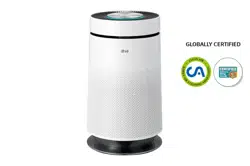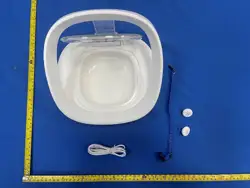

NutriCare Feeder
User Manual
使用说明书
NutriCare宠物喂食器
Model /型号:PF009
Please read this manual carefully before using.
Keep the manual in a safe place for future reference.
www.petoneer.com
V.75
使用产品前请仔细阅读本使用说明书,并妥善保管
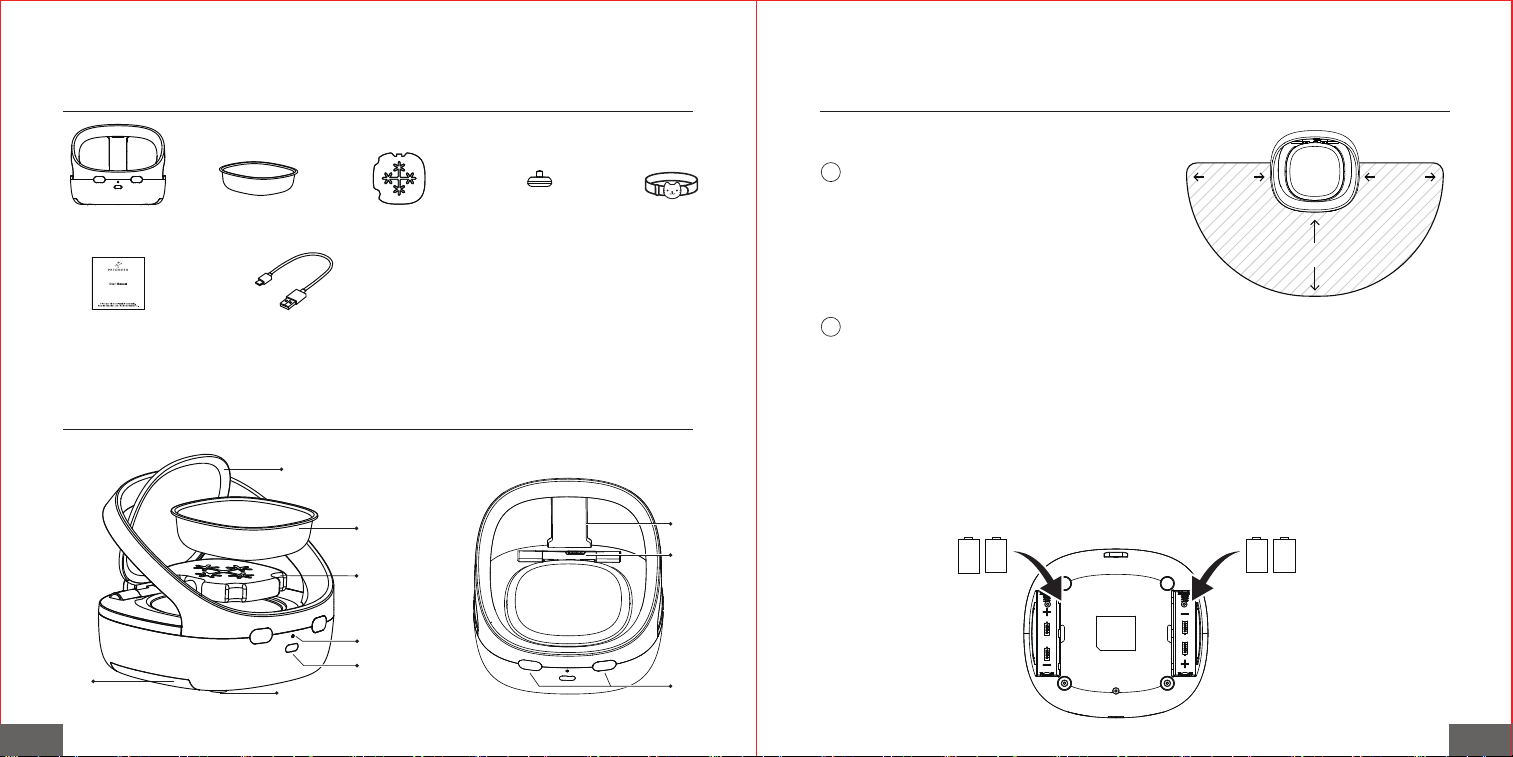
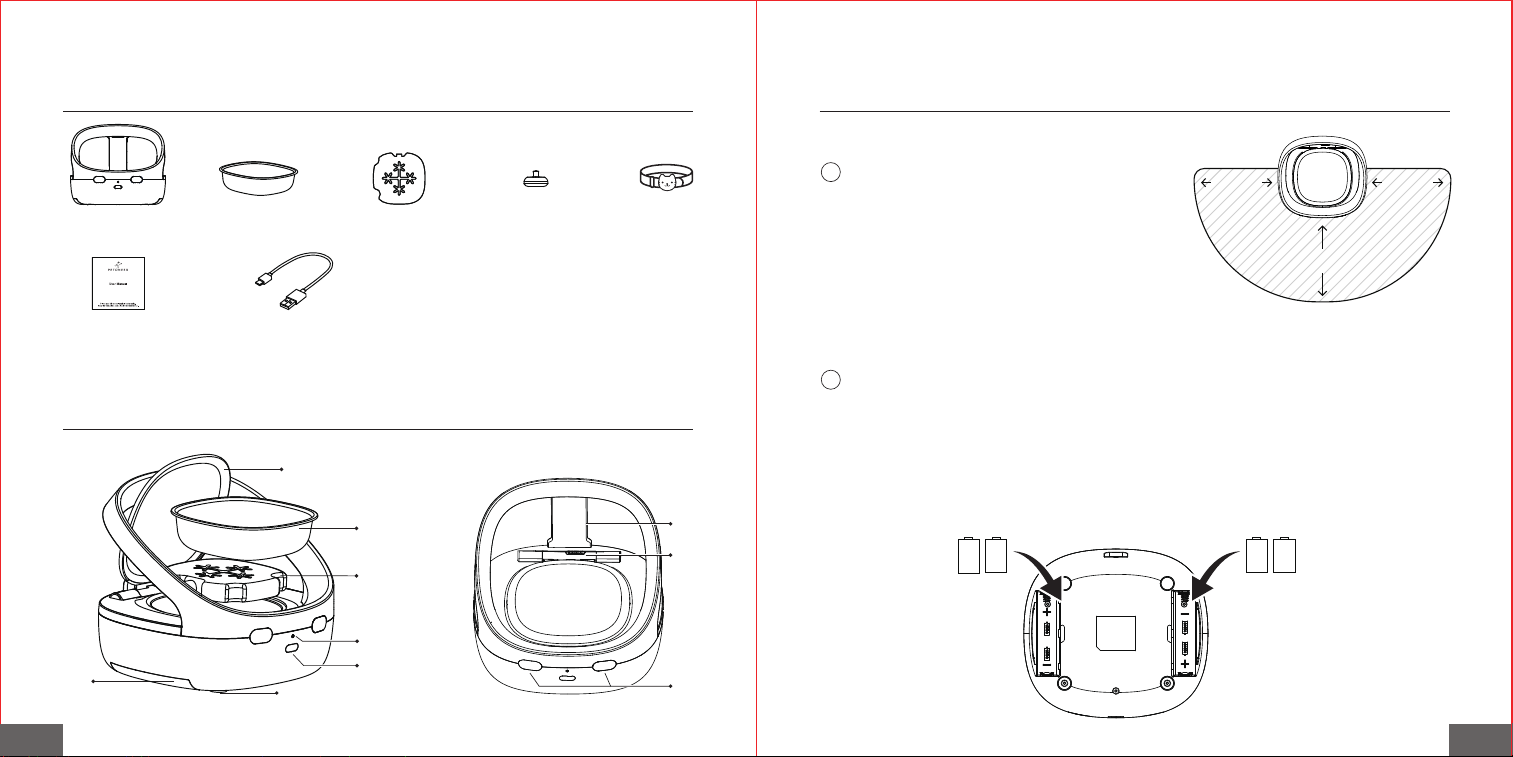
Feeder*1 Bowl*1 Ice Pack*1 RFID Tag*2
Manual*1
Collar*1
USB Type-C to
USB-A 2.0 Cable (1.2M)*1
02 / Meet NutriCare
03 / Operations
01 / Inside the box
EN EN
1
· Battery-powered (recommended): Open the battery compartment on both sides of the
bottom of the device, insert 4 LR14 alkaline batteries (pay attention to the positive and
negative poles), and close the battery compartment.
· It is recommended to use high-quality alkaline batteries (battery life is approximately 120
days). When the indicator light flashes red, it means the battery is low. Please replace the
batteries in time.
· This product does not include battery. Please prepare your own.
· If the batteries are not used for a long time, please remove them.
Ensure there are no obstacles within 50 cm in
front, left, and right of the device, and avoid
placing it on metal surfaces to ensure proper
sensor functionality.
Power Supply:
2
Battery
Compartment
Indicator LED
Button
Anti-skid Pad
Lock
Bezel
Sensor
Bowl
Ice Pack
Lid
C
C C C
50cm 50cm
50cm
EN EN
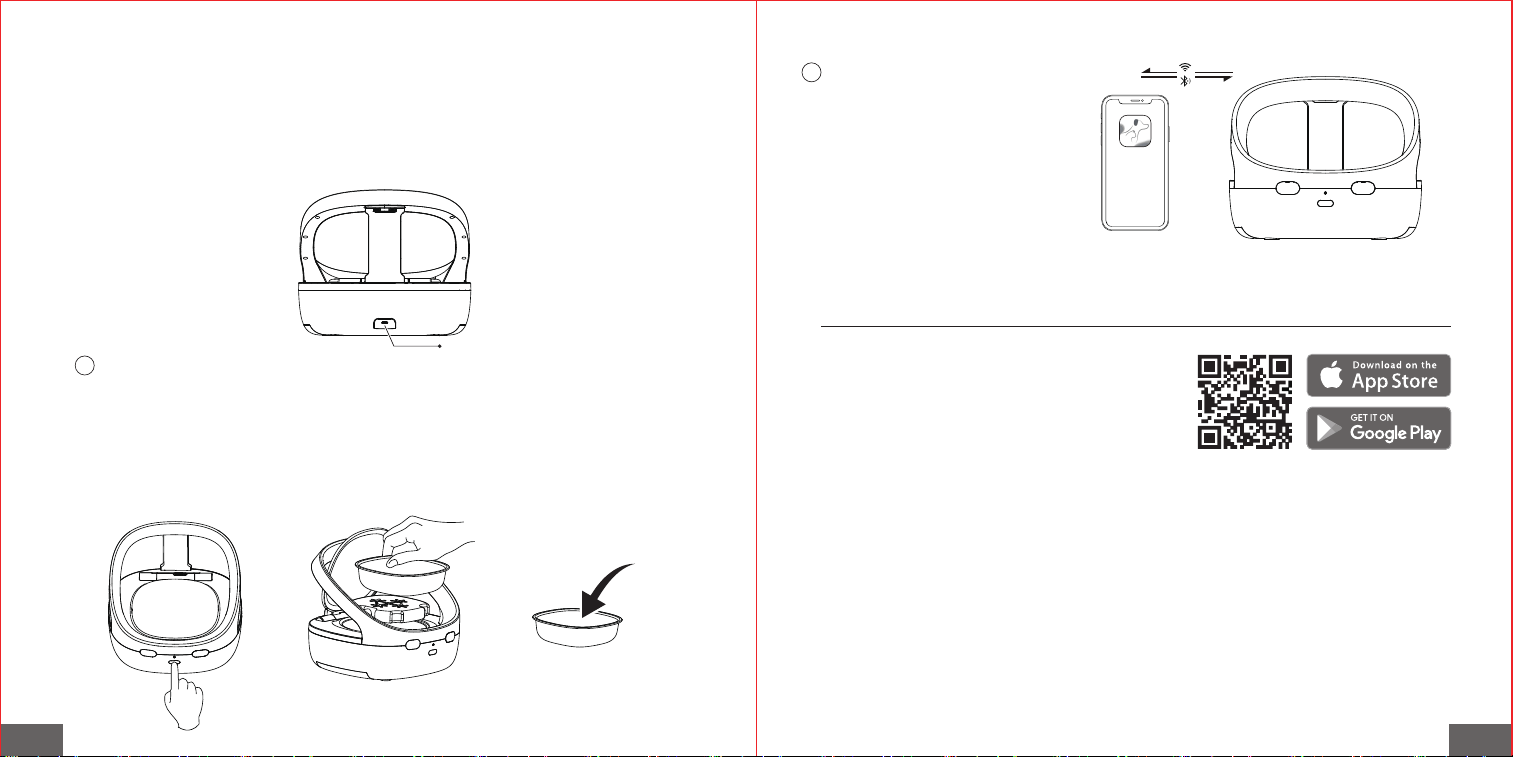
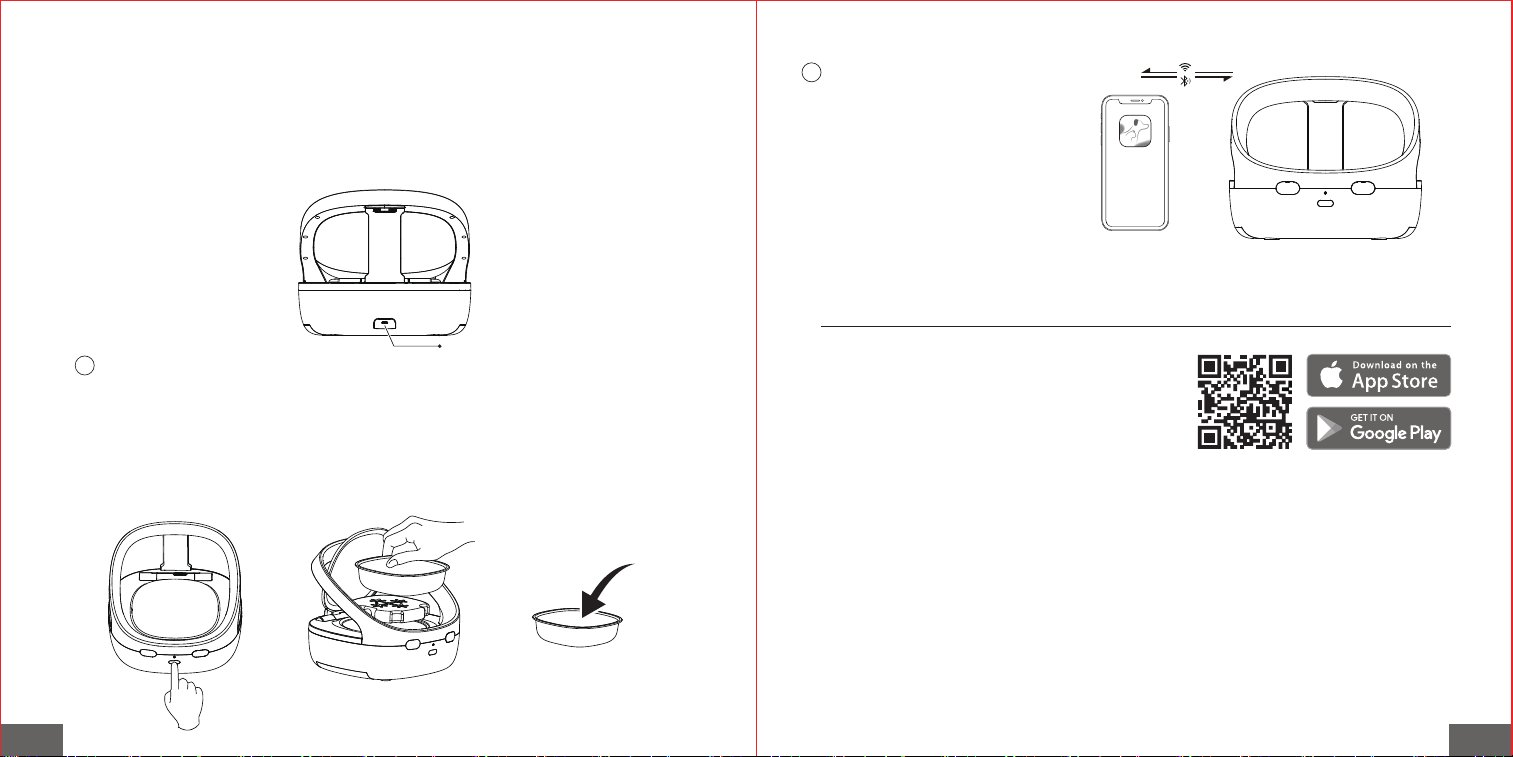
Scan the QR code on the right and download the
Petoneer App, which is available on App Store and
Google Play. Click Sign up and Sign in to get walked
through to connect the feeder by pressing the + icon.
04 / Quick Setup
· USB-powered: Insert the USB power cord into the port on the back of the device,
connect to an adapter, and power on.
· This product does not include a power adapter. Please prepare your own.
· When both battery power and USB power are connected, the device will prioritize USB
power.
· Short press the button to open the lid.
· Remove the food bowl and add food to the bowl. If you need to keep the food fresh, you
can place a pre-frozen ice pack at the bottom of the food bowl.
· Place the food bowl back into the feeder and close the lid.
· The ice pack needs to be pre-frozen before use.
Adding Food:
3
· Download the "Petoneer"
app and add the device.
Adding Device:
4
USB-powered
Pour food

ENEN
Indicator Status
Blinking Blue
Steady Blue
Blue and Red blinking alternately
Blinking Blue 3 times
Blinking Red 3 times
Steady Red
Blinking Red
Bluetooth not connected
(Sensor activated)
Bluetooth Connected
(Sensor activated)
Entering add/remove tag mode
Authorized tag detected /
Tag added successfully
Unauthorized tag detected /
Tag deleted successfully
Device self-check failure or lid abnormal
Low battery
Button Status
Short press
Long press for 3 seconds
Long press for 5 seconds
Open/close lid
Add/delete tag
Reset device
06 / Indicator and Button
05 / Operating Modes
1. Authorized Mode: The lid will only open when a pet with an authorized tag approaches for
feeding. The lid will automatically close after the pet leaves (the closing delay can be set in the
app).
2. Sensor Mode: The lid will open whenever any pet approaches for feeding and will
automatically close after the pet leaves (the closing delay can be set in the app).
3. Manual Mode: The lid can be opened or closed manually by pressing the button. RFID and
sensor functions are disabled in this mode. The device can only be opened manually and
cannot be opened automatically.
Deleting a Tag:
① Open the app and enter authorization management to delete the tag.
② When the device is in the add/remove tag mode, place the tag above the lid. If the tag has
already been added, the red light will flash, indicating that the tag has been successfully
removed.
Adding a Tag Manually:
① Long press the device button for 3 seconds. When you hear a "beep" and see the indicator
light blinking, the device is in add/remove tag mode.
② Hold the tag close to the top of the food bowl until the indicator light blinks blue 3 times and
you hear a beep, indicating successful authorization.
*A feeder can bind up to 10 tags in authorized mode. For an enhanced user experience, we
recommend using our tags.
Adding a Tag via App:
① Open the app and go to the authorization mode settings.
② Follow the prompts to enter pet information and bind the tag.

ENEN
Description: Petoneer NutriCare Feeder
Model: PF009
Dimension: 240x220x205mm
Net Weight: Around 1108g
Capacity: 400mL(1.69 cups)
Communication: Bluetooth
Power Input: LR14*4pcs or DC 5V 1A
07 / Specifications
09 / Warranty Terms
Within the period of warranty, if the product fails with no fault of user operations, it will be
repaired at Petoneer's expense. The warranty will not cover product failure in examples below:
1). Intentional damage to the product by the user or third party
2). Failure to operate or maintain the product following the (QIG) Quick Installation Guide
Instructions.
3). Failure by natural wear and tear including but not limited to scratching, corrosion, oxidation
and rusting.
4). Failure by non-authorized repair of the product including but not limited to user's own or
third-party repairing attempts or modifications.
(All Pictures shown in the manual are for illustration purpose only. Actual product may vary due
to product enhancement.)
08 / Precautions
1. Do not use the ice pack when feeding dry food.
2. Keep the top of the feeder clear of any objects.
3. Do not rinse the feeder under running water.
4. Avoid overfilling the feeder with food.
5. Replace the batteries when the low battery indicator appears. Remove batteries if the device
will not be used for an extended period.
6. It is normal for the ice pack to bulge after freezing.
7. Do not consume the ice pack. Store the ice pack in a cool, dark place when not in use.
8. Place the feeder in a cool, dry, indoor location away from direct sunlight.
9. Keep the area 50 cm in front of the feeder clear to ensure unobstructed access for your pet.
10. Ensure there are no obstacles within 50 cm in front, left, and right of the device, and avoid
placing it on metal surfaces to ensure proper sensor functionality.
11. Placement near metal or electrical appliances is usually fine. If the feeder doesn’t work
properly, try moving it further away from the appliance.
12. Clean leftover food particles or debris around the bowl after feeding to prevent lid closure
issues and deter pests and bacteria.
FCC Instructions:
This product has been tested and found to comply with the limits for a Class B digital device,
pursuant to Part 15 of the FCC Rules. These limits are designed to provide reasonable
protection against harmful interference in a residential installation. This product generates,
uses and can radiate radio frequency energy and, if not installed and used in accordance
with the instructions, may cause harmful interference to radio communications. However,
there is no guarantee that interference will not occur in a particular installation. If the product
does cause harmful interference to radio or television reception, which can be determined by
turning the equipment off and on, the user is encouraged to try to correct the interference by
one or more of the following measures:

ENEN
Read all the instructions
When using electrical appliances, basic safety precautions should always be followed, including
the following:
1.Do not touch hot surfaces. Use handles.
2.To protect against electric shock do not immerse cord, plug into water or other liquid.
3.Close supervision is necessary when any appliance is used by or near children.
4.Unplug from outlet when not in use and before cleaning. Allow to cool before putting on or
taking off parts, and before cleaning the appliance.
5.Do not operate any appliance with a damaged cord or plug, should the appliance
malfunction, or if it has been damaged in any manner. Return appliance to the nearest
authorized service facility for examination, repair or adjustment.
6.The use of the accessory attachments is not recommended by the appliance manufacturer as
it may cause injuries.
7.Do not use outdoors.
8.Do not let the cord hang over edge of table or counter, or touch hot surfaces.
9.Do not place on or near a hot gas or electric burner, or in a heated oven.
10.Always attach plug to appliance first, then plug cord in the wall outlet.
- Reorient or relocate the receiving antenna.
- Increase the separation between the product and receiver.
- Connect the product into an outlet on a circuit different from that to which the receiver is
connected.
- Consult the dealer or an experienced radio/TV technician for help.
This device complies with Part 15 of the FCC Rules. Operation is subject to the following two
conditions:
(1) This device may not cause harmful interference, and (2) this device must accept any
interference received, including interference that may cause undesired operation.
Warning: Changes or modifications not expressly approved by the party responsible for
compliance could avoid the user’s authority to operate the product.
FCC Radiation Exposure Statement:
Environmental Conditions
Operating Temperature: 32°F to 104°F, (0 ºC to 40 ºC) (indoor only)
SkyRC Technology Co., Ltd. declares that this Petoneer NutriCare Feeder (PF009), is in
compliance with the essential requirements and other relevant provisions of the Radio
Equipment Directive
(2014/53/EU).
The equipment complies with FCC Radiation exposure limits set forth for uncontrolled
enviroment.
This equipment should be installed and operated with minimum distance 20cm between the
radiator and your body.
Environment friendly disposal
You can help protect the environment!
Please remember to respect your local regulations: dispose of nonfunctional electrical
equipment with an appropriate waste disposal center.
Manufacturer: SkyRC Technology Co., Ltd.
4, 5, 8 Floors, Building 4, Meitai Science Park, Guanguang Road, Guanlan, Longhua District, Shenzhen, China.

EN
11.Do not use the appliance for other than intended use.
12.WARNING: Never leave the appliance unattended whilst in use.
13.Warning: keep the supply cord away from heating tip and metal enclosure while using.
14.This appliance is not intended for use by persons (including children) with reduced
physical, sensory or mental capabilities, or lack of experience and knowledge, unless they have
been given supervision or instructions concerning use of the appliance by a person responsible
for their safety.
15.Children should be supervised to ensure that they do not play with the appliance.
16.If the SUPPLY CORD is damaged, it must be replaced by the manufacturer, its service
agent or similarly qualified persons in order to avoid a hazard.
17.WARNING: This tool must be placed on its stand when not in use.
SAVE THESE INSTRUCTIONS.
喂食器*1 食盆*1 冰盒*1 RFID吊牌*2
说明书*1
项圈*1
1.2m USB Type-C
插头电源线*1
02 / 产品概览
03 / 使用操作
01 / 包装清单
中文 中文
1
· 电池供电(推荐使用):
打开设备两侧底部电池仓,放入4节2号碱性电池(注意正负极),关闭电池仓。
*建议使用高品质碱性电池(续航时间约120天)。 当指示灯闪烁红色时,表示电量不足,
请及时更换电池。
确保设备前方及左右50cm内无障碍物; 避免放
置在金属板上,以保证传感器正常工作。
接通电源(本设备支持两种供电方式):
2
电池仓
状态指示灯
按键
防滑垫
锁扣
挡板
传感器
食盆
冰盒
盖子
C
C
C C
50cm 50cm
50cm
中文 中文
扫描右侧二维码,前往 “Google Play” 或 “App
Store” 下载安装 Petoneer App,并注册登录账号,
点击“+”按照提示进行设置。
04 / 快速添加设备
· USB供电:
将USB电源线插入设备背面接口,连接适配器,接通电源。
*本产品不包含电源适配器,请自行准备。
电池供电与USB供电同时使用时,设备优先使用USB供电。
短按按键,打开喂食器盖子。取出食盆,在食盆中加入食物。如需保鲜,可将已冰冻的
冰盒放入食盆底部。将食盆放回喂食器中,关闭盖子。
*冰盒需提前放入冰箱冷冻后使用。
添加食物:
3
下载 “Petoneer” APP,添加
设备。
添加设备:
4
USB-供电
倒入食物

中文中文
指示灯 状态
蓝灯闪烁
蓝灯常亮
红蓝交替闪烁
蓝灯闪三次
红灯闪三次
红灯常亮
红灯闪烁
蓝牙未连接(传感器触发中)
蓝牙已连接(传感器触发中)
进入添加 / 删除吊牌模式
读取到授权吊牌 / 吊牌添加成功
读取到未授权吊牌 / 吊牌删除成功
开机自检异常、开关盖异常
电池电量低
按键 状态
短按
长按3秒
长按5秒
开盖/关盖
添加/删除吊牌
设备重置
06 / 指示灯与按键
05 / 工作模式
1. 授权模式: 仅当带有授权吊牌的宠物过来进食时,喂食器的盖子才会开启,且该宠物离开后,
盖子会自动关闭(关闭的延迟时间可以在App中设定)。
2. 红外模式: 任意宠物过来进食时,喂食器的盖子均会开启,宠物离开,盖子会自动关闭(延
迟关盖时间可以在App中设定)。
3. 手动模式: 通过按键开启或关闭餐盖(RFID和红外不工作),设备此时只可被手动开启,无
法自动开启。
删除吊牌:
① 方式一:打开App进入授权管理删除吊牌
② 方式二:设备进入添加/删除吊牌模式时,将吊牌放置于餐盖上方。若吊牌已添加,则红灯
闪烁,吊牌成功被删除。
手动添加吊牌:
① 长按设备按键3秒,听到“嘀”一声并指示灯红蓝交替闪烁,表示设备进入添加/删除吊牌模式。
② 将吊牌靠近餐盖上方,待指示灯变为蓝色闪烁并听到提示音后,表示授权成功。
*在授权模式下,一台喂食器最多可绑定10个RFID吊牌,并且为了更好的使用体验,建议使用湃
妮原装吊牌。
App添加吊牌:
① 打开APP,进入授权模式添加吊牌设置。
② 按照提示填写宠物信息,并绑定吊牌。

中文中文
产品名称:NutriCare宠物喂食器
产品型号:PF009 产品尺寸:240x220x205mm
产品净重:约1108g
容量:400 mL
通信方式:Bluetooth
工作电源:4节2号干电池 或 DC 5V 1A
07 / 基本参数 09 / 保修条款
在保修期限内,对于正常使用Petoneer产品过程中,由于非人为导致的损坏,所产生的维修费
用和相关的人工费用,由Petoneer承担。以下情况导致的维修不在保修条款包含中。
(1)故意行为导致的损坏。
(2)未按照产品使用说明书指引使用、保养该产品。
(3)设备正常磨损、腐蚀、氧化、锈垢、耗损等原因导致的损失。
(4)因在非Petoneer授权维修代理店或用户自身进行维修、改造、清洗而造成的损坏。
(为了提供更好的产品,我们会定期进行产品改良。产品实物可能与说明书有差异。)
08 / 注意事项
1. 喂食干粮时,请勿使用冰盒。
2. 喂食器顶部请勿放置其他杂物。
3. 请勿用水冲洗喂食器。
4. 请勿在喂食器内盛入过量食物。
5. 电池低电量时,请及时更换电池。如长期不用,请将电池取出。
6. 冰盒冷冻后出现鼓包,属于正常现象。
7. 冰盒请勿食用。不用时,请放置于阴凉处,避免阳光直射。
8. 请将喂食器放置于室内避光干燥处。
9. 设备前方50cm内请保持空旷,以免影响宠物进食。
10. 确保设备前方及左右50cm内无障碍物; 避免放置在金属板上,以保证传感器正常工作。
11. 设备靠近日常家电放置通常无碍,但如果实际使用中受影响,建议保持适当距离。
12. 喂食后清理碗槽周围残留的碎屑或异物,避免影响仓盖闭合,并防止虫害和细菌滋生。